Back up SUBARU TRIBECA 2009 1.G Service User Guide
[x] Cancel search | Manufacturer: SUBARU, Model Year: 2009, Model line: TRIBECA, Model: SUBARU TRIBECA 2009 1.GPages: 2453, PDF Size: 46.32 MB
Page 52 of 2453
AB(diag)-28
Airbag Connector
AIRBAG SYSTEM (DIAGNOSTICS)
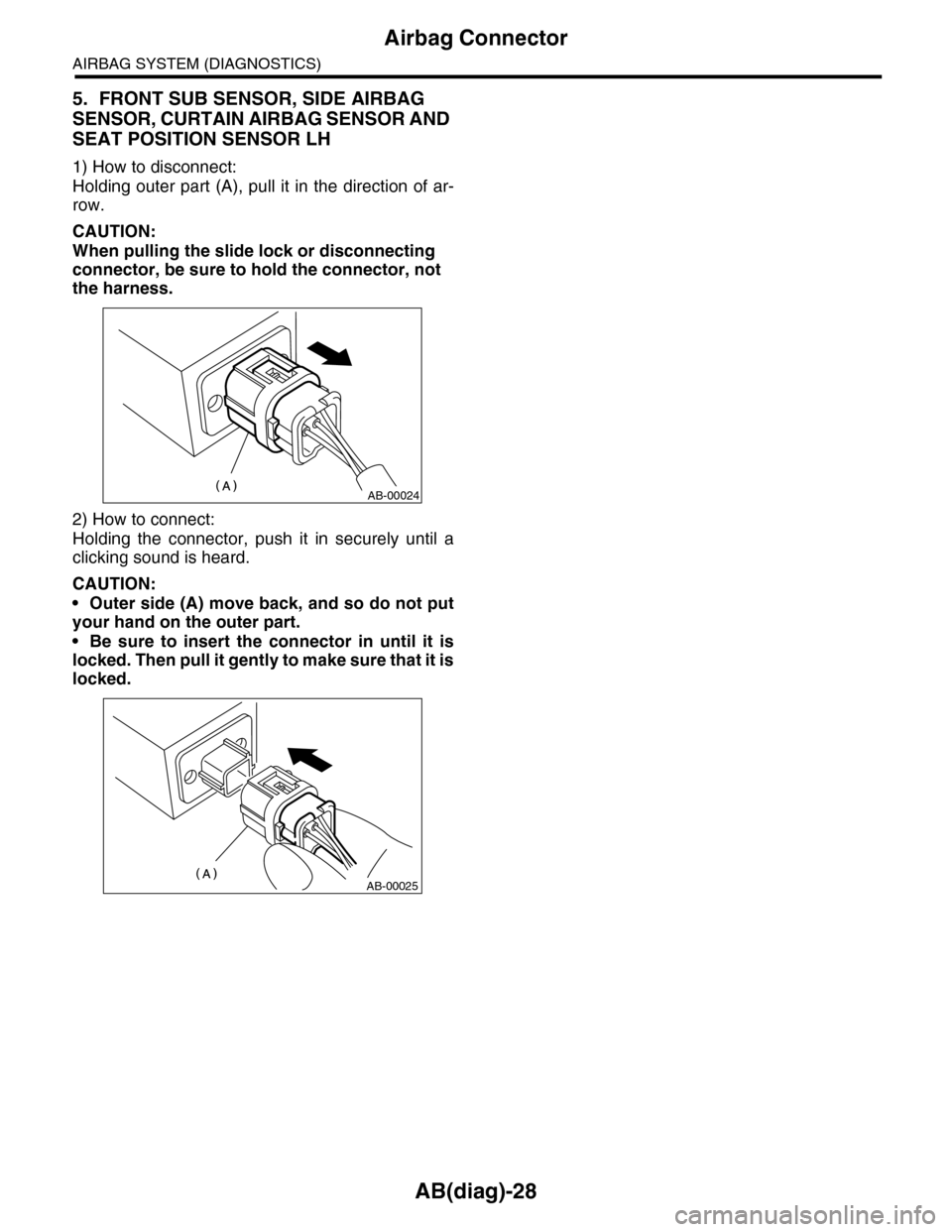
5. FRONT SUB SENSOR, SIDE AIRBAG
SENSOR, CURTAIN AIRBAG SENSOR AND
SEAT POSITION SENSOR LH
1) How to disconnect:
Holding outer part (A), pull it in the direction of ar-
row.
CAUTION:
When pulling the slide lock or disconnecting
connector, be sure to hold the connector, not
the harness.
2) How to connect:
Holding the connector, push it in securely until a
clicking sound is heard.
CAUTION:
•Outer side (A) move back, and so do not put
your hand on the outer part.
•Be sure to insert the connector in until it is
locked. Then pull it gently to make sure that it is
locked.
AB-00024
AB-00025
Page 167 of 2453
CC-5
Cruise Control Command Switch
CRUISE CONTROL SYSTEM
3. Cruise Control Command
Switch
A: REMOVAL
CAUTION:
Before servicing, be sure to read the notes in
the “AB” section for proper handling of the
driver’s airbag module.
1) Set the front wheels in straight ahead position.
2) Turn the ignition switch to OFF.
3) Disconnect the ground cable from battery and
wait for at least 20 seconds before starting work.
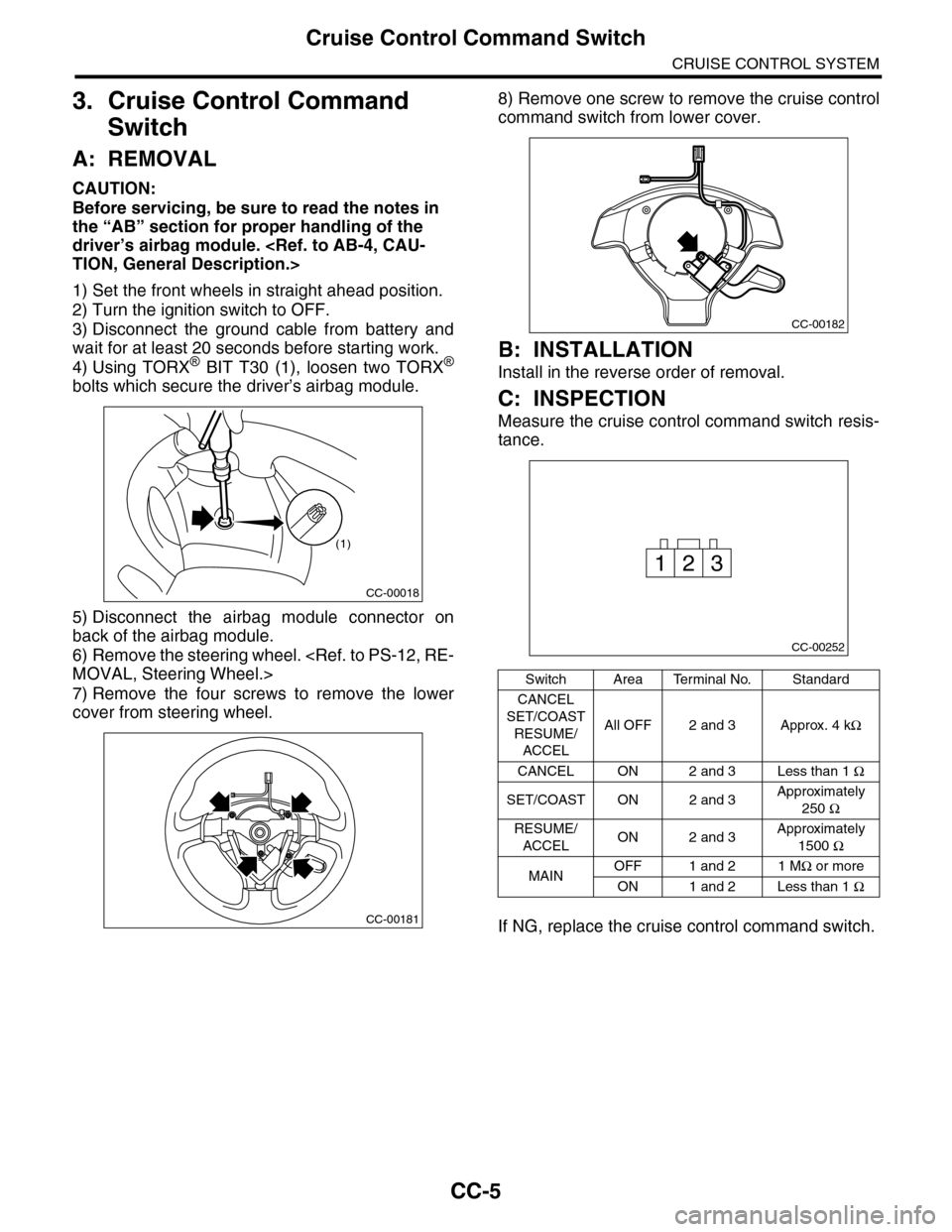
4) Using TORX® BIT T30 (1), loosen two TORX®
bolts which secure the driver’s airbag module.
5) Disconnect the airbag module connector on
back of the airbag module.
6) Remove the steering wheel.
7) Remove the four screws to remove the lower
cover from steering wheel.
8) Remove one screw to remove the cruise control
command switch from lower cover.
B: INSTALLATION
Install in the reverse order of removal.
C: INSPECTION
Measure the cruise control command switch resis-
tance.
If NG, replace the cruise control command switch.
CC-00018
(1)
CC-00181
Switch Area Terminal No. Standard
CANCEL
SET/COAST
RESUME/
ACCEL
All OFF 2 and 3 Approx. 4 kΩ
CANCEL ON 2 and 3 Less than 1 Ω
SET/COAST ON 2 and 3Approximately
250 Ω
RESUME/
ACCELON 2 and 3Approximately
1500 Ω
MAINOFF 1 and 2 1 MΩ or more
ON 1 and 2 Less than 1 Ω
CC-00182
CC-00252
231
Page 179 of 2453
CC(ETC)(diag)-12
List of Diagnostic Trouble Code (DTC)
CRUISE CONTROL SYSTEM (DIAGNOSTICS)
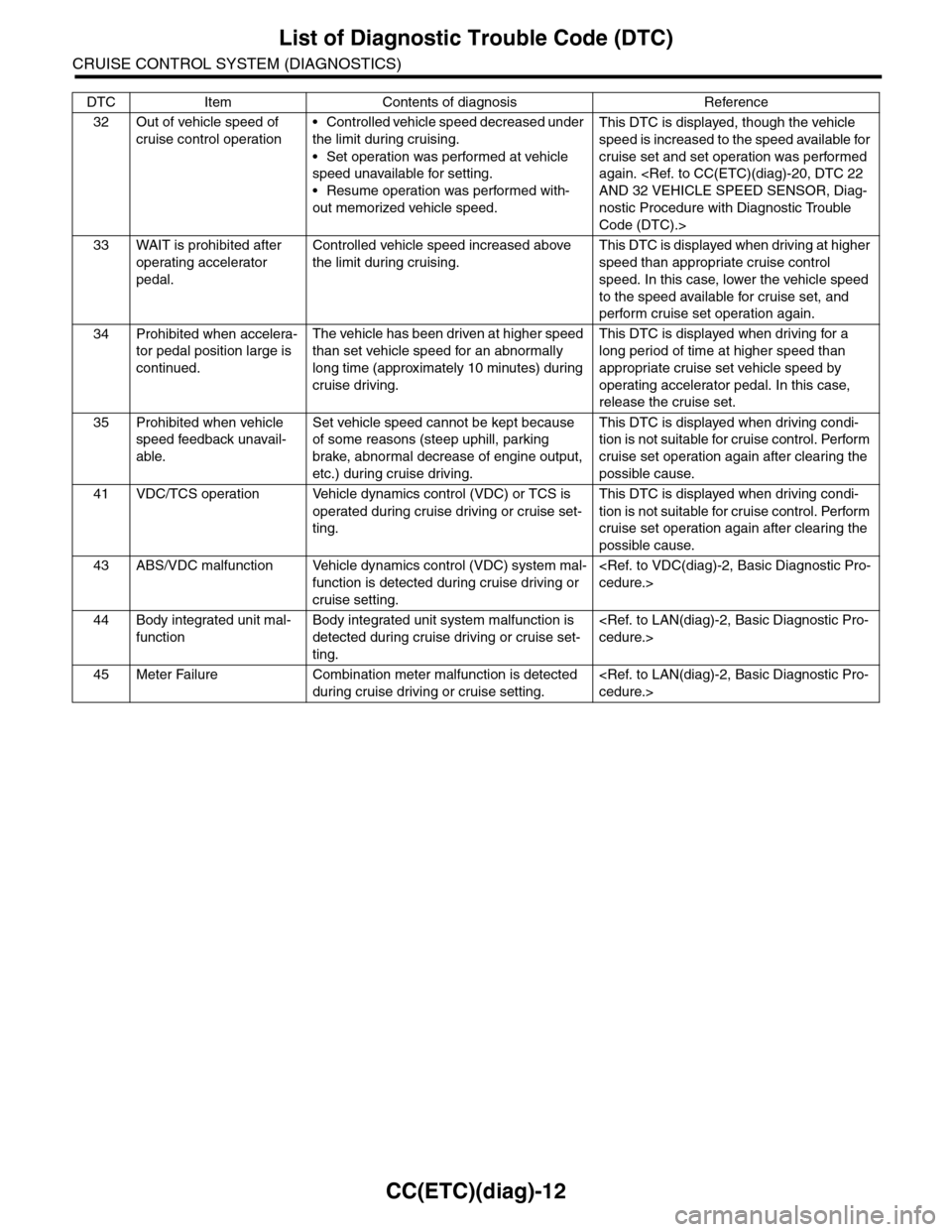
32 Out of vehicle speed of
cruise control operation
•Controlled vehicle speed decreased under
the limit during cruising.
•Set operation was performed at vehicle
speed unavailable for setting.
•Resume operation was performed with-
out memorized vehicle speed.
This DTC is displayed, though the vehicle
speed is increased to the speed available for
cruise set and set operation was performed
again.
nostic Procedure with Diagnostic Trouble
Code (DTC).>
33 WAIT is prohibited after
operating accelerator
pedal.
Controlled vehicle speed increased above
the limit during cruising.
This DTC is displayed when driving at higher
speed than appropriate cruise control
speed. In this case, lower the vehicle speed
to the speed available for cruise set, and
perform cruise set operation again.
34 Prohibited when accelera-
tor pedal position large is
continued.
The vehicle has been driven at higher speed
than set vehicle speed for an abnormally
long time (approximately 10 minutes) during
cruise driving.
This DTC is displayed when driving for a
long period of time at higher speed than
appropriate cruise set vehicle speed by
operating accelerator pedal. In this case,
release the cruise set.
35 Prohibited when vehicle
speed feedback unavail-
able.
Set vehicle speed cannot be kept because
of some reasons (steep uphill, parking
brake, abnormal decrease of engine output,
etc.) during cruise driving.
This DTC is displayed when driving condi-
tion is not suitable for cruise control. Perform
cruise set operation again after clearing the
possible cause.
41 VDC/TCS operation Vehicle dynamics control (VDC) or TCS is
operated during cruise driving or cruise set-
ting.
This DTC is displayed when driving condi-
tion is not suitable for cruise control. Perform
cruise set operation again after clearing the
possible cause.
43 ABS/VDC malfunction Vehicle dynamics control (VDC) system mal-
function is detected during cruise driving or
cruise setting.
44 Body integrated unit mal-
function
Body integrated unit system malfunction is
detected during cruise driving or cruise set-
ting.
45 Meter Failure Combination meter malfunction is detected
during cruise driving or cruise setting.
DTC Item Contents of diagnosis Reference
Page 192 of 2453
ET-6
Navigation System
ENTERTAINMENT
5. Navigation System
A: WIRING DIAGRAM
B: INSPECTION
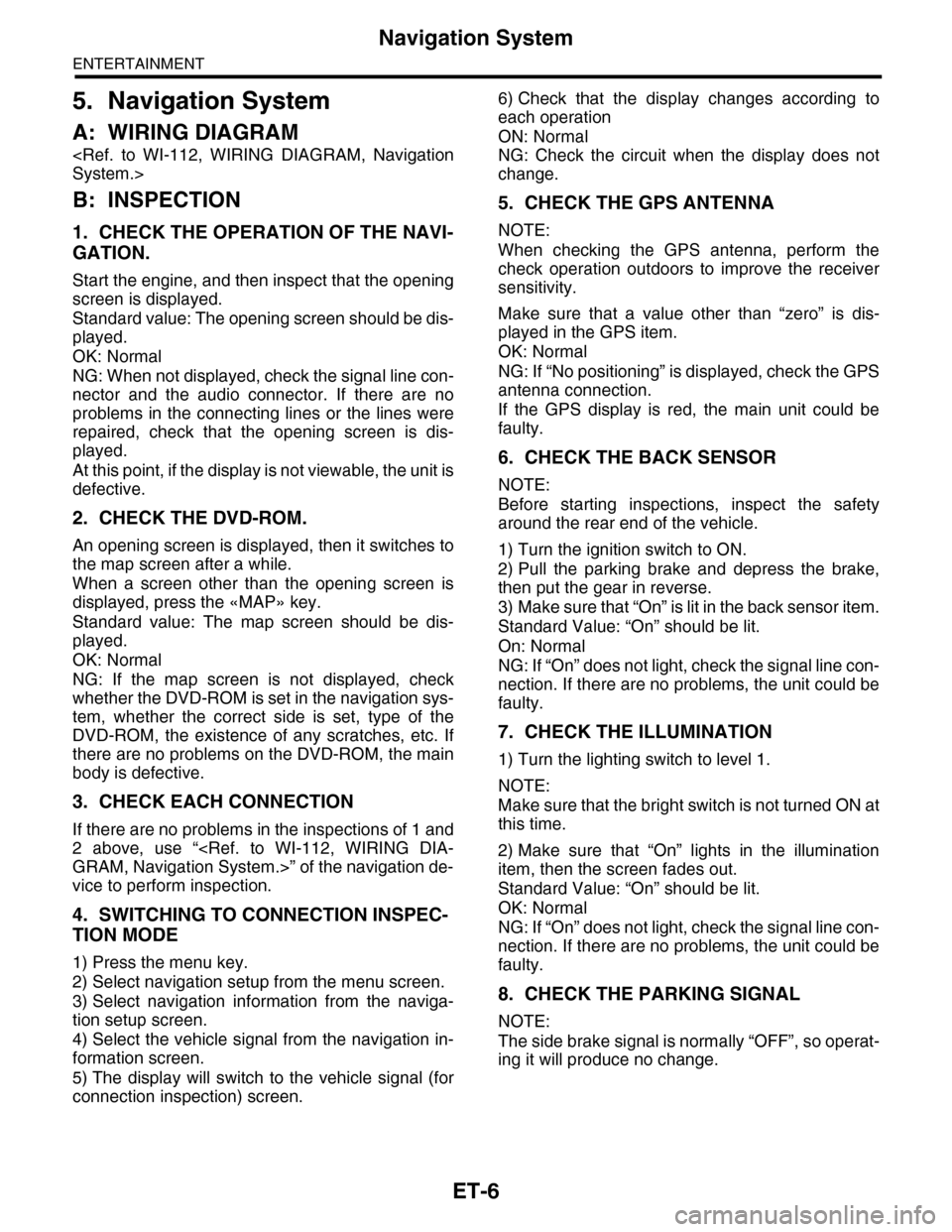
1. CHECK THE OPERATION OF THE NAVI-
GATION.
Start the engine, and then inspect that the opening
screen is displayed.
Standard value: The opening screen should be dis-
played.
OK: Normal
NG: When not displayed, check the signal line con-
nector and the audio connector. If there are no
problems in the connecting lines or the lines were
repaired, check that the opening screen is dis-
played.
At this point, if the display is not viewable, the unit is
defective.
2. CHECK THE DVD-ROM.
An opening screen is displayed, then it switches to
the map screen after a while.
When a screen other than the opening screen is
displayed, press the «MAP» key.
Standard value: The map screen should be dis-
played.
OK: Normal
NG: If the map screen is not displayed, check
whether the DVD-ROM is set in the navigation sys-
tem, whether the correct side is set, type of the
DVD-ROM, the existence of any scratches, etc. If
there are no problems on the DVD-ROM, the main
body is defective.
3. CHECK EACH CONNECTION
If there are no problems in the inspections of 1 and
2 above, use “
vice to perform inspection.
4. SWITCHING TO CONNECTION INSPEC-
TION MODE
1) Press the menu key.
2) Select navigation setup from the menu screen.
3) Select navigation information from the naviga-
tion setup screen.
4) Select the vehicle signal from the navigation in-
formation screen.
5) The display will switch to the vehicle signal (for
connection inspection) screen.
6) Check that the display changes according to
each operation
ON: Normal
NG: Check the circuit when the display does not
change.
5. CHECK THE GPS ANTENNA
NOTE:
When checking the GPS antenna, perform the
check operation outdoors to improve the receiver
sensitivity.
Make sure that a value other than “zero” is dis-
played in the GPS item.
OK: Normal
NG: If “No positioning” is displayed, check the GPS
antenna connection.
If the GPS display is red, the main unit could be
faulty.
6. CHECK THE BACK SENSOR
NOTE:
Before starting inspections, inspect the safety
around the rear end of the vehicle.
1) Turn the ignition switch to ON.
2) Pull the parking brake and depress the brake,
then put the gear in reverse.
3) Make sure that “On” is lit in the back sensor item.
Standard Value: “On” should be lit.
On: Normal
NG: If “On” does not light, check the signal line con-
nection. If there are no problems, the unit could be
faulty.
7. CHECK THE ILLUMINATION
1) Turn the lighting switch to level 1.
NOTE:
Make sure that the bright switch is not turned ON at
this time.
2) Make sure that “On” lights in the illumination
item, then the screen fades out.
Standard Value: “On” should be lit.
OK: Normal
NG: If “On” does not light, check the signal line con-
nection. If there are no problems, the unit could be
faulty.
8. CHECK THE PARKING SIGNAL
NOTE:
The side brake signal is normally “OFF”, so operat-
ing it will produce no change.
Page 194 of 2453
ET-8
Multi Function Display (MFD) System
ENTERTAINMENT
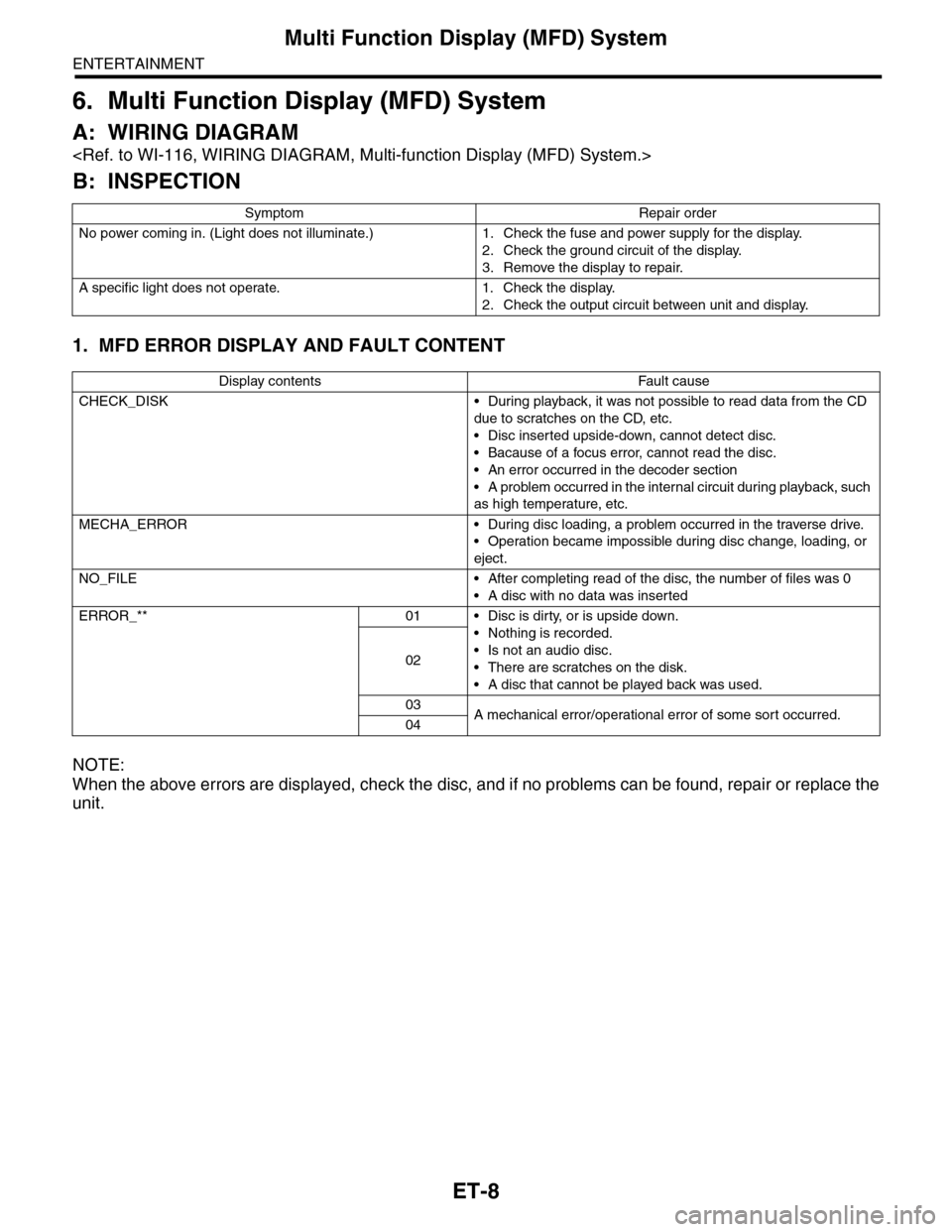
6. Multi Function Display (MFD) System
A: WIRING DIAGRAM
B: INSPECTION
1. MFD ERROR DISPLAY AND FAULT CONTENT
NOTE:
When the above errors are displayed, check the disc, and if no problems can be found, repair or replace the
unit.
Symptom Repair order
No power coming in. (Light does not illuminate.) 1. Check the fuse and power supply for the display.
2. Check the ground circuit of the display.
3. Remove the display to repair.
A specific light does not operate. 1. Check the display.
2. Check the output circuit between unit and display.
Display contents Fault cause
CHECK_DISK • During playback, it was not possible to read data from the CD
due to scratches on the CD, etc.
•Disc inserted upside-down, cannot detect disc.
•Bacause of a focus error, cannot read the disc.
•An error occurred in the decoder section
•A problem occurred in the internal circuit during playback, such
as high temperature, etc.
MECHA_ERROR • During disc loading, a problem occurred in the traverse drive.
•Operation became impossible during disc change, loading, or
eject.
NO_FILE • After completing read of the disc, the number of files was 0
•A disc with no data was inserted
ERROR_** 01 • Disc is dirty, or is upside down.
•Nothing is recorded.
•Is not an audio disc.
•There are scratches on the disk.
•A disc that cannot be played back was used.
02
03A mechanical error/operational error of some sor t occurred.04
Page 195 of 2453
ET-9
Rear Entertainment System
ENTERTAINMENT
7. Rear Entertainment System
A: WIRING DIAGRAM
B: INSPECTION
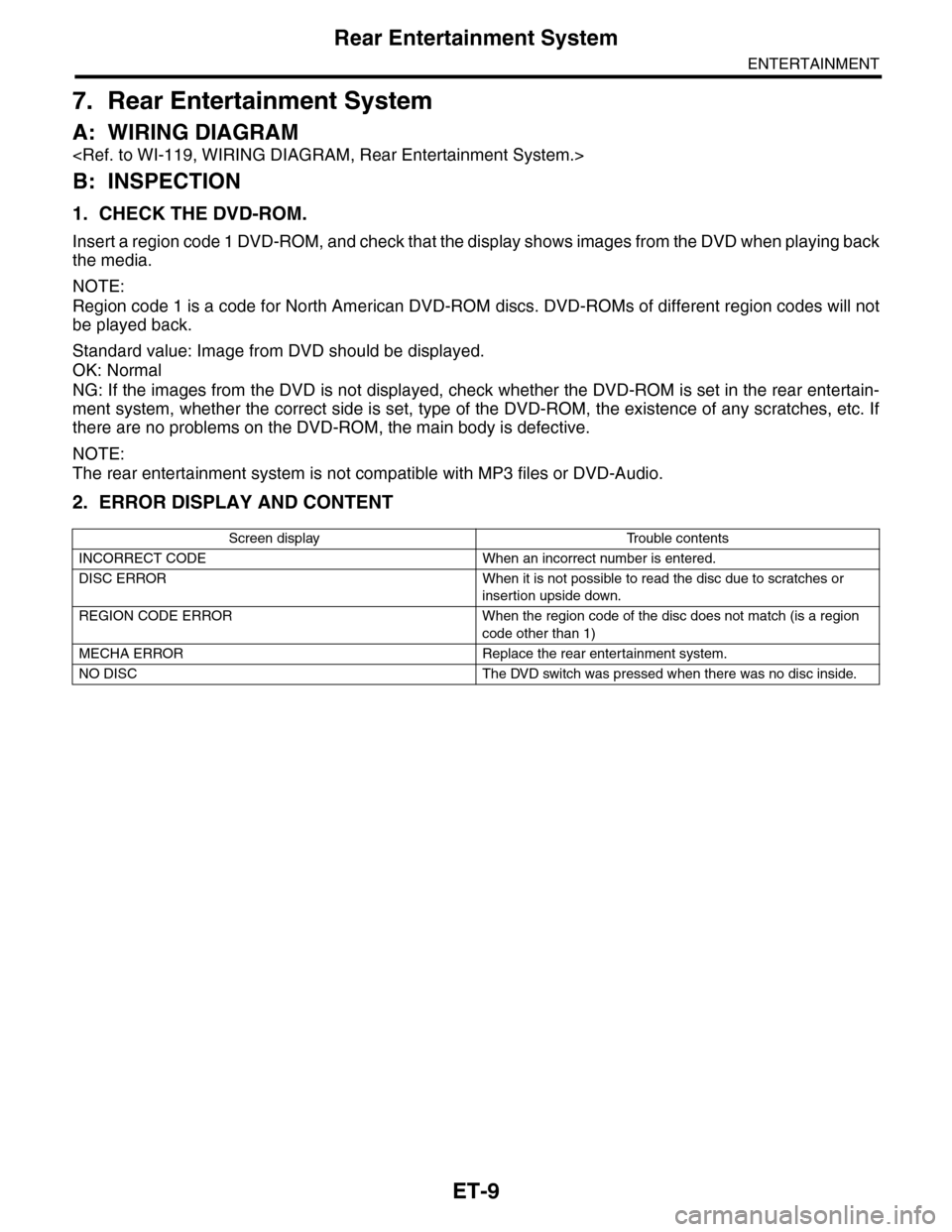
1. CHECK THE DVD-ROM.
Insert a region code 1 DVD-ROM, and check that the display shows images from the DVD when playing back
the media.
NOTE:
Region code 1 is a code for North American DVD-ROM discs. DVD-ROMs of different region codes will not
be played back.
Standard value: Image from DVD should be displayed.
OK: Normal
NG: If the images from the DVD is not displayed, check whether the DVD-ROM is set in the rear entertain-
ment system, whether the correct side is set, type of the DVD-ROM, the existence of any scratches, etc. If
there are no problems on the DVD-ROM, the main body is defective.
NOTE:
The rear entertainment system is not compatible with MP3 files or DVD-Audio.
2. ERROR DISPLAY AND CONTENT
Screen display Trouble contents
INCORRECT CODE When an incorrect number is entered.
DISC ERROR When it is not possible to read the disc due to scratches or
insertion upside down.
REGION CODE ERROR When the region code of the disc does not match (is a region
code other than 1)
MECHA ERROR Replace the rear entertainment system.
NO DISC The DVD switch was pressed when there was no disc inside.
Page 275 of 2453
EI-33
Side Garnish
EXTERIOR/INTERIOR TRIM
(3) Apply masking tape around the double-sid-
ed tape remaining on the surface of body or
spoiler.
(4) Apply solvent uniformly on the double-sided
tape using a brush.
CAUTION:
•Do not use solvent to the body which has
been repaired with lacquer paint.
•Wipe off immediately when the solvent is at-
tached on surface of the body or spoiler.
Solvent:
3M 8907 or equivalent
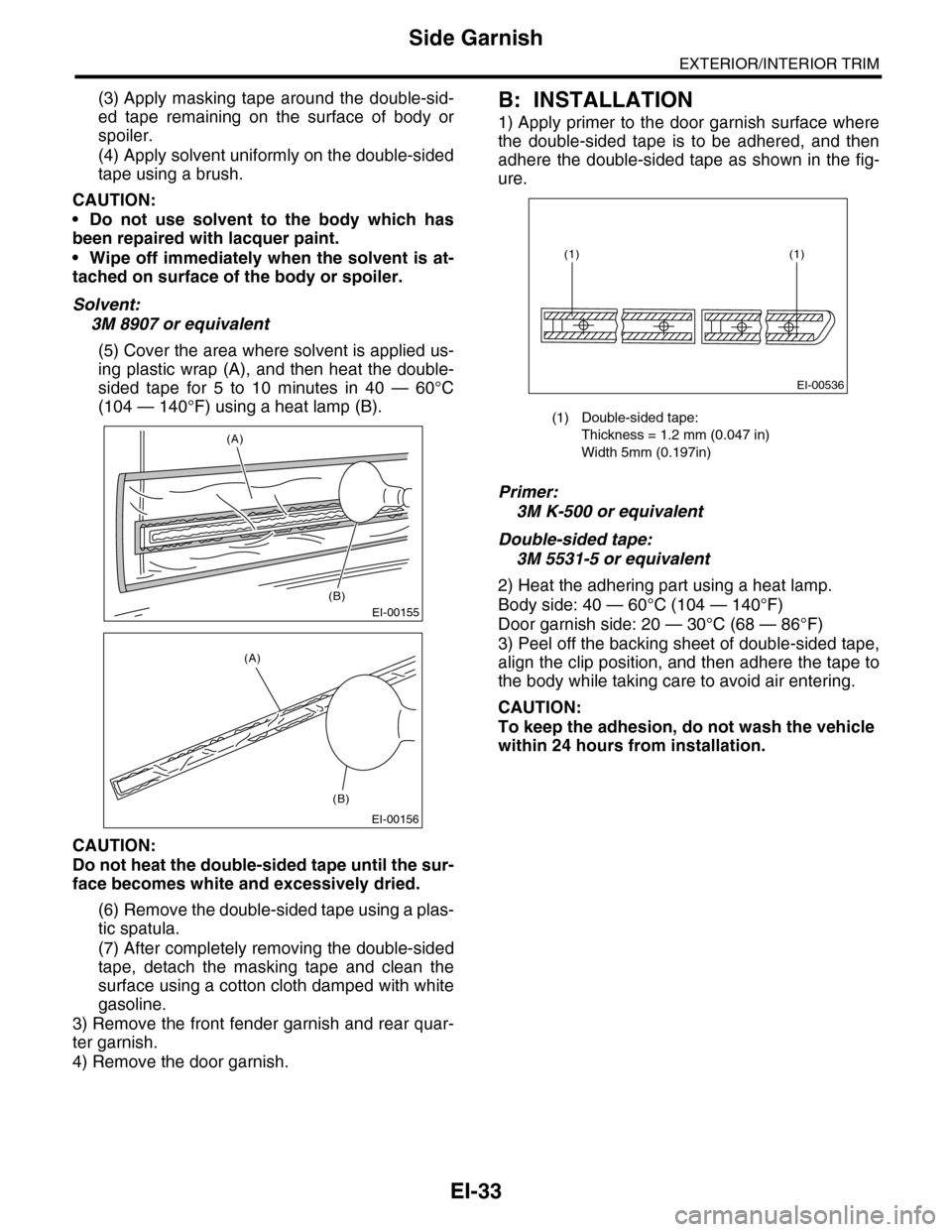
(5) Cover the area where solvent is applied us-
ing plastic wrap (A), and then heat the double-
sided tape for 5 to 10 minutes in 40 — 60°C
(104 — 140°F) using a heat lamp (B).
CAUTION:
Do not heat the double-sided tape until the sur-
face becomes white and excessively dried.
(6) Remove the double-sided tape using a plas-
tic spatula.
(7) After completely removing the double-sided
tape, detach the masking tape and clean the
surface using a cotton cloth damped with white
gasoline.
3) Remove the front fender garnish and rear quar-
ter garnish.
4) Remove the door garnish.
B: INSTALLATION
1) Apply primer to the door garnish surface where
the double-sided tape is to be adhered, and then
adhere the double-sided tape as shown in the fig-
ure.
Primer:
3M K-500 or equivalent
Double-sided tape:
3M 5531-5 or equivalent
2) Heat the adhering part using a heat lamp.
Body side: 40 — 60°C (104 — 140°F)
Door garnish side: 20 — 30°C (68 — 86°F)
3) Peel off the backing sheet of double-sided tape,
align the clip position, and then adhere the tape to
the body while taking care to avoid air entering.
CAUTION:
To keep the adhesion, do not wash the vehicle
within 24 hours from installation.
EI-00155
(A)
(B)
EI-00156
(A)
(B)
(1) Double-sided tape:
Thickness = 1.2 mm (0.047 in)
Width 5mm (0.197in)
EI-00536
(1)(1)
Page 309 of 2453
GW-14
Outer Mirror
GLASS/WINDOWS/MIRRORS
9. Outer Mirror
A: REPLACEMENT
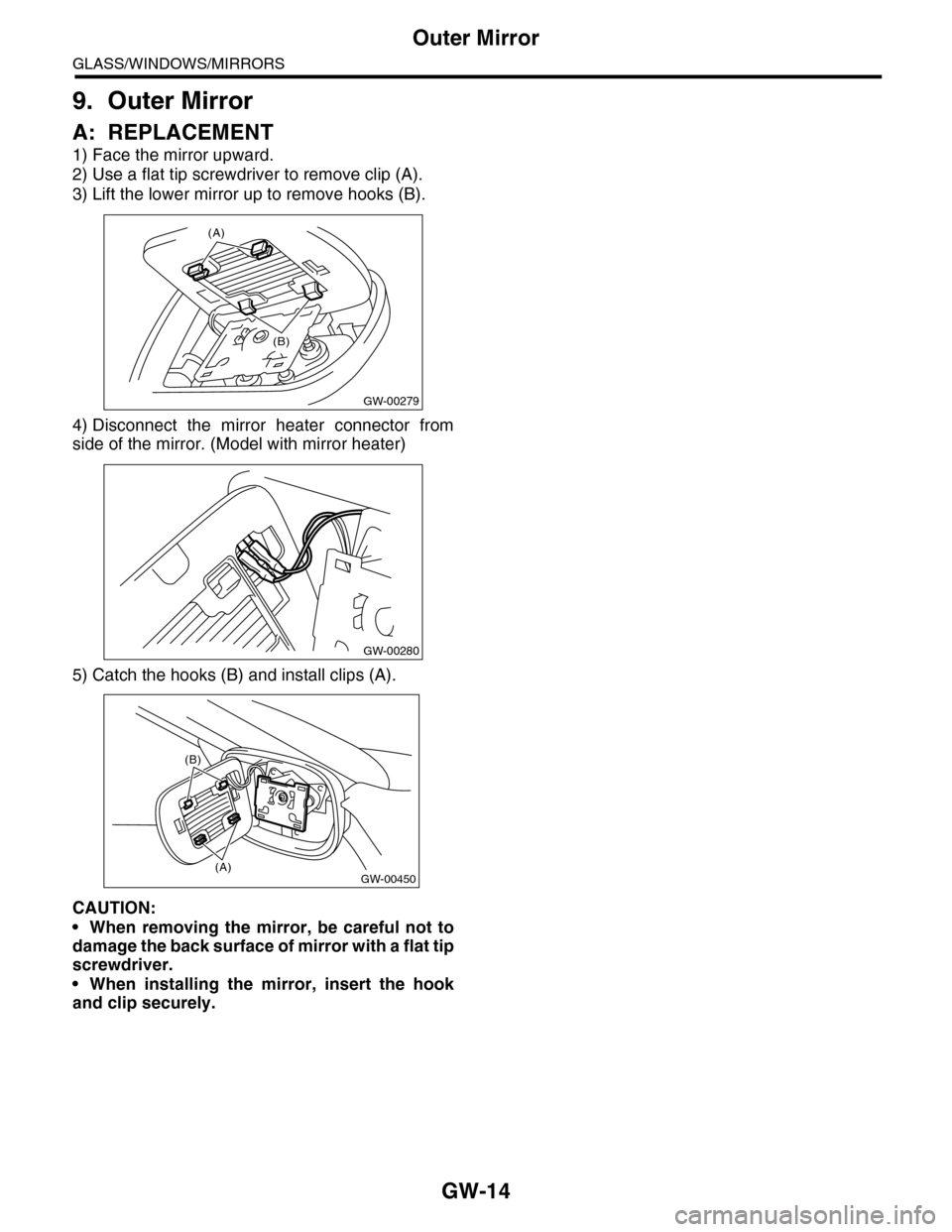
1) Face the mirror upward.
2) Use a flat tip screwdriver to remove clip (A).
3) Lift the lower mirror up to remove hooks (B).
4) Disconnect the mirror heater connector from
side of the mirror. (Model with mirror heater)
5) Catch the hooks (B) and install clips (A).
CAUTION:
•When removing the mirror, be careful not to
damage the back surface of mirror with a flat tip
screwdriver.
•When installing the mirror, insert the hook
and clip securely.
(A)
GW-00279
(B)
GW-00280
(B)
GW-00450(A)
Page 311 of 2453
GW-16
Rear Door Glass
GLASS/WINDOWS/MIRRORS
11.Rear Door Glass
A: REMOVAL
1) Remove the rear door trim.
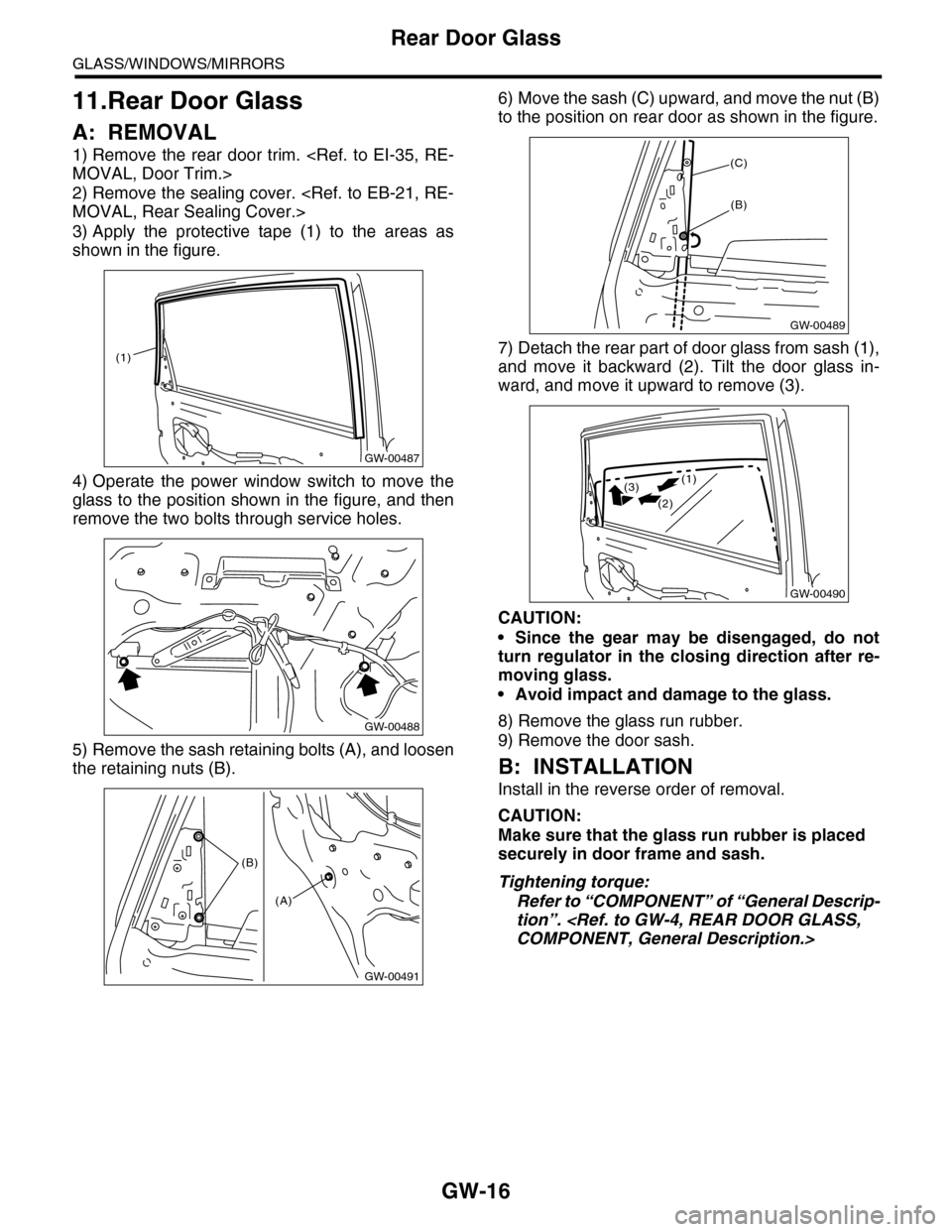
2) Remove the sealing cover.
3) Apply the protective tape (1) to the areas as
shown in the figure.
4) Operate the power window switch to move the
glass to the position shown in the figure, and then
remove the two bolts through service holes.
5) Remove the sash retaining bolts (A), and loosen
the retaining nuts (B).
6) Move the sash (C) upward, and move the nut (B)
to the position on rear door as shown in the figure.
7) Detach the rear part of door glass from sash (1),
and move it backward (2). Tilt the door glass in-
ward, and move it upward to remove (3).
CAUTION:
•Since the gear may be disengaged, do not
turn regulator in the closing direction after re-
moving glass.
•Avoid impact and damage to the glass.
8) Remove the glass run rubber.
9) Remove the door sash.
B: INSTALLATION
Install in the reverse order of removal.
CAUTION:
Make sure that the glass run rubber is placed
securely in door frame and sash.
Tightening torque:
Refer to “COMPONENT” of “General Descrip-
tion”.
GW-00487
(1)
GW-00488
GW-00491
(B)
(A)
GW-00489
(C)
(B)
GW-00490
(1)
(2)
(3)
Page 340 of 2453
AC-14
General Description
HVAC SYSTEM (HEATER, VENTILATOR AND A/C)
C: CAUTION
1. HFC-134A A/C SYSTEM
•The cooling system components for the HFC-
134a system such as the refrigerant and compres-
sor oil are different from the conventional CFC-12
system components and they are incompatible with
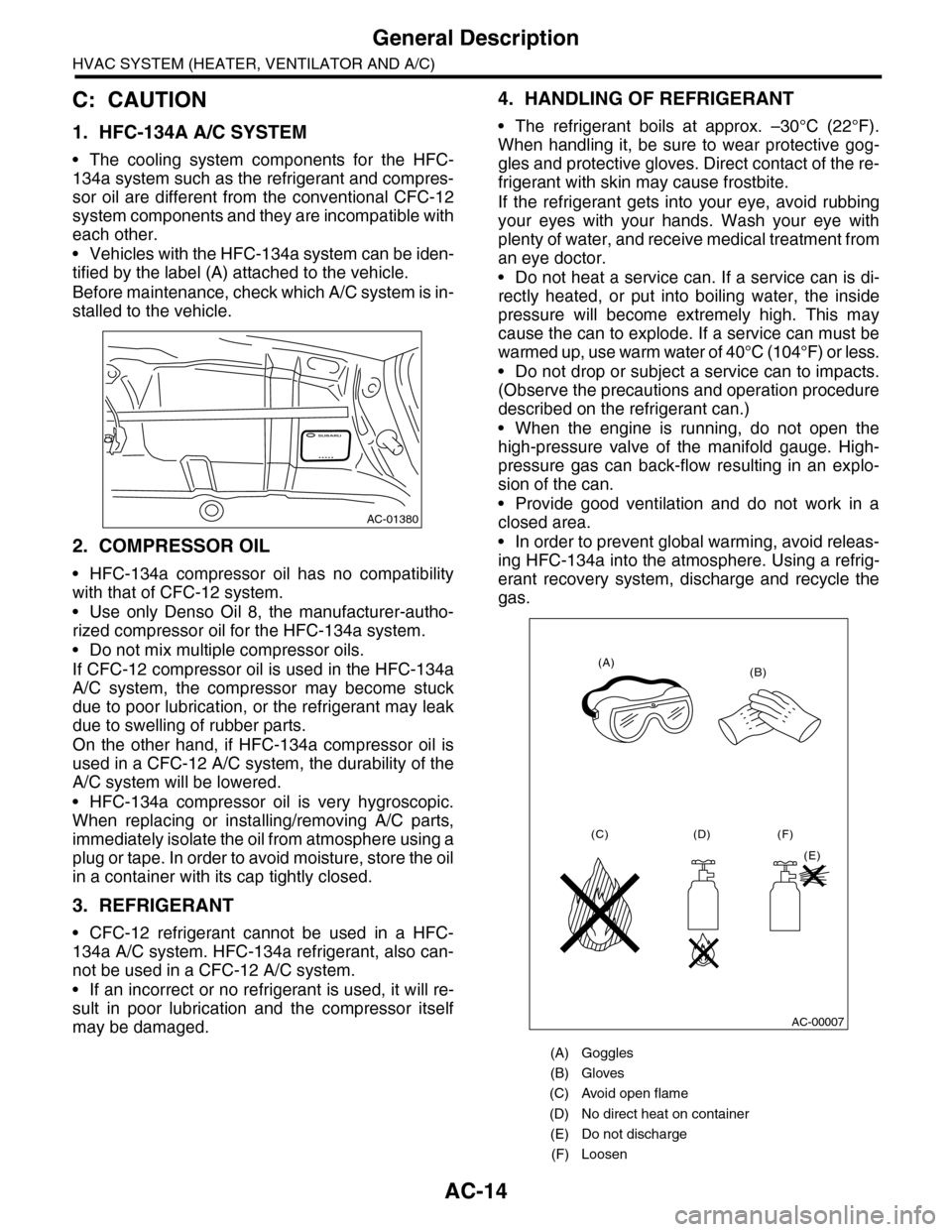
each other.
•Vehicles with the HFC-134a system can be iden-
tified by the label (A) attached to the vehicle.
Before maintenance, check which A/C system is in-
stalled to the vehicle.
2. COMPRESSOR OIL
•HFC-134a compressor oil has no compatibility
with that of CFC-12 system.
•Use only Denso Oil 8, the manufacturer-autho-
rized compressor oil for the HFC-134a system.
•Do not mix multiple compressor oils.
If CFC-12 compressor oil is used in the HFC-134a
A/C system, the compressor may become stuck
due to poor lubrication, or the refrigerant may leak
due to swelling of rubber parts.
On the other hand, if HFC-134a compressor oil is
used in a CFC-12 A/C system, the durability of the
A/C system will be lowered.
•HFC-134a compressor oil is very hygroscopic.
When replacing or installing/removing A/C parts,
immediately isolate the oil from atmosphere using a
plug or tape. In order to avoid moisture, store the oil
in a container with its cap tightly closed.
3. REFRIGERANT
•CFC-12 refrigerant cannot be used in a HFC-
134a A/C system. HFC-134a refrigerant, also can-
not be used in a CFC-12 A/C system.
•If an incorrect or no refrigerant is used, it will re-
sult in poor lubrication and the compressor itself
may be damaged.
4. HANDLING OF REFRIGERANT
•The refrigerant boils at approx. –30°C (22°F).
When handling it, be sure to wear protective gog-
gles and protective gloves. Direct contact of the re-
frigerant with skin may cause frostbite.
If the refrigerant gets into your eye, avoid rubbing
your eyes with your hands. Wash your eye with
plenty of water, and receive medical treatment from
an eye doctor.
•Do not heat a service can. If a service can is di-
rectly heated, or put into boiling water, the inside
pressure will become extremely high. This may
cause the can to explode. If a service can must be
warmed up, use warm water of 40°C (104°F) or less.
•Do not drop or subject a service can to impacts.
(Observe the precautions and operation procedure
described on the refrigerant can.)
•When the engine is running, do not open the
high-pressure valve of the manifold gauge. High-
pressure gas can back-flow resulting in an explo-
sion of the can.
•Provide good ventilation and do not work in a
closed area.
•In order to prevent global warming, avoid releas-
ing HFC-134a into the atmosphere. Using a refrig-
erant recovery system, discharge and recycle the
gas.
AC-01380
(A) Goggles
(B) Gloves
(C) Avoid open flame
(D) No direct heat on container
(E) Do not discharge
(F) Loosen
(A)(B)
(C) (D)
(E)
(F)
AC-00007