Back up SUBARU TRIBECA 2009 1.G Service Service Manual
[x] Cancel search | Manufacturer: SUBARU, Model Year: 2009, Model line: TRIBECA, Model: SUBARU TRIBECA 2009 1.GPages: 2453, PDF Size: 46.32 MB
Page 492 of 2453
LAN(diag)-36
Diagnostic Procedure with Diagnostic Trouble Code (DTC)
LAN SYSTEM (DIAGNOSTICS)
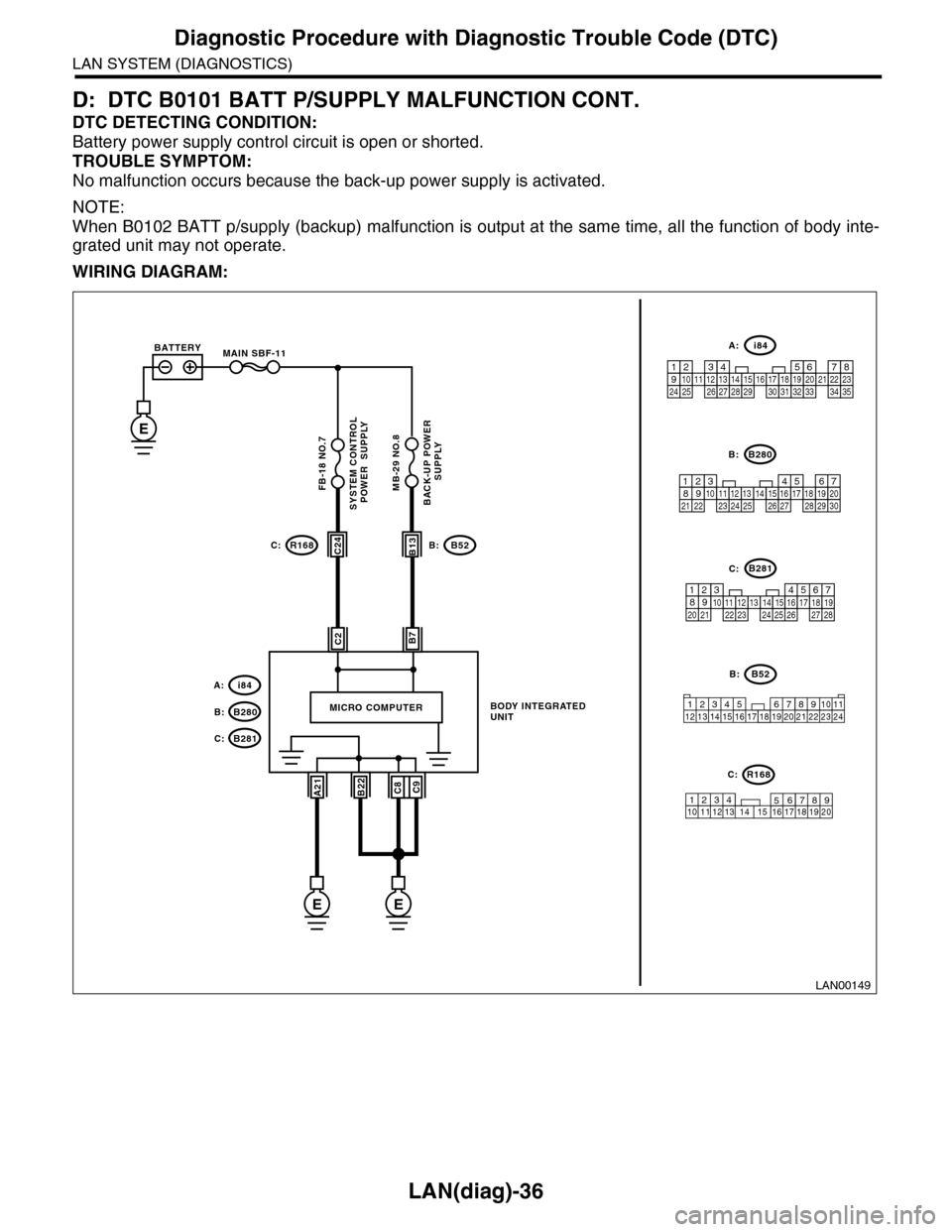
D: DTC B0101 BATT P/SUPPLY MALFUNCTION CONT.
DTC DETECTING CONDITION:
Battery power supply control circuit is open or shorted.
TROUBLE SYMPTOM:
No malfunction occurs because the back-up power supply is activated.
NOTE:
When B0102 BATT p/supply (backup) malfunction is output at the same time, all the function of body inte-
grated unit may not operate.
WIRING DIAGRAM:
LAN00149
SYSTEM CONTROL POWER SUPPLYBACK-UP POWER
SUPPLY
BODY INTEGRATED UNIT
B7C2
A21C9B22C8
MICRO COMPUTER
C24B13
i84
B52
B280
R168C:B:
B:
A:
12345678910 11 12 19 2013 14 15 16 17 18
R168C:
B52B:
34128910 1112 13 14 15 16 17 18 19 20 21 22 23 24567
E
MAIN SBF-11BATTERY
B281C:
EE
B280B:
B281C:
567821943102422 2325111213141526 27281617181920 21
5467821931022 23111213141524 25 26 2716171828 29192021 30
i84A:
1234567891011121314151617181920212223242526272829303132333435
FB-18 NO.7MB-29 NO.8
Page 494 of 2453
LAN(diag)-38
Diagnostic Procedure with Diagnostic Trouble Code (DTC)
LAN SYSTEM (DIAGNOSTICS)
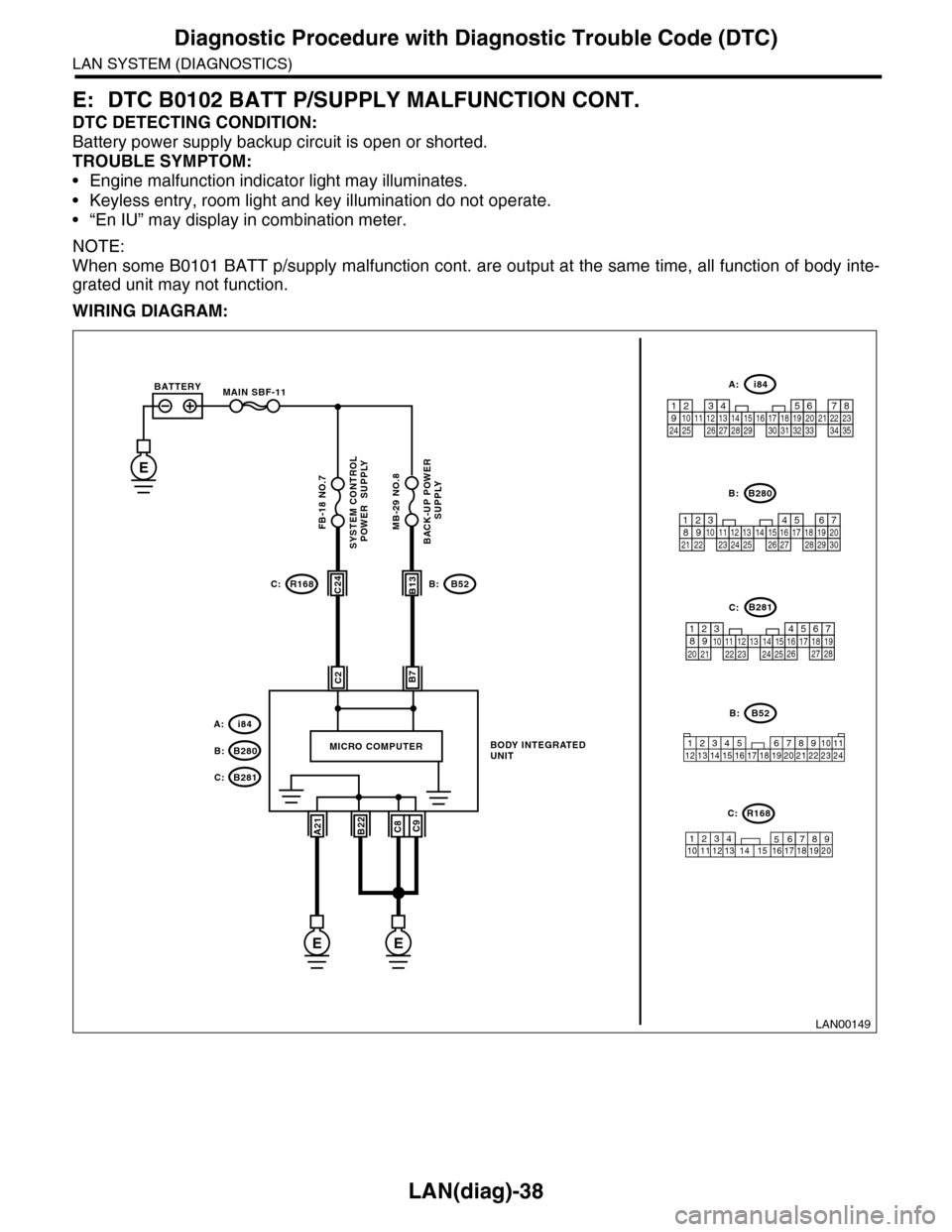
E: DTC B0102 BATT P/SUPPLY MALFUNCTION CONT.
DTC DETECTING CONDITION:
Battery power supply backup circuit is open or shorted.
TROUBLE SYMPTOM:
•Engine malfunction indicator light may illuminates.
•Keyless entry, room light and key illumination do not operate.
•“En IU” may display in combination meter.
NOTE:
When some B0101 BATT p/supply malfunction cont. are output at the same time, all function of body inte-
grated unit may not function.
WIRING DIAGRAM:
LAN00149
SYSTEM CONTROL POWER SUPPLYBACK-UP POWER
SUPPLY
BODY INTEGRATED UNIT
B7C2
A21C9B22C8
MICRO COMPUTER
C24B13
i84
B52
B280
R168C:B:
B:
A:
12345678910 11 12 19 2013 14 15 16 17 18
R168C:
B52B:
34128910 1112 13 14 15 16 17 18 19 20 21 22 23 24567
E
MAIN SBF-11BATTERY
B281C:
EE
B280B:
B281C:
567821943102422 2325111213141526 27281617181920 21
5467821931022 23111213141524 25 26 2716171828 29192021 30
i84A:
1234567891011121314151617181920212223242526272829303132333435
FB-18 NO.7MB-29 NO.8
Page 519 of 2453
LAN(diag)-63
Diagnostic Procedure with Diagnostic Trouble Code (DTC)
LAN SYSTEM (DIAGNOSTICS)
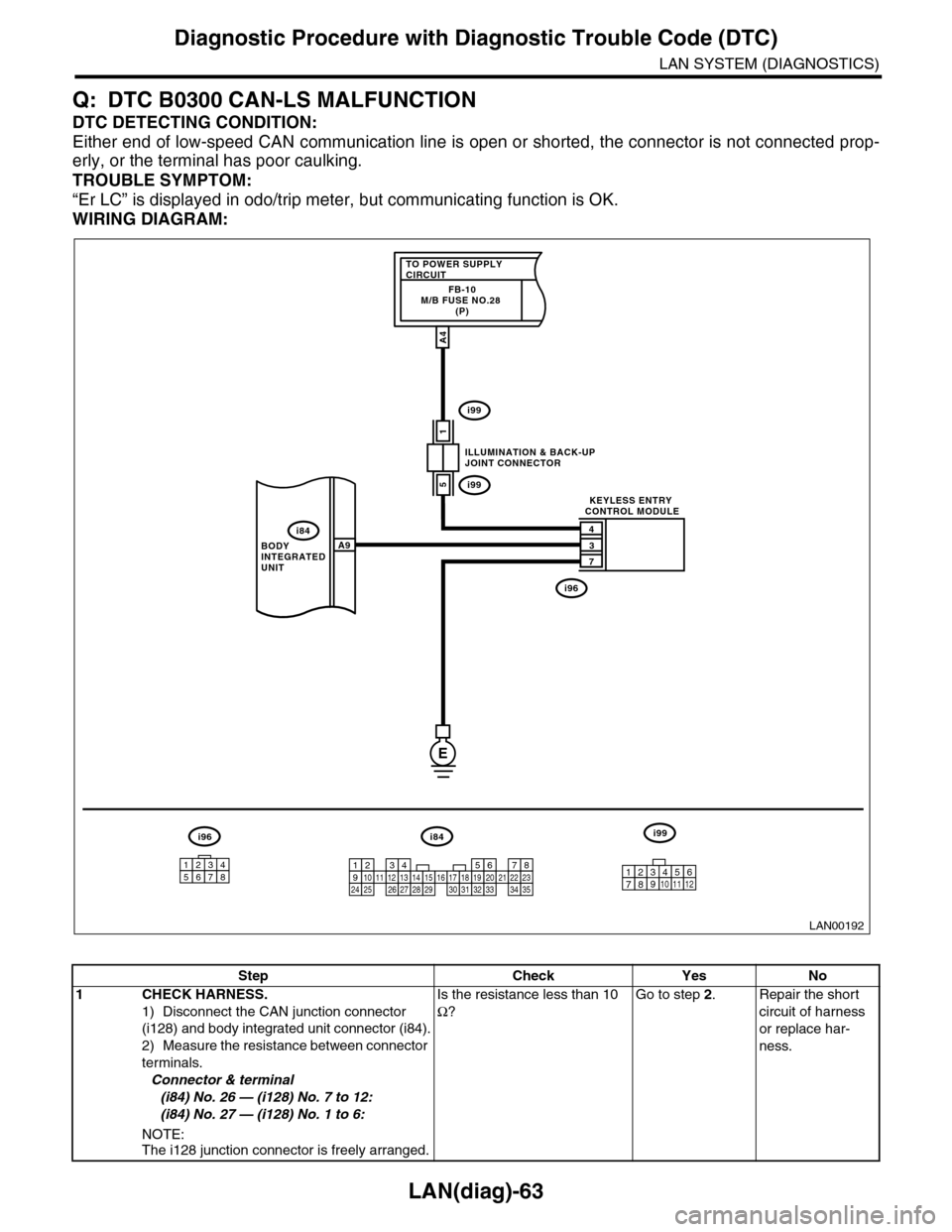
Q: DTC B0300 CAN-LS MALFUNCTION
DTC DETECTING CONDITION:
Either end of low-speed CAN communication line is open or shorted, the connector is not connected prop-
erly, or the terminal has poor caulking.
TROUBLE SYMPTOM:
“Er LC” is displayed in odo/trip meter, but communicating function is OK.
WIRING DIAGRAM:
LAN00192
TO POWER SUPPLY CIRCUITFB-10M/B FUSE NO.28 (P)
1
4
3
7
A9
A4
5
BODY INTEGRATED UNIT
ILLUMINATION & BACK-UPJOINT CONNECTOR
KEYLESS ENTRY CONTROL MODULE
i84
i99
i99
i96
E
i84i96i99
123456789101112131415161718192021222324252627282930313233343510 11 12349561728
12345678
Step Check Yes No
1CHECK HARNESS.
1) Disconnect the CAN junction connector
(i128) and body integrated unit connector (i84).
2) Measure the resistance between connector
terminals.
Connector & terminal
(i84) No. 26 — (i128) No. 7 to 12:
(i84) No. 27 — (i128) No. 1 to 6:
NOTE:The i128 junction connector is freely arranged.
Is the resistance less than 10
Ω?
Go to step 2.Repair the short
circuit of harness
or replace har-
ness.
Page 528 of 2453
LAN(diag)-72
Diagnostic Procedure with Diagnostic Trouble Code (DTC)
LAN SYSTEM (DIAGNOSTICS)
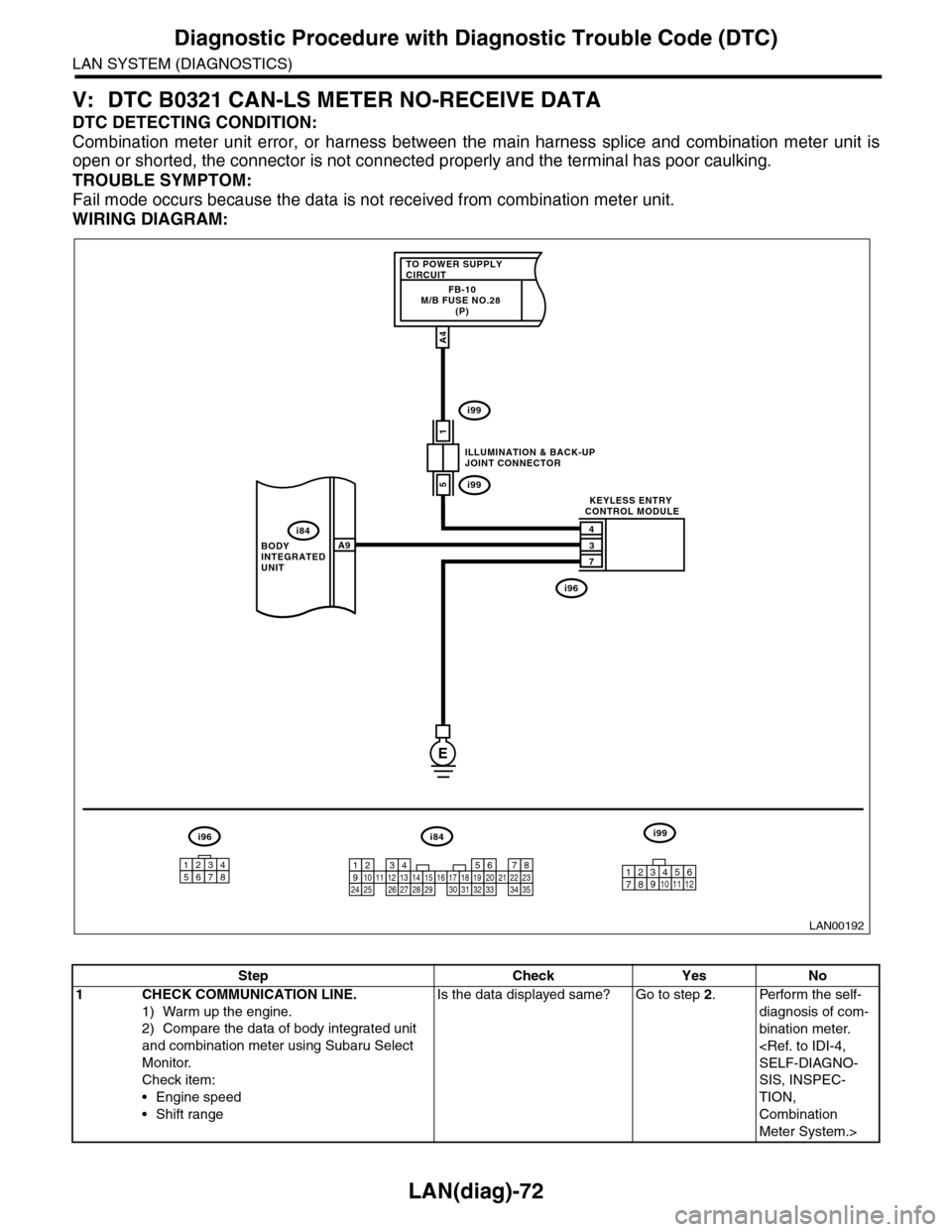
V: DTC B0321 CAN-LS METER NO-RECEIVE DATA
DTC DETECTING CONDITION:
Combination meter unit error, or harness between the main harness splice and combination meter unit is
open or shorted, the connector is not connected properly and the terminal has poor caulking.
TROUBLE SYMPTOM:
Fail mode occurs because the data is not received from combination meter unit.
WIRING DIAGRAM:
LAN00192
TO POWER SUPPLY CIRCUITFB-10M/B FUSE NO.28 (P)
1
4
3
7
A9
A4
5
BODY INTEGRATED UNIT
ILLUMINATION & BACK-UPJOINT CONNECTOR
KEYLESS ENTRY CONTROL MODULE
i84
i99
i99
i96
E
i84i96i99
123456789101112131415161718192021222324252627282930313233343510 11 12349561728
12345678
Step Check Yes No
1CHECK COMMUNICATION LINE.
1) Warm up the engine.
2) Compare the data of body integrated unit
and combination meter using Subaru Select
Monitor.
Check item:
•Engine speed
•Shift range
Is the data displayed same? Go to step 2.Perform the self-
diagnosis of com-
bination meter.
SIS, INSPEC-
TION,
Combination
Meter System.>
Page 535 of 2453
LI-2
General Description
LIGHTING SYSTEM
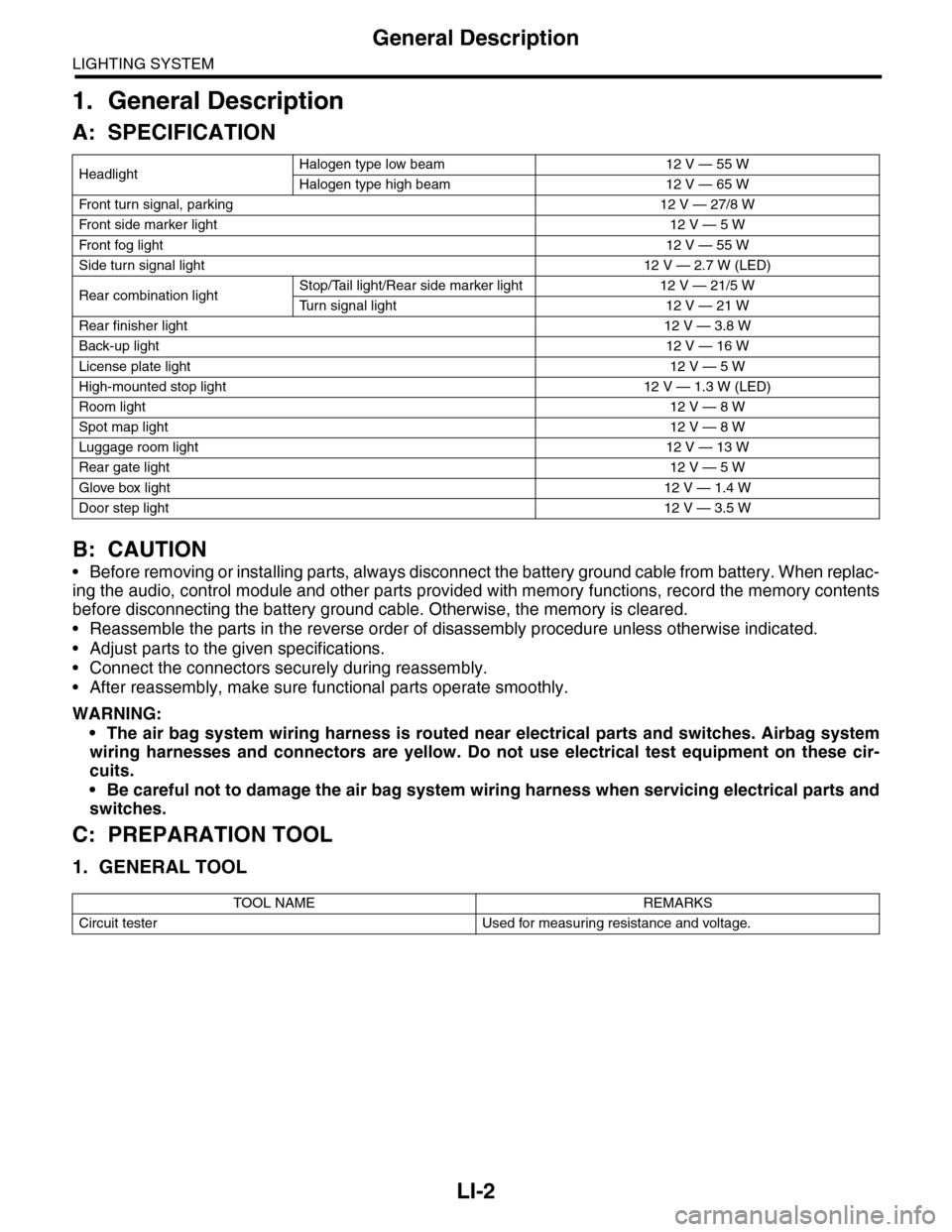
1. General Description
A: SPECIFICATION
B: CAUTION
•Before removing or installing parts, always disconnect the battery ground cable from battery. When replac-
ing the audio, control module and other parts provided with memory functions, record the memory contents
before disconnecting the battery ground cable. Otherwise, the memory is cleared.
•Reassemble the parts in the reverse order of disassembly procedure unless otherwise indicated.
•Adjust parts to the given specifications.
•Connect the connectors securely during reassembly.
•After reassembly, make sure functional parts operate smoothly.
WARNING:
•The air bag system wiring harness is routed near electrical parts and switches. Airbag system
wiring harnesses and connectors are yellow. Do not use electrical test equipment on these cir-
cuits.
•Be careful not to damage the air bag system wiring harness when servicing electrical parts and
switches.
C: PREPARATION TOOL
1. GENERAL TOOL
HeadlightHalogen type low beam 12 V — 55 W
Halogen type high beam 12 V — 65 W
Fr o nt t ur n si gn a l, p ar k in g 1 2 V — 27 / 8 W
Fr o nt si d e m ar ke r li gh t12 V — 5 W
Fr o nt fog li g ht12 V — 55 W
Side turn signal light 12 V — 2.7 W (LED)
Rear combination lightStop/Tail light/Rear side marker light 12 V — 21/5 W
Tu r n s i g n a l l i g h t 1 2 V — 2 1 W
Rear finisher light12 V — 3.8 W
Back-up light12 V — 16 W
License plate light12 V — 5 W
High-mounted stop light 12 V — 1.3 W (LED)
Room light12 V — 8 W
Spot map light12 V — 8 W
Luggage room light12 V — 13 W
Rear gate light12 V — 5 W
Glove box light12 V — 1.4 W
Door step light12 V — 3.5 W
TOOL NAME REMARKS
Circuit tester Used for measuring resistance and voltage.
Page 539 of 2453
LI-6
Back-up Light System
LIGHTING SYSTEM
5. Back-up Light System
A: WIRING DIAGRAM
1. BACK-UP LIGHT
B: INSPECTION
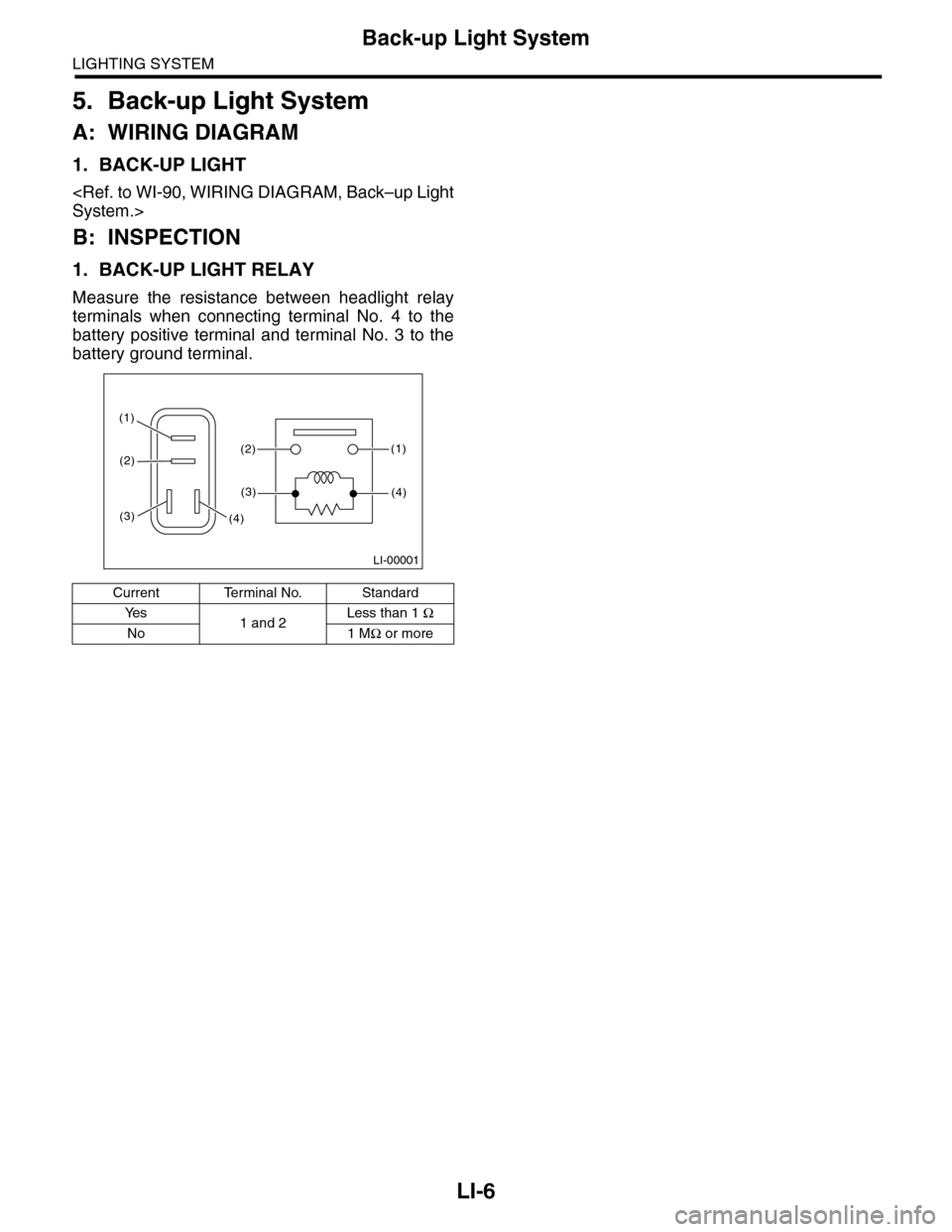
1. BACK-UP LIGHT RELAY
Measure the resistance between headlight relay
terminals when connecting terminal No. 4 to the
battery positive terminal and terminal No. 3 to the
battery ground terminal.
Current Terminal No. Standard
Ye s1 and 2Less than 1 Ω
No 1 MΩ or more
LI-00001
(1)(2)
(1)
(4)
(2)
(3)
(3)(4)
Page 546 of 2453
LI-13
Headlight Bulb
LIGHTING SYSTEM
11.Headlight Bulb
A: REMOVAL
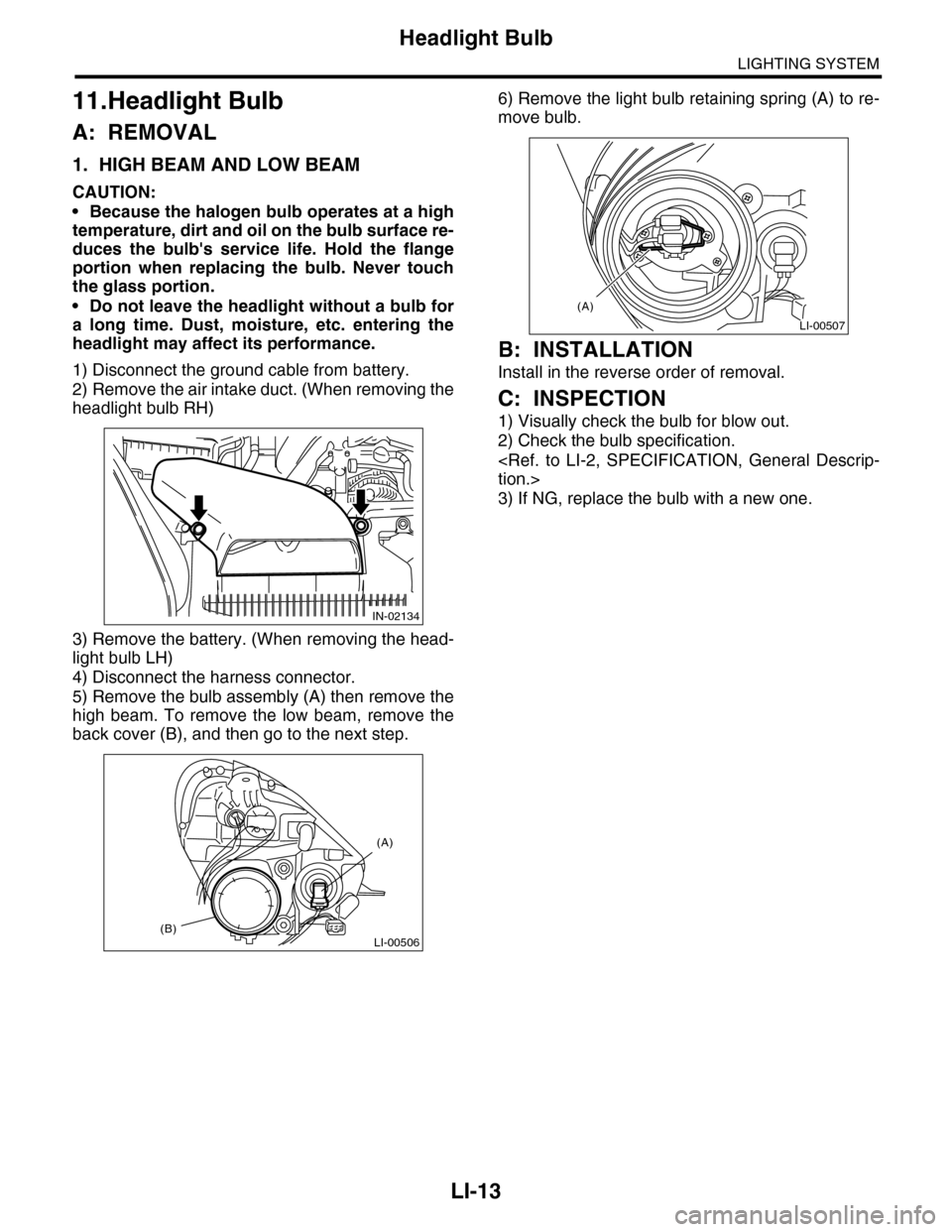
1. HIGH BEAM AND LOW BEAM
CAUTION:
•Because the halogen bulb operates at a high
temperature, dirt and oil on the bulb surface re-
duces the bulb's service life. Hold the flange
portion when replacing the bulb. Never touch
the glass portion.
•Do not leave the headlight without a bulb for
a long time. Dust, moisture, etc. entering the
headlight may affect its performance.
1) Disconnect the ground cable from battery.
2) Remove the air intake duct. (When removing the
headlight bulb RH)
3) Remove the battery. (When removing the head-
light bulb LH)
4) Disconnect the harness connector.
5) Remove the bulb assembly (A) then remove the
high beam. To remove the low beam, remove the
back cover (B), and then go to the next step.
6) Remove the light bulb retaining spring (A) to re-
move bulb.
B: INSTALLATION
Install in the reverse order of removal.
C: INSPECTION
1) Visually check the bulb for blow out.
2) Check the bulb specification.
3) If NG, replace the bulb with a new one.
IN-02134
LI-00506(B)
(A)
LI-00507
(A)
Page 551 of 2453
LI-18
Front Fog Light Bulb
LIGHTING SYSTEM
16.Front Fog Light Bulb
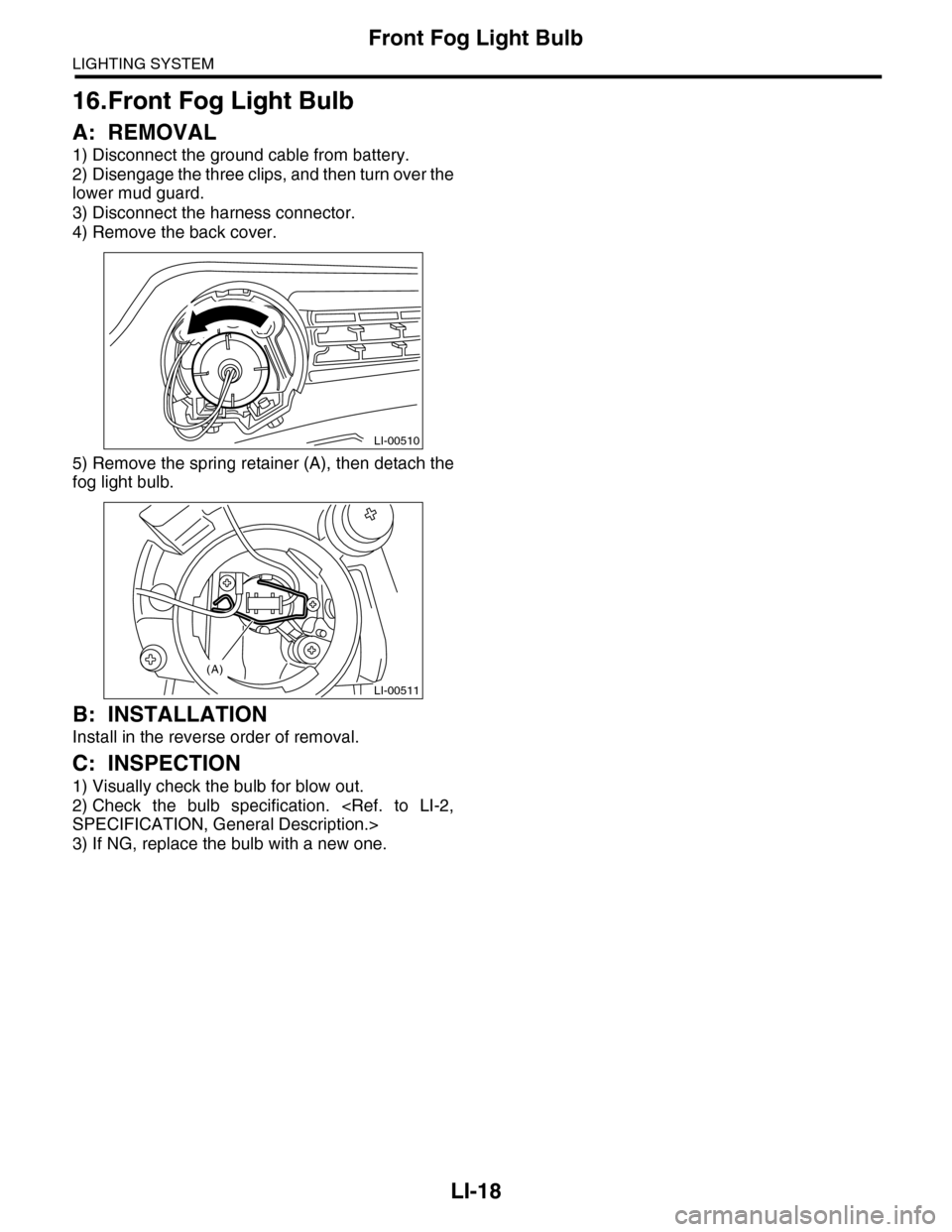
A: REMOVAL
1) Disconnect the ground cable from battery.
2) Disengage the three clips, and then turn over the
lower mud guard.
3) Disconnect the harness connector.
4) Remove the back cover.
5) Remove the spring retainer (A), then detach the
fog light bulb.
B: INSTALLATION
Install in the reverse order of removal.
C: INSPECTION
1) Visually check the bulb for blow out.
2) Check the bulb specification.
3) If NG, replace the bulb with a new one.
LI-00510
LI-00511
(A)
Page 558 of 2453
LI-25
Back-up Light Bulb
LIGHTING SYSTEM
23.Back-up Light Bulb
A: REMOVAL
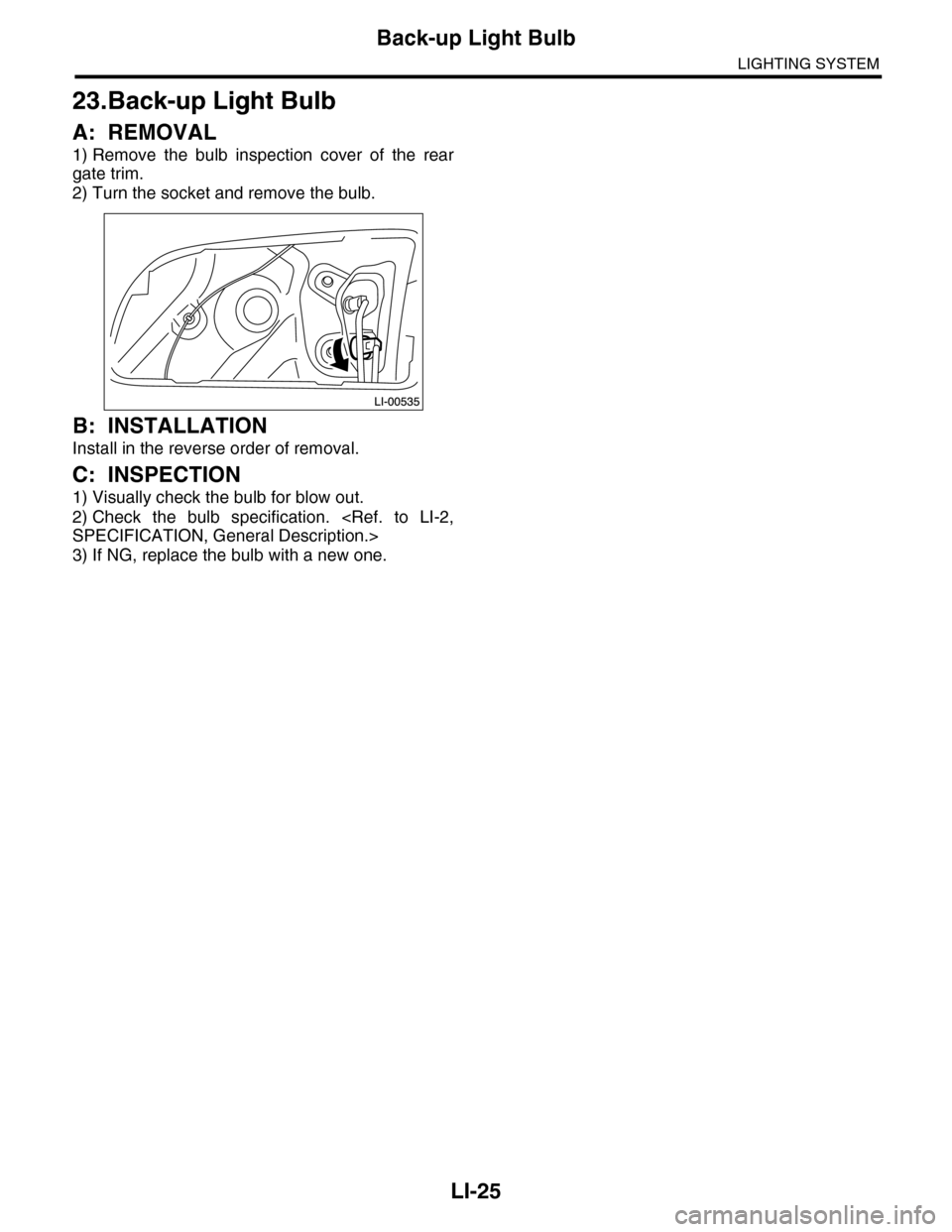
1) Remove the bulb inspection cover of the rear
gate trim.
2) Turn the socket and remove the bulb.
B: INSTALLATION
Install in the reverse order of removal.
C: INSPECTION
1) Visually check the bulb for blow out.
2) Check the bulb specification.
3) If NG, replace the bulb with a new one.
Page 586 of 2453
OD(diag)-18
Subaru Select Monitor
OCCUPANT DETECTION SYSTEM (DIAGNOSTICS)
3. CLEAR MEMORY MODE
Clear the DTC stored in the airbag control module
after repairing the airbag system and occupant de-
tection system. (After the breakdown is recovered,
the breakdown code for completed recoveries are
read out when the next breakdown occurs if the
memory clear work is not performed.)
1) On the «Main Menu» display screen, select the
{Each System Check} and press the [YES] key.
2) On the «System Selection Menu» display
screen, select the {Airbag System} and press the
[YES] key.
3) On the {Airbag System} menu screen, select the
{Clear Memory} and press the [YES] key.
4) When the “Clear Memory?” is shown on the
screen, press the [YES] key.
5) When “Done” is displayed, turn the Subaru Se-
lect Monitor to OFF.
NOTE:
For details concerning operation procedure, refer
to the “SUBARU SELECT MONITOR OPERATION
MANUAL”.
4. SYSTEM CALIBRATION (REZEROING)
NOTE:
When replacing the occupant detection system, or
removing and disassembling the passenger’s seat,
always perform the system calibration after install-
ing a seat in the vehicle.
CAUTION:
When the trouble occurs in the system during
calibration process, “Occupant detection cali-
bration failure” is detected in the DTC 2A of the
airbag system and the airbag warning light
lights. In this case, after turning the ignition
switch to OFF once, redo the system calibration
(Rezeroing), or after clearing the cause of the
failure, perform the system calibration again.
1) Park empty vehicle on a level surface.
2) On the «Main Menu» display screen, select the
{Each System Check} and press the [YES] key.
3) On the «System Selection Menu» display
screen, select the {Occupant Detection System}
and press the [YES] key.
4) On the Occupant Detection System display
screen, select the {Zero Point Adjustment} and
press the [YES] key.
5) “See service manual. And check vehicle condi-
tion for successfully completing the rezeroing.” is
displayed. Check the following to adjust the condi-
tion of the vehicle.
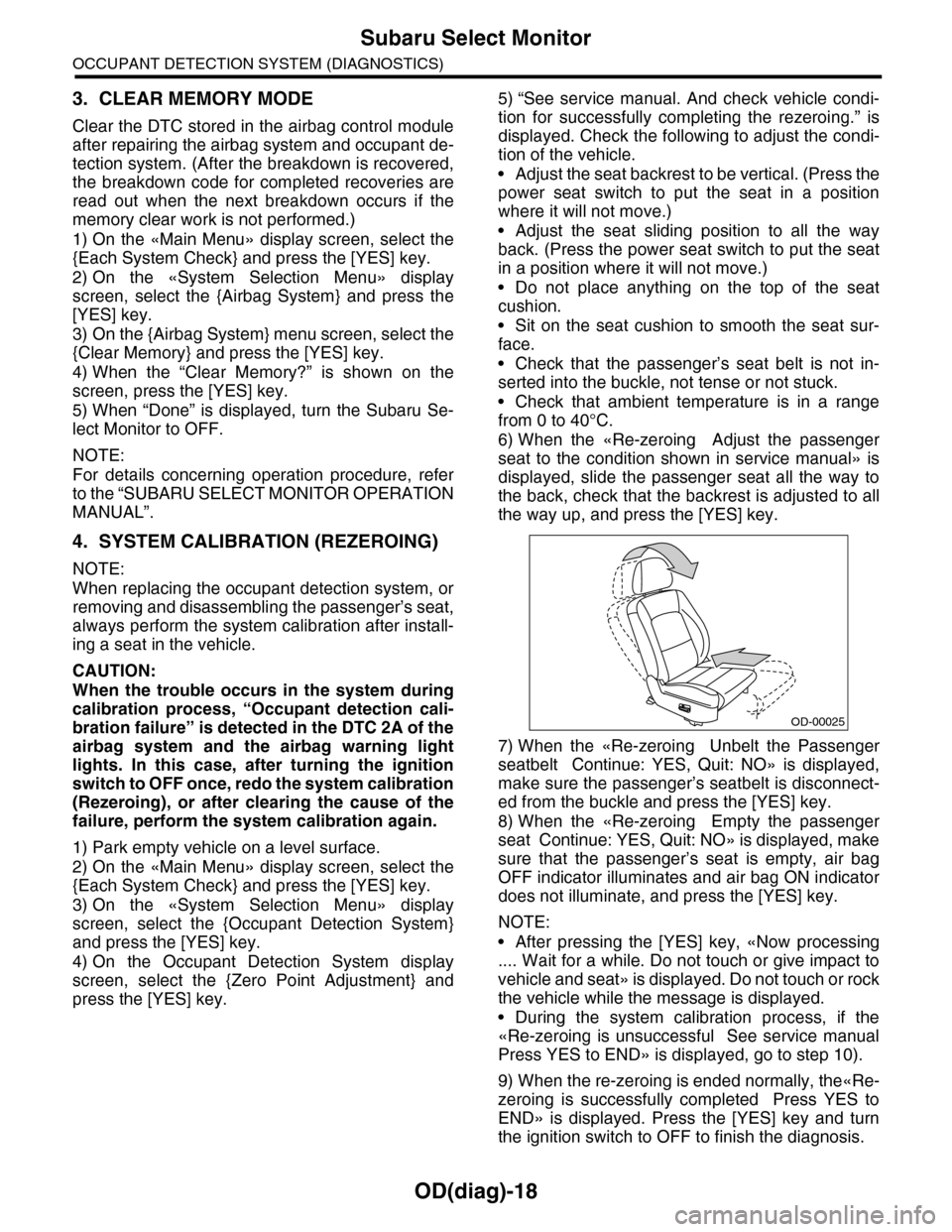
•Adjust the seat backrest to be vertical. (Press the
power seat switch to put the seat in a position
where it will not move.)
•Adjust the seat sliding position to all the way
back. (Press the power seat switch to put the seat
in a position where it will not move.)
•Do not place anything on the top of the seat
cushion.
•Sit on the seat cushion to smooth the seat sur-
face.
•Check that the passenger’s seat belt is not in-
serted into the buckle, not tense or not stuck.
•Check that ambient temperature is in a range
from 0 to 40°C.
6) When the «Re-zeroing Adjust the passenger
seat to the condition shown in service manual» is
displayed, slide the passenger seat all the way to
the back, check that the backrest is adjusted to all
the way up, and press the [YES] key.
7) When the «Re-zeroing Unbelt the Passenger
seatbelt Continue: YES, Quit: NO» is displayed,
make sure the passenger’s seatbelt is disconnect-
ed from the buckle and press the [YES] key.
8) When the «Re-zeroing Empty the passenger
seat Continue: YES, Quit: NO» is displayed, make
sure that the passenger’s seat is empty, air bag
OFF indicator illuminates and air bag ON indicator
does not illuminate, and press the [YES] key.
NOTE:
•After pressing the [YES] key, «Now processing
.... Wait for a while. Do not touch or give impact to
vehicle and seat» is displayed. Do not touch or rock
the vehicle while the message is displayed.
•During the system calibration process, if the
«Re-zeroing is unsuccessful See service manual
Press YES to END» is displayed, go to step 10).
9) When the re-zeroing is ended normally, the«Re-
zeroing is successfully completed Press YES to
END» is displayed. Press the [YES] key and turn
the ignition switch to OFF to finish the diagnosis.
OD-00025