Back up SUBARU TRIBECA 2009 1.G Service Owner's Manual
[x] Cancel search | Manufacturer: SUBARU, Model Year: 2009, Model line: TRIBECA, Model: SUBARU TRIBECA 2009 1.GPages: 2453, PDF Size: 46.32 MB
Page 349 of 2453
AC-23
Refrigerant Charging Procedure
HVAC SYSTEM (HEATER, VENTILATOR AND A/C)
17) After confirming that there are no leaks with the
leak test, charge the required amount of refrigerant.
CAUTION:
Never run the engine while charging from the
high-pressure side.
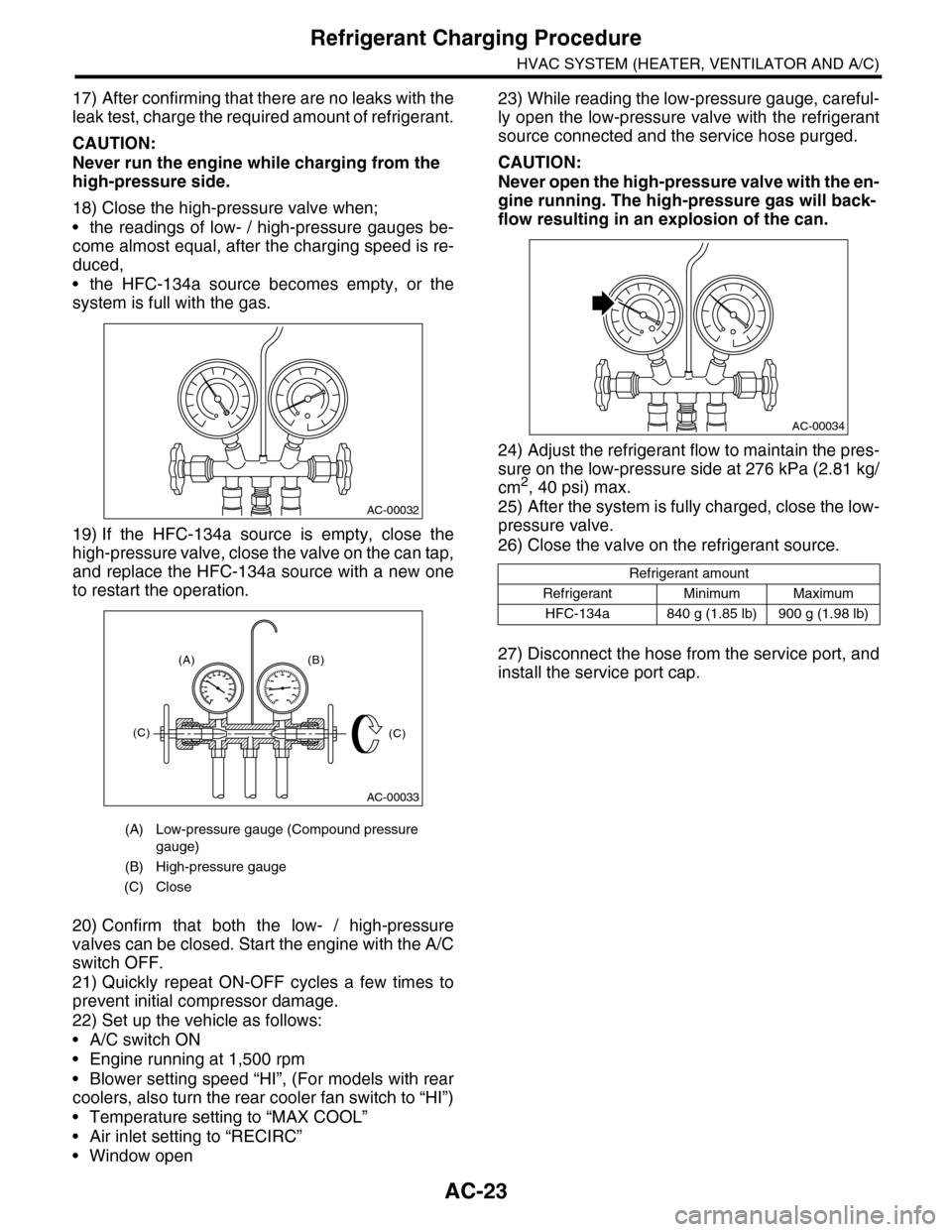
18) Close the high-pressure valve when;
•the readings of low- / high-pressure gauges be-
come almost equal, after the charging speed is re-
duced,
•the HFC-134a source becomes empty, or the
system is full with the gas.
19) If the HFC-134a source is empty, close the
high-pressure valve, close the valve on the can tap,
and replace the HFC-134a source with a new one
to restart the operation.
20) Confirm that both the low- / high-pressure
valves can be closed. Start the engine with the A/C
switch OFF.
21) Quickly repeat ON-OFF cycles a few times to
prevent initial compressor damage.
22) Set up the vehicle as follows:
•A/C switch ON
•Engine running at 1,500 rpm
•Blower setting speed “HI”, (For models with rear
coolers, also turn the rear cooler fan switch to “HI”)
•Temperature setting to “MAX COOL”
•Air inlet setting to “RECIRC”
•Window open
23) While reading the low-pressure gauge, careful-
ly open the low-pressure valve with the refrigerant
source connected and the service hose purged.
CAUTION:
Never open the high-pressure valve with the en-
gine running. The high-pressure gas will back-
flow resulting in an explosion of the can.
24) Adjust the refrigerant flow to maintain the pres-
sure on the low-pressure side at 276 kPa (2.81 kg/
cm2, 40 psi) max.
25) After the system is fully charged, close the low-
pressure valve.
26) Close the valve on the refrigerant source.
27) Disconnect the hose from the service port, and
install the service port cap.
(A) Low-pressure gauge (Compound pressure
gauge)
(B) High-pressure gauge
(C) Close
AC-00032
AC-00033
(A) (B)
(C)(C)
Refrigerant amount
Refrigerant Minimum Maximum
HFC-134a 840 g (1.85 lb) 900 g (1.98 lb)
AC-00034
Page 357 of 2453
AC-31
Control Panel
HVAC SYSTEM (HEATER, VENTILATOR AND A/C)
12.Control Panel
A: REMOVAL
1. FRONT
1) Disconnect the ground cable from battery.
2) Remove the front console panel.
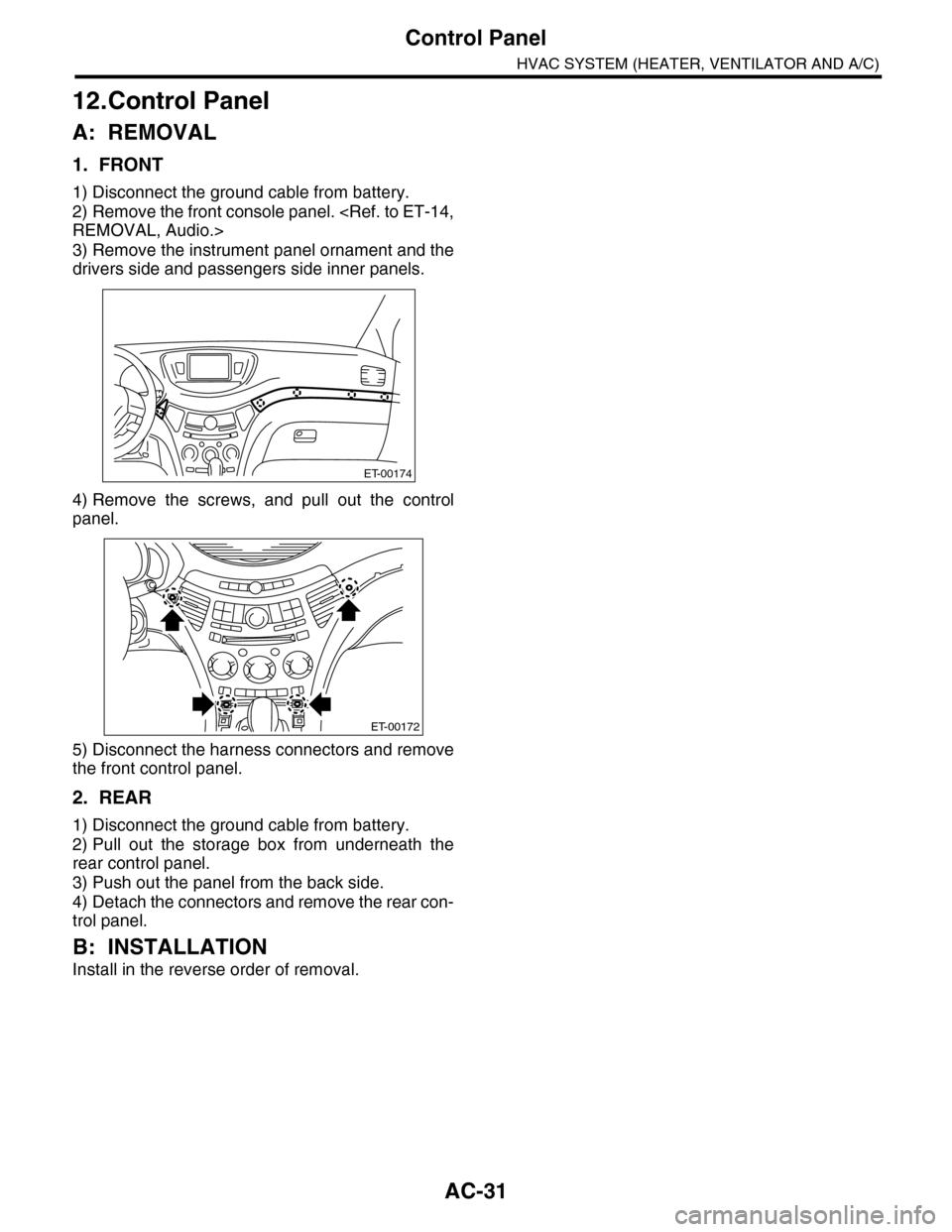
3) Remove the instrument panel ornament and the
drivers side and passengers side inner panels.
4) Remove the screws, and pull out the control
panel.
5) Disconnect the harness connectors and remove
the front control panel.
2. REAR
1) Disconnect the ground cable from battery.
2) Pull out the storage box from underneath the
rear control panel.
3) Push out the panel from the back side.
4) Detach the connectors and remove the rear con-
trol panel.
B: INSTALLATION
Install in the reverse order of removal.
ET-00174
ET-00172
Page 381 of 2453
AC(diag)-4
General Description
HVAC SYSTEM (AUTO A/C) (DIAGNOSTICS)
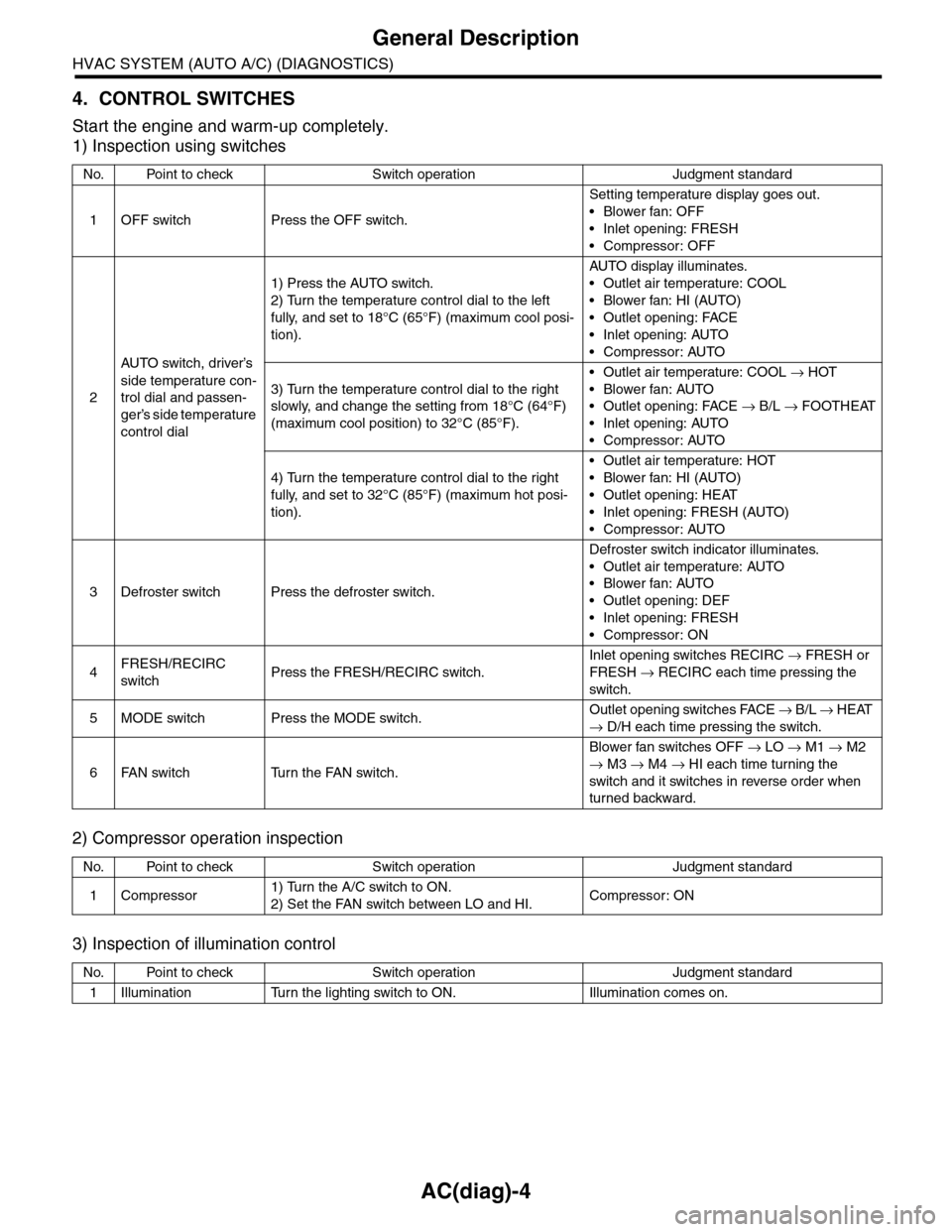
4. CONTROL SWITCHES
Start the engine and warm-up completely.
1) Inspection using switches
2) Compressor operation inspection
3) Inspection of illumination control
No. Point to check Switch operation Judgment standard
1OFF switch Press the OFF switch.
Setting temperature display goes out.
•Blower fan: OFF
•Inlet opening: FRESH
•Compressor: OFF
2
AU TO sw it c h, d r iver ’s
side temperature con-
trol dial and passen-
ger’s side temperature
control dial
1) Press the AUTO switch.
2) Turn the temperature control dial to the left
fully, and set to 18°C (65°F) (maximum cool posi-
tion).
AU TO di sp l ay i l lu mi n at e s.
•Outlet air temperature: COOL
•Blower fan: HI (AUTO)
•Outlet opening: FACE
•Inlet opening: AUTO
•Compressor: AUTO
3) Turn the temperature control dial to the right
slowly, and change the setting from 18°C (64°F)
(maximum cool position) to 32°C (85°F).
•Outlet air temperature: COOL → HOT
•Blower fan: AUTO
•Outlet opening: FACE → B/L → FOOTHEAT
•Inlet opening: AUTO
•Compressor: AUTO
4) Turn the temperature control dial to the right
fully, and set to 32°C (85°F) (maximum hot posi-
tion).
•Outlet air temperature: HOT
•Blower fan: HI (AUTO)
•Outlet opening: HEAT
•Inlet opening: FRESH (AUTO)
•Compressor: AUTO
3Defroster switch Press the defroster switch.
Defroster switch indicator illuminates.
•Outlet air temperature: AUTO
•Blower fan: AUTO
•Outlet opening: DEF
•Inlet opening: FRESH
•Compressor: ON
4FRESH/RECIRC
switchPress the FRESH/RECIRC switch.
Inlet opening switches RECIRC → FRESH or
FRESH → RECIRC each time pressing the
switch.
5MODE switch Press the MODE switch.Outlet opening switches FACE → B / L → HEAT
→ D/H each time pressing the switch.
6FAN switch Turn the FAN switch.
Blower fan switches OFF → LO → M1 → M2
→ M3 → M4 → HI each time turning the
switch and it switches in reverse order when
turned backward.
No. Point to check Switch operation Judgment standard
1Compressor1) Turn the A/C switch to ON.
2) Set the FAN switch between LO and HI.Compressor: ON
No. Point to check Switch operation Judgment standard
1Illumination Turn the lighting switch to ON. Illumination comes on.
Page 382 of 2453
AC(diag)-5
General Description
HVAC SYSTEM (AUTO A/C) (DIAGNOSTICS)
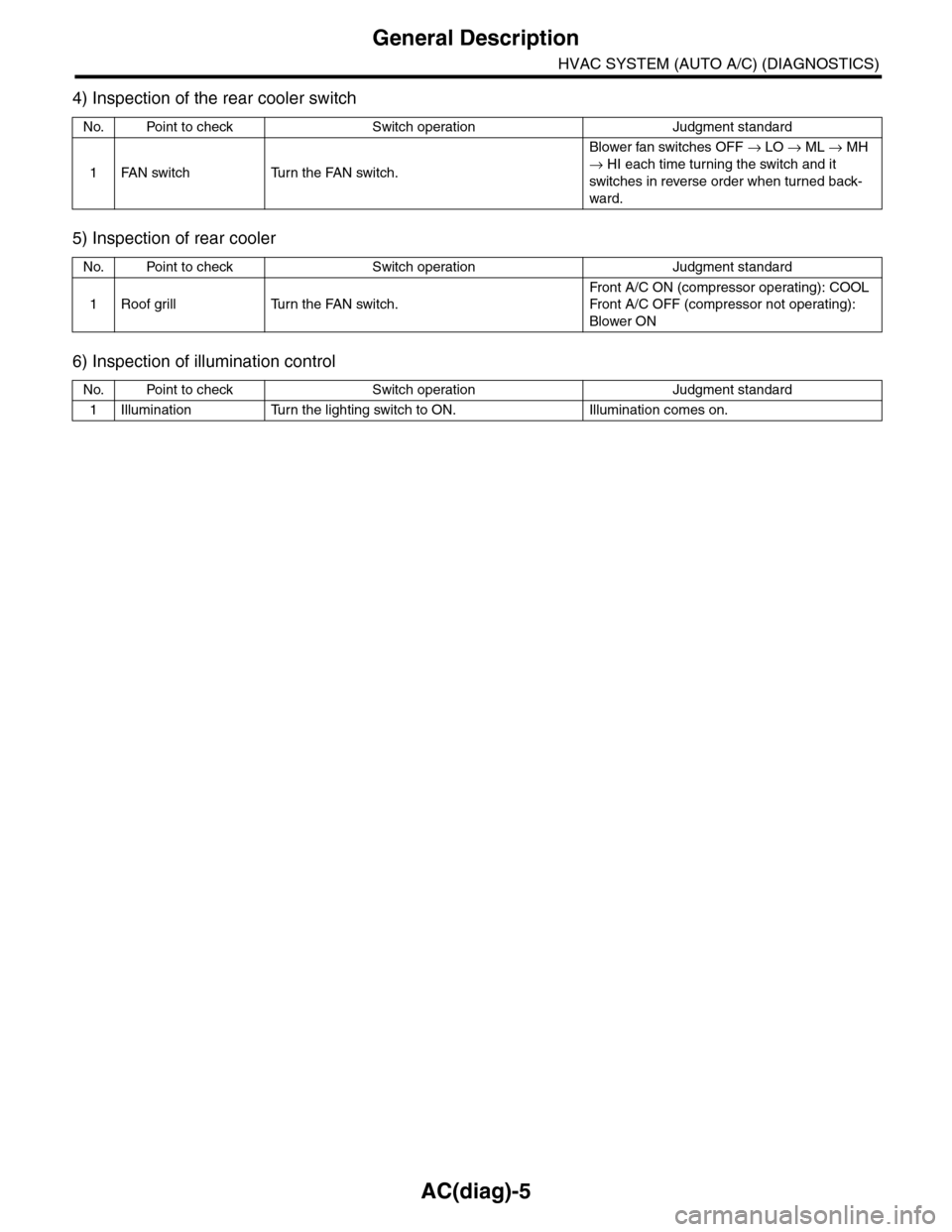
4) Inspection of the rear cooler switch
5) Inspection of rear cooler
6) Inspection of illumination control
No. Point to check Switch operation Judgment standard
1FAN switch Turn the FAN switch.
Blower fan switches OFF → LO → ML → MH
→ HI each time turning the switch and it
switches in reverse order when turned back-
ward.
No. Point to check Switch operation Judgment standard
1Roof grill Turn the FAN switch.
Fr on t A / C O N ( co mp r es so r op e rat i ng ) : COOL
Fr on t A / C O FF ( co mp r e ss or n ot o pe ra t in g) :
Blower ON
No. Point to check Switch operation Judgment standard
1Illumination Turn the lighting switch to ON. Illumination comes on.
Page 385 of 2453
AC(diag)-8
Auto A/C Control Module I/O Signal
HVAC SYSTEM (AUTO A/C) (DIAGNOSTICS)
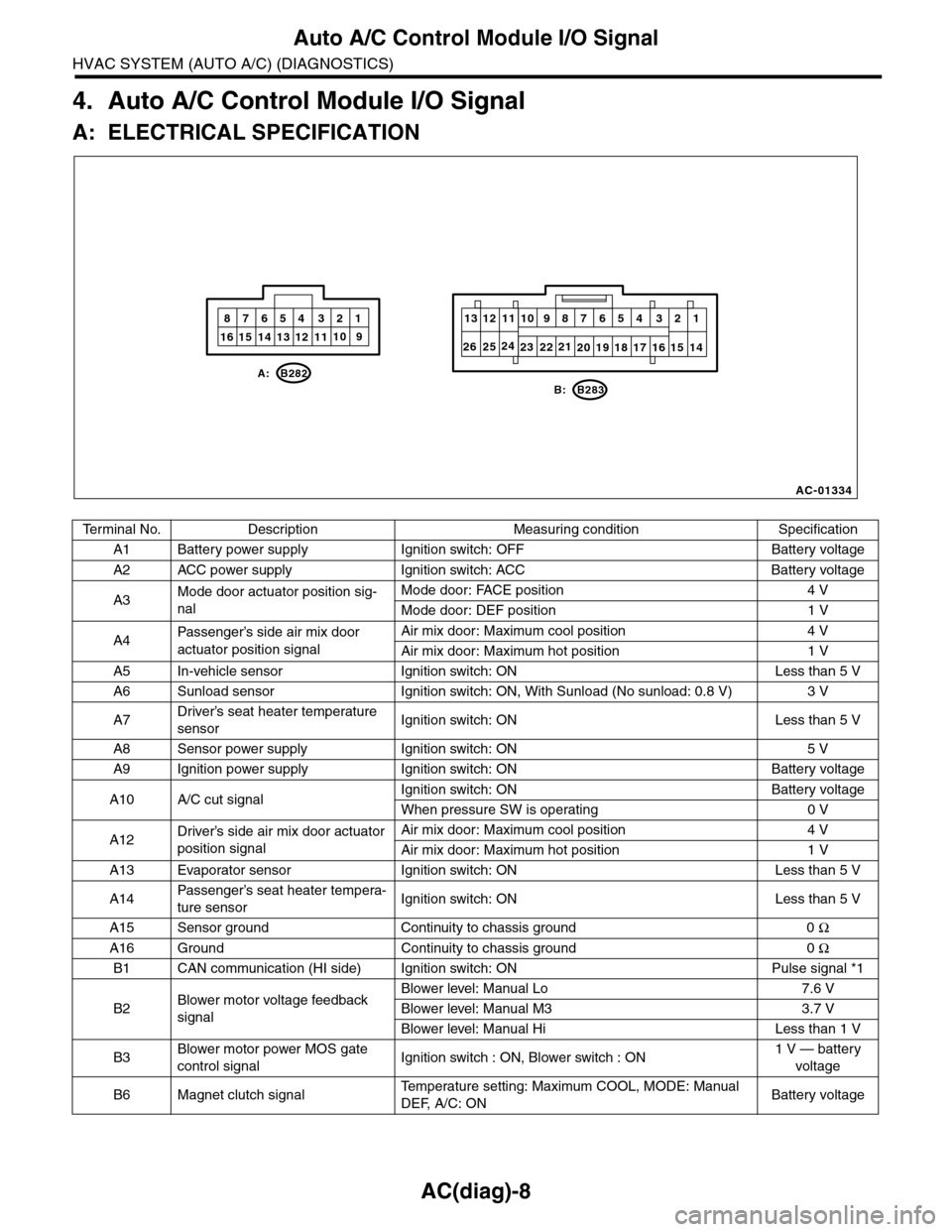
4. Auto A/C Control Module I/O Signal
A: ELECTRICAL SPECIFICATION
Te r m i n a l N o . D e s c r i p t i o n M e a s u r i n g c o n d i t i o n S p e c i f i c a t i o n
A1 Battery power supply Ignition switch: OFF Battery voltage
A2 ACC power supply Ignition switch: ACC Battery voltage
A3Mode door actuator position sig-
nal
Mode door: FACE position 4 V
Mode door: DEF position 1 V
A4Passenger’s side air mix door
actuator position signal
Air mix door: Maximum cool position 4 V
Air mix door: Maximum hot position 1 V
A5 In-vehicle sensor Ignition switch: ON Less than 5 V
A6 Sunload sensor Ignition switch: ON, With Sunload (No sunload: 0.8 V) 3 V
A7Driver’s seat heater temperature
sensorIgnition switch: ON Less than 5 V
A8 Sensor power supply Ignition switch: ON 5 V
A9 Ignition power supply Ignition switch: ON Battery voltage
A10 A/C cut signalIgnition switch: ON Battery voltage
When pressure SW is operating 0 V
A12Driver’s side air mix door actuator
position signal
Air mix door: Maximum cool position 4 V
Air mix door: Maximum hot position 1 V
A13 Evaporator sensor Ignition switch: ON Less than 5 V
A14Passenger’s seat heater tempera-
ture sensorIgnition switch: ON Less than 5 V
A15 Sensor ground Continuity to chassis ground 0 Ω
A16 Ground Continuity to chassis ground 0 Ω
B1 CAN communication (HI side) Ignition switch: ON Pulse signal *1
B2Blower motor voltage feedback
signal
Blower level: Manual Lo 7.6 V
Blower level: Manual M3 3.7 V
Blower level: Manual Hi Less than 1 V
B3Blower motor power MOS gate
control signalIgnition switch : ON, Blower switch : ON1 V — battery
voltage
B6 Magnet clutch signalTe m p e r a t u r e s e t t i n g : M a x i m u m C O O L , M O D E : M a n u a l
DEF, A/C: ONBattery voltage
AC-01334
10
20 19 18 17 16 15 14
13 12 11987654 321
1016 15 14 13 12 119
87654 321
B: B283
A: B282
232122242526
Page 441 of 2453
IDI-2
General Description
INSTRUMENTATION/DRIVER INFO
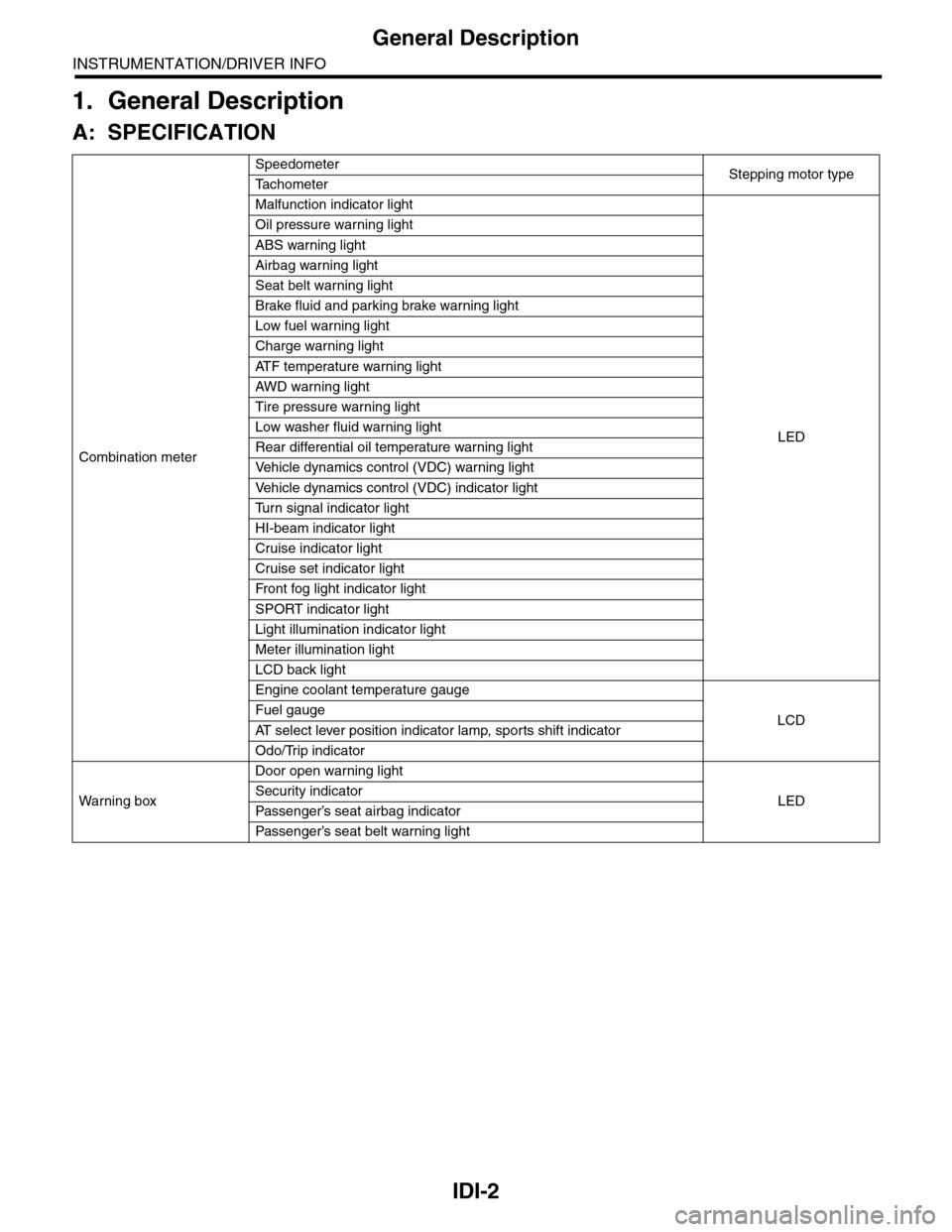
1. General Description
A: SPECIFICATION
Combination meter
SpeedometerStepping motor typeTa c h o m e t e r
Malfunction indicator light
LED
Oil pressure warning light
ABS warning light
Airbag warning light
Seat belt warning light
Brake fluid and parking brake warning light
Low fuel warning light
Charge warning light
AT F t e m p e r a t u r e w a r n i n g l i g h t
AW D war n in g l i gh t
Tire pressure warning light
Low washer fluid warning light
Rear differential oil temperature warning light
Ve h i c l e d y n a m i c s c o n t r o l ( V D C ) w a r n i n g l i g h t
Ve h i c l e d y n a m i c s c o n t r o l ( V D C ) i n d i c a t o r l i g h t
Tu r n s i g n a l i n d i c a t o r l i g h t
HI-beam indicator light
Cruise indicator light
Cruise set indicator light
Fr o nt fog li g ht i nd i ca to r li g ht
SPORT indicator light
Light illumination indicator light
Meter illumination light
LCD back light
Engine coolant temperature gauge
LCDFuel gauge
AT s e l e c t l e v e r p o s i t i o n i n d i c a t o r l a m p , s p o r t s s h i f t i n d i c a t o r
Odo/Trip indicator
Wa r ni n g b ox
Door open warning light
LEDSecurity indicator
Passenger’s seat airbag indicator
Passenger’s seat belt war ning light
Page 444 of 2453
IDI-5
Combination Meter System
INSTRUMENTATION/DRIVER INFO
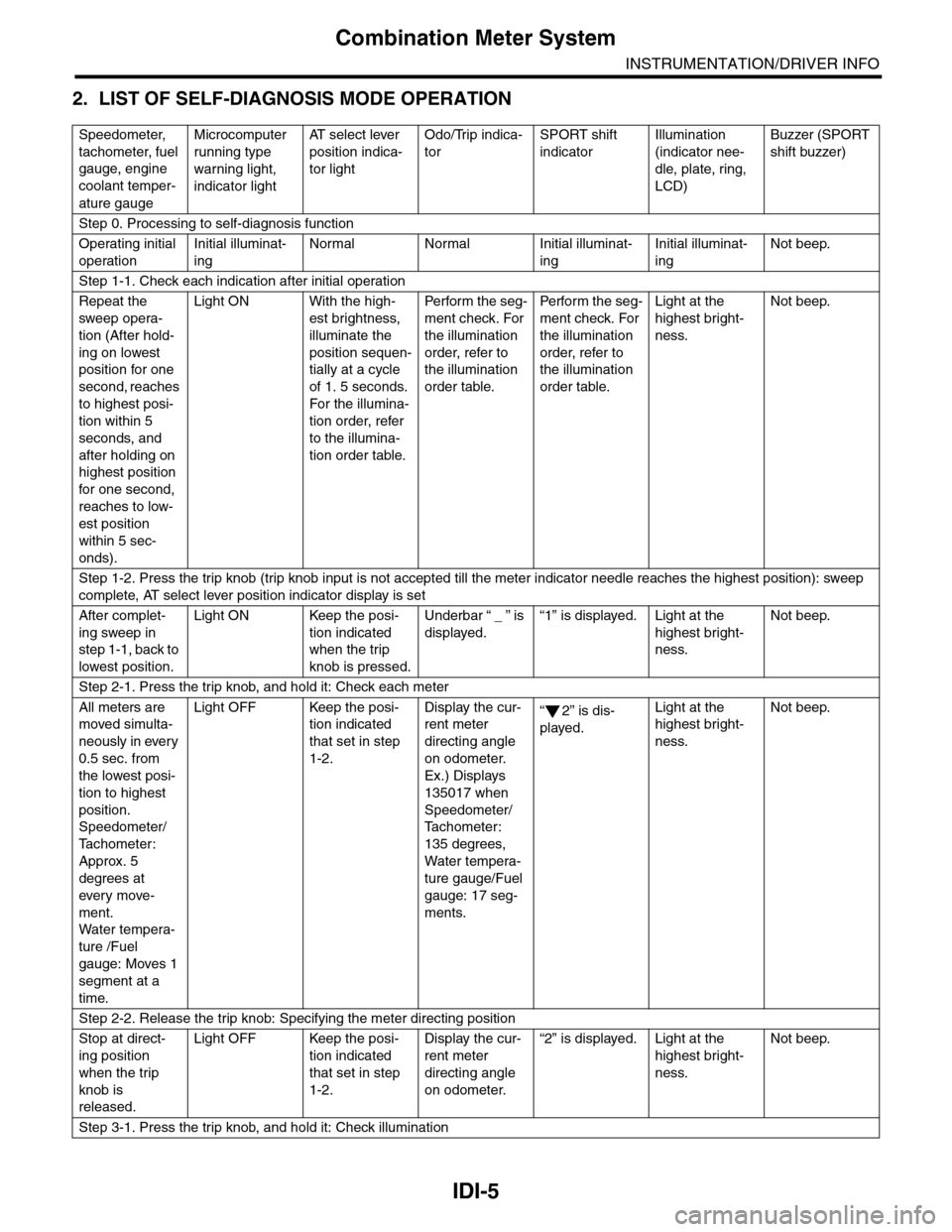
2. LIST OF SELF-DIAGNOSIS MODE OPERATION
Speedometer,
tachometer, fuel
gauge, engine
coolant temper-
ature gauge
Microcomputer
running type
warning light,
indicator light
AT s e l e c t l e v e r
position indica-
tor light
Odo/Trip indica-
tor
SPORT shift
indicator
Illumination
(indicator nee-
dle, plate, ring,
LCD)
Buzzer (SPORT
shift buzzer)
Step 0. Processing to self-diagnosis function
Operating initial
operation
Initial illuminat-
ing
Normal Normal Initial illuminat-
ing
Initial illuminat-
ing
Not beep.
Step 1-1. Check each indication after initial operation
Repeat the
sweep opera-
tion (After hold-
ing on lowest
position for one
second, reaches
to highest posi-
tion within 5
seconds, and
after holding on
highest position
for one second,
reaches to low-
est position
within 5 sec-
onds).
Light ON With the high-
est brightness,
illuminate the
position sequen-
tially at a cycle
of 1. 5 seconds.
For the illumina-
tion order, refer
to the illumina-
tion order table.
Pe r for m t he s eg -
ment check. For
the illumination
order, refer to
the illumination
order table.
Pe rfo r m t h e se g -
ment check. For
the illumination
order, refer to
the illumination
order table.
Light at the
highest bright-
ness.
Not beep.
Step 1-2. Press the trip knob (trip knob input is not accepted till the meter indicator needle reaches the highest position): sweep
complete, AT select lever position indicator display is set
After complet-
ing sweep in
step 1-1, back to
lowest position.
Light ON Keep the posi-
tion indicated
when the trip
knob is pressed.
Underbar “ _ ” is
displayed.
“1” is displayed. Light at the
highest bright-
ness.
Not beep.
Step 2-1. Press the trip knob, and hold it: Check each meter
All meters are
moved simulta-
neously in every
0.5 sec. from
the lowest posi-
tion to highest
position.
Speedometer/
Ta c h o m e t e r :
Approx. 5
degrees at
ever y move-
ment.
Wa t er t e mp er a-
ture /Fuel
gauge: Moves 1
segment at a
time.
Light OFF Keep the posi-
tion indicated
that set in step
1-2.
Display the cur-
rent meter
directing angle
on odometer.
Ex.) Displays
135017 when
Speedometer/
Ta c h o m e t e r :
135 degrees,
Water tempera-
ture gauge/Fuel
gauge: 17 seg-
ments.
“2” is dis-
played.
Light at the
highest bright-
ness.
Not beep.
Step 2-2. Release the trip knob: Specifying the meter directing position
Stop at direct-
ing position
when the trip
knob is
released.
Light OFF Keep the posi-
tion indicated
that set in step
1-2.
Display the cur-
rent meter
directing angle
on odometer.
“2” is displayed. Light at the
highest bright-
ness.
Not beep.
Step 3-1. Press the trip knob, and hold it: Check illumination
Page 445 of 2453
IDI-6
Combination Meter System
INSTRUMENTATION/DRIVER INFO
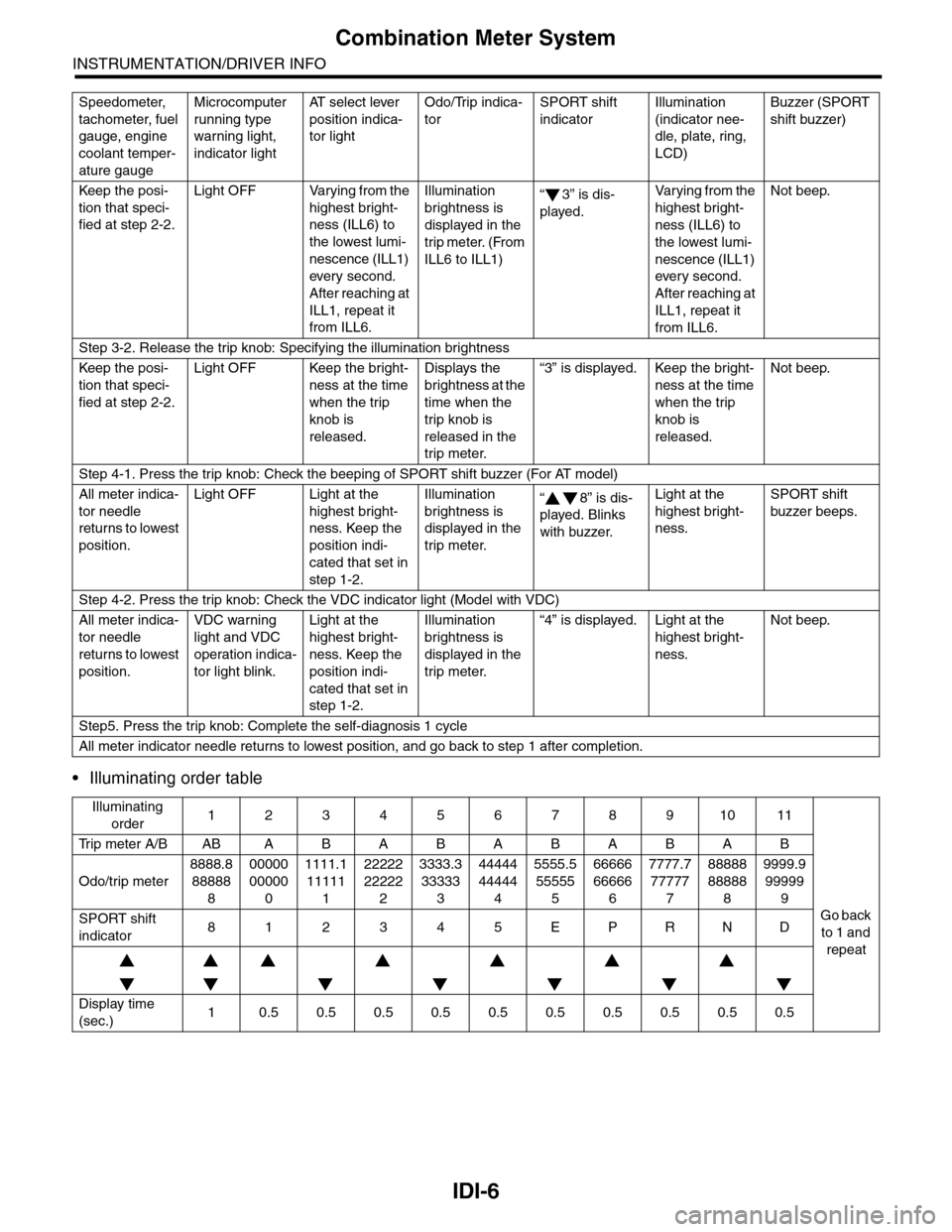
•Illuminating order table
Keep the posi-
tion that speci-
fied at step 2-2.
Light OFF Varying from the
highest bright-
ness (ILL6) to
the lowest lumi-
nescence (ILL1)
ever y second.
After reaching at
ILL1, repeat it
from ILL6.
Illumination
brightness is
displayed in the
trip meter. (From
ILL6 to ILL1)
“3” is dis-
played.
Va r y i n g f r o m t h e
highest bright-
ness (ILL6) to
the lowest lumi-
nescence (ILL1)
every second.
After reaching at
ILL1, repeat it
from ILL6.
Not beep.
Step 3-2. Release the trip knob: Specifying the illumination brightness
Keep the posi-
tion that speci-
fied at step 2-2.
Light OFF Keep the bright-
ness at the time
when the trip
knob is
released.
Displays the
brightness at the
time when the
trip knob is
released in the
trip meter.
“3” is displayed. Keep the bright-
ness at the time
when the trip
knob is
released.
Not beep.
Step 4-1. Press the trip knob: Check the beeping of SPORT shift buzzer (For AT model)
All meter indica-
tor needle
returns to lowest
position.
Light OFF Light at the
highest bright-
ness. Keep the
position indi-
cated that set in
step 1-2.
Illumination
brightness is
displayed in the
trip meter.
“8” is dis-
played. Blinks
with buzzer.
Light at the
highest bright-
ness.
SPORT shift
buzzer beeps.
Step 4-2. Press the trip knob: Check the VDC indicator light (Model with VDC)
All meter indica-
tor needle
returns to lowest
position.
VDC warning
light and VDC
operation indica-
tor light blink.
Light at the
highest bright-
ness. Keep the
position indi-
cated that set in
step 1-2.
Illumination
brightness is
displayed in the
trip meter.
“4” is displayed. Light at the
highest bright-
ness.
Not beep.
Step5. Press the trip knob: Complete the self-diagnosis 1 cycle
All meter indicator needle returns to lowest position, and go back to step 1 after completion.
Illuminating
order1234567891011
Tr i p m e t e r A / B A B A B A B A B A B A B
Go back
to 1 and
repeat
Odo/trip meter
8888.8
88888
8
00000
00000
0
1111.1
11111
1
22222
22222
2
3333.3
33333
3
44444
44444
4
5555.5
55555
5
66666
66666
6
7777.7
77777
7
88888
88888
8
9999.9
99999
9
SPORT shift
indicator812345EPRND
Display time
(sec.)10.50.50.50.50.50.50.50.50.50.5
Speedometer,
tachometer, fuel
gauge, engine
coolant temper-
ature gauge
Microcomputer
running type
warning light,
indicator light
AT s e l e c t l e v e r
position indica-
tor light
Odo/Trip indica-
tor
SPORT shift
indicator
Illumination
(indicator nee-
dle, plate, ring,
LCD)
Buzzer (SPORT
shift buzzer)
Page 452 of 2453
IDI-13
Speedometer
INSTRUMENTATION/DRIVER INFO
4. Speedometer
A: SPECIFICATION
Since the meter case assembly cannot be disas-
sembled, do not remove or inspect the speedome-
ter alone. (Do not remove the cover on the back
side.)
Page 453 of 2453
IDI-14
Tachometer
INSTRUMENTATION/DRIVER INFO
5. Tachometer
A: SPECIFICATION
Since the meter case assembly cannot be disas-
sembled, do not remove or inspect the tachometer
alone. (Do not remove the cover on the back side.)