engine TOYOTA 86 2017 Service Manual
[x] Cancel search | Manufacturer: TOYOTA, Model Year: 2017, Model line: 86, Model: TOYOTA 86 2017Pages: 428, PDF Size: 5.25 MB
Page 148 of 428
1482-1. Driving procedures
Manual mode driving
To enter manual mode, shift the shift lever to the M position.
While the upshift/downshift indicator light is illuminated, gears can be
selected by operating the shift leve r or paddle shift switches, allowing
you to drive in the gear of your choosing. Even if upshifting operations are performed, if vehicle speed is too low for
the requested gear, the gear will not change.
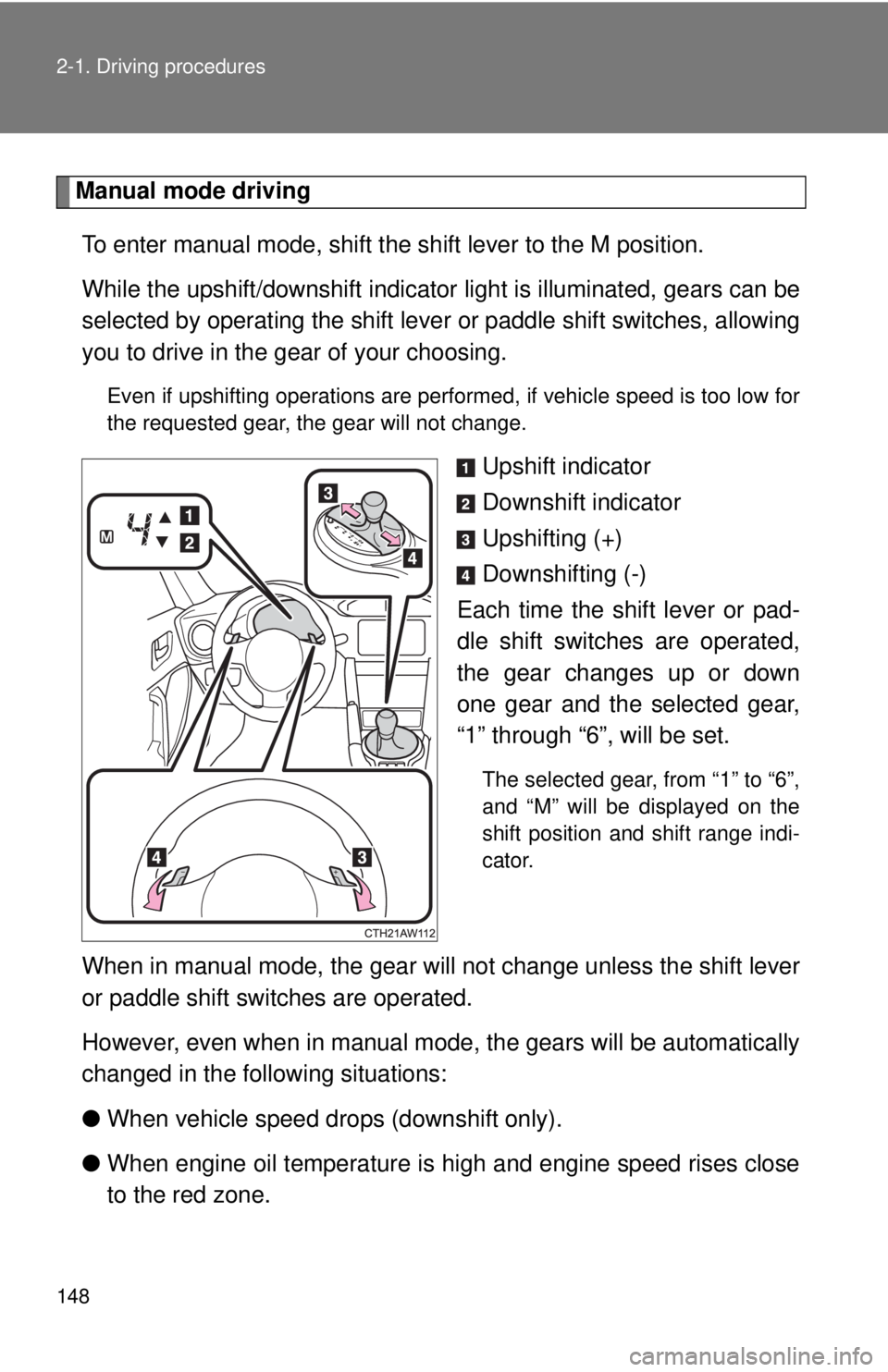
Upshift indicator
Downshift indicator
Upshifting (+)
Downshifting (-)
Each time the shift lever or pad-
dle shift switches are operated,
the gear changes up or down
one gear and the selected gear,
“1” through “6”, will be set. The selected gear, from “1” to “6”,
and “M” will be displayed on the
shift position and shift range indi-
cator.
When in manual mode, the gear w ill not change unless the shift lever
or paddle shift switches are operated.
However, even when in manual mode, t he gears will be automatically
changed in the following situations:
● When vehicle speed drops (downshift only).
● When engine oil temperature is high and engine speed rises close
to the red zone.
Page 149 of 428

1492-1. Driving procedures
2
When driving ■ When moving the shift lever out of P
If the shift lever is pushed sideways before the brake pedal is depressed,
shift lever operation may not be possible. Depress the brake pedal before
shifting the shift lever out of P.
■ Downshifting restrictions warning buzzer
If downshifting operations are performed at a vehicle speed by which down-
shifting is not possible (when downshifting will cause the engine speed to
enter the red zone), a buzzer will sound to warn the driver that downshifting
cannot be performed.
■ When driving with cruise control activated
Downshifting can be performed even when using cruise control. After down-
shifting, the set speed continues. ( → P. 148, 150)
■ Sport mode
● In sport mode, lower gears are used and gears change at a higher
engine speed.
● If sport mode is changed to while the shift lever is in the M position, the
“SPORT” indicator will come on but sport mode controls will not be car-
ried out. Shift the shift lever to the D position.
● Sport mode cannot be changed to when driving with cruise control acti-
vated.
■ Snow mode
To prevent slipping, 1 st
gear cannot be selected when in snow mode.
■ Sport mode and snow mode automatic deactivation
In the following situations, the driving mode is automatically deactivated:
● When the engine is turned off after dr iving in sport mode or snow mode.
● When cruise control is activated while driving in sport mode.
■ If the shift lever cannot be shifted from P
→ P. 339
Page 150 of 428
1502-1. Driving procedures
■ Automatic gear selection when the vehicle is stopped
When the vehicle is idling at high rpm in order to warm up, and the vehicle is
on a slippery road, the transmission may automatically shift to 2 nd
gear for
stopping and starting off.
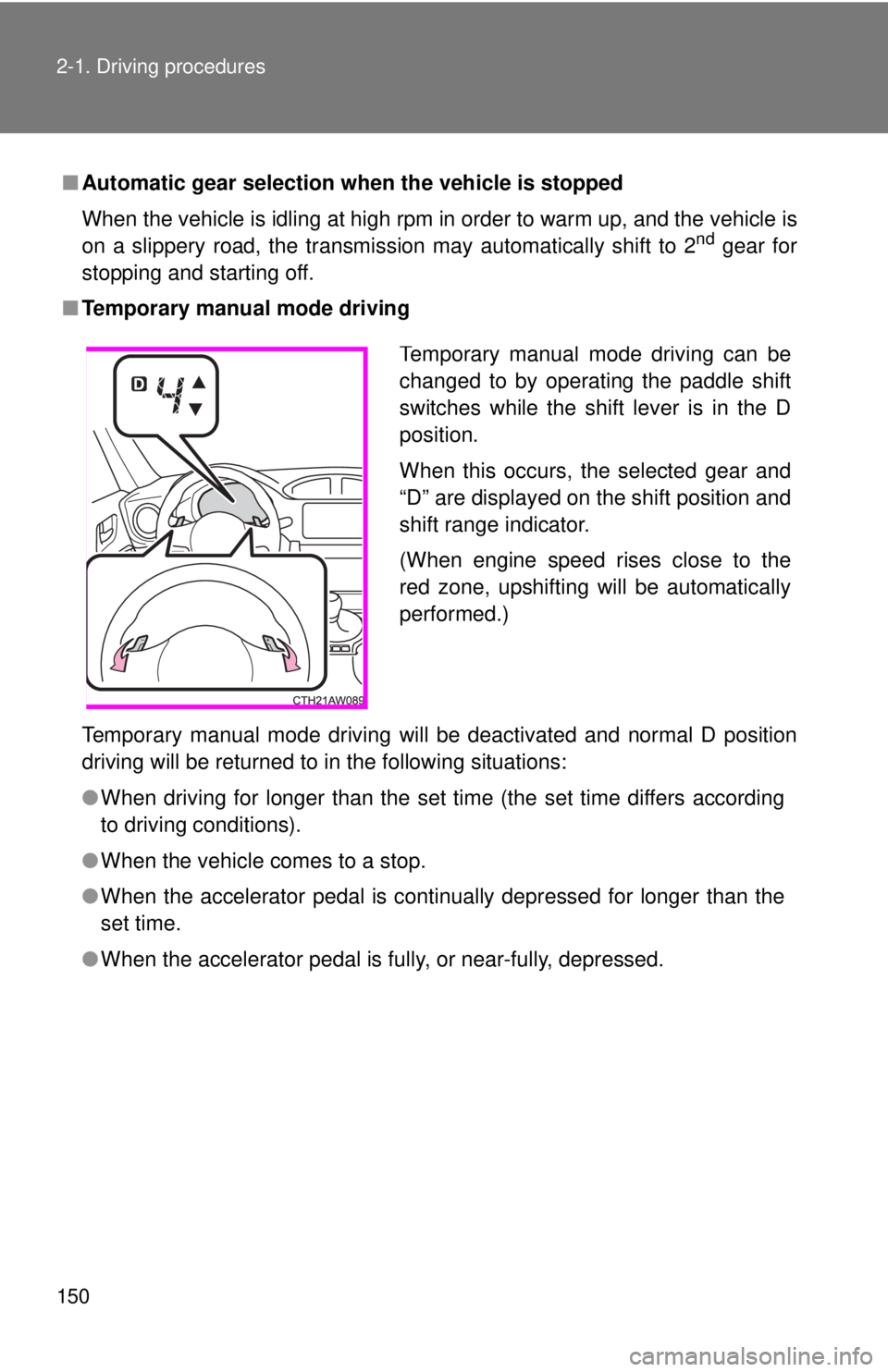
■ Temporary manual mode driving
Temporary manual mode driving will be deactivated and normal D position
driving will be returned to in the following situations:
● When driving for longer than the set time (the set time differs according
to driving conditions).
● When the vehicle comes to a stop.
● When the accelerator pedal is continually depressed for longer than the
set time.
● When the accelerator pedal is fully, or near-fully, depressed. Temporary manual mode driving can be
changed to by operating the paddle shift
switches while the shift lever is in the D
position.
When this occurs, the selected gear and
“D” are displayed on the shift position and
shift range indicator.
(When engine speed rises close to the
red zone, upshifting will be automatically
performed.)
Page 155 of 428
1552-1. Driving procedures
2
When driving
Turn signal lever
■ Turn signals can be operated when
The engine switch is in the “ON” position.
■ If the indicators flash faster than usual
Check that a light bulb in the turn signal lights has not burned out.The turn signal lever can be used to show the following intentions of
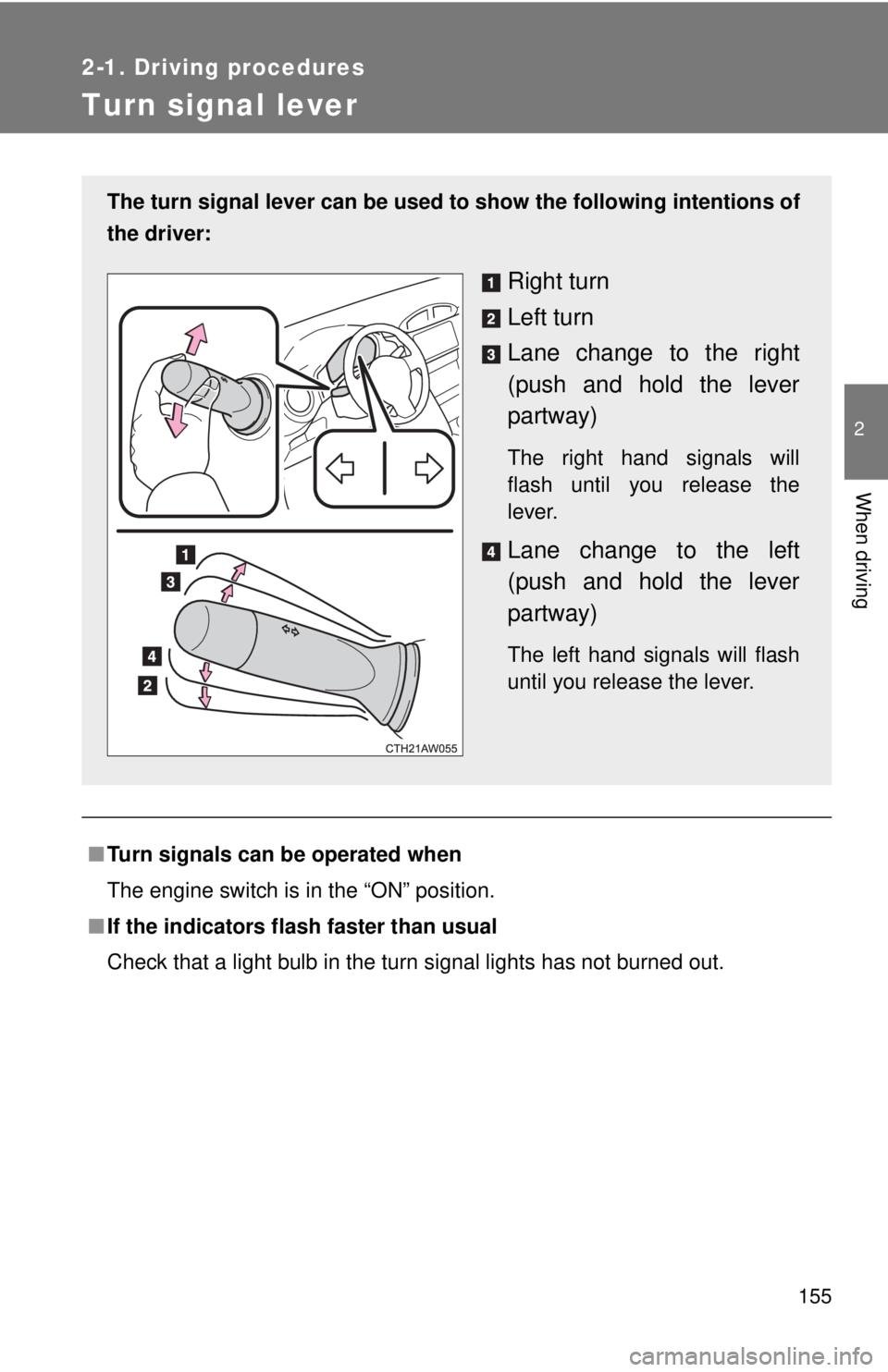
the driver:
Right turn
Left turn
Lane change to the right
(push and hold the lever
partway) The right hand signals will
flash until you release the
lever.
Lane change to the left
(push and hold the lever
partway) The left hand signals will flash
until you release the lever.
Page 158 of 428
1582-2. Instrument cluster
Gauges and meters
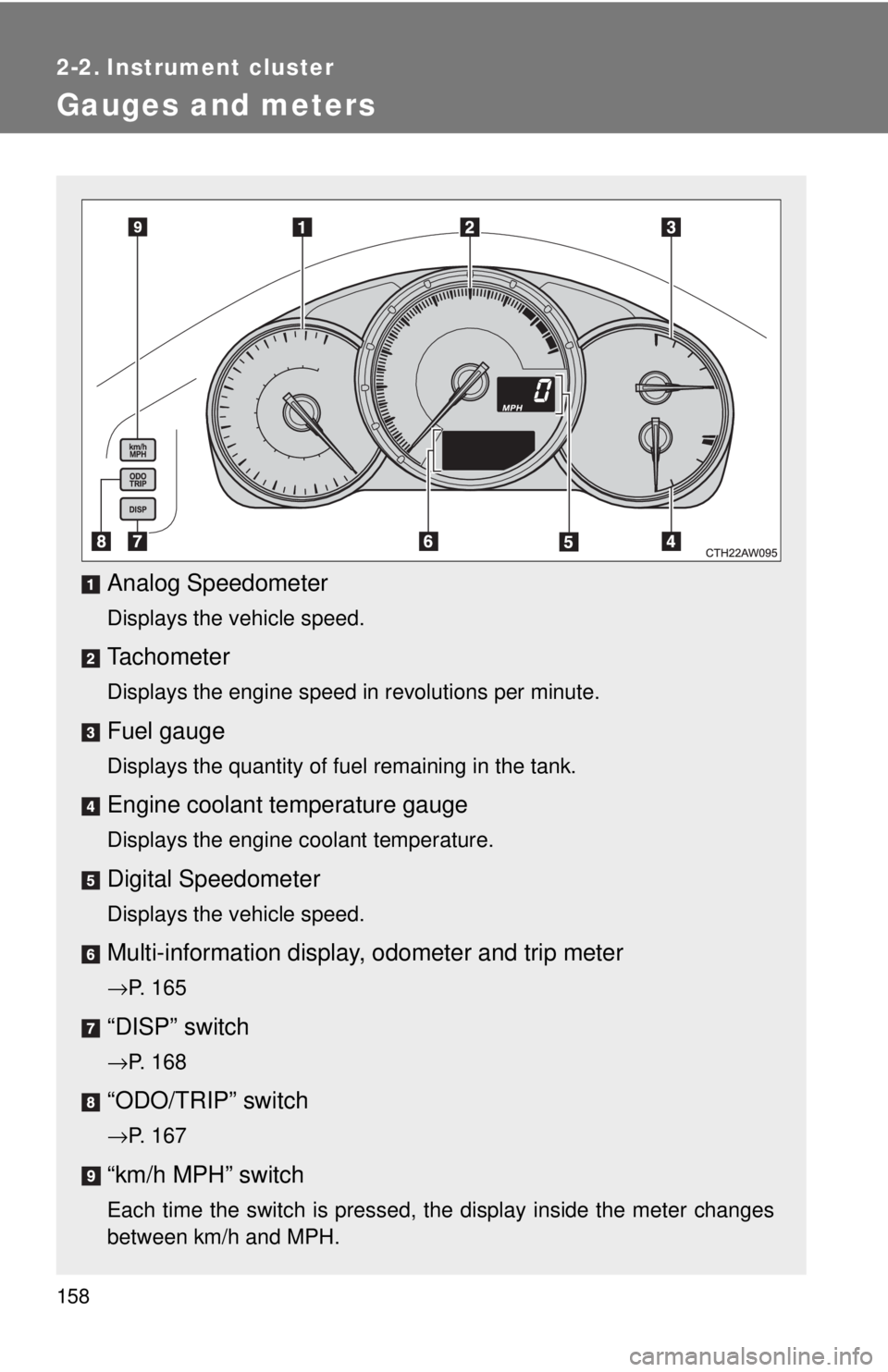
Analog Speedometer Displays the vehicle speed.
Tachometer Displays the engine speed in revolutions per minute.
Fuel gauge Displays the quantity of fuel remaining in the tank.
Engine coolant temperature gauge Displays the engine coolant temperature.
Digital Speedometer Displays the vehicle speed.
Multi-information display, odometer and trip meter→ P. 165
“DISP” switch
→ P. 168
“ODO/TRIP” switch
→ P. 167
“km/h MPH” switch
Each time the switch is pressed, the display inside the meter changes
between km/h and MPH.
Page 159 of 428
1592-2. Instrument cluster
2
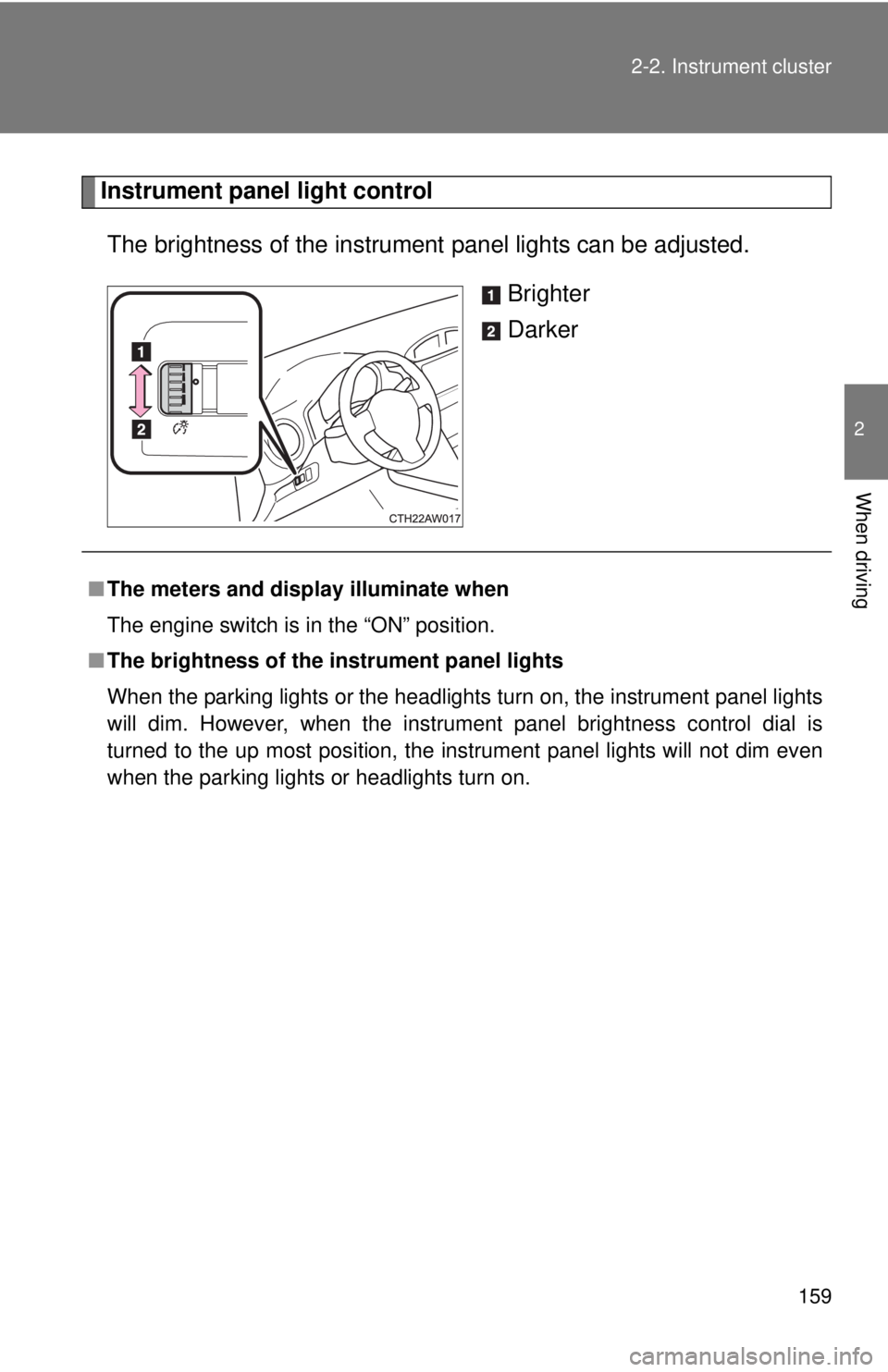
When driving Instrument panel light control
The brightness of the instrument panel lights can be adjusted.
Brighter
Darker
■ The meters and display illuminate when
The engine switch is in the “ON” position.
■ The brightness of the instrument panel lights
When the parking lights or the headlights turn on, the instrument panel lights
will dim. However, when the instrument panel brightness control dial is
turned to the up most position, the instrument panel lights will not dim even
when the parking lights or headlights turn on.
Page 160 of 428

1602-2. Instrument cluster
NOTICE■ To prevent damage to the engine and its components
● Do not let the indicator needle of the tachometer enter the red zone, which
indicates the maximum engine speed.
● The engine may be overheating if the temperature gauge is in the red
zone (H). In this case, immediately stop the vehicle in a safe place, and
check the engine after it has cooled completely. (
→ P. 345)
Page 163 of 428
1632-2. Instrument cluster
2
When driving
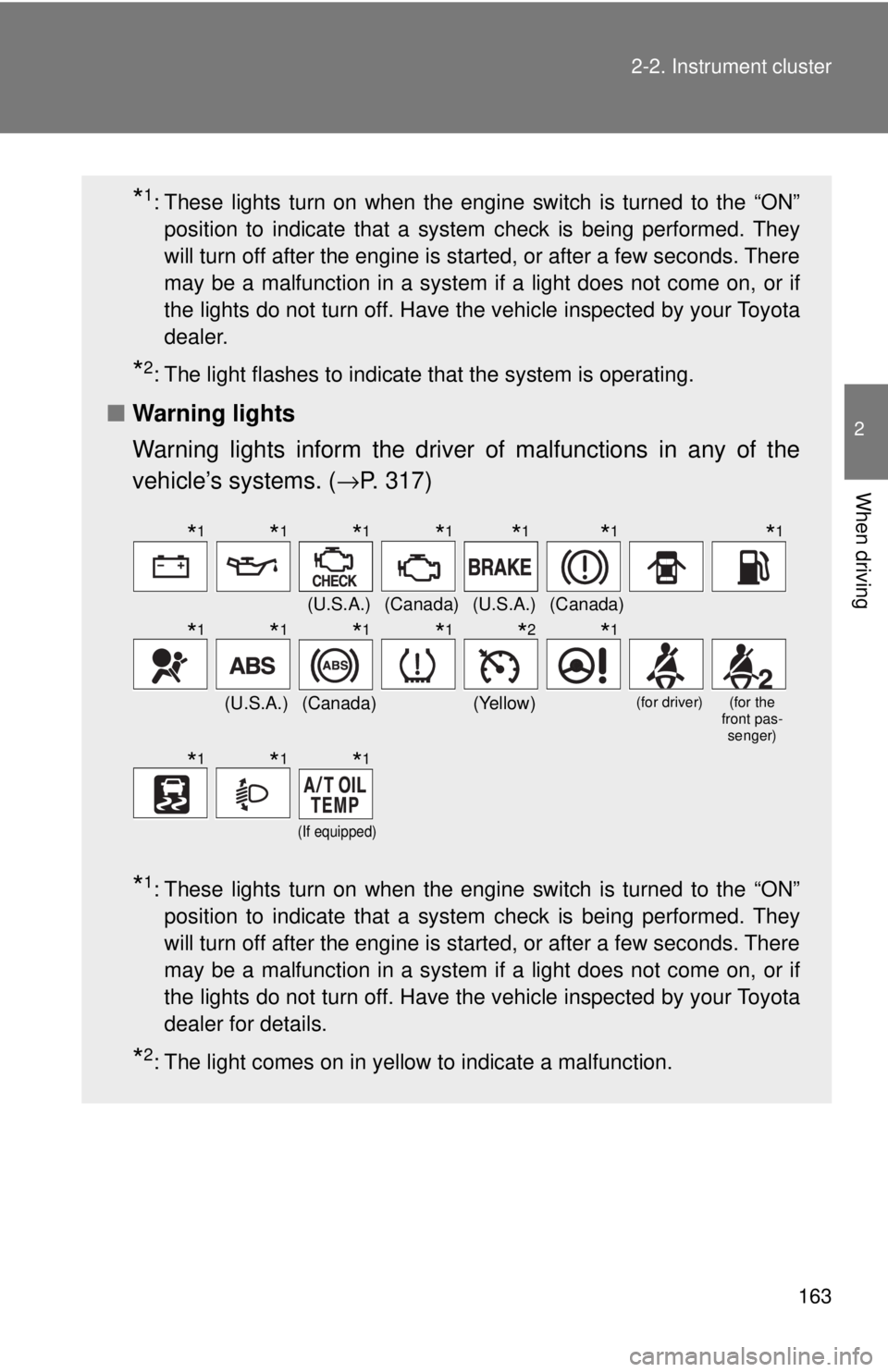
* 1
: These lights turn on when the engine switch is turned to the “ON”
position to indicate that a system check is being performed. They
will turn off after the engine is started, or after a few seconds. There
may be a malfunction in a system if a light does not come on, or if
the lights do not turn off. Have the vehicle inspected by your Toyota
dealer.
* 2
: The light flashes to indicate that the system is operating.
■ Warning lights
Warning lights inform the driver of malfunctions in any of the
vehicle’s systems. ( → P. 317)
* 1
: These lights turn on when the engine switch is turned to the “ON”
position to indicate that a system check is being performed. They
will turn off after the engine is started, or after a few seconds. There
may be a malfunction in a system if a light does not come on, or if
the lights do not turn off. Have the vehicle inspected by your Toyota
dealer for details.
* 2
: The light comes on in yellow to indicate a malfunction. (U.S.A.) (Canada) (U.S.A.) (Canada)
(U.S.A.) (Canada) (Yellow) (for driver) (for the
front pas-
senger)
(If equipped)
* 1
* 1
* 1
* 1
* 1
* 1
* 1
* 1
* 1
* 1
* 1
* 2
* 1
* 1
* 1
* 1
Page 164 of 428

1642-2. Instrument cluster
WARNING■ If a safety system warning light does not come on
Should a safety system light such as the ABS and SRS warning light not
come on when you start the engine, this could mean that these systems are
not available to help protect you in an accident, which could result in death
or serious injury. Have the vehicle inspected by your Toyota dealer immedi-
ately if this occurs.
Page 167 of 428
1672-2. Instrument cluster
2
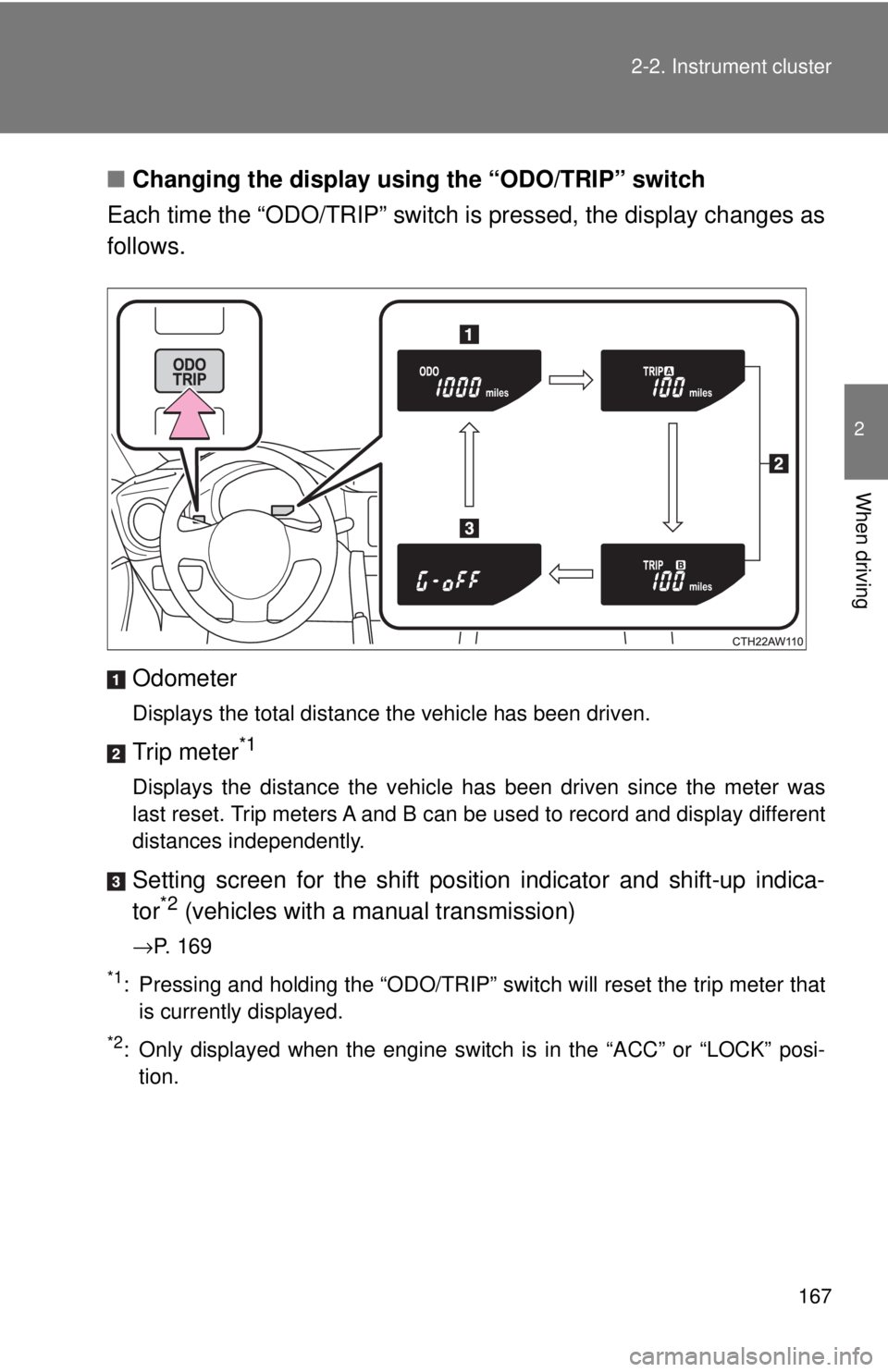
When driving ■ Changing the display using the “ODO/TRIP” switch
Each time the “ODO/TRIP” switch is pressed, the display changes as
follows.
Odometer Displays the total distance the vehicle has been driven.
Trip meter *1
Displays the distance the vehicle has been driven since the meter was
last reset. Trip meters A and B can be used to record and display different
distances independently.
Setting screen for the shift position indicator and shift-up indica-
tor *2
(vehicles with a manual transmission)→ P. 169*1
: Pressing and holding the “ODO/TRIP” switch will reset the trip meter that
is currently displayed.*2
: Only displayed when the engine switch is in the “ACC” or “LOCK” posi-
tion.