charging TOYOTA AVALON 2019 Owners Manual (in English)
[x] Cancel search | Manufacturer: TOYOTA, Model Year: 2019, Model line: AVALON, Model: TOYOTA AVALON 2019Pages: 536, PDF Size: 9.43 MB
Page 5 of 536

5
1
8 7 5 4
3
2
9
6
5-4. Other interior featuresOther interior features ....... 330
• Sun visors ..................... 330
• Vanity mirrors................ 330
• Power outlet .................. 331
• USB charging ports....... 332
• Wireless charger ........... 334
• Armrest ......................... 343
• Assist grips ................... 343
• Coat hooks.................... 344
Garage door opener .......... 345
Safety Connect.................. 352 6-1. Maintenance and care
Cleaning and protecting the vehicle exterior .......... 360
Cleaning and protecting the vehicle interior ........... 363
6-2. Maintenance Maintenance requirements ................... 366
General maintenance ........ 368
Emission inspection and maintenance (I/M)
programs ......................... 372
6-3. Do-it-yourself maintenance
Do-it-yourself service precautions ...................... 373
Hood .................................. 375
Positioning a floor jack....... 376
Engine compartment ......... 377
Tires................................... 387
Tire inflation pressure ........ 401
Wheels............................... 404
Air conditioning filter .......... 406
Electronic key battery ........ 408
Checking and replacing fuses ................................ 410
Light bulbs ......................... 4136Maintenance and care
Page 74 of 536

741-2. Theft deterrent system
■Alarm-operated door lock
In the following cases, depending on the situation, the door ma y automatically
lock to prevent improper entry into the vehicle:
● When a person remaining in the vehicle unlocks the door and the alarm is
activated.
● While the alarm is activated, a person remaining in the vehicle unlocks the
door.
● When recharging or replacing the battery
NOTICE
■To ensure the system operates correctly
Do not modify or remove the system. If modified or removed, the proper
operation of the system cannot be guaranteed.
Page 77 of 536
772. Instrument cluster
2
Instrument cluster
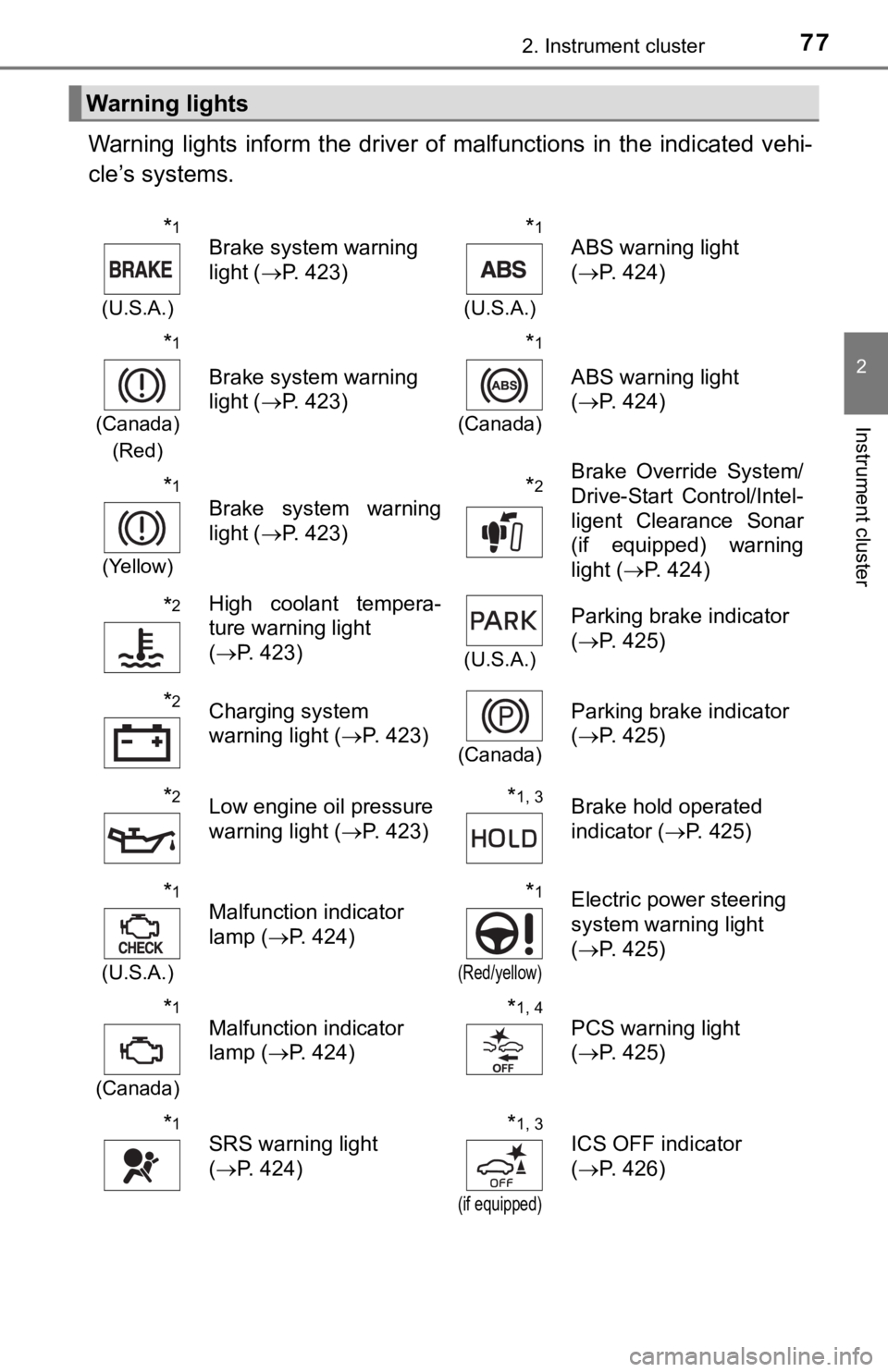
Warning lights inform the driver of malfunctions in the indicated vehi-
cle’s systems.
Warning lights
*1
(U.S.A.)
Brake system warning
light ( P. 423)*1
(U.S.A.)
ABS warning light
(P. 424)
*1
(Canada)
(Red)
Brake system warning
light ( P. 423)
*1
(Canada)
ABS warning light
(P. 424)
*1
(Yellow)
Brake system warning
light ( P. 423)*2Brake Override System/
Drive-Start Control/Intel-
ligent Clearance Sonar
(if equipped) warning
light (P. 424)
*2High coolant tempera-
ture warning light
(P. 423)
(U.S.A.)
Parking brake indicator
(P. 425)
*2Charging system
warning light ( P. 423)
(Canada)
Parking brake indicator
(P. 425)
*2Low engine oil pressure
warning light ( P. 423)*1, 3Brake hold operated
indicator ( P. 425)
*1
(U.S.A.)
Malfunction indicator
lamp ( P. 424)*1
(Red/yellow)
Electric power steering
system warning light
(P. 425)
*1
(Canada)
Malfunction indicator
lamp ( P. 424)*1, 4PCS warning light
(P. 425)
*1SRS warning light
(P. 424)*1, 3
(if equipped)
ICS OFF indicator
(P. 426)
Page 113 of 536
1133-1. Key information
3
Operation of each component
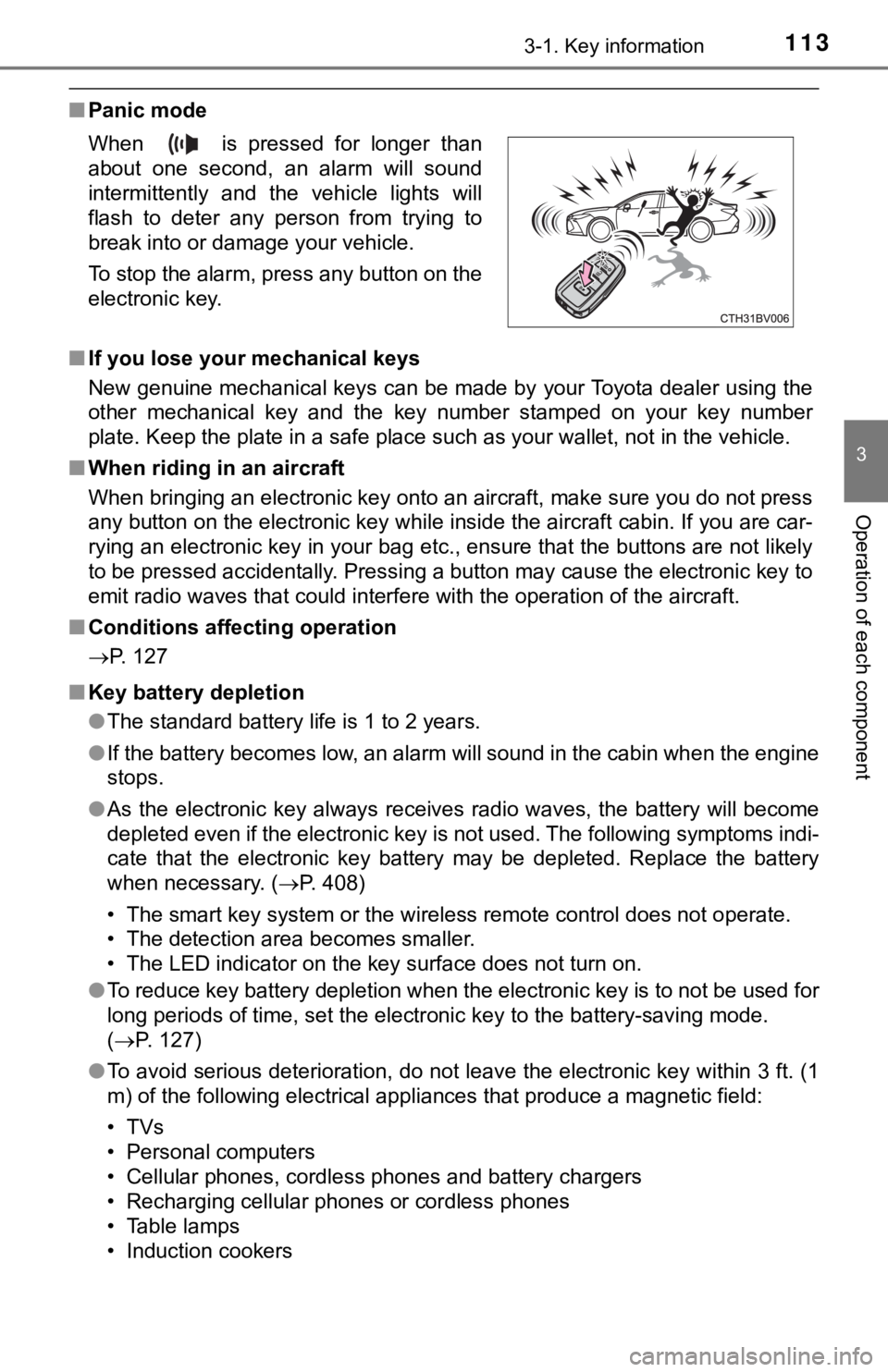
■Panic mode
■ If you lose your mechanical keys
New genuine mechanical keys can be made by your Toyota dealer u sing the
other mechanical key and the key number stamped on your key num ber
plate. Keep the plate in a safe place such as your wallet, not in the vehicle.
■ When riding in an aircraft
When bringing an electronic key onto an aircraft, make sure you do not press
any button on the electronic key while inside the aircraft cabi n. If you are car-
rying an electronic key in your bag etc., ensure that the butto ns are not likely
to be pressed accidentally. Pressing a button may cause the electronic key to
emit radio waves that could interfere with the operation of the aircraft.
■ Conditions affecting operation
P. 127
■ Key battery depletion
●The standard battery life is 1 to 2 years.
● If the battery becomes low, an alarm will sound in the cabin wh en the engine
stops.
● As the electronic key always receives radio waves, the battery will become
depleted even if the electronic key is not used. The following symptoms indi-
cate that the electronic key battery may be depleted. Replace the battery
when necessary. ( P. 408)
• The smart key system or the wireless remote control does not o perate.
• The detection area becomes smaller.
• The LED indicator on the key surface does not turn on.
● To reduce key battery depletion when the electronic key is to not be used for
long periods of time, set the electronic key to the battery-sav ing mode.
( P. 127)
● To avoid serious deterioration, do not leave the electronic key within 3 ft. (1
m) of the following electrical appliances that produce a magnet ic field:
•TVs
• Personal computers
• Cellular phones, cordless phones and battery chargers
• Recharging cellular phones or cordless phones
• Table lamps
• Induction cookers
When is pressed for longer than
about one second, an alarm will sound
intermittently and the vehicle lights will
flash to deter any person from trying to
break into or damage your vehicle.
To stop the alarm, press any button on the
electronic key.
Page 309 of 536

309
5Interior features
5-1. Using the air conditioning system
and defogger
Automatic air conditioning system............................. 310
Heated steering wheel/ seat heaters/
seat ventilators ................ 317
5-2. Using the interior lights Interior lights list ................ 320
• Interior light ................... 321
• Personal lights .............. 321
• Ambient lights ............... 322
5-3. Using the storage features
List of storage features ..... 323
• Glove box...................... 324
• Console box .................. 324
• Bottle holders ................ 325
• Cup holders .................. 326
• Auxiliary boxes.............. 327
• Open tray ...................... 328
Trunk features ................... 329 5-4. Other interior features
Other interior features ....... 330
• Sun visors ..................... 330
• Vanity mirrors................ 330
• Power outlet .................. 331
• USB charging ports....... 332
• Wireless charger ........... 334
• Armrest ......................... 343
• Assist grips ................... 343
• Coat hooks.................... 344
Garage door opener.......... 345
Safety Connect ................. 352
Page 332 of 536
3325-4. Other interior features
The USB charging ports are used to supply 2.1 A of electricity at 5 V
to external devices (power consumption of 10.5 W).
The USB charging ports are for charging only. They are not desi gned
for data transfer or other purposes.
Depending on the external device, it may not charge properly. R efer to
the manual included with the dev ice before using a USB charging
port.
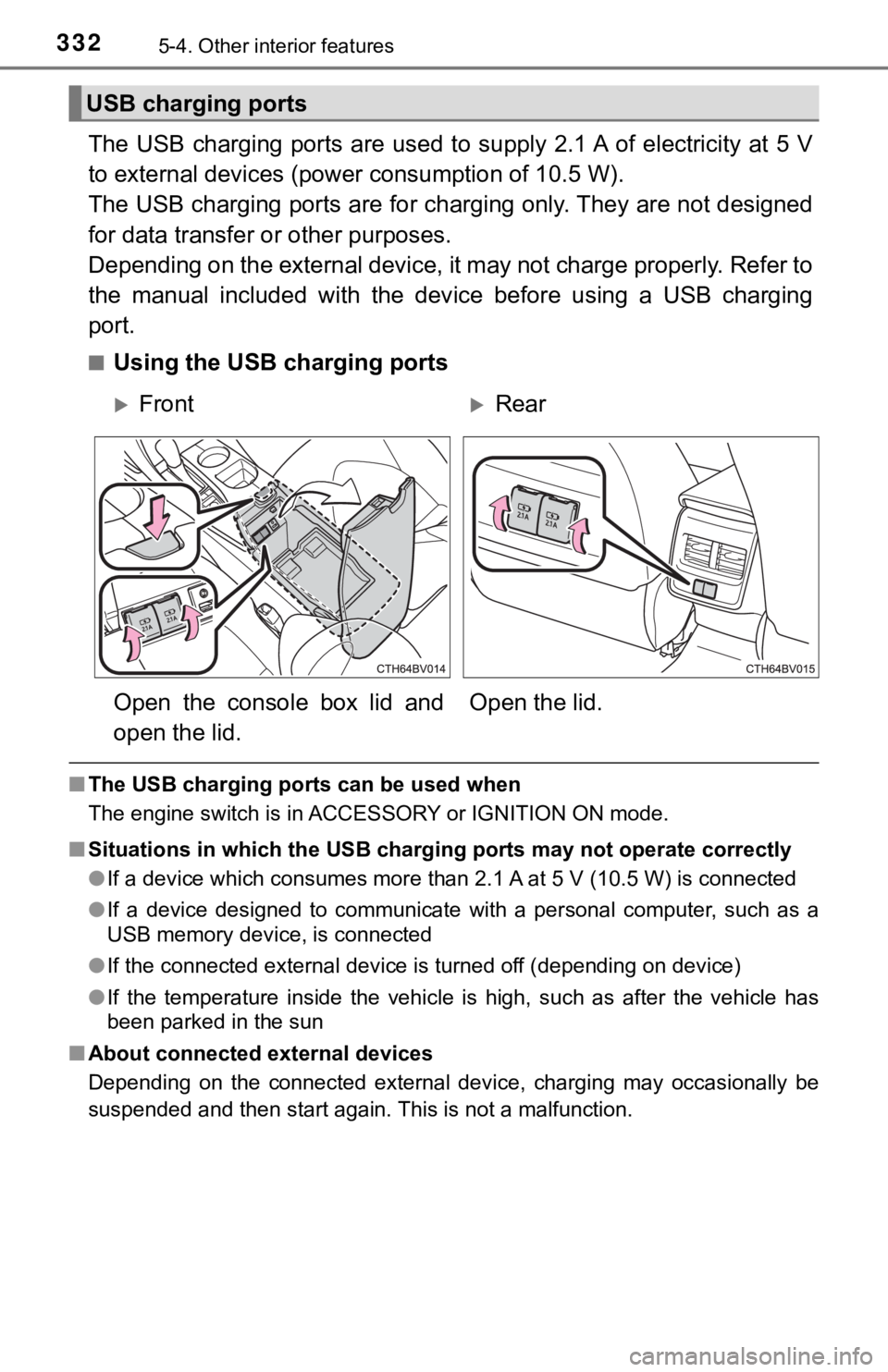
■Using the USB charging ports
■ The USB charging ports can be used when
The engine switch is in ACCESSORY or IGNITION ON mode.
■ Situations in which the USB charg ing ports may not operate correctly
● If a device which consumes more than 2.1 A at 5 V (10.5 W) is connected
● If a device designed to communicate with a personal computer, s uch as a
USB memory device, is connected
● If the connected external device is turned off (depending on de vice)
● If the temperature inside the vehicle is high, such as after the vehicle has
been parked in the sun
■ About connected external devices
Depending on the connected external device, charging may occasi onally be
suspended and then start again. This is not a malfunction.
USB charging ports
FrontRear
Open the console box lid and
open the lid. Open the lid.
Page 333 of 536
3335-4. Other interior features
5
Interior features
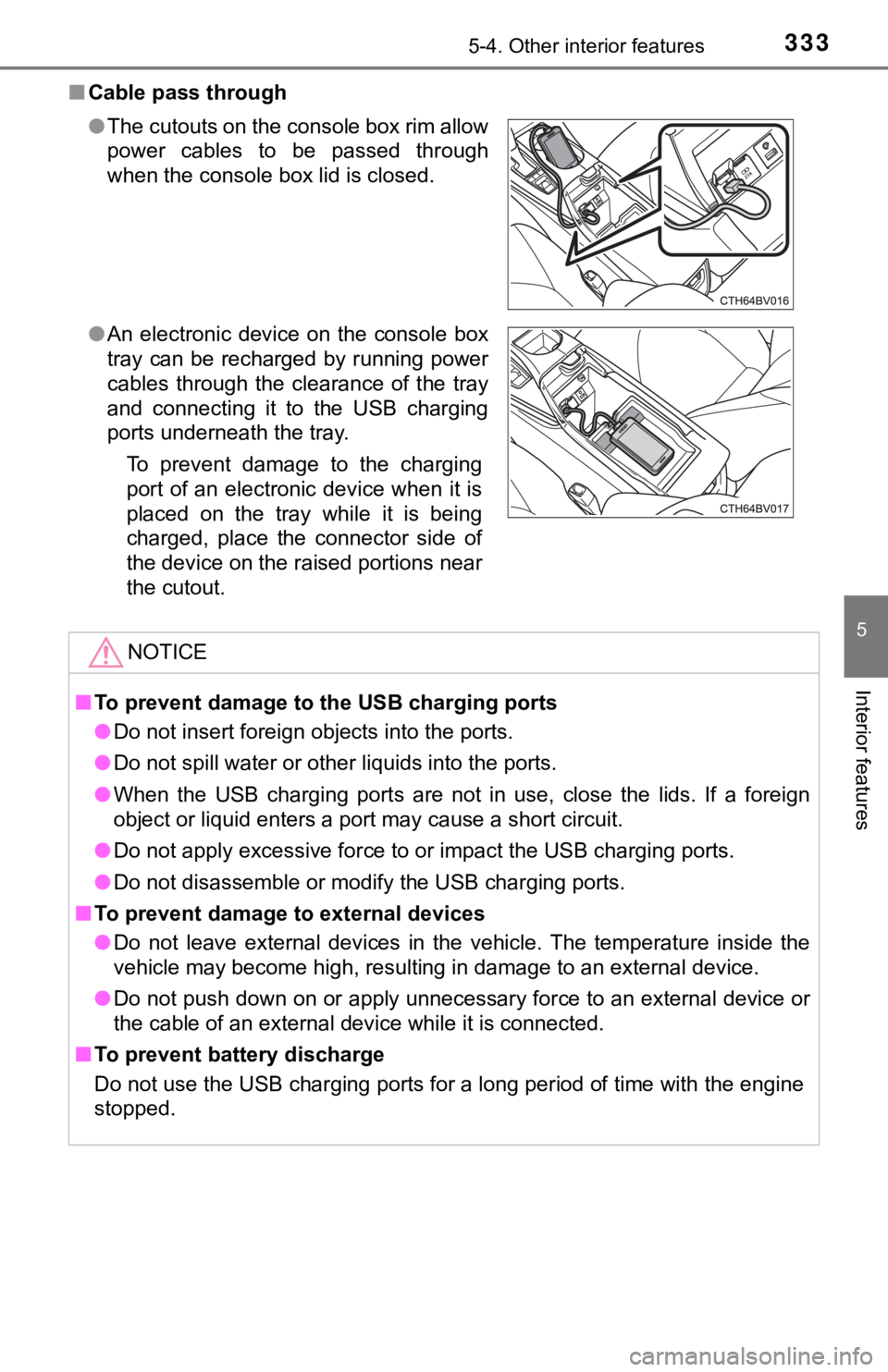
■Cable pass through
●The cutouts on the console box rim allow
power cables to be passed through
when the console box lid is closed.
● An electronic device on the console box
tray can be recharged by running power
cables through the clearance of the tray
and connecting it to the USB charging
ports underneath the tray.
To prevent damage to the charging
port of an electronic device when it is
placed on the tray while it is being
charged, place the connector side of
the device on the raised portions near
the cutout.
NOTICE
■To prevent damage to the USB charging ports
● Do not insert foreign objects into the ports.
● Do not spill water or other liquids into the ports.
● When the USB charging ports are not in use, close the lids. If a foreign
object or liquid enters a port may cause a short circuit.
● Do not apply excessive force to or impact the USB charging port s.
● Do not disassemble or modify the USB charging ports.
■ To prevent damage to external devices
● Do not leave external devices in the vehicle. The temperature i nside the
vehicle may become high, resulting in damage to an external dev ice.
● Do not push down on or apply unnecessary force to an external device or
the cable of an external device while it is connected.
■ To prevent battery discharge
Do not use the USB charging ports for a long period of time wit h the engine
stopped.
Page 334 of 536
3345-4. Other interior features
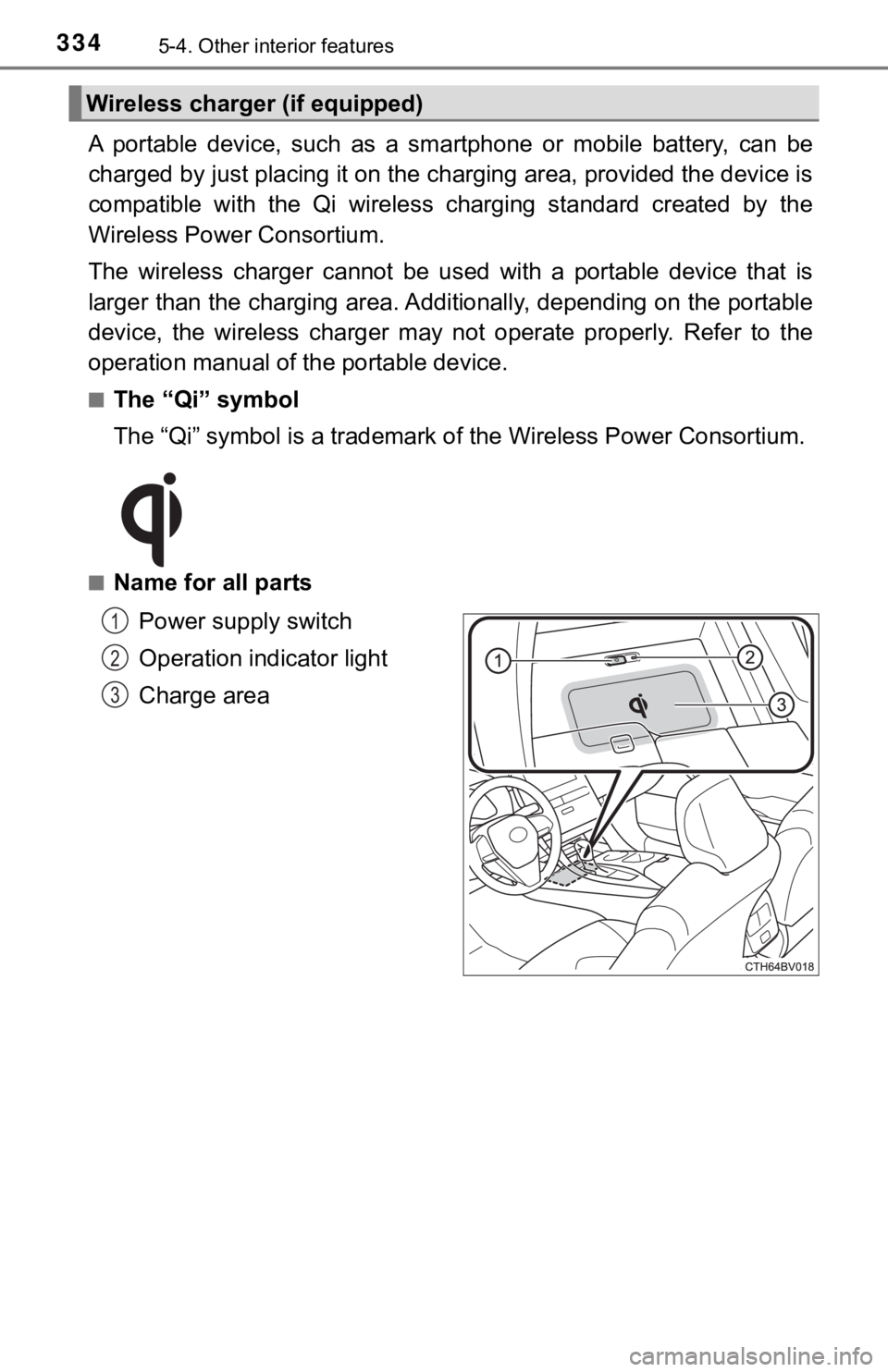
A portable device, such as a smartphone or mobile battery, can be
charged by just placing it on th e charging area, provided the d evice is
compatible with the Qi wireless charging standard created by th e
Wireless Power Consortium.
The wireless charger cannot be used with a portable device that is
larger than the charging area. Additionally, depending on the p ortable
device, the wireless charger may not operate properly. Refer to the
operation manual of the portable device.
■The “Qi” symbol
The “Qi” symbol is a trademark of the Wireless Power Consortium .
■Name for all parts
Power supply switch
Operation indicator light
Charge area
Wireless charger (if equipped)
1
2
3
Page 335 of 536
3355-4. Other interior features
5
Interior features
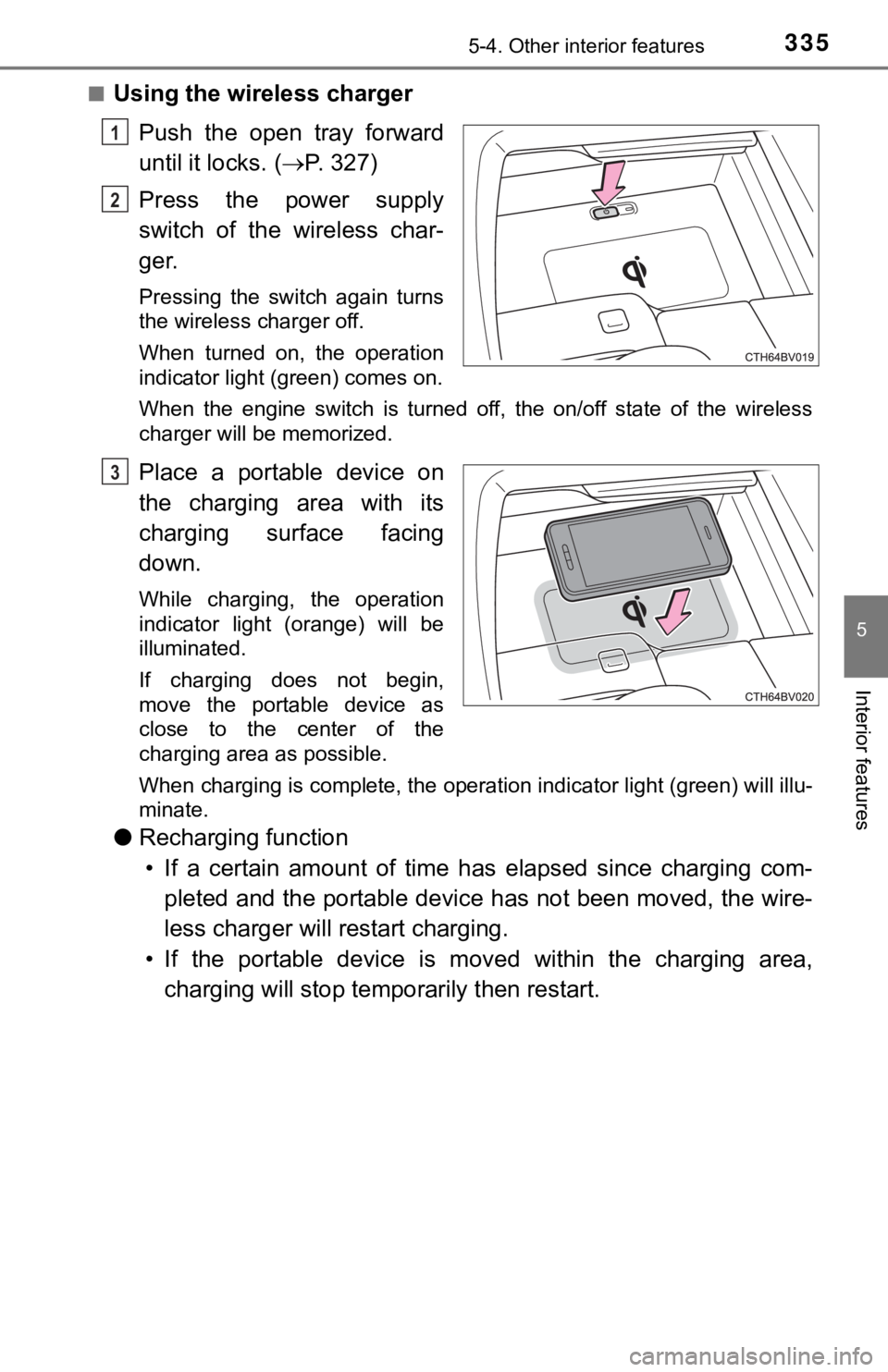
■Using the wireless charger
Push the open tray forward
until it locks. ( P. 3 2 7 )
Press the power supply
switch of the wireless char-
ger.
Pressing the switch again turns
the wireless charger off.
When turned on, the operation
indicator light (green) comes on.
When the engine switch is turned off, the on/off state of the wireless
charger will be memorized.
Place a portable device on
the charging area with its
charging surface facing
down.
While charging, the operation
indicator light (orange) will be
illuminated.
If charging does not begin,
move the portable device as
close to the center of the
charging area as possible.
When charging is complete, the operation indicator light (green ) will illu-
minate.
● Recharging function
• If a certain amount of time has elapsed since charging com- pleted and the portable device has not been moved, the wire-
less charger will restart charging.
• If the portable device is mov ed within the charging area,
charging will stop tempo rarily then restart.
1
2
3
Page 336 of 536
3365-4. Other interior features
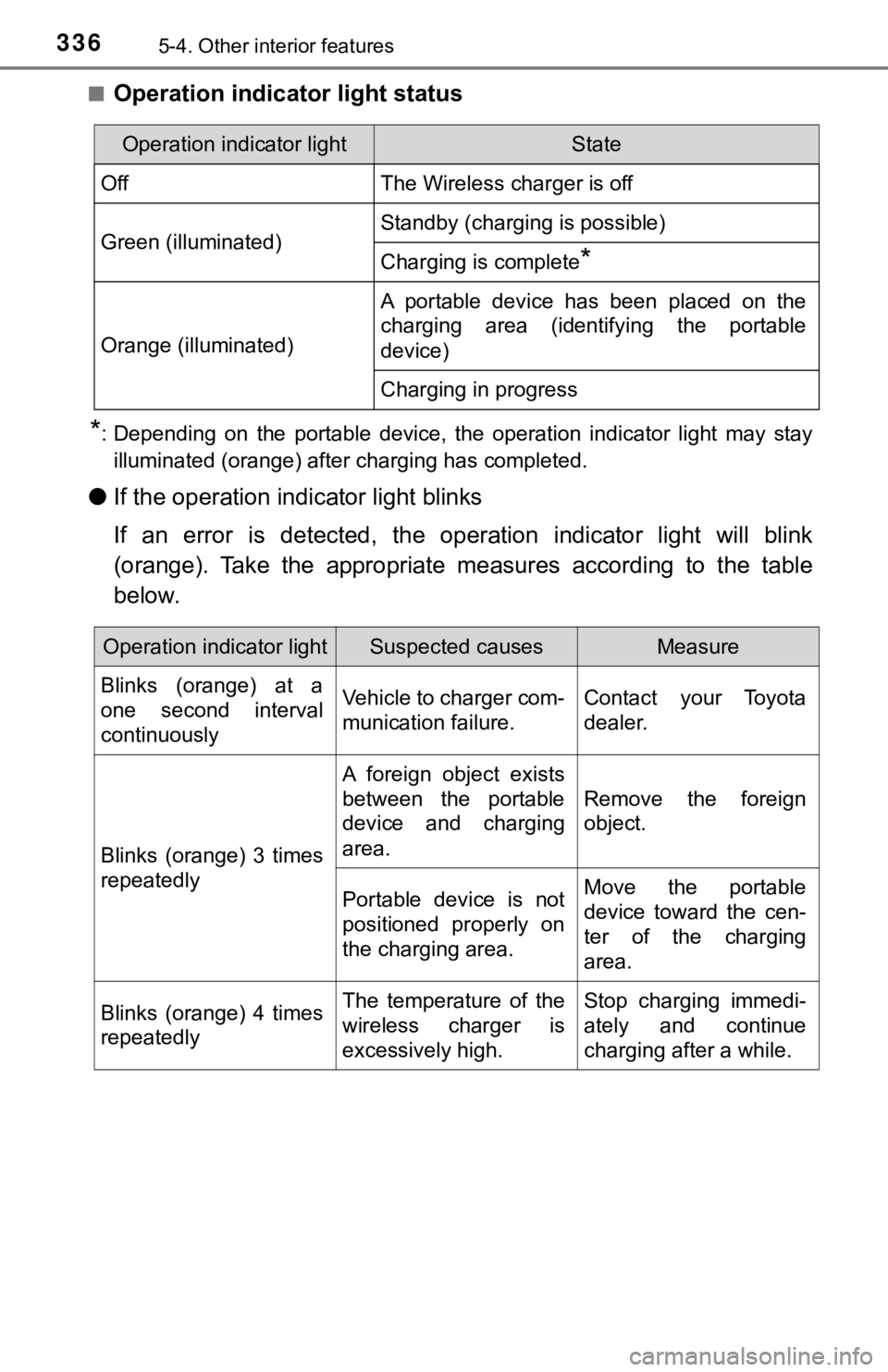
■Operation indicator light status
*: Depending on the portable device, the operation indicator light may stay
illuminated (orange) after charging has completed.
● If the operation indi cator light blinks
If an error is detected, the operation indicator light will bli nk
(orange). Take the appropriate measures according to the table
below.
Operation indicator lightState
OffThe Wireless charger is off
Green (illuminated)Standby (charging is possible)
Charging is complete*
Orange (illuminated)
A portable device has been placed on the
charging area (identifying the portable
device)
Charging in progress
Operation indicator lightSuspected causesMeasure
Blinks (orange) at a
one second interval
continuously Vehicle to charger com-
munication failure.
Contact your Toyota
dealer.
Blinks (orange) 3 times
repeatedly A foreign object exists
between the portable
device and charging
area.
Remove the foreign
object.
Portable device is not
positioned properly on
the charging area. Move the portable
device toward the cen-
ter of the charging
area.
Blinks (orange) 4 times
repeatedly The temperature of the
wireless charger is
excessively high.Stop charging immedi-
ately and continue
charging after a while.