ECO mode TOYOTA AVALON 2021 (in English) Owner's Manual
[x] Cancel search | Manufacturer: TOYOTA, Model Year: 2021, Model line: AVALON, Model: TOYOTA AVALON 2021Pages: 548, PDF Size: 13.4 MB
Page 187 of 548

1874-2. Driving procedures
4
Driving
■Steering lock motor overheating prevention
To prevent the steering lock motor from overheating, the motor may be sus-
pended if the engine is turned on and off repeatedly in a short period of time.
In this case, refrain from operating the engine. After about 10 seconds, the
steering lock motor will resume functioning.
■When a message requesting the smart key system be inspected is dis-
played on the multi-information display
The system may be malfunctioning. Have the vehicle inspected by your
Toyota dealer immediately.
■If the electronic key battery is depleted
P. 415
■Operation of the engine switch
●If the switch is not pressed shortly and firmly, the engine switch mode may
not change or the engine may not start.
●If attempting to restart the engine immediately after turning the engine
switch off, the engine may not start in some cases. After turning the engine
switch off, wait a few seconds before restarting the engine.
■If the smart key system has been deactivated in a customized setting
P. 463
WARNING
■When starting the engine
Always start the engine while sitting in the driver’s seat. Do not depress the
accelerator pedal while starting the engine under any circumstances.
Doing so may cause an accident resulting in death or serious injury.
■Caution while driving
If engine failure occurs while the vehicle is moving, do not lock or open the
doors until the vehicle reaches a safe and complete stop. Activation of the
steering lock in this circumstance may lead to an accident, resulting in
death or serious injury.
■Stopping the engine in an emergency
●If you want to stop the engine in an emergency while driving the vehicle,
press and hold the engine switch for more than 2 seconds, or press it
briefly 3 times or more in succession. (P. 425)
However, do not touch the engine switch while driving except in an emer-
gency. Turning the engine off while driving will not cause loss of steering
or braking control, but the power assist to these systems will be lost. This
will make it more difficult to steer and brake, so you should pull over and
stop the vehicle as soon as it is safe to do so.
●If the engine switch is operated while the vehicle is running, a warning
message will be shown on the multi-information display and a buzzer
sounds.
●When restarting the engine after it was turned off while driving, shift the
shift lever to N and press the engine switch.
Page 188 of 548
1884-2. Driving procedures
WARNING
■When parking
Exhaust gases include harmful carbon monoxide (CO), which is colorless
and odorless. Observe the following precautions.
Failure to do so may cause exhaust gases to enter the vehicle and may
lead to an accident caused by light-headedness, or may lead to death or a
serious health hazard.
●If the vehicle is in a poorly ventilated area or a closed area, such as a
garage, stop the engine.
●Do not leave the vehicle with the engine running for a long time. If such a
situation cannot be avoided, park the vehicle in an open space and ensure
that exhaust fumes do not enter the vehicle interior.
●Do not leave the engine running in an area with snow build-up, or where it
is snowing. If snowbanks build up around the vehicle while the engine is
running, exhaust gases may collect and enter the vehicle.
NOTICE
■To prevent battery discharge
●Do not leave the engine switch in ACCESSORY or IGNITION ON mode
for long periods of time without the engine running.
●If “ACCESSORY” or “IGNITION ON” is displayed on the multi-information
display, the engine switch is not off. Exit the vehicle after turning the
engine switch off.
●Do not stop the engine when the shift lever is in a position other than P. If
the engine is stopped in another shift lever position, the engine switch will
not be turned off but instead be turned to ACCESSORY mode. If the vehi-
cle is left in ACCESSORY mode, battery discharge may occur.
■When starting the engine
●Do not race a cold engine.
●If the engine becomes difficult to start or stalls frequently, have your vehi-
cle checked by your Toyota dealer immediately.
■Symptoms indicating a malfunction with the engine switch
If the engine switch seems to be operating somewhat differently than usual,
such as the switch sticking slightly, there may be a malfunction. Contact
your Toyota dealer immediately.
Page 190 of 548
1904-2. Driving procedures
*1: Shifting to the D position allows the system to select a gear suitable for the
driving conditions. Setting the shift lever to the D position is recommended
for normal driving.
*2: Selecting shift ranges using S mode restricts the upper limit of the possible
gear ranges, controls engine braking force, and prevents unnecessary
upshifting.
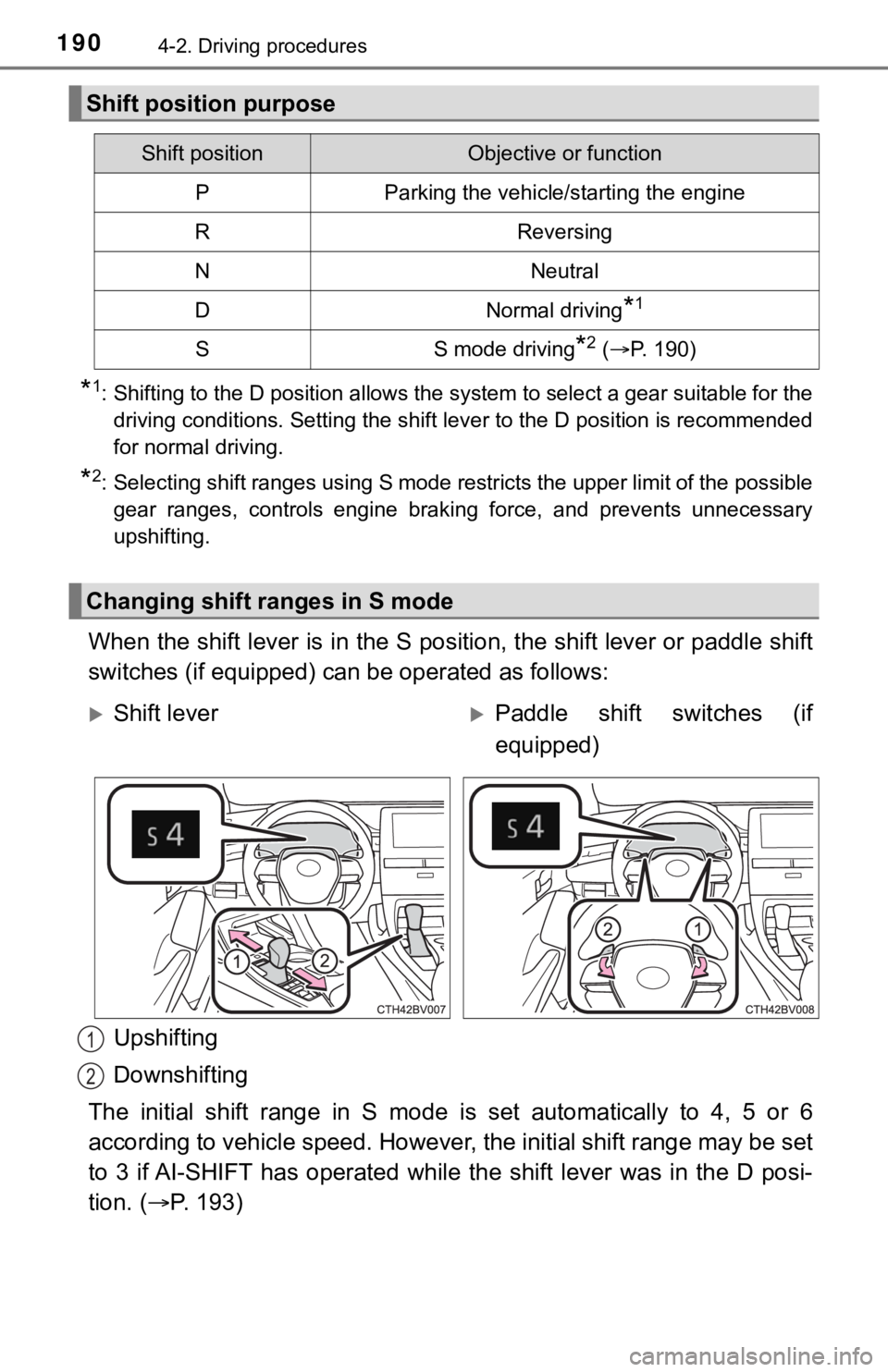
When the shift lever is in the S position, the shift lever or paddle shift
switches (if equipped) can be operated as follows:
Upshifting
Downshifting
The initial shift range in S mode is set automatically to 4, 5 or 6
according to vehicle speed. However, the initial shift range may be set
to 3 if AI-SHIFT has operated while the shift lever was in the D posi-
tion. (P. 193)
Shift position purpose
Shift positionObjective or function
PParking the vehicle/starting the engine
RReversing
NNeutral
DNormal driving*1
SS mode driving*2 (P. 190)
Changing shift ranges in S mode
Shift leverPaddle shift switches (if
equipped)
1
2
Page 198 of 548

1984-2. Driving procedures
■Parking the vehicle
P. 170
■Parking brake operation
●When the engine switch is not in IGNITION ON mode, the parking brake
cannot be released using the parking brake switch.
●When the engine switch is not in IGNITION ON mode, automatic mode
(automatic brake setting and releasing) is not available.
■Automatic release function
The parking brake is automatically released when slowly depress the acceler-
ator pedal.
The parking brake will be released automatically under the following condi-
tions:
●The driver’s door is closed.
●The driver’s seat belt is fastened.
●Shift the shift lever is in a forward or reverse position.
●The malfunction indicator lamp or brake system warning light is not illumi-
nated.
If the automatic release function does not operate, manually release the park-
ing brake.
■If “Parking Brake Temporarily Unavailable” is displayed on the multi-
information display
If the parking brake is operated repeatedly over a short period of time, the
system may restrict operation to prevent overheating. If this happens, refrain
from operating the parking brake. Normal operation will return after about 1
minute.
■If “Parking Brake Unavailable” is displayed on the multi-information dis-
play
Operate the parking brake switch. If the message does not disappear after
operating the switch several times, the system may be malfunctioning. Have
the vehicle inspected by your Toyota dealer immediately.
■Parking brake operation sound
When the parking brake operates, a motor sound (whirring sound) may be
heard. This does not indicate a malfunction.
■Parking brake indicator light and parking brake light
●Depending on the engine switch mode, the parking brake indicator light and
<005300440055004e004c0051004a0003004500550044004e00480003004f004c004a004b00570003005a004c004f004f0003005700580055005100030052005100030044005100470003005600570044005c00030052005100030044005600030047004800
5600460055004c004500480047000300450048004f0052005a[:
<002c002a0031002c0037002c0032003100030032003100030050005200470048001d0003002600520050004800560003005200510003005800510057004c004f00030057004b00480003005300440055004e004c0051004a0003004500550044004e004800
03004c0056000300550048004f004800440056004800470011[
Not in IGNITION ON mode: Stays on for approximately 15 seconds.
●When the engine switch is turned off with the parking brake set, the parking
brake indicator light and parking brake light will stay on for about 15 sec-
onds. This does not indicate a malfunction.
Page 209 of 548

2094-3. Operating the lights and wipers
4
Driving
●In the following situations the system may not be able to correctly detect the
surrounding brightness level. This may cause the low beams to remain on
or the high beams to flash or dazzle pedestrians or vehicles ahead. In such
a case, it is necessary to manually switch between the high and low beams.
• When driving in inclement weather (heavy rain, snow, fog, sandstorms,
etc.)
• When the windshield is obscured by fog, mist, ice, dirt, etc.
• When the windshield is cracked or damaged
• When the camera sensor is deformed or dirty
• When the temperature of the camera sensor is extremely high
• When the surrounding brightness level is equal to that of headlights, tail
lights or fog lights
• When headlights or tail lights of vehicles ahead are turned off, dirty,
changing color, or not aimed properly
• When the vehicle is hit by water, snow, dust, etc. from a preceding vehi-
cle
• When driving through an area of intermittently changing brightness and
darkness
• When frequently and repeatedly driving ascending/descending roads, or
roads with rough, bumpy or uneven surfaces (such as stone-paved
roads, gravel roads, etc.)
• When frequently and repeatedly taking curves or driving on a winding
road
• When there is a highly reflective object ahead of the vehicle, such as a
sign or mirror
• When the back of a preceding vehicle is highly reflective, such as a con-
tainer on a truck
• When the vehicle's headlights are damaged or dirty, or are not aimed
properly
• When the vehicle is listing or titling due to a flat tire, a trailer being towed,
etc.
• When the headlights are changed between the high beams and low
beams repeatedly in an abnormal manner
• When the driver believes that the high beams may be flashing or dazzling
pedestrians or other drivers
■Temporarily lowering sensor sensitivity
<0037004b004800030056004800510056004c0057004c0059004c0057005c00030052004900030057004b004800030056004800510056005200550003004600440051000300450048000300570048005000530052005500440055004c004f005c0003004f00
52005a00480055004800470011[
Turn the engine switch off while the following conditions are met.
• The headlight switch is in .
• The headlight switch lever is in high beam position.
Turn the engine switch to the IGNITION ON mode.
Within 5 seconds after , repeat pulling the headlight switch lever to the
original position then pushing it to the high beam position quickly 9 times,
then leave the lever in high beam position.
Automatic High Beam (headlights) may turn on even when the vehicle is
stopped.
1
2
32
Page 211 of 548
2114-3. Operating the lights and wipers
4
Driving
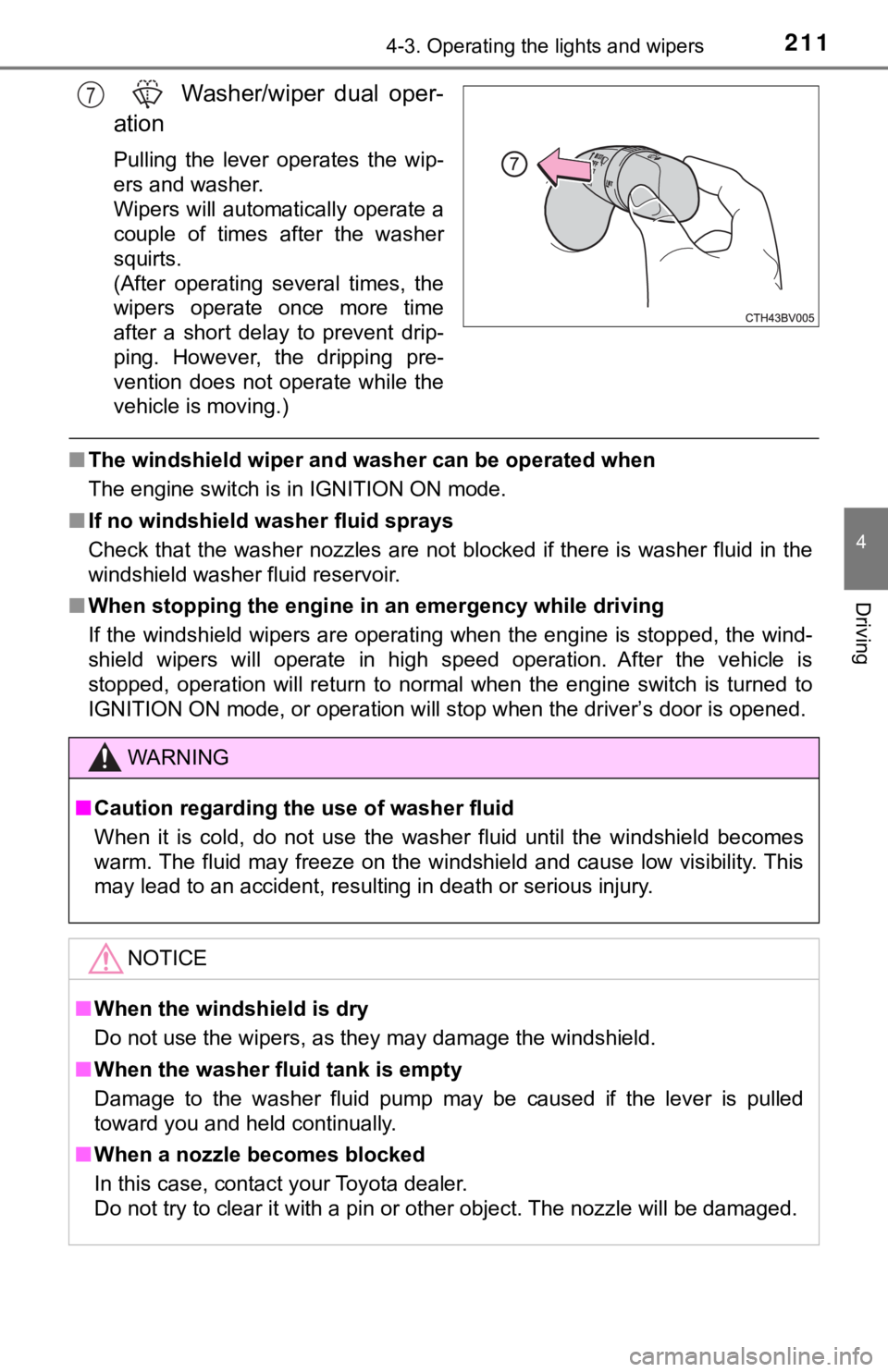
Washer/wiper dual oper-
ation
Pulling the lever operates the wip-
ers and washer.
Wipers will automatically operate a
couple of times after the washer
squirts.
(After operating several times, the
wipers operate once more time
after a short delay to prevent drip-
ping. However, the dripping pre-
vention does not operate while the
vehicle is moving.)
■The windshield wiper and washer can be operated when
The engine switch is in IGNITION ON mode.
■If no windshield washer fluid sprays
Check that the washer nozzles are not blocked if there is washer fluid in the
windshield washer fluid reservoir.
■When stopping the engine in an emergency while driving
If the windshield wipers are operating when the engine is stopped, the wind-
shield wipers will operate in high speed operation. After the vehicle is
stopped, operation will return to normal when the engine switch is turned to
<002c002a0031002c0037002c0032003100030032003100030050005200470048000f0003005200550003005200530048005500440057004c005200510003005a004c004f004f000300560057005200530003005a004b0048005100030057004b0048000300
470055004c00590048005500b6005600030047005200520055[ is opened.
7
WARNING
■Caution regarding the use of washer fluid
When it is cold, do not use the washer fluid until the windshield becomes
warm. The fluid may freeze on the windshield and cause low visibility. This
may lead to an accident, resulting in death or serious injury.
NOTICE
■When the windshield is dry
Do not use the wipers, as they may damage the windshield.
■When the washer fluid tank is empty
Damage to the washer fluid pump may be caused if the lever is pulled
toward you and held continually.
■When a nozzle becomes blocked
In this case, contact your Toyota dealer.
Do not try to clear it with a pin or other object. The nozzle will be damaged.
Page 251 of 548
2514-5. Using the driving support systems
4
Driving
Example of acceleration
When there are no longer any preceding vehicles driving slower
than the set speed
The system accelerates until the set speed is reached. The system then
returns to constant speed cruising.
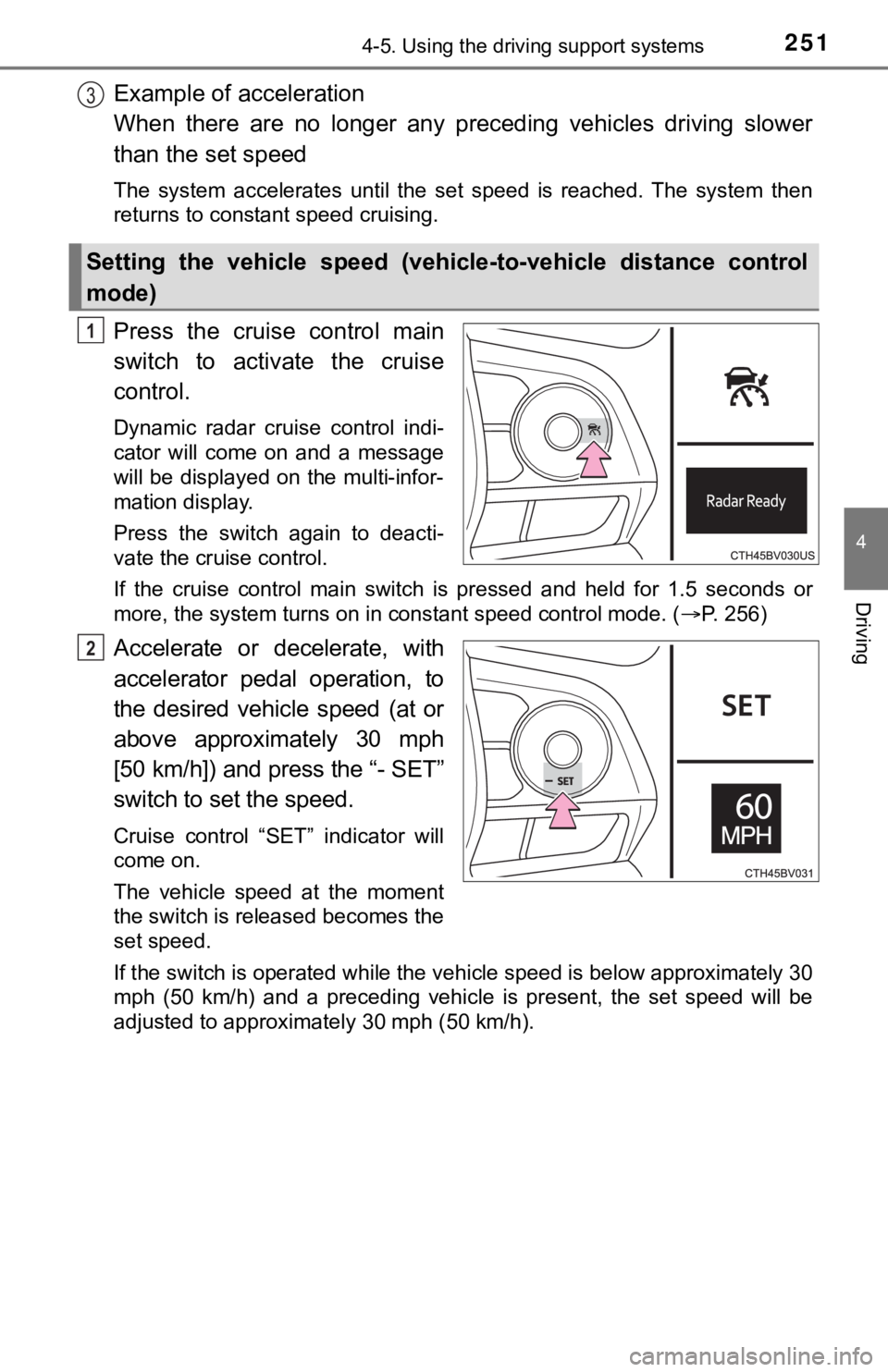
Press the cruise control main
switch to activate the cruise
control.
Dynamic radar cruise control indi-
cator will come on and a message
will be displayed on the multi-infor-
mation display.
Press the switch again to deacti-
vate the cruise control.
If the cruise control main switch is pressed and held for 1.5 seconds or
more, the system turns on in constant speed control mode. (P. 256)
Accelerate or decelerate, with
accelerator pedal operation, to
the desired vehicle speed (at or
above approximately 30 mph
[50 km/h]) and press the “- SET”
switch to set the speed.
Cruise control “SET” indicator will
come on.
The vehicle speed at the moment
the switch is released becomes the
set speed.
If the switch is operated while the vehicle speed is below approximately 30
mph (50 km/h) and a preceding vehicle is present, the set speed will be
adjusted to approximately 30 mph (50 km/h).
Setting the vehicle speed (vehicle-to-vehicle distance control
mode)
3
1
2
Page 256 of 548
2564-5. Using the driving support systems
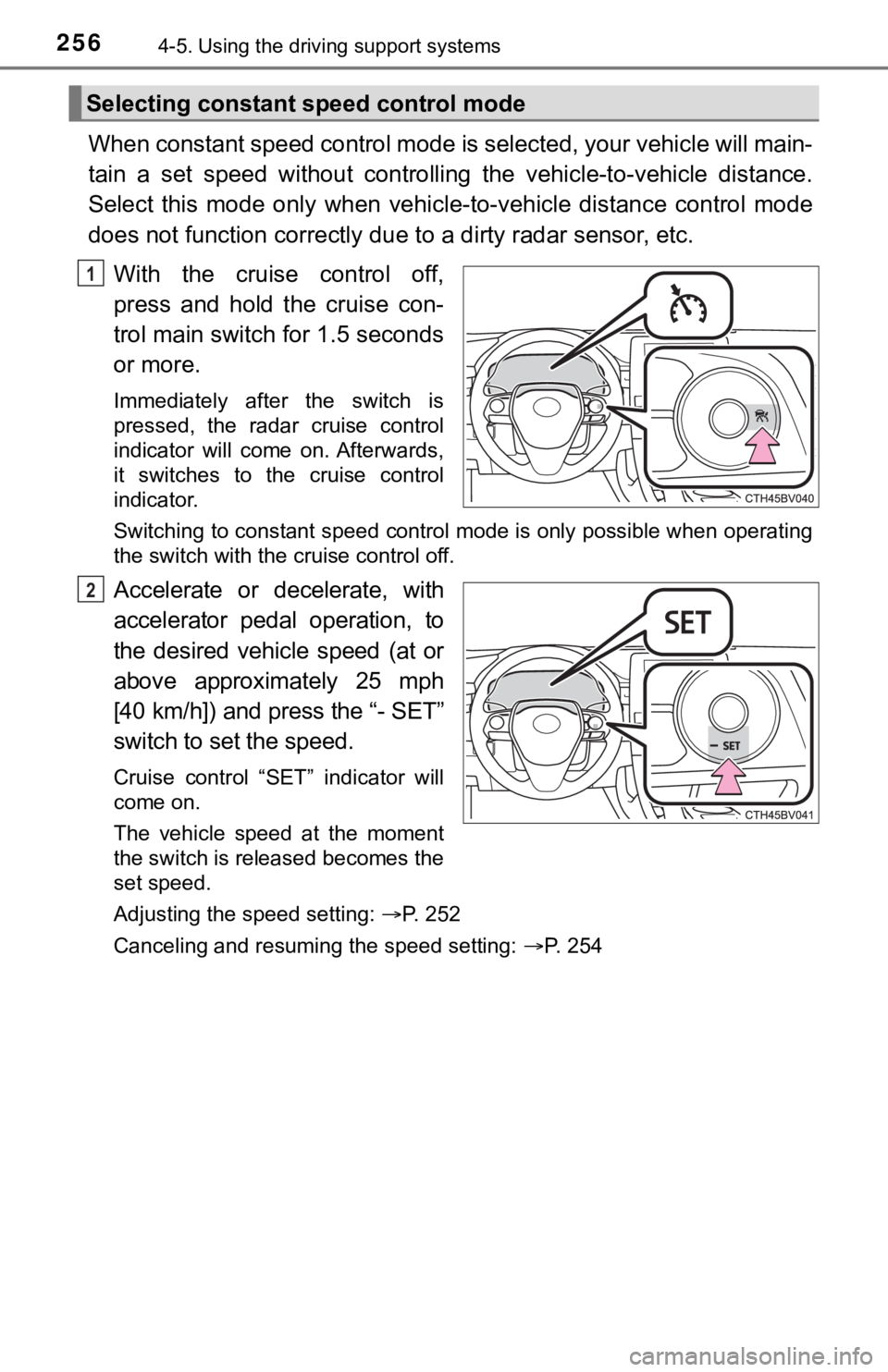
When constant speed control mode is selected, your vehicle will main-
tain a set speed without controlling the vehicle-to-vehicle distance.
Select this mode only when vehicle-to-vehicle distance control mode
does not function correctly due to a dirty radar sensor, etc.
With the cruise control off,
press and hold the cruise con-
trol main switch for 1.5 seconds
or more.
Immediately after the switch is
pressed, the radar cruise control
indicator will come on. Afterwards,
it switches to the cruise control
indicator.
Switching to constant speed control mode is only possible when operating
the switch with the cruise control off.
Accelerate or decelerate, with
accelerator pedal operation, to
the desired vehicle speed (at or
above approximately 25 mph
[40 km/h]) and press the “- SET”
switch to set the speed.
Cruise control “SET” indicator will
come on.
The vehicle speed at the moment
the switch is released becomes the
set speed.
Adjusting the speed setting: P. 252
Canceling and resuming the speed setting: P. 254
Selecting constant speed control mode
1
2
Page 257 of 548

2574-5. Using the driving support systems
4
Driving
■Dynamic radar cruise control with full-speed range can be set when
●The shift lever is in D or range 4 or higher of S has been selected.
●Range 4 or higher of D has been selected by using the paddle shift switch.
(vehicles with paddle shift switches)
●Vehicle speed is at or above approximately 30 mph (50 km/h). However,
when a preceding vehicle is detected, the dynamic radar cruise control with
full-speed range can be set even if the vehicle speed is below approximately
30 mph (50 km/h).
■Accelerating after setting the vehicle speed
The vehicle can accelerate by operating the accelerator pedal. After acceler-
ating, the set speed resumes. However, during vehicle-to-vehicle distance
control mode, the vehicle speed may decrease below the set speed in order
to maintain the distance to the preceding vehicle.
■When the vehicle stops while follow-up cruising
●Pressing the “+ RES” switch while the vehicle ahead stops will resume fol-
low-up cruising if the vehicle ahead starts off within approximately 3 sec-
onds after the switch is pressed.
●If the vehicle ahead starts off within 3 seconds after your vehicle stops, fol-
low-up cruising will be resumed.
■Automatic cancelation of vehicle-to-vehicle distance control mode
Vehicle-to-vehicle distance control mode is automatically canceled in the fol-
lowing situations.
●Actual vehicle speed falls at or below approximately 25 mph (40 km/h) when
there are no vehicles ahead.
●The preceding vehicle leaves the lane when your vehicle is following at a
vehicle speed at or below approximately 25 mph (40 km/h). Otherwise, the
sensor can not properly detect the vehicle. (“Radar Cruise Control Unavail-
able” is displayed on the multi-information display)
●VSC is activated.
●TRAC is activated for a period of time.
●When the VSC or TRAC system is turned off.
●The sensor cannot detect correctly because it is covered in some way.
●Pre-collision braking is activated.
●The parking brake is operated.
●The vehicle is stopped by system control on a steep incline.
●The following are detected when the vehicle has been stopped by system
control:
• The driver is not wearing a seat belt.
• The driver’s door is opened.
• The vehicle has been stopped for about 3 minutes
If vehicle-to-vehicle distance control mode is automatically canceled for any
other reason, there may be a malfunction in the system. Contact your Toyota
dealer.
Page 273 of 548
2734-5. Using the driving support systems
4
Driving
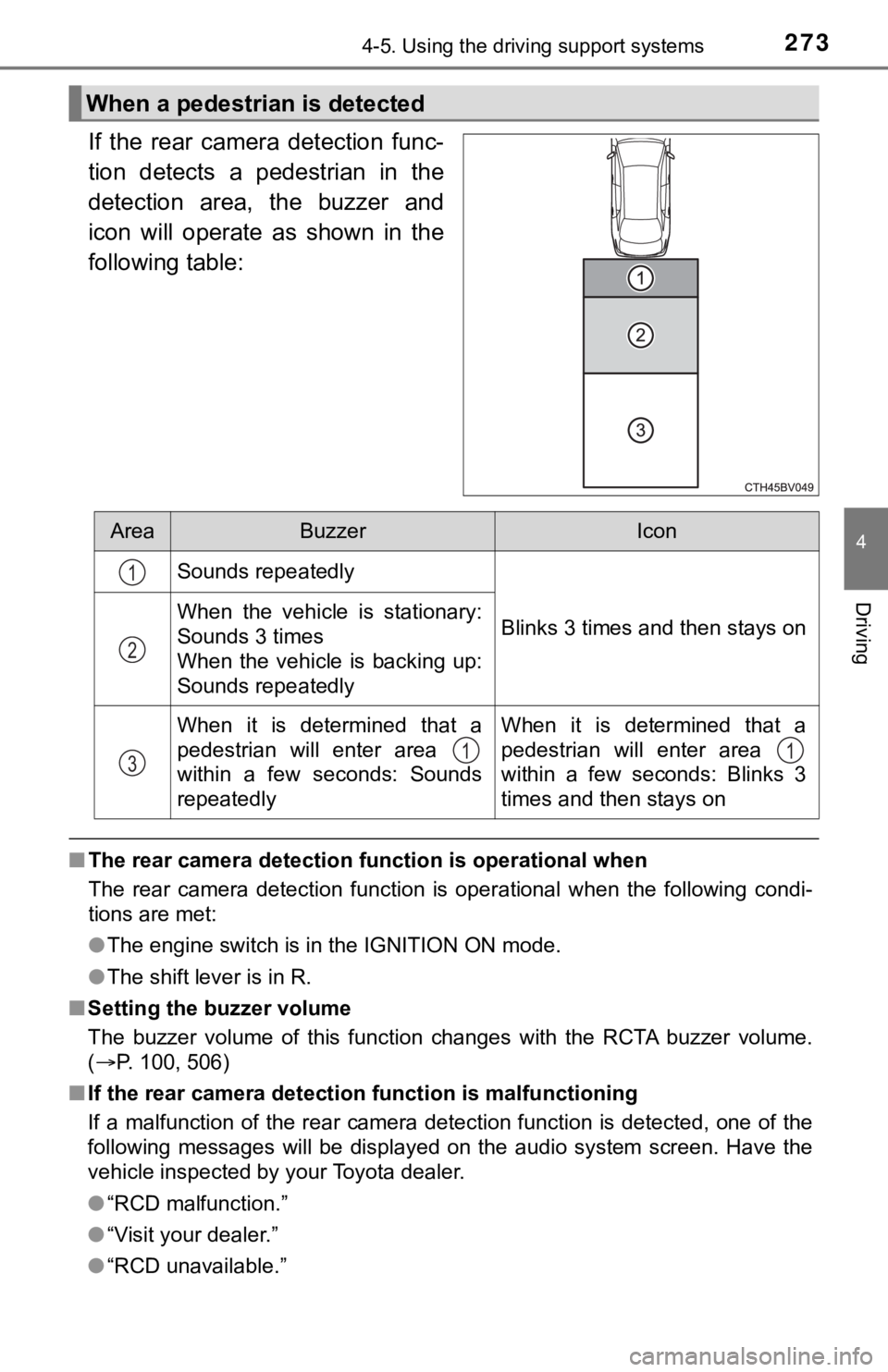
If the rear camera detection func-
tion detects a pedestrian in the
detection area, the buzzer and
icon will operate as shown in the
following table:
■The rear camera detection function is operational when
The rear camera detection function is operational when the following condi-
tions are met:
●The engine switch is in the IGNITION ON mode.
●The shift lever is in R.
■Setting the buzzer volume
The buzzer volume of this function changes with the RCTA buzzer volume.
(P. 100, 506)
■If the rear camera detection function is malfunctioning
If a malfunction of the rear camera detection function is detected, one of the
following messages will be displayed on the audio system screen. Have the
vehicle inspected by your Toyota dealer.
●“RCD malfunction.”
●“Visit your dealer.”
●“RCD unavailable.”
When a pedestrian is detected
AreaBuzzerIcon
Sounds repeatedly
Blinks 3 times and then stays onWhen the vehicle is stationary:
Sounds 3 times
When the vehicle is backing up:
Sounds repeatedly
When it is determined that a
pedestrian will enter area
within a few seconds: Sounds
repeatedlyWhen it is determined that a
pedestrian will enter area
within a few seconds: Blinks 3
times and then stays on
1
2
311