ECU TOYOTA AYGO X 2022 (in English) Owner's Manual
[x] Cancel search | Manufacturer: TOYOTA, Model Year: 2022, Model line: AYGO X, Model: TOYOTA AYGO X 2022Pages: 494, PDF Size: 92.53 MB
Page 62 of 494
60
Owner's Manual_Europe_M99V08_en
1-2. Child safety
■Installing child restraint sys-
tem using a seat belt
Install the child restraint system in
accordance to the operation man-
ual enclosed with the child restraint
system.
If the child restraint system on hand
is not within the “universal” cate-
gory (or the necessary information
is not in the table), refer to the
“Vehicle List” provided by the child
restraint system maker for various
possible installation positions, or
check the compatibility after asking
the retailer of the child seat.
( P.52, 53)
1 If installing the child restraint
system to the front passenger
seat is unavoidable, refer to
P.49 for the front passenger seat
adjustment.
2 If the head restraint interferes
with your child restraint system,
and the head restraint can be
removed, remove the head
restraint. Otherwise, put the
head restraint in the upper most
position. ( P.108)
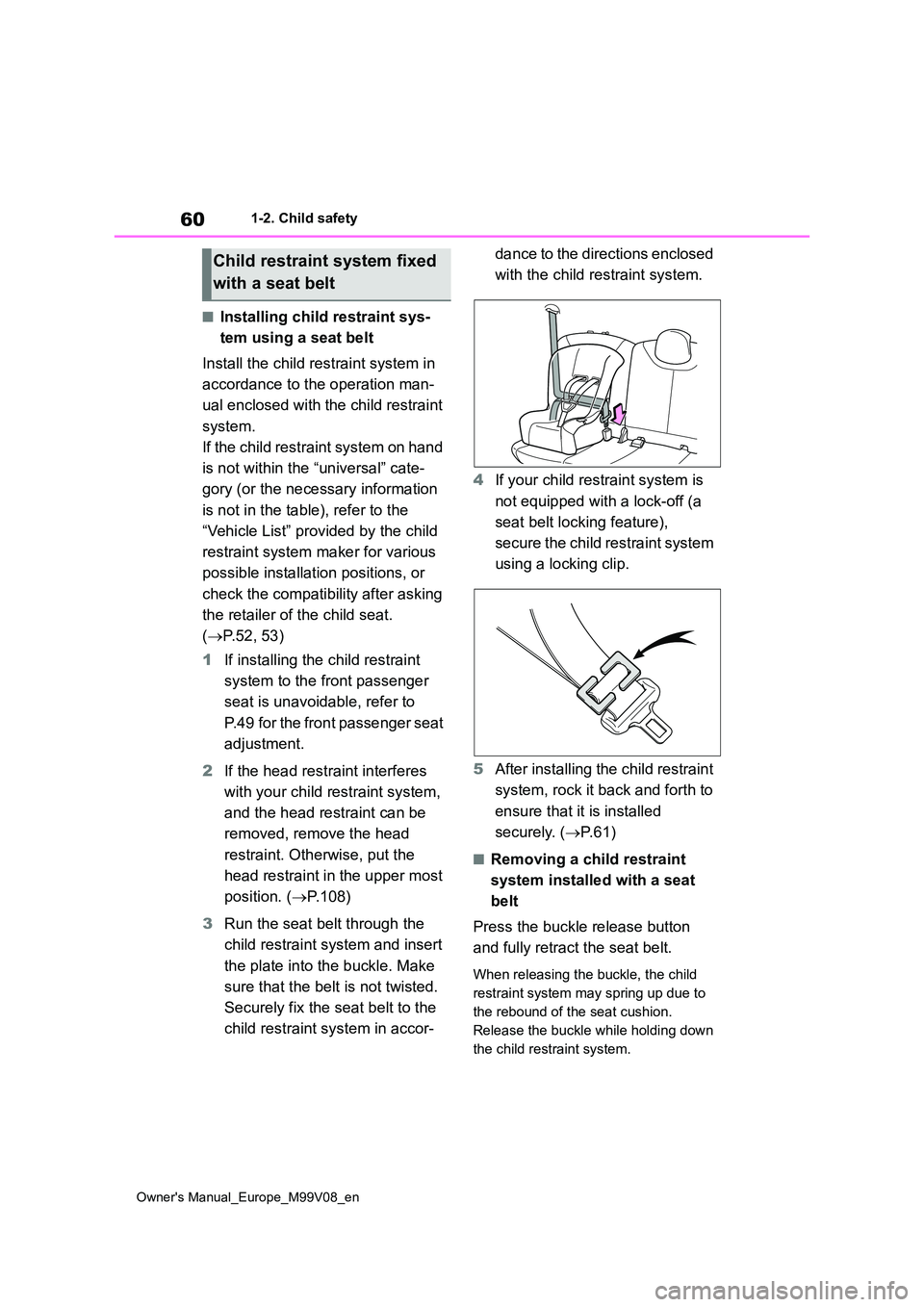
3 Run the seat belt through the
child restraint system and insert
the plate into the buckle. Make
sure that the belt is not twisted.
Securely fix the seat belt to the
child restraint system in accor-
dance to the directions enclosed
with the child restraint system.
4 If your child restraint system is
not equipped with a lock-off (a
seat belt locking feature),
s e c u r e t h e c h i l d r e s t r a i n t s y s t e m
using a locking clip.
5 After installing the child restraint
system, rock it back and forth to
ensure that it is installed
securely. ( P. 6 1 )
■Removing a child restraint
system installed with a seat
belt
Press the buckle release button
and fully retract the seat belt.
When releasing the buckle, the child
restraint system may spring up due to
the rebound of the seat cushion.
Release the buckle while holding down
the child restraint system.
Child restraint system fixed
with a seat belt
Page 63 of 494
61
1
Owner's Manual_Europe_M99V08_en
1-2. Child safety
For safety and security
Since the seat belt automatically reels
itself, slowly return it to the stowing
position.
■When installing a child restraint system
You may need a locking clip to install the
child restraint system. Follow the instructions provided by the manufac-turer of the system. If your child restraint
system does not provide a locking clip, you can purchase the following item from any authorized Toyota retailer or
Toyota authorized repairer, or any reli- able repairer: Locking clip for child restraint system
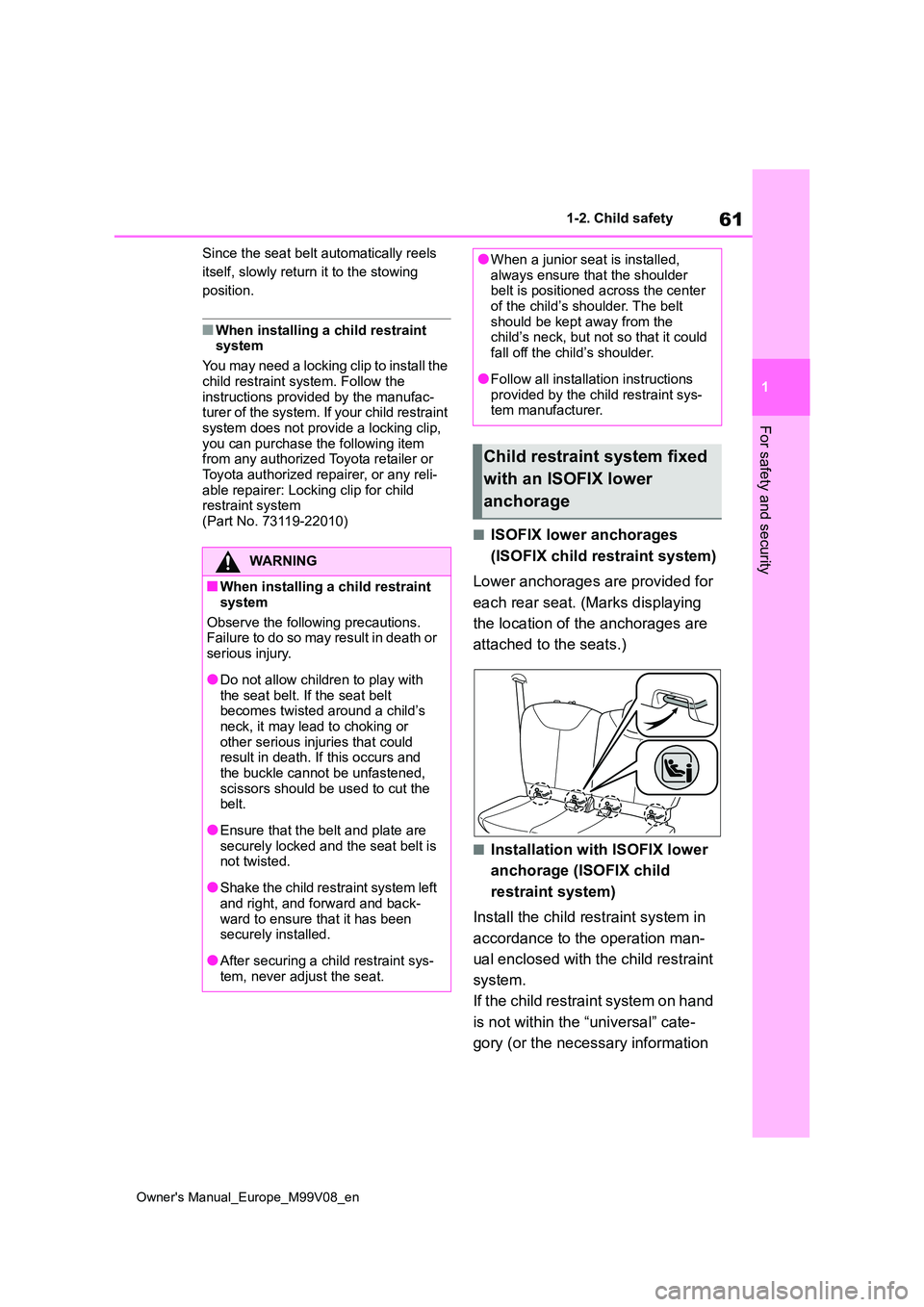
(Part No. 73119-22010)■ISOFIX lower anchorages
(ISOFIX child restraint system)
Lower anchorages are provided for
each rear seat. (Marks displaying
the location of the anchorages are
attached to the seats.)
■Installation with ISOFIX lower
anchorage (ISOFIX child
restraint system)
Install the child restraint system in
accordance to the operation man-
ual enclosed with the child restraint
system.
If the child restraint system on hand
is not within the “universal” cate-
gory (or the necessary information
WARNING
■When installing a child restraint
system
Observe the following precautions. Failure to do so may result in death or
serious injury.
●Do not allow children to play with
the seat belt. If the seat belt becomes twisted around a child’s neck, it may lead to choking or
other serious injuries that could result in death. If this occurs and the buckle cannot be unfastened,
scissors should be used to cut the belt.
●Ensure that the belt and plate are securely locked and the seat belt is not twisted.
●Shake the child restraint system left and right, and forward and back-
ward to ensure that it has been securely installed.
●After securing a child restraint sys-tem, never adjust the seat.
●When a junior seat is installed, always ensure that the shoulder belt is positioned across the center
of the child’s shoulder. The belt should be kept away from the child’s neck, but not so that it could
fall off the child’s shoulder.
●Follow all installation instructions
provided by the child restraint sys- tem manufacturer.
Child restraint system fixed
with an ISOFIX lower
anchorage
Page 64 of 494
62
Owner's Manual_Europe_M99V08_en
1-2. Child safety
is not in the table), refer to the
“Vehicle List” provided by the child
restraint system maker for various
possible installation positions, or
check the compatibility after asking
the retailer of the child seat.
( P.52, 53)
1 If the head restraint interferes
with your child restraint system,
and the head restraint can be
removed, remove the head
restraint. Otherwise, put the
head restraint in the upper most
position. ( P.108)
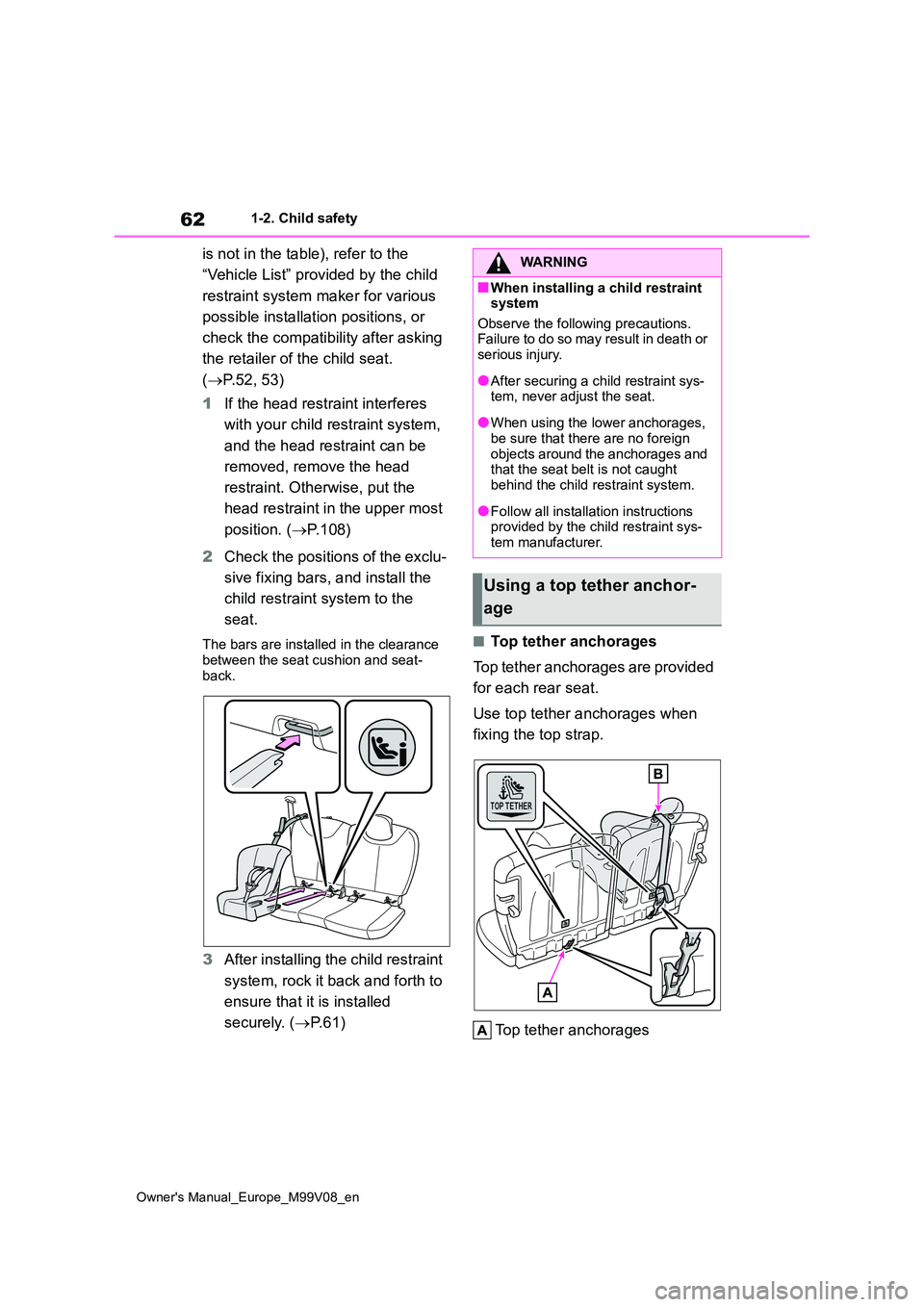
2 Check the positions of the exclu-
sive fixing bars, and install the
child restraint system to the
seat.
The bars are installed in the clearance
between the seat cushion and seat- back.
3 After installing the child restraint
system, rock it back and forth to
ensure that it is installed
securely. ( P. 6 1 )
■Top tether anchorages
Top tether anchorages are provided
for each rear seat.
Use top tether anchorages when
fixing the top strap.
Top tether anchorages
WARNING
■When installing a child restraint system
Observe the following precautions. Failure to do so may result in death or serious injury.
●After securing a child restraint sys-tem, never adjust the seat.
●When using the lower anchorages, be sure that there are no foreign
objects around the anchorages and that the seat belt is not caught behind the child restraint system.
●Follow all installation instructions provided by the child restraint sys-
tem manufacturer.
Using a top tether anchor-
age
Page 65 of 494
63
1
Owner's Manual_Europe_M99V08_en
1-2. Child safety
For safety and security
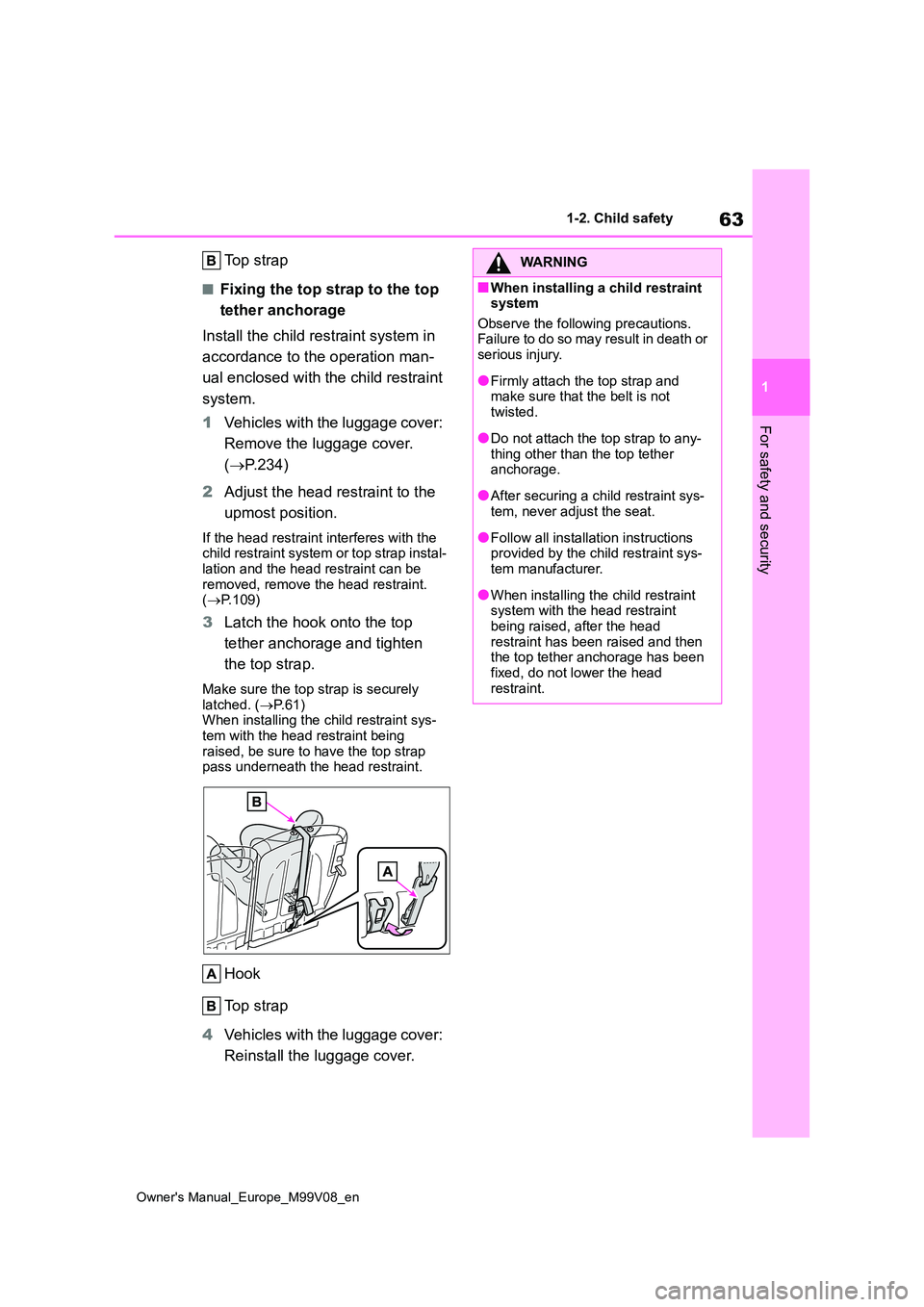
Top strap
■Fixing the top strap to the top
tether anchorage
Install the child restraint system in
accordance to the operation man-
ual enclosed with the child restraint
system.
1 Vehicles with the luggage cover:
Remove the luggage cover.
( P.234)
2 Adjust the head restraint to the
upmost position.
If the head restraint interferes with the child restraint system or top strap instal-
lation and the head restraint can be removed, remove the head restraint. ( P.109)
3Latch the hook onto the top
tether anchorage and tighten
the top strap.
Make sure the top strap is securely latched. ( P.61) When installing the child restraint sys-
tem with the head restraint being raised, be sure to have the top strap pass underneath the head restraint.
Hook
Top strap
4 Vehicles with the luggage cover:
Reinstall the luggage cover.
WARNING
■When installing a child restraint system
Observe the following precautions. Failure to do so may result in death or serious injury.
●Firmly attach the top strap and make sure that the belt is not
twisted.
●Do not attach the top strap to any-
thing other than the top tether anchorage.
●After securing a child restraint sys-tem, never adjust the seat.
●Follow all installation instructions provided by the child restraint sys-tem manufacturer.
●When installing the child restraint system with the head restraint
being raised, after the head restraint has been raised and then the top tether anchorage has been
fixed, do not lower the head restraint.
Page 67 of 494
65
1
Owner's Manual_Europe_M99V08_en
1-3. Emergency assistance
For safety and security
tance required.
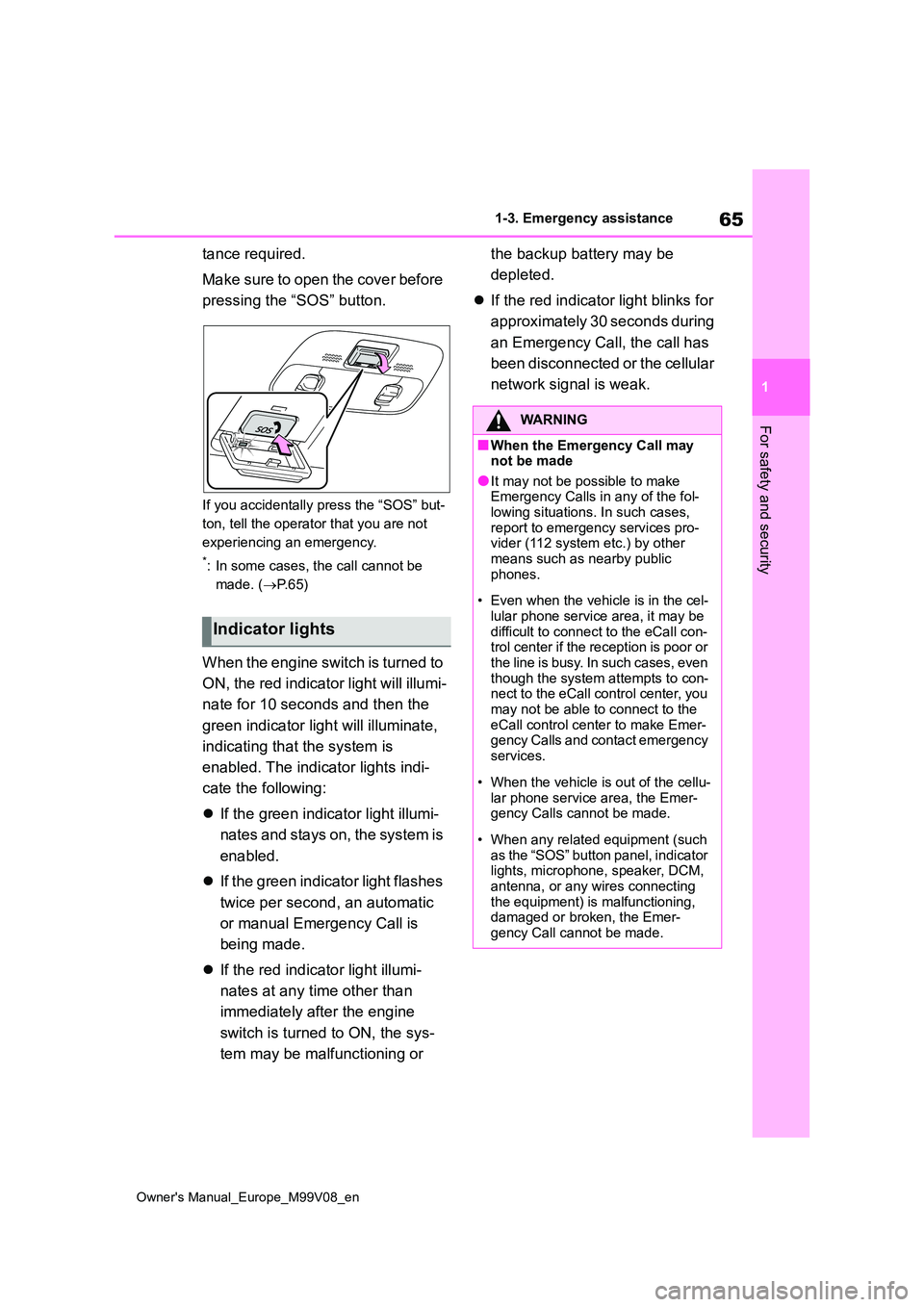
Make sure to open the cover before
pressing the “SOS” button.
If you accidentally press the “SOS” but-
ton, tell the operator that you are not
experiencing an emergency.
*: In some cases, the call cannot be
made. ( P. 6 5 )
When the engine switch is turned to
ON, the red indicator light will illumi-
nate for 10 seconds and then the
green indicator light will illuminate,
indicating that the system is
enabled. The indicator lights indi-
cate the following:
If the green indicator light illumi-
nates and stays on, the system is
enabled.
If the green indicator light flashes
twice per second, an automatic
or manual Emergency Call is
being made.
If the red indicator light illumi-
nates at any time other than
immediately after the engine
switch is turned to ON, the sys-
tem may be malfunctioning or
the backup battery may be
depleted.
If the red indicator light blinks for
approximately 30 seconds during
an Emergency Call, the call has
been disconnected or the cellular
network signal is weak.
Indicator lights
WARNING
■When the Emergency Call may not be made
●It may not be possible to make Emergency Calls in any of the fol-lowing situations. In such cases,
report to emergency services pro- vider (112 system etc.) by other means such as nearby public
phones.
• Even when the vehicle is in the cel-
lular phone service area, it may be difficult to connect to the eCall con-trol center if the reception is poor or
the line is busy. In such cases, even though the system attempts to con-nect to the eCall control center, you
may not be able to connect to the eCall control center to make Emer-gency Calls and contact emergency
services.
• When the vehicle is out of the cellu-
lar phone service area, the Emer- gency Calls cannot be made.
• When any related equipment (such as the “SOS” button panel, indicator lights, microphone, speaker, DCM,
antenna, or any wires connecting the equipment) is malfunctioning, damaged or broken, the Emer-
gency Call cannot be made.
Page 69 of 494
67
1
Owner's Manual_Europe_M99V08_en
1-3. Emergency assistance
For safety and security
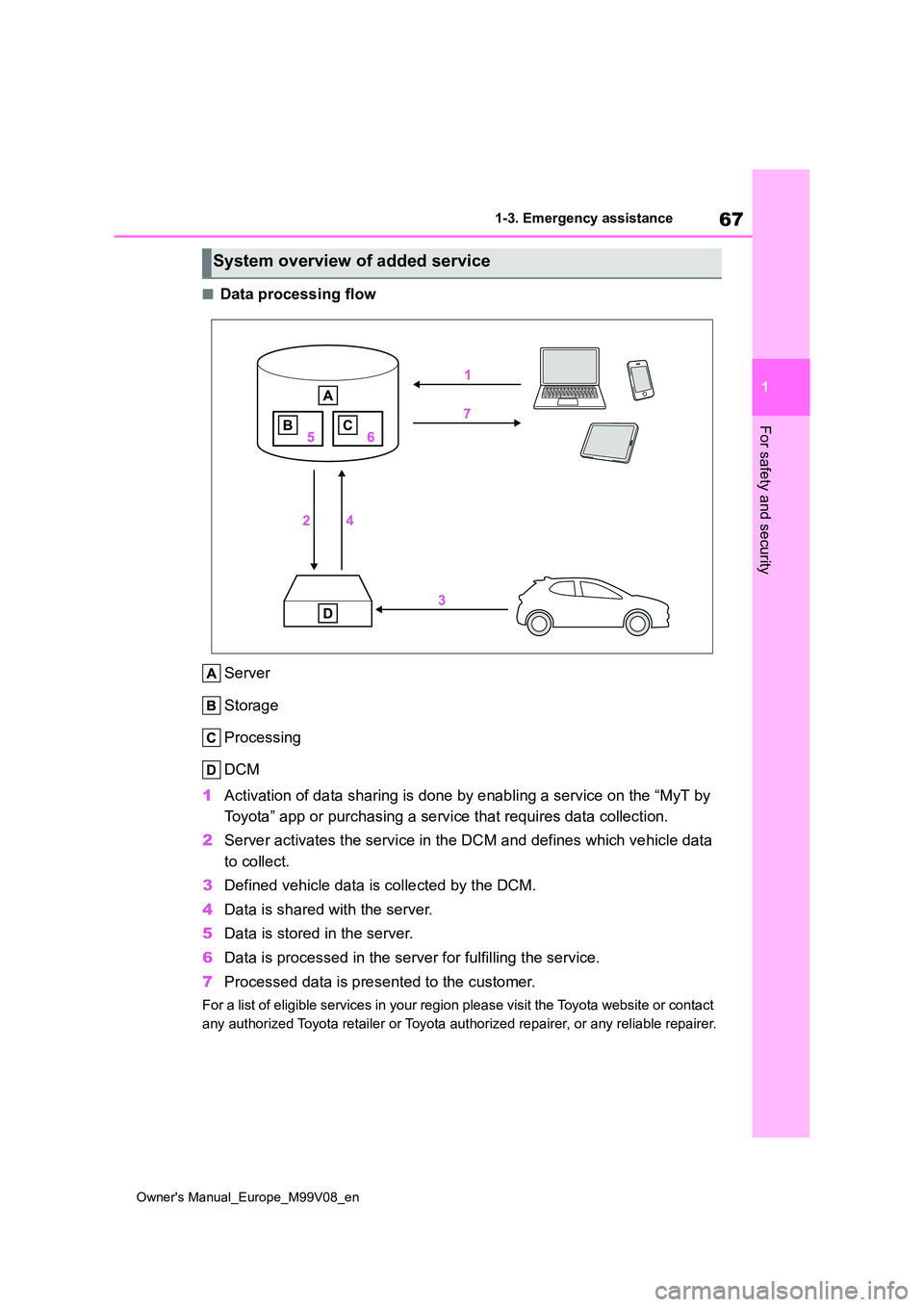
■Data processing flow
Server
Storage
Processing
DCM
1 Activation of data sharing is done by enabling a service on the “MyT by
Toyota” app or purchasing a service that requires data collecti on.
2 Server activates the service in the DCM and defines which vehicle data
to collect.
3 Defined vehicle data is collected by the DCM.
4 Data is shared with the server.
5 Data is stored in the server.
6 Data is processed in the server for fulfilling the service.
7 Processed data is presented to the customer.
For a list of eligible services in your region please visit the Toyota website or contact
any authorized Toyota retailer or Toyota authorized repairer, o r any reliable repairer.
System overview of added service
Page 71 of 494
69
1
Owner's Manual_Europe_M99V08_en
1-3. Emergency assistance
For safety and security
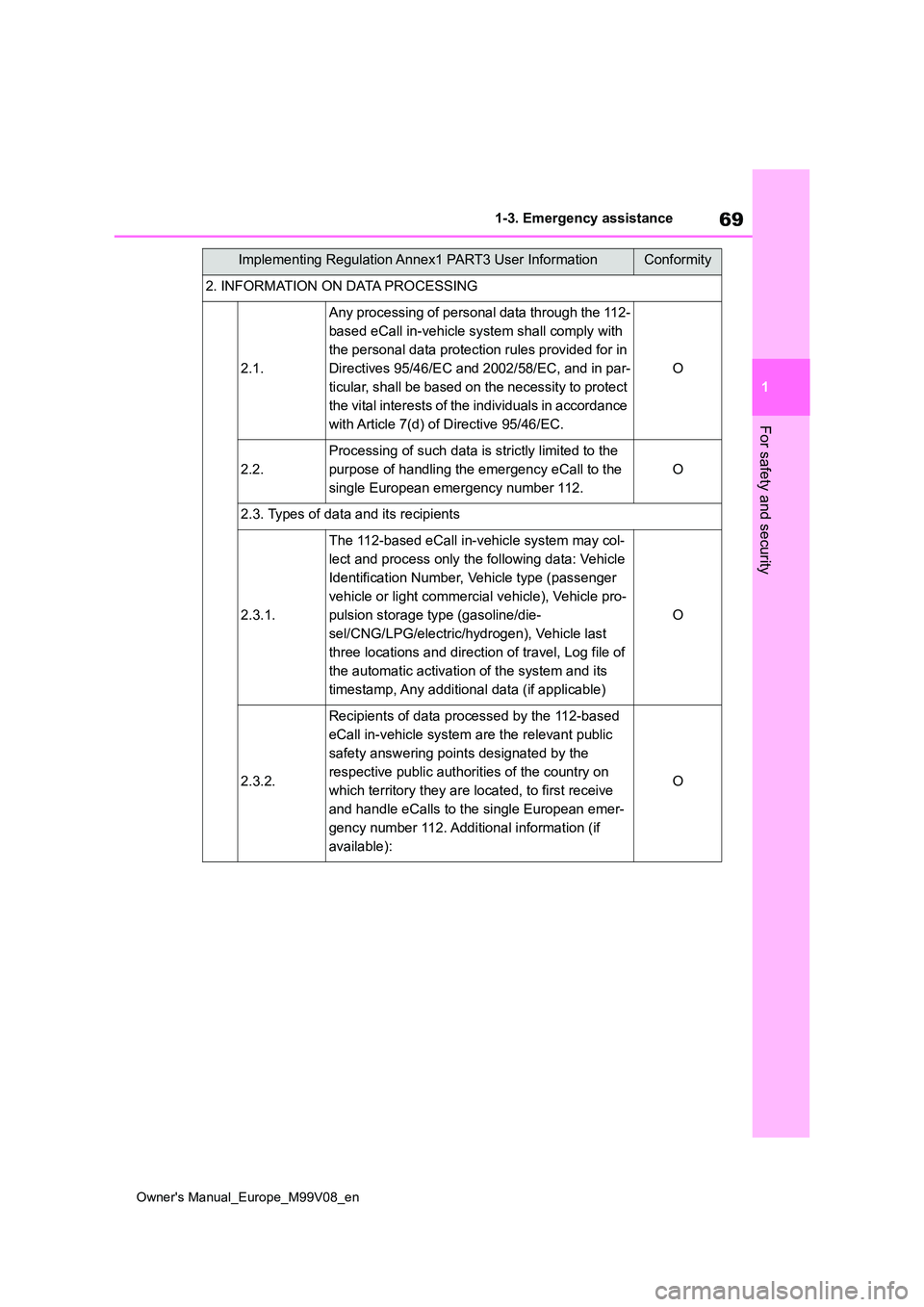
2. INFORMATION ON DATA PROCESSING
2.1.
Any processing of personal data through the 112-
based eCall in-vehicle system shall comply with
the personal data protection rules provided for in
Directives 95/46/EC and 2002/58/EC, and in par-
ticular, shall be based on the necessity to protect
the vital interests of the individuals in accordance
with Article 7(d) of Directive 95/46/EC.
O
2.2.
Processing of such data is strictly limited to the
purpose of handling the emergency eCall to the
single European emergency number 112.
O
2.3. Types of data and its recipients
2.3.1.
The 112-based eCall in-vehicle system may col-
lect and process only the following data: Vehicle
Identification Number, Vehicle type (passenger
vehicle or light commercial vehicle), Vehicle pro-
pulsion storage type (gasoline/die-
sel/CNG/LPG/electric/hydrogen), Vehicle last
three locations and direction of travel, Log file of
the automatic activation of the system and its
timestamp, Any additional data (if applicable)
O
2.3.2.
Recipients of data processed by the 112-based
eCall in-vehicle system are the relevant public
safety answering points designated by the
respective public authorities of the country on
which territory they are located, to first receive
and handle eCalls to the single European emer-
gency number 112. Additional information (if
available):
O
Implementing Regulation Annex1 PART3 User InformationConformity
Page 73 of 494
71
1
Owner's Manual_Europe_M99V08_en
1-3. Emergency assistance
For safety and security
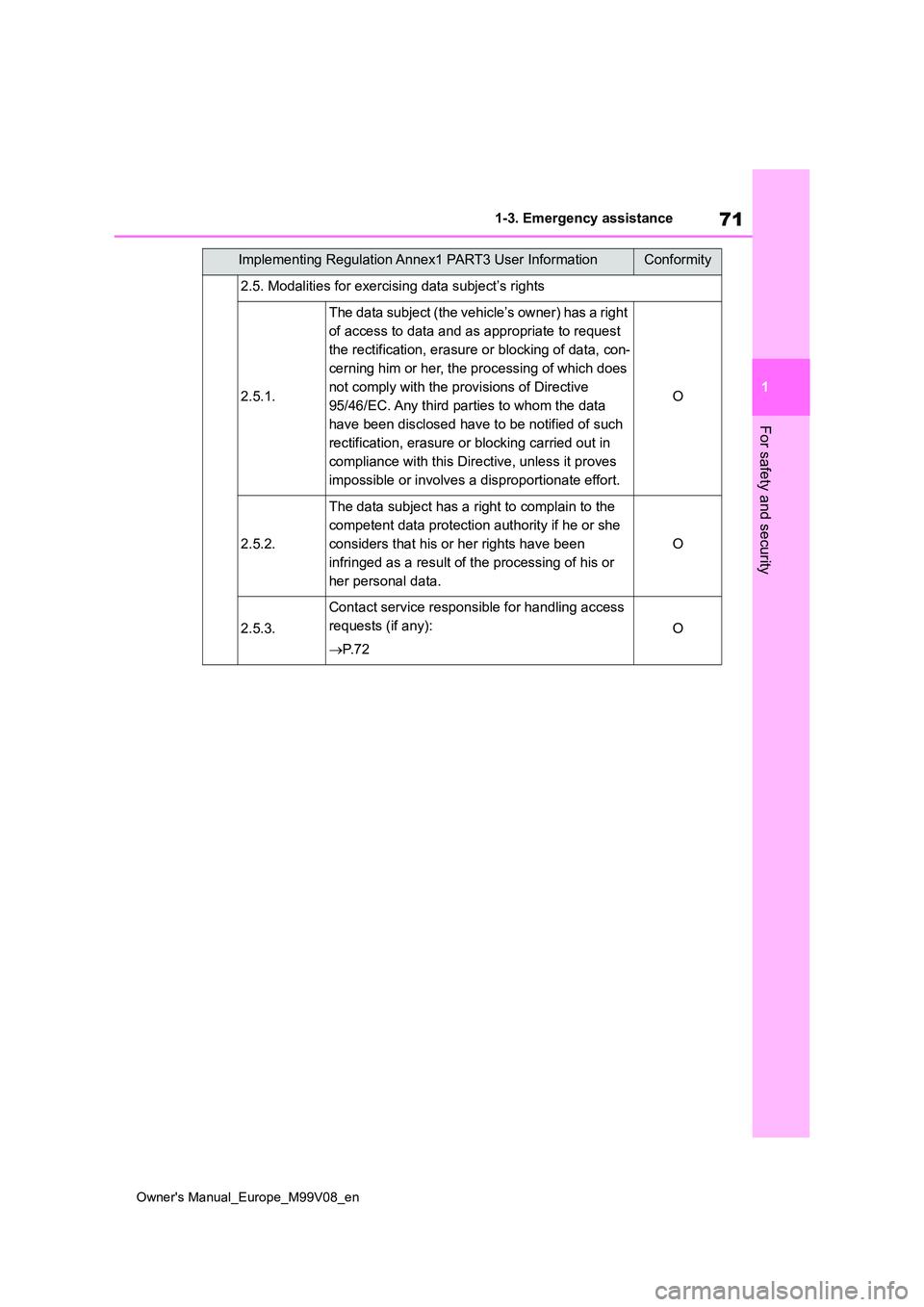
2.5. Modalities for exercising data subject’s rights
2.5.1.
The data subject (the vehicle’s owner) has a right
of access to data and as appropriate to request
the rectification, erasure or blocking of data, con-
cerning him or her, the processing of which does
not comply with the provisions of Directive
95/46/EC. Any third parties to whom the data
have been disclosed have to be notified of such
rectification, erasure or blocking carried out in
compliance with this Directive, unless it proves
impossible or involves a disproportionate effort.
O
2.5.2.
The data subject has a right to complain to the
competent data protection authority if he or she
considers that his or her rights have been
infringed as a result of the processing of his or
her personal data.
O
2.5.3.
Contact service responsible for handling access
requests (if any):
P. 7 2
O
Implementing Regulation Annex1 PART3 User InformationConformity
Page 75 of 494
73
1
Owner's Manual_Europe_M99V08_en
1-3. Emergency assistance
For safety and security
■Free/Open Source Software Information
This product contains Free/Open Source Software (FOSS). The lic ense information
and/or the source code of such FOSS can be found at the followi ng URL.
http://www.opensourceautomotive.com/dcm/toyota/
■Certification for eCall
P. 3 7 8
[email protected]
Czech Republic/
Hungary/[email protected]
[email protected] og
[email protected]
[email protected]
[email protected]
[email protected]
Great [email protected]
[email protected]
[email protected]
[email protected]
[email protected]
Netherlandswww.toyota.nl/klantenservice
[email protected]
[email protected]
[email protected]
[email protected]
[email protected]
[email protected] / [email protected].
[email protected]
[email protected]
CountryContact information
Page 76 of 494
74
Owner's Manual_Europe_M99V08_en
1-4. Theft deterrent system
1-4.Theft de terre nt sys te m
Vehicles without smart entry &
start system
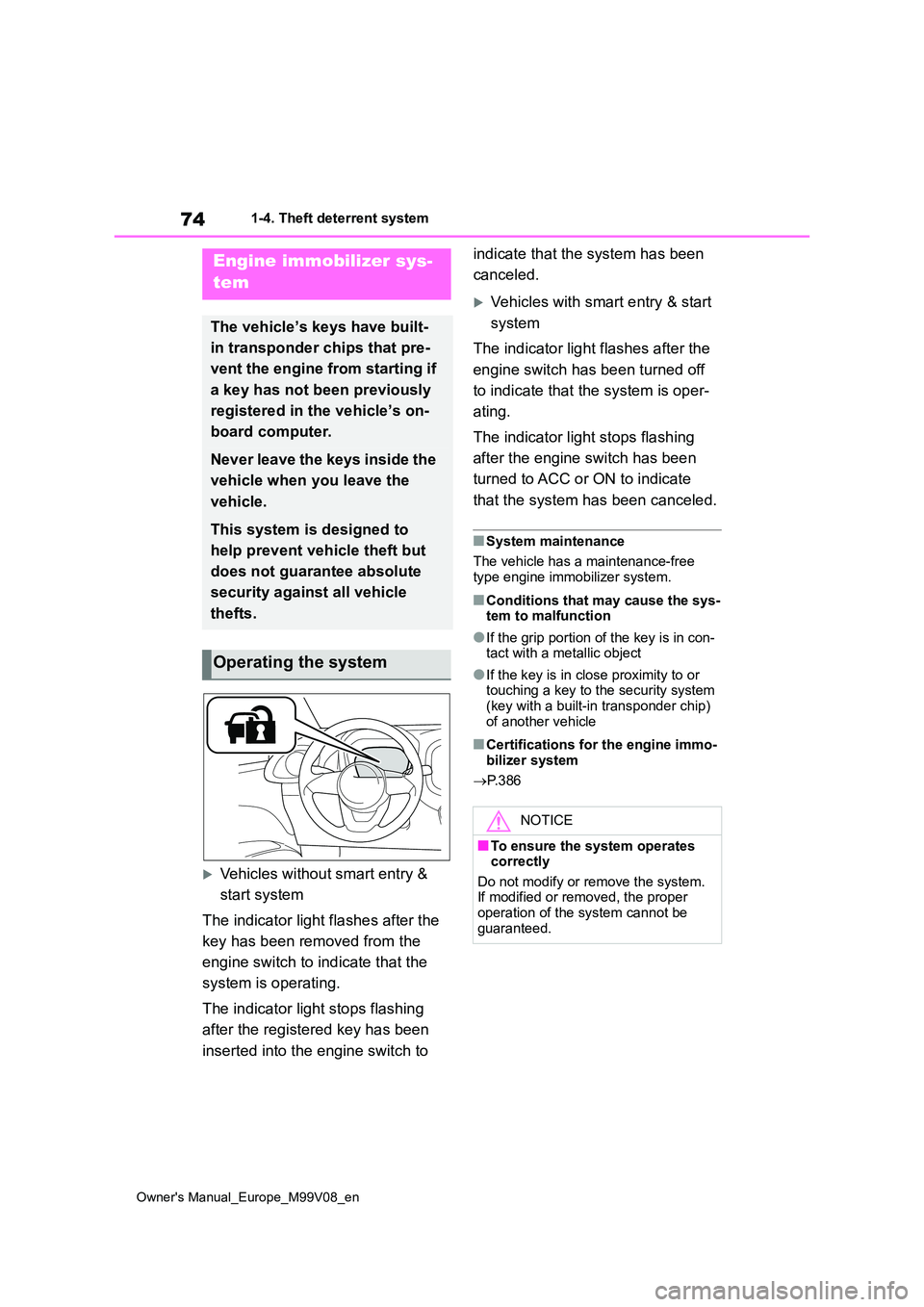
The indicator light flashes after the
key has been removed from the
engine switch to indicate that the
system is operating.
The indicator light stops flashing
after the registered key has been
inserted into the engine switch to
indicate that the system has been
canceled.
Vehicles with smart entry & start
system
The indicator light flashes after the
engine switch has been turned off
to indicate that the system is oper-
ating.
The indicator light stops flashing
after the engine switch has been
turned to ACC or ON to indicate
that the system has been canceled.
■System maintenance
The vehicle has a maintenance-free
type engine immobilizer system.
■Conditions that may cause the sys- tem to malfunction
●If the grip portion of the key is in con-tact with a metallic object
●If the key is in close proximity to or touching a key to the security system (key with a built-in transponder chip)
of another vehicle
■Certifications for the engine immo- bilizer system
P. 3 8 6
Engine immobilizer sys-
tem
The vehicle’s keys have built-
in transponder chips that pre-
vent the engine from starting if
a key has not been previously
registered in the vehicle’s on-
board computer.
Never leave the keys inside the
vehicle when you leave the
vehicle.
This system is designed to
help prevent vehicle theft but
does not guarantee absolute
security against all vehicle
thefts.
Operating the system
NOTICE
■To ensure the system operates correctly
Do not modify or remove the system. If modified or removed, the proper operation of the system cannot be
guaranteed.