warning TOYOTA AYGO X 2022 (in English) Owner's Guide
[x] Cancel search | Manufacturer: TOYOTA, Model Year: 2022, Model line: AYGO X, Model: TOYOTA AYGO X 2022Pages: 494, PDF Size: 92.53 MB
Page 67 of 494
65
1
Owner's Manual_Europe_M99V08_en
1-3. Emergency assistance
For safety and security
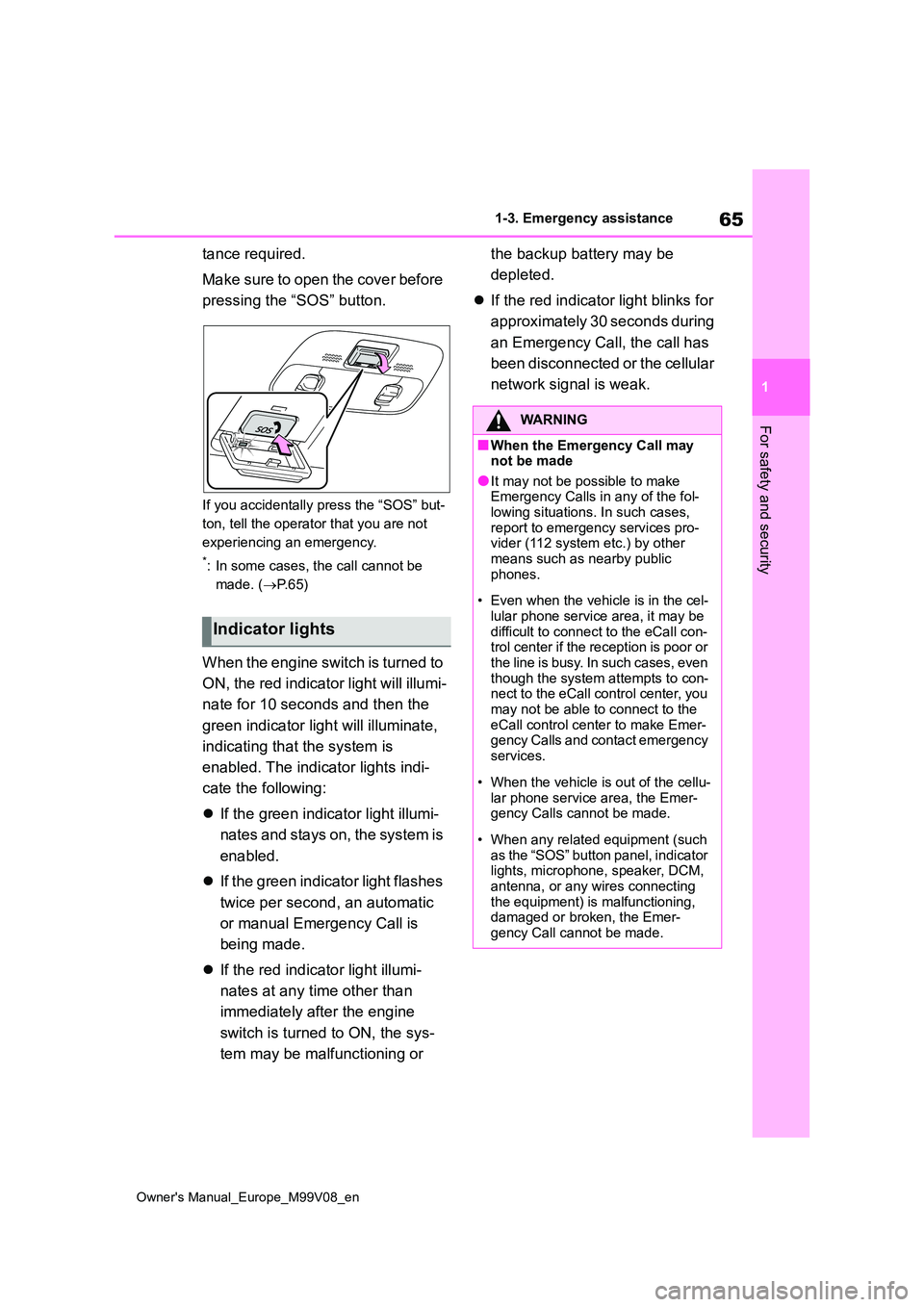
tance required.
Make sure to open the cover before
pressing the “SOS” button.
If you accidentally press the “SOS” but-
ton, tell the operator that you are not
experiencing an emergency.
*: In some cases, the call cannot be
made. ( P. 6 5 )
When the engine switch is turned to
ON, the red indicator light will illumi-
nate for 10 seconds and then the
green indicator light will illuminate,
indicating that the system is
enabled. The indicator lights indi-
cate the following:
If the green indicator light illumi-
nates and stays on, the system is
enabled.
If the green indicator light flashes
twice per second, an automatic
or manual Emergency Call is
being made.
If the red indicator light illumi-
nates at any time other than
immediately after the engine
switch is turned to ON, the sys-
tem may be malfunctioning or
the backup battery may be
depleted.
If the red indicator light blinks for
approximately 30 seconds during
an Emergency Call, the call has
been disconnected or the cellular
network signal is weak.
Indicator lights
WARNING
■When the Emergency Call may not be made
●It may not be possible to make Emergency Calls in any of the fol-lowing situations. In such cases,
report to emergency services pro- vider (112 system etc.) by other means such as nearby public
phones.
• Even when the vehicle is in the cel-
lular phone service area, it may be difficult to connect to the eCall con-trol center if the reception is poor or
the line is busy. In such cases, even though the system attempts to con-nect to the eCall control center, you
may not be able to connect to the eCall control center to make Emer-gency Calls and contact emergency
services.
• When the vehicle is out of the cellu-
lar phone service area, the Emer- gency Calls cannot be made.
• When any related equipment (such as the “SOS” button panel, indicator lights, microphone, speaker, DCM,
antenna, or any wires connecting the equipment) is malfunctioning, damaged or broken, the Emer-
gency Call cannot be made.
Page 68 of 494
66
Owner's Manual_Europe_M99V08_en
1-3. Emergency assistance
WARNING
• During an Emergency Call, the sys- tem makes repeated attempts to
connect to the eCall control center. However, if it cannot connect to the eCall control center due to poor
radio wave reception, the system may not be able to connect to the cellular network and the call may
finish without connecting. The red indicator light will blink for approxi-mately 30 seconds to indicate this
disconnection.
●If t he b at t er y ’s vo lt a g e d ec r ea se s o r
there is a disconnection, the system may not be able to connect to the eCall control center.
●The Emergency Call system might not work outside of EU area,
depending on the available infra- structure in the country.
■When the Emergency Call sys-tem is replaced with a new one
The Emergency Call system should
be registered. Contact any authorized Toyota retailer or Toyota authorized repairer, or any reliable repairer.
■For your safety
●Please drive safely.
The function of this system is to assist you in making the Emer-gency Call in case of accidents
such as traffic accidents or sudden medical emergencies, and it does not protect the driver or passengers
in any way. Please drive safely and fasten your seatbelts at all times for your safety.
●In case of an emergency, make lives the top priority.
●If you smell anything burning or other unusual smells, leave the
vehicle and evacuate to a safe area immediately.
●If the airbags deploy when the sys-tem is operating normally, the sys-tem makes emergency call. The
system also makes emergency call when the vehicle is struck from the r e a r o r r ol l s ov er, ev e n i f t h e a ir b a gs
do not deploy.
●For safety, do not make the Emer-
gency Call while driving. Making calls during driving may cause mishandling of the steering
wheel, which may lead to unex- pected accidents.Stop the vehicle and confirm the
safety of your surroundings before making the Emergency Call.
●When changing fuses, please use the specified fuses. Using other fuses may cause ignition or smoke
in the circuit and lead to a fire.
●Using the system while there is
smoke or an unusual smell may cause a fire. Stop using the system immediately and consult any autho-
rized Toyota retailer or Toyota authorized repairer, or any reliable repairer.
NOTICE
■To prevent damage
Do not pour any liquids onto the “SOS” button panel, etc. and do not
impact it.
■If the “SOS” button panel,
speaker or microphone malfunc- tions during an Emergency Call or manual maintenance check
It may not be possible to make Emer- gency Calls, confirm the system sta-tus, or communicate with the eCall
control center operator. If any of the above equipment is damaged, please consult any authorized Toyota retailer
or Toyota authorized repairer, or any reliable repairer.
Page 70 of 494
68
Owner's Manual_Europe_M99V08_en
1-3. Emergency assistance
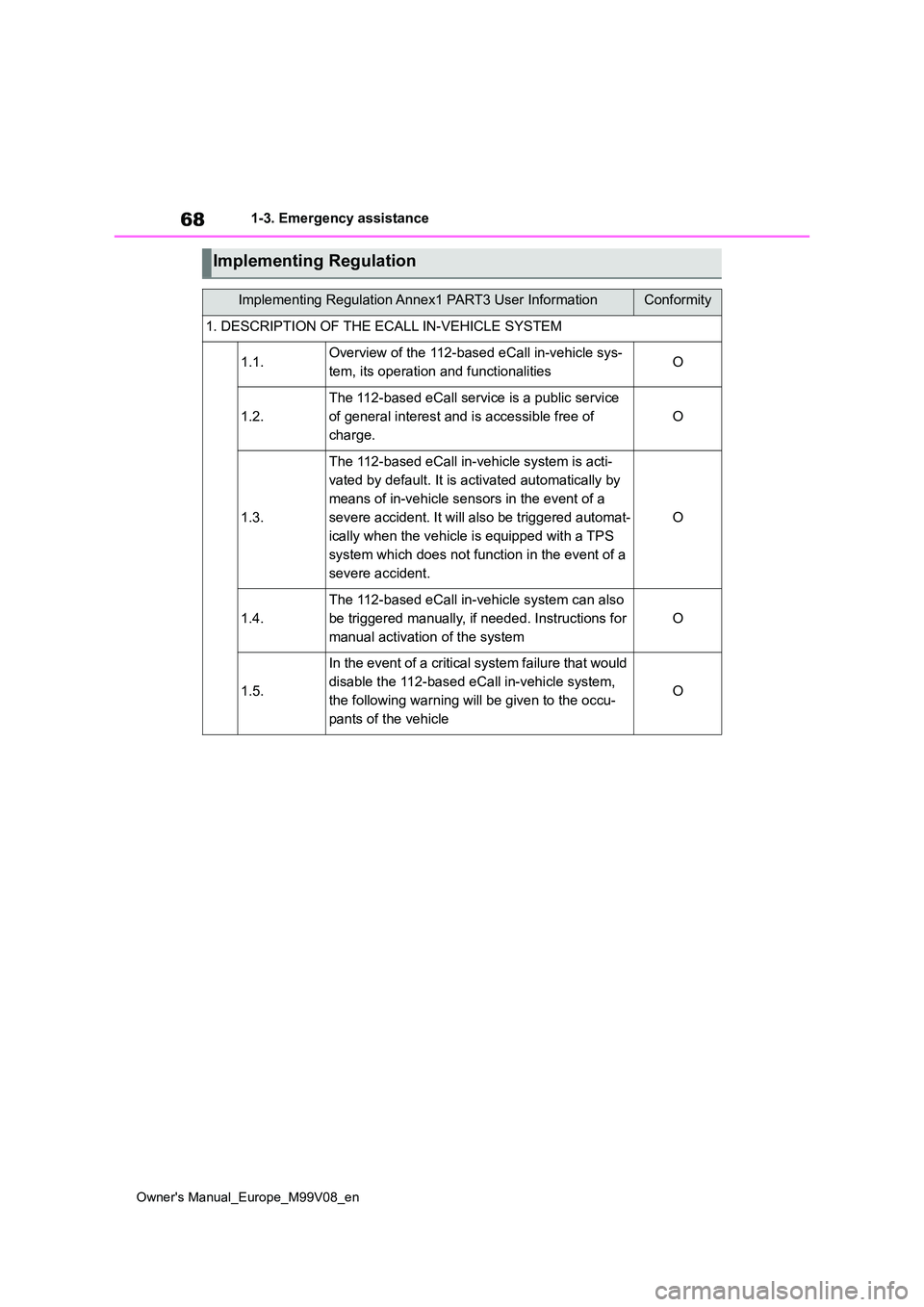
Implementing Regulation
Implementing Regulation Annex1 PART3 User InformationConformity
1. DESCRIPTION OF THE ECALL IN-VEHICLE SYSTEM
1.1.Overview of the 112-based eCall in-vehicle sys-
tem, its operation and functionalitiesO
1.2.
The 112-based eCall service is a public service
of general interest and is accessible free of
charge.
O
1.3.
The 112-based eCall in-vehicle system is acti-
vated by default. It is activated automatically by
means of in-vehicle sensors in the event of a
severe accident. It will also be triggered automat-
ically when the vehicle is equipped with a TPS
system which does not function in the event of a
severe accident.
O
1.4.
The 112-based eCall in-vehicle system can also
be triggered manually, if needed. Instructions for
manual activation of the system
O
1.5.
In the event of a critical system failure that would
disable the 112-based eCall in-vehicle system,
the following warning will be given to the occu-
pants of the vehicle
O
Page 77 of 494
2
75
Owner's Manual_Europe_M99V08_en
2
Vehicle status information and indicators
Vehicle status informa-
tion and indicators
2-1. Instrument cluster
Warning lights and indicators
......................................... 76
Gauges and meters ............ 79
Multi-information display ..... 83
Fuel consumption information
......................................... 88
Page 78 of 494
76
Owner's Manual_Europe_M99V08_en
2-1. Instrument cluster
2-1.In strument clu ste r
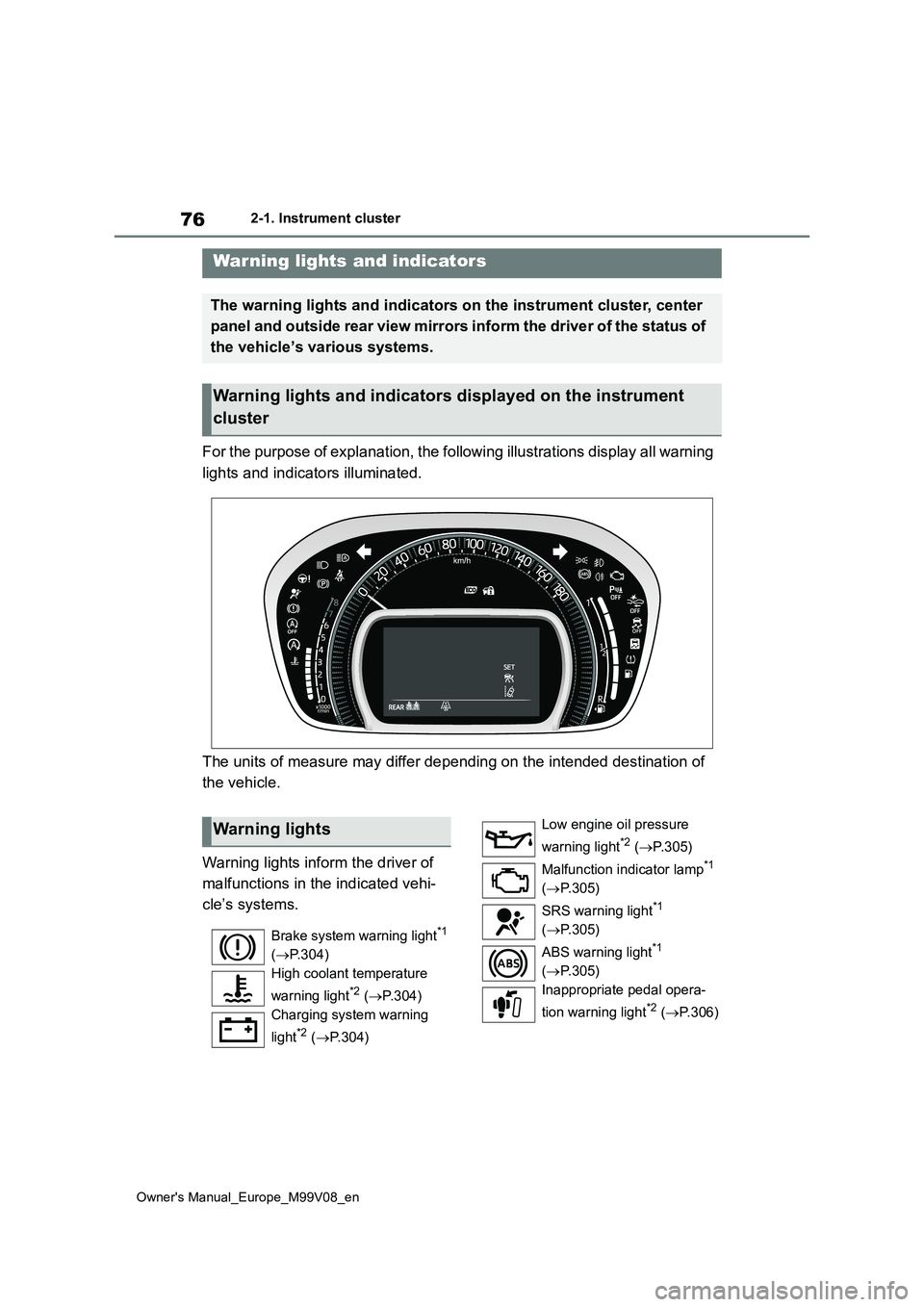
For the purpose of explanation, the following illustrations display all warning
lights and indicators illuminated.
The units of measure may differ depending on the intended desti nation of
the vehicle.
Warning lights inform the driver of
malfunctions in the indicated vehi-
cle’s systems.
Warning lights and indicators
The warning lights and indicators on the instrument cluster, center
panel and outside rear view mirrors inform the driver of the st atus of
the vehicle’s various systems.
Warning lights and indicators displayed on the instrument
cluster
Warning lights
Brake system warning light*1
( P.304)
High coolant temperature
warning light*2 ( P.304)
Charging system warning
light*2 ( P.304)
Low engine oil pressure
warning light*2 ( P. 3 0 5 )
Malfunction indicator lamp*1
( P.305)
SRS warning light*1
( P.305)
ABS warning light*1
( P.305)
Inappropriate pedal opera-
tion warning light*2 ( P. 3 0 6 )
Page 79 of 494
77
2
Owner's Manual_Europe_M99V08_en
2-1. Instrument cluster
Vehicle status information and indicators
*1: These lights come on when the
engine switch is turned to ON to indi-
cate that a system check is being
performed. They will turn off after the
engine is started, or after a few sec-
onds. There may be a malfunction in
a system if the lights do not come
on, or turn off. Have the vehicle
inspected by any authorized Toyota
retailer or Toyota authorized repairer,
or any reliable repairer.
*2: This light illuminates on the multi-
information display.
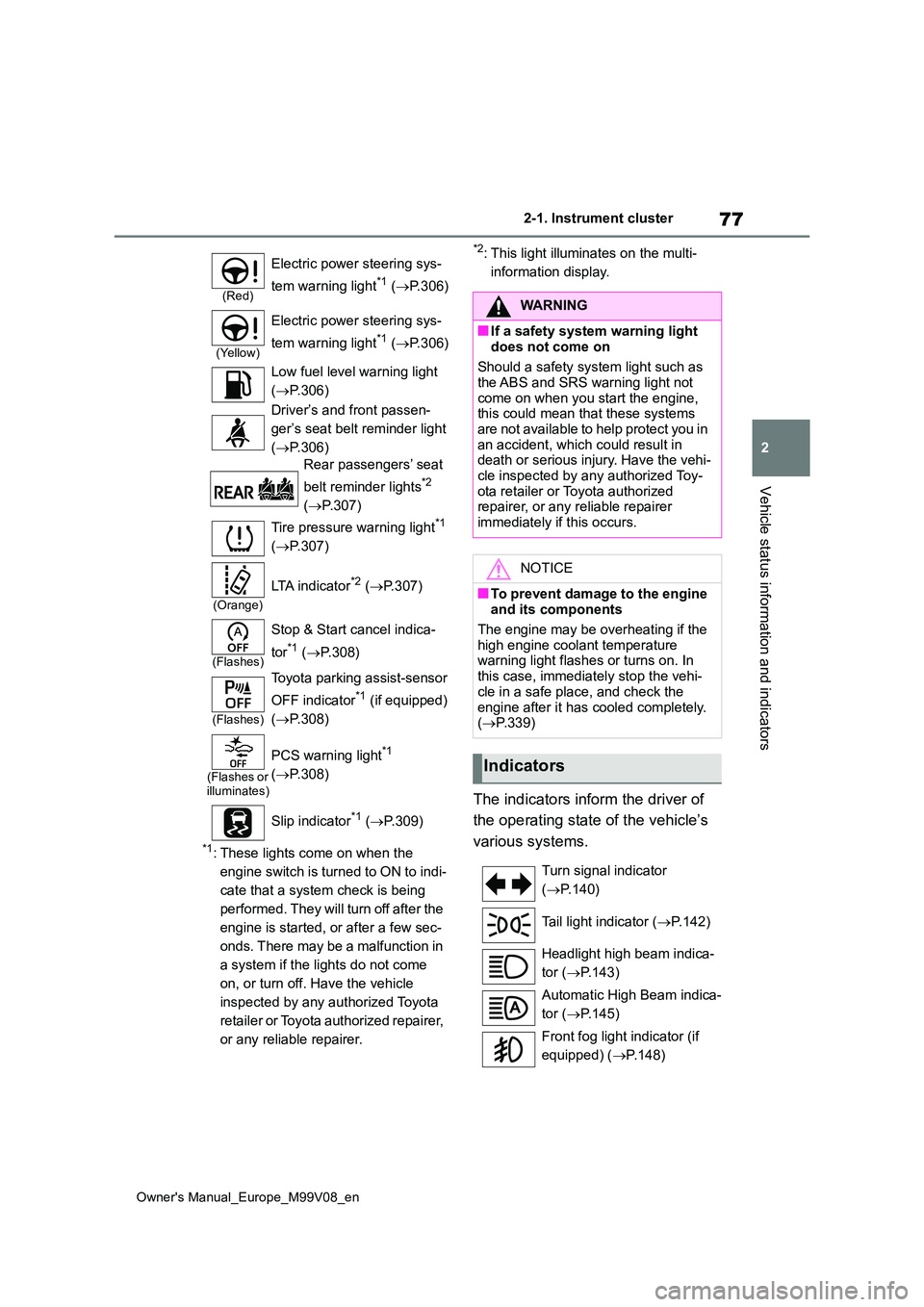
The indicators inform the driver of
the operating state of the vehicle’s
various systems.
(Red)
Electric power steering sys-
tem warning light*1 ( P.306)
(Yellow)
Electric power steering sys-
tem warning light*1 ( P.306)
Low fuel level warning light
( P.306)
Driver’s and front passen-
ger’s seat belt reminder light
( P.306)
Rear passengers’ seat
belt reminder lights*2
( P.307)
Tire pressure warning light*1
( P.307)
(Orange)
LTA indicator*2 (P.307)
(Flashes)
Stop & Start cancel indica-
tor*1 ( P.308)
(Flashes)
Toyota parking assist-sensor
OFF indicator*1 (if equipped)
( P.308)
(Flashes or illuminates)
PCS warning light*1
( P.308)
Slip indicator*1 ( P.309)
WARNING
■If a safety system warning light
does not come on
Should a safety system light such as the ABS and SRS warning light not
come on when you start the engine, this could mean that these systems are not available to help protect you in
an accident, which could result in death or serious injury. Have the vehi-cle inspected by any authorized Toy-
ota retailer or Toyota authorized repairer, or any reliable repairer immediately if this occurs.
NOTICE
■To prevent damage to the engine and its components
The engine may be overheating if the high engine coolant temperature warning light flashes or turns on. In
this case, immediately stop the vehi- cle in a safe place, and check the
engine after it has cooled completely. ( P.339)
Indicators
Turn signal indicator
( P.140)
Tail light indicator ( P.142)
Headlight high beam indica-
tor ( P.143)
Automatic High Beam indica-
tor ( P.145)
Front fog light indicator (if
equipped) ( P.148)
Page 80 of 494
78
Owner's Manual_Europe_M99V08_en
2-1. Instrument cluster
*1: These lights come on when the
engine switch is turned to ON to indi-
cate that a system check is being
performed. They will turn off after the
engine is started, or after a few sec-
onds. There may be a malfunction in
a system if the lights do not come
on, or turn off. Have the vehicle
inspected by any authorized Toyota
retailer or Toyota authorized repairer,
or any reliable repairer.
*2: This light comes on when the system
is turned off.
*3: This light illuminates on the multi-
information display.
*4: Depending on the operating condi-
tion, the color and illuminating/flash-
ing state of the light change.
*5: When the outside temperature is
approximately 3°C (37°F) or lower,
this indicator will flash for approxi-
mately 10 seconds, then stay on.
*6: This light illuminates on the center
panel.
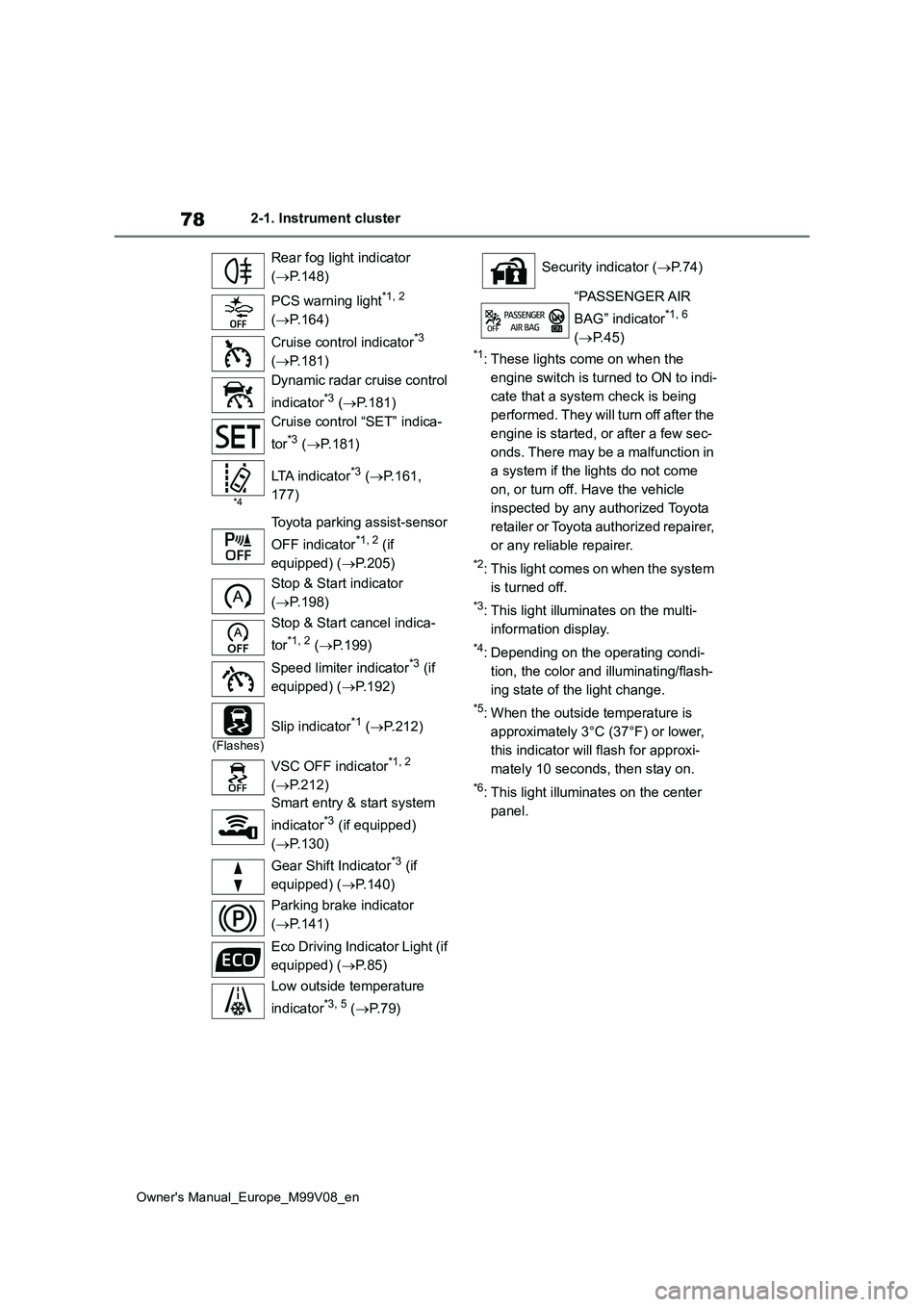
Rear fog light indicator
( P.148)
PCS warning light*1, 2
( P.164)
Cruise control indicator*3
( P.181)
Dynamic radar cruise control
indicator*3 ( P.181)
Cruise control “SET” indica-
tor*3 ( P.181)
*4
LTA indicator*3 (P.161,
177)
Toyota parking assist-sensor
OFF indicator*1, 2 (if
equipped) ( P.205)
Stop & Start indicator
( P.198)
Stop & Start cancel indica-
tor*1, 2 ( P.199)
Speed limiter indicator*3 (if
equipped) ( P.192)
(Flashes)
Slip indicator*1 (P.212)
VSC OFF indicator*1, 2
( P.212)
Smart entry & start system
indicator*3 (if equipped)
( P.130)
Gear Shift Indicator*3 (if
equipped) ( P.140)
Parking brake indicator
( P.141)
Eco Driving Indicator Light (if
equipped) ( P. 8 5 )
Low outside temperature
indicator*3, 5 ( P. 7 9 )
Security indicator (P. 7 4 )
“PASSENGER AIR
BAG” indicator*1, 6
( P.45)
Page 81 of 494
79
2
Owner's Manual_Europe_M99V08_en
2-1. Instrument cluster
Vehicle status information and indicators
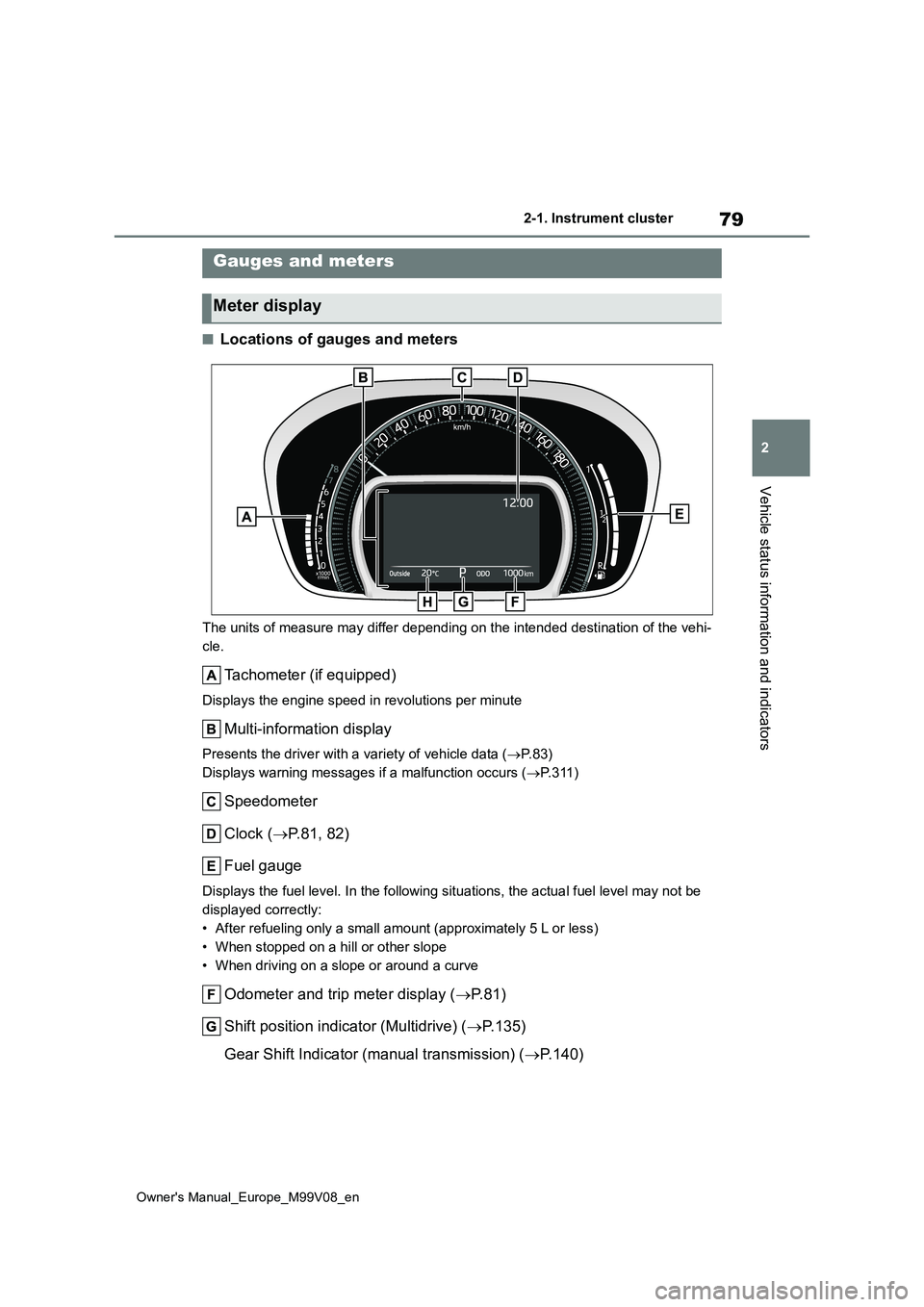
■Locations of gauges and meters
The units of measure may differ depending on the intended destination of the vehi-
cle.
Tachometer (if equipped)
Displays the engine speed in revolutions per minute
Multi-information display
Presents the driver with a variety of vehicle data ( P. 8 3 )
Displays warning messages if a malfunction occurs ( P. 3 1 1 )
Speedometer
Clock ( P.81, 82)
Fuel gauge
Displays the fuel level. In the following situations, the actua l fuel level may not be
displayed correctly:
• After refueling only a small amount (approximately 5 L or less )
• When stopped on a hill or other slope
• When driving on a slope or around a curve
Odometer and trip meter display ( P. 8 1 )
Shift position indicator (Multidrive) ( P.135)
Gear Shift Indicator (manual transmission) ( P.140)
Gauges and meters
Meter display
Page 82 of 494
80
Owner's Manual_Europe_M99V08_en
2-1. Instrument cluster
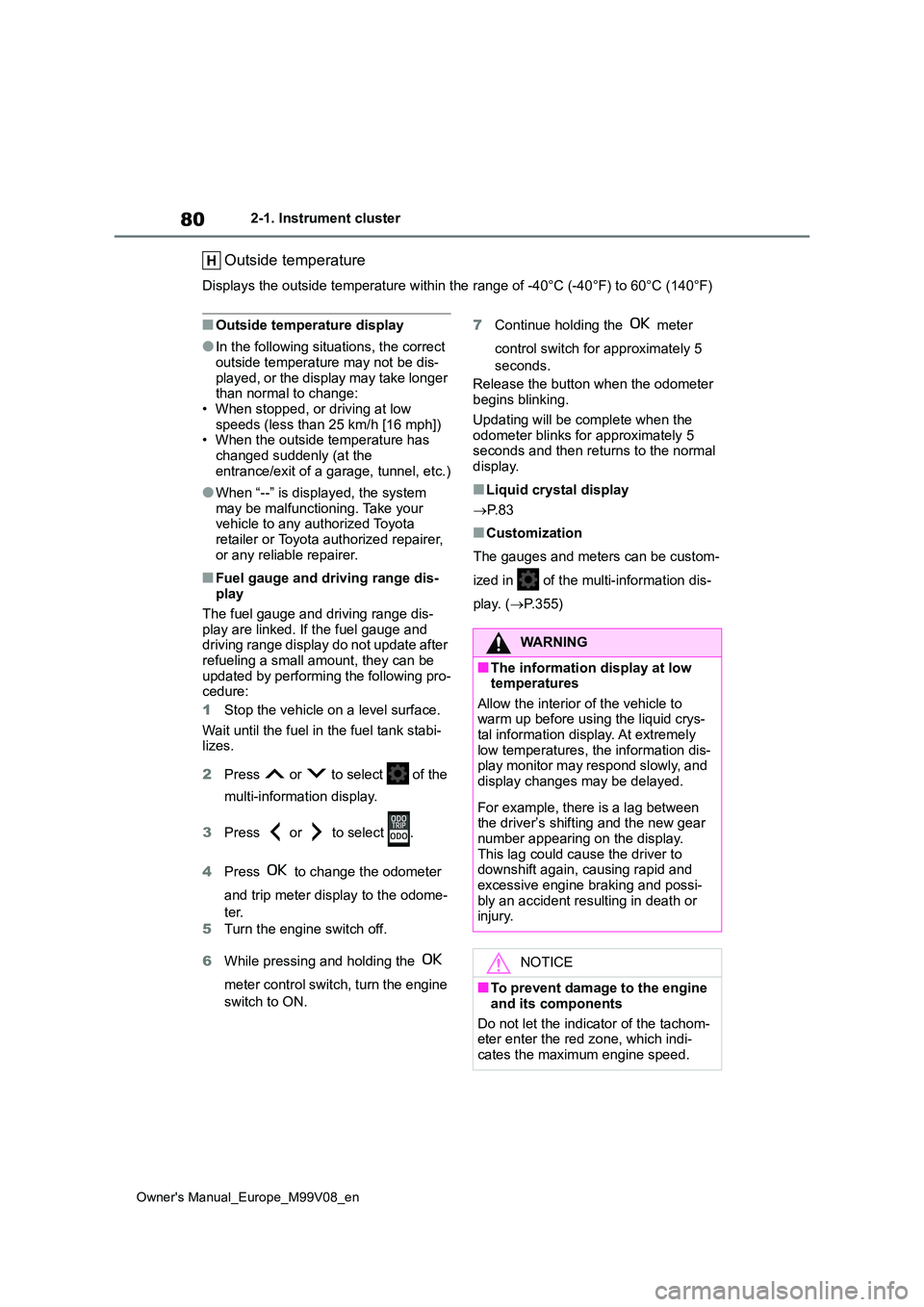
Outside temperature
Displays the outside temperature within the range of -40°C (-40°F) to 60°C (140°F)
■Outside temperature display
●In the following situations, the correct outside temperature may not be dis-
played, or the display may take longer than normal to change:• When stopped, or driving at low
speeds (less than 25 km/h [16 mph]) • When the outside temperature has changed suddenly (at the
entrance/exit of a garage, tunnel, etc.)
●When “--” is displayed, the system
may be malfunctioning. Take your vehicle to any authorized Toyota retailer or Toyota authorized repairer,
or any reliable repairer.
■Fuel gauge and driving range dis- play
The fuel gauge and driving range dis-
play are linked. If the fuel gauge and driving range display do not update after refueling a small amount, they can be
updated by performing the following pro- cedure:
1 Stop the vehicle on a level surface.
Wait until the fuel in the fuel tank stabi- lizes.
2 Press or to select of the
multi-information display.
3 Press or to select .
4 Press to change the odometer
and trip meter display to the odome-
ter.
5 Turn the engine switch off.
6 While pressing and holding the
meter control switch, turn the engine
switch to ON.
7 Continue holding the meter
control switch for approximately 5
seconds.
Release the button when the odometer begins blinking.
Updating will be complete when the odometer blinks for approximately 5 seconds and then returns to the normal
display.
■Liquid crystal display
P. 8 3
■Customization
The gauges and meters can be custom-
ized in of the multi-information dis-
play. ( P.355)
WARNING
■The information display at low temperatures
Allow the interior of the vehicle to warm up before using the liquid crys-tal information display. At extremely
low temperatures, the information dis- play monitor may respond slowly, and display changes may be delayed.
For example, there is a lag between the driver’s shifting and the new gear
number appearing on the display. This lag could cause the driver to downshift again, causing rapid and
excessive engine braking and possi- bly an accident resulting in death or injury.
NOTICE
■To prevent damage to the engine
and its components
Do not let the indicator of the tachom- eter enter the red zone, which indi-
cates the maximum engine speed.
Page 83 of 494
81
2
Owner's Manual_Europe_M99V08_en
2-1. Instrument cluster
Vehicle status information and indicators
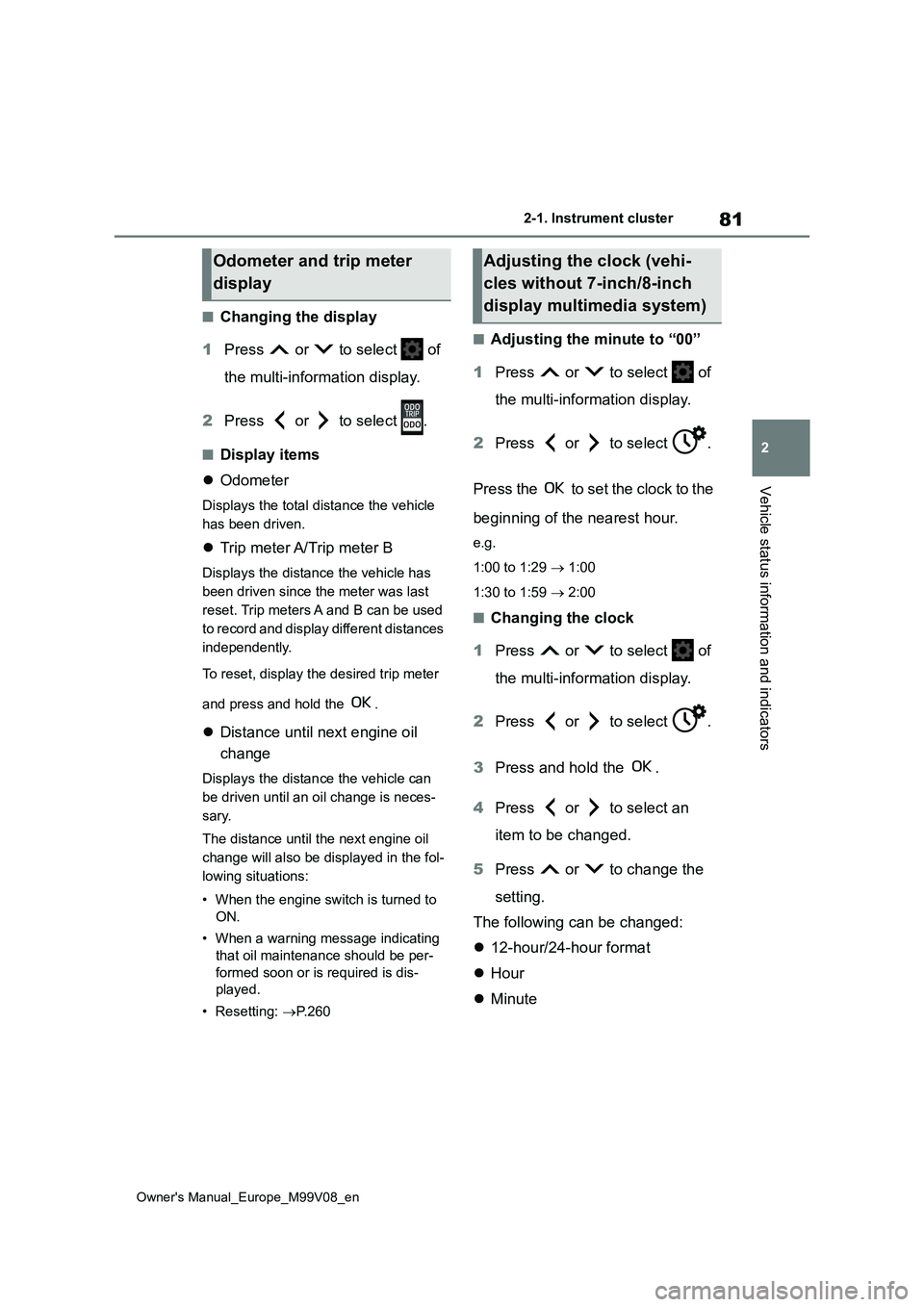
■Changing the display
1 Press or to select of
the multi-information display.
2 Press or to select .
■Display items
Odometer
Displays the total distance the vehicle
has been driven.
Trip meter A/Trip meter B
Displays the distance the vehicle has
been driven since the meter was last
reset. Trip meters A and B can be used
to record and display different distances
independently.
To reset, display the desired trip meter
and press and hold the .
Distance until next engine oil
change
Displays the distance the vehicle can
be driven until an oil change is neces-
sary.
The distance until the next engine oil
change will also be displayed in the fol-
lowing situations:
• When the engine switch is turned to
ON.
• When a warning message indicating
that oil maintenance should be per-
formed soon or is required is dis-
played.
• Resetting: P. 2 6 0
■Adjusting the minute to “00”
1 Press or to select of
the multi-information display.
2 Press or to select .
Press the to set the clock to the
beginning of the nearest hour.
e.g.
1:00 to 1:29 1:00
1:30 to 1:59 2:00
■Changing the clock
1 Press or to select of
the multi-information display.
2 Press or to select .
3 Press and hold the .
4 Press or to select an
item to be changed.
5 Press or to change the
setting.
The following can be changed:
12-hour/24-hour format
Hour
Minute
Odometer and trip meter
display
Adjusting the clock (vehi-
cles without 7-inch/8-inch
display multimedia system)