battery TOYOTA AYGO X 2022 (in English) Service Manual
[x] Cancel search | Manufacturer: TOYOTA, Model Year: 2022, Model line: AYGO X, Model: TOYOTA AYGO X 2022Pages: 494, PDF Size: 92.53 MB
Page 277 of 494
275
6
Owner's Manual_Europe_M99V08_en
6-3. Do-it-yourself maintenance
Maintenance and care
■If the key battery is depleted
The following symptoms may occur:
●The smart entry & start system (if equipped) and wireless remote control will not function properly.
●The operational range will be reduced.
Flathead screwdriver
Small flathead screwdriver
Lithium battery CR2032 (vehi-
cles without smart entry & start
system), or CR2450 (vehicles
with smart entry & start system)
■Use a CR2032 (vehicles without smart entry & start system) or CR2450 (vehicles with smart entry
& start system) lithium battery
●Batteries can be purchased at any
authorized Toyota retailer or Toyota authorized repairer, or any reliable repairer, local electrical appliance
shops or camera stores.
●Replace only with the same or equiva-
lent type recommended by the manu-
facturer.
●Dispose of used batteries according to
local laws.
Vehicles without smart entry &
start system
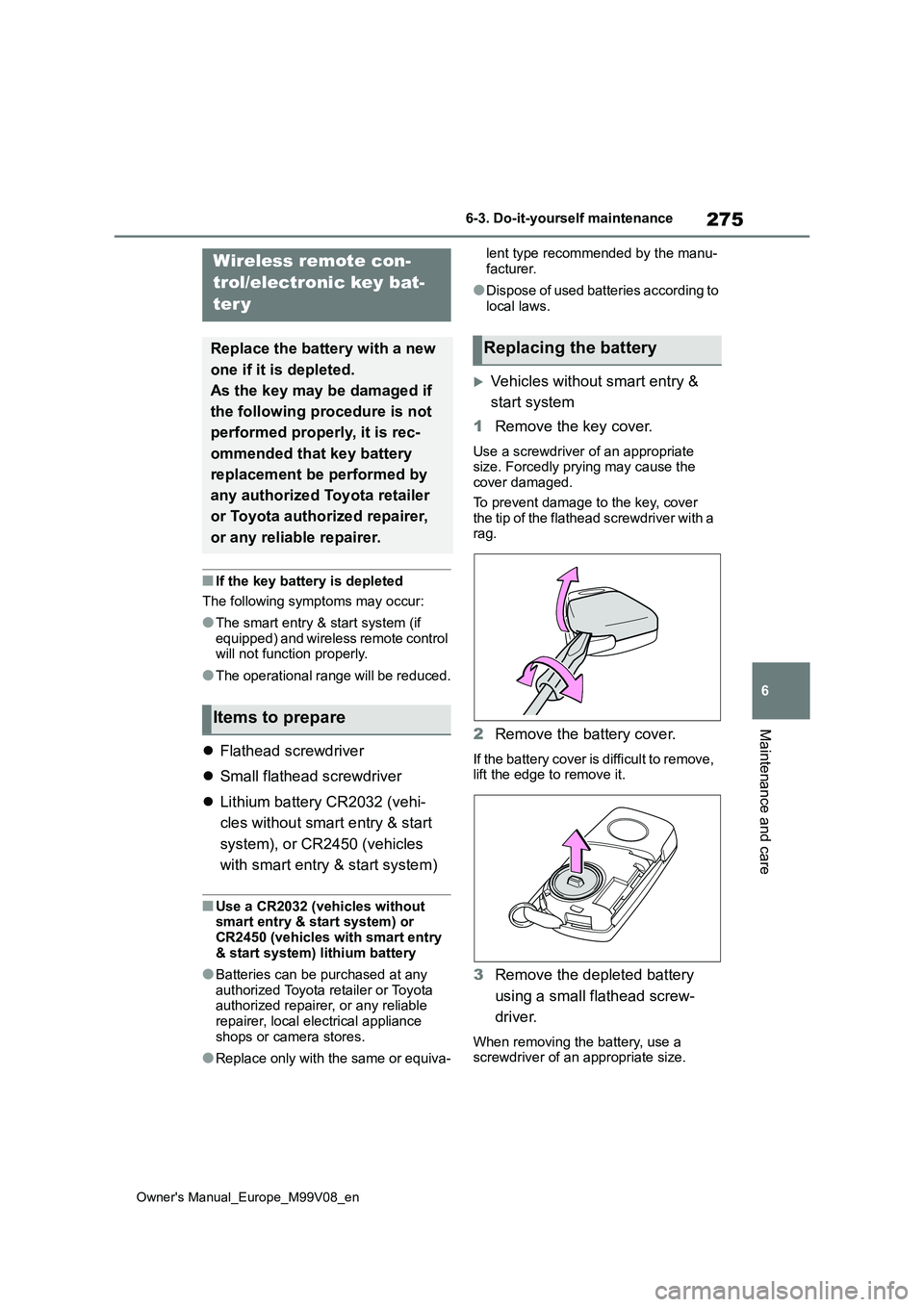
1 Remove the key cover.
Use a screwdriver of an appropriate size. Forcedly prying may cause the cover damaged.
To prevent damage to the key, cover the tip of the flathead screwdriver with a rag.
2 Remove the battery cover.
If the battery cover is difficult to remove, lift the edge to remove it.
3 Remove the depleted battery
using a small flathead screw-
driver.
When removing the battery, use a screwdriver of an appropriate size.
Wireless remote con-
trol/electronic key bat-
ter y
Replace the battery with a new
one if it is depleted.
As the key may be damaged if
the following procedure is not
performed properly, it is rec-
ommended that key battery
replacement be performed by
any authorized Toyota retailer
or Toyota authorized repairer,
or any reliable repairer.
Items to prepare
Replacing the battery
Page 278 of 494
276
Owner's Manual_Europe_M99V08_en
6-3. Do-it-yourself maintenance
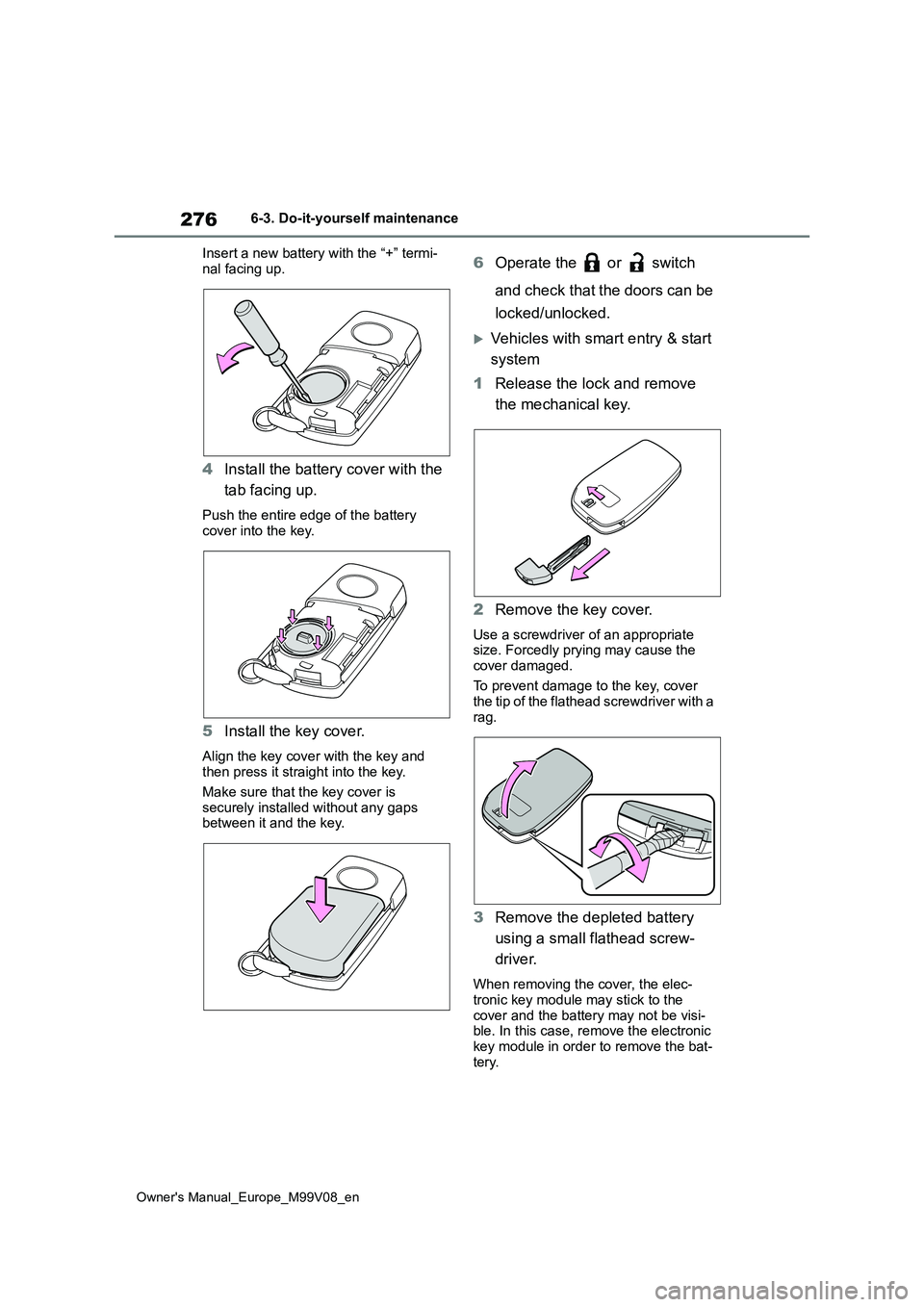
Insert a new battery with the “+” termi-
nal facing up.
4 Install the battery cover with the
tab facing up.
Push the entire edge of the battery
cover into the key.
5 Install the key cover.
Align the key cover with the key and then press it straight into the key.
Make sure that the key cover is
securely installed without any gaps between it and the key.
6 Operate the or switch
and check that the doors can be
locked/unlocked.
Vehicles with smart entry & start
system
1 Release the lock and remove
the mechanical key.
2 Remove the key cover.
Use a screwdriver of an appropriate size. Forcedly prying may cause the
cover damaged.
To prevent damage to the key, cover the tip of the flathead screwdriver with a
rag.
3 Remove the depleted battery
using a small flathead screw-
driver.
When removing the cover, the elec- tronic key module may stick to the
cover and the battery may not be visi- ble. In this case, remove the electronic key module in order to remove the bat-
tery.
Page 279 of 494
277
6
Owner's Manual_Europe_M99V08_en
6-3. Do-it-yourself maintenance
Maintenance and care
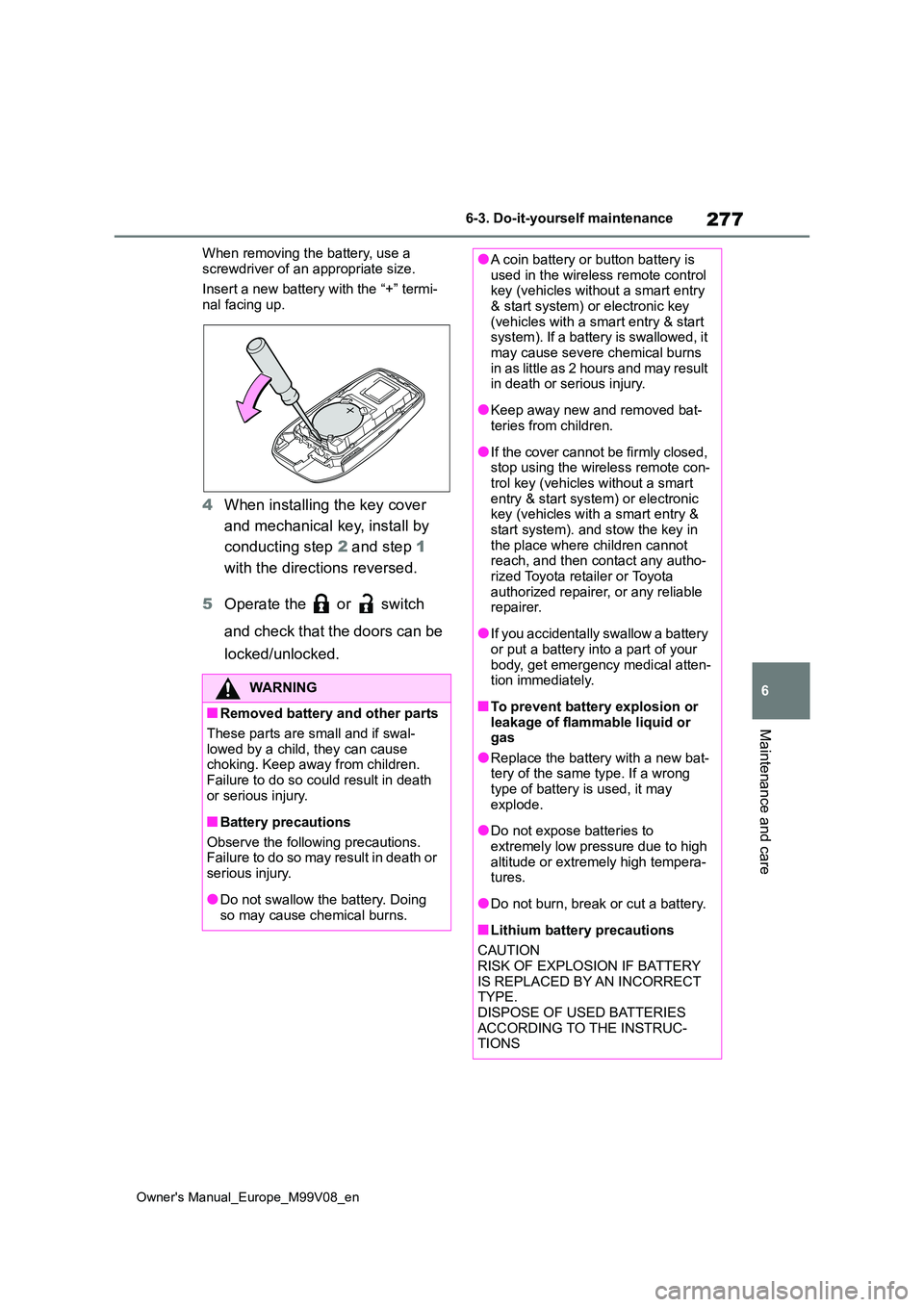
When removing the battery, use a
screwdriver of an appropriate size.
Insert a new battery with the “+” termi- nal facing up.
4 When installing the key cover
and mechanical key, install by
conducting step 2 and step 1
with the directions reversed.
5 Operate the or switch
and check that the doors can be
locked/unlocked.
WARNING
■Removed battery and other parts
These parts are small and if swal- lowed by a child, they can cause choking. Keep away from children.
Failure to do so could result in death or serious injury.
■Battery precautions
Observe the following precautions. Failure to do so may result in death or
serious injury.
●Do not swallow the battery. Doing
so may cause chemical burns.
●A coin battery or button battery is used in the wireless remote control key (vehicles without a smart entry
& start system) or electronic key (vehicles with a smart entry & start system). If a battery is swallowed, it
may cause severe chemical burns i n a s l it t l e as 2 ho u r s a n d m ay r e su lt in death or serious injury.
●Keep away new and removed bat-teries from children.
●If the cover cannot be firmly closed, stop using the wireless remote con-
trol key (vehicles without a smart entry & start system) or electronic key (vehicles with a smart entry &
start system). and stow the key in the place where children cannot reach, and then contact any autho-
rized Toyota retailer or Toyota authorized repairer, or any reliable repairer.
●If you accidentally swallow a battery or put a battery into a part of your
body, get emergency medical atten- tion immediately.
■To prevent battery explosion or leakage of flammable liquid or gas
●Replace the battery with a new bat-tery of the same type. If a wrong type of battery is used, it may
explode.
●Do not expose batteries to
extremely low pressure due to high altitude or extremely high tempera-tures.
●Do not burn, break or cut a battery.
■Lithium battery precautions
CAUTION RISK OF EXPLOSION IF BATTERY
IS REPLACED BY AN INCORRECT TYPE.DISPOSE OF USED BATTERIES
ACCORDING TO THE INSTRUC- TIONS
Page 280 of 494
278
Owner's Manual_Europe_M99V08_en
6-3. Do-it-yourself maintenance
1Turn the engine switch off.
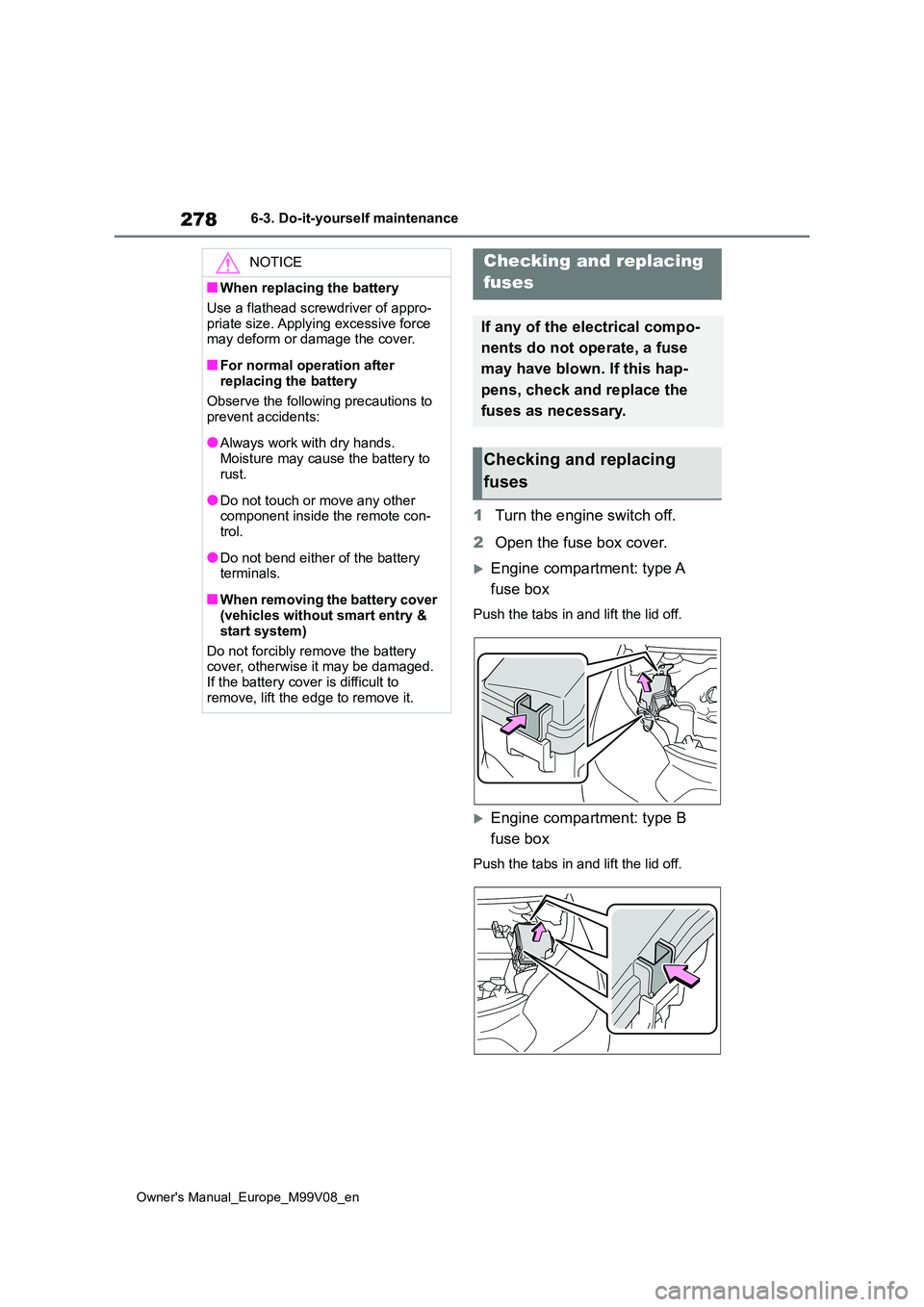
2 Open the fuse box cover.
Engine compartment: type A
fuse box
Push the tabs in and lift the lid off.
Engine compartment: type B
fuse box
Push the tabs in and lift the lid off.
NOTICE
■When replacing the battery
Use a flathead screwdriver of appro-
priate size. Applying excessive force may deform or damage the cover.
■For normal operation after replacing the battery
Observe the following precautions to
prevent accidents:
●Always work with dry hands.
Moisture may cause the battery to rust.
●Do not touch or move any other component inside the remote con-trol.
●Do not bend either of the battery terminals.
■When removing the battery cover (vehicles without smart entry &
start system)
Do not forcibly remove the battery cover, otherwise it may be damaged.
If the battery cover is difficult to remove, lift the edge to remove it.
Checking and replacing
fuses
If any of the electrical compo-
nents do not operate, a fuse
may have blown. If this hap-
pens, check and replace the
fuses as necessary.
Checking and replacing
fuses
Page 285 of 494
283
6
Owner's Manual_Europe_M99V08_en
6-3. Do-it-yourself maintenance
Maintenance and care
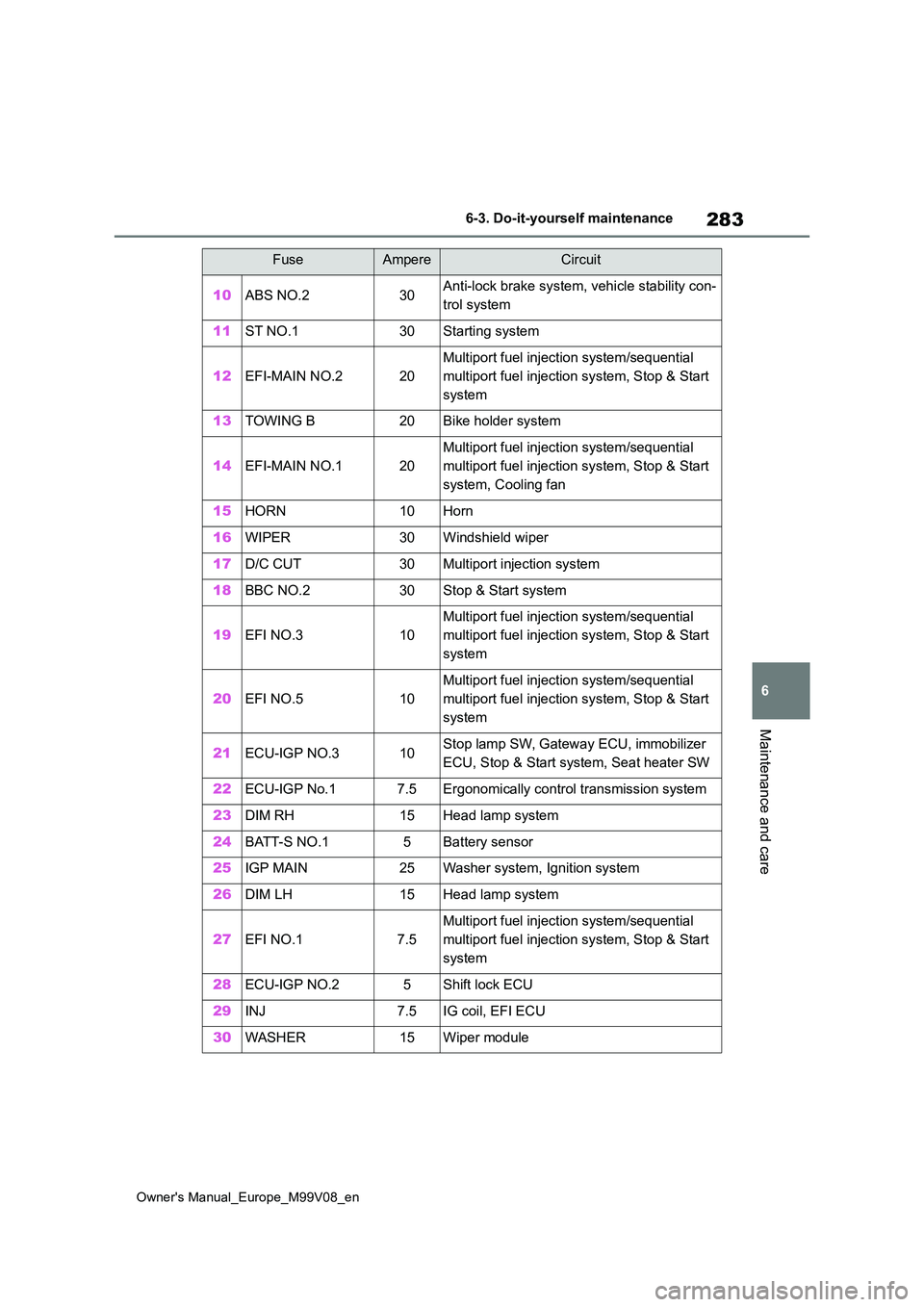
10ABS NO.230Anti-lock brake system, vehicle stability con-
trol system
11ST NO.130Starting system
12EFI-MAIN NO.220
Multiport fuel injection system/sequential
multiport fuel injection system, Stop & Start
system
13TOWING B20Bike holder system
14EFI-MAIN NO.120
Multiport fuel injection system/sequential
multiport fuel injection system, Stop & Start
system, Cooling fan
15HORN10Horn
16WIPER30Windshield wiper
17D/C CUT30Multiport injection system
18BBC NO.230Stop & Start system
19EFI NO.310
Multiport fuel injection system/sequential
multiport fuel injection system, Stop & Start
system
20EFI NO.510
Multiport fuel injection system/sequential
multiport fuel injection system, Stop & Start
system
21ECU-IGP NO.310Stop lamp SW, Gateway ECU, immobilizer
ECU, Stop & Start system, Seat heater SW
22ECU-IGP No.17.5Ergonomically control transmission system
23DIM RH15Head lamp system
24BATT-S NO.15Battery sensor
25IGP MAIN25Washer system, Ignition system
26DIM LH15Head lamp system
27EFI NO.17.5
Multiport fuel injection system/sequential
multiport fuel injection system, Stop & Start
system
28ECU-IGP NO.25Shift lock ECU
29INJ7.5IG coil, EFI ECU
30WASHER15Wiper module
FuseAmpereCircuit
Page 297 of 494
7
295
Owner's Manual_Europe_M99V08_en
7
When trouble arises
When trouble arises
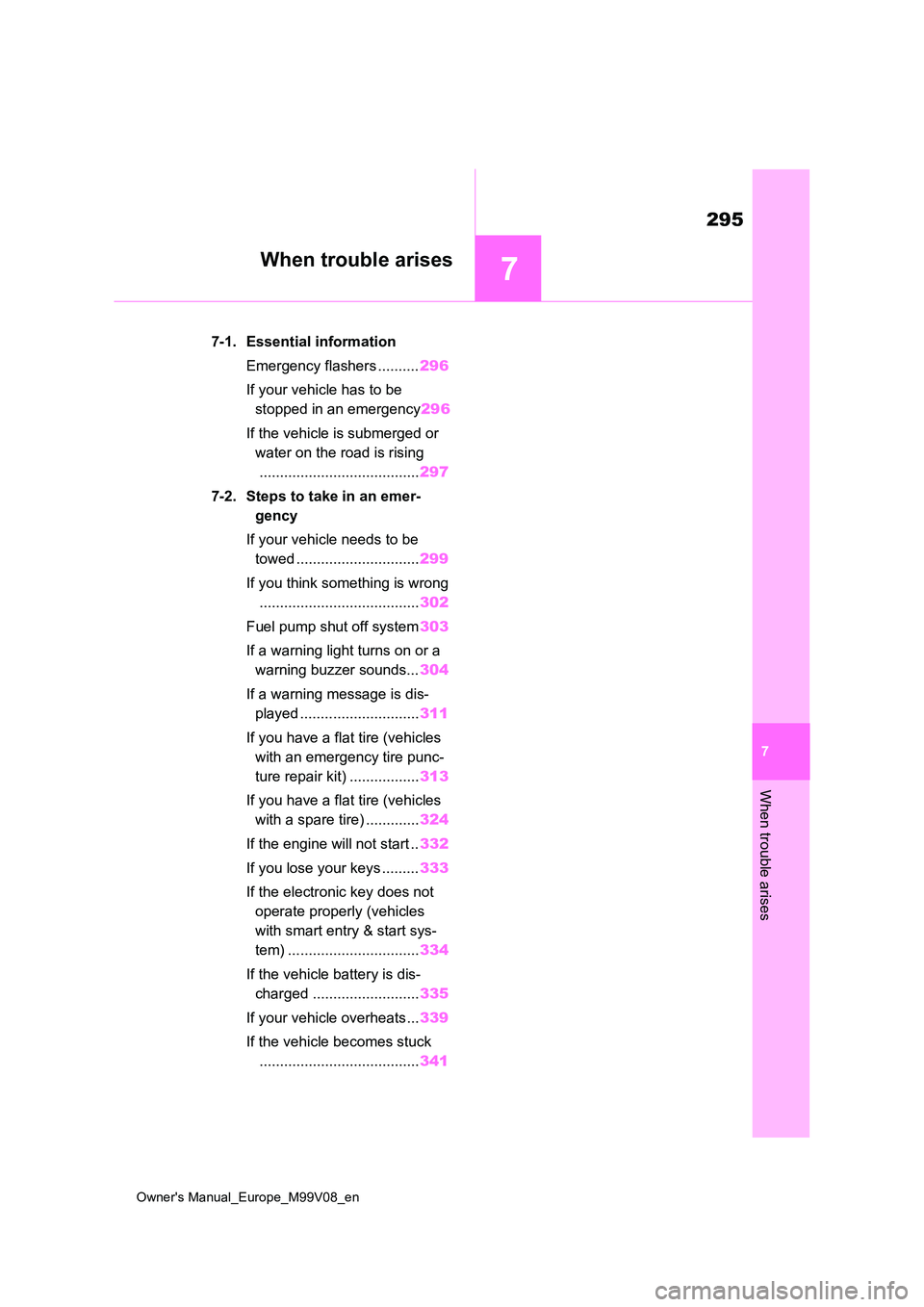
7-1. Essential information
Emergency flashers .......... 296
If your vehicle has to be
stopped in an emergency 296
If the vehicle is submerged or
water on the road is rising
....................................... 297
7-2. Steps to take in an emer-
gency
If your vehicle needs to be
towed .............................. 299
If you think something is wrong
....................................... 302
Fuel pump shut off system 303
If a warning light turns on or a
warning buzzer sounds... 304
If a warning message is dis-
played ............................. 311
If you have a flat tire (vehicles
with an emergency tire punc-
ture repair kit) ................. 313
If you have a flat tire (vehicles
with a spare tire) ............. 324
If the engine will not start .. 332
If you lose your keys ......... 333
If the electronic key does not
operate properly (vehicles
with smart entry & start sys-
tem) ................................ 334
If the vehicle battery is dis-
charged .......................... 335
If your vehicle overheats... 339
If the vehicle becomes stuck
....................................... 341
Page 298 of 494
296
Owner's Manual_Europe_M99V08_en
7-1. Essential information
7-1.Esse ntial informa tion
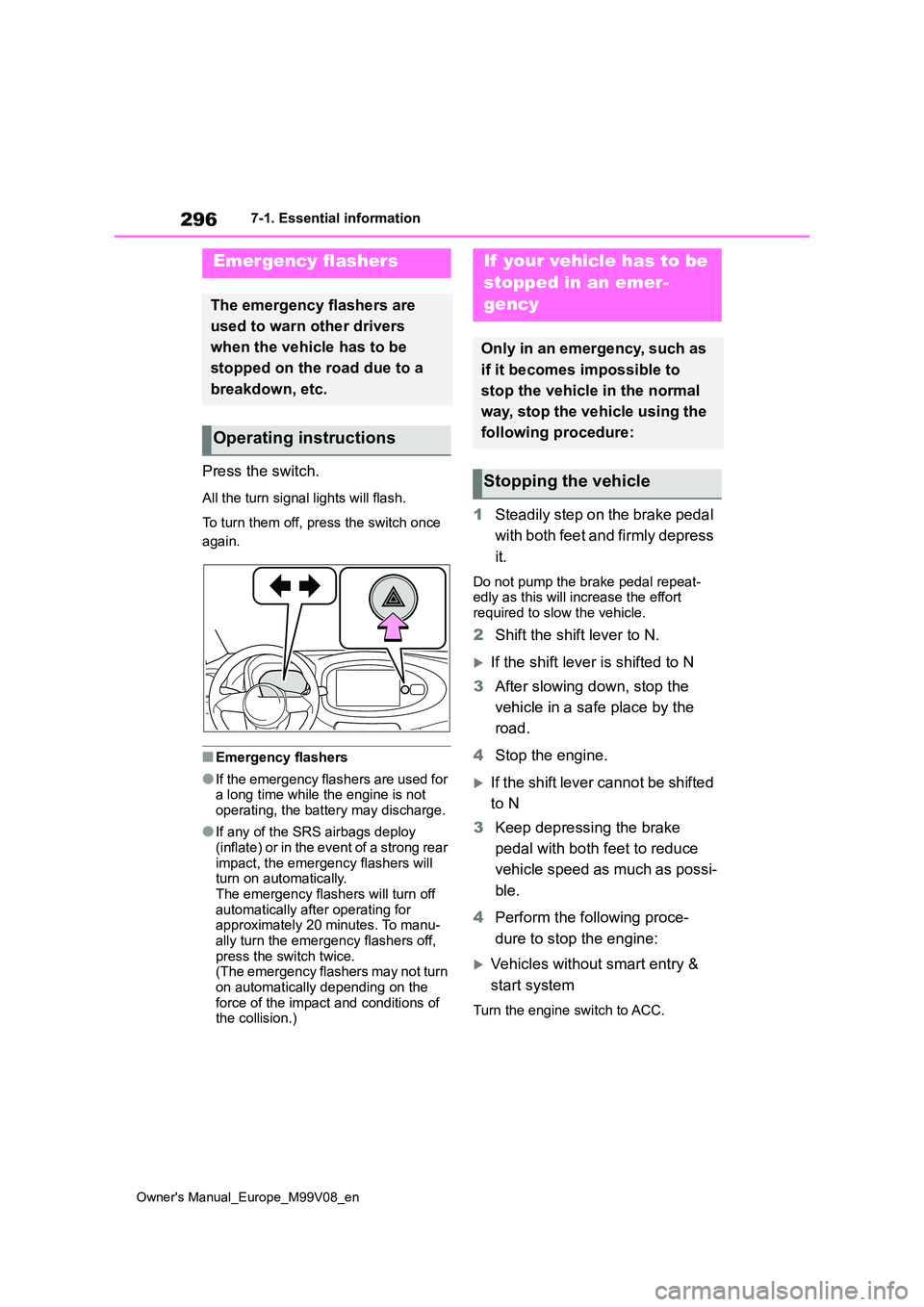
Press the switch.
All the turn signal lights will flash.
To turn them off, press the switch once
again.
■Emergency flashers
●If the emergency flashers are used for a long time while the engine is not
operating, the battery may discharge.
●If any of the SRS airbags deploy
(inflate) or in the event of a strong rear impact, the emergency flashers will turn on automatically.
The emergency flashers will turn off automatically after operating for approximately 20 minutes. To manu-
ally turn the emergency flashers off, press the switch twice.(The emergency flashers may not turn
on automatically depending on the force of the impact and conditions of the collision.)
1 Steadily step on the brake pedal
with both feet and firmly depress
it.
Do not pump the brake pedal repeat- edly as this will increase the effort required to slow the vehicle.
2 Shift the shift lever to N.
If the shift lever is shifted to N
3 After slowing down, stop the
vehicle in a safe place by the
road.
4 Stop the engine.
If the shift lever cannot be shifted
to N
3 Keep depressing the brake
pedal with both feet to reduce
vehicle speed as much as possi-
ble.
4 Perform the following proce-
dure to stop the engine:
Vehicles without smart entry &
start system
Turn the engine switch to ACC.
Emergency flashers
The emergency flashers are
used to warn other drivers
when the vehicle has to be
stopped on the road due to a
breakdown, etc.
Operating instructions
If your vehicle has to be
stopped in an emer-
gency
Only in an emergency, such as
if it becomes impossible to
stop the vehicle in the normal
way, stop the vehicle using the
following procedure:
Stopping the vehicle
Page 311 of 494
309
7
Owner's Manual_Europe_M99V08_en
7-2. Steps to take in an emergency
When trouble arises
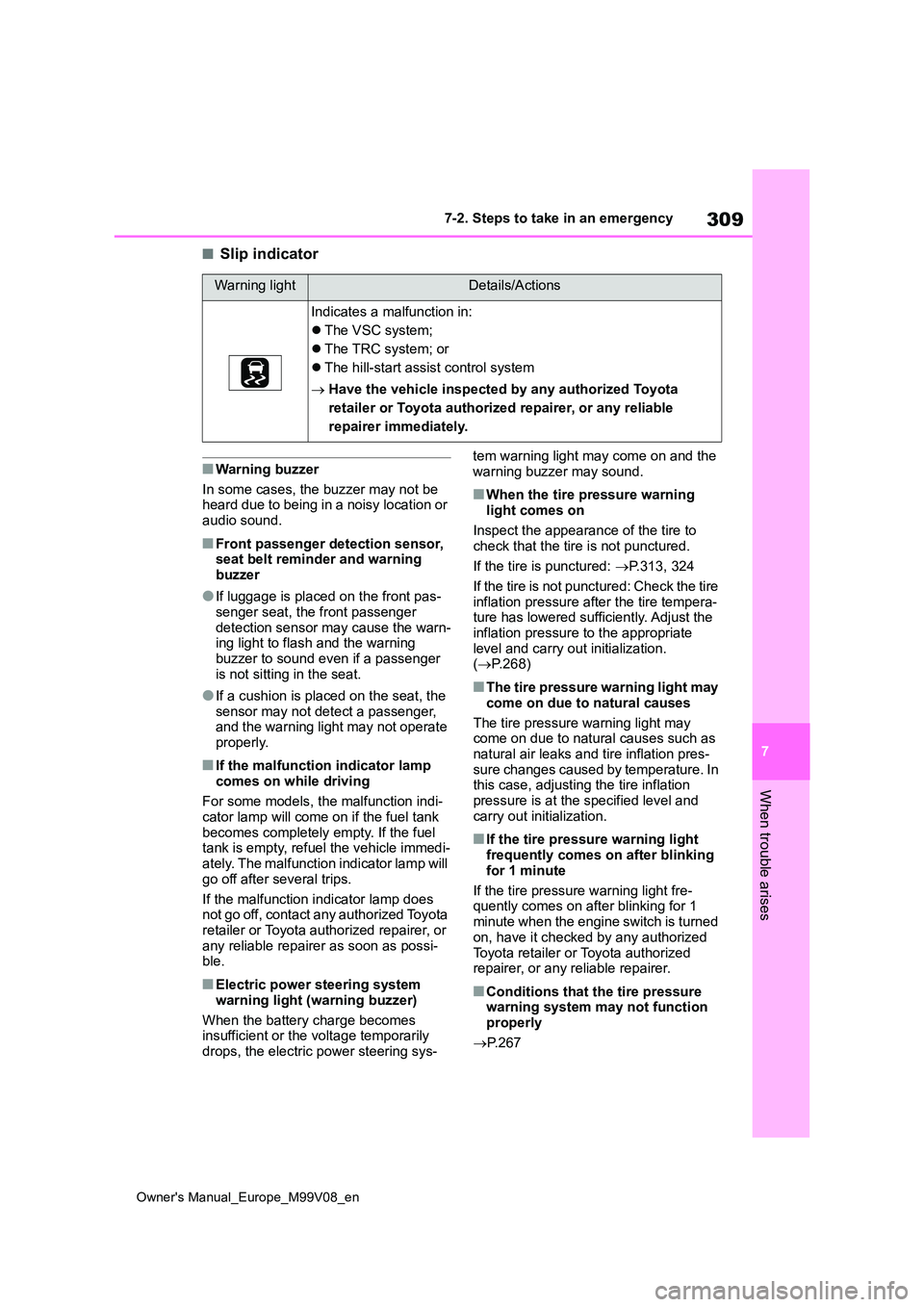
■Slip indicator
■Warning buzzer
In some cases, the buzzer may not be heard due to being in a noisy location or
audio sound.
■Front passenger detection sensor, seat belt reminder and warning buzzer
●If luggage is placed on the front pas-senger seat, the front passenger
detection sensor may cause the warn- ing light to flash and the warning buzzer to sound even if a passenger
is not sitting in the seat.
●If a cushion is placed on the seat, the
sensor may not detect a passenger, and the warning light may not operate properly.
■If the malfunction indicator lamp
comes on while driving
For some models, the malfunction indi- cator lamp will come on if the fuel tank
becomes completely empty. If the fuel tank is empty, refuel the vehicle immedi-ately. The malfunction indicator lamp will
go off after several trips.
If the malfunction indicator lamp does not go off, contact any authorized Toyota
retailer or Toyota authorized repairer, or any reliable repairer as soon as possi-ble.
■Electric power steering system
warning light (warning buzzer)
When the battery charge becomes insufficient or the voltage temporarily
drops, the electric power steering sys-
tem warning light may come on and the warning buzzer may sound.
■When the tire pressure warning light comes on
Inspect the appearance of the tire to check that the tire is not punctured.
If the tire is punctured: P.313, 324
If the tire is not punctured: Check the tire inflation pressure after the tire tempera-ture has lowered sufficiently. Adjust the
inflation pressure to the appropriate level and carry out initialization. ( P.268)
■The tire pressure warning light may
come on due to natural causes
The tire pressure warning light may come on due to natural causes such as
natural air leaks and tire inflation pres- sure changes caused by temperature. In this case, adjusting the tire inflation
pressure is at the specified level and carry out initialization.
■If the tire pressure warning light frequently comes on after blinking
for 1 minute
If the tire pressure warning light fre- quently comes on after blinking for 1
minute when the engine switch is turned on, have it checked by any authorized
Toyota retailer or Toyota authorized repairer, or any reliable repairer.
■Conditions that the tire pressure warning system may not function
properly
P. 2 6 7
Warning lightDetails/Actions
Indicates a malfunction in:
The VSC system;
The TRC system; or
The hill-start assist control system
Have the vehicle inspected by any authorized Toyota
retailer or Toyota authorized repairer, or any reliable
repairer immediately.
Page 313 of 494
311
7
Owner's Manual_Europe_M99V08_en
7-2. Steps to take in an emergency
When trouble arises
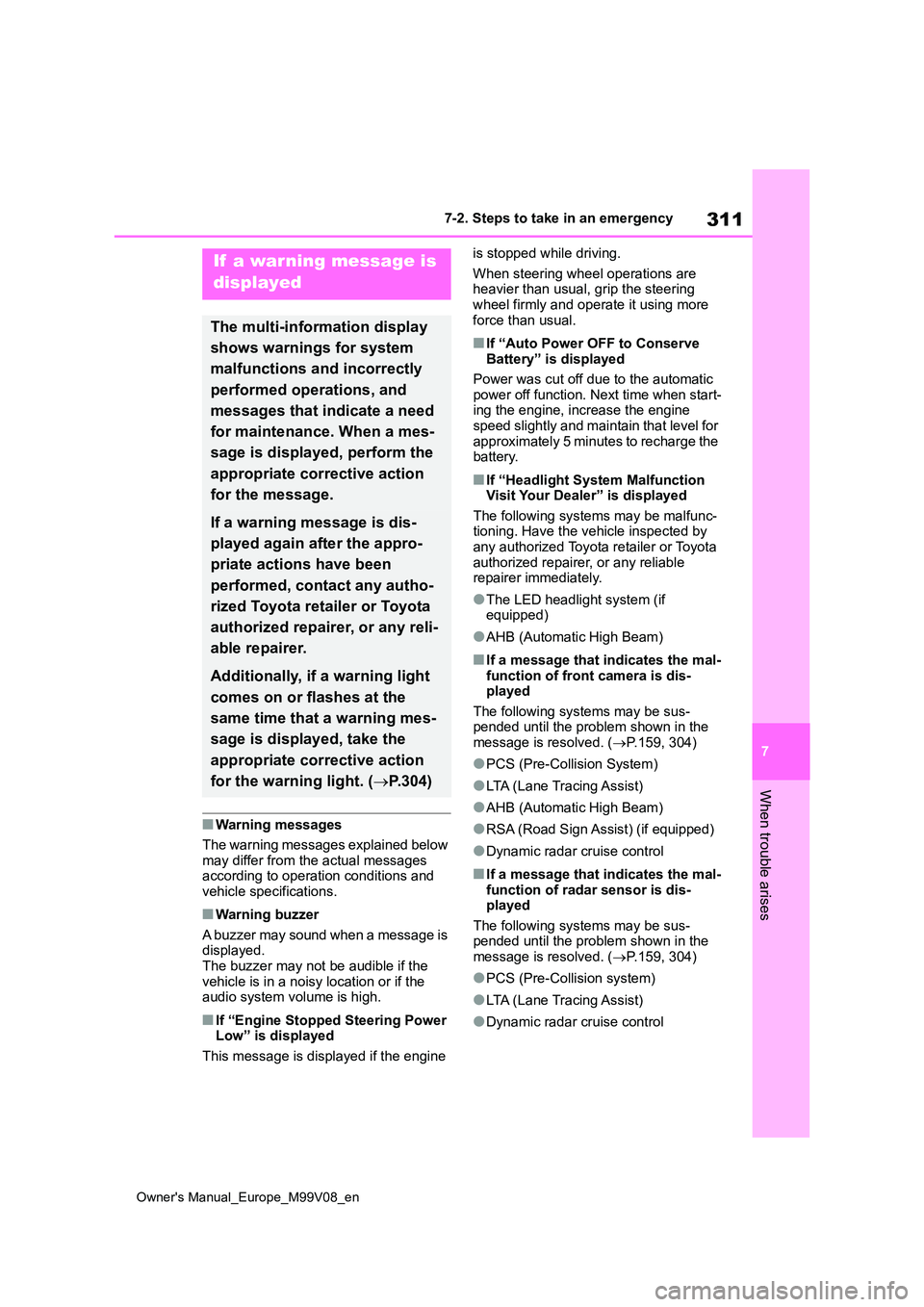
■Warning messages
The warning messages explained below
may differ from the actual messages according to operation conditions and vehicle specifications.
■Warning buzzer
A buzzer may sound when a message is displayed.The buzzer may not be audible if the
vehicle is in a noisy location or if the audio system volume is high.
■If “Engine Stopped Steering Power Low” is displayed
This message is displayed if the engine
is stopped while driving.
When steering wheel operations are heavier than usual, grip the steering wheel firmly and operate it using more
force than usual.
■If “Auto Power OFF to Conserve Battery” is displayed
Power was cut off due to the automatic
power off function. Next time when start- ing the engine, increase the engine speed slightly and maintain that level for
approximately 5 minutes to recharge the battery.
■If “Headlight System Malfunction Visit Your Dealer” is displayed
The following systems may be malfunc- tioning. Have the vehicle inspected by any authorized Toyota retailer or Toyota
authorized repairer, or any reliable repairer immediately.
●The LED headlight system (if equipped)
●AHB (Automatic High Beam)
■If a message that indicates the mal-function of front camera is dis-played
The following systems may be sus- pended until the problem shown in the message is resolved. ( P.159, 304)
●PCS (Pre-Collision System)
●LTA (Lane Tracing Assist)
●AHB (Automatic High Beam)
●RSA (Road Sign Assist) (if equipped)
●Dynamic radar cruise control
■If a message that indicates the mal- function of radar sensor is dis-played
The following systems may be sus- pended until the problem shown in the message is resolved. ( P.159, 304)
●PCS (Pre-Collision system)
●LTA (Lane Tracing Assist)
●Dynamic radar cruise control
If a warning message is
displayed
The multi-information display
shows warnings for system
malfunctions and incorrectly
performed operations, and
messages that indicate a need
for maintenance. When a mes-
sage is displayed, perform the
appropriate corrective action
for the message.
If a warning message is dis-
played again after the appro-
priate actions have been
performed, contact any autho-
rized Toyota retailer or Toyota
authorized repairer, or any reli-
able repairer.
Additionally, if a warning light
comes on or flashes at the
same time that a warning mes-
sage is displayed, take the
appropriate corrective action
for the warning light. ( P.304)
Page 314 of 494
312
Owner's Manual_Europe_M99V08_en
7-2. Steps to take in an emergency
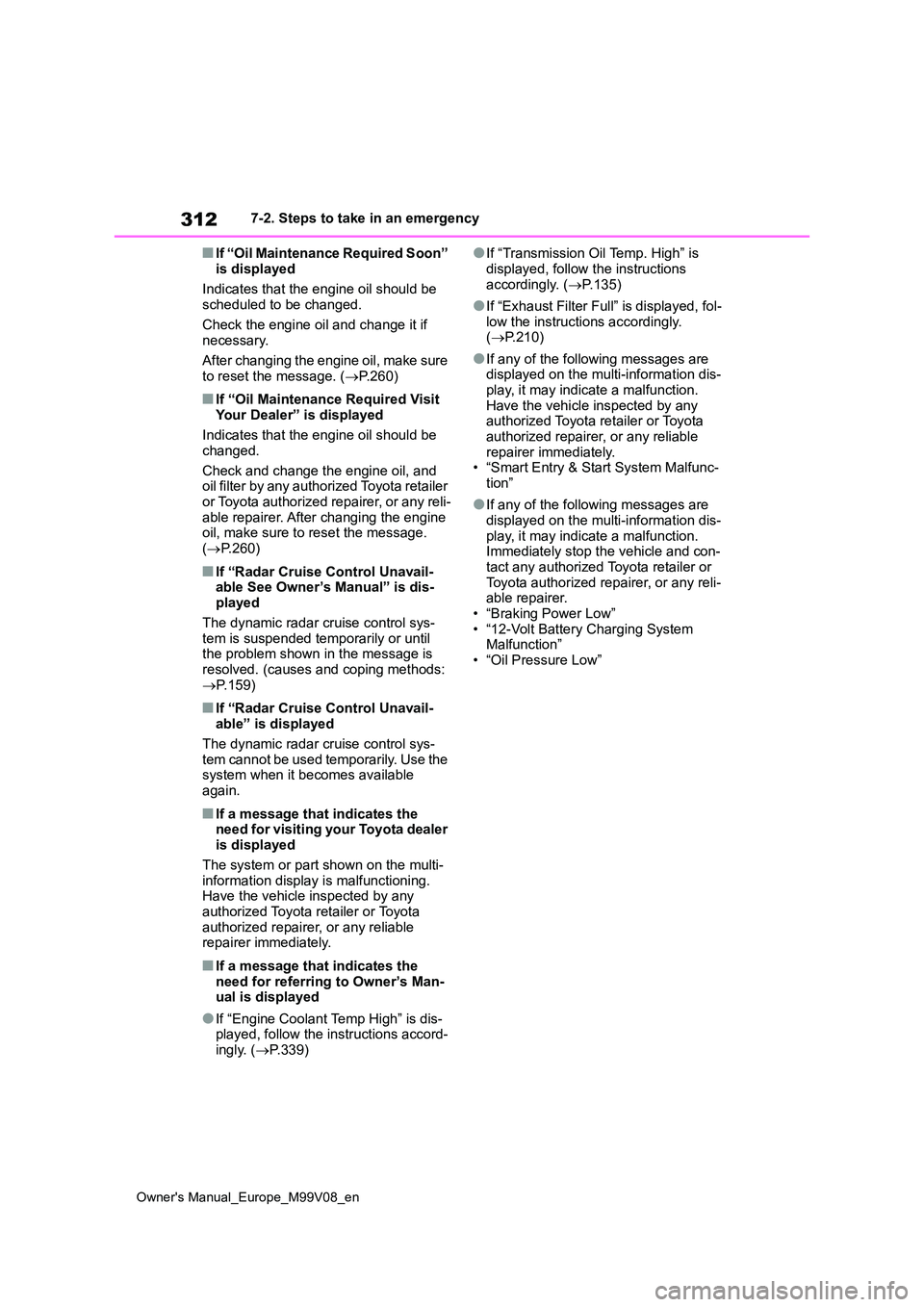
■If “Oil Maintenance Required Soon”
is displayed
Indicates that the engine oil should be scheduled to be changed.
Check the engine oil and change it if necessary.
After changing the engine oil, make sure
to reset the message. ( P.260)
■If “Oil Maintenance Required Visit Your Dealer” is displayed
Indicates that the engine oil should be
changed.
Check and change the engine oil, and oil filter by any authorized Toyota retailer
or Toyota authorized repairer, or any reli- able repairer. After changing the engine oil, make sure to reset the message.
( P.260)
■If “Radar Cruise Control Unavail- able See Owner’s Manual” is dis-played
The dynamic radar cruise control sys- tem is suspended temporarily or until the problem shown in the message is
resolved. (causes and coping methods: P.159)
■If “Radar Cruise Control Unavail- able” is displayed
The dynamic radar cruise control sys- tem cannot be used temporarily. Use the system when it becomes available
again.
■If a message that indicates the need for visiting your Toyota dealer is displayed
The system or part shown on the multi- information display is malfunctioning. Have the vehicle inspected by any
authorized Toyota retailer or Toyota authorized repairer, or any reliable repairer immediately.
■If a message that indicates the
need for referring to Owner’s Man- ual is displayed
●If “Engine Coolant Temp High” is dis-played, follow the instructions accord-ingly. ( P.339)
●If “Transmission Oil Temp. High” is
displayed, follow the instructions accordingly. ( P.135)
●If “Exhaust Filter Full” is displayed, fol- low the instructions accordingly. ( P.210)
●If any of the following messages are displayed on the multi-information dis-
play, it may indicate a malfunction. Have the vehicle inspected by any authorized Toyota retailer or Toyota
authorized repairer, or any reliable repairer immediately.• “Smart Entry & Start System Malfunc-
tion”
●If any of the following messages are
displayed on the multi-information dis- play, it may indicate a malfunction. Immediately stop the vehicle and con-
tact any authorized Toyota retailer or Toyota authorized repairer, or any reli-able repairer.
• “Braking Power Low” • “12-Volt Battery Charging System Malfunction”
• “Oil Pressure Low”