cruise control TOYOTA CAMRY 2021 Owners Manual (in English)
[x] Cancel search | Manufacturer: TOYOTA, Model Year: 2021, Model line: CAMRY, Model: TOYOTA CAMRY 2021Pages: 660, PDF Size: 16.97 MB
Page 4 of 660

TABLE OF CONTENTS4
CAMRY_U4-5. Using the driving
support systems
Toyota Safety Sense 2.5+ ................................. 250
PCS (Pre-Collision System) ........................... 258
LTA (Lane Tracing Assist) ............................. 274
RSA (Road Sign Assist) ............................. 289
Dynamic radar cruise control with full-speed
range ............................... 294
Dynamic radar cruise control ............................. 310
Driving assist systems....... 326
BSM (Blind Spot Monitor) ........................... 334
• BSM function ................ 339
Intuitive parking assist ....... 342
RCTA (Rear Cross Traffic Alert) .................... 350
• RCTA function .............. 352
Rear Camera Detection Function .......................... 357
PKSB (Parking Support Brake) ............................. 361
Parking Support Brake function
(static objects) ................. 368
Parking Support Brake function (rear-crossing
vehicles) .......................... 377
Driving mode select switches .......................... 384
4-6. Driving tips Winter driving tips.............. 386 5-1. Using the air
conditioning system
and defogger
Manual air conditioning system ............................. 392
Automatic air conditioning system (without “SYNC”
button) ............................. 397
Automatic air conditioning system (with “SYNC”
button) ............................. 404
Heated steering wheel/ seat heaters/
seat ventilators ................ 412
5-2. Using the interior lights Interior lights list................. 415
• Interior lights.................. 416
• Personal lights............... 417
5Interior features
Page 19 of 660
19Pictorial index
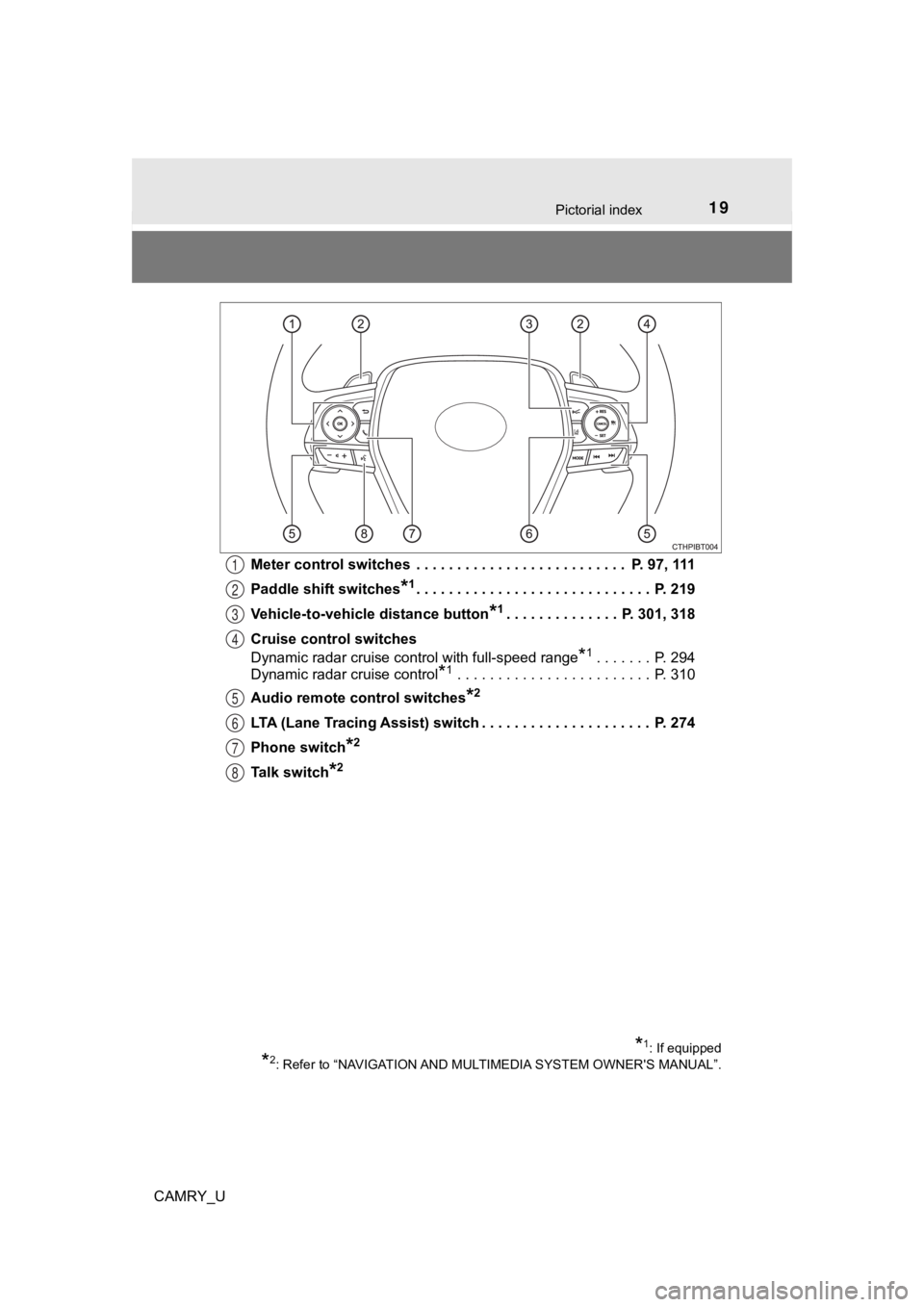
CAMRY_UMeter control switches . . . . . . . . . . . . . . . . . . . . . . . . . . P. 97, 111
Paddle shift switches
*1. . . . . . . . . . . . . . . . . . . . . . . . . . . . . P. 21
9
Vehicle-to-vehicle distance button
*1. . . . . . . . . . . . . . P. 301, 318
Cruise control switches
Dynamic radar cruise control with full-speed range
*1. . . . . . . P. 294
Dynamic radar cruise control
*1 . . . . . . . . . . . . . . . . . . . . . . . . P. 310
Audio remote control switches
*2
LTA (Lane Tracing Assist) switch . . . . . . . . . . . . . . . . . . . . . P. 274
Phone switch
*2
Talk switch*2
1
2
3
4
5
6
7
8
*1: If equipped
*2: Refer to “NAVIGATION AND MULTIMEDIA SYSTEM OWNER'S MANUAL”.
Page 89 of 660
892. Instrument cluster
2
Instrument cluster
CAMRY_U
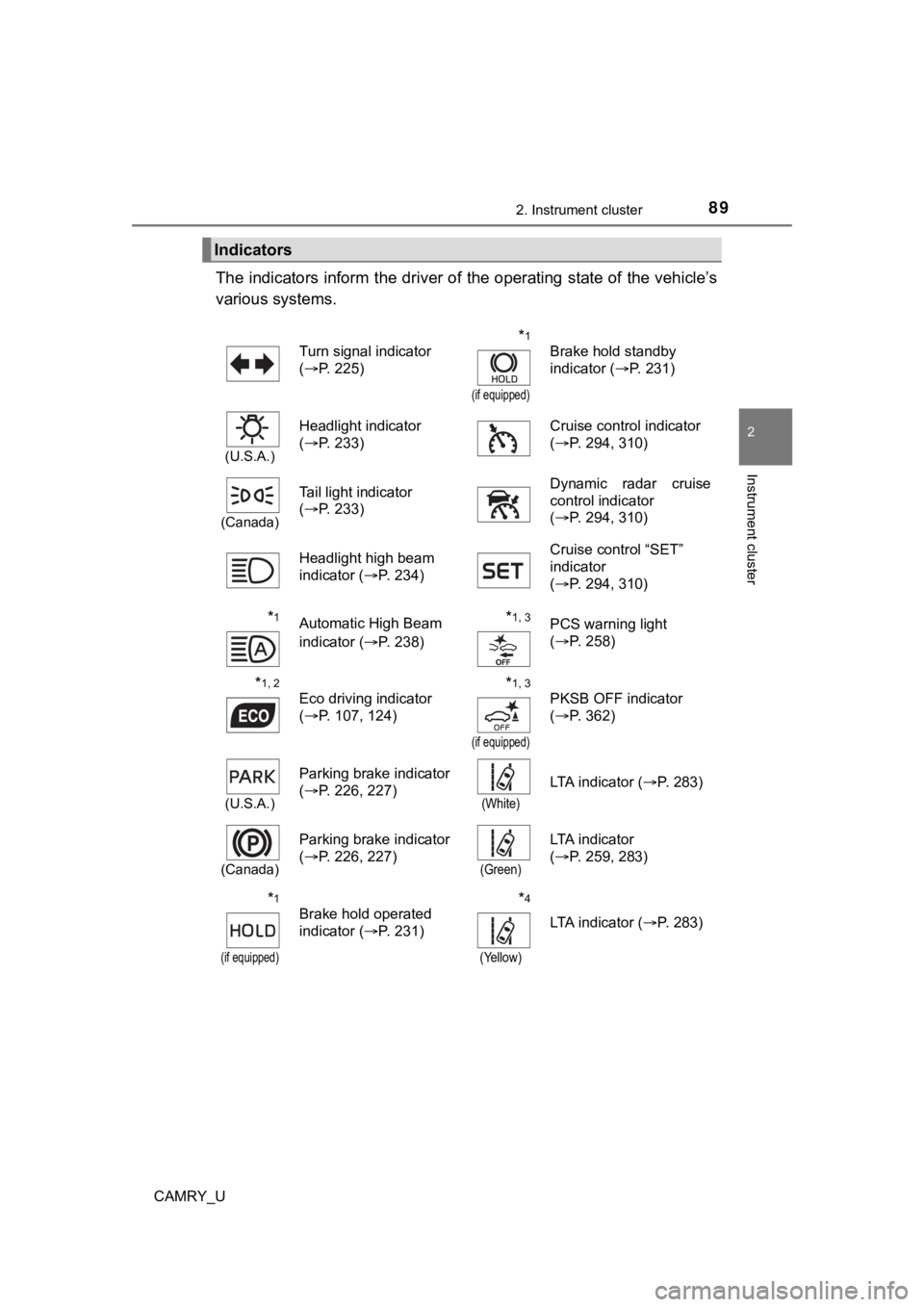
The indicators inform the driver of the operating state of the vehicle’s
various systems.
Indicators
Turn signal indicator
( P. 225)*1
(if equipped)
Brake hold standby
indicator ( P. 231)
(U.S.A.)
Headlight indicator
(P. 233) Cruise control indicator
(
P. 294, 310)
(Canada)
Tail light indicator
(P. 233) Dynamic radar cruise
control indicator
(
P. 294, 310)
Headlight high beam
indicator ( P. 234) Cruise control “SET”
indicator
(
P. 294, 310)
*1Automatic High Beam
indicator ( P. 238)*1, 3PCS warning light
(P. 258)
*1, 2
Eco driving indicator
(P. 107, 124)*1, 3
(if equipped)
PKSB OFF indicator
(P. 362)
(U.S.A.)
Parking brake indicator
(P. 226, 227)
(White)
LTA indicator ( P. 283)
(Canada)
Parking brake indicator
(P. 226, 227)
(Green)
LTA indicator
(P. 259, 283)
*1
(if equipped)
Brake hold operated
indicator ( P. 231)*4
(Yellow)
LTA indicator ( P. 283)
Page 98 of 660
982. Instrument cluster
CAMRY_U
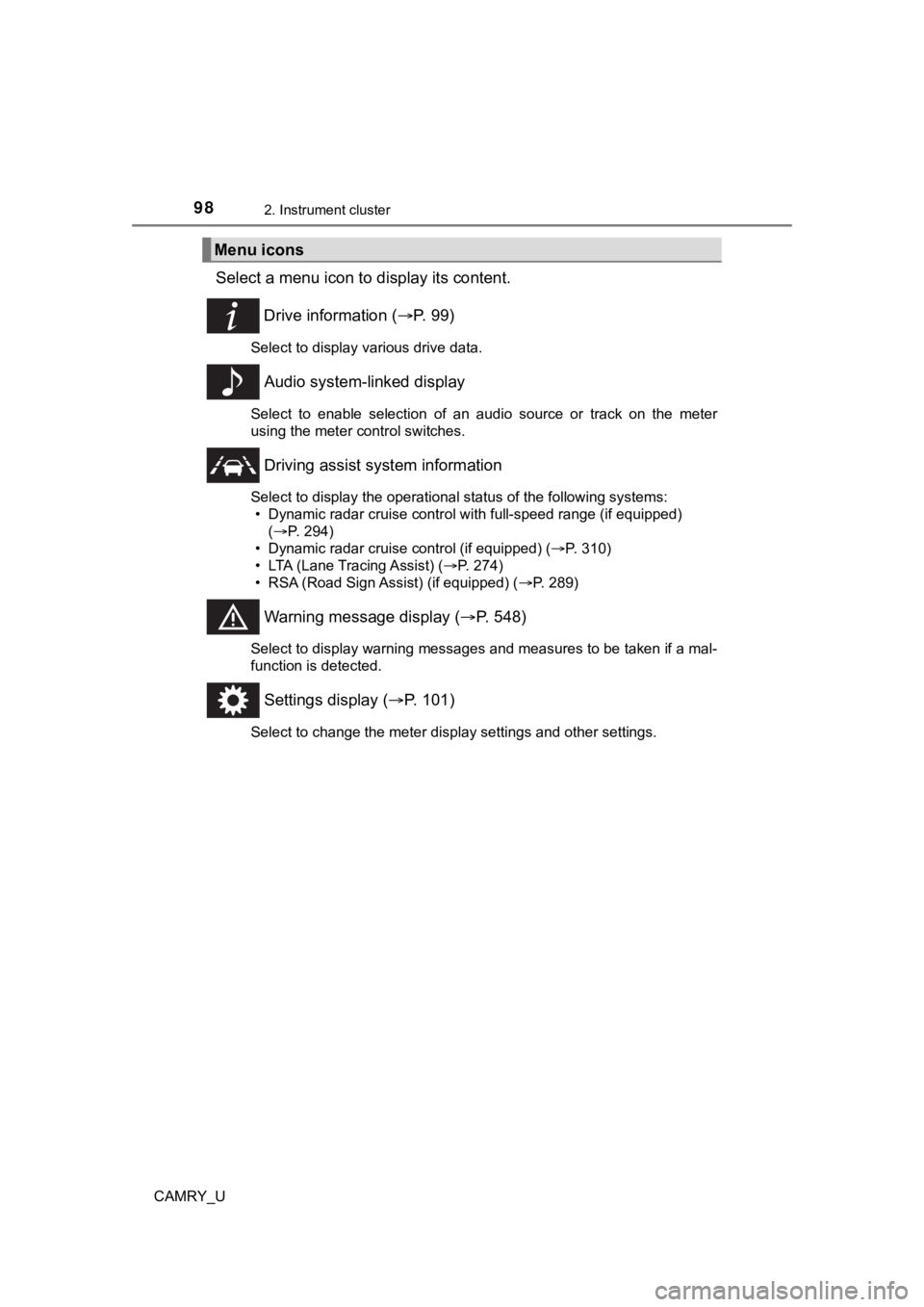
Select a menu icon to display its content.
Drive information ( P. 9 9 )
Select to display various drive data.
Audio system-linked display
Select to enable selection of an audio source or track on the m eter
using the meter control switches.
Driving assist sys tem information
Select to display the operational status of the following syste ms:
• Dynamic radar cruise control with full-speed range (if equippe d)
( P. 294)
• Dynamic radar cruise control (if equipped) ( P. 310)
• LTA (Lane Tracing Assist) ( P. 274)
• RSA (Road Sign Assist) (if equipped) ( P. 289)
Warning message display (P. 548)
Select to display warning messages and measures to be taken if a mal-
function is detected.
Settings display ( P. 101)
Select to change the meter display settings and other settings.
Menu icons
Page 102 of 660
1022. Instrument cluster
CAMRY_U■
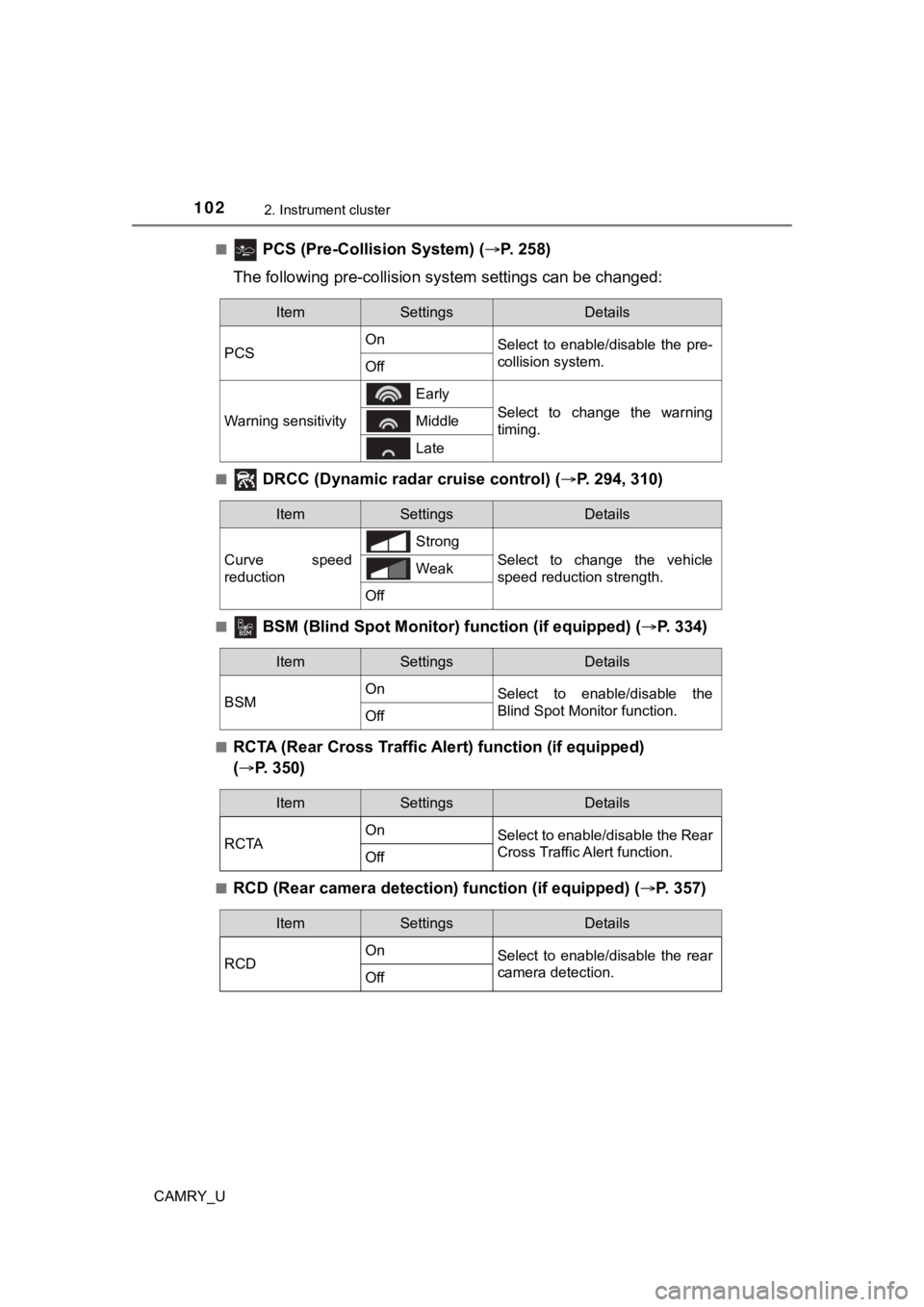
PCS (Pre-Collision System) (
P. 258)
The following p re-collision system s ettings can be changed:
■ DRCC (Dynamic rada r cruise control) (P. 294, 310)
■ BSM (Blind Spot Monitor) function (if equipped) ( P. 334)
■RCTA (Rear Cross Traffic Ale rt) function (if equipped)
( P. 350)
■RCD (Rear camera detecti on) function (if equipped) ( P. 357)
ItemSettingsDetails
PCS On
Select to enable/disable the pre-
collision system.
Off
Warning sensitivity
Early
Select to change the warning
timing. Middle
Late
ItemSettingsDetails
Curve speed
reduction Strong
Select to change the vehicle
speed reduction strength.
Weak
Off
ItemSettingsDetails
BSM On
Select to enable/disable the
Blind Spot Monitor function.
Off
ItemSettingsDetails
RCTA On
Select to enable/disable the Rear
Cross Traffic Alert function.
Off
ItemSettingsDetails
RCD On
Select to enable/disable the rear
camera detection.
Off
Page 109 of 660
1092. Instrument cluster
2
Instrument cluster
CAMRY_U
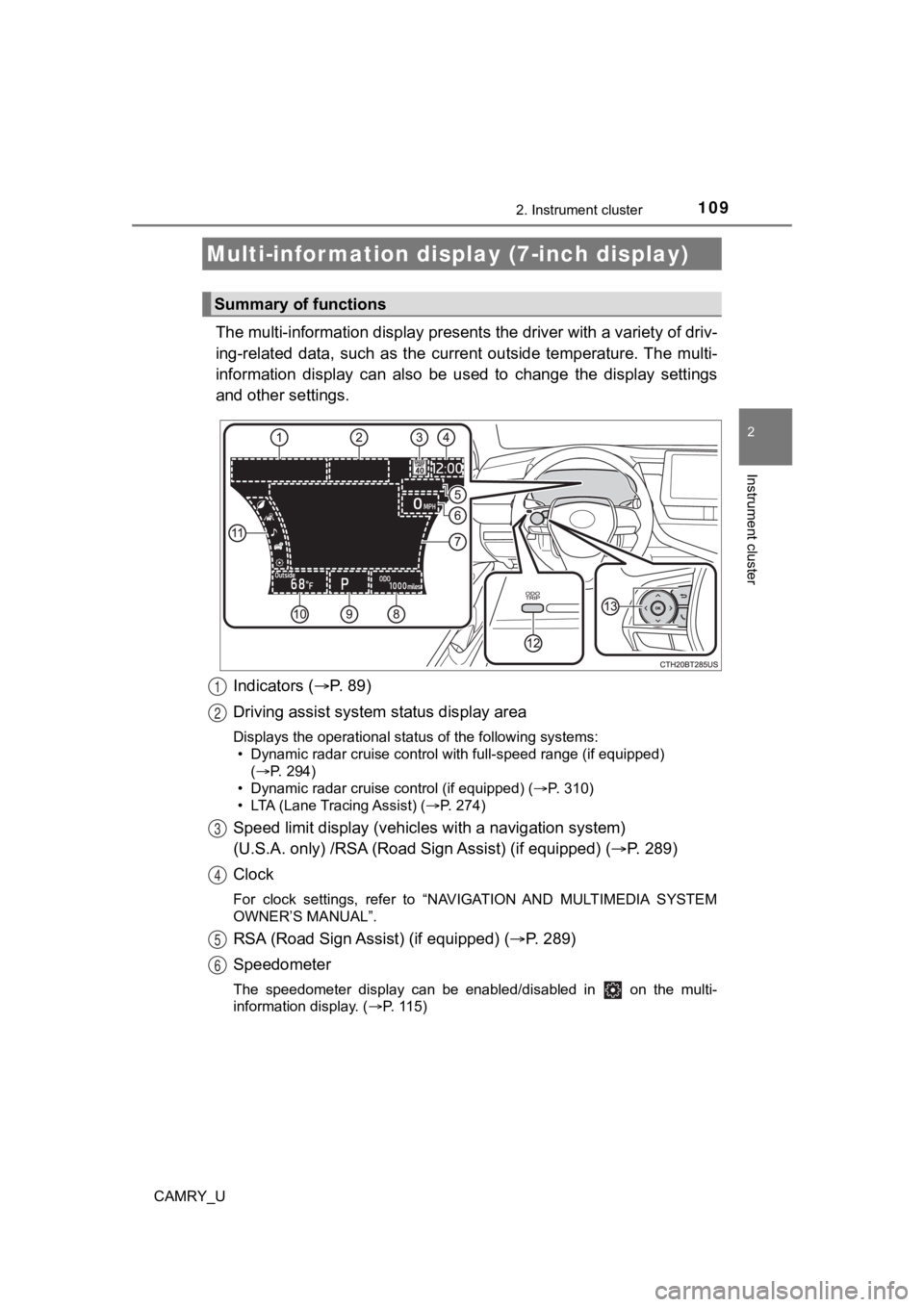
The multi-information display presents the driver with a variety of driv-
ing-related data, such as the cur rent outside temperature. The multi-
information display can also be used to change the display sett ings
and other settings.
Indicators ( P. 89)
Driving assist system status display area
Displays the operational status of the following systems:
• Dynamic radar cruise control with full-speed range (if equippe d)
( P. 294)
• Dynamic radar cruise control (if equipped) ( P. 310)
• LTA (Lane Tracing Assist) ( P. 274)
Speed limit display (vehicles with a navigation system)
(U.S.A. only) /RSA (Road Sign Assist) (if equipped) ( P. 289)
Clock
For clock settings, refer to “NAVIGATION AND MULTIMEDIA SYSTEM
OWNER’S MANUAL”.
RSA (Road Sign Assist) (if equipped) ( P. 289)
Speedometer
The speedometer display can be enabled/disabled in on the mult i-
information display. ( P. 115)
Multi-infor mation disp lay (7-inch display)
Summary of functions
1
2
3
4
5
6
Page 112 of 660
1122. Instrument cluster
CAMRY_U
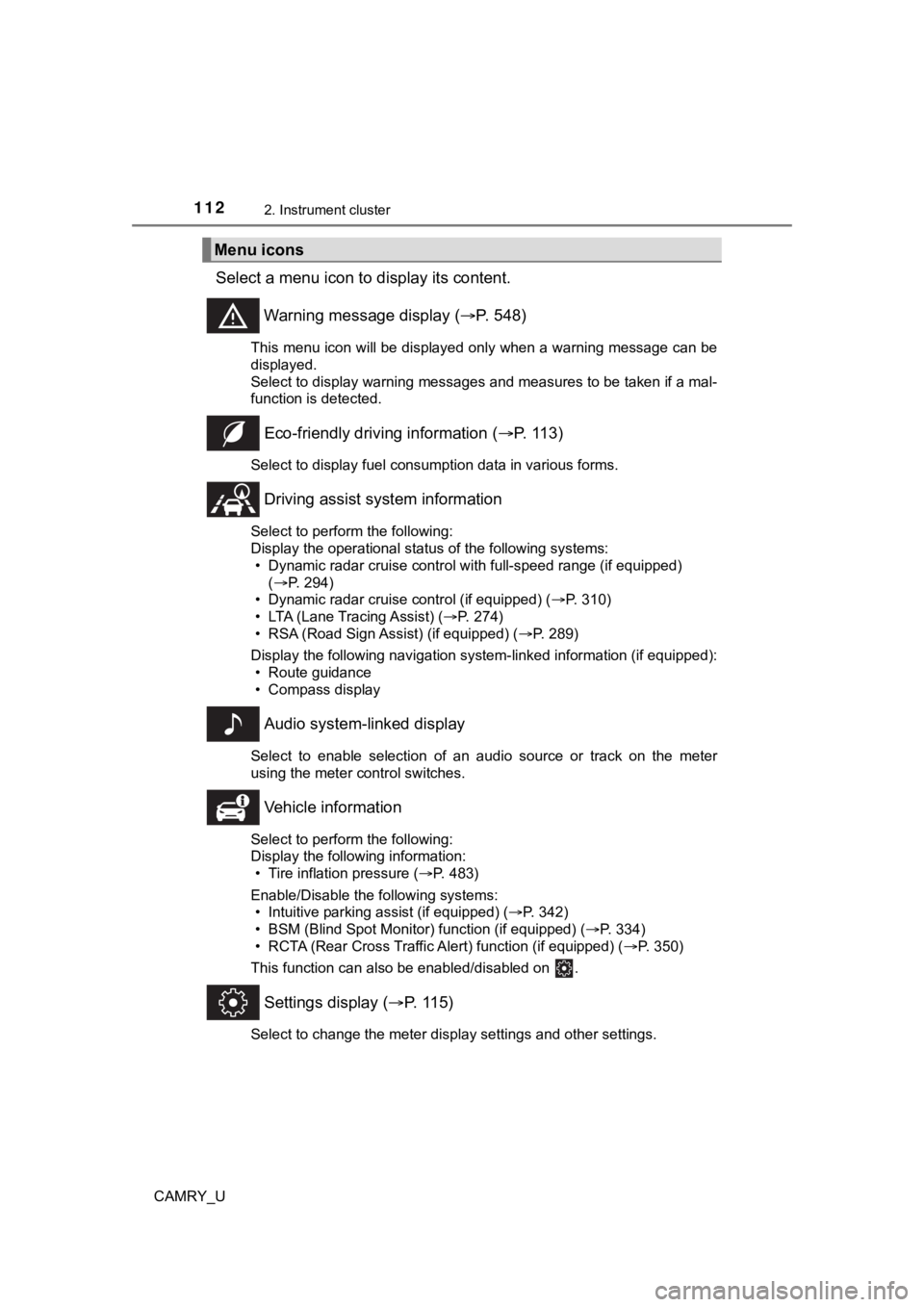
Select a menu icon to display its content.
Warning message display ( P. 548)
This menu icon will be displayed only when a warning message ca n be
displayed.
Select to display warning messages and measures to be taken if a mal-
function is detected.
Eco-friendly drivin g information (P. 113)
Select to display fuel consumption data in various forms.
Driving assist sys tem information
Select to perform the following:
Display the operational status of the following systems:
• Dynamic radar cruise control with full-speed range (if equippe d)
( P. 294)
• Dynamic radar cruise control (if equipped) ( P. 310)
• LTA (Lane Tracing Assist) ( P. 274)
• RSA (Road Sign Assist) (if equipped) ( P. 289)
Display the following navigation system-linked information (if equipped):
• Route guidance
• Compass display
Audio system-linked display
Select to enable selection of an audio source or track on the m eter
using the meter control switches.
Vehicle information
Select to perform the following:
Display the following information: • Tire inflation pressure ( P. 483)
Enable/Disable the following systems: • Intuitive parking assist (if equipped) ( P. 342)
• BSM (Blind Spot Monitor) function (if equipped) ( P. 334)
• RCTA (Rear Cross Traffic Al ert) function (if equipped) (P. 350)
This function can also be enabled/disabled on .
Settings display ( P. 115)
Select to change the meter display settings and other settings.
Menu icons
Page 116 of 660
1162. Instrument cluster
CAMRY_U
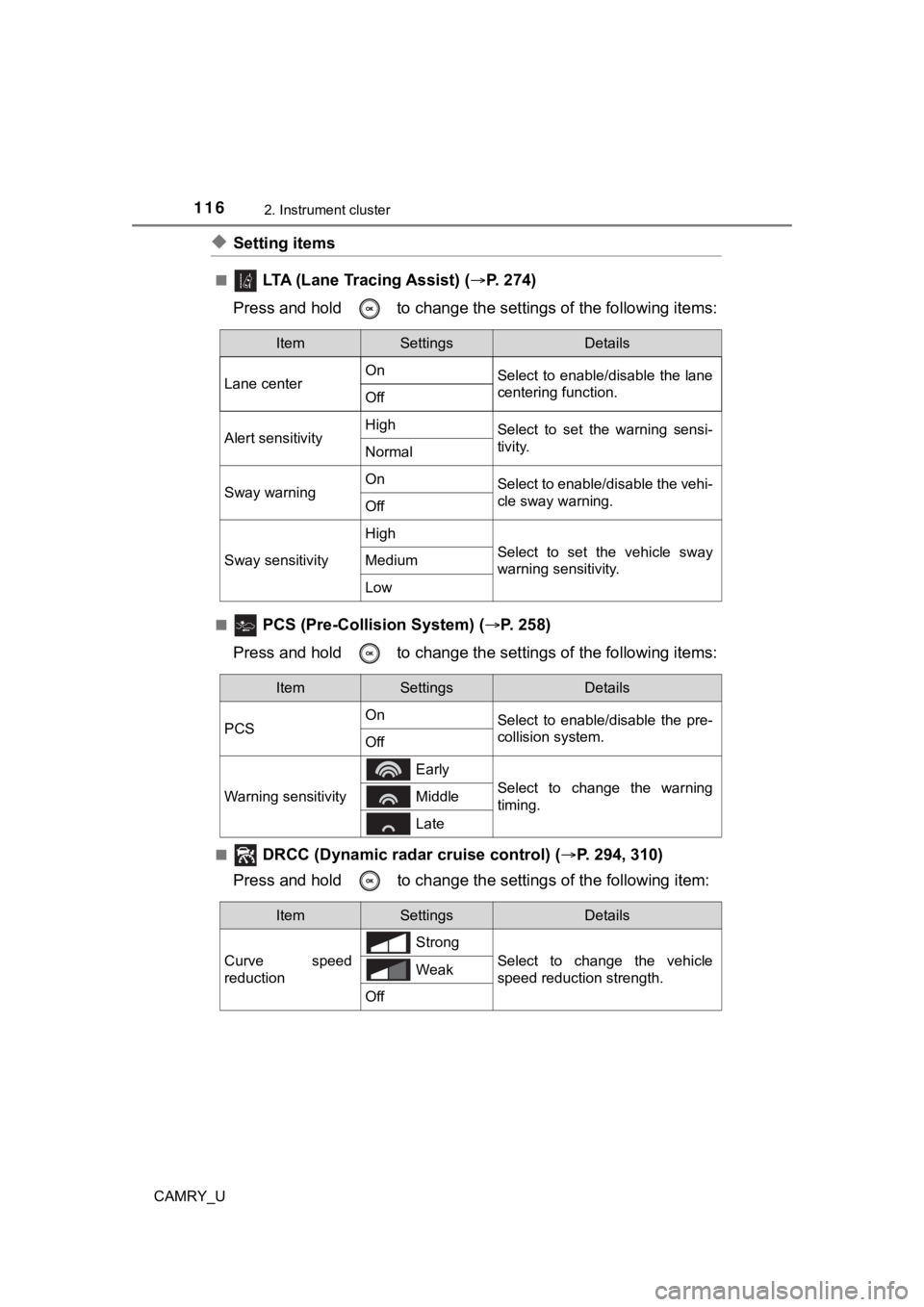
◆Setting items
■ LTA (Lane Tracing Assist) (P. 2 7 4 )
Press and hold to change the se ttings of the following items:
■ PCS (Pre-Collision System) (P. 258)
Press and hold to change the se ttings of the following items:
■ DRCC (Dynamic radar cruise control) (P. 294, 310)
Press and hold to c hange the settings of the following item:
ItemSettingsDetails
Lane center On
Select to enable/disable the lane
centering function.
Off
Alert sensitivityHighSelect to set the warning sensi-
tivity.
Normal
Sway warningOnSelect to enable/disable the vehi-
cle sway warning.
Off
Sway sensitivity
High
Select to set the vehicle sway
warning sensitivity.Medium
Low
ItemSettingsDetails
PCS On
Select to enable/disable the pre-
collision system.
Off
Warning sensitivity
Early
Select to change the warning
timing. Middle
Late
ItemSettingsDetails
Curve speed
reduction Strong
Select to change the vehicle
speed reduction strength.
Weak
Off
Page 128 of 660
1282. Instrument cluster
CAMRY_U
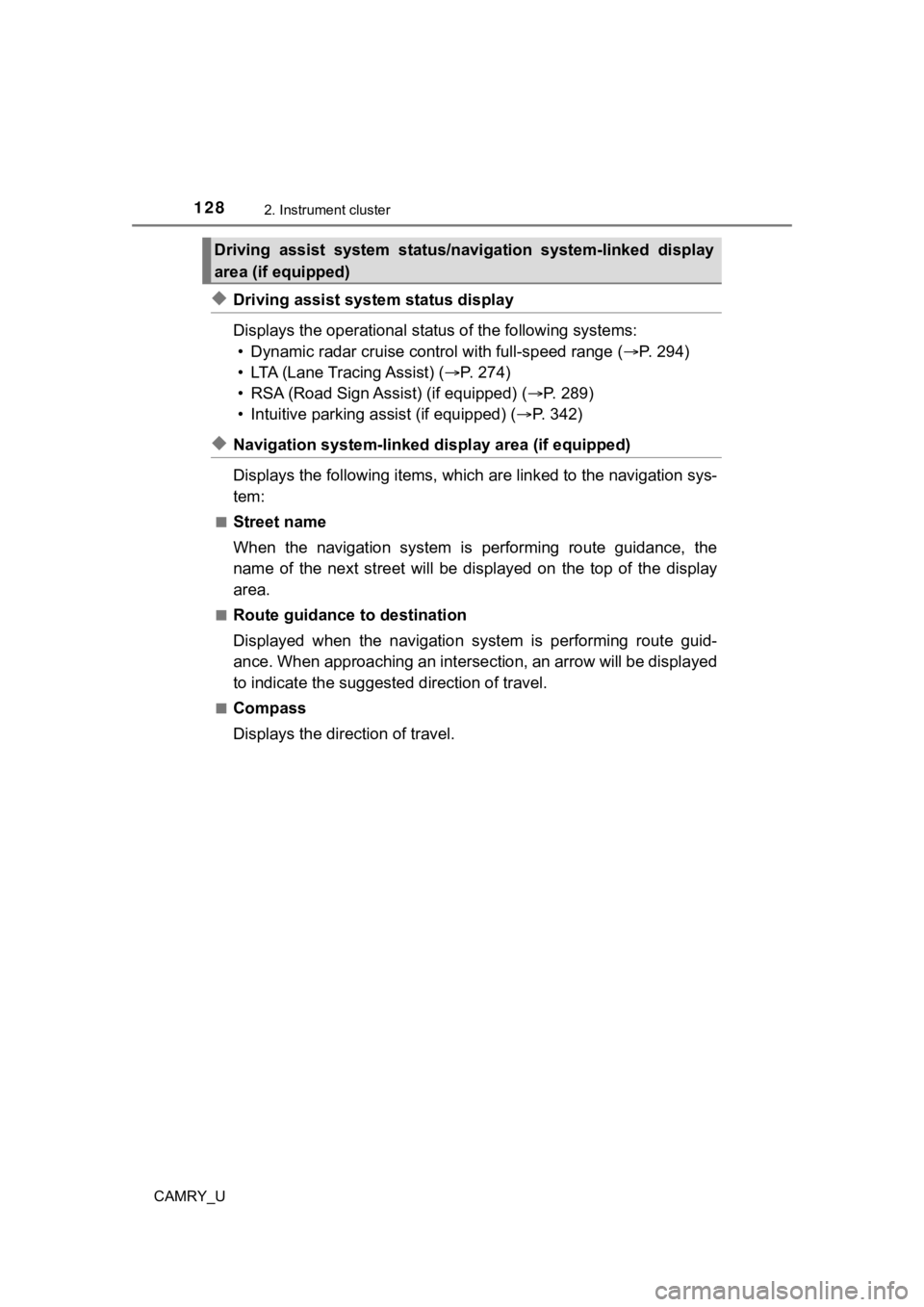
◆Driving assist system status display
Displays the operational status of the following systems:
• Dynamic radar cruise control with full-speed range ( P. 294)
• LTA (Lane Tracing Assist) ( P. 2 7 4 )
• RSA (Road Sign Assist) (if equipped) ( P. 289)
• Intuitive parking assist (if equipped) ( P. 342)
◆Navigation system-linked dis play area (if equipped)
Displays the following items, which are linked to the navigatio n sys-
tem:
■Street name
When the navigation system is performing route guidance, the
name of the next street will be displayed on the top of the dis play
area.
■Route guidance to destination
Displayed when the navigation s ystem is performing route guid-
ance. When approaching an intersection, an arrow will be displa yed
to indicate the suggeste d direction of travel.
■Compass
Displays the direction of travel.
Driving assist system status/navigation system-linked display
area (if equipped)
Page 129 of 660
1292. Instrument cluster
2
Instrument cluster
CAMRY_U■
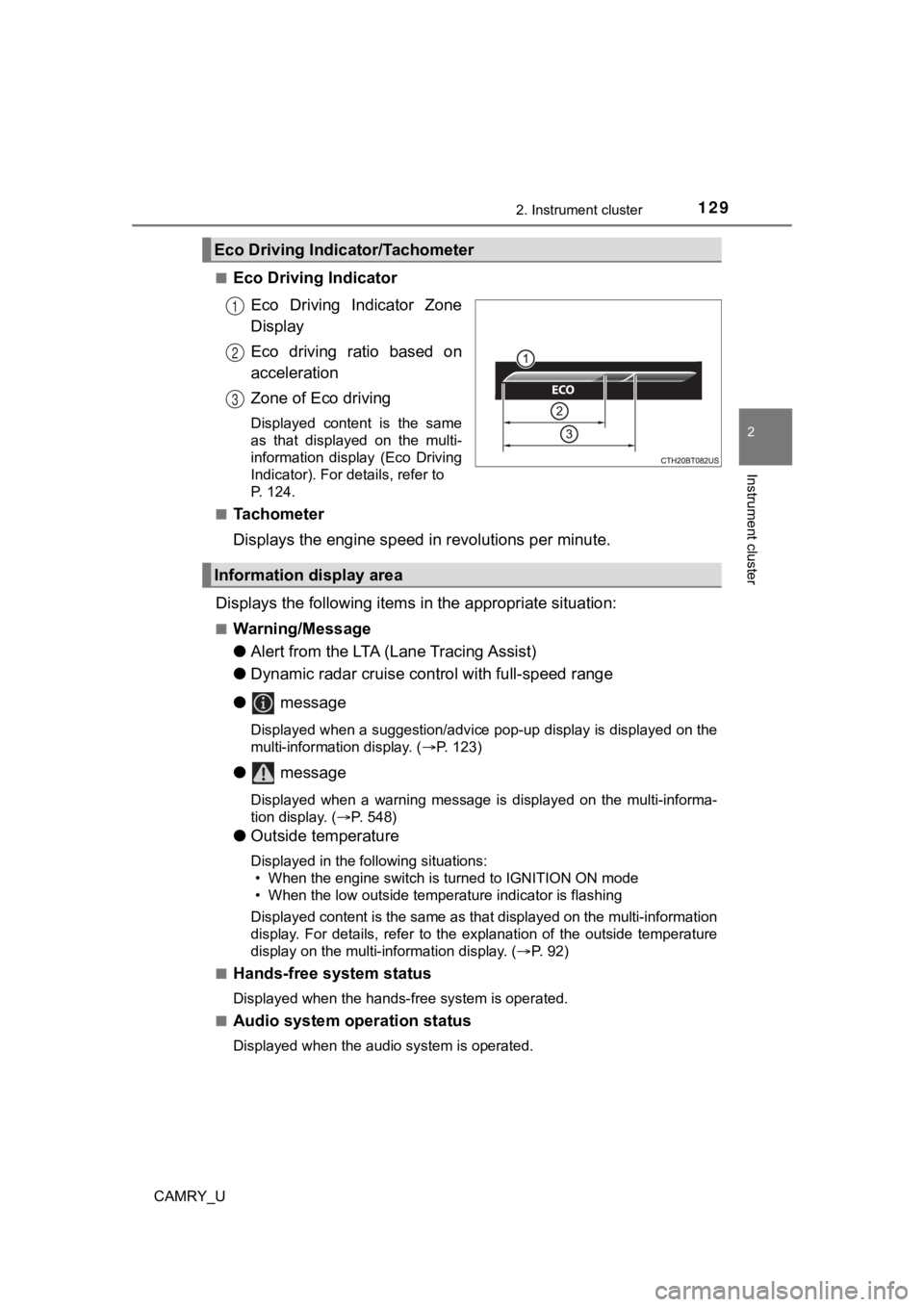
Eco Driving Indicator
Eco Driving Indicator Zone
Display
Eco driving ratio based on
acceleration
Zone of Eco driving
Displayed content is the same
as that displayed on the multi-
information display (Eco Driving
Indicator). For details, refer to
P. 124.
■
Tachometer
Displays the engine speed in revolutions per minute.
Displays the following items in the appropriate situation:
■Warning/Message
●Alert from the LTA (Lane Tracing Assist)
● Dynamic radar cruise control with full-speed range
● message
Displayed when a suggestion/advice pop-up display is displayed on the
multi-information display. ( P. 123)
● message
Displayed when a warning message is displayed on the multi-informa-
tion display. ( P. 548)
● Outside temperature
Displayed in the following situations:
• When the engine switch is turned to IGNITION ON mode
• When the low outside temperature indicator is flashing
Displayed content is the same as that displayed on the multi-in formation
display. For details, refer to the explanation of the outside temperature
display on the multi-information display. ( P. 92)
■
Hands-free system status
Displayed when the hands-free system is operated.
■
Audio system operation status
Displayed when the audio system is operated.
Eco Driving Indicator/Tachometer
1
2
3
Information display area