ad blue TOYOTA COROLLA HYBRID 2021 Owners Manual (in English)
[x] Cancel search | Manufacturer: TOYOTA, Model Year: 2021, Model line: COROLLA HYBRID, Model: TOYOTA COROLLA HYBRID 2021Pages: 584, PDF Size: 19.59 MB
Page 3 of 584
3TABLE OF CONTENTS
COROLLA HV_U
1
2
3
4
5
6
7
8
9
10
4-3. Operating the lights and wip- ers
Headlight switch ................. 173
Automatic High Beam ........ 175
Windshield wipers and washer ......................................... 178
4-4. Refueling Opening the fuel tank cap .. 180
4-5. Using the driving support sys- tems
Toyota Safety Sense 2.0 .... 183
PCS (Pre-Collision System) ......................................... 189
LTA (Lane Tracing Assist)... 197
Dynamic radar cruise control with full-speed range ........ 207
RSA (Road Sign Assist) ..... 218
BSM (Blind Spot Monitor)... 221
RCTA (Rear Cross Traffic Alert) function ............................ 226
Rear view monitor system .. 231
Driving mode select switch ......................................... 239
Driving assist systems........ 240
4-6. Driving tips Hybrid vehicle driving tips .. 245
Winter driving tips............... 247
5-1. Basic function Buttons overview ................ 253
Menu screen ...................... 255
Status icon ......................... 256
“Setup” screen ................... 258
5-2. Basic information before oper- ation
Initial screen ....................... 259
Touch screen ...................... 260
Home screen ...................... 262Entering letters and num-
bers/list screen operation......................................... 263
Screen adjustment ............. 266
Linking multi-information display and the system ................ 267
5-3. Connectivity settings Registering/Connecting a Blue-
tooth
® device ................... 268
Setting Bluetooth
® details .. 272
Wi-Fi
® Hotspot ................... 280
Apple CarPlay/ Android Auto .................... 284
5-4. Other settings General settings ................. 291
Voice settings ..................... 295
Vehicle settings .................. 296
5-5. Using the audio/visual system Quick reference.................. 298
Some basics ...................... 299
5-6. Radio operation
AM radio/FM radio/SiriusXM
®
Satellite Radio(SXM) ....... 303
Internet radio ...................... 308
5-7. Media operation USB memory...................... 309
iPod/iPhone (Apple CarPlay) ......................................... 311
Android Auto ...................... 314
Bluetooth
® audio ................ 315
5-8. Audio/visual remote controls Steering switches ............... 319
5-9. Audio settings Setup.................................. 321
5-10. Tips for operating the audio/visual system
Operating information ........ 322
5-11. Voice command system oper- ation
Voice command system ..... 334
5Audio
Page 4 of 584
4TABLE OF CONTENTS
COROLLA HV_U
Command list .....................337
5-12. Mobile Assistant operation Mobile Assistant ................. 341
5-13. Phone operation (Hands-free system for cellular phones)
Quick reference .................. 343
Some basics ...................... 344
Placing a call using the Blue-
tooth
® hands-free system 348
Receiving a call using the Blue-
tooth
® hands-free system 351
Talking on the Bluetooth
®
hands-free system ........... 352
Bluetooth
® phone message
function ............................ 354
5-14. Phone settings Setup .................................. 358
5-15. What to do if... (Bluetooth
®)
Troubleshooting ................. 368
5-16. Connected Services Overview Functional overview ........... 372
Type A: Function achieved by using a smart phone or DCM......................................... 373
Type B: Function achieved by using DCM and the system
......................................... 376
Type C: Function achieved by using DCM ....................... 377
Type D: Function achieved by using DCM and a smartphone
......................................... 377
5-17. Connected Services Opera- tion
Toyota apps ........................ 379
5-18. Toyota apps settings Setup .................................. 3836-1. Using the air conditioning
system and defogger
Automatic air conditioning sys-tem ................................... 386
Heated steering wheel/seat heaters ............................. 393
6-2. Using the interior lights Interior lights list ................. 395
6-3. Using the storage features List of storage features ...... 397
Trunk features .................... 400
6-4. Other interior features Other interior features ........ 401
Garage door opener........... 411
7-1. Maintenance and care Cleaning and protecting the vehicle exterior................. 420
Cleaning and protecting the vehicle interior.................. 422
7-2. Maintenance Maintenance requirements......................................... 425
General maintenance......... 426
Emission inspection and mainte- nance (I/M) programs ...... 429
7-3. Do-it-yourself maintenance Do-it-yourself service precau-tions ................................. 430
Hood .................................. 432
Positioning a floor jack ....... 433
Engine compartment .......... 434
Tires ................................... 441
Tire inflation pressure......... 450
Wheels ............................... 452
Air conditioning filter........... 454
6Interior features
7Maintenance and care
Page 77 of 584
771-3. Emergency assistance
COROLLA HV_U
1
For safety and security
are available for purchase. Con-
tact your Toyota dealer, call the
following appropriate Customer
Experience Center or push the
“SOS” button in your vehicle for
further subscription details.
• The United States
1-800-331-4331
• Canada
1-888-869-6828
•Puerto Rico
1-877-855-8377
■Safety Connect Services Infor-
mation
●Phone calls using the vehicle’s
Bluetooth® technology will not be
possible when Safety Connect is
active and in use.
●Safety Connect is available begin-
ning Fall 2009 on select Toyota
models (in the contiguous United
States only). Contact with the
Safety Connect response center
is dependent upon the telematics
device being in operative condi-
tion, cellular connection availabil-
ity, and GPS satellite signal
reception, which can limit the abil-
ity to reach the response center or
receive emergency service sup-
port. Enrollment and Telematics
Subscription Service Agreement
are required. A variety of subscrip-
tion terms are available; charges
vary by subscription term selected
and location.
●Automatic Collision Notification,
Emergency Assistance and Stolen
Vehicle Location are available in
the United States, including
Hawaii and Alaska, Puerto Rico
and Canada, and Enhanced
Roadside Assistance are avail-
able in the United States, Puerto
Rico and Canada.
●Automatic Collision Notification, Emergency Assistance, Stolen
Vehicle and Enhanced Road
Assistance are not available in the
U.S. Virgin Islands.
For vehicles first sold in the U.S.
Virgin Islands, no Safety Connect
services will function in or outside
the U.S. Virgin Islands.
●Safety Connect services are not
subject to section
255 of the Tele-
communications Act and the
device is not TTY compatible.
■Languages
The Safety Connect response cen-
ter will offer suppor t in multiple lan-
guages.
The Safety Connect system will
offer voice prompts in English,
Spanish, and French. Please indi-
cate your language of choice when
enrolling.
■When contacting the response
center
You may be unable to contact the
response center if the network is
busy.
When the power switch is turned
to ON, the red indicator light
comes on for 2 seconds then
turns off. Afterward, the green
indicator light comes on, indicat-
ing that the service is active.
The following indicator light pat-
terns indicate specific system
usage conditions:
Green indicator light on =
Active service
Green indicator light flashing
= Safety Connect call in pro-
cess
Safety Connect LED light
Indicators
Page 105 of 584
1052-1. Instrument cluster
COROLLA HV_U
2
Vehicle status information and indicators
sumption since hybrid system start.
Average fuel economy (after
refuel)
Displays the average fuel con-
sumption since the vehicle was
refueled.
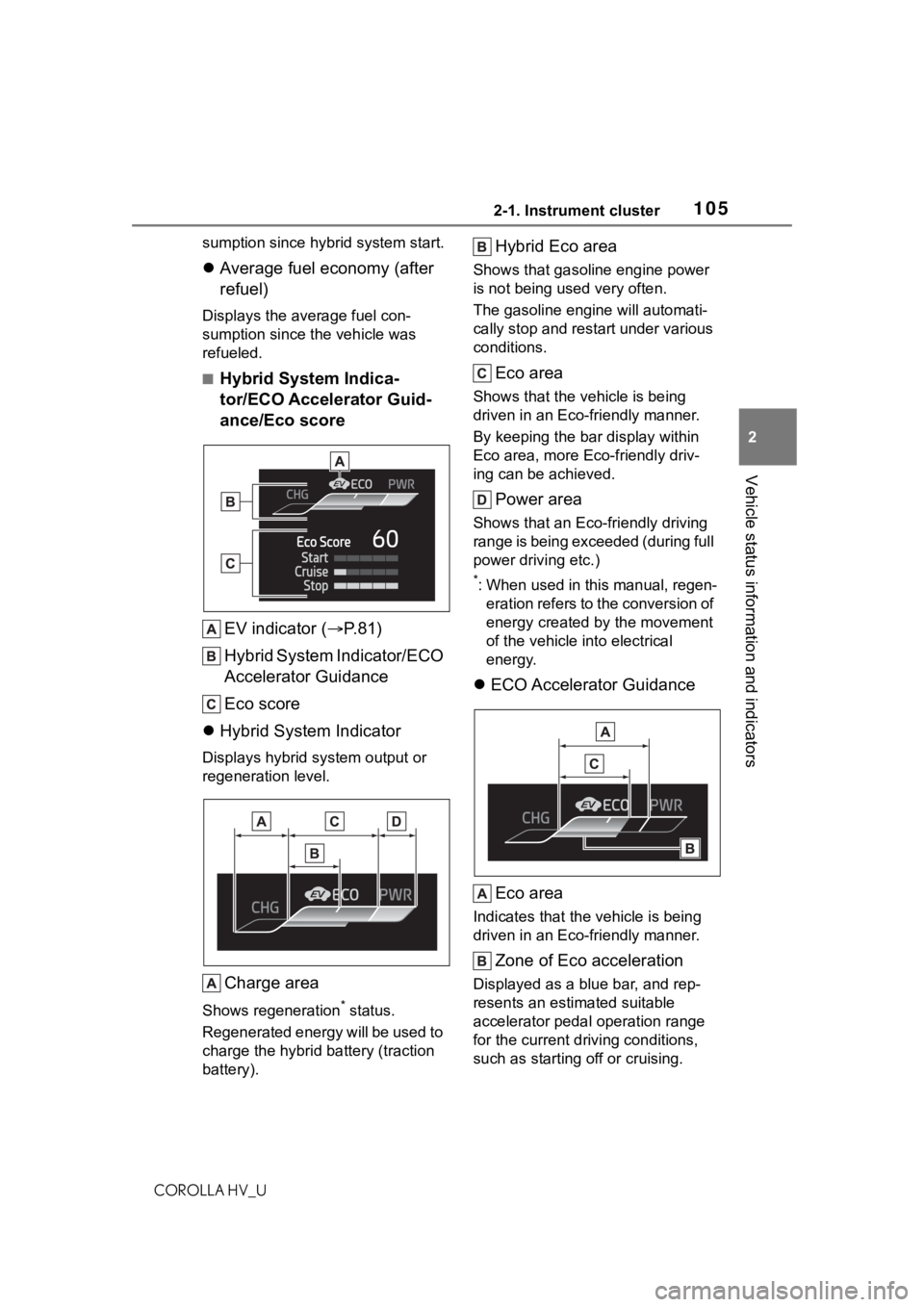
■Hybrid System Indica-
tor/ECO Accelerator Guid-
ance/Eco score
EV indicator ( P.81)
Hybrid System Indicator/ECO
Accelerator Guidance
Eco score
Hybrid System Indicator
Displays hybrid system output or
regeneration level.
Charge area
Shows regeneration* status.
Regenerated energy will be used to
charge the hybrid battery (traction
battery).
Hybrid Eco area
Shows that gasoline engine power
is not being used very often.
The gasoline engi ne will automati-
cally stop and restart under various
conditions.
Eco area
Shows that the vehicle is being
driven in an Eco-friendly manner.
By keeping the bar display within
Eco area, more Eco-friendly driv-
ing can be achieved.
Power area
Shows that an Eco-friendly driving
range is being exceeded (during full
power driving etc.)
*: When used in this manual, regen- eration refers to the conversion of
energy created by the movement
of the vehicle into electrical
energy.
ECO Accelerator Guidance
Eco area
Indicates that the vehicle is being
driven in an Eco-friendly manner.
Zone of Eco acceleration
Displayed as a blue bar, and rep-
resents an estimated suitable
accelerator pedal operation range
for the current driving conditions,
such as starting off or cruising.
Page 106 of 584
1062-1. Instrument cluster
COROLLA HV_UThis display changes according to
situation, such as when starting off
or cruising.
Current accelerator pedal
operation
Displayed as a green bar when
within the Eco area.
Eco-friendly acceleration can be
achieved by keeping the accelera-
tor pedal operation display within
the range indicated by the blue bar.
(
P.147)
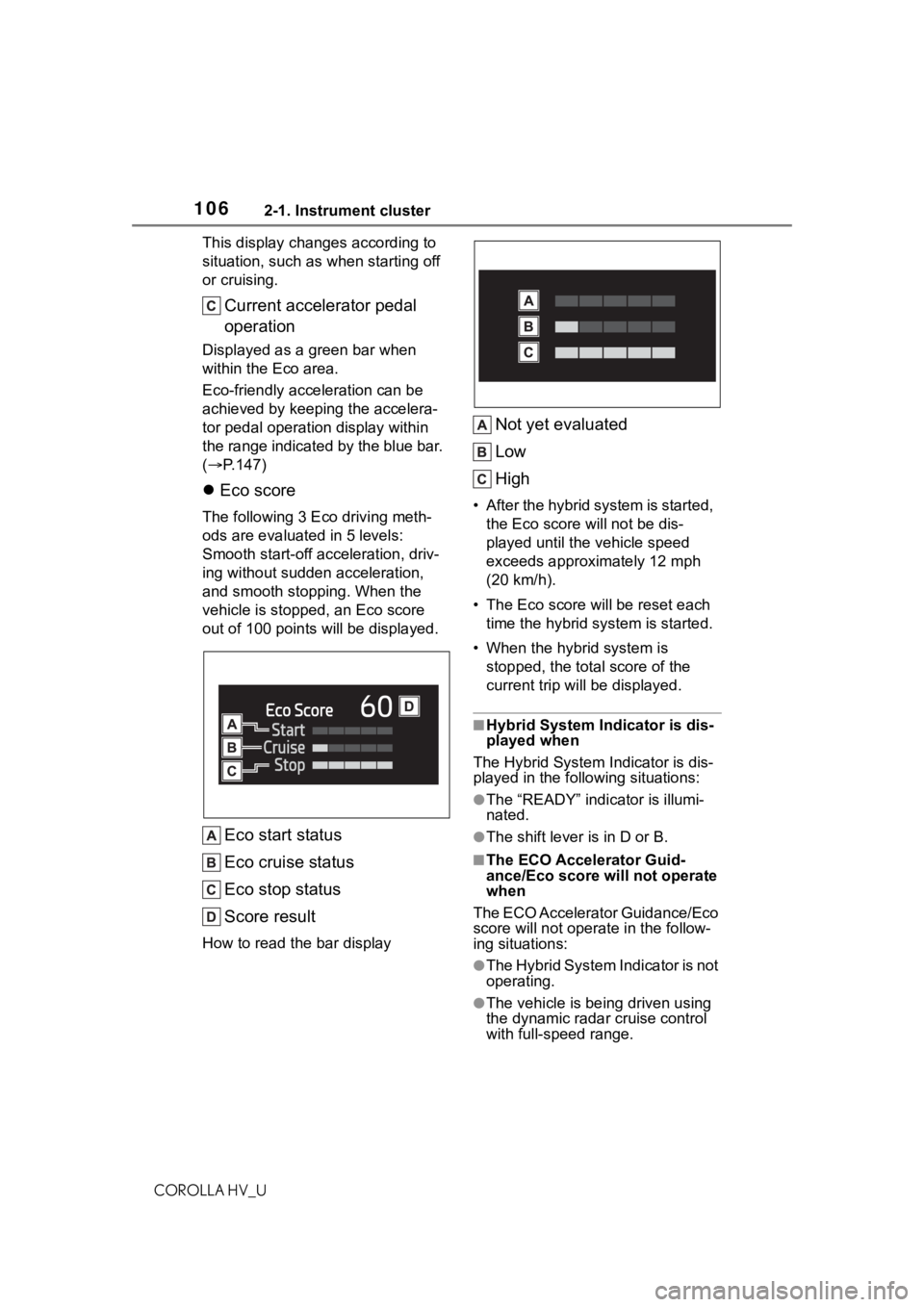
Eco score
The following 3 E co driving meth-
ods are evaluated in 5 levels:
Smooth start-off acceleration, driv-
ing without sudden acceleration,
and smooth stopping. When the
vehicle is stopped , an Eco score
out of 100 po ints will be displayed.
Eco start status
Eco cruise status
Eco stop status
Score result
How to read the bar display
Not yet evaluated
Low
High
• After the hybrid system is started,
the Eco score will not be dis-
played until the vehicle speed
exceeds approximately 12 mph
(20 km/h).
• The Eco score will be reset each
time the hybrid system is started.
• When the hybrid system is stopped, the total score of the
current trip will be displayed.
■Hybrid System Indicator is dis-
played when
The Hybrid System Indicator is dis-
played in the follo wing situations:
●The “READY” indicator is illumi-
nated.
●The shift lever is in D or B.
■The ECO Accelerator Guid-
ance/Eco score will not operate
when
The ECO Accelerator Guidance/Eco
score will not operate in the follow-
ing situations:
●The Hybrid System Indicator is not
operating.
●The vehicle is bei ng driven using
the dynamic radar cruise control
with full-speed range.
Page 232 of 584
2324-5. Using the driving support systems
COROLLA HV_U
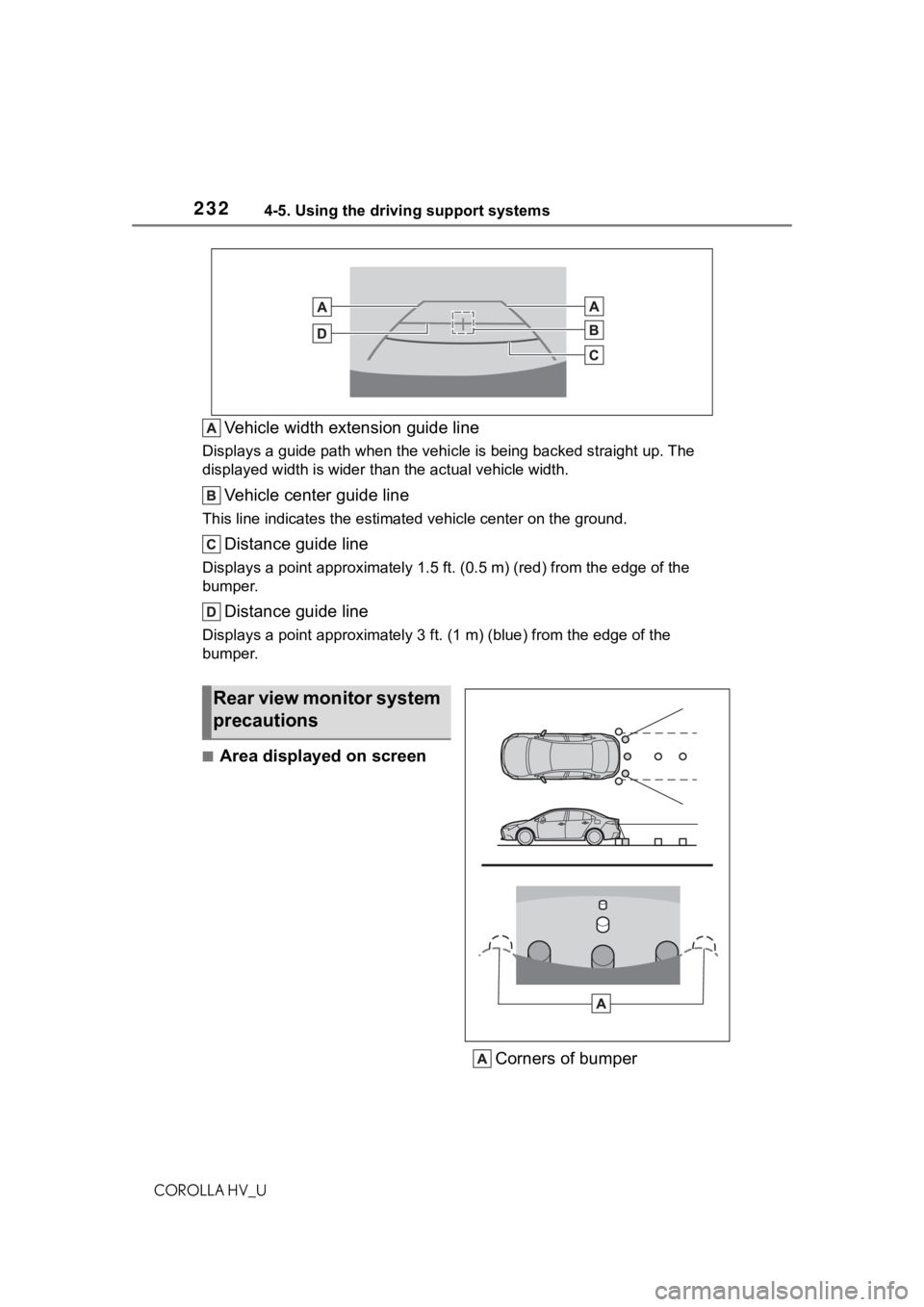
Vehicle width extension guide line
Displays a guide path when the vehicle is being backed straight up. The
displayed width is wider than the actual vehicle width.
Vehicle center guide line
This line indicates the estimated vehicle center on the ground.
Distance guide line
Displays a point approximately 1.5 ft. (0.5 m) (r ed) from the edge of the
bumper.
Distance guide line
Displays a point approximately 3 ft. (1 m) (blue) from the edge of the
bumper.
■Area displayed on screen
Corners of bumper
Rear view monitor system
precautions
Page 251 of 584
251
COROLLA HV_U
5
5
Audio
Audio
.5-1. Basic functionButtons overview......... 253
Menu screen ............... 255
Status icon .................. 256
“Setup” screen ............ 258
5-2. Basic information before operation
Initial screen ................ 259
Touch screen............... 260
Home screen............... 262
Entering letters and num- bers/list screen operation
.................................. 263
Screen adjustment ...... 266
Linking multi-information display and the system
.................................. 267
5-3. Connectivity settings Registering/Connecting a Bluetooth
® device ..... 268
Setting Bluetooth
® details
.................................. 272
Wi-Fi
® Hotspot ............ 280
Apple CarPlay/ Android Auto.............. 284
5-4. Other settings General settings .......... 291
Voice settings .............. 295
Vehicle settings ........... 2965-5. Using the audio/visual
system
Quick reference ........... 298
Some basics................ 299
5-6. Radio operation AM radio/FM radio/Siri-usXM
® Satellite
Radio(SXM) ............... 303
Internet radio ............... 308
5-7. Media operation USB memory ............... 309
iPod/iPhone (Apple Car- Play) .......................... 311
Android Auto................ 314
Bluetooth
® audio ......... 315
5-8. Audio/visual remote con- trols
Steering switches ........ 319
5-9. Audio settings Setup ........................... 321
5-10.Tips for operating the audio/visual system
Operating information.. 322
5-11.Voice command system operation
Voice command system .................................. 334
Command list .............. 337
5-12.Mobile Assistant opera- tion
Mobile Assistant .......... 341
Page 252 of 584
252
COROLLA HV_U
5-13.Phone operation (Hands-free system for
cellular phones)
Quick reference........... 343
Some basics ............... 344
Placing a call using the Bluetooth
® hands-free sys-
tem ............................ 348
Receiving a ca ll using the
Bluetooth
® hands-free sys-
tem ............................ 351
Talking on the Bluetooth
®
hands-free system..... 352
Bluetooth
® phone message
function...................... 354
5-14.Phone settings Setup........................... 358
5-15.What to do if... (Blue- tooth
®)
Troubleshooting .......... 368
5-16.Connected Services Over- view
Functional overview .... 372
Type A: Function achieved by using a smart phone or
DCM .......................... 373
Type B: Function achieved by using DCM and the sys-
tem ............................ 376
Type C: Function achieved by using DCM............ 377Type D: Function achieved
by using DCM and a
smartphone ............... 377
5-17.Connected Services Operation
Toyota apps ................. 379
5-18.Toyota apps settings Setup ........................... 383
Page 253 of 584
2535-1. Basic function
COROLLA HV_U
5
Audio
5-1.Basic function
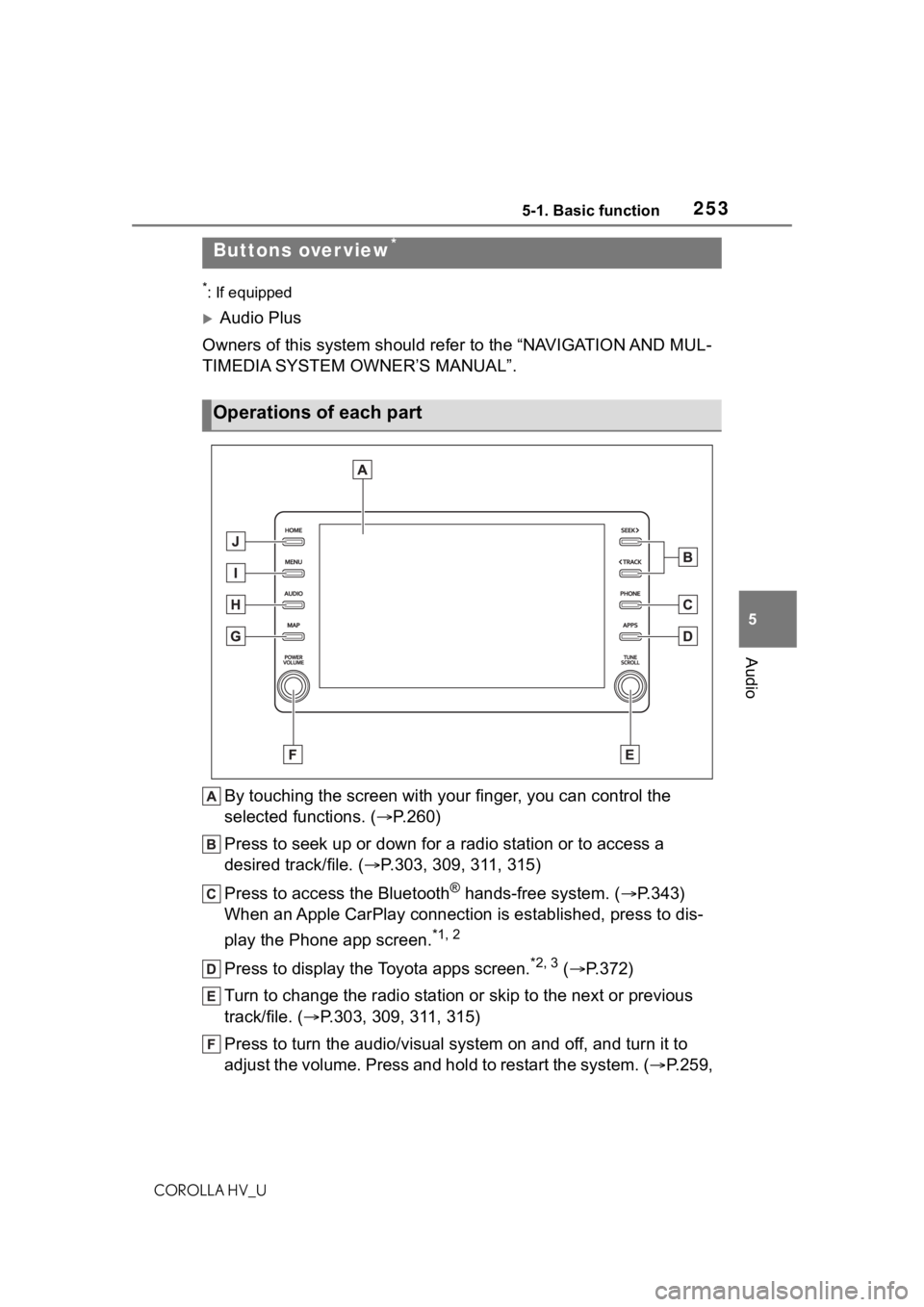
*: If equipped
Audio Plus
Owners of this system should refer to the “NAVIGATION AND MUL-
TIMEDIA SYSTEM OWNER’S MANUAL”.
By touching the screen with y our finger, you can control the
selected functions. ( P.260)
Press to seek up or down for a radio station or to access a
desired track/file. ( P.303, 309, 311, 315)
Press to access the Bluetooth
® hands-free system. ( P.343)
When an Apple CarPlay connection is established, press to dis-
play the Phone app screen.
*1, 2
Press to display the Toyota apps screen.*2, 3 ( P.372)
Turn to change the radio station or skip to the next or previou s
track/file. ( P.303, 309, 311, 315)
Press to turn the audio/visual system on and off, and turn it t o
adjust the volume. Press and hold to restart the system. ( P.259,
Buttons over view*
Operations of each part
Page 256 of 584
2565-1. Basic function
COROLLA HV_U
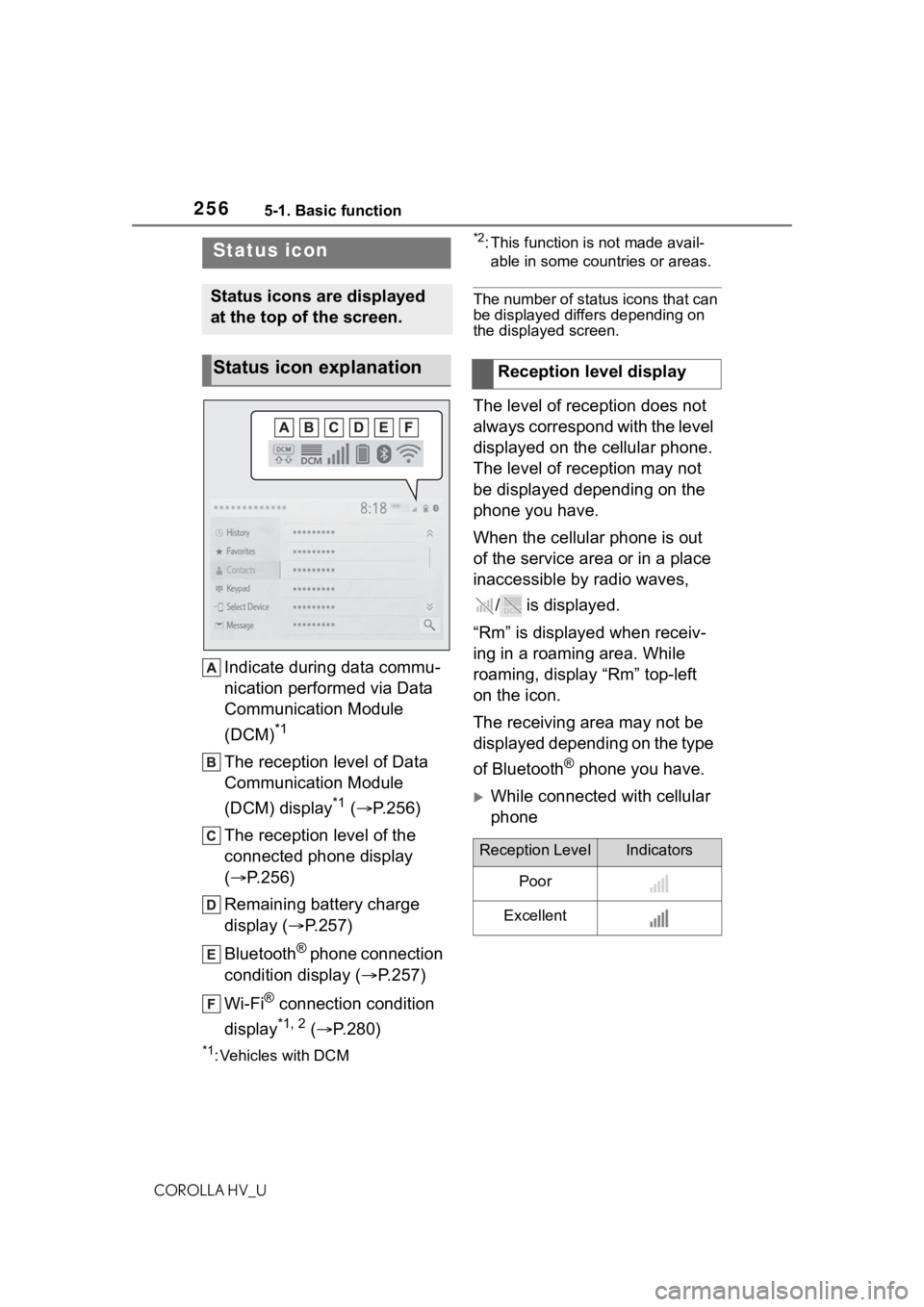
Indicate during data commu-
nication performed via Data
Communication Module
(DCM)
*1
The reception level of Data
Communication Module
(DCM) display
*1 ( P.256)
The reception level of the
connected phone display
( P.256)
Remaining battery charge
display ( P.257)
Bluetooth
® phone connection
condition display ( P.257)
Wi-Fi
® connection condition
display
*1, 2 ( P.280)
*1: Vehicles with DCM
*2: This function is not made avail-
able in some countries or areas.
The number of status icons that can
be displayed differs depending on
the displayed screen.
The level of reception does not
always correspond with the level
displayed on the cellular phone.
The level of reception may not
be displayed depending on the
phone you have.
When the cellular phone is out
of the service area or in a place
inaccessible by radio waves,
/ is displayed.
“Rm” is displayed when receiv-
ing in a roaming area. While
roaming, display “Rm” top-left
on the icon.
The receiving area may not be
displayed depending on the type
of Bluetooth
® phone you have.
While connected with cellular
phone
Status icon
Status icons are displayed
at the top of the screen.
Status icon explanationReception level display
Reception LevelIndicators
Poor
Excellent