ABS TOYOTA iQ EV 2013 Owners Manual (in English)
[x] Cancel search | Manufacturer: TOYOTA, Model Year: 2013, Model line: iQ EV, Model: TOYOTA iQ EV 2013Pages: 444, PDF Size: 7.34 MB
Page 102 of 444
1023. Instrument cluster
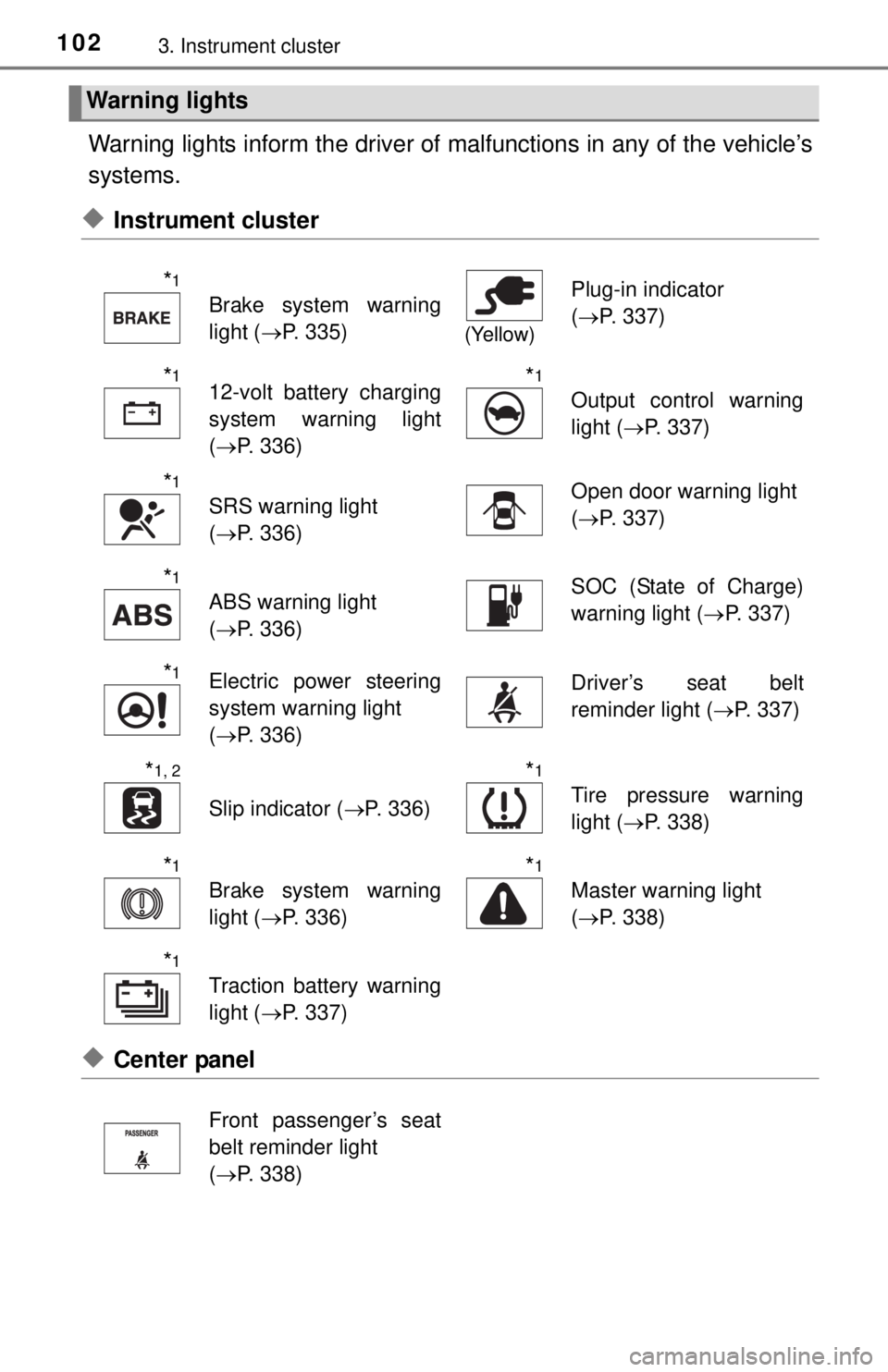
Warning lights inform the driver of malfunctions in any of the vehicle’s
systems.
◆Instrument cluster
◆Center panel
Warning lights
*1
Brake system warning
light ( P. 335)
(Yellow)
Plug-in indicator
(P. 337)
*112-volt battery charging
system warning light
(P. 336)*1
Output control warning
light ( P. 337)
*1
SRS warning light
(P. 336)Open door warning light
(P. 337)
*1
ABS warning light
(P. 336)SOC (State of Charge)
warning light ( P. 337)
*1Electric power steering
system warning light
(P. 336)Driver’s seat belt
reminder light ( P. 337)
*1, 2
Slip indicator (P. 336)
*1
Tire pressure warning
light (P. 338)
*1
Brake system warning
light (P. 336)
*1
Master warning light
(P. 338)
*1
Traction battery warning
light ( P. 337)
Front passenger’s seat
belt reminder light
(P. 338)
Page 104 of 444

1043. Instrument cluster
*1: These lights turn on when the power switch is turned to ON mode to indi-cate that a system check is being performed. They will turn off after the EV
system is on, or after a few seconds. There may be a malfunction in a sys-
tem if the lights do not come on, or turn off. Have the vehicle inspected by
your Scion dealer.
*2: The light flashes to indicate that the system is operating.
CAUTION
■ If a safety system warning light does not come on
Should a safety system light such as the ABS and SRS airbag warning light
not come on when you start the EV system, this could mean that these sys-
tems are not available to help protect you in an accident, which could r\
esult
in death or serious injury. Have the vehicle inspected by your Scion dealer
immediately if this occurs.
Page 210 of 444
2105-5. Using the driving support systems
Driving assist systems
◆ABS (Anti-lock Brake System)
Helps to prevent wheel lock when the brakes are applied suddenly,
or if the brakes are applied while driving on a slippery road surface
◆Brake assist
Generates an increased level of braking force after the brake pedal
is depressed when the system detects a panic stop situation
◆VSC (Vehicle Stability Control)
Helps the driver to control skidding when swerving suddenly or
turning on slippery road surfaces
◆Enhanced VSC (Enhanced Ve hicle Stability Control)
Provides cooperative control of the ABS, TRAC, VSC and EPS.
Helps to maintain directional st ability when swerving on slippery
road surfaces by controllin g steering performance.
◆TRAC (Traction Control)
Helps to maintain drive power and prevent the drive wheels from
spinning when starting the vehicle or accelerating on slippery roads
◆Hill-start assist control
P. 2 1 3
◆EPS (Electric Power Steering)
Employs an electric motor to redu ce the amount of effort needed to
turn the steering wheel
To help enhance driving safety and performance, the following
systems operate automatically in response to various driving
situations. Be aware, however, that these systems are supple-
mentary and should not be relied upon too heavily when operat-
ing the vehicle.
Page 211 of 444
2115-5. Using the driving support systems
5
Driving
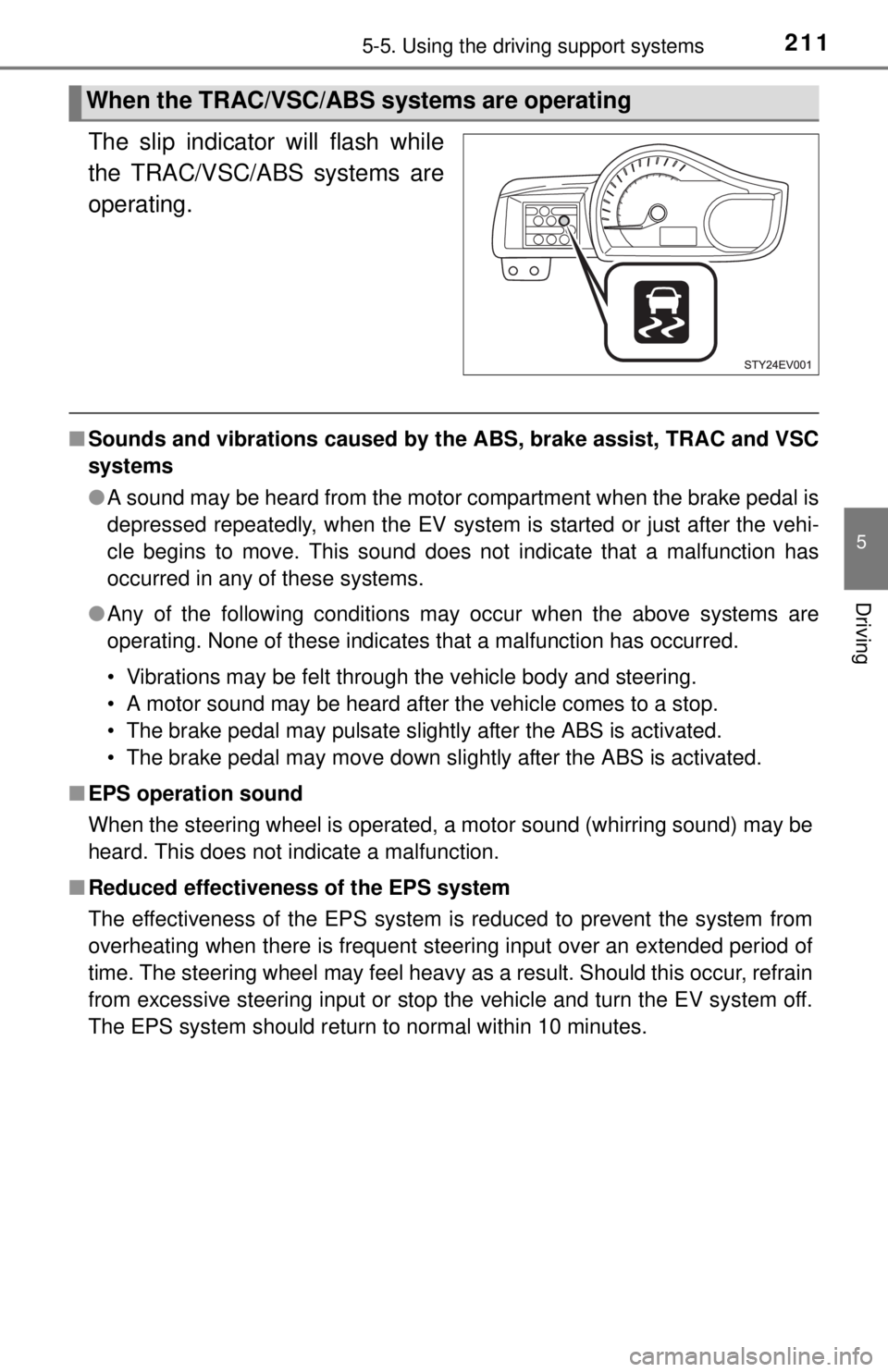
The slip indicator will flash while
the TRAC/VSC/ABS systems are
operating.
■Sounds and vibrations caused by the ABS, brake assist, TRAC and VSC
systems
●A sound may be heard from the motor compartment when the brake pedal is
depressed repeatedly, when the EV system is started or just after the vehi-
cle begins to move. This sound does not indicate that a malfunction has
occurred in any of these systems.
● Any of the following conditions may occur when the above systems are
operating. None of these indicates that a malfunction has occurred.
• Vibrations may be felt through the vehicle body and steering.
• A motor sound may be heard after the vehicle comes to a stop.
• The brake pedal may pulsate slightly after the ABS is activated.
• The brake pedal may move down slightly after the ABS is activated.
■ EPS operation sound
When the steering wheel is operated, a motor sound (whirring sound) may be
heard. This does not indicate a malfunction.
■ Reduced effectiveness of the EPS system
The effectiveness of the EPS system is reduced to prevent the system from
overheating when there is frequent steering input over an extended period of
time. The steering wheel may feel heavy as a result. Should this occur, refrain
from excessive steering input or stop the vehicle and turn the EV system off.
The EPS system should return to normal within 10 minutes.
When the TRAC/VSC/ABS systems are operating
Page 212 of 444

2125-5. Using the driving support systems
CAUTION
■The ABS does not operate effectively when
● The limits of tire gripping performance have been exceeded.
● The vehicle hydroplanes while driving at high speed on wet or slick roads.
■ Stopping distance when the ABS is operating may exceed that of nor-
mal conditions
The ABS is not designed to shorten the vehicle’s stopping distance. Always
maintain a safe distance from the vehicle in front of you, especially in the
following situations:
● When driving on dirt, gravel or snow-covered roads
● When driving with tire chains
● When driving over bumps in the road
● When driving over roads with potholes or uneven surfaces
■ TRAC may not operat e effectively when
Directional control and power may not be achievable while driving on slip-
pery road surfaces, even if the TRAC system is operating.
Do not drive the vehicle in conditions where stability and power may be lost.
■ When the VSC is activated
The slip indicator flashes. Always drive carefully. Reckless driving may
cause an accident. Exercise particular care when the indicator flashes.
■ Replacing tires
Make sure that all tires are of the specified size, brand, tread pattern and
total load capacity. In addition, make sure that the tires are inflated to the
recommended tire inflation pressure level.
The ABS, TRAC and VSC systems will not function correctly if different tires
are installed on the vehicle.
Contact your Scion dealer for further information when replacing tires or
wheels.
■ Handling of tires and the suspension
Using tires with any kind of problem or modifying the suspension will affect
the driving assist systems, and may cause a system to malfunction.
Page 280 of 444
2807-3. Do-it-yourself maintenance
■Adding fluid
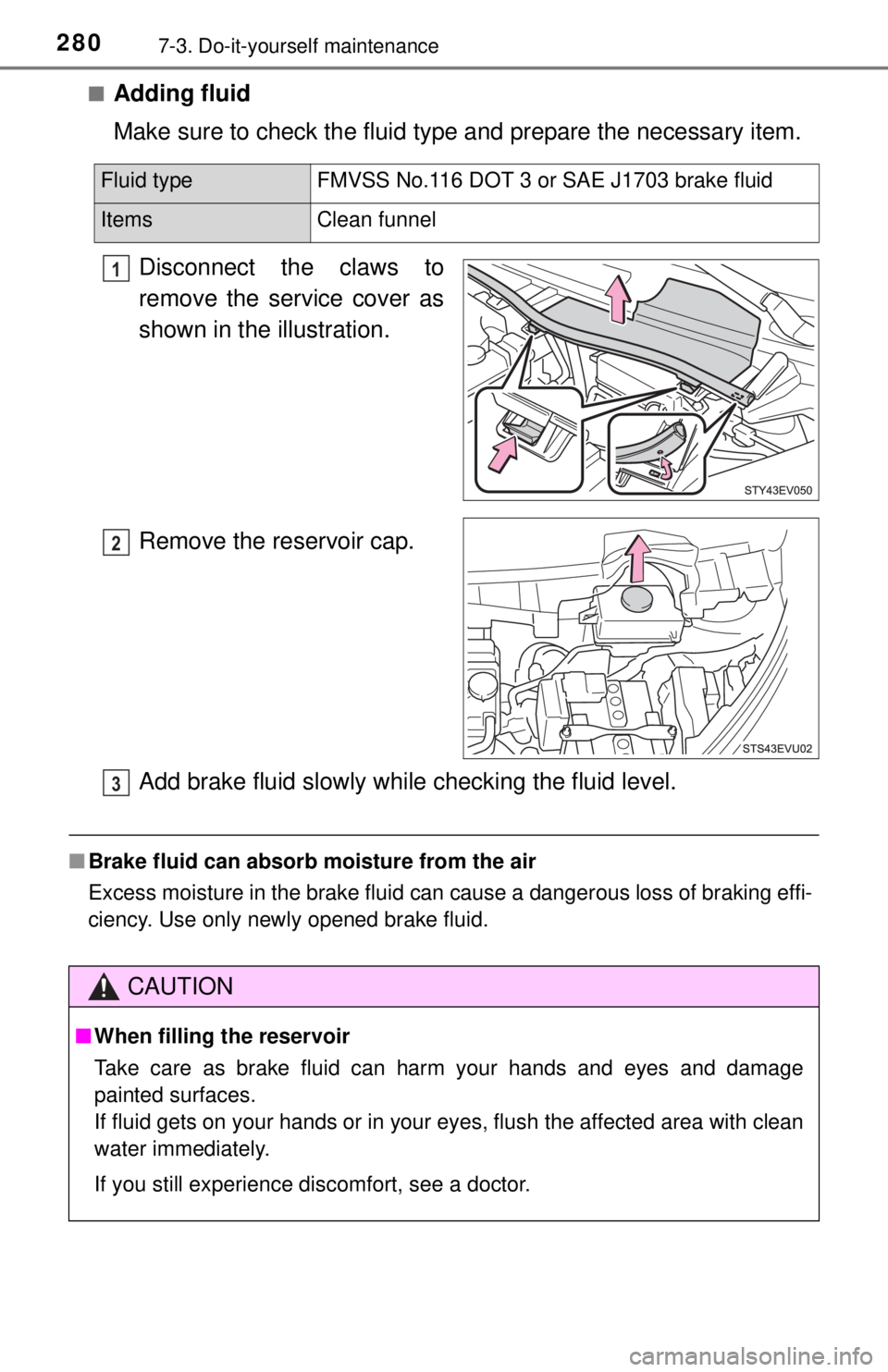
Make sure to check the fluid type and prepare the necessary item.
Disconnect the claws to
remove the service cover as
shown in the illustration.
Remove the reservoir cap.
Add brake fluid slowly while checking the fluid level.
■ Brake fluid can absorb moisture from the air
Excess moisture in the brake fluid can cause a dangerous loss of braking effi-
ciency. Use only newly opened brake fluid.
Fluid type FMVSS No.116 DOT 3 or SAE J1703 brake fluid
Items Clean funnel
1
2
CAUTION
■When filling the reservoir
Take care as brake fluid can harm your hands and eyes and damage
painted surfaces.
If fluid gets on your hands or in your eyes, flush the affected area with clean
water immediately.
If you still experience discomfort, see a doctor.
3
Page 305 of 444
3057-3. Do-it-yourself maintenance
7
Maintenance and care
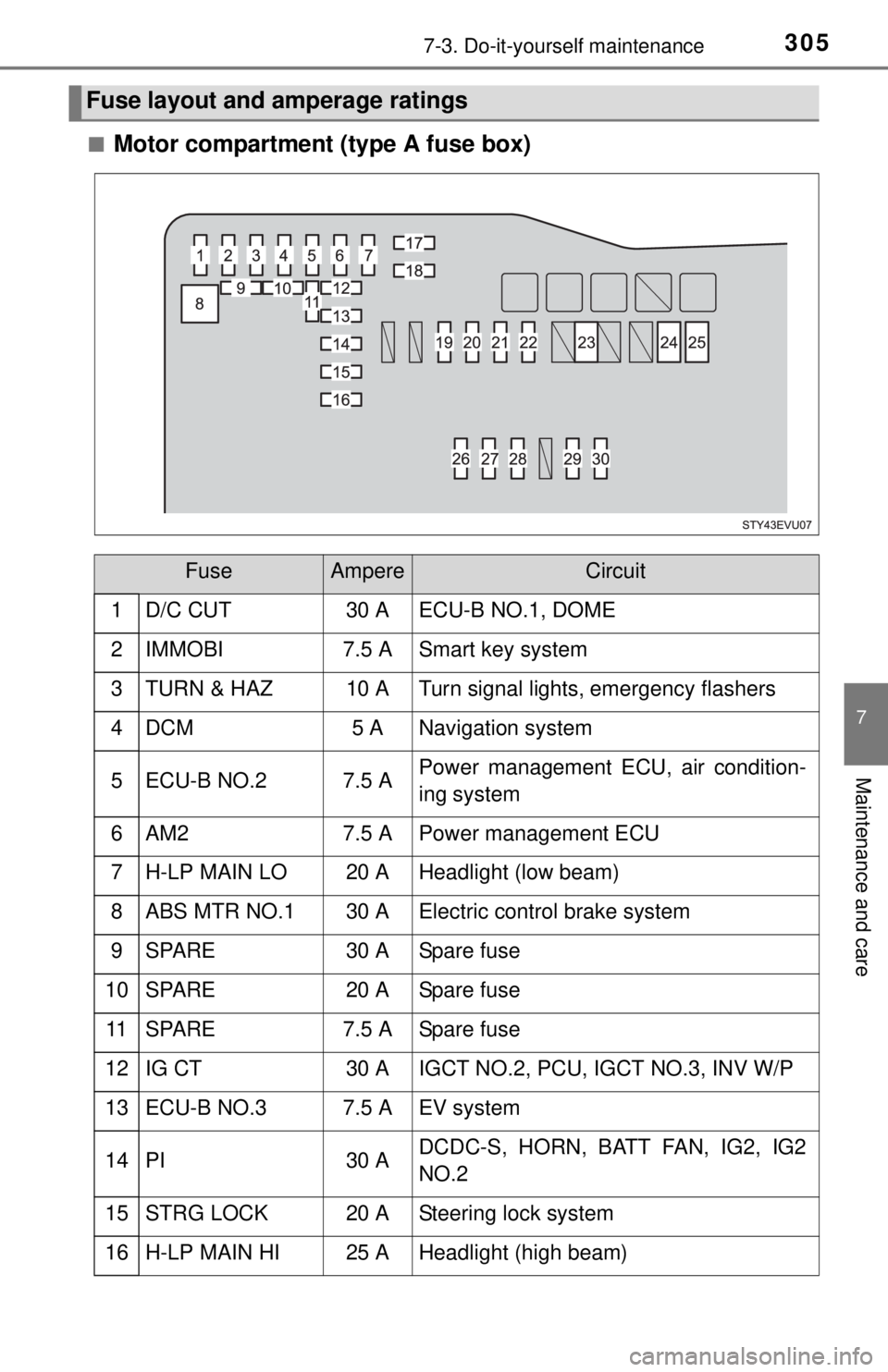
■Motor compartment (type A fuse box)
Fuse layout and amperage ratings
FuseAmpereCircuit
1 D/C CUT30 A ECU-B NO.1, DOME
2IMMOBI7.5 ASmart key system
3TURN & HAZ10 ATurn signal lights, emergency flashers
4DCM5 ANavigation system
5ECU-B NO.27.5 APower management ECU, air condition-
ing system
6AM27.5 APower management ECU
7H-LP MAIN LO20 AHeadlight (low beam)
8ABS MTR NO.130 AElectric control brake system
9SPARE30 ASpare fuse
10SPARE20 ASpare fuse
11SPARE7.5 ASpare fuse
12IG CT30 AIGCT NO.2, PCU, IGCT NO.3, INV W/P
13ECU-B NO.37.5 AEV system
14PI30 ADCDC-S, HORN, BATT FAN, IG2, IG2
NO.2
15STRG LOCK20 ASteering lock system
16H-LP MAIN HI25 AHeadlight (high beam)
Page 306 of 444
3067-3. Do-it-yourself maintenance
17DOME10 ANavigation system, interior light
18ECU-B NO.17.5 ASmart key system, main body ECU,
enhanced VSC
19RDI5 ARadiator fan
20DEFOGGER30 ARear window defogger
21BK/UP10 ABack-up lights
22ABS NO.27.5 AElectric control brake system
23RDI30 ARadiator fan
24HTR-B40 AAir conditioning system
25ABS NO.230 AElectric control brake system
26HORN10 AHorn
27BATT FAN15 ABattery cooling fan, power management
ECU
28DCDC-S5 AEV system
29IG210 APower management ECU, electric con-
trol brake system
30IG2 NO.25 ASmart key system, steering lock system,
meter, navigation system
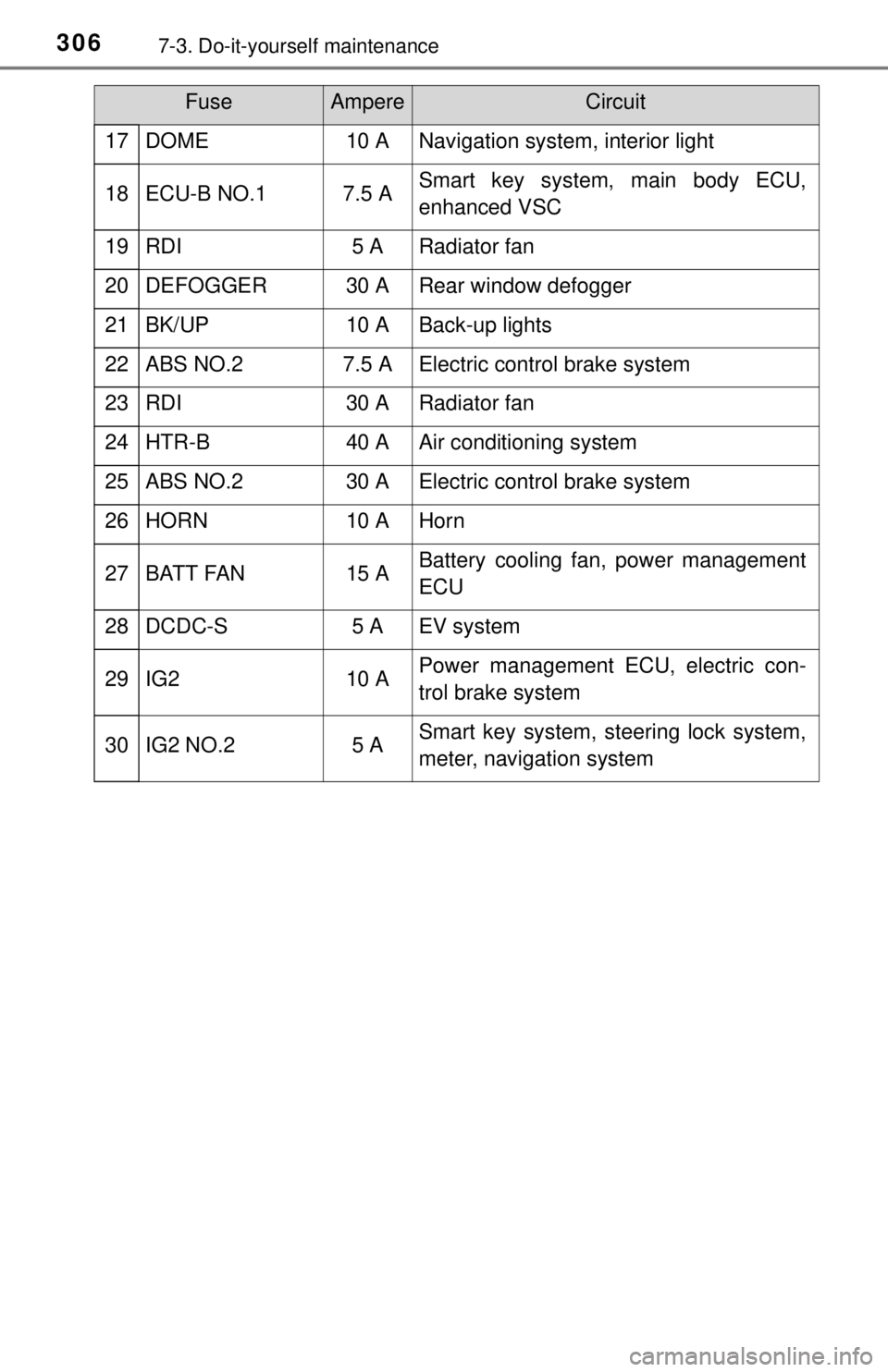
FuseAmpereCircuit
Page 307 of 444
3077-3. Do-it-yourself maintenance
7
Maintenance and care
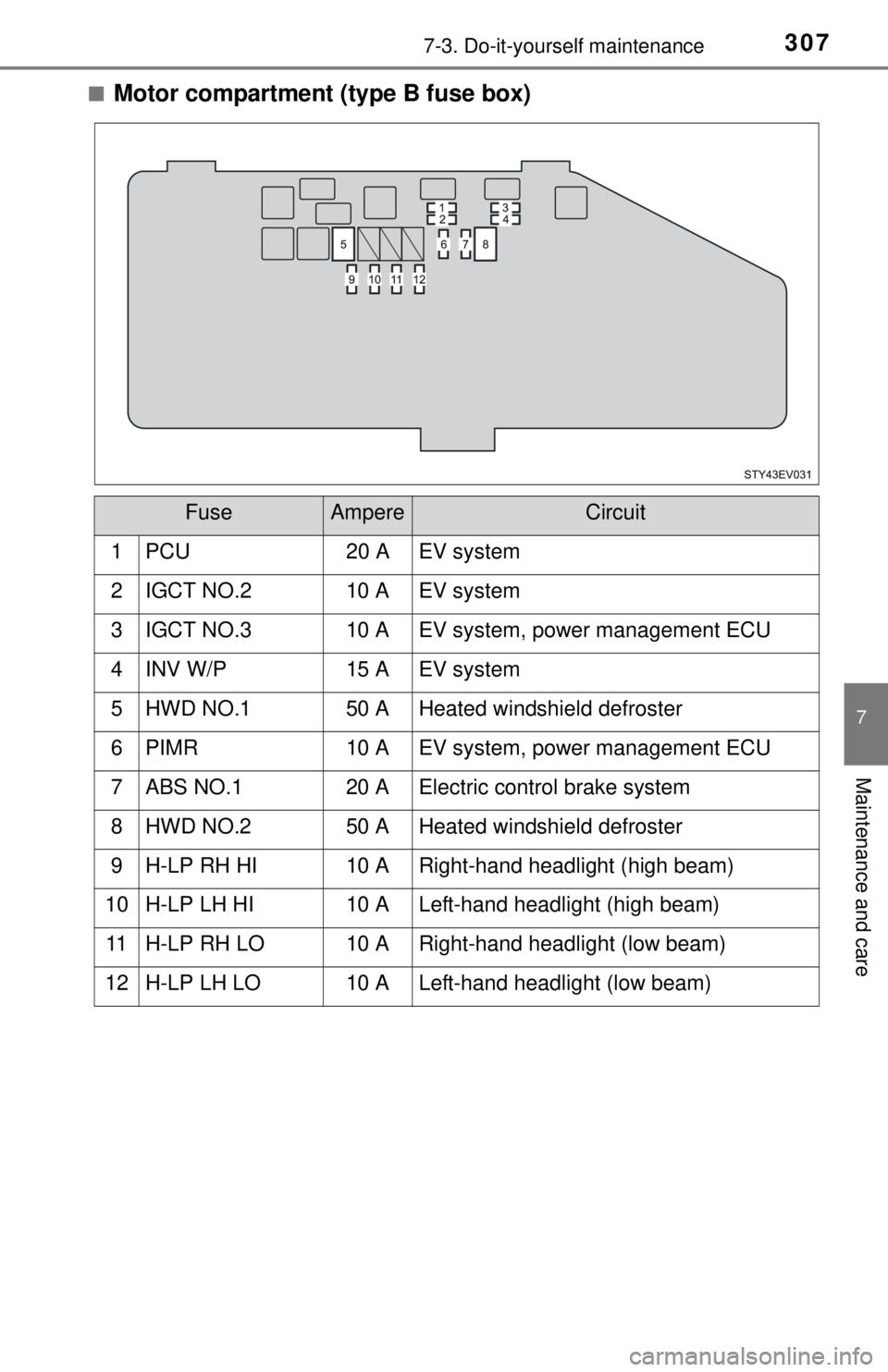
■Motor compartment (type B fuse box)
FuseAmpereCircuit
1 PCU20 A EV system
2IGCT NO.210 AEV system
3IGCT NO.310 AEV system, power management ECU
4INV W/P15 AEV system
5HWD NO.150 AHeated windshield defroster
6PIMR10 AEV system, power management ECU
7ABS NO.120 AElectric control brake system
8HWD NO.250 AHeated windshield defroster
9H-LP RH HI10 ARight-hand headlight (high beam)
10H-LP LH HI10 ALeft-hand headlight (high beam)
11H-LP RH LO10 ARight-hand headlight (low beam)
12H-LP LH LO10 ALeft-hand headlight (low beam)
Page 314 of 444
3147-3. Do-it-yourself maintenance
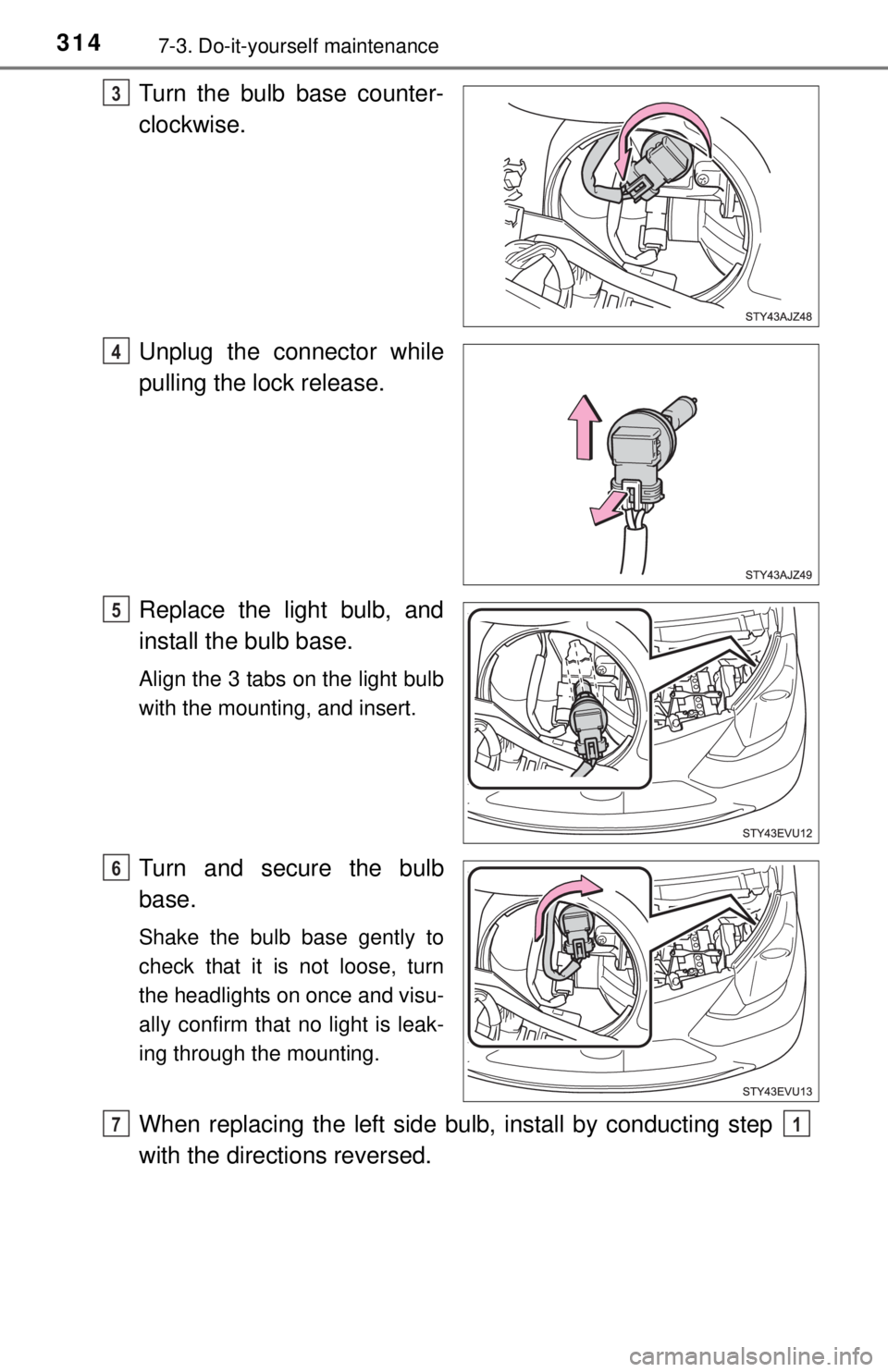
Turn the bulb base counter-
clockwise.
Unplug the connector while
pulling the lock release.
Replace the light bulb, and
install the bulb base.
Align the 3 tabs on the light bulb
with the mounting, and insert.
Turn and secure the bulb
base.
Shake the bulb base gently to
check that it is not loose, turn
the headlights on once and visu-
ally confirm that no light is leak-
ing through the mounting.
When replacing the left side bulb, install by conducting step
with the directions reversed.
3
4
5
6
71