oil TOYOTA iQ EV 2013 Owners Manual (in English)
[x] Cancel search | Manufacturer: TOYOTA, Model Year: 2013, Model line: iQ EV, Model: TOYOTA iQ EV 2013Pages: 444, PDF Size: 7.34 MB
Page 125 of 444

1254-2. Opening, closing and locking the doors
4
Operation of each component
■Conditions affecting operation
The smart key system uses weak radio waves. In the following situations, the
communication between the electronic key and the vehicle may be affected,
preventing the smart key system, wireless remote control and immobilizer
system from operating properly. (Ways of coping: P. 384)
● When the electronic key battery is depleted
● Near a TV tower, electric power plant, gas station, radio station, large dis-
play, airport or other facility that generates strong radio waves or electrical
noise
● When carrying a portable radio, cellular phone, cordless phone or other
wireless communication device
● When the electronic key is in contact with, or is covered by the following
metallic objects
• Cards to which aluminum foil is attached
• Cigarette boxes that have aluminum foil inside
• Metallic wallets or bags
• Coins
• Hand warmers made of metal
• Media such as CDs and DVDs
● When other wireless keys (that emit radio waves) are being used nearby
● When carrying the electronic key together with the following devices that
emit radio waves
• Another vehicle’s electronic key or a wireless key that emits radio waves
• Personal computers or personal digital assistants (PDAs)
• Digital audio players
• Portable game systems
● If window tint with a metallic content or metallic objects are attached to the
rear window
Page 192 of 444

1925-4. How to charge
CAUTION
■When charging
Follow these points when charging. If you do not follow them, fire or electri-
cal shock may occur, possibly resulting in death or serious injury.
● Connect to a power source suitable for charging. ( P. 88)
● Check that the outlet, charging cable and charging inlet are not damaged\
.
● Check that no foreign objects have been caught in charging connector or
inlet.
● Ensure that no water is in the charging connector or inlet.
● Check that the tips of the plug have not been deformed.
● If the plug is dirty or dusty, clean it before inserting.
● Plugging into the outlet that is located in a spot that is not high above the
ground or floor is recommended.
● Insert the plug firmly into the outlet.
● Do not touch the terminals of the charging connector or inlet, or allow a
short circuit to occur with foreign objects.
● Do not get the charging connector or inlet wet.
Do not wash the vehicle while the charging cable is connected to the vehi-
cle. ( P. 249)
● Do not touch the terminals of the charging connector or inlet with metallic
sharp tips (wires and needles).
● Do not use coiled up or tied up charging cables.
● Ensure that the charging cable is not bent or placed under heavy objects.
● If charging is interrupted, remove the charging connector before removing
the plug.
● When charging outdoors, make sure to connect to a weatherproof outlet
for outdoor use.
Also, if rain falls during charging, take care that rainwater does not run
along the length of cable and enter the outlet.
● Do not insert the plug if the outlet is submerged in water or snow.
If the plug has already been inserted and it is necessary to remove it, first
switch the circuit breaker off, then remove the plug.
Page 200 of 444

2005-4. How to charge
■Capacity reduction of the traction battery
P. 190
■ Handling the traction battery
P. 8 3
■ When not using the vehicle for an extended period of time
P. 191
■ If the recharge inle t door cannot be opened
P. 191
CAUTION
■ When charging
Follow these points when charging. If you do not follow them, fire or electri-
cal shock may occur, possibly resulting in death or serious injury.
● Check that the charging cable and charging inlet are not damaged.
● Check that no foreign objects have been caught in charging connector or
inlet.
● Ensure that no water is in the charging connector or inlet.
● Do not touch the terminals of the charging connector or inlet, or allow a
short circuit to occur with foreign objects.
● Do not get the charging connector or inlet wet.
Do not wash the vehicle while the charging cable is connected to the vehi-
cle. ( P. 249)
● Do not touch the terminals of the charging connector or inlet with metallic
sharp tips (wires and needles).
● Do not use coiled up or tied up charging cables.
● Ensure that the charging cable is not bent or placed under heavy objects.
● If charging is interrupted, follow the quick charger’s instruction manual pro-
vided by the manufacturer.
Page 250 of 444

2507-1. Maintenance and care
NOTICE
■To prevent paint deterioration and corrosion on the body and compo-
nents (aluminum wheels etc.)
● Wash the vehicle immediately in the following cases:
• After driving near the sea coast
• After driving on salted roads
• If coal tar or tree sap is present on the paint surface
• If dead insects, insect droppings or bird droppings are present on the
paint surface
• After driving in an area contaminated with soot, oily smoke, mine dust, iron powder or chemical substances
• If the vehicle becomes heavily soiled with dust or mud
• If liquids such as benzene and gasoline are spilled on the paint surface
● If the paint is chipped or scratched, have it repaired immediately.
● To prevent the wheels from corroding, remove any dirt and store in a place
with low humidity when storing the wheels.
■ Cleaning the exterior lights
● Wash carefully. Do not use organic substances or scrub with a hard brush.
This may damage the surfaces of the lights.
● Do not apply wax to the surfaces of the lights.
Wax may cause damage to the lenses.
■ When using a high pressure car washer
Do not use the washer on the area around the recharge inlet door. Water
could get into the charging inlet and could damage the vehicle.
■ Antenna installation and removal precautions
● Before driving, ensure that the antenna is installed.
● When the antenna is removed, such as before entering an automatic car
wash, make sure to store it in a suitable place so as not to lose it. Also,
before driving, make sure to reinstall the antenna in its original position.
■ To prevent damage to the windshield wiper arms
When lifting the wiper arms away from the windshield, pull the driver side
wiper arm upward first, and repeat for the passenger side. When returning
the wipers to their original position, do so from the passenger side first.
■ To prevent damage to the antenna
Remove the antenna in the following situations:
● When the antenna will touch the ceiling of a garage or other such places
● When a car cover is to be used to cover the vehicle
Page 274 of 444
2747-3. Do-it-yourself maintenance
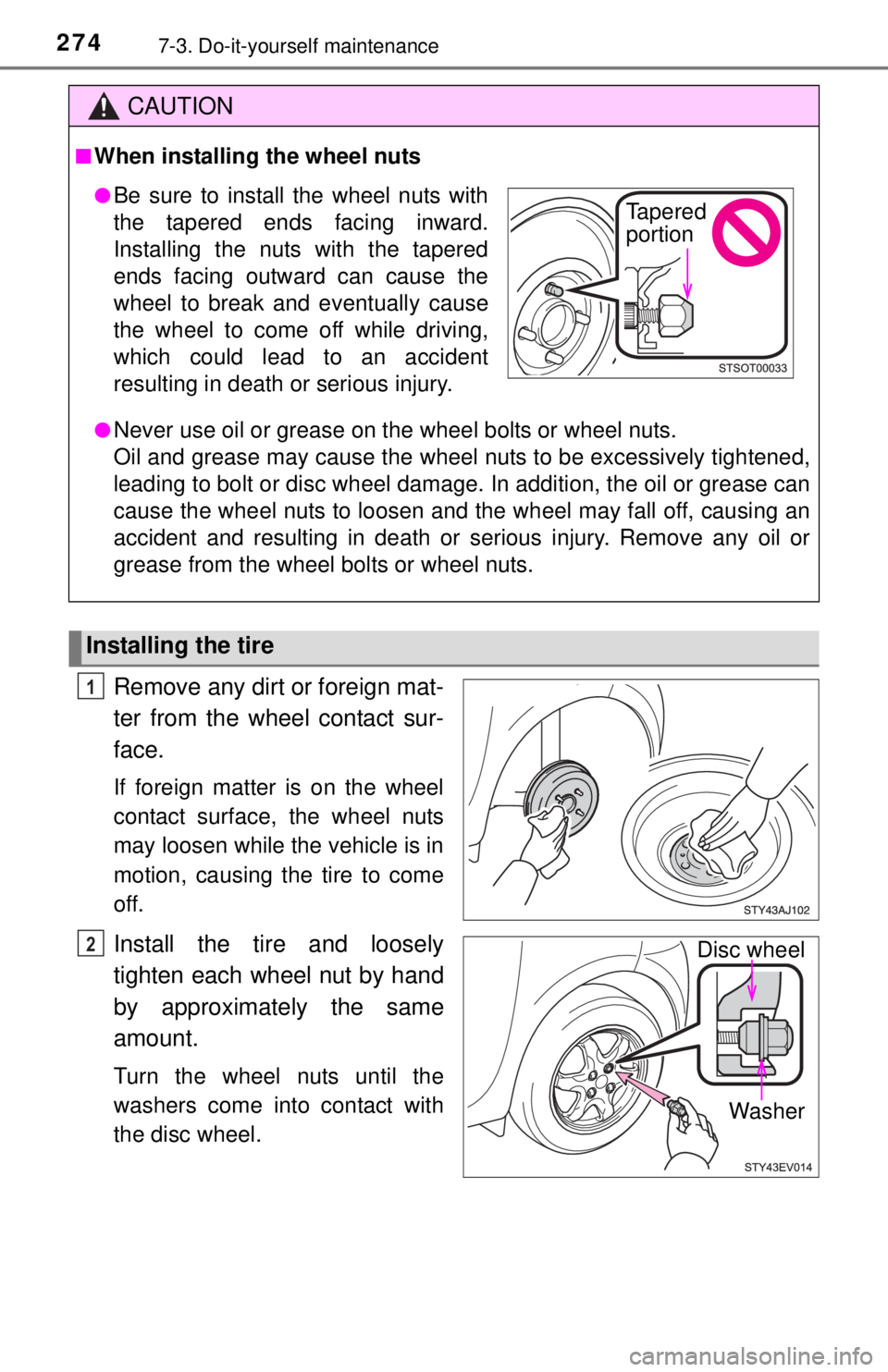
Remove any dirt or foreign mat-
ter from the wheel contact sur-
face.
If foreign matter is on the wheel
contact surface, the wheel nuts
may loosen while the vehicle is in
motion, causing the tire to come
off.
Install the tire and loosely
tighten each wheel nut by hand
by approximately the same
amount.
Turn the wheel nuts until the
washers come into contact with
the disc wheel.
CAUTION
■When installing the wheel nuts
●Never use oil or grease on the wheel bolts or wheel nuts.
Oil and grease may cause the wheel nuts to be excessively tightened,
leading to bolt or disc wheel damage. In addition, the oil or grease can
cause the wheel nuts to loosen and the wheel may fall off, causing an
accident and resulting in death or serious injury. Remove any oil or
grease from the wheel bolts or wheel nuts.
Installing the tire
●Be sure to install the wheel nuts with
the tapered ends facing inward.
Installing the nuts with the tapered
ends facing outward can cause the
wheel to break and eventually cause
the wheel to come off while driving,
which could lead to an accident
resulting in death or serious injury.Tapered
portion
1
Disc wheel
Washer2
Page 408 of 444
4089-1. Specifications
Glossary of tire terminology
Tire related termMeaning
Cold tire inflation pres-
sure
Tire pressure when the vehicle has been
parked for three hours or more, or has not
been driven more than 1 mile or 1.5 km under
that condition
Maximum inflation
pressureThe maximum cold inflated pressure to which
a tire may be inflated, shown on the sidewall
of the tire
Recommended infla-
tion pressureCold tire inflation pressure recommended by a
manufacturer
Accessory weight
The combined weight (in excess of those stan-
dard items which may be replaced) of trans-
mission, power steering, power brakes, power
windows, power seats, radio and heater, to the
extent that these item s are available as fac-
tory-installed equipment (whether installed or
not)
Curb weight
The weight of a motor vehicle with standard
equipment, including the maximum capacity of
fuel, oil (for electric vehicle, traction battery)
and coolant, and if so equipped, air condition-
ing and additional weight optional engine (for
electric vehicle, traction motor)
Maximum loaded vehi-
cle weight
The sum of:
(a) Curb weight
(b) Accessory weight
(c) Vehicle capacity weight
(d) Production options weight
Normal occupant
weight150 lb. (68 kg) times the number of occupants
specified in the second column of Table 1
*
that follows
Occupant distributionDistribution of occupants in a vehicle as speci-
fied in the third column of Table 1
* below