open hood TOYOTA iQ EV 2013 Owners Manual (in English)
[x] Cancel search | Manufacturer: TOYOTA, Model Year: 2013, Model line: iQ EV, Model: TOYOTA iQ EV 2013Pages: 444, PDF Size: 7.34 MB
Page 13 of 444
13Pictorial index
Recharge inlet door (charging port lid) . . . . . . . . . . . . . . . . . P. 84
Charging equipment . . . . . . . . . . . . . . . . . . . . . . . . . . . . . . . . . P. 84
Power sources that can be used . . . . . . . . . . . . . . . . . . . . . . . . P. 88
How to charge your vehicle . . . . . . . . . . . . . . . . . . . . . . . . . . . . P. 91
If charging cannot be done . . . . . . . . . . . . . . . . . . . . . . . . . . . P. 377
Inspecting the charging cable . . . . . . . . . . . . . . . . . . . . . . . . . P. 262
Warning messages . . . . . . . . . . . . . . . . . . . . . . . . . . . . . . . . . P. 355
Tires . . . . . . . . . . . . . . . . . . . . . . . . . . . . . . . . . . . . . . . . . . . . P. 285
Tire size/inflation pressure . . . . . . . . . . . . . . . . . . . . . . . . . . . . P. 400
Winter tires/tire chain . . . . . . . . . . . . . . . . . . . . . . . . . . . . . . . . P. 215
Checking/rotation/tire pressure warning system . . . . . . . P. 285, 286
Replacement . . . . . . . . . . . . . . . . . . . . . . . . . . . . . . . . . . . . . . P. 269
Coping with flat tires . . . . . . . . . . . . . . . . . . . . . . . . . . . . . . . . P. 359
Hood . . . . . . . . . . . . . . . . . . . . . . . . . . . . . . . . . . . . . . . . . . . . P. 264
Opening . . . . . . . . . . . . . . . . . . . . . . . . . . . . . . . . . . . . . . . . . . P. 264
Coping with overheat . . . . . . . . . . . . . . . . . . . . . . . . . . . . . . . . P. 390
Headlights/parking lights . . . . . . . . . . . . . . . . . . . . . . . . . . . P. 176
Turn signal lights . . . . . . . . . . . . . . . . . . . . . . . . . . . . . . . . . . P. 173
Tail lights . . . . . . . . . . . . . . . . . . . . . . . . . . . . . . . . . . . . . . . . P. 176
Stop lights
Hill-start assist control . . . . . . . . . . . . . . . . . . . . . . . . . . . . . . . P. 213
License plate lights . . . . . . . . . . . . . . . . . . . . . . . . . . . . . . . . P. 176
Back-up lights
Shifting the shift lever to R . . . . . . . . . . . . . . . . . . . . . . . . . . . . P. 171
Side marker lights . . . . . . . . . . . . . . . . . . . . . . . . . . . . . . . . . P. 1765
6
7
Light bulbs of the exterior lights for driving
(Replacing method: P. 311, Watts: P. 401)
8
9
10
11
12
13
14
Page 51 of 444
511-1. For safe use
1
For safety and security
Safety infor mation for children
●It is recommended that children sit in the rear seats to avoid acci-
dental contact with the shift lever, wiper switch etc.
● Use the window lock switch to avoid children opening the door
while driving or operating the power window accidentally.
● Do not let small children operate equipment which may catch or
pinch body parts, such as the power window, hood, back door,
seats etc.
Observe the following precautions when children are in the vehi-
cle.
Use a child restraint system appropriate for the child, until the
child becomes large enough to pr operly wear the vehicle’s seat
belt.
CAUTION
Never leave children unattended in the vehicle, and never allow children to
have or use the key.
Children may be able to start the vehicle or shift the vehicle into neutral.
There is also a danger that children may injure themselves by playing with
the windows or other features of the vehicle. In addition, heat build-up or
extremely cold temperatures inside the vehicle can be fatal to children.
Page 191 of 444
1915-4. How to charge
5
Driving
■When not using the vehicle for an extended period of time
●When the vehicle will not be used for a prolonged period of time, charge the
traction battery once a month.
This protects the traction battery from extreme voltage decline due to self
discharging.
● To prevent the 12-volt battery from being discharged, do not leave the
recharging inlet door open or the charging cable connected to the vehicle.
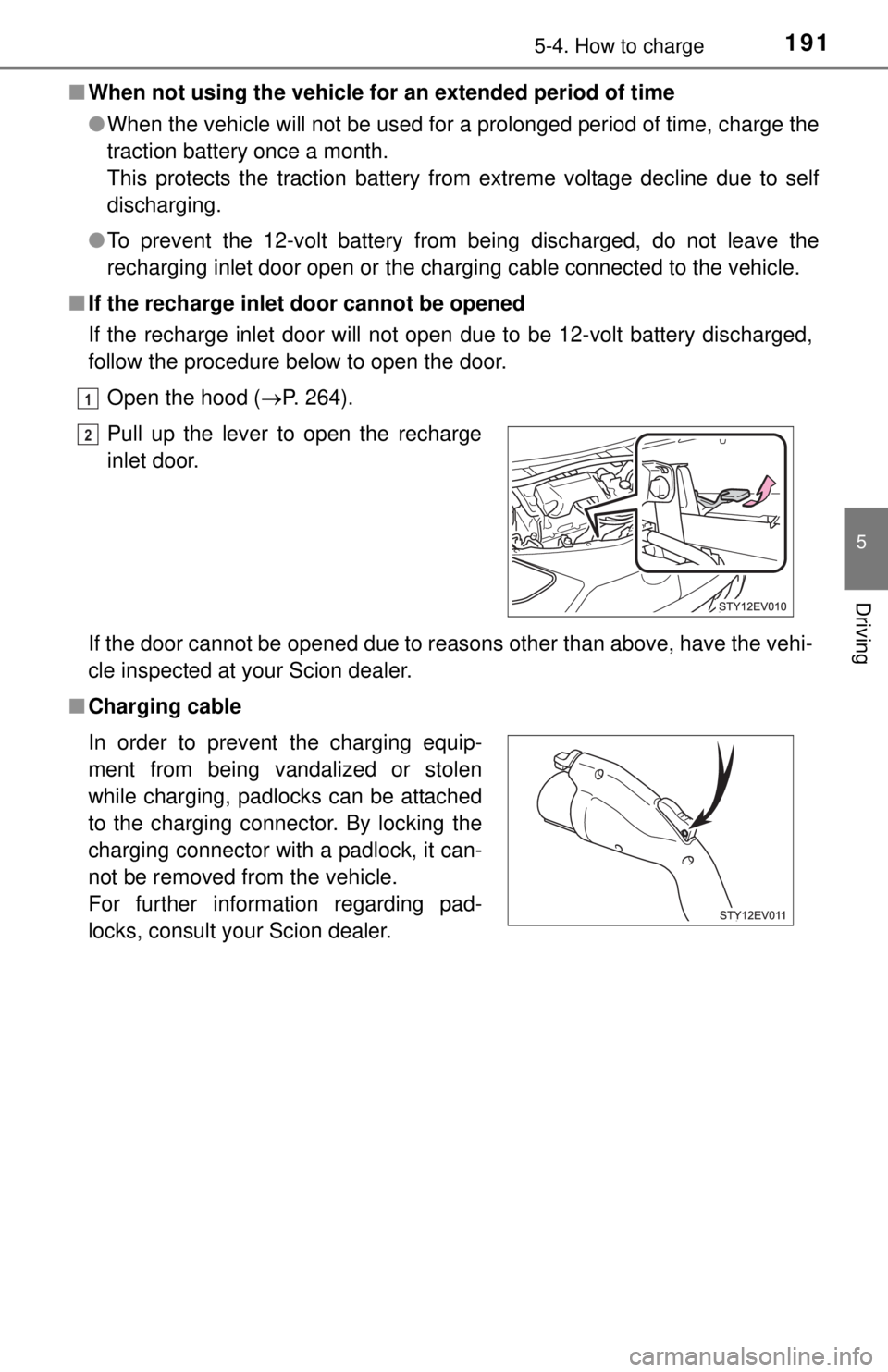
■ If the recharge inle t door cannot be opened
If the recharge inlet door will not open due to be 12-volt battery discharged,
follow the procedure below to open the door.
Open the hood ( P. 264).
If the door cannot be opened due to reasons other than above, have the vehi-
cle inspected at your Scion dealer.
■ Charging cablePull up the lever to open the recharge
inlet door.
In order to prevent the charging equip-
ment from being vandalized or stolen
while charging, padlocks can be attached
to the charging connector. By locking the
charging connector with a padlock, it can-
not be removed from the vehicle.
For further information regarding pad-
locks, consult your Scion dealer.
1
2
Page 231 of 444
2316-1. Using the air conditioning system and defogger
6
Interior features
CAUTION
■Precautions for the Remo te Climate Control
● Do not use the system if people are in the vehicle.
• Even when the system is in use, the interior temperature may still reach
a high or low level due to features such as the automatic shut-off. Chil-
dren and pets left inside the vehicle may suffer heatstroke, dehydration
or hypothermia or could result in death or serious injury.
• The wipers can be operated during system operation. Children or pets left inside the vehicle may mistakenly operate these and cause an acci-
dent.
● Depending on the surrounding environment, signals from the wireless
switch may transmit further than expected. Pay appropriate attention to
the vehicle’s surroundings and use the switch only when necessary.
● Turn the wipers off. If the Remote Climate Control operates while the wiper
switch is turned on, the wipers may operate and objects may get caught in
the wiper blades.
● Do not operate the if the hood is open. The air conditioning may
operate unintentionally and objects may be drawn into the electrical cool-
ing fan.
NOTICE
■To prevent the traction battery from being discharged through incor-
rect operation
Use the only when necessary.
Page 264 of 444
2647-3. Do-it-yourself maintenance
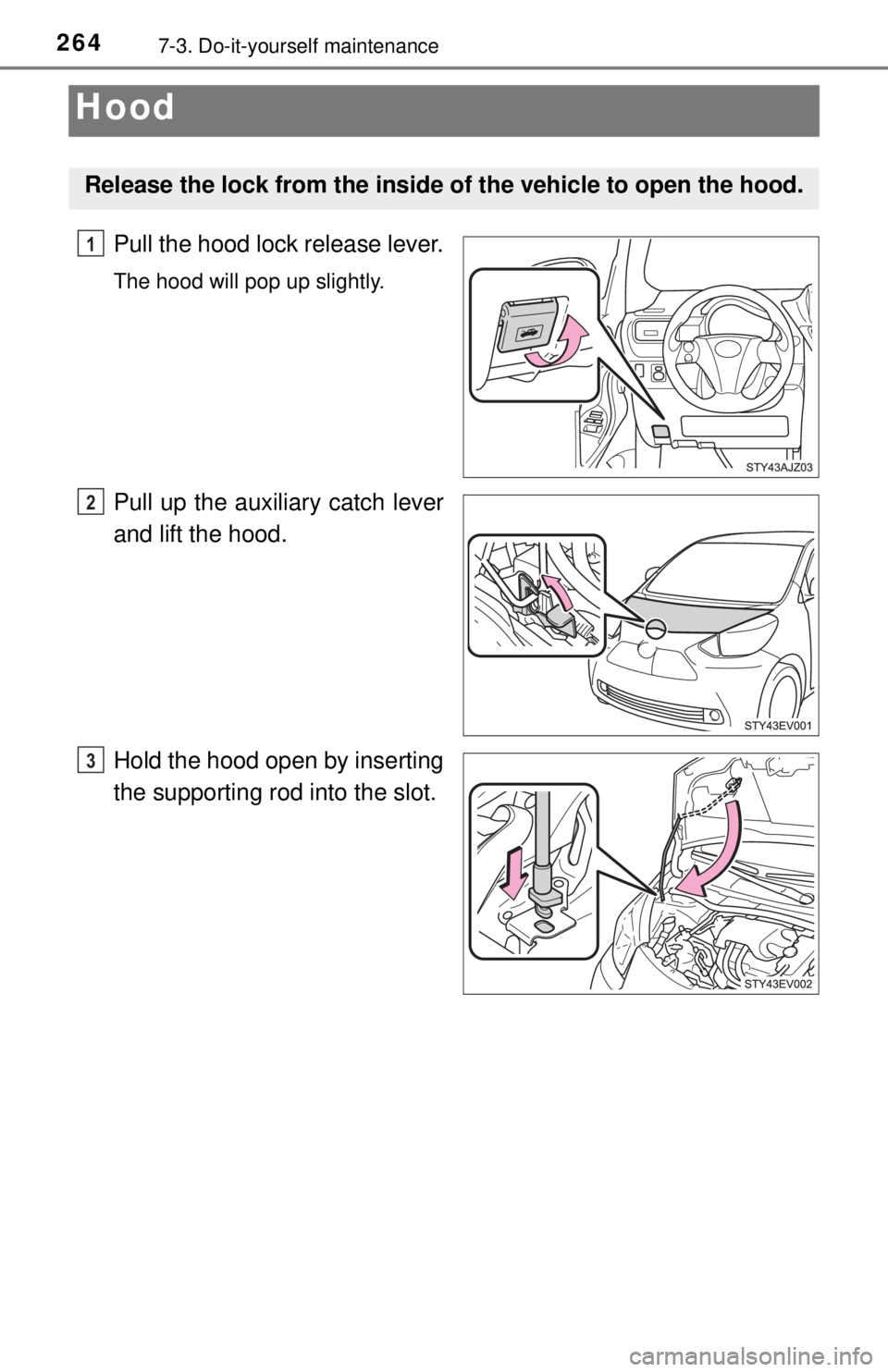
Hood
Pull the hood lock release lever.
The hood will pop up slightly.
Pull up the auxiliary catch lever
and lift the hood.
Hold the hood open by inserting
the supporting rod into the slot.
Release the lock from the inside of the vehicle to open the hood.
1
2
3
Page 265 of 444
2657-3. Do-it-yourself maintenance
7
Maintenance and care
CAUTION
■Pre-driving check
Check that the hood is fully closed and locked.
If the hood is not locked properly, it may open while the vehicle is in motion
and cause an accident, which may result in death or serious injury.
■ When opening the hood
Make sure to use the support rod to support the hood when opening it,
ensuring that the rod is fixed correctly. The hood may stay open without
support on slope, however, it is dangerous because the hood may suddenly
close.
NOTICE
■When closing the hood
Be sure to return the support rod to its clip before closing the hood. Closing
the hood with the support rod up could cause the hood to bend.
Page 386 of 444
3868-2. Steps to take in an emergency
If the 12-volt batter y is discharged
If you have a set of jumper (or booster) cables and a second vehicle
with a 12-volt battery, you can jump start your vehicle by following the
steps below.
Open the hood. ( P. 264)
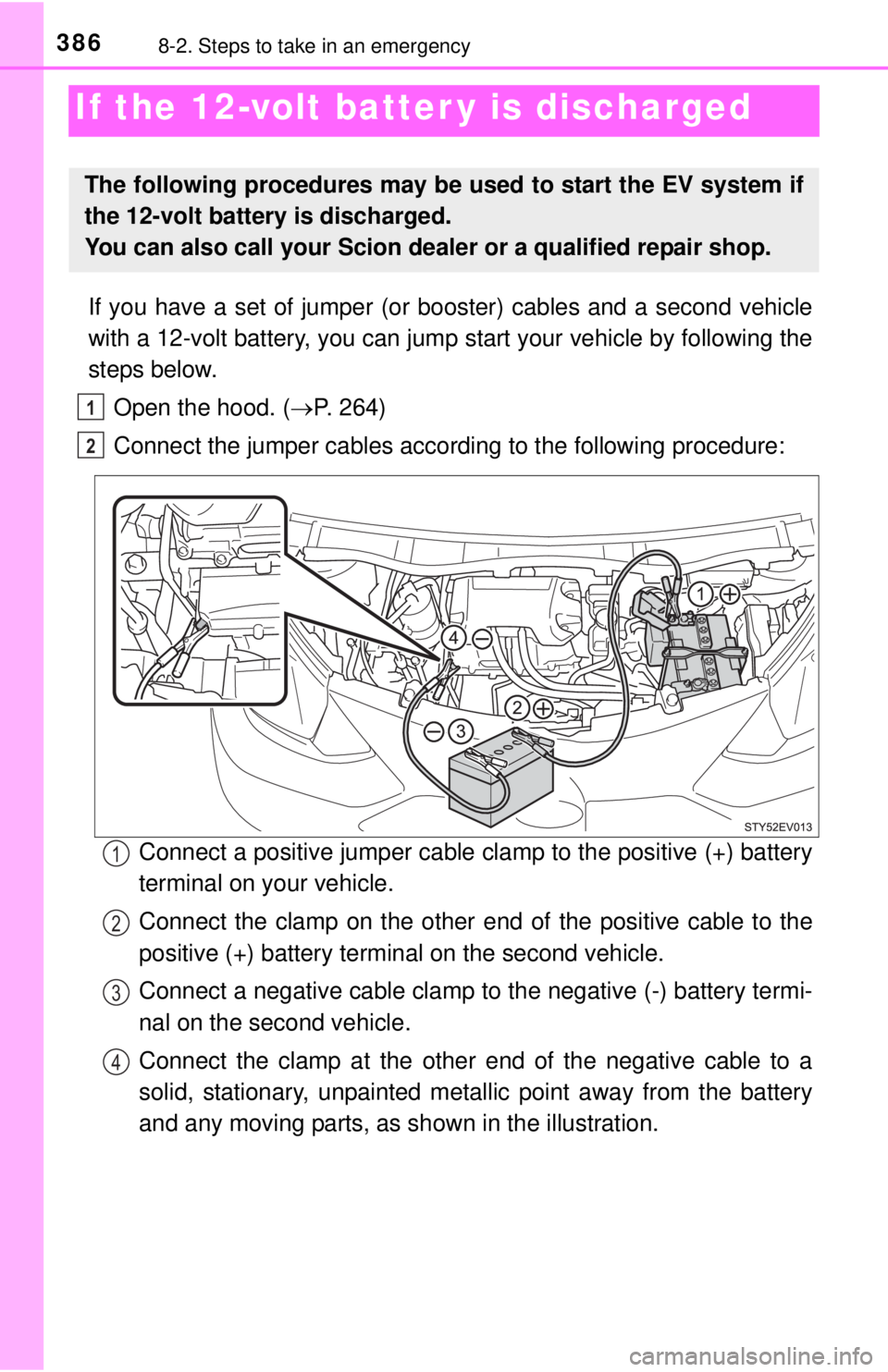
Connect the jumper cables according to the following procedure:
Connect a positive jumper cable clamp to the positive (+) battery
terminal on your vehicle.
Connect the clamp on the other e nd of the positive cable to the
positive (+) battery terminal on the second vehicle.
Connect a negative cable clamp to the negative (-) battery termi-
nal on the second vehicle.
Connect the clamp at the other end of the negative cable to a
solid, stationary, unpainted metallic point away from the battery
and any moving parts, as shown in the illustration.
The following procedures may be used to start the EV system if
the 12-volt battery is discharged.
You can also call your Scion dealer or a qualified repair shop.
1
2
1
2
3
4
Page 391 of 444
3918-2. Steps to take in an emergency
8
When trouble arises
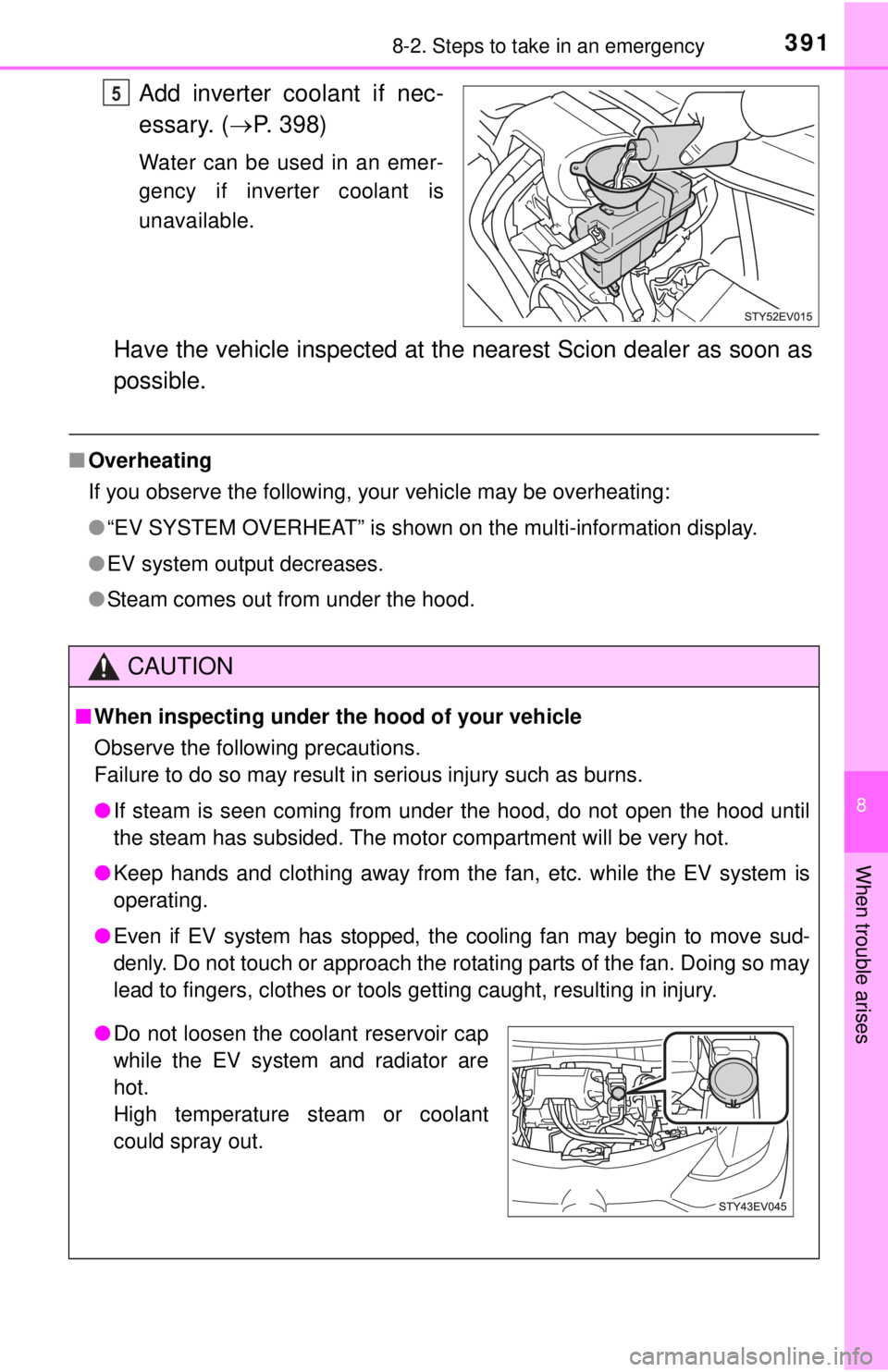
Add inverter coolant if nec-
essary. (P. 398)
Water can be used in an emer-
gency if inverter coolant is
unavailable.
Have the vehicle inspected at the nearest Scion dealer as soon as
possible.
■Overheating
If you observe the following, your vehicle may be overheating:
●“EV SYSTEM OVERHEAT” is shown on the multi-information display.
● EV system output decreases.
● Steam comes out from under the hood.
5
CAUTION
■When inspecting under the hood of your vehicle
Observe the following precautions.
Failure to do so may result in serious injury such as burns.
● If steam is seen coming from under the hood, do not open the hood until
the steam has subsided. The motor compartment will be very hot.
● Keep hands and clothing away from the fan, etc. while the EV system is
operating.
● Even if EV system has stopped, the cooling fan may begin to move sud-
denly. Do not touch or approach the rotating parts of the fan. Doing so may
lead to fingers, clothes or tools getting caught, resulting in injury.
●Do not loosen the coolant reservoir cap
while the EV system and radiator are
hot.
High temperature steam or coolant
could spray out.
Page 433 of 444
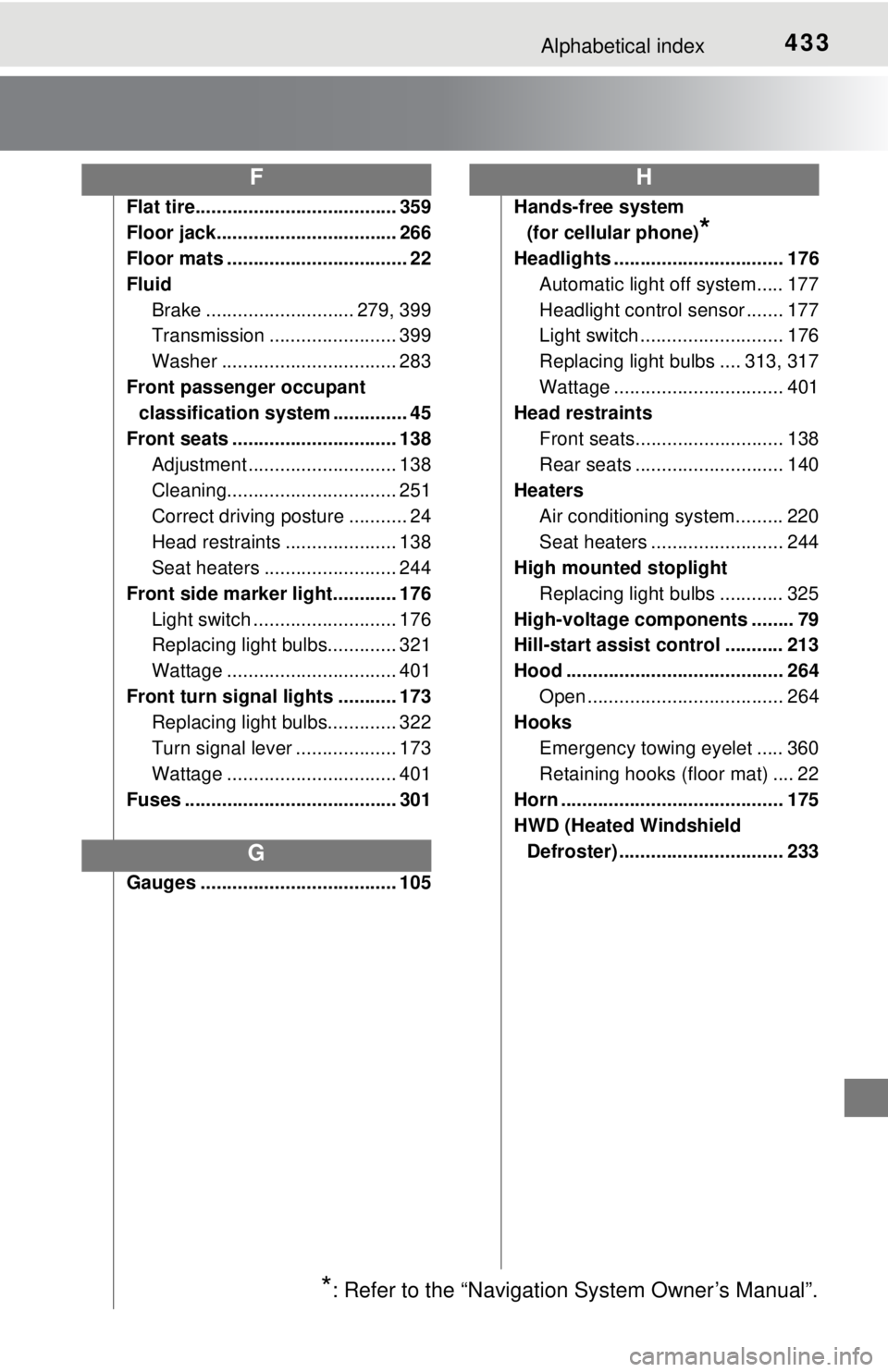
433Alphabetical index
Flat tire...................................... 359
Floor jack.................................. 266
Floor mats .................................. 22
FluidBrake ............................ 279, 399
Transmission ........................ 399
Washer ................................. 283
Front passenger occupant classification system .............. 45
Front seats ............................... 138 Adjustment ............................ 138
Cleaning................................ 251
Correct driving posture ........... 24
Head restraints ..................... 138
Seat heaters ......................... 244
Front side marker light............ 176 Light switch ........................... 176
Replacing light bulbs............. 321
Wattage ................................ 401
Front turn signal lights ........... 173 Replacing light bulbs............. 322
Turn signal lever ................... 173
Wattage ................................ 401
Fuses ........................................ 301
Gauges ..................................... 105 Hands-free system
(for cellular phone)
*
Headlights ................................ 176
Automatic light off system..... 177
Headlight control sensor ....... 177
Light switch ........................... 176
Replacing light bulbs .... 313, 317
Wattage ................................ 401
Head restraints
Front seats............................ 138
Rear seats ............................ 140
Heaters
Air conditioning system......... 220
Seat heaters ......................... 244
High mounted stoplight
Replacing light bulbs ............ 325
High-voltage components ........ 79
Hill-start assist control ........... 213
Hood ......................................... 264 Open ..................................... 264
Hooks
Emergency towing eyelet ..... 360
Retaining hooks (floor mat) .... 22
Horn .......................................... 175
HWD (Heated Windshield
Defroster) ............................... 233
F
G
H
*: Refer to the “Navigation System Owner’s Manual”.
Page 436 of 444

436Alphabetical index
Navigation system*
Normal charging ...................... 181Charging cable........................ 85
Charging inlet.......................... 84
Charging methods .................. 91
If charging cannot be done ... 377
Timer charging ...................... 202
Odometer.................................. 105 Changing the display ............ 106
Opener Back door.............................. 134
Hood ..................................... 264
Recharge inlet door ...... 181, 195
Outside rear view mirrors ....... 145
Outside temperature display .................................... 242
Overheating.............................. 390 Parking brake........................... 174
Maintenance data ................. 399
Operation .............................. 174
Parking brake engaged
warning buzzer ................... 335
Parking brake engaged
warning message ............... 349
Parking lights........................... 176 Light switch ........................... 176
Replacing light bulbs ............ 321
Wattage ................................ 401
Power consumption
After charge .......................... 109
Average power consumption ....................... 109
Current power consumption ....................... 109
Power control unit ..................... 79
Power (ignition) switch ........... 165
Power outlet ............................. 243
Power steering......................... 210
Warning light......................... 336
Power windows ....................... 147 Jam protection function ........ 147
Operation .............................. 147
Window lock switch .............. 147
Quick charging ........................ 195 Charging inlet ......................... 84
Charging methods .................. 91
If charging cannot be done ... 377
N
O
P
Q