lock TOYOTA MIRAI 2023 Owners Manual
[x] Cancel search | Manufacturer: TOYOTA, Model Year: 2023, Model line: MIRAI, Model: TOYOTA MIRAI 2023Pages: 572, PDF Size: 17.71 MB
Page 483 of 572
4838-2. Steps to take in an emergency
Owners Manual_USA_M62064_en
8
When trouble arises
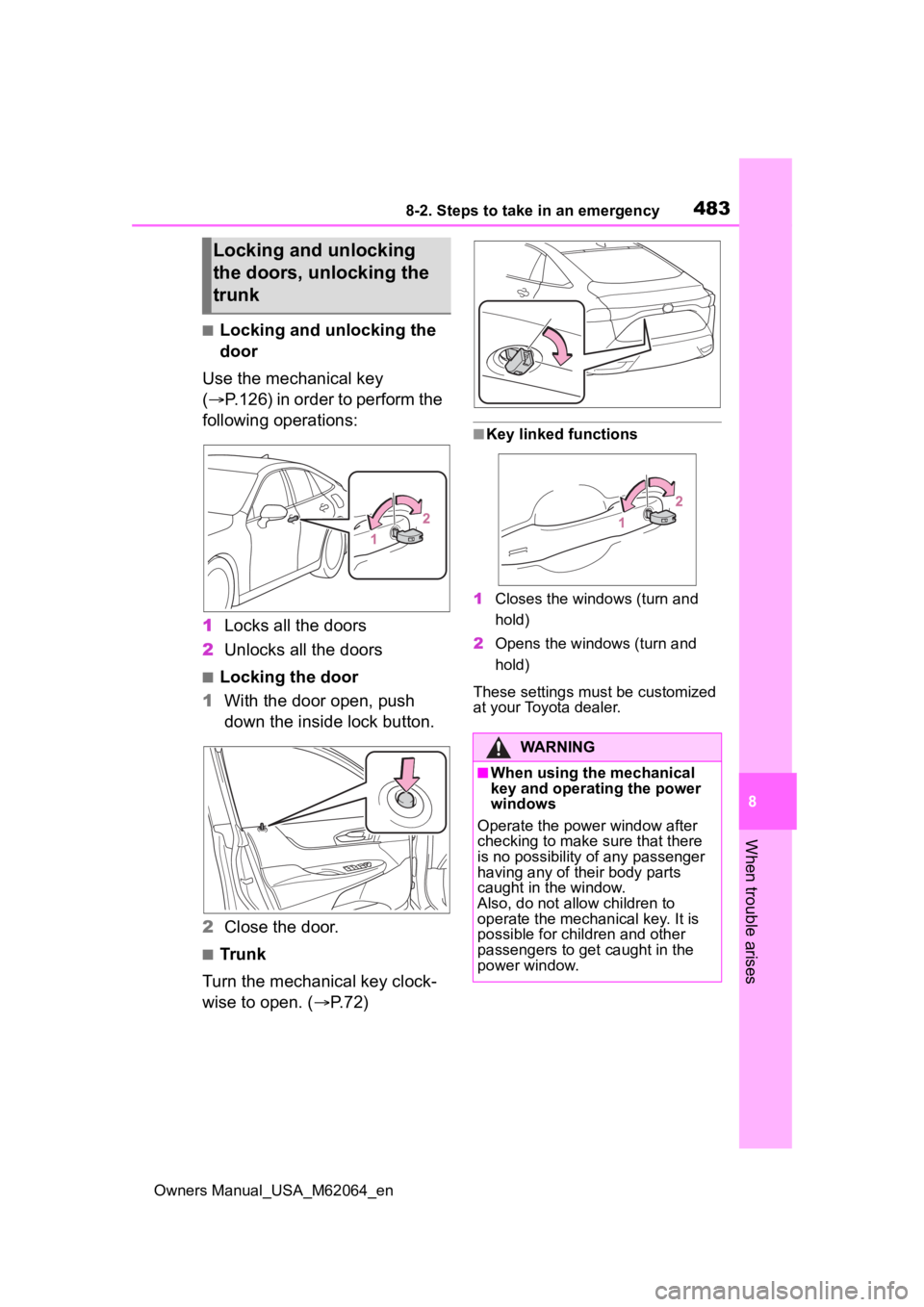
■Locking and unlocking the
door
Use the mechanical key
( P.126) in order to perform the
following operations:
1 Locks all the doors
2 Unlocks all the doors
■Locking the door
1 With the door open, push
down the inside lock button.
2 Close the door.
■Trunk
Turn the mechanical key clock-
wise to open. ( P.72)
■Key linked functions
1 Closes the windows (turn and
hold)
2 Opens the windows (turn and
hold)
These settings mus t be customized
at your Toyota dealer.
Locking and unlocking
the doors, unlocking the
trunk
WARNING
■When using the mechanical
key and operating the power
windows
Operate the power window after
checking to make sure that there
is no possibility of any passenger
having any of their body parts
caught in the window.
Also, do not allo w children to
operate the mechanical key. It is
possible for children and other
passengers to get caught in the
power window.
Page 484 of 572
4848-2. Steps to take in an emergency
Owners Manual_USA_M62064_en
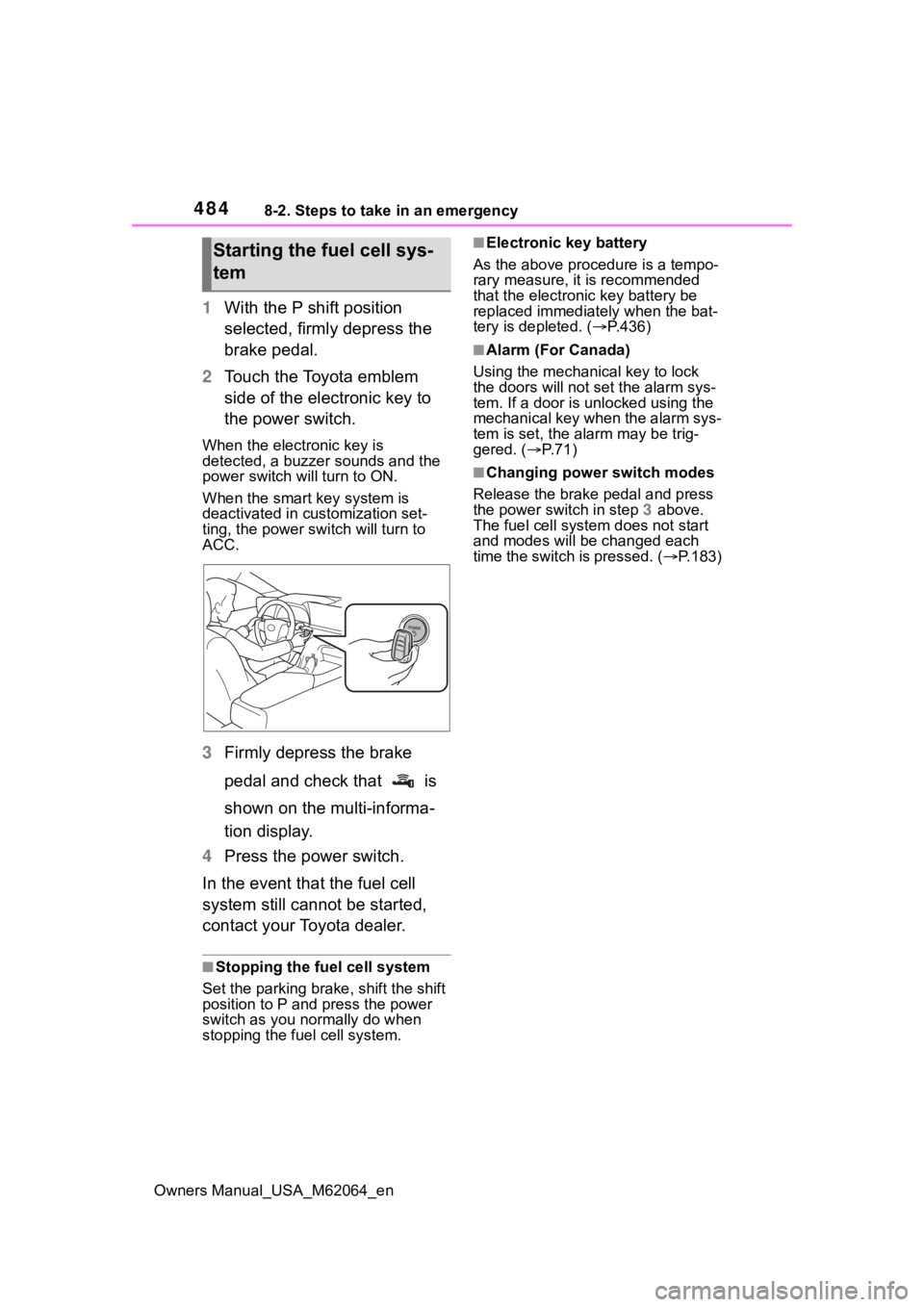
1With the P shift position
selected, firmly depress the
brake pedal.
2 Touch the Toyota emblem
side of the electronic key to
the power switch.
When the electronic key is
detected, a buzzer sounds and the
power switch will turn to ON.
When the smart key system is
deactivated in customization set-
ting, the power switch will turn to
ACC.
3Firmly depress the brake
pedal and check that is
shown on the multi-informa-
tion display.
4 Press the power switch.
In the event that the fuel cell
system still cannot be started,
contact your Toyota dealer.
■Stopping the fuel cell system
Set the parking brake, shift the shift
position to P and press the power
switch as you no rmally do when
stopping the fuel cell system.
■Electronic key battery
As the above proce dure is a tempo-
rary measure, it is recommended
that the electronic key battery be
replaced immediatel y when the bat-
tery is depleted. ( P.436)
■Alarm (For Canada)
Using the mechanical key to lock
the doors will not set the alarm sys-
tem. If a door is unlocked using the
mechanical key when the alarm sys-
tem is set, the alarm may be trig-
gered. ( P.71)
■Changing power switch modes
Release the brake pedal and press
the power switch in step 3 above.
The fuel cell system does not start
and modes will be changed each
time the switch is pressed. ( P.183)
Starting the fuel cell sys-
tem
Page 485 of 572
4858-2. Steps to take in an emergency
Owners Manual_USA_M62064_en
8
When trouble arises
If you have a set of jumper (or
booster) cables and a second
vehicle with a 12-volt battery,
you can jump start your vehicle
by following the steps below.
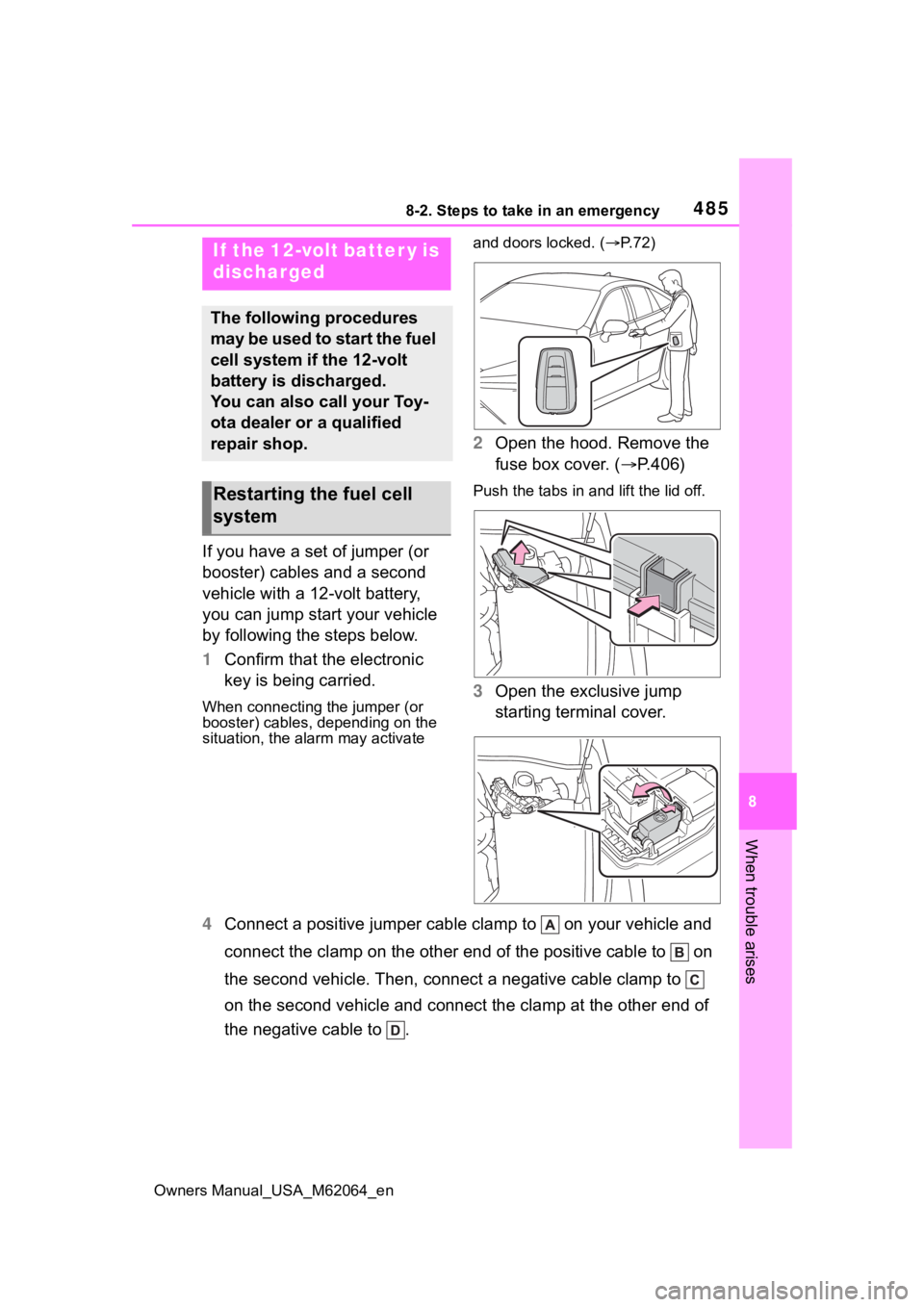
1 Confirm that the electronic
key is being carried.
When connecting the jumper (or
booster) cables, depending on the
situation, the ala rm may activate and doors locked. (
P. 7 2 )
2 Open the hood. Remove the
fuse box cover. ( P.406)
Push the tabs in and lift the lid off.
3 Open the exclusive jump
starting terminal cover.
4 Connect a positive jumper cabl e clamp to on your vehicle and
connect the clamp on the other end of the positive cable to on
the second vehicle. Then, connect a negative cable clamp to
on the second vehicle and connect the clamp at the other end of
the negative cable to .
If the 12-volt batter y is
discharged
The following procedures
may be used to start the fuel
cell system if the 12-volt
battery is discharged.
You can also call your Toy-
ota dealer or a qualified
repair shop.
Restarting the fuel cell
system
Page 487 of 572
4878-2. Steps to take in an emergency
Owners Manual_USA_M62064_en
8
When trouble arises
■Starting the fuel cell system
when the 12-volt battery is dis-
charged
The fuel cell system cannot be
started by push-starting.
■To prevent 12-volt battery dis-
charge
●Turn off the headlights and the
audio system while the fuel cell
system is off.
●Turn off any unnecessary electri-
cal components when the vehicle
is running at a low speed for an
extended period, such as in heavy
traffic.
■When the 12-volt battery is
removed or discharged
●Information stor ed in the ECU is
cleared. When the 12-volt battery
is depleted, have the vehicle
inspected at you r Toyota dealer.
●Some systems may require initial-
ization. ( P.526)
●If the 12-volt battery discharges, it
may not be possible to shift the
shift position to other positions.
In this case, the vehicle cannot be
towed without lifting both rear
wheels because the rear wheels will
be locked.
■When removing the 12-volt bat-
tery terminals
When the 12-volt battery terminals
are removed, the information stored
in the ECU is cleared. Before
removing the 12-volt battery termi-
nals, contact your Toyota dealer.
■Charging the 1 2-volt battery
The electricity stor ed in the 12-volt
battery will discharge gradually even
when the vehicle is not in use, due
to natural discharge and the drain-
ing effects of certain electrical appli-
ances. If the vehicle is left for a long
time, the 12-volt battery may dis-
charge, and the fuel cell system
may be unable to s tart. (The 12-volt battery recharges automatically
while the fuel cell
system is operat-
ing.)
■When recharging or replacing
the 12-volt battery
●In some cases, it may not be pos-
sible to unlock the doors using the
smart key system when the 12-
volt battery is discharged. Use the
wireless remote c ontrol or the
mechanical key to lock or unlock
the doors.
●The fuel cell system may not start
on the first attempt after the 12-
volt battery has recharged but will
start normally after the second
attempt. This is not a malfunction.
●The power switch mode is memo-
rized by the vehicle. When the 12-
volt battery is reconnected, the
system will return to the mode it
was in before the 12-volt battery
was discharged. Before discon-
necting the 12-volt battery, turn
the power switch off.
If you are unsure what mode the
power switch was in before the
12-volt battery discharged, be
especially careful when recon-
necting the 12-volt battery.
●When the 12-volt battery is recon-
nected, start the fuel cell system,
depress the brake pedal, and con-
firm that it is possible to shift into
each shift position.
●If the battery is removed or the ter-
minals disconnected without oper-
ating the water release function
during cold weather, the vehicle
may not start due to the fuel cell
system being frozen. To prevent
this, operate th e water release
function before removing the bat-
tery or disconnecting the termi-
nals. ( P.196)
Page 513 of 572
5139-2. Customization
Owners Manual_USA_M62064_en
9
Vehicle specifications
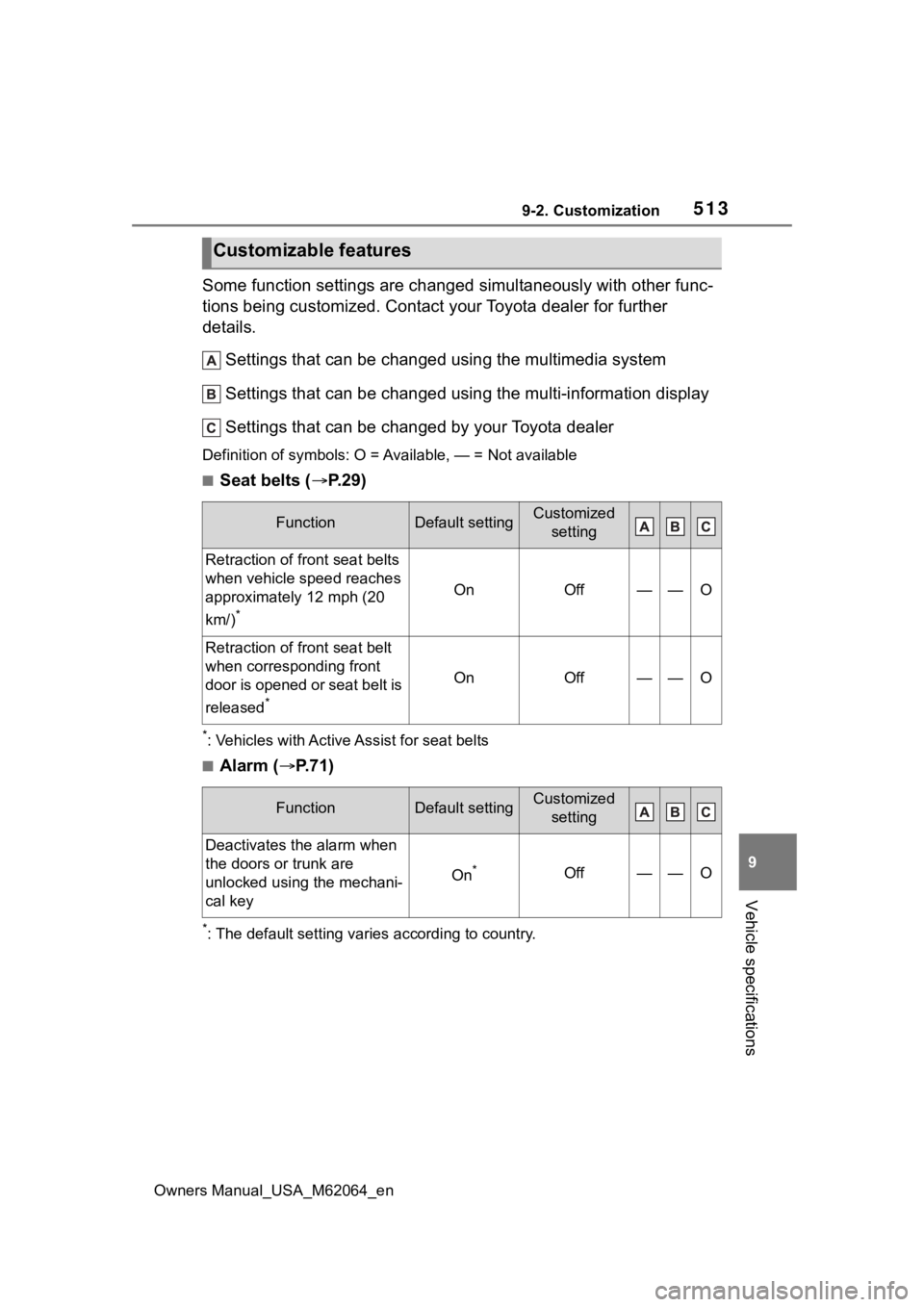
Some function settings are changed simultaneously with other func-
tions being customized. Contact y our Toyota dealer for further
details.
Settings that can be changed using the multimedia system
Settings that can be changed using the multi-information displ ay
Settings that can be changed by your Toyota dealer
Definition of symbols: O = Av ailable, — = Not available
■Seat belts (P.29)
*: Vehicles with Active Assist for seat belts
■Alarm ( P.71)
*: The default setting varies according to country.
Customizable features
FunctionDefault settingCustomized
setting
Retraction of front seat belts
when vehicle speed reaches
approximately 12 mph (20
km/)
*
OnOff——O
Retraction of front seat belt
when corresponding front
door is opened or seat belt is
released
*
OnOff——O
FunctionDefault settingCustomized setting
Deactivates the alarm when
the doors or trunk are
unlocked using the mechani-
cal key
On*Off——O
Page 515 of 572
5159-2. Customization
Owners Manual_USA_M62064_en
9
Vehicle specifications
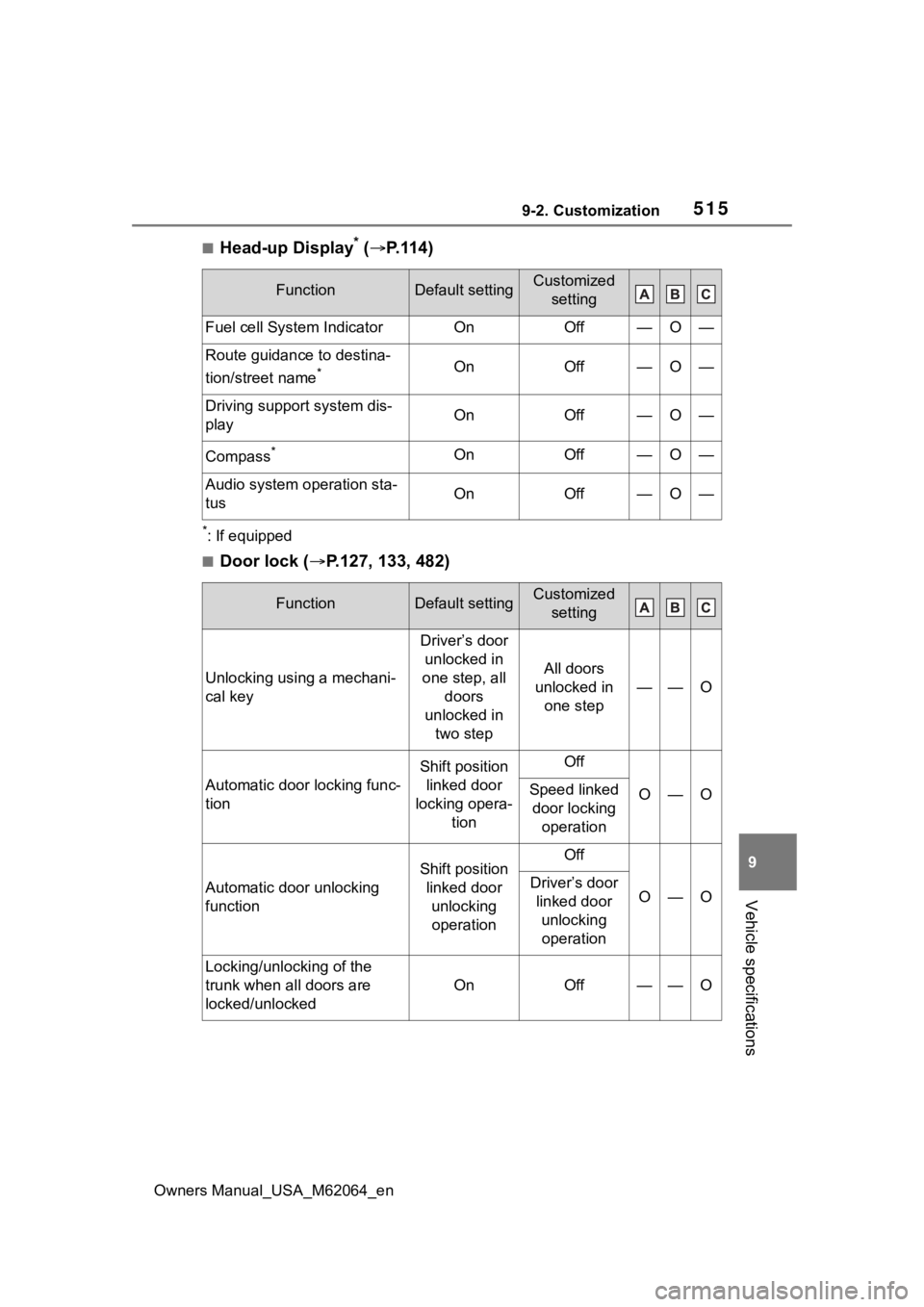
■Head-up Display* ( P.114)
*: If equipped
■Door lock ( P.127, 133, 482)
FunctionDefault settingCustomized
setting
Fuel cell System IndicatorOnOff—O—
Route guidance to destina-
tion/street name
*OnOff—O—
Driving support system dis-
playOnOff—O—
Compass*OnOff—O—
Audio system operation sta-
tusOnOff—O—
FunctionDefault settingCustomized setting
Unlocking using a mechani-
cal key
Driver’s door unlocked in
one step, all doors
unlocked in two step
All doors
unlocked in one step
——O
Automatic door locking func-
tion
Shift position linked door
locking opera- tionOff
O—OSpeed linked door locking operation
Automatic door unlocking
function
Shift position linked door unlocking operationOff
O—ODriver’s door linked door unlocking operation
Locking/unlocking of the
trunk when all doors are
locked/unlocked
OnOff——O
Page 516 of 572
5169-2. Customization
Owners Manual_USA_M62064_en
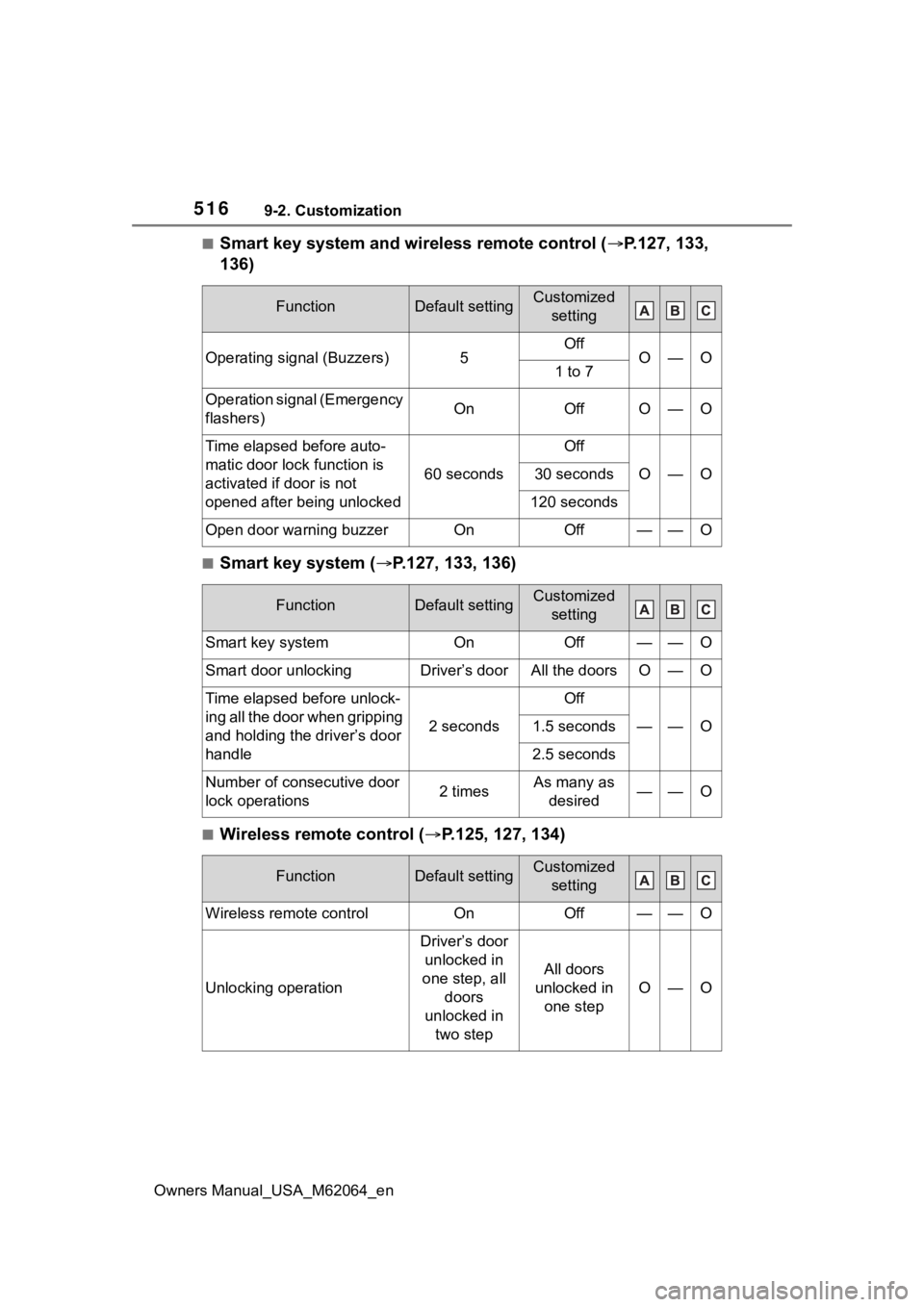
■Smart key system and wireless remote control (P.127, 133,
136)
■Smart key system ( P.127, 133, 136)
■Wireless remote control ( P.125, 127, 134)
FunctionDefault settingCustomized
setting
Operating signal (Buzzers)5OffO—O1 to 7
Operation signal (Emergency
flashers)OnOffO—O
Time elapsed before auto-
matic door lock function is
activated if door is not
opened after being unlocked
60 seconds
Off
O—O30 seconds
120 seconds
Open door warning buzzerOnOff——O
FunctionDefault settingCustomized setting
Smart key systemOnOff——O
Smart door unlockingDriver’s doorAll the doorsO—O
Time elapsed before unlock-
ing all the door when gripping
and holding the driver’s door
handle
2 seconds
Off
——O1.5 seconds
2.5 seconds
Number of consecutive door
lock operations2 timesAs many as desired——O
FunctionDefault settingCustomized setting
Wireless remote controlOnOff——O
Unlocking operation
Driver’s door unlocked in
one step, all doors
unlocked in two step
All doors
unlocked in one step
O—O
Page 517 of 572
5179-2. Customization
Owners Manual_USA_M62064_en
9
Vehicle specifications
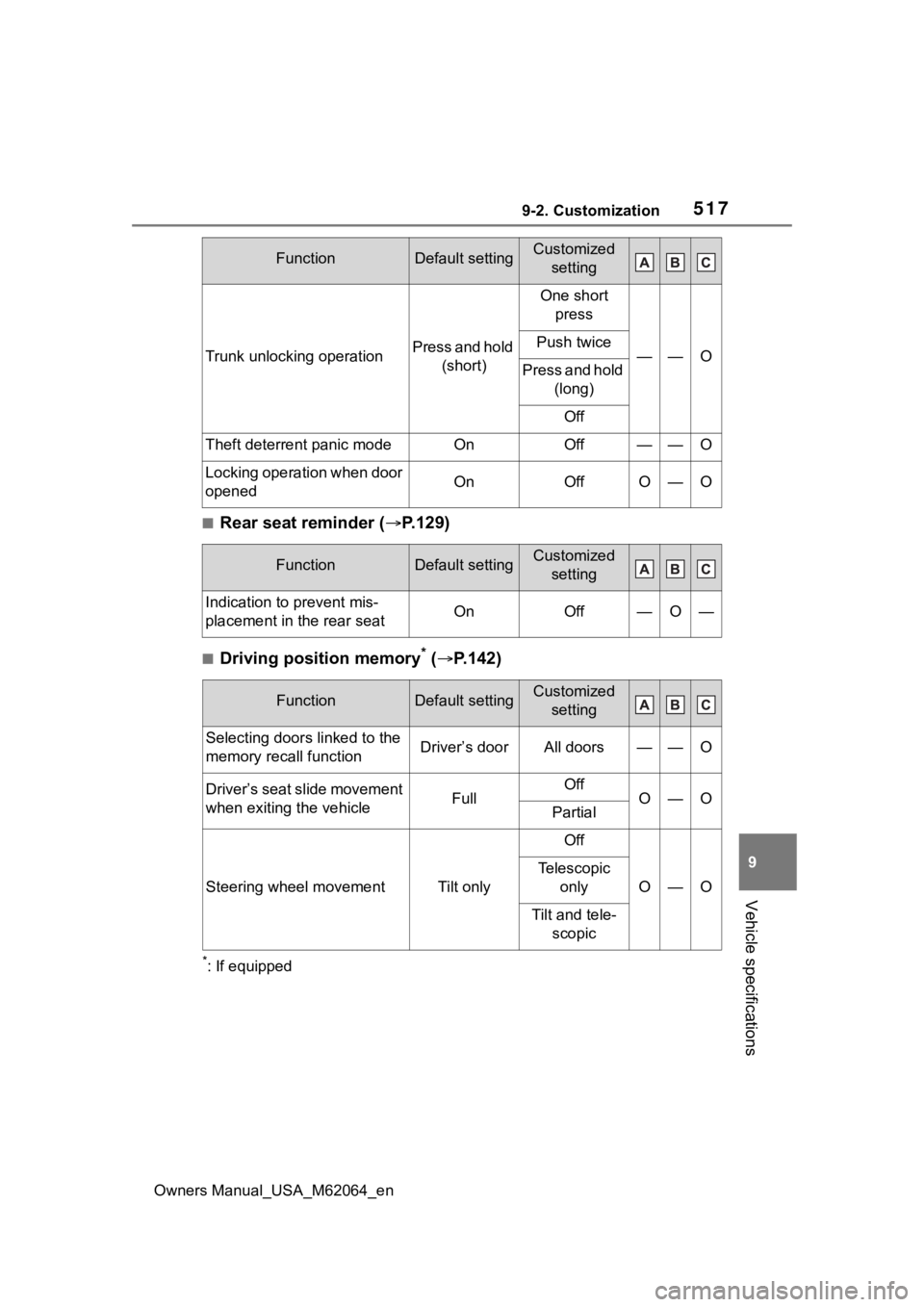
■Rear seat reminder ( P.129)
■Driving position memory* ( P.142)
*: If equipped
Trunk unlocking operationPress and hold
(short)
One short press
——OPush twice
Press and hold (long)
Off
Theft deterrent panic modeOnOff——O
Locking operation when door
openedOnOffO—O
FunctionDefault settingCustomized setting
Indication to prevent mis-
placement in the rear seatOnOff—O—
FunctionDefault settingCustomized setting
Selecting door s linked to the
memory recall functionDriver’s doorAll doors——O
Driver’s seat slide movement
when exiting the vehicleFullOffO—OPartial
Steering wheel movementTilt only
Off
O—O
Telescopic only
Tilt and tele-scopic
FunctionDefault settingCustomized setting
Page 518 of 572
5189-2. Customization
Owners Manual_USA_M62064_en
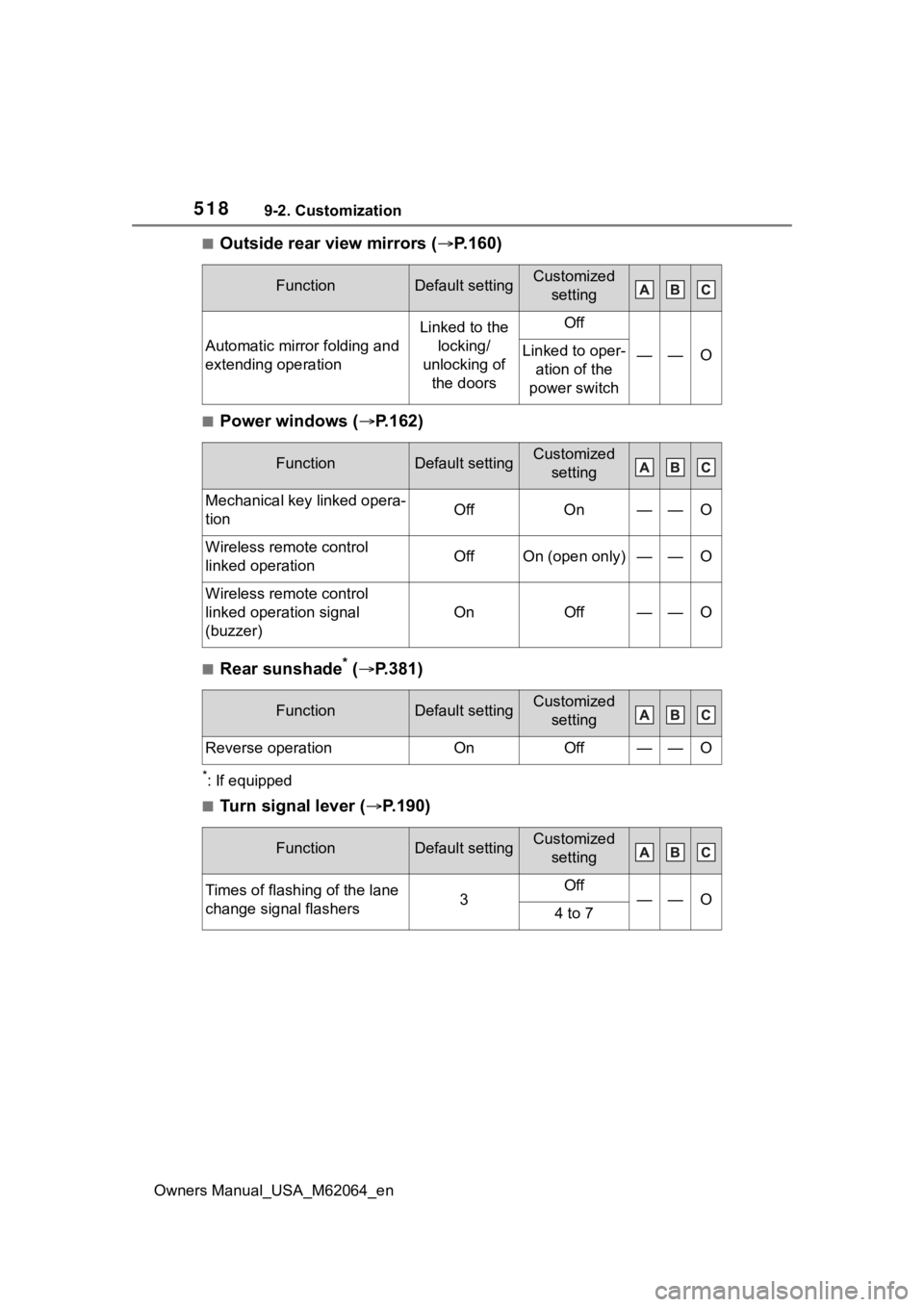
■Outside rear view mirrors (P.160)
■Power windows (P.162)
■Rear sunshade* ( P.381)
*: If equipped
■Turn signal lever ( P.190)
FunctionDefault settingCustomized
setting
Automatic mirror folding and
extending operation
Linked to the locking/
unlocking of the doorsOff
——OLinked to oper- ation of the
power switch
FunctionDefault settingCustomized setting
Mechanical key linked opera-
tionOffOn——O
Wireless remote control
linked operationOffOn (open only)——O
Wireless remote control
linked operation signal
(buzzer)
OnOff——O
FunctionDefault settingCustomized setting
Reverse operationOnOff——O
FunctionDefault settingCustomized setting
Times of flashing of the lane
change signal flashers3Off——O4 to 7
Page 524 of 572
5249-2. Customization
Owners Manual_USA_M62064_en
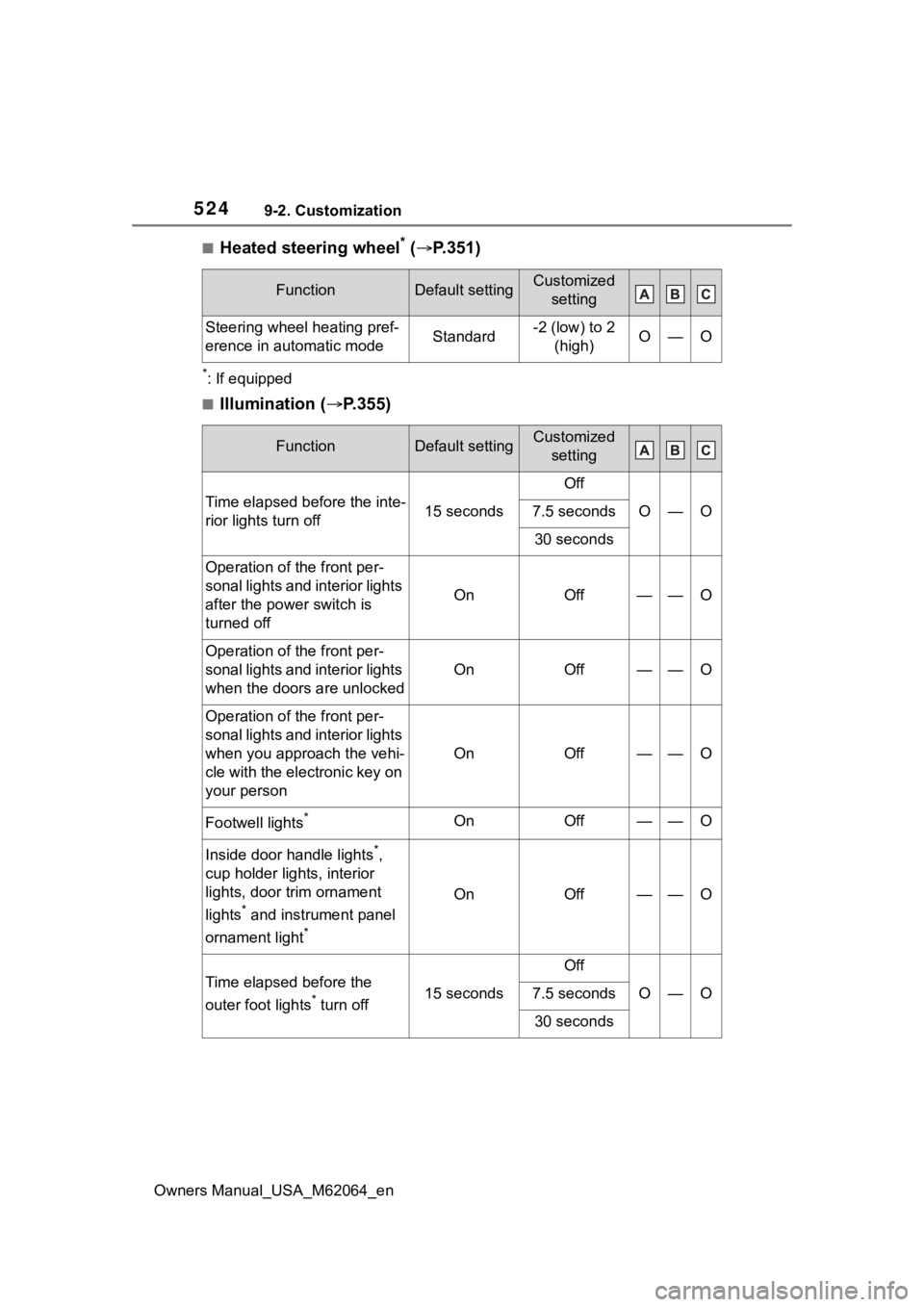
■Heated steering wheel* ( P.351)
*: If equipped
■Illumination ( P.355)
FunctionDefault settingCustomized
setting
Steering wheel heating pref-
erence in automatic modeStandard-2 (low) to 2 (high)O—O
FunctionDefault settingCustomized setting
Time elapsed before the inte-
rior lights turn off15 seconds
Off
O—O7.5 seconds
30 seconds
Operation of the front per-
sonal lights and interior lights
after the powe r switch is
turned off
OnOff——O
Operation of the front per-
sonal lights and interior lights
when the doors are unlocked
OnOff——O
Operation of the front per-
sonal lights and interior lights
when you appro ach the vehi-
cle with the electronic key on
your person
OnOff——O
Footwell lights*OnOff——O
Inside door handle lights*,
cup holder lights, interior
lights, door trim ornament
lights
* and instrument panel
ornament light
*
OnOff——O
Time elapsed before the
outer foot lights
* turn off15 seconds
Off
O—O7.5 seconds
30 seconds