lock TOYOTA MIRAI 2023 Repair Manual
[x] Cancel search | Manufacturer: TOYOTA, Model Year: 2023, Model line: MIRAI, Model: TOYOTA MIRAI 2023Pages: 572, PDF Size: 17.71 MB
Page 199 of 572
1995-3. Operating the lights and wipers
Owners Manual_USA_M62064_en
5
Driving
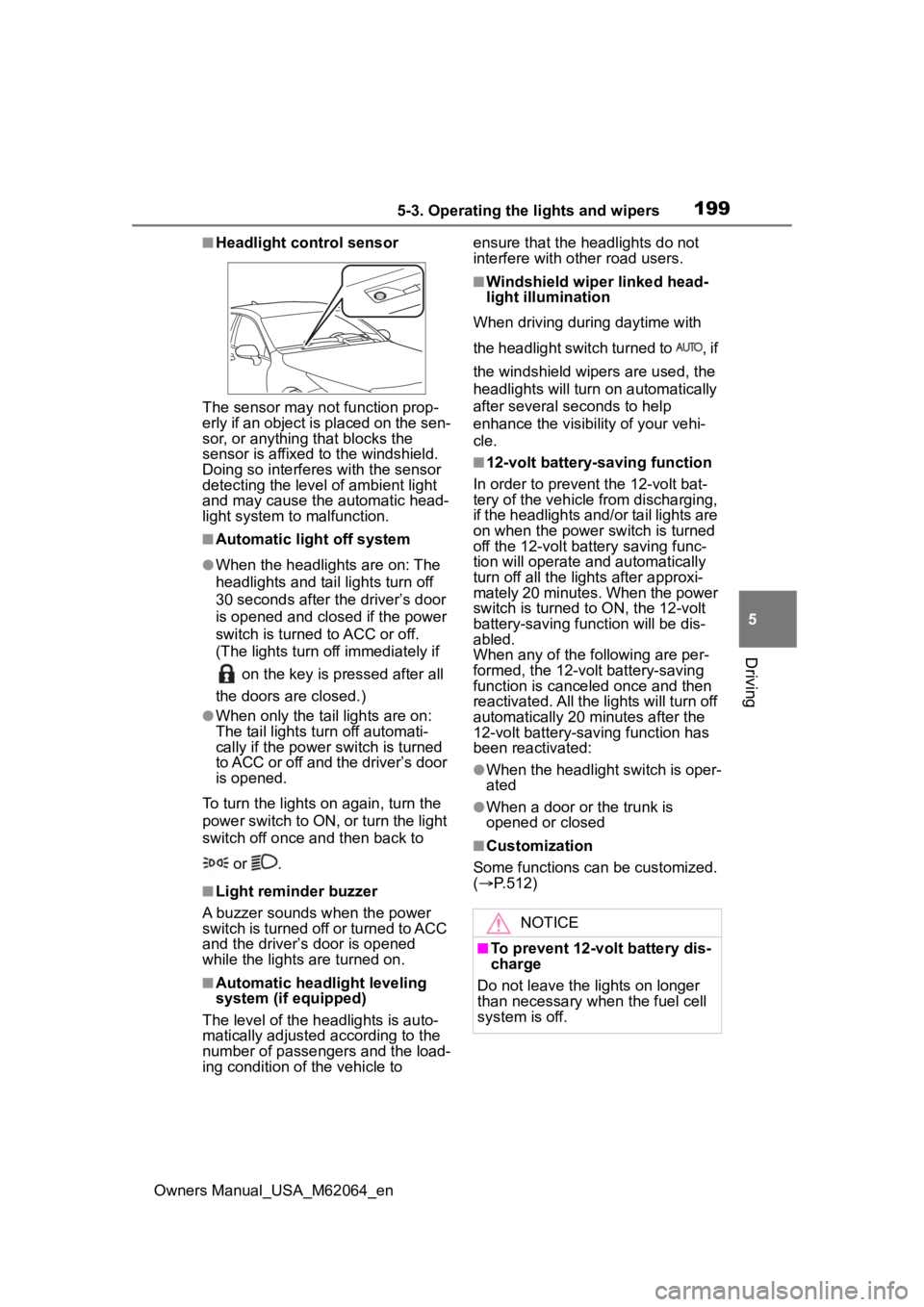
■Headlight control sensor
The sensor may not function prop-
erly if an object is placed on the sen-
sor, or anything that blocks the
sensor is affixed to the windshield.
Doing so interfere s with the sensor
detecting the level of ambient light
and may cause the automatic head-
light system to malfunction.
■Automatic light off system
●When the headlights are on: The
headlights and tail lights turn off
30 seconds after the driver’s door
is opened and clos ed if the power
switch is turned to ACC or off.
(The lights turn off immediately if
on the key is pressed after all
the doors are closed.)
●When only the tail lights are on:
The tail lights tu rn off automati-
cally if the power switch is turned
to ACC or off and the driver’s door
is opened.
To turn the lights on again, turn the
power switch to ON, or turn the light
switch off once and then back to
or .
■Light reminder buzzer
A buzzer sounds when the power
switch is turned off or turned to ACC
and the driver’s door is opened
while the lights are turned on.
■Automatic headlight leveling
system (if equipped)
The level of the headlights is auto-
matically adjusted according to the
number of passengers and the load-
ing condition of the vehicle to ensure that the headlights do not
interfere with other road users.
■Windshield wiper linked head-
light illumination
When driving during daytime with
the headlight switch turned to , if
the windshield wipers are used, the
headlights will turn o n automatically
after several seconds to help
enhance the visibility of your vehi-
cle.
■12-volt battery-saving function
In order to prevent the 12-volt bat-
tery of the vehicle from discharging,
if the headlights and/or tail lights are
on when the power switch is turned
off the 12-volt battery saving func-
tion will operate and automatically
turn off all the lig hts after approxi-
mately 20 minutes. When the power
switch is turned to ON, the 12-volt
battery-saving function will be dis-
abled.
When any of the following are per-
formed, the 12-volt battery-saving
function is canceled once and then
reactivated. All the lights will turn off
automatically 20 minutes after the
12-volt battery-saving function has
been reactivated:
●When the headlight switch is oper-
ated
●When a door or the trunk is
opened or closed
■Customization
Some functions can be customized.
( P.512)
NOTICE
■To prevent 12-volt battery dis-
charge
Do not leave the lights on longer
than necessary when the fuel cell
system is off.
Page 207 of 572
2075-3. Operating the lights and wipers
Owners Manual_USA_M62064_en
5
Driving
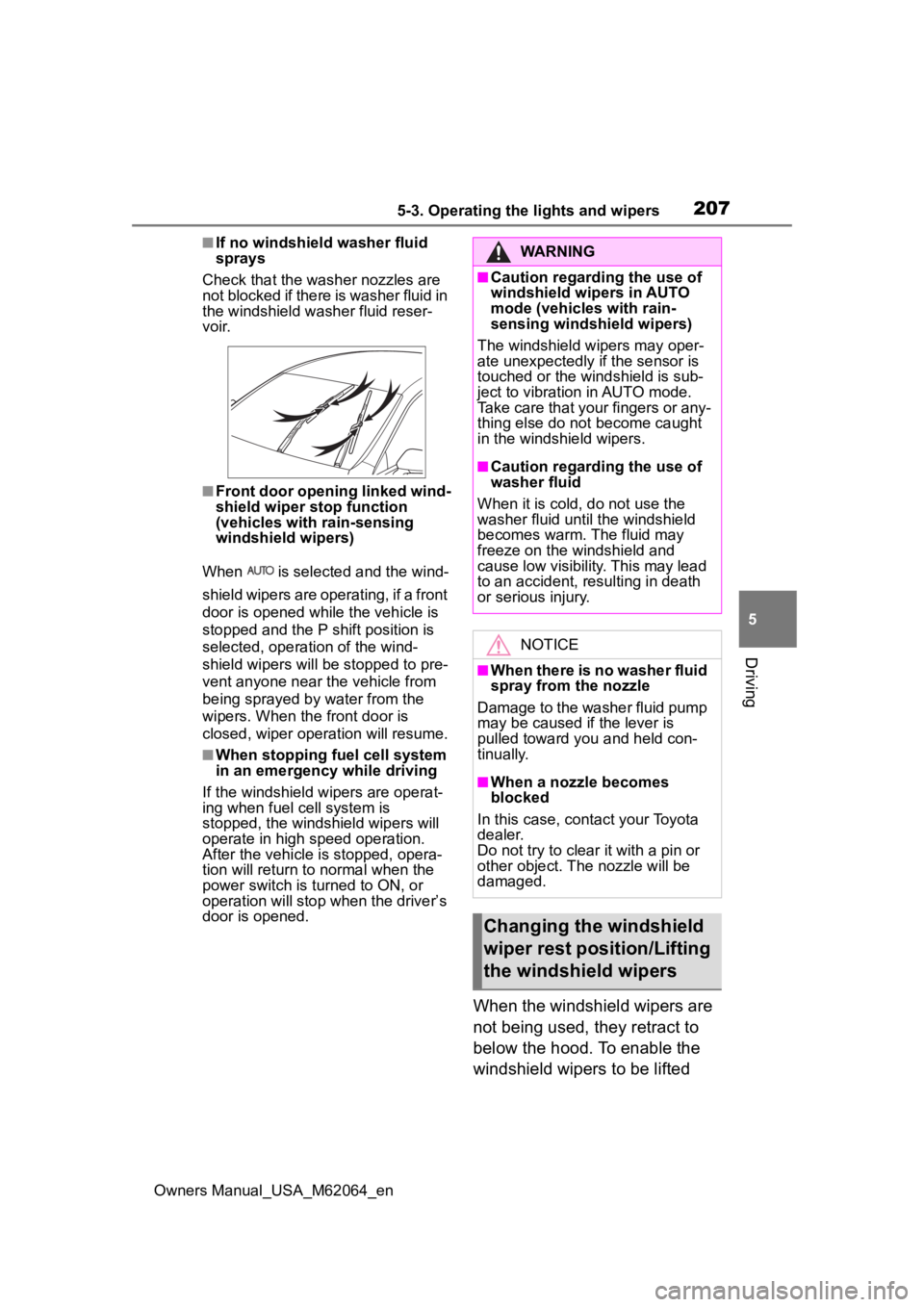
■If no windshield washer fluid
sprays
Check that the wash er nozzles are
not blocked if there is washer fluid in
the windshield washer fluid reser-
v oi r.
■Front door opening linked wind-
shield wiper stop function
(vehicles with rain-sensing
windshield wipers)
When is selected and the wind-
shield wipers are operating, if a front
door is opened while the vehicle is
stopped and the P shift position is
selected, operation of the wind-
shield wipers will be stopped to pre-
vent anyone near the vehicle from
being sprayed by water from the
wipers. When the front door is
closed, wiper operation will resume.
■When stopping fuel cell system
in an emergency while driving
If the windshield wipers are operat-
ing when fuel cell system is
stopped, the windshield wipers will
operate in high speed operation.
After the vehicle is stopped, opera-
tion will return to normal when the
power switch is turned to ON, or
operation will stop w hen the driver’s
door is opened.
When the windshield wipers are
not being used, they retract to
below the hood. To enable the
windshield wipers to be lifted
WARNING
■Caution regarding the use of
windshield wipers in AUTO
mode (vehicles with rain-
sensing windshield wipers)
The windshield wipers may oper-
ate unexpectedly if the sensor is
touched or the windshield is sub-
ject to vibration in AUTO mode.
Take care that your fingers or any-
thing else do not become caught
in the windshield wipers.
■Caution regarding the use of
washer fluid
When it is cold, do not use the
washer fluid unt il the windshield
becomes warm. The fluid may
freeze on the windshield and
cause low visibility. This may lead
to an accident, resulting in death
or serious injury.
NOTICE
■When there is no washer fluid
spray from the nozzle
Damage to the washer fluid pump
may be caused if the lever is
pulled toward you and held con-
tinually.
■When a nozzle becomes
blocked
In this case, contact your Toyota
dealer.
Do not try to clear it with a pin or
other object. The nozzle will be
damaged.
Changing the windshield
wiper rest position/Lifting
the windshield wipers
Page 211 of 572
2115-4. Refueling
Owners Manual_USA_M62064_en
5
Driving
WARNING
●Turn the power switch off before
fueling.
●Ensure the hydrogen gas noz-
zle is locked onto the vehicle
receptacle before filling. This
can be done by pulling on the
hydrogen gas no zzle to check
that it cannot be pulled off. Fail-
ure to do so may result in injury
or damage to the hydrogen gas
nozzle or vehicle.
●Do not smoke while fueling.
●Because the fuel is cold, the
hydrogen gas nozzle and vehi-
cle receptacle surface will
become cold, and frost may
develop. After fueling is com-
pleted, remove the hydrogen
gas nozzle by the plastic handle
only. Do not touch any other
parts of the hydrogen gas noz-
zle or vehicle receptacle with
bare hands immediately after
fueling, as frostbite may occur.
●Be sure to use hydrogen gas
nozzles at 350 bar/700 bar for
passenger vehicles.
Do not use hydrogen gas noz-
zles designed for commercial
vehicles. Check the instructions
at hydrogen station or ask the
station operator for assistance.
●Only fuel the vehicle at hydro-
gen stations designed for pas-
senger vehicles. Do not fuel the
vehicle at hydrogen stations
designed for forklifts, buses, or
trucks. Ask the station operator
for assistance.
NOTICE
■When filling
●Fuel only with compressed
hydrogen gas at stations com-
pliant with the Society of Auto-
motive Engineers (SAE) J2601
fueling protocol or laws that may
supersede such SAE protocols.
If improper fuels are used, the
fuel cell stack will be damaged.
●Do not swing or drop the hydro-
gen gas nozzle, or subject it to a
large amount of force. Doing so
may cause damage.
●If the hydrogen gas nozzle can-
not be removed after fueling, it
may be frozen to the vehicle
receptacle. Wait for the hydro-
gen gas nozzle to thaw before
attempting to r emove. Do not
pull or rotate the hydrogen gas
nozzle forcibly. Failure to follow
these precautions may cause
damage.
●Be sure to replace the cap after
filling. If foreign ma terial gets in
the vehicle receptacle, it may
cause damage.
●Do not put anything sharp, such
as a screwdriver, blade, or any
foreign object into the opening
of the vehicle receptacle. If the
vehicle receptacle is damaged,
hydrogen gas may leak during
fueling.
●If you notice anything unusual
about the vehicle receptacle,
please notify your Toyota
dealer.
●If you notice anything unusual
with the hydrogen dispenser or
hydrogen gas nozzle, please
notify the hydrogen station
operator. Contact information is
usually displayed on the dis-
penser.
Page 212 of 572
2125-4. Refueling
Owners Manual_USA_M62064_en
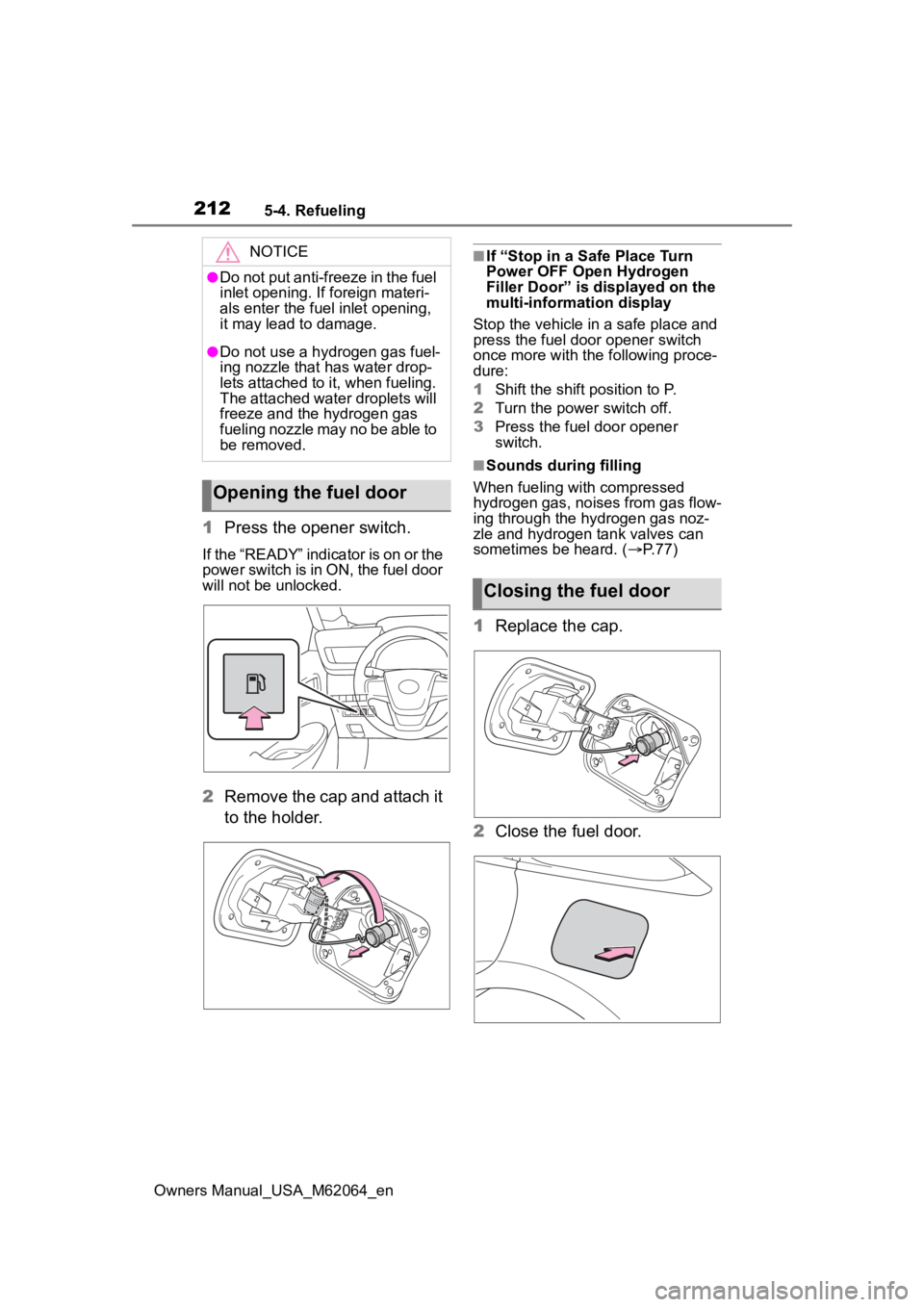
1Press the opener switch.
If the “READY” indicator is on or the
power switch is in ON, the fuel door
will not be unlocked.
2Remove the cap and attach it
to the holder.
■If “Stop in a Safe Place Turn
Power OFF Open Hydrogen
Filler Door” is displayed on the
multi-information display
Stop the vehicle in a safe place and
press the fuel door opener switch
once more with the following proce-
dure:
1 Shift the shift position to P.
2 Turn the power switch off.
3 Press the fuel door opener
switch.
■Sounds during filling
When fueling with compressed
hydrogen gas, noises from gas flow-
ing through the hydrogen gas noz-
zle and hydrogen tank valves can
sometimes be heard. ( P. 7 7 )
1Replace the cap.
2 Close the fuel door.
NOTICE
●Do not put anti-freeze in the fuel
inlet opening. If foreign materi-
als enter the fuel inlet opening,
it may lead to damage.
●Do not use a hydrogen gas fuel-
ing nozzle that has water drop-
lets attached to it, when fueling.
The attached water droplets will
freeze and the hydrogen gas
fueling nozzle may no be able to
be removed.
Opening the fuel door
Closing the fuel door
Page 229 of 572
2295-5. Using the driving support systems
Owners Manual_USA_M62064_en
5
Driving
started the vehicle has not been
driven for a certain amount of time
• While making a left/right turn and
for a few seconds after making a
left/right turn
• While driving on a curve and for a
few seconds after driving on a
curve
• If your vehicle is skidding
• If the front of the vehicle is raised
or lowered
• If the wheels are misaligned
• If a wiper blade is blocking the front camera
• The vehicle is being driven at extremely high speeds
• When driving on a hill
• If the radar sensor or front camera
is misaligned
• When driving in a traffic lane sep-
arated by more t han one lane
where oncoming vehicles are driv-
ing while making a right/left turn
• When largely out of place with the opposite facing targeted oncom-
ing vehicle during a right/left turn
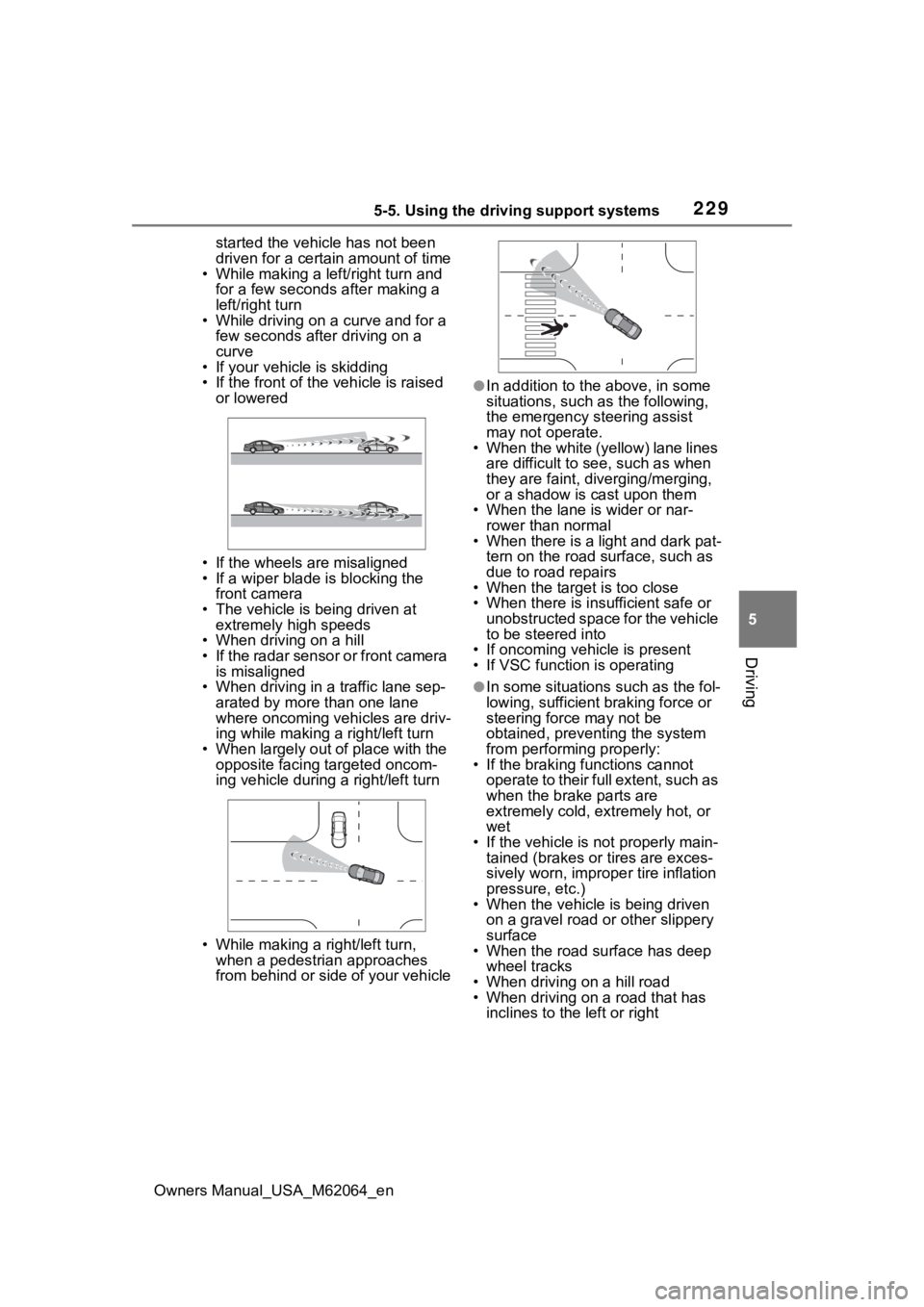
• While making a right/left turn, when a pedestrian approaches
from behind or side of your vehicle
●In addition to the above, in some
situations, such as the following,
the emergency steering assist
may not operate.
• When the white (yellow) lane lines are difficult to see, such as when
they are faint, diverging/merging,
or a shadow is cast upon them
• When the lane is wider or nar-
rower than normal
• When there is a light and dark pat- tern on the road surface, such as
due to road repairs
• When the target is too close
• When there is insufficient safe or unobstructed space for the vehicle
to be steered into
• If oncoming vehicle is present
• If VSC function is operating
●In some situations such as the fol-
lowing, sufficien t braking force or
steering force may not be
obtained, preventing the system
from performing properly:
• If the braking functions cannot operate to their full extent, such as
when the brake parts are
extremely cold, ext remely hot, or
wet
• If the vehicle is not properly main- tained (brakes or tires are exces-
sively worn, imprope r tire inflation
pressure, etc.)
• When the vehicle is being driven on a gravel road or other slippery
surface
• When the road surface has deep wheel tracks
• When driving on a hill road
• When driving on a road that has inclines to the left or right
Page 295 of 572
2955-5. Using the driving support systems
Owners Manual_USA_M62064_en
5
Driving
WARNING
●As following objects may not be
detected, make sure to check
the safety of the area around
your vehicle and depress the
brake pedal to stop the vehicle if
it may collide with an object.
• Wires, fences, ropes, etc.
• Cotton, snow and other materi- als that absorb sound waves
• Sharply-angled objects
• Low objects (curb stones, park- ing blocks, etc.)
• Tall objects with upper sections projecting outwards in the direc-
tion of your vehicle
●Even if there is an object in the
target parking space, it may not
be detected and assistance
may be performed.
●While the system is operating, if
it is likely that your vehicle will
collide with a nearby vehicle,
parking block, object, or person,
depress the brake pedal to stop
the vehicle and press the
Advanced Park main switch to
disable the system.
●Never use only the multimedia
display to view the area behind
the vehicle. The image dis-
played may differ than the
actual situation. Using only the
screen when backing up may
lead to an accident, such as a
collision with another vehicle.
When backing up, make sure to
look directly or use the mirrors
to check the safety of the area
around your vehicle, especially
behind the vehicle.
●When the ambient temperature
is extremely low, the screen
may appear dark or the dis-
played image may become
unclear. Also, as moving objects
may appear distorted or may
not be able to be seen on the
screen, make sure to directly
check the safety of the area
around your vehicle.
●In the following situations, while
the vehicle is stopped and held
by Advanced Park, it may be
canceled and th e vehicle may
start moving. Immediately
depress the brake pedal. Fail-
ure to do so may lead to an
accident.
• When the driver’s door is opened
• When operations instructed by the system are not performed
within a certain amount of time
• When the brake pedal is depressed and th e vehicle is
stopped for a certain amount of
time
• When the system malfunctions
●As the steering wheel will turn
while this system i s operating,
pay attention to the following.
• Be careful so that a necktie, scarf, or arm d oes not get
caught. Keep your upper body
away from the steering wheel.
Also, keep children away from
the steering wheel.
• Long fingernails may be caught and when the steering wheel is
rotating, leading to injury.
• In an emergency, depress the brake pedal to stop the vehicle,
and then press the Advanced
Park main switch to disable the
system.
Page 298 of 572

2985-5. Using the driving support systems
Owners Manual_USA_M62064_en
■Precautions for use
For details on the following, refer to
“Panoramic view monitor” of “Pan-
oramic view monitor functions” in
the “MULTIMEDIA OWNER’S MAN-
UAL”.
●Displayable range of the screens
●Cameras
●Differences between displayed
images and the actual road
●Differences between displayed
images and the actual objects
■Detection range of the cameras
and sensors
●If a parked vehicle is behind the
target parking space and the dis-
tance between it a nd the vehicle
becomes far, it may no longer be
able to be detected. Depending on
shape or conditi on of a parked
vehicle, the detection range may
become short or the vehicle may
not be detected.
●Objects other than parked vehi-
cles, such as columns, walls, etc.,
may not be detect ed. Also, if they
are detected, they may cause the
target parking space to be mis-
aligned.
■Situations in which parking
space lines may not be recog-
nized properly
●In situations such as the following,
parking space lines on the road
surface may not be detected:
• When the parking space does not
use lines (parking space boundar-
ies are marked with rope, blocks,
etc.)
• When the parking space lines are
faded or dirty, making them
unclear
• When the road surface is bright,
such as concrete, and the contrast
between it and t he white parking
space lines is small
• When the parking space lines are
any color other than yellow or
white
• When the area surrounding the parking space is dark, such as at
night, in an underground parking
lot, parking garage, etc.
• When it is raining or has rained and the road surface is wet and
reflective or there are puddles
• When the sun is shining directly into a camera, such as in the early
morning or evening
• When the parking space is cov- ered with snow or de-icing agent
• When there marks from repairs or
other marks on the road surface,
or there is a traffic bollard, or other
object on the road surface
• When the color or brightness of the road surface is uneven
• When a camera has been
splashed by hot or cold water and
the lens has fogged up
• When the appearance of the park-
ing space is affected by the
shadow of the vehicle or trees
• When a camera lens is dirty or
covered with wa ter droplets
●In situations such as the following,
the target parking space may not
be recognized correctly:
• When there marks from repairs or
other marks on the road surface,
or there is a parking block, traffic
bollard, or other object on the road
surface
• When it is raining or has rained and the road surface is wet and
reflective or there are puddles
• When the area around the vehicle is dark or backlit
• When the color or brightness of the road surface is uneven
• When the parking space is on a
slope
• When there are diagonal lines (access aisle) nea r the parking
space
• When the appearance of the park- ing space is affected by the
shadow of a parked vehicle (such
as shadows from the grille, side
step, etc.)
• When accessories which obstruct
the view of the camera are
installed
• When the parking space lines are
Page 316 of 572
3165-5. Using the driving support systems
Owners Manual_USA_M62064_en
■Assistance will be can-
celed when
In situations such as the follow-
ing, Advanced Park operation
will be canceled. Firmly hold the
steering wheel and depress the
brake pedal to stop the vehicle.
As system operation has been can-
celed, begin the operation again or
continue parking manually, using
the steering wheel.
The Advanced Park main
switch is pushed
The shift position has been
NOTICE
• When the registered parking
space cannot be reached due to
the existence of parking blocks,
etc.
• When the road surface around the parking space has changed
(road surface has degraded or
been resurfaced)
• When the sunlight conditions differ from when registration
was performed (due to weather
or time of day)
• When the sun is shining directly into a camera, such as in the
early morning or evening
• When the color or brightness of the road surface is uneven
• When a light is temporarily shined on the parking space
(lights of another vehicle, secu-
rity light, etc.)
• When the road surface around the parking space has the same
repeating pattern
• When there is a low protrusion on the road surface near the
parking space
• When the parking space is on a slope
• When a camera has been splashed by hot or cold water
and the lens has fogged up
• When a camera lens is dirty or covered with water droplets
• When accessories which obstruct the view of the camera
are installed
If assistance is ended during reg-
istration, perform registration
again.
●When registering a parking
space to the memory function, if
the road surface cannot be
detected “No available parking
space to register” will be dis-
played.
●When using the memory func-
tion, make sure to stop immedi-
ately in front of the stop
position. Otherwise the parking
space may not be able to be
detected correctly or assis-
tance may not be provided to
the point that the vehicle is fully
parked.
●Do not use the memory function
if a camera has been subjected
to a strong impac t or images of
the panoramic view monitor are
misaligned.
●If a camera has been replaced,
as the installation angle of the
camera will have changed, it will
be necessary to reregister park-
ing spaces of the memory func-
tion.
Advanced Park cancel-
ation/suspension
Page 319 of 572
3195-5. Using the driving support systems
Owners Manual_USA_M62064_en
5
Driving
■Clear registered parking
space
The parking spaces registered
to the memory function can be
deleted. Parking space informa-
tion cannot be deleted when
assistance is being performed
or when registering parking
space information to the mem-
ory function.
The operating state, assistance
operation, etc. of the Advanced
Park is displayed on the multi-
media display. If a message is
displayed, respond according to
the content displayed.
■If “No available parking space”
is displayed
Move the vehicle to a location where
a parking space or parking lines can
be detected.
■If “Unavailable in current condi-
tion” is displayed
Move the vehicle to another location and use the system.
■If “Not enough space to exit” is
displayed
The parallel parking exit function
cannot be used due to a situation
such as the distance between your
vehicle and vehicles parked in front
of and behind your vehicle being
short, the existence of an object in
the exit direction, etc.
Check the conditions of the area
around your vehicle and exit from
the parking space manually.
■If “Cannot control speed” is
displayed
The system judged that it cannot
adjust the speed of the vehicle when
using the system in an area with a
slope or step and assistance was
canceled.
Use the system in a level location.
■If “Obstacle detected” is dis-
played
As a moving object or stationary
object that may collide with your
vehicle has been detected, the fuel
cell system output control/braking
control operates to suspend
Advanced Park assistance.
Check the condition of the surround-
ing area. To resume assistance,
select the “Start” button on the multi-
media display.
■If “No available parking space
to register” is displayed
This message is displayed when
is selected at a parking space that
cannot be detected.
Operate the system at a parking
space where differences in the road
surface can be recognized.
( P. 3 1 1 )
NOTICE
Take care when using the park
position adjustment (forward) or
park position adjustment (reverse)
for adjusting because the vehicle
may collide with pa rking blocks,
curb stones, or other low objects.
If it is likely that your vehicle will
collide with a nearby vehi-
cle/object, parking block, curb
stone, etc., depress the brake
pedal to stop the vehicle and
press the Advanced Park main
switch to disable the system.
Advanced Park Displayed
messages
Page 322 of 572
3225-5. Using the driving support systems
Owners Manual_USA_M62064_en
■ECB (Electronically Con-
trolled Brake System)
The electronically controlled
system generates braking force
corresponding to the brake
operation
■ABS (Anti-lock Brake Sys-
tem)
Helps to prevent wheel lock
when the brakes are applied
suddenly, or if the brakes are
applied while driving on a slip-
pery road surface
■Brake assist
Generates an increased level of
braking force after the brake
pedal is depressed when the
system detects a panic stop sit-
uation
■VSC (Vehicle Stability Con-
trol)
Helps the driver to control skid-
ding when swerving suddenly or
turning on slippery road sur-
faces.
■TRAC (Traction Control)
Helps to maintain drive power
and prevent the drive wheels
from spinning when starting the
vehicle or accelerating on slip-
pery roads
■Active Cornering Assist
(ACA)
Helps to prevent the vehicle
from drifting to the outer side by
performing inner wheel brake
control when attempting to
accelerate while turning
■Hill-start assist control
Helps to reduce the backward
movement of the vehicle when
starting on an uphill
■EPS (Electric Power Steer-
ing)
Employs an electric motor to
reduce the amount of effort
needed to turn the steering
wheel.
■VDIM (Vehicle Dynamics
Integrated Management)
Provides integrated control of
the ABS, brake assist, TRAC,
VSC, hill-start assist control and
EPS systems
Helps to maintain vehicle stabil-
ity when swerving on slippery
Driving assist systems
To keep driving safety and
performance, the following
systems operate automati-
cally in response to various
driving situations. Be
aware, however, that these
systems are supplementary
and should not be relied
upon too heavily when oper-
ating the vehicle.
Summary of the driving
assist systems