display TOYOTA PRIUS PRIME 2023 Repair Manual
[x] Cancel search | Manufacturer: TOYOTA, Model Year: 2023, Model line: PRIUS PRIME, Model: TOYOTA PRIUS PRIME 2023Pages: 680, PDF Size: 14.97 MB
Page 174 of 680
1743-1. Instrument cluster
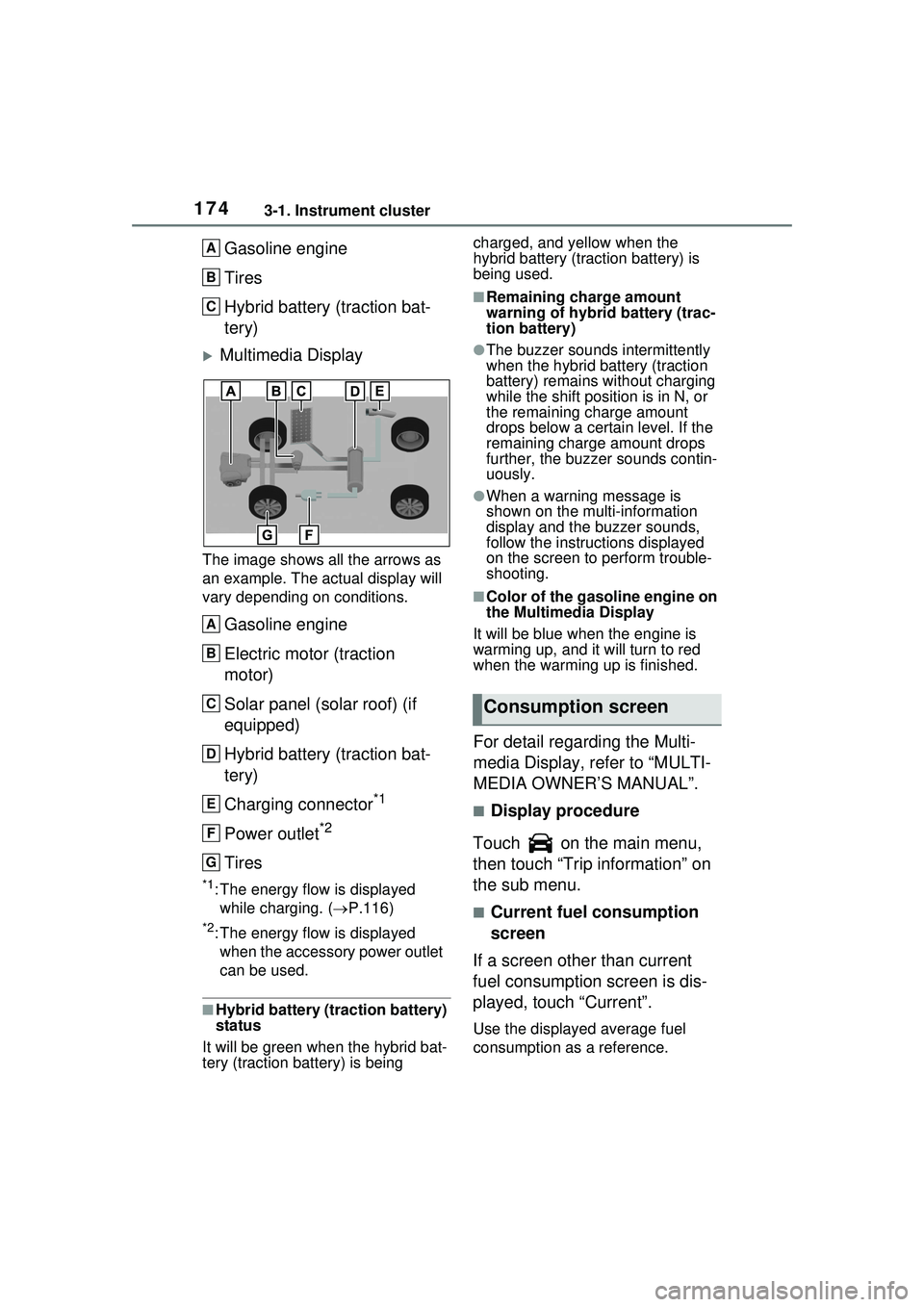
Gasoline engine
Tires
Hybrid battery (traction bat-
tery)
Multimedia Display
The image shows all the arrows as
an example. The actual display will
vary depending on conditions.
Gasoline engine
Electric motor (traction
motor)
Solar panel (solar roof) (if
equipped)
Hybrid battery (traction bat-
tery)
Charging connector
*1
Power outlet*2
Tires
*1: The energy flow is displayed while charging. ( P.116)
*2: The energy flow is displayed
when the accessory power outlet
can be used.
■Hybrid battery (traction battery)
status
It will be green when the hybrid bat-
tery (traction battery) is being charged, and yellow when the
hybrid battery (traction battery) is
being used.
■Remaining charge amount
warning of hybrid battery (trac-
tion battery)
●The buzzer sounds intermittently
when the hybrid battery (traction
battery) remains without charging
while the shift posit
ion is in N, or
the remaining charge amount
drops below a certain level. If the
remaining charge amount drops
further, the buzzer sounds contin-
uously.
●When a warning message is
shown on the multi-information
display and the buzzer sounds,
follow the instruct ions displayed
on the screen to perform trouble-
shooting.
■Color of the gasoline engine on
the Multimedia Display
It will be blue when the engine is
warming up, and it will turn to red
when the warming up is finished.
For detail regarding the Multi-
media Display, refer to “MULTI-
MEDIA OWNER’S MANUAL”.
■Display procedure
Touch on the main menu,
then touch “Trip information” on
the sub menu.
■Current fuel consumption
screen
If a screen other than current
fuel consumption screen is dis-
played, touch “Current”.
Use the displayed average fuel
consumption as a reference.
A
B
C
A
B
C
D
E
F
G
Consumption screen
Page 175 of 680
1753-1. Instrument cluster
3
Vehicle status information and indicators
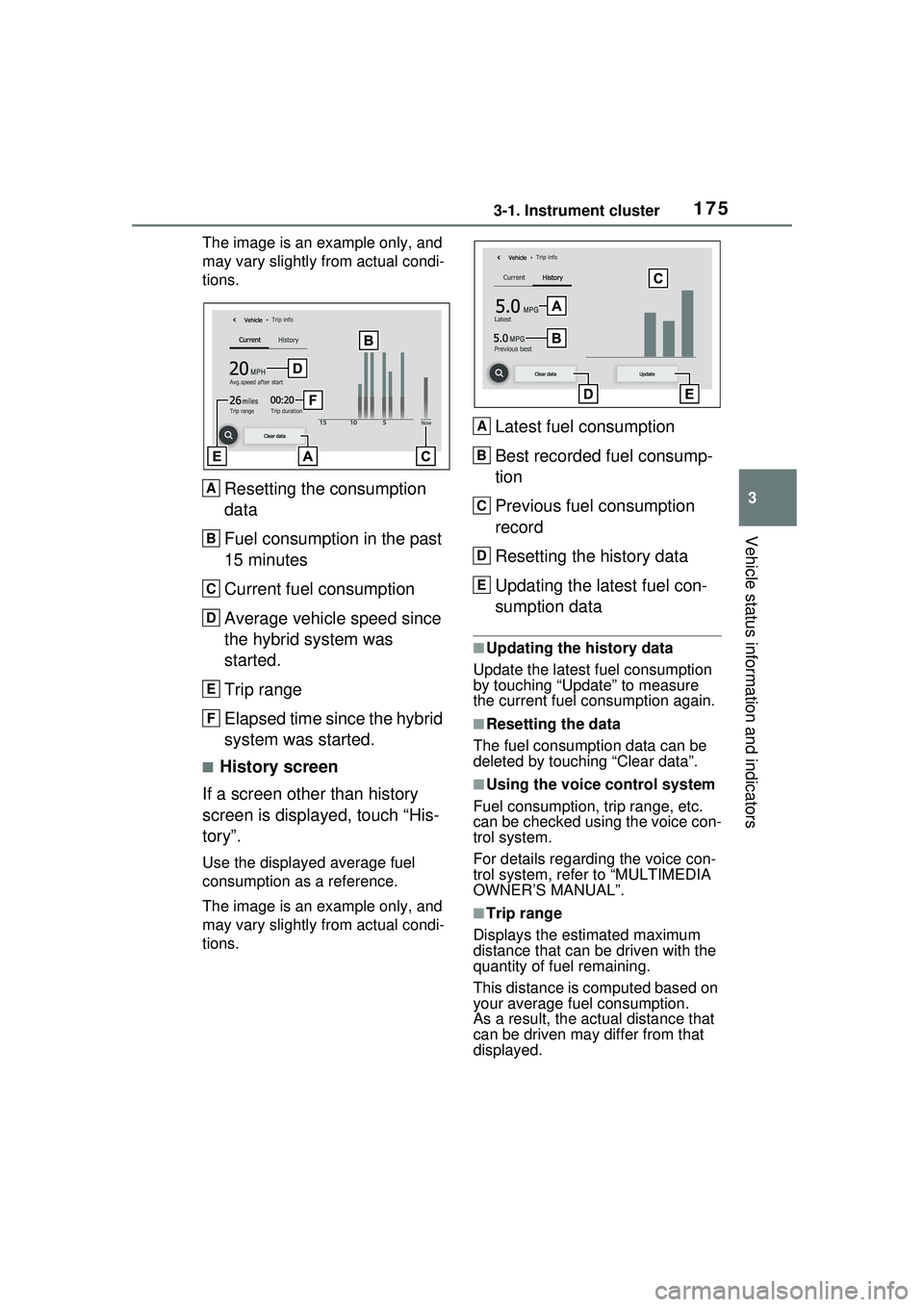
The image is an example only, and
may vary slightly from actual condi-
tions.
Resetting the consumption
data
Fuel consumption in the past
15 minutes
Current fuel consumption
Average vehicle speed since
the hybrid system was
started.
Trip range
Elapsed time since the hybrid
system was started.
■History screen
If a screen other than history
screen is displayed, touch “His-
tory”.
Use the displayed average fuel
consumption as a reference.
The image is an example only, and
may vary slightly from actual condi-
tions.
Latest fuel consumption
Best recorded fuel consump-
tion
Previous fuel consumption
record
Resetting the history data
Updating the latest fuel con-
sumption data
■Updating the history data
Update the latest fuel consumption
by touching “Update” to measure
the current fuel consumption again.
■Resetting the data
The fuel consumption data can be
deleted by touching “Clear data”.
■Using the voice control system
Fuel consumption, trip range, etc.
can be checked using the voice con-
trol system.
For details regarding the voice con-
trol system, refe r to “MULTIMEDIA
OWNER’S MANUAL”.
■Trip range
Displays the estimated maximum
distance that can be driven with the
quantity of fuel remaining.
This distance is computed based on
your average fuel consumption.
As a result, the actual distance that
can be driven may differ from that
displayed.
A
B
C
D
E
F
A
B
C
D
E
Page 176 of 680
1763-1. Instrument cluster
Information related to the solar
charging system can be dis-
played.
■Display procedure
Multi-information display
Solar charging information
screen can be displayed on
of the multi-information
display.
For detail regarding the multi-
information display, refer to
P.161.
Multimedia Display
Touch on the main menu,
then touch “Solar charging” on
the sub menu.
For detail regarding the Multimedia
Display, refer to “MULTIMEDIA
OWNER’S MANUAL”.
■Solar charging information
screen (multi-information
display)
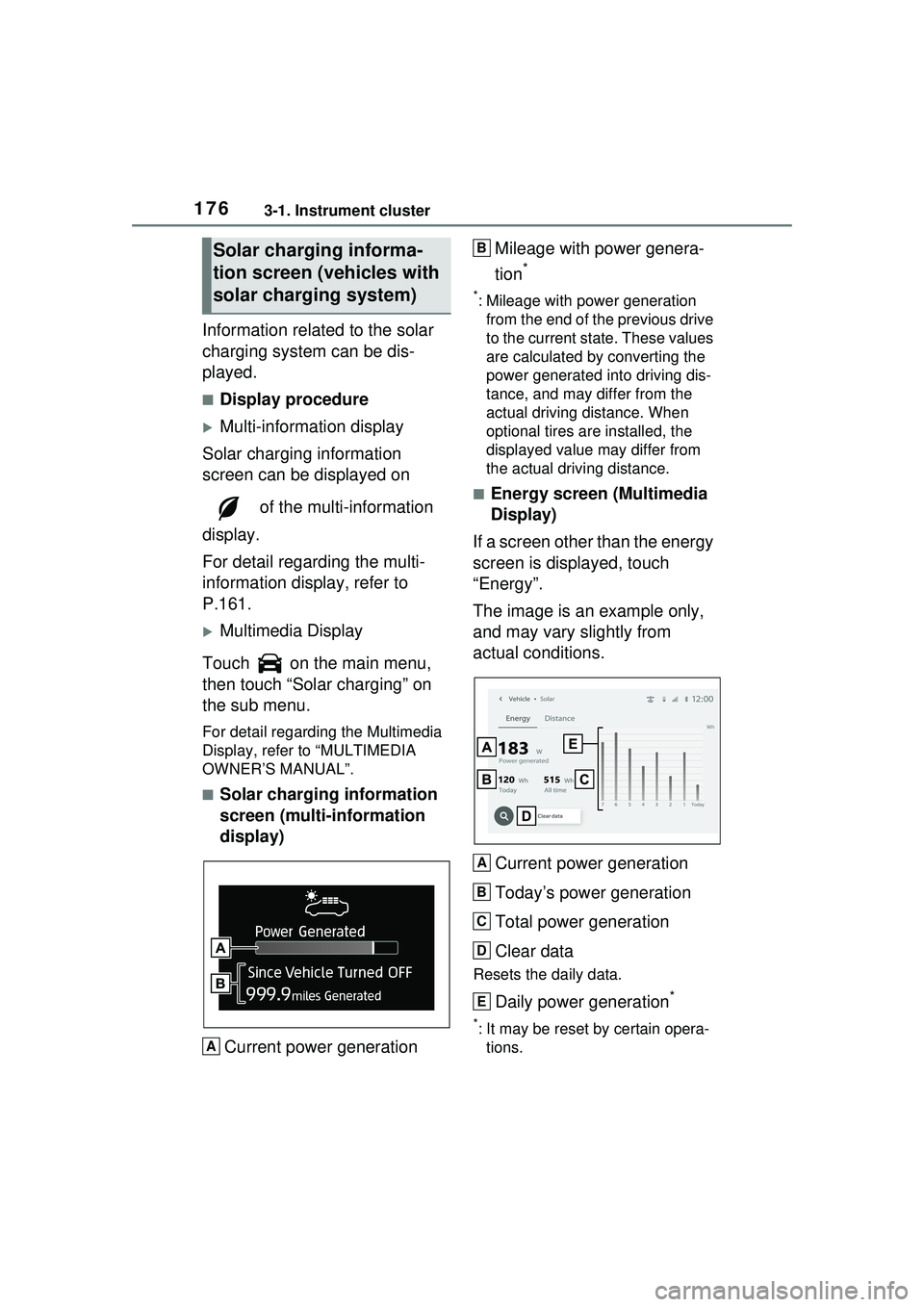
Current power generation Mileage with power genera-
tion
*
*: Mileage with power generation
from the end of the previous drive
to the current state. These values
are calculated by converting the
power generated into driving dis-
tance, and may differ from the
actual driving distance. When
optional tires are installed, the
displayed value may differ from
the actual driving distance.
■Energy screen (Multimedia
Display)
If a screen other than the energy
screen is displayed, touch
“Energy”.
The image is an example only,
and may vary slightly from
actual conditions.
Current power generation
Today’s power generation
Total power generation
Clear data
Resets the daily data.
Daily power generation*
*: It may be reset by certain opera-tions.
Solar charging informa-
tion screen ( vehicles with
solar charging system)
A
B
A
B
C
D
E
Page 177 of 680
1773-1. Instrument cluster
3
Vehicle status information and indicators
■Distance screen (Multime-
dia Display)
If a screen other than the dis-
tance screen is displayed, touch
“Distance”.
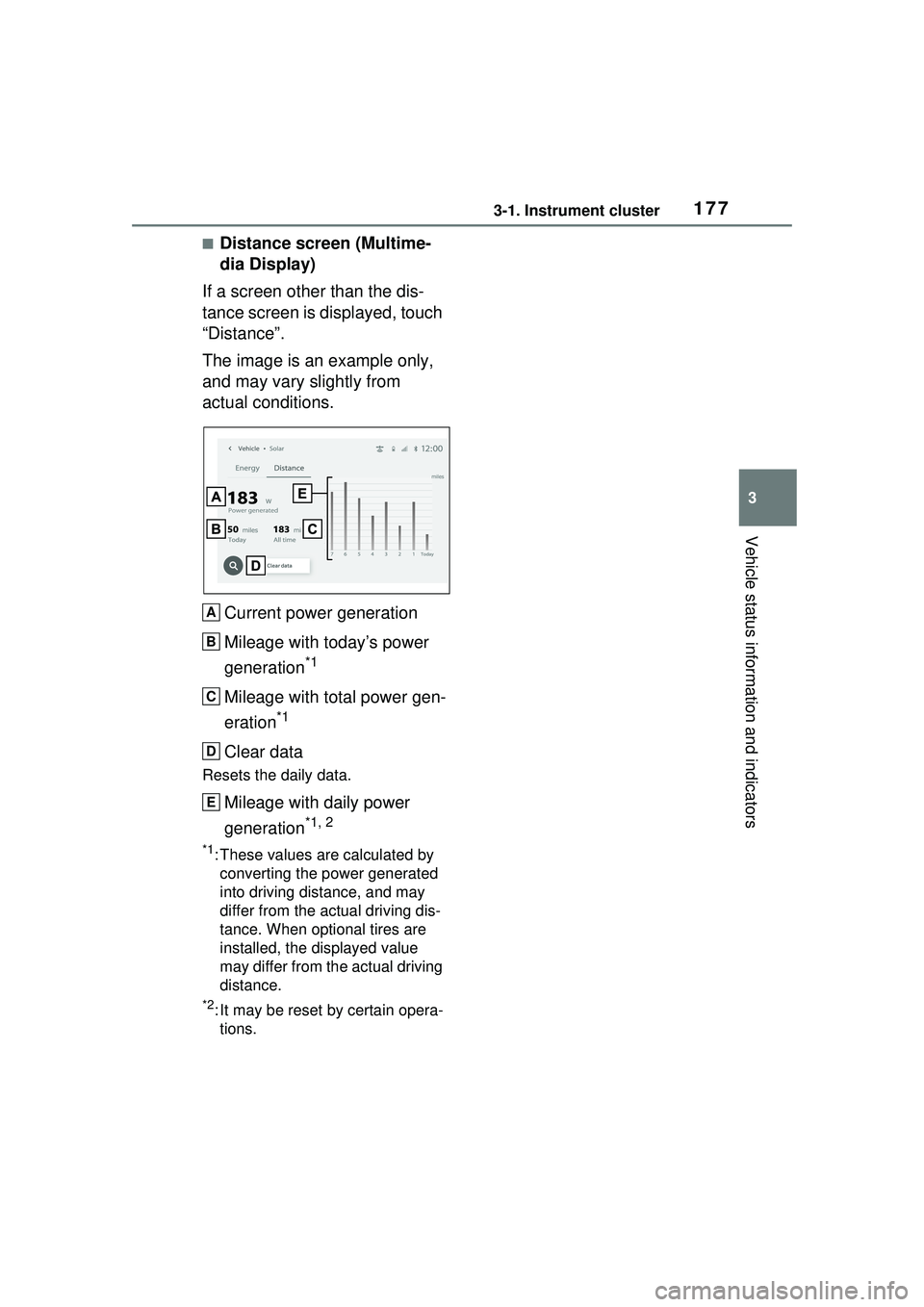
The image is an example only,
and may vary slightly from
actual conditions.
Current power generation
Mileage with today’s power
generation
*1
Mileage with total power gen-
eration
*1
Clear data
Resets the daily data.
Mileage with daily power
generation
*1, 2
*1: These values are calculated by converting the power generated
into driving distance, and may
differ from the actual driving dis-
tance. When optional tires are
installed, the displayed value
may differ from the actual driving
distance.
*2: It may be reset by certain opera-tions.
A
B
C
D
E
Page 180 of 680
1804-1. Key information
4-1.Key information
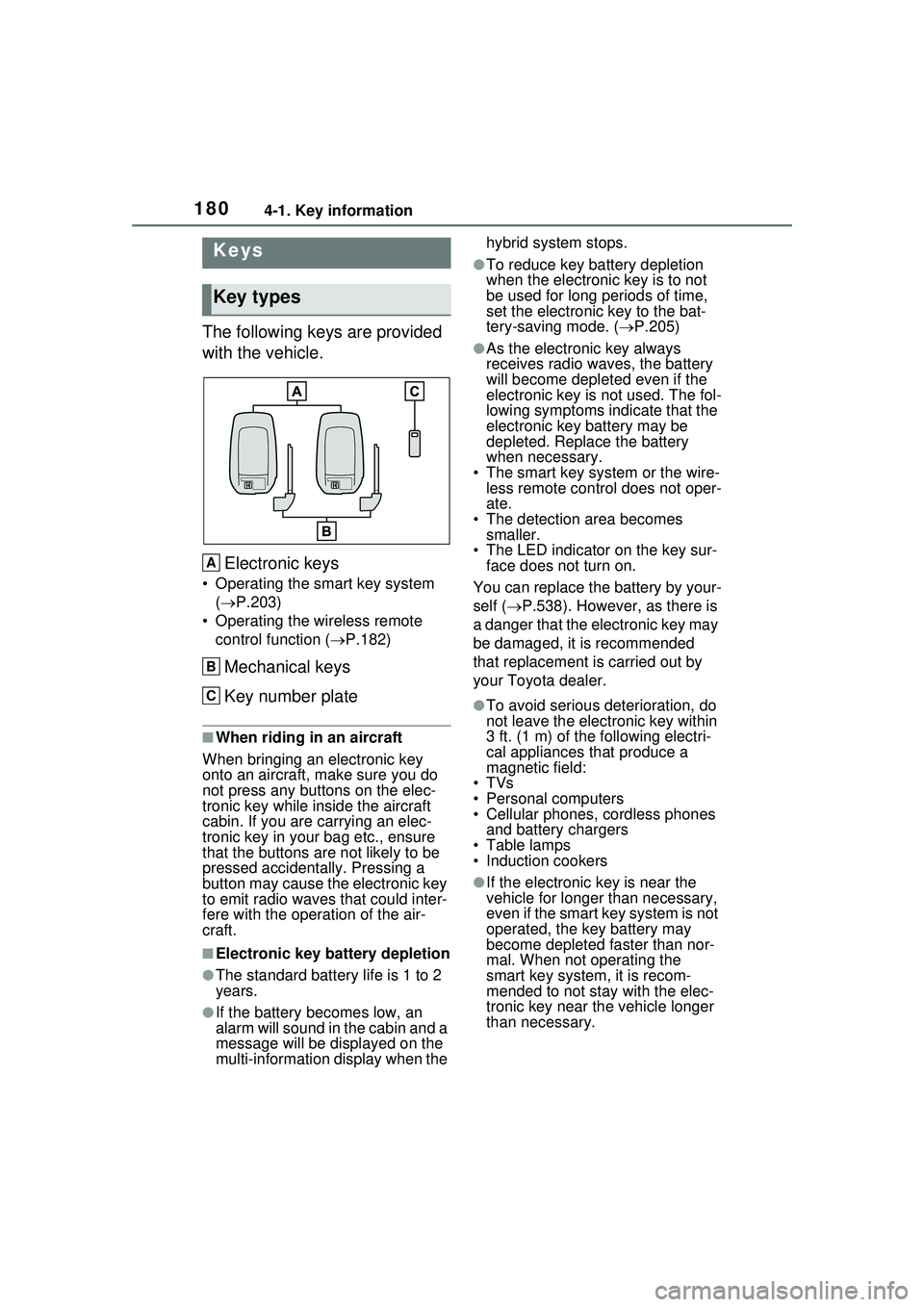
The following keys are provided
with the vehicle.Electronic keys
• Operating the smart key system ( P.203)
• Operating the wireless remote control function ( P.182)
Mechanical keys
Key number plate
■When riding in an aircraft
When bringing an electronic key
onto an aircraft, make sure you do
not press any buttons on the elec-
tronic key while inside the aircraft
cabin. If you are carrying an elec-
tronic key in your bag etc., ensure
that the buttons are not likely to be
pressed accidentally. Pressing a
button may cause the electronic key
to emit radio waves that could inter-
fere with the oper ation of the air-
craft.
■Electronic key battery depletion
●The standard battery life is 1 to 2
years.
●If the battery becomes low, an
alarm will sound in the cabin and a
message will be displayed on the
multi-information display when the hybrid system stops.
●To reduce key ba
ttery depletion
when the electronic key is to not
be used for long periods of time,
set the electronic key to the bat-
tery-saving mode. ( P.205)
●As the electronic key always
receives radio waves, the battery
will become depleted even if the
electronic key is not used. The fol-
lowing symptoms indicate that the
electronic key battery may be
depleted. Replace the battery
when necessary.
• The smart key system or the wire- less remote control does not oper-
ate.
• The detection area becomes smaller.
• The LED indicator on the key sur- face does not turn on.
You can replace the battery by your-
self ( P.538). However, as there is
a danger that the electronic key may
be damaged, it is recommended
that replacement is carried out by
your Toyota dealer.
●To avoid serious deterioration, do
not leave the electronic key within
3 ft. (1 m) of the following electri-
cal appliances that produce a
magnetic field:
•TVs
• Personal computers
• Cellular phones, cordless phones and battery chargers
• Table lamps
• Induction cookers
●If the electronic key is near the
vehicle for longer than necessary,
even if the smart key system is not
operated, the key battery may
become depleted faster than nor-
mal. When not operating the
smart key system, it is recom-
mended to not stay with the elec-
tronic key near the vehicle longer
than necessary.
Keys
Key types
A
B
C
Page 181 of 680
1814-1. Key information
4
Before driving
■If a message regarding the state
of the electronic key or power
switch mode, etc. is shown
To prevent trapping the electronic
key inside the vehicle, leaving the
vehicle carrying the electronic key
on your person without turning the
power switch to OFF or other pas-
sengers from unintentionally taking
the key out of the vehicle, etc., a
message that prompts the user to
confirm the state of the electronic
key or power switch mode may be
shown on the multi-information dis-
play. In those cases, follow the
instructions on the display immedi-
ately.
■If “Key Battery Low Replace
Key Battery” is displayed on
the multi-information display
The electronic key has a low bat-
tery. Replace the electronic key bat-
tery. ( P.538)
■Replacing the battery
P.538
■Confirmation of the registered
key number
The number of keys already regis-
tered to the vehicle can be con-
firmed. Ask your Toyota dealer for
details.
■If “A New Key has been Regis-
tered Contact Your Dealer for
Details” is displayed on the
multi-information display
This message will be displayed
each time the driver’s door is
opened when the doors are
unlocked from the outside for
approximately 10 days after a new
electronic key has been registered.
If this message is displayed but you
have not had a new electronic key
registered, ask your Toyota dealer
to check if an unknown electronic
key (other than those in your pos-
session) has been registered.
NOTICE
■To prevent key damage
●Do not drop the keys, subject
them to strong shocks or bend
them.
●Do not expose the keys to high
temperatures for long periods of
time.
●Do not get the keys wet or wash
them in an ultrasonic washer,
etc.
●Do not attach me tallic or mag-
netic materials to the keys or
place the keys close to such
materials.
●Do not disassemble the keys.
●Do not attach a sticker or any-
thing else to the surface of the
electronic key.
●Do not place the keys near
objects that produce magnetic
fields, such as TVs, audio sys-
tems and induction cookers.
●Do not place the keys near
medical electrical equipment
such as low-fr equency therapy
equipment or microwave ther-
apy equipment, and do not
receive medical attention with
the keys on your person.
■Carrying the electronic key
on your person
Carry the electronic key 3.9 in.
(10 cm) or more away from elec-
tric appliances that are turned on.
Radio waves emitted from electric
appliances within 3.9 in. (10 cm)
of the electronic key may interfere
with the key, causing the key to
not function properly.
■In case of a smart key system
malfunction or other key-
related problems
P.587
Page 189 of 680
1894-2. Opening, closing and locking the doors
4
Before driving
message will be displayed on the
multi-information display for approx-
imately 6 seconds.
Also, as the second reminder, when
the doors are locked, a buzzer will
sound and the emergency flashers
will flash for a few seconds, and a
message will be displayed on the
multi-information display.
●The hybrid system is started
within approximately 10 minutes
after opening and closing a rear
door.
●A rear door has been opened and
closed after the hybrid system
was started.
The second reminder will not be
activated if a rear door was opened
before the doors are locked.
However, if a rear door is opened
and then closed within approxi-
mately 2 seconds, the rear seat
reminder function may not operate.
The rear seat reminder function
determines that luggage, etc. has
been placed in a rear seat based on
opening and closing of a rear door.
Therefore, depending on the situa-
tion, the rear seat reminder function
may not operate and you may still
forget luggage, etc. in the rear seat,
or it may operate unnecessarily.
■Open door warning buzzer
If the vehicle speed reaches 3 mph
(5 km/h), a buzzer sounds to indi-
cate that the door(s) or the hood is
not fully closed.
The open door(s) or hood is dis-
played on the multi-information dis-
play.
■Customization
The rear seat reminder function can
be enabled/disabled. (Customiz-
able features: P.618)The door cannot be opened
from inside the vehicle when the
lock is set.
WARNING
■To prevent an accident
Observe the following precautions
while driving the vehicle.
Failure to do so may result in a
door opening and an occupant
could be thrown out of the vehicle,
resulting in death or serious
injury.
●Ensure that all doors are prop-
erly closed and locked.
●Do not pull the inside handle of
the doors while driving.
Be especially careful for the
front doors, as the doors may
be opened even if the inside
lock buttons are in locked posi-
tion.
●Set the rear door child-protector
locks when children are seated
in the rear seats.
■When opening or closing a
door
Check the surroundings of the
vehicle such as whether the vehi-
cle is on an incline, whether there
is enough space for a door to
open and whether a strong wind
is blowing. When opening or clos-
ing the door, hold the door handle
tightly to prepare for any unpre-
dictable movement.
Rear door child-protector
lock
Page 202 of 680
2024-2. Opening, closing and locking the doors
The settings of the power back
door system can be changed by
displaying “PBD” from “
Vehicle Settings” on of the
multi-information display. (
P.166)
The changed power back door set-
tings are not reset by turning the
power switch to OFF. In order to
restore the original settings, they
need to be changed back on the
of the multi-information display.
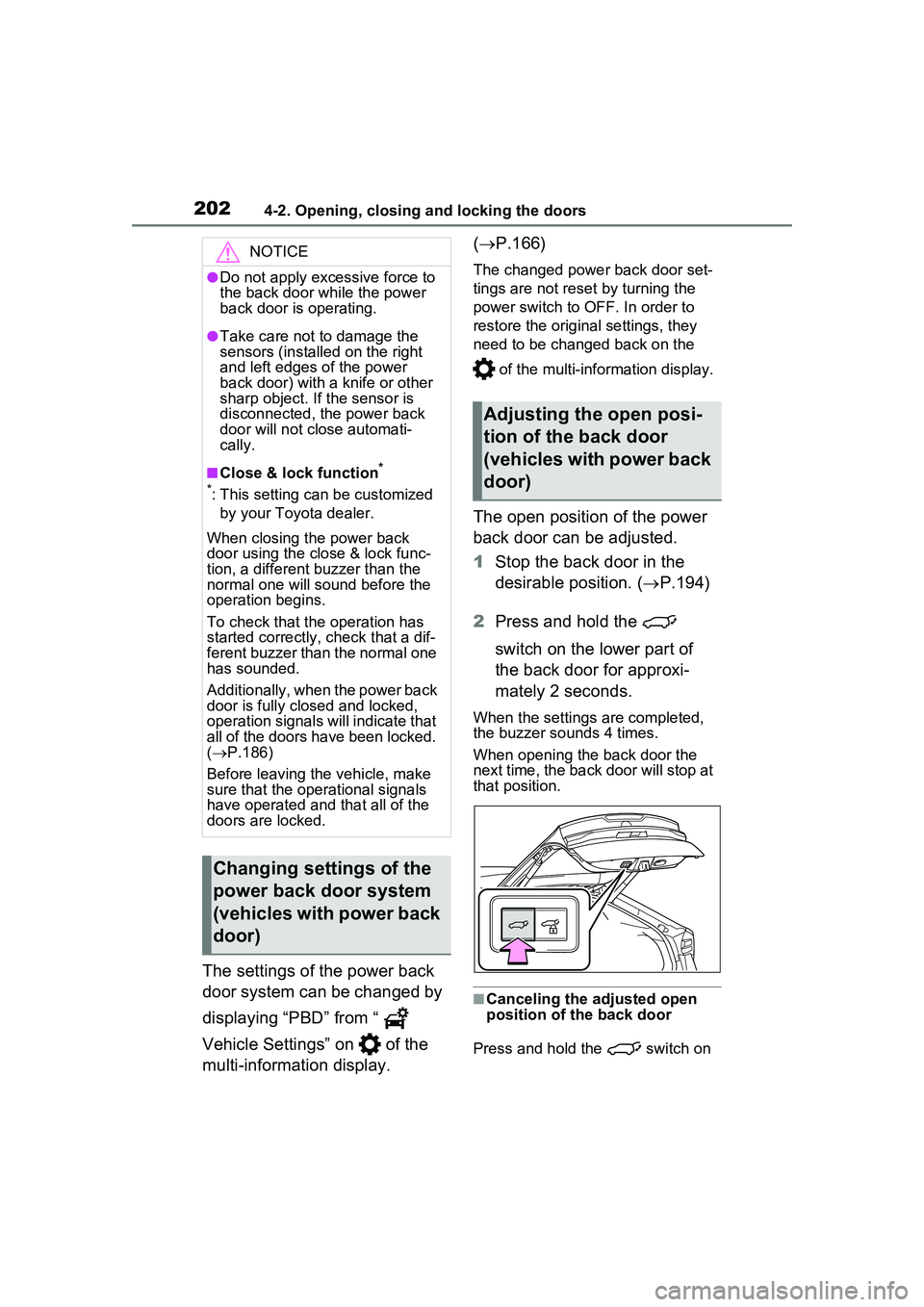
The open position of the power
back door can be adjusted.
1Stop the back door in the
desirable position. ( P.194)
2 Press and hold the
switch on the lower part of
the back door for approxi-
mately 2 seconds.
When the settings are completed,
the buzzer sounds 4 times.
When opening the back door the
next time, the back door will stop at
that position.
■Canceling the adjusted open
position of the back door
Press and hold the switch on
NOTICE
●Do not apply excessive force to
the back door while the power
back door is operating.
●Take care not to damage the
sensors (installed on the right
and left edges of the power
back door) with a knife or other
sharp object. If the sensor is
disconnected, the power back
door will not close automati-
cally.
■Close & lock function*
*
: This setting can be customized by your Toyota dealer.
When closing the power back
door using the close & lock func-
tion, a different buzzer than the
normal one will sound before the
operation begins.
To check that the operation has
started correctly, check that a dif-
ferent buzzer than the normal one
has sounded.
Additionally, when the power back
door is fully closed and locked,
operation signals will indicate that
all of the doors have been locked.
( P.186)
Before leaving the vehicle, make
sure that the operational signals
have operated and that all of the
doors are locked.
Changing settings of the
power back door system
(vehicles with power back
door)
Adjusting the open posi-
tion of the back door
(vehicles with power back
door)
Page 203 of 680
2034-2. Opening, closing and locking the doors
4
Before driving
the lower part of the back door for
approximately 7 seconds.
After the buzzer sounds 4 times, it
sounds twice more. When the
power back door does the opening
operation the next time, the door will
open to the initial settings position.
■Customization
The opening position can be set
with the multi-information display.
( P.166)
Priority for the stop position is given
to the last position set by either the
switch on the lower part of the
back door or multi-information dis-
play.
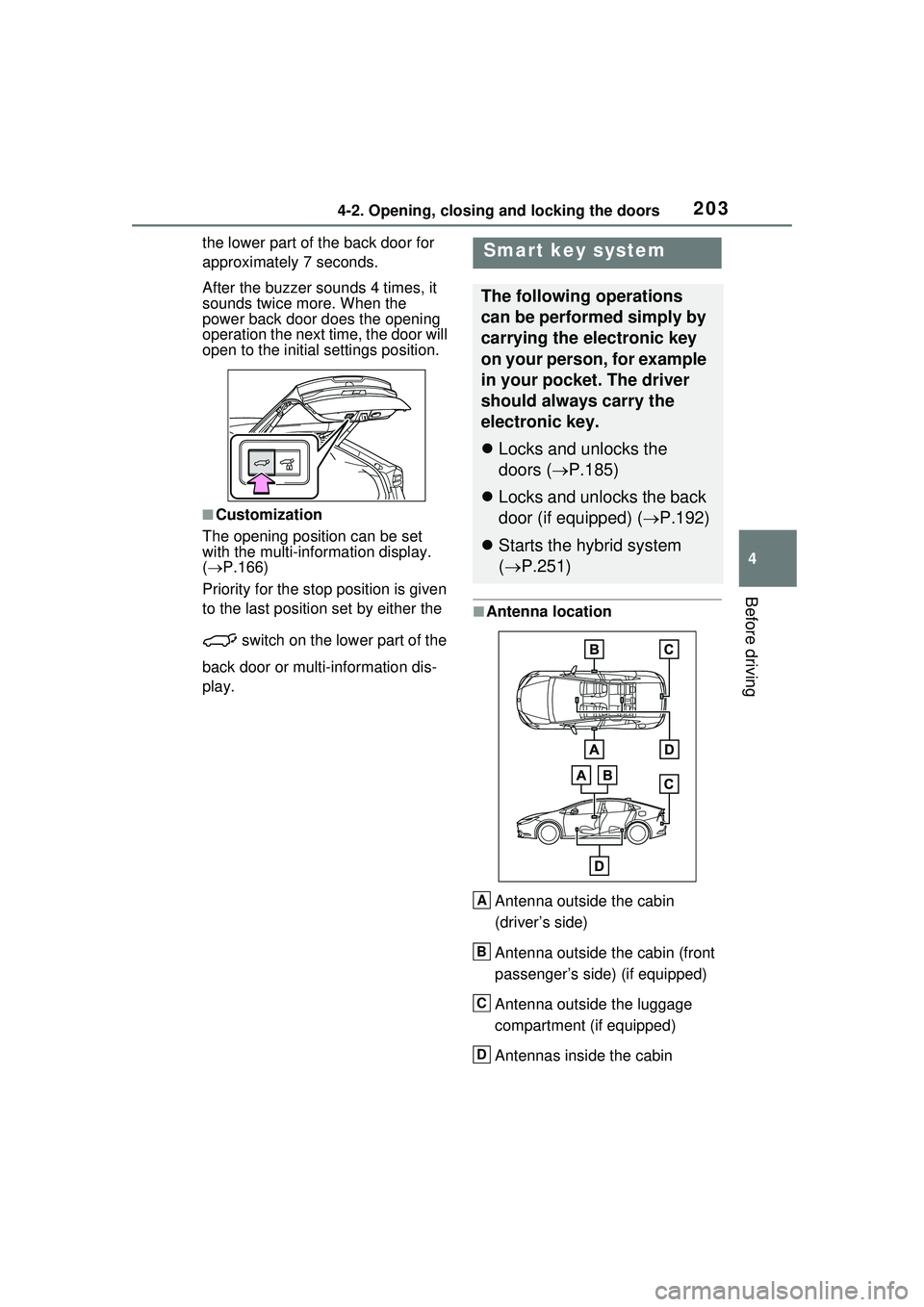
■Antenna location
Antenna outside the cabin
(driver’s side)
Antenna outside the cabin (front
passenger’s side) (if equipped)
Antenna outside the luggage
compartment (if equipped)
Antennas inside the cabin
Smart key system
The following operations
can be performed simply by
carrying the electronic key
on your person, for example
in your pocket. The driver
should always carry the
electronic key.
Locks and unlocks the
doors ( P.185)
Locks and unlocks the back
door (if equipped) ( P.192)
Starts the hybrid system
( P.251)
A
B
C
D
Page 204 of 680
2044-2. Opening, closing and locking the doors
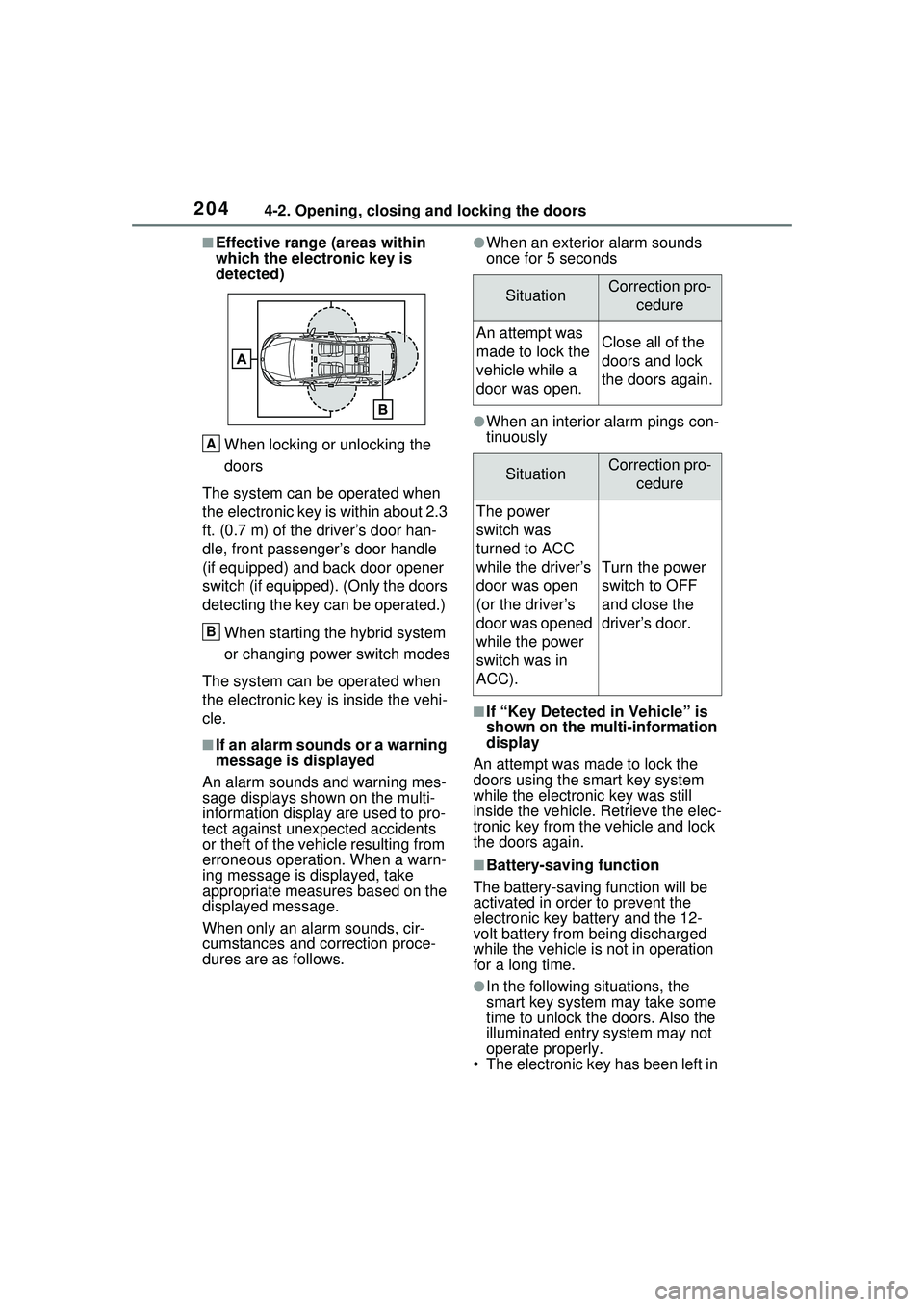
■Effective range (areas within
which the electronic key is
detected)When locking or unlocking the
doors
The system can be operated when
the electronic key is within about 2.3
ft. (0.7 m) of the driver’s door han-
dle, front passenger’s door handle
(if equipped) and back door opener
switch (if equipped). (Only the doors
detecting the key can be operated.)
When starting the hybrid system
or changing power switch modes
The system can be operated when
the electronic key is inside the vehi-
cle.
■If an alarm sounds or a warning
message is displayed
An alarm sounds and warning mes-
sage displays shown on the multi-
information display are used to pro-
tect against unexpected accidents
or theft of the vehicle resulting from
erroneous operation. When a warn-
ing message is displayed, take
appropriate measures based on the
displayed message.
When only an alarm sounds, cir-
cumstances and correction proce-
dures are as follows.
●When an exterior alarm sounds
once for 5 seconds
●When an interior alarm pings con-
tinuously
■If “Key Detected in Vehicle” is
shown on the multi-information
display
An attempt was made to lock the
doors using the smart key system
while the electronic key was still
inside the vehicle. Retrieve the elec-
tronic key from the vehicle and lock
the doors again.
■Battery-saving function
The battery-saving function will be
activated in order to prevent the
electronic key battery and the 12-
volt battery from being discharged
while the vehicle is not in operation
for a long time.
●In the following situations, the
smart key system may take some
time to unlock the doors. Also the
illuminated entry system may not
operate properly.
• The electronic key has been left in
A
B
SituationCorrection pro-
cedure
An attempt was
made to lock the
vehicle while a
door was open.Close all of the
doors and lock
the doors again.
SituationCorrection pro-cedure
The power
switch was
turned to ACC
while the driver’s
door was open
(or the driver’s
door was opened
while the power
switch was in
ACC).
Turn the power
switch to OFF
and close the
driver’s door.