engine TOYOTA RAV4 2006 Service Repair Manual
[x] Cancel search | Manufacturer: TOYOTA, Model Year: 2006, Model line: RAV4, Model: TOYOTA RAV4 2006Pages: 2000, PDF Size: 45.84 MB
Page 1570 of 2000
BRAKE – BRAKE PEDALBR–15
BR
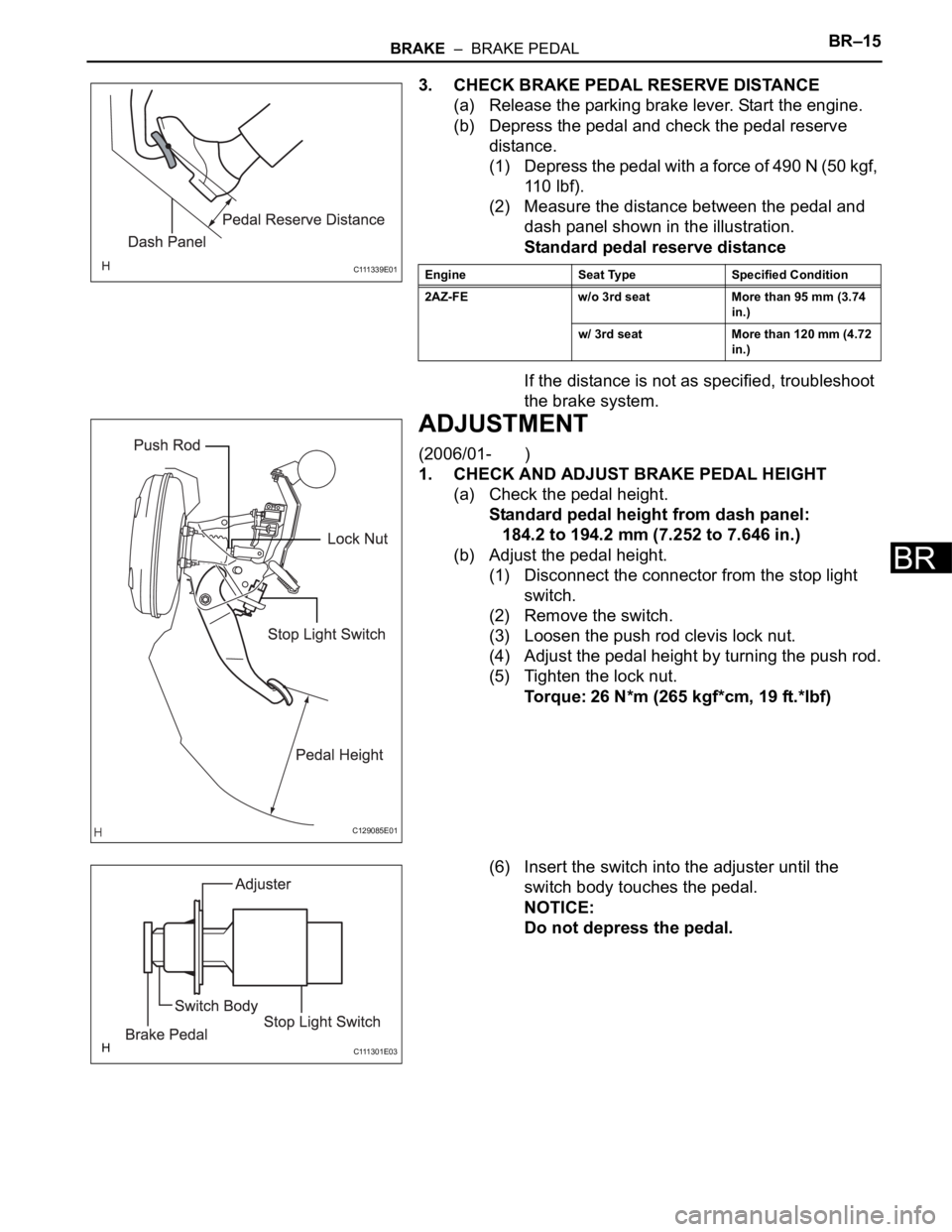
3. CHECK BRAKE PEDAL RESERVE DISTANCE
(a) Release the parking brake lever. Start the engine.
(b) Depress the pedal and check the pedal reserve
distance.
(1) Depress the pedal with a force of 490 N (50 kgf,
11 0 l b f ) .
(2) Measure the distance between the pedal and
dash panel shown in the illustration.
Standard pedal reserve distance
If the distance is not as specified, troubleshoot
the brake system.
ADJUSTMENT
(2006/01- )
1. CHECK AND ADJUST BRAKE PEDAL HEIGHT
(a) Check the pedal height.
Standard pedal height from dash panel:
184.2 to 194.2 mm (7.252 to 7.646 in.)
(b) Adjust the pedal height.
(1) Disconnect the connector from the stop light
switch.
(2) Remove the switch.
(3) Loosen the push rod clevis lock nut.
(4) Adjust the pedal height by turning the push rod.
(5) Tighten the lock nut.
Torque: 26 N*m (265 kgf*cm, 19 ft.*lbf)
(6) Insert the switch into the adjuster until the
switch body touches the pedal.
NOTICE:
Do not depress the pedal.
C 111 3 3 9 E 0 1Engine Seat Type Specified Condition
2AZ-FE w/o 3rd seat More than 95 mm (3.74
in.)
w/ 3rd seat More than 120 mm (4.72
in.)
C129085E01
C 111 3 0 1 E 0 3
Page 1571 of 2000
BR–16BRAKE – BRAKE PEDAL
BR
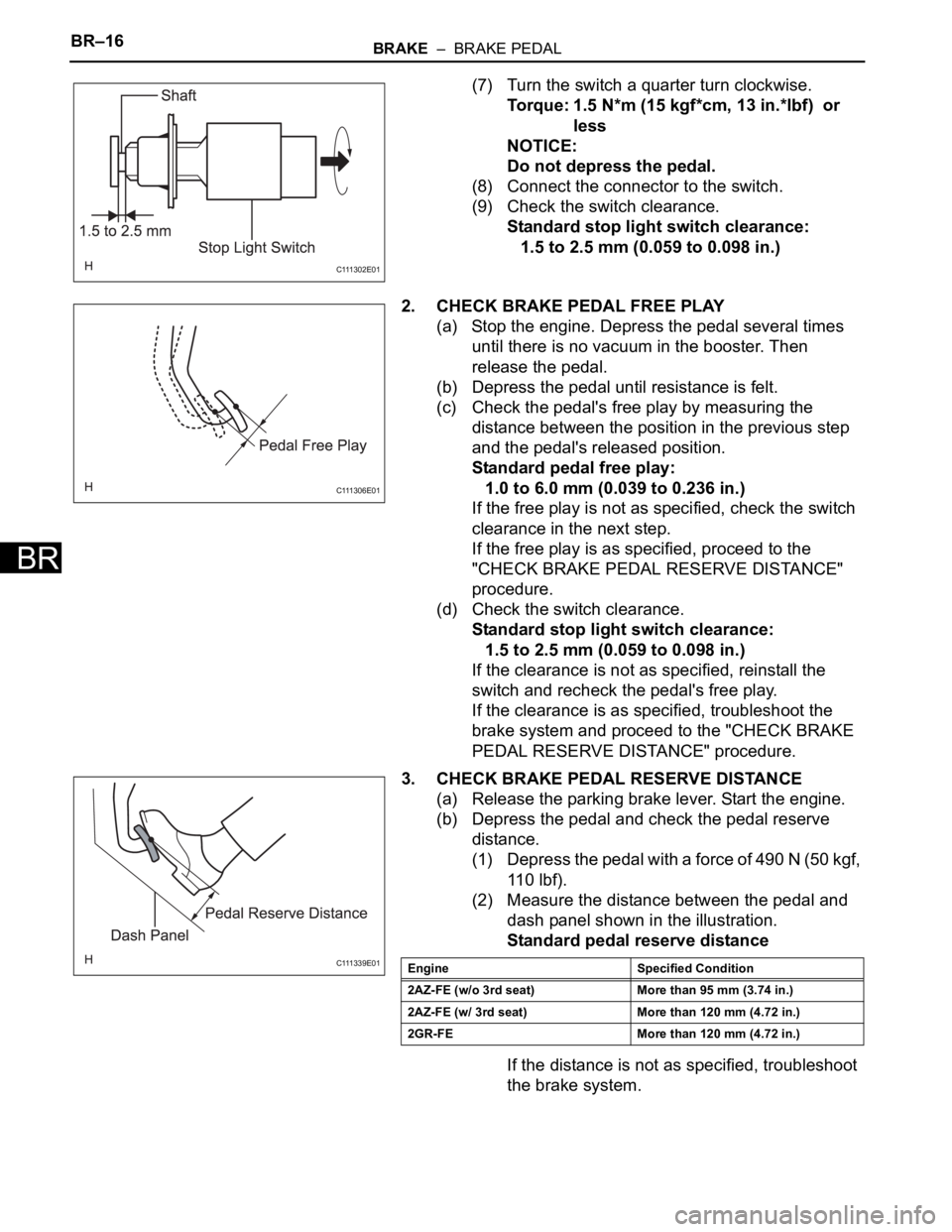
(7) Turn the switch a quarter turn clockwise.
Torque: 1.5 N*m (15 kgf*cm, 13 in.*lbf) or
less
NOTICE:
Do not depress the pedal.
(8) Connect the connector to the switch.
(9) Check the switch clearance.
Standard stop light switch clearance:
1.5 to 2.5 mm (0.059 to 0.098 in.)
2. CHECK BRAKE PEDAL FREE PLAY
(a) Stop the engine. Depress the pedal several times
until there is no vacuum in the booster. Then
release the pedal.
(b) Depress the pedal until resistance is felt.
(c) Check the pedal's free play by measuring the
distance between the position in the previous step
and the pedal's released position.
Standard pedal free play:
1.0 to 6.0 mm (0.039 to 0.236 in.)
If the free play is not as specified, check the switch
clearance in the next step.
If the free play is as specified, proceed to the
"CHECK BRAKE PEDAL RESERVE DISTANCE"
procedure.
(d) Check the switch clearance.
Standard stop light switch clearance:
1.5 to 2.5 mm (0.059 to 0.098 in.)
If the clearance is not as specified, reinstall the
switch and recheck the pedal's free play.
If the clearance is as specified, troubleshoot the
brake system and proceed to the "CHECK BRAKE
PEDAL RESERVE DISTANCE" procedure.
3. CHECK BRAKE PEDAL RESERVE DISTANCE
(a) Release the parking brake lever. Start the engine.
(b) Depress the pedal and check the pedal reserve
distance.
(1) Depress the pedal with a force of 490 N (50 kgf,
11 0 l b f ) .
(2) Measure the distance between the pedal and
dash panel shown in the illustration.
Standard pedal reserve distance
If the distance is not as specified, troubleshoot
the brake system.
C 111 3 0 2 E 0 1
C 111 3 0 6 E 0 1
C 111 3 3 9 E 0 1Engine Specified Condition
2AZ-FE (w/o 3rd seat) More than 95 mm (3.74 in.)
2AZ-FE (w/ 3rd seat) More than 120 mm (4.72 in.)
2GR-FE More than 120 mm (4.72 in.)
Page 1575 of 2000
BR–22BRAKE – BRAKE MASTER CYLINDER
BR
REMOVAL
(2005/11-2006/01)
NOTICE:
• The master cylinder and piston are designed so that
the piston can easily fall out. Prevent this by making
sure that the tip of the master cylinder points
downward when handling the master cylinder.
• Make sure foreign matter does not attach to the
master cylinder's piston. If foreign matter attaches,
clean it off with a cloth. Then apply lithium soap base
glycol grease to the entire outer circumference
contact surface area of the piston.
1. REMOVE AIR CLEANER CASE SUB-ASSEMBLY
(a) Remove the air cleaner case (see page EM-98).
HINT:
Refer to the procedures from the removal of the
purge VSV up until the removal of the air cleaner
case.
2. DRAIN BRAKE FLUID
NOTICE:
Wash off brake fluid immediately if it comes in
contact with any painted surface.
3. REMOVE BRAKE MASTER CYLINDER SUB-
ASSEMBLY
(a) Release the vacuum pressure in the brake booster
as follows.
(1) Stop the engine.
(2) Depress the brake pedal several times.
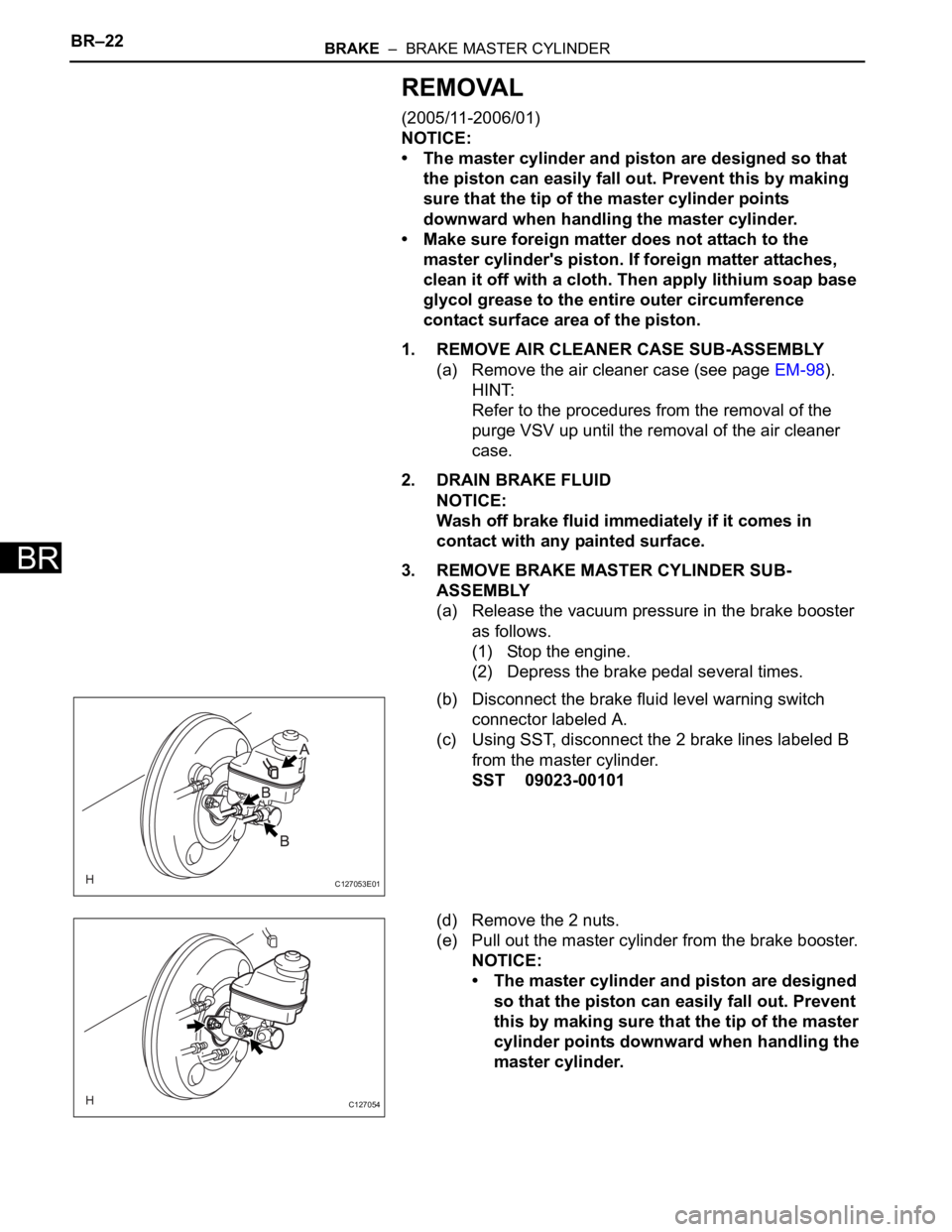
(b) Disconnect the brake fluid level warning switch
connector labeled A.
(c) Using SST, disconnect the 2 brake lines labeled B
from the master cylinder.
SST 09023-00101
(d) Remove the 2 nuts.
(e) Pull out the master cylinder from the brake booster.
NOTICE:
• The master cylinder and piston are designed
so that the piston can easily fall out. Prevent
this by making sure that the tip of the master
cylinder points downward when handling the
master cylinder.
C127053E01
C127054
Page 1577 of 2000
BR–24BRAKE – BRAKE MASTER CYLINDER
BR
REMOVAL
(2006/01- )
NOTICE:
• The master cylinder and piston are designed so that
the piston can easily fall out. Prevent this by making
sure that the tip of the master cylinder points
downward when handling the master cylinder.
• Make sure foreign matter does not attach to the
master cylinder's piston. If foreign matter attaches,
clean it off with a cloth. Then apply lithium soap base
glycol grease to the entire outer circumference
contact surface area of the piston.
1. REMOVE AIR CLEANER CASE SUB-ASSEMBLY (for
2AZ-FE)
(a) Remove the air cleaner case (see page EM-98).
HINT:
Refer to the procedures from the removal of the
purge VSV up until the removal of the air cleaner
case.
2. REMOVE AIR CLEANER CASE (for 2GR-FE)
(a) Remove the air cleaner case (see page EM-21).
HINT:
Refer to the procedures from the removal of the air
cleaner cap sub-assembly up until the removal of
the air cleaner case.
3. DRAIN BRAKE FLUID
NOTICE:
Wash off brake fluid immediately if it comes in
contact with any painted surface.
4. REMOVE BRAKE MASTER CYLINDER SUB-
ASSEMBLY
(a) Release the vacuum pressure in the brake booster
as follows.
(1) Stop the engine.
(2) Depress the brake pedal several times.
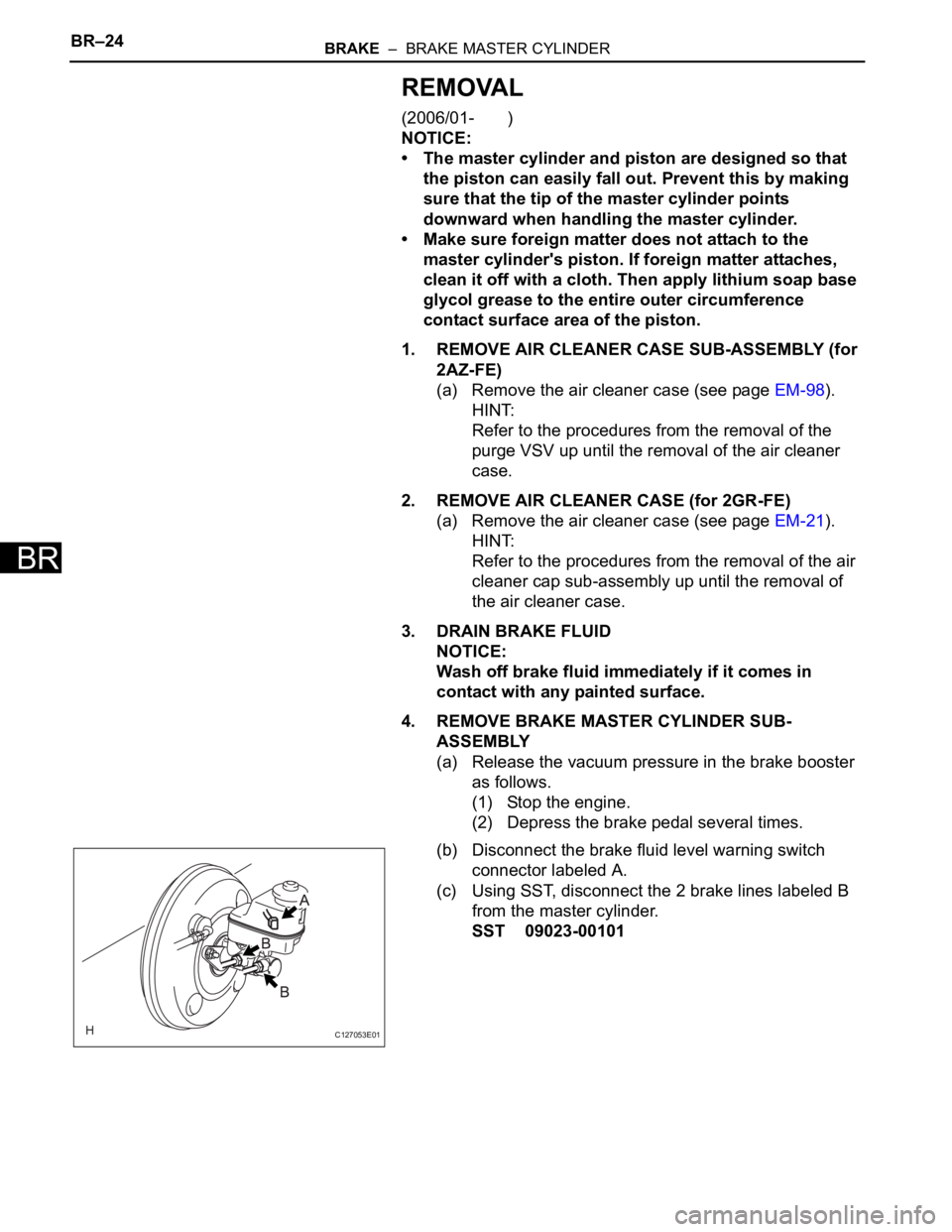
(b) Disconnect the brake fluid level warning switch
connector labeled A.
(c) Using SST, disconnect the 2 brake lines labeled B
from the master cylinder.
SST 09023-00101
C127053E01
Page 1614 of 2000

PS–14POWER STEERING – ELECTRONIC POWER STEERING SYSTEM
PS
FREEZE FRAME DATA
1. FREEZE FRAME DATA
NOTICE:
• It is difficult to show the specified values
(judgment values) clearly because freeze frame
data values change significantly due to
differences in measurement conditions,
surroundings, or vehicle conditions. For this
reason, there may be a problem even when the
values are within specifications.
• Turn the ignition switch ON and park the vehicle
on level ground. Check the freeze frame data by
using intelligent tester.
(a) Connect the intelligent tester (with CAN VIM) to the
DLC3.
(b) Turn the ignition switch ON and check the freeze
frame data by following the prompts on the
intelligent tester display.
Power steering ECU
Item Item Description: Range
(Display)Inspection Condition Reference Value
BATTERY VOLTAGE Battery voltage:
Min.: 0 V
Max.: 25.5 V- 10 to 14 V
SPD Vehicle speed from meter:
Min.: 0 km/h (0 mph)
Max.: 300 km/h (187.5 mph)Vehicle stopped 0 km/h (mph)
Vehicle driven at constant speedNo significant fluctuation
ENGINE REV Show the engine revolution:
Min.: 0 rpm
Max.: 12800 rpmEngine is running at a constant
speedNo significant fluctuation
MOTOR ACTUAL Amount of current to motor:
Min.: -327.68 A
Max.: 327.67 APower steering is in operationValue changes in proportion to
steering effort
COMMAND VALUE Demanded amount of current to
motor:
Min.: -327.68 A
Max.: 327.68 APower steering is in operationValue changes in proportion to
steering effort
STR ANGL VEL Steering angle speed:
Min.: -32768
/sec.
Max.: 32767/sec.Steering wheel is turned Value changes in proportion to
steering effort
STEERING TORQUE Steering wheel torque:
Min.: -7 Nm
Max.: 7 Nm--
THERMISTOR TEMP ECU substrate temperature:
Min.: -40
C
Max.: 150
CIgnition switch ON -
PIG SUPPLY Power source voltage to activate
motor:
Min.: 0 V
Max.: 20.1531 VPower steering in operation 10 to 14 V
IG SUPPLY ECU power source voltage:
Min.: 0 V
Max.: 20.1531 VIgnition switch ON 10 to 14 V
MOTOR ROTATE Motor rotation angle:
Min.: 0
Max.: 360
Power steering in operation During steering operation, motor
rotation angle value changes from
0 to 360
MOTOR VOLTAGE Motor power supply voltage:
0 V
Max.: 45.955 VPower steering in operation -
Page 1616 of 2000

PS–16POWER STEERING – ELECTRONIC POWER STEERING SYSTEM
PS
FAIL-SAFE CHART
If a problem occurs in the electric power steering system, the
P/S warning light will come on in the combination meter and
steering power assist will be stopped, fixed at a particular
point, or decreased simultaneously to protect the system.
Electronic power steering system
HINT:
The amount of power assist may be decreased to prevent the
motor and ECUs from overheating if the steering wheel is
continuously turned when the vehicle is either stopped or
driven at a low speed, or if the steering wheel is kept at either
full lock position for a long time. In such cases, the amount of
power assist returns to normal if the steering wheel is not
turned for approximately 10 minutes with the engine idling.
DTC No. Detection Condition Fail-safe
C1511/11 Torque sensor malfunction Power assist stops
C1512/11
C1513/11
C1514/11
C1521/25 Motor malfunction
C1524/24
C1528/12 Motor rotation angle sensor malfunction
C1531/25 ECU malfunction
C1532/25
C1534/25
C1551/25 IG power source voltage error
C1552/22 PIG power source voltage error
C1554/23 Power source relay malfunction
C1555/25 Motor relay malfunction
C1533/25 ECU malfunction Assist force restricted
U0073/49 CAN bus malfunction Amount of power assist is locked at 140 km/h
(87.5 mph) level of power assist
U0121/42 Skid control ECU communication error
U0105/41 ECM communication error Power assist stops
Page 1617 of 2000

POWER STEERING – ELECTRONIC POWER STEERING SYSTEMPS–17
PS
DATA LIST / ACTIVE TEST
1. READ DATA LIST
HINT:
Using the intelligent tester's DATA LIST allows switch,
sensor, actuator and other item values to be read without
removing any parts. Reading the DATA LIST early in
troubleshooting is one way to save time.
(a) Connect the intelligent tester (with CAN VIM) to the
DLC3.
(b) Turn the ignition switch ON and press the intelligent
tester main switch ON.
(c) Read the DATA LIST by following the directions on
the tester screen.
Tester Display Measurement Item/Range Normal Condition Reference Value
BATTERY VOLTAGE Battery voltage:
Min.: 0 V
Max.: 25.5 V- 10 to 14 V
SPD Vehicle speed from meter:
Min.: 0 km/h (0 mph)
Max.: 300 km/h (187.5 mph)Vehicle stopped 0 km/h (0 mph)
Vehicle driven at constant speed No significant fluctuation
SPD SIG INVALID Record of vehicle speed signal
invalid:
REC or UNREC- UNREC
ENGINE REV Show the engine revolution:
Min.: 0 rpm
Max.: 12800 rpmEngine is running at a constant
speedNo significant fluctuation
ENG REV INTER Record of engine revolution
signal interruption
REC or UNREC- UNREC
MOTOR ACTUAL Amount of current to motor:
Min.: -327.68 A
Max.: 327.67 APower steering is in operation Value changes in proportion to
steering effort
COMMAND VALUE Demanded amount of current to
motor:
Min.: -327.68 A
Max.: 327.68 APower steering is in operation Value changes in proportion to
steering effort
STR ANGL VEL Steering angle speed:
Min.: -32768
/sec.
Max.: 32767
/sec.Steering wheel is turned Value changes in proportion to
steering effort
STEERING TORQUE Steering wheel torque:
Min.: -7 Nm
Max.: 7 Nm--
THERMISTOR TEMP ECU substrate temperature:
Min.: -40
C
Max.: 150
CIgnition switch ON -
PIG SUPPLY Power source voltage to activate
motor:
Min.: 0 V
Max.: 20.1531 VPower steering in operation 10 to 14 V
IG SUPPLY ECU power source voltage:
Min.: 0 V
Max.: 20.1531 VIgnition switch ON 10 to 14 V
MTR OVERHEAT Continuous overheat prevention
control record:
REC or UNREC- UNREC
MTR LOW POWER PIG power source voltage drop
record:
REC or UNREC- UNREC
Page 1618 of 2000

PS–18POWER STEERING – ELECTRONIC POWER STEERING SYSTEM
PS
2. PERFORM ACTIVE TEST
HINT:
Performing the intelligent tester's ACTIVE TEST allows
relays, the VSV, actuators and other items to be
operated without removing any parts. Performing the
ACTIVE TEST early in troubleshooting is one way to
save time. The DATA LIST can be displayed in the
ACTIVE TEST.
(a) Connect the intelligent tester (with CAN VIM) to the
DLC3.
(b) Turn the ignition switch ON and turn the intelligent
tester ON.
(c) Perform the ACTIVE TEST by following the prompts
on the tester.
Combination meter
MOTOR ROTATE Motor rotation angle:
Min.: 0
Max.: 360
Power steering in operation During steering operation, motor
rotation angle value changes from
0 to 360
MOTOR VOLTAGE Motor power supply voltage:
0 V
Max.: 45.955 VPower steering in operation -
MTR TERMINAL(U) Motor terminal voltage (U phase):
Min.: 0 V
Max.: 46.667 VSteering wheel is turned While turning the steering wheel,
a value within the range of 1 V to
approximately 0.7 V less than the
battery voltage is displayed. (The
value changes according to the
steering load.)
MTR TERMINAL(V) Motor terminal voltage (V phase):
Min.: 0 V
Max.: 46.667 VSteering wheel is turned While turning the steering wheel,
a value within the range of 1 V to
approximately 0.7 V less than the
battery voltage is displayed. (The
value changes according to the
steering load.)
MTR TERMINAL(W) Motor Terminal voltage (W
phase):
Min.: 0 V
Max.: 46.667 VSteering wheel is turned While turning the steering wheel,
a value within the range of 1 V to
approximately 0.7 V less than the
battery voltage is displayed. (The
value changes according to the
steering load.)
IG ON/OFF TIMES Ignition switch ON/OFF number
of times after fail detection:
Min.: 0 times
Max.: 65535 times--
# CODES Number of detected DTCs when
freeze frame data stored:
Min.: 0
Max.: 255 --
PS ASSIST SIG Power steering assist signal:
ON or OFF-- Tester Display Measurement Item/Range Normal Condition Reference Value
Tester Display Test Part Control Range
EPS INDIC P/S indicator
ON/OFFConfirm that vehicle is stopped, engine idling
Page 1638 of 2000

AC–10AIR CONDITIONING – AIR CONDITIONING SYSTEM (for Automatic Air Conditioning Sys-
tem)
AC
Communication table
Sender Receiver Signal Communication Line
Air conditioning amplifier ECMA/C compressor control signal
CAN Idle up request signal
External variable control solenoid
current signal
Cooling fan motor driving request
signal
Ambient temperature signal
Air conditioning amplifier Air conditioning control assemblyFront panel indication signal
LIN AUTO indication signal
A/C indication signal
MODE indication signal
REC indication signal
FRS indication signal
RDEF indication signal
Blower level indication signal
Set temperature indication signal
Combination meter assembly Air conditioning amplifierVehicle speed signal
CAN
Ambient temperature signal
ECM Air conditioning amplifierEngine revolution speed signal
CAN Engine coolant temperature
signal
A/C control cut signal
Variable control prohibition signal
Air conditioning control assembly Air conditioning amplifierAUTO switch signal
LIN OFF switch signal
A/C switch signal
DEF switch signal
MODE switch signal
RDEF switch signal
Blower switch signal (FAN+, FAN-
)
Set temperature switch signal
(UP, DOWN)
Page 1640 of 2000

AC–12AIR CONDITIONING – AIR CONDITIONING SYSTEM (for Automatic Air Conditioning Sys-
tem)
AC
Communication table
Sender Receiver Signal Communication Line
Air conditioning amplifier ECMA/C compressor control signal
CAN Idle up request signal
External variable control solenoid
current signal
Cooling fan motor driving request
signal
Ambient temperature signal
Air conditioning amplifier Air conditioning control assemblyFront panel indication signal
LIN AUTO indication signal
A/C indication signal
MODE indication signal
REC indication signal
FRS indication signal
RDEF indication signal
Blower level indication signal
Set temperature indication signal
Combination meter assembly Air conditioning amplifierVehicle speed signal
CAN
Ambient temperature signal
ECM Air conditioning amplifierEngine revolution speed signal
CAN Engine coolant temperature
signal
A/C control cut signal
Variable control prohibition signal
Air conditioning control assembly Air conditioning amplifierAUTO switch signal
LIN OFF switch signal
A/C switch signal
DEF switch signal
MODE switch signal
RDEF switch signal
Blower switch signal (FAN+, FAN-
)
Set temperature switch signal
(UP, DOWN)