AUX TOYOTA RAV4 PLUG-IN HYBRID 2023 Owners Manual
[x] Cancel search | Manufacturer: TOYOTA, Model Year: 2023, Model line: RAV4 PLUG-IN HYBRID, Model: TOYOTA RAV4 PLUG-IN HYBRID 2023Pages: 718, PDF Size: 167.55 MB
Page 23 of 718
21Pictorial index
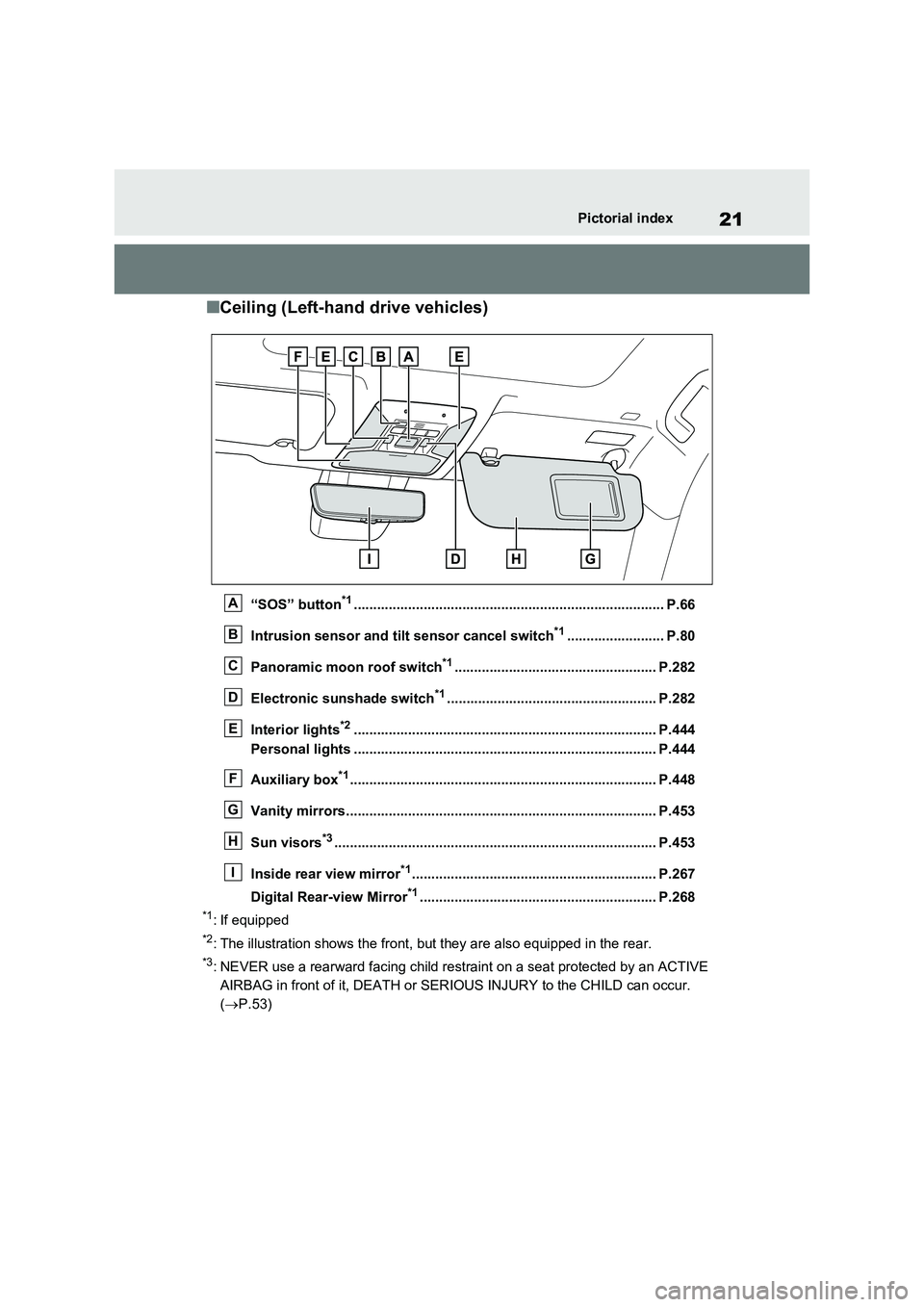
■Ceiling (Left-hand drive vehicles)
“SOS” button*1................................................................................ P.66
Intrusion sensor and tilt sensor cancel switch*1......................... P.80
Panoramic moon roof switch*1.................................................... P.282
Electronic sunshade switch*1...................................................... P.282
Interior lights*2.............................................................................. P.444
Personal lights .............................................................................. P.444
Auxiliary box*1............................................................................... P.448
Vanity mirrors................................................................................ P.453
Sun visors*3................................................................................... P.453
Inside rear view mirror*1............................................................... P.267
Digital Rear-view Mirror*1............................................................. P.268
*1: If equipped
*2: The illustration shows the front, but they are also equipped in the rear.
*3: NEVER use a rearward facing child restraint on a seat protected by an ACTIVE
AIRBAG in front of it, DEATH or SERIOUS INJURY to the CHILD can occur.
( P.53)
A
B
C
D
E
F
G
H
I
Page 31 of 718
29Pictorial index
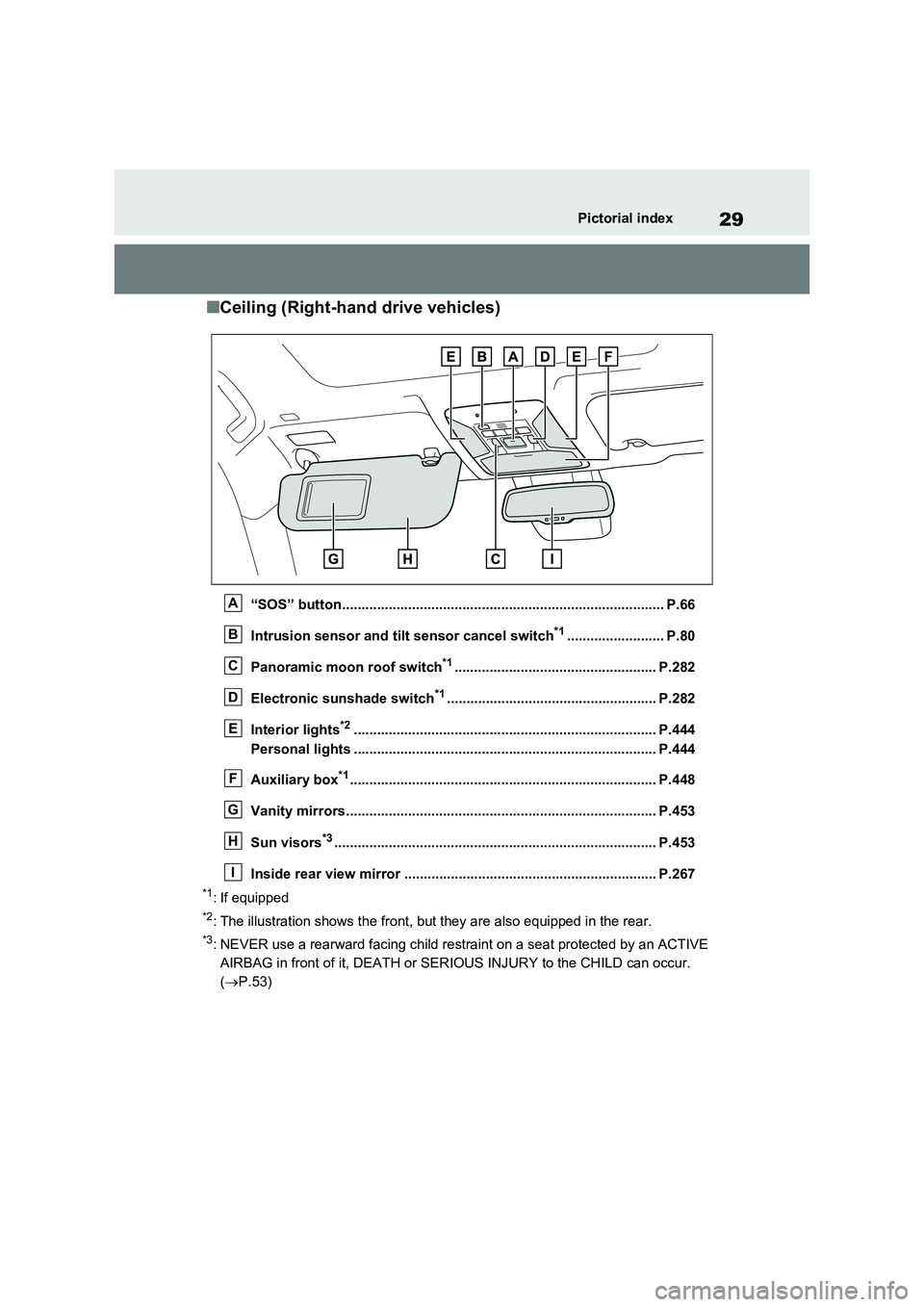
■Ceiling (Right-hand drive vehicles)
“SOS” button................................................................................... P.66
Intrusion sensor and tilt sensor cancel switch*1......................... P.80
Panoramic moon roof switch*1.................................................... P.282
Electronic sunshade switch*1...................................................... P.282
Interior lights*2.............................................................................. P.444
Personal lights .............................................................................. P.444
Auxiliary box*1............................................................................... P.448
Vanity mirrors................................................................................ P.453
Sun visors*3................................................................................... P.453
Inside rear view mirror ................................................................. P.267
*1: If equipped
*2: The illustration shows the front, but they are also equipped in the rear.
*3: NEVER use a rearward facing child restraint on a seat protected by an ACTIVE
AIRBAG in front of it, DEATH or SERIOUS INJURY to the CHILD can occur.
( P.53)
A
B
C
D
E
F
G
H
I
Page 179 of 718
177
2 2-2. Charging
Plug-in hybrid system
■If “Charging Stopped High Energy Use See Owner’s Manual” is
shown
■If “Charging System Malfunction See Owner’s Manual” is shown
■If “The Traction Battery Temp is low System put priority on
charging to preserve battery condition” is shown (Greenland only)
Likely causeCorrection procedure
Power is being consumed by electrical
components of vehicle
Check the following items, and then carry
out charging again.
If the headlights and audio are turned
on, turn them off.
Turn the power switch off.
If charging cannot be carried out, even
after performing the above, the auxiliary
battery may not be sufficiently charged.
Operate the hybrid system for approxi-
mately 15 minutes or more to charge the
auxiliary battery.
Likely causeCorrection procedure
Malfunction occurred in charging system
Have the vehicle inspected by any autho-
rized Toyota retailer or Toyota authorized
repairer, or any reliable repairer.
Likely causeCorrection procedure
The Hybrid battery (traction battery)
warming control was operated (P.128)
When the hybrid battery (traction battery)
warming control operates, the charging
schedule is not used and charging is per-
formed.
This is a control to protect the hybrid bat-
tery (traction battery), and not a malfunc-
tion.
Page 447 of 718
445
6 6-3. Using the storage features
Interior features
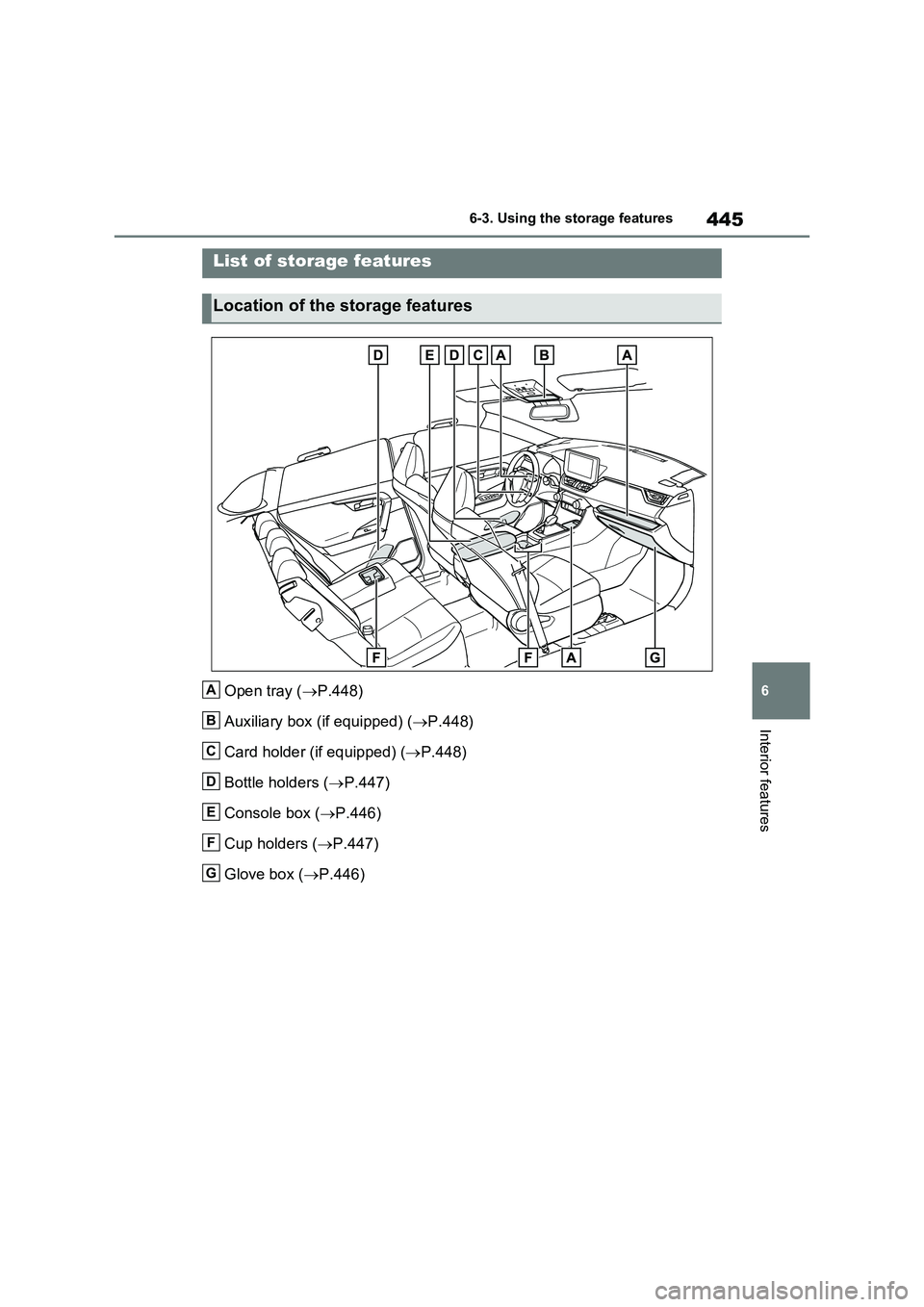
6-3.Using the s torage feature s
Open tray (P.448)
Auxiliary box (if equipped) (P.448)
Card holder (if equipped) (P.448)
Bottle holders (P.447)
Console box (P.446)
Cup holders (P.447)
Glove box (P.446)
List of storage features
Location of the storage features
A
B
C
D
E
F
G
Page 450 of 718
4486-3. Using the storage features
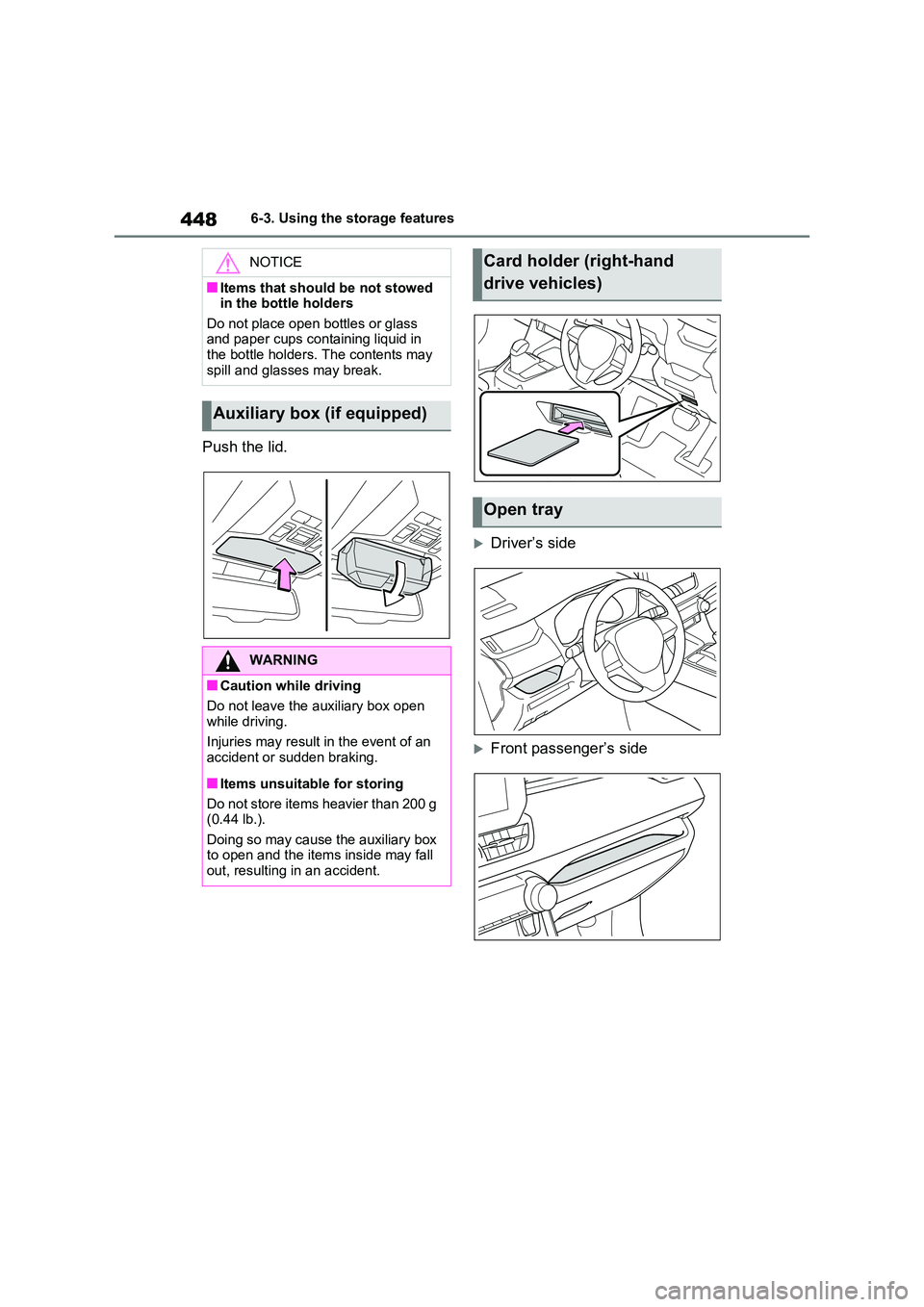
Push the lid.
Driver’s side
Front passenger’s side
NOTICE
■Items that should be not stowed in the bottle holders
Do not place open bottles or glass and paper cups containing liquid in the bottle holders. The contents may
spill and glasses may break.
Auxiliary box (if equipped)
WARNING
■Caution while driving
Do not leave the auxiliary box open while driving.
Injuries may result in the event of an accident or sudden braking.
■Items unsuitable for storing
Do not store items heavier than 200 g (0.44 lb.).
Doing so may cause the auxiliary box to open and the items inside may fall out, resulting in an accident.
Card holder (right-hand
drive vehicles)
Open tray
Page 478 of 718
4767-3. Do-it-yourself maintenance
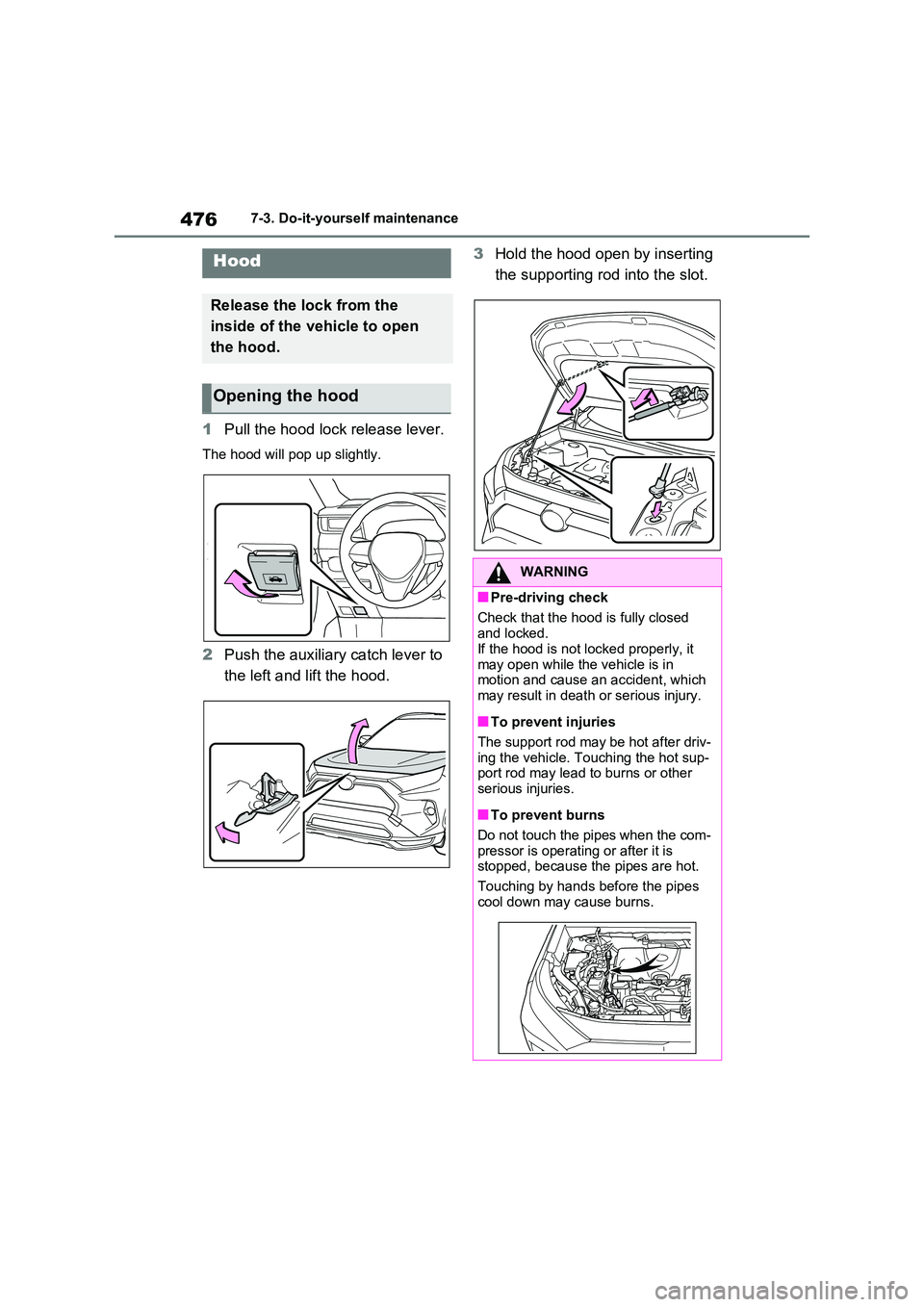
1Pull the hood lock release lever.
The hood will pop up slightly.
2Push the auxiliary catch lever to
the left and lift the hood.
3 Hold the hood open by inserting
the supporting rod into the slot.Hood
Release the lock from the
inside of the vehicle to open
the hood.
Opening the hood
WARNING
■Pre-driving check
Check that the hood is fully closed
and locked. If the hood is not locked properly, it
may open while the vehicle is in motion and cause an accident, which may result in death or serious injury.
■To prevent injuries
The support rod may be hot after driv-
ing the vehicle. Touching the hot sup- port rod may lead to burns or other serious injuries.
■To prevent burns
Do not touch the pipes when the com-
pressor is operating or after it is stopped, because the pipes are hot.
Touching by hands before the pipes
cool down may cause burns.
Page 492 of 718
4907-3. Do-it-yourself maintenance
while the vehicle is moving.
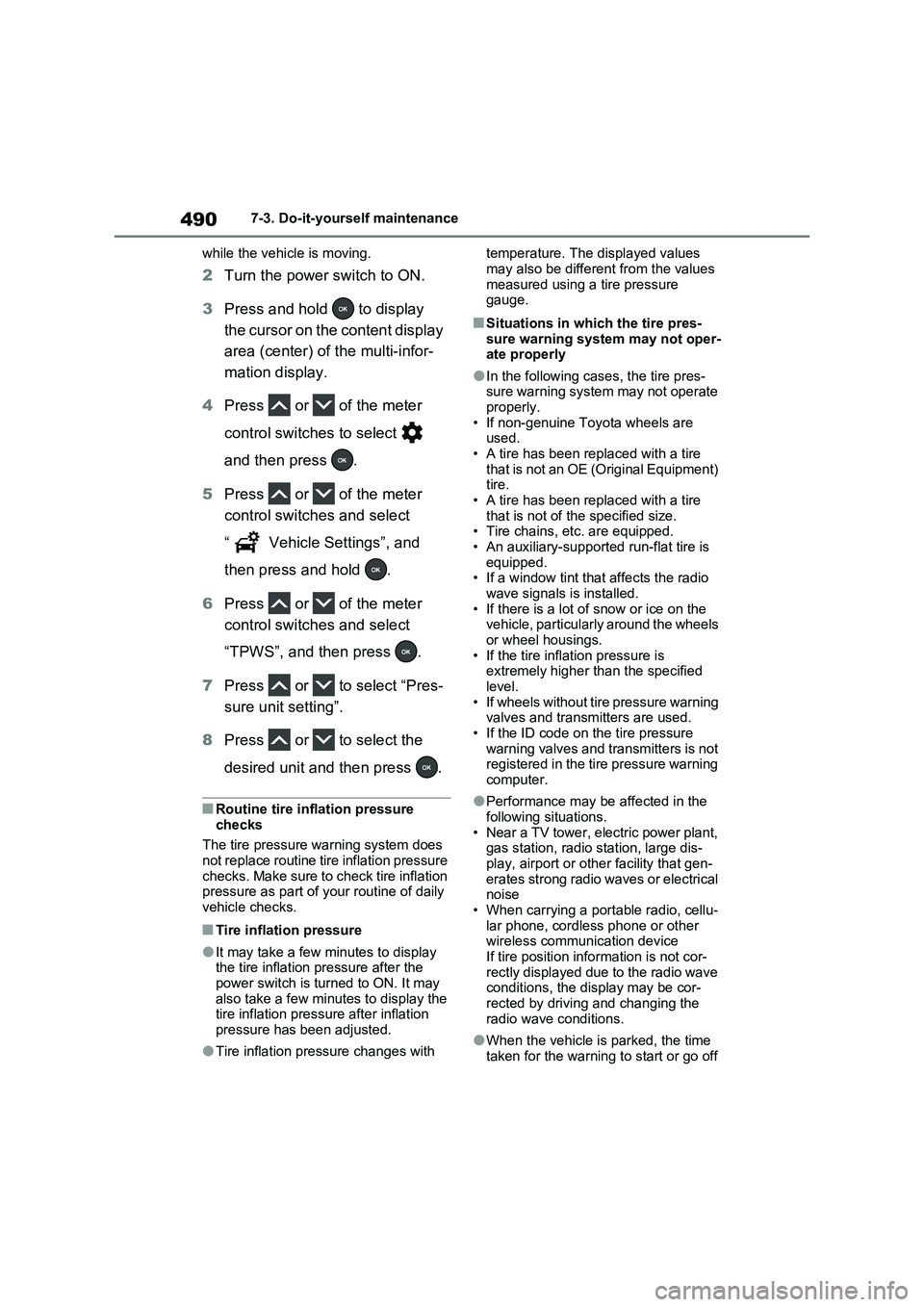
2Turn the power switch to ON.
3Press and hold to display
the cursor on the content display
area (center) of the multi-infor-
mation display.
4Press or of the meter
control switches to select
and then press .
5Press or of the meter
control switches and select
“ Vehicle Settings”, and
then press and hold .
6Press or of the meter
control switches and select
“TPWS”, and then press .
7Press or to select “Pres-
sure unit setting”.
8Press or to select the
desired unit and then press .
■Routine tire inflation pressure
checks
The tire pressure warning system does
not replace routine tire inflation pressure
checks. Make sure to check tire inflation
pressure as part of your routine of daily
vehicle checks.
■Tire inflation pressure
●It may take a few minutes to display
the tire inflation pressure after the
power switch is turned to ON. It may
also take a few minutes to display the
tire inflation pressure after inflation
pressure has been adjusted.
●Tire inflation pressure changes with temperature. The displayed values
may also be different from the values
measured using a tire pressure
gauge.
■Situations in which the tire pres-
sure warning system may not oper-
ate properly
●In the following cases, the tire pres-
sure warning system may not operate
properly.
• If non-genuine Toyota wheels are
used.
• A tire has been replaced with a tire
that is not an OE (Original Equipment)
tire.
• A tire has been replaced with a tire
that is not of the specified size.
• Tire chains, etc. are equipped.
• An auxiliary-supported run-flat tire is
equipped.
• If a window tint that affects the radio
wave signals is installed.
• If there is a lot of snow or ice on the
vehicle, particularly around the wheels
or wheel housings.
• If the tire inflation pressure is
extremely higher than the specified
level.
• If wheels without tire pressure warning
valves and transmitters are used.
• If the ID code on the tire pressure
warning valves and transmitters is not
registered in the tire pressure warning
computer.
●Performance may be affected in the
following situations.
• Near a TV tower, electric power plant,
gas station, radio station, large dis-
play, airport or other facility that gen-
erates strong radio waves or electrical
noise
• When carrying a portable radio, cellu-
lar phone, cordless phone or other
wireless communication device
If tire position information is not cor-
rectly displayed due to the radio wave
conditions, the display may be cor-
rected by driving and changing the
radio wave conditions.
●When the vehicle is parked, the time
taken for the warning to start or go off
Page 618 of 718
616Alphabetical Index
Blower customization ................. 432
Front seat concentrated airflow
mode (S-FLOW) ...................... 435
Humidity sensor ......................... 437
Remote Air Conditioning System438
Automatic headlight leveling system
..................................................... 327
Automatic High Beam (AHB) ....... 328
Automatic light control system ... 326
Auxiliary box ................................. 448
Average fuel economy . 201, 213, 216
Average vehicle speed ......... 204, 216
B
Back door ...................................... 240
Hands Free Power Back Door ... 244
Power back door ........................ 243
Wireless remote control ............. 243
Back-up lights
Replacing light bulbs .................. 516
Wattage...................................... 591
Battery (12-volt battery) ............... 484
If the 12-volt battery is discharged
................................................. 573
Preparing and checking before win-
ter ............................................ 422
Replacing ................................... 576
Warning light .............................. 535
Battery (traction battery)................ 95
Charging ............................ 127, 135
Location ....................................... 95
Specification............................... 586
Blind Spot Monitor (BSM) ............ 386
Blind Spot Monitor function ........ 389
Rear Crossing Traffic Alert function
................................................. 391
Bottle holders ............................... 447
Brake
Brake Hold ................................. 323
Parking brake ............................. 320
Regenerative braking ................... 90Warning light .............................. 534
Brake assist...................................415
Brake Hold ..................................... 323
Brake Override System ................ 289
Break-in tips .................................. 289
BSM (Blind Spot Monitor) ............386
Blind Spot Monitor function ........ 389
Rear Crossing Traffic Alert function
................................................. 391
C
Card holder.................................... 448
Care
Aluminum wheels .......................466
Exterior ....................................... 466
Front camera .............................. 339
Interior ........................................469
Radar sensor.............................. 339
Seat belts ...................................469
Water-repellent coating .............. 467
Cargo hooks .................................. 449
Chains ............................................ 424
Charging
“My Room Mode” .......................164
AC charging cable ...................... 109
Charging equipment ................... 106
Charging indicator ...................... 107
Charging messages ................... 172
Charging procedure ................... 135
Charging schedule function........ 144
Charging time may increase ...... 134
High voltage components............. 95
How to charge ............................ 135
Information related to charging dis-
play .......................................... 131
Opening and closing the charging
port lid ...................................... 107
Power sources precautions ........ 126
Power sources that can be used 124
Safety functions.......................... 132
When charging cannot be carried
Page 624 of 718
622Alphabetical Index
Replacing the battery ................. 511
Warning buzzer .......................... 253
Wireless remote control key....... 233
Knee airbags ................................... 39
L
Lane Tracing Assist (LTA) ........... 353
Operation ................................... 353
Warning messages .................... 363
Language (multi-information dis-
play) ............................. 208, 217, 596
Lever
Auxiliary catch lever ................... 476
Hood lock release lever ............. 476
Shift lever ................................... 315
Tilt and telescopic steering lock
release lever ............................ 266
Turn signal lever ........................ 319
Wiper lever ......................... 332, 334
License plate lights
Light switch ................................ 326
Replacing light bulbs .................. 516
Light bulbs
Replacing ................................... 516
Wattage...................................... 591
Lights
Automatic High Beam system .... 328
Emergency flasher switch .......... 526
Extended Headlight Lighting system
................................................. 327
Fog light switch .......................... 331
Front interior lights ..................... 444
Headlight switch ......................... 326
Illuminated entry system ............ 443
Interior lights .............................. 444
Luggage compartment light 242, 245
Personal lights ........................... 444
Rear interior light........................ 444
Replacing light bulbs .................. 516
Turn signal lever ........................ 319
Vanity lights................................ 453Wattage ...................................... 591
Lock steering column................... 311
LTA (Lane Tracing Assist) ........... 353
Operation ...................................353
Warning messages .................... 363
Luggage compartment light 242, 245
Luggage cover .............................. 450
M
Maintenance
Do-it-yourself maintenance ........ 474
Maintenance data.......................584
Maintenance requirements......... 472
Malfunction indicator lamp .......... 536
Menu icons .................................... 200
Meter
“ODO TRIP” switch ............ 191, 199
Clock .................................. 192, 193
Head-up display ......................... 222
Hybrid System Indicator ..... 190, 196
Indicators.................................... 180
Meter control switches ....... 200, 212
Meters ................................187, 193
Multi-information display ....199, 211
Settings ...................... 206, 217, 596
Units ................................... 208, 220
Warning lights .................... 534, 544
Warning messages .................... 209
Meter control switches ......... 200, 212
Mirrors
Digital Rear-view Mirror.............. 268
Inside rear view mirror................ 267
Outside rear view mirror defoggers
................................................. 432
Outside rear view mirrors ........... 277
Vanity mirrors .............................453
Multi-information display ..... 199, 211
Audio system-linked display204, 216
BSM (Blind Spot Monitor)........... 387
Changing the display..........200, 212
Convenience Services (Suggestion
Page 718 of 718
716
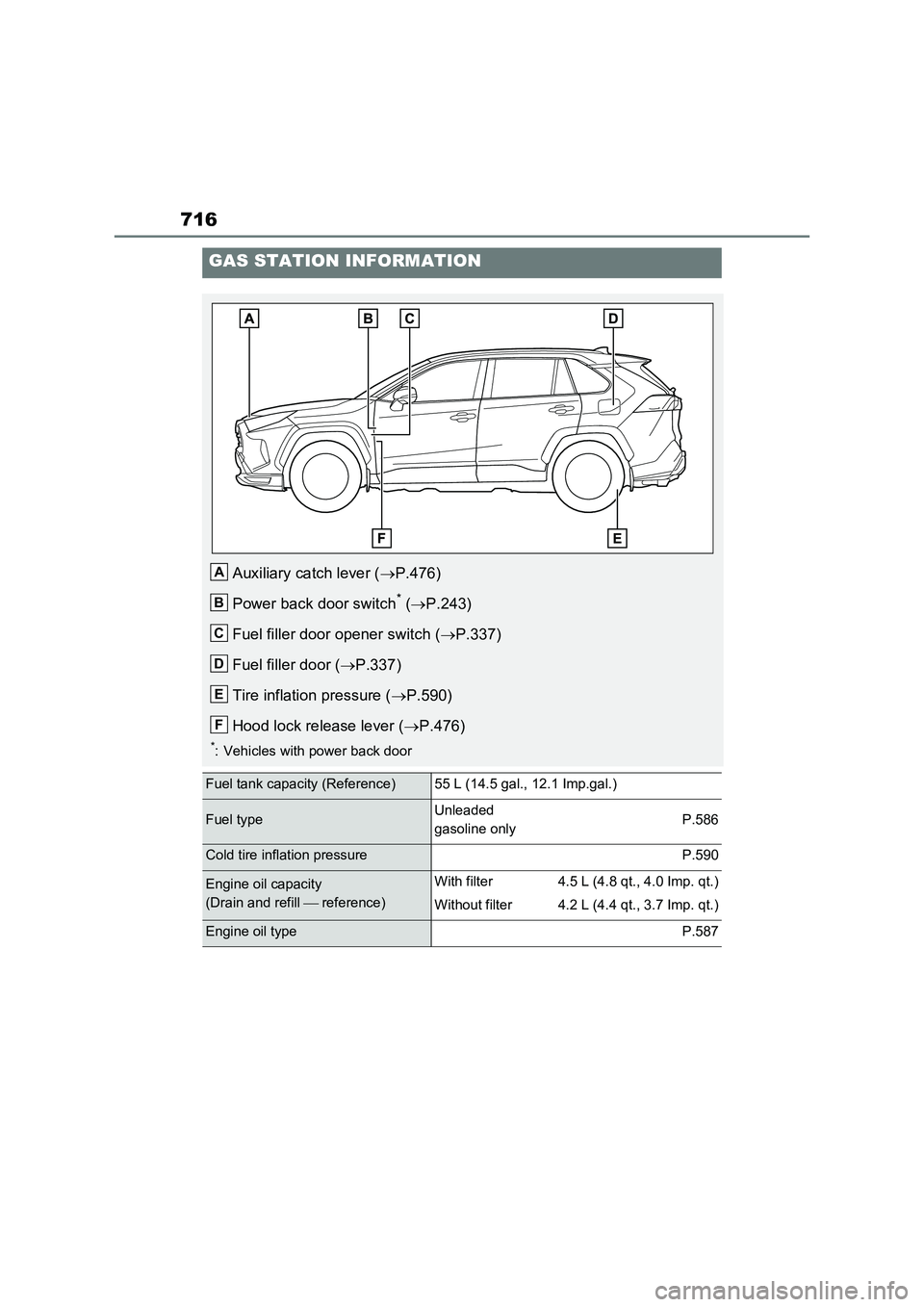
GAS STATION INFORMATION
Auxiliary catch lever (P.476)
Power back door switch
* (P.243)
Fuel filler door opener switch (P.337)
Fuel filler door (P.337)
Tire inflation pressure (P.590)
Hood lock release lever (P.476)
*: Vehicles with power back door
Fuel tank capacity (Reference)55 L (14.5 gal., 12.1 Imp.gal.)
Fuel typeUnleaded
gasoline onlyP.586
Cold tire inflation pressureP.590
Engine oil capacity
(Drain and refill reference)With filter
Without filter4.5 L (4.8 qt., 4.0 Imp. qt.)
4.2 L (4.4 qt., 3.7 Imp. qt.)
Engine oil typeP.587
A
B
C
D
E
F