My room TOYOTA RAV4 PLUG-IN HYBRID 2023 Owners Manual
[x] Cancel search | Manufacturer: TOYOTA, Model Year: 2023, Model line: RAV4 PLUG-IN HYBRID, Model: TOYOTA RAV4 PLUG-IN HYBRID 2023Pages: 718, PDF Size: 167.55 MB
Page 4 of 718
2TABLE OF CONTENTS
For your information ........................6
Reading this manual........................ 9
How to search ............................... 10
Pictorial index ................................ 12
1-1. For safe use
Before driving........................ 32
For safe driving ..................... 33
Seat belts .............................. 35
SRS airbags.......................... 39
Exhaust gas precautions ...... 47
1-2. Child safety
Airbag manual on-off system 48
Riding with children............... 49
Child restraint systems ......... 50
1-3. Emergency assistance
eCall...................................... 66
1-4. Theft deterrent system
Immobilizer system ............... 77
Double locking system .......... 78
Alarm .................................... 79
2-1. Plug-in hybrid system
Plug-in hybrid system features
............................................ 84
Plug-in hybrid system precau-
tions .................................... 95
Plug-in Hybrid Electric Vehicle
driving tips ........................ 100
EV driving range ................. 103
2-2. Charging
Charging equipment ........... 106
AC charging cable .............. 109
Locking and unlocking the
charging port lid and charging
connector .......................... 121
Power sources that can be used
.......................................... 124
Charging methods .............. 127
Charging tips....................... 130
Things to know before charging
.......................................... 132
How to charge..................... 135
Using the charging schedule
function ............................. 144
Using the “My Room Mode” 164
When charging cannot be car-
ried out.............................. 167
3-1. Instrument cluster
Warning lights and indicators
.......................................... 180
Gauges and meters (with 7-inch
display) ............................. 187
Gauges and meters (with 12.3-
inch display)...................... 193
Multi-information display (with 7-
inch display)...................... 199
Multi-information display (with
12.3-inch display) ............. 211
Head-up display .................. 222
Energy monitor/consumption
screen ............................... 226
1For safety and security
2Plug-in hybrid system
3
Vehicle status
information and
indicators
Page 85 of 718
2
83
2
Plug-in hybrid system
Plug-in hybrid system
2-1. Plug-in hybrid system
Plug-in hybrid system features
......................................... 84
Plug-in hybrid system precau-
tions .................................. 95
Plug-in Hybrid Electric Vehicle
driving tips ...................... 100
EV driving range ............... 103
2-2. Charging
Charging equipment ......... 106
AC charging cable ............ 109
Locking and unlocking the
charging port lid and charging
connector........................ 121
Power sources that can be
used ................................ 124
Charging methods ............ 127
Charging tips .................... 130
Things to know before
charging .......................... 132
How to charge .................. 135
Using the charging schedule
function ........................... 144
Using the “My Room Mode”
....................................... 164
When charging cannot be car-
ried out ........................... 167
Page 130 of 718
1282-2. Charging
charging.
■“My Room Mode” (P.164)
When the AC charging cable is
connected to the vehicle, electrical
components such as the air condi-
tioning system or audio system can
be used using the external power
source
*.
*: The power of the hybrid battery (trac-
tion battery) may be used depending
on the situation.
■“Battery Heater”
When the outside temperature is
low and the AC charging cable is
connected to the vehicle, this func-
tion automatically warms the hybrid
battery (traction battery) until it
reaches or exceeds a certain tem-
perature.
“Battery Heater” will operate when
the “Battery Heater” of the
“Charging Settings” on the multi-
information display is on. (P.207)
■Hybrid battery (traction bat-
tery) warming control (Green-
land only)
This control operates after the AC
charging cable remains connected
to the vehicle for 3 days and “Bat-
tery Heater” automatically stops. It
automatically insulates the hybrid
battery (traction battery) in
extremely low temperatures.
This control stops 31 days after
the AC charging cable is con-
nected, even if it is still con-
nected to the vehicle.When this control operates,
charging schedule settings are
ignored and charging starts.
■“Battery Cooler”
When the hybrid battery (traction
battery) is hot and the AC charging
cable is connected to the vehicle,
this function cools the hybrid bat-
tery (traction battery) before
charging is carried out.
“Battery Cooler” will operate when
the “Battery Cooler” of the
“Charging Settings” on the multi-
information display is on. (P.207)
■Traction battery heating and cool-
ing system (“Battery Heater” and
“Battery Cooler”)
●The system operates when the hybrid
battery (traction battery) is below or
above a certain temperature.
●The system may operate when
charging is not being performed.
●When the charging schedule is used
(P.144), this function will operate
according to the charging schedule.
■“Battery Heater”
●When “Battery Heater” is operating,
the charging indicator illuminates.
●When the AC charging cable is
removed from the vehicle or remains
connected to the vehicle for approxi-
mately 3 days, the system automati-
cally stops.
●When “Battery Heater” is operating
during charging, the charging time
may be longer than normal.
●If the outside temperature becomes
high while “Battery Heater” is operat-
ing, charging may complete earlier
than the “Departure” or “Departure
time” time set. (P.144)
●When the following operations are
Page 136 of 718
1342-2. Charging
speed for EV driving. (P.90)
●Leave a low level of charge in the
hybrid battery (traction battery) when
leaving the vehicle undriven for a long
period of time.
After confirming that EV mode or
AUTO EV/HV mode has switched to
HV mode, turn the power switch off.
●Use the charging schedule function as
much as possible in order to fully
charge the hybrid battery (traction bat-
tery) immediately before starting off.
(P.144)
Also, if the hybrid battery (traction bat-
tery) capacity reduces, the distance that
can be driven in EV mode or AUTO
EV/HV mode decreases. However, vehi-
cle performance does not significantly
become worse.
■When the remaining charge of the
hybrid battery (traction battery) is
low after charging
In the following situations, the remaining
charge of the hybrid battery (traction
battery) after charging completes may
be less than normal in order to protect
the system (the EV driving range after
the battery is fully charged may be
shorter).
*
●Charging is carried out when the out-
side temperature is low or high.
●Charging is carried out immediately
after high-load driving or in extreme
heat.
When none of the above situations
apply and there is a drastic drop in the
remaining charge of the hybrid battery
(traction battery) after charging com-
pletes, have the vehicle inspected by
any authorized Toyota retailer or Toyota
authorized repairer, or any reliable
repairer.
*: When this occurs, even if the remain-
ing charge display of the hybrid bat-
tery (traction battery) shows that it is
fully charged, the remaining charge
rapidly decreases faster than normal.
■When the charging amount sent to
the hybrid battery (traction battery)
decreases
When the amount of power supplied by
the charger is low or operation of the
“Battery Heater”, etc., reduces the
charging power sent to the hybrid bat-
tery (traction battery), the charging
amount sent to the hybrid battery (trac-
tion battery) may decrease.
■Charging time may increase
In the following situations, charging time
may become longer than normal:
●In very hot or very cold temperatures.
●When the hybrid battery (traction bat-
tery) becomes hot, such as immedi-
ately after high-load driving.
●The vehicle is consuming a lot of elec-
tricity, for example, when the head-
lights are on etc.
●When using “My Room Mode”.
(P.164)
●There is a power outage during
charging.
●There is an interruption in the electri-
cal supply.
●There is a drop in the voltage of exter-
nal power source.
●The charge in the 12-volt battery is
low, for example due to the vehicle
being left unused for a long period of
time.
●The maximum charging current is set
to 8A or 16A*. (P.125, 126)
●When the “Battery Heater” operates.
(P.128)
●When the “Battery Cooler” is operated
before charging. (P.128)
●When the plug generates heat due to
a loose socket connection etc.
*: Vehicles with 7 kW onboard traction
battery charger only
■Using a DC Charger
DC Chargers cannot be used with this
vehicle.
Page 148 of 718
1462-2. Charging
●A maximum of 15 charging schedules
can be registered.
■To make sure that the charging
schedule function operates cor-
rectly
Check the following items.
●The clock is adjusted to the proper
time
●The calendar is set to the correct date
●Check that the power switch is turned
off
●After registering the charging sched-
ule, connect the AC charging cable
The charging start time is determined
based on the charging schedule at the
time that the AC charging cable was
connected.
●After connecting the AC charging
cable, check that the charging indica-
tor of the charging port flashes
(P.107)
●Do not use an socket that has a power
cut off function (including a timer func-
tion)
Use an socket that constantly supplies
electricity. For sockets where the
power is cut off due to a timer func-
tion, etc., charging may not be carried
out according to plan if the power is
cut off during the set time.
●The automatic adjustment of the clock
by GPS is set to on.
For details regarding setting clock, refer
to “Multimedia Owner’s Manual”.
■When the AC charging cable
remains connected to the vehicle
Even if multiple consecutive charging
schedules are registered, the next
charge will not be carried out according
to the charging schedule until the AC
charging cable is removed and recon-
nected after charging completes. Also,
when the hybrid battery (traction battery)
is fully charged, charging according to
the charging schedule will not be carried
out.
■“Climate Prep” or “Climate prepa-
ration”
●When the air conditioning-linked set-
ting is turned on, the air conditioning
operates until the set departure time.
Therefore, the air conditioning will
consume electricity and charging may
not complete by the set departure
time.
●If the hybrid battery (traction battery)
is fully charged, charging will not be
carried out, even if the charging
schedule is set. However, if “Climate
Prep” or “Climate preparation” is
turned on, the air conditioning will
operate only once when it nears the
time set in “Departure” or “Departure
time”. If this occurs, the air condition-
ing will consume electricity and the
remaining charge of the hybrid battery
(traction battery) when departing may
be decreased.
●When the doors are unlocked, the air
conditioning system does not operate.
■When charging schedules are
ignored
When the following operations are per-
formed while the charging schedule is
on standby, charging schedule is tempo-
rarily canceled and charging is started.
●When the Remote Air Conditioning
System (P.438) is operated
●When turning “My Room Mode” on
(P.164)
●When turning “Charge Now” on
(P.150, 156, 162)
●When an operation that temporarily
cancels charging using the charging
schedule is performed (P.138)
■Effects of outside temperature
When the charging mode is set to
“Departure” or “Departure time”,
charging schedule may be ignored due
to the outside temperature and charging
may start.
Page 153 of 718
151
2 2-2. Charging
Plug-in hybrid system
procedure (P.147) and display
“Charging Schedule” screen.
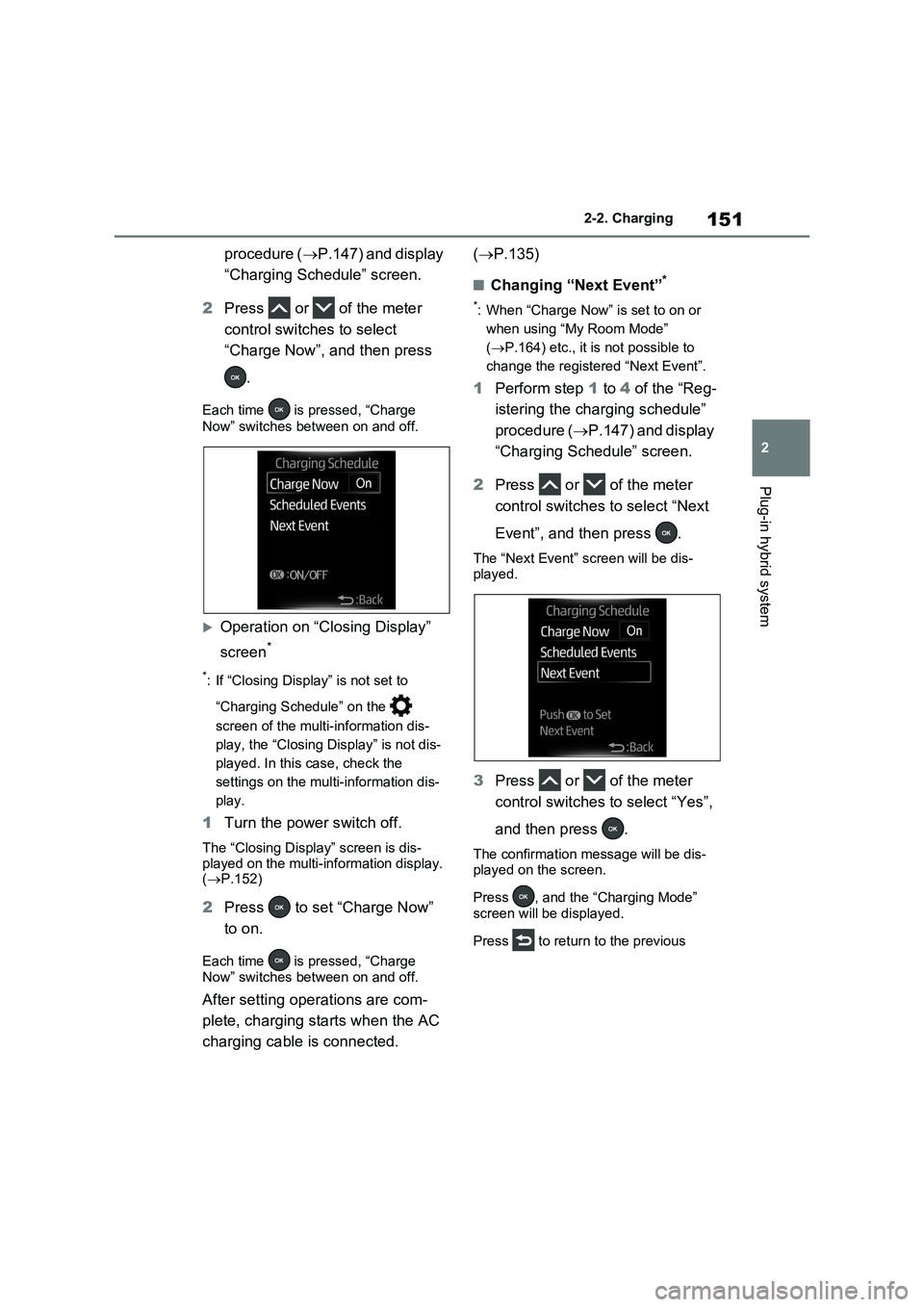
2Press or of the meter
control switches to select
“Charge Now”, and then press
.
Each time is pressed, “Charge
Now” switches between on and off.
Operation on “Closing Display”
screen
*
*: If “Closing Display” is not set to
“Charging Schedule” on the
screen of the multi-information dis-
play, the “Closing Display” is not dis-
played. In this case, check the
settings on the multi-information dis-
play.
1Turn the power switch off.
The “Closing Display” screen is dis-
played on the multi-information display.
(P.152)
2Press to set “Charge Now”
to on.
Each time is pressed, “Charge
Now” switches between on and off.
After setting operations are com-
plete, charging starts when the AC
charging cable is connected. (P.135)
■Changing “Next Event”*
*: When “Charge Now” is set to on or
when using “My Room Mode”
(P.164) etc., it is not possible to
change the registered “Next Event”.
1Perform step 1 to 4 of the “Reg-
istering the charging schedule”
procedure (P.147) and display
“Charging Schedule” screen.
2Press or of the meter
control switches to select “Next
Event”, and then press .
The “Next Event” screen will be dis-
played.
3Press or of the meter
control switches to select “Yes”,
and then press .
The confirmation message will be dis-
played on the screen.
Press , and the “Charging Mode”
screen will be displayed.
Press to return to the previous
Page 159 of 718
157
2 2-2. Charging
Plug-in hybrid system
procedure (P.153) and display
“Charging Schedule” screen.
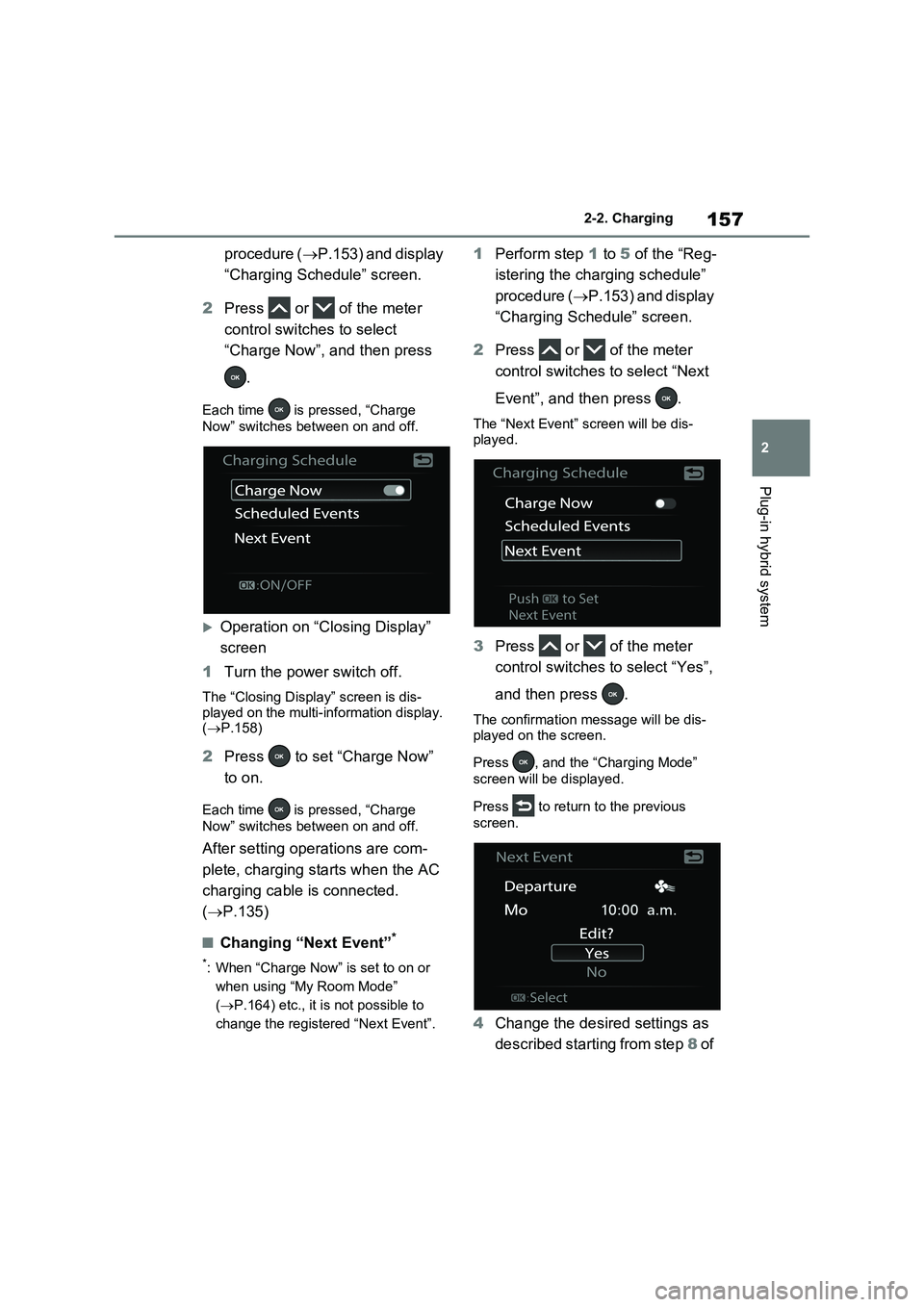
2Press or of the meter
control switches to select
“Charge Now”, and then press
.
Each time is pressed, “Charge
Now” switches between on and off.
Operation on “Closing Display”
screen
1Turn the power switch off.
The “Closing Display” screen is dis-
played on the multi-information display.
(P.158)
2Press to set “Charge Now”
to on.
Each time is pressed, “Charge
Now” switches between on and off.
After setting operations are com-
plete, charging starts when the AC
charging cable is connected.
(P.135)
■Changing “Next Event”*
*: When “Charge Now” is set to on or
when using “My Room Mode”
(P.164) etc., it is not possible to
change the registered “Next Event”.
1Perform step 1 to 5 of the “Reg-
istering the charging schedule”
procedure (P.153) and display
“Charging Schedule” screen.
2Press or of the meter
control switches to select “Next
Event”, and then press .
The “Next Event” screen will be dis-
played.
3Press or of the meter
control switches to select “Yes”,
and then press .
The confirmation message will be dis-
played on the screen.
Press , and the “Charging Mode”
screen will be displayed.
Press to return to the previous
screen.
4Change the desired settings as
described starting from step 8 of
Page 166 of 718
1642-2. Charging
1Connect the AC charging cable
to the vehicle and start charging
2Turn the power switch on during
charging
The setting screen of “My Room Mode”
is displayed automatically on the multi-
information display.
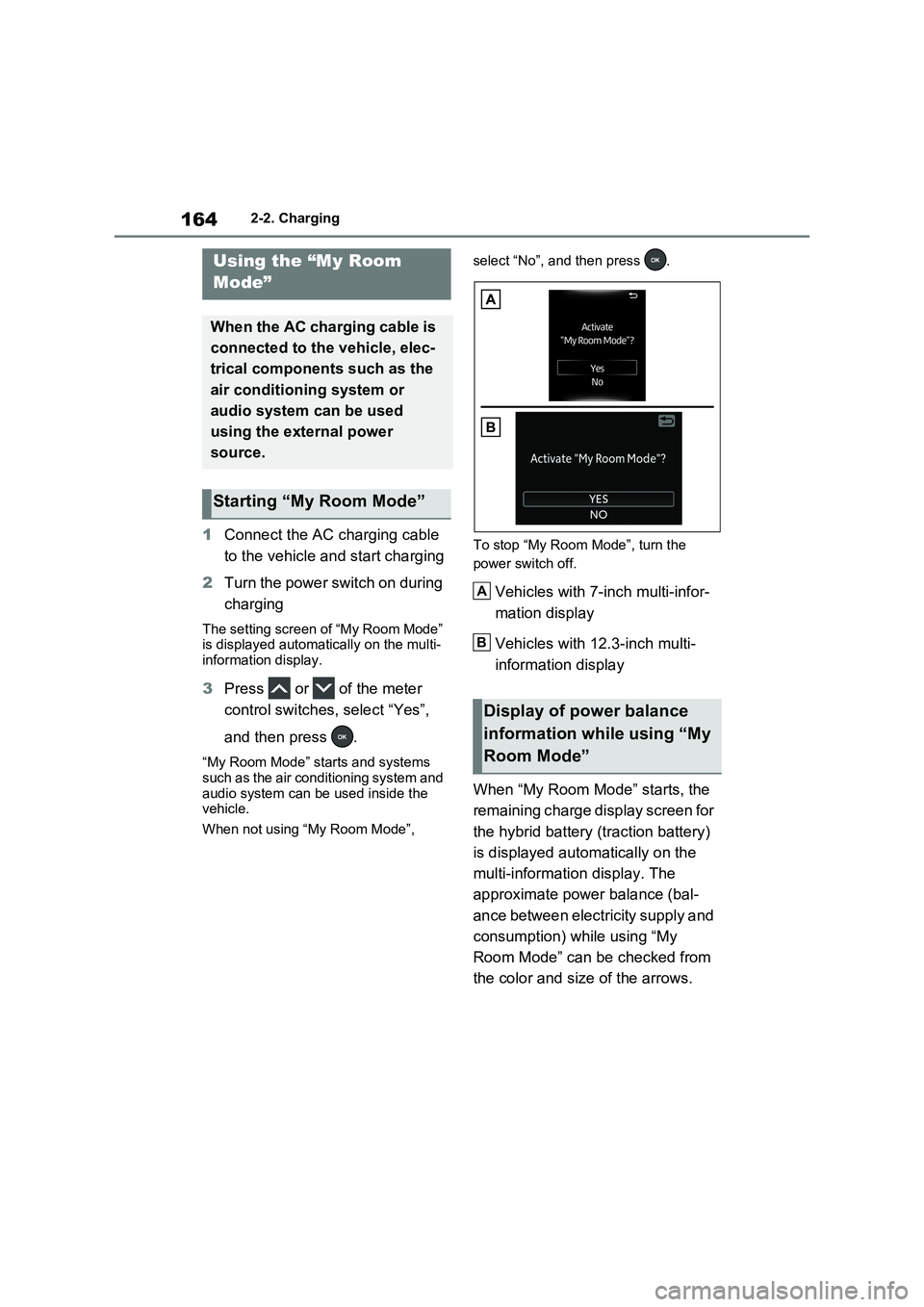
3Press or of the meter
control switches, select “Yes”,
and then press .
“My Room Mode” starts and systems
such as the air conditioning system and
audio system can be used inside the
vehicle.
When not using “My Room Mode”, select “No”, and then press .
To stop “My Room Mode”, turn the
power switch off.
Vehicles with 7-inch multi-infor-
mation display
Vehicles with 12.3-inch multi-
information display
When “My Room Mode” starts, the
remaining charge display screen for
the hybrid battery (traction battery)
is displayed automatically on the
multi-information display. The
approximate power balance (bal-
ance between electricity supply and
consumption) while using “My
Room Mode” can be checked from
the color and size of the arrows.
Using the “My Room
Mode”
When the AC charging cable is
connected to the vehicle, elec-
trical components such as the
air conditioning system or
audio system can be used
using the external power
source.
Starting “My Room Mode”
Display of power balance
information while using “My
Room Mode”
A
B
Page 167 of 718
165
2 2-2. Charging
Plug-in hybrid system
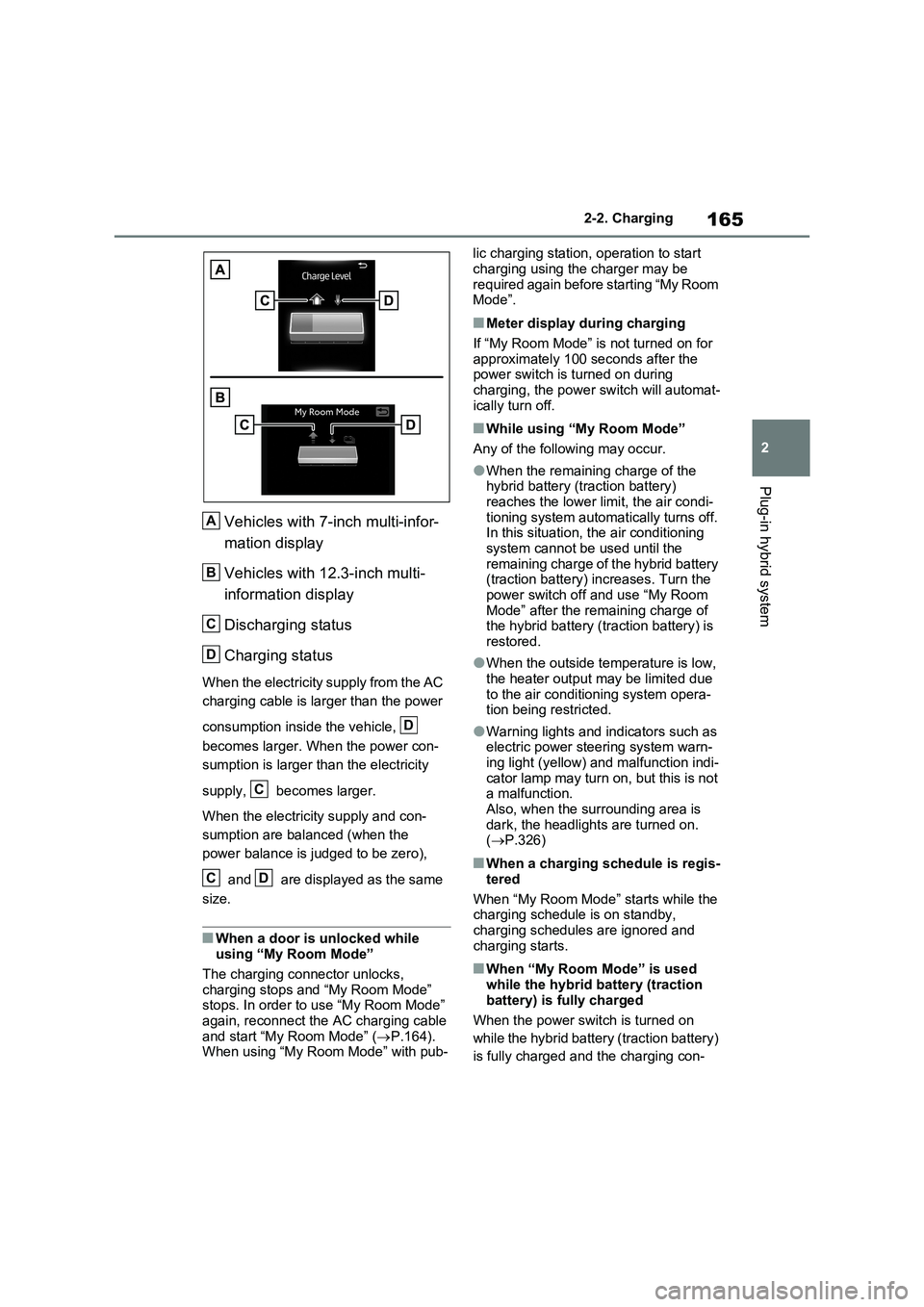
Vehicles with 7-inch multi-infor-
mation display
Vehicles with 12.3-inch multi-
information display
Discharging status
Charging status
When the electricity supply from the AC
charging cable is larger than the power
consumption inside the vehicle,
becomes larger. When the power con-
sumption is larger than the electricity
supply, becomes larger.
When the electricity supply and con-
sumption are balanced (when the
power balance is judged to be zero),
and are displayed as the same
size.
■When a door is unlocked while
using “My Room Mode”
The charging connector unlocks,
charging stops and “My Room Mode”
stops. In order to use “My Room Mode”
again, reconnect the AC charging cable
and start “My Room Mode” (P.164).
When using “My Room Mode” with pub-lic charging station, operation to start
charging using the charger may be
required again before starting “My Room
Mode”.
■Meter display during charging
If “My Room Mode” is not turned on for
approximately 100 seconds after the
power switch is turned on during
charging, the power switch will automat-
ically turn off.
■While using “My Room Mode”
Any of the following may occur.
●When the remaining charge of the
hybrid battery (traction battery)
reaches the lower limit, the air condi-
tioning system automatically turns off.
In this situation, the air conditioning
system cannot be used until the
remaining charge of the hybrid battery
(traction battery) increases. Turn the
power switch off and use “My Room
Mode” after the remaining charge of
the hybrid battery (traction battery) is
restored.
●When the outside temperature is low,
the heater output may be limited due
to the air conditioning system opera-
tion being restricted.
●Warning lights and indicators such as
electric power steering system warn-
ing light (yellow) and malfunction indi-
cator lamp may turn on, but this is not
a malfunction.
Also, when the surrounding area is
dark, the headlights are turned on.
(P.326)
■When a charging schedule is regis-
tered
When “My Room Mode” starts while the
charging schedule is on standby,
charging schedules are ignored and
charging starts.
■When “My Room Mode” is used
while the hybrid battery (traction
battery) is fully charged
When the power switch is turned on
while the hybrid battery (traction battery)
is fully charged and the charging con-
A
B
C
D
D
C
CD
Page 168 of 718
1662-2. Charging
nector that supplies power is connected,
“Charging Port Lid is Open” is displayed
on the multi-information display. In this
case, press of the meter control
switches to display the setting screen of
“My Room Mode”, and then select “My
Room Mode”.
When “My Room Mode” is used while the hybrid battery (traction battery) is
fully charged, the electric power of the hybrid battery (traction battery) may be
consumed. In this case, charging may be performed again.
■When a message related to “My Room Mode” is displayed
When a message is displayed on the multi-information display while using or attempting to start “My Room Mode”,
take the following correction proce- dures.
●“Traction battery is too low for “My Room Mode””
There is insufficient remaining charge in
the hybrid battery (traction battery) for
starting “My Room Mode”.
Wait until the charge of the hybrid bat-
tery (traction battery) increases, then
start “My Room Mode”.
●““My Room Mode” has stopped due to low traction battery”
The remaining charge in the hybrid bat-
tery (traction battery) is insufficient.
Stop using “My Room Mode” and
charge the hybrid battery (traction bat-
tery).
●““My Room Mode” will stop when trac- tion battery is too low Reduce power usage to continue using “My Room
Mode””
The power consumption inside the vehi-
cle is greater than the power being
charged to the hybrid battery (traction
battery), and the remaining charge of
the hybrid battery (traction battery) is
low.*
• “My Room Mode” will end unless the
power consumption inside the vehicle is improved.• To continue using “My Room Mode”,
turn off the power of systems such as the air conditioning system and audio system to increase the remaining
charge of the hybrid battery (traction battery).*: The power balance status during “My
Room Mode” can be checked from the
remaining charge display screen for
the hybrid battery (traction battery)
displayed on the multi-information dis-
play. ( P.164)
WARNING
■Cautions for using “My Room
Mode”
Make sure to observe the following precautions.
Failure to do so may result in serious health problems or even death.
●Do not leave children, people who need assistance, or pets inside the vehicle. The system may turn off
automatically and the interior tem- perature may become high or low, resulting in heat stroke, dehydration
or hypothermia. Devices such as the wipers can also be used, which may lead to mistaken operation and
an accident.
●Check the safety around the vehicle
carefully before use.