tires TOYOTA RAV4 PLUG-IN HYBRID 2023 Owners Manual
[x] Cancel search | Manufacturer: TOYOTA, Model Year: 2023, Model line: RAV4 PLUG-IN HYBRID, Model: TOYOTA RAV4 PLUG-IN HYBRID 2023Pages: 718, PDF Size: 167.55 MB
Page 6 of 718
4TABLE OF CONTENTS
GPF (Gasoline Particulate Fil-
ter) system ........................ 414
Driving assist systems ........ 415
5-6. Driving tips
Winter driving tips ............... 422
Utility vehicle precautions ... 425
6-1. Using the air conditioning
system and defogger
Automatic air conditioning sys-
tem .................................... 430
Remote Air Conditioning Sys-
tem .................................... 438
Heated steering wheel/Front
seat heaters/Front seat heat-
ers and ventilators/Rear seat
heaters.............................. 440
6-2. Using the interior lights
Interior lights list .................. 443
6-3. Using the storage features
List of storage features ....... 445
Luggage compartment features
.......................................... 449
6-4. Using the other interior fea-
tures
Other interior features ......... 453
7-1. Maintenance and care
Cleaning and protecting the
vehicle exterior ................. 466
Cleaning and protecting the
vehicle interior .................. 469
7-2. Maintenance
Maintenance requirements . 472
7-3. Do-it-yourself maintenance
Do-it-yourself service precau-
tions .................................. 474
Hood ................................... 476
Positioning a floor jack ........ 477
Engine compartment........... 479
12-volt battery ..................... 484
Tires .................................... 487
Tire inflation pressure ......... 498
Wheels ................................ 499
Air conditioning filter ........... 500
Cleaning the DC/DC Converter
air intake vent and filter .... 504
Wiper insert replacement .... 508
Electronic key battery ......... 511
Checking and replacing fuses
.......................................... 513
Light bulbs .......................... 516
8-1. Essential information
Emergency flashers ............ 526
If your vehicle has to be stopped
in an emergency ............... 526
If the vehicle is submerged or
water on the road is rising 527
8-2. Steps to take in an emergency
If your vehicle needs to be
towed ................................ 529
If you think something is wrong
.......................................... 532
If a warning light turns on or a
warning buzzer sounds..... 534
6Interior features
7Maintenance and care
8When trouble arises
Page 15 of 718
13Pictorial index
Precautions against winter season ................................................. P.422
To prevent freezing (windshield wiper de-icer)
*1............................. P.435
Precautions against car wash ......................................................... P.467
Replacing the wiper insert............................................................... P.508
Fuel filler door ............................................................................... P.336
Refueling method ............................................................................ P.336
Fuel type/fuel tank capacity ............................................................ P.586
Charging port ................................................................................ P.106
Charging method ............................................................................ P.127
Tires ............................................................................................... P.487
Tire size/inflation pressure .............................................................. P.590
Winter tires/tire chain ...................................................................... P.422
Checking/rotation/tire pressure warning system ............................. P.487
Coping with flat tires................................................................ P.548, 559
Hood ............................................................................................... P.476
Opening .......................................................................................... P.476
Engine oil ........................................................................................ P.587
Coping with overheat ...................................................................... P.578
Warning messages ......................................................................... P.544
Headlights/front position lights/daytime running lights ........... P.326
Turn signal lights .......................................................................... P.319
Front fog lights.............................................................................. P.331
Stop lights/tail lights..................................................................... P.326
Tail lights ....................................................................................... P.326
Back-up lights
Shifting the shift lever to R .............................................................. P.315
Light bulbs of the exterior lights for driving
(Replacing method: P.516, Watts: P.591)
E
F
G
H
I
J
K
L
M
Page 84 of 718
821-4. Theft deterrent system
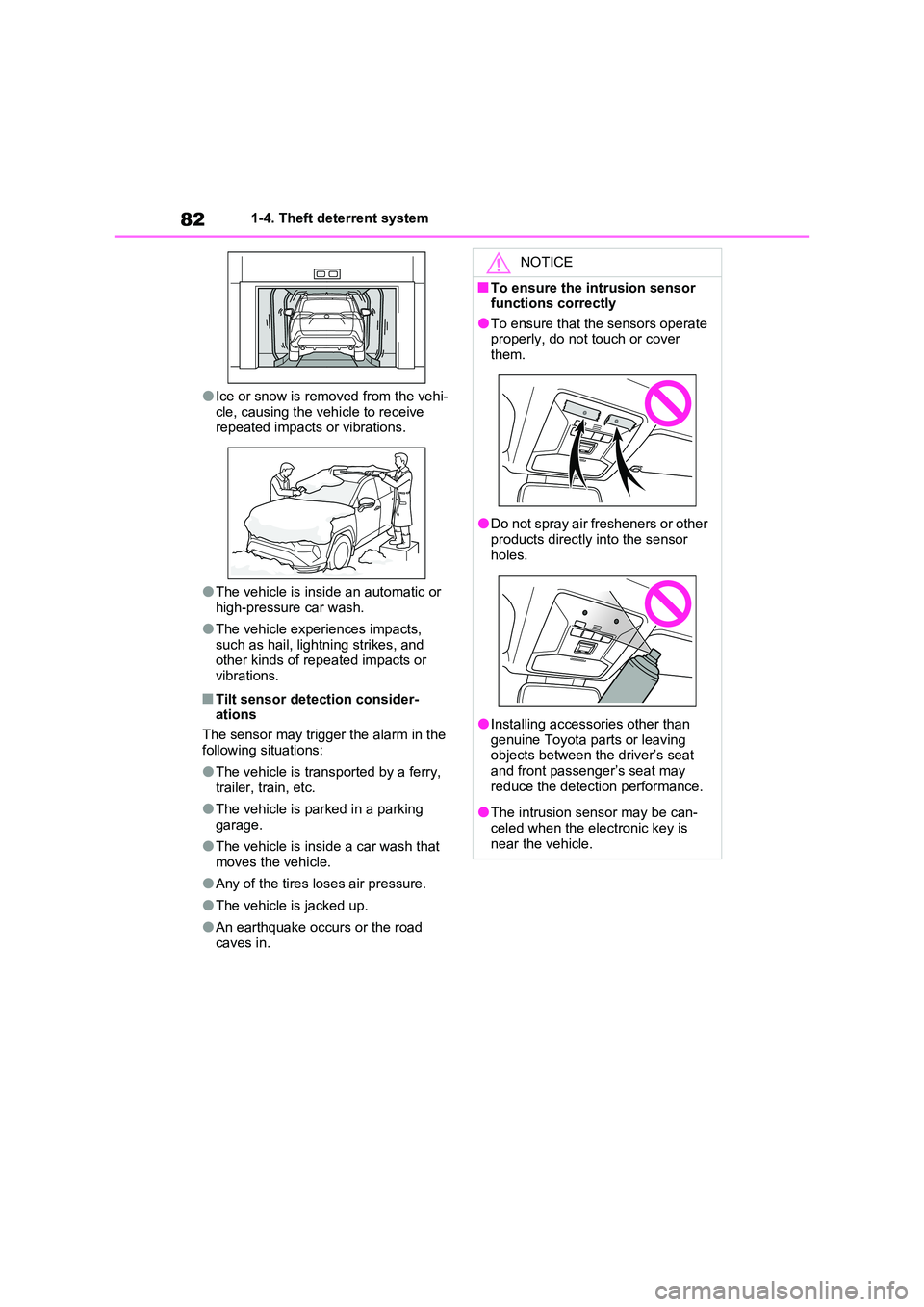
●Ice or snow is removed from the vehi-
cle, causing the vehicle to receive repeated impacts or vibrations.
●The vehicle is inside an automatic or high-pressure car wash.
●The vehicle experiences impacts, such as hail, lightning strikes, and other kinds of repeated impacts or
vibrations.
■Tilt sensor detection consider- ations
The sensor may trigger the alarm in the
following situations:
●The vehicle is transported by a ferry,
trailer, train, etc.
●The vehicle is parked in a parking
garage.
●The vehicle is inside a car wash that
moves the vehicle.
●Any of the tires loses air pressure.
●The vehicle is jacked up.
●An earthquake occurs or the road caves in.
NOTICE
■To ensure the intrusion sensor functions correctly
●To ensure that the sensors operate properly, do not touch or cover them.
●Do not spray air fresheners or other products directly into the sensor
holes.
●Installing accessories other than
genuine Toyota parts or leaving objects between the driver’s seat and front passenger’s seat may
reduce the detection performance.
●The intrusion sensor may be can-
celed when the electronic key is near the vehicle.
Page 104 of 718
1022-1. Plug-in hybrid system
to EV mode or AUTO EV/HV
mode after leaving the freeway.
(P.86)
Turn the “A/C” switch off when it
is not needed. Doing so can help
reduce excessive electricity and
fuel consumption.
In summer: When the ambient tem-
perature is high, use the recirculated air
mode. Doing so will help to reduce the
burden on the air conditioning system
and reduce electricity and fuel con-
sumption as well.
In winter: Avoid excessive and unnec-
essary use of the heater. Usage of the
heated steering wheel (if equipped) and
seat heaters are effective. (P.440)
Using the Remote Air Condition-
ing System (P.438) while the
AC charging cable is connected
to the vehicle can reduce elec-
tricity consumption immediately
after starting off by operating air
conditioning mainly using elec-
tricity from an external power
source.
When setting the charging
schedule, setting the charging
mode to “Departure” or “Depar-
ture time” and “Climate Prep” or
“Climate preparation” to on can
reduce electricity consumption
immediately after starting off by
operating air conditioning before
charging is completed. (P.144)Make sure to check the tire inflation
pressure frequently. If there is
improper tire inflation pressure in
the tires, the EV driving range will
become shorter, and fuel consump-
tion when in HV mode will increase.
Also, as snow tires can cause large
amounts of friction, their use on dry
roads can lead to increased fuel
and electricity consumption.
Carrying heavy luggage will lead to
poor fuel economy. Avoid carrying
unnecessary luggage. Installing a
large roof rack will also cause poor
fuel economy.
Since the gasoline engine starts up
and cuts out automatically, warm-
ing up is not necessary.
Air conditioning
Checking tire inflation pres-
sure
Luggage
Warming up before driving
Page 107 of 718
105
2 2-1. Plug-in hybrid system
Plug-in hybrid system
A pressure level 50 kPa (0.5 kgf/cm2 or
bar, 7 psi) lower than the specified
value will cause a worsening of several
percentage points.
■When driving on highways,
use the EV/HV mode selection
switch to drive in HV mode
The power consumption will
increase significantly if the vehicle
is driven in EV mode on highways.
■Do not load unnecessary
objects in the vehicle
Driving with objects weighing 100
kg (220 lb.) in the vehicle will
worsen the electrical and fuel effi-
ciency by approximately 3%.
Air resistance also greatly affects
electrical and fuel efficiency.
Remove any exterior accessories
such as a roof luggage carrier when
they are not being used.
The running resistance of snow
tires is high and they will worsen
electrical and fuel efficiency.
Replace them with standard tires
as soon as they are no longer
needed.
■Know your vehicle’s electrical
and fuel efficiency
If you know your vehicle’s daily
electrical and fuel efficiency, you
will understand the benefits of Eco
drive.
Use the Power Consumption/Fuel
Economy, ECO Accelerator Guid-
ance/“Eco Score” and other data
displayed on the multi-information display.
The following indicate that charging
has been carried out properly.
The charging indicator of the
charging port turns off
“Charging Complete” is dis-
played on the multi-information
display when a door is opened
with the power switch off
(P.131)
Regardless of the type of power
source or whether the charging
schedule function is used, charging
is completed if the above can be
confirmed.
Charging-related messages: P.172
Display when charging is
completed
Page 207 of 718
205
3 3-1. Instrument cluster
Vehicle status information and indicators
setting (since the system was
started or between resets).
(P.206)
Use the displayed information as a ref-
erence only.
Following items will be displayed.
“Trip”
• “Average Speed”: Displays the aver-
age vehicle speed since hybrid sys-
tem start
*
• “Distance”: Displays the distance
driven since hybrid system start*
• “Total Time”: Displays the elapsed
time since hybrid system start*
*
: These items are reset each time the
hybrid system stops.
“Total”
• “Average Speed”: Displays the aver-
age vehicle speed since the display
was reset
*
• “Distance”: Displays the distance
driven since the display was reset*
• “Total Time”: Displays the elapsed
time since the display was reset*
*
: To reset, display the desired item and
press and hold .
■Energy monitor
P.226
■Tire pressure
P.488
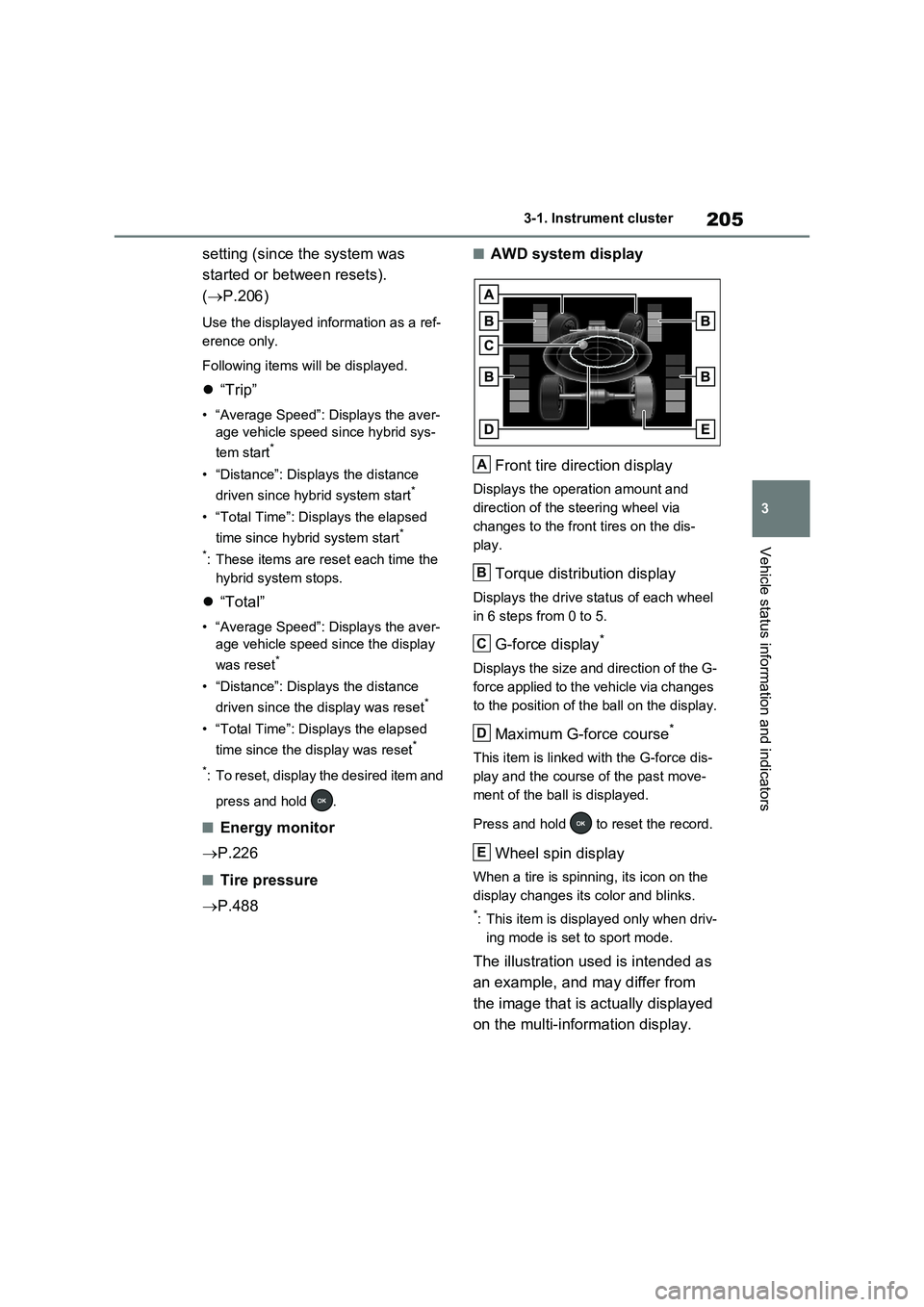
■AWD system display
Front tire direction display
Displays the operation amount and
direction of the steering wheel via
changes to the front tires on the dis-
play.
Torque distribution display
Displays the drive status of each wheel
in 6 steps from 0 to 5.
G-force display*
Displays the size and direction of the G-
force applied to the vehicle via changes
to the position of the ball on the display.
Maximum G-force course*
This item is linked with the G-force dis-
play and the course of the past move-
ment of the ball is displayed.
Press and hold to reset the record.
Wheel spin display
When a tire is spinning, its icon on the
display changes its color and blinks.
*: This item is displayed only when driv-
ing mode is set to sport mode.
The illustration used is intended as
an example, and may differ from
the image that is actually displayed
on the multi-information display.
A
B
C
D
E
Page 229 of 718
227
3 3-1. Instrument cluster
Vehicle status information and indicators
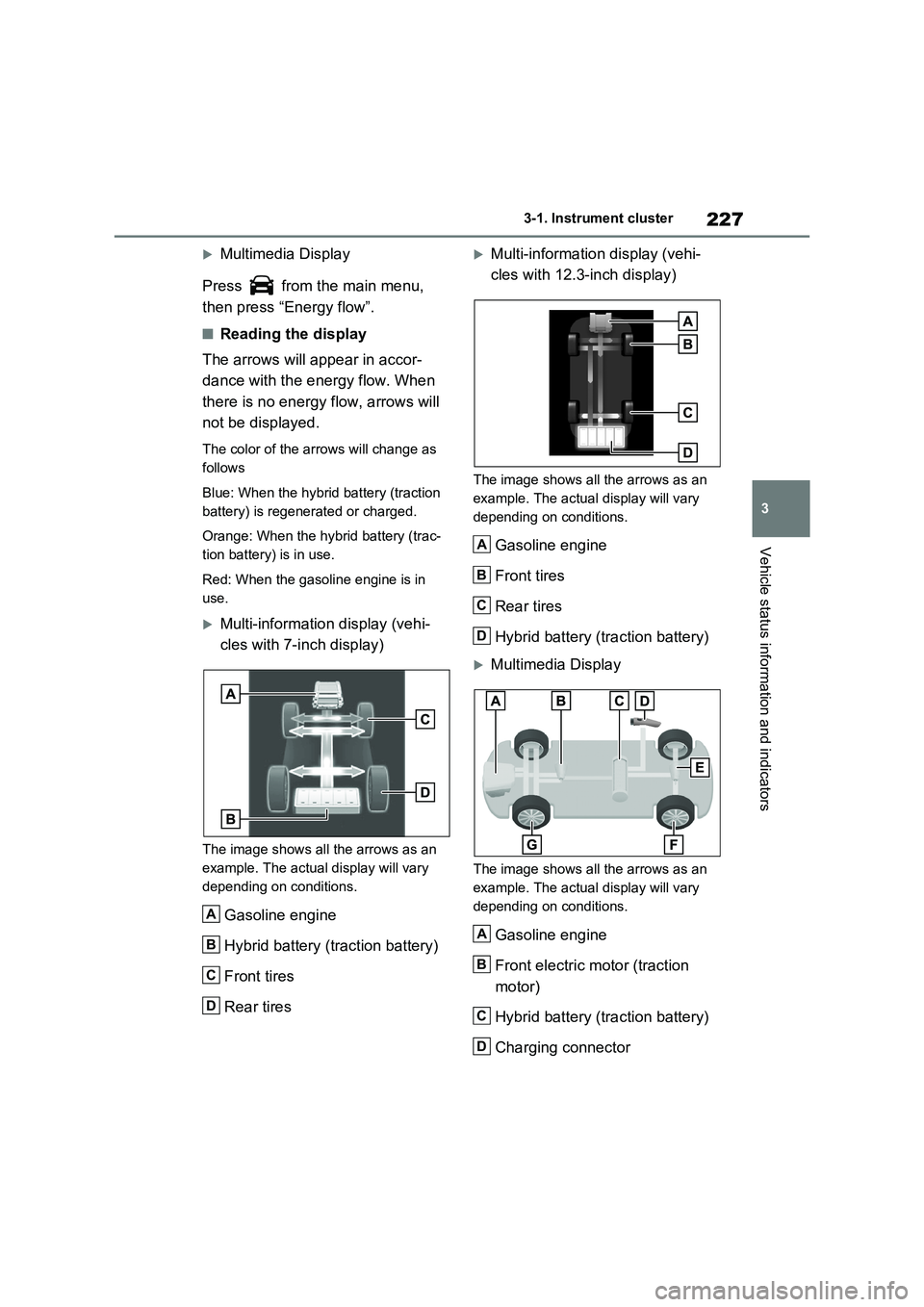
Multimedia Display
Press from the main menu,
then press “Energy flow”.
■Reading the display
The arrows will appear in accor-
dance with the energy flow. When
there is no energy flow, arrows will
not be displayed.
The color of the arrows will change as
follows
Blue: When the hybrid battery (traction
battery) is regenerated or charged.
Orange: When the hybrid battery (trac-
tion battery) is in use.
Red: When the gasoline engine is in
use.
Multi-information display (vehi-
cles with 7-inch display)
The image shows all the arrows as an
example. The actual display will vary
depending on conditions.
Gasoline engine
Hybrid battery (traction battery)
Front tires
Rear tires
Multi-information display (vehi-
cles with 12.3-inch display)
The image shows all the arrows as an
example. The actual display will vary
depending on conditions.
Gasoline engine
Front tires
Rear tires
Hybrid battery (traction battery)
Multimedia Display
The image shows all the arrows as an
example. The actual display will vary
depending on conditions.
Gasoline engine
Front electric motor (traction
motor)
Hybrid battery (traction battery)
Charging connector
A
B
C
D
A
B
C
D
A
B
C
D
Page 230 of 718
2283-1. Instrument cluster
Rear electric motor (traction
motor)
Rear tires
Front tires
■Color of the hybrid battery (traction
battery) on the center display
It will be green when the hybrid battery
(traction battery) is being charged, and
yellow when the hybrid battery (traction
battery) is being used.
■Remaining charge amount warning
of hybrid battery (traction battery)
●The buzzer sounds intermittently
when the hybrid battery (traction bat-
tery) remains without charging while
the shift lever is in N, or the remaining
charge amount drops below a certain
level. If the remaining charge amount
drops further, the buzzer sounds con-
tinuously.
●When a warning message is shown
on the multi-information display and
the buzzer sounds, follow the instruc-
tions displayed on the screen to per-
form troubleshooting.
■Color of the gasoline engine on the
center display
It will be blue when the engine is warm-
ing up, and it will turn to red when the
warming up is finished.
Hybrid system output may be restricted
when the gasoline engine is displayed in
blue.
■Display procedure
Press from the main menu,
then press “Trip information”.
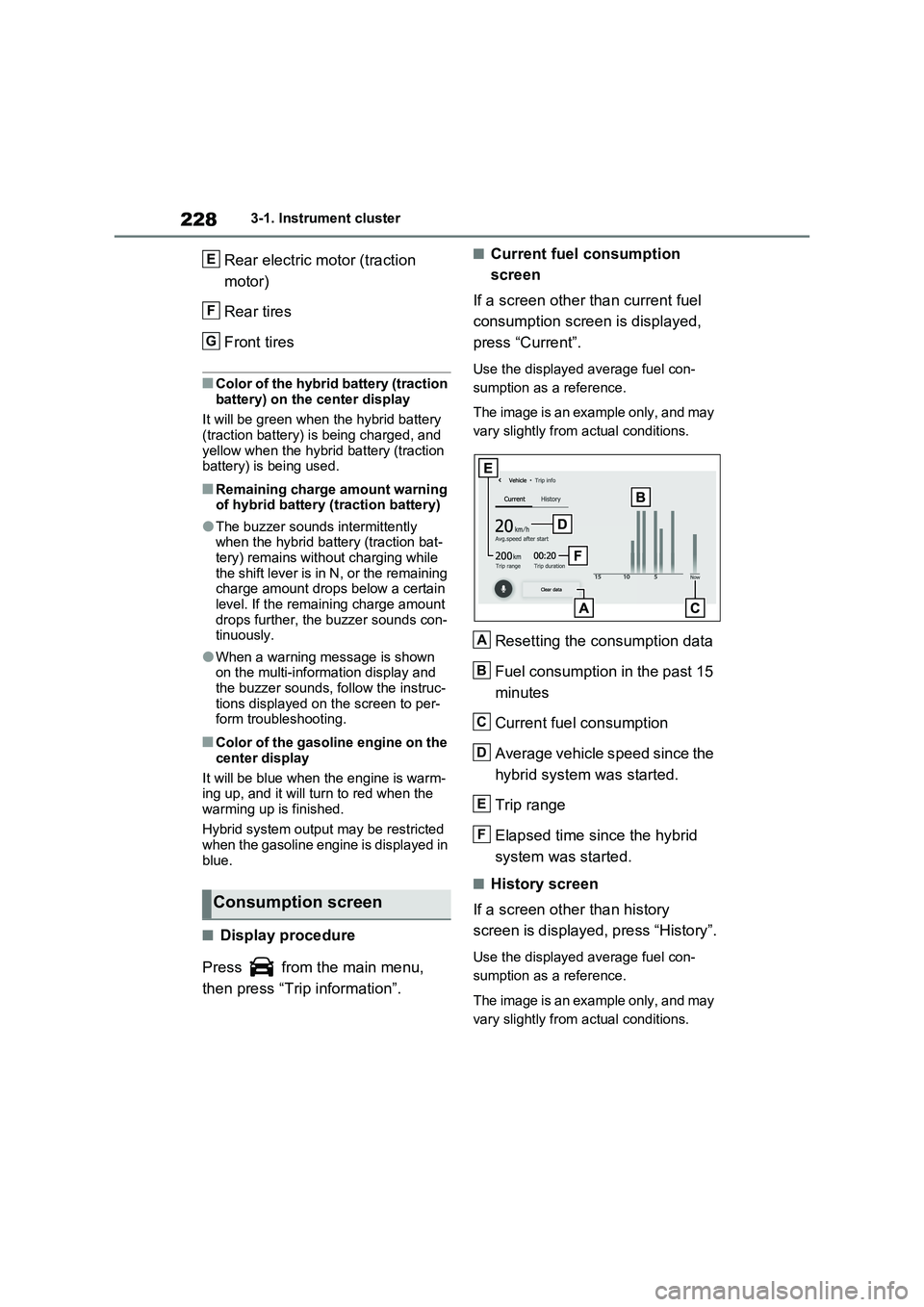
■Current fuel consumption
screen
If a screen other than current fuel
consumption screen is displayed,
press “Current”.
Use the displayed average fuel con-
sumption as a reference.
The image is an example only, and may
vary slightly from actual conditions.
Resetting the consumption data
Fuel consumption in the past 15
minutes
Current fuel consumption
Average vehicle speed since the
hybrid system was started.
Trip range
Elapsed time since the hybrid
system was started.
■History screen
If a screen other than history
screen is displayed, press “History”.
Use the displayed average fuel con-
sumption as a reference.
The image is an example only, and may
vary slightly from actual conditions.
Consumption screen
E
F
G
A
B
C
D
E
F
Page 291 of 718
289
5
5-1. Before driving
Driving
ilar to conventional vehicles, and it is
necessary to refrain from activities such as sudden acceleration. Refer to “Plug-in Hybrid Electric Vehicle driving tips”
( P.100).
■Driving in the rain
●Drive carefully when it is raining,
because visibility will be reduced, the windows may become fogged-up, and the road could be slippery.
●Drive carefully when it starts to rain, as the road surface could be espe-
cially slippery.
●Refrain from high speeds when driv-
ing on an expressway in the rain, because there may be a layer of water between the tires and the road sur-
face, preventing the steering and brakes from operating properly.
■ECO Accelerator Guidance ( P.202)
It is easier to drive in an Eco-friendly manner by driving while referring to the ECO Accelerator Guidance display.
Also, by using the ECO Accelerator Guidance it is easier to increase the “Eco Score” evaluation.
●When starting off: While staying within the ECO Accelerator Guidance range,
gradually depress the accelerator pedal and accelerate to the desired speed. If excessive acceleration is
avoided, the “Start” score will increase.
●When driving: After accelerating to the desired speed, release the accelera-tor pedal and drive at a stable speed
within the ECO Accelerator Guidance range. By keeping the vehicle within the ECO Accelerator Guidance range,
the “Cruise” score will increase.
●When stopping: When stopping the
vehicle, early releasing the accelera- tor pedal will cause the “Stop” score to increase.
■Restraining the hybrid system out-
put (Brake Override System)
●When the accelerator and brake ped-
als are depressed at the same time,
the hybrid system output may be restrained.
●A warning message is displayed on the multi-information display while the system is operating.
■Breaking in your new Toyota
To extend the life of the vehicle, observ- ing the following precautions is recom-mended:
●For the first 300 km (200 miles):Avoid sudden stops.
●For the first 800 km (500 miles):Do not tow a trailer.
●For the first 1000 km (600 miles):• Do not drive at extremely high
speeds. • Avoid sudden acceleration.• Do not drive continuously in low
gears. • Do not drive at a constant speed for extended periods.
■Operating your vehicle in a foreign
country
Comply with the relevant vehicle regis- tration laws and confirm the availability
of the correct fuel. ( P.586)
WARNING
Observe the following precautions. Failure to do so may result in death or
serious injury.
■When starting the vehicle
Always keep your foot on the brake pedal while stopped with the “READY” indicator is illuminated. This
prevents the vehicle from creeping.
Page 295 of 718
293
5
5-1. Before driving
Driving
WARNING
●The brake system consists of 2 or more individual hydraulic systems;
if one of the systems fails, the other will still operate. In this case, the brake pedal should be depressed
more firmly than usual and the braking distance will increase. Have your brakes fixed immediately.
■If the vehicle becomes stuck
Do not spin the wheels excessively
when any of the tires is up in the air, or the vehicle is stuck in sand, mud, etc. This may damage the driveline
components or propel the vehicle for- ward or backward, causing an acci-dent.
NOTICE
■When driving the vehicle
●Do not depress the accelerator and brake pedals at the same time
during driving, as this may restrain the hybrid system output.
●Do not use the accelerator pedal or depress the accelerator and brake
pedals at the same time to hold the vehicle on a hill.
■Avoiding damage to vehicle parts
●Do not turn the steering wheel fully
in either direction and hold it there for an extended period of time.Doing so may damage the power
steering motor.
●When driving over bumps in the
road, drive as slowly as possible to avoid damaging the wheels, under-side of the vehicle, etc.
■If you get a flat tire while driving
A flat or damaged tire may cause the
following situations.
●It may be difficult to control your vehicle.
●The vehicle will make abnormal sounds or vibrations.
●The vehicle will lean abnormally.
Hold the steering wheel firmly and gradually depress the brake pedal to
slow down the vehicle.
Information on what to do in case of a flat tire ( P.548, 559)
■When encountering flooded roads
Do not drive on a road that has flooded after heavy rain, etc. Doing so may cause the following serious dam-
age to the vehicle:
●Engine stalling
●Short in electrical components
●Engine damage caused by water
immersion
In the event that you drive on a
flooded road and the vehicle is flooded, be sure to have any autho-rized Toyota retailer or Toyota autho-
rized repairer, or any reliable repairer check the following:
●Brake function
●Changes in quantity and quality of oil and fluid used for the engine,
hybrid transaxle (front and rear), etc.
●Lubricant condition for the bearings and suspension joints (where possi-ble), and the function of all joints,
bearings, etc.
●Components connected to the trac-
tion battery.
■When parking the vehicle
Always set the parking brake, and shift the shift lever to P. Failure to do so may cause the vehicle to move or
the vehicle may accelerate suddenly if the accelerator pedal is accidentally depressed.