light TOYOTA RAV4 PRIME 2023 Service Manual
[x] Cancel search | Manufacturer: TOYOTA, Model Year: 2023, Model line: RAV4 PRIME, Model: TOYOTA RAV4 PRIME 2023Pages: 662, PDF Size: 25.4 MB
Page 127 of 662
1272-2. Charging
2
Plug-in hybrid system
has accumulated.
■When the outside temperature
is low or high
The level shown on the SOC (State
of Charge) gauge ( P.173, 178)
may drop slightly when the power
switch is turned to ON, even if
charging has bee n completed and
the hybrid battery (traction battery)
is fully charged. However, this does
not indicate a malfunction.
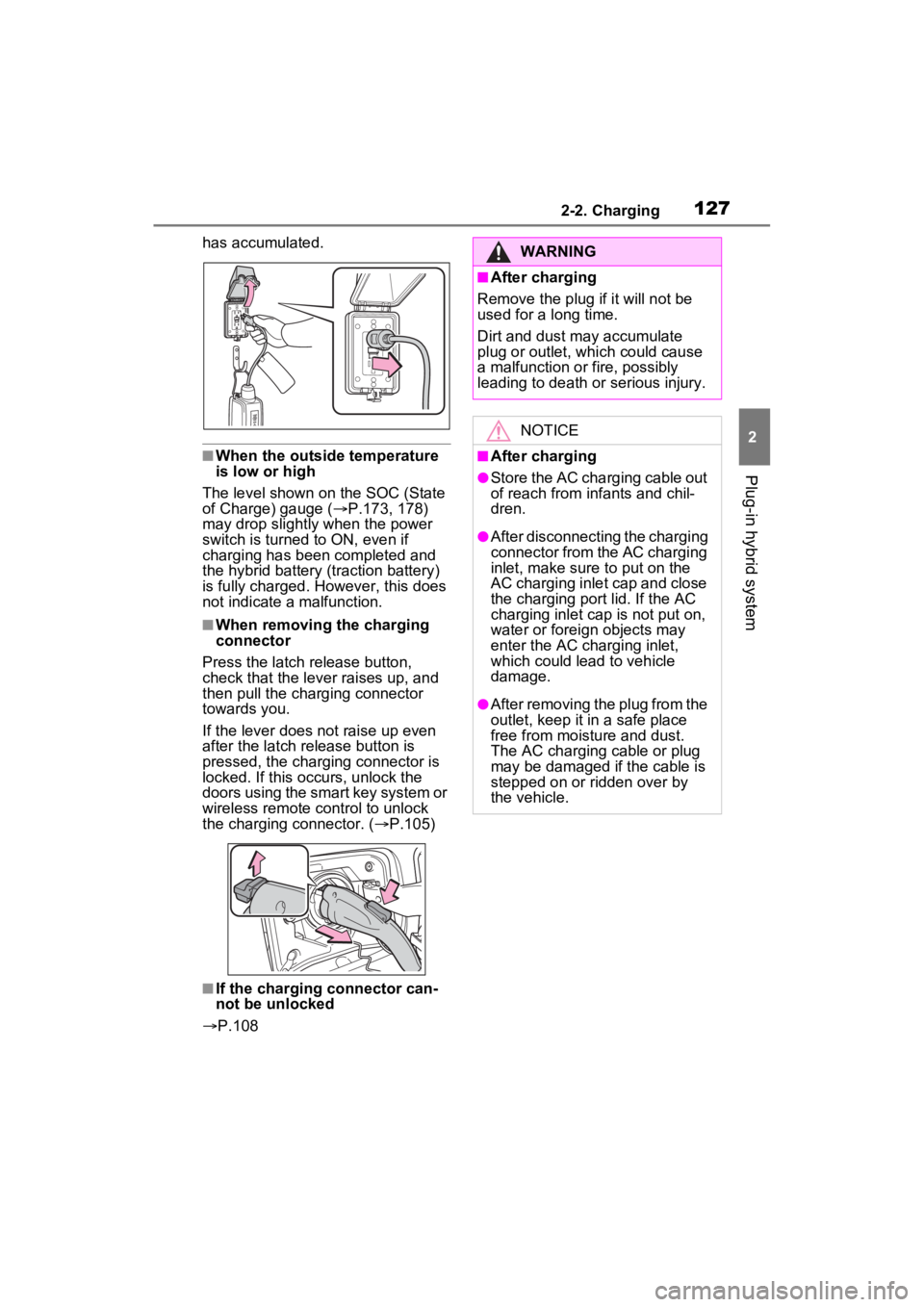
■When removing the charging
connector
Press the latch release button,
check that the lever raises up, and
then pull the charging connector
towards you.
If the lever does not raise up even
after the latch release button is
pressed, the charging connector is
locked. If this occurs, unlock the
doors using the smart key system or
wireless remote control to unlock
the charging connector. ( P.105)
■If the charging connector can-
not be unlocked
P.108
WARNING
■After charging
Remove the plug if it will not be
used for a long time.
Dirt and dust may accumulate
plug or outlet, which could cause
a malfunction or fire, possibly
leading to death or serious injury.
NOTICE
■After charging
●Store the AC charging cable out
of reach from infants and chil-
dren.
●After disconnecting the charging
connector from the AC charging
inlet, make sure to put on the
AC charging inlet cap and close
the charging port lid. If the AC
charging inlet cap is not put on,
water or foreign objects may
enter the AC cha rging inlet,
which could lead to vehicle
damage.
●After removing the plug from the
outlet, keep it in a safe place
free from moisture and dust.
The AC charging cable or plug
may be damaged if the cable is
stepped on or ridden over by
the vehicle.
Page 128 of 662
1282-2. Charging
■Calendar settings
The current date an d time is auto-
matically set using GPS. However, if
the automatic setti ng of the clock is
turned off on the Multimedia Dis-
play, it is necessary to set the calen-
dar on the multi-information display
( P.191, 203). For details, refer to
the “MULTIMEDIA OWNER’S MAN-
UAL”.
If the calendar settings check
screen is displayed when an
attempt is made to register a
charging schedule, make sure that
the calendar settings are correctly. If
the calendar is not set correctly, the
charging schedule function will not
operate properly.
When registering the charging
schedule, the following settings
can be changed.
■Select the charging mode
One of the two following
charging modes can be
selected.
“Start” or “Start at set time”
Starts charging at the set time
*1,
2
and finishes charging when
fully charged.
“Departure” or “Departure
time”
Starts charging to finish at the
set time.
*3, 4
When this setting is selected,
the air conditioning-linked func-
tion can be used.
*1: There might be a slight error in the timing when charging starts
due to the state of the hybrid bat-
tery (traction battery).
*2: Charging schedule function is performed in accordance with
the clock. Before registering the
charging schedule, check and
set the clock to t he proper time.
*3: If the system de termines that
charging cannot be completed
by the set depart ure time, it will
start charging. Check the
charging schedule.
*4: If the outside temperature changes suddenly o r the state of
the power source being used is
changed during charging, the
system may not complete the
charging as estimated.
■Repeated setting
The periodic charging schedule
can be set by selecting your
desired day of the week. (If no
days are selected, charging is
only carried out once.)
Using the charging
schedule function
Charging can be carried out
at the desired time by regis-
tering the charging sched-
ule. Also, it is possible to
set the charging schedule to
one’s preferences, such as
having charging complete
by a certain departure time
or be carried out at the
same time on certain days.
Settings of the charging
schedule function
Page 150 of 662

1502-2. Charging
●When the remaining charge of the
hybrid battery (traction battery)
reaches the lower limit, the air
conditioning system automatically
turns off.
In this situation, the air condition-
ing system cannot be used until
the remaining charge of the hybrid
battery (traction battery)
increases. Turn the power switch
off and use “My Room Mode” after
the remaining charge of the hybrid
battery (traction battery) is
restored.
●When the outside temperature is
low, the heater output may be lim-
ited due to the air conditioning
system operation being restricted.
●Warning lights and indicators such
as electric power steering system
warning light (ye llow) and mal-
function indicator lamp may turn
on, but this is not a malfunction.
Also, when the headlight switch is
in the AUTO position and the sur-
rounding area is dark, the head-
lights are turned on. ( P.321)
■When a charging schedule is
registered
When “My Room Mode” starts while
the charging schedule is on
standby, charging schedules are
ignored and charging starts.
■When “My Room Mode” is used
while the hybrid battery (trac-
tion battery) is fully charged
When the power switch is turned on
while the hybrid battery (traction
battery) is fully charged and the
charging connector that supplies
power is connected, “Charging Port
Lid is Open” is displayed on the
multi-information display. In this
case, press on the meter control
switches to display the setting
screen of “My Room Mode”, and
then select “My Room Mode”.
When “My Room Mode” is used while the hybrid battery (traction
battery) is fully charged, the electric
power of the hybrid battery (traction
battery) may be consumed. In this
case, charging may be performed
again.
■When a message related to “My
Room Mode” is displayed
When a message is displayed on
the multi-informat ion display while
using or attempting to start “My
Room Mode”, take the following cor-
rection procedures.
●“Traction battery is too low for “My
Room Mode””
There is insufficient remaining
charge in the hybrid battery (traction
battery) for starting “My Room
Mode”.
Wait until the char ge of the hybrid
battery (traction battery) increases,
then start “My Room Mode”.
●““My Room Mode” has stopped
due to low traction battery”
The remaining char ge in the hybrid
battery (traction battery) is insuffi-
cient.
Stop using “My Room Mode” and
charge the hybrid battery (traction
battery).
●““My Room Mode” will stop when
traction battery is too low Reduce
power usage to continue using
“My Room Mode””
The power consumption inside the
vehicle is greater than the power
being charged to the hybrid battery
(traction battery), and the remaining
charge of the hybrid battery (traction
battery) is low.
*
• “My Room Mode” will end unless the power consumption inside the
vehicle is improved.
• To continue using “My Room Mode”, turn off the power of sys-
tems such as the air conditioning
Page 163 of 662
1632-2. Charging
2
Plug-in hybrid system
■If “Charging Stopped High Energy Use See Owner’s Manual”
is shown
■If “Charging System Malfunction See Owner’s Manual” is
shown
■If “The Traction Battery Temp is low System put priority on
charging to preserve battery condition” is shown (Alaska and
Canada only)
Likely causeCorrection procedure
Power is being consumed by electri-
cal components of vehicle
Check the following items, and then
carry out charging again.
If the headlights and audio are
turned on, t urn them off.
Turn the power switch off.
If charging cannot be carried out,
even after performing the above, the
auxiliary battery may not be suffi-
ciently charged. Op erate the hybrid
system for approximately 15 minutes
or more to charge the auxiliary bat-
tery.
Likely causeCorrection procedure
Malfunction occurred in charging
systemHave the vehicle inspected by your
Toyota dealer.
Likely causeCorrection procedure
The Hybrid battery ( traction battery)
warming control was operated
( P.113)
When the hybrid battery (traction
battery) warming control operates,
the charging schedule is not used
and charging is performed.
This is a control to protect the hybrid
battery (traction battery), and not a
malfunction.
Page 165 of 662
165
3
3
Vehicle status information and indicators
Vehicle status informa-tion and indicators
3-1. Instrument cluster
Warning lights and indica-tors ............................ 166
Gauges and meters (with 7- inch display) .............. 173
Gauges and meters (with 12.3-inch display) ...... 178
Multi-information display (with 7-inch display) .. 185
Multi-information display (with 12.3-inch display).................................. 196
Head-up display .......... 208
Energy monitor/consump- tion screen................. 212
Page 166 of 662
1663-1. Instrument cluster
3-1.Instrument cluster
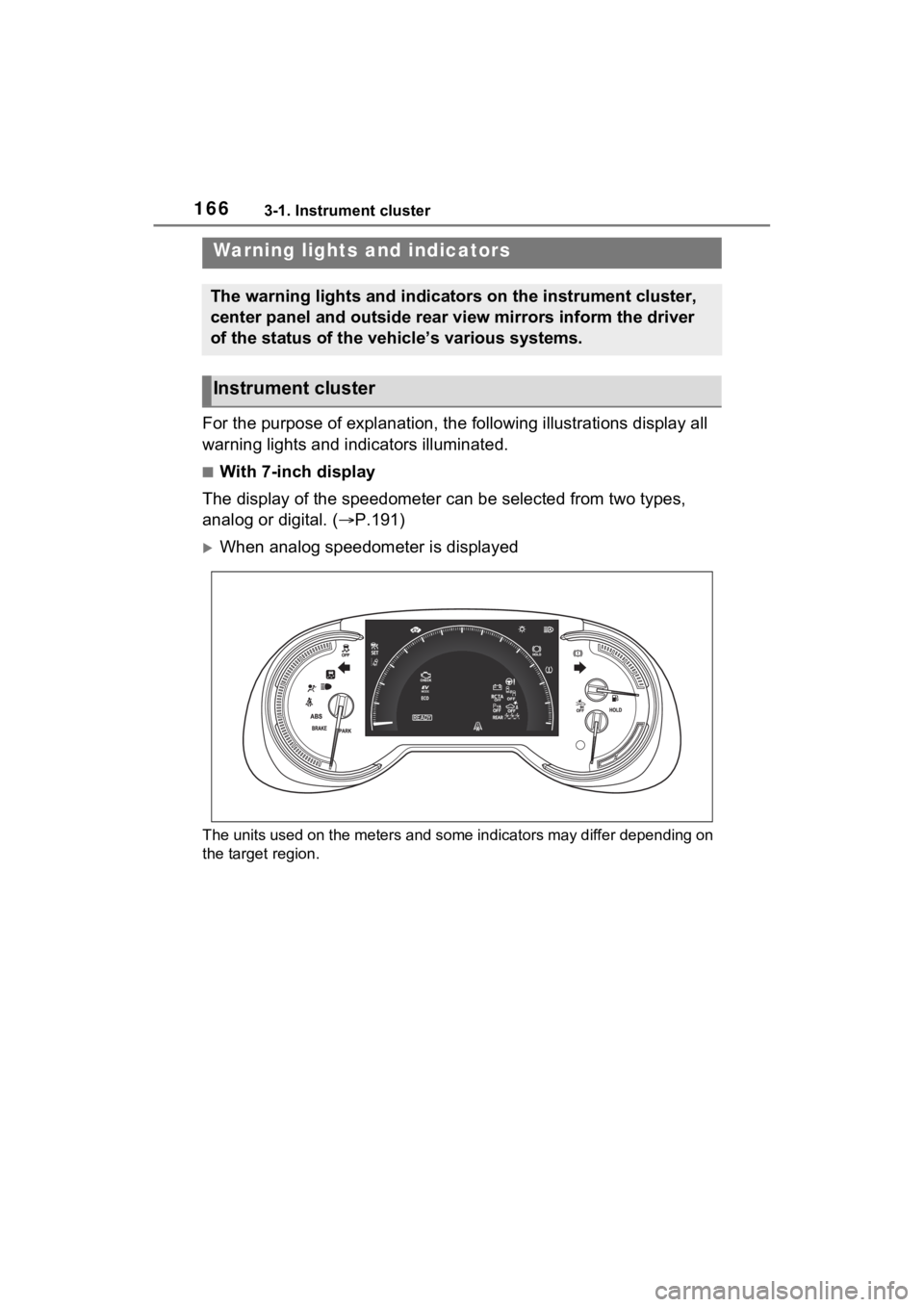
For the purpose of explanation, the following illustrations display all
warning lights and indicators illuminated.
■With 7-inch display
The display of the speedometer can be selected from two types,
analog or digital. ( P.191)
When analog speedometer is displayed
The units used on the meters and some indicators may differ dep ending on
the target region.
Warning lights and indicators
The warning lights and indicators on the instrument cluster,
center panel and outside rear view mirrors inform the driver
of the status of the vehicle’s various systems.
Instrument cluster
Page 168 of 662
1683-1. Instrument cluster
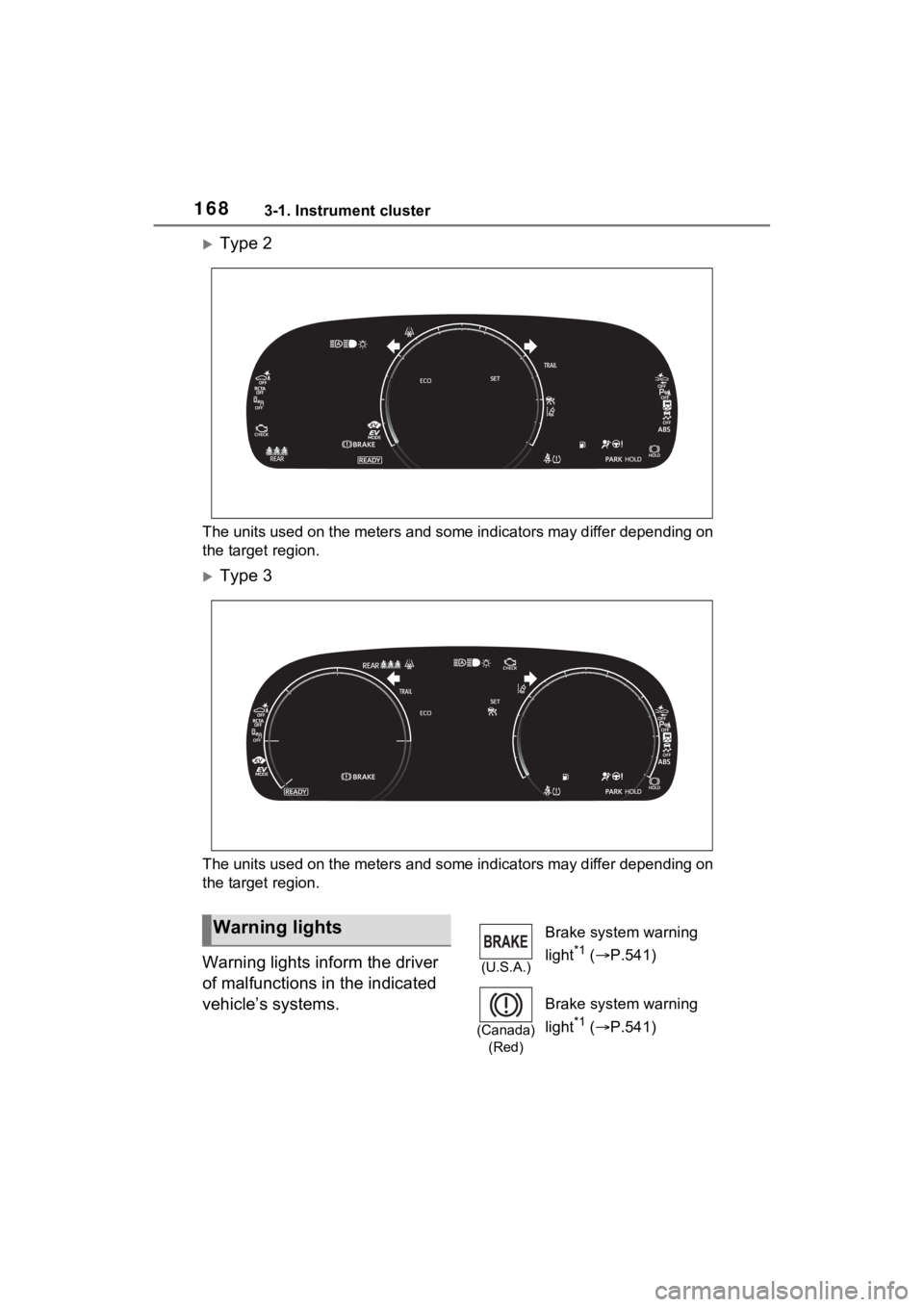
Type 2
The units used on the meters and some indicators may differ depending on
the target region.
Type 3
The units used on the meters and some indicators may differ dep ending on
the target region.
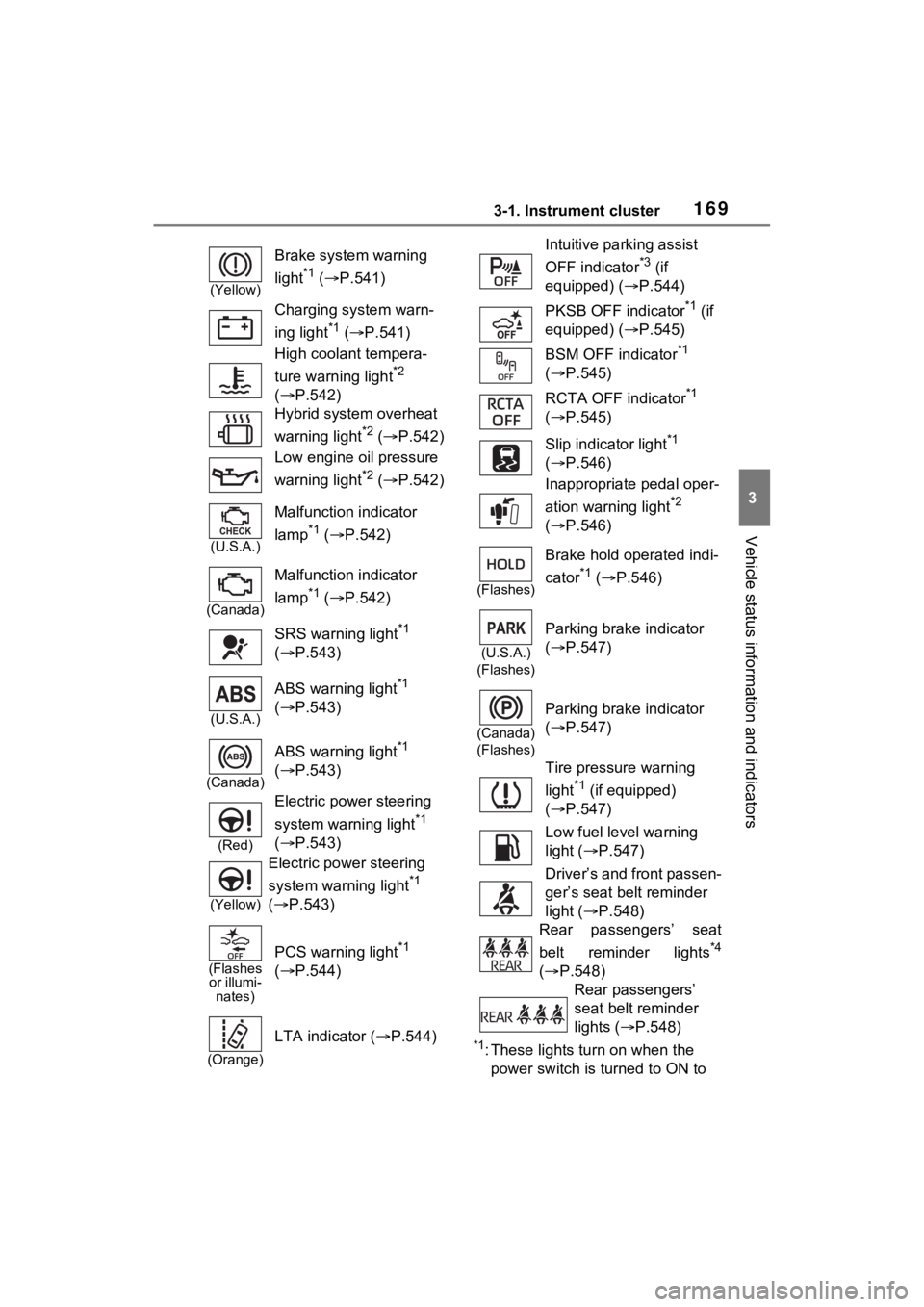
Warning lights inform the driver
of malfunctions in the indicated
vehicle’s systems.
Warning lights
(U.S.A.)
Brake system warning
light
*1 ( P.541)
(Canada)
(Red)
Brake system warning
light
*1 ( P.541)
Page 169 of 662
1693-1. Instrument cluster
3
Vehicle status information and indicators
*1: These lights turn on when the
power switch is turned to ON to
(Yellow)
Brake system warning
light
*1 ( P.541)
Charging system warn-
ing light
*1 ( P.541)
High coolant tempera-
ture warning light
*2
( P.542)
Hybrid system overheat
warning light
*2 ( P.542)
Low engine oil pressure
warning light
*2 ( P.542)
(U.S.A.)
Malfunction indicator
lamp
*1 ( P.542)
(Canada)
Malfunction indicator
lamp
*1 ( P.542)
SRS warning light
*1
( P.543)
(U.S.A.)
ABS warning light*1
( P.543)
(Canada)
ABS warning light*1
( P.543)
(Red)
Electric power steering
system warning light
*1
( P.543)
(Yellow)
Electric power steering
system warning light
*1
( P.543)
(Flashes
or illumi- nates)
PCS warning light*1
( P.544)
(Orange)
LTA indicator ( P.544)
Intuitive parking assist
OFF indicator
*3 (if
equipped) ( P.544)
PKSB OFF indicator
*1 (if
equipped) ( P.545)
BSM OFF indicator
*1
( P.545)
RCTA OFF indicator
*1
( P.545)
Slip indicator light
*1
( P.546)
Inappropriate pedal oper-
ation warning light
*2
( P.546)
(Flashes)
Brake hold operated indi-
cator
*1 ( P.546)
(U.S.A.)
(Flashes)
Parking brake indicator
( P.547)
(Canada)
(Flashes)
Parking brake indicator
( P.547)
Tire pressure warning
light
*1 (if equipped)
( P.547)
Low fuel level warning
light ( P.547)
Driver’s and front passen-
ger’s seat belt reminder
light ( P.548)
Rear passengers’ seat
belt reminder lights
*4
( P.548)
Rear passengers’
seat belt reminder
lights ( P.548)
Page 170 of 662
1703-1. Instrument cluster
indicate that a system check is
being performed. They will turn
off after the hybr id system is on,
or after a few seconds. There
may be a malfunction in a sys-
tem if the light does not come on,
or turn off. Have the vehicle
inspected by your Toyota dealer.
*2: This light illuminates on the multi-informatio n display with a
message.
*3: Intuitive parking assist OFF indi- cator turns on when the power
switch is turned to ON while the
Intuitive parking assist function is
on. It will turn off after a few sec-
onds.
*4: Vehicles with 12.3-inch display
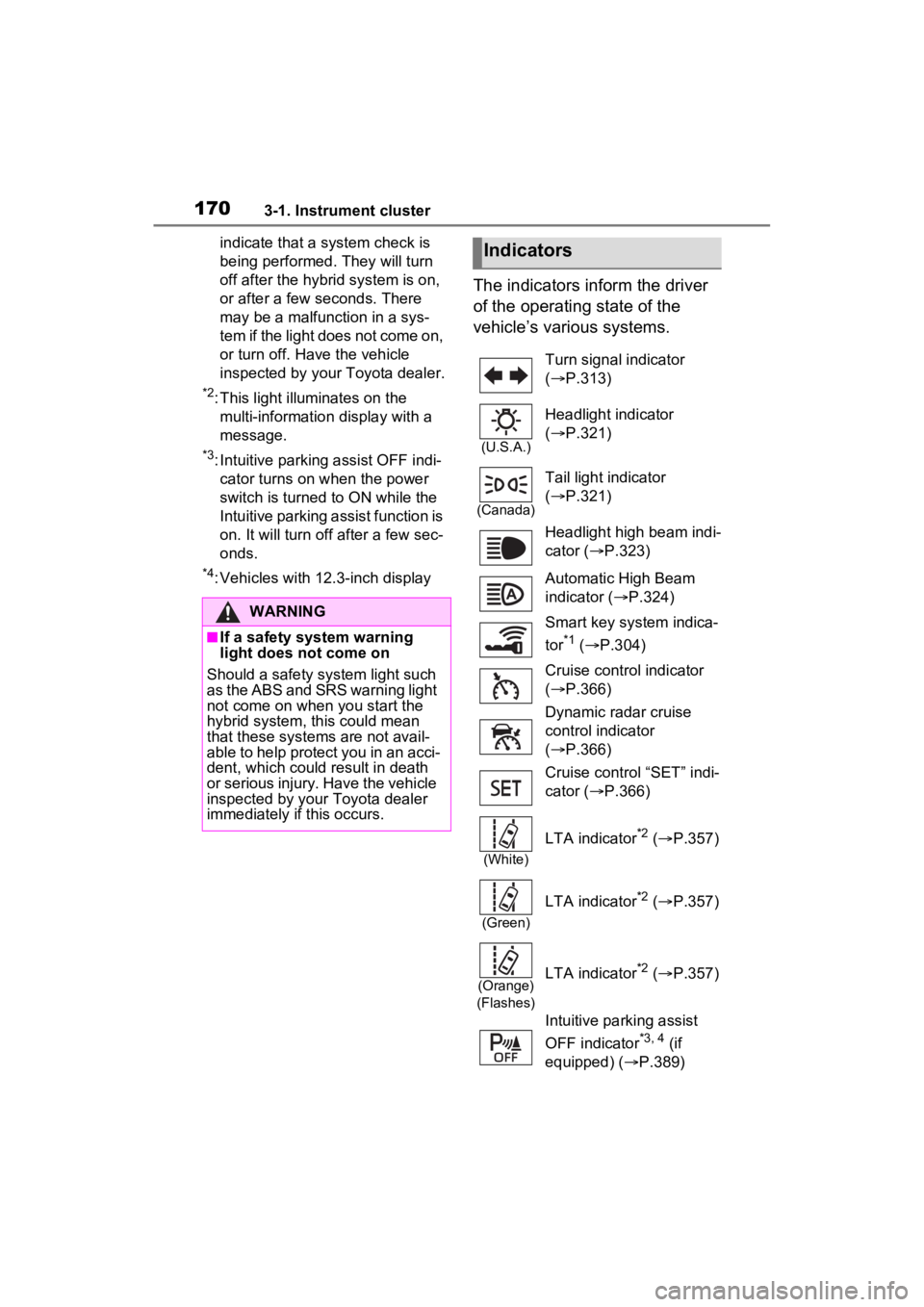
The indicators inform the driver
of the operating state of the
vehicle’s various systems.
WARNING
■If a safety system warning
light does not come on
Should a safety system light such
as the ABS and SR S warning light
not come on when you start the
hybrid system, this could mean
that these systems are not avail-
able to help protect you in an acci-
dent, which could result in death
or serious injury. Have the vehicle
inspected by your Toyota dealer
immediately if this occurs.
Indicators
Turn signal indicator
( P.313)
(U.S.A.)
Headlight indicator
( P.321)
(Canada)
Tail light indicator
( P.321)
Headlight high beam indi-
cator ( P.323)
Automatic High Beam
indicator ( P.324)
Smart key system indica-
tor
*1 ( P.304)
Cruise control indicator
( P.366)
Dynamic radar cruise
control indicator
( P.366)
Cruise control “SET” indi-
cator ( P.366)
(White)
LTA indicator*2 ( P.357)
(Green)
LTA indicator*2 ( P.357)
(Orange)
(Flashes)LTA indicator*2 ( P.357)
Intuitive parking assist
OFF indicator
*3, 4 (if
equipped) ( P.389)
Page 171 of 662
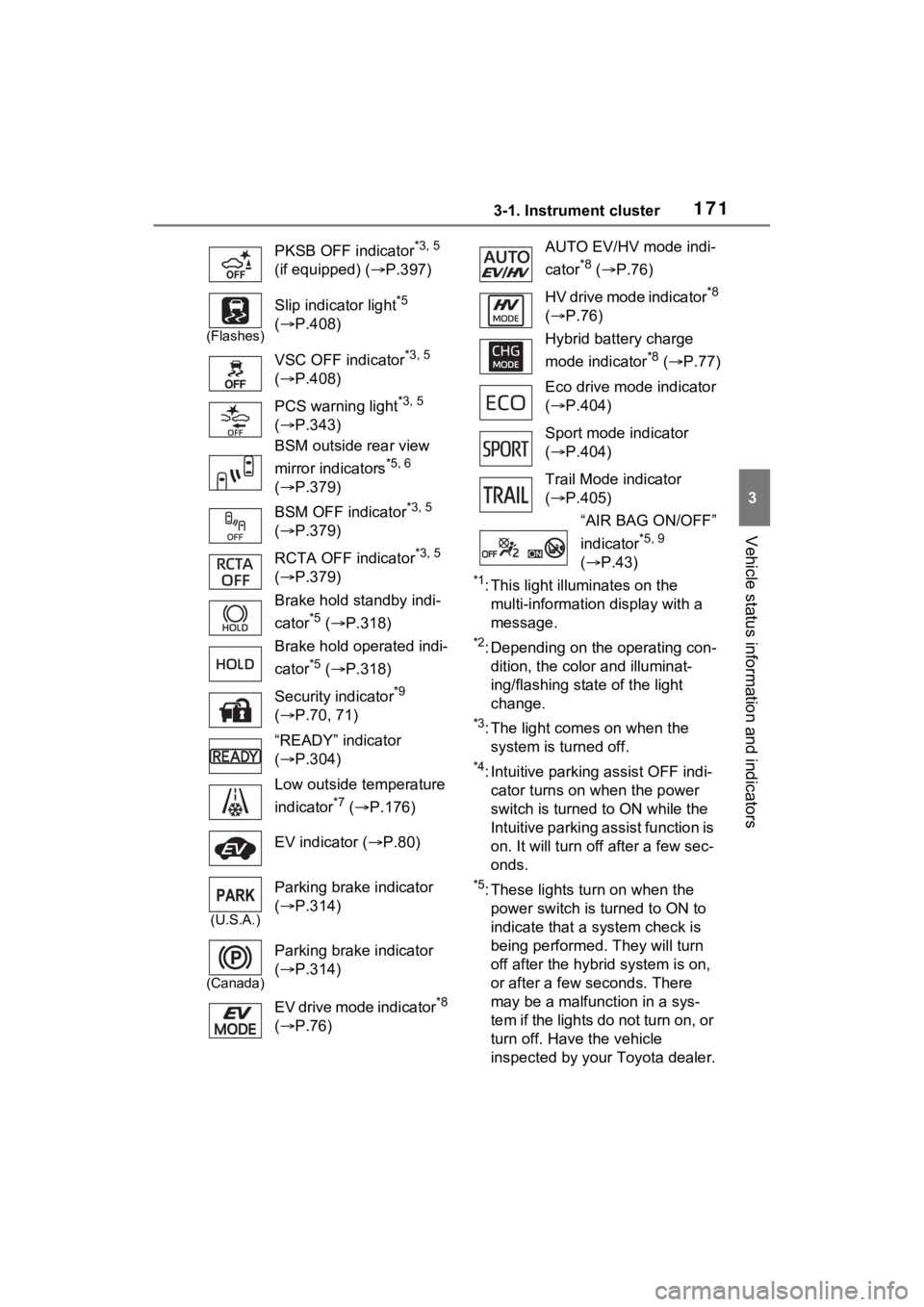
1713-1. Instrument cluster
3
Vehicle status information and indicators
*1: This light illuminates on the multi-information display with a
message.
*2: Depending on the operating con-dition, the color and illuminat-
ing/flashing stat e of the light
change.
*3: The light comes on when the system is turned off.
*4: Intuitive parking assist OFF indi-cator turns on wh en the power
switch is turned t o ON while the
Intuitive parking assist function is
on. It will turn off after a few sec-
onds.
*5: These lights tu rn on when the
power switch is turned to ON to
indicate that a system check is
being performed. They will turn
off after the hybrid system is on,
or after a few seconds. There
may be a malfunction in a sys-
tem if the lights do not turn on, or
turn off. Have the vehicle
inspected by your Toyota dealer.
PKSB OFF indicator
*3, 5
(if equipped) ( P.397)
(Flashes)
Slip indicator light*5
( P.408)
VSC OFF indicator
*3, 5
( P.408)
PCS warning light
*3, 5
( P.343)
BSM outside rear view
mirror indicators
*5, 6
( P.379)
BSM OFF indicator
*3, 5
( P.379)
RCTA OFF indicator
*3, 5
( P.379)
Brake hold standby indi-
cator
*5 ( P.318)
Brake hold operated indi-
cator
*5 ( P.318)
Security indicator
*9
( P.70, 71)
“READY” indicator
( P.304)
Low outside temperature
indicator
*7 ( P.176)
EV indicator ( P.80)
(U.S.A.)
Parking brake indicator
( P.314)
(Canada)
Parking brake indicator
( P.314)
EV drive mode indicator
*8
( P.76)
AUTO EV/HV mode indi-
cator
*8 ( P.76)
HV drive mode indicator
*8
( P.76)
Hybrid battery charge
mode indicator
*8 ( P.77)
Eco drive mode indicator
( P.404)
Sport mode indicator
( P.404)
Trail Mode indicator
( P.405)
“AIR BAG ON/OFF”
indicator
*5, 9
( P.43)