check engine TOYOTA SIENNA 2007 Service Repair Manual
[x] Cancel search | Manufacturer: TOYOTA, Model Year: 2007, Model line: SIENNA, Model: TOYOTA SIENNA 2007Pages: 3000, PDF Size: 52.26 MB
Page 2514 of 3000
BC–152BRAKE CONTROL – VEHICLE STABILITY CONTROL SYSTEM
BC
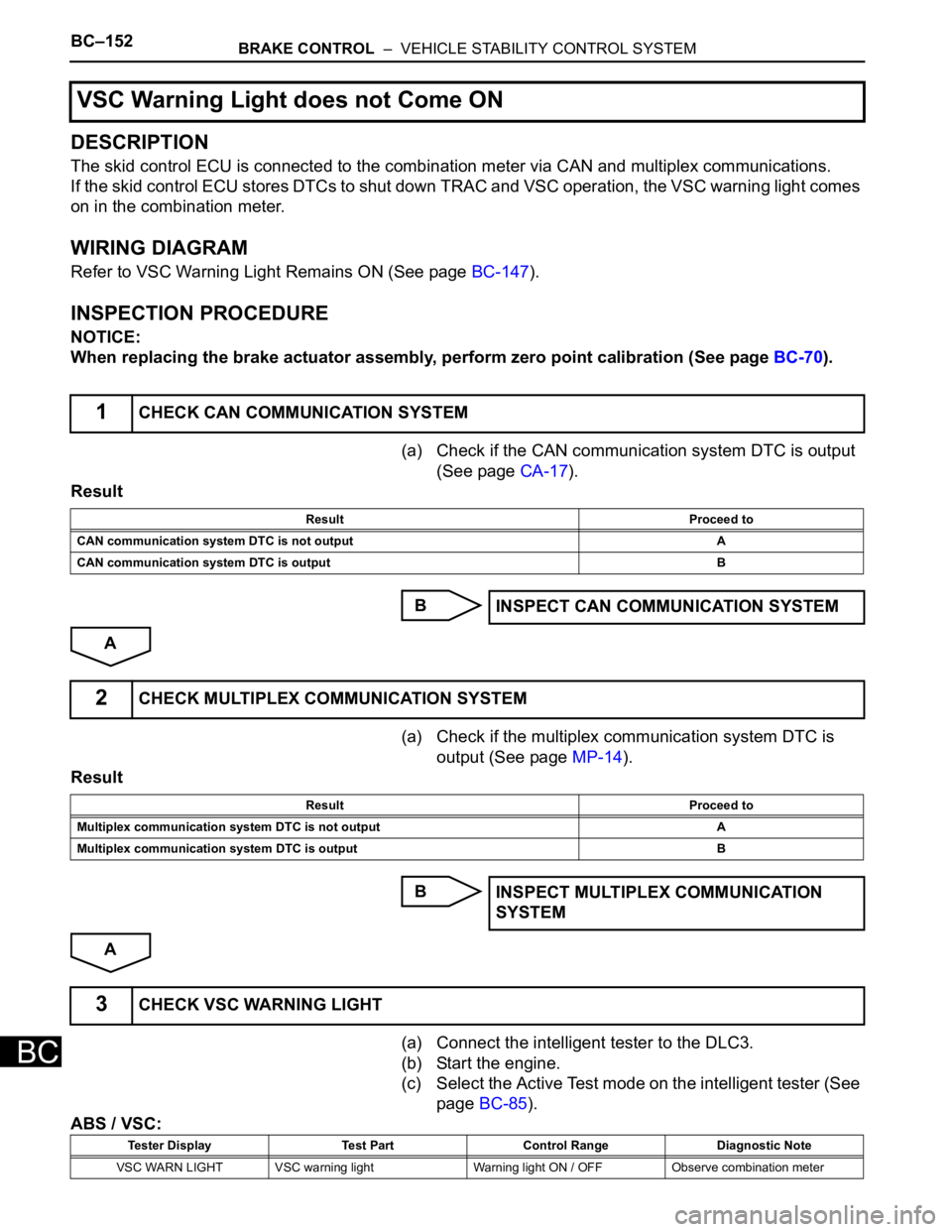
DESCRIPTION
The skid control ECU is connected to the combination meter via CAN and multiplex communications.
If the skid control ECU stores DTCs to shut down TRAC and VSC operation, the VSC warning light comes
on in the combination meter.
WIRING DIAGRAM
Refer to VSC Warning Light Remains ON (See page BC-147).
INSPECTION PROCEDURE
NOTICE:
When replacing the brake actuator assembly, perform zero point calibration (See page BC-70).
(a) Check if the CAN communication system DTC is output
(See page CA-17).
Result
B
A
(a) Check if the multiplex communication system DTC is
output (See page MP-14).
Result
B
A
(a) Connect the intelligent tester to the DLC3.
(b) Start the engine.
(c) Select the Active Test mode on the intelligent tester (See
page BC-85).
ABS / VSC:
VSC Warning Light does not Come ON
1CHECK CAN COMMUNICATION SYSTEM
Result Proceed to
CAN communication system DTC is not output A
CAN communication system DTC is output B
INSPECT CAN COMMUNICATION SYSTEM
2CHECK MULTIPLEX COMMUNICATION SYSTEM
Result Proceed to
Multiplex communication system DTC is not output A
Multiplex communication system DTC is output B
INSPECT MULTIPLEX COMMUNICATION
SYSTEM
3CHECK VSC WARNING LIGHT
Tester Display Test Part Control Range Diagnostic Note
VSC WARN LIGHT VSC warning light Warning light ON / OFF Observe combination meter
Page 2517 of 3000
BRAKE CONTROL – VEHICLE STABILITY CONTROL SYSTEMBC–155
BC
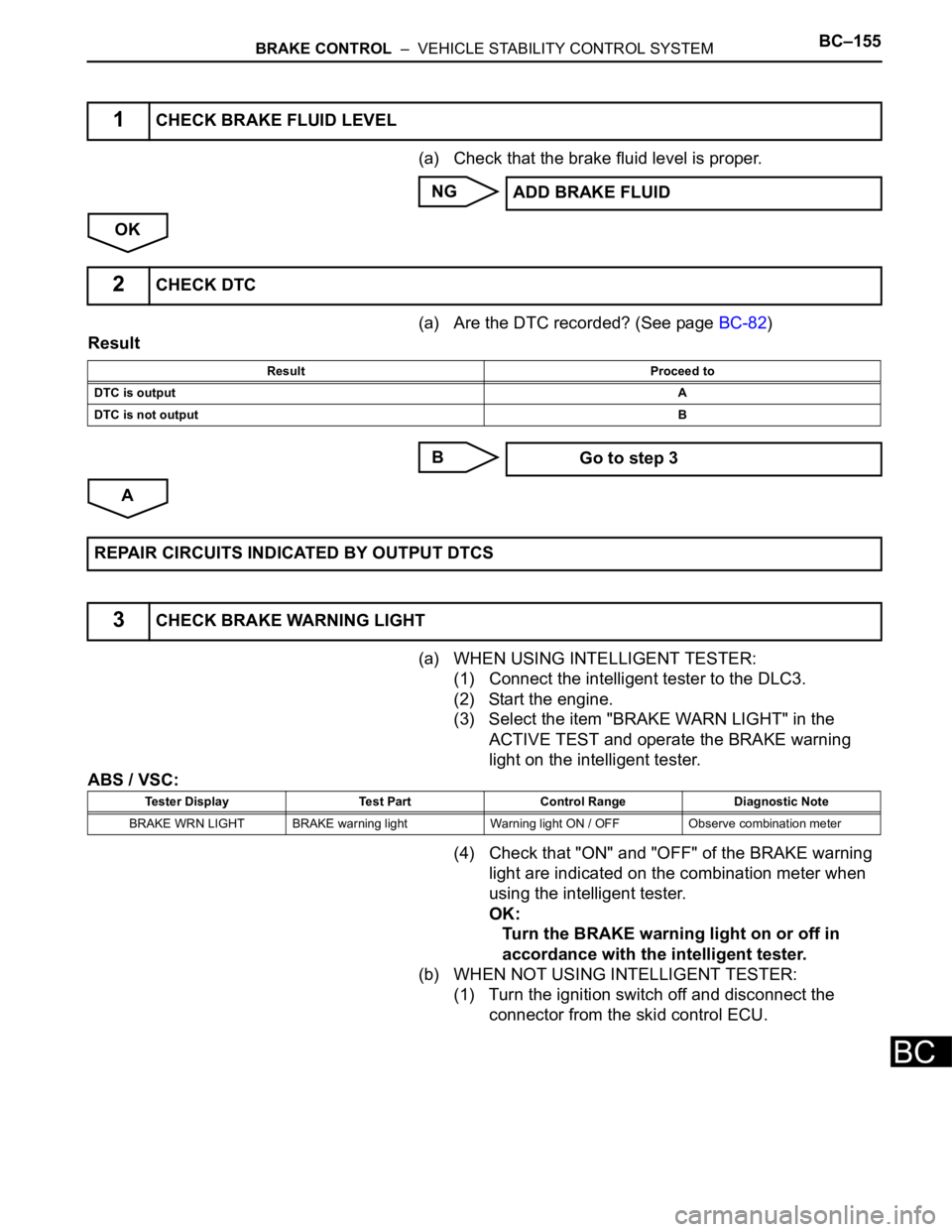
(a) Check that the brake fluid level is proper.
NG
OK
(a) Are the DTC recorded? (See page BC-82)
Result
B
A
(a) WHEN USING INTELLIGENT TESTER:
(1) Connect the intelligent tester to the DLC3.
(2) Start the engine.
(3) Select the item "BRAKE WARN LIGHT" in the
ACTIVE TEST and operate the BRAKE warning
light on the intelligent tester.
ABS / VSC:
(4) Check that "ON" and "OFF" of the BRAKE warning
light are indicated on the combination meter when
using the intelligent tester.
OK:
Turn the BRAKE warning light on or off in
accordance with the intelligent tester.
(b) WHEN NOT USING INTELLIGENT TESTER:
(1) Turn the ignition switch off and disconnect the
connector from the skid control ECU.
1CHECK BRAKE FLUID LEVEL
ADD BRAKE FLUID
2CHECK DTC
Result Proceed to
DTC is outputA
DTC is not outputB
Go to step 3
REPAIR CIRCUITS INDICATED BY OUTPUT DTCS
3CHECK BRAKE WARNING LIGHT
Tester Display Test Part Control Range Diagnostic Note
BRAKE WRN LIGHT BRAKE warning light Warning light ON / OFF Observe combination meter
Page 2526 of 3000
BC–164BRAKE CONTROL – VEHICLE STABILITY CONTROL SYSTEM
BC
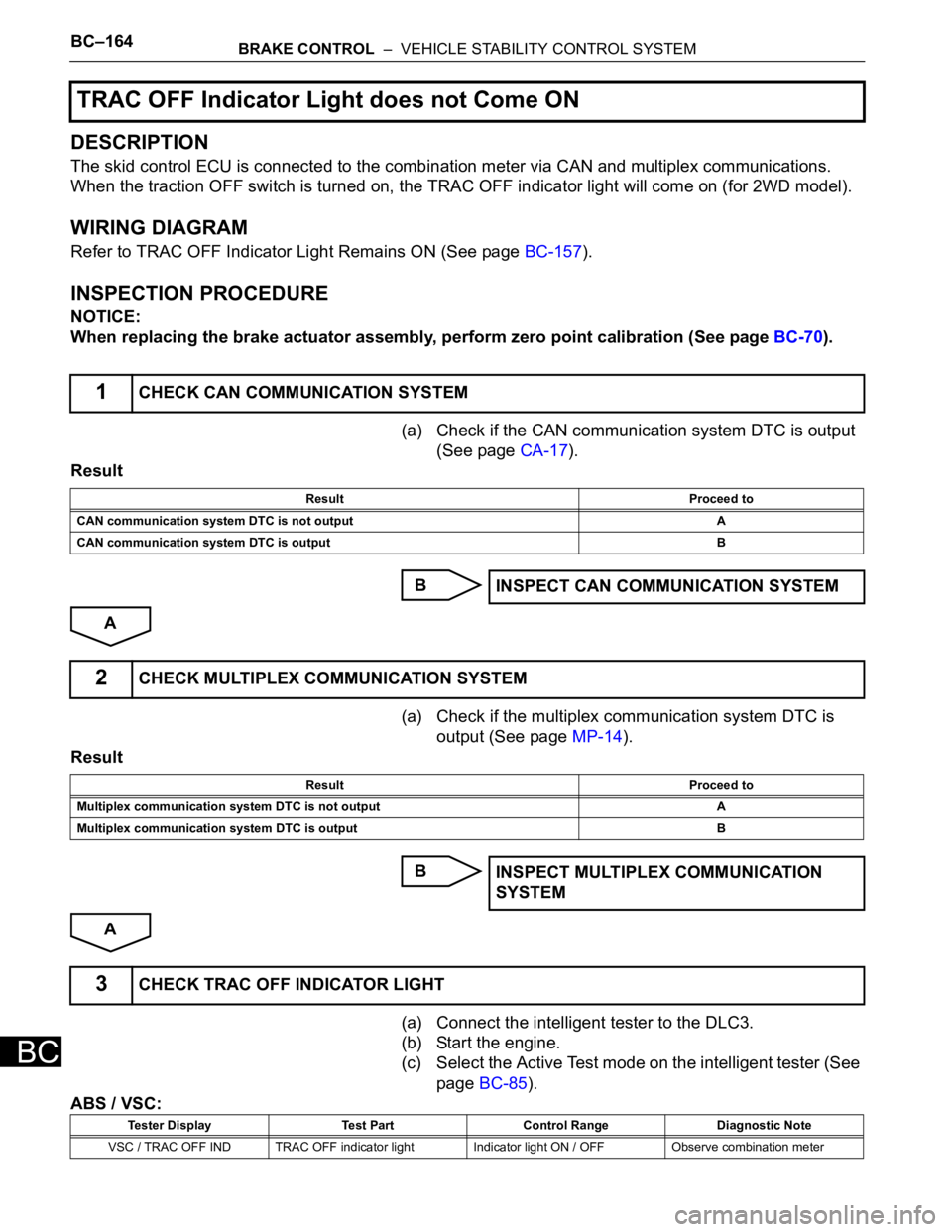
DESCRIPTION
The skid control ECU is connected to the combination meter via CAN and multiplex communications.
When the traction OFF switch is turned on, the TRAC OFF indicator light will come on (for 2WD model).
WIRING DIAGRAM
Refer to TRAC OFF Indicator Light Remains ON (See page BC-157).
INSPECTION PROCEDURE
NOTICE:
When replacing the brake actuator assembly, perform zero point calibration (See page BC-70).
(a) Check if the CAN communication system DTC is output
(See page CA-17).
Result
B
A
(a) Check if the multiplex communication system DTC is
output (See page MP-14).
Result
B
A
(a) Connect the intelligent tester to the DLC3.
(b) Start the engine.
(c) Select the Active Test mode on the intelligent tester (See
page BC-85).
ABS / VSC:
TRAC OFF Indicator Light does not Come ON
1CHECK CAN COMMUNICATION SYSTEM
Result Proceed to
CAN communication system DTC is not output A
CAN communication system DTC is output B
INSPECT CAN COMMUNICATION SYSTEM
2CHECK MULTIPLEX COMMUNICATION SYSTEM
Result Proceed to
Multiplex communication system DTC is not output A
Multiplex communication system DTC is output B
INSPECT MULTIPLEX COMMUNICATION
SYSTEM
3CHECK TRAC OFF INDICATOR LIGHT
Tester Display Test Part Control Range Diagnostic Note
VSC / TRAC OFF IND TRAC OFF indicator light Indicator light ON / OFF Observe combination meter
Page 2531 of 3000
BRAKE CONTROL – VEHICLE STABILITY CONTROL SYSTEMBC–169
BC
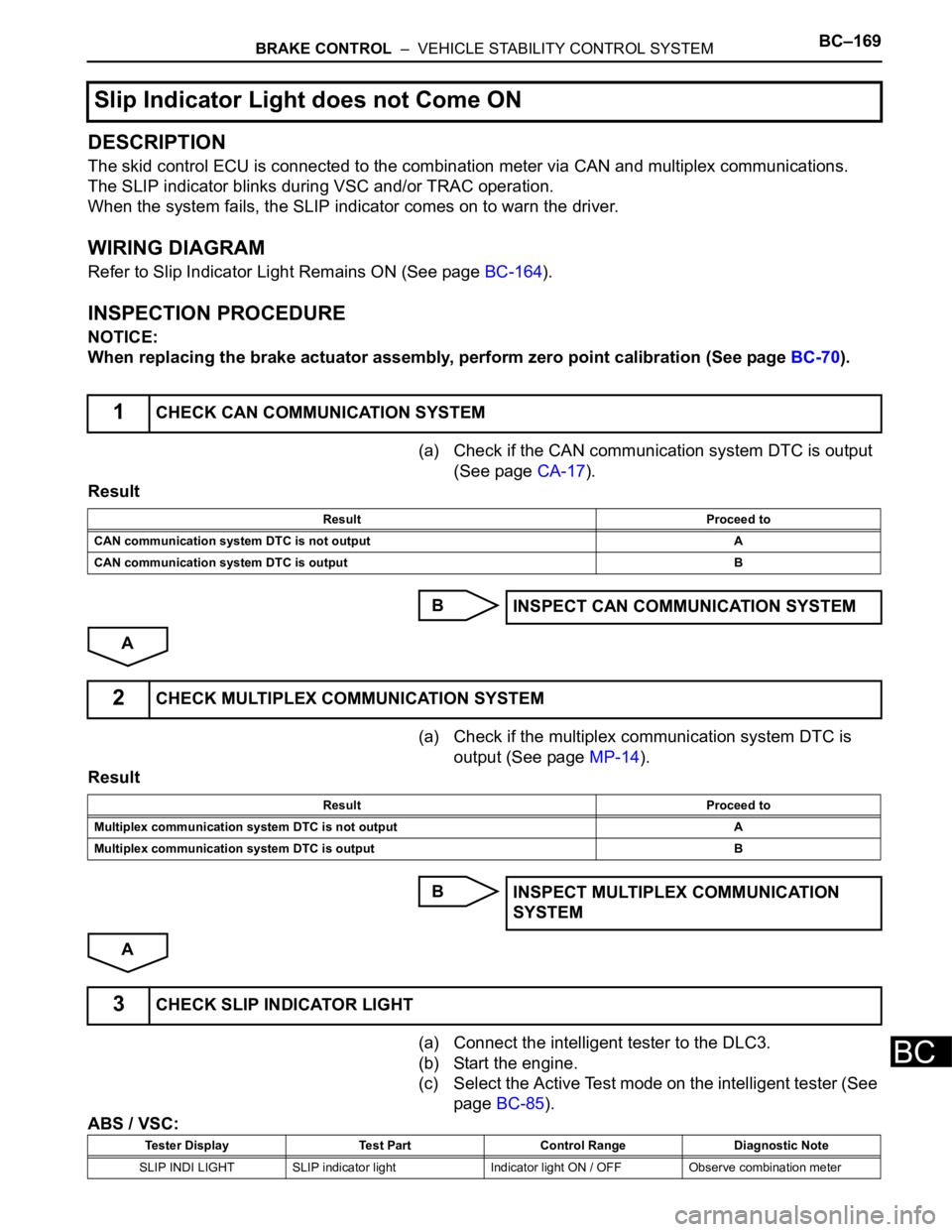
DESCRIPTION
The skid control ECU is connected to the combination meter via CAN and multiplex communications.
The SLIP indicator blinks during VSC and/or TRAC operation.
When the system fails, the SLIP indicator comes on to warn the driver.
WIRING DIAGRAM
Refer to Slip Indicator Light Remains ON (See page BC-164).
INSPECTION PROCEDURE
NOTICE:
When replacing the brake actuator assembly, perform zero point calibration (See page BC-70).
(a) Check if the CAN communication system DTC is output
(See page CA-17).
Result
B
A
(a) Check if the multiplex communication system DTC is
output (See page MP-14).
Result
B
A
(a) Connect the intelligent tester to the DLC3.
(b) Start the engine.
(c) Select the Active Test mode on the intelligent tester (See
page BC-85).
ABS / VSC:
Slip Indicator Light does not Come ON
1CHECK CAN COMMUNICATION SYSTEM
Result Proceed to
CAN communication system DTC is not output A
CAN communication system DTC is output B
INSPECT CAN COMMUNICATION SYSTEM
2CHECK MULTIPLEX COMMUNICATION SYSTEM
Result Proceed to
Multiplex communication system DTC is not output A
Multiplex communication system DTC is output B
INSPECT MULTIPLEX COMMUNICATION
SYSTEM
3CHECK SLIP INDICATOR LIGHT
Tester Display Test Part Control Range Diagnostic Note
SLIP INDI LIGHT SLIP indicator light Indicator light ON / OFF Observe combination meter
Page 2533 of 3000
BRAKE CONTROL – VEHICLE STABILITY CONTROL SYSTEMBC–171
BC
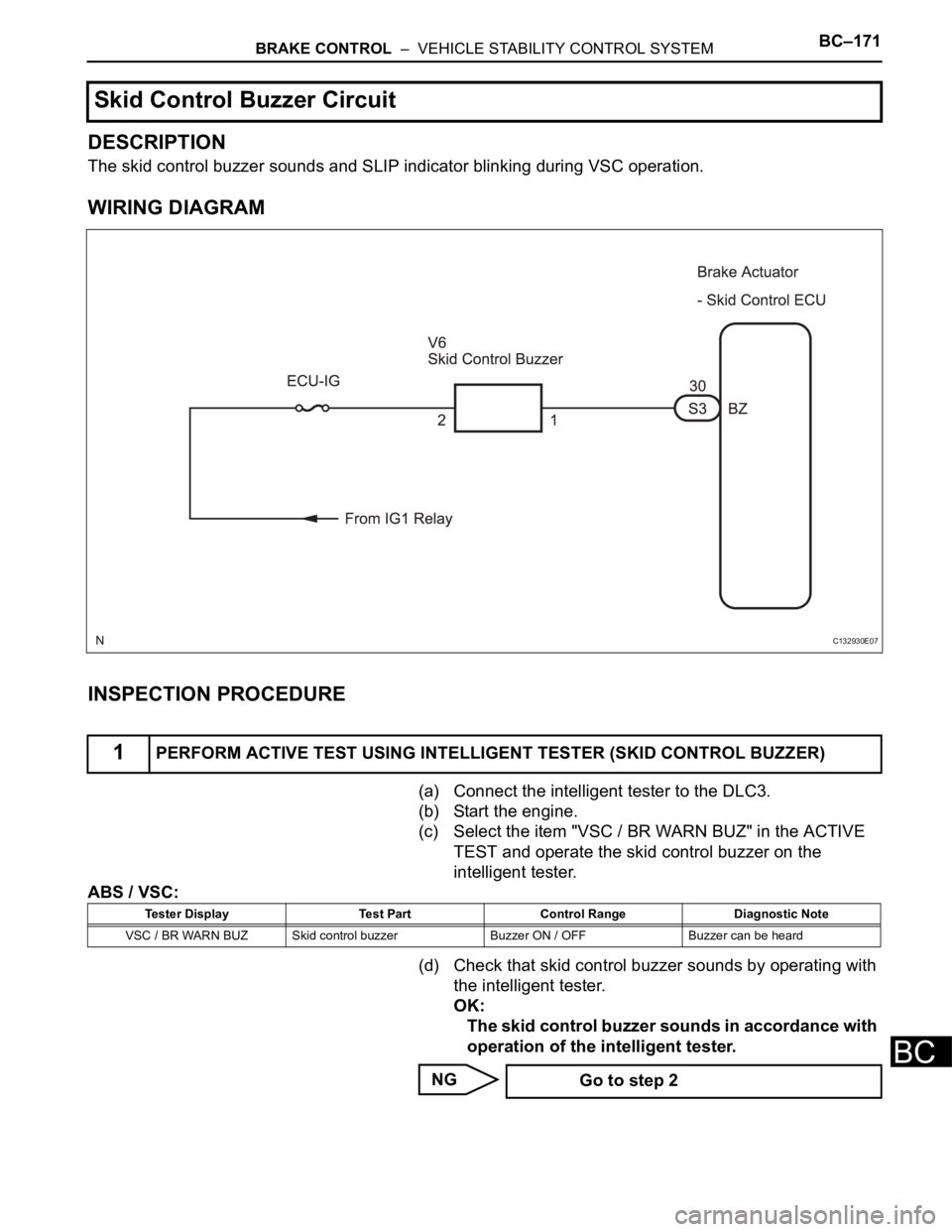
DESCRIPTION
The skid control buzzer sounds and SLIP indicator blinking during VSC operation.
WIRING DIAGRAM
INSPECTION PROCEDURE
(a) Connect the intelligent tester to the DLC3.
(b) Start the engine.
(c) Select the item "VSC / BR WARN BUZ" in the ACTIVE
TEST and operate the skid control buzzer on the
intelligent tester.
ABS / VSC:
(d) Check that skid control buzzer sounds by operating with
the intelligent tester.
OK:
The skid control buzzer sounds in accordance with
operation of the intelligent tester.
NG
Skid Control Buzzer Circuit
1PERFORM ACTIVE TEST USING INTELLIGENT TESTER (SKID CONTROL BUZZER)
C132930E07
Tester Display Test Part Control Range Diagnostic Note
VSC / BR WARN BUZ Skid control buzzer Buzzer ON / OFF Buzzer can be heard
Go to step 2
Page 2538 of 3000
BC–176BRAKE CONTROL – VEHICLE STABILITY CONTROL SYSTEM
BC
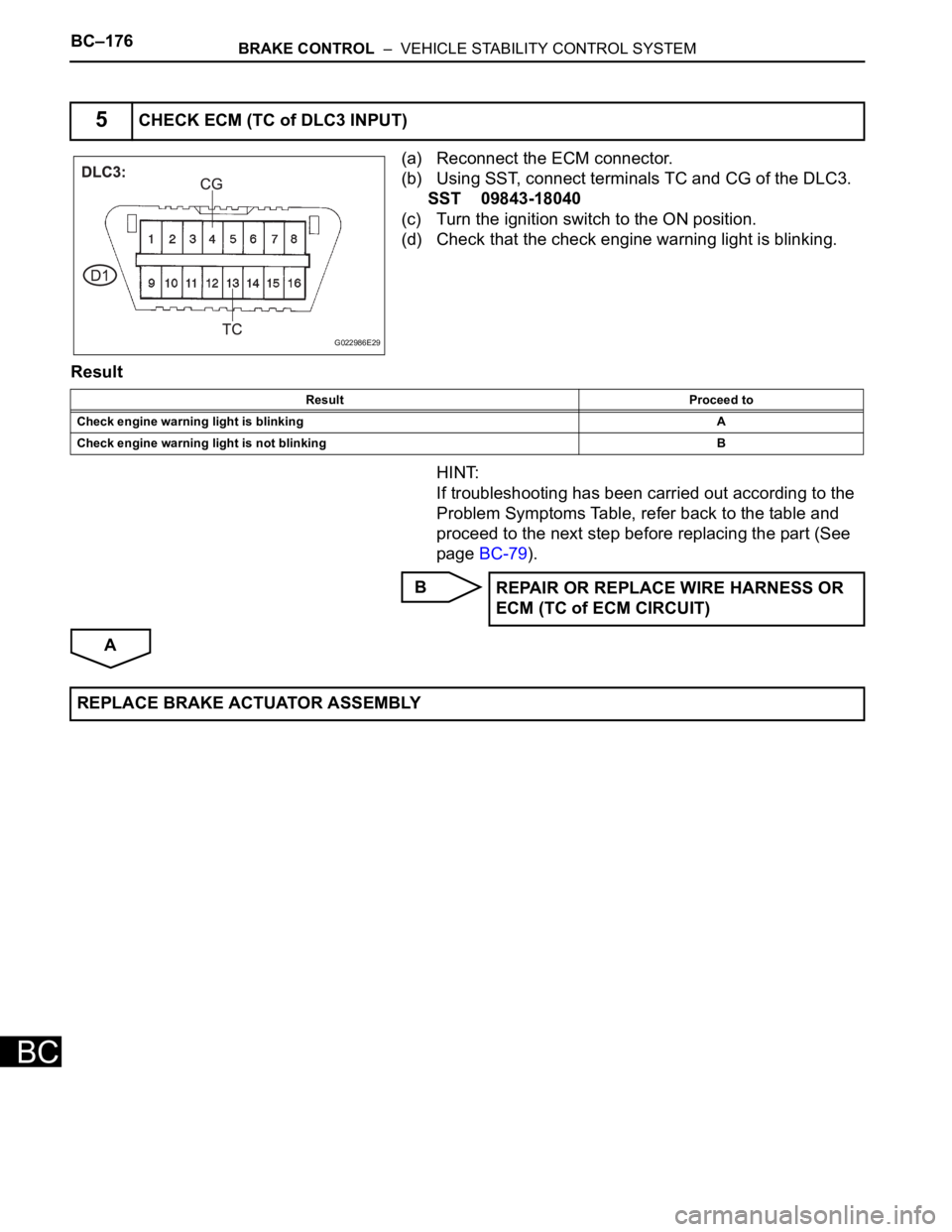
(a) Reconnect the ECM connector.
(b) Using SST, connect terminals TC and CG of the DLC3.
SST 09843-18040
(c) Turn the ignition switch to the ON position.
(d) Check that the check engine warning light is blinking.
Result
HINT:
If troubleshooting has been carried out according to the
Problem Symptoms Table, refer back to the table and
proceed to the next step before replacing the part (See
page BC-79).
B
A
5CHECK ECM (TC of DLC3 INPUT)
G022986E29
Result Proceed to
Check engine warning light is blinkingA
Check engine warning light is not blinking B
REPAIR OR REPLACE WIRE HARNESS OR
ECM (TC of ECM CIRCUIT)
REPLACE BRAKE ACTUATOR ASSEMBLY
Page 2544 of 3000

BC–178BRAKE CONTROL – BRAKE ACTUATOR (w/ VSC)
BC
ON-VEHICLE INSPECTION
1. CONNECT INTELLIGENT TESTER
(a) Connect the intelligent tester to the DLC3.
(b) Start the engine and run at idle.
(c) Select the ACTIVE TEST mode on the intelligent
tester.
HINT:
Please refer to the intelligent tester operator's
manual for further details.
2. INSPECT ACTUATOR MOTOR OPERATION
(a) With the motor relay on, check the actuator motor
operation noise.
(b) Turn the motor relay off.
(c) Depress the brake pedal and hold it for
approximately 15 seconds. Check that the brake
pedal cannot be depressed.
(d) With the motor relay on, check that the pedal does
not pulsate.
NOTICE:
Do not keep the motor relay turned on for more
than 5 seconds continuously. When operating it
continuously, set an interval of more than 20
seconds.
(e) Turn the motor relay off and release the brake
pedal.
3. INSPECT RIGHT FRONT WHEEL OPERATION
NOTICE:
Never turn on the solenoids in a manner different to
those described below.
(a) With the brake pedal depressed, perform the
following operations.
(b) Turn the SFRH and SFRR solenoids on
simultaneously, and check that the pedal cannot be
depressed.
NOTICE:
Do not keep the solenoid turned on for more
than 10 seconds continuously. When operating
it continuously, set an interval of more than 20
seconds.
(c) Turn the SFRH and SFRR solenoids off
simultaneously, and check that the pedal can be
depressed.
(d) Turn the motor relay on, and check that the pedal
returns.
NOTICE:
Do not keep the motor relay turned on for more
than 5 seconds continuously. When operating it
continuously, set an interval of more than 20
seconds.
(e) Turn the motor relay off and release the brake
pedal.
A080036E03
Page 2555 of 3000

BRAKE CONTROL – BRAKE ACTUATOR (w/o VSC)BC–183
BC
ON-VEHICLE INSPECTION
1. CONNECT INTELLIGENT TESTER
(a) Connect the intelligent tester to the DLC3.
(b) Start the engine and run at idle.
(c) Select the ACTIVE TEST mode on the intelligent
tester.
HINT:
Please refer to the intelligent tester operator's
manual for further details.
2. INSPECT ACTUATOR MOTOR OPERATION
(a) With the motor relay on, check the actuator motor
operation noise.
(b) Turn the motor relay off.
(c) Depress the brake pedal and hold it for
approximately 15 seconds. Check that the brake
pedal cannot be depressed.
(d) With the motor relay on, check that the pedal does
not pulsate.
NOTICE:
Do not keep the motor relay turned on for more
than 5 seconds continuously. When operating it
continuously, set an interval of more than 20
seconds.
(e) Turn the motor relay off and release the brake
pedal.
3. INSPECT RIGHT FRONT WHEEL OPERATION
NOTICE:
Never turn on the solenoids in a manner different to
those described below.
(a) With the brake pedal depressed, perform the
following operations.
(b) Turn the SFRH and SFRR solenoids on
simultaneously, and check that the pedal cannot be
depressed.
NOTICE:
Do not keep the solenoid turned on for more
than 10 seconds continuously. When operating
it continuously, set an interval of more than 20
seconds.
(c) Turn the SFRH and SFRR solenoids off
simultaneously, and check that the pedal can be
depressed.
(d) Turn the motor relay on, and check that the pedal
returns.
NOTICE:
Do not keep the motor relay turned on for more
than 5 seconds continuously. When operating it
continuously, set an interval of more than 20
seconds.
(e) Turn the motor relay off and release the brake
pedal.
A080036E03
Page 2568 of 3000
BC–32BRAKE CONTROL – ANTI-LOCK BRAKE SYSTEM
BC
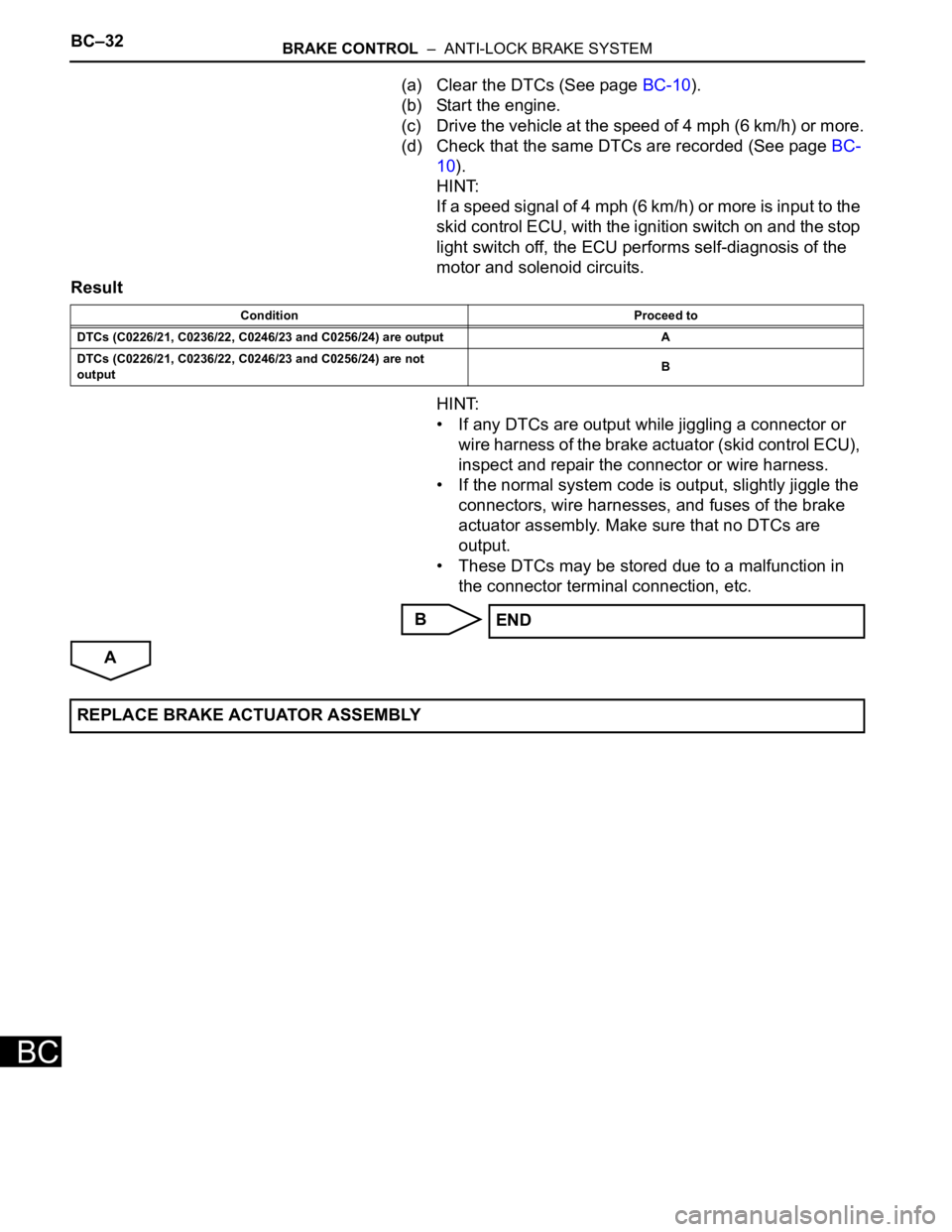
(a) Clear the DTCs (See page BC-10).
(b) Start the engine.
(c) Drive the vehicle at the speed of 4 mph (6 km/h) or more.
(d) Check that the same DTCs are recorded (See page BC-
10).
HINT:
If a speed signal of 4 mph (6 km/h) or more is input to the
skid control ECU, with the ignition switch on and the stop
light switch off, the ECU performs self-diagnosis of the
motor and solenoid circuits.
Result
HINT:
• If any DTCs are output while jiggling a connector or
wire harness of the brake actuator (skid control ECU),
inspect and repair the connector or wire harness.
• If the normal system code is output, slightly jiggle the
connectors, wire harnesses, and fuses of the brake
actuator assembly. Make sure that no DTCs are
output.
• These DTCs may be stored due to a malfunction in
the connector terminal connection, etc.
B
A
Condition Proceed to
DTCs (C0226/21, C0236/22, C0246/23 and C0256/24) are output A
DTCs (C0226/21, C0236/22, C0246/23 and C0256/24) are not
outputB
END
REPLACE BRAKE ACTUATOR ASSEMBLY
Page 2573 of 3000
BRAKE CONTROL – ANTI-LOCK BRAKE SYSTEMBC–35
BC
(f) Check operating sound of the ABS motor when
operating it with the intelligent tester.
OK:
The operating sound of the ABS motor is heard.
NG
OK
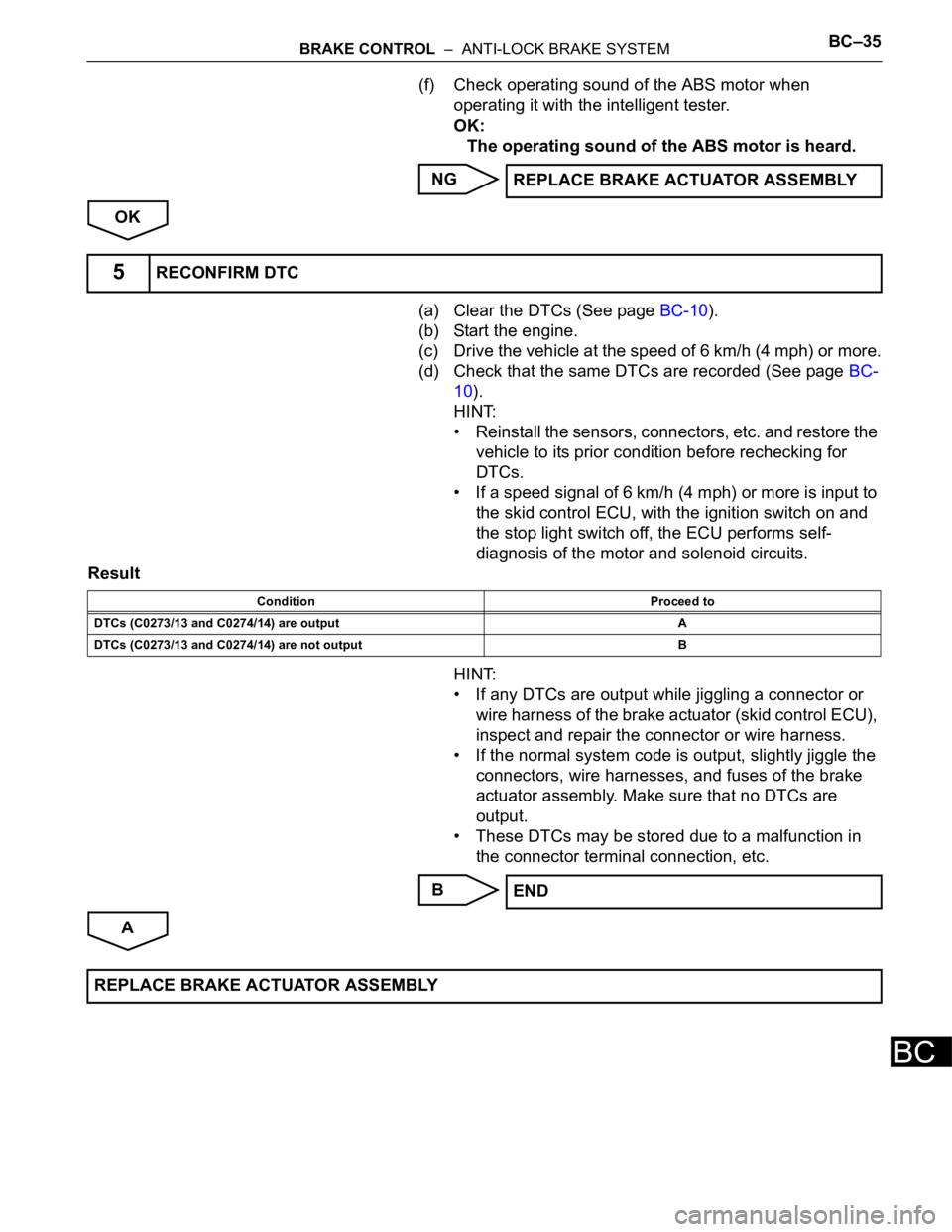
(a) Clear the DTCs (See page BC-10).
(b) Start the engine.
(c) Drive the vehicle at the speed of 6 km/h (4 mph) or more.
(d) Check that the same DTCs are recorded (See page BC-
10).
HINT:
• Reinstall the sensors, connectors, etc. and restore the
vehicle to its prior condition before rechecking for
DTCs.
• If a speed signal of 6 km/h (4 mph) or more is input to
the skid control ECU, with the ignition switch on and
the stop light switch off, the ECU performs self-
diagnosis of the motor and solenoid circuits.
Result
HINT:
• If any DTCs are output while jiggling a connector or
wire harness of the brake actuator (skid control ECU),
inspect and repair the connector or wire harness.
• If the normal system code is output, slightly jiggle the
connectors, wire harnesses, and fuses of the brake
actuator assembly. Make sure that no DTCs are
output.
• These DTCs may be stored due to a malfunction in
the connector terminal connection, etc.
B
AREPLACE BRAKE ACTUATOR ASSEMBLY
5RECONFIRM DTC
Condition Proceed to
DTCs (C0273/13 and C0274/14) are output A
DTCs (C0273/13 and C0274/14) are not output B
END
REPLACE BRAKE ACTUATOR ASSEMBLY