mirror TOYOTA SUPRA 2019 User Guide
[x] Cancel search | Manufacturer: TOYOTA, Model Year: 2019, Model line: SUPRA, Model: TOYOTA SUPRA 2019Pages: 456, PDF Size: 88.65 MB
Page 68 of 456
68
Supra Owner's Manual3-1. CONTROLS
4"Connect new device"
5Select functions:
• "Telephone"
• "Bluetooth audio"
• "Apps"
• "Apple CarPlay"
• "Screen Mirroring"
The Bluetooth name of the vehicle is
displayed in the Control Display.
6On the mobile device, search for
Bluetooth devices in the vicinity.
The Bluetooth name of the vehicle is
shown on the display of the mobile
device.
Select the Bluetooth name of the vehi-
cle.
7Depending on the mobile
device, either a control number
is displayed, or you will have to
enter the control number your-
self.
• Compare the control number
shown on the Control Display
with the control number in the
device display.
Confirm the control number in the
device and on the Control Display.
• Enter the same control number
on the device and via Toyota
Supra Command then confirm.
The device is connected and displayed
in the device list, see page 72.
There may be instances where the
mobile device does not function as
expected, even though all precondi-
tions have been met and all the necessary steps have been carried
out in the correct order. Neverthe-
less, the mobile device does not
function as expected.
In such cases, the following expla-
nations may provide assistance:
Why could the mobile telephone
not be paired or connected?
• Too many Bluetooth devices are
paired to the mobile telephone or
the vehicle.
In the vehicle, delete Bluetooth connec-
tions with other devices.
Delete all known Bluetooth connections
from the device list on the mobile tele-
phone and start a new device search.
• The mobile telephone is in
power-save mode or the battery
is low.
Charge the mobile telephone.
Why does the mobile telephone no
longer respond?
• The applications on the mobile
telephone are no longer function-
ing.
Switch the mobile telephone off and on
again.
• Ambient temperature too high or
too low to operate the mobile
telephone.
Do not subject the mobile telephone to
extreme ambient conditions.
Why can telephone functions not
be operated via Toyota Supra Com-
mand?
• The mobile telephone may not
be configured correctly, for
example as a Bluetooth audio Frequently Asked Questions
Page 71 of 456
71
3
Supra Owner's Manual3-1. CONTROLS
CONTROLS
1"My Vehicle"
2"System settings"
3"Mobile devices"
4"Settings"
5Select the following settings:
• "Bluetooth"
• "Apple CarPlay"
Register iPhone via Bluetooth on
the vehicle, see page 67.
Select CarPlay as the function:
"Apple CarPlay"
The iPhone is connected to the
vehicle and displayed in the device
list, see page 72.
For further information, see the
Owner's Manual for Navigation,
Entertainment and Communication.
There may be instances where the
mobile device does not function as
expected, even though all precondi-
tions have been met and all the
necessary steps have been carried
out in the correct order. Neverthe-
less, the mobile device does not
function as expected.
In such cases, the following expla-
nations may provide assistance:
The iPhone has already been
paired with Apple CarPlay. When a new connection is established, Car-
Play can no longer be selected.
• Delete the iPhone concerned
from the device list.
• On the iPhone, delete the vehicle
concerned from the list of saved
connections under Bluetooth and
under WLAN.
• Pair the iPhone as a new device.
If the steps listed have been carried
out and the desired function still
cannot be run: contact the cus-
tomer support, an any authorized
Toyota retailer or Toyota authorized
repairer, or any reliable repairer.
Screen Mirroring enables you to
display your smartphone screen on
the Control Display.
• Compatible smartphone with
Screen Mirroring interface.
• Screen Mirroring is switched on
in the smartphone.
• WLAN is switched on in the vehi-
cle.
Via Toyota Supra Command:
1"My Vehicle"
2"System settings"
3"Mobile devices" Registering iPhone with CarPlay
Operation
Frequently Asked Questions
Screen Mirroring
General
Operating requirements
Switching on WLAN
Page 72 of 456
72
Supra Owner's Manual3-1. CONTROLS
4"Settings"
5"Vehicle WiFi"
Via Toyota Supra Command:
1"My Vehicle"
2"System settings"
3"Mobile devices"
4"Connect new device"
5 "Screen Mirroring"
The WLAN name of the vehicle is dis-
played in the Control Display.
6On the smartphone, search for
WLAN devices in the vicinity.
The WLAN name of the vehicle is
shown on the display of the device.
Select WLAN name of the vehicle.
7Confirm the connection via
Toyota Supra Command.
The device is connected and dis-
played in the device list, see page
72.
• Following one-off registration,
the devices are automatically
detected and connected again
when the standby state is
switched on.
• The data saved on the SIM card
or in the mobile telephone is
transferred to the vehicle follow-
ing detection.• Some devices may require par-
ticular settings, for example
authorisation; see the user man-
ual of the device.
All devices registered or connected
to the vehicle are displayed in the
device list.
Via Toyota Supra Command:
1"My Vehicle"
2"System settings"
3"Mobile devices"
A symbol indicates which function a
device is used for.
Functions can be activated or deac-
tivated on a registered or con-
nected device.
Via Toyota Supra Command:
1"My Vehicle"
2"System settings"
3"Mobile devices"
4Select the required device. Registering the smartphone with
Screen Mirroring
Managing mobile devices
General
Displaying the device list
SymbolFunction
"Telephone"
"Additional telephone"
"Bluetooth audio"
"Apps"
"Apple CarPlay"
"Screen Mirroring"
Configuring the device
Page 75 of 456
75
3
Supra Owner's Manual3-1. CONTROLS
CONTROLS
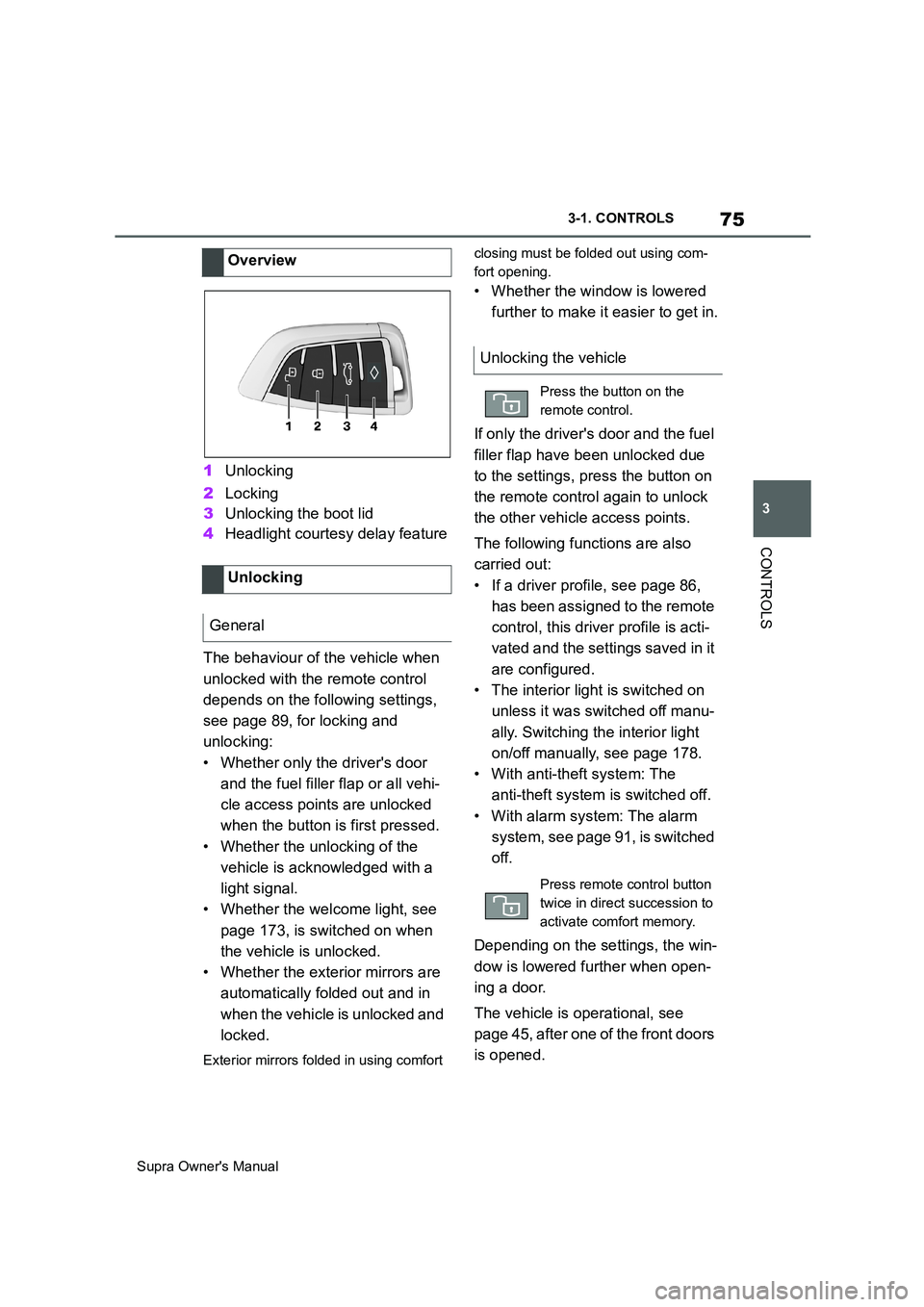
1Unlocking
2Locking
3Unlocking the boot lid
4Headlight courtesy delay feature
The behaviour of the vehicle when
unlocked with the remote control
depends on the following settings,
see page 89, for locking and
unlocking:
• Whether only the driver's door
and the fuel filler flap or all vehi-
cle access points are unlocked
when the button is first pressed.
• Whether the unlocking of the
vehicle is acknowledged with a
light signal.
• Whether the welcome light, see
page 173, is switched on when
the vehicle is unlocked.
• Whether the exterior mirrors are
automatically folded out and in
when the vehicle is unlocked and
locked.
Exterior mirrors folded in using comfort closing must be folded out using com-
fort opening.
• Whether the window is lowered
further to make it easier to get in.
If only the driver's door and the fuel
filler flap have been unlocked due
to the settings, press the button on
the remote control again to unlock
the other vehicle access points.
The following functions are also
carried out:
• If a driver profile, see page 86,
has been assigned to the remote
control, this driver profile is acti-
vated and the settings saved in it
are configured.
• The interior light is switched on
unless it was switched off manu-
ally. Switching the interior light
on/off manually, see page 178.
• With anti-theft system: The
anti-theft system is switched off.
• With alarm system: The alarm
system, see page 91, is switched
off.
Depending on the settings, the win-
dow is lowered further when open-
ing a door.
The vehicle is operational, see
page 45, after one of the front doors
is opened. Overview
Unlocking
General
Unlocking the vehicle
Press the button on the
remote control.
Press remote control button
twice in direct succession to
activate comfort memory.
Page 76 of 456
76
Supra Owner's Manual3-1. CONTROLS
The light functions might be
dependent on the ambient bright-
ness.
The windows are opened for as
long as the button on the remote
control is pressed.
Exterior mirrors which were folded
in via the comfort closing feature
are folded out.
The behaviour of the vehicle in the
case of remote control locking
depends on the following settings,
see page 89:
• Whether locking of the vehicle is
acknowledged with a light signal.
• Whether the exterior mirrors are
automatically folded in and out
when the vehicle is unlocked and
locked.
• Whether the headlight courtesy
delay feature, see page 173, is
activated when the vehicle is
locked.
1Close the driver's door.2 Press the button on the
remote control.
Following functions are carried out:
• All the doors, the boot lid and
fuel filler flap are locked.
• With anti-theft system: The
anti-theft system is switched on.
This prevents the doors from
being unlocked using the locking
buttons or the door openers.
• With alarm system: The alarm
system, see page 91, is switched
on.
If the drive-ready state is still
switched on when locking, the vehi-
cle horn sounds twice. In this case,
switch off the drive-ready state
using start/ stop button.
The windows are closed for as long
as the button on the remote control
is pressed. Comfort opening
Opening
Press and hold the button on
the remote control.
Locking
General
Locking the vehicle
Comfort closing
Safety notes
WARNING
Parts of the body can become
trapped when the comfort closing fea-
ture is operated. There is a danger of
injury. During comfort closing, make
sure that the area of movement is
kept clear.
Closing
Keep the button on the
remote control pressed after
locking.
Page 77 of 456
77
3
Supra Owner's Manual3-1. CONTROLS
CONTROLS
The exterior mirrors are folded in.
If the hazard warning lights are
switched on, the exterior mirrors
are not folded in.
The function is not available for the
first 10 seconds after locking.
• The interior light is switched on
unless it was switched off manu-
ally. Switching the interior light
on/off manually, see page 178.
• Depending on the settings, the
exterior lights, see page 173, are
switched on.
The light functions might be
dependent on the ambient bright-
ness.
To prevent the remote control from
being locked in, do not place the
remote control in the boot.
It is possible to set whether the
doors are unlocked when the boot
lid is opened with the remote con-
trol. For settings, see page 89.On some equipment versions, the
doors are also unlocked each time.
Setting the duration, see page 173.
1Remove the integrated key from
the remote control, see page 80.
2Place integrated key under the
battery compartment cover,
arrow 1, and pry off the cover Switching on the interior
light and exterior lights
With the vehicle locked,
press the button on the
remote control.
Boot lid
General
Safety notes
WARNING
Parts of the body can become
trapped when the boot lid is operated.
There is a danger of injury. When
opening and closing, make sure that
the area of movement of the boot lid
is kept clear.
NOTICE
The boot lid swings rearwards and
upwards when opened. There is a
danger of damage to property. When
opening and closing, make sure that
the area of movement of the boot lid
is kept clear.
Unlocking
Press and hold the button on
the remote control for approx-
imately 1 second.
Switching on the headlight
courtesy delay feature
Press and hold the button on
the remote control for approx-
imately 1 second.
Replacing the battery
Page 84 of 456
84
Supra Owner's Manual3-1. CONTROLS
Near the front of the center console
Near the rear of the center console
In the luggage compartment and near the rear bumper
Near each door and door handle
The behaviour of the vehicle when
unlocked via Smart Key System
depends on the following settings,
see page 89:
• Whether the unlocking of the
vehicle is acknowledged with a
light signal.
• Whether the welcome light, see
page 173, is switched on when the vehicle is unlocked.
• Whether the exterior mirrors are
automatically folded out and in
when the vehicle is unlocked and
locked.
Exterior mirrors folded in using comfort
closing must be folded out using com-
fort opening.
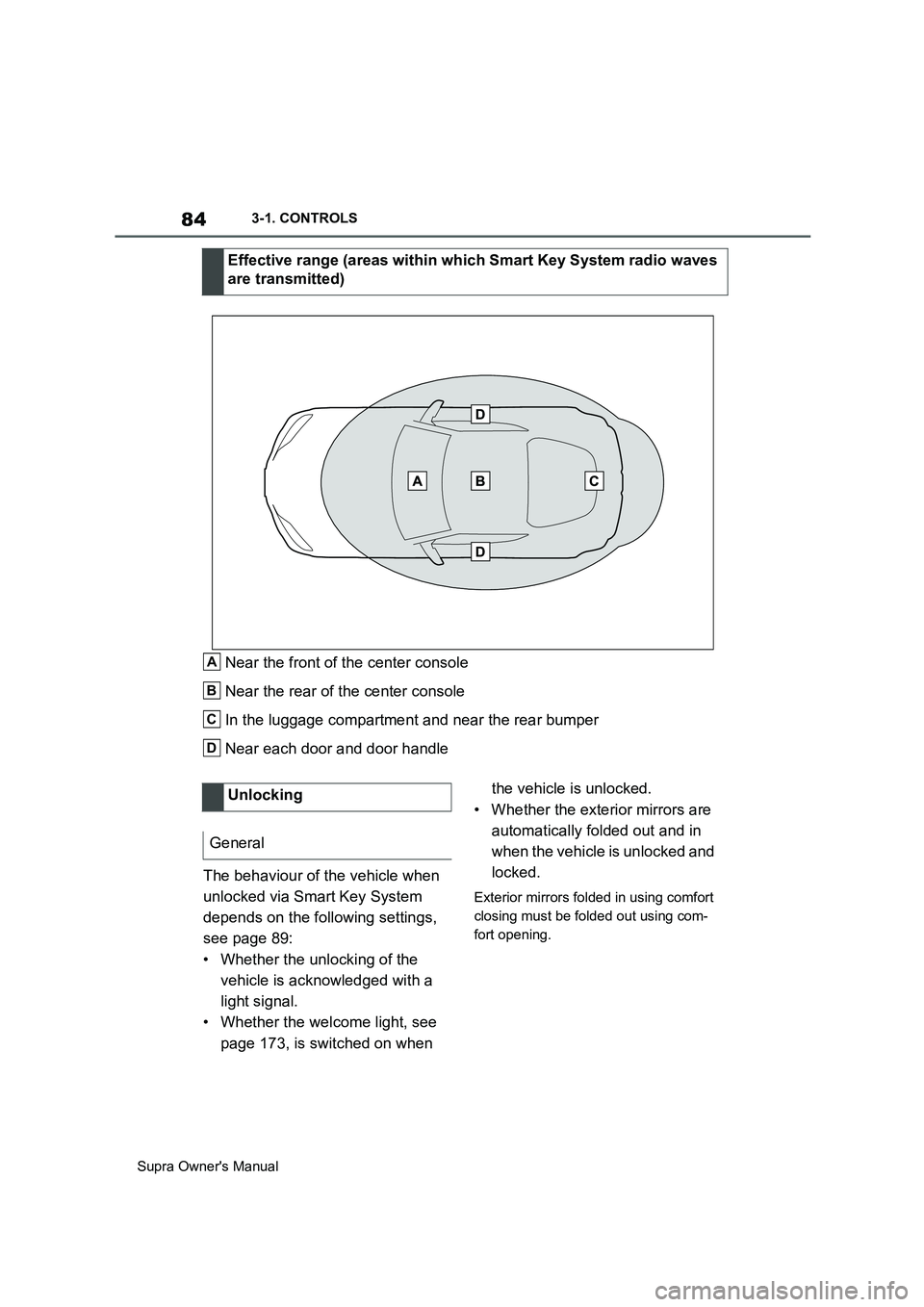
Effective range (areas within which Smart Key System radio waves
are transmitted)
A
B
C
D
Unlocking
General
Page 85 of 456
85
3
Supra Owner's Manual3-1. CONTROLS
CONTROLS
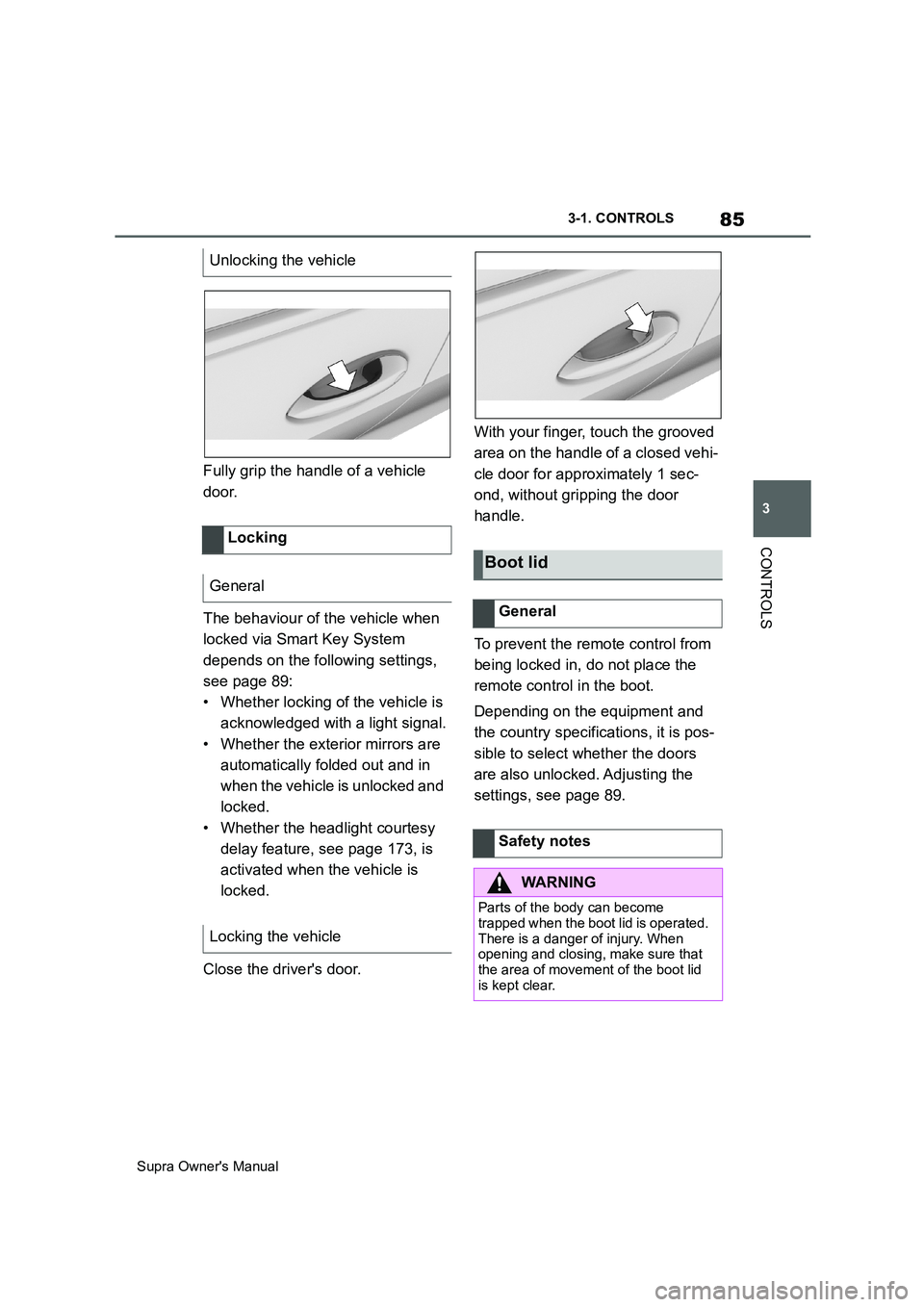
Fully grip the handle of a vehicle
door.
The behaviour of the vehicle when
locked via Smart Key System
depends on the following settings,
see page 89:
• Whether locking of the vehicle is
acknowledged with a light signal.
• Whether the exterior mirrors are
automatically folded out and in
when the vehicle is unlocked and
locked.
• Whether the headlight courtesy
delay feature, see page 173, is
activated when the vehicle is
locked.
Close the driver's door.With your finger, touch the grooved
area on the handle of a closed vehi-
cle door for approximately 1 sec-
ond, without gripping the door
handle.
To prevent the remote control from
being locked in, do not place the
remote control in the boot.
Depending on the equipment and
the country specifications, it is pos-
sible to select whether the doors
are also unlocked. Adjusting the
settings, see page 89. Unlocking the vehicle
Locking
General
Locking the vehicle
Boot lid
General
Safety notes
WARNING
Parts of the body can become
trapped when the boot lid is operated.
There is a danger of injury. When
opening and closing, make sure that
the area of movement of the boot lid
is kept clear.
Page 87 of 456
87
3
Supra Owner's Manual3-1. CONTROLS
CONTROLS
are also restored if the vehicle is
used in the intervening period by
someone with a different remote
control.
Changes to settings are saved
automatically in the currently used
driver profile.
If a different driver profile is
selected via Toyota Supra Com-
mand, the settings saved there are
automatically applied. The new
driver profile is allocated to the
remote control currently used.
A guest profile is also available
which is not allocated to any remote
control. It can be used to perform
settings on the vehicle without
changing the personal driver pro-
files.
To ensure that the correct driver
profile can be set, the system must
be able to allocate the detected
remote control uniquely to the
driver.
This is ensured if the following con-
ditions are met:
• The driver is only carrying their
own remote control.
• The driver unlocks the vehicle.
• The driver enters the vehicle
through the driver's door.
The name of the currently used
driver profile is displayed when the Control Display is switched on.
Select a driver profile, see page 88.
As soon as the engine is started or
any button pressed, the display
selected last is shown on the Con-
trol Display.
To cancel the welcome screen via
Toyota Supra Command: "OK"
Settings for the following systems
and functions are saved in the cur-
rently used driver profile. Which
settings can be saved depends on
the country and equipment.
• Unlocking and locking.
•Lights.
• Air conditioning.
• Radio.
• Instrument cluster.
• Favourites buttons.
• Volumes, sound.
• Control Display.
• Navigation.
• Parking Sensors.
• Rear-view camera.
• Head-Up Display.
•Sport mode switch.
• Seat position, exterior mirror
position
The positions set via the seat memory
and the last position set are saved.
• Cruise Control.
• Toyota Supra Safety. Operating requirements
Currently used driver profile
Settings
Page 90 of 456
90
Supra Owner's Manual3-1. CONTROLS
Via Toyota Supra Command:
1"My Vehicle"
2"Vehicle settings"
3"Doors/Key"
4"Driver's door" or "All
doors"
5Select the desired setting:
• "Driver's door only"
Only the driver's door and fuel filler flap
are unlocked. Pressing again unlocks
the entire vehicle.
• "All doors"
The entire vehicle is unlocked.
Depending on the equipment and
the country specifications, these
settings may not be available.
Via Toyota Supra Command:
1"My Vehicle"
2"Vehicle settings"
3"Doors/Key"
4 "Tailgate" or "Tailgate
and door(s)"
5Select the desired setting:
•"Tailgate"
Boot lid is opened.
• "Tailgate and door(s)"
Boot lid is opened and the doors are
unlocked.
Via Toyota Supra Command:
1"My Vehicle"
2"Driver profiles"
3Select a driver profile.
The setting can be made for the
driver profile marked with this symbol.
4"Last seat position automatic"
When the vehicle is unlocked, the
driver's seat and exterior mirrors
are adjusted to their last set posi-
tions.
The last position setting is inde-
pendent of the positions saved via
the seat memory.
Via Toyota Supra Command:
1"My Vehicle"
2"Vehicle settings"
3"Doors/Key"
4"Flash for lock/unlock"
Unlocking is acknowledged by flashing
twice, locking by flashing once.
Via Toyota Supra Command:
1"My Vehicle"
2"Vehicle settings"
3"Doors/Key"
4Select the desired setting:
• "Relock automatically" Unlocking
Doors
Boot lid
Setting the last seat and mirror
position
Acknowledgement signals of
the vehicle
Automatic locking