change language TOYOTA SUPRA 2019 Owners Manual
[x] Cancel search | Manufacturer: TOYOTA, Model Year: 2019, Model line: SUPRA, Model: TOYOTA SUPRA 2019Pages: 456, PDF Size: 88.65 MB
Page 48 of 456
48
Supra Owner's Manual3-1. CONTROLS
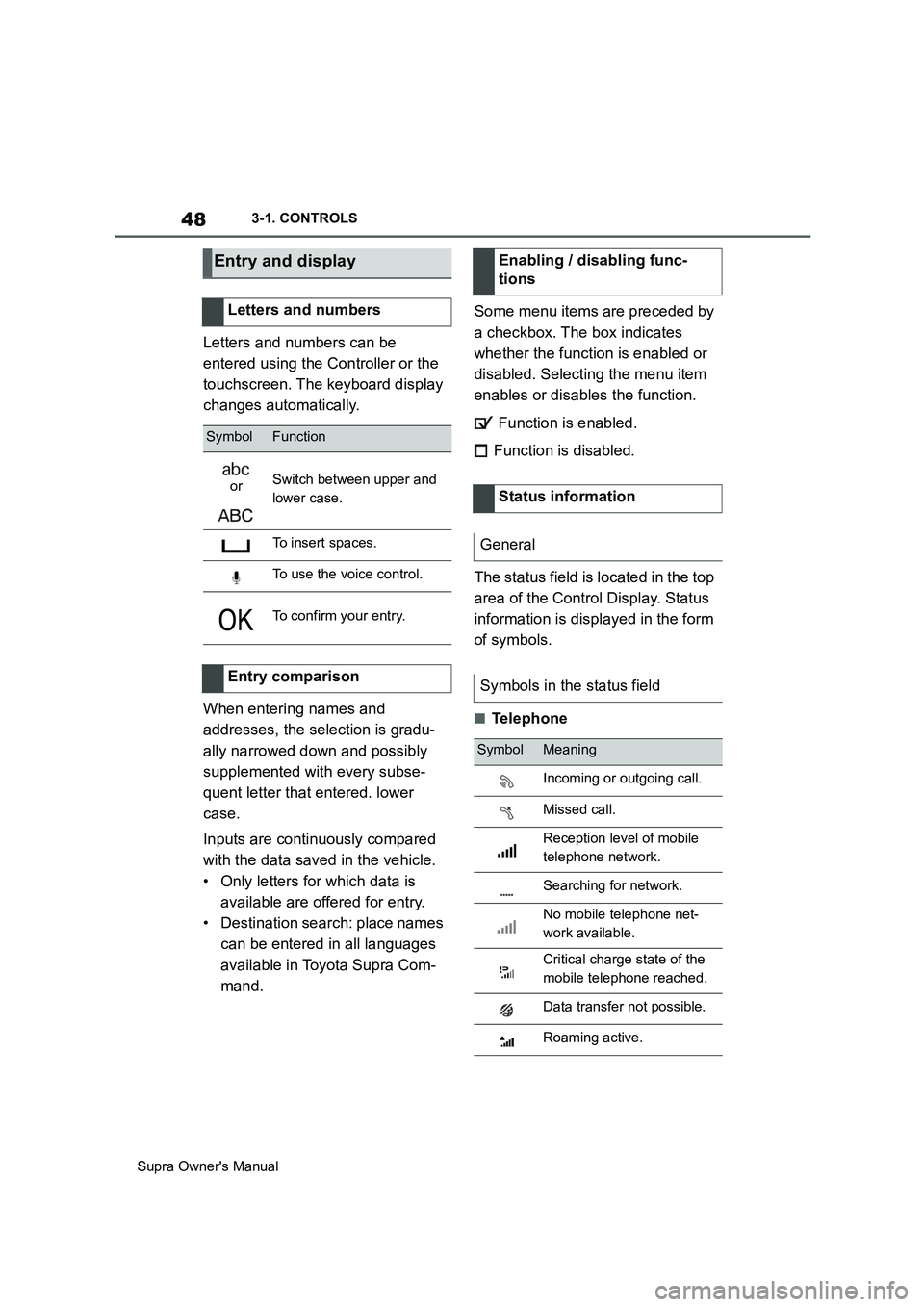
Letters and numbers can be
entered using the Controller or the
touchscreen. The keyboard display
changes automatically.
When entering names and
addresses, the selection is gradu-
ally narrowed down and possibly
supplemented with every subse-
quent letter that entered. lower
case.
Inputs are continuously compared
with the data saved in the vehicle.
• Only letters for which data is
available are offered for entry.
• Destination search: place names
can be entered in all languages
available in Toyota Supra Com-
mand.Some menu items are preceded by
a checkbox. The box indicates
whether the function is enabled or
disabled. Selecting the menu item
enables or disables the function.
Function is enabled.
Function is disabled.
The status field is located in the top
area of the Control Display. Status
information is displayed in the form
of symbols.
■Telephone
Entry and display
Letters and numbers
SymbolFunction
orSwitch between upper and
lower case.
To insert spaces.
To use the voice control.
To confirm your entry.
Entry comparison
Enabling / disabling func-
tions
Status information
General
Symbols in the status field
SymbolMeaning
Incoming or outgoing call.
Missed call.
Reception level of mobile
telephone network.
Searching for network.
No mobile telephone net-
work available.
Critical charge state of the
mobile telephone reached.
Data transfer not possible.
Roaming active.
Page 61 of 456

61
3
Supra Owner's Manual3-1. CONTROLS
CONTROLS
desired volume is obtained.
• The volume setting is retained
even if you change the volume of
other audio sources.
• The volume setting is saved for
the currently used driver profile.
The voice control system should
not be used for emergency calls.
Under stress, a person's speech
and voice pitch can change. This
could unnecessarily delay connec-
tion of your call.
Instead, use the SOS button, see
page 337, located near the
rear-view mirror.
• Doors and windows should be
kept closed to avoid noise inter-
ference.
• Avoid background noise in the
vehicle while you are speaking.This chapter describes all standard,
country-specific and special equip-
ment available for the model series.
It may therefore describe equip-
ment which is not installed in your
vehicle, for example on account of
the optional equipment selected or
the country specification. This also
applies to safety-relevant functions
and systems. Please comply with
the relevant laws and regulations
when using the corresponding func-
tions and systems.
Via Toyota Supra Command:
1"My Vehicle"
2"System settings"
3If applicable, "Language"
4"Language:"
5Select the desired setting.
The setting is saved for the cur-
rently used driver profile.
Speech dialogue for the voice con-
trol system, see page 60.
Information for emergency
calls
Operating conditions
General settings
Vehicle equipment
Language
Selecting the language
Setting the speech dialogue