display TOYOTA SUPRA 2022 Owner's Guide
[x] Cancel search | Manufacturer: TOYOTA, Model Year: 2022, Model line: SUPRA, Model: TOYOTA SUPRA 2022Pages: 498, PDF Size: 104.06 MB
Page 74 of 498
723-1. CONTROLS
Via Toyota Supra Command:
1 "My Vehicle"
2 "System settings"
3 "Date and time"
4 "Time zone:"
5 Select the desired setting.
Via Toyota Supra Command:
1 "My Vehicle"
2 "System settings"
3 "Date and time"
4 "Time"
5 Turn the Controller until the
desired hours are displayed.
6 Press the Controller.
7 Turn the Controller until the
desired minutes are displayed.
8 Press the Controller.
Via Toyota Supra Command:
1 "My Vehicle"
2 "System settings"
3 "Date and time"
4 "Time format:"
5 Select the desired setting.
Depending on the equipment, the
time, date and, if necessary, time
zone are updated automatically.
Via Toyota Supra Command:
1 "My Vehicle"
2 "System settings"
3 "Date and time"
4 "Automatic time setting"
Via Toyota Supra Command:
1 "My Vehicle"
2 "System settings"
3 "Date and time"
4 "Date:"
5 Turn the Controller until the
desired day is displayed.
6 Press the Controller.
7 Select the month and year.
Via Toyota Supra Command:
1 "My Vehicle"
2 "System settings"
3 "Date and time"
4 "Date format:"
5 Select the desired setting.
Time
Setting the time zone
Setting the time
Setting the time format
Automatic time setting
Date
Setting the date
Setting the date format
Page 75 of 498
73
3
3-1. CONTROLS
CONTROLS
Depending on the country specifi-
cations, it is poss ible to select the
units of measurement for various
values, for example consumption,
distances and temperature.
Via Toyota Supra Command:
1 "My Vehicle"
2 "System settings"
3 "Units"
4 Select the desired menu item.
5 Select the desired setting.
If vehicle tracking is activated, the
current vehicle position can be dis-
played in the Toyota Supra Apps.
Via Toyota Supra Command:
1 "My Vehicle"
2 "Vehicle settings"
3 "Vehicle tracking"
4 "Vehicle tracking"
Information windows are automati-
cally shown on the Control Display
for some functions. Some of these
information windows can be acti-
vated or deactivated.
Via Toyota Supra Command:
1 "My Vehicle"
2 "System settings"
3 "Pop-ups"
4 Select the desired setting.
Via Toyota Supra Command:
1 "My Vehicle"
2 "System settings"
3 "Displays"
4 "Control display"
5 "Brightness at night"
6 Turn the Controller until the
desired brightness is obtained.
7 Press the Controller.
Depending on the lighting condi-
tions, the brightness adjustment
may not be immediately apparent.
The content displayed in some
menu items of the main menu can
be selected.
1 Press the button.
2 "Contents of main menu"
Selecting the units ofmeas-
urement
Activating/deactivating dis-
play of the current vehicle
position
Principle
Activating/deactivating
Activating/deactivating
information windows
Control Display
Brightness
Selecting the content of the
main menu
Page 76 of 498
743-1. CONTROLS
3Select the desired menu and
desired content.
The menu shows all messages
received by the vehicle, centrally in
the form of a list.
The following messages can be
displayed:
• Traffic messages.
• Vehicle messages.
• Communication messages, for
example email, SMS or remind-
ers.
• Service requirement messages.
Messages are additionally dis-
played in the status field.
Via Toyota Supra Command:
1 "My Vehicle"
2 "System settings"
3 "Notifications"
4 Select the required message.
The associated menu is opened
and the message displayed.
All messages which are not vehicle
messages can be deleted from the
list. Vehicle messages remain for
as long as they are relevant.
Via Toyota Supra Command:
1 "Notifications"
2 Select the required message if
necessary.
3 Press the button.
4 "Delete this notification" or
"Delete all notifications"
The following settings can be per-
formed:
• Selection of applications from
which messages are permitted.
• Sorting of sequence of mes-
sages by date or priority.
Via Toyota Supra Command:
1 "My Vehicle"
2 "System settings"
3 "Notifications"
4 Select the desired setting.
Messages
Principle
General
Calling up messages
Deleting messages
Settings
Page 77 of 498
75
3
3-1. CONTROLS
CONTROLS
This chapter describes all standard,
country-specific and special equip-
ment available for the model series.
It may therefore describe equip-
ment which is not installed in your
vehicle, for exampl e on account of
the special equipment selected or
the country specific ation. This also
applies to safety-relevant functions
and systems. Please comply with
the relevant laws and regulations
when using the corresponding func-
tions and systems.
The vehicle offers various functions
which require data to be transferred
to Toyota or a service provider. The
transfer of data can be deactivated
for some functions.
If data transfer has been deacti-
vated for a function, then that func-
tion cannot be used.
Only perform settings with the vehi-
cle at a standstill.
Follow the instruct ions on the Con-
trol Display.
Via Toyota Supra Command:
1 "My Vehicle"
2 "System settings"
3 "Data privacy"
4 Select the desired setting.
Depending on use, the vehicle
stores personal data such as saved
radio stations. This personal data
can be permanently deleted using
Toyota Supra Command.
Depending on the equipment in
your vehicle, the following data can
be deleted:
• Driver profile settings.
• Saved radio stations.
• Saved Favourites buttons.
• Trip and on-board computer val-
ues.
• Music hard disc.
• Navigation, for example saved
destinations.
• Phone book.
• Online data, for example Favour-
ites, cookies.
• Office data, for example voice
Personal settings
Vehicle equipment
Data protection
Data transfer
Principle
General
Activating/deactivating
Deleting persona l data in the
vehicle
Principle
General
Page 78 of 498
763-1. CONTROLS
memos.
• Login accounts.
It can take up to 15 minutes in total
to delete data.
Data can only be deleted with the
vehicle at a standstill.
Follow the instructions on the Con-
trol Display.
Via Toyota Supra Command:
1 "My Vehicle"
2 "System settings"
3 "Data privacy"
4 "Delete personal data"
5 "Delete personal data"
6 "OK"
7 Exit and lock the vehicle.
Deletion is completed after 15 min-
utes.
If not all data is deleted, repeat the
deletion process if required.
Switch-on drive-ready state to can-
cel data deletion.
Individual settings for several driv-
ers can be saved in the driver pro-
files and called up again as
required.
Three profiles are provided, in
which personal vehicle settings can
be saved. Each remote control is
allocated one of these driver pro-
files.
When the vehicle is unlocked with a
remote control, the allocated driver
profile is activated. All the settings
saved in the driver profile are
applied automatically.
If several drivers each use their
own remote control, the vehicle will
adapt to their personal settings
when it is unlocked. These settings
are also restored if the vehicle is
used in the intervening period by
someone with a different remote
control.
Changes to settings are saved
automatically in the currently used
driver profile.
If a different driver profile is
selected via To yota Supra Com-
mand, the settings saved there are
automatically applied. The new
driver profile is allocated to the cur-
rently used vehicle key.
A guest profile is also available
which is not allocated to any remote
control. It can be used to perform
settings on the vehicle without
changing the personal driver pro-
Operating requirements
Deleting data
Cancelling deletion
Driver profiles
Principle
General
Page 79 of 498
77
3
3-1. CONTROLS
CONTROLS
files.
To ensure that the correct driver
profile can be set, the system must
be able to allocate the detected
remote control uniquely to the
driver.
This is ensured if the following con-
ditions are met:
• The driver is only carrying their
own remote control.
• The driver unlocks the vehicle.
• The driver enters the vehicle
through the driver's door.
The name of the currently used
driver profile is displayed when the
Control Display is switched on.
Select a driver profile, see page 77.
As soon as the engine is started or
any button pressed, the display
selected last is shown on the Con-
trol Display.
To cancel the welcome screen via
Toyota Supra Command: "OK"
Settings for the following systems
and functions are saved in the cur-
rently used driv er profile. Which
settings can be saved depends on
the country and equipment.
• Unlocking and locking.
•Lights.
• Air conditioning.
• Radio.
• Instrument cluster.
• Favourites buttons.
• Volumes, sound.
• Control Display.
• Parking Sensors.
• Rear-view camera.
• Head-Up Display.
• Sport mode switch.
• Seat position, exterior mirror
position
The positions set via the seat memory
and the last position set are saved.
• Cruise Control.
• Toyota Supra Safety.
Regardless of which remote control
is currently being used, it is possi-
ble to call up a different driver pro-
file. This enables the personal
vehicle settings to be called up,
even if the vehicle was not
unlocked with the driver's own
remote control.
Via Toyota Supra Command:
1 "My Vehicle"
2 "Driver profiles"
3 Select a driver profile.
4 "OK"
• The settings saved in the
selected driver profile are
applied automatically.
Operating requirements
Currently used driver profile
Settings
Profile management
Selecting a driver profile
Page 82 of 498
803-1. CONTROLS
This chapter describes all standard,
country-specific and special equip-
ment available for the model series.
It may therefore describe equip-
ment which is not installed in your
vehicle, for exampl e on account of
the special equipment selected or
the country variant. This also
applies to safety-relevant functions
and systems. Please comply with
the relevant laws and regulations
when using the corresponding func-
tions and systems.
Various types of connection are
available in the vehicle for using
mobile devices. Which connection
type to select depends on the
mobile device and the function you
wish to use.
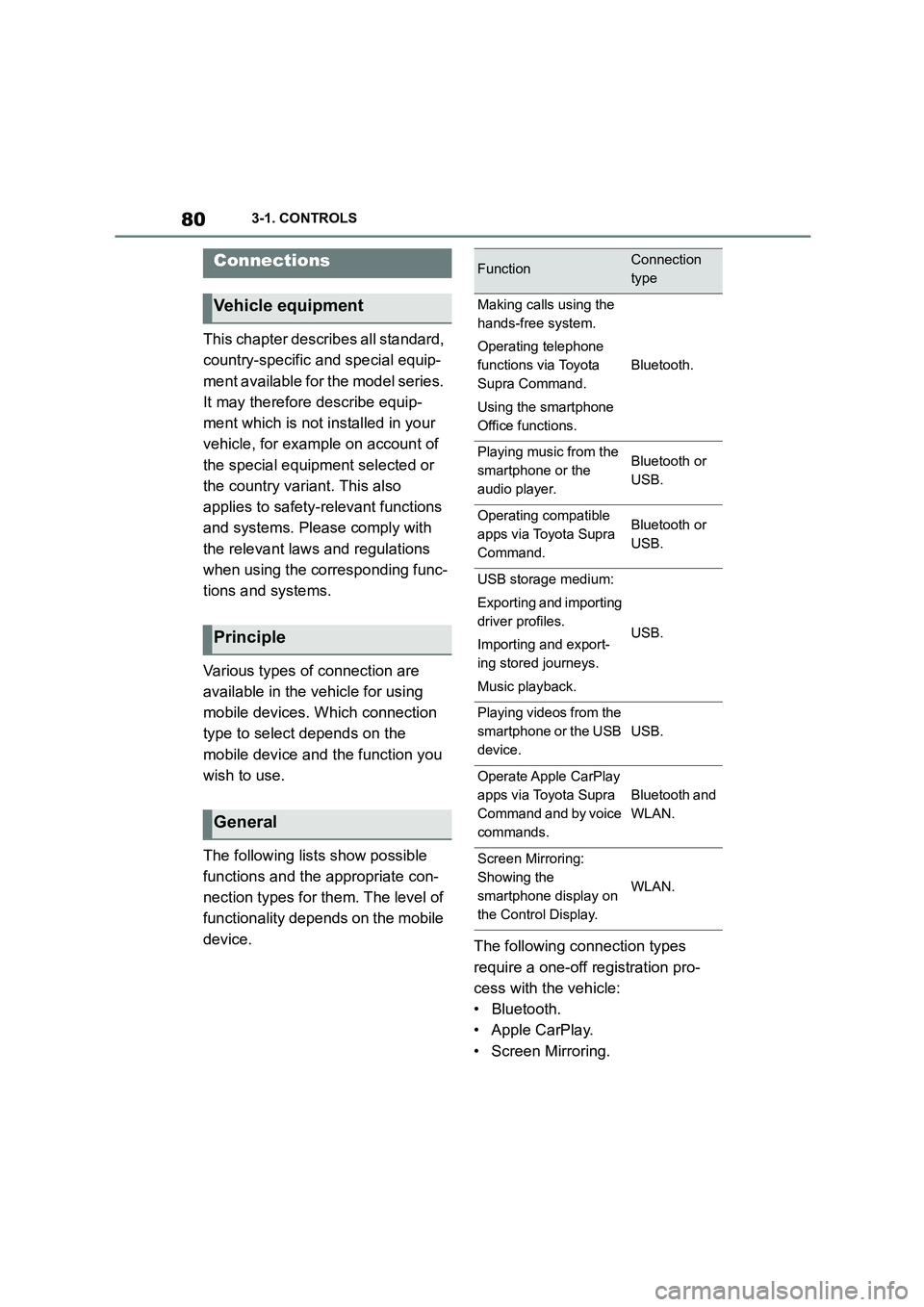
The following lists show possible
functions and the appropriate con-
nection types for them. The level of
functionality depends on the mobile
device. The following connection types
require a one-off registration pro-
cess with the vehicle:
• Bluetooth.
• Apple CarPlay.
• Screen Mirroring.
Connections
Vehicle equipment
Principle
General
FunctionConnection
type
Making calls using the
hands-free system.
Operating telephone
functions via Toyota
Supra Command.
Using the smartphone
Office functions.
Bluetooth.
Playing music from the
smartphone or the
audio player.
Bluetooth or
USB.
Operating compatible
apps via Toyota Supra
Command.
Bluetooth or
USB.
USB storage medium:
Exporting and importing
driver profiles.
Importing and export-
ing stored journeys.
Music playback.
USB.
Playing videos from the
smartphone or the USB
device.
USB.
Operate Apple CarPlay
apps via Toyota Supra
Command and by voice
commands.
Bluetooth and
WLAN.
Screen Mirroring:
Showing the
smartphone display on
the Control Display.
WLAN.
Page 83 of 498
81
3
3-1. CONTROLS
CONTROLS
Registered devices are then auto-
matically recognised and con-
nected to the vehicle.
• Compatible device with
Bluetooth interface.
• The device is operational.
• Bluetooth is activated on the
device and switched on in the
vehicle, see page 81.
• The device may require certain
Bluetooth defaul t settings, for
example visibility, see the user
manual of the device.
Via Toyota Supra Command:
1 "My Vehicle"
2 "System settings"
3 "Mobile devices"
4 "Settings"
5 "Bluetooth"
To be able to use all supported
functions of a mobile telephone, it is
necessary for the following func-
tions to be activated before regis-
tering the mobile telephone with the
vehicle.
Via Toyota Supra Command:
1 "My Vehicle"
2 "System settings"
3 "Mobile devices"
4 "Settings"
5 Select the desired setting.
•"Office"
Activate this function to transfer SMS
messages, e-mails, calendar, tasks,
memos and reminders to the vehicle.
Transferring all data to the vehicle may
incur costs.
• "Contact pictures"
Activate this function to have contact
pictures displayed.
6 Tilt the Controller to the left.
Via Toyota Supra Command:
1 "My Vehicle"
2 "System settings"
3 "Mobile devices"
4 "Connect new device"
5 Select functions:
Safety note
WA R N I N G
Operating integrated information sys-
tems and communication devices dur- ing a journey may distract you from
the traffic. You could lose control of
the vehicle. There is a danger of acci- dents. Only operat e the systems or
devices if permissible in the traffic sit-
uation. Stop if necessary and operate the systems or devices with the vehi-
cle at a standstill.
Bluetooth connection
Operating requirements
Switching on Bluetooth
Enabling/disabling tele-
phone functions
Registering the mobile
device with the vehicle
Page 84 of 498
823-1. CONTROLS
• "Telephone"
• "Bluetooth audio"
• "Apps"
• "Apple CarPlay"
• "Screen Mirroring"
The Bluetooth name of the vehicle is displayed in the Control Display.
6 On the mobile device, search for
Bluetooth devices in the vicinity.
The Bluetooth name of the vehicle is shown on the display of the mobile
device.
Select the Bluetooth name of the vehi- cle.
7 Depending on the mobile
device, either a control number
is displayed, or you will have to
enter the control number your-
self.
• Compare the control number
shown on the Control Display
with the control number in the
device display.
Confirm the control number in the
device and on the Control Display.
• Enter the same control number
on the device and via Toyota
Supra Command then confirm.
The device is connected and displayed
in the device list, see page 86.
There may be instances where the
mobile device does not function as
expected, even though all precondi-
tions have been met and all the
necessary steps have been carried
out in the correct order. Neverthe-
less, the mobile device does not
function as expected.
In such cases, the following expla-
nations may provide assistance:
Why could the mobile telephone
not be paired or connected?
• Too many Bluetooth devices are
paired to the mobile telephone or
the vehicle.
In the vehicle, delete Bluetooth connec-
tions with other devices.
Delete all known Bluetooth connections
from the device list on the mobile tele-
phone and start a new device search.
• The mobile telephone is in
power-save mode or the battery
is low.
Charge the mobile telephone.
Why does the mobile telephone no
longer respond?
• The applications on the mobile
telephone are no longer function-
ing.
Switch the mobile telephone off and on
again.
• Ambient temperature too high or
too low to operate the mobile
telephone.
Do not subject the mobile telephone to
extreme ambient conditions.
Why can telephone functions not
be operated via Toyota Supra Com-
mand?
• The mobile telephone may not
be configured correctly, for
example as a Bluetooth audio
device.
Connect the mobile telephone with the
telephone or additional telephone func-
Frequently Asked Questions
Page 85 of 498
83
3
3-1. CONTROLS
CONTROLS
tion.
Why are no phone book entries, not
all entries or incomplete entries dis-
played?
• The transfer of the phone book
entries is not yet completed.
• Under certain circumstances
only the phone book entries
saved in the mobile telephone or
on the SIM card are transferred.
• It is possible that phone book
entries with special characters
cannot be displayed.
• It may not be possib le to transfer
contacts from social networks.
• The number of telephone book
entries to be saved is too high.
• The data volume of the contact is
too large, for example due to
saved information such as
memos.
Reduce the data volume of the contact.
• A mobile telephone can only be
connected as an audio source or
as a telephone.
Configure the mobile telephone and
connect it with the telephone or addi-
tional telephone function.
How can the telephone connection
quality be improved?
• Adjust the strength of the
Bluetooth signal on the mobile
telephone; the procedure varies
from mobile telephone to mobile
telephone.
• Adjust the volume of the micro-
phone and speaker separately in
the sound settings.
If all the points on the list have been
reviewed and the desired function
cannot be performed, contact the
customer support, any authorized
Toyota retailer or Toyota authorized
repairer, or any reliable repairer.
Mobile devices with a USB port are
connected to the USB port.
• Audio devices, for example MP3
players.
• USB storage devices.
Common file systems are supported.
Formats FAT32 and exFAT are recom-
mended.
A connected USB device is sup-
plied with charging current via the
USB port if the device supports this.
Note the maximum charging cur-
rent of the USB port.
The following can be done at USB
ports compatible with data transfer:
• Exporting and importing of driver
profiles, see page 76.
• Playback of music files via USB
audio.
• Playback of video films via USB
video.
• Importing trips.
When connecting, bear the follow-
ing in mind:
• Do not use force when inserting
the plug into the USB port.
• Use a flexible adapter cable.
USB connection
General