infotainment TOYOTA SUPRA 2022 Owners Manual
[x] Cancel search | Manufacturer: TOYOTA, Model Year: 2022, Model line: SUPRA, Model: TOYOTA SUPRA 2022Pages: 498, PDF Size: 104.06 MB
Page 12 of 498
101-1. NOTES
• Personal settings: settings saved
in the vehicle profile, for example
seat setting.
• Multimedia, navigation, for
example destinations.
Personal data may be collected at
the following times:
• When the customer makes direct
contact with the manufacturer of
the vehicle, for example via the
web page.
• When requesting information on
products and services or direct
purchases, for example on web
pages or in apps.
• When making direct purchases,
for example on the web page.
• When purchasing services
directly, for example online ser-
vices.
• When responding to the cus-
tomer regarding direct market-
ing activities, for example when
personal data is provided.
• When using vehicles, products,
services and digital offers, for
example web pages, apps.
• When transferring personal data
through any authorized Toyota
retailer or Toyota authorized
repairer, or any reliable repairer,
provided that data protection
requirements are met.
• When providing personal data
through certified address provid-
ers, provided that data protection
requirements are met.
• When reading out vehicle data,
including the vehicle identifica-
tion number, during service and
repair activities.
A number of electronic control
devices are installed in your vehi-
cle. Electronic control units process
data that they receive from vehicle
sensors, generate themselves or
exchange with one another, for
example. A high number of control
units are necessary for the vehicle
to function safely or provide assis-
tance during driv ing, for example
driver assistance systems. There
are also control devices which
manage comfort or infotainment
functions.
Data saved in the vehicle can be
deleted at any time. This data is
only transmitted to third parties if
expressly requested in the course
of using online services. The trans-
fer depends on the settings
selected for using the services.
Driver assistance systems, for
example dynamic radar cruise con-
trol, Driver Attention Control, pro-
cess sensor data which is used to
evaluate the vehicle surroundings
Time of data collectionData in the vehicle
General
Sensor data
Page 35 of 498
33
2
2-1. QUICK REFERENCE
QUICK REFERENCE
The memory function enables the
following settings to be stored and
retrieved when required:
• Seat position.
• Exterior mirror position.
• Height of the Head-Up Display.
1 Set the desired position.
2 Press the button on the
driver's seat. The lettering in the
button is illuminated.
3 Press the desired button 1 or 2
at the driver's seat while the let-
tering is illuminated. A signal
sounds.
Press the desired button 1 or 2.
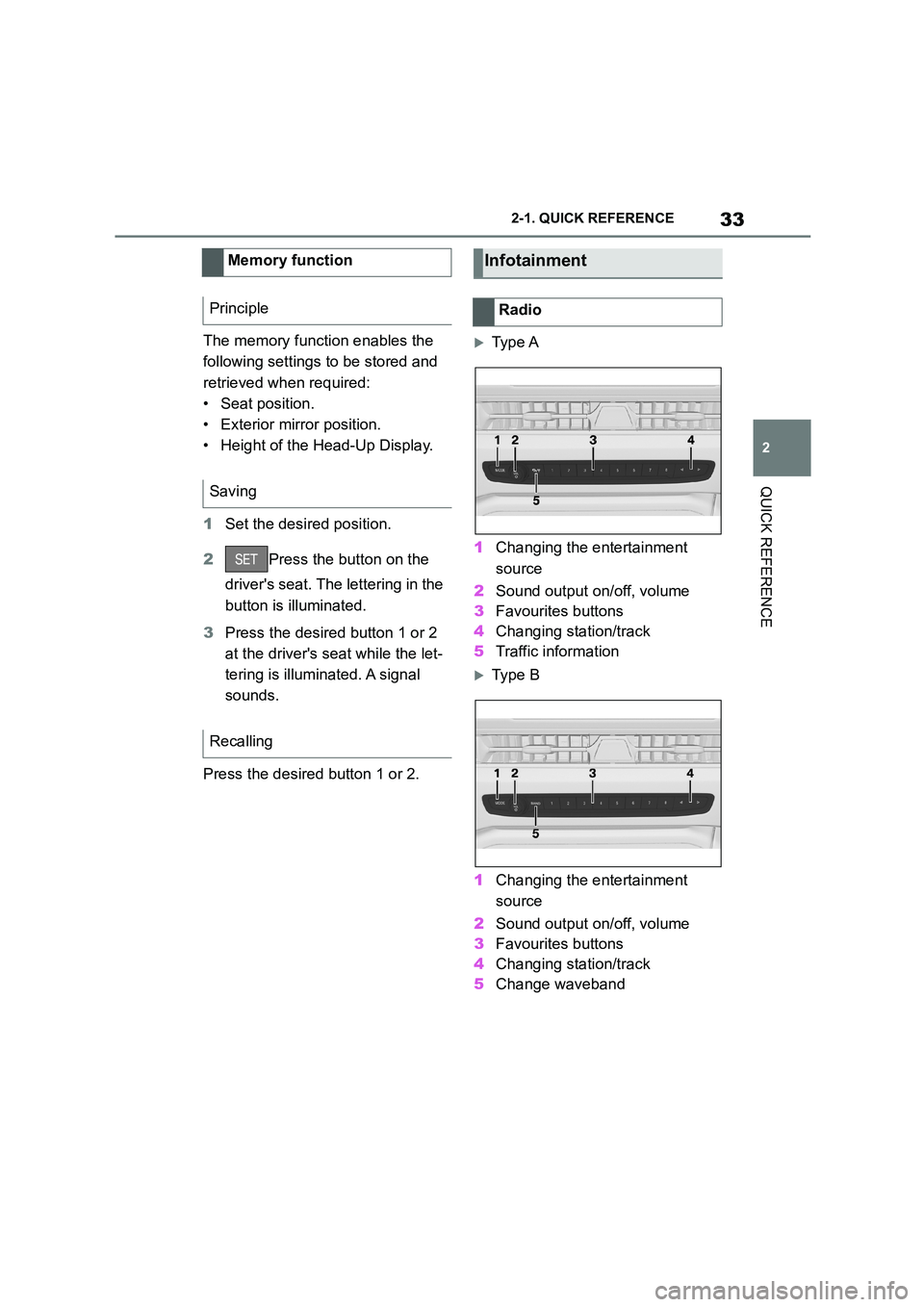
Ty p e A
1 Changing the entertainment
source
2 Sound output on/off, volume
3 Favourites buttons
4 Changing station/track
5 Traffic information
Ty p e B
1 Changing the entertainment
source
2 Sound output on/off, volume
3 Favourites buttons
4 Changing station/track
5 Change waveband
Memory function
Principle
Saving
Recalling
Infotainment
Radio