pairing phone TOYOTA YARIS 2019 Owners Manual (in English)
[x] Cancel search | Manufacturer: TOYOTA, Model Year: 2019, Model line: YARIS, Model: TOYOTA YARIS 2019Pages: 600, PDF Size: 6.11 MB
Page 338 of 600

338
YARIS SEDAN_OM_OM99S50z_(U)
4-3. Bluetooth®
Bluetooth®
■Bluetooth® Hands-Free outline
When a Bluetooth
® device (mobile phone) is connected to the vehi-
cle’s Bluetooth® unit via radio wave transmission, a call can be
made or received by pressing the talk button, pickup button, or
hang-up button on the audio remote control switch, or by operat ing
the center display. For example, even if a device (mobile phone) is
in your coat pocket, a call c an be made without taking the devi ce
(mobile phone) out and operating it directly.
■Bluetooth® audio outline
When a portable audio unit equipped with the Bluetooth
® communi-
cation function is paired to the vehicle, you can listen to mus ic
stored on the paired portable audio device from the vehicle’s s peak-
ers. It is not necessary to c onnect the portable audio device t o the
vehicle’s external input terminal. After programming, operate t he
vehicle audio control panel to play/stop the audio.
■Applicable Bluetooth® specification (Recommended)
Type A: Ver. 2.0
Type B: Ver. 1.1/1.2/2.0 + EDR/2.1 + EDR/3.0 (conformity)
● For your safety, a device can be paired only when the vehicle i s parked. If
the vehicle starts to move, the pairing procedure will end. Par k the vehicle in
a safe place before pairing.
● The communication range of a Bluetooth
® equipped device is about 32 ft.
(10 m) or less.
● Basic audio operation is available using voice commands even if Bluetooth
®
is not connected.
● For safety reasons, operation of the center display is disabled while the
vehicle is being driven. However, items not displayed in gray can be oper-
ated using the commander switch while the vehicle is being driv en.
Page 341 of 600
YARIS SEDAN_OM_OM99S50z_(U)
3414-3. Bluetooth®
4
Interior Features
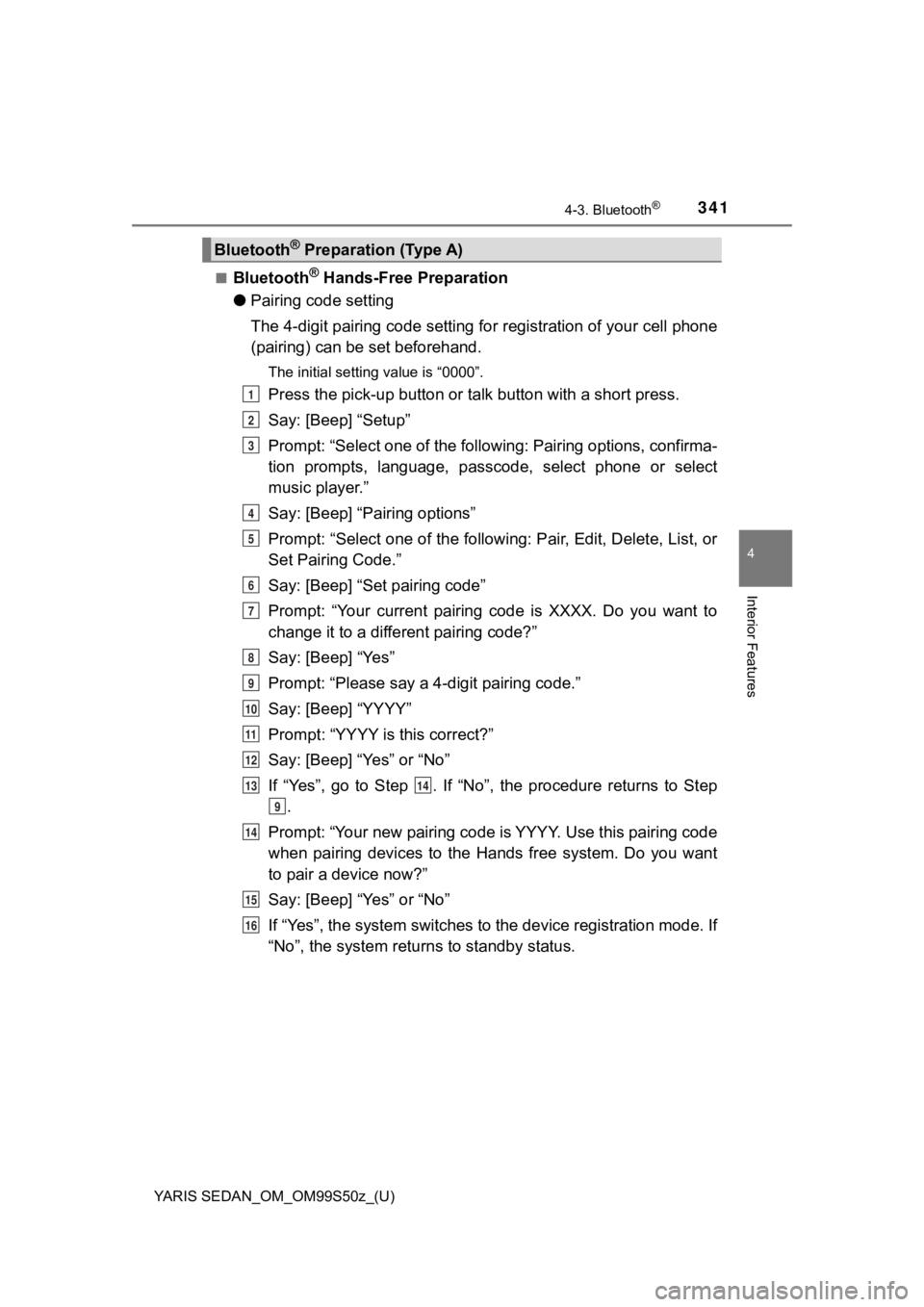
■Bluetooth® Hands-Free Preparation
● Pairing code setting
The 4-digit pairing code setting for registration of your cell phone
(pairing) can be set beforehand.
The initial setting value is “0000”.
Press the pick-up button or ta lk button with a short press.
Say: [Beep] “Setup”
Prompt: “Select one of the following: Pairing options, confirma -
tion prompts, language, passco de, select phone or select
music player.”
Say: [Beep] “Pairing options”
Prompt: “Select one of the following: Pair, Edit, Delete, List, or
Set Pairing Code.”
Say: [Beep] “Set pairing code”
Prompt: “Your current pairing code is XXXX. Do you want to
change it to a different pairing code?”
Say: [Beep] “Yes”
Prompt: “Please say a 4-digit pairing code.”
Say: [Beep] “YYYY”
Prompt: “YYYY is this correct?”
Say: [Beep] “Yes” or “No”
If “Yes”, go to Step . If “No”, the procedure returns to Step .
Prompt: “Your new pairing code is YYYY. Use this pairing code
when pairing devices to the Hands free system. Do you want
to pair a device now?”
Say: [Beep] “Yes” or “No”
If “Yes”, the system switches t o the device registration mode. If
“No”, the system returns to standby status.
Bluetooth® Preparation (Type A)
1
2
3
4
5
6
7
8
9
10
11
12
1314
9
14
15
16
Page 342 of 600

342
YARIS SEDAN_OM_OM99S50z_(U)
4-3. Bluetooth®
●Device pairing
To use Bluetooth
® Hands-Free, the device equipped with Blue-
tooth® has to be paired to the Bluetooth® unit using the following
procedure.
A maximum of seven devices including hands-free mobile
phones and Bluetooth
® audio devices can be paired to one vehi-
cle.
If a Bluetooth® device has already been paired to the vehicle as a
Bluetooth® audio device, it does not need to be paired again when
using the device as a hands-free mobile phone. Conversely, it d oes
not need to be paired again as a Bluetooth
® audio device if it has
already been paired as a hands-free mobile phone.
Activate the Bluetooth® application of the device.
For the operation of the device, refer to its instruction manua l.
Press the pick-up button or talk button with a short press.
Say: [Beep] “Setup”
Prompt: “Select one of the following: Pairing options, confirma -
tion prompts, language, passco de, select phone or select
music player.”
Say: [Beep] “Pairing options”
Prompt: “Select one of the following: Pair, Edit, Delete, List, or
Set Pairing Code.”
Say: [Beep] “Pair”
Prompt: “Start the pairing process on your Bluetooth
® device.
Your pairing code is 0000 (XXXX). Input this on your Blue-
tooth
® device when prompted on the device. See device man-
ual for instructions.”
Using the device, perform a search for the Bluetooth
® device
(Peripheral device).
For the operation of the device, refer to its instruction manua l.
1
2
3
4
5
6
7
8
9
Page 344 of 600

344
YARIS SEDAN_OM_OM99S50z_(U)
4-3. Bluetooth®
●Registered device read-out
Bluetooth
® Hands-Free can read-out the devices registered to its
system.
Do this function only when parked. It is too distracting to att empt
while driving and you may make too many errors to be effective.
Press the pick-up button or ta lk button with a short press.
Say: [Beep] “Setup”
Prompt: “Select one of the following: Pairing options, confirma -
tion prompts, language, passco de, select phone or select
music player.”
Say: [Beep] “Pairing options”
Prompt: “Select one of the following: Pair, Edit, Delete, List, or
Set Pairing Code”
Say: [Beep] “List”
Prompt: “XXXXX..., XXXXX..., XXXXX... (Ex. Device A, device
B, device C)” (The voice guidance reads out the device tags
registered to the hands-free system.)
Press the talk button with a sho rt press during the read-out at
the desired device, and then say one of the following voice
commands to execute it. • “Select phone”: Selects device (Mobile phone) when the talk button is short-pressed.
• “Select music player”: Selects device (Music player) when the talk button is short-pressed.
• “Edit”: Edits device when the talk button is short-pressed.
• “Continue”: Continues the list readout.
• “Delete”: Deletes the registered device when the talk button is short-pressed.
• “Previous”: Returns to the pr evious device in read-out when
the talk button is short-pressed.
Prompt: “End of list, would you like to start from the begin-
ning?”
Say: [Beep] “No”
Prompt: “Returning to main menu.”1
2
3
4
5
6
7
8
9
10
Page 345 of 600
YARIS SEDAN_OM_OM99S50z_(U)
3454-3. Bluetooth®
4
Interior Features
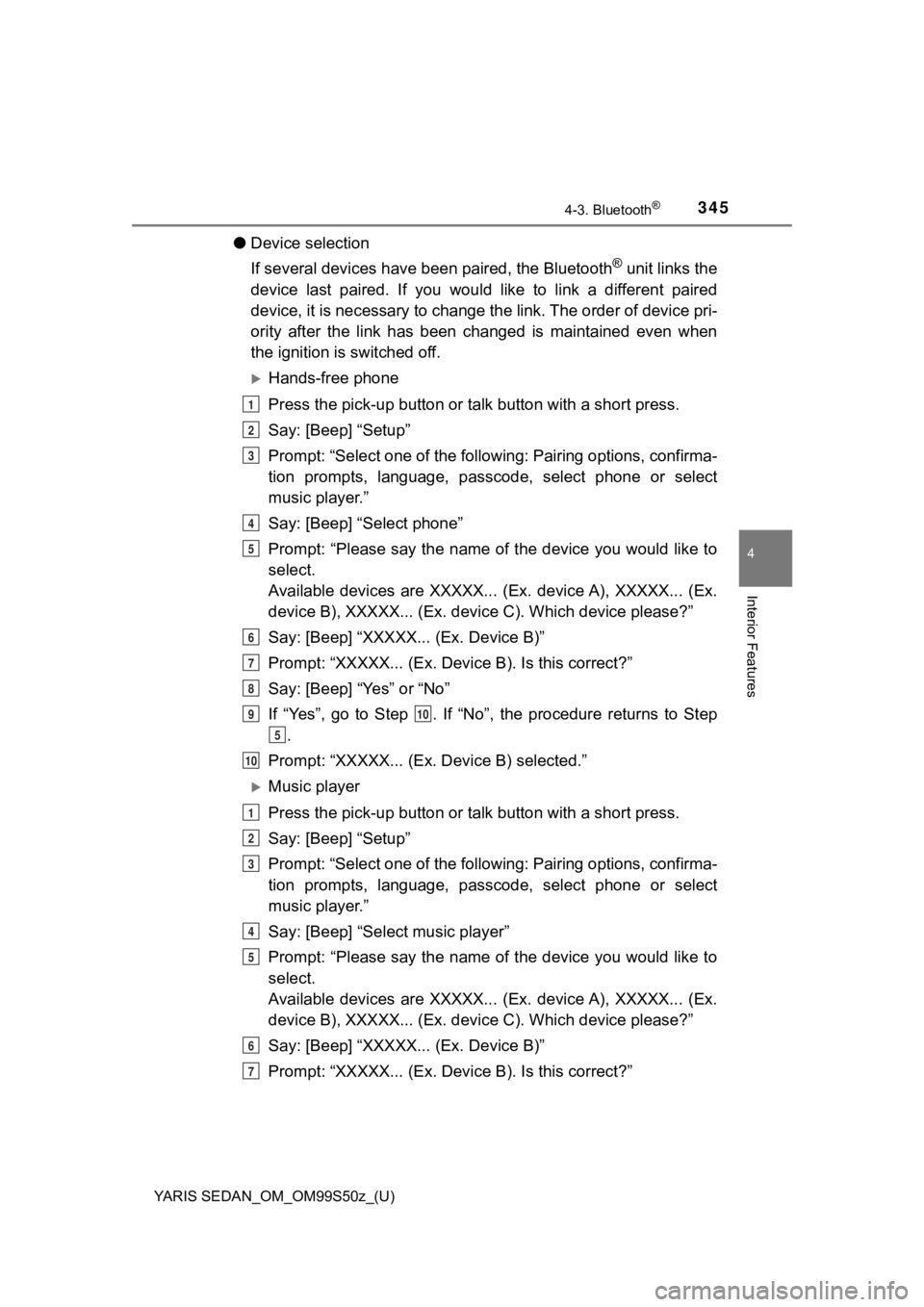
●Device selection
If several devices have been paired, the Bluetooth
® unit links the
device last paired. If you would like to link a different paire d
device, it is necessary to change the link. The order of device pri-
ority after the link has been changed is maintained even when
the ignition is switched off.
Hands-free phone
Press the pick-up button or ta lk button with a short press.
Say: [Beep] “Setup”
Prompt: “Select one of the following: Pairing options, confirma -
tion prompts, language, passco de, select phone or select
music player.”
Say: [Beep] “Select phone”
Prompt: “Please say the name of the device you would like to
select.
Available devices are XXXXX... (Ex. device A), XXXXX... (Ex.
device B), XXXXX... (Ex. devic e C). Which device please?”
Say: [Beep] “XXXXX... (Ex. Device B)”
Prompt: “XXXXX... (Ex. De vice B). Is this correct?”
Say: [Beep] “Yes” or “No”
If “Yes”, go to Step . If “No”, the procedure returns to Step .
Prompt: “XXXXX... (Ex. Device B) selected.”
Music player
Press the pick-up button or ta lk button with a short press.
Say: [Beep] “Setup”
Prompt: “Select one of the following: Pairing options, confirma -
tion prompts, language, passco de, select phone or select
music player.”
Say: [Beep] “Select music player”
Prompt: “Please say the name of the device you would like to
select.
Available devices are XXXXX... (Ex. device A), XXXXX... (Ex.
device B), XXXXX... (Ex. devic e C). Which device please?”
Say: [Beep] “XXXXX... (Ex. Device B)”
Prompt: “XXXXX... (Ex. De vice B). Is this correct?”
1
2
3
4
5
6
7
8
910
5
10
1
2
3
4
5
6
7
Page 346 of 600
![TOYOTA YARIS 2019 Owners Manual (in English) 346
YARIS SEDAN_OM_OM99S50z_(U)
4-3. Bluetooth®
Say: [Beep] “Yes” or “No”
If “Yes”, go to Step . If “No”, the procedure returns to Step.
Prompt: “XXXXX... (Ex. Device B](/img/14/43146/w960_43146-345.png "TOYOTA YARIS 2019 Owners Manual (in English) 346
YARIS SEDAN_OM_OM99S50z_(U)
4-3. Bluetooth®
Say: [Beep] “Yes” or “No”
If “Yes”, go to Step . If “No”, the procedure returns to Step.
Prompt: “XXXXX... (Ex. Device B")
346
YARIS SEDAN_OM_OM99S50z_(U)
4-3. Bluetooth®
Say: [Beep] “Yes” or “No”
If “Yes”, go to Step . If “No”, the procedure returns to Step.
Prompt: “XXXXX... (Ex. Device B) selected.”
When the selected device connection is completed, the or
symbol is displayed. Some Bluetooth® audio devices need a
certain amount of time before the or symbol is dis-
played.
Device (Music player) selection can also be done by operating t he
panel button.
● Deleting a device
Registered devices (Mobile pho ne) can be deleted individually o r
collectively.
Do this function only when parked. It is too distracting to att empt
while driving and you may make too many errors to be effective.
Press the pick-up button or ta lk button with a short press.
Say: [Beep] “Setup”
Prompt: “Select one of the following: Pairing options, confirma -
tion prompts, language, passco de, select phone or select
music player.”
Say: [Beep] “Pairing options”
Prompt: “Select one of the following: Pair, Edit, Delete, List, or
Set Pairing Code.”
A registered device (Mobile phone) can be deleted using the reg istra-
tion list.
Say: [Beep] “Delete”
Prompt: “Please say the name of the device you would like to
delete.
Available devices are XXXXX... (Ex. device A), XXXXX... (Ex.
device B), XXXXX... (Ex. devic e C), or all. Which device
please?”
Say: [Beep] “X” (Say the number of the device to be deleted.)
Say “All” to delete all devices (Mobile phone).
Prompt: “Deleting XXXXX... (Ex. device B...) (Registered
device tag). Is this correct?”
Say: [Beep] “Yes”
Prompt: “Deleted”
8
910
5
10
1
2
3
4
5
6
7
8
9
10
11
Page 347 of 600
![TOYOTA YARIS 2019 Owners Manual (in English) YARIS SEDAN_OM_OM99S50z_(U)
3474-3. Bluetooth®
4
Interior Features
●Registered device editing
Press the pick-up button or ta lk button with a short press.
Say: [Beep] “Setup”
Prompt: “Select](/img/14/43146/w960_43146-346.png "TOYOTA YARIS 2019 Owners Manual (in English) YARIS SEDAN_OM_OM99S50z_(U)
3474-3. Bluetooth®
4
Interior Features
●Registered device editing
Press the pick-up button or ta lk button with a short press.
Say: [Beep] “Setup”
Prompt: “Select")
YARIS SEDAN_OM_OM99S50z_(U)
3474-3. Bluetooth®
4
Interior Features
●Registered device editing
Press the pick-up button or ta lk button with a short press.
Say: [Beep] “Setup”
Prompt: “Select one of the following: Pairing options, confirma -
tion prompts, language, passco de, select phone or select
music player.”
Say: [Beep] “Pairing options”
Prompt: “Select one of the following: Pair, Edit, Delete, List, or
Set Pairing Code.”
Say: [Beep] “Edit”
Prompt: “Please say the name of the device you would like to
edit. Available devices are XXXXX... (Ex. device A), XXXXX...
(Ex. device B), XXXXX... (Ex . device C). Which device
please?”
Say: [Beep] “X” (Say the number of the device to be edited.)
Prompt: “New name please?”
Say: [Beep] “XXXXX... (Ex. Device C)” (Speak a “device tag”
an arbitrary name for the device.)
Prompt: “XXXXX... (Ex. device C) (Device tag), is this cor-
rect?”
Say: [Beep] “Yes”
Prompt: “New name saved.”
1
2
3
4
5
6
7
8
9
10
11
12
13
Page 349 of 600

YARIS SEDAN_OM_OM99S50z_(U)
3494-3. Bluetooth®
4
Interior Features
●Bluetooth® audio device pairing
Any Bluetooth
® audio device must be paired to the vehicle’s
Bluetooth® unit before it can be listened to over the vehicle’s
speakers.
A maximum of seven dev ices including Bluetooth
® audio devices
and hands-free mobile phones can be paired to one vehicle.
If a Bluetooth® device has already been paired to the vehicle as a
hands-free mobile phone, it does not need to be paired again wh en
using the device as a Bluetooth
® audio device. Conversely, it does
not need to be paired again as a hands-free mobile phone if it has
already been paired as a Bluetooth
® audio device.
Device registration can also be done using voice recognition.
Concerning the operation of a Bluetooth® audio device itself,
refer to its instruction manual.
Some Bluetooth
® audio devices have PIN codes (four digits).
Refer to the audio device’s instruction manual because the pair -
ing procedure differs depending on whether it has a PIN code or
not.
● Pairing a Bluetooth
® audio device which has a four-digit PIN
code
Using the audio control dial, select the pairing mode “PAIR
DEVICE” in the “BT SETUP” mode. (Refer to “Bluetooth
®
audio device set-up” for details.)
Press the audio control dial to determine the mode. After
“ENTER PIN” is displayed on the audio display for three sec-
onds, “PIN 0000” is displayed and the PIN code can be input.
1
2
Page 355 of 600
YARIS SEDAN_OM_OM99S50z_(U)
3554-3. Bluetooth®
4
Interior Features
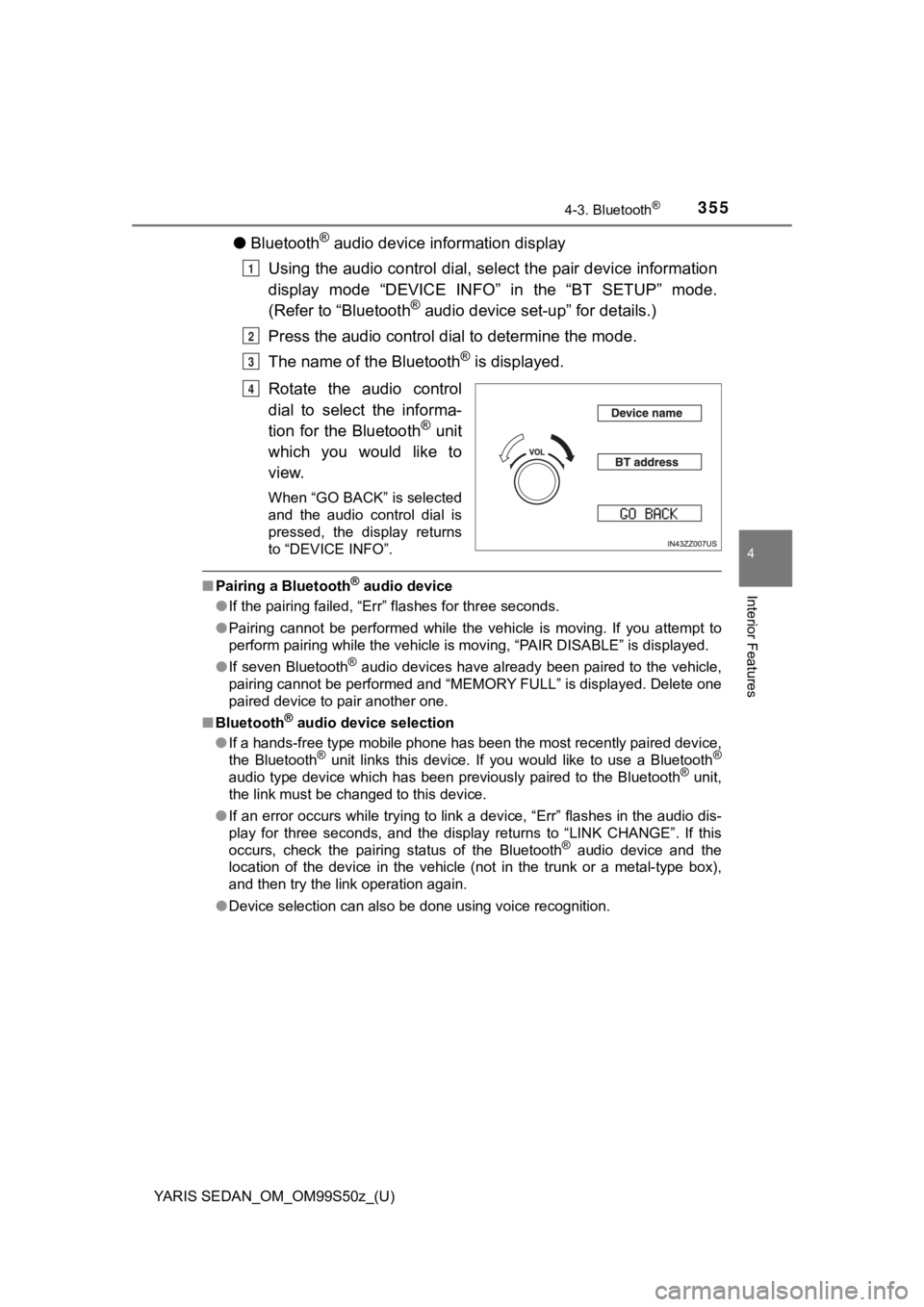
●Bluetooth® audio device information display
Using the audio control dial, sel ect the pair device information
display mode “DEVICE INFO” in the “BT SETUP” mode.
(Refer to “Bluetooth
® audio device set-up” for details.)
Press the audio control dia l to determine the mode.
The name of the Bluetooth
® is displayed.
Rotate the audio control
dial to select the informa-
tion for the Bluetooth
® unit
which you would like to
view.
When “GO BACK” is selected
and the audio control dial is
pressed, the display returns
to “DEVICE INFO”.
■ Pairing a Bluetooth® audio device
● If the pairing failed, “Err” flashes for three seconds.
● Pairing cannot be performed while the vehicle is moving. If you attempt to
perform pairing while the vehicle is moving, “PAIR DISABLE” is displayed.
● If seven Bluetooth
® audio devices have already been paired to the vehicle,
pairing cannot be performed and “MEMORY FULL” is displayed. Delete one
paired device to pair another one.
■ Bluetooth
® audio device selection
● If a hands-free type mobile phone has been the most recently paired device,
the Bluetooth
® unit links this device. If you would like to use a Bluetooth®
audio type device which has been previously paired to the Bluetooth® unit,
the link must be changed to this device.
● If an error occurs while trying to link a device, “Err” flashes in the audio dis-
play for three seconds, and the display returns to “LINK CHANGE”. If this
occurs, check the pairing status of the Bluetooth
® audio device and the
location of the device in the vehicle (not in the trunk or a me tal-type box),
and then try the link operation again.
● Device selection can also be done using voice recognition.
1
2
3
4
Page 356 of 600

356
YARIS SEDAN_OM_OM99S50z_(U)
4-3. Bluetooth®
The available languages are English, Spanish, and Canadian French.
If the language setting is changed, all of the voice guidance and voice
input commands are done in the selected language.
Method 1
Press the pick-up button or talk button with a short press.
Say: [Beep] “Setup”
Prompt: “Select one of the follo wing: Pairing options, confirmation
prompts, language, passcode, select phone or select music playe r. ”
Say: [Beep] “Language”
Prompt: “Select a language: English, French, or Spanish.”
Say: [Beep] “French” (Speak the desired language: “English”,
“French” or “Spanish”)
Other language settings can also be made while in the current setting by
saying the name of the language in the native pronunciation.
Prompt: “French (Desired langu age) selected. Is this correct?”
Say: [Beep] “Yes”
Prompt: “French (Desired language) selected” (Spoken in the new ly
selected language).
Method 2
Press the pick-up button or talk button with a short press.
Say: [Beep] “French” (Say the desired language: “English”,
“French” or “Spanish”). (Change the desired language by saying the
language name.)
Other language settings can also be made while in the current setting by
saying the name of the language in the native pronunciation.
Prompt: “Would you like to change the language to French (Desir ed
language)?”
Say: [Beep] “Yes”
Prompt: “Please wait. Switching to French phonebook. French
selected” (Spoken in the newly selected language).
Available Language (Type A)
1
2
3
4
5
6
7
8
9
1
2
3
4
5