TRAN TOYOTA YARIS 2019 Service Manual
[x] Cancel search | Manufacturer: TOYOTA, Model Year: 2019, Model line: YARIS, Model: TOYOTA YARIS 2019Pages: 700, PDF Size: 65.2 MB
Page 345 of 700
3454-6. Using the driving support systems
4
Driving
YARIS_F_OM_Europe_OM52K19E
● Vehicles with a manual transmission: When the engine cannot be restarted
by the Stop & Start system
■ If the Stop & Start cancel indicator continues to flash
The Stop & Start system may be malfunctioning. Contact any authorized
Toyota retailer or Toyota authorized repairer, or any reliable repairer.
■ If the windshield is fogged up while the engine is stopped by the Stop &
Start system
Vehicles with an automatic air conditioning system
Turn the windshield defogger on. (The engine will start due to the automatic
engine start function.) ( P. 444)
Vehicles with a manual air conditioning system
Vehicles with a Multidrive:
Restart the engine by releasing the brake pedal (when the shift lever is in D
or M) or depress the brak e pedal and shift the shift lever to D or M (when
the shift lever is in N or P) ( P. 338), or by pressing the Stop & Start cancel
switch, and then set the air outlet selector dial to . ( P. 434)
Vehicles with a manual transmission:
Restart the engine by depressing the clutch pedal ( P. 338), or by pressing
the Stop & Start cancel switch, and then set the air outlet selector dial to
. ( P. 434)
If the windshield fogs up frequently, press the Stop & Start cancel switch to
deactivate the system.
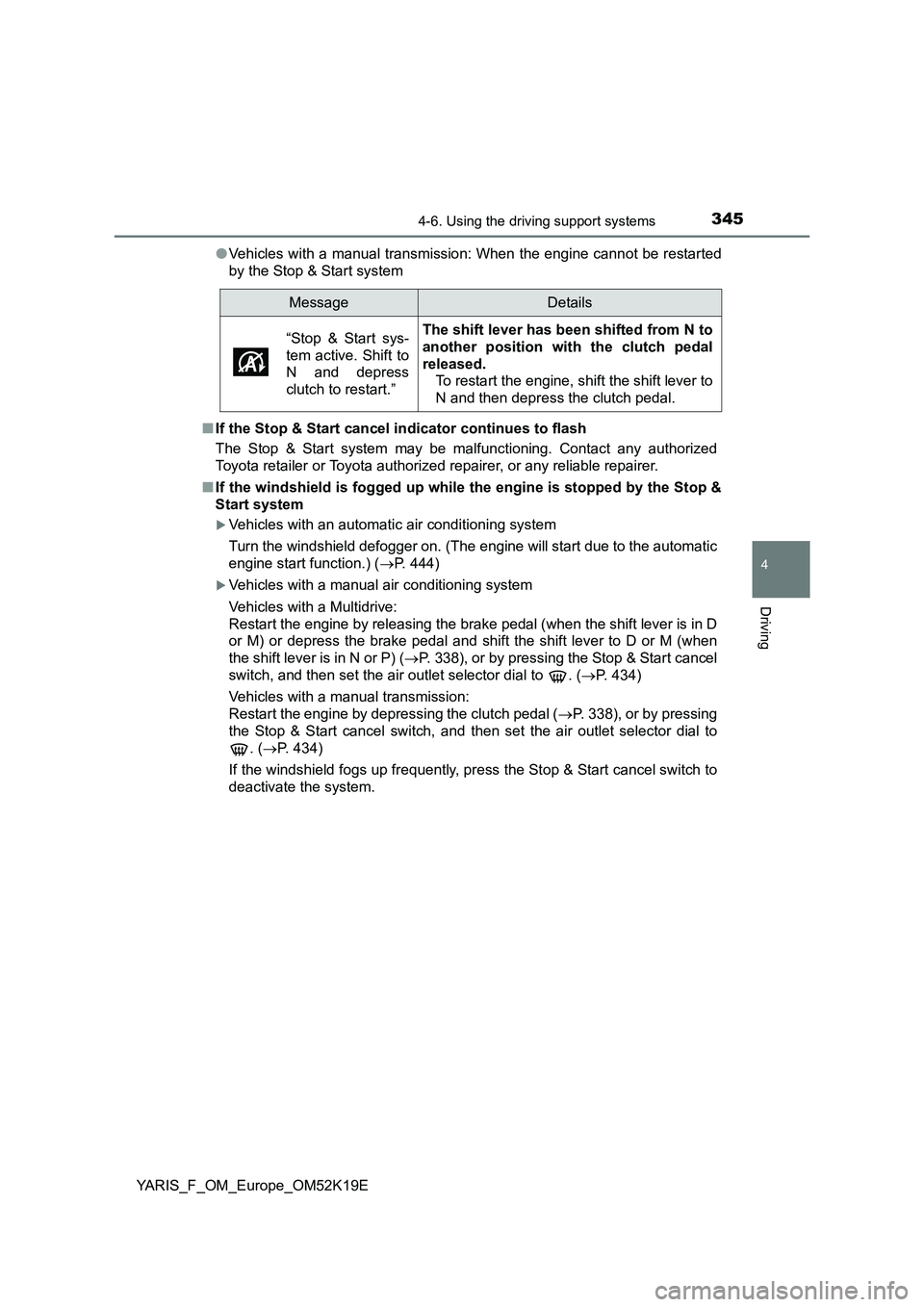
MessageDetails
“Stop & Start sys-
tem active. Shift to
N and depress
clutch to restart.”
The shift lever has been shifted from N to
another position with the clutch pedal
released.
To restart the engine, shift the shift lever to
N and then depress the clutch pedal.
Page 346 of 700
3464-6. Using the driving support systems
YARIS_F_OM_Europe_OM52K19E
■ Air conditioning system operation while the engine is stopped by the
Stop & Start system
● If the air conditioning system is being used in automatic mode, the fan
speed may be reduced or the fan may be stopped while the engine is
stopped by the Stop & Start system in order to reduce changes in the cabin
temperature.
● To ensure air conditioning system performance when the vehicle is stopped,
disable the Stop & Start system by pressing the Stop & Start cancel switch.
■ The Stop & Start system operation time and Stop & Start system total
operation time display
P. 121
■ When replacing the battery
P. 634
WARNING
■When the Stop & Start system is operating
● Keep the shift lever in N (manual transmission) and apply the brake pedal
or parking brake for safety while the engine is stopped due to the Stop &
Start system (while the Stop & Start indicator is on).
Unexpected accidents may occur due to the automatic engine start func-
tion.
● Do not leave the vehicle while the engine is stopped due to the Stop &
Start system (while the Stop & Start indicator is on).
Unexpected accidents may occur due to the automatic engine start func-
tion.
● Ensure that the engine is not stopped by the Stop & Start system while the
vehicle is in a poorly ventilated area. The engine may restart due to the
automatic engine start function, causing exhaust gases to collect and
enter the vehicle and resulting in death or a serious health hazard.
Page 351 of 700
3514-6. Using the driving support systems
4
Driving
YARIS_F_OM_Europe_OM52K19E
■ Operating conditions of hill-start assist control
When the following four conditions are me t, the hill-start assist control will
operate:
● Vehicles with Multidrive: The shift lever is in a position other than P or N
(when starting off forward/bac kward on an upward incline).
● Vehicles with manual transmission: The shift lever is in a position other than
R when starting off forward on an upward incline, or the shift lever is in R
when starting off backward on an upward incline.
● The vehicle is stopped.
● The accelerator pedal is not depressed.
● The parking brake is not engaged.
■ Automatic system cancelation of hill-start assist control
The hill-start assist control will turn off in any of the following situations:
● Vehicles with Multidrive: The shift lever is shifted to P or N.
● Vehicles with manual transmission: The shift lever is shifted to R when start-
ing off forward on an upward incline, or the shift lever is shifted to other than
R when starting off backward on an upward incline.
● The accelerator pedal is depressed.
● Approximately 2 seconds elapse.
● 2 seconds at maximum elapsed after the brake pedal is released.
■ Sounds and vibrations caused by the ABS, brake assist, VSC, TRC, and
hill-start assist control systems
● A sound may be heard from the engine compartment when the brake pedal
is depressed repeatedly, when the engine is started or just after the vehicle
begins to move. This sound does not indicate that a malfunction has
occurred in any of these systems.
● Any of the following conditions may occur when the above systems are
operating. None of these indicates that a malfunction has occurred.
• Vibrations may be felt through the vehicle body and steering.
• A motor sound may be heard also after the vehicle comes to a stop.
• The brake pedal may pulsate slightly after the ABS is activated.
• The brake pedal may move down slightly after the ABS is activated.
Page 356 of 700
3564-7. Driving tips
YARIS_F_OM_Europe_OM52K19E
Accelerate the vehicle slowly, keep a safe distance between you and
the vehicle ahead, and drive at a reduced speed suitable to road con-
ditions.
● Park the vehicle and move the shift lever to P (Multidrive) 1 or R
(manual transmission) without setting the parking brake. The park-
ing brake may freeze up, preventing it from being released. If the
vehicle is parked without setting the parking brake, make sure to
block the wheels.
Failure to do so may be dangerous because it may cause the vehi-
cle to move unexpectedly, possibly leading to an accident.
● On vehicles with a Multidrive, if the vehicle is parked without setting
the parking brake, confirm that the shift lever cannot be moved out
of P*.
*: The shift lever will be locked if it is attempted to be shifted from P to any
other position without depressing the brake pedal. If the shift lever can be
shifted from P, there may be a problem with the shift lock system. Have the
vehicle inspected by any authorized Toyota retailer or Toyota authorizes
repairer, or any reliable repairer.
When driving the vehicle
When parking the vehicle
Page 358 of 700
3584-7. Driving tips
YARIS_F_OM_Europe_OM52K19E
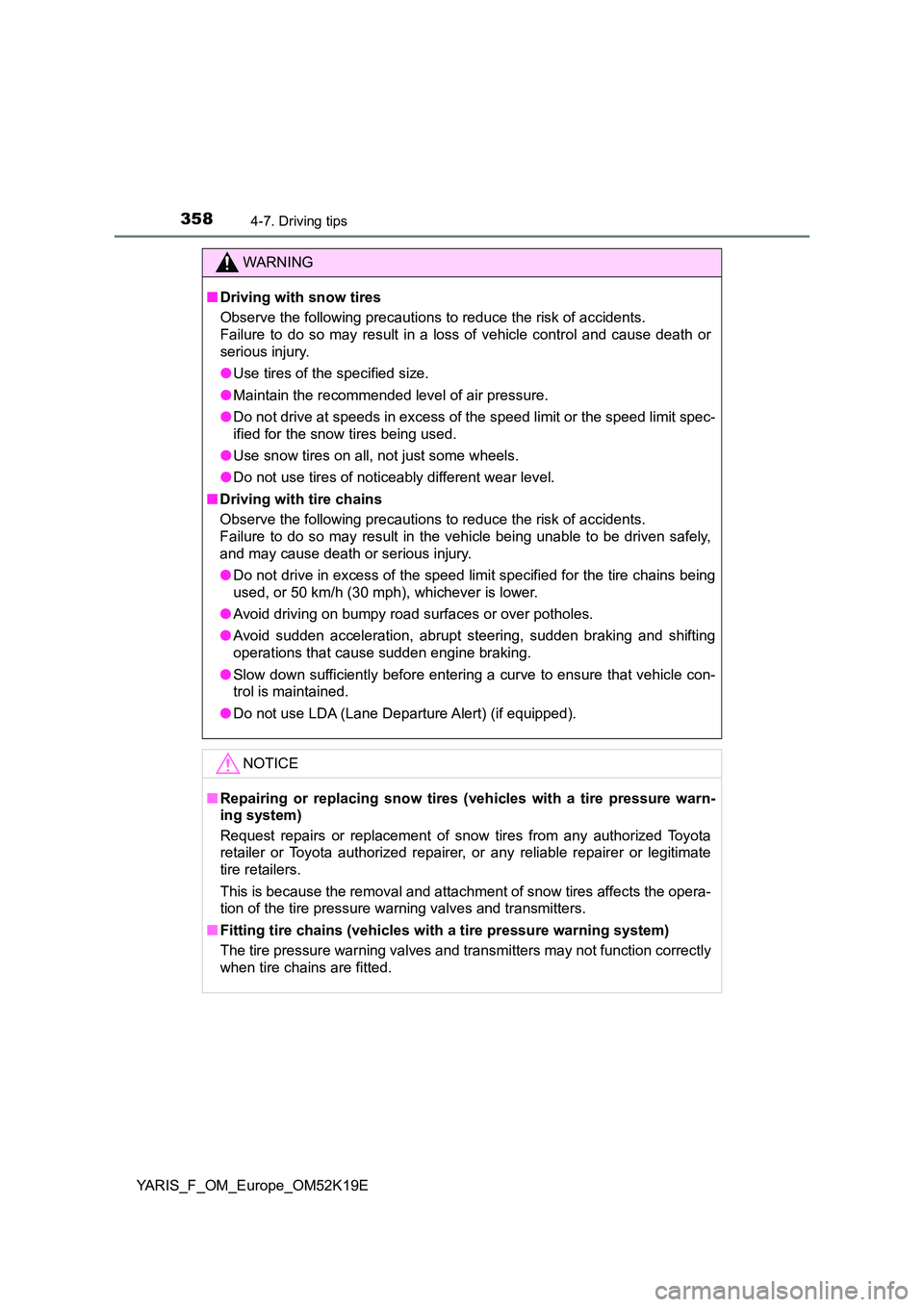
WARNING
■Driving with snow tires
Observe the following precautions to reduce the risk of accidents.
Failure to do so may result in a loss of vehicle control and cause death or
serious injury.
● Use tires of the specified size.
● Maintain the recommended level of air pressure.
● Do not drive at speeds in excess of the speed limit or the speed limit spec-
ified for the snow tires being used.
● Use snow tires on all, not just some wheels.
● Do not use tires of noticeably different wear level.
■ Driving with tire chains
Observe the following precautions to reduce the risk of accidents.
Failure to do so may result in the vehicle being unable to be driven safely,
and may cause death or serious injury.
● Do not drive in excess of the speed limit specified for the tire chains being
used, or 50 km/h (30 mph), whichever is lower.
● Avoid driving on bumpy road surfaces or over potholes.
● Avoid sudden acceleration, abrupt steering, sudden braking and shifting
operations that cause sudden engine braking.
● Slow down sufficiently before entering a curve to ensure that vehicle con-
trol is maintained.
● Do not use LDA (Lane Departure Alert) (if equipped).
NOTICE
■Repairing or replacing snow tires (vehicles with a tire pressure warn-
ing system)
Request repairs or replacement of snow tires from any authorized Toyota
retailer or Toyota authorized repairer, or any reliable repairer or legitimate
tire retailers.
This is because the removal and attachment of snow tires affects the opera-
tion of the tire pressure warning valves and transmitters.
■ Fitting tire chains (vehicles with a tire pressure warning system)
The tire pressure warning valves and transmitters may not function correctly
when tire chains are fitted.
Page 369 of 700
3695-3. Using the radio
5
Audio system
YARIS_F_OM_Europe_OM52K19E
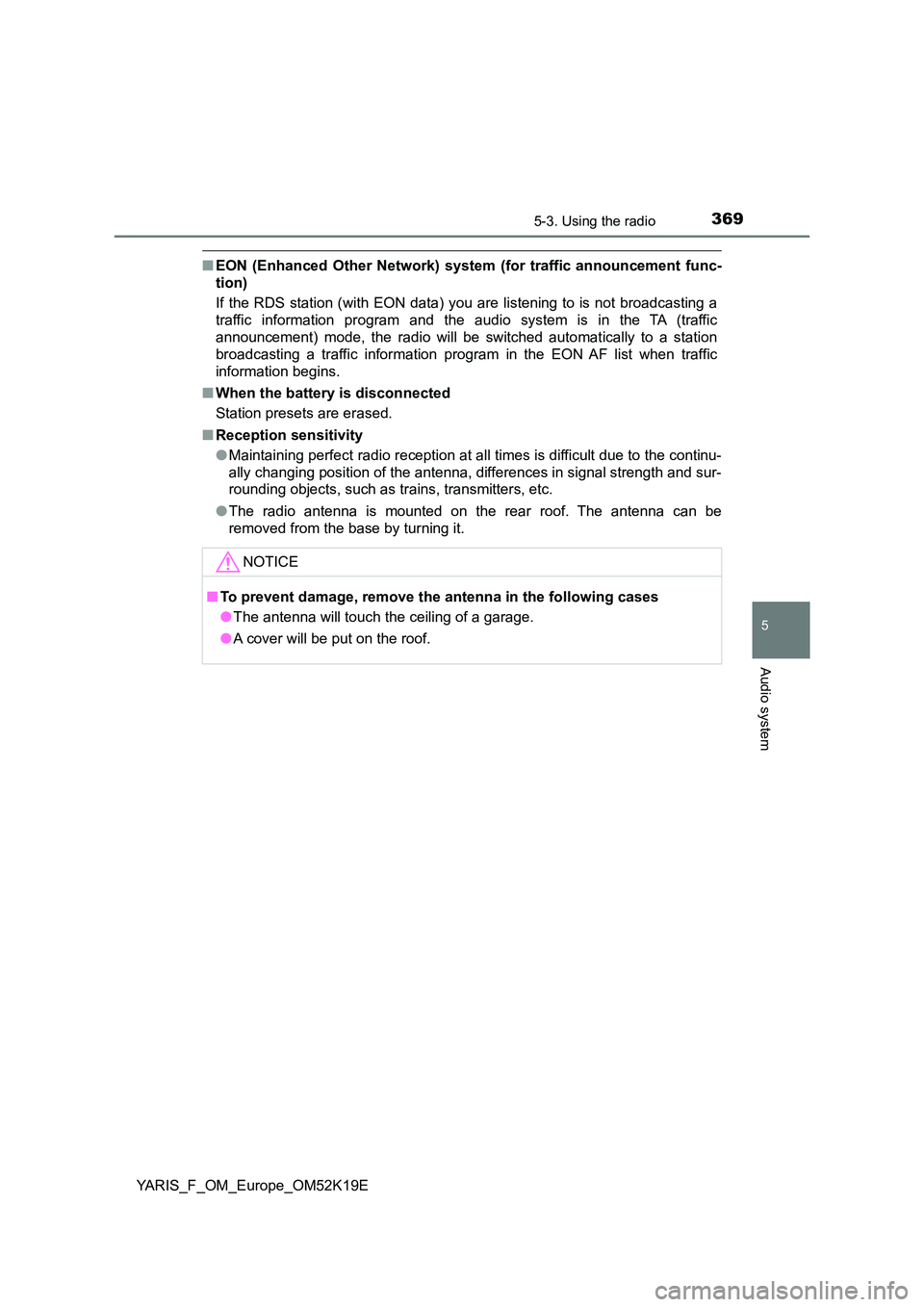
■EON (Enhanced Other Network) system (for traffic announcement func-
tion)
If the RDS station (with EON data) you are listening to is not broadcasting a
traffic information program and the audio system is in the TA (traffic
announcement) mode, the radio will be switched automatically to a station
broadcasting a traffic information program in the EON AF list when traffic
information begins.
■ When the battery is disconnected
Station presets are erased.
■ Reception sensitivity
● Maintaining perfect radio reception at all times is difficult due to the continu-
ally changing position of the antenna, differences in signal strength and sur-
rounding objects, such as trains, transmitters, etc.
● The radio antenna is mounted on the rear roof. The antenna can be
removed from the base by turning it.
NOTICE
■ To prevent damage, remove the antenna in the following cases
● The antenna will touch the ceiling of a garage.
● A cover will be put on the roof.
Page 378 of 700
3785-4. Playing audio CDs and MP3/WMA discs
YARIS_F_OM_Europe_OM52K19E
NOTICE
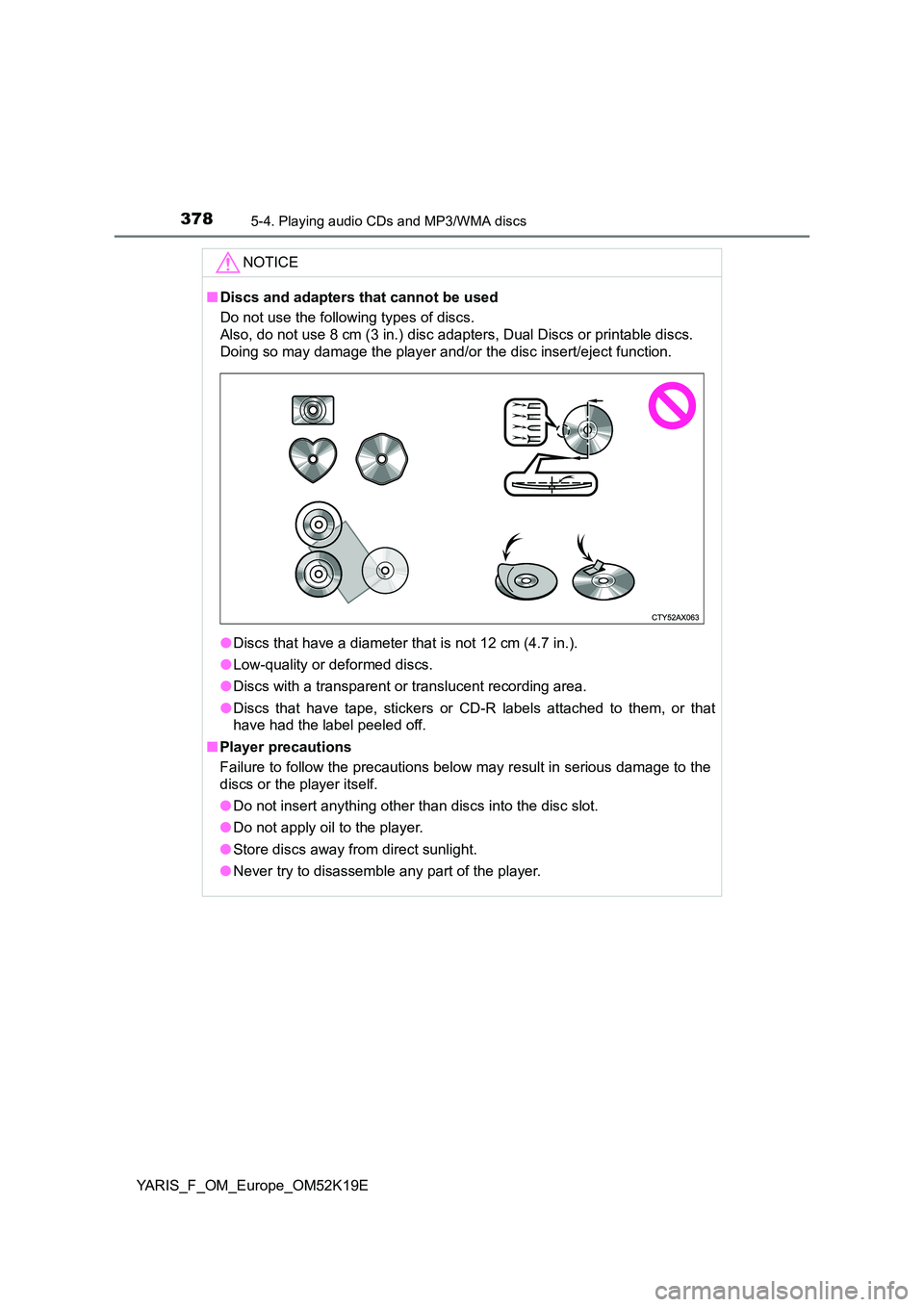
■Discs and adapters that cannot be used
Do not use the following types of discs.
Also, do not use 8 cm (3 in.) disc adapters, Dual Discs or printable discs.
Doing so may damage the player and/or the disc insert/eject function.
● Discs that have a diameter that is not 12 cm (4.7 in.).
● Low-quality or deformed discs.
● Discs with a transparent or translucent recording area.
● Discs that have tape, stickers or CD-R labels attached to them, or that
have had the label peeled off.
■ Player precautions
Failure to follow the precautions below may result in serious damage to the
discs or the player itself.
● Do not insert anything other than discs into the disc slot.
● Do not apply oil to the player.
● Store discs away from direct sunlight.
● Never try to disassemble any part of the player.
Page 400 of 700
4005-6. Using Bluetooth® devices
YARIS_F_OM_Europe_OM52K19E
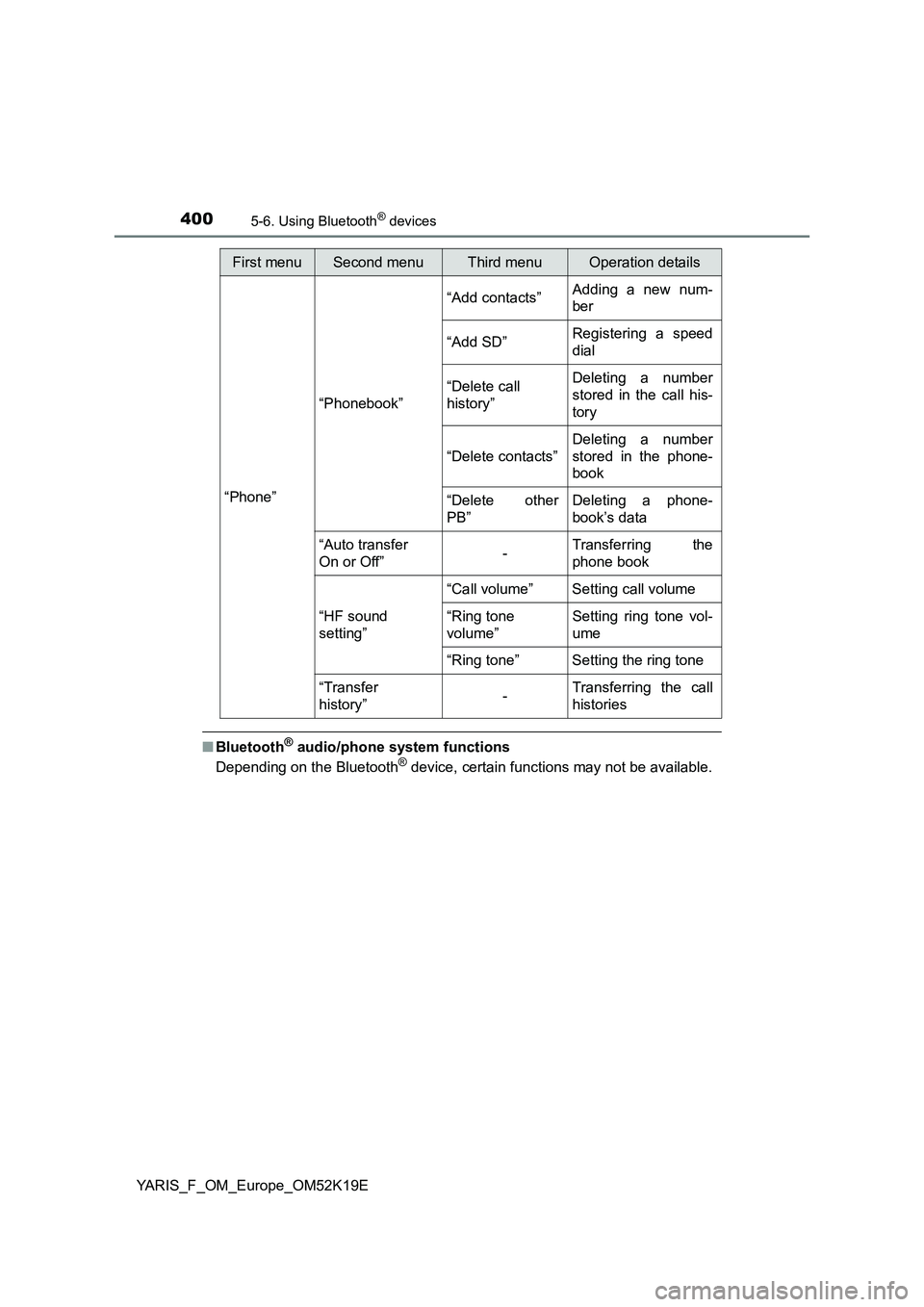
■Bluetooth® audio/phone system functions
Depending on the Bluetooth® device, certain functions may not be available.
First menuSecond menuThird menuOperation details
“Phone”
“Phonebook”
“Add contacts” Adding a new num-
ber
“Add SD” Registering a speed
dial
“Delete call
history”
Deleting a number
stored in the call his-
tory
“Delete contacts”
Deleting a number
stored in the phone-
book
“Delete other
PB”
Deleting a phone-
book’s data
“Auto transfer
On or Off” - Transferring the
phone book
“HF sound
setting”
“Call volume” Setting call volume
“Ring tone
volume”
Setting ring tone vol-
ume
“Ring tone” Setting the ring tone
“Transfer
history” -Transferring the call
histories
Page 408 of 700
4085-7. “SETUP” menu
YARIS_F_OM_Europe_OM52K19E
Using the “SETUP” menu (“Phone” menu)
Select “Add contacts” using the tune/scroll knob. (P. 399)
● Transferring all contacts from the cellular phone
Select “Overwrite all” using the knob and press (“Yes”).
● Transferring one contact from the cellular phone
Select “Add contact” using the knob and press (“Yes”).
Select “Add SD” using the tune/scroll knob. ( P. 399)
Select the desired data using the knob.
Press the desired preset button (from [1] to [5]).
For details about setting speed dials from the call history: P. 416
For details about deleting speed dials: P. 415
: If equipped
Adding a new phone number
Setting speed dials
1
2
3
Page 411 of 700
4115-7. “SETUP” menu
5
Audio system
YARIS_F_OM_Europe_OM52K19E
Select “Ring tone volume” using the tune/scroll knob. (P. 399)
Change the ring tone volume.
To decrease the volume: Turn the knob counterclockwise.
To increase the volume: Turn the knob clockwise.
To set the volume, press (“Back”).
Select “Ring tone” using the tune/scroll knob. ( P. 399)
Using the knob, select a ring tone [1 - 3]. To set the selected ring
tone, press (“Back”).
Select “Transfer history” using the tune/scroll knob ( P. 399) and
press (“Yes”).
■ Phone number
Up to 1000 names can be stored.
■ Call history
Up to 10 numbers can be stored in each of the outgoing, incoming and
missed call history memories.
■ Limitation of number of digits
A phone number that exceeds 24 digits cannot be registered.
Setting ring tone volume
Setting ring tone
Transferring call histories
1
2
1
2