lights TOYOTA YARIS 2022 User Guide
[x] Cancel search | Manufacturer: TOYOTA, Model Year: 2022, Model line: YARIS, Model: TOYOTA YARIS 2022Pages: 590, PDF Size: 128.6 MB
Page 40 of 590
38
HV Owner's Manual_Europe_M52N30_en
1-1. For safe use
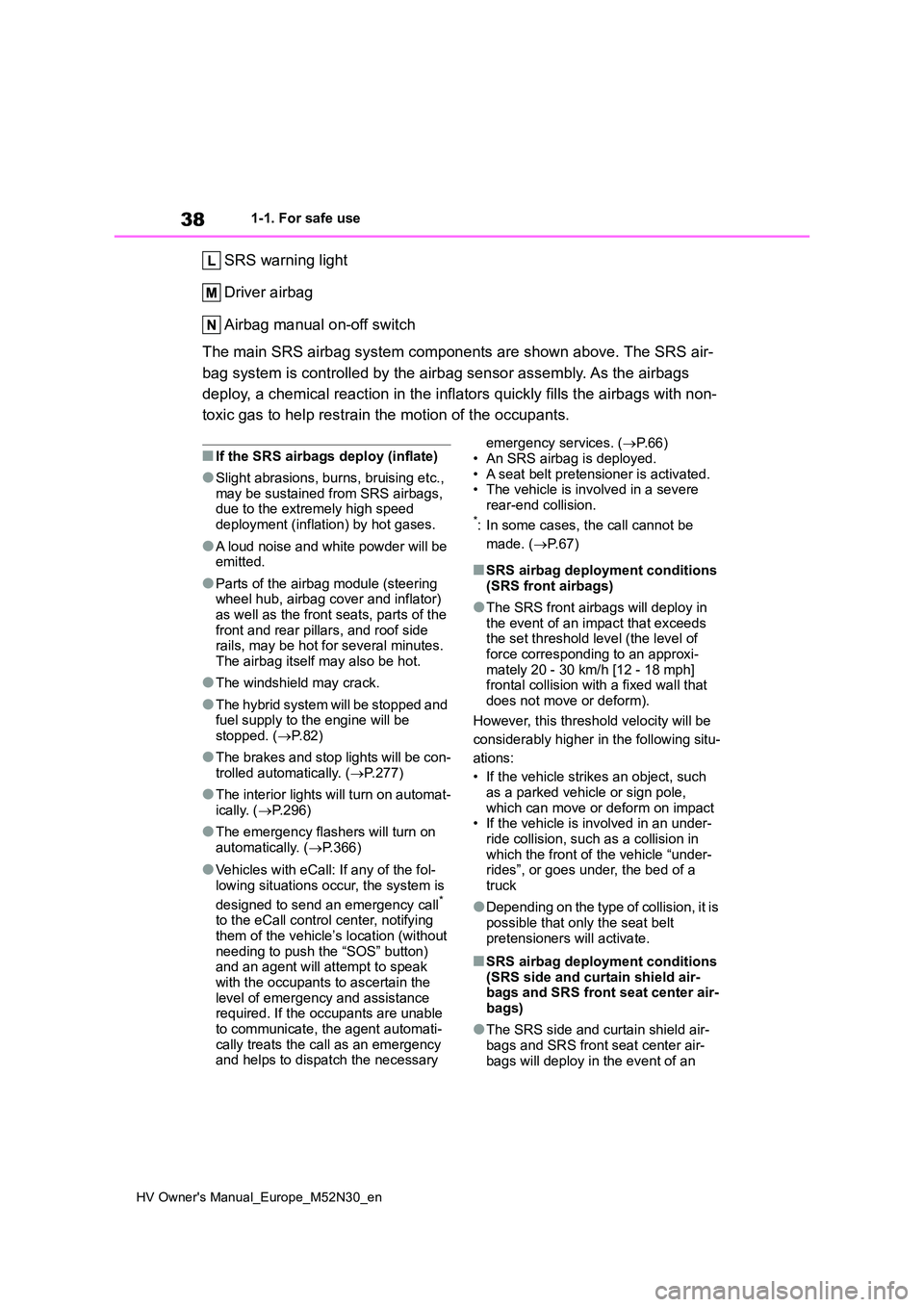
SRS warning light
Driver airbag
Airbag manual on-off switch
The main SRS airbag system components are shown above. The SRS air-
bag system is controlled by the airbag sensor assembly. As the airbags
deploy, a chemical reaction in the inflators quickly fills the airbags with non-
toxic gas to help restrain the motion of the occupants.
■If the SRS airbags deploy (inflate)
●Slight abrasions, burns, bruising etc., may be sustained from SRS airbags, due to the extremely high speed
deployment (inflation) by hot gases.
●A loud noise and white powder will be emitted.
●Parts of the airbag module (steering wheel hub, airbag cover and inflator) as well as the front seats, parts of the
front and rear pillars, and roof side rails, may be hot for several minutes. The airbag itself may also be hot.
●The windshield may crack.
●The hybrid system will be stopped and fuel supply to the engine will be stopped. ( P.82)
●The brakes and stop lights will be con- trolled automatically. ( P.277)
●The interior lights will turn on automat- ically. ( P.296)
●The emergency flashers will turn on automatically. ( P.366)
●Vehicles with eCall: If any of the fol-
lowing situations occur, the system is
designed to send an emergency call* to the eCall control center, notifying them of the vehicle’s location (without
needing to push the “SOS” button) and an agent will attempt to speak with the occupants to ascertain the
level of emergency and assistance required. If the occupants are unable to communicate, the agent automati-
cally treats the call as an emergency and helps to dispatch the necessary
emergency services. ( P.66)
• An SRS airbag is deployed. • A seat belt pretensioner is activated.• The vehicle is involved in a severe
rear-end collision.*: In some cases, the call cannot be
made. ( P. 6 7 )
■SRS airbag deployment conditions (SRS front airbags)
●The SRS front airbags will deploy in the event of an impact that exceeds the set threshold level (the level of
force corresponding to an approxi- mately 20 - 30 km/h [12 - 18 mph] frontal collision with a fixed wall that
does not move or deform).
However, this threshold velocity will be
considerably higher in the following situ-
ations:
• If the vehicle strikes an object, such as a parked vehicle or sign pole,
which can move or deform on impact • If the vehicle is involved in an under-ride collision, such as a collision in
which the front of the vehicle “under- rides”, or goes under, the bed of a truck
●Depending on the type of collision, it is possible that only the seat belt
pretensioners will activate.
■SRS airbag deployment conditions (SRS side and curtain shield air-bags and SRS front seat center air-
bags)
●The SRS side and curtain shield air-
bags and SRS front seat center air- bags will deploy in the event of an
Page 68 of 590
66
HV Owner's Manual_Europe_M52N30_en
1-3. Emergency assistance
1-3.Emerg ency as sista nce
*1: If equipped
*2: Operates within the eCall coverage.
The system name differs depending
on the country.
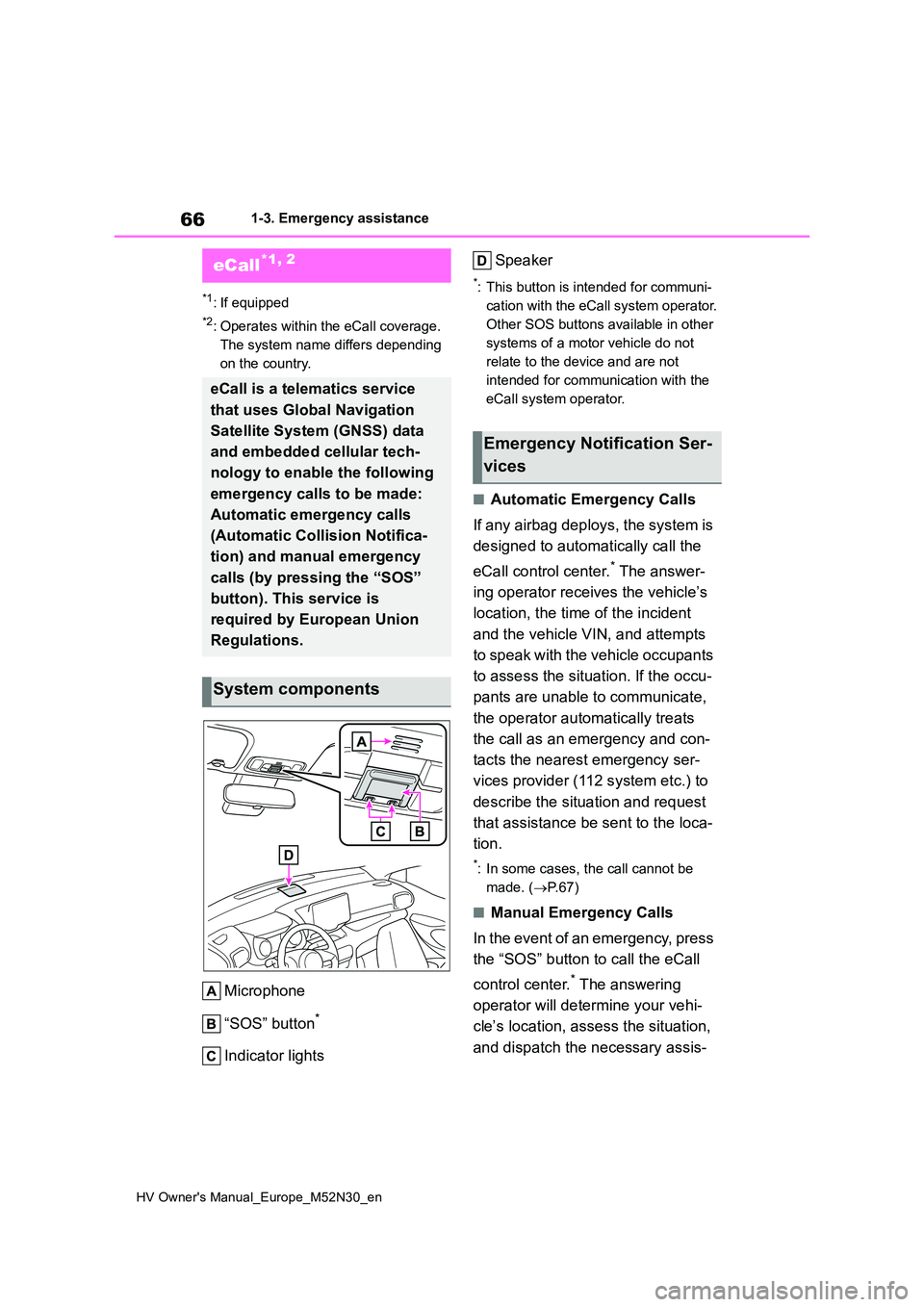
Microphone
“SOS” button*
Indicator lights
Speaker
*: This button is intended for communi-
cation with the eCall system operator.
Other SOS buttons available in other
systems of a motor vehicle do not
relate to the device and are not
intended for communication with the
eCall system operator.
■Automatic Emergency Calls
If any airbag deploys, the system is
designed to automatically call the
eCall control center.* The answer-
ing operator receives the vehicle’s
location, the time of the incident
and the vehicle VIN, and attempts
to speak with the vehicle occupants
to assess the situation. If the occu-
pants are unable to communicate,
the operator automatically treats
the call as an emergency and con-
tacts the nearest emergency ser-
vices provider (112 system etc.) to
describe the situation and request
that assistance be sent to the loca-
tion.
*: In some cases, the call cannot be
made. ( P. 6 7 )
■Manual Emergency Calls
In the event of an emergency, press
the “SOS” button to call the eCall
control center.* The answering
operator will determine your vehi-
cle’s location, assess the situation,
and dispatch the necessary assis-
eCall*1, 2
eCall is a telematics service
that uses Global Navigation
Satellite System (GNSS) data
and embedded cellular tech-
nology to enable the following
emergency calls to be made:
Automatic emergency calls
(Automatic Collision Notifica-
tion) and manual emergency
calls (by pressing the “SOS”
button). This service is
required by European Union
Regulations.
System components
Emergency Notification Ser-
vices
Page 69 of 590
67
1
HV Owner's Manual_Europe_M52N30_en
1-3. Emergency assistance
For safety and security
tance required.
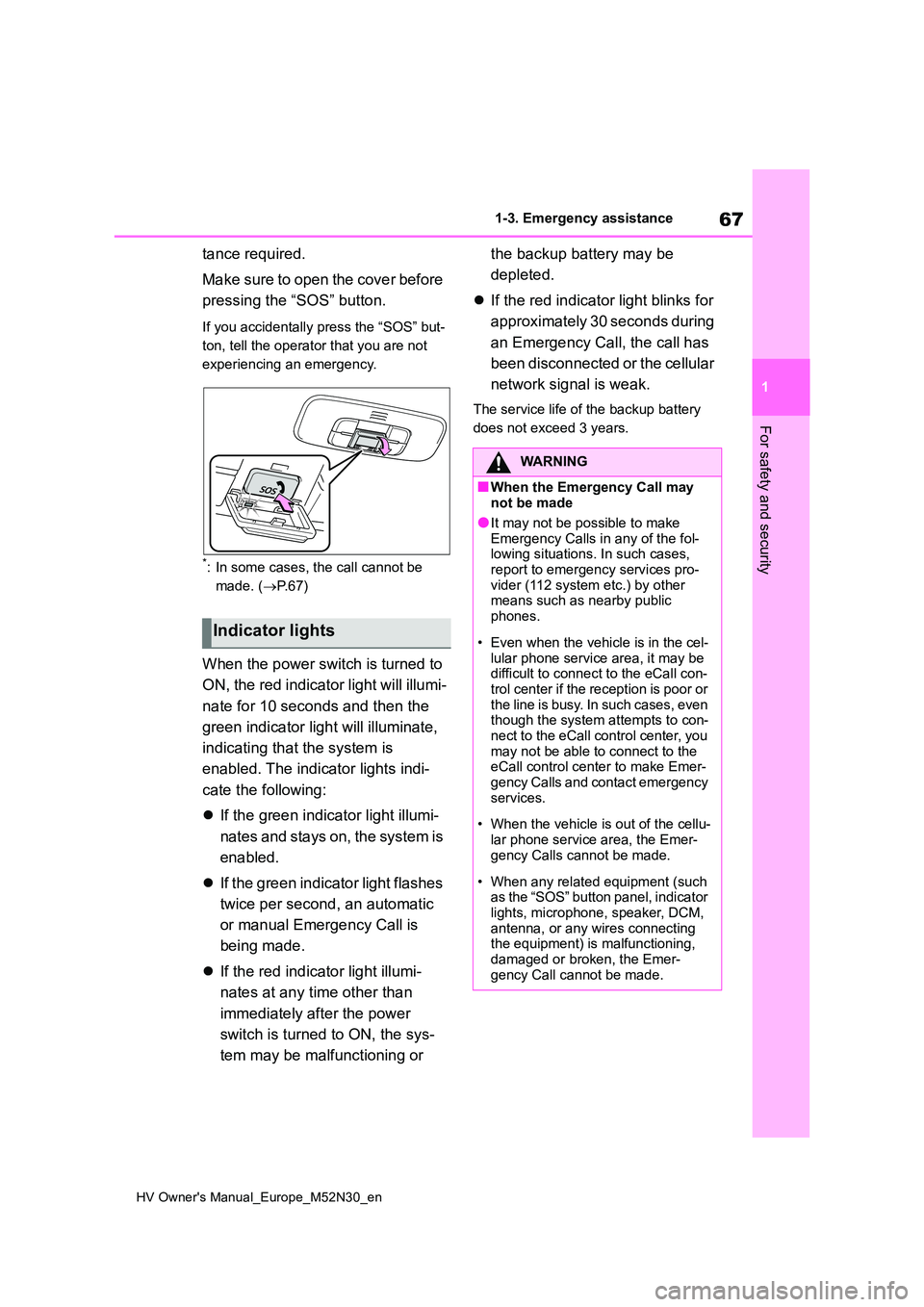
Make sure to open the cover before
pressing the “SOS” button.
If you accidentally press the “SOS” but-
ton, tell the operator that you are not
experiencing an emergency.
*: In some cases, the call cannot be
made. ( P. 6 7 )
When the power switch is turned to
ON, the red indicator light will illumi-
nate for 10 seconds and then the
green indicator light will illuminate,
indicating that the system is
enabled. The indicator lights indi-
cate the following:
If the green indicator light illumi-
nates and stays on, the system is
enabled.
If the green indicator light flashes
twice per second, an automatic
or manual Emergency Call is
being made.
If the red indicator light illumi-
nates at any time other than
immediately after the power
switch is turned to ON, the sys-
tem may be malfunctioning or
the backup battery may be
depleted.
If the red indicator light blinks for
approximately 30 seconds during
an Emergency Call, the call has
been disconnected or the cellular
network signal is weak.
The service life of the backup battery
does not exceed 3 years.
Indicator lights
WARNING
■When the Emergency Call may not be made
●It may not be possible to make Emergency Calls in any of the fol-lowing situations. In such cases,
report to emergency services pro- vider (112 system etc.) by other means such as nearby public
phones.
• Even when the vehicle is in the cel-
lular phone service area, it may be difficult to connect to the eCall con-trol center if the reception is poor or
the line is busy. In such cases, even though the system attempts to con-nect to the eCall control center, you
may not be able to connect to the eCall control center to make Emer-gency Calls and contact emergency
services.
• When the vehicle is out of the cellu-
lar phone service area, the Emer- gency Calls cannot be made.
• When any related equipment (such as the “SOS” button panel, indicator lights, microphone, speaker, DCM,
antenna, or any wires connecting the equipment) is malfunctioning, damaged or broken, the Emer-
gency Call cannot be made.
Page 91 of 590
2
89
HV Owner's Manual_Europe_M52N30_en
2
Vehicle status information and indicators
Vehicle status informa-
tion and indicators
2-1. Instrument cluster
Warning lights and indicators
......................................... 90
Gauges and meters (vertical
display) ............................. 94
Gauges and meters (horizontal
display) ............................. 99
Multi-information display (verti-
cal display)...................... 103
Multi-information display (hori-
zontal display)................. 109
Head-up display................ 116
Energy monitor/consumption
screen ............................. 120
Page 92 of 590
90
HV Owner's Manual_Europe_M52N30_en
2-1. Instrument cluster
2-1.In strument clu ste r
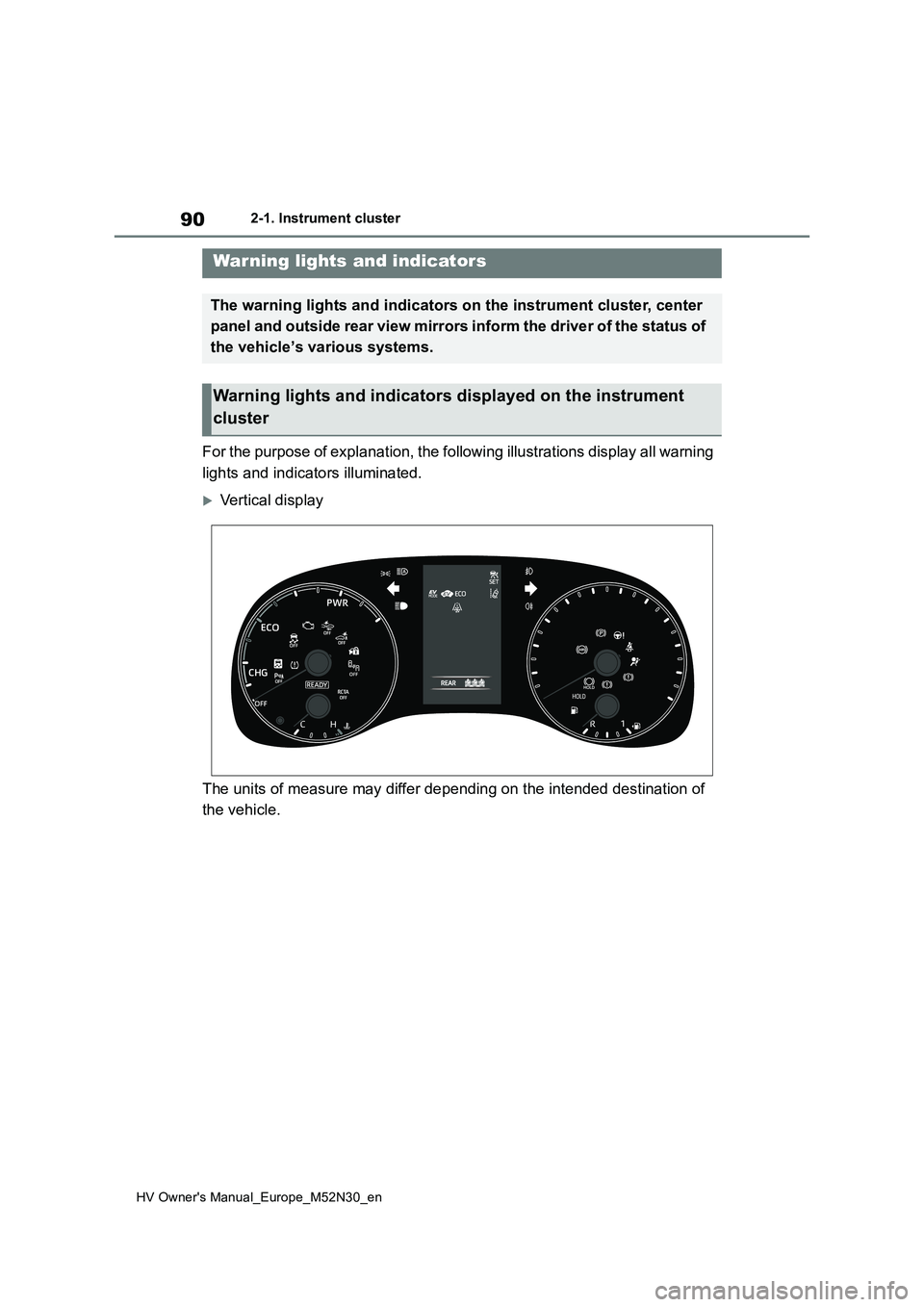
For the purpose of explanation, the following illustrations display all warning
lights and indicators illuminated.
Vertical display
The units of measure may differ depending on the intended desti nation of
the vehicle.
Warning lights and indicators
The warning lights and indicators on the instrument cluster, center
panel and outside rear view mirrors inform the driver of the st atus of
the vehicle’s various systems.
Warning lights and indicators displayed on the instrument
cluster
Page 93 of 590
91
2
HV Owner's Manual_Europe_M52N30_en
2-1. Instrument cluster
Vehicle status information and indicators
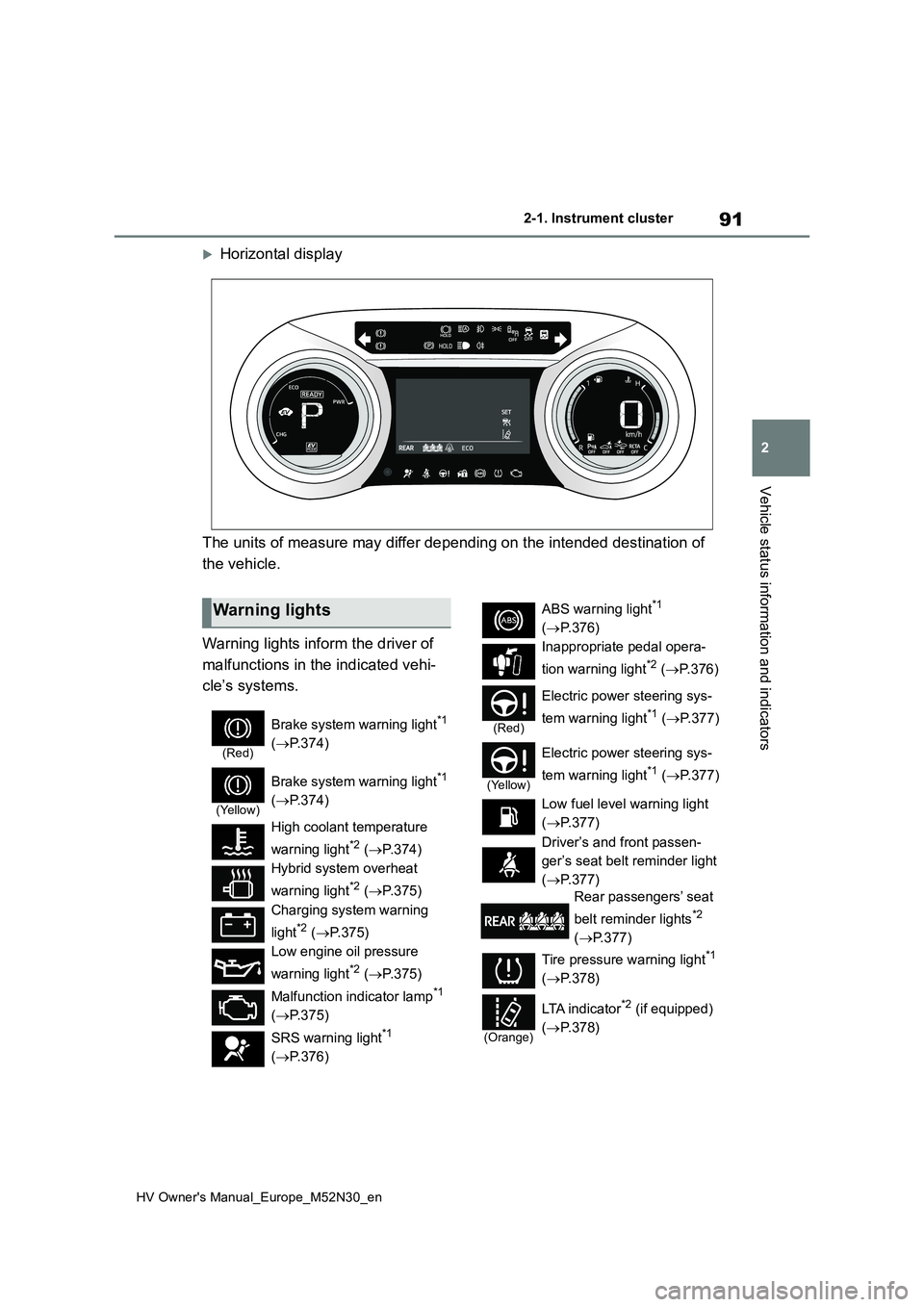
Horizontal display
The units of measure may differ depending on the intended desti nation of
the vehicle.
Warning lights inform the driver of
malfunctions in the indicated vehi-
cle’s systems.
Warning lights
(Red)
Brake system warning light*1
( P.374)
(Yellow)
Brake system warning light*1
( P.374)
High coolant temperature
warning light*2 ( P.374)
Hybrid system overheat
warning light*2 ( P.375)
Charging system warning
light*2 ( P.375)
Low engine oil pressure
warning light*2 ( P.375)
Malfunction indicator lamp*1
( P.375)
SRS warning light*1
( P.376)
ABS warning light*1
( P.376)
Inappropriate pedal opera-
tion warning light*2 ( P. 3 7 6 )
(Red)
Electric power steering sys-
tem warning light*1 ( P.377)
(Yellow)
Electric power steering sys-
tem warning light*1 ( P.377)
Low fuel level warning light
( P.377)
Driver’s and front passen-
ger’s seat belt reminder light
( P.377)
Rear passengers’ seat
belt reminder lights*2
( P.377)
Tire pressure warning light*1
( P.378)
(Orange)
LTA i n d i c a t o r*2 (if equipped)
( P.378)
Page 94 of 590
92
HV Owner's Manual_Europe_M52N30_en
2-1. Instrument cluster
*1: These lights come on when the
power switch is turned to ON to indi-
cate that a system check is being
performed. They will turn off after the
hybrid system is started, or after a
few seconds. There may be a mal-
function in a system if the lights do
not come on, or turn off. Have the
vehicle inspected by any authorized
Toyota retailer or Toyota authorized
repairer, or any reliable repairer.
*2: This light illuminates on the multi-
information display.
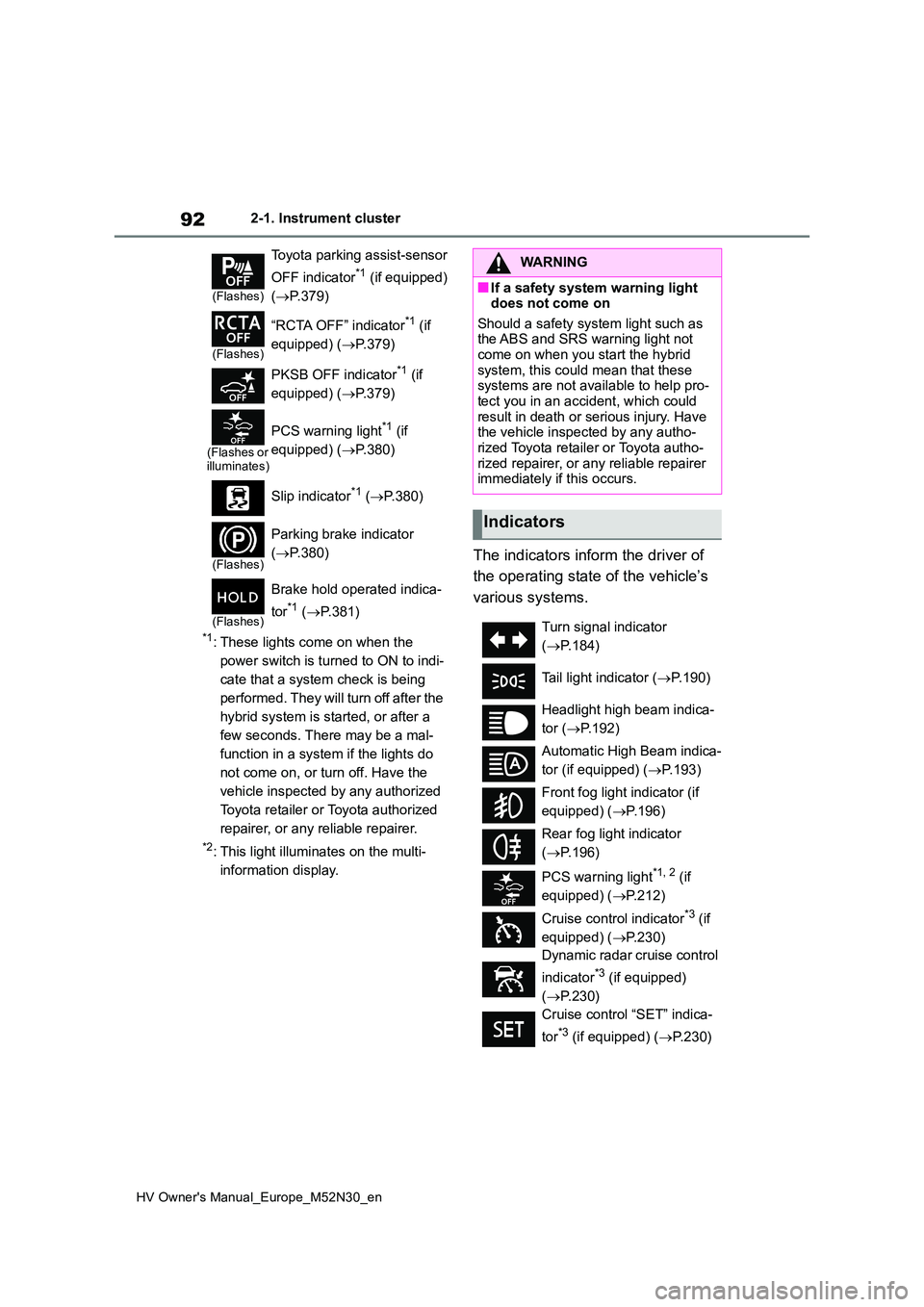
The indicators inform the driver of
the operating state of the vehicle’s
various systems.
(Flashes)
Toyota parking assist-sensor
OFF indicator*1 (if equipped)
( P.379)
(Flashes)
“RCTA OFF” indicator*1 (if
equipped) ( P.379)
PKSB OFF indicator*1 (if
equipped) ( P.379)
(Flashes or illuminates)
PCS warning light*1 (if
equipped) ( P.380)
Slip indicator*1 ( P.380)
(Flashes)
Parking brake indicator
( P.380)
(Flashes)
Brake hold operated indica-
tor*1 ( P.381)
WARNING
■If a safety system warning light does not come on
Should a safety system light such as the ABS and SRS warning light not come on when you start the hybrid
system, this could mean that these systems are not available to help pro-tect you in an accident, which could
result in death or serious injury. Have the vehicle inspected by any autho-rized Toyota retailer or Toyota autho-
rized repairer, or any reliable repairer immediately if this occurs.
Indicators
Turn signal indicator
( P.184)
Tail light indicator ( P.190)
Headlight high beam indica-
tor ( P.192)
Automatic High Beam indica-
tor (if equipped) ( P.193)
Front fog light indicator (if
equipped) ( P.196)
Rear fog light indicator
( P.196)
PCS warning light*1, 2 (if
equipped) ( P.212)
Cruise control indicator*3 (if
equipped) ( P.230)
Dynamic radar cruise control
indicator*3 (if equipped)
( P.230)
Cruise control “SET” indica-
tor*3 (if equipped) ( P.230)
Page 95 of 590
93
2
HV Owner's Manual_Europe_M52N30_en
2-1. Instrument cluster
Vehicle status information and indicators
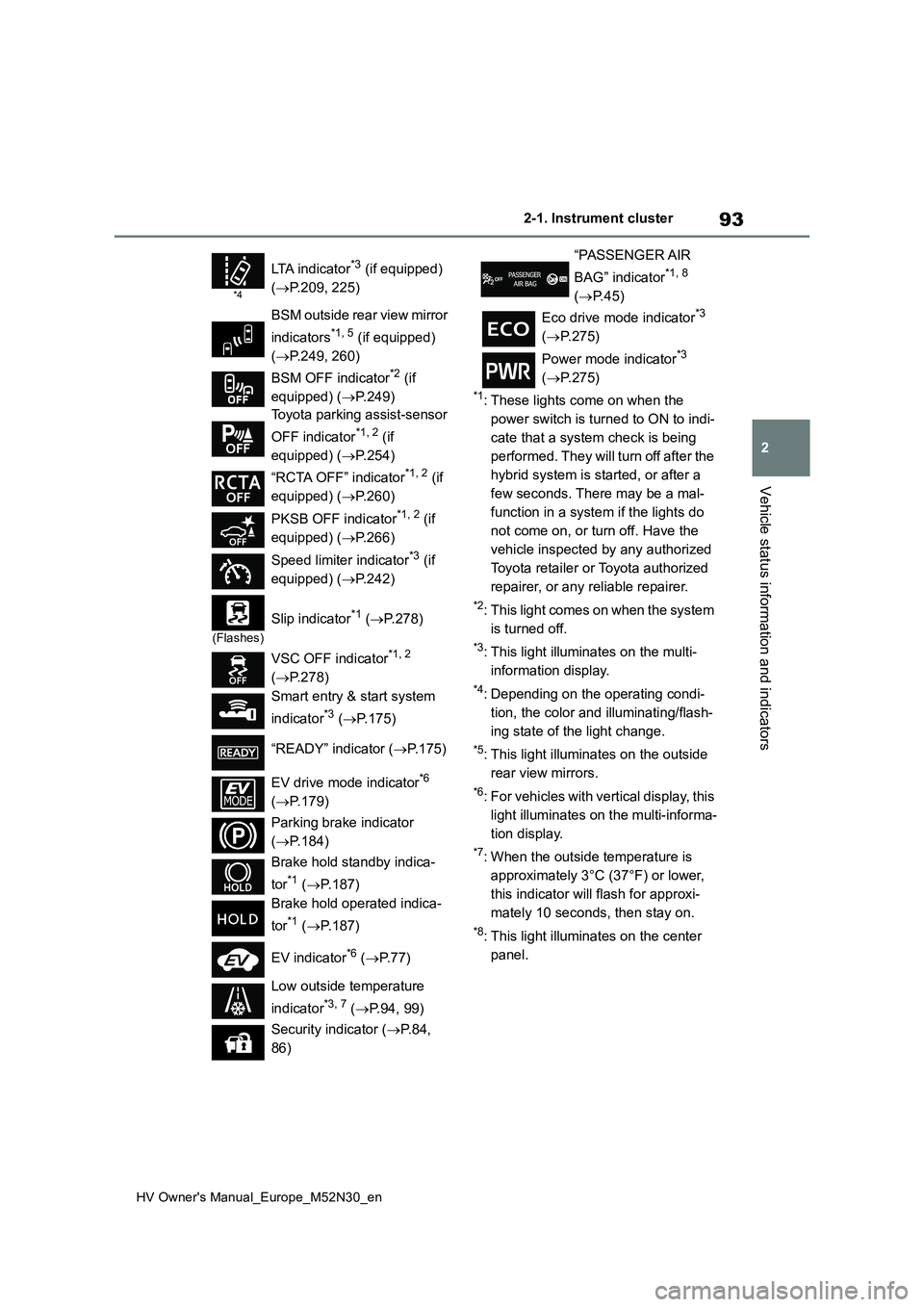
*1: These lights come on when the
power switch is turned to ON to indi-
cate that a system check is being
performed. They will turn off after the
hybrid system is started, or after a
few seconds. There may be a mal-
function in a system if the lights do
not come on, or turn off. Have the
vehicle inspected by any authorized
Toyota retailer or Toyota authorized
repairer, or any reliable repairer.
*2: This light comes on when the system
is turned off.
*3: This light illuminates on the multi-
information display.
*4: Depending on the operating condi-
tion, the color and illuminating/flash-
ing state of the light change.
*5: This light illuminates on the outside
rear view mirrors.
*6: For vehicles with vertical display, this
light illuminates on the multi-informa-
tion display.
*7: When the outside temperature is
approximately 3°C (37°F) or lower,
this indicator will flash for approxi-
mately 10 seconds, then stay on.
*8: This light illuminates on the center
panel.
*4
LTA indicator*3 (if equipped)
( P.209, 225)
BSM outside rear view mirror
indicators*1, 5 (if equipped)
( P.249, 260)
BSM OFF indicator*2 (if
equipped) ( P.249)
Toyota parking assist-sensor
OFF indicator*1, 2 (if
equipped) ( P.254)
“RCTA OFF” indicator*1, 2 (if
equipped) ( P.260)
PKSB OFF indicator*1, 2 (if
equipped) ( P.266)
Speed limiter indicator*3 (if
equipped) ( P.242)
(Flashes)
Slip indicator*1 (P.278)
VSC OFF indicator*1, 2
( P.278)
Smart entry & start system
indicator*3 ( P.175)
“READY” indicator ( P.175)
EV drive mode indicator*6
( P.179)
Parking brake indicator
( P.184)
Brake hold standby indica-
tor*1 ( P.187)
Brake hold operated indica-
tor*1 ( P.187)
EV indicator*6 ( P. 7 7 )
Low outside temperature
indicator*3, 7 ( P.94, 99)
Security indicator ( P. 8 4 ,
86)
“PASSENGER AIR
BAG” indicator*1, 8
( P.45)
Eco drive mode indicator*3
( P.275)
Power mode indicator*3
( P.275)
Page 100 of 590
98
HV Owner's Manual_Europe_M52N30_en
2-1. Instrument cluster
ual”.
■Clock settings screen (vehicles
with 7-inch/8-inch display multime- dia system)
If “Clock : 00” is displayed when is
selected on the multi-information dis-
play, the system may be malfunctioning.
Have the vehicle inspected by any
authorized Toyota retailer or Toyota
authorized repairer, or any reliable
repairer.
The brightness of the instrument
panel lights can be adjusted on
select to the multi-information
display.
The brightness of the instrument panel
lights can be adjusted separately for
when the tail lights are on and off.
1 Press or to select of
the multi-information display.
2 Press or to select ,
and then press and hold the
.
3 Press or to change the
brightness.
Adjusting the instrument
panel light control
Page 105 of 590
103
2
HV Owner's Manual_Europe_M52N30_en
2-1. Instrument cluster
Vehicle status information and indicators
play, the system may be malfunctioning.
Have the vehicle inspected by any
authorized Toyota retailer or Toyota
authorized repairer, or any reliable
repairer.
The brightness of the instrument
panel lights can be adjusted on
select to the multi-information
display.
The brightness of the instrument panel
lights can be adjusted separately for
when the tail lights are on and off.
1 Press or to select of
the multi-information display.
2 Press or to select ,
and then press and hold the
.
3 Press or to change the
brightness.
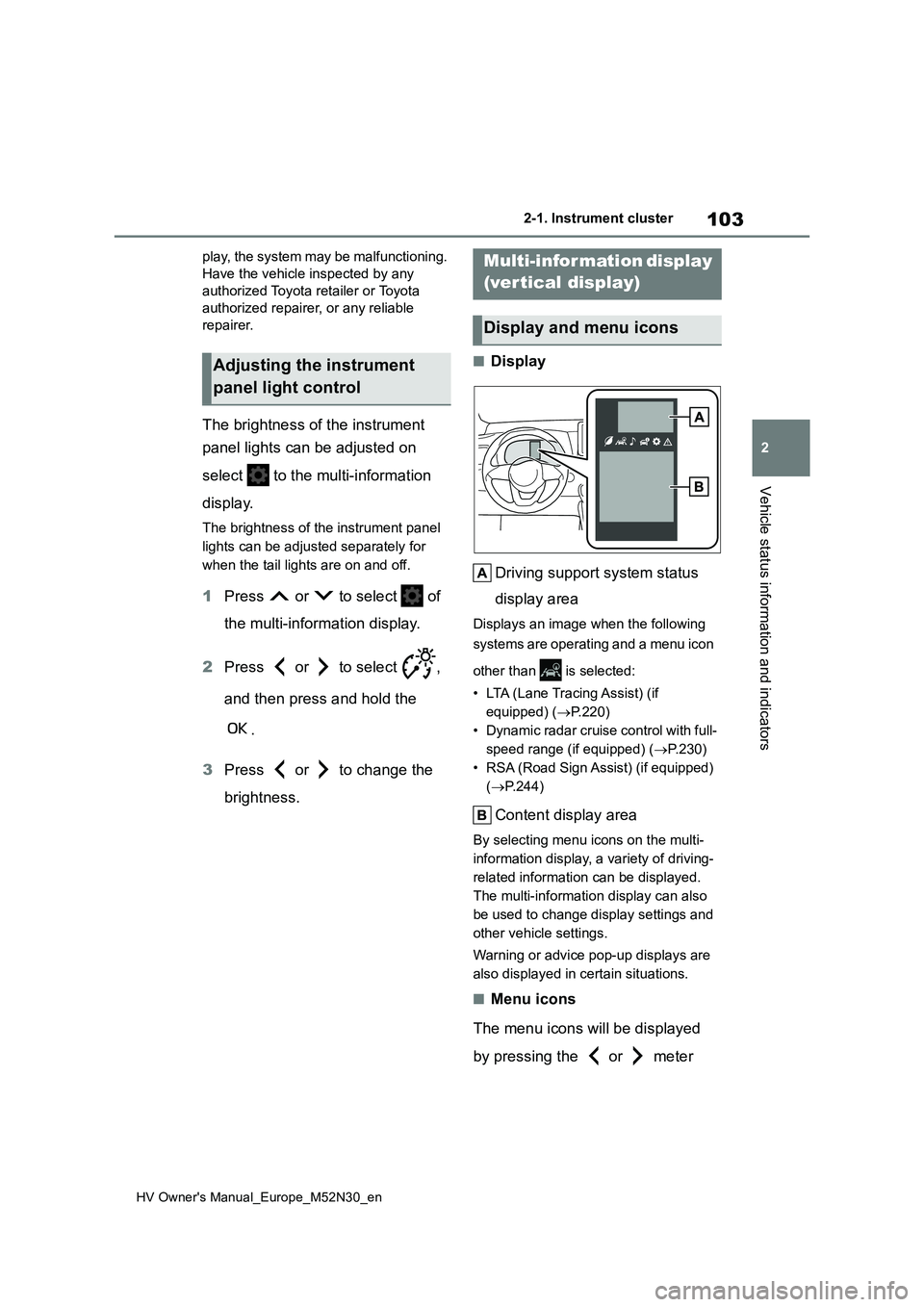
■Display
Driving support system status
display area
Displays an image when the following
systems are operating and a menu icon
other than is selected:
• LTA (Lane Tracing Assist) (if
equipped) ( P.220)
• Dynamic radar cruise control with full-
speed range (if equipped) ( P.230)
• RSA (Road Sign Assist) (if equipped)
( P.244)
Content display area
By selecting menu icons on the multi-
information display, a variety of driving-
related information can be displayed.
The multi-information display can also
be used to change display settings and
other vehicle settings.
Warning or advice pop-up displays are
also displayed in certain situations.
■Menu icons
The menu icons will be displayed
by pressing the or meter
Adjusting the instrument
panel light control
Multi-information display
(vertical display)
Display and menu icons