lights TOYOTA YARIS 2022 Service Manual
[x] Cancel search | Manufacturer: TOYOTA, Model Year: 2022, Model line: YARIS, Model: TOYOTA YARIS 2022Pages: 590, PDF Size: 128.6 MB
Page 210 of 590
208
HV Owner's Manual_Europe_M52N30_en
4-5. Using the driving support systems
●In the following situations, if the situation has changed (or the vehicle has been
driven for some time) and the normal operating conditions are d etected, the mes- sage will disappear and the system will become operational.
If the message does not disappear, contact any authorized Toyot a retailer or Toyota
authorized repairer, or any reliable repairer.
• When the temperature around the radar sensor is outside of the operational range,
such as when the vehicle is in the sun or in an extremely cold environment • When the front camera cannot detect objects in front of the ve hicle, such as when driving in the dark, snow, or fog, or when bright lights are sh ining into the front
camera • Depending on the conditions in the vicinity of the vehicle, th e radar may judge the surrounding environment can not be properly recognized. In that case, “Pre-Colli-
sion System Unavailable See Owner’s Manual” is displayed.
Page 216 of 590
214
HV Owner's Manual_Europe_M52N30_en
4-5. Using the driving support systems
●Pre-collision brake assist
●Pre-collision braking
If either of the following occur while the pre-collision brakin g function is operating, it will be canceled:
• The accelerator pedal is depressed strongly.
• The steering wheel is turned sharply or abruptly.
●Emergency steering assist
When the turn signal lights are flashing, emergency steering as sist will not operate in
case of an emergency.
If any of the following occur while the emergency steering assi st function is operat- ing, it will be canceled:
• The accelerator pedal is depressed strongly.
• The steering wheel is turned sharply or abruptly.
• The brake pedal is depressed.
Detectable objectsVehicle speedRelative speed between
your vehicle and object
Ve hi cl e sApprox. 30 to 180 km/h
(20 to 110 mph)
Approx. 30 to 180 km/h (20
to 110 mph)
Bicyclists and pedestriansApprox. 30 to 80 km/h (20
to 50 mph)
Approx. 30 to 80 km/h (20
to 50 mph)
Detectable objectsVehicle speedRelative speed between
your vehicle and object
Ve hi cl e sApprox. 10 to 180 km/h (7
to 110 mph)
Approx. 10 to 180 km/h (7
to 110 mph)
Bicyclists and pedestriansApprox. 10 to 80 km/h (7 to
50 mph)
Approx. 10 to 80 km/h (7 to
50 mph)
Detectable objectsVehicle speedRelative speed between
your vehicle and object
PedestriansApprox. 40 to 80 km/h (25
to 50 mph)
Approx. 40 to 80 km/h (25
to 50 mph)
Page 217 of 590
215
4
HV Owner's Manual_Europe_M52N30_en
4-5. Using the driving support systems
Driving
●Intersection right/left turn assistance (pre-collision warning)
When the turn signal lights are not flashing, support for turni ng left or right at an inter-
section which targets oncoming vehicles does not work.
●Intersection right/left turn assistance (pre-collision braking)
When the turn signal lights are not flashing, support for turni ng left or right at an inter-
section which targets oncoming vehicles does not work.
■Object detection function
The system detects objects based on their size, profile, motion, etc. However, an object may not be detected depend-
ing on the surrounding brightness and the motion, posture, and angle of the detected object, preventing the system
from operating properly. ( P.217) The illustration shows an image of detectable objects.
■Conditions under which the system
may operate even if there is no pos- sibility of a collision
●In some situations such as the follow-ing, the system may determine that there is a possibility of a frontal colli-
sion and operate. • When passing a detectable object, etc.
• When changing lanes while overtak- ing a detectable object, etc.• When approaching a detectable
object in an adjacent lane or on the roadside, such as when changing the course of travel or driving on a wind-
ing road
Detectable
objectsVehicle speedOncoming vehicle
speed
Relative speed
between your vehicle
and object
VehiclesApprox. 10 to 25 km/h
(7 to 15 mph)
Approx. 30 to 55 km/h
(20 to 35 mph)
Approx. 40 to 80 km/h
(25 to 50 mph)
PedestriansApprox. 10 to 25 km/h
(7 to 15 mph)-Approx. 10 to 25 km/h
(7 to 15 mph)
Detectable
objectsVehicle speedOncoming vehicle
speed
Relative speed
between your vehicle
and object
VehiclesApprox. 15 to 25 km/h
(10 to 15 mph)
Approx. 30 to 45 km/h
(20 to 28 mph)
Approx. 45 to 70 km/h
(28 to 43 mph)
PedestriansApprox. 10 to 25 km/h
(7 to 15 mph)-Approx. 10 to 25 km/h
(7 to 15 mph)
Page 219 of 590
217
4
HV Owner's Manual_Europe_M52N30_en
4-5. Using the driving support systems
Driving
reflects radio waves, such as a large
truck or guardrail • When driving near a TV tower, broad-casting station, electric power plant,
radar equipped vehicles, etc., or other location where strong radio waves or electrical noise may be present
• When there are many things which can reflect the radio waves of the radar in the vicinity (tunnels, truss
bridges, gravel roads, snow covered road that have tracks, etc.)• While making a right/left turn, when an
oncoming vehicle or a crossing pedestrian has already exited the path of your vehicle
• While making a right/left turn, closely in front of an oncoming vehicle or a crossing pedestrian
• While making a right/left turn, when an oncoming vehicle or a crossing pedestrian stops before entering the
path of your vehicle • While making a right/left turn, when an oncoming vehicle turns right/left in
front of your vehicle
• While steering into the direction of
oncoming traffic
■Situations in which the system may not operate properly
●In some situations such as the follow-ing, an object may not be detected by the radar sensor and front camera,
preventing the system from operating properly:• When a detectable object is
approaching your vehicle • When your vehicle or a detectable object is wobbling
• If a detectable object makes an abrupt maneuver (such as sudden swerving, acceleration or deceleration)
• When your vehicle approaches a
detectable object rapidly • When a detectable object is not directly in front of your vehicle
• When a detectable object is near a wall, fence, guardrail, manhole cover,
vehicle, steel plate on the road, etc. • When a detectable object is under a structure
• When part of a detectable object is hidden by an object, such as large baggage, an umbrella, or guardrail
• When there are many things which can reflect the radio waves of the radar in the vicinity (tunnels, truss
bridges, gravel roads, snow covered road that have tracks, etc.)• When there is an effect on the radio
waves to the radar that is installed on another vehicle• When multiple detectable objects are
close together • If the sun or other light is shining directly on a detectable object
• When a detectable object is a shade of white and looks extremely bright• When a detectable object appears to
be nearly the same color or brightness as its surroundings• If a detectable object cuts or suddenly
emerges in front of your vehicle • When the front of your vehicle is hit by water, snow, dust, etc.
• When a very bright light ahead, such as the sun or the headlights of oncom-ing traffic, shines directly into the front
camera • When approaching the side or front of a vehicle ahead
• If a vehicle ahead is a motorcycle • If a vehicle ahead is narrow, such as a personal mobility vehicle
• If a preceding vehicle has a small rear
Page 223 of 590
221
4
HV Owner's Manual_Europe_M52N30_en
4-5. Using the driving support systems
Driving
WARNING
●When your vehicle is towing a trailer (vehicles with towing pack-
ages) or during emergency towing
■Preventing LTA system malfunc-
tions and operations performed by mistake
●Do not modify the headlights or
place stickers, etc., on the surface of the lights.
●Do not modify the suspension, etc. If the suspension, etc., needs to be replaced, contact any authorized
Toyota retailer or Toyota authorized repairer, or any reliable repairer.
●Do not install or place anything on the hood or grille. Also, do not install a grille guard (bull bars, kan-
garoo bar, etc.).
●If your windshield needs repairs,
contact any authorized Toyota retailer or Toyota authorized repairer, or any reliable repairer.
■Conditions in which functions may not operate properly
In the following situations, the func- tions may not operate properly and the vehicle may depart from its lane.
Drive safely by always paying careful attention to your surroundings and operate the steering wheel to correct
the path of the vehicle without relying solely on the functions.
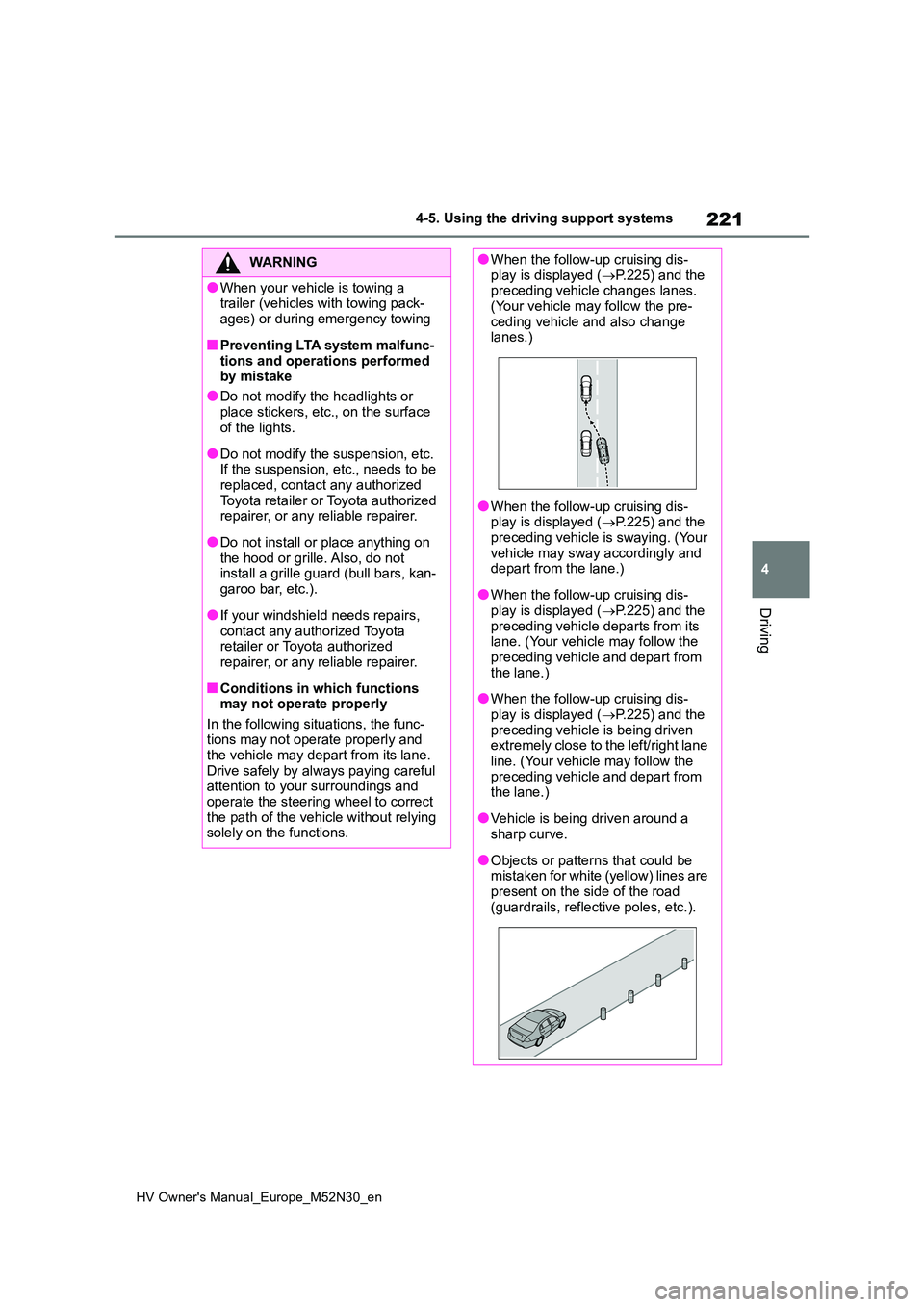
●When the follow-up cruising dis-play is displayed ( P.225) and the preceding vehicle changes lanes.
(Your vehicle may follow the pre- ceding vehicle and also change lanes.)
●When the follow-up cruising dis-play is displayed ( P.225) and the
preceding vehicle is swaying. (Your vehicle may sway accordingly and depart from the lane.)
●When the follow-up cruising dis-play is displayed ( P.225) and the
preceding vehicle departs from its lane. (Your vehicle may follow the preceding vehicle and depart from
the lane.)
●When the follow-up cruising dis-
play is displayed ( P.225) and the preceding vehicle is being driven extremely close to the left/right lane
line. (Your vehicle may follow the preceding vehicle and depart from the lane.)
●Vehicle is being driven around a sharp curve.
●Objects or patterns that could be mistaken for white (yellow) lines are
present on the side of the road (guardrails, reflective poles, etc.).
Page 224 of 590
222
HV Owner's Manual_Europe_M52N30_en
4-5. Using the driving support systems
WARNING
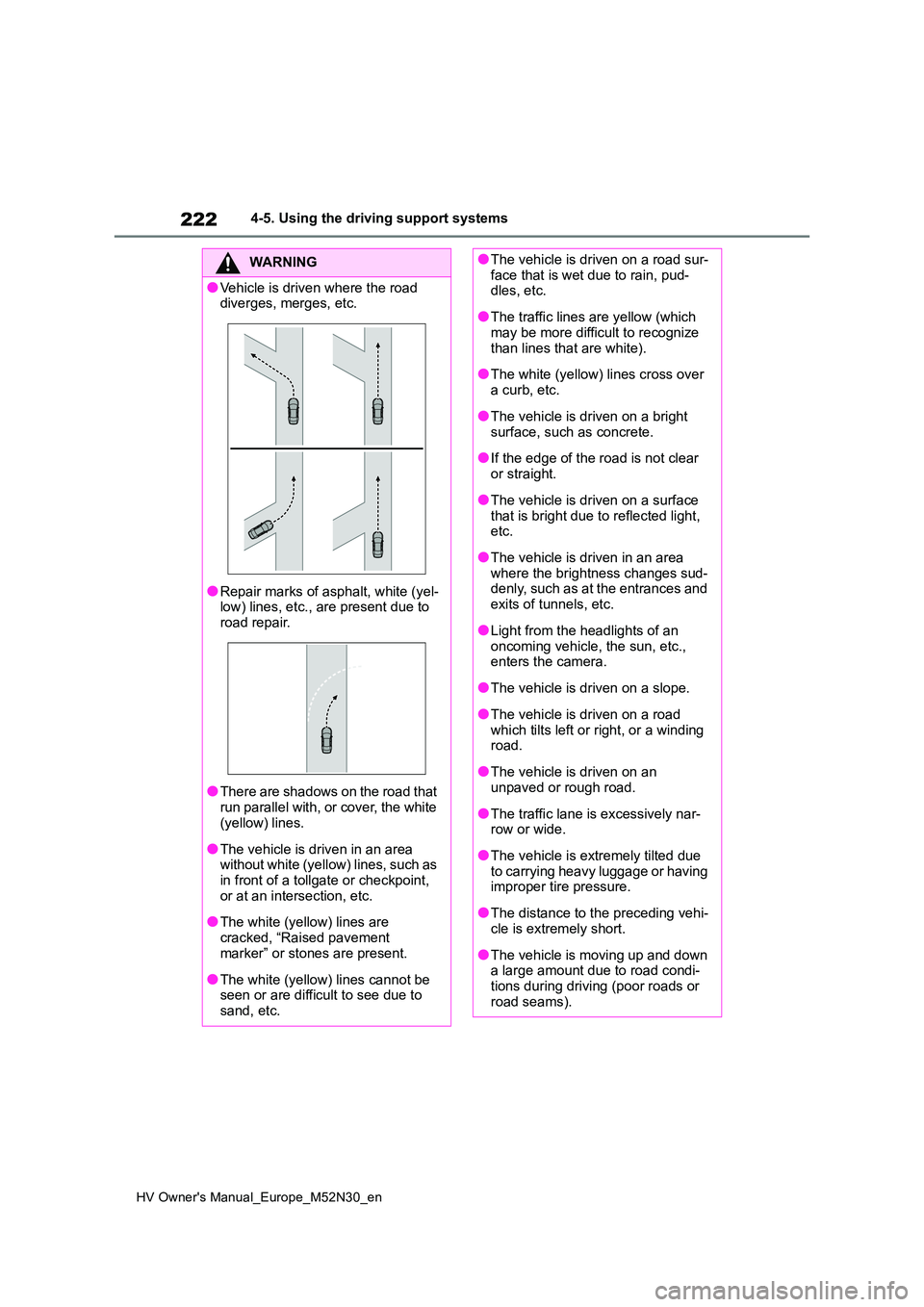
●Vehicle is driven where the road diverges, merges, etc.
●Repair marks of asphalt, white (yel-low) lines, etc., are present due to
road repair.
●There are shadows on the road that
run parallel with, or cover, the white (yellow) lines.
●The vehicle is driven in an area without white (yellow) lines, such as in front of a tollgate or checkpoint,
or at an intersection, etc.
●The white (yellow) lines are
cracked, “Raised pavement marker” or stones are present.
●The white (yellow) lines cannot be seen or are difficult to see due to sand, etc.
●The vehicle is driven on a road sur-face that is wet due to rain, pud-dles, etc.
●The traffic lines are yellow (which may be more difficult to recognize
than lines that are white).
●The white (yellow) lines cross over
a curb, etc.
●The vehicle is driven on a bright
surface, such as concrete.
●If the edge of the road is not clear
or straight.
●The vehicle is driven on a surface
that is bright due to reflected light, etc.
●The vehicle is driven in an area where the brightness changes sud-denly, such as at the entrances and
exits of tunnels, etc.
●Light from the headlights of an
oncoming vehicle, the sun, etc., enters the camera.
●The vehicle is driven on a slope.
●The vehicle is driven on a road
which tilts left or right, or a winding road.
●The vehicle is driven on an unpaved or rough road.
●The traffic lane is excessively nar-row or wide.
●The vehicle is extremely tilted due to carrying heavy luggage or having improper tire pressure.
●The distance to the preceding vehi-cle is extremely short.
●The vehicle is moving up and down a large amount due to road condi-
tions during driving (poor roads or road seams).
Page 225 of 590
223
4
HV Owner's Manual_Europe_M52N30_en
4-5. Using the driving support systems
Driving
■Lane departure alert function
When the system determines that
the vehicle might depart from its
lane or course*, a warning is dis-
played on the multi-information dis-
play, and either a warning buzzer
will sound or the steering wheel will
vibrate to alert the driver.
When the warning buzzer sounds or
the steering wheel vibrates, check the
area around your vehicle and carefully
operate the steering wheel to move the
vehicle back to the center of the lane.
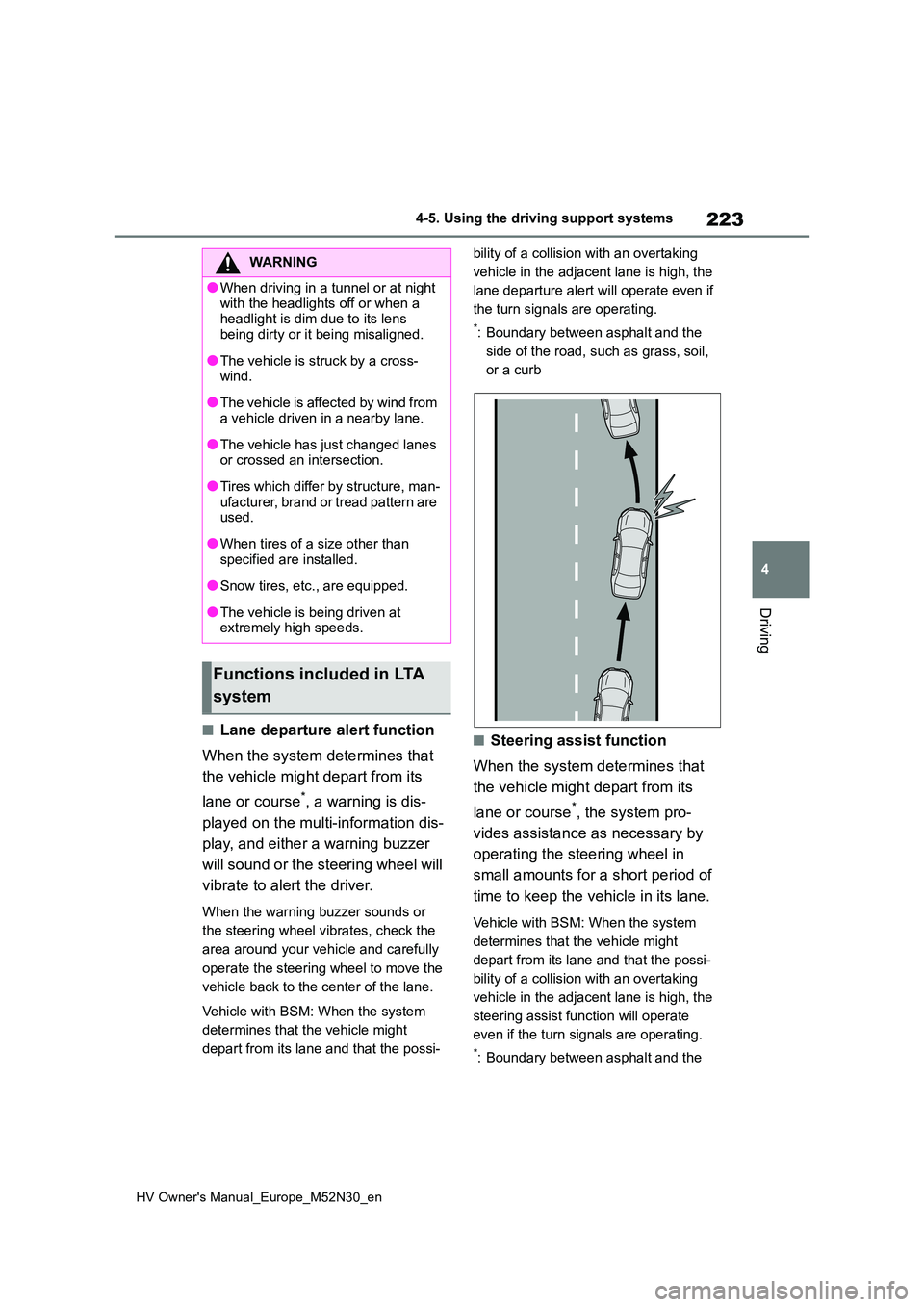
Vehicle with BSM: When the system
determines that the vehicle might
depart from its lane and that the possi-
bility of a collision with an overtaking
vehicle in the adjacent lane is high, the
lane departure alert will operate even if
the turn signals are operating.
*: Boundary between asphalt and the
side of the road, such as grass, soil,
or a curb
■Steering assist function
When the system determines that
the vehicle might depart from its
lane or course*, the system pro-
vides assistance as necessary by
operating the steering wheel in
small amounts for a short period of
time to keep the vehicle in its lane.
Vehicle with BSM: When the system
determines that the vehicle might
depart from its lane and that the possi-
bility of a collision with an overtaking
vehicle in the adjacent lane is high, the
steering assist function will operate
even if the turn signals are operating.
*: Boundary between asphalt and the
WARNING
●When driving in a tunnel or at night with the headlights off or when a
headlight is dim due to its lens being dirty or it being misaligned.
●The vehicle is struck by a cross-wind.
●The vehicle is affected by wind from a vehicle driven in a nearby lane.
●The vehicle has just changed lanes or crossed an intersection.
●Tires which differ by structure, man-ufacturer, brand or tread pattern are used.
●When tires of a size other than specified are installed.
●Snow tires, etc., are equipped.
●The vehicle is being driven at extremely high speeds.
Functions included in LTA
system
Page 235 of 590
233
4
HV Owner's Manual_Europe_M52N30_en
4-5. Using the driving support systems
Driving
This mode employs a radar to detect the presence of vehicles up to approx-
imately 100 m (328 ft.) ahead, d etermines the current vehicle-to-vehicle fol-
lowing distance, and operates to maintain a suitable following distance from
the vehicle ahead. The desired vehicle-to-vehicle distance can also be set
by operating the vehicle-to-vehicle distance switch.
When driving on downhill slopes, the vehicle-to-vehicle distanc e may become
shorter.
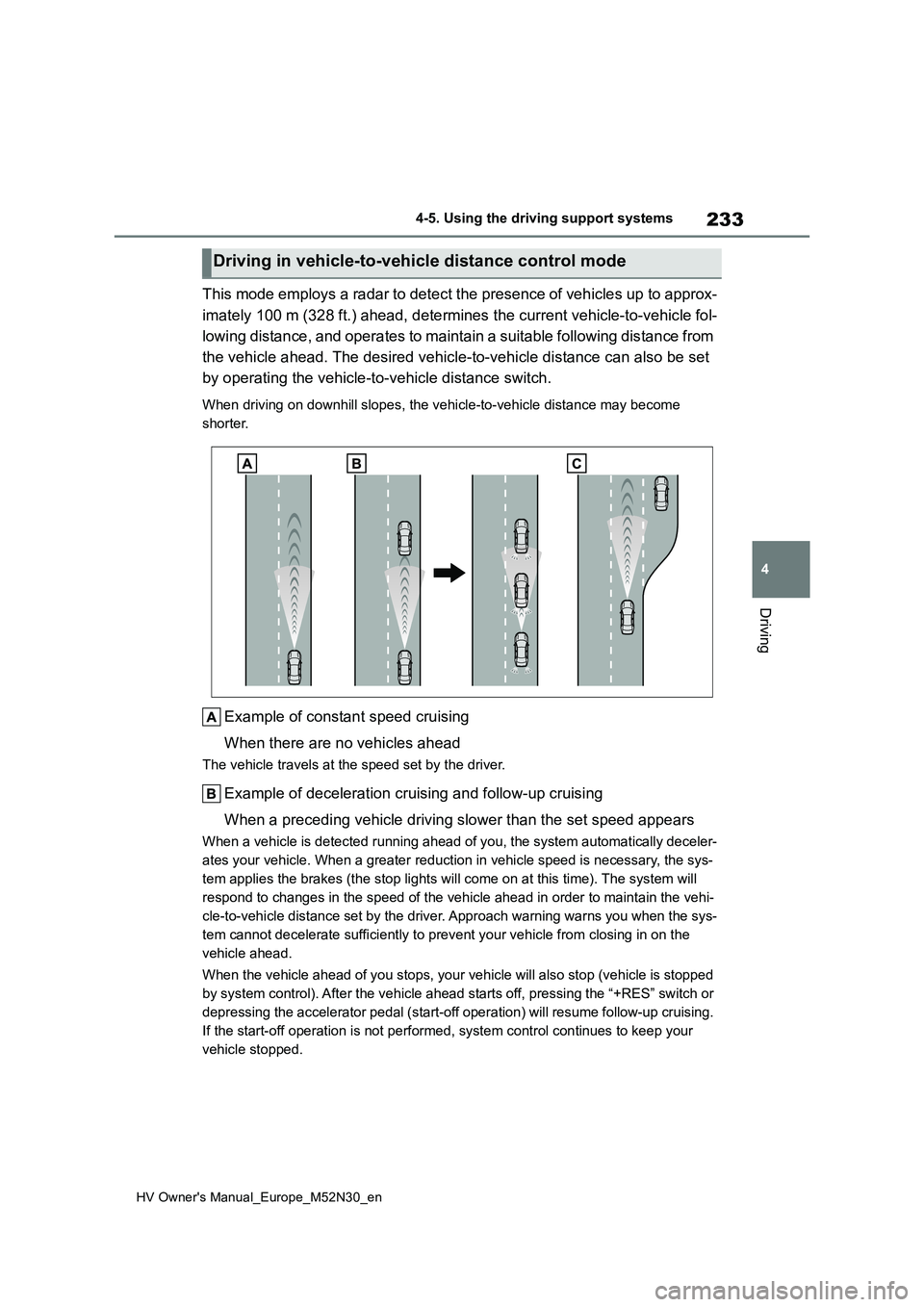
Example of constant speed cruising
When there are no vehicles ahead
The vehicle travels at the speed set by the driver.
Example of deceleration cruising and follow-up cruising
When a preceding vehicle driving slower than the set speed appe ars
When a vehicle is detected running ahead of you, the system automatically deceler-
ates your vehicle. When a greater reduction in vehicle speed is necessary, the sys-
tem applies the brakes (the stop lights will come on at this ti me). The system will
respond to changes in the speed of the vehicle ahead in order t o maintain the vehi-
cle-to-vehicle distance set by the driver. Approach warning war ns you when the sys-
tem cannot decelerate sufficiently to prevent your vehicle from closing in on the
vehicle ahead.
When the vehicle ahead of you stops, your vehicle will also sto p (vehicle is stopped
by system control). After the vehicle ahead starts off, pressin g the “+RES” switch or
depressing the accelerator pedal (start-off operation) will res ume follow-up cruising.
If the start-off operation is not performed, system control con tinues to keep your
vehicle stopped.
Driving in vehicle-to-vehicle distance control mode
Page 256 of 590
254
HV Owner's Manual_Europe_M52N30_en
4-5. Using the driving support systems
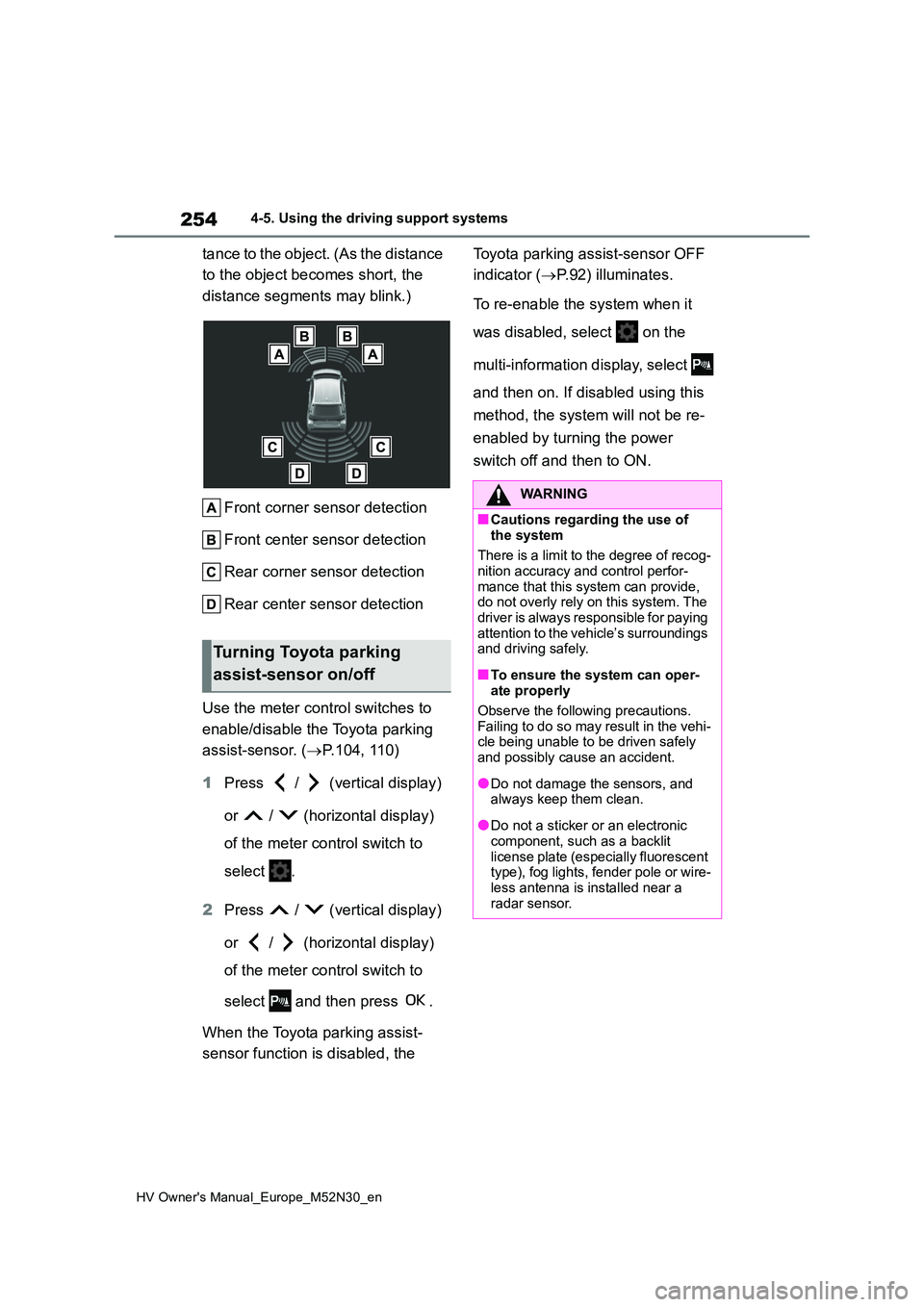
tance to the object. (As the distance
to the object becomes short, the
distance segments may blink.)
Front corner sensor detection
Front center sensor detection
Rear corner sensor detection
Rear center sensor detection
Use the meter control switches to
enable/disable the Toyota parking
assist-sensor. ( P.104, 110)
1 Press / (vertical display)
or / (horizontal display)
of the meter control switch to
select .
2 Press / (vertical display)
or / (horizontal display)
of the meter control switch to
select and then press .
When the Toyota parking assist-
sensor function is disabled, the
Toyota parking assist-sensor OFF
indicator ( P.92) illuminates.
To re-enable the system when it
was disabled, select on the
multi-information display, select
and then on. If disabled using this
method, the system will not be re-
enabled by turning the power
switch off and then to ON.
Turning Toyota parking
assist-sensor on/off
WARNING
■Cautions regarding the use of
the system
There is a limit to the degree of recog- nition accuracy and control perfor-
mance that this system can provide, do not overly rely on this system. The driver is always responsible for paying
attention to the vehicle’s surroundings and driving safely.
■To ensure the system can oper-ate properly
Observe the following precautions.
Failing to do so may result in the vehi- cle being unable to be driven safely and possibly cause an accident.
●Do not damage the sensors, and always keep them clean.
●Do not a sticker or an electronic component, such as a backlit
license plate (especially fluorescent type), fog lights, fender pole or wire-less antenna is installed near a
radar sensor.
Page 280 of 590
278
HV Owner's Manual_Europe_M52N30_en
4-5. Using the driving support systems
lights are automatically controlled
to reduce the vehicle speed and
help reduce the possibility of further
damage due to a secondary colli-
sion.
■When the TRC/VSC/ABS systems
are operating
The slip indicator light will flash while the TRC/VSC/ABS systems are operating.
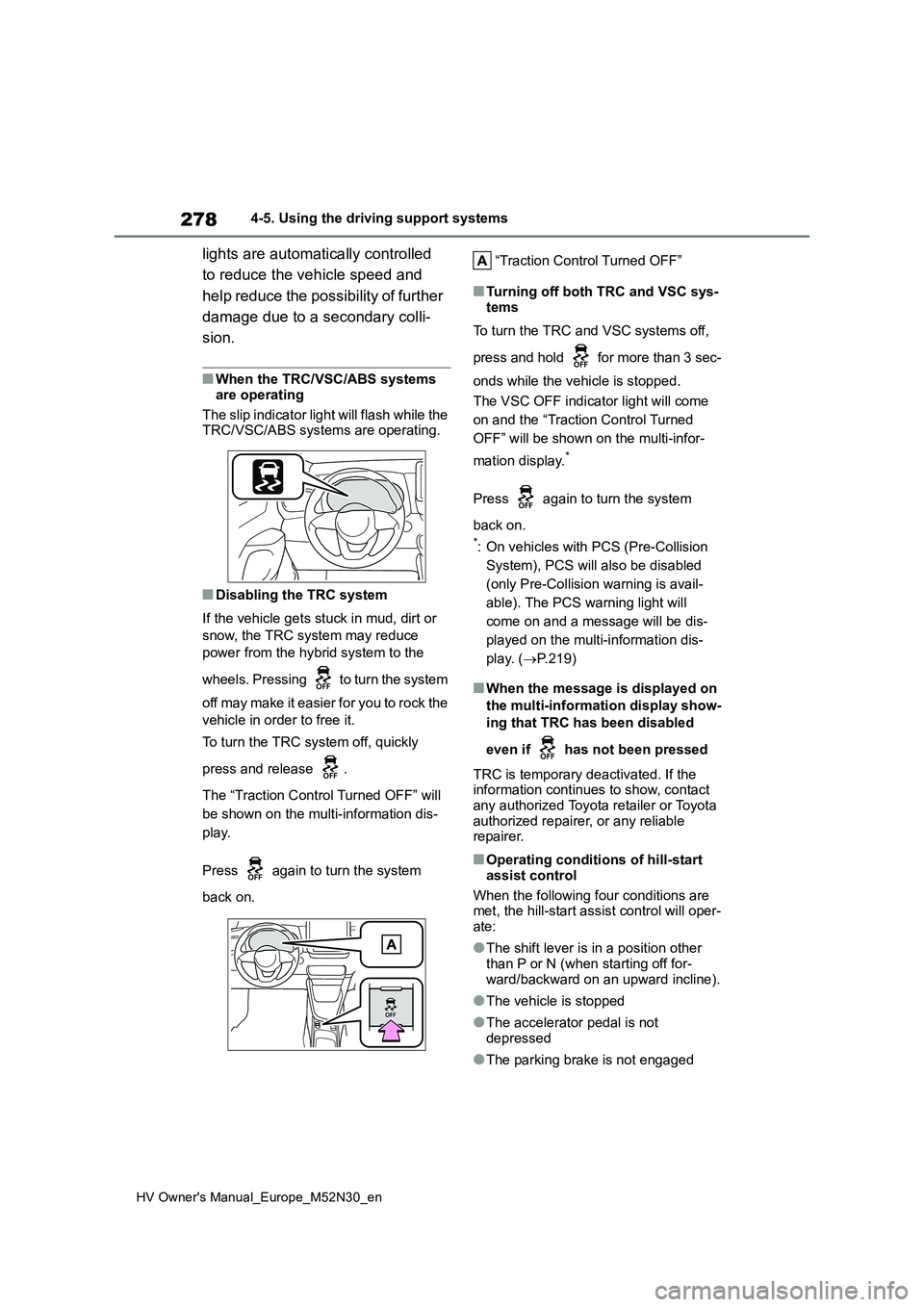
■Disabling the TRC system
If the vehicle gets stuck in mud, dirt or
snow, the TRC system may reduce
power from the hybrid system to the
wheels. Pressing to turn the system
off may make it easier for you to rock the
vehicle in order to free it.
To turn the TRC system off, quickly
press and release .
The “Traction Control Turned OFF” will
be shown on the multi-information dis-
play.
Press again to turn the system
back on.
“Traction Control Turned OFF”
■Turning off both TRC and VSC sys-
tems
To turn the TRC and VSC systems off,
press and hold for more than 3 sec-
onds while the vehicle is stopped.
The VSC OFF indicator light will come
on and the “Traction Control Turned
OFF” will be shown on the multi-infor-
mation display.*
Press again to turn the system
back on.
*: On vehicles with PCS (Pre-Collision
System), PCS will also be disabled
(only Pre-Collision warning is avail-
able). The PCS warning light will
come on and a message will be dis-
played on the multi-information dis-
play. ( P.219)
■When the message is displayed on
the multi-information display show-
ing that TRC has been disabled
even if has not been pressed
TRC is temporary deactivated. If the information continues to show, contact
any authorized Toyota retailer or Toyota authorized repairer, or any reliable repairer.
■Operating conditions of hill-start
assist control
When the following four conditions are met, the hill-start assist control will oper-
ate:
●The shift lever is in a position other
than P or N (when starting off for- ward/backward on an upward incline).
●The vehicle is stopped
●The accelerator pedal is not
depressed
●The parking brake is not engaged