Mode VOLKSWAGEN TIGUAN 2017 Owner´s Manual
[x] Cancel search | Manufacturer: VOLKSWAGEN, Model Year: 2017, Model line: TIGUAN, Model: VOLKSWAGEN TIGUAN 2017Pages: 341, PDF Size: 9.14 MB
Page 107 of 341
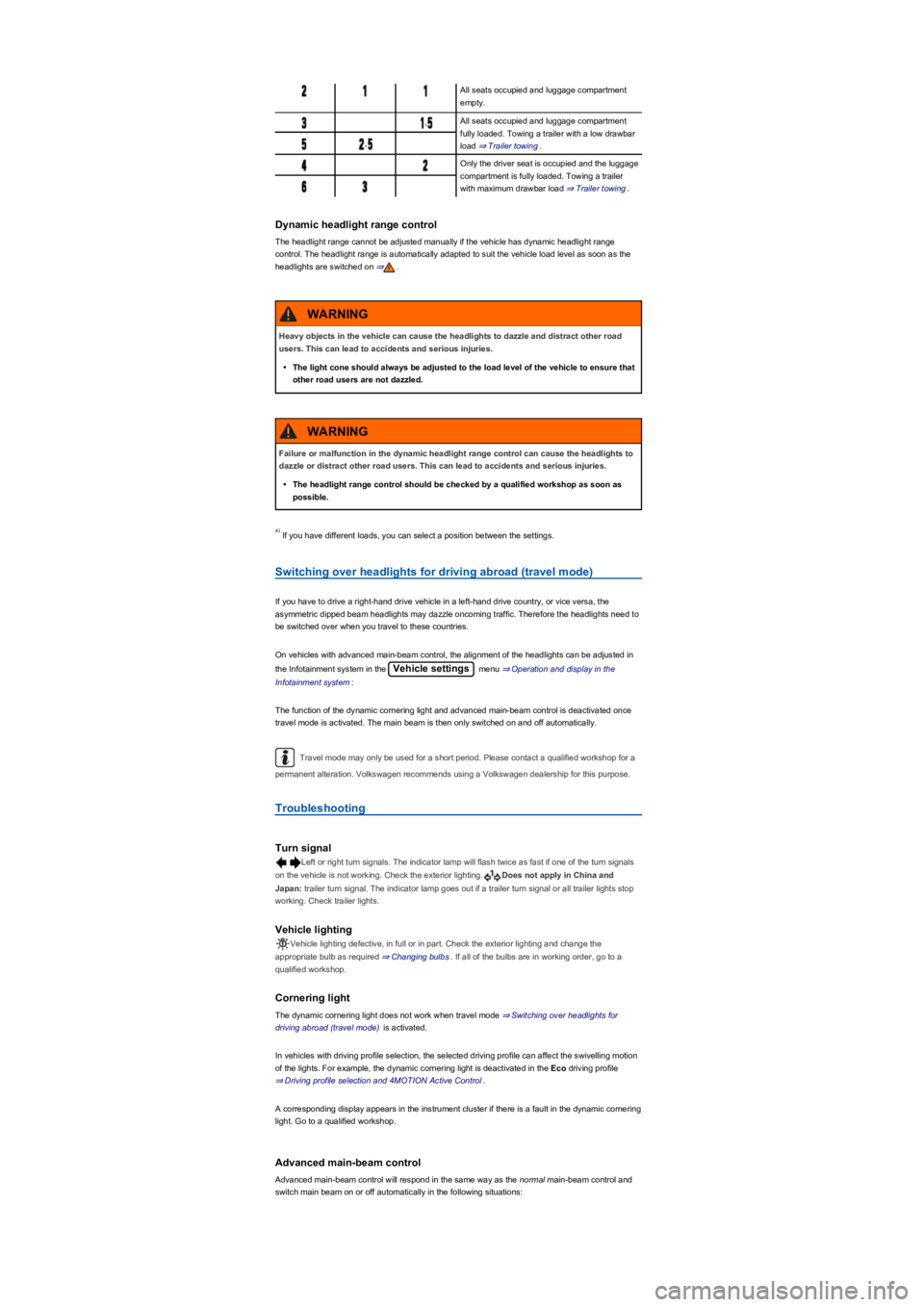
All seats occupied and luggage compartment
empty.
,All seats occupied and luggage compartment
fully loaded. Towing a trailer with a low drawbar
load ⇒ Trailer towing.,
Only the driver seat is occupied and the luggage
compartment is fully loaded. Towing a trailer
with maximum drawbar load ⇒ Trailer towing.
Dynamic headlight range control
The headlight range cannot be adjusted manually if the vehicle has dynamic headlight range
control. The headlight range is automatically adapted to suit the vehicle load level as soon as the
headlights are switched on ⇒.
If you have different loads, you can select a position between the settings.
Switching over headlights for driving abroad (travel mode)
If you have to drive a right-hand drive vehicle in a left-hand drive country, or vice versa, the
asymmetric dipped beam headlights may dazzle oncoming traffic. Therefore the headlights need to
be switched over when you travel to these countries.
On vehicles with advanced main-beam control, the alignment of the headlights can be adjusted in
the Infotainment system in the Vehicle settings menu ⇒ Operation and display in the
Infotainment system:
The function of the dynamic cornering light and advanced main-beam control is deactivated once
travel mode is activated. The main beam is then only switched on and off automatically.
Travel mode may only be used for a short period. Please contact a qualified workshop for a
permanent alteration. Volkswagen recommends using a Volkswagen dealership for this purpose.
Troubleshooting
Turn signal
Left or right turn signals. The indicator lamp will flash twice as fast if one of the turn signals
on the vehicle is not working. Check the exterior lighting.Does not apply in China and
Japan: trailer turn signal. The indicator lamp goes out if a trailer turn signal or all trailer lights stop
working. Check trailer lights.
Vehicle lighting
Vehicle lighting defective, in full or in part. Check the exterior lighting and change the
appropriate bulb as required ⇒ Changing bulbs. If all of the bulbs are in working order, go to a
qualified workshop.
Cornering light
The dynamic cornering light does not work when travel mode ⇒ Switching over headlights for
driving abroad (travel mode) is activated.
In vehicles with driving profile selection, the selected driving profile can affect the swivelling motion
of the lights. For example, the dynamic cornering light is deactivated in the Eco driving profile
⇒ Driving profile selection and 4MOTION Active Control.
A corresponding display appears in the instrument cluster if there is a fault in the dynamic cornering
light. Go to a qualified workshop.
Advanced main-beam control
Advanced main-beam control will respond in the same way as the normal main-beam control and
switch main beam on or off automatically in the following situations:
Heavy objects in the vehicle can cause the headlights to dazzle and distract other road
users. This can lead to accidents and serious injuries.
•The light cone should always be adjusted to the load level of the vehicle to ensure that
other road users are not dazzled.
WARNING
Failure or malfunction in the dynamic headlight range control can cause the headlights to
dazzle or distract other road users. This can lead to accidents and serious injuries.
•The headlight range control should be checked by a qualified workshop as soon as
possible.
WARNING
a)
Page 108 of 341
•If the dynamic cornering light has been deactivated.
•If travel mode is activated ⇒ Switching over headlights for driving abroad (travel mode).
•When the Eco driving profile is selected in vehicles with driving profile selection ⇒ Driving
profile selection and 4MOTION Active Control.
Interior lighting
Instrument and switch lighting
The brightness of the instrument and switch lighting and the basic brightness level of the Head-up
Display ⇒ Instrument cluster can be adjusted in the Infotainment system in
the Vehicle settings menu ⇒ Operation and display in the Infotainment system.
The brightness setting is automatically adjusted to the changing light conditions in the vehicle.
When the light switch is in position , a sensor will switch the dipped beam and the lighting
in the instruments and switches on and off automatically depending on the ambient brightness
level.
When the light is switched off and the ignition switched on, the dash panel lighting (indicators
and scales) is switched on. As the ambient light becomes lower, the lighting of these scales is
automatically reduced and may be switched off entirely. This function is intended to remind the
driver to switch on the dipped beam in good time, i.e. when driving through tunnels.
Interior lights, reading lights, background lighting
Press the corresponding button:
Switches the front interior lights on or off.Switches the rear interior lights on or off.
The interior lights are switched on automatically when the vehicle is unlocked, a door is
opened or the vehicle key is removed from the ignition lock.Switches the reading lights on or
off.
Stowage compartment and luggage compartment lights
A light will be switched on and off automatically when the stowage compartment on the front
passenger side, or the boot lid, is opened or closed.
Background lighting
Depending on the equipment level, the background lighting provides indirect light in the various
areas of the vehicle interior.
The footwell and, where applicable, the closed blind of the glass roof may also be illuminated.
The brightness of the background lighting can be adjusted in the Infotainment system in
the Vehicle settings menu ⇒ Operation and display in the Infotainment system.
The lights go out when the vehicle is locked or after a delay of a few minutes when the
vehicle key is removed from the ignition lock. This prevents the 12-volt battery from discharging.
Some settings can be stored in the user accounts of the personalisation function and
therefore change automatically when the user account changes ⇒ Personalisation.
Visibility
Wipers
Operating the wiper lever
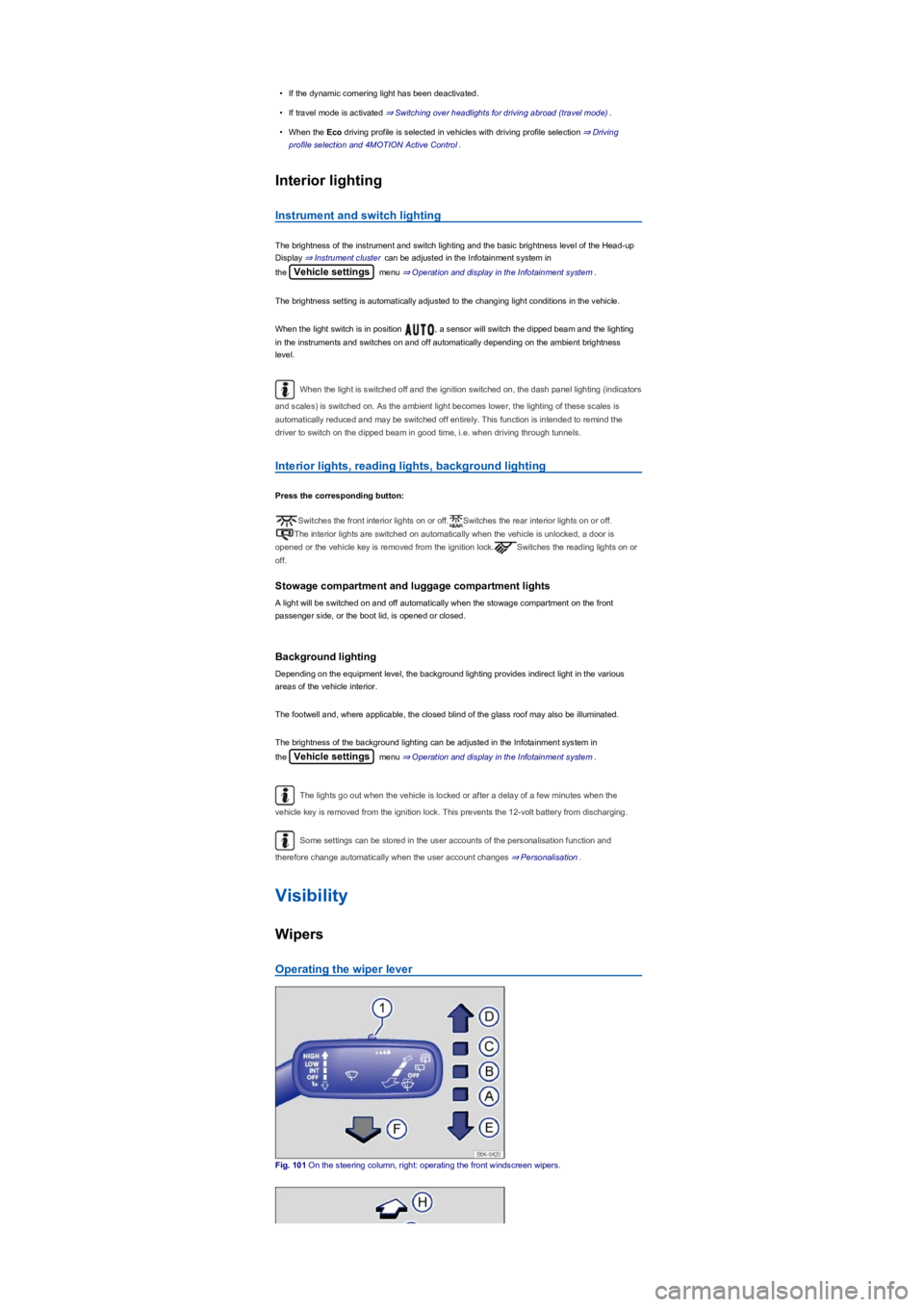
Fig. 101 On the steering column, right: operating the front windscreen wipers.
Page 109 of 341
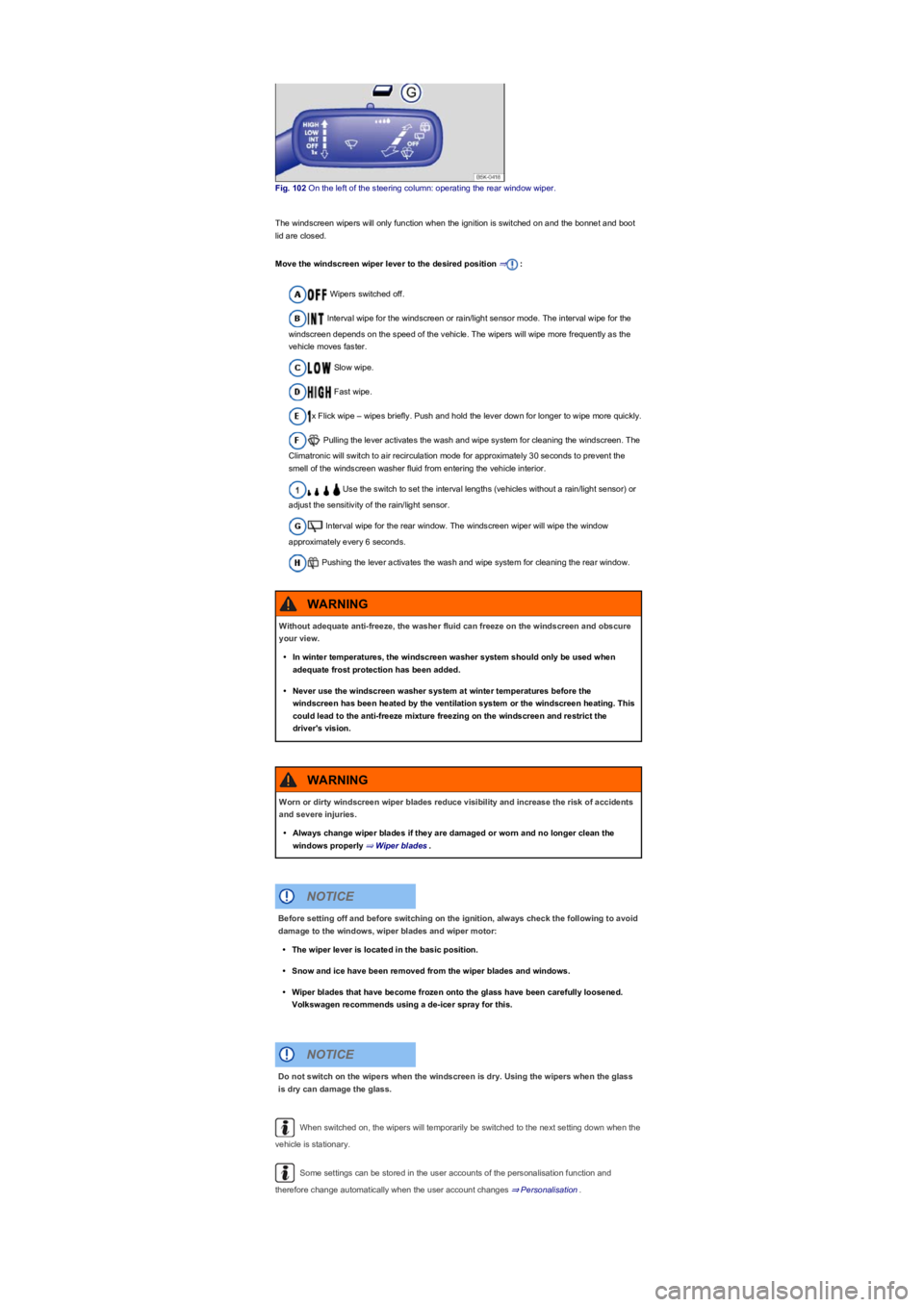
Fig. 102 On the left of the steering column: operating the rear window wiper.
The windscreen wipers will only function when the ignition is switched on and the bonnet and boot
lid are closed.
Move the windscreen wiper lever to the desired position ⇒:
Wipers switched off.
Interval wipe for the windscreen or rain/light sensor mode. The interval wipe for the
windscreen depends on the speed of the vehicle. The wipers will wipe more frequently as the
vehicle moves faster.
Slow wipe.
Fast wipe.
x Flick wipe – wipes briefly. Push and hold the lever down for longer to wipe more quickly.
Pulling the lever activates the wash and wipe system for cleaning the windscreen. The
Climatronic will switch to air recirculation mode for approximately 30 seconds to prevent the
smell of the windscreen washer fluid from entering the vehicle interior.
Use the switch to set the interval lengths (vehicles without a rain/light sensor) or
adjust the sensitivity of the rain/light sensor.
Interval wipe for the rear window. The windscreen wiper will wipe the window
approximately every 6 seconds.
Pushing the lever activates the wash and wipe system for cleaning the rear window.
When switched on, the wipers will temporarily be switched to the next setting down when the
vehicle is stationary.
Some settings can be stored in the user accounts of the personalisation function and
therefore change automatically when the user account changes ⇒ Personalisation.
Without adequate anti-freeze, the washer fluid can freeze on the windscreen and obscure
your view.
•In winter temperatures, the windscreen washer system should only be used when
adequate frost protection has been added.
•Never use the windscreen washer system at winter temperatures before the
windscreen has been heated by the ventilation system or the windscreen heating. This
could lead to the anti-freeze mixture freezing on the windscreen and restrict the
driver's vision.
WARNING
Worn or dirty windscreen wiper blades reduce visibility and increase the risk of accidents
and severe injuries.
•Always change wiper blades if they are damaged or worn and no longer clean the
windows properly ⇒ Wiper blades.
WARNING
Before setting off and before switching on the ignition, always check the following to avoid
damage to the windows, wiper blades and wiper motor:
•The wiper lever is located in the basic position.
•Snow and ice have been removed from the wiper blades and windows.
•Wiper blades that have become frozen onto the glass have been carefully loosened.
Volkswagen recommends using a de-icer spray for this.
NOTICE
Do not switch on the wipers when the windscreen is dry. Using the wipers when the glass
is dry can damage the glass.
NOTICE
Page 115 of 341
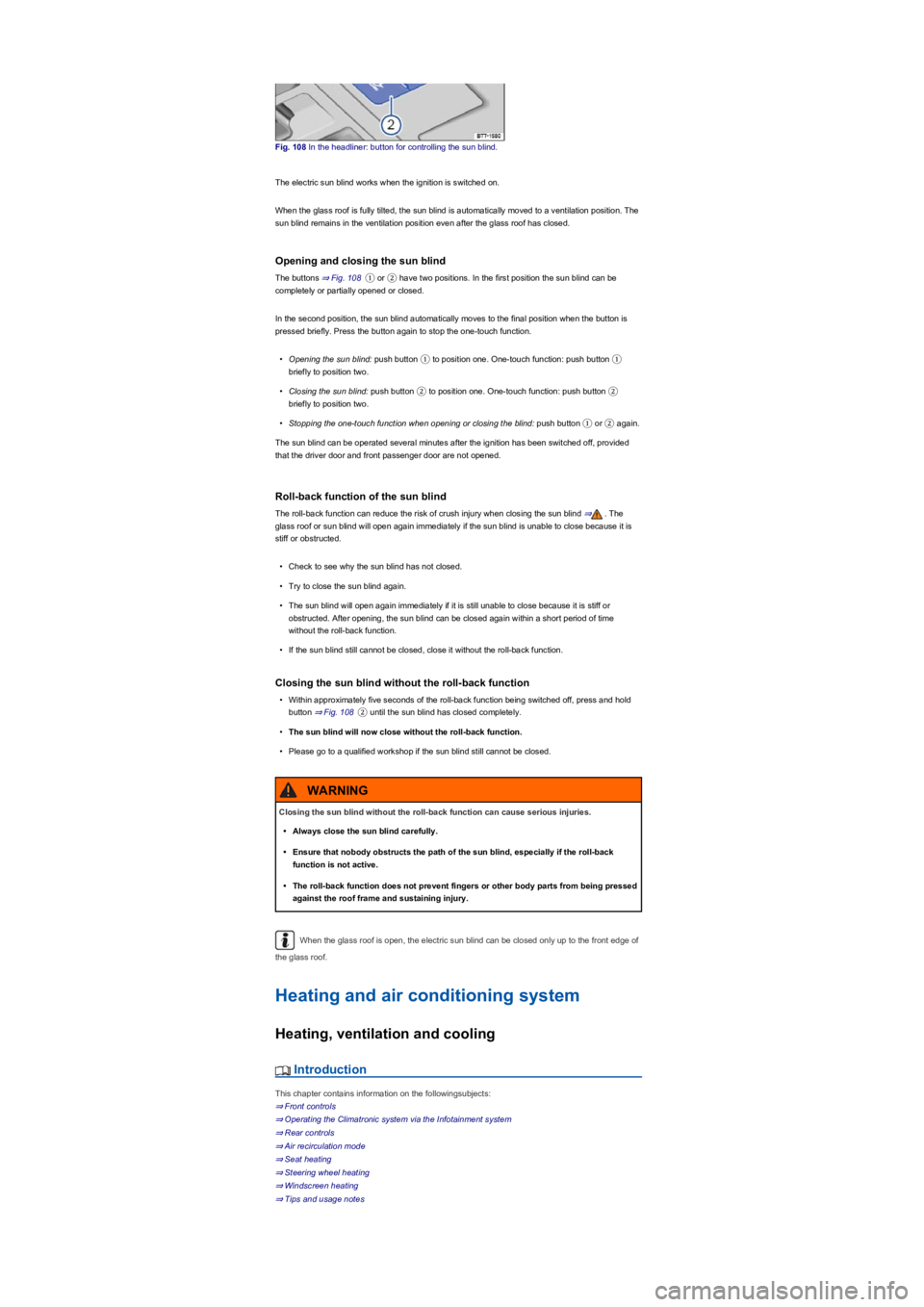
Fig. 108 In the headliner: button for controlling the sun blind.
The electric sun blind works when the ignition is switched on.
When the glass roof is fully tilted, the sun blind is automatically moved to a ventilation position. The
sun blind remains in the ventilation position even after the glass roof has closed.
Opening and closing the sun blind
The buttons ⇒ Fig. 108① or ② have two positions. In the first position the sun blind can be
completely or partially opened or closed.
In the second position, the sun blind automatically moves to the final position when the button is
pressed briefly. Press the button again to stop the one-touch function.
•Opening the sun blind: push button ① to position one. One-touch function: push button ①
briefly to position two.
•Closing the sun blind: push button ② to position one. One-touch function: push button ②
briefly to position two.
•Stopping the one-touch function when opening or closing the blind: push button ① or ② again.
The sun blind can be operated several minutes after the ignition has been switched off, provided
that the driver door and front passenger door are not opened.
Roll-back function of the sun blind
The roll-back function can reduce the risk of crush injury when closing the sun blind ⇒. The
glass roof or sun blind will open again immediately if the sun blind is unable to close because it is
stiff or obstructed.
•Check to see why the sun blind has not closed.
•Try to close the sun blind again.
•The sun blind will open again immediately if it is still unable to close because it is stiff or
obstructed. After opening, the sun blind can be closed again within a short period of time
without the roll-back function.
•If the sun blind still cannot be closed, close it without the roll-back function.
Closing the sun blind without the roll-back function
•Within approximately five seconds of the roll-back function being switched off, press and hold
button ⇒ Fig. 108② until the sun blind has closed completely.
•The sun blind will now close without the roll-back function.
•Please go to a qualified workshop if the sun blind still cannot be closed.
When the glass roof is open, the electric sun blind can be closed only up to the front edge of
the glass roof.
Heating and air conditioning system
Heating, ventilation and cooling
Introduction
This chapter contains information on the followingsubjects:
⇒ Front controls
⇒ Operating the Climatronic system via the Infotainment system
⇒ Rear controls
⇒ Air recirculation mode
⇒ Seat heating
⇒ Steering wheel heating
⇒ Windscreen heating
⇒ Tips and usage notes
Closing the sun blind without the roll-back function can cause serious injuries.
•Always close the sun blind carefully.
•Ensure that nobody obstructs the path of the sun blind, especially if the roll-back
function is not active.
•The roll-back function does not prevent fingers or other body parts from being pressed
against the roof frame and sustaining injury.
WARNING
Page 116 of 341
The following systems may be installed in the vehicle
The heating and fresh air system warms up and supplies fresh air to the vehicle interior. The
heating and fresh air system does not cool down the vehicle interior.
The manual air conditioning system or Climatronic cools down and dehumidifies the air. It
works most effectively when the windows and the glass roof are closed. If heat has built up in the
vehicle interior, opening the doors and windows can speed up the cooling process.
How the vehicle displays active functions
Lit up LEDs on rotary knobs and buttons indicate that a function has been switched on.
Some settings can be stored in the user accounts of the personalisation function and
therefore change when the user account changes ⇒ Personalisation.
Front controls
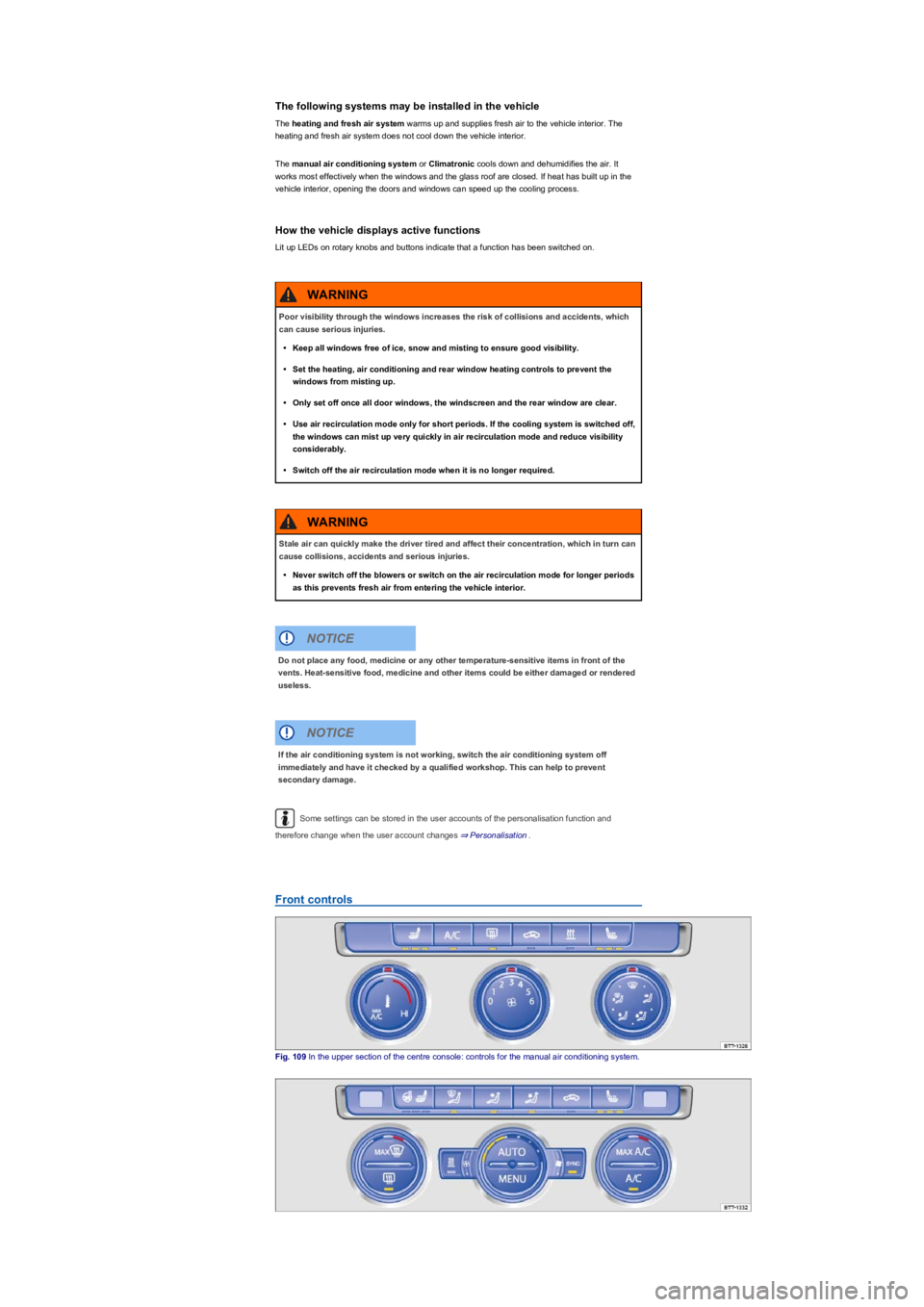
Fig. 109 In the upper section of the centre console: controls for the manual air conditioning system.
Poor visibility through the windows increases the risk of collisions and accidents, which
can cause serious injuries.
•Keep all windows free of ice, snow and misting to ensure good visibility.
•Set the heating, air conditioning and rear window heating controls to prevent the
windows from misting up.
•Only set off once all door windows, the windscreen and the rear window are clear.
•Use air recirculation mode only for short periods. If the cooling system is switched off,
the windows can mist up very quickly in air recirculation mode and reduce visibility
considerably.
•Switch off the air recirculation mode when it is no longer required.
WARNING
Stale air can quickly make the driver tired and affect their concentration, which in turn can
cause collisions, accidents and serious injuries.
•Never switch off the blowers or switch on the air recirculation mode for longer periods
as this prevents fresh air from entering the vehicle interior.
WARNING
Do not place any food, medicine or any other temperature-sensitive items in front of the
vents. Heat-sensitive food, medicine and other items could be either damaged or rendered
useless.
NOTICE
If the air conditioning system is not working, switch the air conditioning system off
immediately and have it checked by a qualified workshop. This can help to prevent
secondary damage.
NOTICE
Page 117 of 341
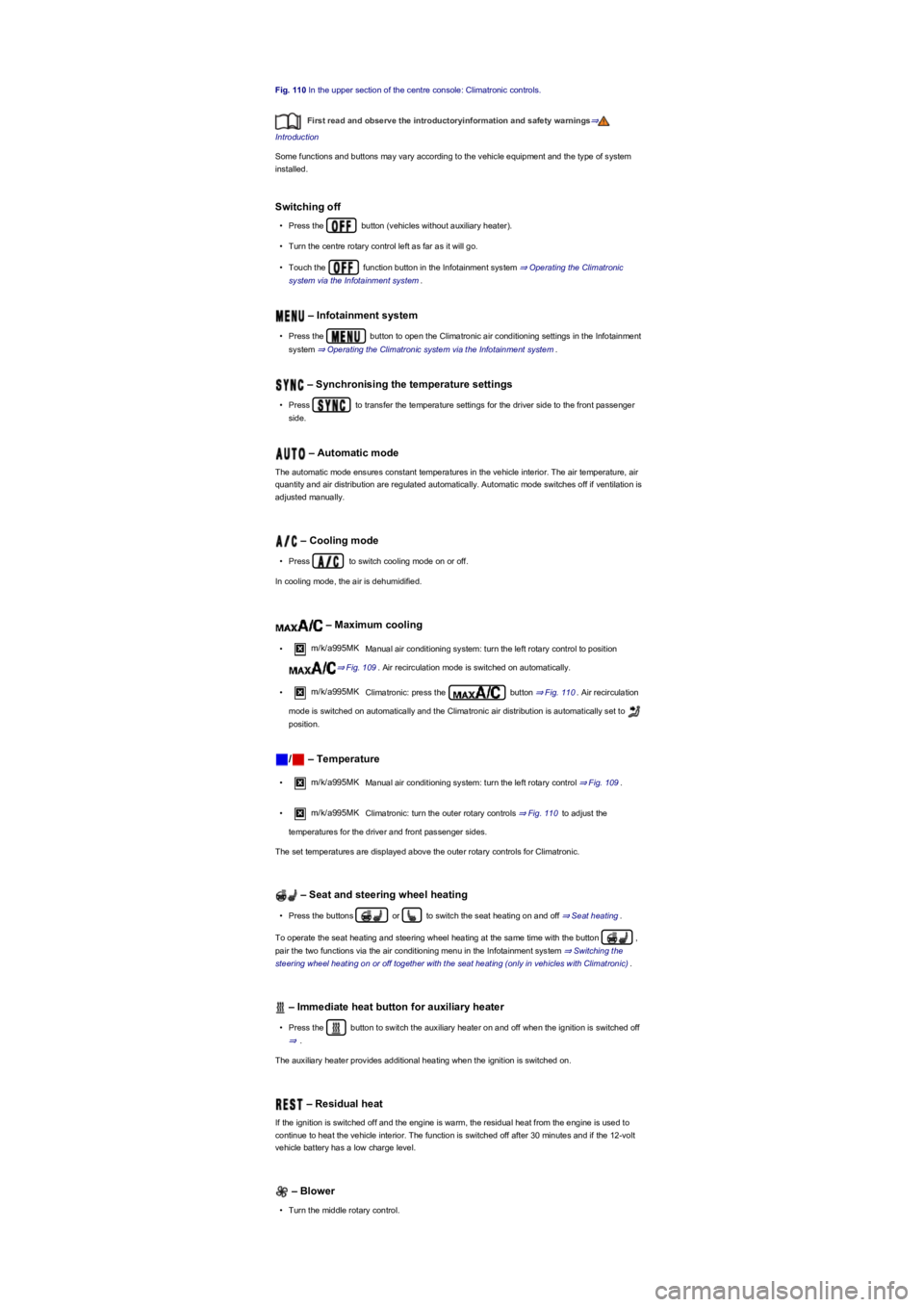
Fig. 110 In the upper section of the centre console: Climatronic controls.
First read and observe the introductoryinformation and safety warnings⇒
Introduction
Some functions and buttons may vary according to the vehicle equipment and the type of system
installed.
Switching off
•Press the button (vehicles without auxiliary heater).
•Turn the centre rotary control left as far as it will go.
•Touch the function button in the Infotainment system ⇒ Operating the Climatronic
system via the Infotainment system.
– Infotainment system
•Press the button to open the Climatronic air conditioning settings in the Infotainment
system ⇒ Operating the Climatronic system via the Infotainment system.
– Synchronising the temperature settings
•Press to transfer the temperature settings for the driver side to the front passenger
side.
– Automatic mode
The automatic mode ensures constant temperatures in the vehicle interior. The air temperature, air
quantity and air distribution are regulated automatically. Automatic mode switches off if ventilation is
adjusted manually.
– Cooling mode
•Press to switch cooling mode on or off.
In cooling mode, the air is dehumidified.
– Maximum cooling
•m/k/a995MK Manual air conditioning system: turn the left rotary control to position
⇒ Fig. 109. Air recirculation mode is switched on automatically.
•m/k/a995MK Climatronic: press the button ⇒ Fig. 110. Air recirculation
mode is switched on automatically and the Climatronic air distribution is automatically set to
position.
/ – Temperature
•m/k/a995MK Manual air conditioning system: turn the left rotary control ⇒ Fig. 109.
•m/k/a995MK Climatronic: turn the outer rotary controls ⇒ Fig. 110 to adjust the
temperatures for the driver and front passenger sides.
The set temperatures are displayed above the outer rotary controls for Climatronic.
– Seat and steering wheel heating
•Press the buttons or to switch the seat heating on and off ⇒ Seat heating.
To operate the seat heating and steering wheel heating at the same time with the button ,
pair the two functions via the air conditioning menu in the Infotainment system ⇒ Switching the
steering wheel heating on or off together with the seat heating (only in vehicles with Climatronic).
– Immediate heat button for auxiliary heater
•Press the button to switch the auxiliary heater on and off when the ignition is switched off
⇒.
The auxiliary heater provides additional heating when the ignition is switched on.
– Residual heat
If the ignition is switched off and the engine is warm, the residual heat from the engine is used to
continue to heat the vehicle interior. The function is switched off after 30 minutes and if the 12-volt
vehicle battery has a low charge level.
– Blower
•Turn the middle rotary control.
Page 118 of 341
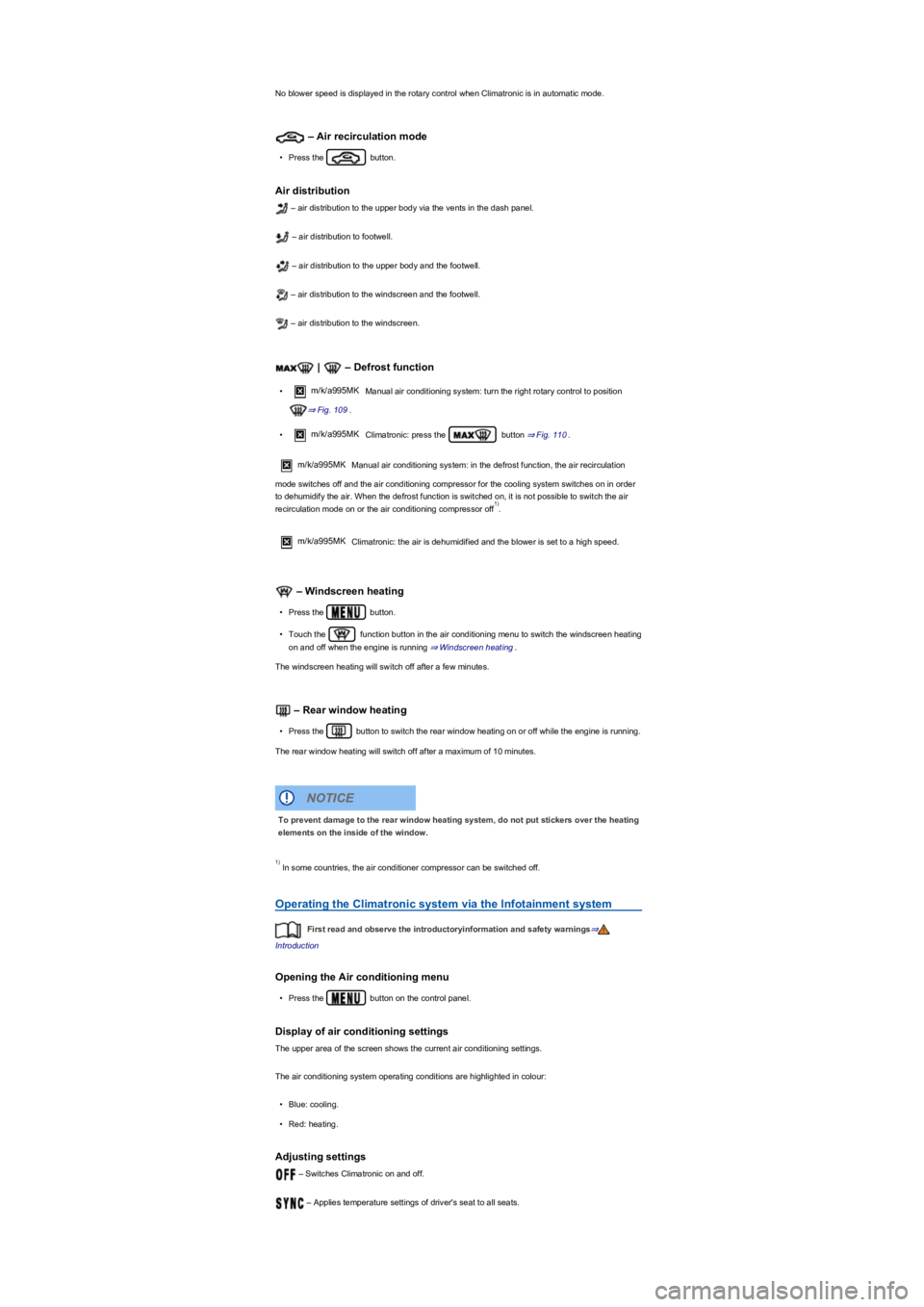
No blower speed is displayed in the rotary control when Climatronic is in automatic mode.
– Air recirculation mode
•Press the button.
Air distribution
– air distribution to the upper body via the vents in the dash panel.
– air distribution to footwell.
– air distribution to the upper body and the footwell.
– air distribution to the windscreen and the footwell.
– air distribution to the windscreen.
| – Defrost function
•m/k/a995MK Manual air conditioning system: turn the right rotary control to position
⇒ Fig. 109.
•m/k/a995MK Climatronic: press the button ⇒ Fig. 110.
m/k/a995MKManual air conditioning system: in the defrost function, the air recirculation
mode switches off and the air conditioning compressor for the cooling system switches on in order
to dehumidify the air. When the defrost function is switched on, it is not possible to switch the air
recirculation mode on or the air conditioning compressor off.
m/k/a995MK Climatronic: the air is dehumidified and the blower is set to a high speed.
– Windscreen heating
•Press the button.
•Touch the function button in the air conditioning menu to switch the windscreen heating
on and off when the engine is running ⇒ Windscreen heating.
The windscreen heating will switch off after a few minutes.
– Rear window heating
•Press the button to switch the rear window heating on or off while the engine is running.
The rear window heating will switch off after a maximum of 10 minutes.
In some countries, the air conditioner compressor can be switched off.
Operating the Climatronic system via the Infotainment system
First read and observe the introductoryinformation and safety warnings⇒
Introduction
Opening the Air conditioning menu
•Press the button on the control panel.
Display of air conditioning settings
The upper area of the screen shows the current air conditioning settings.
The air conditioning system operating conditions are highlighted in colour:
•Blue: cooling.
•Red: heating.
Adjusting settings
– Switches Climatronic on and off.
– Applies temperature settings of driver's seat to all seats.
1)
To prevent damage to the rear window heating system, do not put stickers over the heating
elements on the inside of the window.
NOTICE
1)
Page 119 of 341
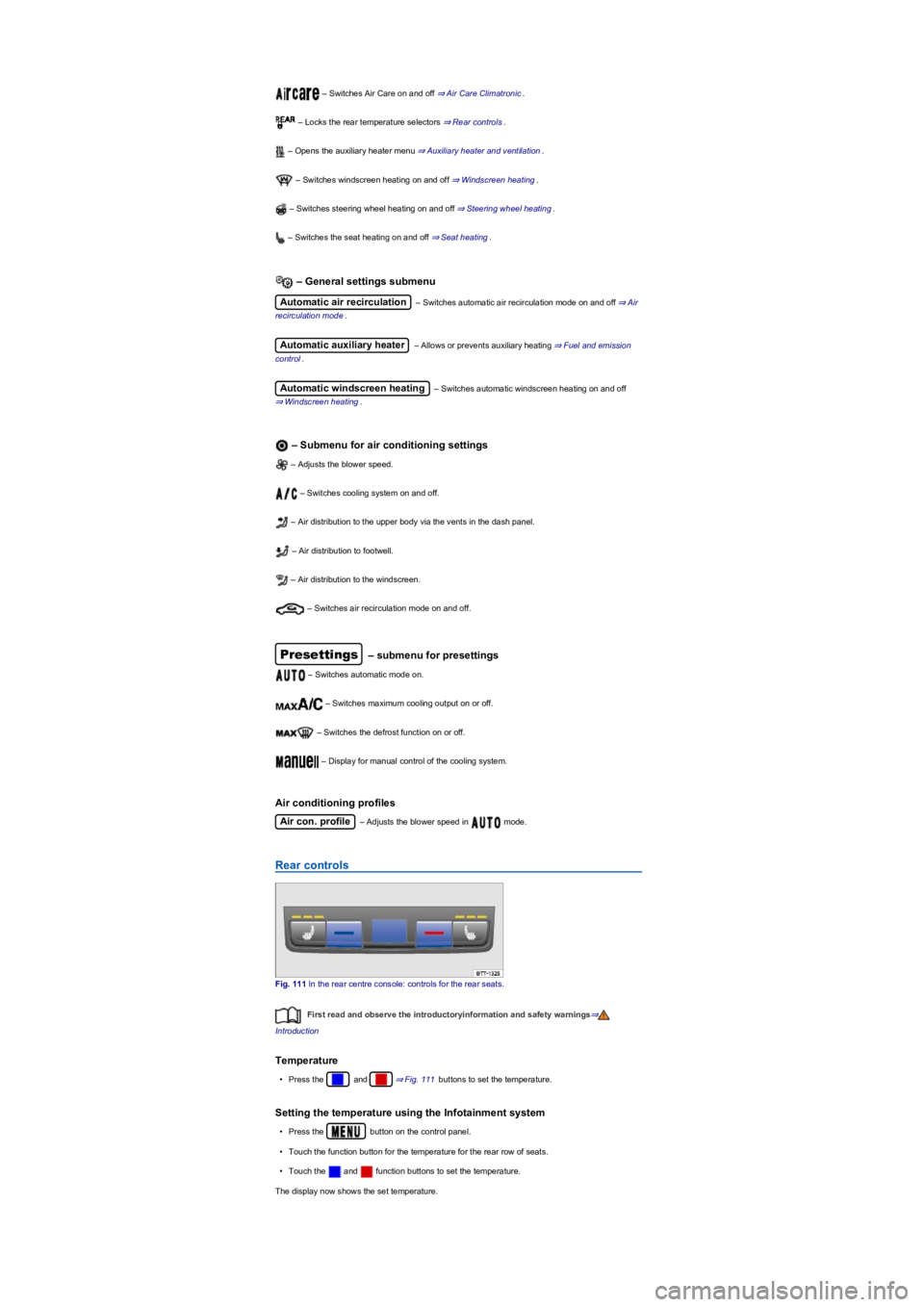
– Switches Air Care on and off ⇒ Air Care Climatronic.
– Locks the rear temperature selectors ⇒ Rear controls.
– Opens the auxiliary heater menu ⇒ Auxiliary heater and ventilation.
– Switches windscreen heating on and off ⇒ Windscreen heating.
– Switches steering wheel heating on and off ⇒ Steering wheel heating.
– Switches the seat heating on and off ⇒ Seat heating.
– General settings submenu
Automatic air recirculation – Switches automatic air recirculation mode on and off ⇒ Air
recirculation mode.
Automatic auxiliary heater – Allows or prevents auxiliary heating ⇒ Fuel and emission
control.
Automatic windscreen heating – Switches automatic windscreen heating on and off
⇒ Windscreen heating.
– Submenu for air conditioning settings
– Adjusts the blower speed.
– Switches cooling system on and off.
– Air distribution to the upper body via the vents in the dash panel.
– Air distribution to footwell.
– Air distribution to the windscreen.
– Switches air recirculation mode on and off.
Presettings – submenu for presettings
– Switches automatic mode on.
– Switches maximum cooling output on or off.
– Switches the defrost function on or off.
– Display for manual control of the cooling system.
Air conditioning profiles
Air con. profile – Adjusts the blower speed in mode.
Rear controls
Fig. 111 In the rear centre console: controls for the rear seats.
First read and observe the introductoryinformation and safety warnings⇒
Introduction
Temperature
•Press the and ⇒ Fig. 111 buttons to set the temperature.
Setting the temperature using the Infotainment system
•Press the button on the control panel.
•Touch the function button for the temperature for the rear row of seats.
•Touch the and function buttons to set the temperature.
The display now shows the set temperature.
Page 120 of 341
– Seat heating
Press the buttons or to switch the seat heating on and off ⇒ Seat heating.
If the function button is activated in the Infotainment system, it is not possible to
operate the rear controls.
Air recirculation mode
First read and observe the introductoryinformation and safety warnings⇒
Introduction
In air recirculation mode, no outside air enters the vehicle interior.
Manual air recirculation mode
•Press the button on the control panel to switch manual air recirculation mode on
and off.
Automatic air recirculation mode (Climatronic)
In automatic air recirculation mode, fresh air will enter the vehicle interior. The air recirculation
mode will switch on automatically if the system detects an increase in the concentration of noxious
substances in the outside air. The air recirculation mode will switch off as soon as the level of
noxious substances has returned to normal. The system cannot detect unpleasant odours.
•Press the button on the control panel.
•Touch function button .
•Touch the Automatic air recirculation function button.
Air recirculation mode with Air Care Climatronic
The vehicle is fitted with an allergen filter. When Air Care is activated ⇒ Air Care Climatronic, the
air recirculation mode of the air conditioning system is maximised as far as is permitted by the risk
of window fogging depending on the interior humidity and outside temperature. The air recirculation
mode is automatically regulated and features continuous adjustment in order to prevent fatigue of
the vehicle occupants.
When is the air recirculation mode deactivated?
Air recirculation mode is deactivated in the following situations ⇒:
•If the button on the Climatronic control panel is pressed.
•If the air distribution regulator of the manual air conditioning system is turned to position.
•If the sensor detects that the vehicle's windows might mist up.
When reversing the vehicle or when the wash and wipe system is being used, the air
recirculation mode will switch on to prevent odours from entering the vehicle interior.
•m/k/a999MK Climatronic
If the outside temperature is very high, brief activation of manual air recirculation mode helps
to cool the vehicle interior more quickly.
Seat heating
First read and observe the introductoryinformation and safety warnings⇒
Introduction
Stale air can quickly make the driver tired and affect their concentration, which in turn can
cause collisions, accidents and serious injuries.
•Never use the air recirculation mode for an extended period as no fresh air will enter
the vehicle interior.
•If the cooling system is switched off, the windows can mist up very quickly in air
recirculation mode and reduce visibility considerably.
•Switch off the air recirculation mode when it is no longer required.
WARNING
In vehicles with an air conditioning system, do not smoke when the air recirculation mode
is switched on. The smoke can leave a residue on the evaporator and the dust and pollen
filter with pollution filter insert, producing a lasting unpleasant odour.
NOTICE
Page 123 of 341
Why does the cooling system switch off automatically or cannot be
switched on?
•The engine is not running.
•The blower is switched off.
•The air conditioning system fuse has blown.
•The ambient temperature is lower than approximately +3°C (+38°F).
•The air conditioning compressor of the cooling system has been temporarily switched off
because the engine coolant temperature is too high.
•There is a vehicle fault. The air conditioning system should be checked by a qualified workshop.
Settings for optimal road visibility
•Keep the air intake in front of the windscreen free from ice, snow or leaves to improve the
heating and cooling performance and prevent condensation on the windows ⇒ Vehicle care.
•Do not cover the air vents in the rear of the luggage compartment to allow air to flow through
the vehicle from the front to the rear.
•The maximum heating output and the fastest window defrosting results are achieved when the
coolant has reached its operating temperature.
Recommended settings for the heating and fresh air system or manual air
conditioning system
•Switch off air recirculation mode.
•Set blower to setting or .
•Set the temperature selector to the middle position.
•Open and position all vents on the dash panel.
•Turn the air distribution regulator to the desired position.
•Manual air conditioning system: press the button on the control panel to switch the
cooling system on.
Recommended Climatronic setup
•Press the button.
•Set the temperature to +22°C (+72°F).
•Open and position the vents on the dash panel.
Air Care Climatronic
The allergen filter of Air Care Climatronic can additionally reduce the amount of pollutants and also
allergens that enter the vehicle interior.
The filters must be changed regularly to avoid impairing the performance of the air conditioning
system. If the vehicle is frequently used in severely polluted air, the filter must be replaced between
service events.
•Press the button on the control panel.
•Touch the Air Care function button.
•Touch the Active function button to switch the Air Care function on or off.
Dust and pollen filter
The dust and pollen filter must be replaced regularly to prevent impaired performance of the manual
air conditioning system. If the vehicle is frequently used in severely polluted air, the filter must be
replaced between service events.
Water under the vehicle
If the humidity and temperature outside the vehicle are high, condensation can drip off the
evaporator in the cooling system and form a pool underneath the vehicle. This is normal and does
not indicate a leak.
If the outside humidity is high and the outside temperature low, condensation may evaporate when
the auxiliary heater is running ⇒ Auxiliary heater and ventilation. If this is the case, steam may
appear underneath the vehicle. This is not a sign that the vehicle is damaged.
Auxiliary heater and ventilation
Introduction
This chapter contains information on the followingsubjects:
⇒ Switching the auxiliary heater and auxiliary ventilation on and off
⇒ Programming the auxiliary heater and auxiliary ventilation
⇒ Remote control