centre VOLKSWAGEN TIGUAN 2017 Owner´s Manual
[x] Cancel search | Manufacturer: VOLKSWAGEN, Model Year: 2017, Model line: TIGUAN, Model: VOLKSWAGEN TIGUAN 2017Pages: 341, PDF Size: 9.14 MB
Page 61 of 341
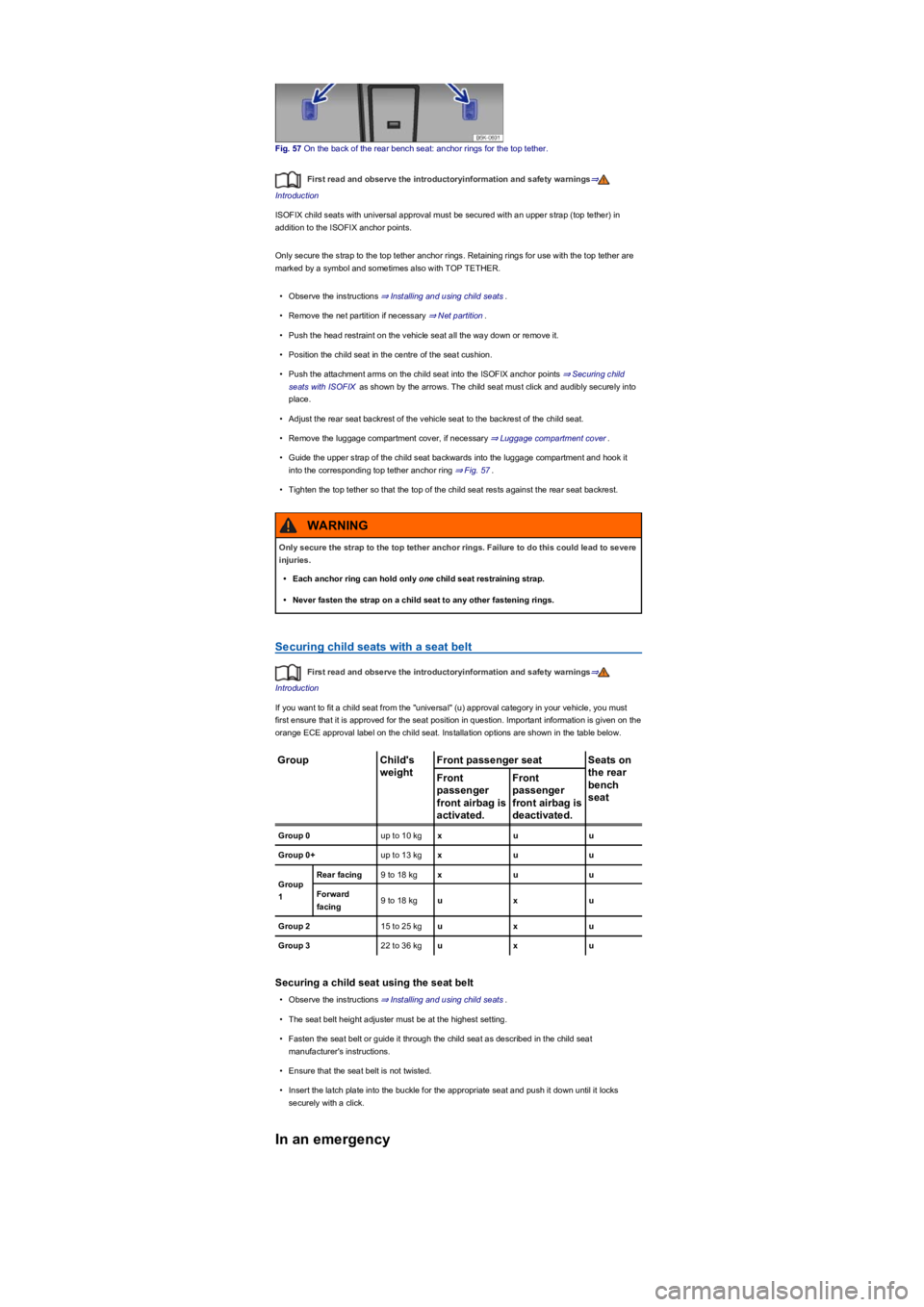
Fig. 57 On the back of the rear bench seat: anchor rings for the top tether.
First read and observe the introductoryinformation and safety warnings⇒
Introduction
ISOFIX child seats with universal approval must be secured with an upper strap (top tether) in
addition to the ISOFIX anchor points.
Only secure the strap to the top tether anchor rings. Retaining rings for use with the top tether are
marked by a symbol and sometimes also with TOP TETHER.
•Observe the instructions ⇒ Installing and using child seats.
•Remove the net partition if necessary ⇒ Net partition.
•Push the head restraint on the vehicle seat all the way down or remove it.
•Position the child seat in the centre of the seat cushion.
•Push the attachment arms on the child seat into the ISOFIX anchor points ⇒ Securing child
seats with ISOFIX as shown by the arrows. The child seat must click and audibly securely into
place.
•Adjust the rear seat backrest of the vehicle seat to the backrest of the child seat.
•Remove the luggage compartment cover, if necessary ⇒ Luggage compartment cover.
•Guide the upper strap of the child seat backwards into the luggage compartment and hook it
into the corresponding top tether anchor ring ⇒ Fig. 57.
•Tighten the top tether so that the top of the child seat rests against the rear seat backrest.
Securing child seats with a seat belt
First read and observe the introductoryinformation and safety warnings⇒
Introduction
If you want to fit a child seat from the "universal" (u) approval category in your vehicle, you must
first ensure that it is approved for the seat position in question. Important information is given on the
orange ECE approval label on the child seat. Installation options are shown in the table below.
GroupChild's
weight
Front passenger seatSeats on
the rear
bench
seat
Front
passenger
front airbag is
activated.
Front
passenger
front airbag is
deactivated.
Group 0up to 10 kgxuu
Group 0+up to 13 kgxuu
Group
1
Rear facing9 to 18 kgxuu
Forward
facing9 to 18 kguxu
Group 215 to 25 kguxu
Group 322 to 36 kguxu
Securing a child seat using the seat belt
•Observe the instructions ⇒ Installing and using child seats.
•The seat belt height adjuster must be at the highest setting.
•Fasten the seat belt or guide it through the child seat as described in the child seat
manufacturer's instructions.
•Ensure that the seat belt is not twisted.
•Insert the latch plate into the buckle for the appropriate seat and push it down until it locks
securely with a click.
In an emergency
Only secure the strap to the top tether anchor rings. Failure to do this could lead to severe
injuries.
•Each anchor ring can hold only one child seat restraining strap.
•Never fasten the strap on a child seat to any other fastening rings.
WARNING
Page 62 of 341
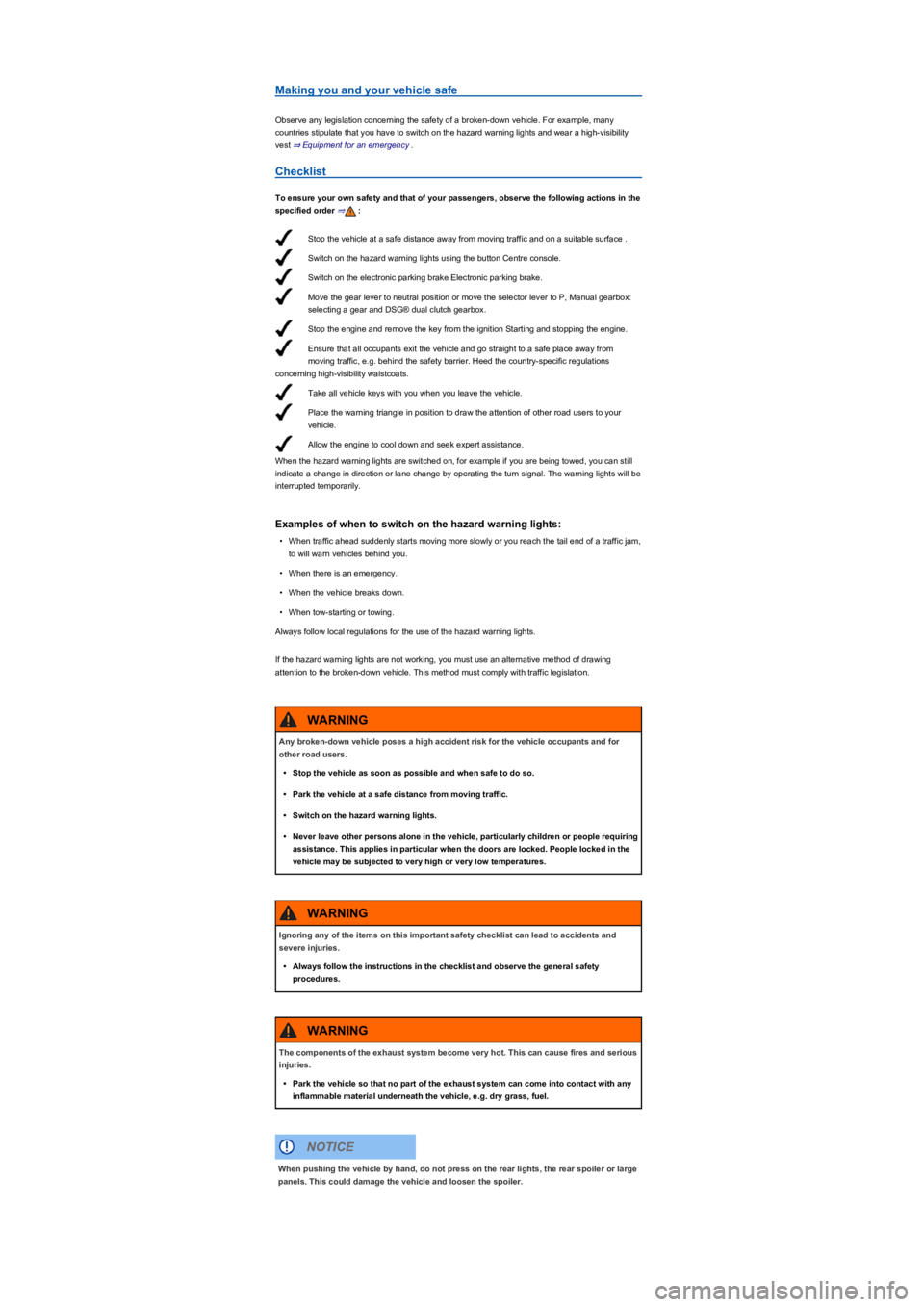
Stop the vehicle at a safe distance away from moving traffic and on a suitable surface .
Switch on the hazard warning lights using the button Centre console.
Switch on the electronic parking brake Electronic parking brake.
Move the gear lever to neutral position or move the selector lever to P, Manual gearbox:
selecting a gear and DSG® dual clutch gearbox.
Stop the engine and remove the key from the ignition Starting and stopping the engine.
Ensure that all occupants exit the vehicle and go straight to a safe place away from
moving traffic, e.g. behind the safety barrier. Heed the country-specific regulations
concerning high-visibility waistcoats.
Take all vehicle keys with you when you leave the vehicle.
Place the warning triangle in position to draw the attention of other road users to your
vehicle.
Allow the engine to cool down and seek expert assistance.
Making you and your vehicle safe
Observe any legislation concerning the safety of a broken-down vehicle. For example, many
countries stipulate that you have to switch on the hazard warning lights and wear a high-visibility
vest ⇒ Equipment for an emergency.
Checklist
To ensure your own safety and that of your passengers, observe the following actions in the
specified order ⇒:
When the hazard warning lights are switched on, for example if you are being towed, you can still
indicate a change in direction or lane change by operating the turn signal. The warning lights will be
interrupted temporarily.
Examples of when to switch on the hazard warning lights:
•When traffic ahead suddenly starts moving more slowly or you reach the tail end of a traffic jam,
to will warn vehicles behind you.
•When there is an emergency.
•When the vehicle breaks down.
•When tow-starting or towing.
Always follow local regulations for the use of the hazard warning lights.
If the hazard warning lights are not working, you must use an alternative method of drawing
attention to the broken-down vehicle. This method must comply with traffic legislation.
Any broken-down vehicle poses a high accident risk for the vehicle occupants and for
other road users.
•Stop the vehicle as soon as possible and when safe to do so.
•Park the vehicle at a safe distance from moving traffic.
•Switch on the hazard warning lights.
•Never leave other persons alone in the vehicle, particularly children or people requiring
assistance. This applies in particular when the doors are locked. People locked in the
vehicle may be subjected to very high or very low temperatures.
WARNING
Ignoring any of the items on this important safety checklist can lead to accidents and
severe injuries.
•Always follow the instructions in the checklist and observe the general safety
procedures.
WARNING
The components of the exhaust system become very hot. This can cause fires and serious
injuries.
•Park the vehicle so that no part of the exhaust system can come into contact with any
inflammable material underneath the vehicle, e.g. dry grass, fuel.
WARNING
When pushing the vehicle by hand, do not press on the rear lights, the rear spoiler or large
panels. This could damage the vehicle and loosen the spoiler.
NOTICE
Page 65 of 341
The symbol can differ depending on the version of the instrument cluster.
Information call, breakdown call and Emergency Call Service
Fig. 60 In the roof console: control for voice services.
Depending on the equipment in the vehicle, a control may be installed in the roof console. Pressing
the buttons , and ⇒ Fig. 60 enables you to access the following voice services:
information call, breakdown call and Emergency Call Service.
The required connection is established by a factory-fitted control unit. A connection to a telephone
call centre will be established when you trigger one of the voice services.
Indicator lamp
The control is equipped with an indicator lamp ⇒ Fig. 60 (arrow). This displays the following
statuses:
•Off: all voice services are disabled.
•Flashing red for around 20 seconds after the ignition is switched on: at least one voice service
is disabled.
•Lit up red: system error. Voice service availability is restricted. Volkswagen recommends
consulting a specialist workshop.
The intelligent technology used in the active bonnet pedestrian protection system cannot
overcome the laws of physics, and functions only within the limits of the system. Never let
the extra convenience afforded by the active bonnet pedestrian protection system tempt
you into taking any safety risks.
•Always adapt your speed and driving style to suit visibility, weather, road and traffic
conditions.
•Do not drive faster than up to 80 km/h (50 mph) when the active bonnet has been
triggered.
WARNING
Failure to observe illuminated warning lamps and text messages can lead to your vehicle
breaking down in traffic, and can cause accident and serious injury.
•Never ignore any illuminated warning lamps or text messages.
•Stop the vehicle as soon as it is possible and safe to do so.
WARNING
Incorrect repairs and modifications can cause malfunctions and damage to the vehicle
and impair the effectiveness of the driver assist systems. This can result in accidents and
severe injuries.
•Repairs and modifications to your vehicle should only be carried out by a qualified
workshop.
WARNING
Incorrect closing of the triggered active bonnet can cause accidents and serious injuries,
particularly to the hands.
•A triggered active bonnet must be repaired only by a qualified workshop. Never
attempt to close the bonnet yourself.
WARNING
Incorrect closing of the triggered active bonnet can damage the vehicle.
•Do not press the active bonnet closed under any circumstances, e.g. by pressing down
on the bonnet with your hand. The bonnet and its hinges could be damaged as a result.
NOTICE
Page 66 of 341
•Lit up green: voice services are available. System is OK.
•Flashing green: active connection to a voice service.
Information call
•The information call enables you to call the Volkswagen AG hotline.
•The information call function is available only in some sales regions.
•The telephone call centre communicates in the language registered for the vehicle in Car-Net.
Breakdown call
•The breakdown call allows you to seek professional assistance should your vehicle break down.
•Some vehicle data, e.g. the current location, is transmitted parallel to the voice call.
•The telephone call centre communicates in the language registered for the vehicle in Car-Net.
Emergency Call Service
•If an emergency call is placed manually or automatically after an accident where an airbag was
triggered, data relevant for the emergency call, e.g. the current vehicle location, will be
transmitted automatically ⇒ Customer information.
•The telephone call centre communicates in the language set up in the vehicle's Infotainment
system. English is used if this language is not available at the location of the emergency.
Back-up 112 emergency call service
In some cases, the Emergency call service may be restricted or unavailable so the general
emergency call number 112 is used to conduct an emergency call. In this case, only a voice-based
connection is established. No data will be transmitted, e.g. regarding the vehicle or its location.
The following circumstances may restrict access to the Emergency call service and lead to the call
being forwarded to the 112 emergency number:
•Your current emergency call location is in an area with no or insufficient mobile communications
and GPS reception. This can also include tunnels, streets with tall buildings, garages,
underpasses, mountains and valleys.
•You are in an area with sufficient mobile communications and GPS reception but the
telecommunications provider's mobile network is not available.
•The Emergency call service is prohibited by law in some countries.
•There is no valid licence for using the Emergency call service.
•The components in the vehicle required for the Emergency call service are damaged or do not
have a sufficient power supply.
Please also observe the other information on Volkswagen Car-Net ⇒ Mobile online services.
Opening and closing
Vehicle key set
Introduction
This chapter contains information on the followingsubjects:
⇒ Vehicle key
⇒ Changing the button cell
⇒ Troubleshooting
Page 82 of 341
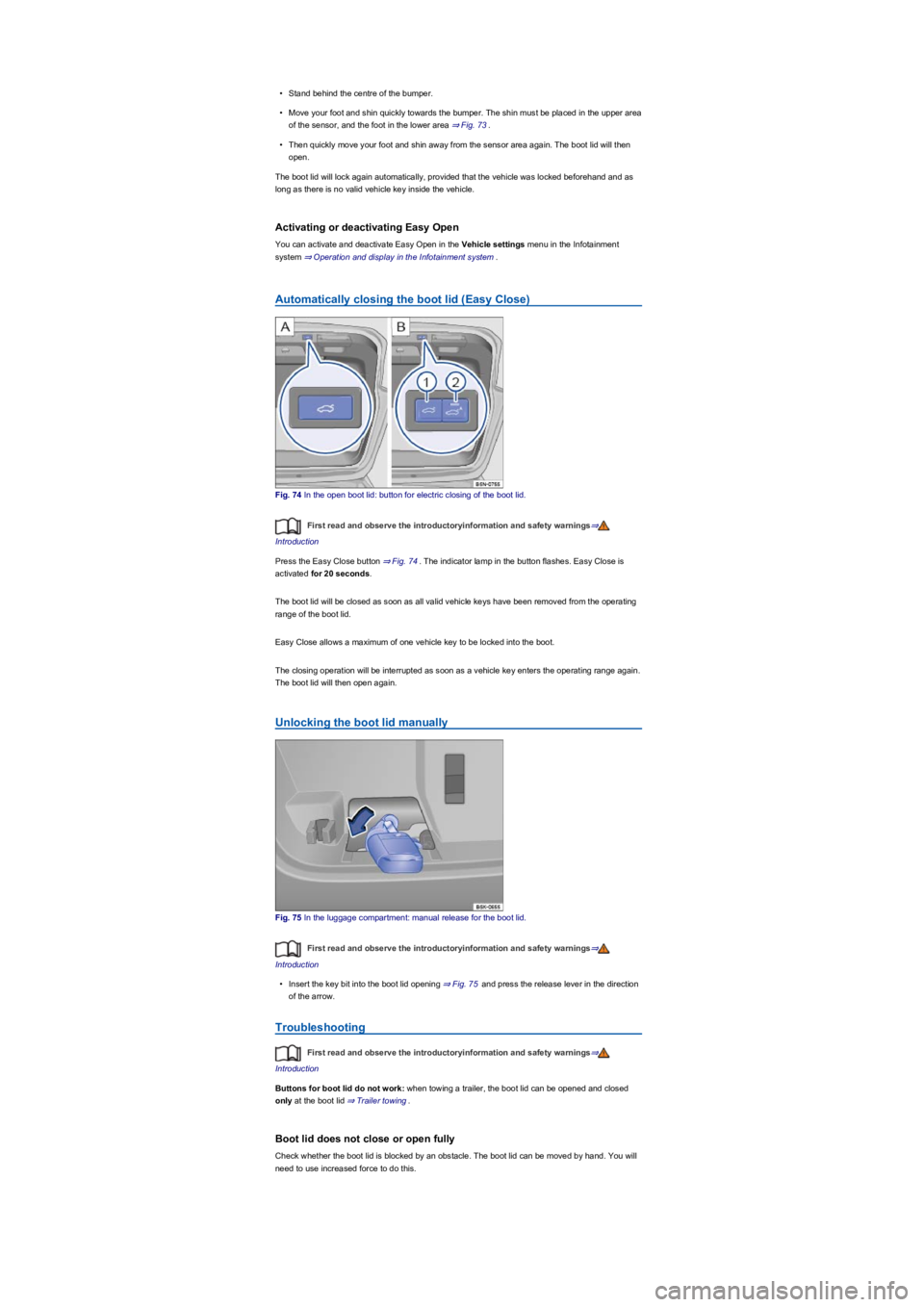
•Stand behind the centre of the bumper.
•Move your foot and shin quickly towards the bumper. The shin must be placed in the upper area
of the sensor, and the foot in the lower area ⇒ Fig. 73.
•Then quickly move your foot and shin away from the sensor area again. The boot lid will then
open.
The boot lid will lock again automatically, provided that the vehicle was locked beforehand and as
long as there is no valid vehicle key inside the vehicle.
Activating or deactivating Easy Open
You can activate and deactivate Easy Open in the Vehicle settings menu in the Infotainment
system ⇒ Operation and display in the Infotainment system.
Automatically closing the boot lid (Easy Close)
Fig. 74 In the open boot lid: button for electric closing of the boot lid.
First read and observe the introductoryinformation and safety warnings⇒
Introduction
Press the Easy Close button ⇒ Fig. 74. The indicator lamp in the button flashes. Easy Close is
activated for 20 seconds.
The boot lid will be closed as soon as all valid vehicle keys have been removed from the operating
range of the boot lid.
Easy Close allows a maximum of one vehicle key to be locked into the boot.
The closing operation will be interrupted as soon as a vehicle key enters the operating range again.
The boot lid will then open again.
Unlocking the boot lid manually
Fig. 75 In the luggage compartment: manual release for the boot lid.
First read and observe the introductoryinformation and safety warnings⇒
Introduction
•Insert the key bit into the boot lid opening ⇒ Fig. 75 and press the release lever in the direction
of the arrow.
Troubleshooting
First read and observe the introductoryinformation and safety warnings⇒
Introduction
Buttons for boot lid do not work: when towing a trailer, the boot lid can be opened and closed
only at the boot lid ⇒ Trailer towing.
Boot lid does not close or open fully
Check whether the boot lid is blocked by an obstacle. The boot lid can be moved by hand. You will
need to use increased force to do this.
Page 95 of 341
Head restraints
Introduction
This chapter contains information on the followingsubjects:
⇒ Adjusting the head restraints
⇒ Removing and fitting head restraints
The following section describes the options for adjusting and removing the head restraints. Always
ensure that the correct sitting position is adjusted ⇒ Sitting position.
Every seat is fitted with a head restraint. The centre head restraint at the rear is designed solely for
use with the centre rear bench seat. Therefore you should not install the head restraint in any of the
other positions.
Correct head restraint setting
Adjust the head restraint so that its upper edge is at the same height as the top of the head, but not
lower than eye level. Position the back of your head as close to the head restraint as possible.
In vehicles with head restraints that can be adjusted in the longitudinal direction, push the head
restraints on the front seats as close as possible to the back of your head.
Head restraint setting for shorter people
Push the head restraint all the way down, even if the head is then underneath the top edge of the
head restraint. There may be a small gap between the head restraint and backrest in the lowest
position.
Head restraint setting for taller people
Push the head restraint up as far as it will go.
Injuries can be caused if the rear backrests are folded forwards and backwards carelessly.
•While folding the rear backrest, always make sure that no people, animals or items are
in the path.
•Never fold the rear seat backrest forwards or backwards while the vehicle is in motion.
•Ensure that the seat belt is not trapped or damaged when folding back the rear seat
backrest.
•Always keep hands, fingers, feet or other body parts away from the seat area when
folding the rear seat backrest forwards and backwards.
•Ensure that the rear seat backrest engages securely, otherwise the seat belts for the
rear seats will not work properly. This applies to the centre seat of the rear bench seat
in particular. If a seat is occupied and the rear seat backrest has not engaged securely
into place, the seat occupant and rear seat backrest may move forwards in the event of
a sudden braking or driving manoeuvre or during accidents.
•Passengers (adults and children) must not use seats if the backrest is folded forwards
or is not clicked securely into place.
WARNING
Damage to the vehicle or to other objects could be caused if the rear bench seat backrest
is folded forwards and backwards in an uncontrolled way or without taking appropriate
care.
•Before folding the rear seat backrests forwards, always adjust the front seats so that
the rear head restraints or rear seat backrest cushions do not rub against the front
seats.
•Before folding down the rear seat backrest, always ensure that there are no objects
located in its path.
NOTICE
Page 97 of 341
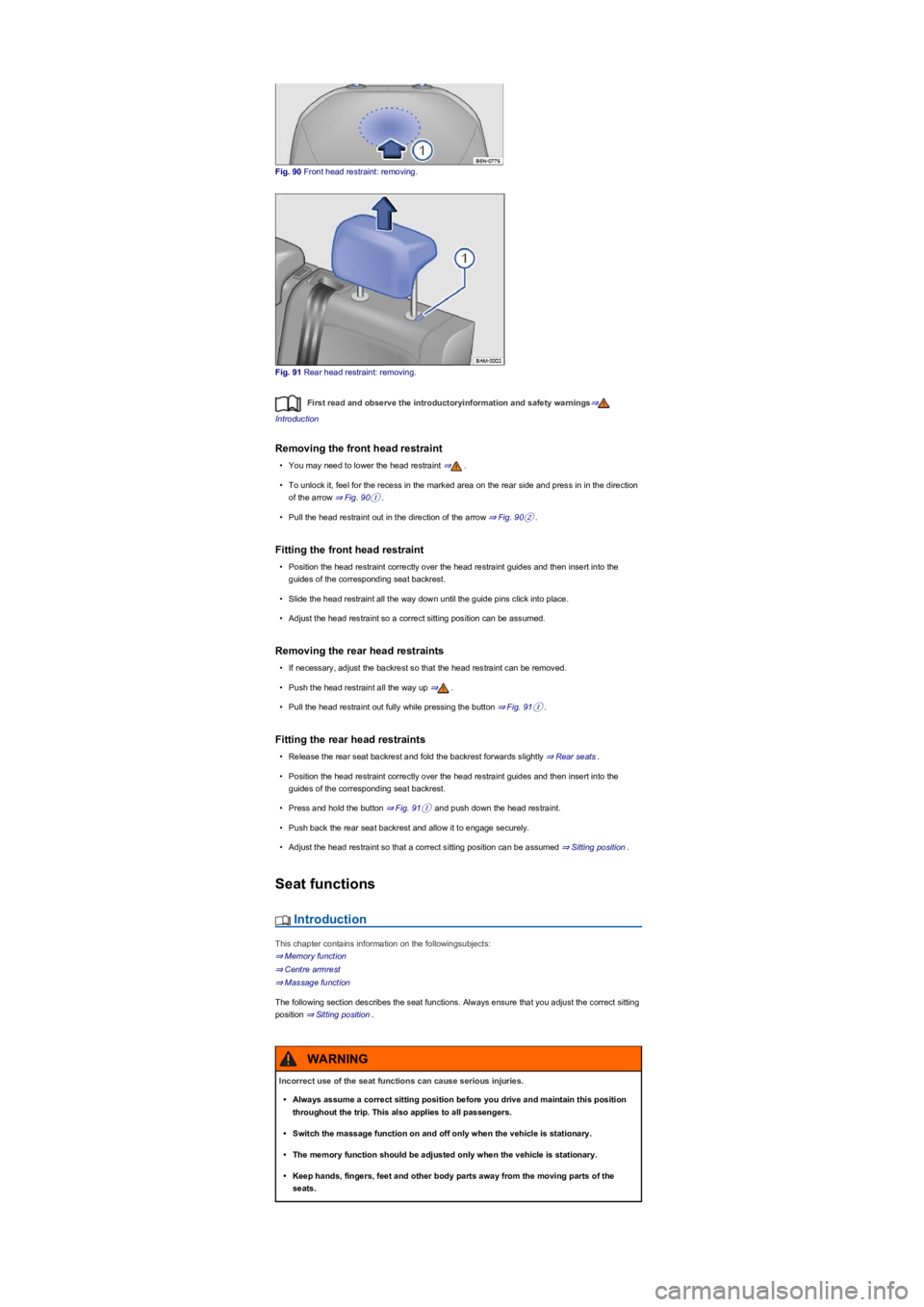
Fig. 90 Front head restraint: removing.
Fig. 91 Rear head restraint: removing.
First read and observe the introductoryinformation and safety warnings⇒
Introduction
Removing the front head restraint
•You may need to lower the head restraint ⇒.
•To unlock it, feel for the recess in the marked area on the rear side and press in in the direction
of the arrow ⇒ Fig. 90①.
•Pull the head restraint out in the direction of the arrow ⇒ Fig. 90②.
Fitting the front head restraint
•Position the head restraint correctly over the head restraint guides and then insert into the
guides of the corresponding seat backrest.
•Slide the head restraint all the way down until the guide pins click into place.
•Adjust the head restraint so a correct sitting position can be assumed.
Removing the rear head restraints
•If necessary, adjust the backrest so that the head restraint can be removed.
•Push the head restraint all the way up ⇒.
•Pull the head restraint out fully while pressing the button ⇒ Fig. 91①.
Fitting the rear head restraints
•Release the rear seat backrest and fold the backrest forwards slightly ⇒ Rear seats.
•Position the head restraint correctly over the head restraint guides and then insert into the
guides of the corresponding seat backrest.
•Press and hold the button ⇒ Fig. 91① and push down the head restraint.
•Push back the rear seat backrest and allow it to engage securely.
•Adjust the head restraint so that a correct sitting position can be assumed ⇒ Sitting position.
Seat functions
Introduction
This chapter contains information on the followingsubjects:
⇒ Memory function
⇒ Centre armrest
⇒ Massage function
The following section describes the seat functions. Always ensure that you adjust the correct sitting
position ⇒ Sitting position.
Incorrect use of the seat functions can cause serious injuries.
•Always assume a correct sitting position before you drive and maintain this position
throughout the trip. This also applies to all passengers.
•Switch the massage function on and off only when the vehicle is stationary.
•The memory function should be adjusted only when the vehicle is stationary.
•Keep hands, fingers, feet and other body parts away from the moving parts of the
seats.
WARNING
Page 99 of 341
•Vehicle stationary or moving no faster than 5 km/h: seat is moved. You can cancel the
movement at any time by touching the appropriate function button in the Infotainment system or
by pressing a button on the driver seat.
•Vehicle moving faster than 5 km/h: seat is not moved. All other setup configurations are
adopted.
If the driver door is opened later than approximately 10 minutes after unlocking the vehicle,
the driver seat and exterior mirrors are not automatically adjusted.
Some settings can be stored in the user accounts of the personalisation function and
therefore change automatically when the user account changes ⇒ Personalisation.
Only if the personalisation function is activated ⇒ Personalisation.
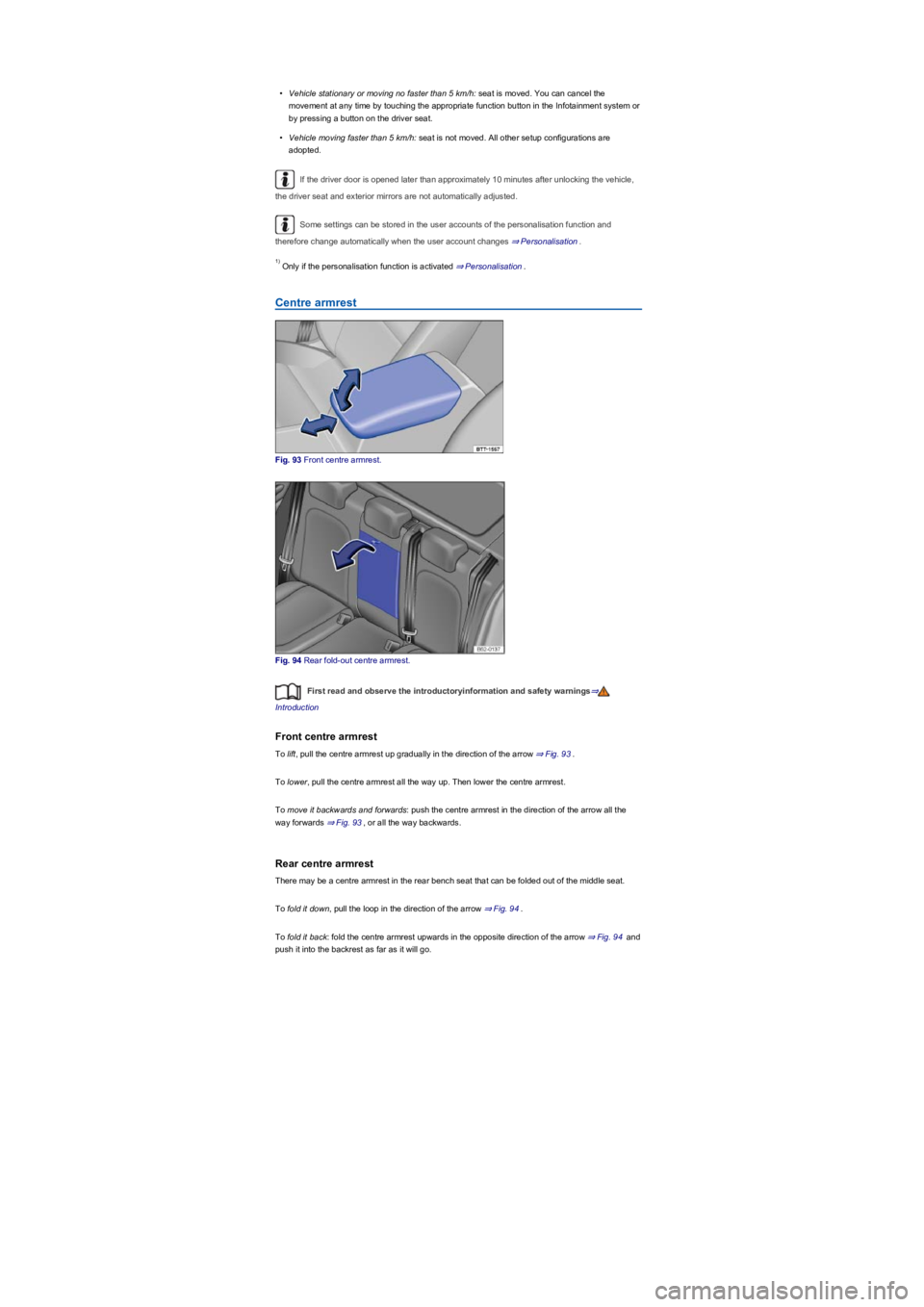
Centre armrest
Fig. 93 Front centre armrest.
Fig. 94 Rear fold-out centre armrest.
First read and observe the introductoryinformation and safety warnings⇒
Introduction
Front centre armrest
To lift, pull the centre armrest up gradually in the direction of the arrow ⇒ Fig. 93.
To lower, pull the centre armrest all the way up. Then lower the centre armrest.
To move it backwards and forwards: push the centre armrest in the direction of the arrow all the
way forwards ⇒ Fig. 93, or all the way backwards.
Rear centre armrest
There may be a centre armrest in the rear bench seat that can be folded out of the middle seat.
To fold it down, pull the loop in the direction of the arrow ⇒ Fig. 94.
To fold it back: fold the centre armrest upwards in the opposite direction of the arrow ⇒ Fig. 94 and
push it into the backrest as far as it will go.
1)
Page 100 of 341
Massage function
Fig. 95 In the lower area of the driver seat: button for massage function.
First read and observe the introductoryinformation and safety warnings⇒
Introduction
When the massage function is switched on, the lumbar support moves and massages the lumbar
region.
The in/out position of the lumbar support can be adjusted using the appropriate switch during a
massage ⇒ Sitting position.
Switching the massage function on or off
To switch on, press the button in the seat control panel. To switch off, press the
button again.
The massage function is switched off automatically after approximately ten minutes.
Lights
Turn signals
Switching turn signals on and off
Fig. 96 On left of the steering column: turn signal and main beam lever.
•Switch on the ignition.
•Move the turn signal and main beam lever from the centre position to the following position:
Right turn signal.
Left turn signal.
•Return the turn signal and main beam lever to the basic position in order to switch off the turn
signal.
Go to a qualified workshop and have the vehicle checked if the acoustic signal does not sound
when a turn signal is switched on.
The front centre armrest can obstruct the driver's arm movements. This can cause
accidents and severe injuries.
•Always keep the stowage compartments in the centre armrest closed while the vehicle
is in motion.
•Never transport an adult or child on the centre armrest. An incorrect seating position
can cause serious injury.
WARNING
The rear centre armrest must always be folded up while the vehicle is in motion in order to
reduce the risk of injury.
•The middle seat on the rear bench seat must never be used when the centre armrest is
folded down – neither by adults nor children. An incorrect sitting position can cause
severe injuries.
WARNING
Page 102 of 341
When reverse gear is engaged, the cornering light on both sides of the vehicle switches on
to provide better illumination of the area when manoeuvring.
Switching the fog lights on and off
•Switching on the front fog lights : Pull the light switch ⇒ Fig. 97 out to the first stopper.
The indicator lamp in the light switch lights up green.
•Switching on the rear fog lights : pull the light switch all the way out. The indicator lamp
in the instrument cluster lights up yellow.
•To switch the fog lights off, press in the light switch or move it to position .
If the automatic headlights are switched on and the front or rear fog lights are
switched on, the dipped beam headlights will also be switched on irrespective of the current light
conditions outside.
In vehicles with a factory-fitted towing bracket: the vehicle's rear fog lights are switched off
automatically if a trailer with rear fog lights is electrically connected to the vehicle ⇒ Trailer towing.
Light functions
Side lights
If the light switch is in position both headlights light up with side lights together with parts of
the tail light clusters, number plate lighting and the buttons in the centre console and the dash
panel. The daytime running lights also switch on when the ignition is switched on.
If the vehicle is not locked from outside (when the ignition is switched off) the continuous parking
light on both sides of the vehicle switches on automatically after ten minutes to reduce 12-volt
vehicle battery discharge ⇒ Switching the parking lights on and off.
Automatic headlights
When the light switch is in position , the vehicle lighting and the instrument and switch
lighting will switch on and off automatically depending on the light conditions. When the lights are
switched on, the indicator lamp in the light switch lights up yellow.
The automatic headlight control function is merely an aid and will not always be able to detect all
driving situations.
In vehicles with a corresponding equipment level, the switch-on time for automatic headlight control
can be adjusted in the Infotainment system in the Vehicle settings menu ⇒ Operation and
display in the Infotainment system.
Cornering light
When cornering slowly or travelling around very tight bends, a static cornering light is switched on
automatically.
Accidents and serious injuries can occur if roads are not sufficiently illuminated and other
road users have difficulty seeing the vehicle, or cannot see it at all.
•The light assist functions are designed to provide assistance only. The driver is
responsible for making sure that the vehicle lights are switched on correctly.
•Always switch the dipped beam headlights on if it is dark, raining or visibility is poor.
WARNING
The side lights or daytime running lights are not bright enough to illuminate the road
ahead and to ensure that other road users are able to see you.
•Always switch the dipped beam headlights on if it is dark, raining or visibility is poor.
•The rear lights will not be switched on with the daytime running lights. If the rear lights
are not switched on, the vehicle may not be visible to other road users if it is dark,
raining, or if visibility is poor.
WARNING
The automatic headlights function ( ) switches the dipped beam headlights on and
off only when there is a change to the level of brightness.
•Switch on the dipped beam headlights manually if this is necessary due to particular
weather conditions, e.g. fog.
WARNING