centre VOLKSWAGEN TIGUAN 2017 Owner´s Manual
[x] Cancel search | Manufacturer: VOLKSWAGEN, Model Year: 2017, Model line: TIGUAN, Model: VOLKSWAGEN TIGUAN 2017Pages: 341, PDF Size: 9.14 MB
Page 8 of 341
Stowage compartment ⇒ Stowage areas
Release lever for the bonnet ⇒ In the engine compartment
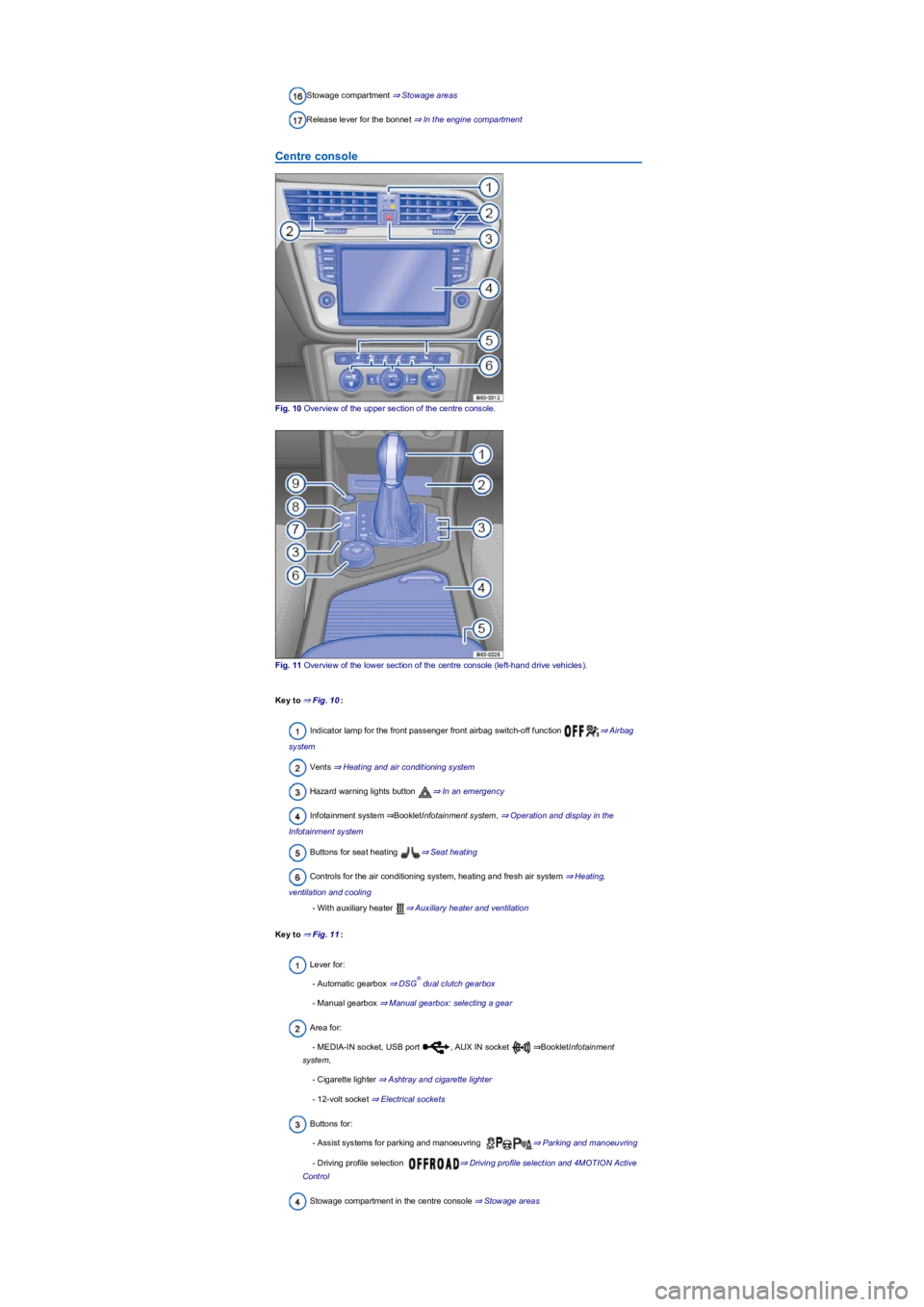
Centre console
Fig. 10 Overview of the upper section of the centre console.
Fig. 11 Overview of the lower section of the centre console (left-hand drive vehicles).
Key to ⇒ Fig. 10:
Indicator lamp for the front passenger front airbag switch-off function ⇒ Airbag
system
Vents ⇒ Heating and air conditioning system
Hazard warning lights button ⇒ In an emergency
Infotainment system ⇒BookletInfotainment system, ⇒ Operation and display in the
Infotainment system
Buttons for seat heating ⇒ Seat heating
Controls for the air conditioning system, heating and fresh air system ⇒ Heating,
ventilation and cooling
- With auxiliary heater ⇒ Auxiliary heater and ventilation
Key to ⇒ Fig. 11:
Lever for:
- Automatic gearbox ⇒ DSG dual clutch gearbox
- Manual gearbox ⇒ Manual gearbox: selecting a gear
Area for:
- MEDIA-IN socket, USB port , AUX IN socket ⇒BookletInfotainment
system,
- Cigarette lighter ⇒ Ashtray and cigarette lighter
- 12-volt socket ⇒ Electrical sockets
Buttons for:
- Assist systems for parking and manoeuvring ⇒ Parking and manoeuvring
- Driving profile selection ⇒ Driving profile selection and 4MOTION Active
Control
Stowage compartment in the centre console ⇒ Stowage areas
®
Page 9 of 341
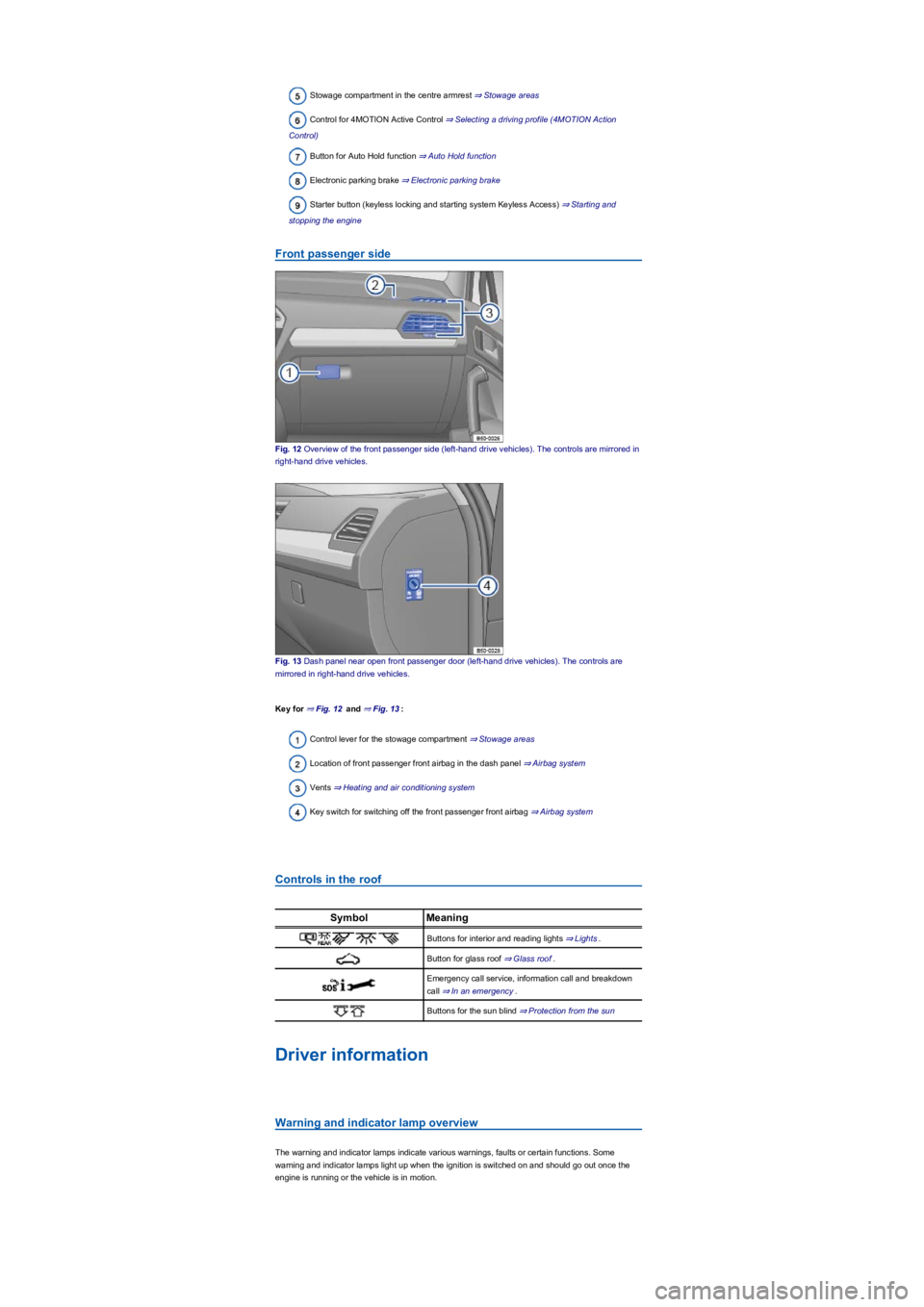
Stowage compartment in the centre armrest ⇒ Stowage areas
Control for 4MOTION Active Control ⇒ Selecting a driving profile (4MOTION Action
Control)
Button for Auto Hold function ⇒ Auto Hold function
Electronic parking brake ⇒ Electronic parking brake
Starter button (keyless locking and starting system Keyless Access) ⇒ Starting and
stopping the engine
Front passenger side
Fig. 12 Overview of the front passenger side (left-hand drive vehicles). The controls are mirrored in
right-hand drive vehicles.
Fig. 13 Dash panel near open front passenger door (left-hand drive vehicles). The controls are
mirrored in right-hand drive vehicles.
Key for ⇒ Fig. 12 and ⇒ Fig. 13:
Control lever for the stowage compartment ⇒ Stowage areas
Location of front passenger front airbag in the dash panel ⇒ Airbag system
Vents ⇒ Heating and air conditioning system
Key switch for switching off the front passenger front airbag ⇒ Airbag system
Controls in the roof
SymbolMeaning
Buttons for interior and reading lights ⇒ Lights.
Button for glass roof ⇒ Glass roof.
Emergency call service, information call and breakdown
call ⇒ In an emergency.
Buttons for the sun blind ⇒ Protection from the sun
Driver information
Warning and indicator lamp overview
The warning and indicator lamps indicate various warnings, faults or certain functions. Some
warning and indicator lamps light up when the ignition is switched on and should go out once the
engine is running or the vehicle is in motion.
Page 14 of 341
Fuel gauge⇒ Fuel gauge.
Coolant temperature display ⇒ Coolant temperature display.
Current gear / selector lever position⇒ Manual gearbox: selecting a gear or ⇒ DSG
dual clutch gearbox.
Information profiles
To select a specific information profile, go to the Views menu option in the display of the instrument
cluster ⇒ Instrument cluster menus. The Active Info Display shows additional information in the
centre of the dials ⇒ Fig. 15② depending on the information profile you have selected. The
following information profiles are available:
•Classic. No additional information shown.
•Consumption and range. Current consumption is shown graphically and average consumption
is shown digitally in the rev counter. The remaining range is shown digitally in the speedometer.
•Efficiency. Average consumption is shown digitally and current consumption is shown
graphically in the rev counter. In the speedometer, the symbol is shown if the current
driving style is fuel-efficient, and a graphic display helps the driver save fuel.
•Navigation. If route guidance is active: the remaining distance to the set destination and an
estimated time of arrival are shown in the rev counter, and arrows to aid navigation are shown
in the speedometer. If route guidance is inactive: the current altitude is shown in the rev
counter, and a compass is shown in the speedometer.
•Driver assistance. Graphic representation of various driver assist systems, or digital display of
the driving time in the rev counter. The speedometer meanwhile shows arrow navigation or a
compass.
•Off-road. Digital display of the steering angle and compass display in the speedometer. With
active Hill Descent Control: graphic display of the Hill Descent Control with speed display in the
speedometer.
Navigation map in the Active Info Display
With some vehicle equipment levels, the Active Info Display is able to display a detailed map. To
display this map, select the Navigation menu item in the instrument cluster ⇒ Instrument cluster
menus.
The map can be shown in either of two sizes. If the larger version is selected, the Active Info
Display dials will be smaller. To select the preferred map size:
•Press the button on the multifunction steering wheel ⇒ Instrument cluster menus to
switch between map sizes as required.
•OR: press the or arrow button on the multifunction steering wheel to select the
required map size. A frame appears around the selected option.
•Confirm the selection by pressing the button on the multifunction steering wheel.
Depending on the equipment level, navigation is shown on two displays or only one. The navigation
map be displayed on the Active Info Display and Infotainment system or only on the Infotainment
system display. In the latter case, only navigation arrows are shown on the Active Info Display.
Changing up a gear early will help to save fuel and reduce engine noise.
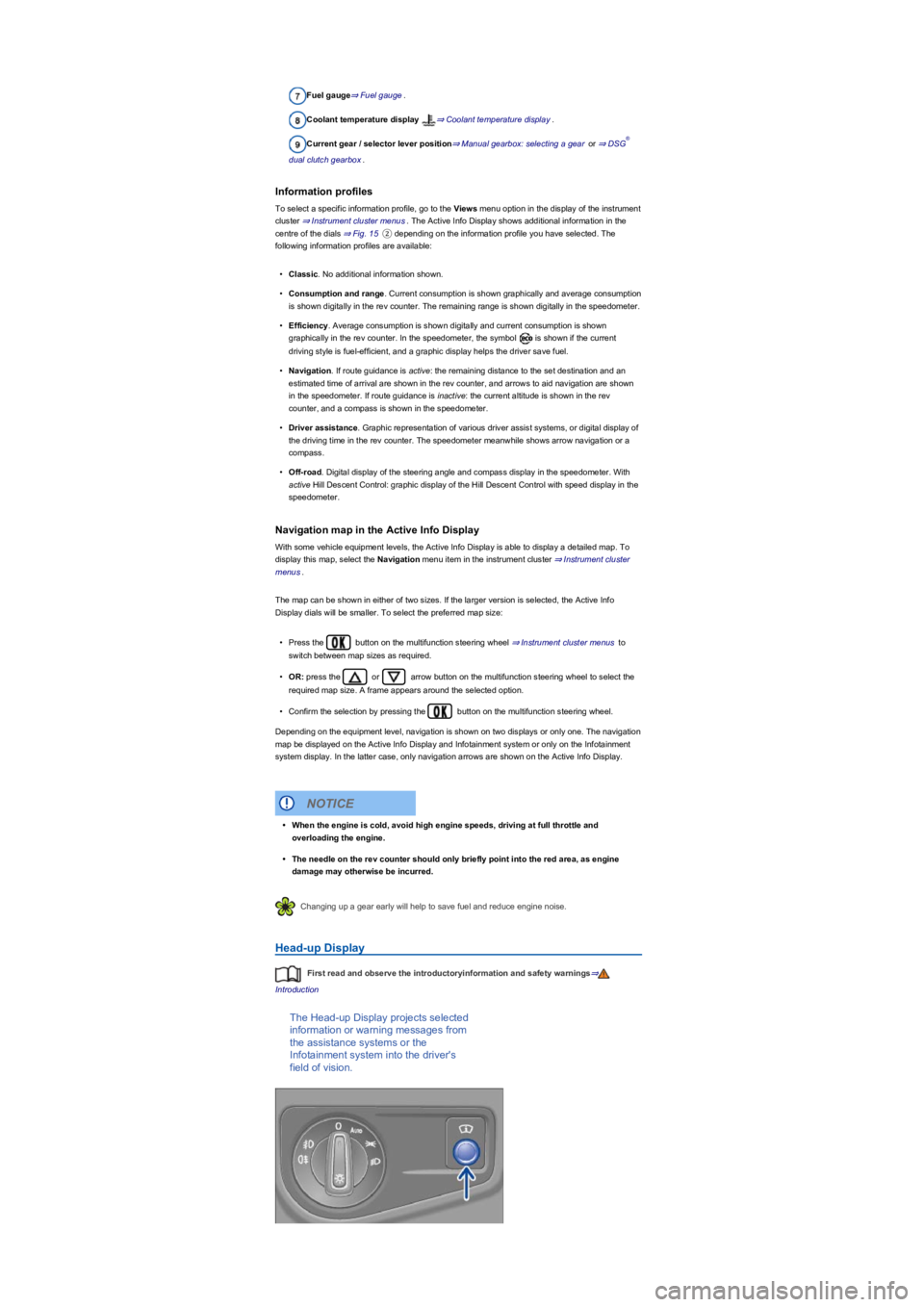
Head-up Display
First read and observe the introductoryinformation and safety warnings⇒
Introduction
The Head-up Display projects selected
information or warning messages from
the assistance systems or the
Infotainment system into the driver's
field of vision.
®
•When the engine is cold, avoid high engine speeds, driving at full throttle and
overloading the engine.
•The needle on the rev counter should only briefly point into the red area, as engine
damage may otherwise be incurred.
NOTICE
Page 31 of 341
Performance monitor
First read and observe the introductoryinformation and safety warnings⇒
Introduction
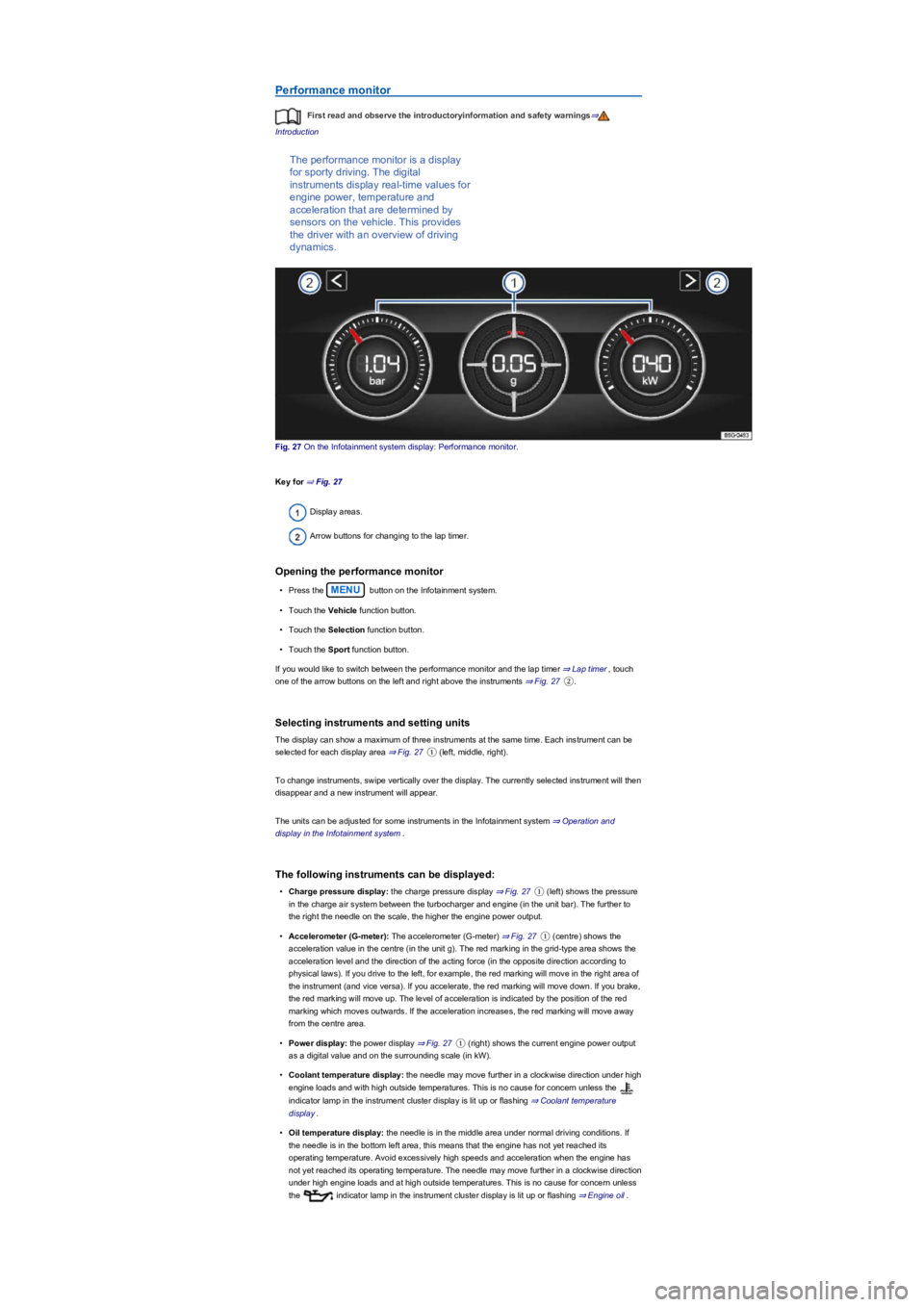
The performance monitor is a display
for sporty driving. The digital
instruments display real-time values for
engine power, temperature and
acceleration that are determined by
sensors on the vehicle. This provides
the driver with an overview of driving
dynamics.
Fig. 27 On the Infotainment system display: Performance monitor.
Key for ⇒ Fig. 27
Display areas.
Arrow buttons for changing to the lap timer.
Opening the performance monitor
•Press the MENU button on the Infotainment system.
•Touch the Vehicle function button.
•Touch the Selection function button.
•Touch the Sport function button.
If you would like to switch between the performance monitor and the lap timer ⇒ Lap timer, touch
one of the arrow buttons on the left and right above the instruments ⇒ Fig. 27②.
Selecting instruments and setting units
The display can show a maximum of three instruments at the same time. Each instrument can be
selected for each display area ⇒ Fig. 27① (left, middle, right).
To change instruments, swipe vertically over the display. The currently selected instrument will then
disappear and a new instrument will appear.
The units can be adjusted for some instruments in the Infotainment system ⇒ Operation and
display in the Infotainment system.
The following instruments can be displayed:
•Charge pressure display: the charge pressure display ⇒ Fig. 27① (left) shows the pressure
in the charge air system between the turbocharger and engine (in the unit bar). The further to
the right the needle on the scale, the higher the engine power output.
•Accelerometer (G-meter): The accelerometer (G-meter) ⇒ Fig. 27① (centre) shows the
acceleration value in the centre (in the unit g). The red marking in the grid-type area shows the
acceleration level and the direction of the acting force (in the opposite direction according to
physical laws). If you drive to the left, for example, the red marking will move in the right area of
the instrument (and vice versa). If you accelerate, the red marking will move down. If you brake,
the red marking will move up. The level of acceleration is indicated by the position of the red
marking which moves outwards. If the acceleration increases, the red marking will move away
from the centre area.
•Power display: the power display ⇒ Fig. 27① (right) shows the current engine power output
as a digital value and on the surrounding scale (in kW).
•Coolant temperature display: the needle may move further in a clockwise direction under high
engine loads and with high outside temperatures. This is no cause for concern unless the
indicator lamp in the instrument cluster display is lit up or flashing ⇒ Coolant temperature
display.
•Oil temperature display: the needle is in the middle area under normal driving conditions. If
the needle is in the bottom left area, this means that the engine has not yet reached its
operating temperature. Avoid excessively high speeds and acceleration when the engine has
not yet reached its operating temperature. The needle may move further in a clockwise direction
under high engine loads and at high outside temperatures. This is no cause for concern unless
the indicator lamp in the instrument cluster display is lit up or flashing ⇒ Engine oil.
Page 33 of 341
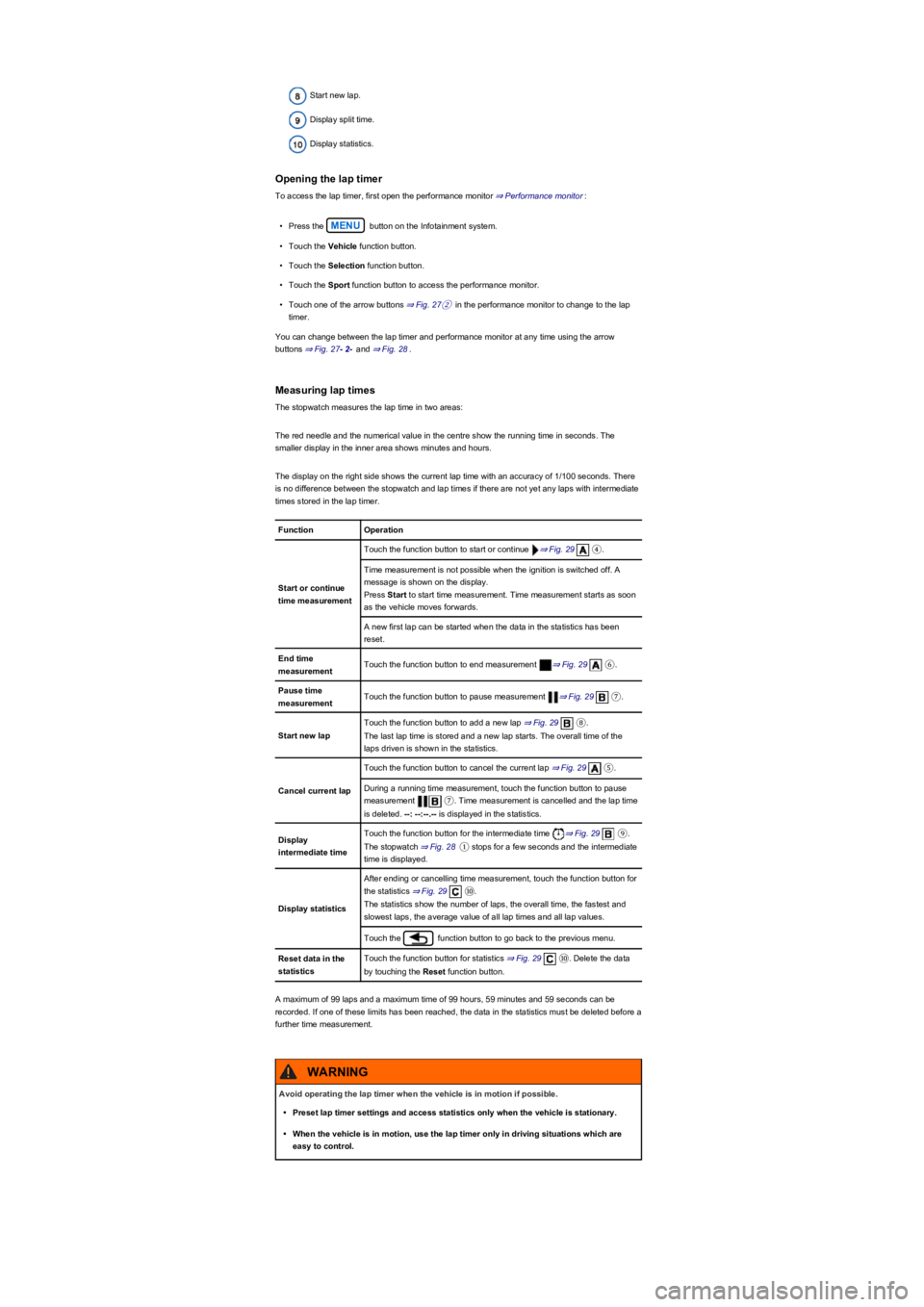
Start new lap.
Display split time.
Display statistics.
Opening the lap timer
To access the lap timer, first open the performance monitor ⇒ Performance monitor:
•Press the MENU button on the Infotainment system.
•Touch the Vehicle function button.
•Touch the Selection function button.
•Touch the Sport function button to access the performance monitor.
•Touch one of the arrow buttons ⇒ Fig. 27② in the performance monitor to change to the lap
timer.
You can change between the lap timer and performance monitor at any time using the arrow
buttons ⇒ Fig. 27- 2- and ⇒ Fig. 28.
Measuring lap times
The stopwatch measures the lap time in two areas:
The red needle and the numerical value in the centre show the running time in seconds. The
smaller display in the inner area shows minutes and hours.
The display on the right side shows the current lap time with an accuracy of 1/100 seconds. There
is no difference between the stopwatch and lap times if there are not yet any laps with intermediate
times stored in the lap timer.
FunctionOperation
Start or continue
time measurement
Touch the function button to start or continue ⇒ Fig. 29④.
Time measurement is not possible when the ignition is switched off. A
message is shown on the display.
Press Start to start time measurement. Time measurement starts as soon
as the vehicle moves forwards.
A new first lap can be started when the data in the statistics has been
reset.
End time
measurementTouch the function button to end measurement ⇒ Fig. 29⑥.
Pause time
measurementTouch the function button to pause measurement ⇒ Fig. 29⑦.
Start new lap
Touch the function button to add a new lap ⇒ Fig. 29⑧.
The last lap time is stored and a new lap starts. The overall time of the
laps driven is shown in the statistics.
Cancel current lap
Touch the function button to cancel the current lap ⇒ Fig. 29⑤.
During a running time measurement, touch the function button to pause
measurement ⑦. Time measurement is cancelled and the lap time
is deleted. --: --:--.-- is displayed in the statistics.
Display
intermediate time
Touch the function button for the intermediate time ⇒ Fig. 29⑨.
The stopwatch ⇒ Fig. 28① stops for a few seconds and the intermediate
time is displayed.
Display statistics
After ending or cancelling time measurement, touch the function button for
the statistics ⇒ Fig. 29⑩.
The statistics show the number of laps, the overall time, the fastest and
slowest laps, the average value of all lap times and all lap values.
Touch the function button to go back to the previous menu.
Reset data in the
statistics
Touch the function button for statistics ⇒ Fig. 29⑩. Delete the data
by touching the Reset function button.
A maximum of 99 laps and a maximum time of 99 hours, 59 minutes and 59 seconds can be
recorded. If one of these limits has been reached, the data in the statistics must be deleted before a
further time measurement.
Avoid operating the lap timer when the vehicle is in motion if possible.
•Preset lap timer settings and access statistics only when the vehicle is stationary.
•When the vehicle is in motion, use the lap timer only in driving situations which are
easy to control.
WARNING
Page 44 of 341
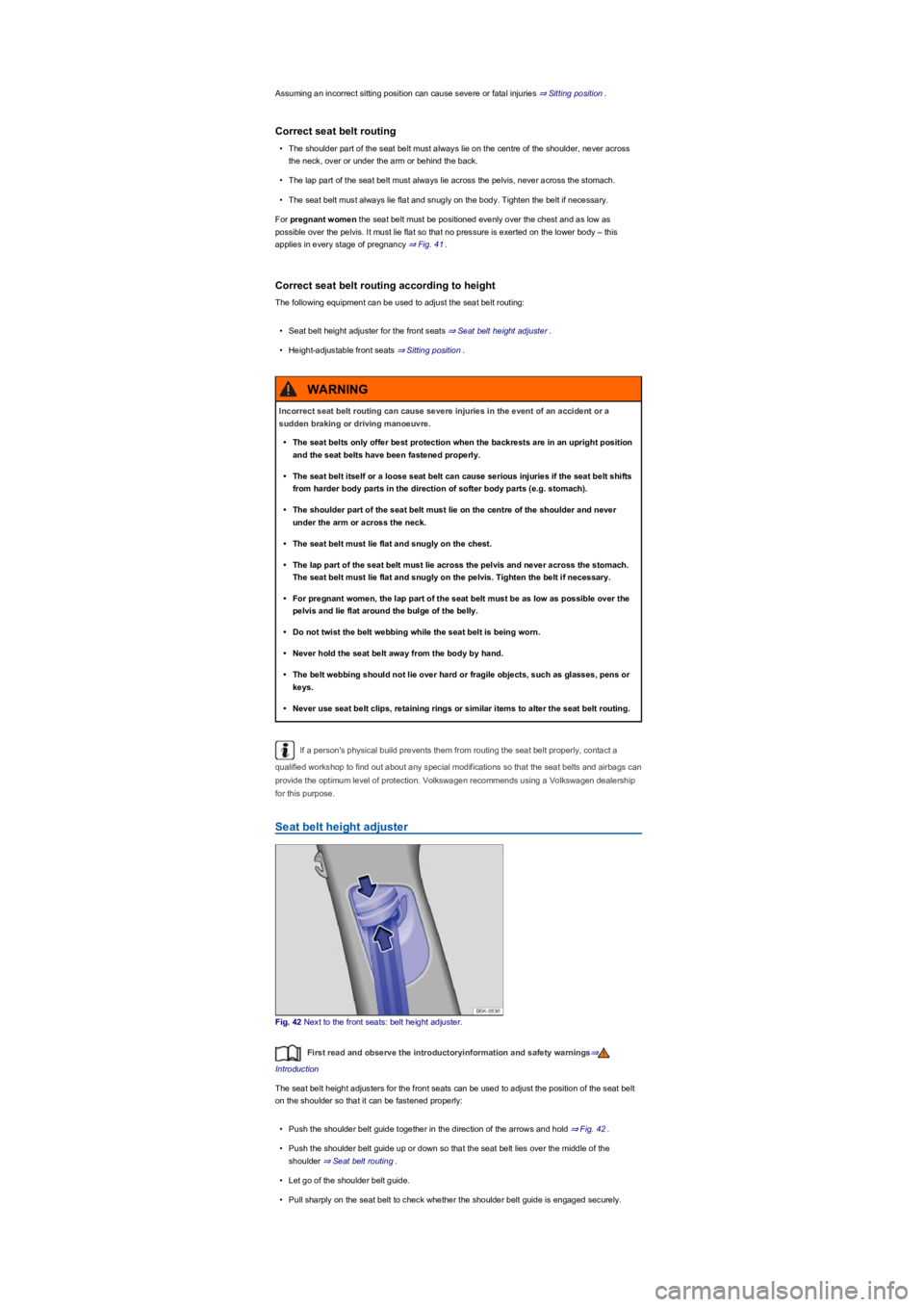
Assuming an incorrect sitting position can cause severe or fatal injuries ⇒ Sitting position.
Correct seat belt routing
•The shoulder part of the seat belt must always lie on the centre of the shoulder, never across
the neck, over or under the arm or behind the back.
•The lap part of the seat belt must always lie across the pelvis, never across the stomach.
•The seat belt must always lie flat and snugly on the body. Tighten the belt if necessary.
For pregnant women the seat belt must be positioned evenly over the chest and as low as
possible over the pelvis. It must lie flat so that no pressure is exerted on the lower body – this
applies in every stage of pregnancy ⇒ Fig. 41.
Correct seat belt routing according to height
The following equipment can be used to adjust the seat belt routing:
•Seat belt height adjuster for the front seats ⇒ Seat belt height adjuster.
•Height-adjustable front seats ⇒ Sitting position.
If a person's physical build prevents them from routing the seat belt properly, contact a
qualified workshop to find out about any special modifications so that the seat belts and airbags can
provide the optimum level of protection. Volkswagen recommends using a Volkswagen dealership
for this purpose.
Seat belt height adjuster
Fig. 42 Next to the front seats: belt height adjuster.
First read and observe the introductoryinformation and safety warnings⇒
Introduction
The seat belt height adjusters for the front seats can be used to adjust the position of the seat belt
on the shoulder so that it can be fastened properly:
•Push the shoulder belt guide together in the direction of the arrows and hold ⇒ Fig. 42.
•Push the shoulder belt guide up or down so that the seat belt lies over the middle of the
shoulder ⇒ Seat belt routing.
•Let go of the shoulder belt guide.
•Pull sharply on the seat belt to check whether the shoulder belt guide is engaged securely.
Incorrect seat belt routing can cause severe injuries in the event of an accident or a
sudden braking or driving manoeuvre.
•The seat belts only offer best protection when the backrests are in an upright position
and the seat belts have been fastened properly.
•The seat belt itself or a loose seat belt can cause serious injuries if the seat belt shifts
from harder body parts in the direction of softer body parts (e.g. stomach).
•The shoulder part of the seat belt must lie on the centre of the shoulder and never
under the arm or across the neck.
•The seat belt must lie flat and snugly on the chest.
•The lap part of the seat belt must lie across the pelvis and never across the stomach.
The seat belt must lie flat and snugly on the pelvis. Tighten the belt if necessary.
•For pregnant women, the lap part of the seat belt must be as low as possible over the
pelvis and lie flat around the bulge of the belly.
•Do not twist the belt webbing while the seat belt is being worn.
•Never hold the seat belt away from the body by hand.
•The belt webbing should not lie over hard or fragile objects, such as glasses, pens or
keys.
•Never use seat belt clips, retaining rings or similar items to alter the seat belt routing.
WARNING
Page 49 of 341
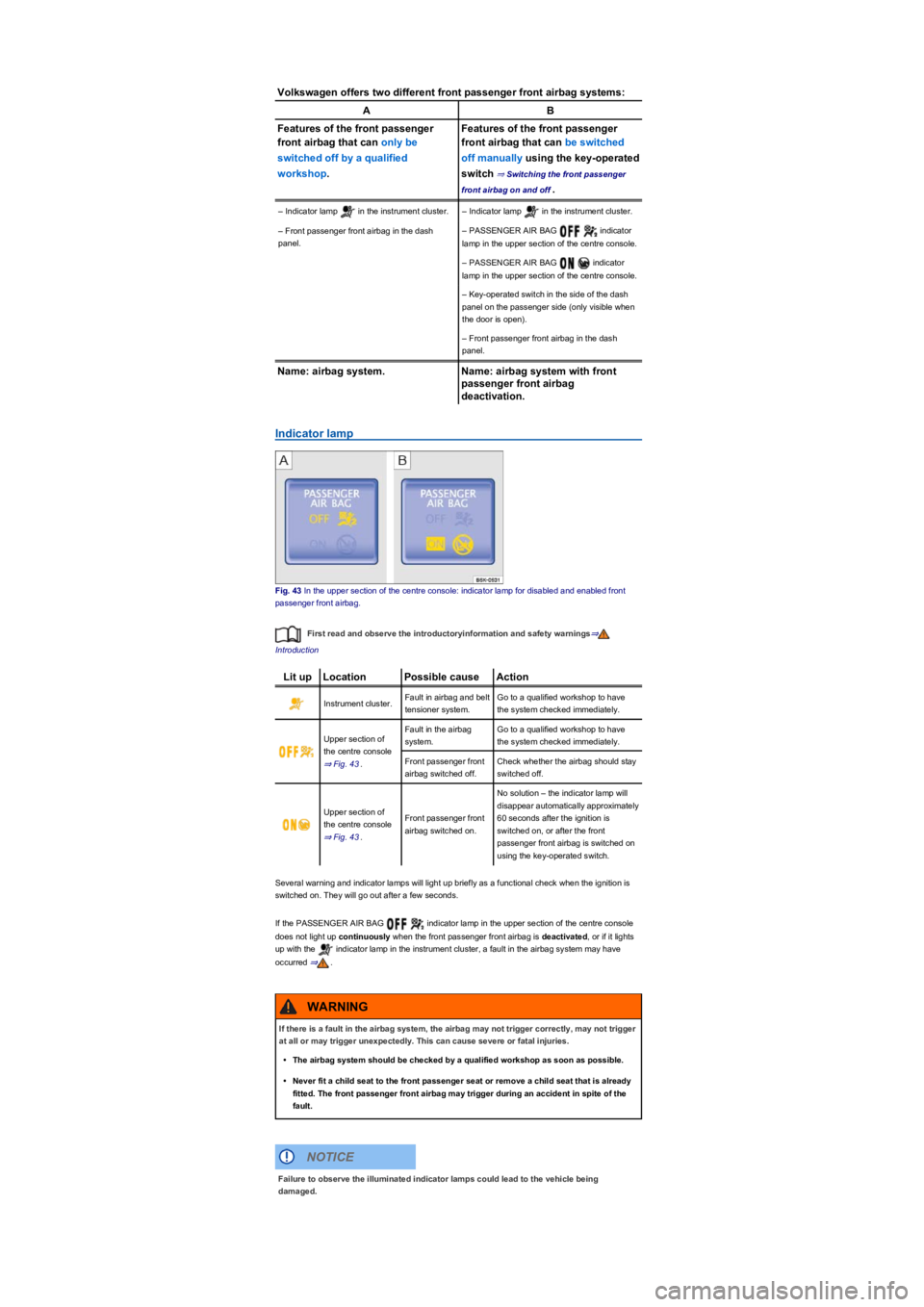
Volkswagen offers two different front passenger front airbag systems:
AB
Features of the front passenger
front airbag that can only be
switched off by a qualified
workshop.
Features of the front passenger
front airbag that can be switched
off manually using the key-operated
switch ⇒ Switching the front passenger
front airbag on and off.
– Indicator lamp in the instrument cluster.– Indicator lamp in the instrument cluster.
– Front passenger front airbag in the dash
panel.
– PASSENGER AIR BAG indicator
lamp in the upper section of the centre console.
– PASSENGER AIR BAG indicator
lamp in the upper section of the centre console.
– Key-operated switch in the side of the dash
panel on the passenger side (only visible when
the door is open).
– Front passenger front airbag in the dash
panel.
Name: airbag system.Name: airbag system with front
passenger front airbag
deactivation.
Indicator lamp
Fig. 43 In the upper section of the centre console: indicator lamp for disabled and enabled front
passenger front airbag.
First read and observe the introductoryinformation and safety warnings⇒
Introduction
Lit upLocationPossible causeAction
Instrument cluster.Fault in airbag and belt
tensioner system.
Go to a qualified workshop to have
the system checked immediately.
Upper section of
the centre console
⇒ Fig. 43.
Fault in the airbag
system.
Go to a qualified workshop to have
the system checked immediately.
Front passenger front
airbag switched off.
Check whether the airbag should stay
switched off.
Upper section of
the centre console
⇒ Fig. 43.
Front passenger front
airbag switched on.
No solution – the indicator lamp will
disappear automatically approximately
60 seconds after the ignition is
switched on, or after the front
passenger front airbag is switched on
using the key-operated switch.
Several warning and indicator lamps will light up briefly as a functional check when the ignition is
switched on. They will go out after a few seconds.
If the PASSENGER AIR BAG indicator lamp in the upper section of the centre console
does not light up continuously when the front passenger front airbag is deactivated, or if it lights
up with the indicator lamp in the instrument cluster, a fault in the airbag system may have
occurred ⇒.
If there is a fault in the airbag system, the airbag may not trigger correctly, may not trigger
at all or may trigger unexpectedly. This can cause severe or fatal injuries.
•The airbag system should be checked by a qualified workshop as soon as possible.
•Never fit a child seat to the front passenger seat or remove a child seat that is already
fitted. The front passenger front airbag may trigger during an accident in spite of the
fault.
WARNING
Failure to observe the illuminated indicator lamps could lead to the vehicle being
damaged.
NOTICE
Page 50 of 341
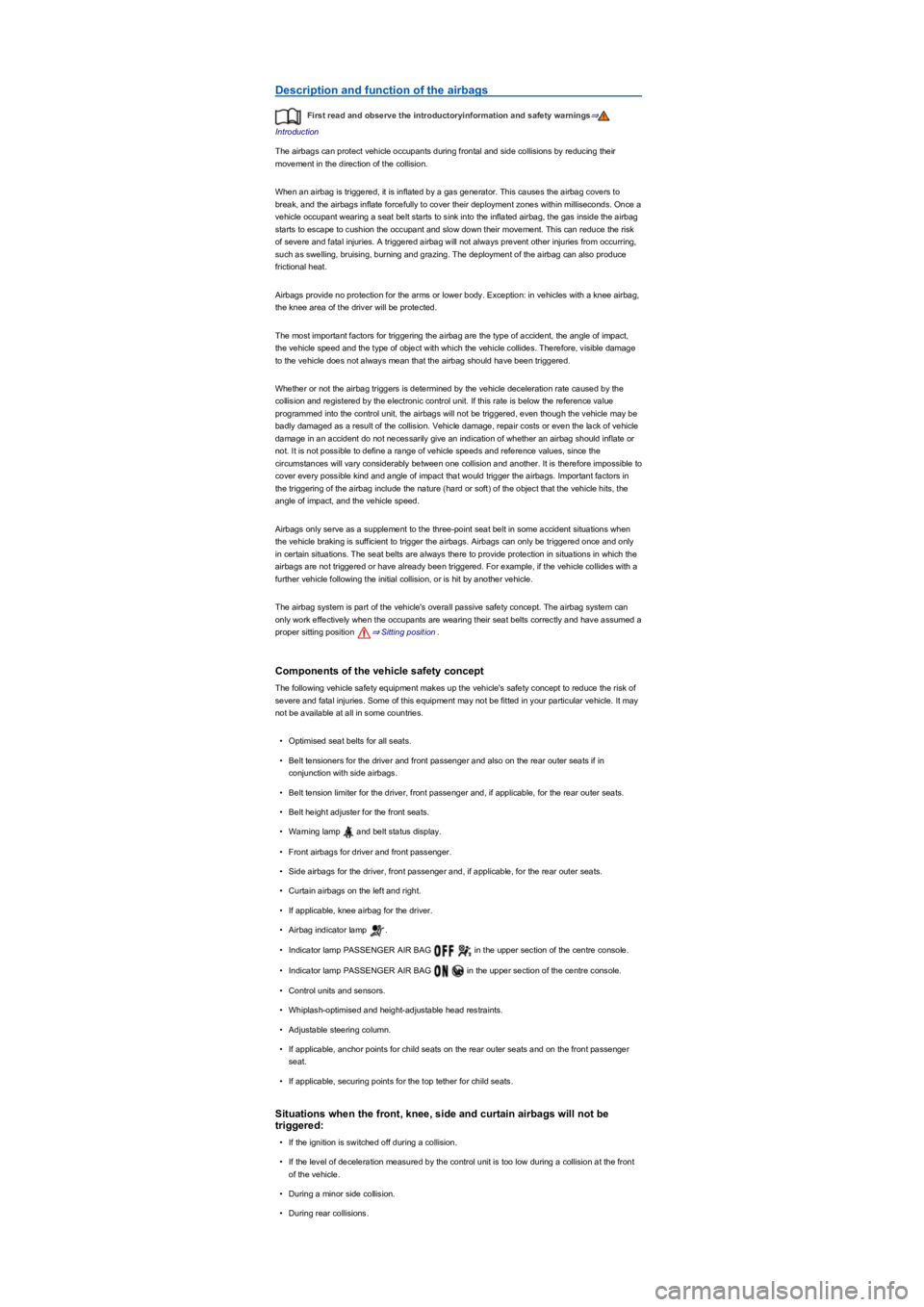
Description and function of the airbags
First read and observe the introductoryinformation and safety warnings⇒
Introduction
The airbags can protect vehicle occupants during frontal and side collisions by reducing their
movement in the direction of the collision.
When an airbag is triggered, it is inflated by a gas generator. This causes the airbag covers to
break, and the airbags inflate forcefully to cover their deployment zones within milliseconds. Once a
vehicle occupant wearing a seat belt starts to sink into the inflated airbag, the gas inside the airbag
starts to escape to cushion the occupant and slow down their movement. This can reduce the risk
of severe and fatal injuries. A triggered airbag will not always prevent other injuries from occurring,
such as swelling, bruising, burning and grazing. The deployment of the airbag can also produce
frictional heat.
Airbags provide no protection for the arms or lower body. Exception: in vehicles with a knee airbag,
the knee area of the driver will be protected.
The most important factors for triggering the airbag are the type of accident, the angle of impact,
the vehicle speed and the type of object with which the vehicle collides. Therefore, visible damage
to the vehicle does not always mean that the airbag should have been triggered.
Whether or not the airbag triggers is determined by the vehicle deceleration rate caused by the
collision and registered by the electronic control unit. If this rate is below the reference value
programmed into the control unit, the airbags will not be triggered, even though the vehicle may be
badly damaged as a result of the collision. Vehicle damage, repair costs or even the lack of vehicle
damage in an accident do not necessarily give an indication of whether an airbag should inflate or
not. It is not possible to define a range of vehicle speeds and reference values, since the
circumstances will vary considerably between one collision and another. It is therefore impossible to
cover every possible kind and angle of impact that would trigger the airbags. Important factors in
the triggering of the airbag include the nature (hard or soft) of the object that the vehicle hits, the
angle of impact, and the vehicle speed.
Airbags only serve as a supplement to the three-point seat belt in some accident situations when
the vehicle braking is sufficient to trigger the airbags. Airbags can only be triggered once and only
in certain situations. The seat belts are always there to provide protection in situations in which the
airbags are not triggered or have already been triggered. For example, if the vehicle collides with a
further vehicle following the initial collision, or is hit by another vehicle.
The airbag system is part of the vehicle's overall passive safety concept. The airbag system can
only work effectively when the occupants are wearing their seat belts correctly and have assumed a
proper sitting position ⇒ Sitting position.
Components of the vehicle safety concept
The following vehicle safety equipment makes up the vehicle's safety concept to reduce the risk of
severe and fatal injuries. Some of this equipment may not be fitted in your particular vehicle. It may
not be available at all in some countries.
•Optimised seat belts for all seats.
•Belt tensioners for the driver and front passenger and also on the rear outer seats if in
conjunction with side airbags.
•Belt tension limiter for the driver, front passenger and, if applicable, for the rear outer seats.
•Belt height adjuster for the front seats.
•Warning lamp and belt status display.
•Front airbags for driver and front passenger.
•Side airbags for the driver, front passenger and, if applicable, for the rear outer seats.
•Curtain airbags on the left and right.
•If applicable, knee airbag for the driver.
•Airbag indicator lamp .
•Indicator lamp PASSENGER AIR BAG in the upper section of the centre console.
•Indicator lamp PASSENGER AIR BAG in the upper section of the centre console.
•Control units and sensors.
•Whiplash-optimised and height-adjustable head restraints.
•Adjustable steering column.
•If applicable, anchor points for child seats on the rear outer seats and on the front passenger
seat.
•If applicable, securing points for the top tether for child seats.
Situations when the front, knee, side and curtain airbags will not be
triggered:
•If the ignition is switched off during a collision.
•If the level of deceleration measured by the control unit is too low during a collision at the front
of the vehicle.
•During a minor side collision.
•During rear collisions.
Page 52 of 341
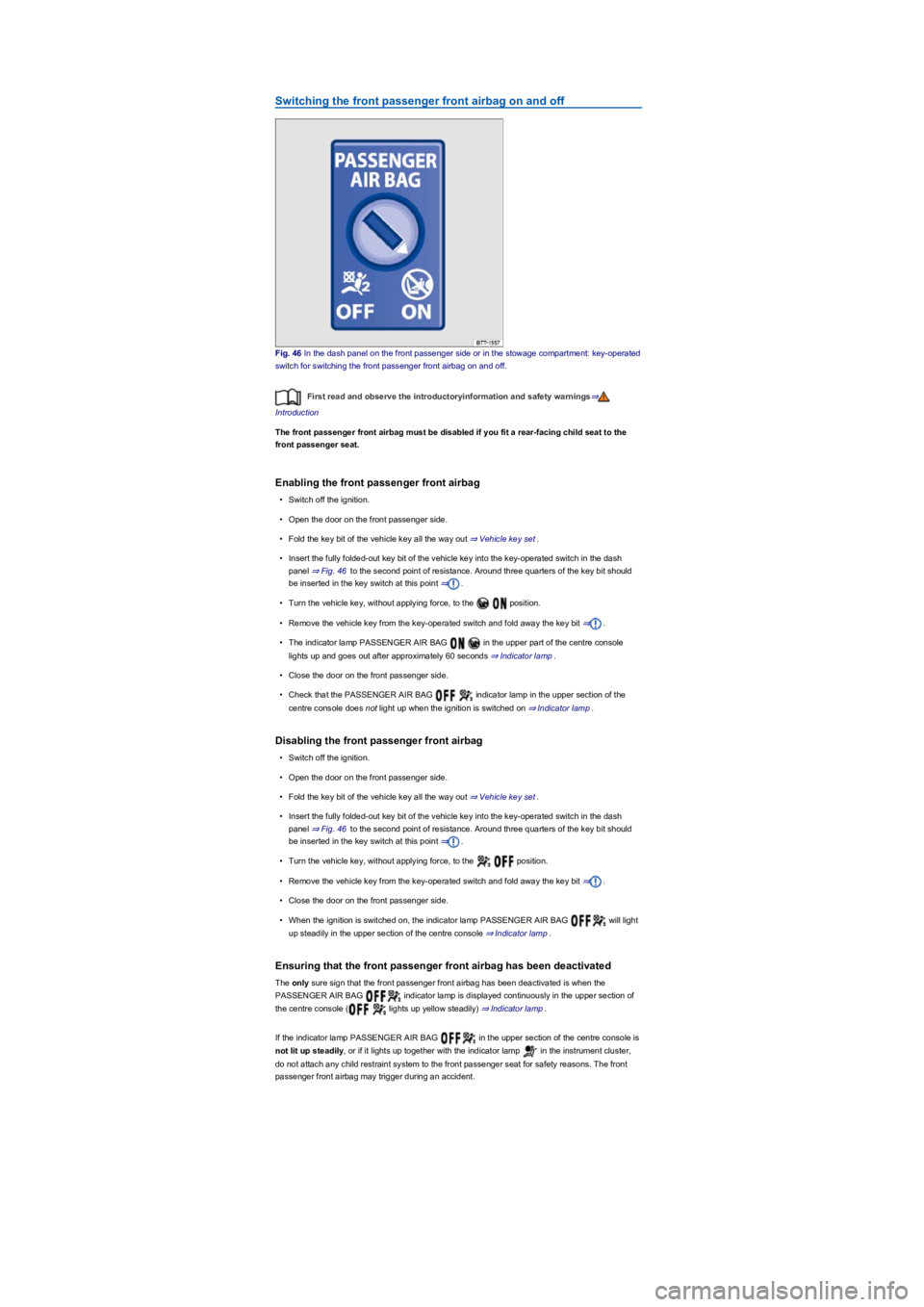
Switching the front passenger front airbag on and off
Fig. 46 In the dash panel on the front passenger side or in the stowage compartment: key-operated
switch for switching the front passenger front airbag on and off.
First read and observe the introductoryinformation and safety warnings⇒
Introduction
The front passenger front airbag must be disabled if you fit a rear-facing child seat to the
front passenger seat.
Enabling the front passenger front airbag
•Switch off the ignition.
•Open the door on the front passenger side.
•Fold the key bit of the vehicle key all the way out ⇒ Vehicle key set.
•Insert the fully folded-out key bit of the vehicle key into the key-operated switch in the dash
panel ⇒ Fig. 46 to the second point of resistance. Around three quarters of the key bit should
be inserted in the key switch at this point ⇒.
•Turn the vehicle key, without applying force, to the position.
•Remove the vehicle key from the key-operated switch and fold away the key bit ⇒.
•The indicator lamp PASSENGER AIR BAG in the upper part of the centre console
lights up and goes out after approximately 60 seconds ⇒ Indicator lamp.
•Close the door on the front passenger side.
•Check that the PASSENGER AIR BAG indicator lamp in the upper section of the
centre console does not light up when the ignition is switched on ⇒ Indicator lamp.
Disabling the front passenger front airbag
•Switch off the ignition.
•Open the door on the front passenger side.
•Fold the key bit of the vehicle key all the way out ⇒ Vehicle key set.
•Insert the fully folded-out key bit of the vehicle key into the key-operated switch in the dash
panel ⇒ Fig. 46 to the second point of resistance. Around three quarters of the key bit should
be inserted in the key switch at this point ⇒.
•Turn the vehicle key, without applying force, to the position.
•Remove the vehicle key from the key-operated switch and fold away the key bit ⇒.
•Close the door on the front passenger side.
•When the ignition is switched on, the indicator lamp PASSENGER AIR BAG will light
up steadily in the upper section of the centre console ⇒ Indicator lamp.
Ensuring that the front passenger front airbag has been deactivated
The only sure sign that the front passenger front airbag has been deactivated is when the
PASSENGER AIR BAG indicator lamp is displayed continuously in the upper section of
the centre console ( lights up yellow steadily) ⇒ Indicator lamp.
If the indicator lamp PASSENGER AIR BAG in the upper section of the centre console is
not lit up steadily, or if it lights up together with the indicator lamp in the instrument cluster,
do not attach any child restraint system to the front passenger seat for safety reasons. The front
passenger front airbag may trigger during an accident.
Page 60 of 341
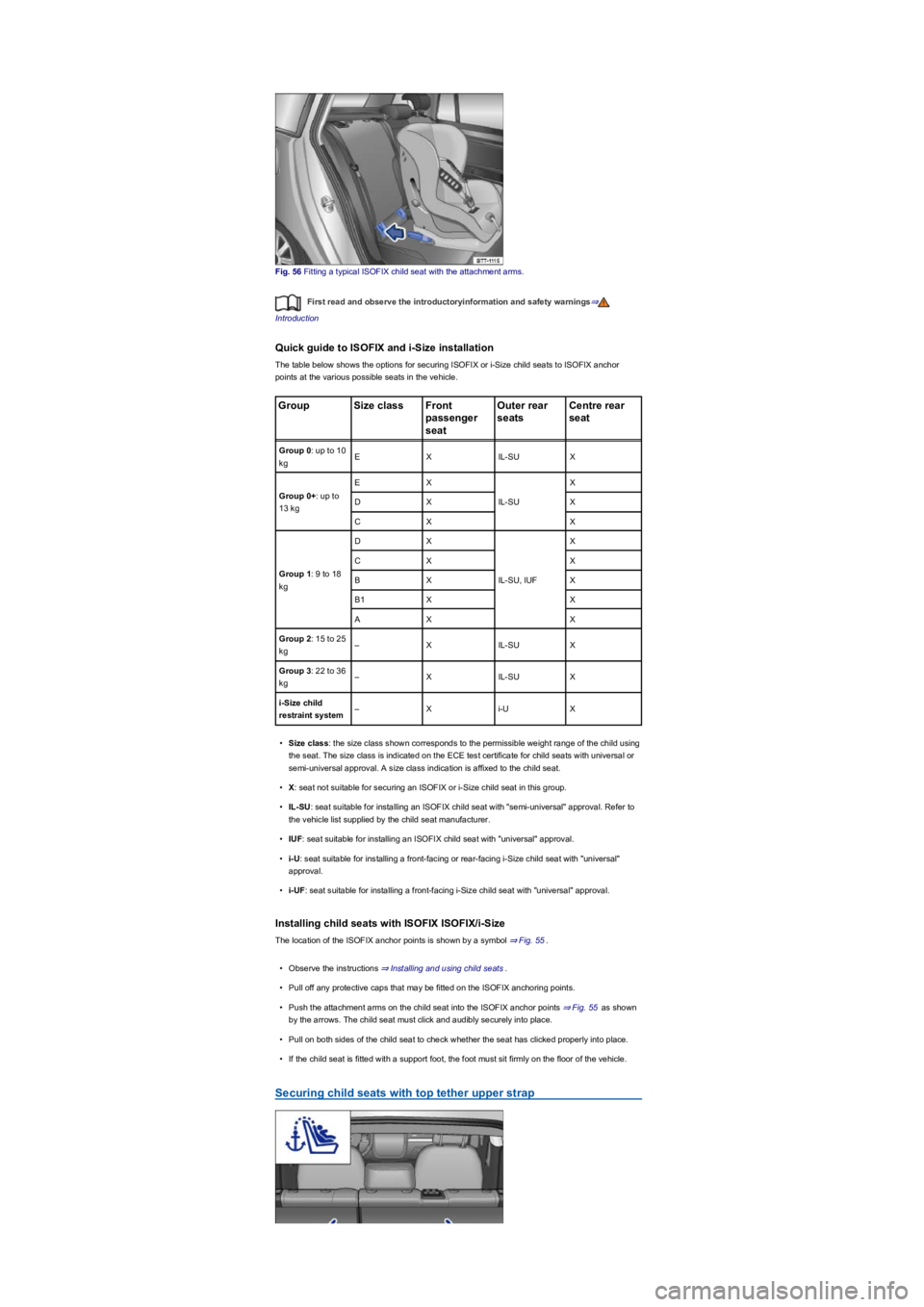
Fig. 56 Fitting a typical ISOFIX child seat with the attachment arms.
First read and observe the introductoryinformation and safety warnings⇒
Introduction
Quick guide to ISOFIX and i-Size installation
The table below shows the options for securing ISOFIX or i-Size child seats to ISOFIX anchor
points at the various possible seats in the vehicle.
GroupSize classFront
passenger
seat
Outer rear
seats
Centre rear
seat
Group 0: up to 10
kgEXIL-SUX
Group 0+: up to
13 kg
EX
IL-SU
X
DXX
CXX
Group 1: 9 to 18
kg
DX
IL-SU, IUF
X
CXX
BXX
B1XX
AXX
Group 2: 15 to 25
kg–XIL-SUX
Group 3: 22 to 36
kg–XIL-SUX
i-Size child
restraint system–Xi-UX
•Size class: the size class shown corresponds to the permissible weight range of the child using
the seat. The size class is indicated on the ECE test certificate for child seats with universal or
semi-universal approval. A size class indication is affixed to the child seat.
•X: seat not suitable for securing an ISOFIX or i-Size child seat in this group.
•IL-SU: seat suitable for installing an ISOFIX child seat with "semi-universal" approval. Refer to
the vehicle list supplied by the child seat manufacturer.
•IUF: seat suitable for installing an ISOFIX child seat with "universal" approval.
•i-U: seat suitable for installing a front-facing or rear-facing i-Size child seat with "universal"
approval.
•i-UF: seat suitable for installing a front-facing i-Size child seat with "universal" approval.
Installing child seats with ISOFIX ISOFIX/i-Size
The location of the ISOFIX anchor points is shown by a symbol ⇒ Fig. 55.
•Observe the instructions ⇒ Installing and using child seats.
•Pull off any protective caps that may be fitted on the ISOFIX anchoring points.
•Push the attachment arms on the child seat into the ISOFIX anchor points ⇒ Fig. 55 as shown
by the arrows. The child seat must click and audibly securely into place.
•Pull on both sides of the child seat to check whether the seat has clicked properly into place.
•If the child seat is fitted with a support foot, the foot must sit firmly on the floor of the vehicle.
Securing child seats with top tether upper strap