change wheel VOLKSWAGEN TIGUAN 2017 Owner´s Manual
[x] Cancel search | Manufacturer: VOLKSWAGEN, Model Year: 2017, Model line: TIGUAN, Model: VOLKSWAGEN TIGUAN 2017Pages: 341, PDF Size: 9.14 MB
Page 101 of 341
Convenience turn signal
To operate the convenience turn signal, push the turn signal and main beam lever up or down to
the point where you meet resistance and then release the lever. The turn signal flashes 3 times.
To cancel the convenience turn signal, immediately move the lever in the opposite direction up to
the pressure point and then release it.
The convenience turn signal can be activated and deactivated in the Infotainment system in
the Vehicle settings menu ⇒ Operation and display in the Infotainment system:
The hazard warning lights also work when the ignition is switched off ⇒ In an emergency.
Some settings can be stored in the user accounts of the personalisation function and
therefore change automatically when the user account changes ⇒ Personalisation.
Vehicle lighting
Switching lights on and off
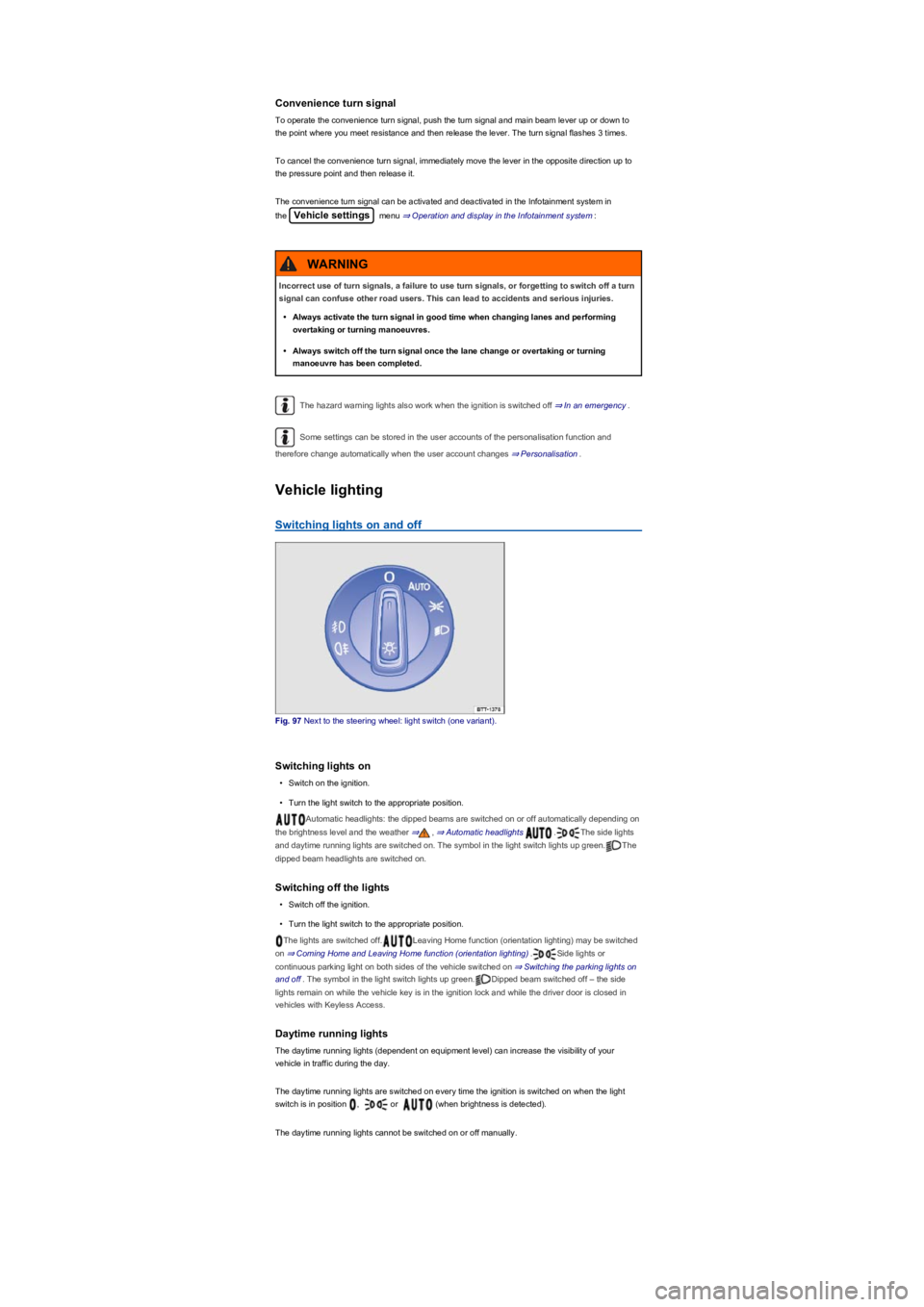
Fig. 97 Next to the steering wheel: light switch (one variant).
Switching lights on
•Switch on the ignition.
•Turn the light switch to the appropriate position.
Automatic headlights: the dipped beams are switched on or off automatically depending on
the brightness level and the weather ⇒, ⇒ Automatic headlights .The side lights
and daytime running lights are switched on. The symbol in the light switch lights up green.The
dipped beam headlights are switched on.
Switching off the lights
•Switch off the ignition.
•Turn the light switch to the appropriate position.
The lights are switched off.Leaving Home function (orientation lighting) may be switched
on ⇒ Coming Home and Leaving Home function (orientation lighting).Side lights or
continuous parking light on both sides of the vehicle switched on ⇒ Switching the parking lights on
and off. The symbol in the light switch lights up green.Dipped beam switched off – the side
lights remain on while the vehicle key is in the ignition lock and while the driver door is closed in
vehicles with Keyless Access.
Daytime running lights
The daytime running lights (dependent on equipment level) can increase the visibility of your
vehicle in traffic during the day.
The daytime running lights are switched on every time the ignition is switched on when the light
switch is in position , or (when brightness is detected).
The daytime running lights cannot be switched on or off manually.
Incorrect use of turn signals, a failure to use turn signals, or forgetting to switch off a turn
signal can confuse other road users. This can lead to accidents and serious injuries.
•Always activate the turn signal in good time when changing lanes and performing
overtaking or turning manoeuvres.
•Always switch off the turn signal once the lane change or overtaking or turning
manoeuvre has been completed.
WARNING
Page 106 of 341
Switching on the Coming Home function
m/k/a999MKNot in China
•Switch off the ignition.
•Operate the headlight flasher for approximately one second.
The Coming Home lighting is switched on when the driver door is opened. The switch-off delay
starts when the last vehicle door or the boot lid has been closed.
Switching on the Coming Home function
m/k/a999MKOnly in China
•Switch off the ignition.
The Coming Home lighting is switched on when the light switch is in position and the
rain/light sensor detects that it is dark.
The switch-off delay starts when the last vehicle door or the boot lid has been closed.
Switching off the Coming home function
•Automatically after the set switch-off delay has elapsed.
•OR: automatically if a vehicle door or the boot lid is still open approximately 30 seconds after
switching on.
•OR: turn light switch to position .
•OR: switch on the ignition.
Switching on the Leaving home function
•Unlock the vehicle when the light switch is in position and the rain/light sensor detects
that it is dark.
Switching off the Leaving home function
•Automatically after the switch-off delay.
•OR: lock the vehicle.
•OR: turn light switch to position .
•OR: switch on the ignition.
Some settings can be stored in the user accounts of the personalisation function and
therefore change automatically when the user account changes ⇒ Personalisation.
Headlights
Headlight range control
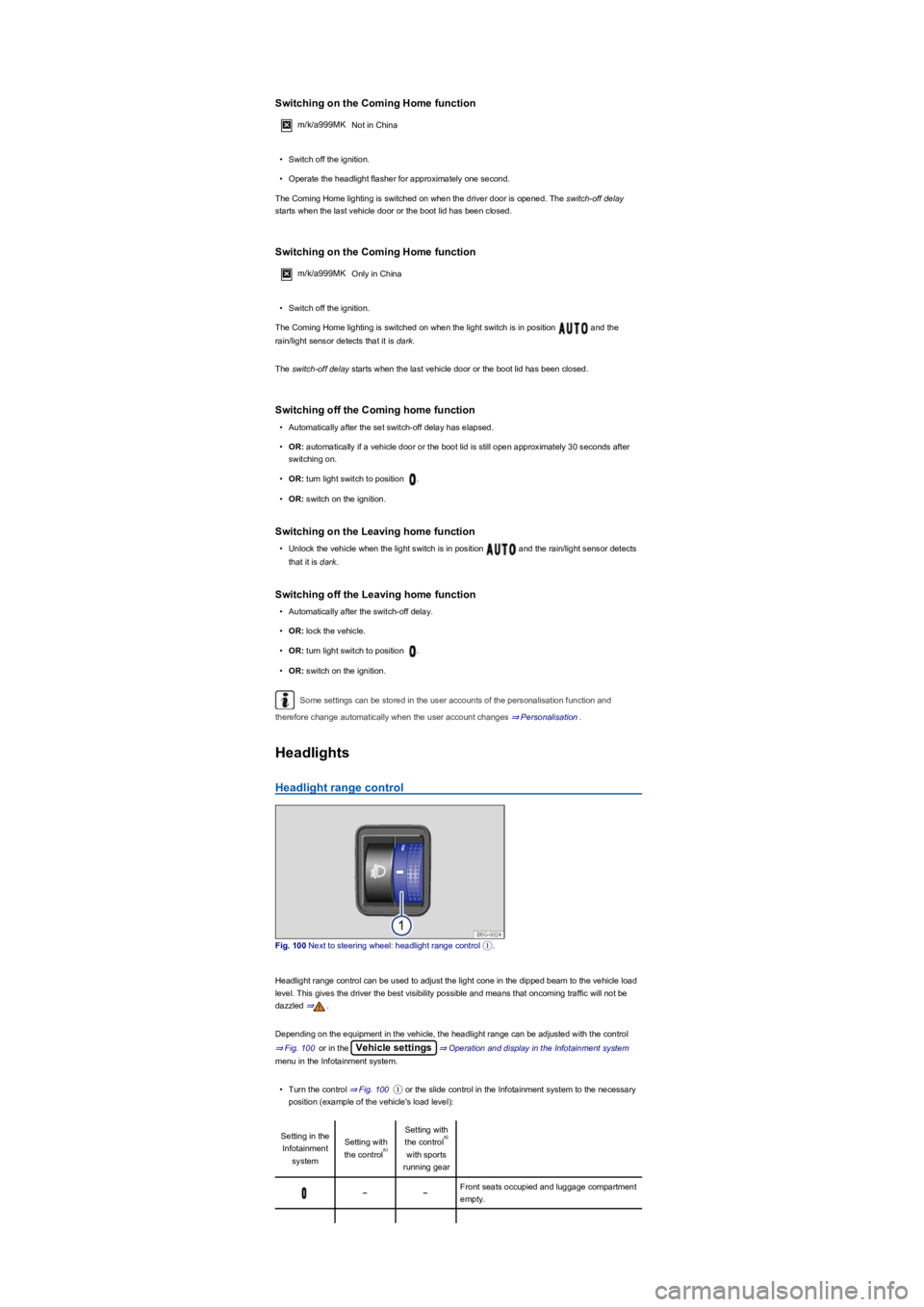
Fig. 100 Next to steering wheel: headlight range control ①.
Headlight range control can be used to adjust the light cone in the dipped beam to the vehicle load
level. This gives the driver the best visibility possible and means that oncoming traffic will not be
dazzled ⇒.
Depending on the equipment in the vehicle, the headlight range can be adjusted with the control
⇒ Fig. 100 or in the Vehicle settings⇒ Operation and display in the Infotainment system
menu in the Infotainment system.
•Turn the control ⇒ Fig. 100① or the slide control in the Infotainment system to the necessary
position (example of the vehicle's load level):
Setting in the
Infotainment
system
Setting with
the control
Setting with
the control
with sports
running gear
Front seats occupied and luggage compartment
empty.
a)
a)
Page 129 of 341
m/k/a995MK Vehicles with DSG dual clutch gearbox: the selector lever must be in the
Tiptronic position ⇒ Changing gear using Tiptronic.
No recommended gear is indicated if the most suitable gear is already selected. The currently
selected gear is displayed.
Information on cleaning the particulate filter
The engine management system recognises when the particulate filter is becoming saturated and
supports regeneration of the particulate filter by recommending the most suitable gear when driving.
Compared with normal driving, this may mean driving with an increased engine speed ⇒ Particulate
filter.
Driving in the correct gear can help to reduce fuel consumption.
Gear-change indicator display goes out when the clutch is depressed in vehicles with a
manual gearbox or when Tiptronic position is deselected in vehicles with a DSG dual clutch
gearbox.
Driving economically
First read and observe the introductoryinformation and safety warnings⇒
Introduction
The fuel consumption, pollution and
wear of the engine, brakes and tyres
are reduced by an appropriate driving
style. A few tips are provided below
which will help you protect the
environment and also save money.
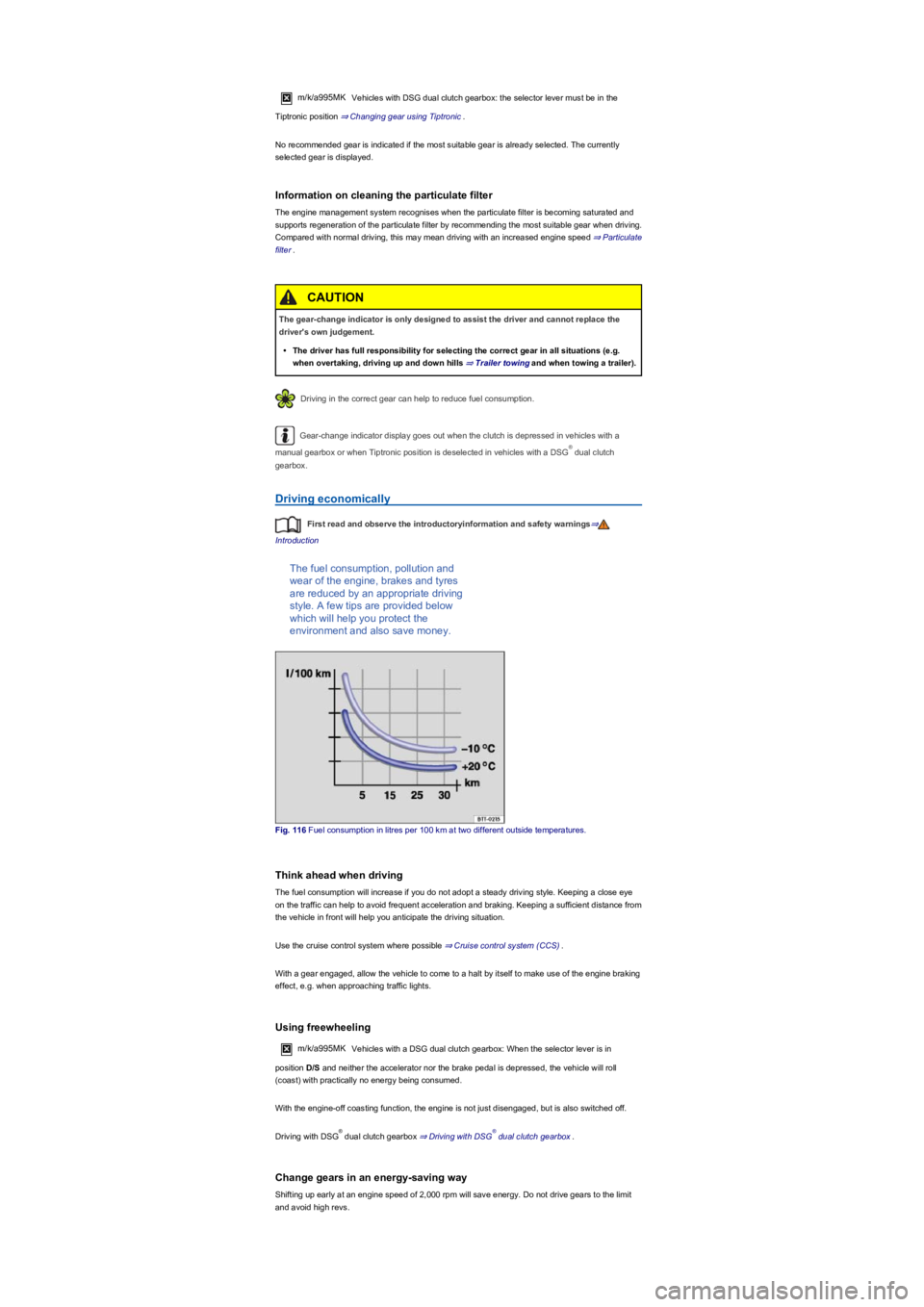
Fig. 116 Fuel consumption in litres per 100 km at two different outside temperatures.
Think ahead when driving
The fuel consumption will increase if you do not adopt a steady driving style. Keeping a close eye
on the traffic can help to avoid frequent acceleration and braking. Keeping a sufficient distance from
the vehicle in front will help you anticipate the driving situation.
Use the cruise control system where possible ⇒ Cruise control system (CCS).
With a gear engaged, allow the vehicle to come to a halt by itself to make use of the engine braking
effect, e.g. when approaching traffic lights.
Using freewheeling
m/k/a995MKVehicles with a DSG dual clutch gearbox: When the selector lever is in
position D/S and neither the accelerator nor the brake pedal is depressed, the vehicle will roll
(coast) with practically no energy being consumed.
With the engine-off coasting function, the engine is not just disengaged, but is also switched off.
Driving with DSG dual clutch gearbox ⇒ Driving with DSG dual clutch gearbox.
Change gears in an energy-saving way
Shifting up early at an engine speed of 2,000 rpm will save energy. Do not drive gears to the limit
and avoid high revs.
The gear-change indicator is only designed to assist the driver and cannot replace the
driver's own judgement.
•The driver has full responsibility for selecting the correct gear in all situations (e.g.
when overtaking, driving up and down hills ⇒ Trailer towingand when towing a trailer).
CAUTION
®
®®
Page 130 of 341
m/k/a995MK Vehicles with manual gearbox: change from first to second gear immediately
after setting off. Change to higher gears rapidly.
m/k/a995MK Vehicles with DSG dual clutch gearbox: accelerate slowly and avoid using the
kickdown function.
Gear-change indicator ⇒ Gear-change indicator.
Eco driving profile ⇒ Driving profile selection and 4MOTION Active Control.
Avoid full throttle
Never fully use the maximum speed of the vehicle. Driving at excessive speeds, e.g. above 130
km/h on the motorway, will increase air resistance and thus the amount of force needed to move
the vehicle.
Reduce idling
Drive off immediately with low revs. If you are stopped for a long period, do not allow the engine to
idle but switch it off, e.g. when in a traffic jam or at a railway crossing.
In vehicles with an activated start/stop system, the engine will switch off automatically when the
vehicle is stopping and when the vehicle is stationary ⇒ Start/stop system .
Refuel with moderation
A full fuel tank increases the weight of the vehicle. A fuel tank that is half to three quarters full is
sufficient for urban journeys in particular.
Avoid short journeys
A cold engine has a very high fuel consumption. The optimum operating temperature is reached
only after driving a few miles. The fuel consumption is above average at very low ambient
temperatures, e.g. in winter ⇒ Fig. 116. Plan journeys economically and combine short distances.
Carry out regular maintenance
Regular maintenance is an essential prerequisite for economical driving and increases the service
life of the vehicle.
Observe the correct tyre pressures
An inadequate tyre pressure does not just mean greater wear, but also increases the rolling
resistance of the tyres and thus the fuel consumption. Use optimised rolling resistance tyres.
Adjust the tyre pressure according to the vehicle load. Observe the information on the tyre pressure
sticker ⇒ Useful information about wheels and tyres
Tyre Pressure Loss Indicator or Tyre Pressure Monitoring System ⇒ Tyre monitoring systems.
Use low viscosity engine oil
Fully synthetic engine oils with a low viscosity decrease frictional resistance in the engine and
spread better and more quickly, especially for cold starts.
Do not drive with unnecessary loads in the vehicle
You can reduce fuel consumption by clearing out the luggage compartment before setting off, for
example by removing empty drink crates or unused child seats.
In order to keep the drag coefficient of the vehicle as low as possible, remove attachments and
add-on parts such as ski, bicycle or roof carriers after use.
Save electrical energy
The alternator is driven by the engine and generates power for convenience consumers such as the
air conditioning system, window heating and ventilation. Saving electrical energy is easy, e.g.:
•At high ambient temperatures, ventilate the car before starting a journey and drive a short
distance with open window. Only then switch on the air conditioning system.
•Switch off convenience systems as soon as they have served their purpose.
Adapt your speed and distance from the vehicles ahead to suit visibility, weather, road
and traffic conditions.
WARNING
Page 146 of 341
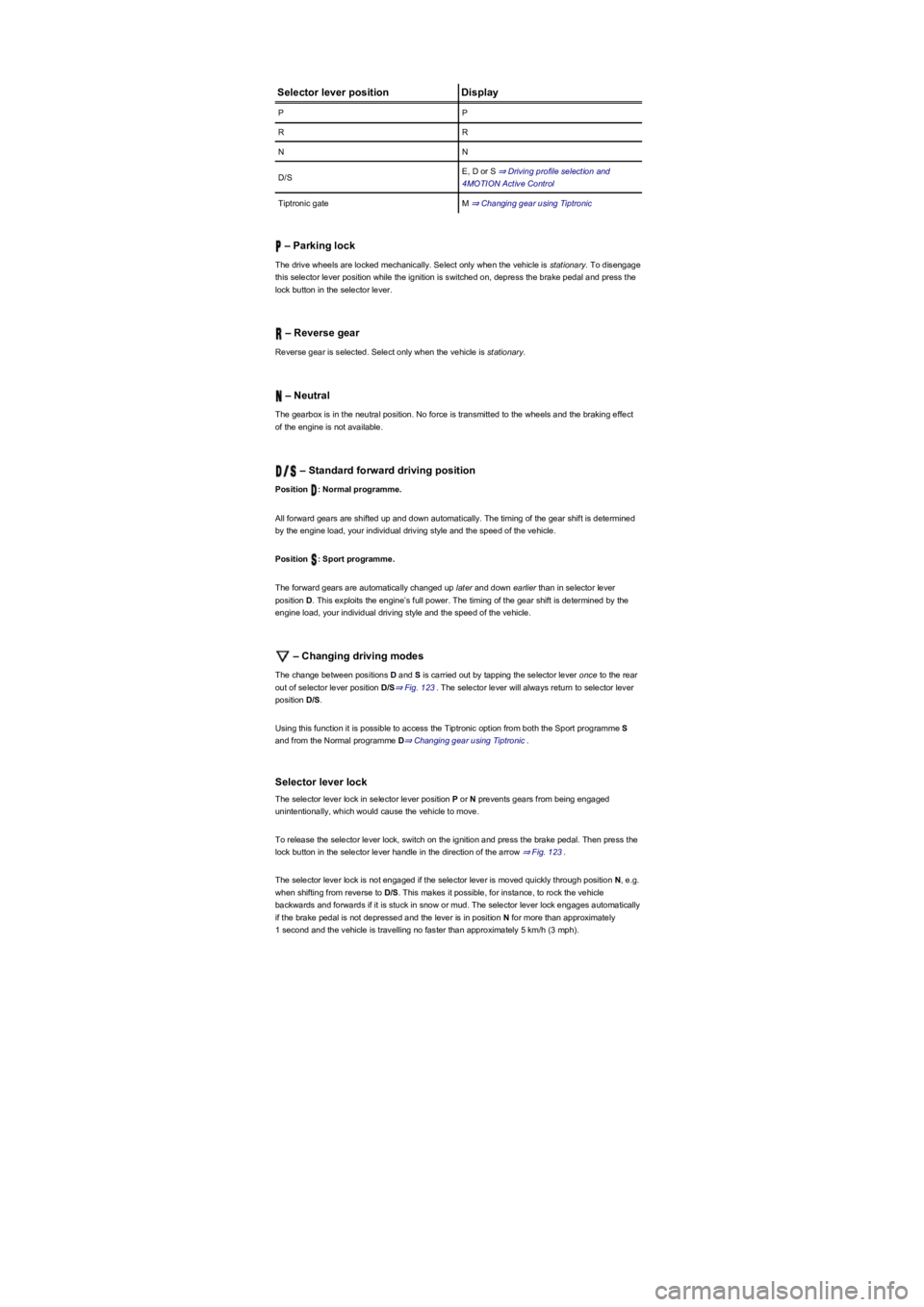
Selector lever positionDisplay
PP
RR
NN
D/SE, D or S ⇒ Driving profile selection and
4MOTION Active Control
Tiptronic gateM ⇒ Changing gear using Tiptronic
– Parking lock
The drive wheels are locked mechanically. Select only when the vehicle is stationary. To disengage
this selector lever position while the ignition is switched on, depress the brake pedal and press the
lock button in the selector lever.
– Reverse gear
Reverse gear is selected. Select only when the vehicle is stationary.
– Neutral
The gearbox is in the neutral position. No force is transmitted to the wheels and the braking effect
of the engine is not available.
– Standard forward driving position
Position : Normal programme.
All forward gears are shifted up and down automatically. The timing of the gear shift is determined
by the engine load, your individual driving style and the speed of the vehicle.
Position : Sport programme.
The forward gears are automatically changed up later and down earlier than in selector lever
position D. This exploits the engine’s full power. The timing of the gear shift is determined by the
engine load, your individual driving style and the speed of the vehicle.
– Changing driving modes
The change between positions D and S is carried out by tapping the selector lever once to the rear
out of selector lever position D/S⇒ Fig. 123. The selector lever will always return to selector lever
position D/S.
Using this function it is possible to access the Tiptronic option from both the Sport programme S
and from the Normal programme D⇒ Changing gear using Tiptronic.
Selector lever lock
The selector lever lock in selector lever position P or N prevents gears from being engaged
unintentionally, which would cause the vehicle to move.
To release the selector lever lock, switch on the ignition and press the brake pedal. Then press the
lock button in the selector lever handle in the direction of the arrow ⇒ Fig. 123.
The selector lever lock is not engaged if the selector lever is moved quickly through position N, e.g.
when shifting from reverse to D/S. This makes it possible, for instance, to rock the vehicle
backwards and forwards if it is stuck in snow or mud. The selector lever lock engages automatically
if the brake pedal is not depressed and the lever is in position N for more than approximately
1 second and the vehicle is travelling no faster than approximately 5 km/h (3 mph).
Page 147 of 341
If the selector lever is moved accidentally to N when driving, take your foot off the
accelerator. Wait for the engine revs in the neutral position before selecting a position again.
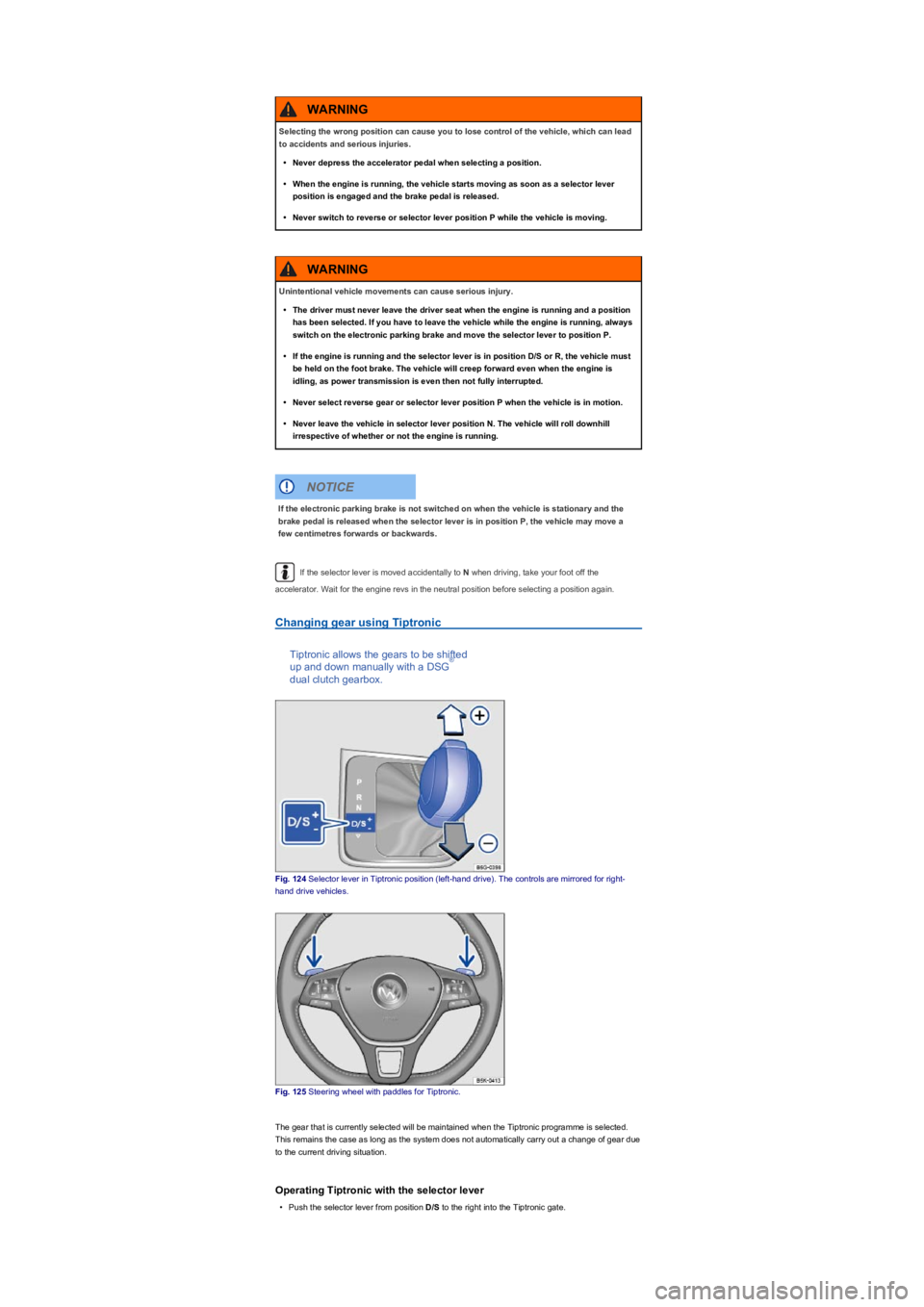
Changing gear using Tiptronic
Tiptronic allows the gears to be shifted
up and down manually with a DSG
dual clutch gearbox.
Fig. 124 Selector lever in Tiptronic position (left-hand drive). The controls are mirrored for right-
hand drive vehicles.
Fig. 125 Steering wheel with paddles for Tiptronic.
The gear that is currently selected will be maintained when the Tiptronic programme is selected.
This remains the case as long as the system does not automatically carry out a change of gear due
to the current driving situation.
Operating Tiptronic with the selector lever
•Push the selector lever from position D/S to the right into the Tiptronic gate.
Selecting the wrong position can cause you to lose control of the vehicle, which can lead
to accidents and serious injuries.
•Never depress the accelerator pedal when selecting a position.
•When the engine is running, the vehicle starts moving as soon as a selector lever
position is engaged and the brake pedal is released.
•Never switch to reverse or selector lever position P while the vehicle is moving.
WARNING
Unintentional vehicle movements can cause serious injury.
•The driver must never leave the driver seat when the engine is running and a position
has been selected. If you have to leave the vehicle while the engine is running, always
switch on the electronic parking brake and move the selector lever to position P.
•If the engine is running and the selector lever is in position D/S or R, the vehicle must
be held on the foot brake. The vehicle will creep forward even when the engine is
idling, as power transmission is even then not fully interrupted.
•Never select reverse gear or selector lever position P when the vehicle is in motion.
•Never leave the vehicle in selector lever position N. The vehicle will roll downhill
irrespective of whether or not the engine is running.
WARNING
If the electronic parking brake is not switched on when the vehicle is stationary and the
brake pedal is released when the selector lever is in position P, the vehicle may move a
few centimetres forwards or backwards.
NOTICE
®
Page 148 of 341
•Gently push the selector lever forwards ⊕ or back ㊀ to shift gear up or down ⇒ Fig. 124.
When moving the selector lever in the Tiptronic gate, do not press the lock button on the selector
lever.
Operating Tiptronic with the paddles
•Pull the right paddle ⇒ Fig. 125 towards the steering wheel to change up a gear.
•Pull the left paddle towards the steering wheel to change down a gear.
•To leave Tiptronic mode, pull the right paddle towards the steering wheel for approximately one
second.
Tiptronic is automatically deactivated if the selector paddles are not operated for some time and the
selector lever is not in the Tiptronic gate.
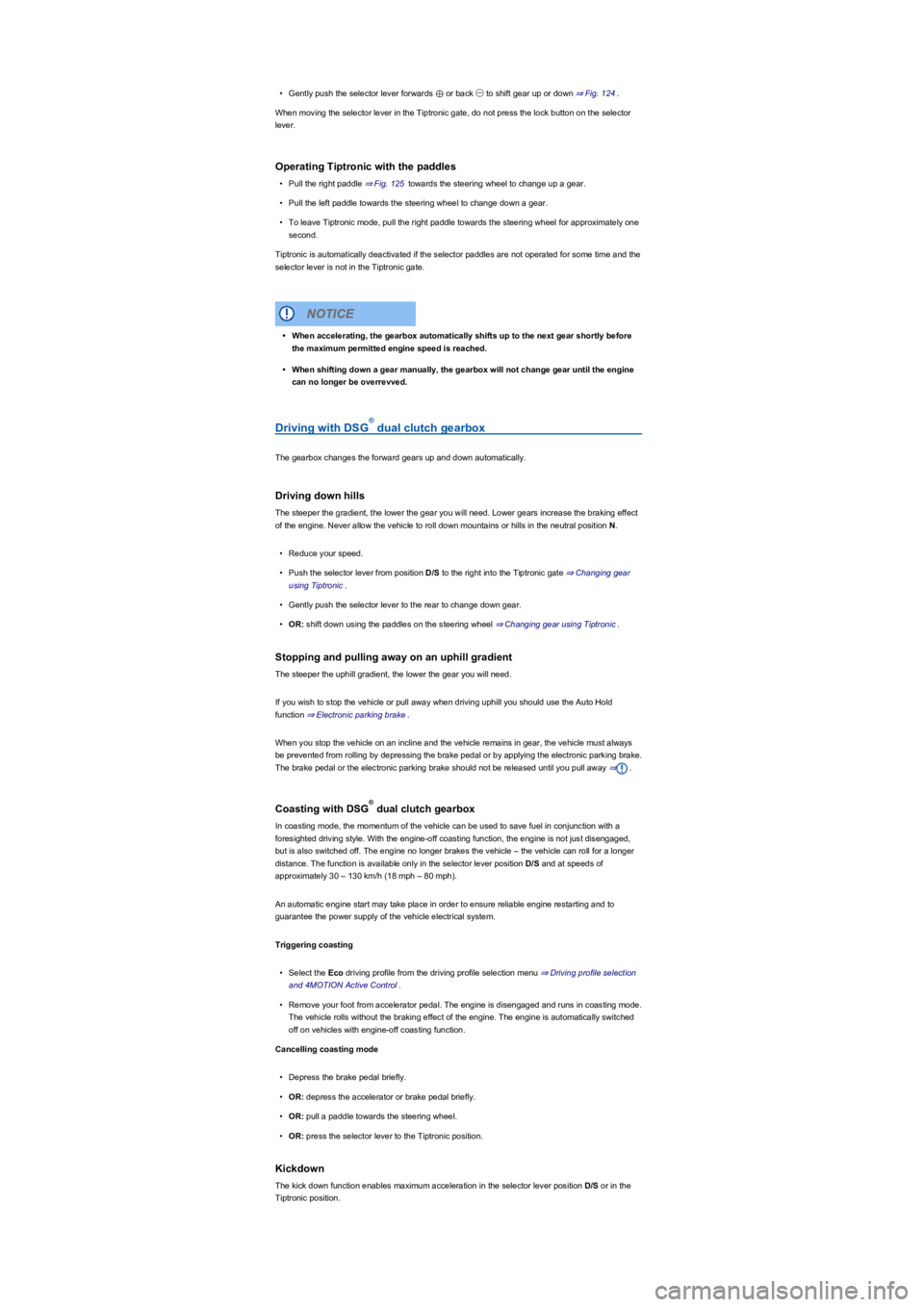
Driving with DSG dual clutch gearbox
The gearbox changes the forward gears up and down automatically.
Driving down hills
The steeper the gradient, the lower the gear you will need. Lower gears increase the braking effect
of the engine. Never allow the vehicle to roll down mountains or hills in the neutral position N.
•Reduce your speed.
•Push the selector lever from position D/S to the right into the Tiptronic gate ⇒ Changing gear
using Tiptronic.
•Gently push the selector lever to the rear to change down gear.
•OR: shift down using the paddles on the steering wheel ⇒ Changing gear using Tiptronic.
Stopping and pulling away on an uphill gradient
The steeper the uphill gradient, the lower the gear you will need.
If you wish to stop the vehicle or pull away when driving uphill you should use the Auto Hold
function ⇒ Electronic parking brake.
When you stop the vehicle on an incline and the vehicle remains in gear, the vehicle must always
be prevented from rolling by depressing the brake pedal or by applying the electronic parking brake.
The brake pedal or the electronic parking brake should not be released until you pull away ⇒.
Coasting with DSG dual clutch gearbox
In coasting mode, the momentum of the vehicle can be used to save fuel in conjunction with a
foresighted driving style. With the engine-off coasting function, the engine is not just disengaged,
but is also switched off. The engine no longer brakes the vehicle – the vehicle can roll for a longer
distance. The function is available only in the selector lever position D/S and at speeds of
approximately 30 – 130 km/h (18 mph – 80 mph).
An automatic engine start may take place in order to ensure reliable engine restarting and to
guarantee the power supply of the vehicle electrical system.
Triggering coasting
•Select the Eco driving profile from the driving profile selection menu ⇒ Driving profile selection
and 4MOTION Active Control.
•Remove your foot from accelerator pedal. The engine is disengaged and runs in coasting mode.
The vehicle rolls without the braking effect of the engine. The engine is automatically switched
off on vehicles with engine-off coasting function.
Cancelling coasting mode
•Depress the brake pedal briefly.
•OR: depress the accelerator or brake pedal briefly.
•OR: pull a paddle towards the steering wheel.
•OR: press the selector lever to the Tiptronic position.
Kickdown
The kick down function enables maximum acceleration in the selector lever position D/S or in the
Tiptronic position.
•When accelerating, the gearbox automatically shifts up to the next gear shortly before
the maximum permitted engine speed is reached.
•When shifting down a gear manually, the gearbox will not change gear until the engine
can no longer be overrevved.
NOTICE
®
®
Page 156 of 341
•Proactive occupant protection system
In vehicles with a DSG dual clutch gearbox, the system automatically changes to gear
position S when the Sport driving profile is selected. The system automatically switches to gear
position D when the Eco driving profile is selected. Since coasting is active in the Eco driving
profile, the gearbox programme E is additionally displayed on the instrument cluster display.
The driver can adjust certain vehicle functions irrespective of the selected driving profile. For
example, the driver can switch to gear position S when the Eco driving profile is selected.
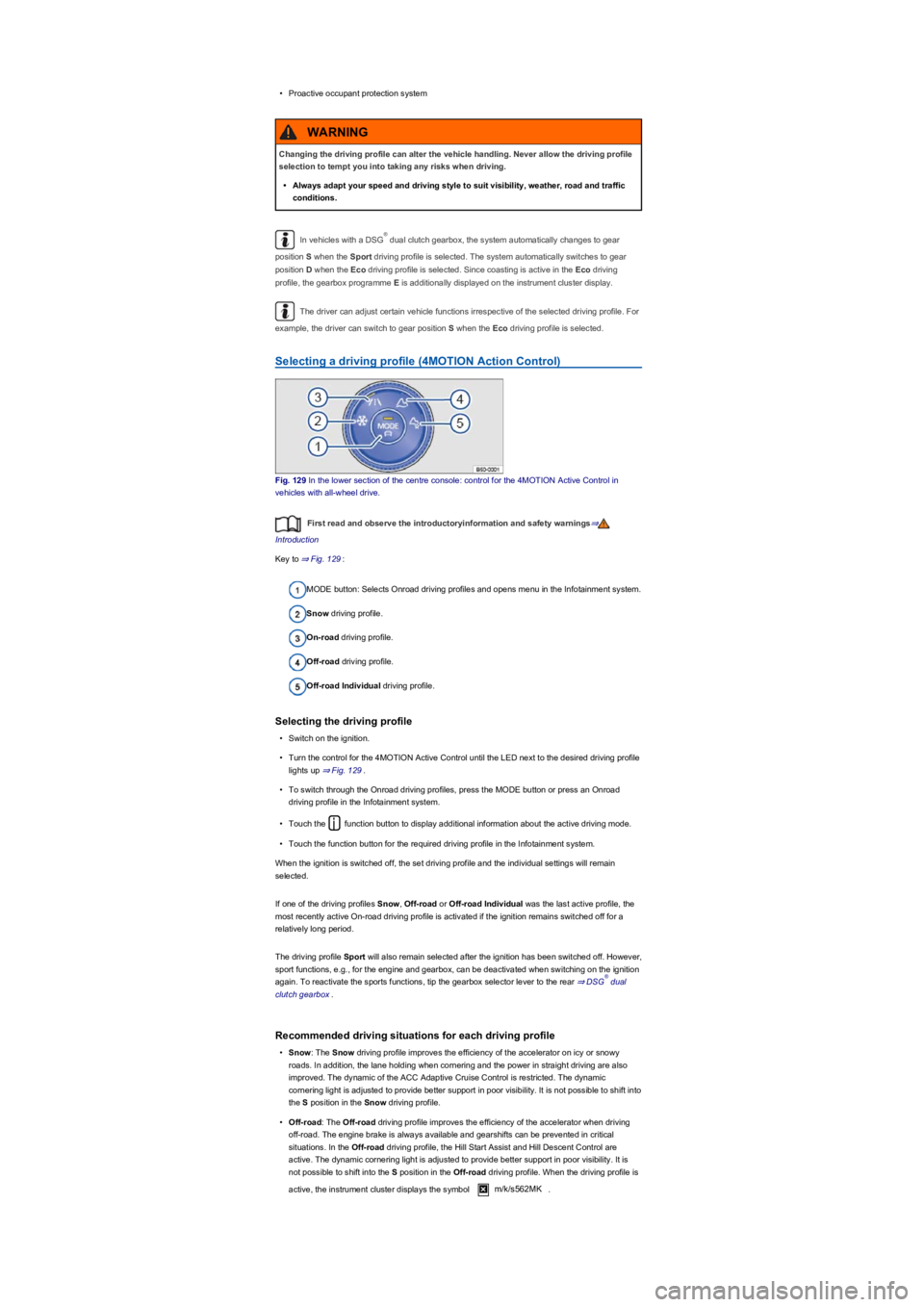
Selecting a driving profile (4MOTION Action Control)
Fig. 129 In the lower section of the centre console: control for the 4MOTION Active Control in
vehicles with all-wheel drive.
First read and observe the introductoryinformation and safety warnings⇒
Introduction
Key to ⇒ Fig. 129:
MODE button: Selects Onroad driving profiles and opens menu in the Infotainment system.
Snow driving profile.
On-road driving profile.
Off-road driving profile.
Off-road Individual driving profile.
Selecting the driving profile
•Switch on the ignition.
•Turn the control for the 4MOTION Active Control until the LED next to the desired driving profile
lights up ⇒ Fig. 129.
•To switch through the Onroad driving profiles, press the MODE button or press an Onroad
driving profile in the Infotainment system.
•Touch the function button to display additional information about the active driving mode.
•Touch the function button for the required driving profile in the Infotainment system.
When the ignition is switched off, the set driving profile and the individual settings will remain
selected.
If one of the driving profiles Snow, Off-road or Off-road Individual was the last active profile, the
most recently active On-road driving profile is activated if the ignition remains switched off for a
relatively long period.
The driving profile Sport will also remain selected after the ignition has been switched off. However,
sport functions, e.g., for the engine and gearbox, can be deactivated when switching on the ignition
again. To reactivate the sports functions, tip the gearbox selector lever to the rear ⇒ DSG dual
clutch gearbox.
Recommended driving situations for each driving profile
•Snow: The Snow driving profile improves the efficiency of the accelerator on icy or snowy
roads. In addition, the lane holding when cornering and the power in straight driving are also
improved. The dynamic of the ACC Adaptive Cruise Control is restricted. The dynamic
cornering light is adjusted to provide better support in poor visibility. It is not possible to shift into
the S position in the Snow driving profile.
•Off-road: The Off-road driving profile improves the efficiency of the accelerator when driving
off-road. The engine brake is always available and gearshifts can be prevented in critical
situations. In the Off-road driving profile, the Hill Start Assist and Hill Descent Control are
active. The dynamic cornering light is adjusted to provide better support in poor visibility. It is
not possible to shift into the S position in the Off-road driving profile. When the driving profile is
active, the instrument cluster displays the symbol m/k/s562MK.
Changing the driving profile can alter the vehicle handling. Never allow the driving profile
selection to tempt you into taking any risks when driving.
•Always adapt your speed and driving style to suit visibility, weather, road and traffic
conditions.
WARNING
®
®
Page 158 of 341
•Press the button in the Infotainment system.
•Touch the Vehicle function button.
•Touch the Selection function button.
•Touch the Off-road function button.
Selecting instruments and setting units
The display shows various instruments ⇒ Fig. 130.
To change instruments, swipe vertically over the display.
The units can be adjusted for some instruments in the Infotainment system ⇒ Operation and
display in the Infotainment system.
Instruments in the off-road display (depends on the vehicle's equipment):
•Altitude: The altitude function shows the current height above sea level.
•Steering angle display: the steering angle of the vehicle is displayed in the range between -
49° and 49°. The value is positive for a left steering angle and negative for a right steering
angle.
•Compass: the compass shows the current driving direction.
•Coolant temperature display: the display corresponds to the temperature display on the
instrument cluster ⇒ Coolant temperature display. At high engine loads and with high outside
temperatures, the needle will move clockwise. This is no cause for concern unless the
indicator lamp in the instrument cluster is lit up or flashing.
•Oil temperature display: the needle is in the middle when the engine has reached operating
temperature. If the needle is in the bottom left area, this means that the engine has not yet
reached its operating temperature. At high engine loads and with high outside temperatures, the
needle will move clockwise. This is no cause for concern unless the indicator lamp in
the instrument cluster is lit up or flashing ⇒ Engine oil.
Adapting the display areas to the driving situation
The displayed instruments can be selected depending on the driving situation, the ambient
conditions and the off-road conditions:
•Sandy terrain: oil, steering angle and coolant temperature display
•Inclines: steering angle and coolant temperature display, altimeter
•Alpine terrain: steering angle display, altimeter, compass
Off-road driving situations
Introduction
This chapter contains information on the followingsubjects:
⇒ Safety notes for driving off-road
⇒ Explanation of some technical terms
⇒ Checklist: Before driving off-road
⇒ General rules and driving tips
⇒ Useful accessories for off-road driving
⇒ Changing gear
⇒ Up hill and down dale
⇒ Driving through water
⇒ Off-road driving in snow
⇒ Driving in sand and mud
⇒ Driving in steep terrain
⇒ Traversing a slope
⇒ Driving through ditches
⇒ If your vehicle gets stuck
⇒ After off-road driving
You can also drive four-wheel drive vehicles off-road in addition to normal roads. It is very important
to read the contents of this section before driving off-road.
The vehicle is not built for expeditions.
The examples given in this chapter are an aid for safe off-road driving. However, we cannot predict
whether these guidelines will be valid for all situations that could occur.
The large variety of landscapes and the associated risks and dangers make it impossible to
describe all possible driving situations. The examples are only general guidelines designed to help
you drive off-road safely. It is crucial that you know what to expect when you drive into off-road
terrain you are unfamiliar with. This will enable you to assess potential danger in advance.
Accidents and injuries can occur if the driver is distracted. Operating the Infotainment
system can distract you from the road.
•Always drive carefully and responsibly.
WARNING
Page 164 of 341
Driving in sand and mud
First read and observe the introductoryinformation and safety warnings⇒
Introduction
Always drive at a steady speed through sand or mud and, if you have a manual gearbox, do not
change gear.
•Check whether ESC is active. The indicator lamp or in the instrument cluster display
should not light up ⇒ Brake support systems.
•Keep the vehicle moving constantly.
•Use the Off-road driving profile ⇒ Selecting a driving profile (4MOTION Action Control).
•Select a suitable gear and remain in this gear until you have reached more solid ground
⇒ Changing gear.
If the tyres have lost their grip, turn the steering wheel back and forth quickly. This can briefly give
the tyres on the front wheels better grip for this ground surface condition.
Driving through sand
Do not under any circumstances reduce the tyre pressure to drive through sand ⇒. If however
the tyre pressure has been reduced for driving through sand, the correct tyre pressure must always
be reset before driving on. Driving with reduced tyre pressure can lead to a loss of control over the
vehicle and increase the risk of serious and fatal injuries.
Driving through mud
Do not change speed or direction. The tyres can lose their traction when driving through mud. If the
vehicle slides, steer in the direction needed to get the vehicle under control.
Driving in steep terrain
First read and observe the introductoryinformation and safety warnings⇒
Introduction
Driving up and down hills
Get out of the vehicle and assess the situation before you attempt to drive up or down a hill:
•Walk along the section and check the firmness of the ground. Look out for obstacles and other
hidden dangers ⇒.
•Check the section beyond the hill.
•You should not follow the route if it is too steep, uneven or if the ground surface is too loose.
Select another route.
•Drive slowly and at constant speed straight up or down a slope.
Driving through snowy terrain is very dangerous.
•Both shallow and deep potholes, hollows, ditches, precipices, frozen surfaces and
other obstacles can be fully or partially covered by snow.
•Dangers concealed by snow can cause an accident, serious injuries, or cause the
vehicle to break down in extreme weather conditions.
•Always adjust your speed and driving to match vehicle load levels and off-road,
visibility and weather conditions.
WARNING
Driving through mud, sand and slush can be dangerous. The vehicle can slide
uncontrollably. This increases the risk of injury. Always drive carefully through sand, mud
and slush.
•Never choose an unsafe route or take a risk which could endanger you or your
passengers. If you are in any doubt about the safety of the route, turn round and
choose another way.
WARNING
Incorrect tyre pressure can cause severe or even fatal accidents.
•Incorrect tyre pressures will increase the levels of wear on the tyres and will negatively
affect the vehicle's driving response.
•An incorrect tyre pressure can cause overheating, sudden tyre damage including tyre
bursts and ripping of the tread surface and thus to a loss of control over the vehicle.
WARNING