REST VOLKSWAGEN TIGUAN 2017 Owner´s Manual
[x] Cancel search | Manufacturer: VOLKSWAGEN, Model Year: 2017, Model line: TIGUAN, Model: VOLKSWAGEN TIGUAN 2017Pages: 341, PDF Size: 9.14 MB
Page 95 of 341
Head restraints
Introduction
This chapter contains information on the followingsubjects:
⇒ Adjusting the head restraints
⇒ Removing and fitting head restraints
The following section describes the options for adjusting and removing the head restraints. Always
ensure that the correct sitting position is adjusted ⇒ Sitting position.
Every seat is fitted with a head restraint. The centre head restraint at the rear is designed solely for
use with the centre rear bench seat. Therefore you should not install the head restraint in any of the
other positions.
Correct head restraint setting
Adjust the head restraint so that its upper edge is at the same height as the top of the head, but not
lower than eye level. Position the back of your head as close to the head restraint as possible.
In vehicles with head restraints that can be adjusted in the longitudinal direction, push the head
restraints on the front seats as close as possible to the back of your head.
Head restraint setting for shorter people
Push the head restraint all the way down, even if the head is then underneath the top edge of the
head restraint. There may be a small gap between the head restraint and backrest in the lowest
position.
Head restraint setting for taller people
Push the head restraint up as far as it will go.
Injuries can be caused if the rear backrests are folded forwards and backwards carelessly.
•While folding the rear backrest, always make sure that no people, animals or items are
in the path.
•Never fold the rear seat backrest forwards or backwards while the vehicle is in motion.
•Ensure that the seat belt is not trapped or damaged when folding back the rear seat
backrest.
•Always keep hands, fingers, feet or other body parts away from the seat area when
folding the rear seat backrest forwards and backwards.
•Ensure that the rear seat backrest engages securely, otherwise the seat belts for the
rear seats will not work properly. This applies to the centre seat of the rear bench seat
in particular. If a seat is occupied and the rear seat backrest has not engaged securely
into place, the seat occupant and rear seat backrest may move forwards in the event of
a sudden braking or driving manoeuvre or during accidents.
•Passengers (adults and children) must not use seats if the backrest is folded forwards
or is not clicked securely into place.
WARNING
Damage to the vehicle or to other objects could be caused if the rear bench seat backrest
is folded forwards and backwards in an uncontrolled way or without taking appropriate
care.
•Before folding the rear seat backrests forwards, always adjust the front seats so that
the rear head restraints or rear seat backrest cushions do not rub against the front
seats.
•Before folding down the rear seat backrest, always ensure that there are no objects
located in its path.
NOTICE
Page 96 of 341
Adjusting the head restraints
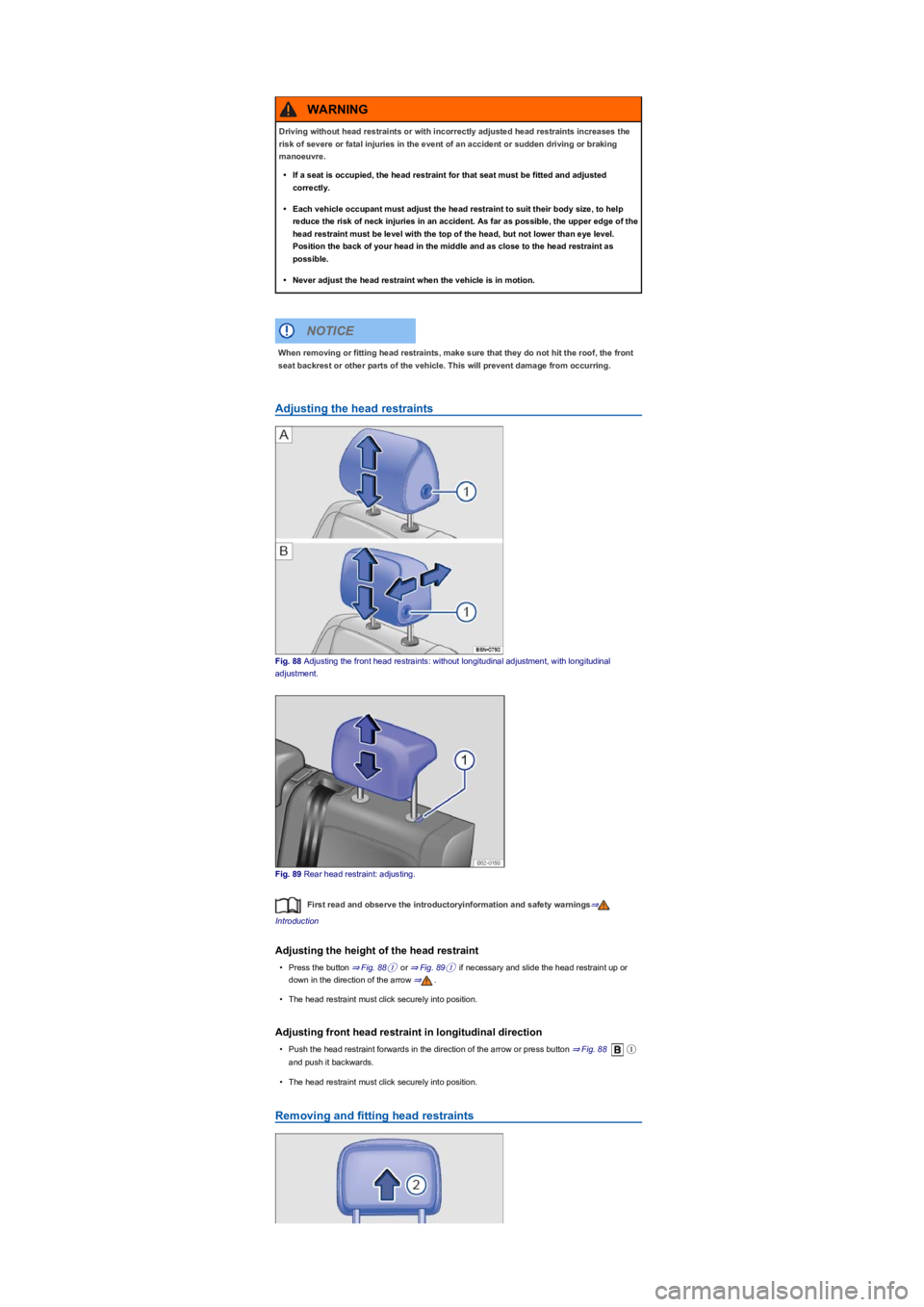
Fig. 88 Adjusting the front head restraints: without longitudinal adjustment, with longitudinal
adjustment.
Fig. 89 Rear head restraint: adjusting.
First read and observe the introductoryinformation and safety warnings⇒
Introduction
Adjusting the height of the head restraint
•Press the button ⇒ Fig. 88① or ⇒ Fig. 89① if necessary and slide the head restraint up or
down in the direction of the arrow ⇒.
•The head restraint must click securely into position.
Adjusting front head restraint in longitudinal direction
•Push the head restraint forwards in the direction of the arrow or press button ⇒ Fig. 88①
and push it backwards.
•The head restraint must click securely into position.
Removing and fitting head restraints
Driving without head restraints or with incorrectly adjusted head restraints increases the
risk of severe or fatal injuries in the event of an accident or sudden driving or braking
manoeuvre.
•If a seat is occupied, the head restraint for that seat must be fitted and adjusted
correctly.
•Each vehicle occupant must adjust the head restraint to suit their body size, to help
reduce the risk of neck injuries in an accident. As far as possible, the upper edge of the
head restraint must be level with the top of the head, but not lower than eye level.
Position the back of your head in the middle and as close to the head restraint as
possible.
•Never adjust the head restraint when the vehicle is in motion.
WARNING
When removing or fitting head restraints, make sure that they do not hit the roof, the front
seat backrest or other parts of the vehicle. This will prevent damage from occurring.
NOTICE
Page 97 of 341
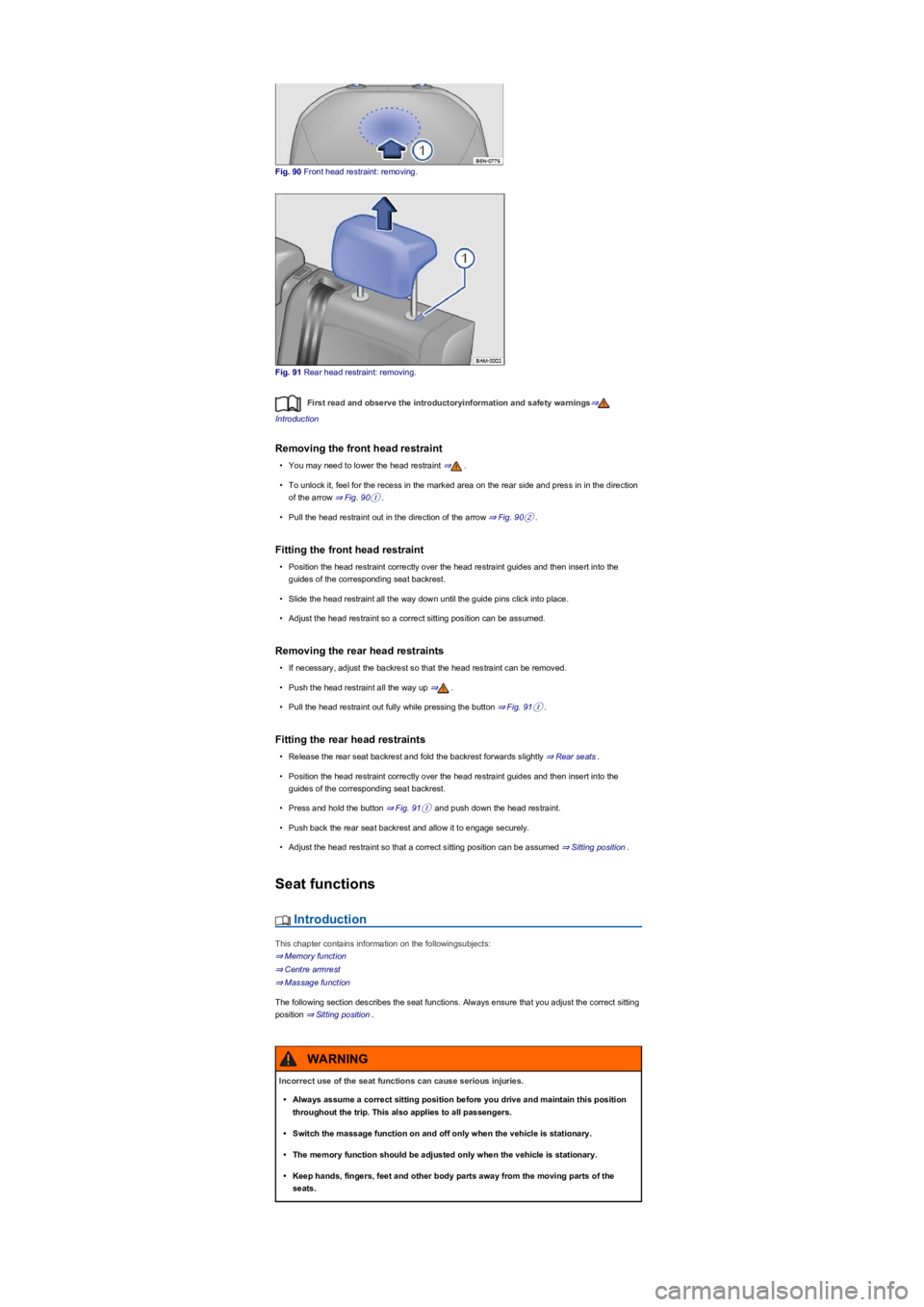
Fig. 90 Front head restraint: removing.
Fig. 91 Rear head restraint: removing.
First read and observe the introductoryinformation and safety warnings⇒
Introduction
Removing the front head restraint
•You may need to lower the head restraint ⇒.
•To unlock it, feel for the recess in the marked area on the rear side and press in in the direction
of the arrow ⇒ Fig. 90①.
•Pull the head restraint out in the direction of the arrow ⇒ Fig. 90②.
Fitting the front head restraint
•Position the head restraint correctly over the head restraint guides and then insert into the
guides of the corresponding seat backrest.
•Slide the head restraint all the way down until the guide pins click into place.
•Adjust the head restraint so a correct sitting position can be assumed.
Removing the rear head restraints
•If necessary, adjust the backrest so that the head restraint can be removed.
•Push the head restraint all the way up ⇒.
•Pull the head restraint out fully while pressing the button ⇒ Fig. 91①.
Fitting the rear head restraints
•Release the rear seat backrest and fold the backrest forwards slightly ⇒ Rear seats.
•Position the head restraint correctly over the head restraint guides and then insert into the
guides of the corresponding seat backrest.
•Press and hold the button ⇒ Fig. 91① and push down the head restraint.
•Push back the rear seat backrest and allow it to engage securely.
•Adjust the head restraint so that a correct sitting position can be assumed ⇒ Sitting position.
Seat functions
Introduction
This chapter contains information on the followingsubjects:
⇒ Memory function
⇒ Centre armrest
⇒ Massage function
The following section describes the seat functions. Always ensure that you adjust the correct sitting
position ⇒ Sitting position.
Incorrect use of the seat functions can cause serious injuries.
•Always assume a correct sitting position before you drive and maintain this position
throughout the trip. This also applies to all passengers.
•Switch the massage function on and off only when the vehicle is stationary.
•The memory function should be adjusted only when the vehicle is stationary.
•Keep hands, fingers, feet and other body parts away from the moving parts of the
seats.
WARNING
Page 99 of 341
•Vehicle stationary or moving no faster than 5 km/h: seat is moved. You can cancel the
movement at any time by touching the appropriate function button in the Infotainment system or
by pressing a button on the driver seat.
•Vehicle moving faster than 5 km/h: seat is not moved. All other setup configurations are
adopted.
If the driver door is opened later than approximately 10 minutes after unlocking the vehicle,
the driver seat and exterior mirrors are not automatically adjusted.
Some settings can be stored in the user accounts of the personalisation function and
therefore change automatically when the user account changes ⇒ Personalisation.
Only if the personalisation function is activated ⇒ Personalisation.
Centre armrest
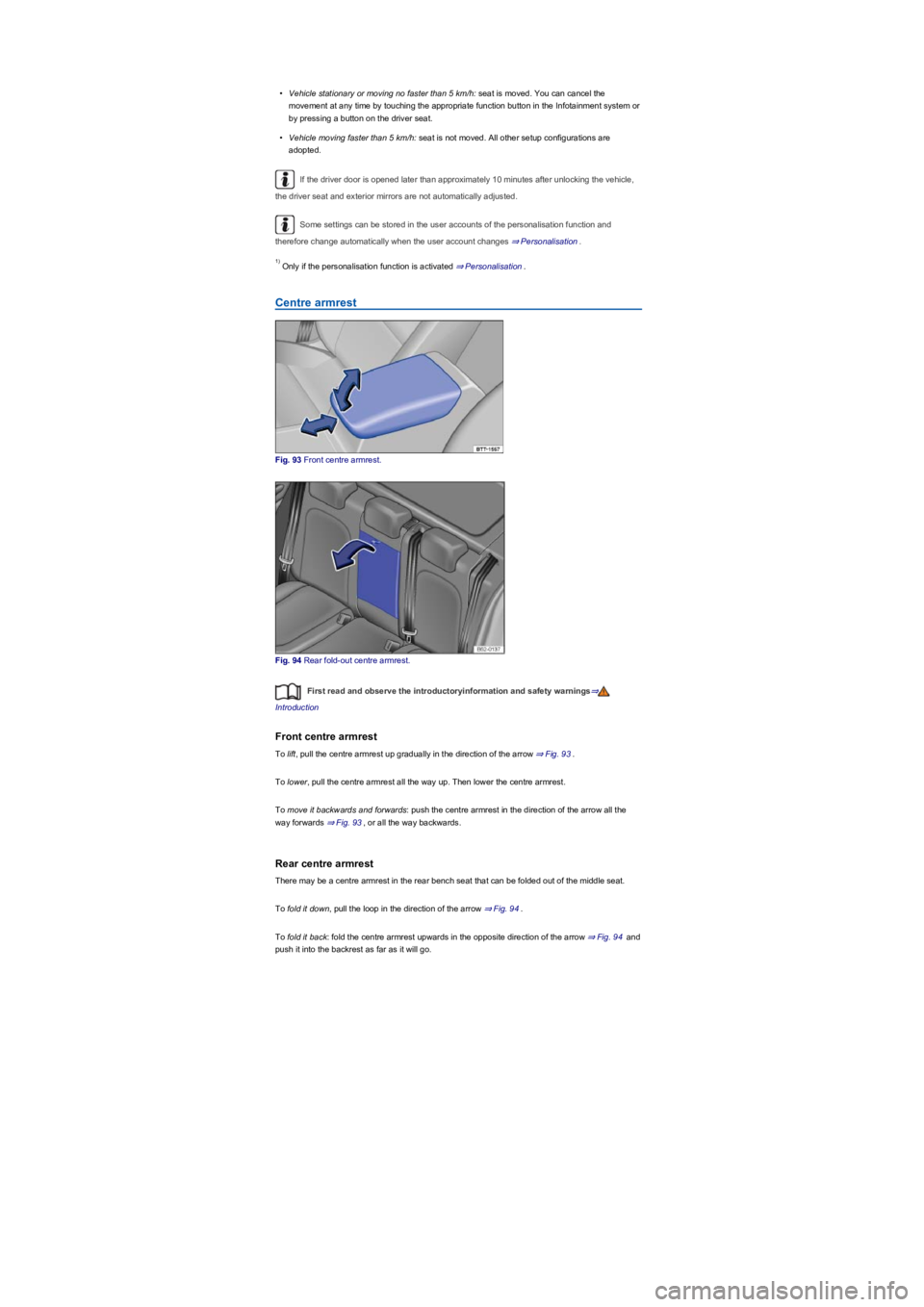
Fig. 93 Front centre armrest.
Fig. 94 Rear fold-out centre armrest.
First read and observe the introductoryinformation and safety warnings⇒
Introduction
Front centre armrest
To lift, pull the centre armrest up gradually in the direction of the arrow ⇒ Fig. 93.
To lower, pull the centre armrest all the way up. Then lower the centre armrest.
To move it backwards and forwards: push the centre armrest in the direction of the arrow all the
way forwards ⇒ Fig. 93, or all the way backwards.
Rear centre armrest
There may be a centre armrest in the rear bench seat that can be folded out of the middle seat.
To fold it down, pull the loop in the direction of the arrow ⇒ Fig. 94.
To fold it back: fold the centre armrest upwards in the opposite direction of the arrow ⇒ Fig. 94 and
push it into the backrest as far as it will go.
1)
Page 100 of 341
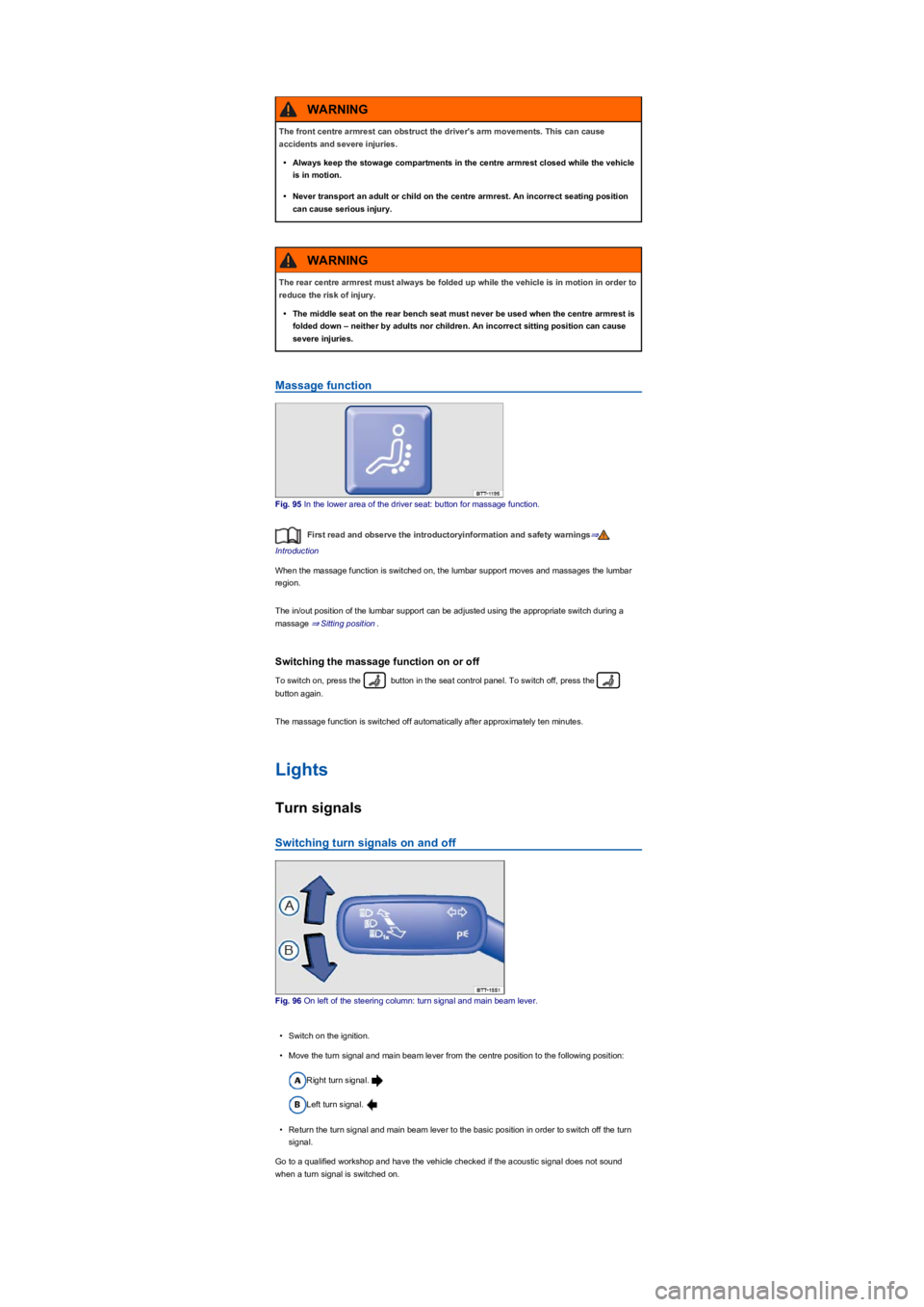
Massage function
Fig. 95 In the lower area of the driver seat: button for massage function.
First read and observe the introductoryinformation and safety warnings⇒
Introduction
When the massage function is switched on, the lumbar support moves and massages the lumbar
region.
The in/out position of the lumbar support can be adjusted using the appropriate switch during a
massage ⇒ Sitting position.
Switching the massage function on or off
To switch on, press the button in the seat control panel. To switch off, press the
button again.
The massage function is switched off automatically after approximately ten minutes.
Lights
Turn signals
Switching turn signals on and off
Fig. 96 On left of the steering column: turn signal and main beam lever.
•Switch on the ignition.
•Move the turn signal and main beam lever from the centre position to the following position:
Right turn signal.
Left turn signal.
•Return the turn signal and main beam lever to the basic position in order to switch off the turn
signal.
Go to a qualified workshop and have the vehicle checked if the acoustic signal does not sound
when a turn signal is switched on.
The front centre armrest can obstruct the driver's arm movements. This can cause
accidents and severe injuries.
•Always keep the stowage compartments in the centre armrest closed while the vehicle
is in motion.
•Never transport an adult or child on the centre armrest. An incorrect seating position
can cause serious injury.
WARNING
The rear centre armrest must always be folded up while the vehicle is in motion in order to
reduce the risk of injury.
•The middle seat on the rear bench seat must never be used when the centre armrest is
folded down – neither by adults nor children. An incorrect sitting position can cause
severe injuries.
WARNING
Page 105 of 341
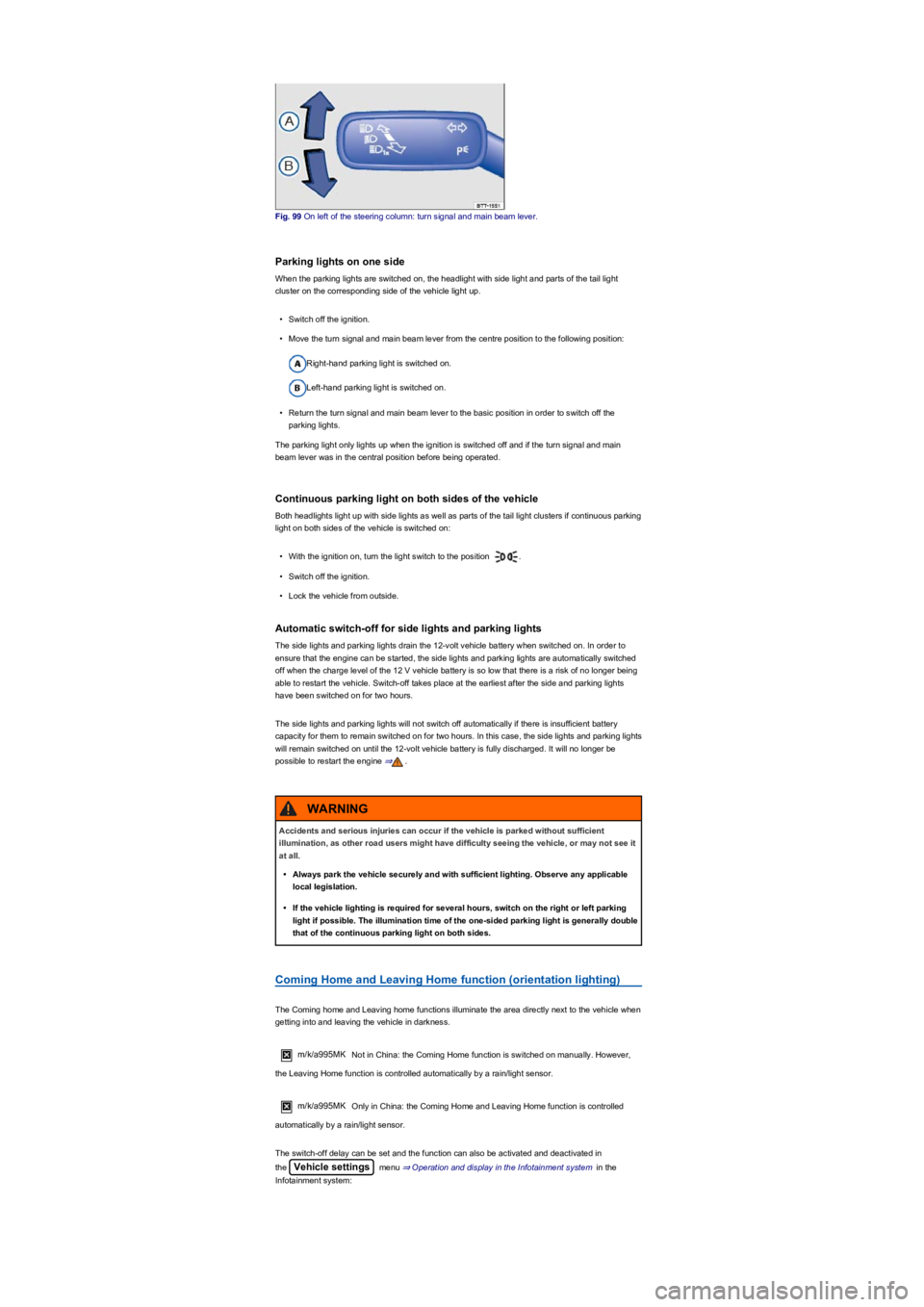
Fig. 99 On left of the steering column: turn signal and main beam lever.
Parking lights on one side
When the parking lights are switched on, the headlight with side light and parts of the tail light
cluster on the corresponding side of the vehicle light up.
•Switch off the ignition.
•Move the turn signal and main beam lever from the centre position to the following position:
Right-hand parking light is switched on.
Left-hand parking light is switched on.
•Return the turn signal and main beam lever to the basic position in order to switch off the
parking lights.
The parking light only lights up when the ignition is switched off and if the turn signal and main
beam lever was in the central position before being operated.
Continuous parking light on both sides of the vehicle
Both headlights light up with side lights as well as parts of the tail light clusters if continuous parking
light on both sides of the vehicle is switched on:
•With the ignition on, turn the light switch to the position .
•Switch off the ignition.
•Lock the vehicle from outside.
Automatic switch-off for side lights and parking lights
The side lights and parking lights drain the 12-volt vehicle battery when switched on. In order to
ensure that the engine can be started, the side lights and parking lights are automatically switched
off when the charge level of the 12 V vehicle battery is so low that there is a risk of no longer being
able to restart the vehicle. Switch-off takes place at the earliest after the side and parking lights
have been switched on for two hours.
The side lights and parking lights will not switch off automatically if there is insufficient battery
capacity for them to remain switched on for two hours. In this case, the side lights and parking lights
will remain switched on until the 12-volt vehicle battery is fully discharged. It will no longer be
possible to restart the engine ⇒.
Coming Home and Leaving Home function (orientation lighting)
The Coming home and Leaving home functions illuminate the area directly next to the vehicle when
getting into and leaving the vehicle in darkness.
m/k/a995MK Not in China: the Coming Home function is switched on manually. However,
the Leaving Home function is controlled automatically by a rain/light sensor.
m/k/a995MK Only in China: the Coming Home and Leaving Home function is controlled
automatically by a rain/light sensor.
The switch-off delay can be set and the function can also be activated and deactivated in
the Vehicle settings menu ⇒ Operation and display in the Infotainment system in the
Infotainment system:
Accidents and serious injuries can occur if the vehicle is parked without sufficient
illumination, as other road users might have difficulty seeing the vehicle, or may not see it
at all.
•Always park the vehicle securely and with sufficient lighting. Observe any applicable
local legislation.
•If the vehicle lighting is required for several hours, switch on the right or left parking
light if possible. The illumination time of the one-sided parking light is generally double
that of the continuous parking light on both sides.
WARNING
Page 109 of 341
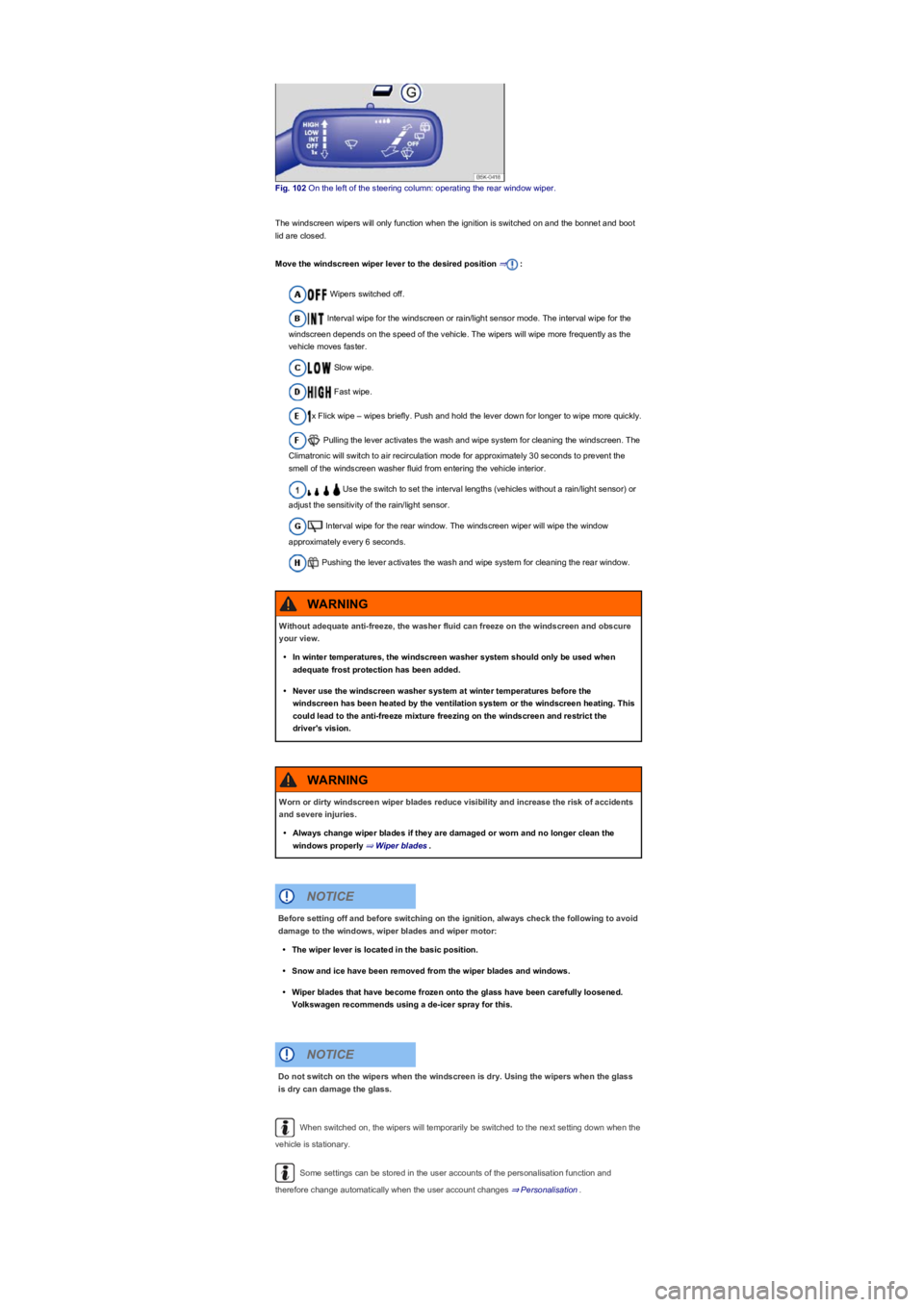
Fig. 102 On the left of the steering column: operating the rear window wiper.
The windscreen wipers will only function when the ignition is switched on and the bonnet and boot
lid are closed.
Move the windscreen wiper lever to the desired position ⇒:
Wipers switched off.
Interval wipe for the windscreen or rain/light sensor mode. The interval wipe for the
windscreen depends on the speed of the vehicle. The wipers will wipe more frequently as the
vehicle moves faster.
Slow wipe.
Fast wipe.
x Flick wipe – wipes briefly. Push and hold the lever down for longer to wipe more quickly.
Pulling the lever activates the wash and wipe system for cleaning the windscreen. The
Climatronic will switch to air recirculation mode for approximately 30 seconds to prevent the
smell of the windscreen washer fluid from entering the vehicle interior.
Use the switch to set the interval lengths (vehicles without a rain/light sensor) or
adjust the sensitivity of the rain/light sensor.
Interval wipe for the rear window. The windscreen wiper will wipe the window
approximately every 6 seconds.
Pushing the lever activates the wash and wipe system for cleaning the rear window.
When switched on, the wipers will temporarily be switched to the next setting down when the
vehicle is stationary.
Some settings can be stored in the user accounts of the personalisation function and
therefore change automatically when the user account changes ⇒ Personalisation.
Without adequate anti-freeze, the washer fluid can freeze on the windscreen and obscure
your view.
•In winter temperatures, the windscreen washer system should only be used when
adequate frost protection has been added.
•Never use the windscreen washer system at winter temperatures before the
windscreen has been heated by the ventilation system or the windscreen heating. This
could lead to the anti-freeze mixture freezing on the windscreen and restrict the
driver's vision.
WARNING
Worn or dirty windscreen wiper blades reduce visibility and increase the risk of accidents
and severe injuries.
•Always change wiper blades if they are damaged or worn and no longer clean the
windows properly ⇒ Wiper blades.
WARNING
Before setting off and before switching on the ignition, always check the following to avoid
damage to the windows, wiper blades and wiper motor:
•The wiper lever is located in the basic position.
•Snow and ice have been removed from the wiper blades and windows.
•Wiper blades that have become frozen onto the glass have been carefully loosened.
Volkswagen recommends using a de-icer spray for this.
NOTICE
Do not switch on the wipers when the windscreen is dry. Using the wipers when the glass
is dry can damage the glass.
NOTICE
Page 110 of 341
When parking the vehicle in cold weather, it may be helpful to leave the windscreen wipers in
the service position to make it easier to loosen the wiper blades ⇒ Wiper blades.
Wiper functions
Automatic activation of the rear window wiper
The rear window wiper is switched on automatically if the front windscreen wipers are switched on
and reverse gear is engaged. The automatic wipe function can be activated and deactivated in the
Infotainment system in the Vehicle settings menu ⇒ Operation and display in the
Infotainment system:
Heated washer jets
The heating defrosts frozen washer jets. The heating output is regulated automatically when the
ignition is switched on depending on the ambient temperature. Only the jets are heated and not the
hoses carrying the washer fluid.
Headlight washer system
The headlight washer system cleans the headlight lenses and only works when the vehicle lighting
is switched on.
Once the ignition has been switched on, the headlights will also be washed the first time the wash
and wipe system for the windscreen is used, and every tenth time thereafter. Hardened dirt, such
as insect remains, should be removed from the headlight lens at regular intervals.
In winter, you should remove any snow from the headlight washer system covers in the bumper
prior to use to keep the system in working order. Remove any ice with a de-icer spray.
Rain/light sensor
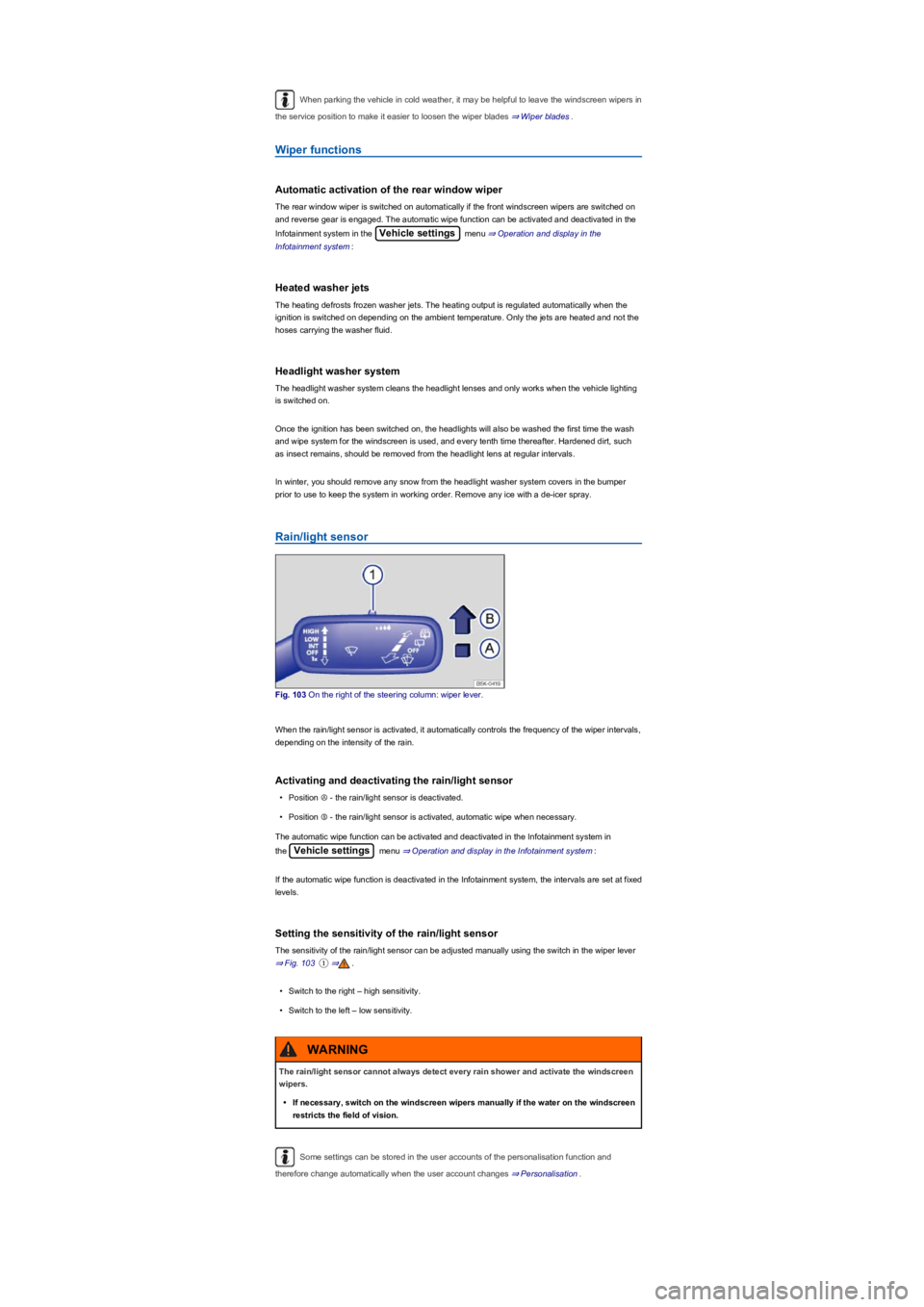
Fig. 103 On the right of the steering column: wiper lever.
When the rain/light sensor is activated, it automatically controls the frequency of the wiper intervals,
depending on the intensity of the rain.
Activating and deactivating the rain/light sensor
•Position Ⓐ - the rain/light sensor is deactivated.
•Position Ⓑ - the rain/light sensor is activated, automatic wipe when necessary.
The automatic wipe function can be activated and deactivated in the Infotainment system in
the Vehicle settings menu ⇒ Operation and display in the Infotainment system:
If the automatic wipe function is deactivated in the Infotainment system, the intervals are set at fixed
levels.
Setting the sensitivity of the rain/light sensor
The sensitivity of the rain/light sensor can be adjusted manually using the switch in the wiper lever
⇒ Fig. 103①⇒.
•Switch to the right – high sensitivity.
•Switch to the left – low sensitivity.
Some settings can be stored in the user accounts of the personalisation function and
therefore change automatically when the user account changes ⇒ Personalisation.
The rain/light sensor cannot always detect every rain shower and activate the windscreen
wipers.
•If necessary, switch on the windscreen wipers manually if the water on the windscreen
restricts the field of vision.
WARNING
Page 111 of 341
Troubleshooting
Washer fluid level too low. Fill up the washer fluid reservoir as soon as possible ⇒ Washer
fluid.Fault in the rain/light sensor. Switch the ignition on and off. If the indicator lamp still lights
up permanently after you switch the ignition back on, seek expert assistance.Fault in
windscreen wipers. Switch the ignition on and off. If the indicator lamp still lights up permanently
after you switch the ignition back on, seek expert assistance.
Changes in the response of the rain/light sensor
Possible causes for faults and misinterpretations relating to the sensitive surface of the rain/light
sensor ⇒ Vehicle overviews include:
•Damaged wiper blades: a film of water or smears caused by damaged wiper blades can
increase the time the wipers are switched on, can shorten the length of the intervals between
wipes or cause the wipers to run quickly and continuously.
•Insects: insects hitting the windscreen surface can cause the wipers to be activated.
•Salt deposits: in winter, salt deposits on the windscreen can cause the wipers to continue to
wipe the windscreen when it is almost dry.
•Soiling: dry dust, wax, windscreen coatings (lotus effect), or detergent deposits (from an
automatic car wash) can cause the rain/light sensor to become less sensitive and react too
slowly, or prevent it from reacting at all. Clean the sensitive surface of the rain/light sensor
⇒ Caring for and cleaning the vehicle exterior at regular intervals and inspect the wiper blades
for damage.
•Crack in the windscreen: a wipe cycle will be triggered if the rain/light sensor is on when the
windscreen is impacted by a stone. The rain/light sensor will then register the reduction in
sensitivity of the surfaces and adjust accordingly. The size of the crack can affect the way in
which the rain/light sensor activates the wipers.
We recommend that you use an alcohol-based glass cleaner to remove wax and polish.
The wipers will try to wipe away any obstacles that are on the windscreen. The wipers will
stop moving if the obstacle blocks their path. Remove the obstacle and switch the wipers back on
again.
Mirrors
Introduction
This chapter contains information on the followingsubjects:
⇒ Interior mirror
⇒ Exterior mirrors
You can use the exterior mirrors and the interior mirror to observe traffic behind you and adjust
driving style accordingly.
For safety reasons it is important that the driver positions the exterior and interior mirrors correctly
before starting a journey ⇒.
Looking in the exterior mirrors and the interior mirror does not allow the driver to see the entire side
and rear area of the vehicle. The area that cannot be seen is known as the blind spot. There may
be objects and other road users in the blind spot.
Adjusting the exterior and interior mirrors while driving may cause the driver to become
distracted. This can lead to accidents and serious injuries.
•Exterior and interior mirrors should only be adjusted when the vehicle is stationary.
•When parking, changing lane, or performing an overtaking or turning manoeuvre,
always pay careful attention to the area around the vehicle as objects and other road
users may be located in the blind spot.
•Always ensure that the mirrors are positioned correctly and that the rear view is not
restricted by ice, snow, condensation or any other objects.
WARNING
If you estimate the distance from traffic behind you incorrectly, you can cause accidents
and serious injuries.
•Curved mirrors (convex or aspheric) enlarge the field of vision and can make objects in
the mirror seem smaller and further away than they actually are.
•Using curved mirrors to estimate the distance from other vehicles behind you when
changing lanes can provide inaccurate results and can lead to accidents and severe
injuries.
•Whenever possible, use the interior mirror to check the exact distance between your
vehicle and following traffic or other objects.
•Ensure that you have a good view to the rear of the vehicle.
WARNING
Page 121 of 341
The seat cushions and backrests can be heated electrically when the ignition is switched on.
Operating the seat heating
•Press the button or in the control panel in order to switch the seat heating to
the highest setting.
•Press the or button until the desired setting is reached.
•To switch the seat heating off, press the button or repeatedly until the LEDs go
out.
If the ignition is turned on again within around 10 minutes, the most recent driver seat temperature
setting is automatically activated.
When is it not advisable to switch on the seat heating?
Do not switch on the seat heating if one of the following conditions applies:
•The seat is not occupied.
•The seat is fitted with a protective cover.
•A child seat is installed on the seat.
•The seat cushion is damp or wet.
•The temperature in the vehicle interior or the outside temperature is above +25°C (77°F).
To save fuel, only switch on the seat heating for as long as necessary.
Steering wheel heating
First read and observe the introductoryinformation and safety warnings⇒
Introduction
The steering wheel heating works when the engine is running.
Switching steering wheel heating on and off automatically via the
Infotainment system
•m/k/a995MKManual air conditioning system: press the button on the
Infotainment system and touch the Vehicle and function buttons.
•m/k/a995MKClimatronic: press the button on the control panel.
•Touch the function button to switch the steering wheel heating on and off.
Switching the steering wheel heating on or off together with the seat
heating (only in vehicles with Climatronic)
•Press the button on the control panel.
Anyone experiencing reduced sensitivity to pain or temperature due to medication,
paralysis or chronic illness (e.g. diabetes) could sustain burns on the back, buttocks and
legs when using the seat heating. These burns may take a long time to heal or may never
heal fully. Please consult a doctor if you have questions about your own state of health.
•Anyone experiencing reduced sensitivity to pain or temperature should never use the
seat heating.
WARNING
Wet upholstery can cause a fault in the seat heating and increase the risk of burns.
•Ensure that the seat cushion is dry before the seat heating is used.
•Do not sit on the seat when wearing damp or wet clothing.
•Do not set any damp or wet objects or items of clothing on the seat.
•Do not spill any liquids on the seat.
WARNING
•To avoid damaging the heating elements, do not kneel on the seat or apply sharp
pressure at a single point on the seat cushion and backrest.
•Liquids, sharp objects and insulating materials, such as a protective cover or child
seat, may damage the seat heating.
•If the system starts to produce an odour, switch off the seat heating immediately and
have it checked by a qualified workshop.
NOTICE