steering wheel VOLKSWAGEN TIGUAN 2017 Owner´s Manual
[x] Cancel search | Manufacturer: VOLKSWAGEN, Model Year: 2017, Model line: TIGUAN, Model: VOLKSWAGEN TIGUAN 2017Pages: 341, PDF Size: 9.14 MB
Page 200 of 341
•Changes have been made to the paintwork around the camera or the construction has been
modified, e.g. vehicle front end or the running gear.
Response to all circumstances
•Switch off the system temporarily.
•Check whether any of the causes described below apply.
•You can switch the system back on again once you have rectified the cause of the problem.
•If the system still fails to respond as expected, have the system checked by a qualified
workshop.
Park Assist
Introduction
This chapter contains information on the followingsubjects:
⇒ Prerequisites
⇒ Looking for a parking space
⇒ Driving into a parking space
⇒ Driving out of a parking space
⇒ Troubleshooting
Park Assist shows parking spaces
which are suitable for parking and
assists the driver when driving into and
out of parking spaces.
Park Assist is an extension of Park Distance Control ⇒ Park Distance Control.
Park Assist automatically steers the vehicle. The driver must control the accelerator, gear changes
and brake!
Driving into a parking space using Park Assist takes place in the following steps:
•Look for a parking space.
•Drive into a parking space.
System limits
The sensors may not always be able to detect objects such as trailer drawbars, thin rails, fences,
posts, trees and open or opening boot lids. This can result in damage to your vehicle.
In some cases, dirt and ice on the sensors could be registered as an obstacle.
Prerequisites
First read and observe the introductoryinformation and safety warnings⇒
Introduction
The following prerequisites must be met for driving into and out of parking spaces:
•The traction control system (TCS) must be switched on ⇒ Brake support systems.
•Distance: maintain a distance of 0.5 – -2.0 metres when driving past the parking space.
•The parking space must have at least the dimensions required by Park Assist.
•Speed when driving past the parking space (for parking spaces parallel to the road): not above
40 km/h (25 mph).
•Speed when driving past the parking space (for parking spaces perpendicular to the road): not
above 20 km/h (12 mph).
•Maximum speed: 7 km/h (4 mph). An automatic braking intervention can take place when
driving into a parking space.
The parking manoeuvre can be continued after the automatic brake intervention.
Fast steering wheel movements can cause serious injury.
•During the manoeuvring operation, do not reach for the steering wheel until prompted
to do so by the system.
•Exception: if a dangerous situation occurs, intervene and take over the steering.
WARNING
Park Assist uses parked vehicles, the kerb and other objects as guidance. Please ensure
that the wheels and tyres are not damaged when parking the vehicle. If necessary, stop the
parking procedure in good time to prevent damage to the vehicle.
NOTICE
Page 201 of 341
The automatic braking intervention takes place a maximum of once per parking manoeuvre. The
parking manoeuvre will be cancelled if a speed of approximately 7 km/h (4 mph) is exceeded again.
Automatic cancellation of driving in/out of a parking space
Park Assist cancels the manoeuvre for driving into or leaving a parking space if one of the following
situations occurs:
•The button is pressed.
•The driver intervenes using the steering wheel.
•The driver door is opened.
•The parking operation is not completed within around six minutes.
•There is a system fault.
•TCS is switched off or is taking corrective action.
Automatic braking intervention to minimise damage
In some countries, Park Assist can assist the driver with an automatic braking intervention in certain
situations ⇒.
Depending on the vehicle equipment and certain conditions, e.g. weather, load or inclination of the
vehicle, Park Assist can automatically brake the vehicle before an obstacle. Following this
intervention, the driver must depress the brake pedal. An automatic braking intervention is activated
to minimise damage and ends the parking manoeuvre.
Looking for a parking space
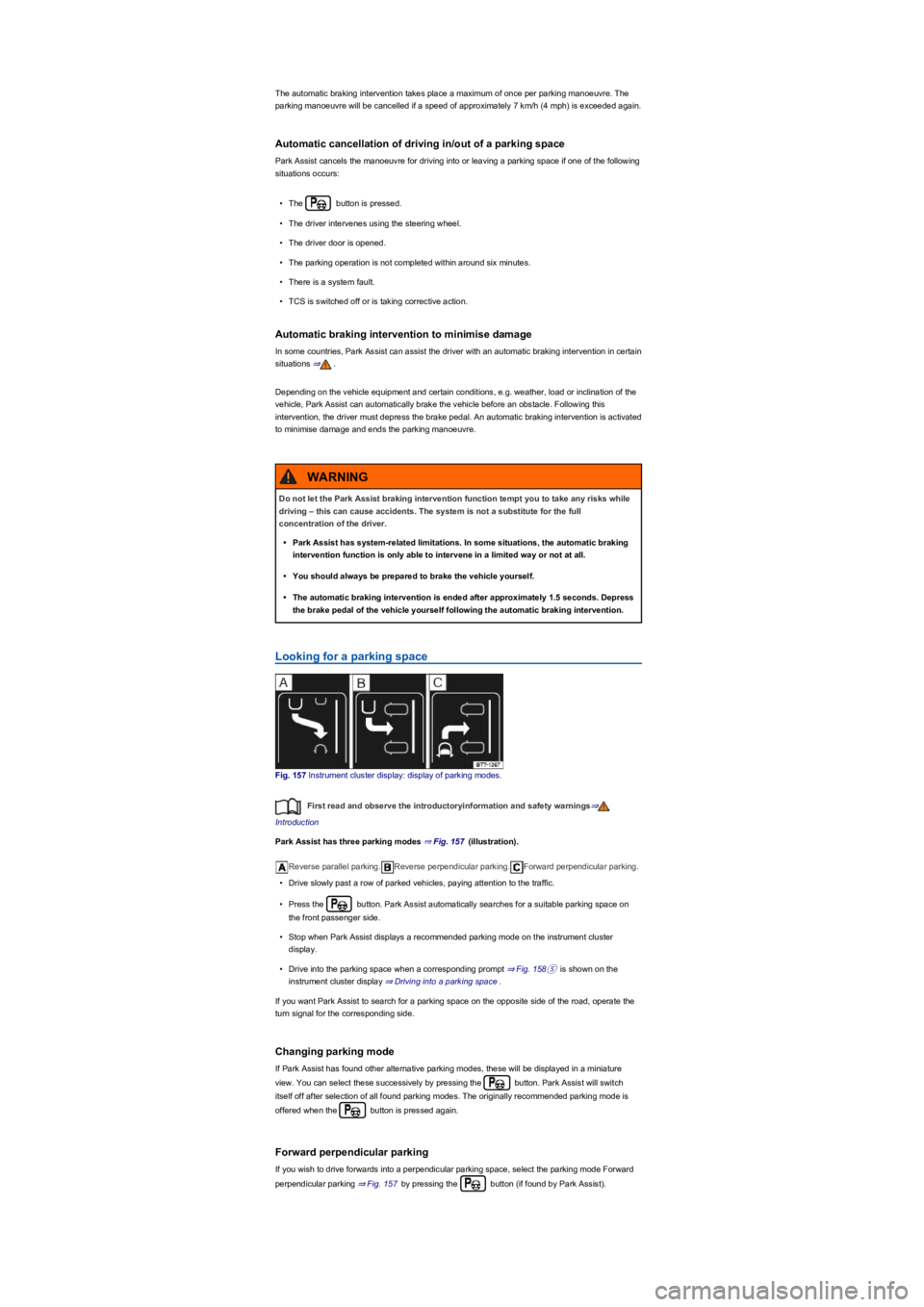
Fig. 157 Instrument cluster display: display of parking modes.
First read and observe the introductoryinformation and safety warnings⇒
Introduction
Park Assist has three parking modes ⇒ Fig. 157 (illustration).
Reverse parallel parking.Reverse perpendicular parking.Forward perpendicular parking.
•Drive slowly past a row of parked vehicles, paying attention to the traffic.
•Press the button. Park Assist automatically searches for a suitable parking space on
the front passenger side.
•Stop when Park Assist displays a recommended parking mode on the instrument cluster
display.
•Drive into the parking space when a corresponding prompt ⇒ Fig. 158⑤ is shown on the
instrument cluster display ⇒ Driving into a parking space.
If you want Park Assist to search for a parking space on the opposite side of the road, operate the
turn signal for the corresponding side.
Changing parking mode
If Park Assist has found other alternative parking modes, these will be displayed in a miniature
view. You can select these successively by pressing the button. Park Assist will switch
itself off after selection of all found parking modes. The originally recommended parking mode is
offered when the button is pressed again.
Forward perpendicular parking
If you wish to drive forwards into a perpendicular parking space, select the parking mode Forward
perpendicular parking ⇒ Fig. 157 by pressing the button (if found by Park Assist).
Do not let the Park Assist braking intervention function tempt you to take any risks while
driving – this can cause accidents. The system is not a substitute for the full
concentration of the driver.
•Park Assist has system-related limitations. In some situations, the automatic braking
intervention function is only able to intervene in a limited way or not at all.
•You should always be prepared to brake the vehicle yourself.
•The automatic braking intervention is ended after approximately 1.5 seconds. Depress
the brake pedal of the vehicle yourself following the automatic braking intervention.
WARNING
Page 202 of 341
Park Assist can be activated retroactively. If a suitable parking space was driven past before,
it is displayed.
Driving into a parking space
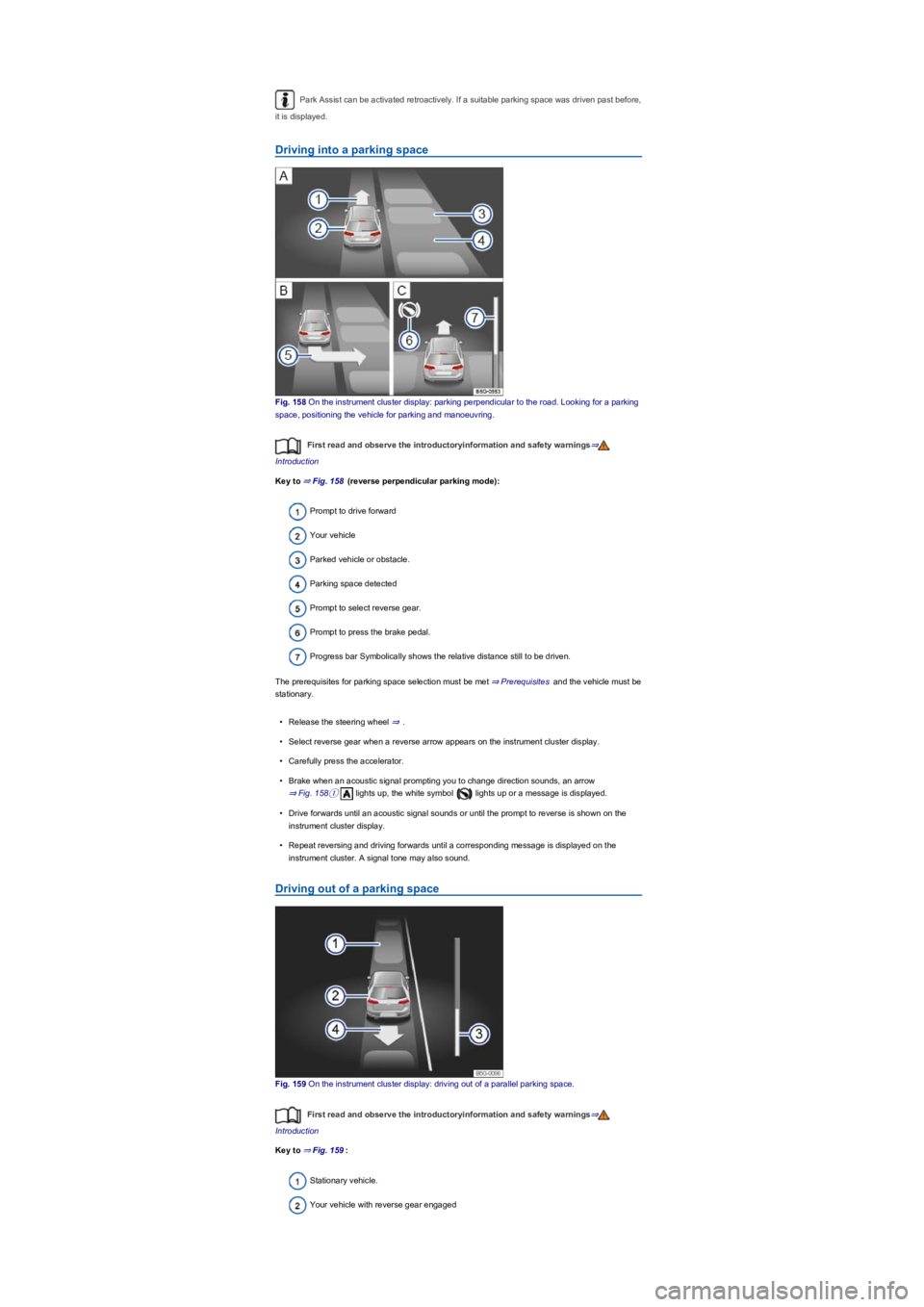
Fig. 158 On the instrument cluster display: parking perpendicular to the road. Looking for a parking
space, positioning the vehicle for parking and manoeuvring.
First read and observe the introductoryinformation and safety warnings⇒
Introduction
Key to ⇒ Fig. 158 (reverse perpendicular parking mode):
Prompt to drive forward
Your vehicle
Parked vehicle or obstacle.
Parking space detected
Prompt to select reverse gear.
Prompt to press the brake pedal.
Progress bar Symbolically shows the relative distance still to be driven.
The prerequisites for parking space selection must be met ⇒ Prerequisites and the vehicle must be
stationary.
•Release the steering wheel ⇒.
•Select reverse gear when a reverse arrow appears on the instrument cluster display.
•Carefully press the accelerator.
•Brake when an acoustic signal prompting you to change direction sounds, an arrow
⇒ Fig. 158① lights up, the white symbol lights up or a message is displayed.
•Drive forwards until an acoustic signal sounds or until the prompt to reverse is shown on the
instrument cluster display.
•Repeat reversing and driving forwards until a corresponding message is displayed on the
instrument cluster. A signal tone may also sound.
Driving out of a parking space
Fig. 159 On the instrument cluster display: driving out of a parallel parking space.
First read and observe the introductoryinformation and safety warnings⇒
Introduction
Key to ⇒ Fig. 159:
Stationary vehicle.
Your vehicle with reverse gear engaged
Page 203 of 341
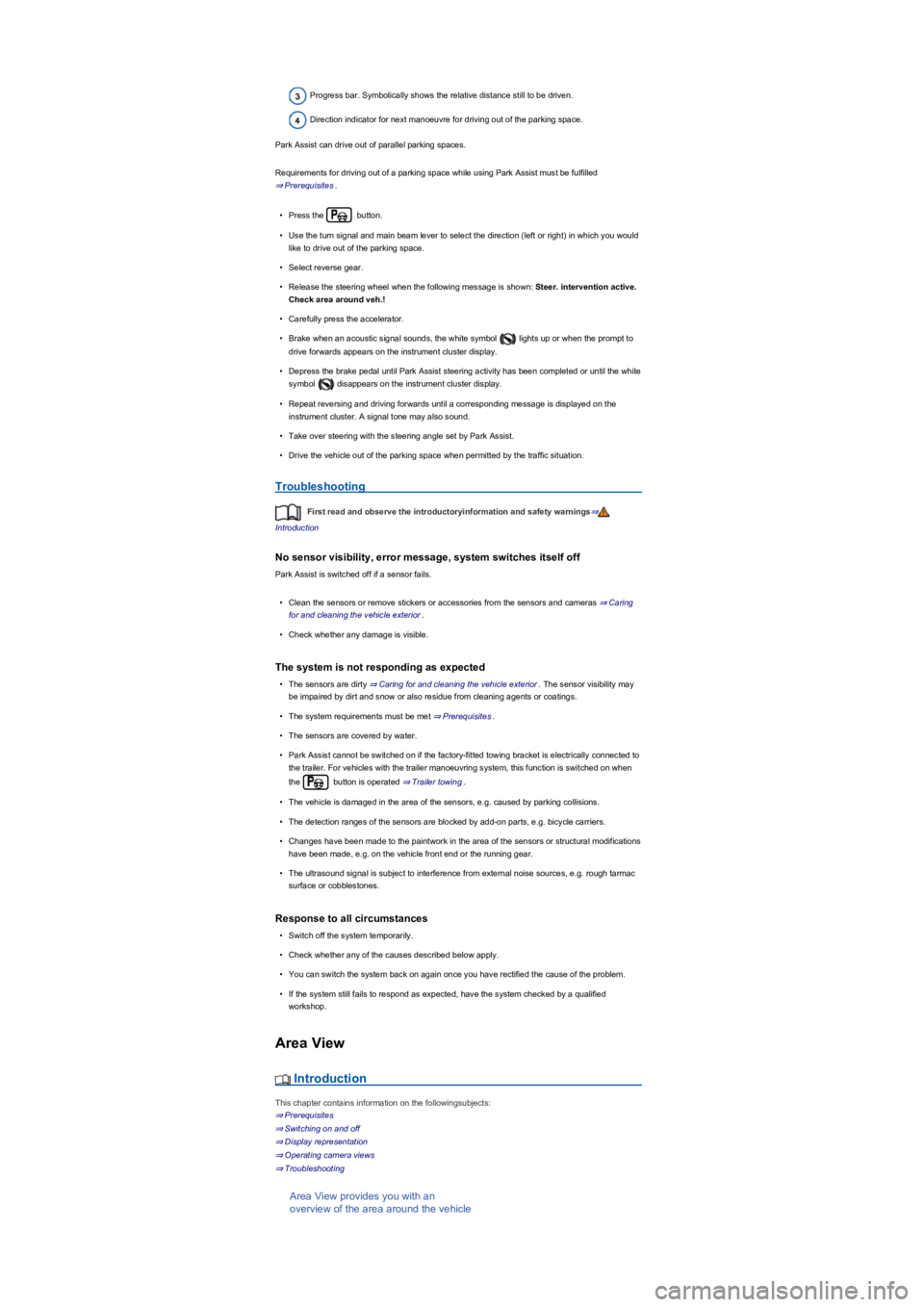
Progress bar. Symbolically shows the relative distance still to be driven.
Direction indicator for next manoeuvre for driving out of the parking space.
Park Assist can drive out of parallel parking spaces.
Requirements for driving out of a parking space while using Park Assist must be fulfilled
⇒ Prerequisites.
•Press the button.
•Use the turn signal and main beam lever to select the direction (left or right) in which you would
like to drive out of the parking space.
•Select reverse gear.
•Release the steering wheel when the following message is shown: Steer. intervention active.
Check area around veh.!
•Carefully press the accelerator.
•Brake when an acoustic signal sounds, the white symbol lights up or when the prompt to
drive forwards appears on the instrument cluster display.
•Depress the brake pedal until Park Assist steering activity has been completed or until the white
symbol disappears on the instrument cluster display.
•Repeat reversing and driving forwards until a corresponding message is displayed on the
instrument cluster. A signal tone may also sound.
•Take over steering with the steering angle set by Park Assist.
•Drive the vehicle out of the parking space when permitted by the traffic situation.
Troubleshooting
First read and observe the introductoryinformation and safety warnings⇒
Introduction
No sensor visibility, error message, system switches itself off
Park Assist is switched off if a sensor fails.
•Clean the sensors or remove stickers or accessories from the sensors and cameras ⇒ Caring
for and cleaning the vehicle exterior.
•Check whether any damage is visible.
The system is not responding as expected
•The sensors are dirty ⇒ Caring for and cleaning the vehicle exterior. The sensor visibility may
be impaired by dirt and snow or also residue from cleaning agents or coatings.
•The system requirements must be met ⇒ Prerequisites.
•The sensors are covered by water.
•Park Assist cannot be switched on if the factory-fitted towing bracket is electrically connected to
the trailer. For vehicles with the trailer manoeuvring system, this function is switched on when
the button is operated ⇒ Trailer towing.
•The vehicle is damaged in the area of the sensors, e.g. caused by parking collisions.
•The detection ranges of the sensors are blocked by add-on parts, e.g. bicycle carriers.
•Changes have been made to the paintwork in the area of the sensors or structural modifications
have been made, e.g. on the vehicle front end or the running gear.
•The ultrasound signal is subject to interference from external noise sources, e.g. rough tarmac
surface or cobblestones.
Response to all circumstances
•Switch off the system temporarily.
•Check whether any of the causes described below apply.
•You can switch the system back on again once you have rectified the cause of the problem.
•If the system still fails to respond as expected, have the system checked by a qualified
workshop.
Area View
Introduction
This chapter contains information on the followingsubjects:
⇒ Prerequisites
⇒ Switching on and off
⇒ Display representation
⇒ Operating camera views
⇒ Troubleshooting
Area View provides you with an
overview of the area around the vehicle
Page 207 of 341
Operation
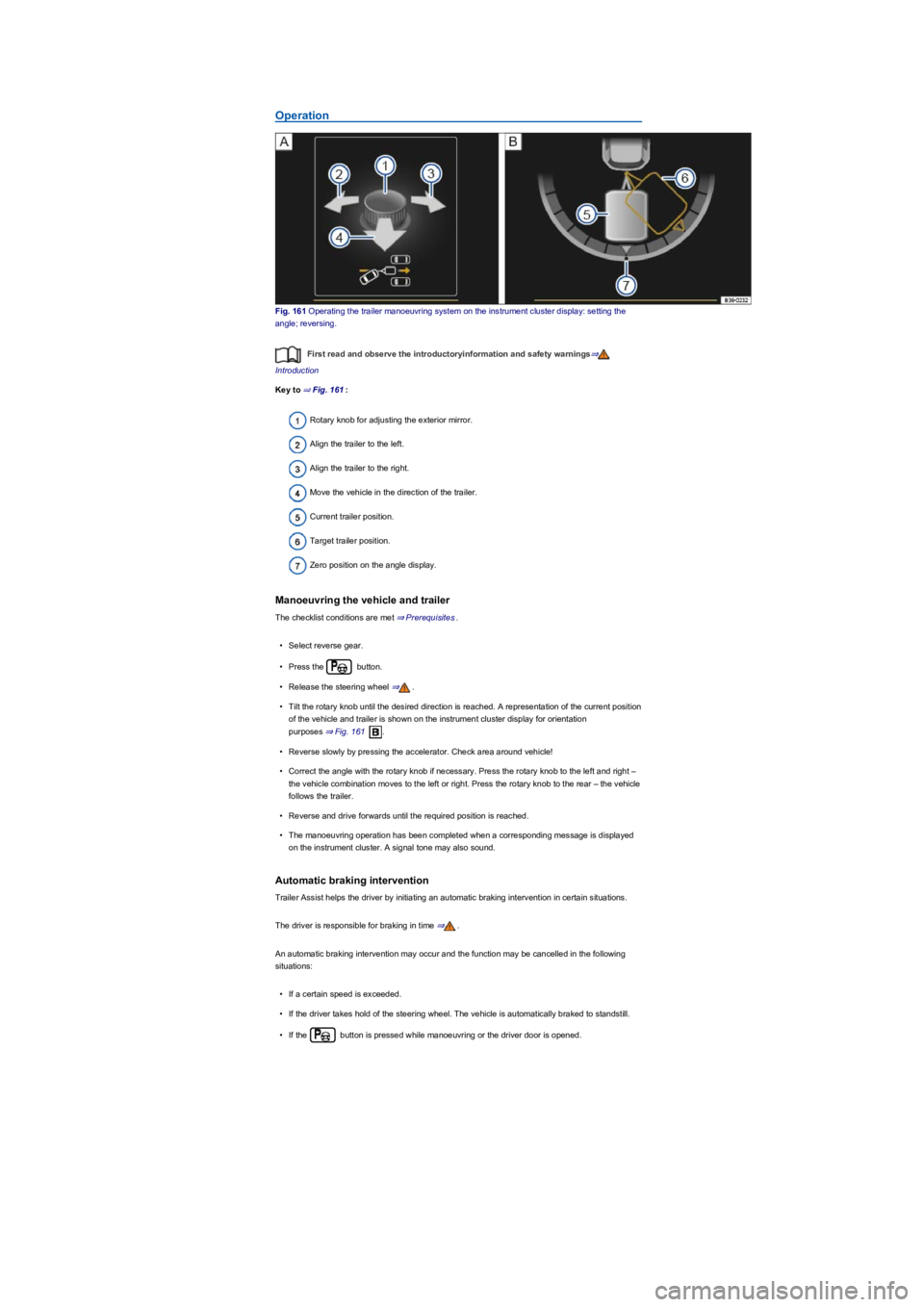
Fig. 161 Operating the trailer manoeuvring system on the instrument cluster display: setting the
angle; reversing.
First read and observe the introductoryinformation and safety warnings⇒
Introduction
Key to ⇒ Fig. 161:
Rotary knob for adjusting the exterior mirror.
Align the trailer to the left.
Align the trailer to the right.
Move the vehicle in the direction of the trailer.
Current trailer position.
Target trailer position.
Zero position on the angle display.
Manoeuvring the vehicle and trailer
The checklist conditions are met ⇒ Prerequisites.
•Select reverse gear.
•Press the button.
•Release the steering wheel ⇒.
•Tilt the rotary knob until the desired direction is reached. A representation of the current position
of the vehicle and trailer is shown on the instrument cluster display for orientation
purposes ⇒ Fig. 161.
•Reverse slowly by pressing the accelerator. Check area around vehicle!
•Correct the angle with the rotary knob if necessary. Press the rotary knob to the left and right –
the vehicle combination moves to the left or right. Press the rotary knob to the rear – the vehicle
follows the trailer.
•Reverse and drive forwards until the required position is reached.
•The manoeuvring operation has been completed when a corresponding message is displayed
on the instrument cluster. A signal tone may also sound.
Automatic braking intervention
Trailer Assist helps the driver by initiating an automatic braking intervention in certain situations.
The driver is responsible for braking in time ⇒.
An automatic braking intervention may occur and the function may be cancelled in the following
situations:
•If a certain speed is exceeded.
•If the driver takes hold of the steering wheel. The vehicle is automatically braked to standstill.
•If the button is pressed while manoeuvring or the driver door is opened.
Page 208 of 341
The exterior mirrors cannot be adjusted while Trailer Assist is active. The stored exterior
mirror setting can be activated ⇒ Mirrors.
Troubleshooting
First read and observe the introductoryinformation and safety warnings⇒
Introduction
No camera visibility, error message, system switches itself off
•Clean the camera or remove stickers or accessories from the camera ⇒ Caring for and cleaning
the vehicle exterior.
•Check whether any damage is visible.
The system is not responding as expected
•The camera is dirty ⇒ Caring for and cleaning the vehicle exterior. The camera visibility may be
impaired by dirt and snow or also residue from cleaning agents or coatings.
•The system requirements must be met ⇒ Prerequisites.
•The camera is covered by water.
•The vehicle is damaged in the area around the camera, e.g. caused by parking collisions.
•The detection range of the camera is blocked by add-on parts, e.g. bicycle carriers.
•Changes have been made to the paintwork around the camera or the construction has been
modified, e.g. vehicle front end or the running gear.
Response to all circumstances
•Switch off the system temporarily.
•Check whether any of the causes described below apply.
•You can switch the system back on again once you have rectified the cause of the problem.
•If the system still fails to respond as expected, have the system checked by a qualified
workshop.
Brake support systems
Information on brake support systems
The vehicle is fitted with brake support systems. The systems can support the driver in critical
driving or braking situations. Brake support systems cannot overcome the limits of physics and
cannot always keep the vehicle under control in every single critical driving or braking situation. The
driver is responsible for driving safety ⇒.
Driving with brake support systems
The brake support systems work when the engine is running. They do not need to be operated
separately.
The brake pedal may pulsate or noises may occur while the brake support systems are regulating.
Continue to apply the necessary amount of brake pressure. Apply the necessary pressure to the
brake pedal consistently. If necessary, steer the vehicle while the brake pedal is depressed.
Fast steering wheel movements can cause serious injury.
•During the manoeuvring operation, do not reach for the steering wheel until prompted
to do so by the system.
•Exception: if a dangerous situation occurs, intervene and take over the steering.
WARNING
Do not let the automatic braking intervention tempt you to take any risks while driving, as
this can cause accidents. The system is not a substitute for the full concentration of the
driver.
•Trailer Assist has system-related limitations. In some situations, the automatic braking
intervention function is only able to intervene in a limited way or not at all.
•You should always be prepared to brake the vehicle yourself.
•The automatic braking intervention is ended after approximately 1.5 seconds at vehicle
standstill. Depress the brake pedal of the vehicle yourself following the automatic
braking intervention.
WARNING
Page 209 of 341
Electronic Stability Control (ESC)
ESC helps to reduce the risk of skidding and to improve driving stability in certain driving situations
⇒.
Depending on the vehicle equipment, ESC can be switched to a Sport mode ⇒ Switching TCS on
and off.
When ESC is regulating, the yellow indicator lamp is shown on the instrument cluster display.
Traction control system (TCS)
The TCS reduces the drive output if wheelspin occurs and adapts the output to suit road surface
conditions. The TCS makes it easier to pull away, accelerate and drive up hills.
Depending on the vehicle equipment, the TCS can be switched off in exceptional circumstances
⇒ Switching TCS on and off.
When the TCS is regulating, the yellow indicator lamp is shown on the instrument cluster
display.
Anti-lock brake system
The anti-lock brake system can prevent the wheels from locking when the brakes are applied up
until the point where the vehicle is nearly stationary and assists the driver in steering the vehicle
and keeping it under control.
Brake assist system
The brake assist system can help to reduce the stopping distance. The brake assist system
reinforces brake pressure when the driver depresses the brake pedal quickly in an emergency
situation.
Do not reduce the pressure on the brake pedal when the brake assist system is regulating. If you
reduce the pressure on the brake pedal, the brake assist system will switch off the brake servo.
Electronic differential lock (EDL and XDS)
EDL brakes the wheel that has lost traction and distributes the driving force to the other drive
wheels.
The EDL switches off automatically under unusually heavy loads to prevent the disc brake from
overheating. The EDL switches back on again automatically as soon as the brake has cooled down.
XDS applies pressure to the brake of the wheel on the inside of the bend. This will improve traction,
helping the vehicle to remain in the required lane longer.
Automatic Post-Collision Braking System
In the event of an accident, the Automatic Post-Collision Braking System can help the driver to
reduce the risk of skidding, and the danger of secondary collisions, through automatic braking.
The Automatic Post-Collision Braking System functions only in front, side and rear collisions when
the airbag control unit detects a corresponding trigger threshold during the accident.
The ESC brakes the vehicle automatically, provided that the hydraulic braking system, the ESC and
the electrical system are undamaged in the accident and remain functional.
The following actions override automatic braking in the event of an accident:
•When the driver depresses the accelerator. No automatic braking occurs.
•When the brake pressure transmitted through the depressed brake pedal is greater than the
brake pressure provided by the system. The vehicle is braked manually.
Page 268 of 341
Notes on tow-starting and towing
First read and observe the introductoryinformation and safety warnings⇒
Introduction
Tow rope, tow bar
It is easier and safer to tow a vehicle with a tow bar. Only use a tow rope if you do not have a tow
bar.
The tow rope should be slightly elastic to reduce the strain on both vehicles. It is advisable to use a
tow rope made of synthetic fibre or similarly elastic material.
Only attach the tow rope or tow bar to the specially provided towing eyes or to the towing bracket.
Vehicles with a factory-fitted towing bracket must only use tow bars that are specially designed
to fit a ball head ⇒ Trailer towing.
Tow-starting
Vehicles should not be tow-started wherever possible. Instead have the vehicle jump-started
⇒ Jump starting or collected by a recovery vehicle.
However, if the vehicle still has to be tow-started:
•Engage second or third gear.
•Keep the clutch pressed down.
•Switch on the ignition and the hazard warning lights.
•Once both vehicles are in motion, release the clutch.
•As soon as the engine starts, press the clutch and put the gear into neutral. This helps to
prevent driving into the towing vehicle.
When should your vehicle not be towed?
•The vehicle gearbox is damaged or does not contain any lubricant.
•The 12-volt vehicle battery is discharged. The steering system is still locked and the electronic
parking brake and electronic steering column lock, if applied, cannot be released.
•The distance to be towed is further than 50 km.
Never tow a vehicle that has no power supply.
•Never remove the vehicle key from the ignition or switch off the ignition using the
starter button during towing. This could cause the mechanical steering column lock
(steering lock) or the electronic steering column lock to engage suddenly. You will no
longer be able to steer the vehicle. This can lead to a loss of control of the vehicle,
accidents and serious injuries.
•If the power supply to the towed vehicle is disconnected, stop towing immediately and
seek expert assistance.
WARNING
If a vehicle is being towed, the vehicle handling and braking effect will change
significantly. Please note the following in order to reduce the risk of an accident or serious
injuries:
•Notes for the driver of the towed vehicle:
- You will need to depress the brake pedal more vigorously than normal as the
brake servo is not working. Always be careful not to drive into the vehicle that is
pulling your vehicle.
- You will need to turn the steering wheel more vigorously as the power-assisted
steering function is not working.
•Notes for the driver of the towing vehicle
- Accelerate carefully and gently.
- Avoid sudden braking and driving manoeuvres.
- Brake earlier than normal by pressing lightly on the brake pedal.
WARNING
•Remove and install the cover and the towing eye carefully so as to avoid damage to the
vehicle, e.g. the paintwork.
•Unburnt fuel can enter the catalytic converter and damage it while the vehicle is being
towed.
NOTICE
Page 269 of 341
•The steering function or the operating clearance of the wheels cannot be ensured after an
accident.
If your own vehicle has to be towed:
•Switch on the ignition.
•Select the neutral position or move the selector lever to N⇒ DSG dual clutch gearbox.
•Do not allow the vehicle to be towed at speeds faster than 50 km/h (30 mph).
•Do not allow the vehicle to be towed further than 50 km.
•Vehicles with a DSG dual clutch gearbox may only be towed by the breakdown truck with the
front wheels raised.
Towing vehicles with four-wheel drive (4MOTION)
Vehicles with four-wheel drive (4MOTION) may be towed with a tow bar or tow rope. If the vehicle
is towed with the rear or front axle raised, the engine must be switched off otherwise the drive train
could be damaged.
Please comply with the following when towing another vehicle:
•Comply with legal regulations.
•Comply with the information on towing contained in the owner's manual for the other vehicle.
The vehicle can only be towed when the electronic parking brake is switched off and, if
applicable, when the electronic steering column lock is released. If the power supply fails or if there
are faults in the electrical system, you may need to use jump leads to start the engine to release the
electronic parking brake and the electronic steering column lock.
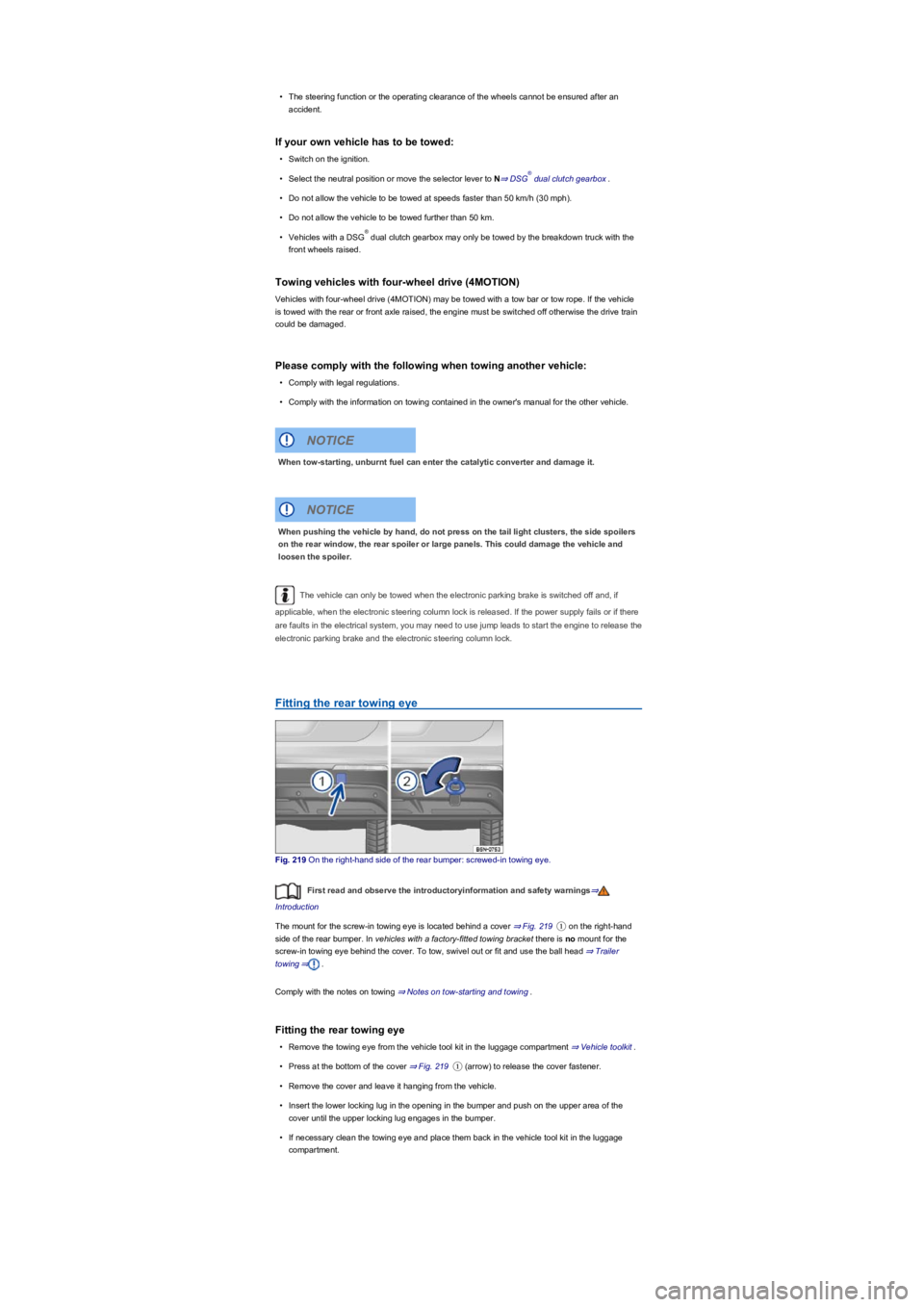
Fitting the rear towing eye
Fig. 219 On the right-hand side of the rear bumper: screwed-in towing eye.
First read and observe the introductoryinformation and safety warnings⇒
Introduction
The mount for the screw-in towing eye is located behind a cover ⇒ Fig. 219① on the right-hand
side of the rear bumper. In vehicles with a factory-fitted towing bracket there is no mount for the
screw-in towing eye behind the cover. To tow, swivel out or fit and use the ball head ⇒ Trailer
towing⇒.
Comply with the notes on towing ⇒ Notes on tow-starting and towing.
Fitting the rear towing eye
•Remove the towing eye from the vehicle tool kit in the luggage compartment ⇒ Vehicle toolkit.
•Press at the bottom of the cover ⇒ Fig. 219① (arrow) to release the cover fastener.
•Remove the cover and leave it hanging from the vehicle.
•Insert the lower locking lug in the opening in the bumper and push on the upper area of the
cover until the upper locking lug engages in the bumper.
•If necessary clean the towing eye and place them back in the vehicle tool kit in the luggage
compartment.
®
®
When tow-starting, unburnt fuel can enter the catalytic converter and damage it.
NOTICE
When pushing the vehicle by hand, do not press on the tail light clusters, the side spoilers
on the rear window, the rear spoiler or large panels. This could damage the vehicle and
loosen the spoiler.
NOTICE
Page 271 of 341
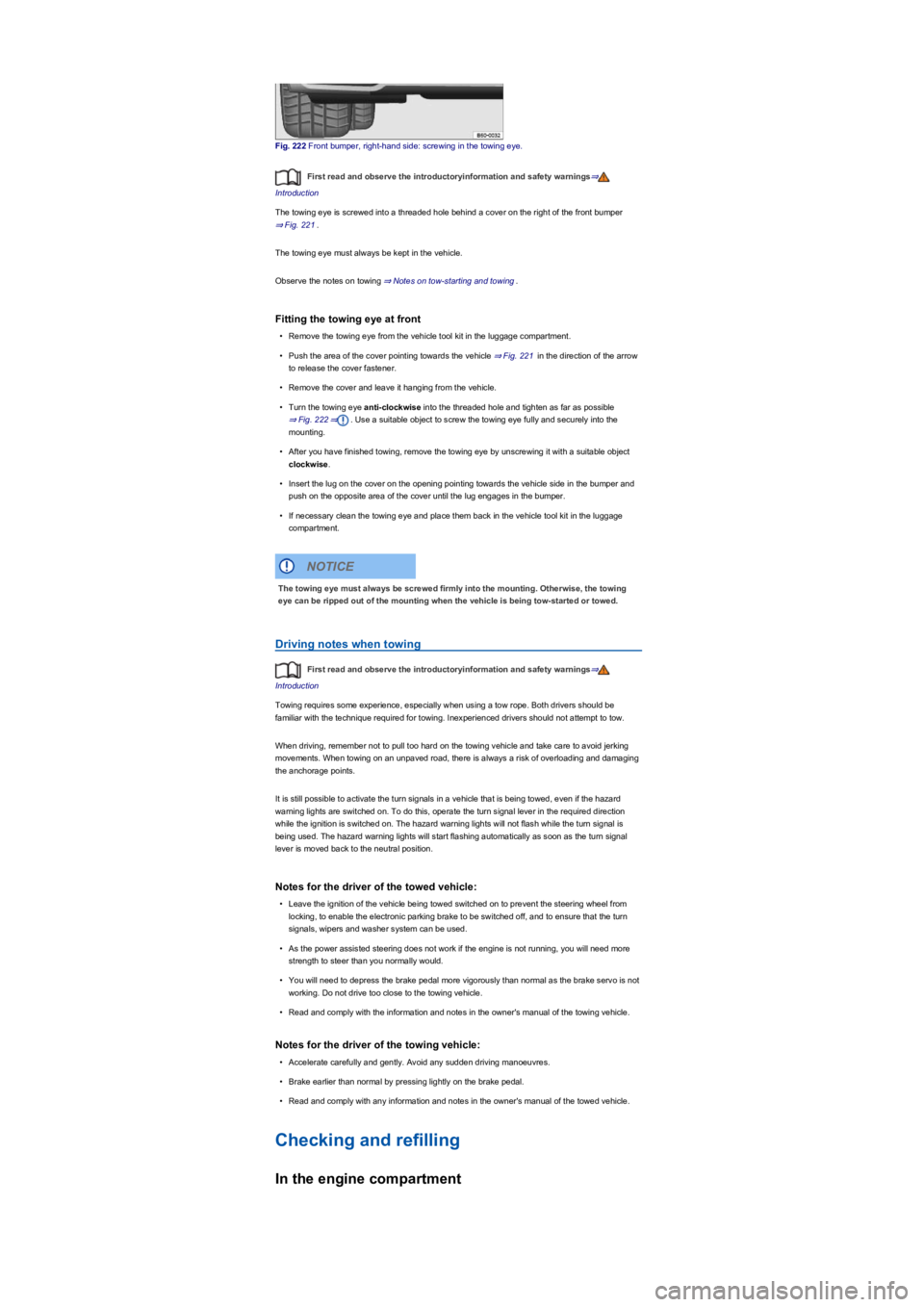
Fig. 222 Front bumper, right-hand side: screwing in the towing eye.
First read and observe the introductoryinformation and safety warnings⇒
Introduction
The towing eye is screwed into a threaded hole behind a cover on the right of the front bumper
⇒ Fig. 221.
The towing eye must always be kept in the vehicle.
Observe the notes on towing ⇒ Notes on tow-starting and towing.
Fitting the towing eye at front
•Remove the towing eye from the vehicle tool kit in the luggage compartment.
•Push the area of the cover pointing towards the vehicle ⇒ Fig. 221 in the direction of the arrow
to release the cover fastener.
•Remove the cover and leave it hanging from the vehicle.
•Turn the towing eye anti-clockwise into the threaded hole and tighten as far as possible
⇒ Fig. 222⇒. Use a suitable object to screw the towing eye fully and securely into the
mounting.
•After you have finished towing, remove the towing eye by unscrewing it with a suitable object
clockwise.
•Insert the lug on the cover on the opening pointing towards the vehicle side in the bumper and
push on the opposite area of the cover until the lug engages in the bumper.
•If necessary clean the towing eye and place them back in the vehicle tool kit in the luggage
compartment.
Driving notes when towing
First read and observe the introductoryinformation and safety warnings⇒
Introduction
Towing requires some experience, especially when using a tow rope. Both drivers should be
familiar with the technique required for towing. Inexperienced drivers should not attempt to tow.
When driving, remember not to pull too hard on the towing vehicle and take care to avoid jerking
movements. When towing on an unpaved road, there is always a risk of overloading and damaging
the anchorage points.
It is still possible to activate the turn signals in a vehicle that is being towed, even if the hazard
warning lights are switched on. To do this, operate the turn signal lever in the required direction
while the ignition is switched on. The hazard warning lights will not flash while the turn signal is
being used. The hazard warning lights will start flashing automatically as soon as the turn signal
lever is moved back to the neutral position.
Notes for the driver of the towed vehicle:
•Leave the ignition of the vehicle being towed switched on to prevent the steering wheel from
locking, to enable the electronic parking brake to be switched off, and to ensure that the turn
signals, wipers and washer system can be used.
•As the power assisted steering does not work if the engine is not running, you will need more
strength to steer than you normally would.
•You will need to depress the brake pedal more vigorously than normal as the brake servo is not
working. Do not drive too close to the towing vehicle.
•Read and comply with the information and notes in the owner's manual of the towing vehicle.
Notes for the driver of the towing vehicle:
•Accelerate carefully and gently. Avoid any sudden driving manoeuvres.
•Brake earlier than normal by pressing lightly on the brake pedal.
•Read and comply with any information and notes in the owner's manual of the towed vehicle.
Checking and refilling
In the engine compartment
The towing eye must always be screwed firmly into the mounting. Otherwise, the towing
eye can be ripped out of the mounting when the vehicle is being tow-started or towed.
NOTICE