phone VOLVO S90 2020 Quick Guide
[x] Cancel search | Manufacturer: VOLVO, Model Year: 2020, Model line: S90, Model: VOLVO S90 2020Pages: 643, PDF Size: 13.68 MB
Page 146 of 643
||
DISPLAYS AND VOICE CONTROL
144response is still not given, voice control will be automatically canceled. To speed up communication and skip prompts from the system, press the voice control but- ton
on the steering wheel keypad. This
will interrupt the system's response and you can say the next command.
Voice command examples
1. Tap .
2. Say "
Call [First name] [Last name]
[number category]", e.g. "Call Robyn
Smith cellular".
> The system will call the selected con- tact from the phone book. If the contact has several phone numbers (e.g. home,cell, work), the right category must alsobe given.
Commands/phrasesThe following commands can usually be usedin any situation:
"
Repeat" - repeats the most recent voice
command in the current dialog.
"
Cancel" - cancels the dialog. 20
"
Help" - initiates a help dialog. The sys-
tem responds with commands that can be used in the current situation, an instruc-tion or an example. Commands for specific functions, such asphone and audio, are described in the sectionsrelated to that function.
Numbers
Number commands can be given in different ways depending on the function to be con-trolled:
Phone numbers and zip codes
should be
given by stating each number individually,e.g. "zero, three, one, two, two, four, four,three" (03122443).
Addresses
can be given by stating each
number individually or in a group, e.g."two, two" or "twenty-two" (22). For Eng-lish and Dutch language settings, groupsof numbers can also be said in sequence,e.g. "twenty-two, twenty-two" (22 22).For English, double or triple digits can alsobe used, e.g. "double zero" (00). Numbersin the range 0-2300 can be used.
Frequencies
can be given as "ninety-eight
point eight" (98.8), "one hundred fourpoint two" or "hundred and four pointtwo" (104.2).
Speech rate and repeat mode
The speed at which the system speaks can be adjusted. With repeat mode on, the system will repeatwhat you have said. To change the speech rate or activate/deacti- vate repeat mode: 1.
Tap
Settings in the Top view.
2. Tap
SystemVoice Control and select
settings.
Repeat Voice Command
Speech Rate
Related information
Voice Control (p. 142)
Voice control for cellular phones (p. 145)
Voice control for radio and media (p. 145)
Climate control system voice commands (p. 198)
Voice control settings (p. 146)
20
Note that this only cancels the dialog when the system is not speaking. To do this, press and hold until you hear two beeps.
Page 147 of 643
DISPLAYS AND VOICE CONTROL
}}
* Option/accessory.145
Voice control for cellular phones 21
Call a contact in the phone book, have a text message read aloud or dictate short mes-sages using voice commands to a Bluetooth-connected phone.
To access a contact in the phone book, the voice command must contain the contactinformation entered in the phone book. If a contact, e.g.
Robyn Smith, has several phone
numbers listed in the phone book, a number category such as
home or cellular can also be
specified, i.e. "Call Robyn Smith cellular".
Tap
and say one of the following com-
mands: "
Call [contact]" - call the selected con-
tact from the phone book.
"
Call [phone number]" - call a phone
number.
"
Recent calls" - display the list of recent
calls.
"
Read message" - read a text message
aloud. If there are several messages, select the message to read aloud.
"
Message to [contact]" – the user is
prompted to dictate a short message. The message will then be read aloud and theuser can choose to send or re-dictate themessage. The vehicle must be connectedto the Internet to access this function.
Related information
Voice Control (p. 142)
Use voice recognition (p. 143)
Voice control for radio and media (p. 145)
Climate control system voice commands(p. 198)
Voice control settings (p. 146)
Internet-connected vehicle
* (p. 480)Voice control for radio and media 22
Voice commands for the radio and media players are shown below.
Tap and say one of the following com-
mands: "
Media" - initiates a dialog for media and
radio and displays examples of com- mands.
"
Play [artist]" - plays music by the
selected artist.
"
Play [song title]" - plays the selected
song.
"
Play [song title] from [album]" - plays
the selected song from the selected album.
"
Play [radio station]" - starts the
selected radio station.
"
Tune to [frequency]" - tunes to the
selected radio frequency in the currently active waveband. If no radio source isactive, the FM band will be started asdefault.
"
Tune to [frequency] [waveband]" -
tunes to the selected radio frequency on the selected waveband.
"
Radio" - starts FM radio.
"
Radio FM" - starts FM radio.
21
Certain markets only.
Page 148 of 643
||
DISPLAYS AND VOICE CONTROL
* Option/accessory.
146
"
Radio AM" - starts AM radio.
"
SiriusXM" - starts SiriusXM radio
*
"
CD" - starts playback from CD
*.
"
USB" - starts playback from USB.
"
iPod" - starts playback from iPod.
"
Bluetooth" - starts playback from a
Bluetooth-connected media source.
"
Similar music" - plays music from a
USB-connected device with music similar to that currently playing.
Related information
Voice Control (p. 142)
Use voice recognition (p. 143)
Voice control for cellular phones (p. 145)
Climate control system voice commands(p. 198)
Voice control settings (p. 146)
Voice control settings 23
Settings for the voice control system are made here.
SettingsSystemVoice Control
Settings can be personalized in the following areas:
Repeat Voice Command
Gender
Speech Rate
Sound settingsSelect sound settings under:
SettingsSoundSystem VolumesVoice Control
Language settingsThe voice control system is not available for all languages. The languages available for voice commands are indicated by the
icon in
the list of languages. Changing the language here will also change the language in the menus, messages andhelp texts.
SettingsSystemSystem Languages
and Units
System Language
Related information
Voice Control (p. 142)
Use voice recognition (p. 143)
Voice control for cellular phones (p. 145)
Climate control system voice commands (p. 198)
Voice control for radio and media (p. 145)
Sound settings (p. 434)
Changing system language (p. 129)
22
Certain markets only.
23 Certain markets only.
Page 194 of 643

SEATS AND STEERING WHEEL
* Option/accessory.
192
Adjusting the passenger seat from the rear seat
The front passenger seat can be adjusted using the control in the right-hand rear door.
Using the functions
Control right-hand rear door.
Move the front passenger seat forward.
Move the front passenger seat backrest rearward.
Move the front passenger seat rearward.
Move the front passenger seat backrest forward.
Steering wheel controls and horn The steering wheel has a horn and controls for e.g. driver support systems and voice con-trol.
Steering wheel keypads and paddles *.
Driver support system controls 5
.
Paddle * for manually shifting gears (auto-
matic transmission).
Controls for voice commands, accessing menus and messages, and handlingphone calls.
Horn
The horn is located in the center of the steering wheel.
Related information
Adjusting the steering wheel (p. 193)
5
Cruise Control, Adaptive Cruise Control *, Distance Alert * and Pilot Assist.
Page 226 of 643

CLIMATE CONTROL
* Option/accessory.
224
Preconditioning *
Preconditioning is a climate function that, if possible, attempts to achieve a comfortabletemperature in the passenger compartmentbefore driving.
Preconditioning can be started immediately or started at a preset time using a timer. In warm weather, the ventilation system cools the passenger compartment by blowing air infrom outside. The function cannot heat thepassenger compartment.
NOTE
During preconditioning of the passenger compartment, the vehicle works to reach acomfortable temperature and not the tem-perature set in the climate system.
Related information
Parking climate
* (p. 223)
Starting and stopping preconditioning
*
(p. 224)
Preconditioning timer
* (p. 225)
Starting and stopping preconditioning *
Preconditioning ventilates the passenger compartment, if possible, before driving. Thefunction can be started in the center displayor from a cellular phone.
Starting and stopping from the vehicle
1. Tap the symbol in the center of the climate bar to open Climate view in the center dis- play.
2. Select the
Parking climate tab.
3. Tap
Preconditioning.
> Preconditioning starts/stops and the button lights up/goes out.
NOTE
The vehicle doors and windows should be closed during preconditioning of the pas-senger compartment.
Starting from app *A device with the Volvo On Call * app can be
used to start preconditioning or check set- tings. Preconditioning ventilates the passen- ger compartment by blowing in air from out-side. The passenger compartment can also be pre- conditioned using the Engine Remote Start (ERS)
6
function using the Volvo On Call * app.
Related information
Parking climate
* (p. 223)
Preconditioning
* (p. 224)
Preconditioning timer
* (p. 225)
6
Certain markets only.
Page 237 of 643

KEY, LOCKS AND ALARM
}}
* Option/accessory.235
NOTE
Be aware of the risk of locking the remote key in the vehicle. If the remote key or key tag is left in the vehicle, it will be deactivated whenthe vehicle is locked and the alarm setusing another valid key. The key will bereactivated when the vehicle isunlocked.
If the remote key or Red Key is left inthe vehicle, it will be deactivated evenif the vehicle is locked using Volvo OnCall, and will be reactivated when thevehicle is unlocked using Volvo On Callor another valid key.
Button-less key (Key Tag)
*
The button-less key4
provided with the keyless
locking and unlocking function works in the same way as the regular remote key for key-less start, locking and unlocking. The key iswaterproof up to a depth of approx. 10 meters(30 feet) for up to 60 minutes. It does nothave a detachable key blade and its batterycannot be replaced.
Red Key - restricted remote key *A Red Key is a key that makes it possible to set restrictions for some of the vehicle's func- tions, e.g. maximum speed and maximum audio system volume. It helps vehicle ownersensure that the vehicle is being operatedresponsibly by other drivers.
InterferenceElectromagnetic fields or obstructing objectsmay interfere with the remote key's functionsfor keyless start and keyless locking and unlocking
*.
NOTE
Avoid storing the remote control key near metal objects or electronic devices, e.g.cell phones, tablets, laptops or chargers –preferably no closer than 10-15 cm(4-6 in.).
If you experience interference, use the remote key's detachable blade to unlock the vehicleand then place the remote key in the backupreader in the tunnel console cup holder to dis-arm the alarm and start the vehicle.
NOTE
When the remote control key is placed in the cup holder, make sure that no othervehicle keys, metal objects or electronicdevices (e.g. cell phones, tablets, laptopsor chargers) are found in the cup holder.Multiple vehicle keys close to each other inthe cup holder can disrupt their functional-ity.
WARNING
California Proposition 65 Operating, servicing and maintaining a pas- senger vehicle can expose you to chemi-cals including engine exhaust, carbon mon-oxide, phthalates, and lead, which areknown to the State of California to causecancer and birth defects or other reproduc-tive harm. To minimize exposure, avoidbreathing exhaust, do not idle the engineexcept as necessary, service your vehicle ina well ventilated area and wear gloves orwash your hands frequently when servicingyour vehicle. For more information go towww.P65Warnings.ca.gov/passenger-vehicle.
4
Also called sport key.
Page 381 of 643

STARTING AND DRIVING
}}
379
Location of the backup reader in the tunnel console.
NOTE
When the remote key is placed in the backup reader, make sure that no othervehicle keys, metal objects or electronicdevices (e.g. cellular phones, tablets, lap-tops or chargers) are in the backup reader.Multiple vehicle keys close to each other inthe backup reader can disrupt their func-tionality.
CAUTION
If the engine has not responded after 3 attempts – wait for 3 minutes before star-ting a new attempt. Starting capabilityincreases if the starter battery is given timeto recover.
WARNING
Never remove the remote control key from
the vehicle while driving or the vehicle is being towed.
WARNING
Always remove the remote key from the passenger compartment when youleave the vehicle and make sure theignition is in mode
0.
Always put the gear selector in
P and
apply the parking brake before leavingthe vehicle. Never leave the vehicleunsupervised while the engine is run-ning.
Always open the garage door fully andmake sure that ventilation is very goodbefore starting the engine in a garage.The exhaust fumes produced by thevehicle contain carbon monoxide,which is invisible and odorless but verytoxic.
CAUTION
When starting in cold weather, the automatic transmission may shift up atslightly higher engine speeds than nor-mal until the automatic transmissionfluid reaches normal operating tem-perature.
Do not race a cold engine immediatelyafter starting. This could prevent fluidsfrom properly lubricating vital compo-nents in the engine before it hasreached the proper operating tempera-ture.
The engine should be idling when thegear selector is moved. Never acceler-ate until the gear is fully engaged.Accelerating rapidly before a gear isproperly engaged could lead to harderwear of components.
To help prevent the transmission oilfrom overheating, select
P or N when
idling at a standstill for prolonged peri-ods of time.
Page 383 of 643
STARTING AND DRIVING
* Option/accessory.381
Ignition modes The vehicle's ignition can be put in various modes (levels) to make different functionsavailable.
To enable the use of a limited number of func- tions when the engine is not running, the igni-tion can be put in one of three different levels:0, I and II. These levels are referred to as "igni-
tion modes" in the Owner's Manual. The following table shows which functions are available in each ignition mode:
Mode Functions
0 The odometer, clock and tem- perature gauge are illumi- nated A
.
The power
* seats can be
adjusted.
The power windows can be used.
The center display is activated and can be used A
.
The infotainment system canbe used A
.
In this mode, the functions are available for a limited time andthen switch off automatically.
I The panoramic roof, powerwindows, 12-volt electricalsocket in the passenger com-partment, Bluetooth, naviga-tion, phone, blower and wind-shield wipers can be used.
The power seats can beadjusted.
The 12-volt electrical socket
* in
the trunk can be used.
Electrical current will be takenfrom the battery in this ignitionmode.Mode Functions
II The headlights illuminate.
Warning/indicator lights illumi- nate for 5 seconds.
A number of other systems areactivated. However, seat andrear window heating can onlybe activated when the engineis running.
This ignition mode uses a lot ofcurrent from the battery andshould be avoided wheneverpossible!
A Also activated when the door is opened.
Related information
Starting the vehicle (p. 378)
Adjusting the steering wheel (p. 193)
Jump starting using another battery (p. 420)
Selecting ignition mode (p. 382)
Page 419 of 643

STARTING AND DRIVING
417
NOTE
When switching to higher octane fuel or changing gasoline brands, it may be neces-sary to fill the tank more than once before adifference in engine operation is noticea-ble.
Fuel FormulationsDo not use gasoline that contains lead or man- ganese as a knock inhibitor, and do not uselead additives. Besides damaging the exhaustemission control systems on your vehicle, leadhas been strongly linked to certain forms ofcancer. Many fuels contain benzene as a solvent. Unburned benzene has been strongly linked tocertain forms of cancer. If you live in an areawhere you must fill your own gas tank, takeprecautions. These may include: standing upwind away from the filler noz-zle while refueling
refueling only at gas stations with vaporrecovery systems that fully seal the mouthof the filler neck during refueling
wearing neoprene gloves while handling afuel filler nozzle.
Use of AdditivesWith the exception of gas line antifreeze dur-ing winter months, do not add solvents, thick-eners, or other store-bought additives to yourvehicle's fuel, cooling, or lubricating systems.Overuse may damage your engine, and someof these additives contain organically volatilechemicals. Do not needlessly expose yourselfto these chemicals.
WARNING
Never carry a cell phone that is
switched
on while refueling your vehicle. If the
phone rings, this may cause a spark that could ignite gasoline fumes, resulting in fireand injury.
WARNING
Carbon monoxide is a poisonous, colorless, and odorless gas. It is present in all exhaustgases. If you ever smell exhaust fumesinside the vehicle, make sure the passengercompartment is ventilated, and immedi-ately return the vehicle to a trained andqualified Volvo service technician for cor-rection.
Demanding drivingIn demanding driving conditions, such as when towing a trailer or driving in hot weather or for prolonged periods at high altitudes, it may be a good idea to switch to a higher- octane fuel (AKI
15
91 or higher) or to switch to
another brand of gasoline in order to fully uti- lize the vehicle's engine capacity and optimizetraction.
Related information
Fuel (p. 415)
Emission controls (p. 418)
15
AKI (Anti Knock Index) is an average value of RON (Research Octane Number) and MON (Motor Octane Number) - (RON)+(MON)/2
Page 436 of 643
AUDIO, MEDIA AND INTERNET
* Option/accessory.
434
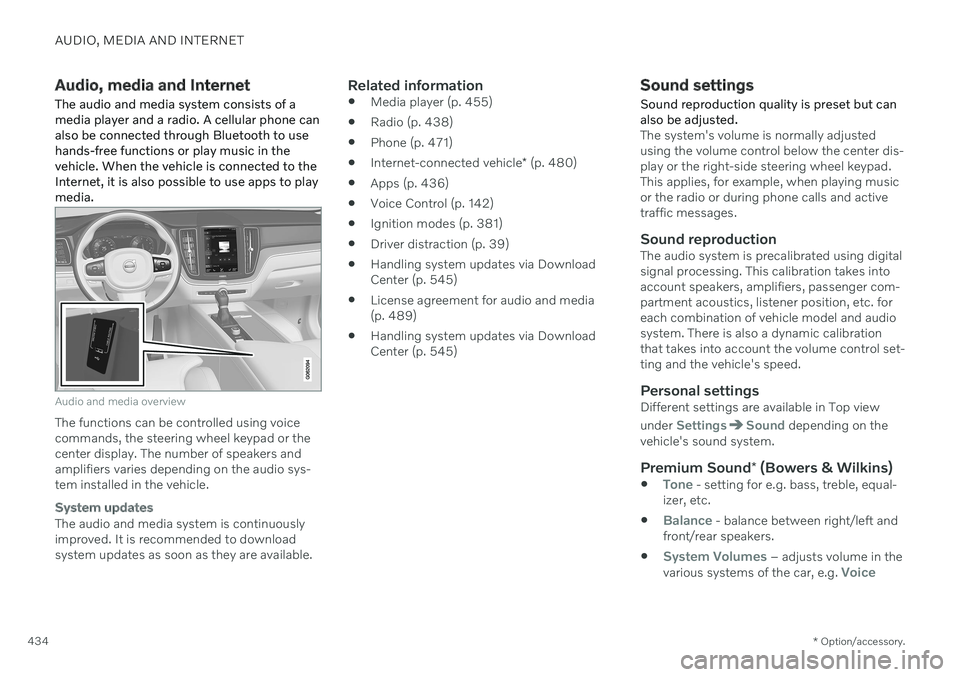
Audio, media and Internet
The audio and media system consists of a media player and a radio. A cellular phone canalso be connected through Bluetooth to usehands-free functions or play music in thevehicle. When the vehicle is connected to theInternet, it is also possible to use apps to playmedia.
Audio and media overview
The functions can be controlled using voice commands, the steering wheel keypad or thecenter display. The number of speakers andamplifiers varies depending on the audio sys-tem installed in the vehicle.
System updates
The audio and media system is continuously improved. It is recommended to download system updates as soon as they are available.
Related information
Media player (p. 455)
Radio (p. 438)
Phone (p. 471)
Internet-connected vehicle
* (p. 480)
Apps (p. 436)
Voice Control (p. 142)
Ignition modes (p. 381)
Driver distraction (p. 39)
Handling system updates via DownloadCenter (p. 545)
License agreement for audio and media(p. 489)
Handling system updates via DownloadCenter (p. 545)
Sound settings
Sound reproduction quality is preset but can also be adjusted.
The system's volume is normally adjusted using the volume control below the center dis-play or the right-side steering wheel keypad.This applies, for example, when playing musicor the radio or during phone calls and activetraffic messages.
Sound reproductionThe audio system is precalibrated using digitalsignal processing. This calibration takes intoaccount speakers, amplifiers, passenger com-partment acoustics, listener position, etc. foreach combination of vehicle model and audiosystem. There is also a dynamic calibrationthat takes into account the volume control set-ting and the vehicle's speed.
Personal settingsDifferent settings are available in Top view under
SettingsSound depending on the
vehicle's sound system.
Premium Sound * (Bowers & Wilkins)
Tone - setting for e.g. bass, treble, equal-
izer, etc.
Balance - balance between right/left and
front/rear speakers.
System Volumes – adjusts volume in the
various systems of the car, e.g. Voice