phone VOLVO S90 2020 Quick Guide
[x] Cancel search | Manufacturer: VOLVO, Model Year: 2020, Model line: S90, Model: VOLVO S90 2020Pages: 643, PDF Size: 13.68 MB
Page 464 of 643
AUDIO, MEDIA AND INTERNET
* Option/accessory.
462
Connecting a device via Bluetooth ®
Connect a Bluetooth ®
device to the vehicle to
wirelessly play media and give the vehicle an Internet connection if it is available.
Many cellular phones on the market currently offer wireless Bluetooth ®
technology, but not
all phones are fully compatible with the vehi- cle. The procedure for connecting a media device is the same as for connecting a cellular phone to the vehicle via Bluetooth ®
.
Related information
Streaming media via Bluetooth ®
(p. 461)
Connecting a phone to the car via Blue- tooth for the first time (p. 472)
Playing media (p. 456)
Playing media via the USB port
External audio sources, such as an iPod ® or
MP3 player, can be connected to the audio system via the vehicle's USB port.
Devices with rechargeable batteries can be charged when they are connected via the USBport and the ignition is in mode I, II or the
engine is running. The content on the external source can be read faster if it only contains data of a compat-ible format. Video files can also be played viathe USB port. Some MP3 players have their own file system that the vehicle has support for.
Related information
Connecting a device via the USB port(p. 462)
Playing media (p. 456)
Video (p. 460)
Ignition modes (p. 381)
Technical specifications for USB devices(p. 463)
Apple ®
CarPlay ®
* (p. 464)
Android Auto
* (p. 468)
Connecting a device via the USB port
External audio sources, such as an iPod ®
or
MP3 player, can be connected to the audio system via any of the vehicle's USB ports.
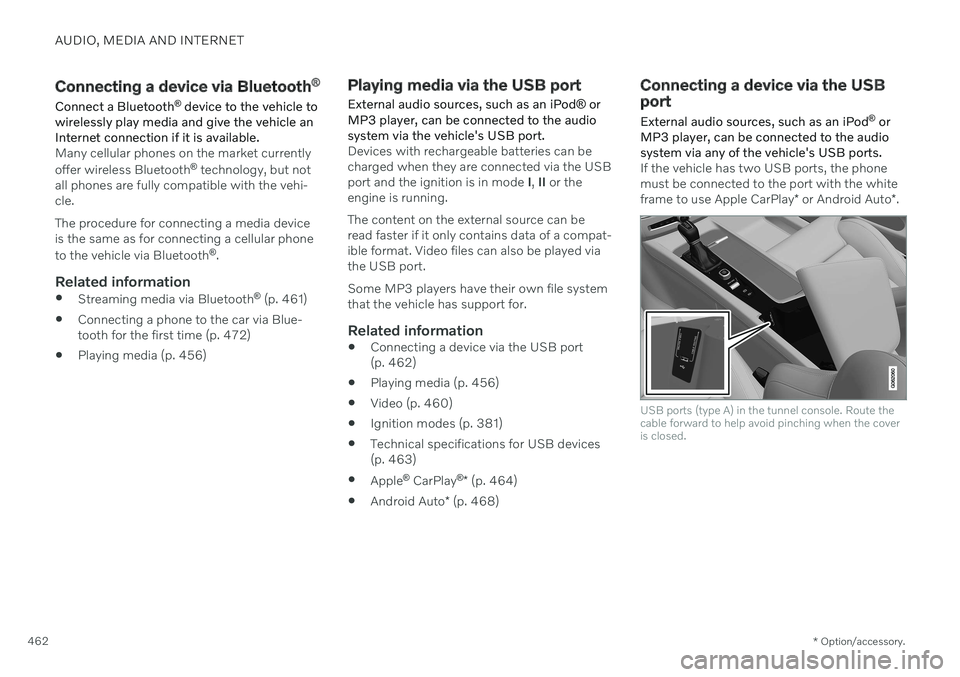
If the vehicle has two USB ports, the phone must be connected to the port with the white frame to use Apple CarPlay * or Android Auto *.
USB ports (type A) in the tunnel console. Route the cable forward to help avoid pinching when the coveris closed.
Page 465 of 643
AUDIO, MEDIA AND INTERNET
}}
* Option/accessory.463
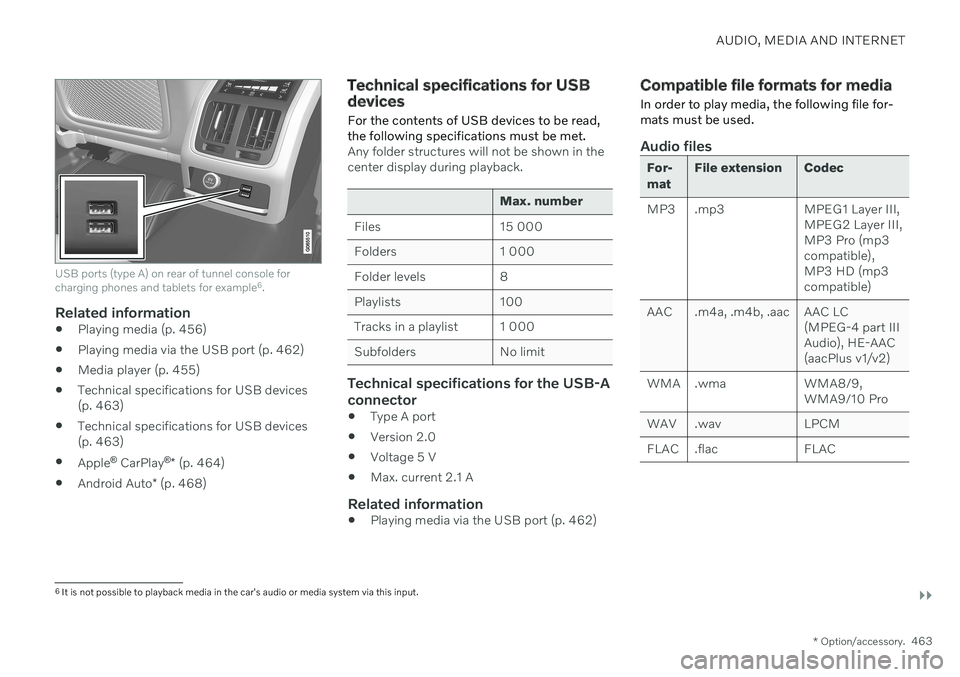
USB ports (type A) on rear of tunnel console for charging phones and tablets for example 6
.
Related information
Playing media (p. 456)
Playing media via the USB port (p. 462)
Media player (p. 455)
Technical specifications for USB devices (p. 463)
Technical specifications for USB devices(p. 463)
Apple ®
CarPlay ®
* (p. 464)
Android Auto
* (p. 468)
Technical specifications for USB devices
For the contents of USB devices to be read, the following specifications must be met.
Any folder structures will not be shown in the center display during playback.
Max. number
Files 15 000
Folders 1 000
Folder levels 8
Playlists 100
Tracks in a playlist 1 000
Subfolders No limit
Technical specifications for the USB-A connector
Type A port
Version 2.0
Voltage 5 V
Max. current 2.1 A
Related information
Playing media via the USB port (p. 462)
Compatible file formats for media
In order to play media, the following file for- mats must be used.
Audio files
For- mat File extension Codec
MP3 .mp3 MPEG1 Layer III, MPEG2 Layer III, MP3 Pro (mp3compatible),MP3 HD (mp3compatible)
AAC .m4a, .m4b, .aac AAC LC (MPEG-4 part IIIAudio), HE-AAC(aacPlus v1/v2)
WMA .wma WMA8/9, WMA9/10 Pro
WAV .wav LPCM
FLAC .flac FLAC
6 It is not possible to playback media in the car's audio or media system via this input.
Page 466 of 643
||
AUDIO, MEDIA AND INTERNET
* Option/accessory.
464
Video files
Format File extension
MP4 .mp4, .m4v
MPEG-PS .mpg, .mp2, .mpeg, .m1v
AVI .avi
AVI (DivX) .avi, .divx
ASF .asf, .wmv
Subtitles
Format File extension
SubViewer .sub
SubRip .srt
SSA .ssa
DivX ®
DivX-certified devices have been tested for high-quality DivX (.divx, .avi) video playback. When you see the DivX logo, you have the freedom to play your favorite DivX videos.
Profile DivX Home Theater
Video codec DivX, MPEG-4
Resolution 720x576Audio speed (bit rate) 4.8Mbps
Frame rate 30 fps
File extension .divx, .avi
Max. file size 4 GB
Audio codec MP3, AC3
Subtitles XSUBSpecial func- tionsMultiple subtitles, multi-ple audio, resume play
Reference Meets all requirements of the DivX Home Theaterprofile. Visit divx.com formore information andsoftware tools to convertyour files into DivX HomeTheater video.
Related information
Media player (p. 455)
Video (p. 460)
Playing DivX ®
(p. 461)
Apple ®
CarPlay ®
*
With CarPlay, you can listen to music, make phone calls, get driving instructions, send/receive messages and use Siri, all whileremaining focused on driving.
CarPlay works with select iOS devices. If the car doesnot already support CarPlay,this can be retrofitted. Con-tact a Volvo retailer to installCarPlay.
Information about supported apps and com- patible iOS devices are available on the Applewebsite: www.apple.com/ios/carplay/. Usingapps that are not compatible with CarPlaymay sometimes mean that the connectionbetween the device and the vehicle is broken.Please note that Volvo is not responsible forthe content of CarPlay. When using map navigation via CarPlay, guid- ance will only be shown on the center displayand not in the instrument panel or head-updisplay. When navigation is started through Apple CarPlay, any current route guidance from thevehicle's own systems will be discontinued. CarPlay apps can be controlled from the cen- ter display, an iOS device or with the right-side steering wheel keypad (for certain func-tions). The apps can also be voice-controlled
Page 467 of 643
AUDIO, MEDIA AND INTERNET
}}
* Option/accessory.465
using Siri. Press and hold the
button on
the steering wheel to start voice control with Siri. Press briefly to activate the vehicle's ownvoice control system. If Siri cuts off too soon, press and hold the
7 button on the steer-
ing wheel.
By using Apple CarPlay you acknowledge the following: Apple CarPlay is a serviceprovided by Apple Inc. under its terms andconditions. Volvo Cars is thus notresponsible for Apple CarPlay or itsfeatures/applications. When using AppleCarPlay, certain information from your car(including its position) is transferred toyour iPhone. In relation to Volvo Cars, youare fully responsible for your and anyothers person
Page 468 of 643
||
AUDIO, MEDIA AND INTERNET
* Option/accessory.
466
Starting CarPlay
To start CarPlay from an iOS device that has previously been connected:
1. Connect an iOS device to the USB port. If
there are two USB ports, use the one with the white frame. >If the auto start setting is selected –
the name of the device will be dis- played. The CarPlay tile will open auto-matically when Home view is displayedwhen the iOS device is connected.
2. If the CarPlay tile does not open automati- cally, tap the name of the device. TheCarPlay tile will open and compatible appswill be displayed.
3. If any other app is active in the same tile, tap
Apple CarPlay in App view.
> The CarPlay tile will open and compati- ble apps will be displayed.
4. Tap the desired app. > The app will start up.
CarPlay will run in the background if another app is started, or is already active when thedevice is connected, in the same view. To dis-play CarPlay in the tile, tap the CarPlay icon inApp view.
Switching connection between CarPlay and iPod
CarPlay to iPod
1.
Tap Settings in the Top view.
2. Proceed to
CommunicationApple
CarPlay.
3. Uncheck the box for the iOS device that should no longer start CarPlay automati- cally when the USB cable is connected.
4. Remove and then reinsert the iOS device into the USB port.
5. Open the
iPod app from App view.
iPod to CarPlay
1.
Tap Apple CarPlay in App view.
2. Read the information in the pop-up win- dow and then tap
OK.
3. Remove and then reinsert the iOS device into the USB port.
> The Apple CarPlay tile will open and
compatible apps will be displayed 8
.
Related information
Connecting a device via the USB port (p. 462)
Apple ®
CarPlay ®
* (p. 464)
Settings for Apple ®
CarPlay ®
* (p. 467)
Connecting the vehicle to the Internet viaa phone (Wi-Fi) (p. 481)
Connecting the vehicle to the Internet viavehicle modem (SIM card) (p. 482)
Voice Control (p. 142)
8
Apple, CarPlay, iPhone and iPod are registered trademarks of Apple Inc.
Page 469 of 643
AUDIO, MEDIA AND INTERNET
}}
* Option/accessory.467
Settings for Apple ®
CarPlay ®
*
Settings for an iOS device connected through CarPlay 9
.
Automatic start1. Tap Settings in the Top view.
2. Tap
CommunicationApple CarPlayand select the desired setting: Check the box - CarPlay will start auto- matically when the USB cable is con-nected.
Uncheck the box - CarPlay will not startautomatically when the USB cable isconnected.
A maximum of 20 iOS devices can be storedin the list, which may be worth noting if manypeople share the vehicle, e.g. in a car pool.When the list is full and a new device is con-nected, the oldest one will be deleted. To delete the list, the settings must be rest in the center display (factory reset).
System Volumes1. Tap Settings in the Top view. 2. Tap
SoundSystem Volumes to
change the settings for the following:
Voice Control
Navi Voice Guidance
Phone Ringtone
Related information
Apple ®
CarPlay ®
* (p. 464)
Using Apple ®
CarPlay ®
* (p. 465)
Resetting center display settings (p. 131)
Tips for using Apple ®
CarPlay ®
*
Here are some useful tips for when you use CarPlay ®
.
Update your iOS device with the latest version of the iOS operating system andensure that the apps have been updated.
In the event of a problem with CarPlay,unplug the iOS device from the USB portand then plug it in again. Otherwise, try toclose the app on the device that is not working and then restart the app, or try closing all apps and restart your device.
If the apps do not appear when CarPlaystarts (black screen), try minimizing andexpanding the tile for CarPlay.
Using apps that are not compatible withCarPlay may sometimes cause the con-nection between the iOS device and thevehicle to be broken. Information aboutsupported apps and compatible devicescan be found on Apple's website. You canalso search for CarPlay in the App Store tofind information about apps that are com-patible with CarPlay in your market.
You can use Siri to write or dictate mes-sages or have them read aloud. Messagesare read aloud and dictated in the lan-guage selected in the Siri settings. Whenyou write/dictate messages, no text willbe shown in the vehicle's center display,
9
Apple and CarPlay are registered trademarks of Apple Inc.
Page 470 of 643
||
AUDIO, MEDIA AND INTERNET
* Option/accessory.
468 but the text will be shown in your iOS device. When using Siri, note that it is thephone's microphones that are used andthe quality therefore depends on thephone's location.
If the device is connected to the vehiclethrough Bluetooth, the connection will bebroken when CarPlay is used. ResumeInternet connection in the vehicle by teth-ering using the device's Wi-Fi hotspot.
Some of CarPlay's functions (such asvoice calls and messages) interrupt theuse of the vehicle's own functions andCarPlay will instead be automatically dis-played. If you do not wish this to happen,deselect display of the correspondingfunction in CarPlay under the phone'snotification settings.
CarPlay only works with iPhone 10
.
NOTE
Availability and functionality can vary depending on market.
Related information
Apple ®
CarPlay ®
* (p. 464)
Connecting the vehicle to the Internet via a phone (Wi-Fi) (p. 481)
Android Auto
*
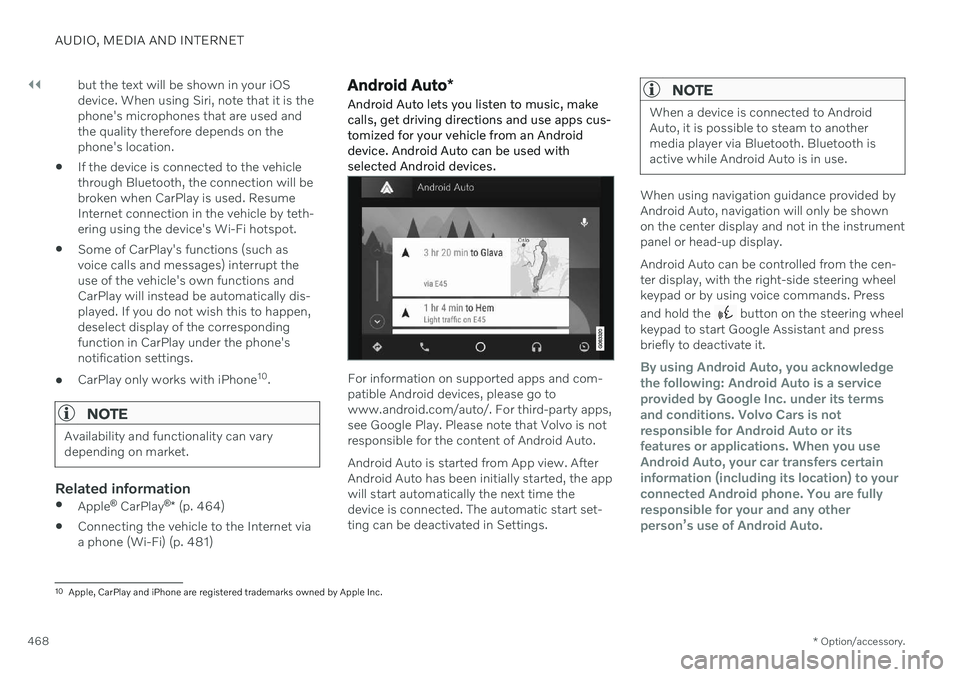
Android Auto lets you listen to music, make calls, get driving directions and use apps cus-tomized for your vehicle from an Androiddevice. Android Auto can be used withselected Android devices.
For information on supported apps and com- patible Android devices, please go towww.android.com/auto/. For third-party apps,see Google Play. Please note that Volvo is notresponsible for the content of Android Auto. Android Auto is started from App view. After Android Auto has been initially started, the appwill start automatically the next time thedevice is connected. The automatic start set-ting can be deactivated in Settings.
NOTE
When a device is connected to Android Auto, it is possible to steam to anothermedia player via Bluetooth. Bluetooth isactive while Android Auto is in use.
When using navigation guidance provided by Android Auto, navigation will only be shownon the center display and not in the instrumentpanel or head-up display. Android Auto can be controlled from the cen- ter display, with the right-side steering wheelkeypad or by using voice commands. Press and hold the
button on the steering wheel
keypad to start Google Assistant and press briefly to deactivate it.
By using Android Auto, you acknowledge the following: Android Auto is a serviceprovided by Google Inc. under its termsand conditions. Volvo Cars is notresponsible for Android Auto or itsfeatures or applications. When you useAndroid Auto, your car transfers certaininformation (including its location) to yourconnected Android phone. You are fullyresponsible for your and any otherperson
Page 472 of 643
AUDIO, MEDIA AND INTERNET
* Option/accessory.
470
Settings for Android Auto *
Settings for Android devices initially con- nected with Android Auto.
Automatic start1. Tap Settings in the Top view.
2. Tap
CommunicationAndroid Autoand select setting: Check the box - Android Auto will start automatically when the USB cable isconnected.
Uncheck the box - Android Auto will notstart automatically when the USB cableis connected.
A maximum of 20 Android devices can bestored in the list. When the list is full and anew device is connected, the oldest one willbe deleted. A factory reset must be performed to delete the list.
System Volumes1. Tap Settings in the Top view.
2. Tap
SoundSystem Volumes to
change the settings for the following:
Voice Control
Navi Voice Guidance
Phone Ringtone
Related information
Android Auto
* (p. 468)
Using Android Auto
* (p. 469)
Resetting center display settings (p. 131)
Tips for using Android Auto
*
Here are some useful tips for when you use Android Auto.
Ensure that your apps are updated.
When starting the vehicle, wait until the center display has started, connect thedevice and then open Android Auto fromthe app view.
In the event of problems with AndroidAuto, unplug your Android device from theUSB port and then plug it in again. Other-wise, try closing the app on the device andthen restarting the app.
When a device is connected to AndroidAuto it is still possible to play media viaBluetooth to another media player. TheBluetooth function is on when AndroidAuto is used.
If the Android Auto icon is grayed out, itmeans that a device is no longer con-nected. When you connect your device,the icon will light up. If there is no icon atall, the vehicle does not support connect-ing a device for this purpose.
If the device is connected to the vehiclethrough Bluetooth, the connection will bebroken when Android Auto is used.Resume Internet connection in the vehicle
Page 473 of 643
AUDIO, MEDIA AND INTERNET
}}
* Option/accessory.471
by tethering using the device's Wi-Fi hot- spot.
A maximum of 20 Android devices can bestored at the same time, which may beworth noting if many people share thevehicle, e.g. in a car pool. When the list isfull and a new device is connected, theoldest one will be deleted. A factory resetmust be performed to delete the list.
Related information
Android Auto
* (p. 468)
Connecting the vehicle to the Internet viaa phone (Wi-Fi) (p. 481)
Phone
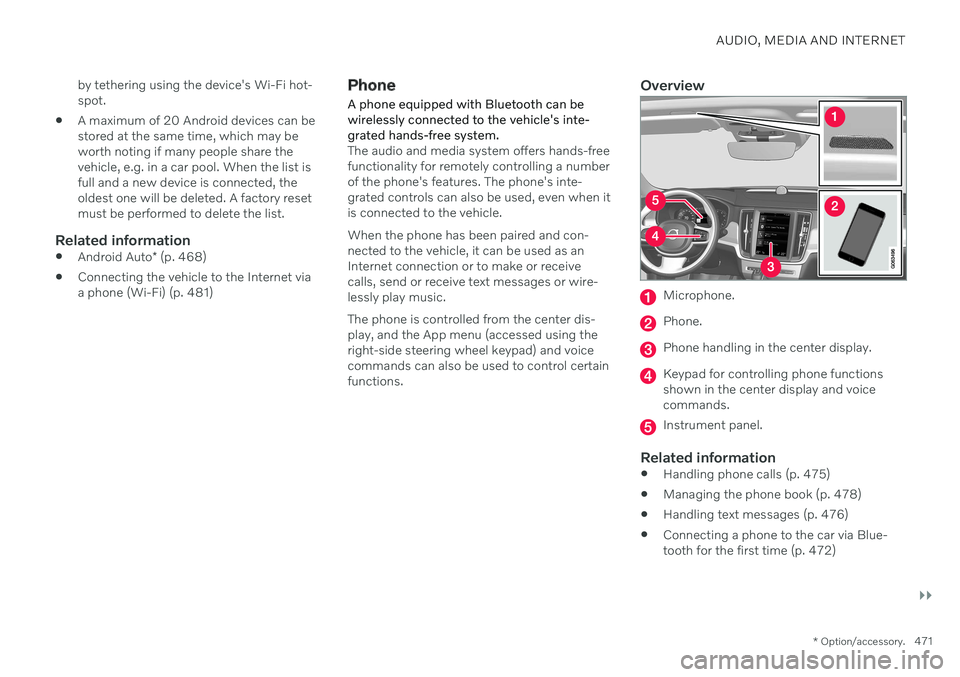
A phone equipped with Bluetooth can be wirelessly connected to the vehicle's inte-grated hands-free system.
The audio and media system offers hands-free functionality for remotely controlling a numberof the phone's features. The phone's inte-grated controls can also be used, even when itis connected to the vehicle. When the phone has been paired and con- nected to the vehicle, it can be used as anInternet connection or to make or receivecalls, send or receive text messages or wire-lessly play music. The phone is controlled from the center dis- play, and the App menu (accessed using theright-side steering wheel keypad) and voicecommands can also be used to control certainfunctions.
Overview
Microphone.
Phone.
Phone handling in the center display.
Keypad for controlling phone functions shown in the center display and voicecommands.
Instrument panel.
Related information
Handling phone calls (p. 475)
Managing the phone book (p. 478)
Handling text messages (p. 476)
Connecting a phone to the car via Blue- tooth for the first time (p. 472)
Page 474 of 643

AUDIO, MEDIA AND INTERNET
472
Connecting a phone to the car via Blue- tooth automatically (p. 474)
Connecting a phone to the car via Blue-tooth manually (p. 474)
Disconnecting a Bluetooth-connectedphone (p. 474)
Switch between phones connected viaBluetooth (p. 475)
Disconnecting Bluetooth-connected devi-ces (p. 475)
Phone settings (p. 478)
Voice Control (p. 142)
Handling the App menu in the instrumentpanel (p. 102)
Sound settings (p. 434)
Connecting the vehicle to the Internet viaa Bluetooth-connected phone (p. 481)
Connecting a phone to the car via Bluetooth for the first time
Pair a Bluetooth-enabled phone to the vehicle to make calls, send/receive text messagesand wirelessly play media from the vehicle, orconnect the vehicle to the Internet.
Two Bluetooth devices can be connected at the same time, but in that case, only one willbe used for wireless playback. The mostrecently paired phone will be automaticallyconnected to make calls, send/receive textmessages, play media or use as an Internetconnection. It is possible to change what the phone is used for under
Bluetooth Devicesvia the settings menu in the center display's Top view. The cellular phone must be equip-ped with Bluetooth and support tethering. After the device has been connected/regis- tered for the first time via Bluetooth, thedevice no longer needs to be visible/searcha-ble. It just needs to have Bluetooth activated.A maximum of 20 paired Bluetooth devicescan be stored in the vehicle. There are two ways to pair a phone to the vehicle. Searching for the phone from the vehi-cle or searching for the vehicle from thephone.
Option 1 - searching for the phone from the vehicle
1. Make the phone discoverable/visible using its Bluetooth function.
2. Open the phone tile in the center display.
If no phone has been paired to the vehi- cle, tap
Add phone.
If a phone has been paired to the vehi- cle, tap
Change. Tap Add phone in
the pop-up window.
> A list of available Bluetooth devices will be displayed. The list will be updated as new devices are discovered.
3. Tap the name of the phone you would like to connect.
4. Make sure that the code displayed in the vehicle matches the one in the phone. If itdoes, confirm the code in both places.
5. In the phone, accept or cancel the options for selecting the phone's contacts and textmessages.
NOTE
The message function must be acti- vated in certain phones.
Not all cell phones are fully compatibleand may not be able to display con-tacts and messages in the vehicle.