cruise control VOLVO V90 2017 User Guide
[x] Cancel search | Manufacturer: VOLVO, Model Year: 2017, Model line: V90, Model: VOLVO V90 2017Pages: 594, PDF Size: 15.07 MB
Page 279 of 594
DRIVER SUPPORT
* Option/accessory.277
Speed limiter *
A speed limiter (Speed Limiter — SL) can be regarded as a reverse cruise control — thedriver regulates the speed using the acceleratorpedal but is prevented by the speed limiter fromaccidentally exceeding a pre-selected/presetmaximum speed.
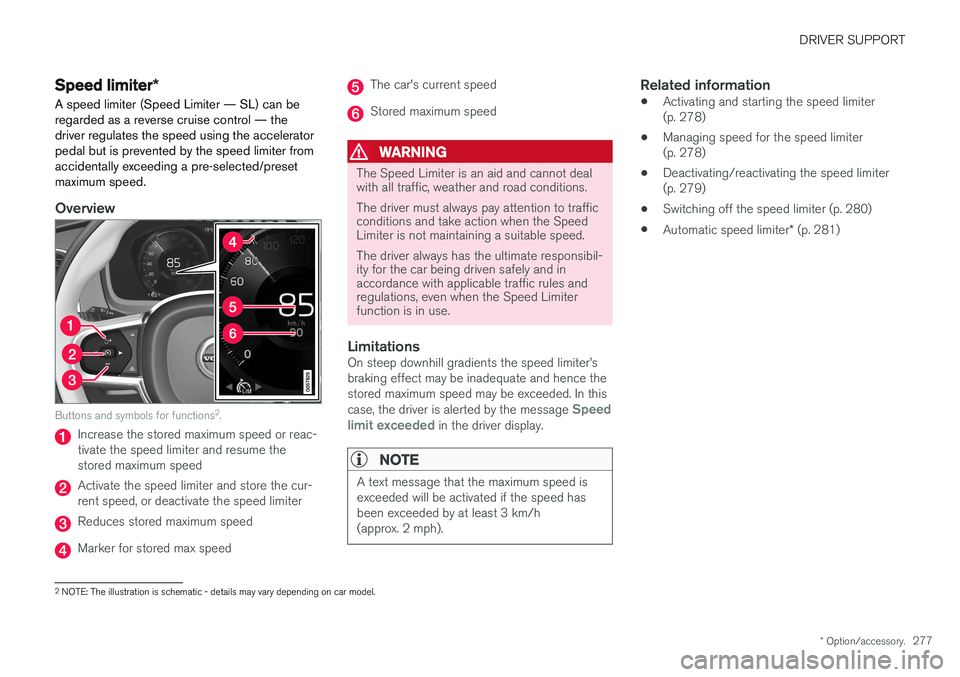
Overview
Buttons and symbols for functions 2
.
Increase the stored maximum speed or reac- tivate the speed limiter and resume thestored maximum speed
Activate the speed limiter and store the cur- rent speed, or deactivate the speed limiter
Reduces stored maximum speed
Marker for stored max speed
The car's current speed
Stored maximum speed
WARNING
The Speed Limiter is an aid and cannot deal with all traffic, weather and road conditions. The driver must always pay attention to traffic conditions and take action when the SpeedLimiter is not maintaining a suitable speed. The driver always has the ultimate responsibil- ity for the car being driven safely and inaccordance with applicable traffic rules andregulations, even when the Speed Limiterfunction is in use.
LimitationsOn steep downhill gradients the speed limiter
Page 286 of 594
DRIVER SUPPORT
* Option/accessory.
284
Cruise control
The cruise control (Cruise Control - CC) helps the driver maintain an even speed, resulting in amore relaxed driving on motorways and long,straight roads in regular traffic flows.
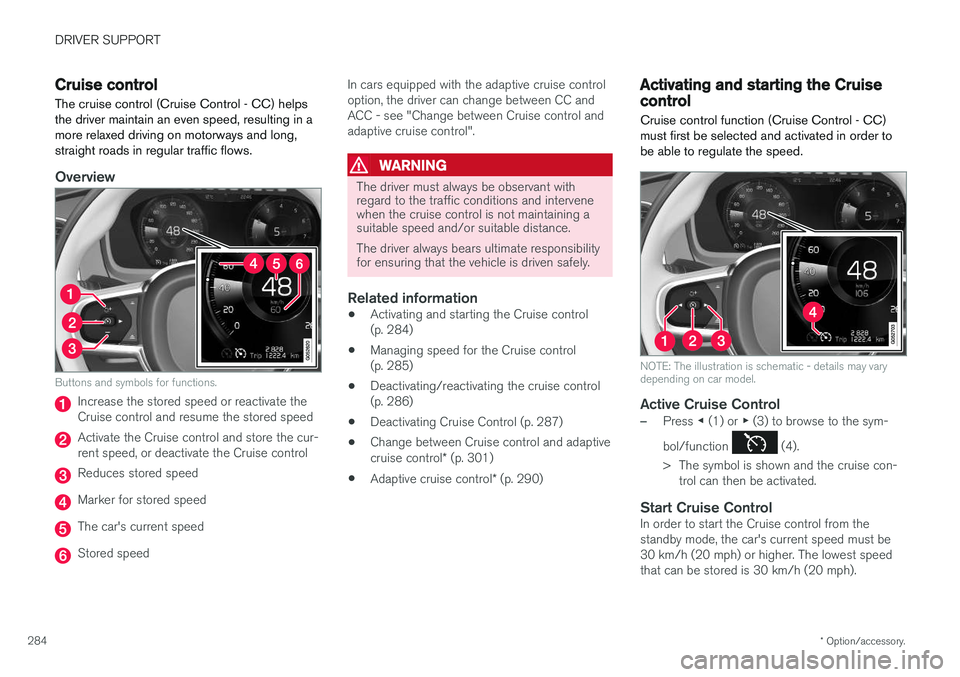
Overview
Buttons and symbols for functions.
Increase the stored speed or reactivate the Cruise control and resume the stored speed
Activate the Cruise control and store the cur- rent speed, or deactivate the Cruise control
Reduces stored speed
Marker for stored speed
The car's current speed
Stored speed In cars equipped with the adaptive cruise control option, the driver can change between CC andACC - see "Change between Cruise control andadaptive cruise control".
WARNING
The driver must always be observant with regard to the traffic conditions and intervenewhen the cruise control is not maintaining asuitable speed and/or suitable distance. The driver always bears ultimate responsibility for ensuring that the vehicle is driven safely.
Related information
•
Activating and starting the Cruise control (p. 284)
• Managing speed for the Cruise control(p. 285)
• Deactivating/reactivating the cruise control(p. 286)
• Deactivating Cruise Control (p. 287)
• Change between Cruise control and adaptive cruise control
* (p. 301)
• Adaptive cruise control
* (p. 290)
Activating and starting the Cruise control Cruise control function (Cruise Control - CC) must first be selected and activated in order tobe able to regulate the speed.
NOTE: The illustration is schematic - details may vary depending on car model.
Active Cruise Control
–Press ◀ (1) or ▶ (3) to browse to the sym-
bol/function
(4).
> The symbol is shown and the cruise con- trol can then be activated.
Start Cruise ControlIn order to start the Cruise control from the standby mode, the car's current speed must be30 km/h (20 mph) or higher. The lowest speedthat can be stored is 30 km/h (20 mph).
Page 287 of 594
DRIVER SUPPORT
}}
285
–With the symbol/function displayed,
press the steering wheel button
(2).
> Cruise Control starts and the current speed becomes the stored speed.
NOTE
Cruise Control cannot be enabled at speeds below 30 km/h (20 mph).
Related information
• Cruise control (p. 284)
• Managing speed for the Cruise control (p. 285)
• Deactivating/reactivating the cruise control(p. 286)
• Deactivating Cruise Control (p. 287)
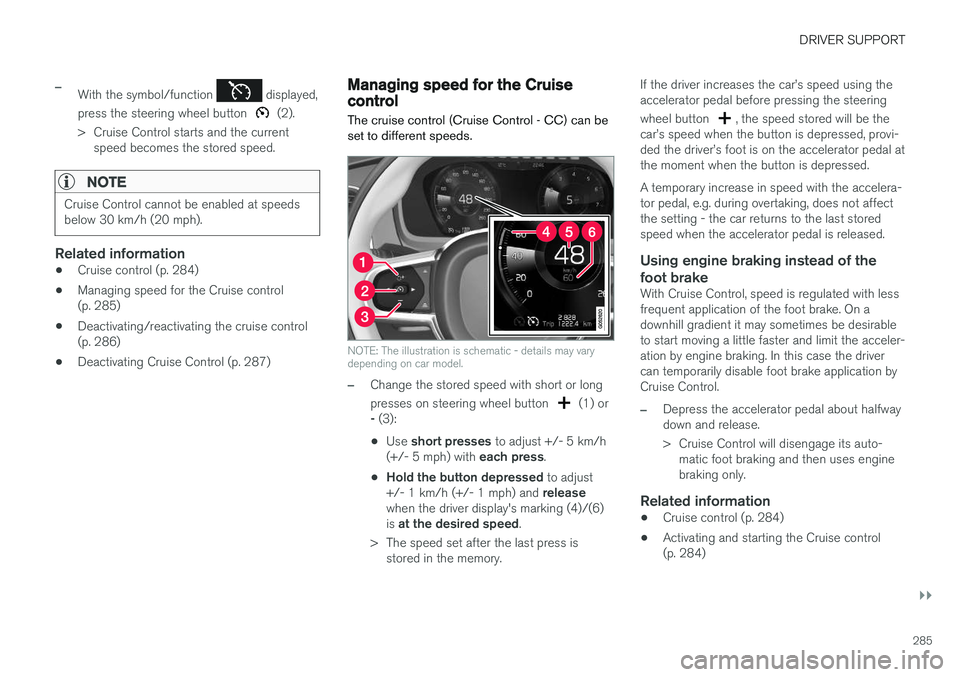
Managing speed for the Cruise control The cruise control (Cruise Control - CC) can be set to different speeds.
NOTE: The illustration is schematic - details may vary depending on car model.
–Change the stored speed with short or long presses on steering wheel button
(1) or
- (3):
• Use
short presses to adjust +/- 5 km/h
(+/- 5 mph) with each press.
• Hold the button depressed
to adjust
+/- 1 km/h (+/- 1 mph) and release
when the driver display's marking (4)/(6) is at the desired speed .
> The speed set after the last press is stored in the memory. If the driver increases the car
Page 288 of 594
DRIVER SUPPORT
286•
Deactivating/reactivating the cruise control (p. 286)
• Deactivating Cruise Control (p. 287)
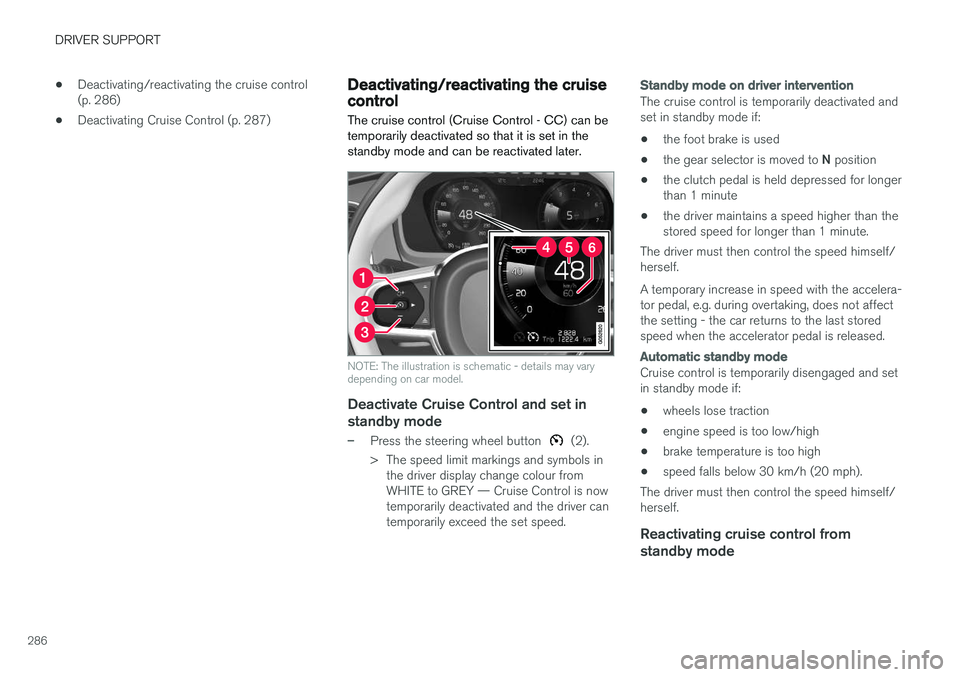
Deactivating/reactivating the cruise control The cruise control (Cruise Control - CC) can be temporarily deactivated so that it is set in thestandby mode and can be reactivated later.
NOTE: The illustration is schematic - details may vary depending on car model.
Deactivate Cruise Control and set in
standby mode
–Press the steering wheel button (2).
> The speed limit markings and symbols in the driver display change colour from WHITE to GREY — Cruise Control is nowtemporarily deactivated and the driver cantemporarily exceed the set speed.
Standby mode on driver intervention
The cruise control is temporarily deactivated and set in standby mode if:
• the foot brake is used
• the gear selector is moved to
N position
• the clutch pedal is held depressed for longerthan 1 minute
• the driver maintains a speed higher than thestored speed for longer than 1 minute.
The driver must then control the speed himself/herself. A temporary increase in speed with the accelera- tor pedal, e.g. during overtaking, does not affectthe setting - the car returns to the last storedspeed when the accelerator pedal is released.
Automatic standby mode
Cruise control is temporarily disengaged and set in standby mode if:
• wheels lose traction
• engine speed is too low/high
• brake temperature is too high
• speed falls below 30 km/h (20 mph).
The driver must then control the speed himself/herself.
Reactivating cruise control from standby mode
Page 289 of 594
DRIVER SUPPORT
* Option/accessory.287
–Press the steering wheel button (1).
> The cruise control markings and symbols in the driver display change colour from GREY to WHITE — the car will now followthe most recently stored speed again.
or
–Press the steering wheel button (2).
> The cruise control markings and symbols in the driver display change colour from GREY to WHITE — the car will now followthe current speed.
NOTE
A marked speed increase may occur once the speed has been resumed by pressing steer- ing wheel button
.
Related information
• Cruise control (p. 284)
• Activating and starting the Cruise control (p. 284)
• Managing speed for the Cruise control(p. 285)
• Deactivating Cruise Control (p. 287)
Deactivating Cruise Control Cruise control Cruise Control — CC can be deactivated.
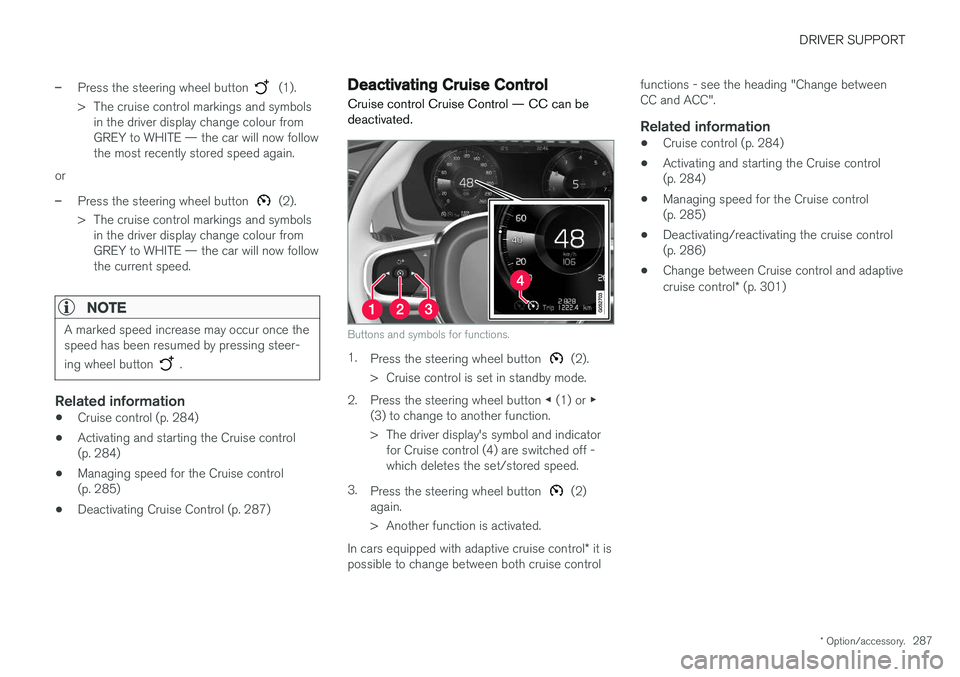
Buttons and symbols for functions.
1.
Press the steering wheel button (2).
> Cruise control is set in standby mode.
2. Press the steering wheel button ◀ (1) or ▶
(3) to change to another function.
> The driver display's symbol and indicator for Cruise control (4) are switched off - which deletes the set/stored speed.
3. Press the steering wheel button
(2)
again.
> Another function is activated.
In cars equipped with adaptive cruise control * it is
possible to change between both cruise control functions - see the heading "Change between CC and ACC".
Related information
•
Cruise control (p. 284)
• Activating and starting the Cruise control(p. 284)
• Managing speed for the Cruise control(p. 285)
• Deactivating/reactivating the cruise control(p. 286)
• Change between Cruise control and adaptive cruise control
* (p. 301)
Page 290 of 594
DRIVER SUPPORT
* Option/accessory.
288
Distance Warning *
The Distance Warning function (Distance Alert) warns the driver if the time interval to the vehicleahead becomes too short.
Distance warning is active at speeds
above 30 km/h (20 mph) and only reacts to thevehicle ahead travelling in the same direction. Nodistance information is provided for oncoming,slow or stationary vehicles.
NOTE
Distance warning is deactivated during the time the adaptive cruise control is active.
WARNING
Distance warning only reacts if the distance to the vehicle ahead is shorter than the presetvalue - the speed of the driver's vehicle is notaffected.
Head-up display *
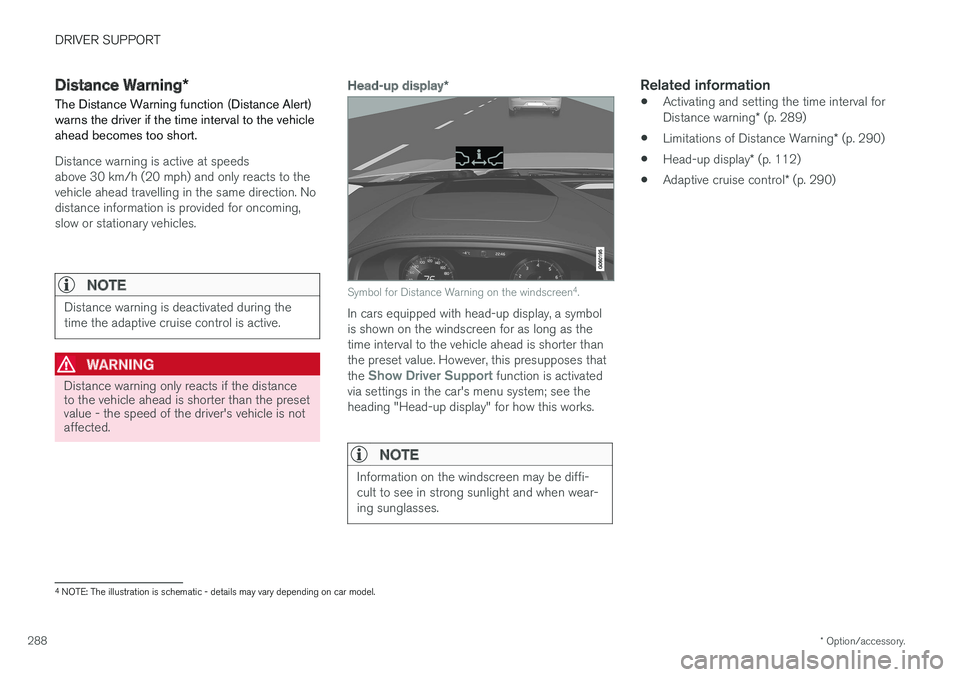
Symbol for Distance Warning on the windscreen 4
.
In cars equipped with head-up display, a symbol is shown on the windscreen for as long as thetime interval to the vehicle ahead is shorter thanthe preset value. However, this presupposes that the
Show Driver Support function is activated
via settings in the car's menu system; see the heading "Head-up display" for how this works.
NOTE
Information on the windscreen may be diffi- cult to see in strong sunlight and when wear-ing sunglasses.
Related information
• Activating and setting the time interval for Distance warning
* (p. 289)
• Limitations of Distance Warning
* (p. 290)
• Head-up display
* (p. 112)
• Adaptive cruise control
* (p. 290)
4
NOTE: The illustration is schematic - details may vary depending on car model.
Page 291 of 594
DRIVER SUPPORT
* Option/accessory.289
Activating and setting the time interval for Distance warning *
The Distance warning (Distance Alert) function can be activated/deactivated and a time intervalcan be set.
Activating/deactivating Distance
warning
The function is activated/deac- tivated in function view in thecentre display.
–Tap on the Distance Alert button in func-
tion view.
> Distance warning is activated/deactivated, a green/grey indicator is displayed in the button.
Setting the time interval for Distance warning
Different time intervals to the vehicle in front can be selectedand shown in the driver displayas 1-5 horizontal lines - themore lines the longer the timeinterval. One line representsabout 1 second to the vehicle
in front, 5 lines represents about 3 seconds.
The same symbol is also shown when the adap- tive cruise control function is activated.
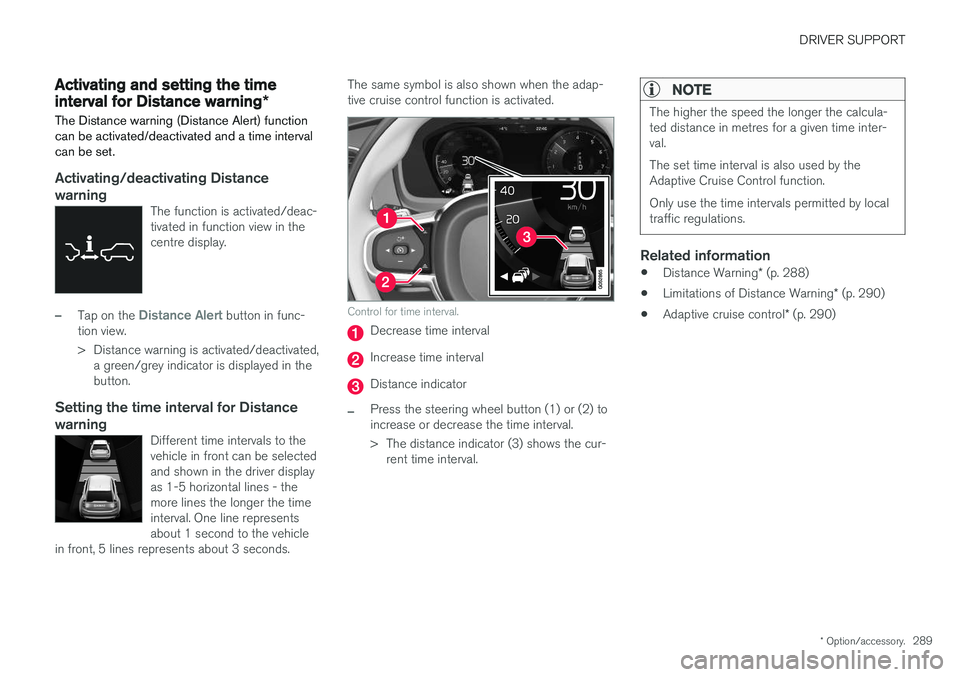
Control for time interval.
Decrease time interval
Increase time interval
Distance indicator
–Press the steering wheel button (1) or (2) to increase or decrease the time interval.
> The distance indicator (3) shows the cur- rent time interval.
NOTE
The higher the speed the longer the calcula- ted distance in metres for a given time inter-val. The set time interval is also used by the Adaptive Cruise Control function. Only use the time intervals permitted by local traffic regulations.
Related information
• Distance Warning
* (p. 288)
• Limitations of Distance Warning
* (p. 290)
• Adaptive cruise control
* (p. 290)
Page 292 of 594
DRIVER SUPPORT
* Option/accessory.
290
Limitations of Distance Warning *
The Distance warning (Distance Alert) function may have limitations in certain situations.
NOTE
Strong sunlight, reflections or strong varia- tions in light intensity, as well as wearing sun-glasses, could mean that the warning light inthe windscreen cannot be seen. Poor weather or winding roads could affect the radar unit's capacity to detect vehicles infront. The size of other vehicles could also affect detection capacity, e.g. motorcycles. Thiscould mean that the warning lamp illuminatesat a shorter distance than the setting or thatthe warning is temporarily absent. Extremely high speeds can also cause the lamp to illuminate at a shorter distance thanthat set due to limitations in sensor range.
NOTE
The function uses the car's radar unit, which has some general limitations, see the "Limita-tions for radar unit" section.
Related information
• Distance Warning
* (p. 288)
• Activating and setting the time interval for Distance warning
* (p. 289)
• Limitations of the radar unit (p. 319)
Adaptive cruise control
*
The adaptive cruise control (Adaptive Cruise Control - ACC) helps the driver to maintain aneven speed combined with a pre-selected timeinterval to the vehicle ahead.
An adaptive cruise control provides a more relax- ing driving experience on long journeys on motor-ways and long straight main roads in smooth traf-fic flows.
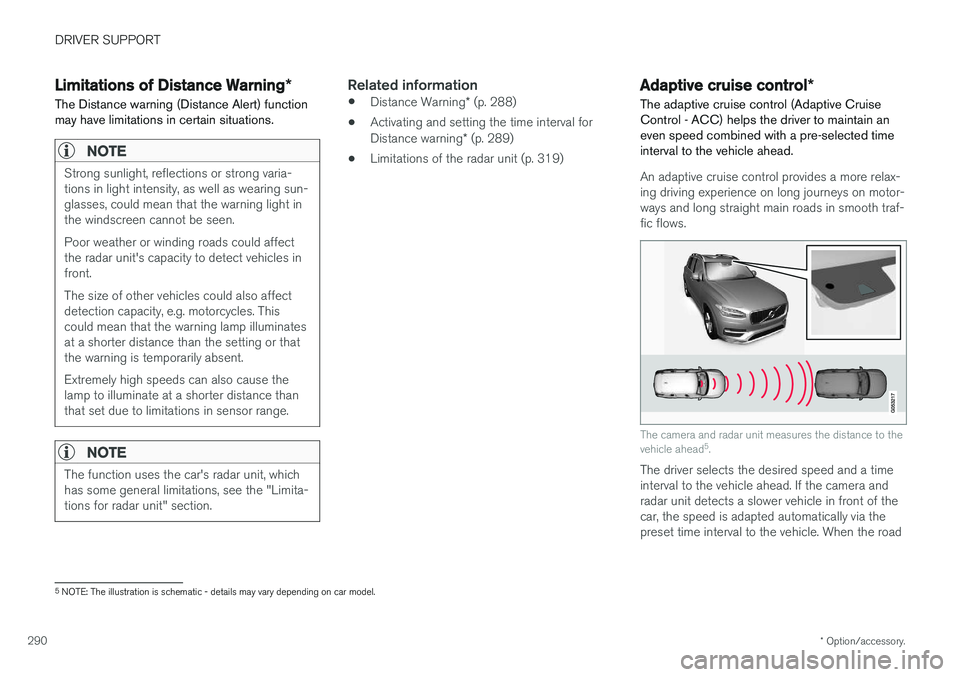
The camera and radar unit measures the distance to the vehicle ahead 5
.
The driver selects the desired speed and a time interval to the vehicle ahead. If the camera andradar unit detects a slower vehicle in front of thecar, the speed is adapted automatically via thepreset time interval to the vehicle. When the road
5 NOTE: The illustration is schematic - details may vary depending on car model.
Page 293 of 594
DRIVER SUPPORT
}}
291
is clear again the car returns to the selected speed.
WARNING
The Adaptive cruise control is an aid, which cannot handle all traffic, weather and roadconditions. The driver must always be observant with regard to the prevailing traffic conditions andintervene if the Adaptive cruise control doesnot maintain a suitable speed or suitable timeinterval. Read all the sections about the adaptive cruise control in the owner's manual in orderto learn about its limitations, of which thedriver should be aware before the function isused. The driver always bears responsibility for maintaining the correct time interval andspeed - even when the Adaptive cruise con-trol is being used.
Adaptive cruise control regulates the speed with acceleration and braking. It is normal for thebrakes to emit a low sound when they are beingused to adjust the speed. The adaptive cruise control aims to control the speed in a smooth way. In situations that demandsudden braking the driver must brake himself/herself. This applies in case of large speed differ- ences or if the vehicle in front brakes suddenly.Due to the limitations of the radar unit, brakingmay come unexpectedly or not at all. The adaptive cruise control aims to follow the vehicle ahead in the same lane at a time intervalset by the driver. If the radar unit cannot see anyvehicle in front then the car will instead maintainthe speed set and stored by the driver. This alsotakes place if the speed of the vehicle aheadincreases and exceeds the stored speed. The following applies for cars with automatic gearbox:
• Adaptive cruise control can follow anothervehicle at speed from 0 km/h up to200 km/h (125 mph).
The following applies for cars with manual gear-box: • The Adaptive cruise control can follow another vehicle at speeds from 30 km/h(20 mph) up to 200 km/h (125 mph).
WARNING
Adaptive cruise control is not a collision avoid- ance system. The driver must intervene if thesystem does not detect a vehicle in front. The adaptive cruise control does not brake for humans or animals, and not for small vehiclessuch as bicycles and motorcycles. Nor for lowtrailers, oncoming, slow or stationary vehiclesand objects. Do not use the Adaptive cruise control, for example, in city traffic, at junctions, on slipperysurfaces, with a lot of water or slush on theroad, in heavy rain/snow, in poor visibility, onwinding roads or on slip roads.
IMPORTANT
Maintenance of adaptive cruise control com- ponents must only be performed at a work-shop - an authorised Volvo workshop is rec-ommended.
Page 294 of 594

||
DRIVER SUPPORT
292
Overview
Controls
Buttons and symbols for functions5
.
Increases stored speed or reactivates the adaptive cruise control and resumes storedspeed and time interval
Activate the adaptive cruise control and store the current speed or deactivate the adaptivecruise control
Reduces stored speed
Increases the time interval to vehicles ahead
Reduces the time interval to vehicles ahead
Target vehicle indicator: ACC has detected and is following a target vehicle at the presettime interval
Symbol for time interval to vehicles ahead
In cars equipped with the adaptive cruise control option, the driver can change between CC andACC - see "Change between Cruise control andadaptive cruise control".
Driver display
Indication of speeds 5
.
Stored speed
Speed of vehicle ahead.
Current speed of your car.
To see different combinations of symbols depending on traffic situation - see the heading "Symbols and messages for the adaptive cruisecontrol".
Collision risk warning
Audio and symbol for collision warning
5
Acoustic warning signal in the event of a risk of collision
Warning signal in the event of a risk of colli- sion
Distance measurement with the camera and radar unit
Adaptive Cruise Control uses approx. 40% of thecapacity of the foot brake. If the car needs to bebraked more heavily than the adaptive cruisecontrol is capable of and the driver does notbrake, the warning lamp and acoustic warning are
5 NOTE: The illustration is schematic - details may vary depending on car model.