key VOLVO V90 2017 User Guide
[x] Cancel search | Manufacturer: VOLVO, Model Year: 2017, Model line: V90, Model: VOLVO V90 2017Pages: 594, PDF Size: 15.07 MB
Page 51 of 594
INTRODUCTION
}}
49
Using the keyboard in the centre display The centre display keyboard makes it possible make entries using keys. It is also possible to"draw in" letters and characters on the screenby hand.
Making entries with the keyboardThe keyboard can be used to enter characters, letters and numbers, e.g. to write text messagesfrom the car, enter passwords or search for arti-cles in the digital owner's manual. The keyboard is only shown when entries can be made on the screen.
Page 52 of 594
||
INTRODUCTION
50
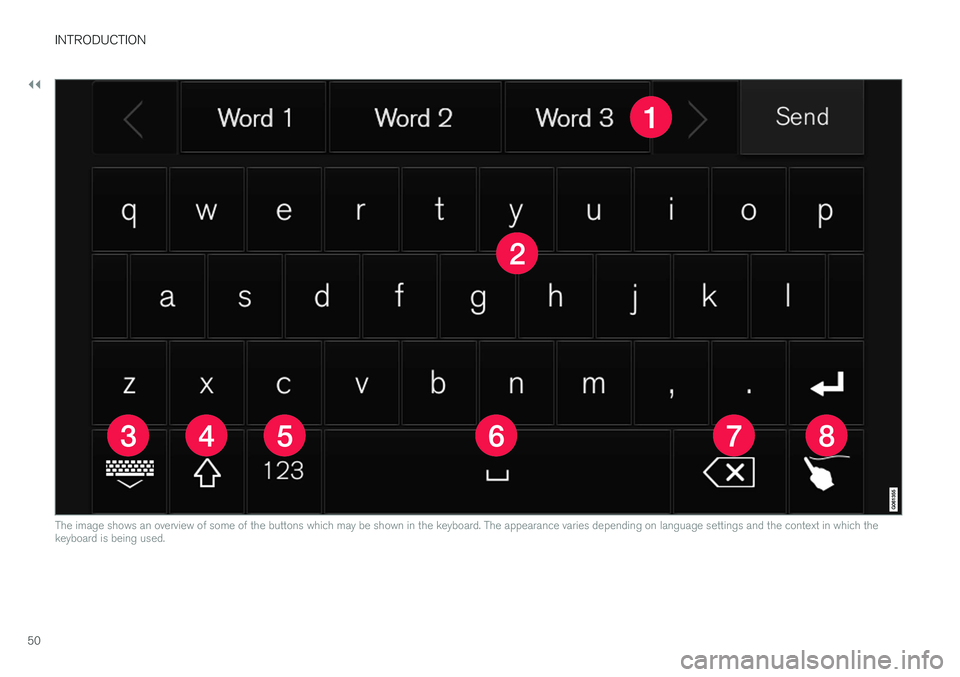
The image shows an overview of some of the buttons which may be shown in the keyboard. The appearance varies depending on language settings and the context in which the keyboard is being used.
Page 53 of 594
INTRODUCTION
}}
51
Row of suggested words or characters11
.
The suggested words are adjusted as new letters are being entered. Browse among thesuggestions by pressing on the right and leftarrows. Tap on a suggestion to select it. Notethat this function is not supported by all lan-guage selections. If not available, the row willnot be shown on the keyboard.
The characters available on the keyboard depend on which language was selected(see point 7). Tap on a character to enter it.
The button works in different ways, depend- ing on the context in which the keyboard is used - either to enter @ (when an email
address is entered) or to create a new row
(for normal text input).
Hides the keyboard. If this is not possible, the button is not shown.
Used to enter capital letters. Press again to enter one capital letter and then continuewith lower-case letters. Another press makesall letters capital letters. The next pressrestores the keyboard to lower-case letters.In this mode, the first letter after a full stop,exclamation mark or question mark is a capi-tal letter. The first letter in the text field isalso a capital letter. In text fields intended fornames or addresses, each word automaticallystarts with a capital letter. In text fields forpassword, web address or email address entry, all letters are automatically lower caseunless otherwise set with the button.
Number entry. The keyboard (2) is then shown with numbers. Press
, which in
number mode is shown instead of
, to
return to the letter keyboard, or
to
open the keyboard with special characters.
Changes text input language, e.g. UK. The
available characters and word suggestions (1) vary depending on the selected language.Press to open a list of languages and thentap on the language to be used. To add addi-tional languages in the keyboard - see theheading "Changing keyboard language"below.
Space.
Undoes entered text. Press briefly to delete one character at a time. Hold the buttondepressed to delete characters more quickly.
Changes keyboard mode to write letters and characters by hand instead. Read moreunder the heading "Writing characters/letters by hand on the screen".
Press the confirmation button above the key-board (not visible in the image) to confirm theentered text. The appearance of the button dif-fers depending on context.
Changing the keyboard languageTo make it possible to switch between differentlanguages for the keyboard, the languages must first be added under
Settings.
Adding/deleting languages in settings
The keyboard is automatically set to the same languages as the system language. The keyboardlanguage can be manually adapted withoutaffecting the system language. 1. Press
Settings in the top view.
2. Press
SystemKeyboard Layouts.
3. Select one or more languages from the list. > It is now possible to switch between theselected languages directly from the key- board for text input.
If no languages have been actively selected under
Settings, the keyboard uses the same lan-
guage as the car's system language; see the section "Changing system settings in the set-tings view".
11 Applies to Asiatic languages.
Page 54 of 594
||
INTRODUCTION
52
Switching between different languages in the keyboard
When a number of languages have been selected in
Settings, the keyboard button
(shown in context as number 7 in the illustration above) is usedto switch between different lan-guages.
To change keyboard language:
1. Press and hold the button (see image above).
> A list opens.
2. Select the required language. If more than four languages have been selected under
Settings, it is possible to scroll in the list
from the keyboard.
> The keyboard is adapted to the selected language and other word suggestions are given.
Variants of a letter or character
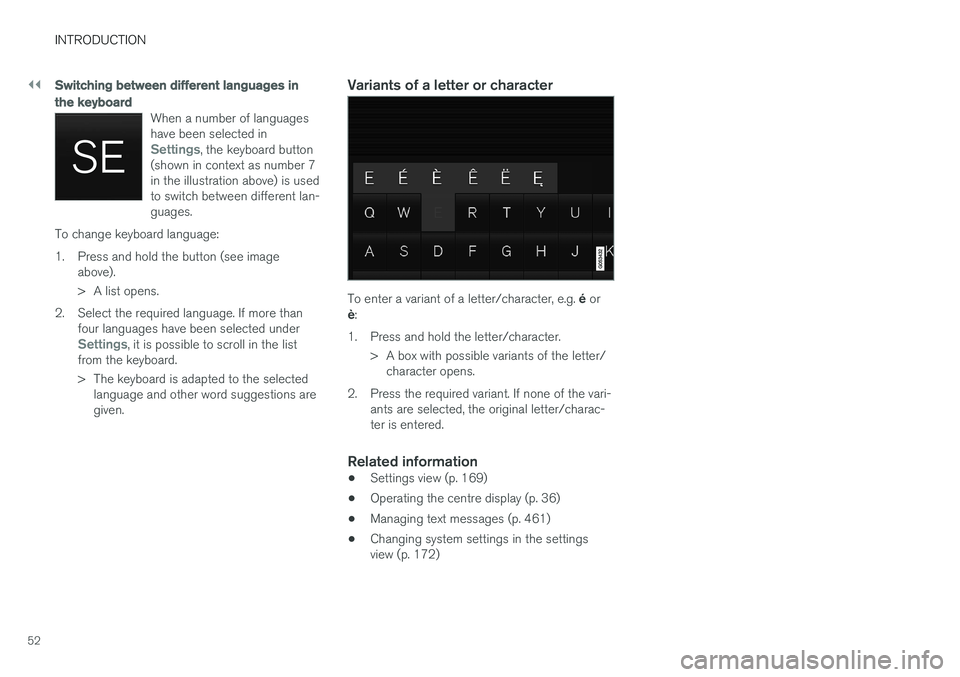
To enter a variant of a letter/character, e.g. é or
è :
1. Press and hold the letter/character. > A box with possible variants of the letter/character opens.
2. Press the required variant. If none of the vari- ants are selected, the original letter/charac- ter is entered.
Related information
• Settings view (p. 169)
• Operating the centre display (p. 36)
• Managing text messages (p. 461)
• Changing system settings in the settingsview (p. 172)
Page 55 of 594
INTRODUCTION
53
Writing characters/letters by hand on the screen
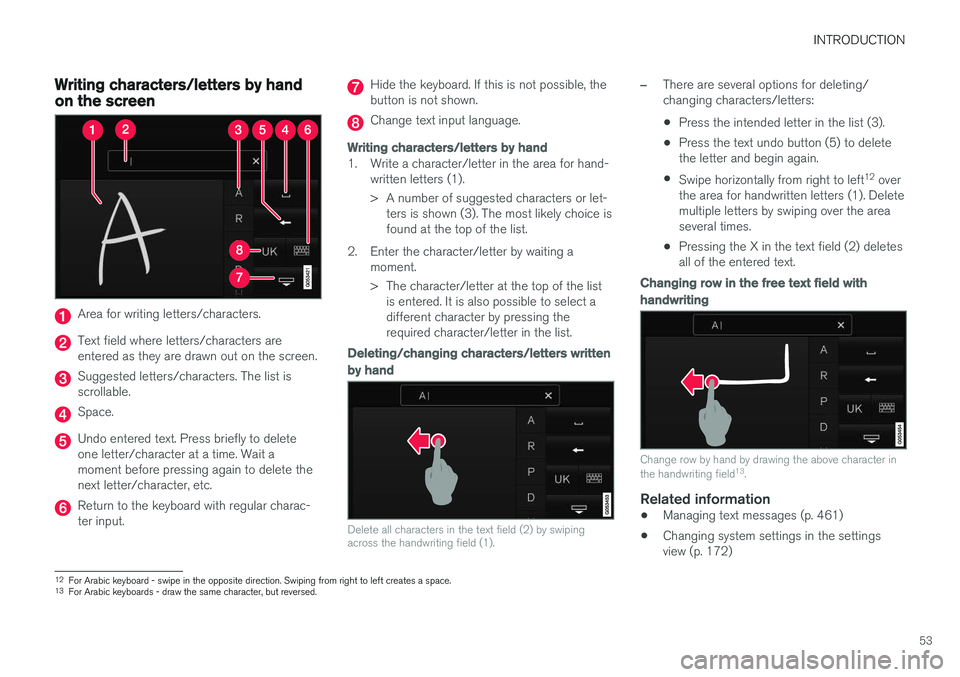
Area for writing letters/characters.
Text field where letters/characters are entered as they are drawn out on the screen.
Suggested letters/characters. The list is scrollable.
Space.
Undo entered text. Press briefly to delete one letter/character at a time. Wait amoment before pressing again to delete thenext letter/character, etc.
Return to the keyboard with regular charac- ter input.
Hide the keyboard. If this is not possible, the button is not shown.
Change text input language.
Writing characters/letters by hand
1. Write a character/letter in the area for hand-written letters (1).
> A number of suggested characters or let-ters is shown (3). The most likely choice is found at the top of the list.
2. Enter the character/letter by waiting a moment.
> The character/letter at the top of the listis entered. It is also possible to select a different character by pressing therequired character/letter in the list.
Deleting/changing characters/letters written by hand
Delete all characters in the text field (2) by swiping across the handwriting field (1).
–There are several options for deleting/ changing characters/letters: •Press the intended letter in the list (3).
• Press the text undo button (5) to delete the letter and begin again.
• Swipe horizontally from right to left 12
over
the area for handwritten letters (1). Deletemultiple letters by swiping over the areaseveral times.
• Pressing the X in the text field (2) deletesall of the entered text.
Changing row in the free text field with handwriting
Change row by hand by drawing the above character in the handwriting field 13
.
Related information
• Managing text messages (p. 461)
• Changing system settings in the settings view (p. 172)
12
For Arabic keyboard - swipe in the opposite direction. Swiping from right to left creates a space.
13 For Arabic keyboards - draw the same character, but reversed.
Page 64 of 594
SAFETY
62
Door and seatbelt reminderThe system reminds unbelted occupants to wear a seatbelt, and also warns about an open door,bonnet, tailgate or fuel filler flap.
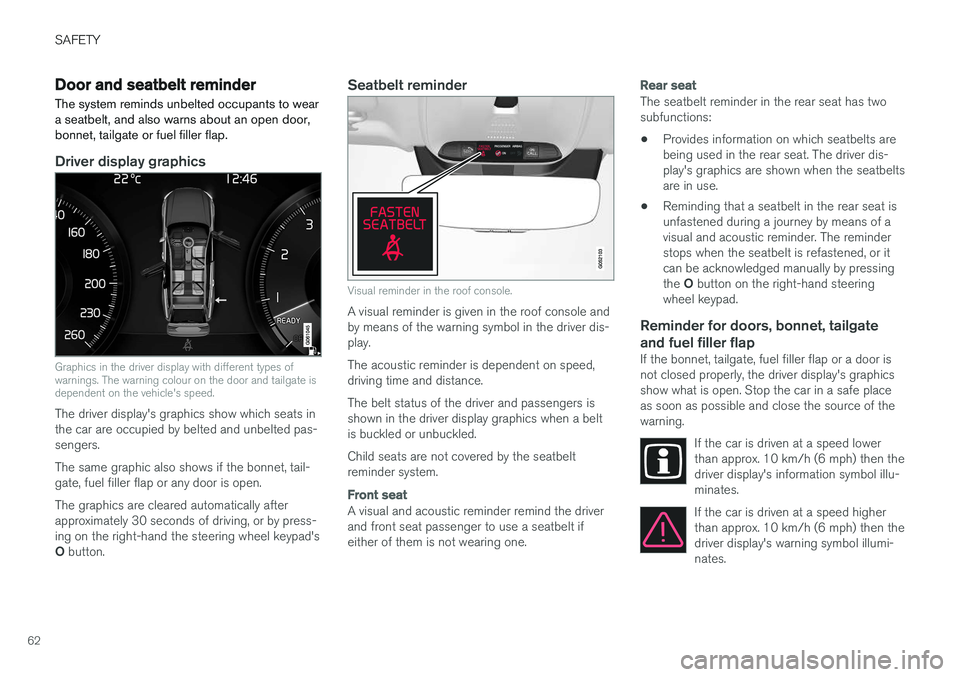
Driver display graphics
Graphics in the driver display with different types of warnings. The warning colour on the door and tailgate isdependent on the vehicle's speed.
The driver display's graphics show which seats in the car are occupied by belted and unbelted pas-sengers. The same graphic also shows if the bonnet, tail- gate, fuel filler flap or any door is open. The graphics are cleared automatically after approximately 30 seconds of driving, or by press-ing on the right-hand the steering wheel keypad's O button.
Seatbelt reminder
Visual reminder in the roof console.
A visual reminder is given in the roof console and by means of the warning symbol in the driver dis-play. The acoustic reminder is dependent on speed, driving time and distance. The belt status of the driver and passengers is shown in the driver display graphics when a beltis buckled or unbuckled. Child seats are not covered by the seatbelt reminder system.
Front seat
A visual and acoustic reminder remind the driver and front seat passenger to use a seatbelt ifeither of them is not wearing one.
Rear seat
The seatbelt reminder in the rear seat has two subfunctions: • Provides information on which seatbelts are being used in the rear seat. The driver dis-play's graphics are shown when the seatbeltsare in use.
• Reminding that a seatbelt in the rear seat isunfastened during a journey by means of avisual and acoustic reminder. The reminderstops when the seatbelt is refastened, or itcan be acknowledged manually by pressing the
O button on the right-hand steering
wheel keypad.
Reminder for doors, bonnet, tailgate
and fuel filler flap
If the bonnet, tailgate, fuel filler flap or a door is not closed properly, the driver display's graphicsshow what is open. Stop the car in a safe placeas soon as possible and close the source of thewarning.
If the car is driven at a speed lowerthan approx. 10 km/h (6 mph) then thedriver display's information symbol illu-minates.
If the car is driven at a speed higher than approx. 10 km/h (6 mph) then thedriver display's warning symbol illumi-nates.
Page 69 of 594
SAFETY
}}
67
2. Confirm the message by pressing the right-
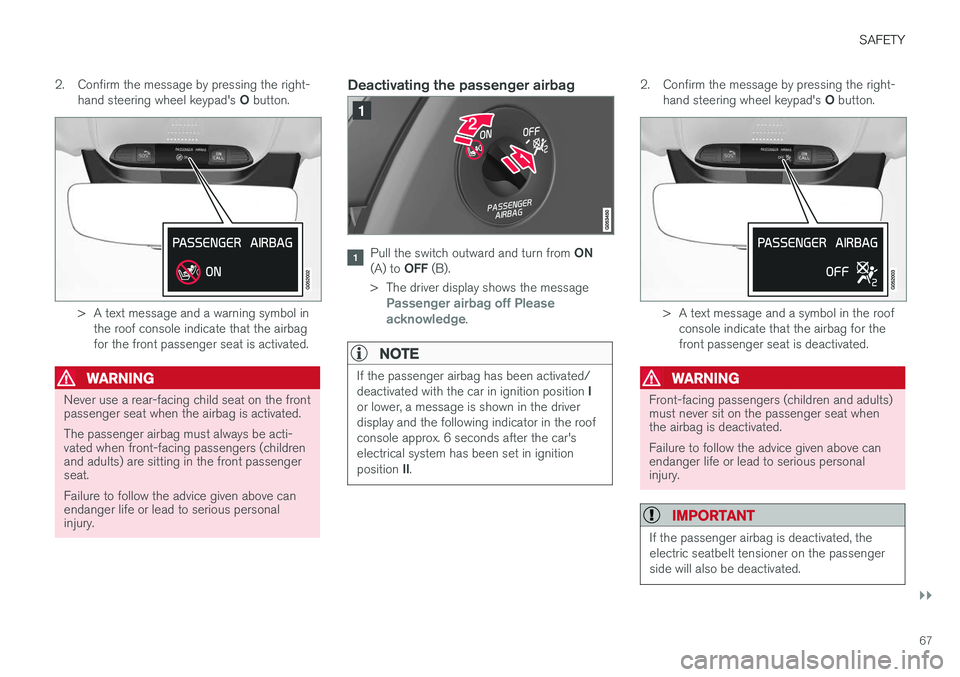
hand steering wheel keypad's O button.
> A text message and a warning symbol in
the roof console indicate that the airbag for the front passenger seat is activated.
WARNING
Never use a rear-facing child seat on the front passenger seat when the airbag is activated. The passenger airbag must always be acti- vated when front-facing passengers (childrenand adults) are sitting in the front passengerseat. Failure to follow the advice given above can endanger life or lead to serious personalinjury.
Deactivating the passenger airbag
Pull the switch outward and turn from ON
(A) to OFF (B).
> The driver display shows the message
Passenger airbag off Please
acknowledge.
NOTE
If the passenger airbag has been activated/ deactivated with the car in ignition position I
or lower, a message is shown in the driver display and the following indicator in the roofconsole approx. 6 seconds after the car'selectrical system has been set in ignition position II.
2. Confirm the message by pressing the right-
hand steering wheel keypad's O button.
> A text message and a symbol in the roof
console indicate that the airbag for the front passenger seat is deactivated.
WARNING
Front-facing passengers (children and adults) must never sit on the passenger seat whenthe airbag is deactivated. Failure to follow the advice given above can endanger life or lead to serious personalinjury.
IMPORTANT
If the passenger airbag is deactivated, the electric seatbelt tensioner on the passengerside will also be deactivated.
Page 88 of 594
INSTRUMENTS AND CONTROLS
* Option/accessory.
86
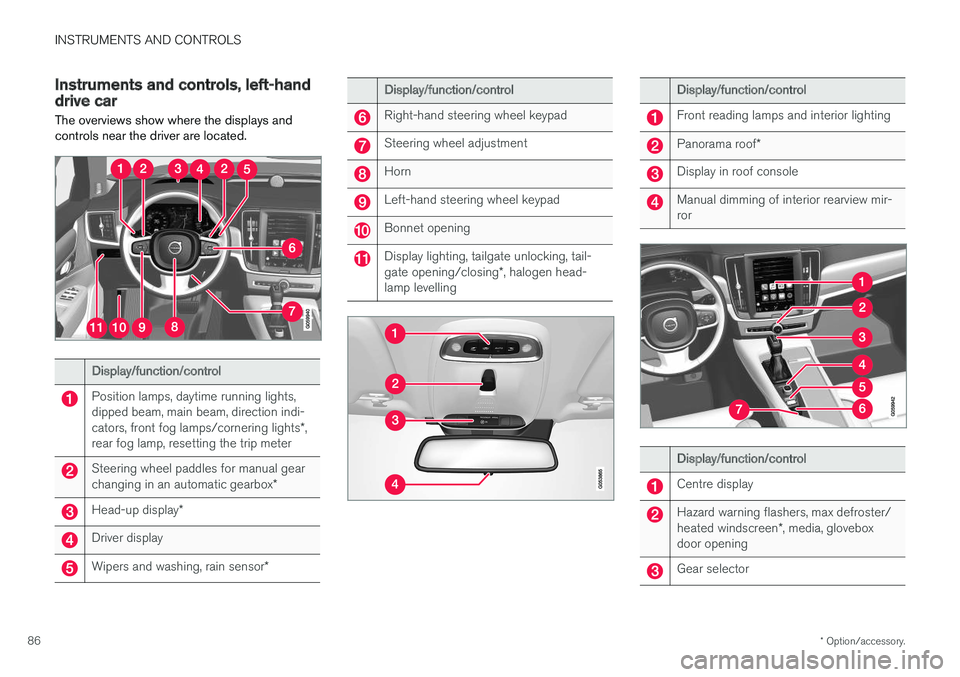
Instruments and controls, left-hand drive car The overviews show where the displays and controls near the driver are located.
Display/function/control
Position lamps, daytime running lights, dipped beam, main beam, direction indi- cators, front fog lamps/cornering lights *,
rear fog lamp, resetting the trip meter
Steering wheel paddles for manual gear changing in an automatic gearbox *
Head-up display*
Driver display
Wipers and washing, rain sensor *
Display/function/control
Right-hand steering wheel keypad
Steering wheel adjustment
Horn
Left-hand steering wheel keypad
Bonnet opening
Display lighting, tailgate unlocking, tail- gate opening/closing*, halogen head-
lamp levelling
Display/function/control
Front reading lamps and interior lighting
Panorama roof *
Display in roof console
Manual dimming of interior rearview mir- ror
Display/function/control
Centre display
Hazard warning flashers, max defroster/ heated windscreen *, media, glovebox
door opening
Gear selector
Page 90 of 594
||
INSTRUMENTS AND CONTROLS
* Option/accessory.
88
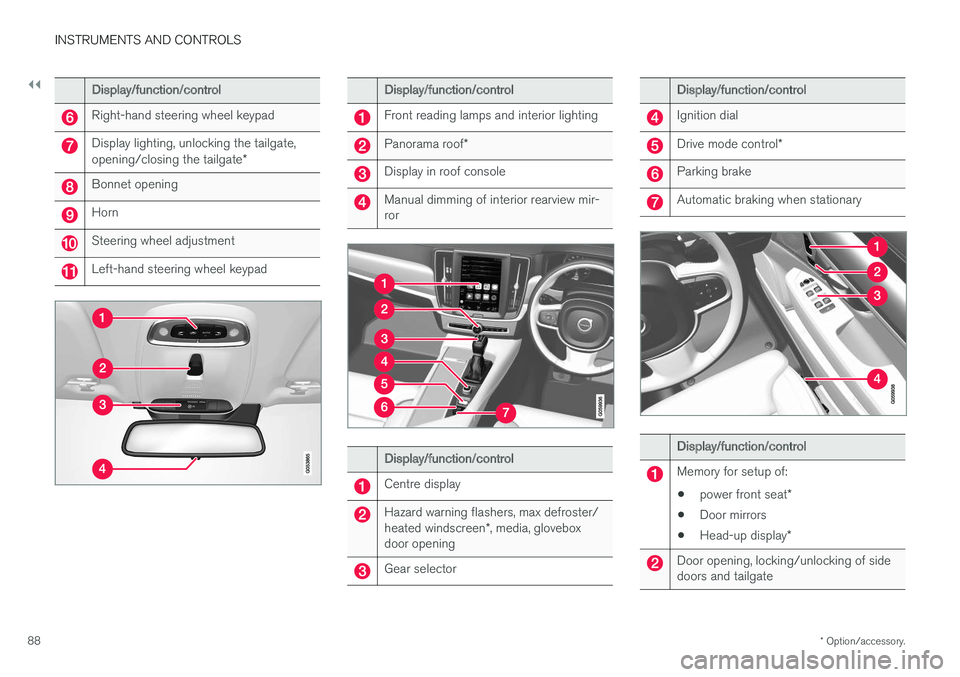
Display/function/control
Right-hand steering wheel keypad
Display lighting, unlocking the tailgate, opening/closing the tailgate *
Bonnet opening
Horn
Steering wheel adjustment
Left-hand steering wheel keypad
Display/function/control
Front reading lamps and interior lighting
Panorama roof*
Display in roof console
Manual dimming of interior rearview mir- ror
Display/function/control
Centre display
Hazard warning flashers, max defroster/ heated windscreen *, media, glovebox
door opening
Gear selector
Display/function/control
Ignition dial
Drive mode control *
Parking brake
Automatic braking when stationary
Display/function/control
Memory for setup of:
• power front seat
*
• Door mirrors
• Head-up display
*
Door opening, locking/unlocking of side doors and tailgate
Page 93 of 594
INSTRUMENTS AND CONTROLS
}}
* Option/accessory.91
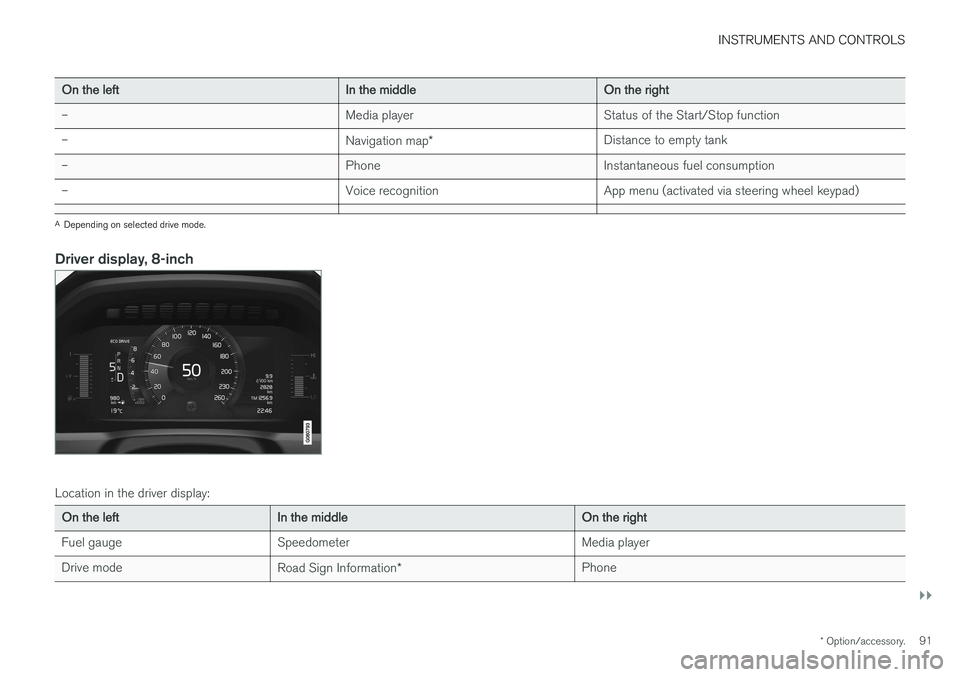
On the left In the middleOn the right
– Media player Status of the Start/Stop function
– Navigation map* Distance to empty tank
– PhoneInstantaneous fuel consumption
– Voice recognition App menu (activated via steering wheel keypad)
A
Depending on selected drive mode.
Driver display, 8-inch
Location in the driver display:
On the left In the middle On the right
Fuel gauge Speedometer Media player
Drive mode Road Sign Information* Phone