lock VOLVO XC60 2009 Owner´s Manual
[x] Cancel search | Manufacturer: VOLVO, Model Year: 2009, Model line: XC60, Model: VOLVO XC60 2009Pages: 297, PDF Size: 21.16 MB
Page 81 of 297
03 Your driving environment
Ignition modes03
}}
79
Functions
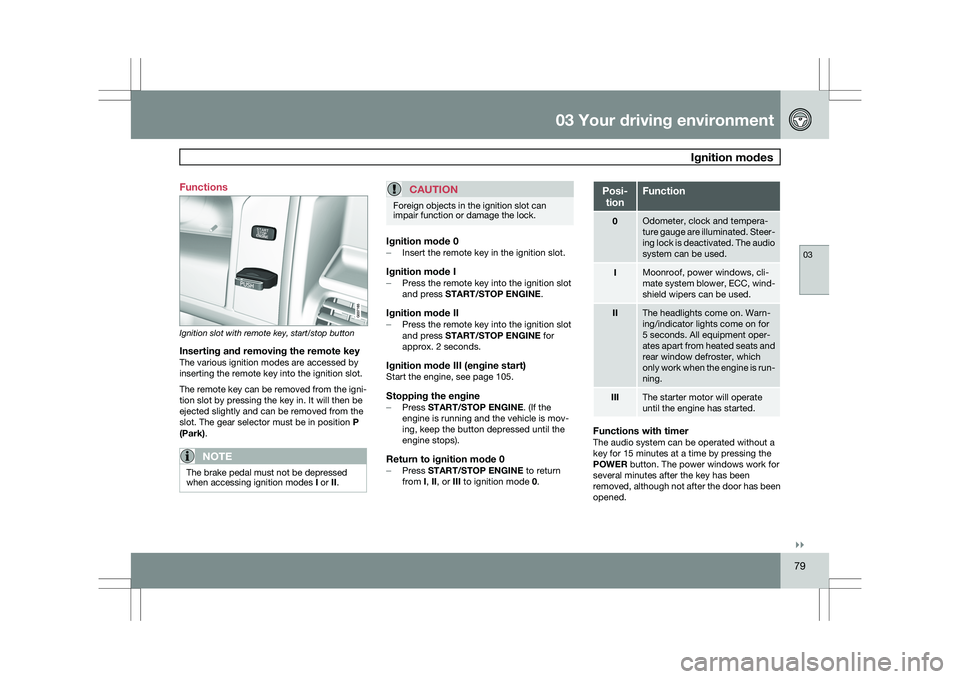
Ignition slot with remote key, start/stop button
Inserting and removing the remote keyThe various ignition modes are accessed by
inserting the remote key into the ignition slot.
The remote key can be removed from the igni-
tion slot by pressing the key in. It will then be
ejected slightly and can be removed from the
slot. The gear selector must be in position
P
(Park).
NOTE The brake pedal must not be depressed
when accessing ignition modes
I or II.
CAUTION Foreign objects in the ignition slot can
impair function or damage the lock.
Ignition mode 0–
Insert the remote key in the ignition slot.
Ignition mode I–Press the remote key into the ignition slot
and press START/STOP ENGINE.
Ignition mode II–Press the remote key into the ignition slot
and press START/STOP ENGINE for
approx. 2 seconds.
Ignition mode III (engine start)Start the engine, see page 105.
Stopping the engine–
Press START/STOP ENGINE. (If the
engine is running and the vehicle is mov-
ing, keep the button depressed until the
engine stops).
Return to ignition mode 0–Press START/STOP ENGINE to return
from I, II, or III to ignition mode 0. Posi-
tion Function
0 Odometer, clock and tempera-
ture gauge are illuminated. Steer-
ing lock is deactivated. The audio
system can be used.
I Moonroof, power windows, cli-
mate system blower, ECC, wind-
shield wipers can be used.
II The headlights come on. Warn-
ing/indicator lights come on for
5 seconds. All equipment oper-
ates apart from heated seats and
rear window defroster, which
only work when the engine is run-
ning.
III The starter motor will operate
until the engine has started.
Functions with timerThe audio system can be operated without a
key for 15 minutes at a time by pressing the
POWER button. The power windows work for
several minutes after the key has been
removed, although not after the door has been
opened.
Page 83 of 297
03 Your driving environment
Seats03
}}
* Option/accessory, for more information, see Introduction. 81
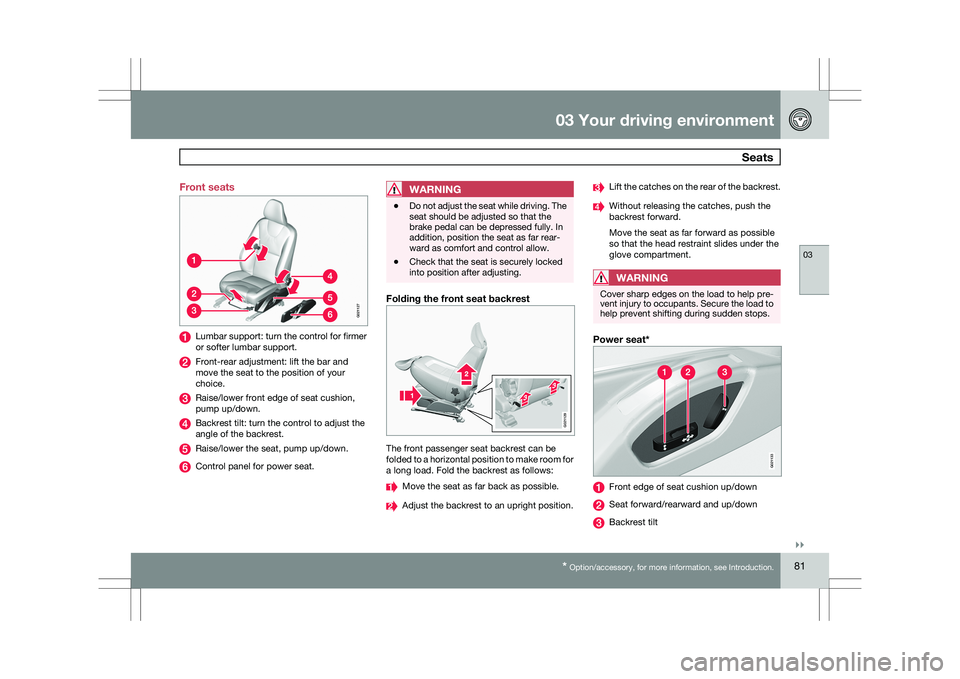
Front seats
Lumbar support: turn the control for firmer
or softer lumbar support.
Front-rear adjustment: lift the bar and
move the seat to the position of your
choice.
Raise/lower front edge of seat cushion,
pump up/down.
Backrest tilt: turn the control to adjust the
angle of the backrest.
Raise/lower the seat, pump up/down.
Control panel for power seat.
WARNING \b
Do not adjust the seat while driving. The
seat should be adjusted so that the
brake pedal can be depressed fully. In
addition, position the seat as far rear-
ward as comfort and control allow.
\b Check that the seat is securely locked
into position after adjusting.
Folding the front seat backrest The front passenger seat backrest can be
folded to a horizontal position to make room for
a long load. Fold the backrest as follows:
Move the seat as far back as possible.
Adjust the backrest to an upright position. Lift the catches on the rear of the backrest.
Without releasing the catches, push the
backrest forward.
Move the seat as far forward as possible
so that the head restraint slides under the
glove compartment.
WARNING
Cover sharp edges on the load to help pre-
vent injury to occupants. Secure the load to
help prevent shifting during sudden stops.
Power seat*
Front edge of seat cushion up/down
Seat forward/rearward and up/down
Backrest tilt G02112
7 G02112
9 G02113
3
Page 84 of 297
03 Your driving environmentSeats 03
82
* Option/accessory, for more information, see Introduction.
OperationThe seats can be adjusted for a short period
after unlocking the door with the remote con-
trol without the key in the ignition slot. Seat
adjustment is normally made when the ignition
is on and can always be made when the engine
is running.
NOTE \b
Only one of the power seat\fs controls
can be used at the same time.
\b The power seats have an overload pro-
tector that activates if a seat is blocked
by any object. If this occurs, switch off
the ignition (key in position
0) and wait
for a short period before operating the
seat again.
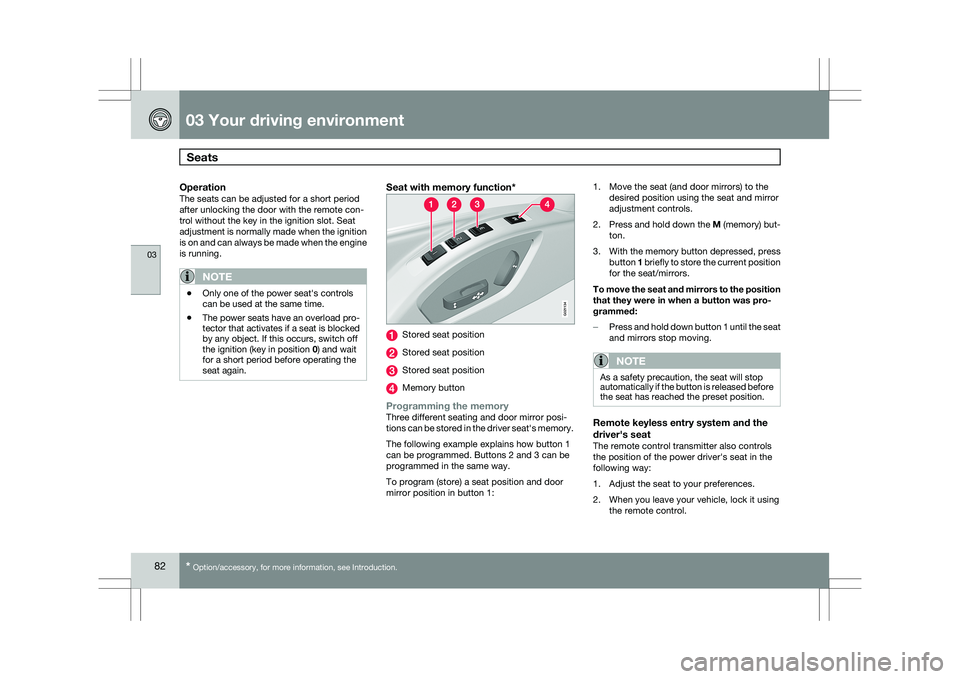
Seat with memory function* Stored seat position
Stored seat position
Stored seat position
Memory button
Programming the memoryThree different seating and door mirror posi-
tions can be stored in the driver seat\fs memory.
The following example explains how button 1
can be programmed. Buttons 2 and 3 can be
programmed in the same way.
To program (store) a seat position and door
mirror position in button 1:1. Move the seat (and door mirrors) to the
desired position using the seat and mirror
adjustment controls.
2. Press and hold down the M (memory) but-
ton.
3. With the memory button depressed, press
button 1 briefly to store the current position
for the seat/mirrors.
To move the seat and mirrors to the position
that they were in when a button was pro-
grammed:
– Press and hold down button 1 until the seat
and mirrors stop moving.
NOTE As a safety precaution, the seat will stop
automatically if the button is released before
the seat has reached the preset position.
Remote keyless entry system and the
driver\fs seat
The remote control transmitter also controls
the position of the power driver\fs seat in the
following way:
1. Adjust the seat to your preferences.
2. When you leave your vehicle, lock it using
the remote control. G02113
4
Page 85 of 297
03 Your driving environment
Seats03
}}
* Option/accessory, for more information, see Introduction. 83
The position of the driver\fs seat is now stored
in the remote control\fs memory.
Automatic seat adjustmentTo move the seat to the position in which you
left it:
1. Unlock the driver\fs door with the same
remote control (the one used to lock the
doors)
2. Open the driver\fs door within 2 minutes.
The driver\fs seat will automatically move to the
position in which you left it.
NOTE \b
The key memory is independent of the
seat memory.
\b The seat will move to this position even
if someone else has moved it to a dif-
ferent seating position and locked the
vehicle with a different remote control.
\b This feature will work in the same way
with all of the remote control transmit-
ters that you use with your vehicle. The function can be activated/deactivated
under Car key memory
Seat & mirror
positions. For a description of the menu sys-
tem, see page 122.
Emergency stopIf the seat accidentally begins to move, press
one of the buttons to stop the seat.
WARNING \b
Because the driver\fs seat can be
adjusted with the ignition off, children
should never be left unattended in the
vehicle.
\b Movement of the seat can be STOPPED
at any time by pressing any button on
the power seat control panel.
\b Do not adjust the seat while driving. The
seat should be adjusted so that the
brake pedal can be depressed fully. In
addition, position the seat as far rear-
ward as comfort and control allow.
\b The seat rails on the floor must not be
obstructed in any way when the seat is
in motion.
Heated seats*See page 128. Rear seats
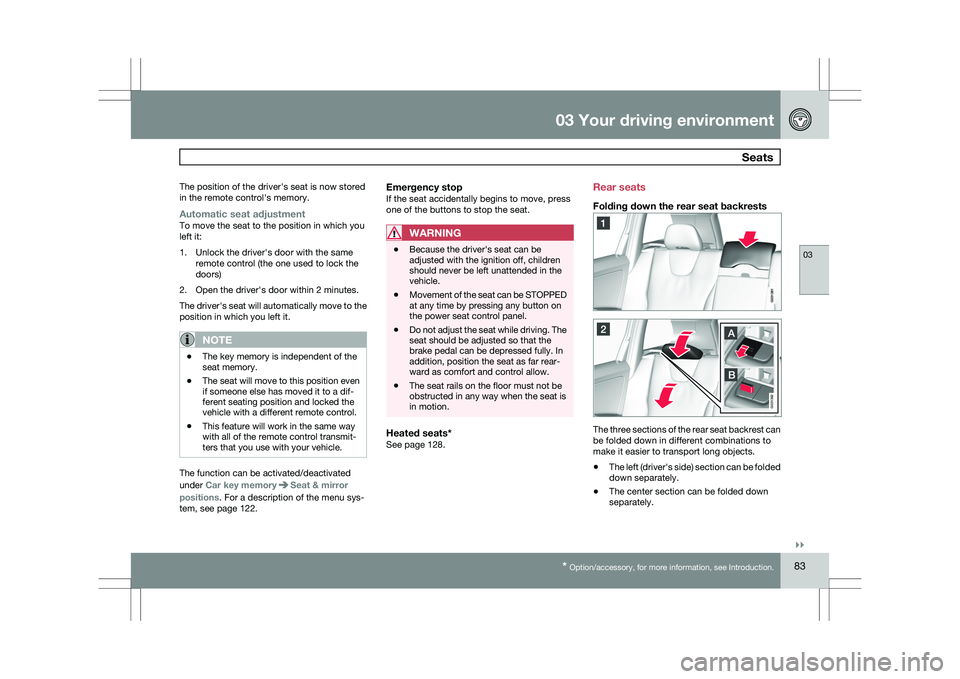
Folding down the rear seat backrests
The three sections of the rear seat backrest can
be folded down in different combinations to
make it easier to transport long objects.
\b
The left (driver\fs side) section can be folded
down separately.
\b The center section can be folded down
separately. G031382
Page 86 of 297
03 Your driving environmentSeats 03
84 \b
The right (passenger\fs side) section can be
folded down together with the center sec-
tion.
\b All three sections can be folded down
together. Release and lower the center head
restraint (see page 83) if the center and/or
right section of the backrest is to be low-
ered. The outboard head restraints fold
down automatically.
Pull up the backrest release control on the
respective section(s) and fold the sec-
tion(s) down.
NOTE
It may be necessary to move the front seats
forward or put their backrests in a more
upright position before folding down the
rear seat backrests.
WARNING \b
When the backrest(s) are returned to the
upright position, check that it is properly
locked in place. The red indicators
should not be visible.
\b Return the outboard head restraints to
the upright position.
\b Long loads should always be securely
anchored to help avoid injury in the
event of a sudden stop.
\b Always turn the engine off and apply the
parking brake when loading/unloading
the vehicle.
\b Place the transmission in the Park (
P)
position to help prevent inadvertent
movement of the gear selector.
\b On hot days, the temperature in the
vehicle interior can rise very quickly.
Exposure of people to these high tem-
peratures for even a short period of time
can cause heat-related injury or death.
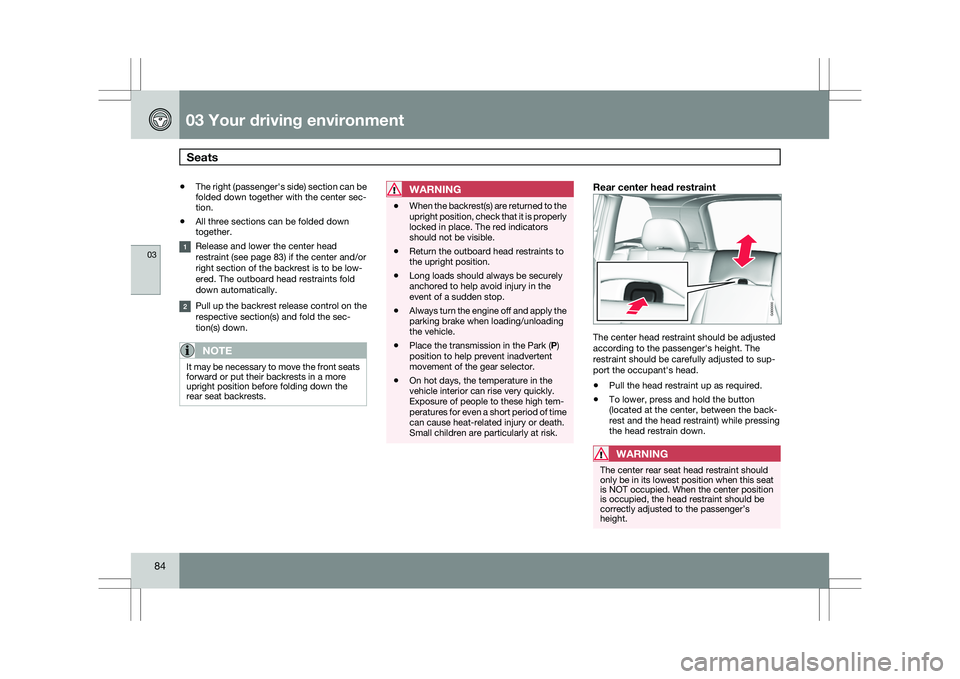
Small children are particularly at risk.Rear center head restraint The center head restraint should be adjusted
according to the passenger\fs height. The
restraint should be carefully adjusted to sup-
port the occupant\fs head.
\b
Pull the head restraint up as required.
\b To lower, press and hold the button
(located at the center, between the back-
rest and the head restraint) while pressing
the head restrain down.
WARNING The center rear seat head restraint should
only be in its lowest position when this seat
is NOT occupied. When the center position
is occupied, the head restraint should be
correctly adjusted to the passenger’s
height. G000000
Page 88 of 297
03 Your driving environmentSteering wheel 03
86
* Option/accessory, for more information, see Introduction.
Adjusting
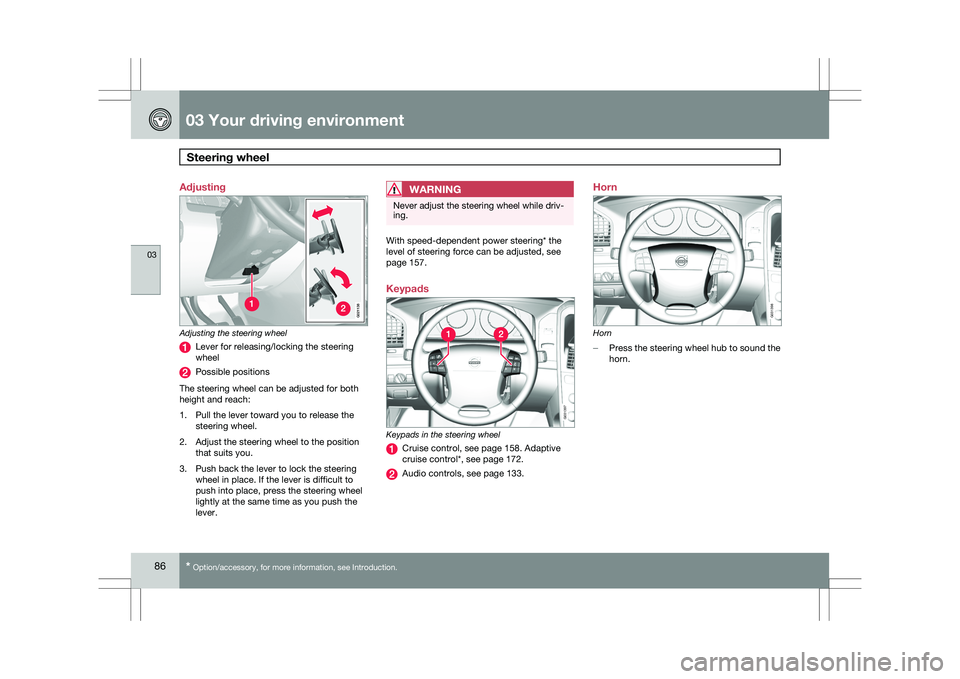
Adjusting the steering wheel
Lever for releasing/locking the steering
wheel
Possible positions
The steering wheel can be adjusted for both
height and reach:
1. Pull the lever toward you to release the steering wheel.
2. Adjust the steering wheel to the position that suits you.
3. Push back the lever to lock the steering wheel in place. If the lever is difficult to
push into place, press the steering wheel
lightly at the same time as you push the
lever.
WARNING Never adjust the steering wheel while driv-
ing.
With speed-dependent power steering* the
level of steering force can be adjusted, see
page 157.
Keypads
Keypads in the steering wheel
Cruise control, see page 158. Adaptive
cruise control*, see page 172.
Audio controls, see page 133.Horn
Horn
–
Press the steering wheel hub to sound the
horn. G02113
8 G031397 G031398
Page 93 of 297
03 Your driving environment
Lighting03
}}
* Option/accessory, for more information, see Introduction. 91
Interior lighting, rear
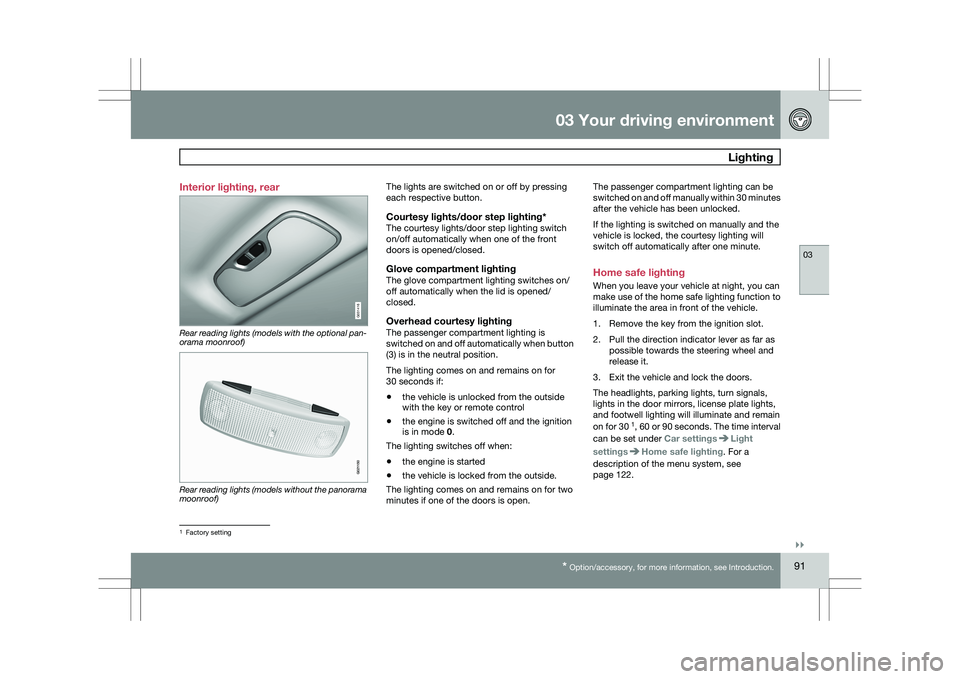
Rear reading lights (models with the optional pan-
orama moonroof)
Rear reading lights (models without the panorama
moonroof) The lights are switched on or off by pressing
each respective button.
Courtesy lights/door step lighting*The courtesy lights/door step lighting switch
on/off automatically when one of the front
doors is opened/closed.
Glove compartment lightingThe glove compartment lighting switches on/
off automatically when the lid is opened/
closed.
Overhead courtesy lightingThe passenger compartment lighting is
switched on and off automatically when button
(3) is in the neutral position.
The lighting comes on and remains on for
30 seconds if:
\b
the vehicle is unlocked from the outside
with the key or remote control
\b the engine is switched off and the ignition
is in mode 0.
The lighting switches off when:
\b the engine is started
\b the vehicle is locked from the outside.
The lighting comes on and remains on for two
minutes if one of the doors is open. The passenger compartment lighting can be
switched on and off manually within 30 minutes
after the vehicle has been unlocked.
If the lighting is switched on manually and the
vehicle is locked, the courtesy lighting will
switch off automatically after one minute.
Home safe lighting
When you leave your vehicle at night, you can
make use of the home safe lighting function to
illuminate the area in front of the vehicle.
1. Remove the key from the ignition slot.
2. Pull the direction indicator lever as far as
possible towards the steering wheel and
release it.
3. Exit the vehicle and lock the doors.
The headlights, parking lights, turn signals,
lights in the door mirrors, license plate lights,
and footwell lighting will illuminate and remain
on for 30 1
, 60 or 90 seconds. The time interval
can be set under Car settings Light
settings Home safe lighting. For a
description of the menu system, see
page 122. 1
Factory setting G031416 G021150
Page 98 of 297
03 Your driving environmentPower windows 03
96
* Option/accessory, for more information, see Introduction.
Power windows
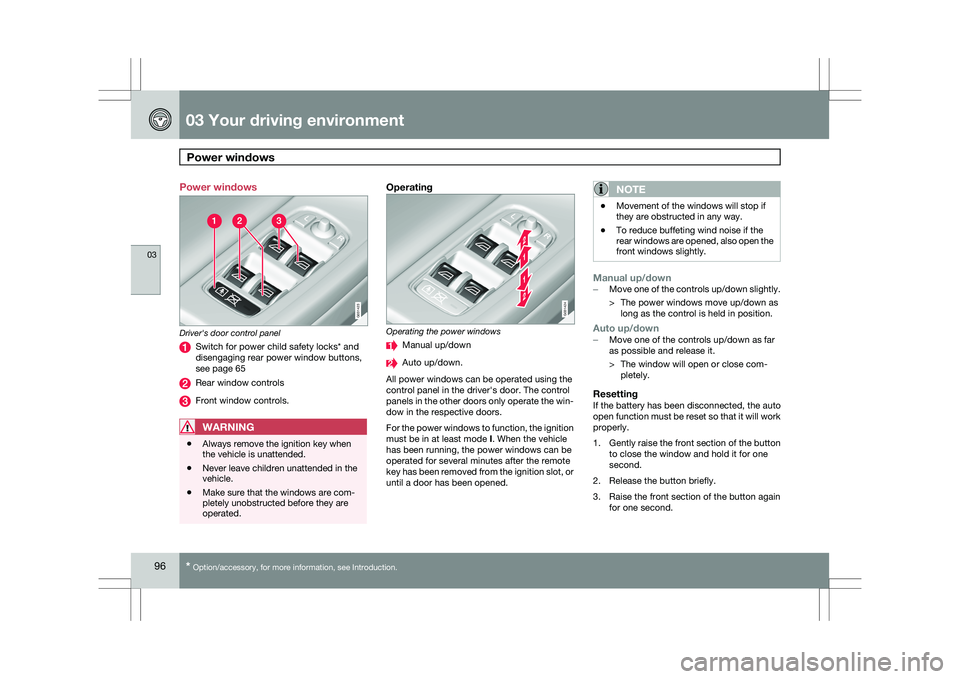
Driver's door control panel
Switch for power child safety locks* and
disengaging rear power window buttons,
see page 65
Rear window controls
Front window controls.
WARNING
\b
Always remove the ignition key when
the vehicle is unattended.
\b Never leave children unattended in the
vehicle.
\b Make sure that the windows are com-
pletely unobstructed before they are
operated.
Operating Operating the power windows
Manual up/down
Auto up/down.
All power windows can be operated using the
control panel in the driver\fs door. The control
panels in the other doors only operate the win-
dow in the respective doors.
For the power windows to function, the ignition
must be in at least mode I. When the vehicle
has been running, the power windows can be
operated for several minutes after the remote
key has been removed from the ignition slot, or
until a door has been opened.NOTE \b
Movement of the windows will stop if
they are obstructed in any way.
\b To reduce buffeting wind noise if the
rear windows are opened, also open the
front windows slightly.
Manual up/down–
Move one of the controls up/down slightly.
> The power windows move up/down as
long as the control is held in position.
Auto up/down– Move one of the controls up/down as far
as possible and release it.
> The window will open or close com-
pletely.
ResettingIf the battery has been disconnected, the auto
open function must be reset so that it will work
properly.
1. Gently raise the front section of the button
to close the window and hold it for one
second.
2. Release the button briefly.
3. Raise the front section of the button again for one second. G031423 G031424
Page 100 of 297
03 Your driving environmentMirrors 03
98
* Option/accessory, for more information, see Introduction.
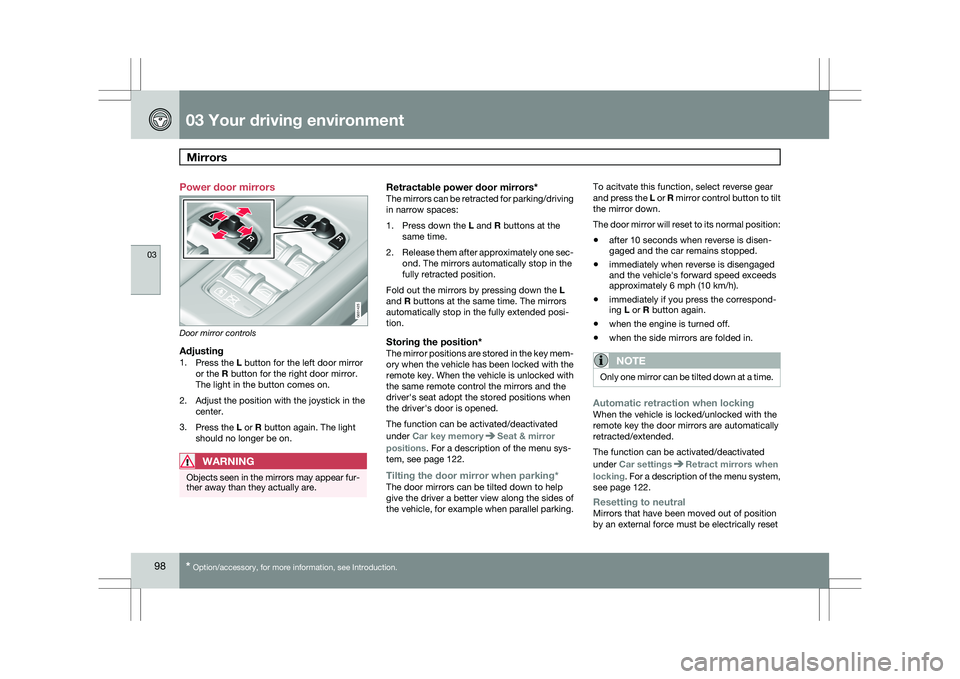
Power door mirrors
Door mirror controls
Adjusting1.
Press the L button for the left door mirror
or the R button for the right door mirror.
The light in the button comes on.
2. Adjust the position with the joystick in the center.
3. Press the L or R button again. The light
should no longer be on.
WARNING Objects seen in the mirrors may appear fur-
ther away than they actually are.
Retractable power door mirrors*The mirrors can be retracted for parking/driving
in narrow spaces:
1.
Press down the L and R buttons at the
same time.
2. Release them after approximately one sec-
ond. The mirrors automatically stop in the
fully retracted position.
Fold out the mirrors by pressing down the L
and R buttons at the same time. The mirrors
automatically stop in the fully extended posi-
tion.
Storing the position*The mirror positions are stored in the key mem-
ory when the vehicle has been locked with the
remote key. When the vehicle is unlocked with
the same remote control the mirrors and the
driver\fs seat adopt the stored positions when
the driver\fs door is opened.
The function can be activated/deactivated
under Car key memory Seat & mirror
positions. For a description of the menu sys-
tem, see page 122.
Tilting the door mirror when parking*The door mirrors can be tilted down to help
give the driver a better view along the sides of
the vehicle, for example when parallel parking. To acitvate this function, select reverse gear
and press the L or R mirror control button to tilt
the mirror down.
The door mirror will reset to its normal position:
\b
after 10 seconds when reverse is disen-
gaged and the car remains stopped.
\b immediately when reverse is disengaged
and the vehicle\fs forward speed exceeds
approximately 6 mph (10 km/h).
\b immediately if you press the correspond-
ing L or R button again.
\b when the engine is turned off.
\b when the side mirrors are folded in.
NOTE Only one mirror can be tilted down at a time.
Automatic retraction when lockingWhen the vehicle is locked/unlocked with the
remote key the door mirrors are automatically
retracted/extended.
The function can be activated/deactivated
under Car settings
Retract mirrors when
locking. For a description of the menu system,
see page 122.
Resetting to neutralMirrors that have been moved out of position
by an external force must be electrically reset G031425
Page 104 of 297
03 Your driving environmentHomeLink® Wireless Control System* 03
102
* Option/accessory, for more information, see Introduction.
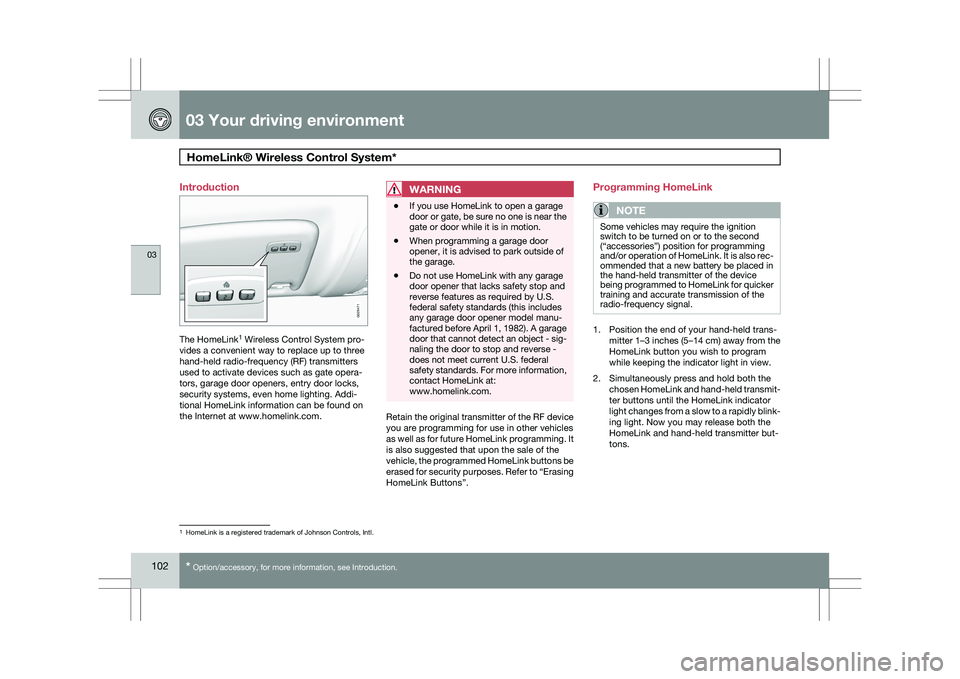
Introduction
The HomeLink
1
Wireless Control System pro-
vides a convenient way to replace up to three
hand-held radio-frequency (RF) transmitters
used to activate devices such as gate opera-
tors, garage door openers, entry door locks,
security systems, even home lighting. Addi-
tional HomeLink information can be found on
the Internet at www.homelink.com.
WARNING \b
If you use HomeLink to open a garage
door or gate, be sure no one is near the
gate or door while it is in motion.
\b When programming a garage door
opener, it is advised to park outside of
the garage.
\b Do not use HomeLink with any garage
door opener that lacks safety stop and
reverse features as required by U.S.
federal safety standards (this includes
any garage door opener model manu-
factured before April 1, 1982). A garage
door that cannot detect an object - sig-
naling the door to stop and reverse -
does not meet current U.S. federal
safety standards. For more information,
contact HomeLink at:
www.homelink.com. Retain the original transmitter of the RF device
you are programming for use in other vehicles
as well as for future HomeLink programming. It
is also suggested that upon the sale of the
vehicle, the programmed HomeLink buttons be
erased for security purposes. Refer to “Erasing
HomeLink Buttons”.Programming HomeLink
NOTE Some vehicles may require the ignition
switch to be turned on or to the second
(“accessories”) position for programming
and/or operation of HomeLink. It is also rec-
ommended that a new battery be placed in
the hand-held transmitter of the device
being programmed to HomeLink for quicker
training and accurate transmission of the
radio-frequency signal.
1. Position the end of your hand-held trans-
mitter 1–3 inches (5–14 cm) away from the
HomeLink button you wish to program
while keeping the indicator light in view.
2. Simultaneously press and hold both the chosen HomeLink and hand-held transmit-
ter buttons until the HomeLink indicator
light changes from a slow to a rapidly blink-
ing light. Now you may release both the
HomeLink and hand-held transmitter but-
tons. 1
HomeLink is a registered trademark of Johnson Controls, Intl. G029471