lock VOLVO XC60 2009 Owner´s Manual
[x] Cancel search | Manufacturer: VOLVO, Model Year: 2009, Model line: XC60, Model: VOLVO XC60 2009Pages: 297, PDF Size: 21.16 MB
Page 210 of 297
05 During your tripRefueling 05
208
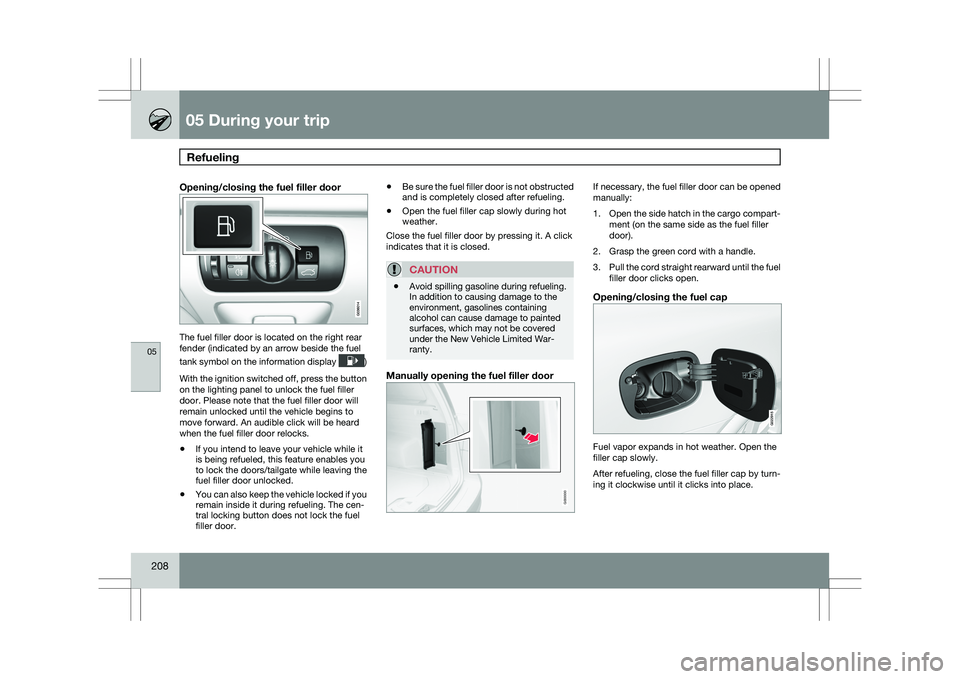
Opening/closing the fuel filler door The fuel filler door is located on the right rear
fender (indicated by an arrow beside the fuel
tank symbol on the information display
)
With the ignition switched off, press the button
on the lighting panel to unlock the fuel filler
door. Please note that the fuel filler door will
remain unlocked until the vehicle begins to
move forward. An audible click will be heard
when the fuel filler door relocks.
\b If you intend to leave your vehicle while it
is being refueled, this feature enables you
to lock the doors/tailgate while leaving the
fuel filler door unlocked.
\b You can also keep the vehicle locked if you
remain inside it during refueling. The cen-
tral locking button does not lock the fuel
filler door. \b
Be sure the fuel filler door is not obstructed
and is completely closed after refueling.
\b Open the fuel filler cap slowly during hot
weather.
Close the fuel filler door by pressing it. A click
indicates that it is closed.
CAUTION \b
Avoid spilling gasoline during refueling.
In addition to causing damage to the
environment, gasolines containing
alcohol can cause damage to painted
surfaces, which may not be covered
under the New Vehicle Limited War-
ranty.
Manually opening the fuel filler door If necessary, the fuel filler door can be opened
manually:
1.
Open the side hatch in the cargo compart-
ment (on the same side as the fuel filler
door).
2. Grasp the green cord with a handle.
3. Pull the cord straight rearward until the fuel
filler door clicks open.
Opening/closing the fuel cap Fuel vapor expands in hot weather. Open the
filler cap slowly.
After refueling, close the fuel filler cap by turn-
ing it clockwise until it clicks into place. G000000 G022915
Page 216 of 297

05 During your tripCargo area 05
214
* Option/accessory, for more information, see Introduction.
Cargo area cover*
Use
\b
Pull the cover over the cargo and hook it
into the holes in the rear cargo area pillars.
\b To retract (roll up) the cover, release it from
the holes and guide it toward the rear seat
backrest.
Installing the cover Press the end piece on one side of the
cargo area cover into the retaining bracket
in the side panel of the cargo area.
Do the same on the opposite side.
Press both sides of the cover until they
click into place.
> Check that both ends of the cover are
securely locked in place.
Removing the cover1. Press one of the end pieces of the cover inward.
2. Pull the cover carefully upward and out- ward. The other end will release automati-
cally from its retaining bracket.
Folding down the cargo area cover\fs rear
flap
The cargo area cover\fs rear flap points hori-
zontally when the cover is retracted (rolled up).
To fold it down:
–Pull the flap slightly rearward past its sup-
ports and fold it down.
NOTE On models equipped with this cover, it
should be removed before a child seat is
attached to the child restraint anchors. See
page 43 for more information. Cargo net*
Cargo net mounted in rear position
Your vehicle can be equipped with a cargo net
made of strong nylon fabric that helps prevent
objects in the cargo area from moving forward
into the passenger compartment.
The net can be attached in two different places:
\b
Rear position: behind the rear seat back-
rest
\b Front position: behind the front seat backr-
ests G031977 G034213
Page 217 of 297
05 During your trip
Cargo area05
}}
215
WARNING\b
Be sure that the cargo net\fs upper
attachment hooks are properly inserted
in the brackets and that the lower straps
are correctly attached and pulled taut.
\b A damaged cargo net should never be
used.
\b Objects in the cargo area should be
securely anchored, even if the cargo net
is correctly installed and in use.
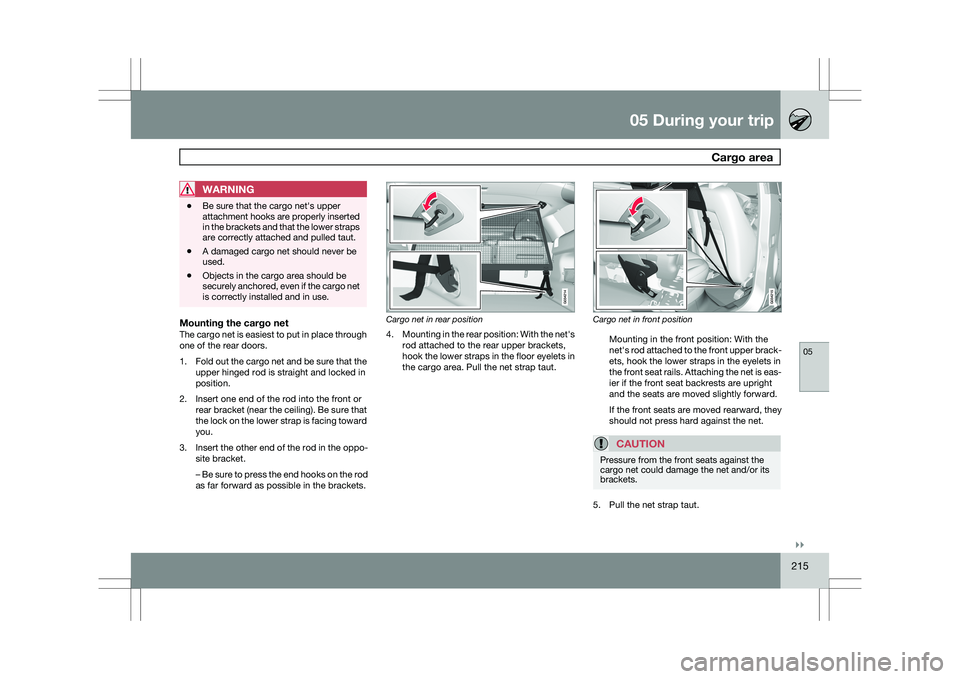
Mounting the cargo netThe cargo net is easiest to put in place through
one of the rear doors.
1.
Fold out the cargo net and be sure that the
upper hinged rod is straight and locked in
position.
2. Insert one end of the rod into the front or rear bracket (near the ceiling). Be sure that
the lock on the lower strap is facing toward
you.
3. Insert the other end of the rod in the oppo-
site bracket.
– Be sure to press the end hooks on the rod
as far forward as possible in the brackets. Cargo net in rear position
4.
Mounting in the rear position: With the net\fs
rod attached to the rear upper brackets,
hook the lower straps in the floor eyelets in
the cargo area. Pull the net strap taut. Cargo net in front position
Mounting in the front position: With the
net\fs rod attached to the front upper brack-
ets, hook the lower straps in the eyelets in
the front seat rails. Attaching the net is eas-
ier if the front seat backrests are upright
and the seats are moved slightly forward.
If the front seats are moved rearward, they
should not press hard against the net.
CAUTION Pressure from the front seats against the
cargo net could damage the net and/or its
brackets.
5. Pull the net strap taut.
Page 218 of 297
05 During your tripCargo area 05
216
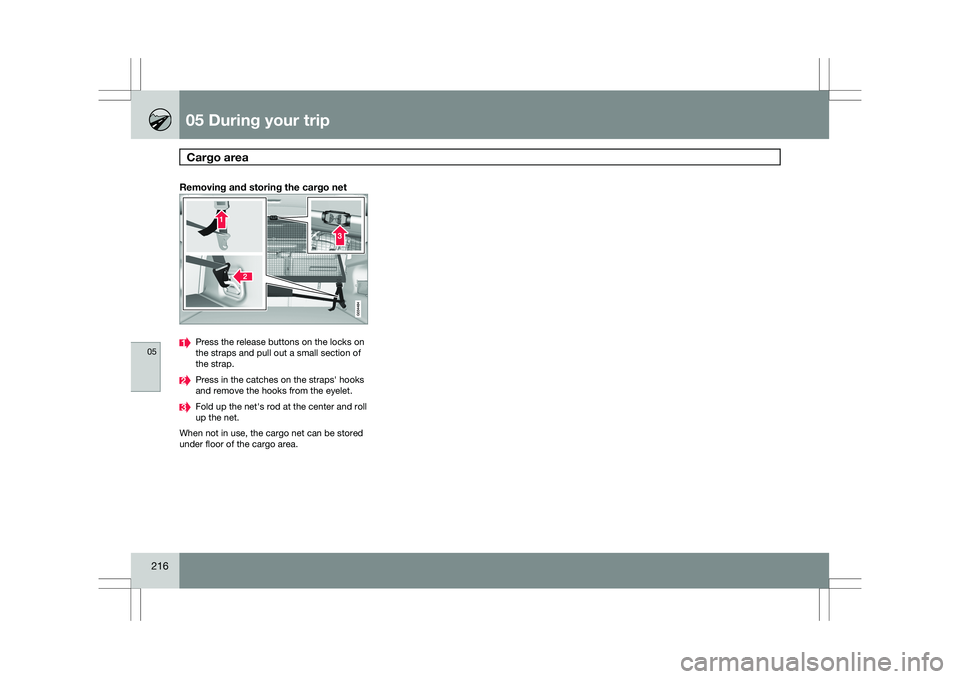
Removing and storing the cargo net Press the release buttons on the locks on
the straps and pull out a small section of
the strap.
Press in the catches on the straps\f hooks
and remove the hooks from the eyelet.
Fold up the net\fs rod at the center and roll
up the net.
When not in use, the cargo net can be stored
under floor of the cargo area.
Page 220 of 297
05 During your tripTowing a trailer 05
218
NOTE \b
When parking the vehicle with a trailer
on a hill, apply the parking brake before
putting the gear selector in
P. Always
follow the trailer manufacturer\fs recom-
mendations for wheel chocking.
\b When starting on a hill, put the gear
selector in
D before releasing the park-
ing brake. See page 116 for more
detailed information about starting off
on a hill while towing a trailer.
\b If you use the manual (Geartronic) shift
positions while towing a trailer, make
sure the gear you select does not put
too much strain on the engine (using too
high a gear).
\b The drawbar assembly/trailer hitch may
be rated for trailers heavier than the
vehicle is designed to tow. Please
adhere to Volvo\fs recommended trailer
weights.
\b Avoid driving with a trailer on inclines of
more than 15 %.
Trailer cableAn adapter is required if the vehicle\fs trailer
hitch has a 13-pin connector and the trailer has
7 pins. Use an adapter cable approved by
Volvo. Make sure the cable does not drag on
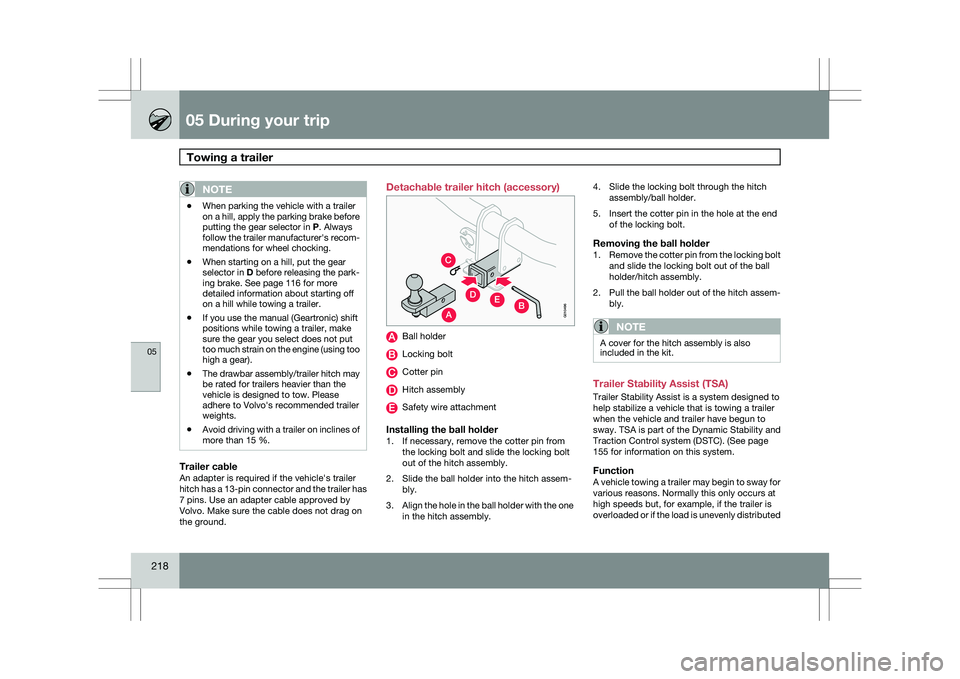
the ground. Detachable trailer hitch (accessory)
Ball holder
Locking bolt
Cotter pin
Hitch assembly
Safety wire attachment
Installing the ball holder1. If necessary, remove the cotter pin from
the locking bolt and slide the locking bolt
out of the hitch assembly.
2. Slide the ball holder into the hitch assem- bly.
3. Align the hole in the ball holder with the one
in the hitch assembly. 4. Slide the locking bolt through the hitch
assembly/ball holder.
5. Insert the cotter pin in the hole at the end of the locking bolt.
Removing the ball holder1.Remove the cotter pin from the locking bolt
and slide the locking bolt out of the ball
holder/hitch assembly.
2. Pull the ball holder out of the hitch assem-
bly.
NOTE A cover for the hitch assembly is also
included in the kit.
Trailer Stability Assist (TSA)
Trailer Stability Assist is a system designed to
help stabilize a vehicle that is towing a trailer
when the vehicle and trailer have begun to
sway.
TSA is part of the Dynamic Stability and
Traction Control system (DSTC). (See page
155 for information on this system.
FunctionA vehicle towing a trailer may begin to sway for
various reasons. Normally this only occurs at
high speeds but, for example, if the trailer is
overloaded or if the load is unevenly distributed
A
C
EDB
G010496
Page 222 of 297
05 During your tripEmergency towing 05
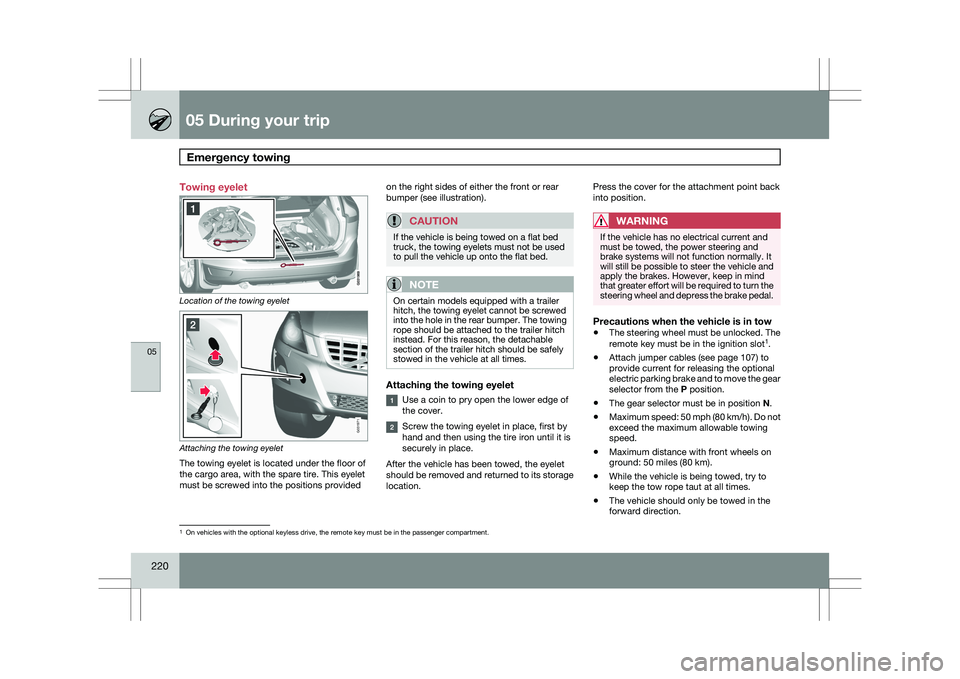
220 Towing eyelet
Location of the towing eyelet
Attaching the towing eyelet
The towing eyelet is located under the floor of
the cargo area, with the spare tire. This eyelet
must be screwed into the positions provided on the right sides of either the front or rear
bumper (see illustration).
CAUTION If the vehicle is being towed on a flat bed
truck, the towing eyelets must not be used
to pull the vehicle up onto the flat bed.
NOTE
On certain models equipped with a trailer
hitch, the towing eyelet cannot be screwed
into the hole in the rear bumper. The towing
rope should be attached to the trailer hitch
instead. For this reason, the detachable
section of the trailer hitch should be safely
stowed in the vehicle at all times.
Attaching the towing eyelet
Use a coin to pry open the lower edge of
the cover.
Screw the towing eyelet in place, first by
hand and then using the tire iron until it is
securely in place.
After the vehicle has been towed, the eyelet
should be removed and returned to its storage
location. Press the cover for the attachment point back
into position.
WARNING If the vehicle has no electrical current and
must be towed, the power steering and
brake systems will not function normally. It
will still be possible to steer the vehicle and
apply the brakes. However, keep in mind
that greater effort will be required to turn the
steering wheel and depress the brake pedal.
Precautions when the vehicle is in tow
\b
The steering wheel must be unlocked. The
remote key must be in the ignition slot 1
.
\b Attach jumper cables (see page 107) to
provide current for releasing the optional
electric parking brake and to move the gear
selector from the
P position.
\b The gear selector must be in position
N.
\b Maximum speed: 50 mph (80 km/h). Do not
exceed the maximum allowable towing
speed.
\b Maximum distance with front wheels on
ground: 50 miles (80 km).
\b While the vehicle is being towed, try to
keep the tow rope taut at all times.
\b The vehicle should only be towed in the
forward direction. 1
On vehicles with the optional keyless drive, the remote key must be in t\
he passenger compartment. G031971
Page 229 of 297
06 Maintenance and specifications
Hood and engine compartment06
227
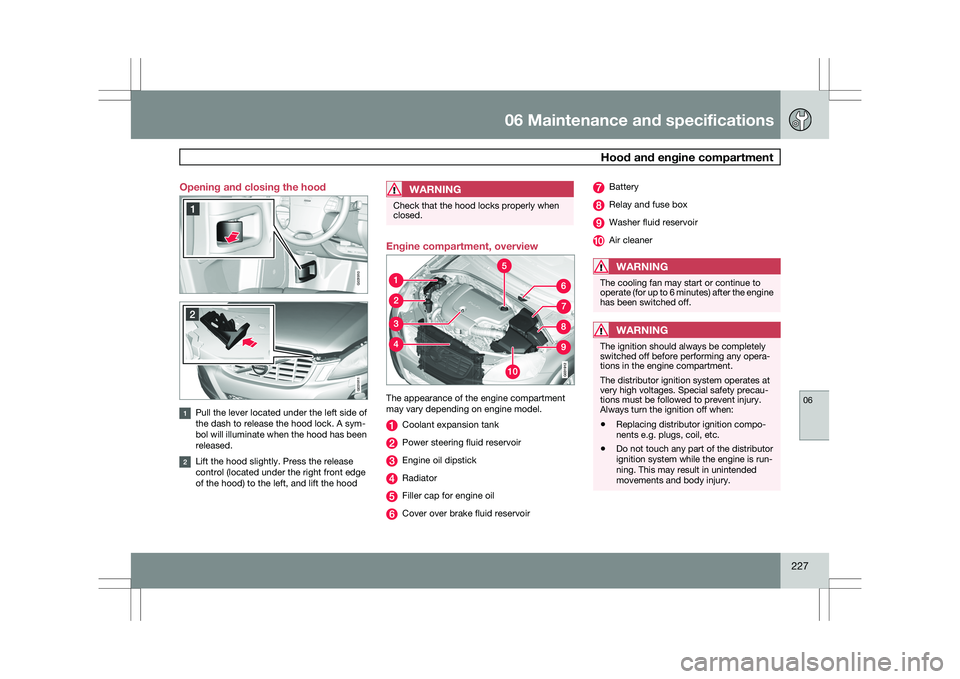
Opening and closing the hood
Pull the lever located under the left side of
the dash to release the hood lock. A sym-
bol will illuminate when the hood has been
released.
Lift the hood slightly. Press the release
control (located under the right front edge
of the hood) to the left, and lift the hood
WARNING Check that the hood locks properly when
closed.
Engine compartment, overview
The appearance of the engine compartment
may vary depending on engine model.
Coolant expansion tank
Power steering fluid reservoir
Engine oil dipstick
Radiator
Filler cap for engine oil
Cover over brake fluid reservoir Battery
Relay and fuse box
Washer fluid reservoir
Air cleaner
WARNING
The cooling fan may start or continue to
operate (for up to 6 minutes) after the engine
has been switched off.
WARNING
The ignition should always be completely
switched off before performing any opera-
tions in the engine compartment.
The distributor ignition system operates at
very high voltages. Special safety precau-
tions must be followed to prevent injury.
Always turn the ignition off when:
\b
Replacing distributor ignition compo-
nents e.g. plugs, coil, etc.
\b Do not touch any part of the distributor
ignition system while the engine is run-
ning. This may result in unintended
movements and body injury. G031910 G031911
Page 235 of 297
06 Maintenance and specifications
Replacing bulbs06
}}
233
CAUTIONNever touch the glass of bulbs with your fin-
gers. Grease and oils from your fingers
vaporize in the heat and will leave a deposit
on the reflector, which will damage it.
NOTE
\b
Always switch off the ignition before
starting to replace a bulb.
\b The optional Active Dual Xenon head-
light bulbs contain trace amounts of
mercury. These bulbs should always be
disposed of by a trained and qualified
Volvo service technician.
Removing the headlight housing1. Switch off the ignition by pressing quickly
on the START/STOP ENGINE button and
remove the remote key from the ignition
slot1
.
2. (Upper illustration under "Headlight hous- ing") Withdraw the headlight housing\fs lock-
ing pins. Pull the headlight housing straight out .
CAUTION When disconnecting the connector, pull on
the connector itself and not on the wiring.
3. (Lower illustration under "Headlight hous-
ing") Unplug the wiring connector by holding
down the clip with your thumb. Pull out the connector with the other
hand.
4. Lift out the housing and place it on a soft surface to avoid scratching the lens.
5. Replace the defective bulb(s).
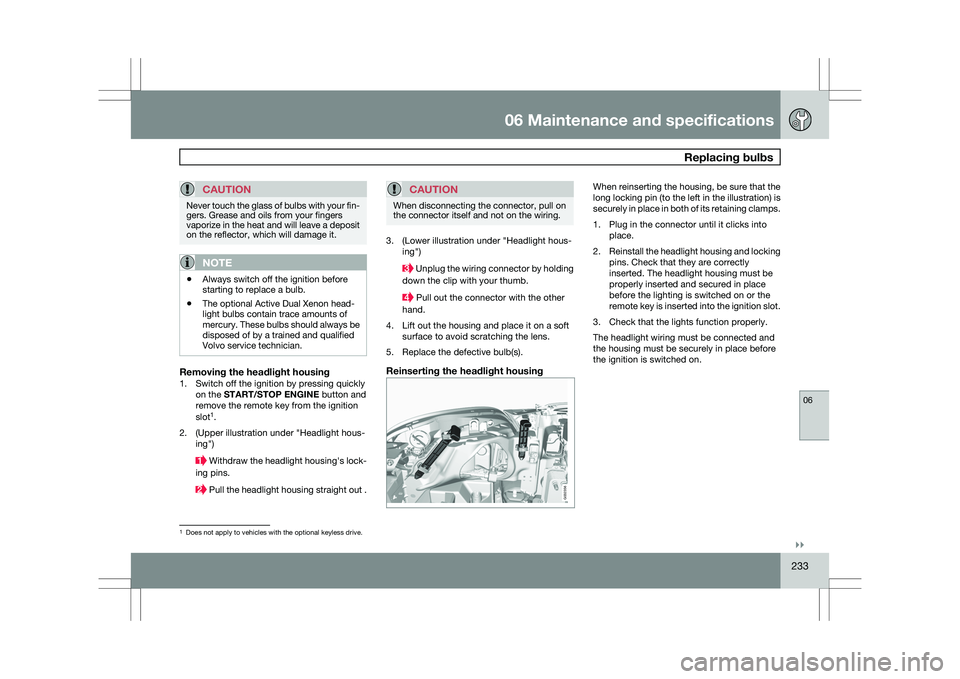
Reinserting the headlight housing When reinserting the housing, be sure that the
long locking pin (to the left in the illustration) is
securely in place in both of its retaining clamps.
1. Plug in the connector until it clicks into
place.
2. Reinstall the headlight housing and locking
pins. Check that they are correctly
inserted. The headlight housing must be
properly inserted and secured in place
before the lighting is switched on or the
remote key is inserted into the ignition slot.
3. Check that the lights function properly.
The headlight wiring must be connected and
the housing must be securely in place before
the ignition is switched on. 1
Does not apply to vehicles with the optional keyless drive. G032356
Page 237 of 297
06 Maintenance and specifications
Replacing bulbs06
}}
235
8.
Reconnect the wiring connector to the bulb
holder.
9. Put the cover back into position and rein- stall the headlight housing.
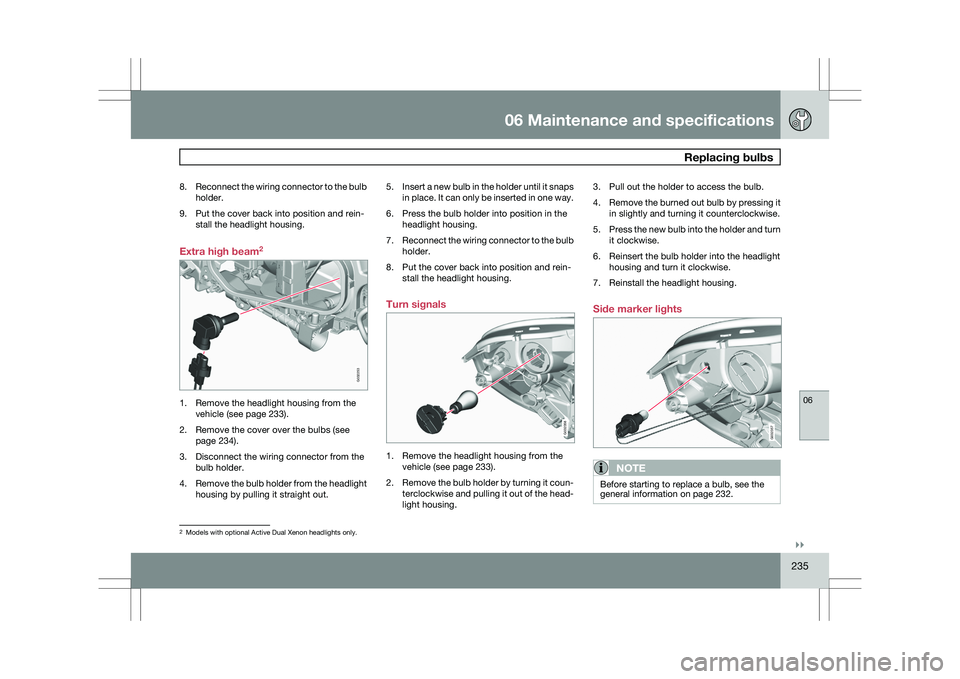
Extra high beam 21. Remove the headlight housing from the
vehicle (see page 233).
2. Remove the cover over the bulbs (see page 234).
3. Disconnect the wiring connector from the bulb holder.
4. Remove the bulb holder from the headlight
housing by pulling it straight out. 5.
Insert a new bulb in the holder until it snaps
in place. It can only be inserted in one way.
6. Press the bulb holder into position in the headlight housing.
7. Reconnect the wiring connector to the bulb
holder.
8. Put the cover back into position and rein- stall the headlight housing.
Turn signals 1. Remove the headlight housing from the
vehicle (see page 233).
2. Remove the bulb holder by turning it coun-
terclockwise and pulling it out of the head-
light housing. 3. Pull out the holder to access the bulb.
4.
Remove the burned out bulb by pressing it
in slightly and turning it counterclockwise.
5. Press the new bulb into the holder and turn
it clockwise.
6. Reinsert the bulb holder into the headlight housing and turn it clockwise.
7. Reinstall the headlight housing.
Side marker lights
NOTE Before starting to replace a bulb, see the
general information on page 232.
2
Models with optional Active Dual Xenon headlights only. G032253 G032358 G032357
Page 238 of 297
06 Maintenance and specificationsReplacing bulbs 06
236 1. Remove the headlight housing from the
vehicle (see page 233).
2. Remove the bulb holder by turning it coun-
terclockwise and pulling it out of the head-
light housing.
3. Pull out the burned out bulb and install a new one. It can only be inserted in one
position.
4. Reinsert the bulb holder into the headlight housing and turn it clockwise.
5. Reinstall the headlight housing.
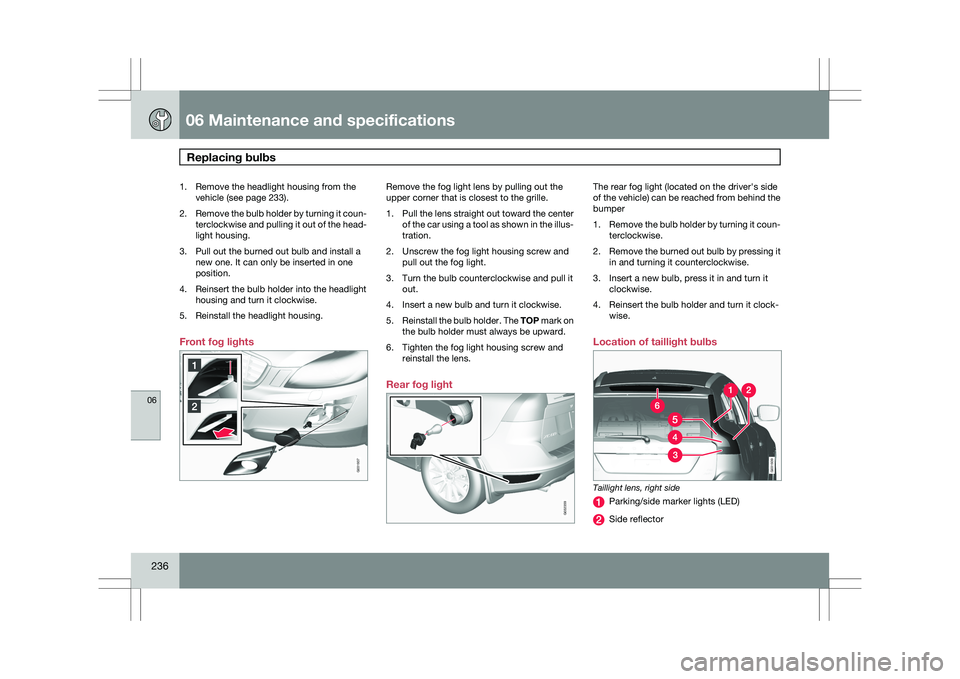
Front fog lights Remove the fog light lens by pulling out the
upper corner that is closest to the grille.
1.
Pull the lens straight out toward the center
of the car using a tool as shown in the illus-
tration.
2. Unscrew the fog light housing screw and pull out the fog light.
3. Turn the bulb counterclockwise and pull it out.
4. Insert a new bulb and turn it clockwise.
5. Reinstall the bulb holder. The TOP mark on
the bulb holder must always be upward.
6. Tighten the fog light housing screw and reinstall the lens.
Rear fog light The rear fog light (located on the driver\fs side
of the vehicle) can be reached from behind the
bumper
1.
Remove the bulb holder by turning it coun-
terclockwise.
2. Remove the burned out bulb by pressing it
in and turning it counterclockwise.
3. Insert a new bulb, press it in and turn it clockwise.
4. Reinsert the bulb holder and turn it clock- wise.
Location of taillight bulbs Taillight lens, right side
Parking/side marker lights (LED)
Side reflector G031937 G032359 G031939