lock VOLVO XC60 2009 Owner´s Manual
[x] Cancel search | Manufacturer: VOLVO, Model Year: 2009, Model line: XC60, Model: VOLVO XC60 2009Pages: 297, PDF Size: 21.16 MB
Page 105 of 297
03 Your driving environment
HomeLink® Wireless Control System*03
}}
* Option/accessory, for more information, see Introduction. 103
NOTESome devices may require you to replace
this Programming Step 2 with procedures
noted in the “Gate Operator / Canadian Pro-
gramming” section. If the HomeLink indica-
tor light does not change to a rapidly blink-
ing light after performing these steps, con-
tact HomeLink at www.homelink.com
.3.
Firmly press, hold for five seconds and
release the programmed HomeLink but-
ton up to two separate times to activate the
door. If the door does not activate, press
and hold the just-trained HomeLink button
and observe the indicator light.
\bIf the indicator light
stays on con-
stantly, programming is complete
and your device should activate when
the HomeLink button is pressed and
released.
\b If the indicator light blinks
rapidly for
two seconds and then turns to a con-
stant light continue with “Program-
ming” steps 4-6 to complete the pro-
gramming of a rolling code equipped
device (most commonly a garage door
opener).
4. At the garage door opener receiver (motor-
head unit) in the garage, locate the “learn”
or “smart” button. This can usually be found where the hanging antenna wire is
attached to the motor-head unit.
5. Firmly press and release the “learn” or “smart” button. (The name and color of the
button may vary by manufacturer.) There
are 30 seconds to initiate step 6.
6. Return to the vehicle and firmly press, hold
for two seconds and release the pro-
grammed HomeLink button. Repeat the
“press/hold/release” sequence a second
time, and, depending on the brand of the
garage door opener (or other rolling code
equipped device), repeat this sequence a
third time to complete the programming
process.
HomeLink should now activate your rolling
code equipped device.
Gate Operator/Canadian ProgrammingCanadian radio-frequency laws require trans-
mitter signals to “time-out” (or quit) after sev-
eral seconds of transmission – which may not
be long enough for HomeLink to pick up the
signal during programming. Similar to this
Canadian law, some U.S. gate operators are
designed to “time-out” in the same manner.
If you live in Canada or you are having difficul-
ties programming a gate operator or garage
door opener by using the “Programming” pro- cedures, replace “Programming HomeLink”
step 2 with the following:
\b
Continue to press and hold the HomeLink
button while you press and release -
every two seconds (“cycle”) your hand-
held transmitter until the HomeLink indica-
tor light changes from a slow to a rapidly
blinking light. Now you may release both
the HomeLink and hand-held transmitter
buttons.
Proceed with “Programming” step 3 to com-
plete.
Using HomeLink
To operate, simply press and release the pro-
grammed HomeLink button. Activation will
now occur for the trained device (i.e., garage
door opener, gate operator, security system,
entry door lock, home/office lighting, etc.). For
convenience, the hand-held transmitter of the
device may also be used at any time. In the
event that there are still programming difficul-
ties or questions, contact HomeLink at:
www.homelink.com.
Page 108 of 297
03 Your driving environmentStarting the engine 03
106
* Option/accessory, for more information, see Introduction.
WARNING \b
Always remove the remote key from the
ignition slot when leaving the vehicle,
especially if there are children in the
vehicle.
\b Never remove the remote key from the
ignition slot while driving or when the
vehicle is being towed. The steering
lock could otherwise be activated, mak-
ing it impossible to steer the vehicle. On
vehicles with the optional keyless drive,
never remove the remote key from the
vehicle while driving or during towing.
\b Always place the gear selector in Park
and apply the parking brake before
leaving the vehicle. Never leave the
vehicle unattended with the engine run-
ning.
\b Always open garage doors fully before
starting the engine inside a garage to
ensure adequate ventilation. The
exhaust gases contain carbon monox-
ide, which is invisible and odorless but
very poisonous.NOTE \b
The idling speed can be noticeably
higher than normal during cold starts.
This is to enable emission control sys-
tem can reach normal operating tem-
perature as quickly as possible, which
helps reduce exhaust emissions 3
.
\b Keylock: Your vehicle is equipped with
a keylock system. When the engine is
switched off, the gear selector must be
in the Park position before the key can
be removed 4
from the ignition slot.CAUTION \b
When starting in cold weather, the auto-
matic transmission may shift up at
slightly higher engine speeds than nor-
mal until the automatic transmission
fluid reaches normal operating tem-
perature.
\b Do not race a cold engine immediately
after starting. Oil flow may not reach
some lubrication points fast enough to
prevent engine damage.
\b The engine should be idling when you
move the gear selector. Never acceler-
ate until after you feel the transmission
engage. Accelerating immediately after
selecting a gear will cause harsh
engagement and premature transmis-
sion wear.
\b Selecting
P or N when idling at a stand-
still for prolonged periods of time will
help prevent overheating of the auto-
matic transmission fluid.
Keyless drive*Follow steps 3 – 4 for starting the engine. 3
If the gear selector is in the D or R positions and the car is not moving, engine speed (rpm) will be lower\
and it will take longer for the engine to reach normal operating temper\
ature.
4 Does not apply to vehicles with the optional keyless drive.
Page 111 of 297
03 Your driving environment
Transmission03
}}
109
Automatic transmission
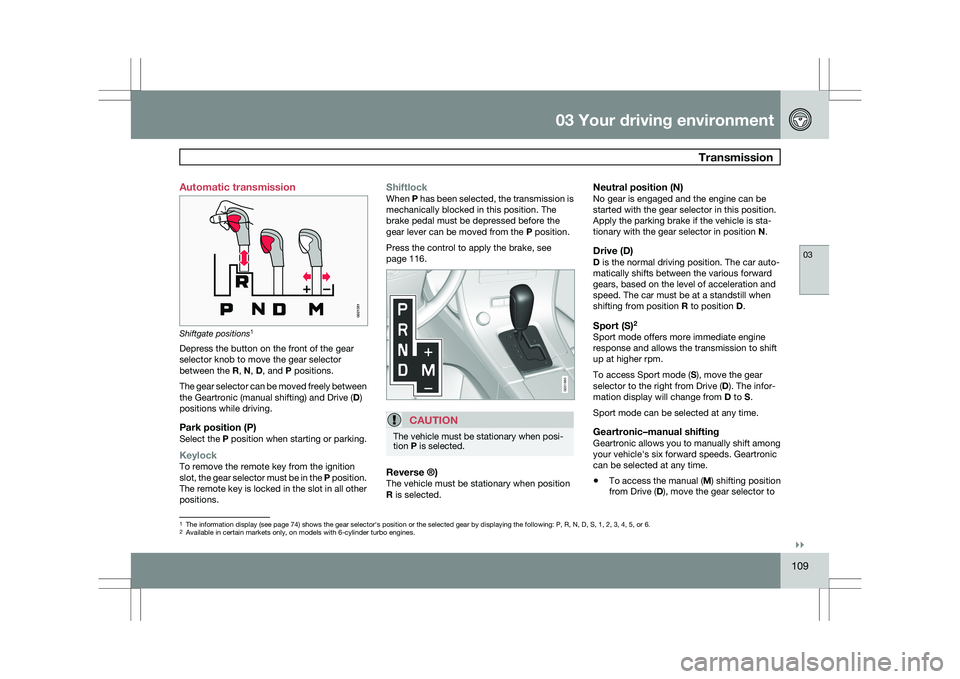
Shiftgate positions
1
Depress the button on the front of the gear
selector knob to move the gear selector
between the R, N, D, and P positions.
The gear selector can be moved freely between
the Geartronic (manual shifting) and Drive ( D)
positions while driving.
Park position (P)Select the P position when starting or parking.
KeylockTo remove the remote key from the ignition
slot, the gear selector must be in the P position.
The remote key is locked in the slot in all other
positions.
ShiftlockWhen P has been selected, the transmission is
mechanically blocked in this position. The
brake pedal must be depressed before the
gear lever can be moved from the P position.
Press the control to apply the brake, see
page 116.
CAUTION The vehicle must be stationary when posi-
tion P is selected.
Reverse ®)The vehicle must be stationary when position
R is selected.
Neutral position (N)No gear is engaged and the engine can be
started with the gear selector in this position.
Apply the parking brake if the vehicle is sta-
tionary with the gear selector in position
N.
Drive (D)D is the normal driving position. The car auto-
matically shifts between the various forward
gears, based on the level of acceleration and
speed. The car must be at a standstill when
shifting from position R to position D.
Sport (S)2Sport mode offers more immediate engine
response and allows the transmission to shift
up at higher rpm.
To access Sport mode (S), move the gear
selector to the right from Drive (
D). The infor-
mation display will change from D to S.
Sport mode can be selected at any time.
Geartronic–manual shiftingGeartronic allows you to manually shift among
your vehicle\fs six forward speeds. Geartronic
can be selected at any time.
\b To access the manual (
M) shifting position
from Drive (D), move the gear selector to 1
The information display (see page 74) shows the gear selector\fs position or the selected gear by displayin\
g the following: P, R, N, D, S, 1, 2, 3, 4, 5, or 6.
2Available in certain markets only, on models with 6-cylinder turbo engin\
es.
G021351 G031963
Page 112 of 297
03 Your driving environmentTransmission 03
110 the right to M (or to S on models equipped
with Sport mode).
\b To return to the D position from M or S,
move the gear selector to the left.
NOTE On models equipped with Sport mode, the
transmission will not switch to manual shift-
ing mode until the gear selector is moved
forward or rearward. The selected gear will
then be shown in the information display
(see page 73).
While driving
\b
If you select the M position while driving,
the gear that was being used in the Drive
position will also initially be selected in the
M position.
\b Move the gear selector forward (toward
"+") to shift to a higher gear or rearward
(toward "–") to shift to a lower gear.
\b If you hold the gear selector toward "–", the
transmission will downshift one gear at a
time and will utilize the braking power of
the engine. If the current speed is too high
for using a lower gear, the downshift will
not occur until the speed has decreased
enough to allow the lower gear to be used. \b
If you slow to a very low speed, the trans-
mission will automatically shift down.
Shiftlock – Neutral (N)If the gear selector is in the
N position and the
vehicle has been stationary for at least 3 sec-
onds (irrespective of whether the engine is run-
ning) then the gear selector is locked.
To be able to move the gear selector from N to
another gear position, the brake pedal must be
depressed and the ignition must be in posi-
tion II, see page 79.
Geartronic–starting on slippery surfacesSelecting 3rd gear in Geartronic’s manual shift-
ing mode can help provide better traction when
starting off on slippery surfaces. To do so:
1. Depress the brake pedal and move the
gear selector to the right from the D posi-
tion to M. The text in the instrument panel
display will change from D to 1.
2. Press the gear selector forward and release it (this selects 2nd gear). Press the
selector forward again and release it to
select 3rd gear.
3. Release the brake pedal and press gently on the accelerator pedal.
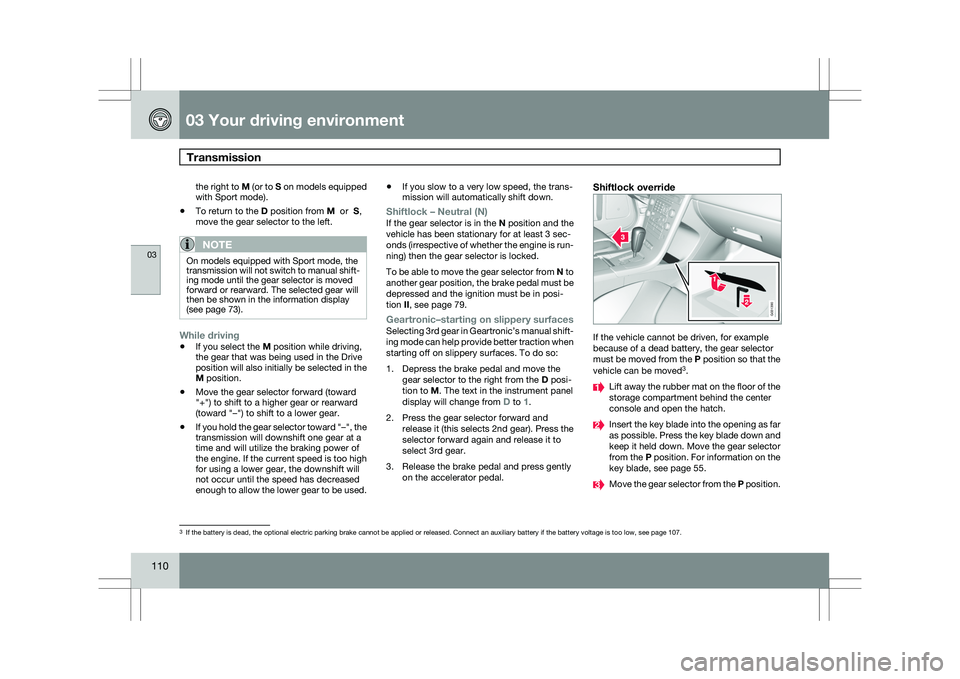
Shiftlock override If the vehicle cannot be driven, for example
because of a dead battery, the gear selector
must be moved from the P position so that the
vehicle can be moved
3
. Lift away the rubber mat on the floor of the
storage compartment behind the center
console and open the hatch.
Insert the key blade into the opening as far
as possible. Press the key blade down and
keep it held down. Move the gear selector
from the P position. For information on the
key blade, see page 55.
Move the gear selector from the
P position.3
If the battery is dead, the optional electric parking brake cannot be ap\
plied or released. Connect an auxiliary battery if the battery voltage i\
s too low, see page 107. G031390
Page 114 of 297
03 Your driving environmentBrakes 03
112 Brake system
The brake system is a hydraulic system con-
sisting of two separate brake circuits. If a prob-
lem should occur in one of these circuits, it is
still possible to stop the vehicle with the other
brake circuit.
If the brake pedal must be depressed farther
than normal and requires greater foot pressure,
the stopping distance will be longer.
A warning light in the instrument panel will light
up to warn the driver that a fault has occurred.
If this light comes on while driving or braking,
stop immediately and check the brake fluid
level in the reservoir.
NOTE
Press the brake pedal hard and maintain
pressure on the pedal – do not pump the
brakes.
WARNING
If the fluid level is below the MIN mark in the
reservoir or if a brake system message is
shown in the information display:
DO NOT
DRIVE. Have the vehicle towed to a trained
and qualified Volvo service technician and
have the brake system inspected.
Power brakes function only when the
engine is running
The power brakes utilize vacuum pressure
which is only created when the engine is run-
ning. Never let the vehicle roll to a stop with the
engine switched off.
If the power brakes are not working, the brake
pedal must be pressed approximately five
times harder than usual to make up for the lack
of power assistance. This can happen for
example when towing your vehicle or if the
engine is switched off when the vehicle is roll-
ing. The brake pedal feels harder than usual.
Water on brake discs and brake pads
affects braking
Driving in rain and slush or passing through an
automatic car wash can cause water to collect
on the brake discs and pads. This will cause a
delay in braking effect when the pedal is
depressed. To avoid such a delay when the
brakes are needed, depress the pedal occa-
sionally when driving through rain, slush, etc.
This will remove the water from the brakes.
Check that brake application feels normal. This
should also be done after washing or starting
in very damp or cold weather.
Severe strain on the brake systemThe brakes will be subject to severe strain
when driving in mountains or hilly areas, or
when towing a trailer. Vehicle speed is usually slower, which means that the cooling of the
brakes is less efficient than when driving on
level roads. To reduce the strain on the brakes,
shift into a lower gear and let the engine help
with the braking. Do not forget that if you are
towing a trailer, the brakes will be subjected to
a greater than normal load.
Anti-lock braking systemThe Anti-lock Braking System (ABS) helps to
improve vehicle control (stopping and steering)
during severe braking conditions by limiting
brake lockup. When the system "senses"
impending lockup, braking pressure is auto-
matically modulated in order to help prevent
lockup that could lead to a skid.
The system performs a brief self-diagnostic
test when the engine has been started and
driver releases the brake pedal. Another auto-
matic test may be performed when the vehicle
first reaches a speed of approximately 25 mph
(40 km/h
). The brake pedal will pulsate several
times and a sound may be audible from the
ABS control module. This is normal.
Cleaning the brake discsCoatings of dirt and water on the brake discs
may result in delayed brake function. This delay
is minimized by cleaning the brake linings.
Cleaning the brake pads is advisable in wet
weather, prior to long-term parking, and after
the vehicle has been washed. Do this by brak-
Page 124 of 297
04 Comfort and driving pleasureMenus and messages 04
122
* Option/accessory, for more information, see Introduction.
Center console
Certain functions are controlled from the cen-
ter console via the menu system or from the
optional keypad in the steering wheel. Each
function is described under its respective sec-
tion.
The current menu level is shown at the top right
of display in the center console.
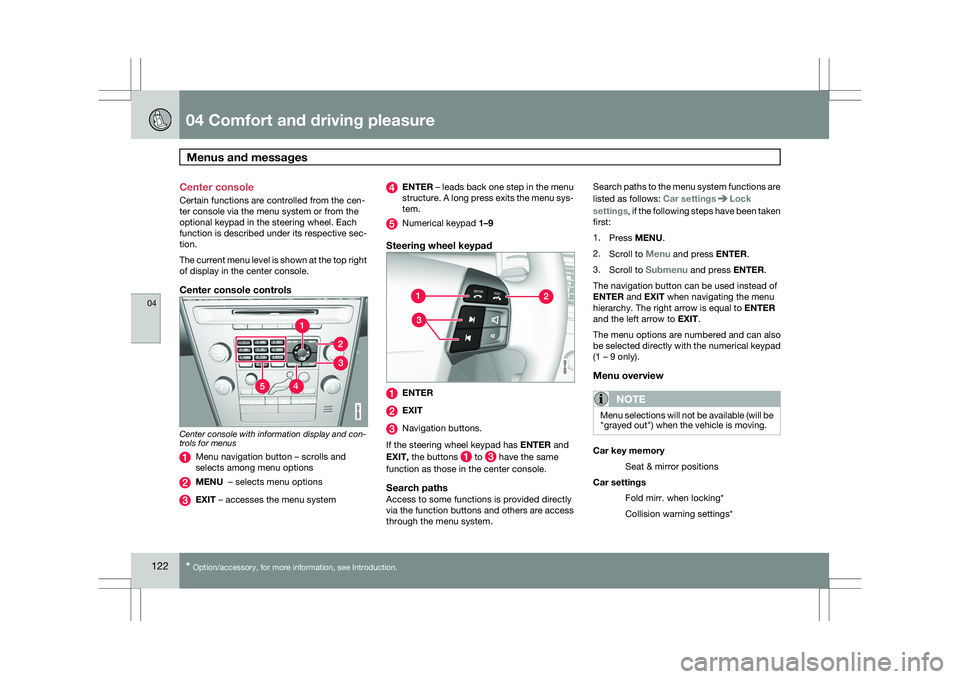
Center console controls
Center console with information display and con-
trols for menus
Menu navigation button – scrolls and
selects among menu options
MENU – selects menu options
EXIT – accesses the menu system ENTER – leads back one step in the menu
structure. A long press exits the menu sys-
tem.
Numerical keypad 1–9
Steering wheel keypad
ENTER
EXIT
Navigation buttons.
If the steering wheel keypad has ENTER and
EXIT, the buttons to have the same
function as those in the center console.
Search pathsAccess to some functions is provided directly
via the function buttons and others are access
through the menu system. Search paths to the menu system functions are
listed as follows: Car settings Lock
settings, if the following steps have been taken
first:
1. Press MENU.
2. Scroll to Menu and press ENTER.
3. Scroll to Submenu and press ENTER.
The navigation button can be used instead of
ENTER and EXIT when navigating the menu
hierarchy. The right arrow is equal to ENTER
and the left arrow to EXIT.
The menu options are numbered and can also
be selected directly with the numerical keypad
(1 – 9 only).
Menu overview
NOTE Menu selections will not be available (will be
"grayed out") when the vehicle is moving.
Car key memory
Seat & mirror positions
Car settings Fold mirr. when locking*
Collision warning settings*
Page 125 of 297
04 Comfort and driving pleasure
Menus and messages04
}}
* Option/accessory, for more information, see Introduction. 123
City Safety
Light settings
Lock settings
Reduced guard
1
Parking camera settings*
Steering force level*
Information
Climate settings Automatic blower adjust
Recirculation timer
Auto. rear defroster
Reset climate settings
Main menu AM
Audio settings 2
Sound stage
Equalizer, front
Equalizer, rear
Auto. volume control
Resets all audio settings.
Main menu FMFM settings Radio text
Advanced radio settings
Audio settings
Main menu CDRandom Off
Folder
Disc
Single disc
All discs
CD settings Disc text*
Audio settings
Main menu AUXVolume, AUX input
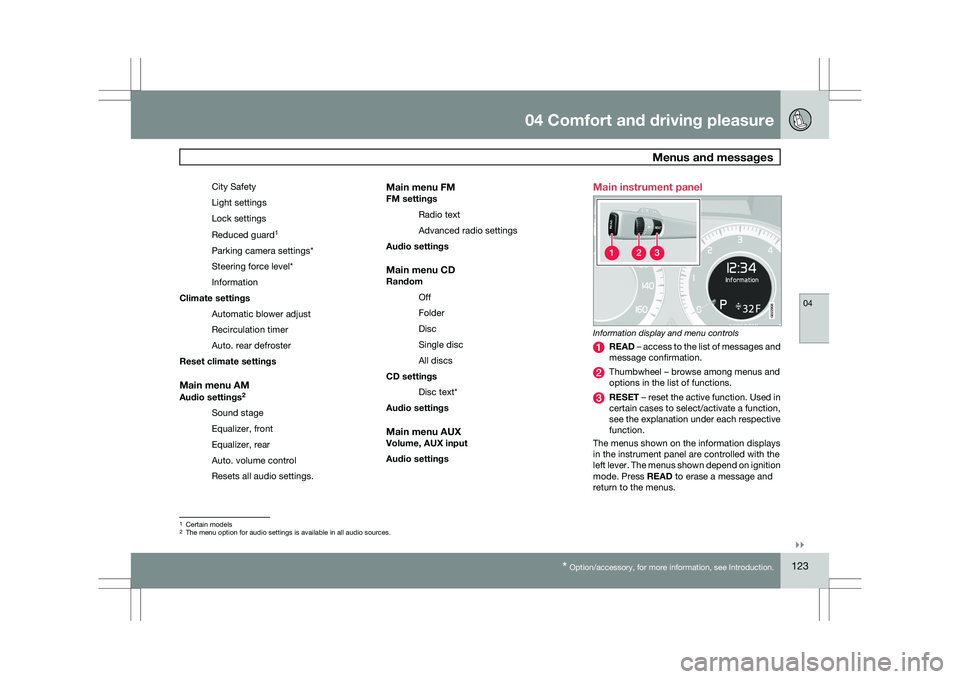
Audio settings Main instrument panel
Information display and menu controls
READ – access to the list of messages and
message confirmation.
Thumbwheel – browse among menus and
options in the list of functions.
RESET – reset the active function. Used in
certain cases to select/activate a function,
see the explanation under each respective
function.
The menus shown on the information displays
in the instrument panel are controlled with the
left lever. The menus shown depend on ignition
mode. Press READ to erase a message and
return to the menus. 1
Certain models
2 The menu option for audio settings is available in all audio sources. G022908
Page 128 of 297
04 Comfort and driving pleasureClimate system 04
126
* Option/accessory, for more information, see Introduction.
Introduction
Air conditioningThe vehicle is equipped with Electronic Climate
Control (ECC). The climate control system
cools, heats or dehumidifies the air in the pas-
senger compartment.
NOTE
\b
The air conditioning can be switched
off, but to ensure the best possible cli-
mate comfort in the passenger com-
partment and to prevent the windows
from misting, it should always be on.
\b In warm weather, a small amount of
water may accumulate under the car
when it has been parked. This water is
condensation from the A/C system and
is normal.
Sensor location
\b
The sunlight sensor is located on the top
side of the dashboard.
NOTE The sunlight sensor monitors which side of
the car that is most exposed to sunlight.
This can mean that the temperature may
differ between the right and left-side air
vents, even if the temperatures set for both
sides of the passenger compartment are the
same.
\b
The temperature sensor for the passenger
compartment is located below the climate
control panel.
\b The outside temperature sensor is located
on the door mirror.
\b The humidity sensor
* is located in the inte-
rior rearview mirror.
NOTE Do not cover or block the sensors with
clothing or other objects.
Side windows and moonroofTo ensure that the air conditioning works opti-
mally, the side windows, and the optional
moonroof should be closed.
Fog on the inside of the windowsThe defroster function should be used to
remove fog or mist from the inside of the win-
dows. Keeping the windows clean with a com-mercially available window washing spray will
also help prevent fogging or misting.
Temporary shut-off of the air
conditioning
The air conditioning is momentarily disen-
gaged during full-throttle acceleration or when
driving uphill with a trailer. This may result in a
temporary increase in cabin temperature.
Ice and snowAlways keep the air intake grille at the base of
the windshield free of snow.
Climate system maintenanceSpecial tools and equipment are required to
maintain and carry out repairs on the climate
system. Work of this type should only be done
by a trained and qualified Volvo service tech-
nician.
RefrigerantVolvo cares about the environment. The air
conditioning system in your car contains a
CFC-free refrigerant – R134a. This substance
will not deplete the ozone layer. The air condi-
tioning system contains 1.8 lbs (800 g) of
R134a. The systems uses PAG oil.
Passenger compartment filterReplace the cabin air filter with a new one at
the recommended intervals. Please refer to
Page 130 of 297
04 Comfort and driving pleasureClimate system 04
128
* Option/accessory, for more information, see Introduction.
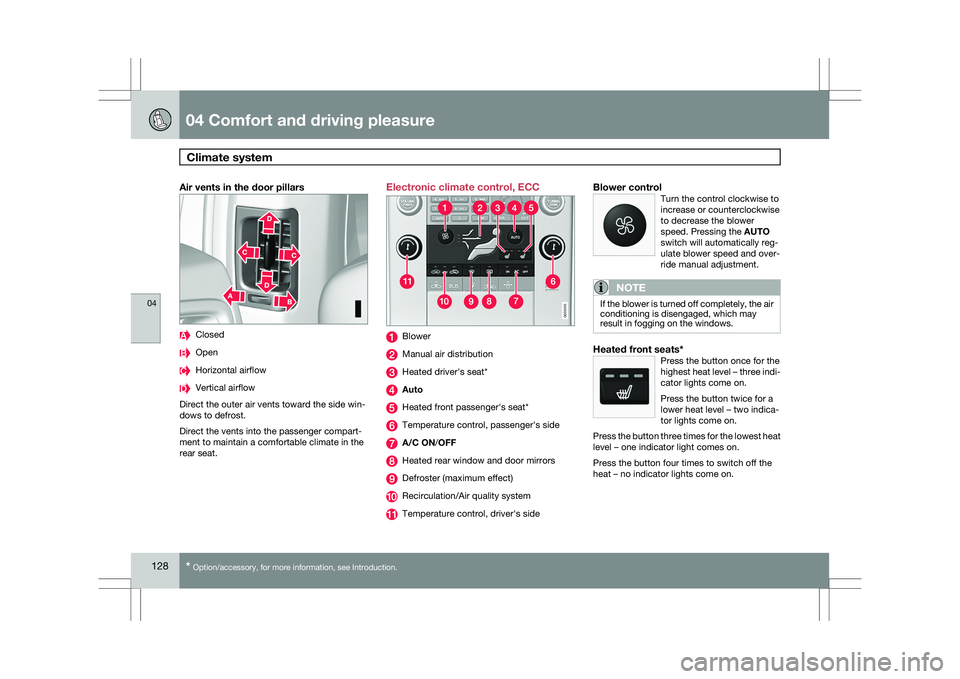
Air vents in the door pillars Closed
Open
Horizontal airflow
Vertical airflow
Direct the outer air vents toward the side win-
dows to defrost.
Direct the vents into the passenger compart-
ment to maintain a comfortable climate in the
rear seat. Electronic climate control, ECC
Blower
Manual air distribution
Heated driver\fs seat*
Auto
Heated front passenger\fs seat*
Temperature control, passenger\fs side
A/C ON/OFF
Heated rear window and door mirrors
Defroster (maximum effect)
Recirculation/Air quality system
Temperature control, driver\fs sideBlower controlTurn the control clockwise to
increase or counterclockwise
to decrease the blower
speed. Pressing the AUTO
switch will automatically reg-
ulate blower speed and over-
ride manual adjustment.
NOTE If the blower is turned off completely, the air
conditioning is disengaged, which may
result in fogging on the windows.
Heated front seats*Press the button once for the
highest heat level – three indi-
cator lights come on.
Press the button twice for a
lower heat level – two indica-
tor lights come on.
Press the button three times for the lowest heat
level – one indicator light comes on.
Press the button four times to switch off the
heat – no indicator lights come on. G033202 G033203
Page 136 of 297
04 Comfort and driving pleasureAudio system 04
134 Please note that these functions are also avail-
able through the audio system controls on cen-
ter console.
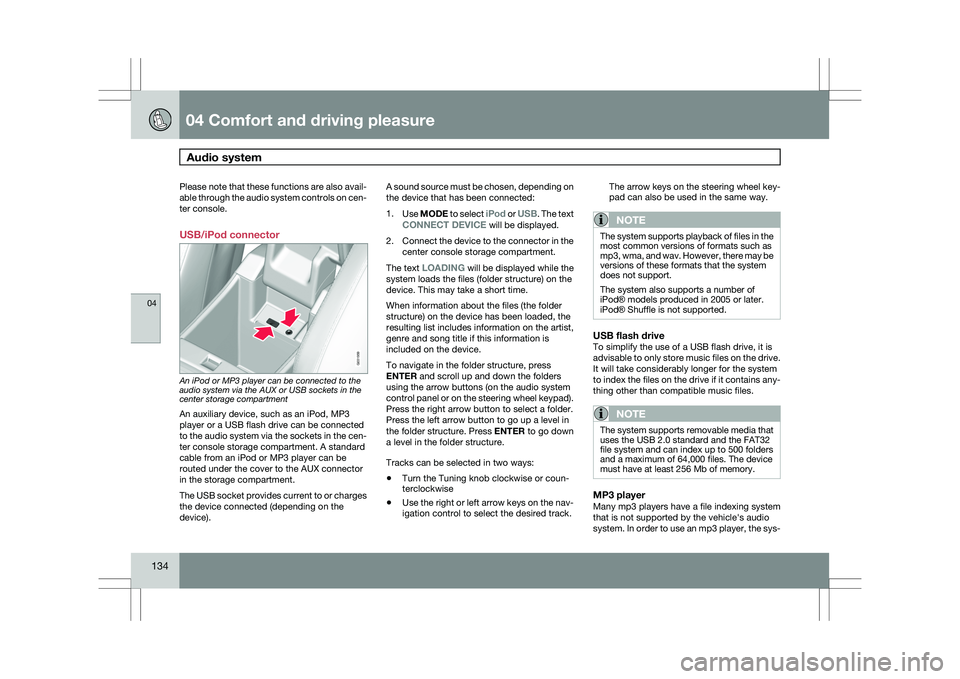
USB/iPod connector
An iPod or MP3 player can be connected to the
audio system via the AUX or USB sockets in the
center storage compartment
An auxiliary device, such as an iPod, MP3
player or a USB flash drive can be connected
to the audio system via the sockets in the cen-
ter console storage compartment. A standard
cable from an iPod or MP3 player can be
routed under the cover to the AUX connector
in the storage compartment.
The USB socket provides current to or charges
the device connected (depending on the
device). A sound source must be chosen, depending on
the device that has been connected:
1.
Use MODE to select iPod or USB. The text
CONNECT DEVICE will be displayed.
2. Connect the device to the connector in the
center console storage compartment.
The text LOADING will be displayed while the
system loads the files (folder structure) on the
device. This may take a short time.
When information about the files (the folder
structure) on the device has been loaded, the
resulting list includes information on the artist,
genre and song title if this information is
included on the device.
To navigate in the folder structure, press
ENTER and scroll up and down the folders
using the arrow buttons (on the audio system
control panel or on the steering wheel keypad).
Press the right arrow button to select a folder.
Press the left arrow button to go up a level in
the folder structure. Press ENTER to go down
a level in the folder structure.
Tracks can be selected in two ways:
\b Turn the Tuning knob clockwise or coun-
terclockwise
\b Use the right or left arrow keys on the nav-
igation control to select the desired track. The arrow keys on the steering wheel key-
pad can also be used in the same way.
NOTE The system supports playback of files in the
most common versions of formats such as
mp3, wma, and wav. However, there may be
versions of these formats that the system
does not support.
The system also supports a number of
iPod® models produced in 2005 or later.
iPod® Shuffle is not supported.
USB flash driveTo simplify the use of a USB flash drive, it is
advisable to only store music files on the drive.
It will take considerably longer for the system
to index the files on the drive if it contains any-
thing other than compatible music files.
NOTE
The system supports removable media that
uses the USB 2.0 standard and the FAT32
file system and can index up to 500 folders
and a maximum of 64,000 files. The device
must have at least 256 Mb of memory.
MP3 playerMany mp3 players have a file indexing system
that is not supported by the vehicle\fs audio
system. In order to use an mp3 player, the sys- G031959