manual YAMAHA TMAX 2016 Owners Manual
[x] Cancel search | Manufacturer: YAMAHA, Model Year: 2016, Model line: TMAX, Model: YAMAHA TMAX 2016Pages: 110, PDF Size: 6.26 MB
Page 1 of 110
XP500
MOTORCYCLE
2PW-28199-E1
OWNER\fS MAN\bAL
Read this manual carefully before oper-
ating this vehicle.
XP500
XP500A
Page 2 of 110
Q Read this manual carefully before operating this vehicle. This manual
should stay with this vehicle if it is sold.
EAU72660
Page 3 of 110
Introduction
EAU10114
Welcome to the Yamaha world of motorcycling!
As the owner of the XP500/XP500A, you are benefiting from Yamaha’s vast expe-
rience and newest technology regarding the design and manufacture of high-qual-
ity products, which have earned Yamaha a reputation for dependability.
Please take the time to read this manual thoroughly, so as to enjoy all advantages
of your XP500/XP500A. The Owner’s Manual does not only instruct you in how to
operate, inspect and maintain your scooter, but also in how to safeguard yourself
and others from trouble and injury.
In addition, the many tips given in this manual will help keep your scooter in the
best possible condition. If y ou have any further questions, do not hesitate to con-
tact your Yamaha dealer.
The Yamaha team wishes you many safe and pleasant rides. So, remember to put
safety first!
Yamaha continually seeks advancements in product design and quality. There-
fore, while this manual contains the most current product information available at
the time of printing, there may be minor discrepancies between your scooter and
this manual. If there is any question c oncerning this manual, please consult a
Yamaha dealer.
WARNING
EWA12412
Please read this manual carefully and completely before operating this
scooter.
2PW-9-E1.book 1 ページ 2015年9月10日 木曜日 午後5時17分
Page 4 of 110
Important manual information
EAU63350
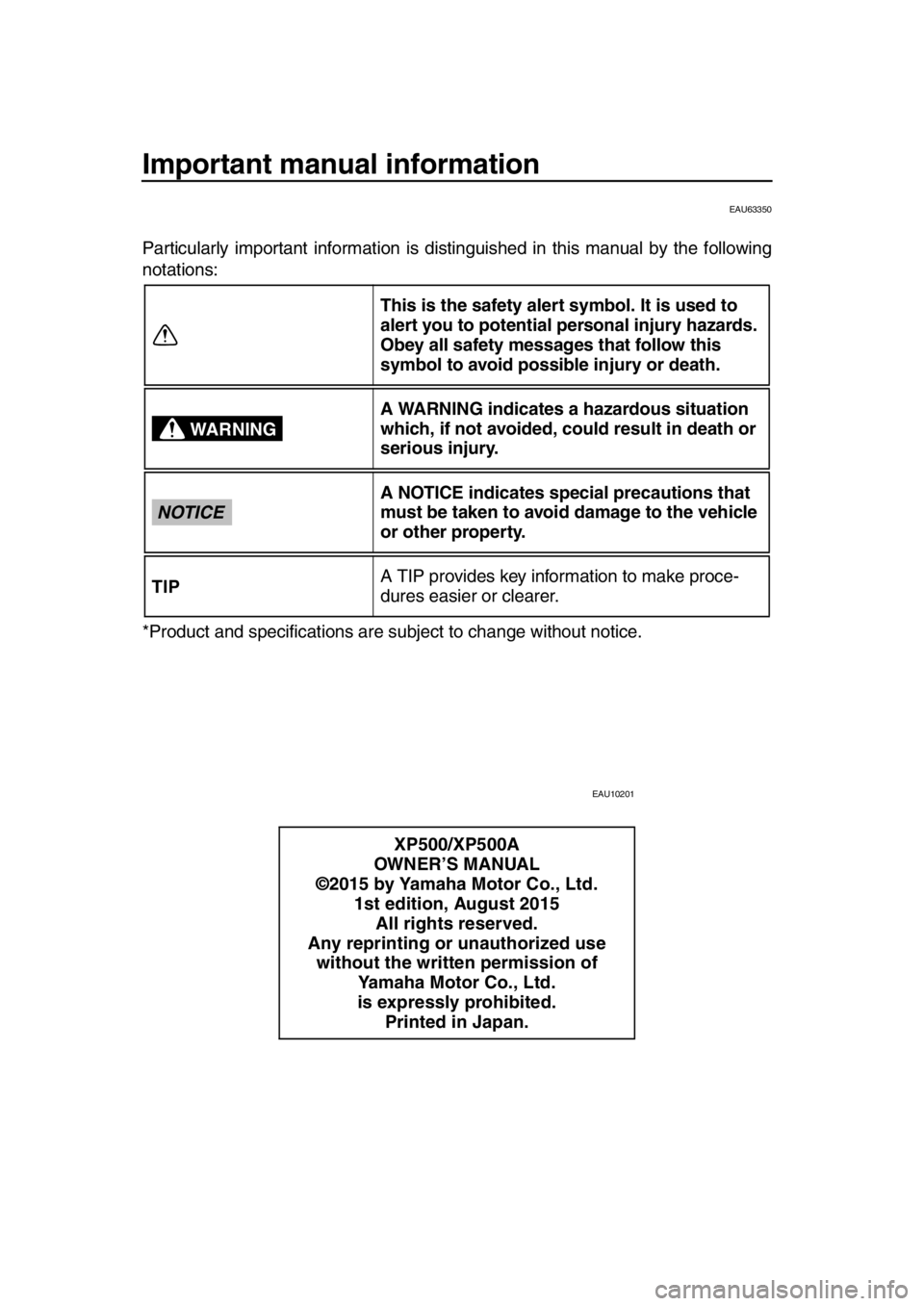
Particularly important information is distinguished in this manual by the following
notations:
*Product and specifications are subject to change without notice.
EAU10201
This is the safety alert symbol. It is used to
alert you to potential personal injury hazards.
Obey all safety messages that follow this
symbol to avoid possible injury or death.
A WARNING indicates a hazardous situation
which, if not avoided, could result in death or
serious injury.
A NOTICE indicates special precautions that
must be taken to avoid damage to the vehicle
or other property.
A TIP provides key information to make proce-
dures easier or clearer.
XP500/XP500A
OWNER’S MANUAL
©2015 by Yamaha Motor Co., Ltd. 1st edition, August 2015All rights reserved.
Any reprinting or unauthorized use without the written permission of Yamaha Motor Co., Ltd.
is expressly prohibited. Printed in Japan.
WARNING
NOTICE
TIP
2PW-9-E1.book 1 ページ 2015年9月10日 木曜日 午後5時17分
Page 7 of 110

1-1
1
2
3
4
5
6
7
8
9
10
11
12
13
14
Safety information
EAU1026B
Be a Responsible Owner
As the vehicle’s owner, you are respon-
sible for the safe and proper operation
of your scooter.
Scooters are single-track vehicles.
Their safe use and operation are de-
pendent upon the use of proper riding
techniques as well as the expertise of
the operator. Every operator should
know the following requirements before
riding this scooter.
He or she should:
Obtain thorough instructions from
a competent source on all aspects
of scooter operation.
Observe the warnings and mainte-
nance requirements in this Own-
er’s Manual.
Obtain qualified training in safe
and proper riding techniques.
Obtain professional technical ser-
vice as indicated in this Owner’s
Manual and/or when made neces-
sary by mechanical conditions.
Never operate a scooter without
proper training or instruction. Take
a training course. Beginners
should receive training from a cer-
tified instructor. Contact an autho-
rized scooter dealer to find out
about the training courses nearest
you.
Safe Riding
Perform the pre-operation checks each
time you use the vehicle to make sure it
is in safe operating condition. Failure to
inspect or maintain the vehicle properly
increases the possibility of an accident
or equipment damage. See page 5-1 for a list of pre-operation checks.
This scooter is designed to carry
the operator and a passenger.
The failure of motorists to detect
and recognize scooters in traffic is
the predominating cause of auto-
mobile/scooter accidents. Many
accidents have been caused by an
automobile driver who did not see
the scooter. Making yourself con-
spicuous appears to be very effec-
tive in reducing the chance of this
type of accident.
Therefore:
Wear a brightly colored jacket.
Use extra caution when you are approaching and passing
through intersections, since in-
tersections are the most likely
places for scooter accidents to
occur.
Ride where other motorists can see you. Avoid riding in another
motorist’s blind spot.
Never maintain a scooter with- out proper knowledge. Contact
an authorized scooter dealer to
inform you on basic scooter
maintenance. Certain mainte-
nance can only be carried out by
certified staff.
Many accidents involve inexperi-
enced operators. In fact, many op-
erators who have been involved in
accidents do not even have a cur-
rent driver’s license. Make sure that you are qualified and that you only lend your
scooter to other qualified opera-
tors.
Know your skills and limits. Staying within your limits may
2PW-9-E1.book 1 ページ 2015年9月10日 木曜日 午後5時17分
Page 17 of 110
Smart key system
3-3
1
2
3
4
5
6
7
8
9
10
11
12
13
14
or cannot communicate with the
vehicle, all switches will be tempo-
rarily disabled.
Placing the smart key in the front
or rear storage compartment may
block communication between the
smart key and the vehicle. If the
rear trunk is locked with the smart
key inside, the smart key system
may be disabled. The smart key
should always be carried on your
person.
When leaving the vehicle, make
sure you apply the steering lock
and take the smart key with you. It
is recommended that you turn the
smart key off.
EAU61643
Handling of the smart key and
mechanical key
WARNING
EWA17952
The smart key should be carried
with you. Do not store it on the
vehicle.
When the smart key is within op-
erating range, exercise due care
because other people not carry-
ing the smart key can start the
engine and operate the vehicle.
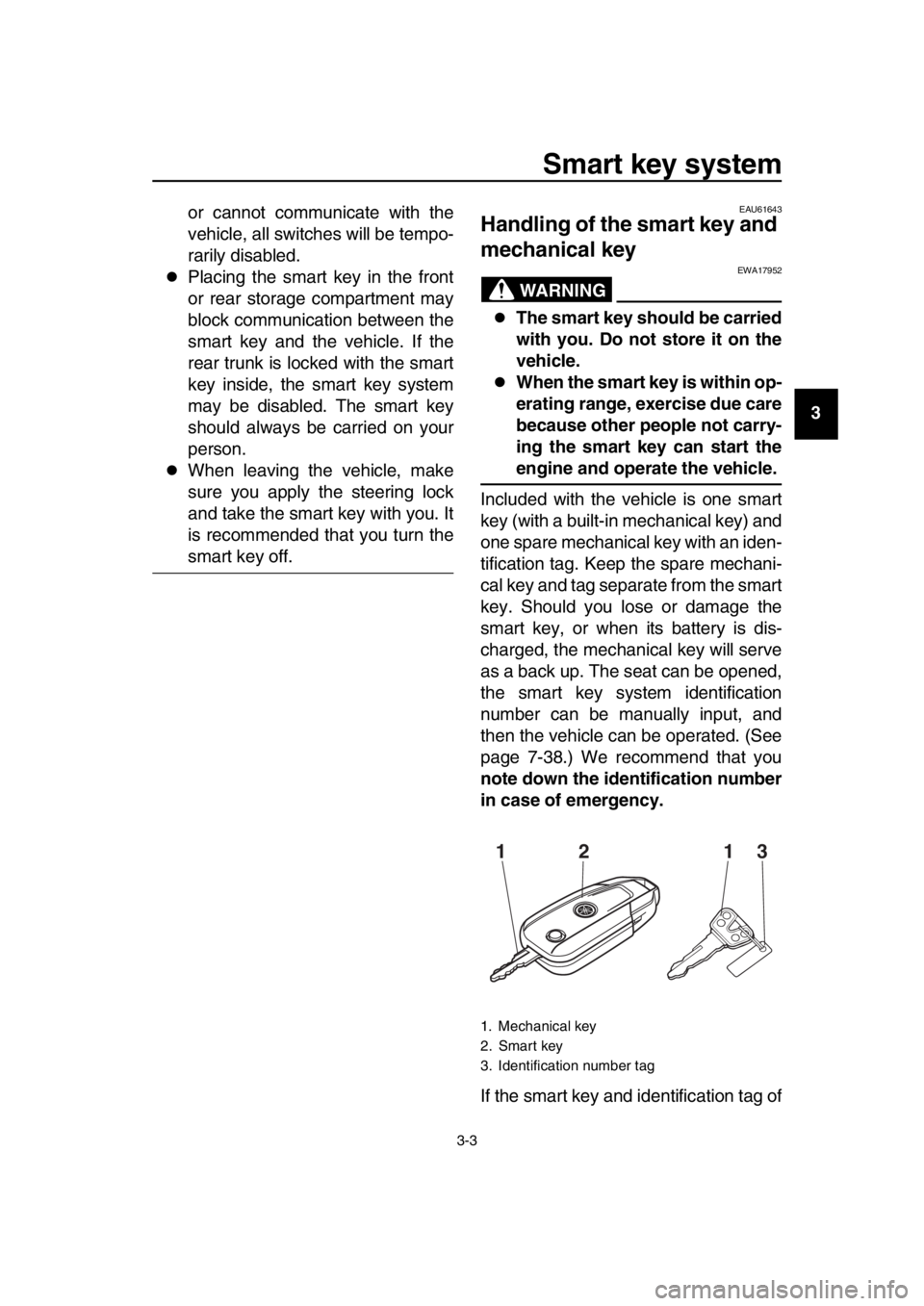
Included with the vehicle is one smart
key (with a built-in mechanical key) and
one spare mechanical key with an iden-
tification tag. Keep the spare mechani-
cal key and tag separate from the smart
key. Should you lose or damage the
smart key, or when its battery is dis-
charged, the mechanical key will serve
as a back up. The seat can be opened,
the smart key system identification
number can be manually input, and
then the vehicle can be operated. (See
page 7-38.) We recommend that you
note down the identification number
in case of emergency.
If the smart key and identification tag of
1. Mechanical key
2. Smart key
3. Identification number tag
12 13
2PW-9-E1.book 3 ページ 2015年9月10日 木曜日 午後5時17分
Page 23 of 110
Smart key system
3-9
1
2
3
4
5
6
7
8
9
10
11
12
13
14
EAU61693
Powering off the vehicle
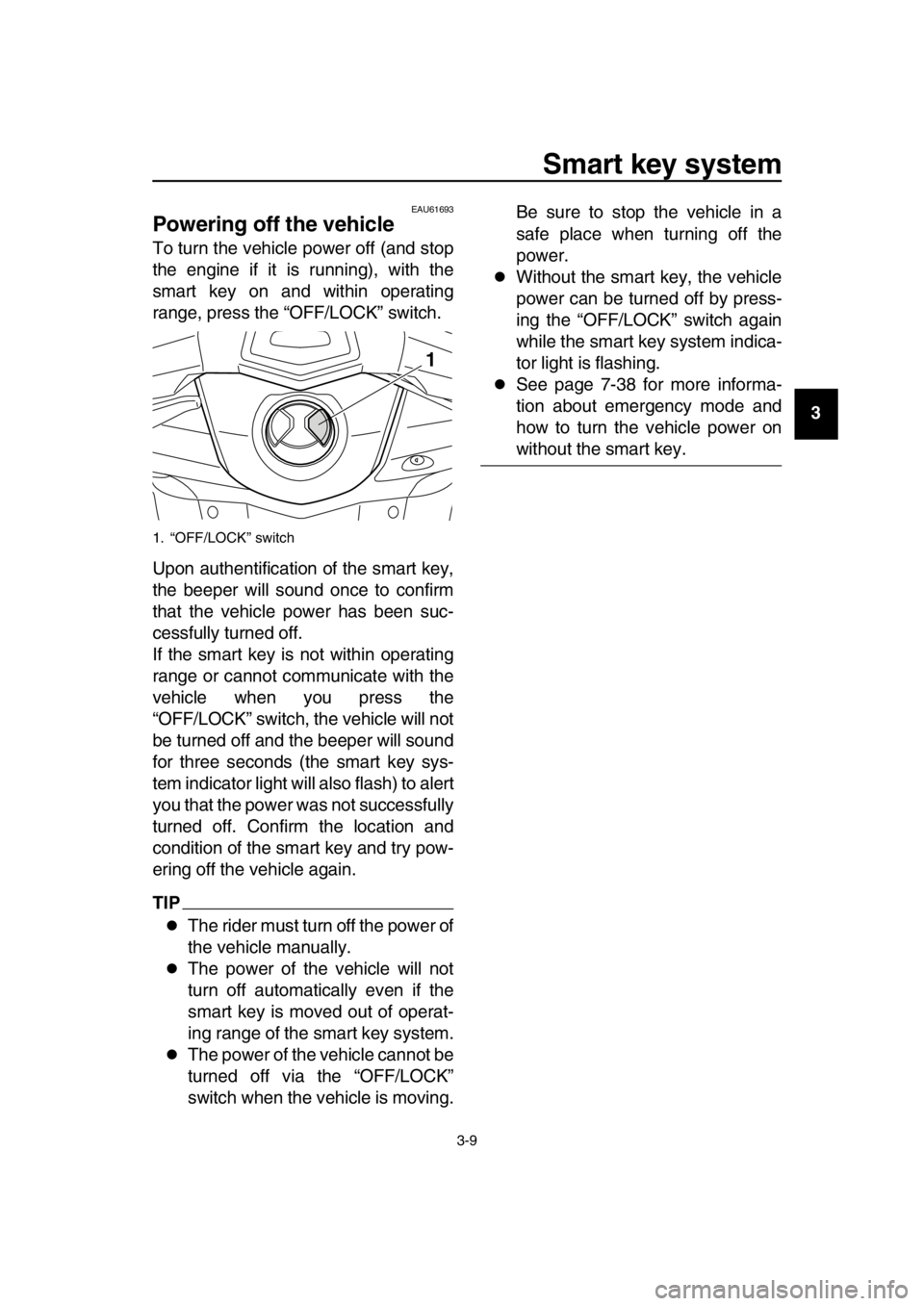
To turn the vehicle power off (and stop
the engine if it is running), with the
smart key on and within operating
range, press the “OFF/LOCK” switch.
Upon authentification of the smart key,
the beeper will sound once to confirm
that the vehicle power has been suc-
cessfully turned off.
If the smart key is not within operating
range or cannot communicate with the
vehicle when you press the
“OFF/LOCK” switch, the vehicle will not
be turned off and the beeper will sound
for three seconds (the smart key sys-
tem indicator light will also flash) to alert
you that the power was not successfully
turned off. Confirm the location and
condition of the smart key and try pow-
ering off the vehicle again.
TIP
The rider must turn off the power of
the vehicle manually.
The power of the vehicle will not
turn off automatically even if the
smart key is moved out of operat-
ing range of the smart key system.
The power of the vehicle cannot be
turned off via the “OFF/LOCK”
switch when the vehicle is moving. Be sure to stop the vehicle in a
safe place when turning off the
power.
Without the smart key, the vehicle
power can be turned off by press-
ing the “OFF/LOCK” switch again
while the smart key system indica-
tor light is flashing.
See page 7-38 for more informa-
tion about emergency mode and
how to turn the vehicle power on
without the smart key.
1. “OFF/LOCK” switch
1
2PW-9-E1.book 9 ページ 2015年9月10日 木曜日 午後5時17分
Page 30 of 110
Instrument and control functions
4-5
1
2
3
4
5
6
7
8
9
10
11
12
13
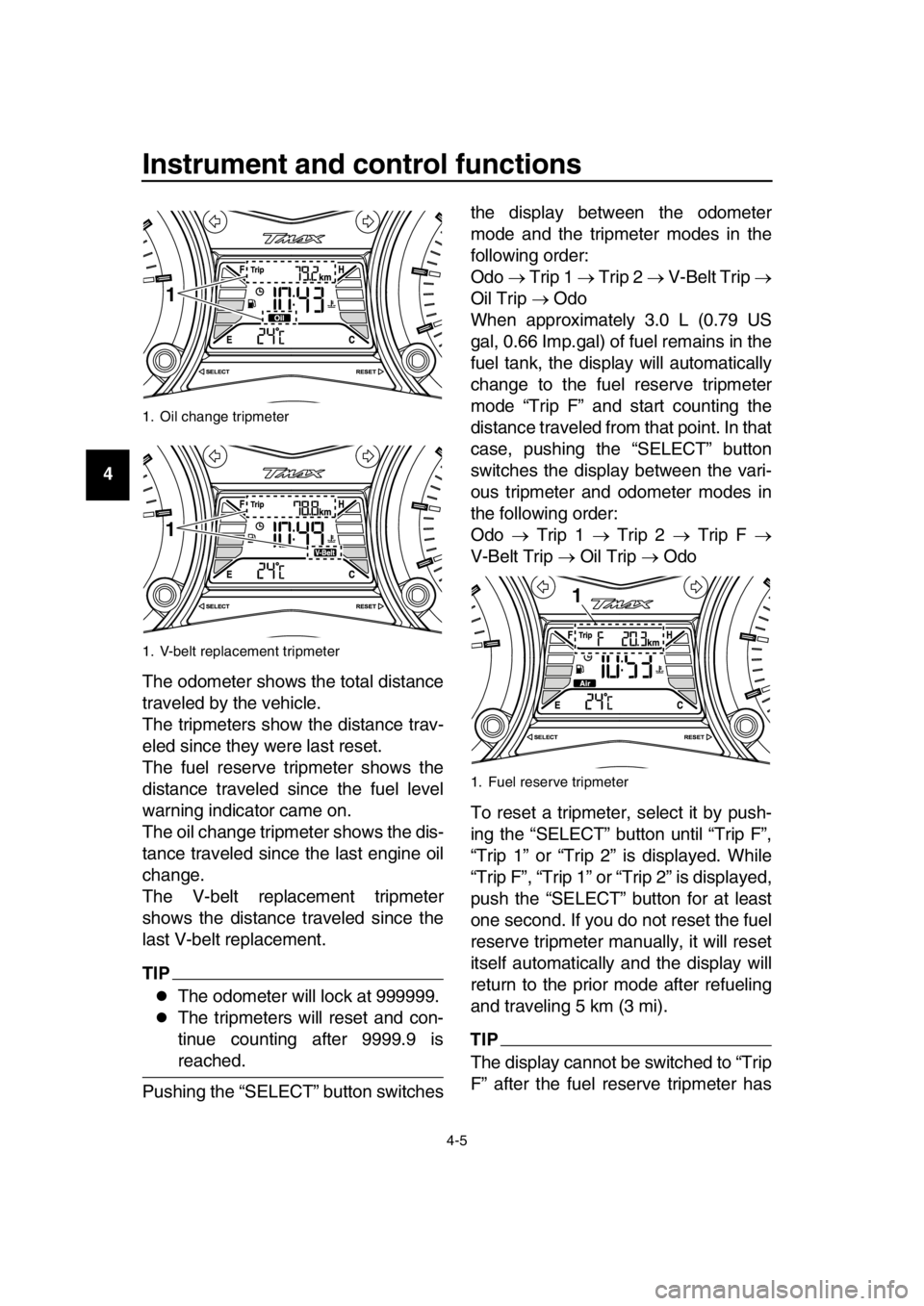
14 The odometer shows the total distance
traveled by the vehicle.
The tripmeters show the distance trav-
eled since they were last reset.
The fuel reserve tripmeter shows the
distance traveled since the fuel level
warning indicator came on.
The oil change tripmeter shows the dis-
tance traveled since the last engine oil
change.
The V-belt replacement tripmeter
shows the distance traveled since the
last V-belt replacement.
TIP
The odometer will lock at 999999.
The tripmeters will reset and con-
tinue counting after 9999.9 is
reached.
Pushing the “SELECT” button switches the display between the odometer
mode and the tripmeter modes in the
following order:
Odo
Trip 1 Trip 2 V-Belt Trip
Oil Trip Odo
When approximately 3.0 L (0.79 US
gal, 0.66 Imp.gal) of fuel remains in the
fuel tank, the display will automatically
change to the fuel reserve tripmeter
mode “Trip F” and start counting the
distance traveled from that point. In that
case, pushing the “SELECT” button
switches the display between the vari-
ous tripmeter and odometer modes in
the following order:
Odo Trip 1 Trip 2 Trip F
V-Belt Trip Oil Trip Odo
To reset a tripmeter, select it by push-
ing the “SELECT” button until “Trip F”,
“Trip 1” or “Trip 2” is displayed. While
“Trip F”, “Trip 1” or “Trip 2” is displayed,
push the “SELECT” button for at least
one second. If you do not reset the fuel
reserve tripmeter manually, it will reset
itself automatically and the display will
return to the prior mode after refueling
and traveling 5 km (3 mi).
TIP
The display cannot be switched to “Trip
F” after the fuel reserve tripmeter has
1. Oil change tripmeter
1. V-belt replacement tripmeter
1
1
1. Fuel reserve tripmeter
1
2PW-9-E1.book 5 ページ 2015年9月10日 木曜日 午後5時17分
Page 50 of 110
5-1
1
2
3
4
5
6
7
8
9
10
11
12
13
14
For your safety – pre-operation checks
EAU63440
Inspect your vehicle each time you use it to make sure the vehicle is in safe oper-
ating condition. Always follow the inspection and maintenance procedures and
schedules described in the Owner’s Manual.
WARNING
EWA11152
Failure to inspect or maintain the vehicle properly increases the possibility
of an accident or equipment damage. Do not operate the vehicle if you find
any problem. If a problem cannot be corrected by the procedures provided
in this manual, have the vehicle inspected by a Yamaha dealer.
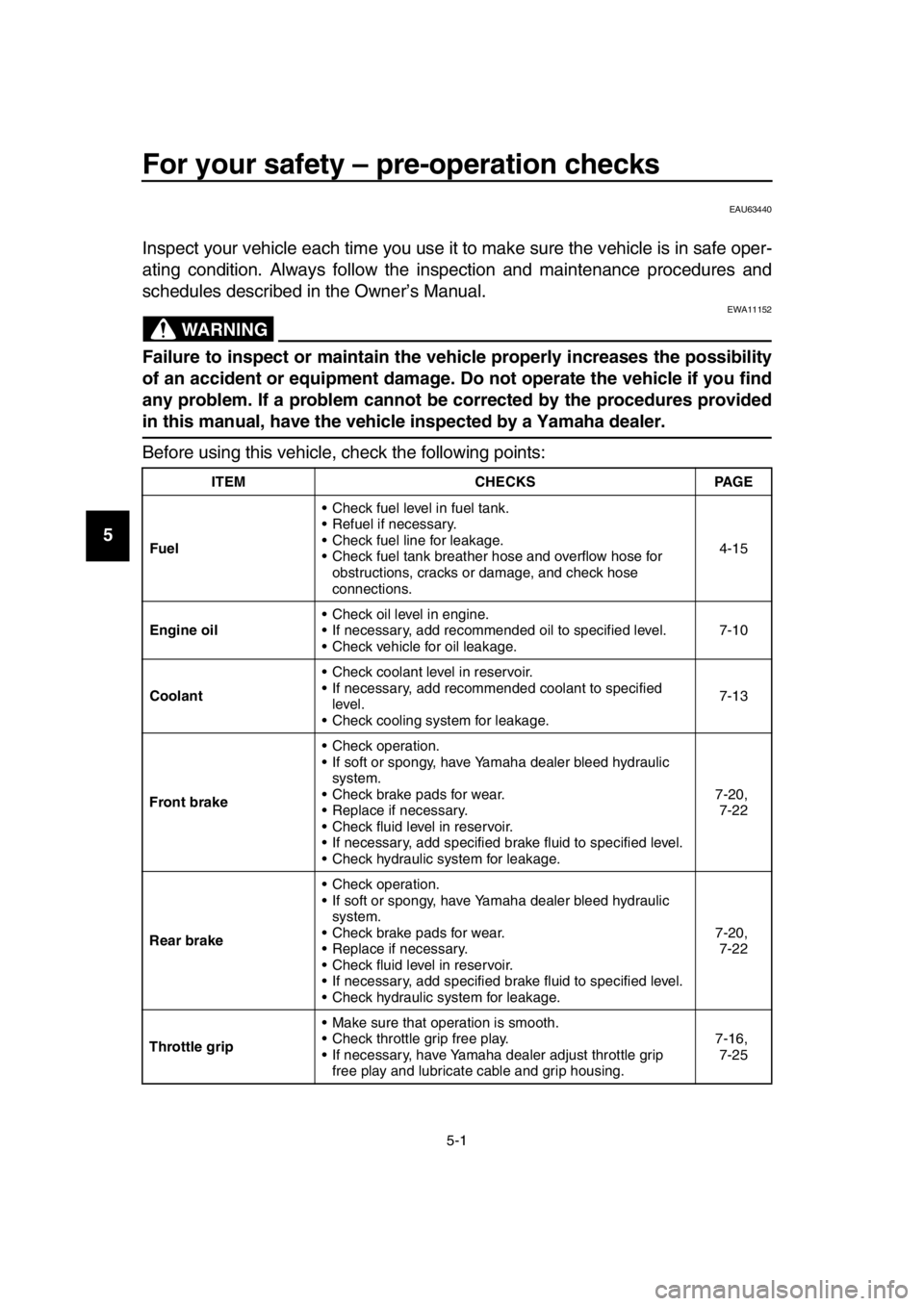
Before using this vehicle, check the following points:
ITEM CHECKSPAGE
Fuel Check fuel level in fuel tank.
Refuel if necessary.
Check fuel line for leakage.
Check fuel tank breather hose and overflow hose for
obstructions, cracks or damage, and check hose
connections. 4-15
Engine oil Check oil level in engine.
If necessary, add recommended oil to specified level.
Check vehicle for oil leakage. 7-10
Coolant Check coolant level in reservoir.
If necessary, add recomm
ended coolant to specified
level.
Check cooling system for leakage. 7-13
Front brake Check operation.
If soft or spongy, have Yamaha dealer bleed hydraulic
system.
Check brake pads for wear.
Replace if necessary.
Check fluid level in reservoir.
If necessary, add specified brake fluid to specified level.
Check hydraulic system for leakage. 7-20,
7-22
Rear brake Check operation.
If soft or spongy, have Yamaha dealer bleed hydraulic
system.
Check brake pads for wear.
Replace if necessary.
Check fluid level in reservoir.
If necessary, add specified brake fluid to specified level.
Check hydraulic system for leakage. 7-20,
7-22
Throttle grip Make sure that operation is smooth.
Check throttle grip free play.
If necessary, have Yamaha dealer adjust throttle grip
free play and lubricate cable and grip housing. 7-16,
7-25
2PW-9-E1.book 1 ページ 2015年9月10日 木曜日 午後5時17分
Page 52 of 110

6-1
1
2
3
4
5
6
7
8
9
10
11
12
13
14
Operation and important riding points
EAU15952
Read the Owner’s Manual carefully to
become familiar with all controls. If
there is a control or function you do not
understand, ask your Yamaha dealer.
WARNING
EWA10272
Failure to familiarize yourself with
the controls can lead to loss of con-
trol, which could cause an accident
or injury.
EAU63621
TIP
This model is equipped with:
a lean angle sensor to stop the en-
gine in case of a turnover. In this
case, the display will indicate error
code 30, but this is not a malfunc-
tion. Turn the vehicle power off
and then on to clear the error code.
Failing to do so will prevent the en-
gine from starting even though the
engine will crank when pushing the
start switch.
an engine auto-stop system. The
engine stops automatically if left
idling for 20 minutes. If the engine
stops, simply push the start switch
to restart the engine.
2PW-9-E1.book 1 ページ 2015年9月10日 木曜日 午後5時17分