fuel YAMAHA TMAX 2017 User Guide
[x] Cancel search | Manufacturer: YAMAHA, Model Year: 2017, Model line: TMAX, Model: YAMAHA TMAX 2017Pages: 124, PDF Size: 14.56 MB
Page 41 of 124
Instrument and control functions
5-8
1
2
3
4
5
6
7
8
9
10
11
12
13
14
To increase the grip warmer tempera-
ture, push the “ ” side of the select
switch. To decrease the grip warmer
temperature, push the “ ” side of the
select switch.NOTICE
ECA17931
Be sure to wear gloves when us-
ing the grip warmers.
If the ambient temperature is 20
C (68 F) or higher, do not set
the grip warmer to the high set-
ting.
If the handlebar grip or throttle
grip becomes worn or damaged,
stop using the grip warmers and
replace the grips.
Adjusting the seat heater
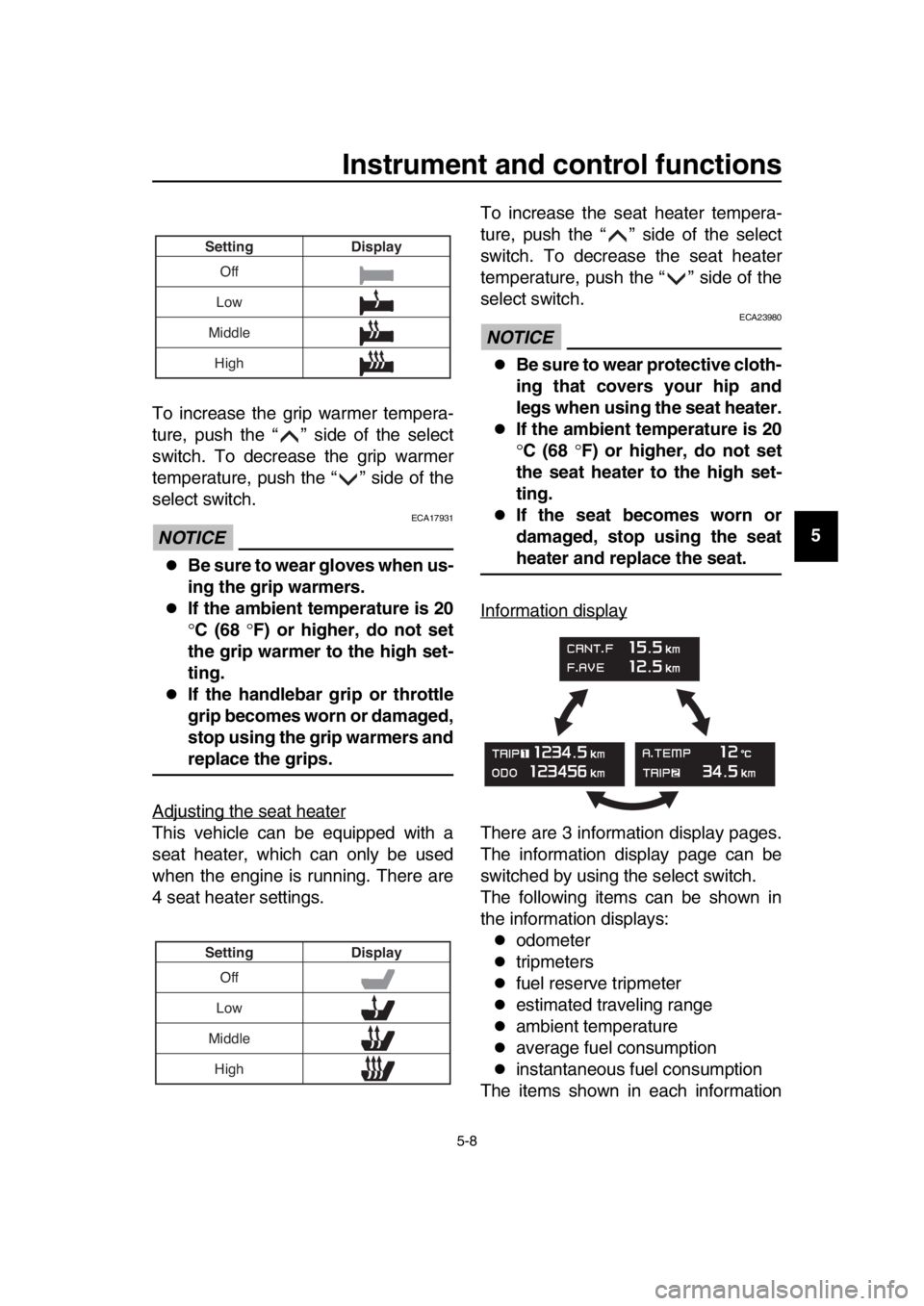
This vehicle can be equipped with a
seat heater, which can only be used
when the engine is running. There are
4 seat heater settings. To increase the seat heater tempera-
ture, push the “ ” side of the select
switch. To decrease the seat heater
temperature, push the “ ” side of the
select switch.
NOTICE
ECA23980
Be sure to wear protective cloth-
ing that covers your hip and
legs when using the seat heater.
If the ambient temperature is 20
C (68 F) or higher, do not set
the seat heater to the high set-
ting.
If the seat becomes worn or
damaged, stop using the seat
heater and replace the seat.
Information display
There are 3 information display pages.
The information display page can be
switched by using the select switch.
The following items can be shown in
the information displays:
odometer
tripmeters
fuel reserve tripmeter
estimated traveling range
ambient temperature
average fuel consumption
instantaneous fuel consumption
The items shown in each information
Off
Low
Middle Display
Setting
High
Off
Low
Middle Display
Setting
High
BV1-28199-E0.book 8 ページ 2016年12月19日 月曜日 午前11時25分
Page 42 of 124
Instrument and control functions
5-9
1
2
3
4
5
6
7
8
9
10
11
12
13
14 display page can be customized. (See
page 5-11.)
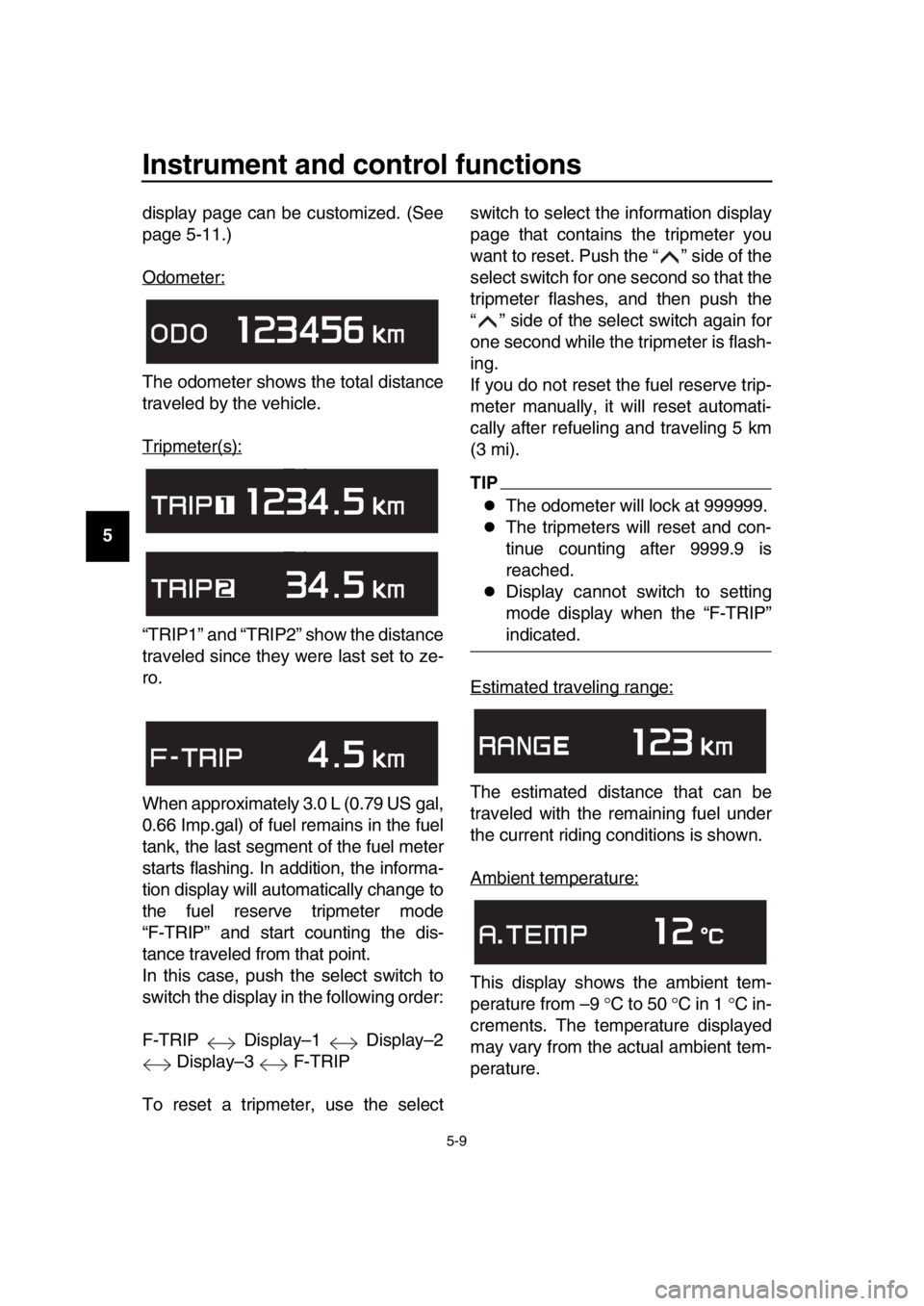
Odometer:
The odometer shows the total distance
traveled by the vehicle.
Tripmeter(s):
“TRIP1” and “TRIP2” show the distance
traveled since they were last set to ze-
ro.
When approximately 3.0 L (0.79 US gal,
0.66 Imp.gal) of fuel remains in the fuel
tank, the last segment of the fuel meter
starts flashing. In addition, the informa-
tion display will automatically change to
the fuel reserve tripmeter mode
“F-TRIP” and start counting the dis-
tance traveled from that point.
In this case, push the select switch to
switch the display in the following order:
F-TRIP Display–1 Display–2
Display–3 F-TRIP
To reset a tripmeter, use the select switch to select the information display
page that contains the tripmeter you
want to reset. Push the “ ” side of the
select switch for one second so that the
tripmeter flashes, and then push the
“ ” side of the select switch again for
one second while the tripmeter is flash-
ing.
If you do not reset the fuel reserve trip-
meter manually, it will reset automati-
cally after refueling and traveling 5 km
(3 mi).
TIP
The odometer will lock at 999999.
The tripmeters will reset and con-
tinue counting after 9999.9 is
reached.
Display cannot switch to setting
mode display when the “F-TRIP”
indicated.
Estimated traveling range:
The estimated distance that can be
traveled with the remaining fuel under
the current riding conditions is shown.
Ambient temperature:
This display shows the ambient tem-
perature from –9 C to 50 C in 1 C in-
crements. The temperature displayed
may vary from the actual ambient tem-
perature.
BV1-28199-E0.book 9 ページ 2016年12月19日 月曜日 午前11時25分
Page 43 of 124
Instrument and control functions
5-10
1
2
3
4
5
6
7
8
9
10
11
12
13
14
TIP
–9 C will be displayed even if the
detected temperature is lower.
50 C will be displayed even if the
detected temperature is higher.
The accuracy of the temperature
reading may be affected when rid-
ing under 20 km/h (12 mi/h) or
when stopped at traffic signals and
railroad crossings.
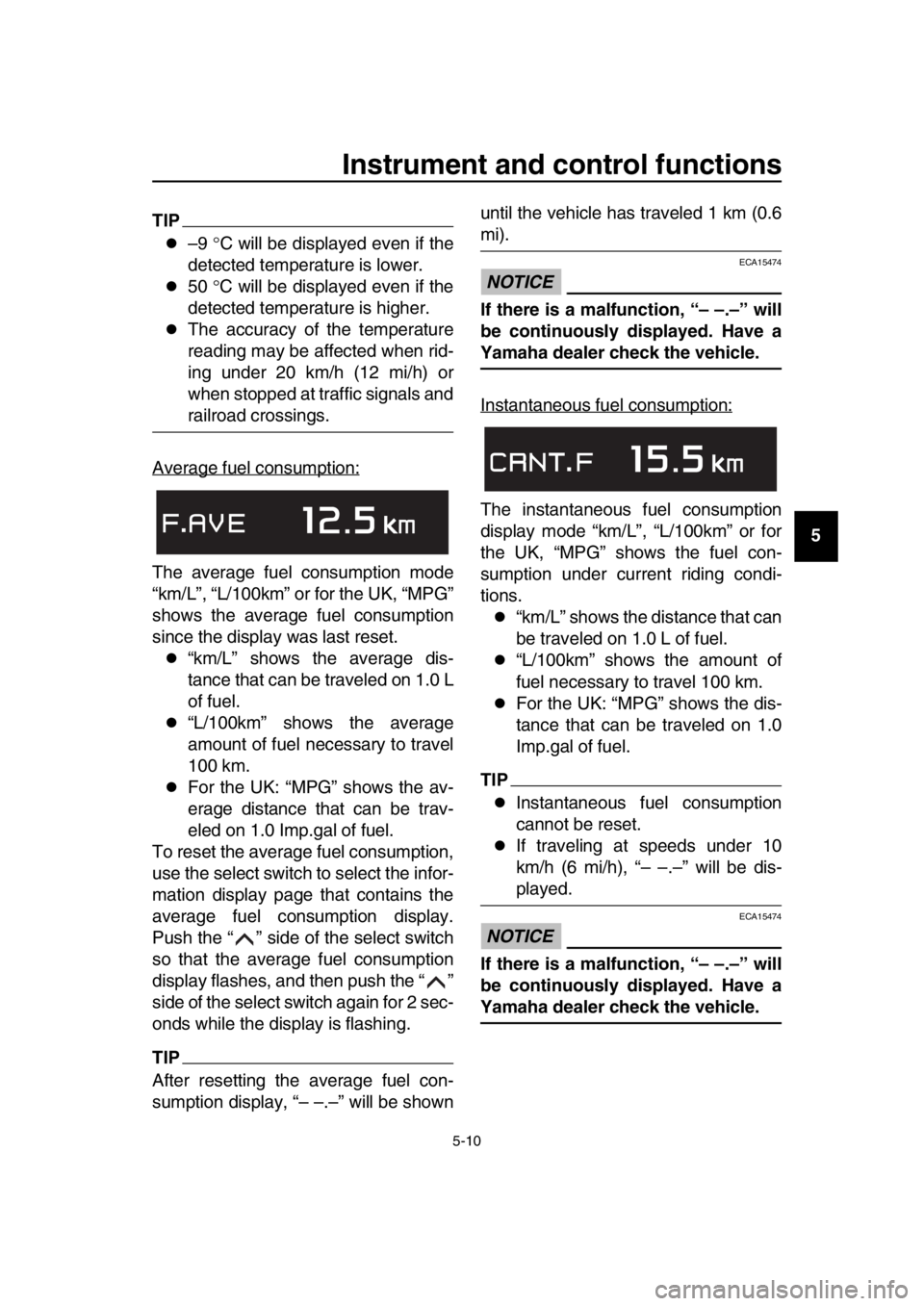
Average fuel consumption:
The average fuel consumption mode
“km/L”, “L/100km” or for the UK, “MPG”
shows the average fuel consumption
since the display was last reset.
“km/L” shows the average dis-
tance that can be traveled on 1.0 L
of fuel.
“L/100km” shows the average
amount of fuel necessary to travel
100 km.
For the UK: “MPG” shows the av-
erage distance that can be trav-
eled on 1.0 Imp.gal of fuel.
To reset the average fuel consumption,
use the select switch to select the infor-
mation display page that contains the
average fuel consumption display.
Push the “ ” side of the select switch
so that the average fuel consumption
display flashes, and then push the “ ”
side of the select switch again for 2 sec-
onds while the display is flashing.
TIP
After resetting the average fuel con-
sumption display, “– –.–” will be shown until the vehicle has traveled 1 km (0.6
mi).
NOTICE
ECA15474
If there is a malfunction, “– –.–” will
be continuously displayed. Have a
Yamaha dealer check the vehicle.
Instantaneous fuel consumption:
The instantaneous fuel consumption
display mode “km/L”, “L/100km” or for
the UK, “MPG” shows the fuel con-
sumption under current riding condi-
tions.
“km/L” shows the distance that can
be traveled on 1.0 L of fuel.
“L/100km” shows the amount of
fuel necessary to travel 100 km.
For the UK: “MPG” shows the dis-
tance that can be traveled on 1.0
Imp.gal of fuel.
TIP
Instantaneous fuel consumption
cannot be reset.
If traveling at speeds under 10
km/h (6 mi/h), “– –.–” will be dis-
played.
NOTICE
ECA15474
If there is a malfunction, “– –.–” will
be continuously displayed. Have a
Yamaha dealer check the vehicle.
BV1-28199-E0.book 10 ページ 2016年12月19日 月曜日 午前11時25分
Page 44 of 124
Instrument and control functions
5-11
1
2
3
4
5
6
7
8
9
10
11
12
13
14 Setting mode
TIP
The vehicle must be stopped to
change settings in this mode.
Starting off or turning the vehicle
power off saves all settings made,
then exits the setting mode.
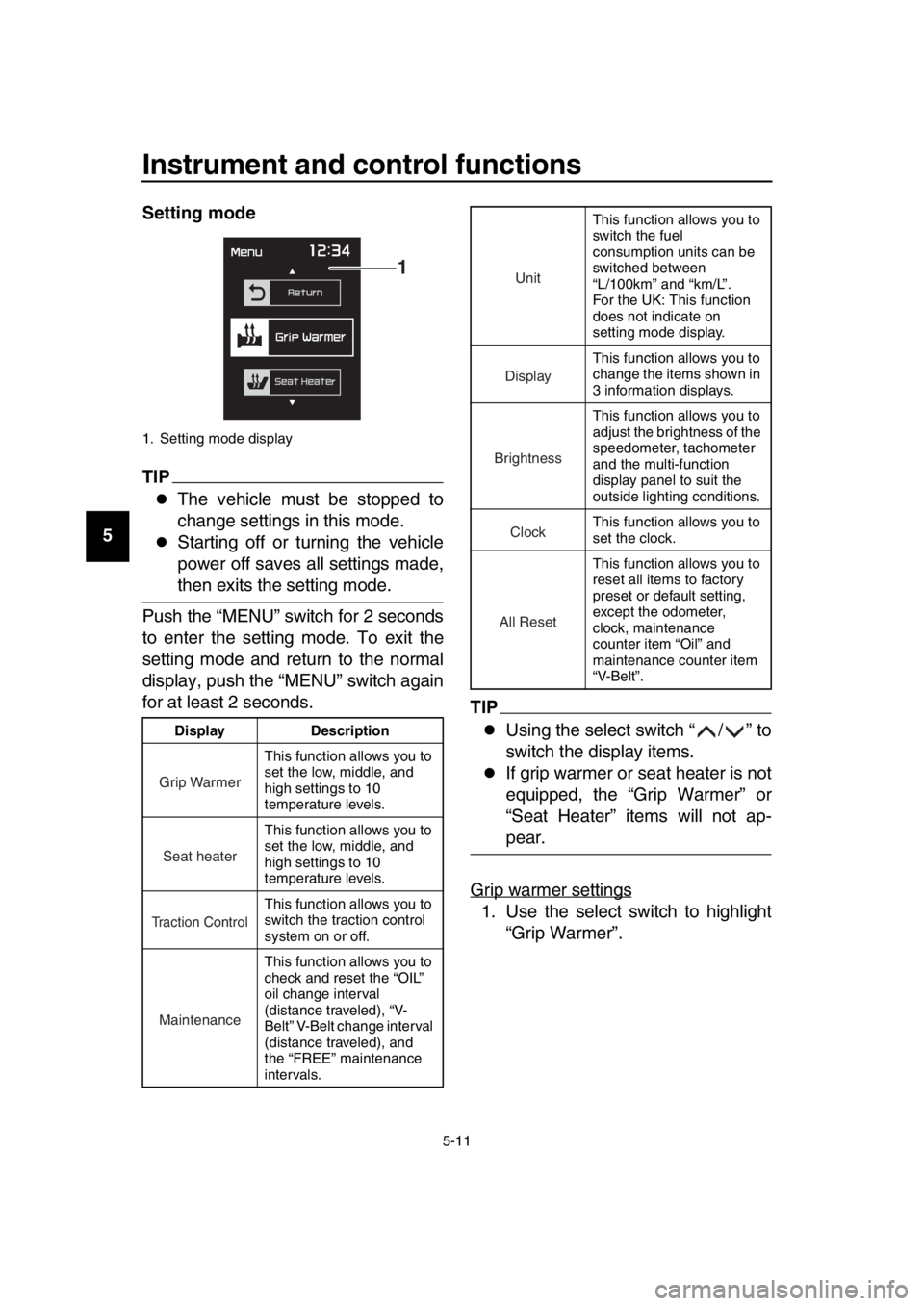
Push the “MENU” switch for 2 seconds
to enter the setting mode. To exit the
setting mode and return to the normal
display, push the “MENU” switch again
for at least 2 seconds.
TIP
Using the select switch “ / ” to
switch the display items.
If grip warmer or seat heater is not
equipped, the “Grip Warmer” or
“Seat Heater” items will not ap-
pear.
Grip warmer settings
1. Use the select switch to highlight “Grip Warmer”.
1. Setting mode display
Display Description This function allows you to
set the low, middle, and
high settings to 10
temperature levels.
This function allows you to
set the low, middle, and
high settings to 10
temperature levels.
This function allows you to
switch the traction control
system on or off.
This function allows you to
check and reset the “OIL”
oil change interval
(distance traveled), “V-
Belt” V-Belt change interval
(distance traveled), and
the “FREE” maintenance
intervals.
1
Grip Warmer
Seat heater
Traction Control
Maintenance
This function allows you to
switch the fuel
consumption units can be
switched between
“L/100km” and “km/L”.
For the UK: This function
does not indicate on
setting mode display.
This function allows you to
change the items shown in
3 information displays.
This function allows you to
adjust the brightness of the
speedometer, tachometer
and the multi-function
display panel to suit the
outside lighting conditions.
This function allows you to
set the clock.
This function allows you to
reset all items to factory
preset or default setting,
except the odometer,
clock, maintenance
counter item “Oil” and
maintenance counter item
“V-Belt”.
Unit
Display
Brightness
Clock
All Reset
BV1-28199-E0.book 11 ページ 2016年12月19日 月曜日 午前11時25分
Page 53 of 124
Instrument and control functions
5-20
1
2
3
4
5
6
7
8
9
10
11
12
13
14
EAU77322
Fuel tank cap
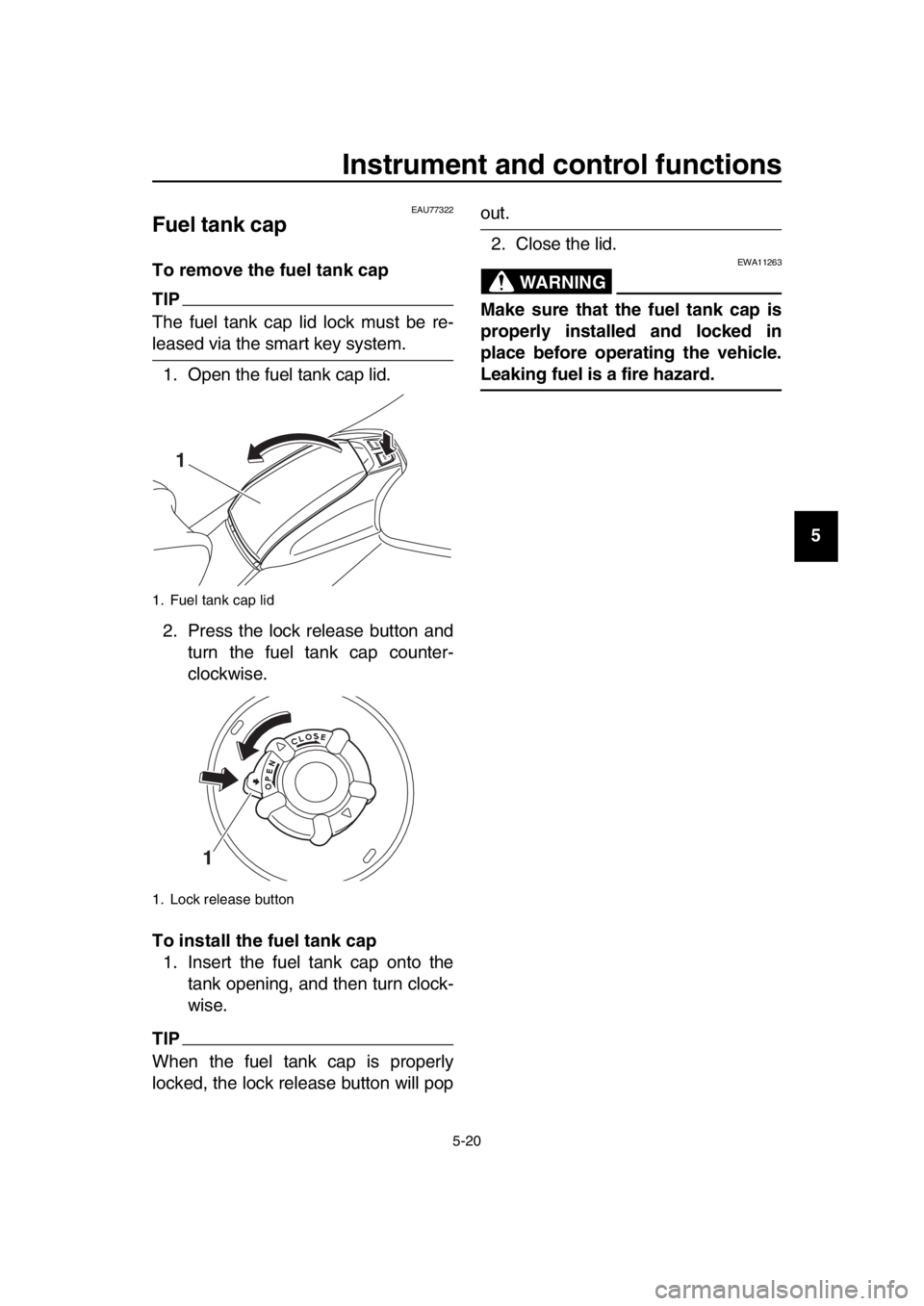
To remove the fuel tank cap
TIP
The fuel tank cap lid lock must be re-
leased via the smart key system. 1. Open the fuel tank cap lid.
2. Press the lock release button and turn the fuel tank cap counter-
clockwise.
To install the fuel tank cap 1. Insert the fuel tank cap onto the tank opening, and then turn clock-
wise.
TIP
When the fuel tank cap is properly
locked, the lock release button will pop
out.
2. Close the lid.
WARNING
EWA11263
Make sure that the fuel tank cap is
properly installed and locked in
place before operating the vehicle.
Leaking fuel is a fire hazard.
1. Fuel tank cap lid
1. Lock release button
1
1
BV1-28199-E0.book 20 ページ 2016年12月19日 月曜日 午前11時25分
Page 54 of 124
Instrument and control functions
5-21
1
2
3
4
5
6
7
8
9
10
11
12
13
14
EAU13222
Fuel
Make sure there is sufficient gasoline in
the tank.
WARNING
EWA10882
Gasoline and gasoline vapors are
extremely flammable. To avoid fires
and explosions and to reduce the
risk of injury when refueling, follow
these instructions. 1. Before refueling, turn off the en- gine and be sure that no one is sit-
ting on the vehicle. Never refuel
while smoking, or while in the vicin-
ity of sparks, open flames, or other
sources of ignition such as the pilot
lights of water heaters and clothes
dryers.
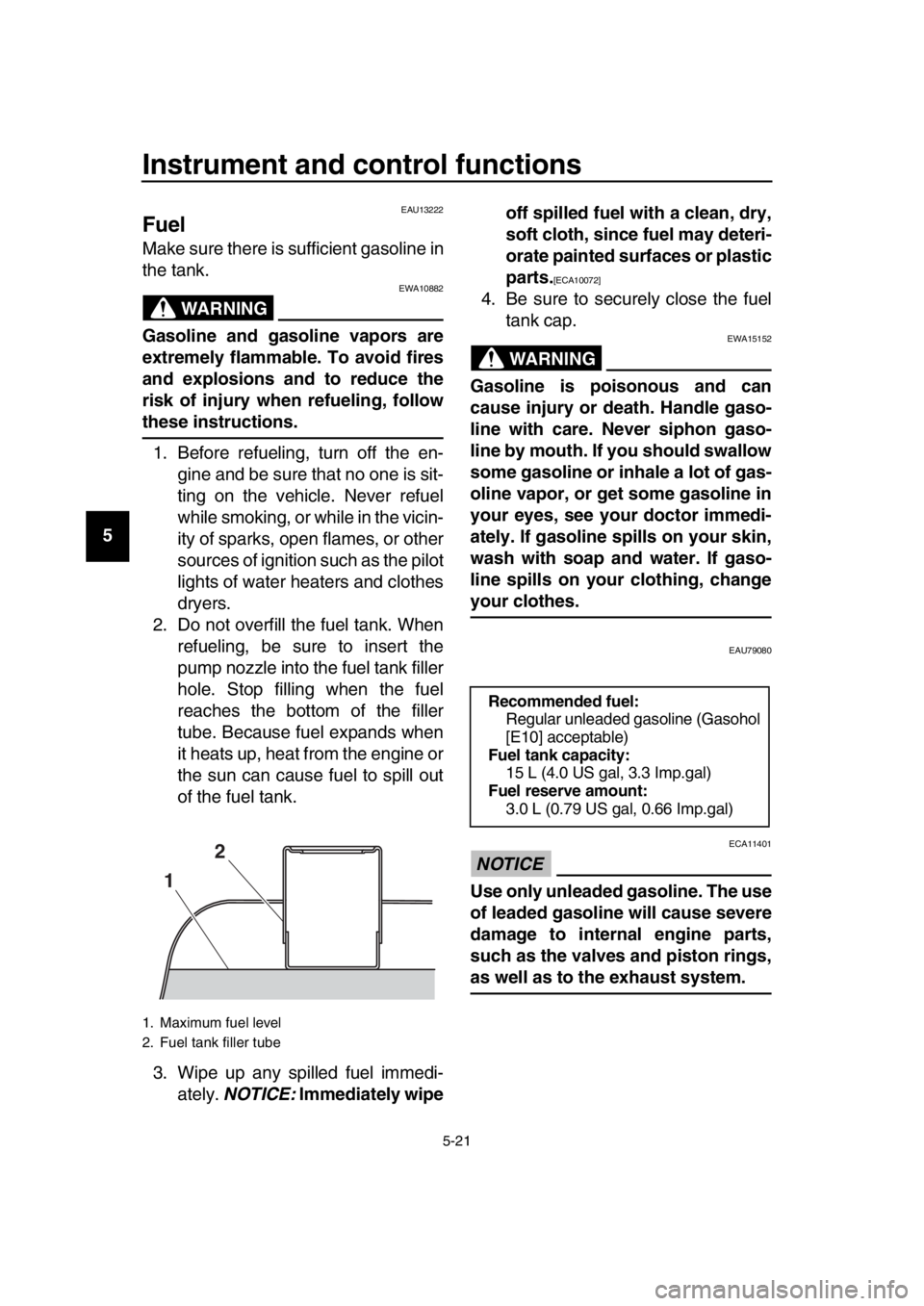
2. Do not overfill the fuel tank. When refueling, be sure to insert the
pump nozzle into the fuel tank filler
hole. Stop filling when the fuel
reaches the bottom of the filler
tube. Because fuel expands when
it heats up, heat from the engine or
the sun can cause fuel to spill out
of the fuel tank.
3. Wipe up any spilled fuel immedi- ately. NOTICE: Immediately wipe off spilled fuel with a clean, dry,
soft cloth, since fuel may deteri-
orate painted surfaces or plastic
parts.
[ECA10072]
4. Be sure to securely close the fuel
tank cap.
WARNING
EWA15152
Gasoline is poisonous and can
cause injury or death. Handle gaso-
line with care. Never siphon gaso-
line by mouth. If you should swallow
some gasoline or inhale a lot of gas-
oline vapor, or get some gasoline in
your eyes, see your doctor immedi-
ately. If gasoline spills on your skin,
wash with soap and water. If gaso-
line spills on your clothing, change
your clothes.
EAU79080
NOTICE
ECA11401
Use only unleaded gasoline. The use
of leaded gasoline will cause severe
damage to internal engine parts,
such as the valves and piston rings,
as well as to the exhaust system.
1. Maximum fuel level
2. Fuel tank filler tube
1 2
Recommended fuel:
Regular unleaded gasoline (Gasohol
[E10] acceptable)
Fuel tank capacity:
15 L (4.0 US gal, 3.3 Imp.gal)
Fuel reserve amount: 3.0 L (0.79 US gal, 0.66 Imp.gal)
BV1-28199-E0.book 21 ページ 2016年12月19日 月曜日 午前11時25分
Page 55 of 124

Instrument and control functions
5-22
1
2
3
4
5
6
7
8
9
10
11
12
13
14
TIP
This mark identifies the recom-
mended fuel for this vehicle as
specified by European regulation
(EN228).
Check that gasoline nozzle has the
same identifier when fueling.
Your Yamaha engine has been de-
signed to use regular unleaded gaso-
line with a research octane number of
95 or higher. If knocking (or pinging) oc-
curs, use a gasoline of a different
brand. Use of unleaded fuel will extend
spark plug life and reduce maintenance
costs.
Gasohol
There are two types of gasohol: gaso-
hol containing ethanol and that contain-
ing methanol. Gasohol containing
ethanol can be used if the ethanol con-
tent does not exceed 10% (E10). Gas-
ohol containing methanol is not
recommended by Yamaha because it
can cause damage to the fuel system
or vehicle performance problems.
EAU58301
Fuel tank overflow hose
Before operating the vehicle:
Check the fuel t ank overflow hose
connection and routing.
Check the fuel t ank overflow hose
for cracks or damage, and replace
it if necessary.
Make sure that the fuel tank over-
flow hose is not blocked, and clean
it if necessary.
E10
1. Fuel tank overflow hose
1
BV1-28199-E0.book 22 ページ 2016年12月19日 月曜日 午前11時25分
Page 65 of 124

6-1
1
2
3
4
5
6
7
8
9
10
11
12
13
14
For your safety – pre-operation checks
EAU63440
Inspect your vehicle each time you use it to make sure the vehicle is in safe oper-
ating condition. Always follow the in spection and maintenance procedures and
schedules described in the Owner’s Manual.
WARNING
EWA11152
Failure to inspect or maintain the vehicle properly increases the possibility
of an accident or equipment damage. Do not operate the vehicle if you find
any problem. If a problem cannot be corrected by the procedures provided
in this manual, have the vehicle inspected by a Yamaha dealer.
Before using this vehicle, check the following points:
ITEM CHECKSPAGE
Fuel Check fuel level in fuel tank.
Refuel if necessary.
Check fuel line for leakage.
Check fuel tank breather hose and overflow hose for
obstructions, cracks or damage, and check hose
connections. 5-21,
5-22
Engine oil Check oil level in engine.
If necessary, add recommended oil to specified level.
Check vehicle for oil leakage. 8-10
Coolant Check coolant level in reservoir.
If necessary, add recommended coolant to specified
level.
Check cooling system for leakage. 8-14
Front brake Check operation.
If soft or spongy, have Yamaha dealer bleed hydraulic
system.
Check brake pads for wear.
Replace if necessary.
Check fluid level in reservoir.
If necessary, add specified brak e fluid to specified level.
Check hydraulic system for leakage. 8-20,
8-22, 8-23
Rear brake Check operation.
If soft or spongy, have Yamaha dealer bleed hydraulic
system.
Check brake pads for wear.
Replace if necessary.
Check fluid level in reservoir.
If necessary, add specified brak e fluid to specified level.
Check hydraulic system for leakage. 8-20,
8-22, 8-23
Throttle grip Make sure that operation is smooth.
Check throttle grip free play.
If necessary, have Yamaha dealer adjust throttle grip
free play and lubricate cable and grip housing. 8-17,
8-25
BV1-28199-E0.book 1 ページ 2016年12月19日 月曜日 午前11時25分
Page 71 of 124

Operation and important riding points
7-5
1
2
3
4
5
6
7
8
9
10
11
12
13
14
EAU16821
Tips for reducing fuel
consumption
Fuel consumption depends largely on
your riding style. Consider the following
tips to reduce fuel consumption:
Avoid high engine speeds during
acceleration.
Avoid high engine speeds with no
load on the engine.
Turn the engine off instead of let-
ting it idle for an extended length of
time (e.g., in traffic jams, at traffic
lights or at railroad crossings).
EAU16842
Engine break-in
There is never a more important period
in the life of your engine than the period
between 0 and 1600 km (1000 mi). For
this reason, you should read the follow-
ing material carefully.
Since the engine is brand new, do not
put an excessive load on it for the first
1600 km (1000 mi). The various parts in
the engine wear and polish themselves
to the correct operating clearances.
During this period, prolonged full-throt-
tle operation or any condition that might
result in engine overheating must be
avoided.
EAU36532
0–1000 km (0–600 mi)
Avoid prolonged operation above 5100
r/min . NOTICE: After 1000 km (600
mi) of operation, the engine oil must
be changed, and the oil filter car-
tridge or element replaced.
[ECA11283]
1000–1600 km (600–1000 mi)
Avoid prolonged operation above 6100
r/min.
1600 km (1000 mi) and beyond
The vehicle can now be operated nor-
mally.
NOTICE
ECA10311
Keep the engine speed out of
the tachometer red zone.
If any engine trouble should oc-
cur during the engine break-in
period, immediately have a
Yamaha dealer check the vehi-
cle.
BV1-28199-E0.book 5 ページ 2016年12月19日 月曜日 午前11時25分
Page 72 of 124
Operation and important riding points
7-6
1
2
3
4
5
6
7
8
9
10
11
12
13
14
EAU77960
Parking
When parking, turn the vehicle power
off and then the smart key off.
When leaving the vehicle, make sure
you apply the steering lock and center-
stand lock. Take the smart key with
you. It is recommended that you turn
the smart key off.
WARNING
EWA10312
Since the engine and exhaust
system can become very hot,
park in a place where pedestri-
ans or children are not likely to
touch them and be burned.
Do not park on a slope or on soft
ground, otherwise the vehicle
may overturn, increasing the
risk of a fuel leak and fire.
Do not park near grass or other
flammable materials which
might catch fire.
TIP
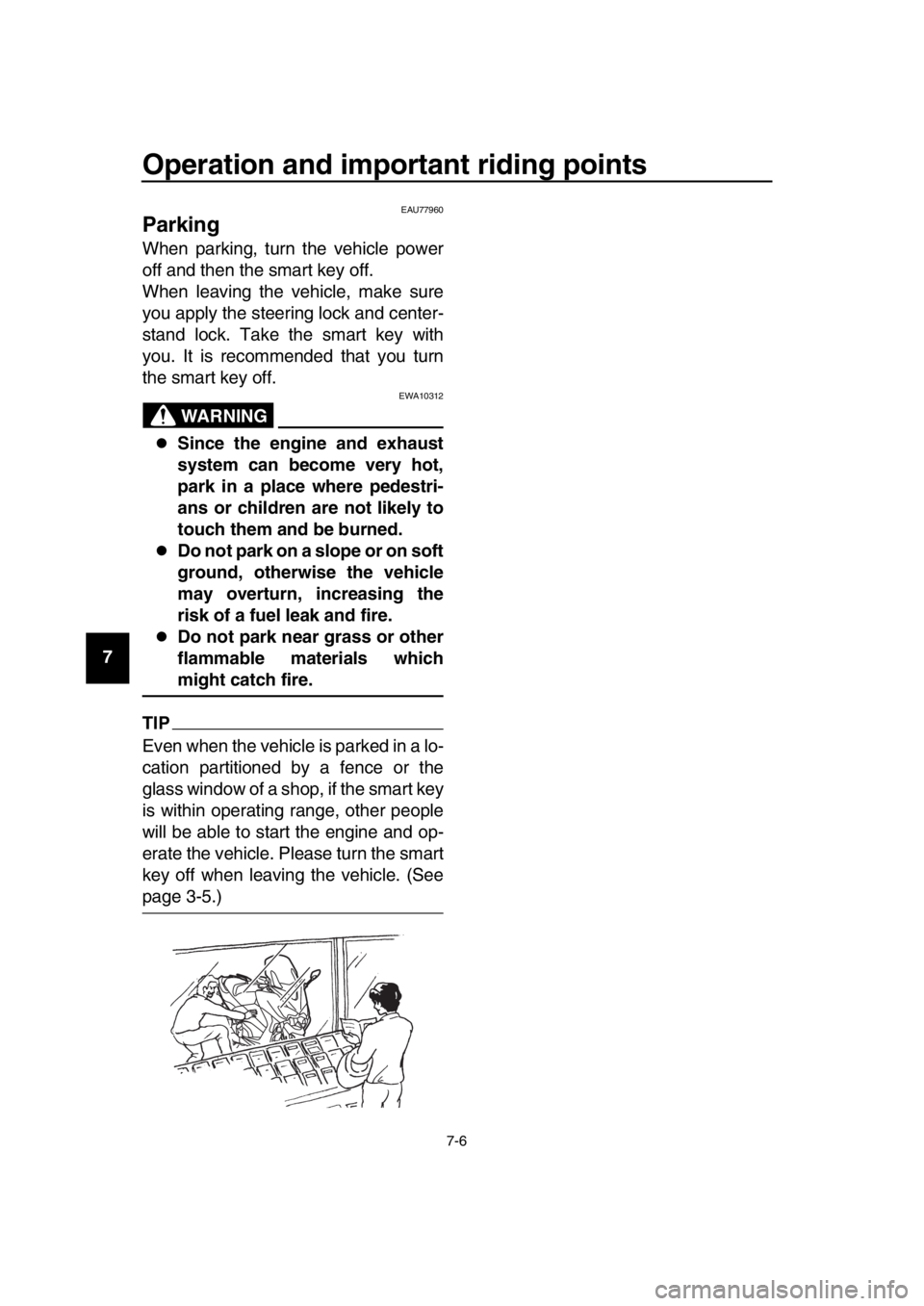
Even when the vehicle is parked in a lo-
cation partitioned by a fence or the
glass window of a shop, if the smart key
is within operating range, other people
will be able to start the engine and op-
erate the vehicle. Please turn the smart
key off when leaving the vehicle. (See
page 3-5.)
BV1-28199-E0.book 6 ページ 2016年12月19日 月曜日 午前11時25分