lock YAMAHA TMAX 2017 User Guide
[x] Cancel search | Manufacturer: YAMAHA, Model Year: 2017, Model line: TMAX, Model: YAMAHA TMAX 2017Pages: 124, PDF Size: 14.56 MB
Page 27 of 124
Smart key system
3-11
1
2
3
4
5
6
7
8
9
10
11
12
13
14
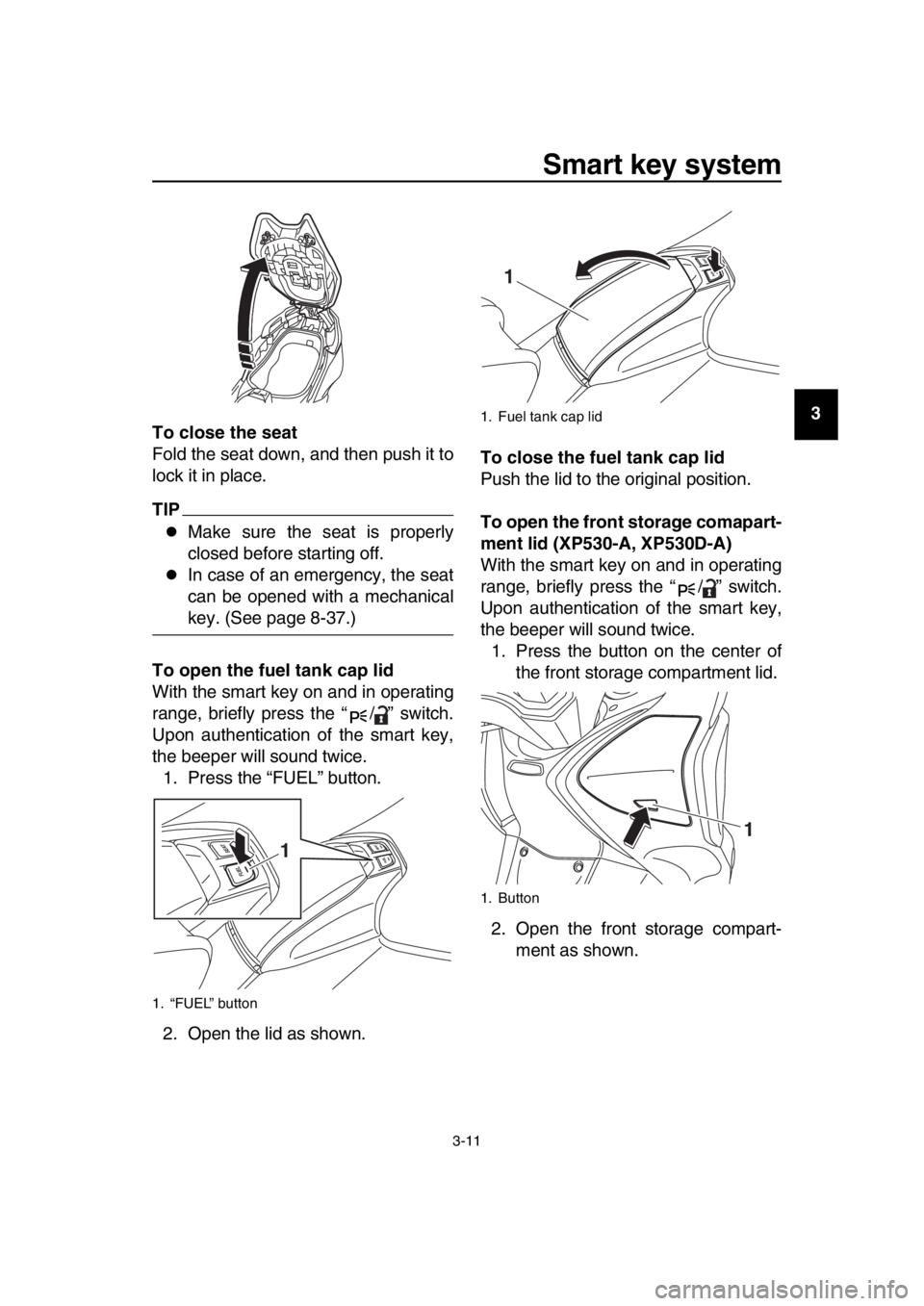
To close the seat
Fold the seat down, and then push it to
lock it in place.
TIP
Make sure the seat is properly
closed before starting off.
In case of an emergency, the seat
can be opened with a mechanical
key. (See page 8-37.)
To open the fuel tank cap lid
With the smart key on and in operating
range, briefly press the “ / ” switch.
Upon authentication of the smart key,
the beeper will sound twice. 1. Press the “FUEL” button.
2. Open the lid as shown. To close the fuel tank cap lid
Push the lid to the original position.
To open the front storage comapart-
ment lid (XP530-A, XP530D-A)
With the smart key on and in operating
range, briefly press the “ / ” switch.
Upon authentication of the smart key,
the beeper will sound twice.
1. Press the button on the center of the front storage compartment lid.
2. Open the front storage compart- ment as shown.
1. “FUEL” button
1
1. Fuel tank cap lid
1. Button
1
1
BV1-28199-E0.book 11 ページ 2016年12月19日 月曜日 午前11時25分
Page 28 of 124
Smart key system
3-12
1
2
3
4
5
6
7
8
9
10
11
12
13
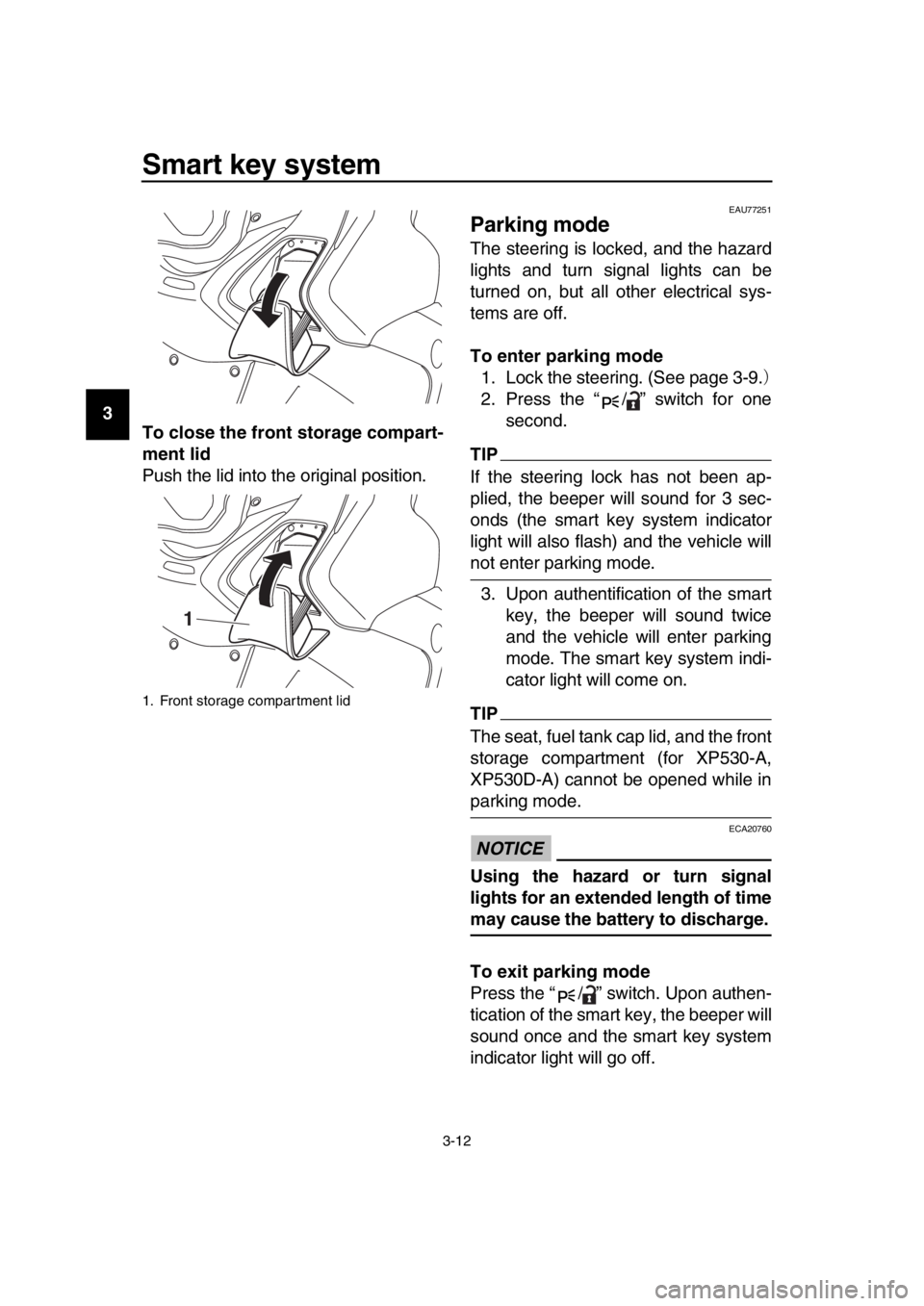
14 To close the front storage compart-
ment lid
Push the lid into the original position.
EAU77251
Parking mode
The steering is locked, and the hazard
lights and turn signal lights can be
turned on, but all other electrical sys-
tems are off.
To enter parking mode
1. Lock the steering. (See page 3-9.)
2. Press the “ / ” switch for one second.
TIP
If the steering lock has not been ap-
plied, the beeper will sound for 3 sec-
onds (the smart key system indicator
light will also flash) and the vehicle will
not enter parking mode.
3. Upon authentification of the smart key, the beeper will sound twice
and the vehicle will enter parking
mode. The smart key system indi-
cator light will come on.
TIP
The seat, fuel tank cap lid, and the front
storage compartment (for XP530-A,
XP530D-A) cannot be opened while in
parking mode.
NOTICE
ECA20760
Using the hazard or turn signal
lights for an extended length of time
may cause the battery to discharge.
To exit parking mode
Press the “ / ” switch. Upon authen-
tication of the smart key, the beeper will
sound once and the smart key system
indicator light will go off.
1. Front storage compartment lid
1
BV1-28199-E0.book 12 ページ 2016年12月19日 月曜日 午前11時25分
Page 35 of 124
Instrument and control functions
5-2
1
2
3
4
5
6
7
8
9
10
11
12
13
14
NOTICE
ECA10062
Do not use the hazard lights for an
extended length of time with the en-
gine not running, otherwise the bat-
tery may discharge.
EAU73951Cruise control switches
See page 4-1 for an explanation of the
cruise control system.
EAU77300Menu switch “MENU”
This switch is used to perform selec-
tions in the function display and setting
mode display of the multi-function dis-
play.
See “Multi-function display” on page
5-5 for detailed information.
EAU77310Select switch “ / ”
This switch is used to perform selec-
tions in the function display and setting
mode display of the multi-function dis-
play.
See “Multi-function display” on page
5-5 for detailed information.
EAU73931Drive mode switch “MODE”
See page 4-3 for an explanation of the
drive mode.
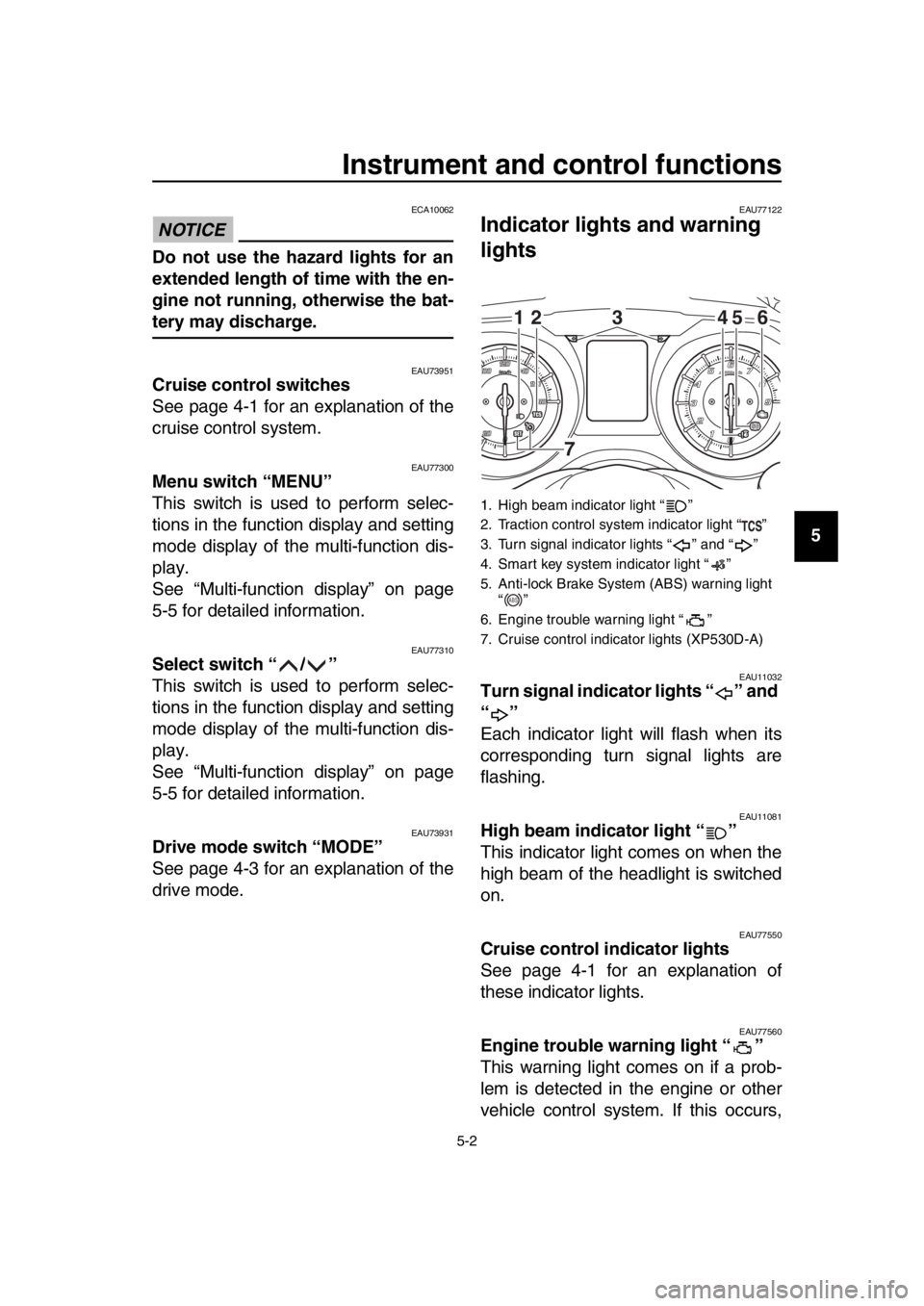
EAU77122
Indicator ligh ts and warning
lights
EAU11032Turn signal indicator lights “ ” and
“”
Each indicator light will flash when its
corresponding turn signal lights are
flashing.
EAU11081High beam indicator light “ ”
This indicator light comes on when the
high beam of the headlight is switched
on.
EAU77550Cruise control indicator lights
See page 4-1 for an explanation of
these indicator lights.
EAU77560Engine trouble warning light “ ”
This warning light comes on if a prob-
lem is detected in the engine or other
vehicle control system. If this occurs,
1. High beam indicator light “ ”
2. Traction control system indicator light “ ”
3. Turn signal indicator lights “ ” and “ ”
4. Smart key system indicator light “ ”
5. Anti-lock Brake System (ABS) warning light “”
6. Engine trouble warning light “ ”
7. Cruise control indicator lights (XP530D-A)
12 45 6
3
7
ABS
BV1-28199-E0.book 2 ページ 2016年12月19日 月曜日 午前11時25分
Page 36 of 124

Instrument and control functions
5-3
1
2
3
4
5
6
7
8
9
10
11
12
13
14 have a Yamaha dealer check the on-
board diagnostic system.
The electrical circuit of the warning light
can be checked by turning the vehicle
power on. The warning light should
come on for a few seconds, and then
go off.
If the warning light does not come on at
all, or if the warning light remains on,
have a Yamaha dealer check the vehi-
cle.
EAU77071ABS warning light “ ”
In normal operation, the ABS warning
light comes on when the vehicle power
is turned on and goes off after traveling
at a speed of 10 km/h (6 mi/h) or higher.
If the ABS warning light:
does not come on when the vehi-
cle power is turned on
comes on or flashes while riding
does not go off after traveling at a
speed of 10 km/h (6 mi/h) or higher
The ABS may not work correctly. If any
of the above occurs, have a Yamaha
dealer check the system as soon as
possible. (See page 5-19 for an expla-
nation of the ABS.)
WARNING
EWA16041
If the ABS warning light does not go
off after traveling at a speed of 10
km/h (6 mi/h) or higher, or if the
warning light comes on or flashes
while riding, the brake system re-
verts to conventional braking. If ei-
ther of the above occurs, or if the
warning light does not come on at
all, use extra caution to avoid possi-
ble wheel lock during emergency
braking. Have a Yamaha dealer
check the brake system and electri-
cal circuits as soon as possible.
TIP
The ABS warning light may come on
when revving the engine with the scoot-
er on its centerstand, but this does not
indicate a malfunction.
EAU74081Traction control system indicator
light “ ”
This indicator light will flash when trac-
tion control has engaged.
If the traction control system is turned
off, this indicator light will come on.
TIP
When the vehicle is turned on, the light
should come on for a few seconds and
then go off. If the light does not come
on, or if the light remains on, have a
Yamaha dealer check vehicle.
EAU78080Smart key system indicator light
“”
This indicator light will flash when com-
munication between the vehicle and
smart key takes place and when certain
smart key system operations are car-
ried out.
The indicator light may also flash when
there is an error in the smart key sys-
tem.
TIP
When the start switch is pushed, the in-
dicator light will come on for about one
second and then go off. If the indicator
light does not come on or go off as nor-
mal, have a Yamaha dealer check the
vehicle.
ABS
BV1-28199-E0.book 3 ページ 2016年12月19日 月曜日 午前11時25分
Page 38 of 124

Instrument and control functions
5-5
1
2
3
4
5
6
7
8
9
10
11
12
13
14
EAU77335
Multi-function display
WARNING
EWA12313
Be sure to stop the vehicle before
making any setting changes to the
multi-function display. Changing
settings while riding can distract the
operator and increase the risk of an
accident. Fuel meter
The fuel meter indicates the amount of
fuel in the fuel tank. The display seg-
ments of the fuel meter disappear from
“F” (full) towards “E” (empty) as the fuel
level decreases. When the last seg-
ment starts flashing, refuel as soon as
possible.
TIP
If a problem is detected in the fuel me-
ter electrical circuit,
the fuel meter will
flash repeatedly. Have a Yamaha deal-
er check the vehicle.
Coolant temperature meter
The coolant temperature varies with
changes in the weather and engine
load. If the top segment starts flashing,
the information display automatically
1. Information display
2. Function display
3. Fuel meter
4. Clock
5. Drive mode display (XP530-A, XP530D-A)
6. Coolant temperature meter
1. Oil change indicator “Oil”
2. V-belt replacement indicator “V-Belt”
3. Eco indicator “ECO”
1 2 3 4 2
5
6
1 2
3
1. Fuel meter
1. Coolant temperature meter
1
1
BV1-28199-E0.book 5 ページ 2016年12月19日 月曜日 午前11時25分
Page 42 of 124
Instrument and control functions
5-9
1
2
3
4
5
6
7
8
9
10
11
12
13
14 display page can be customized. (See
page 5-11.)
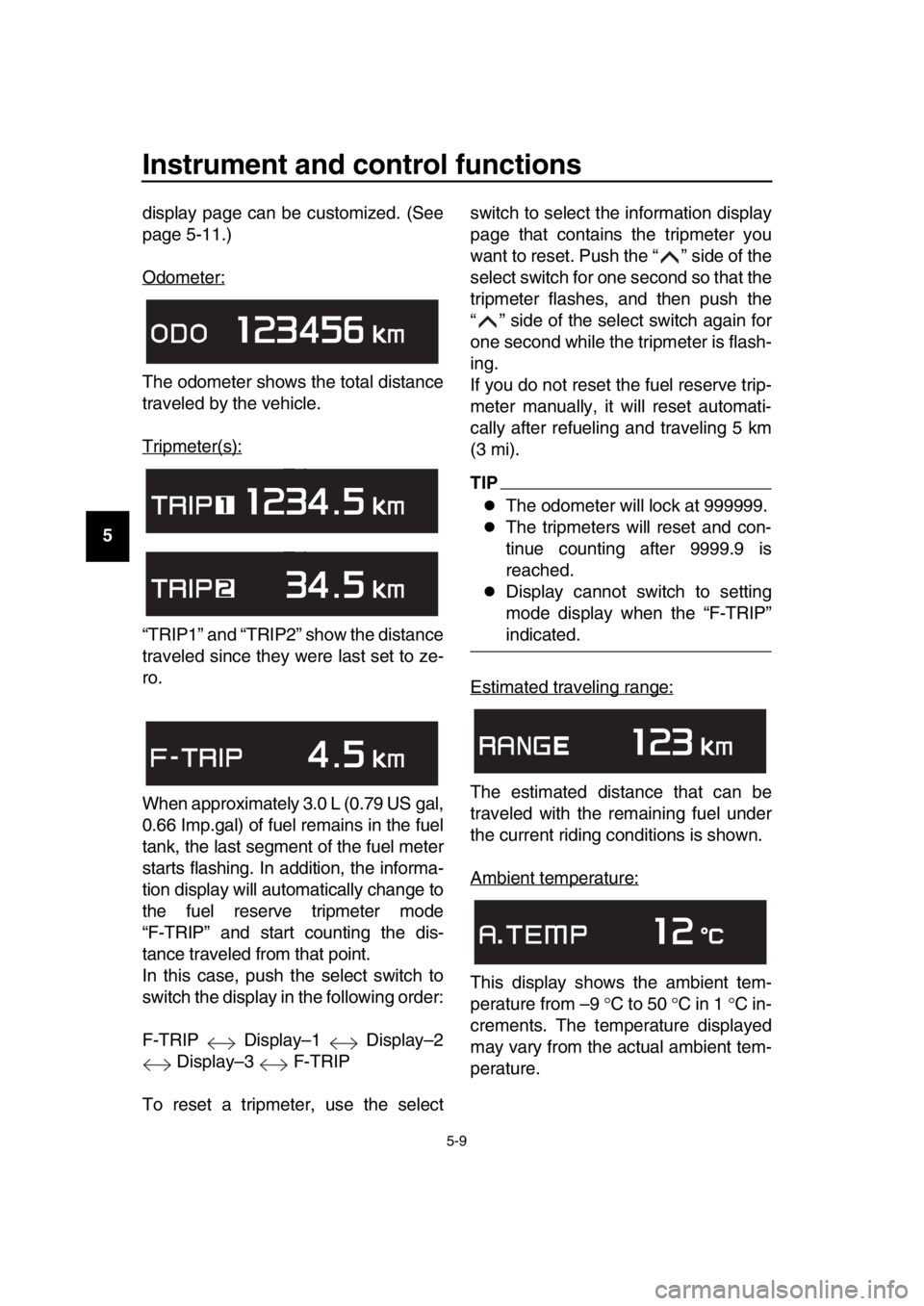
Odometer:
The odometer shows the total distance
traveled by the vehicle.
Tripmeter(s):
“TRIP1” and “TRIP2” show the distance
traveled since they were last set to ze-
ro.
When approximately 3.0 L (0.79 US gal,
0.66 Imp.gal) of fuel remains in the fuel
tank, the last segment of the fuel meter
starts flashing. In addition, the informa-
tion display will automatically change to
the fuel reserve tripmeter mode
“F-TRIP” and start counting the dis-
tance traveled from that point.
In this case, push the select switch to
switch the display in the following order:
F-TRIP Display–1 Display–2
Display–3 F-TRIP
To reset a tripmeter, use the select switch to select the information display
page that contains the tripmeter you
want to reset. Push the “ ” side of the
select switch for one second so that the
tripmeter flashes, and then push the
“ ” side of the select switch again for
one second while the tripmeter is flash-
ing.
If you do not reset the fuel reserve trip-
meter manually, it will reset automati-
cally after refueling and traveling 5 km
(3 mi).
TIP
The odometer will lock at 999999.
The tripmeters will reset and con-
tinue counting after 9999.9 is
reached.
Display cannot switch to setting
mode display when the “F-TRIP”
indicated.
Estimated traveling range:
The estimated distance that can be
traveled with the remaining fuel under
the current riding conditions is shown.
Ambient temperature:
This display shows the ambient tem-
perature from –9 C to 50 C in 1 C in-
crements. The temperature displayed
may vary from the actual ambient tem-
perature.
BV1-28199-E0.book 9 ページ 2016年12月19日 月曜日 午前11時25分
Page 44 of 124
Instrument and control functions
5-11
1
2
3
4
5
6
7
8
9
10
11
12
13
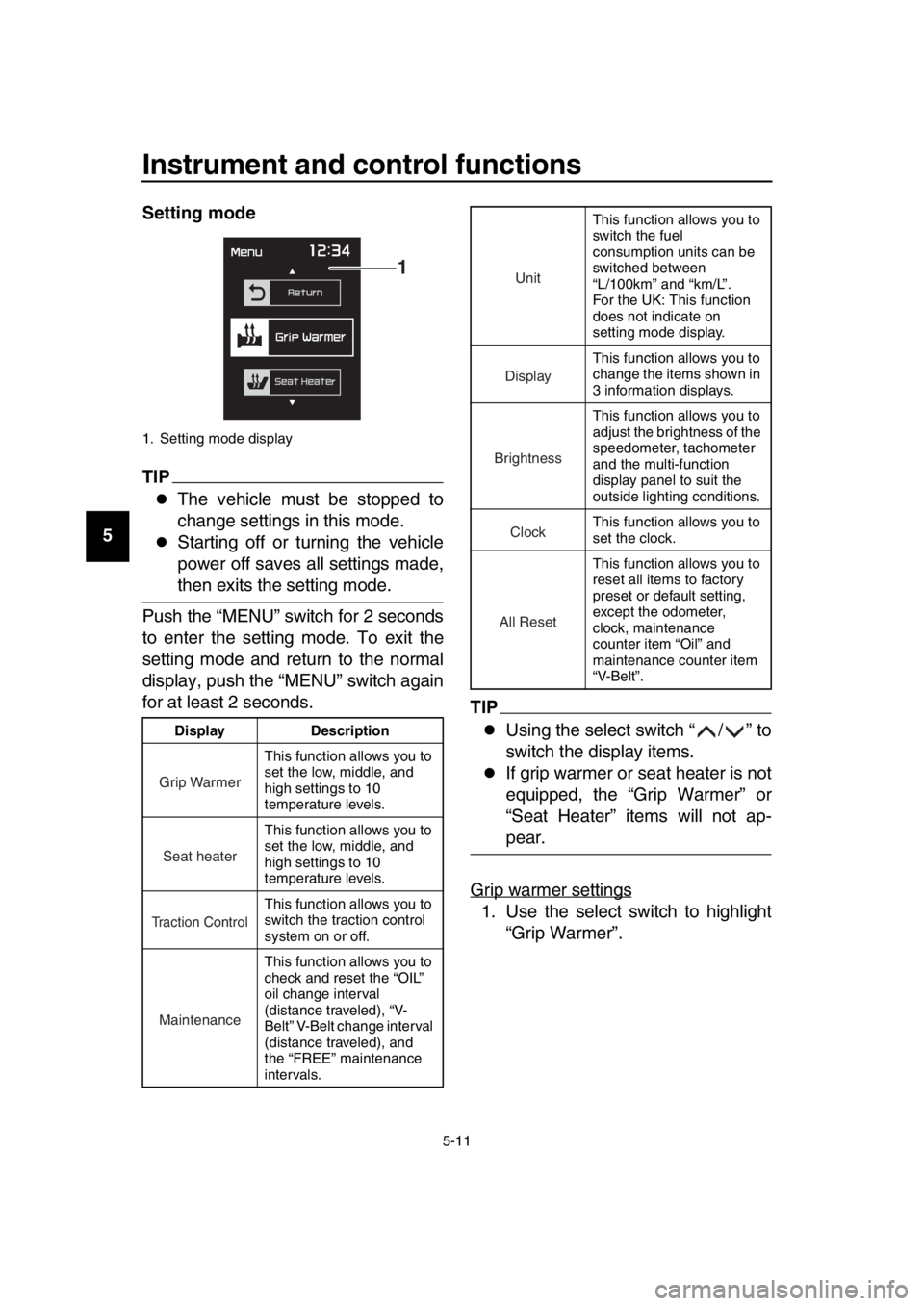
14 Setting mode
TIP
The vehicle must be stopped to
change settings in this mode.
Starting off or turning the vehicle
power off saves all settings made,
then exits the setting mode.
Push the “MENU” switch for 2 seconds
to enter the setting mode. To exit the
setting mode and return to the normal
display, push the “MENU” switch again
for at least 2 seconds.
TIP
Using the select switch “ / ” to
switch the display items.
If grip warmer or seat heater is not
equipped, the “Grip Warmer” or
“Seat Heater” items will not ap-
pear.
Grip warmer settings
1. Use the select switch to highlight “Grip Warmer”.
1. Setting mode display
Display Description This function allows you to
set the low, middle, and
high settings to 10
temperature levels.
This function allows you to
set the low, middle, and
high settings to 10
temperature levels.
This function allows you to
switch the traction control
system on or off.
This function allows you to
check and reset the “OIL”
oil change interval
(distance traveled), “V-
Belt” V-Belt change interval
(distance traveled), and
the “FREE” maintenance
intervals.
1
Grip Warmer
Seat heater
Traction Control
Maintenance
This function allows you to
switch the fuel
consumption units can be
switched between
“L/100km” and “km/L”.
For the UK: This function
does not indicate on
setting mode display.
This function allows you to
change the items shown in
3 information displays.
This function allows you to
adjust the brightness of the
speedometer, tachometer
and the multi-function
display panel to suit the
outside lighting conditions.
This function allows you to
set the clock.
This function allows you to
reset all items to factory
preset or default setting,
except the odometer,
clock, maintenance
counter item “Oil” and
maintenance counter item
“V-Belt”.
Unit
Display
Brightness
Clock
All Reset
BV1-28199-E0.book 11 ページ 2016年12月19日 月曜日 午前11時25分
Page 49 of 124

Instrument and control functions
5-16
1
2
3
4
5
6
7
8
9
10
11
12
13
14
2. Push the “MENU” switch.
3. Use the select switch to select the
desired brightness level.
4. Push the “MENU” switch to return to the setting mode menu.
Setting the clock
TIP
The clock uses a 12-hour time system. 1. Use the select switch to highlight “Clock”.
2. Push the “MENU” switch.
3. When the hour digits start flashing, use the select switch to set the
hours.
4. Push the “MENU” switch, and the minute digits start flashing.
5. Use the select switch to set the minutes.
6. Push the “MENU” switch to return to the setting mode menu.
Resetting all of the display items
1. Use the select switch to highlight “All Reset”.
2. Push the “MENU” switch.
3. Use the select switch to highlight
BV1-28199-E0.book 16 ページ 2016年12月19日 月曜日 午前11時25分
Page 50 of 124
Instrument and control functions
5-17
1
2
3
4
5
6
7
8
9
10
11
12
13
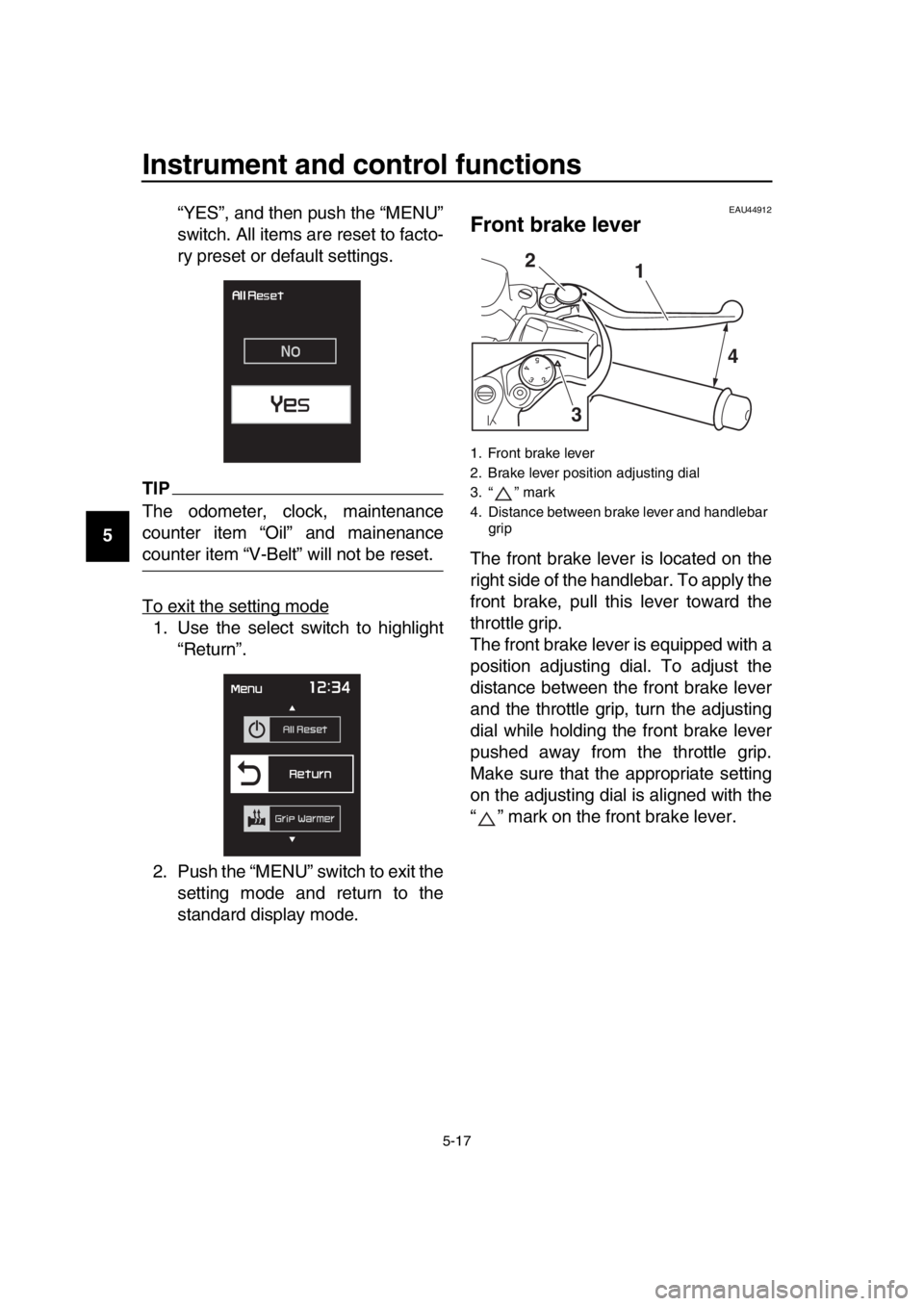
14 “YES”, and then push the “MENU”
switch. All items are reset to facto-
ry preset or default settings.
TIP
The odometer, clock, maintenance
counter item “Oil” and mainenance
counter item “V-Belt” will not be reset.
To exit the setting mode
1. Use the select switch to highlight
“Return”.
2. Push the “MENU” switch to exit the setting mode and return to the
standard display mode.
EAU44912
Front brake lever
The front brake lever is located on the
right side of the handlebar. To apply the
front brake, pull this lever toward the
throttle grip.
The front brake lever is equipped with a
position adjusting dial. To adjust the
distance between the front brake lever
and the throttle grip, turn the adjusting
dial while holding the front brake lever
pushed away from the throttle grip.
Make sure that the appropriate setting
on the adjusting dial is aligned with the
“ ” mark on the front brake lever.
1. Front brake lever
2. Brake lever position adjusting dial
3. “ ” mark
4. Distance between brake lever and handlebar grip
1
2
3 4
BV1-28199-E0.book 17 ページ 2016年12月19日 月曜日 午前11時25分
Page 51 of 124
Instrument and control functions
5-18
1
2
3
4
5
6
7
8
9
10
11
12
13
14
EAU44922
Rear brake lever
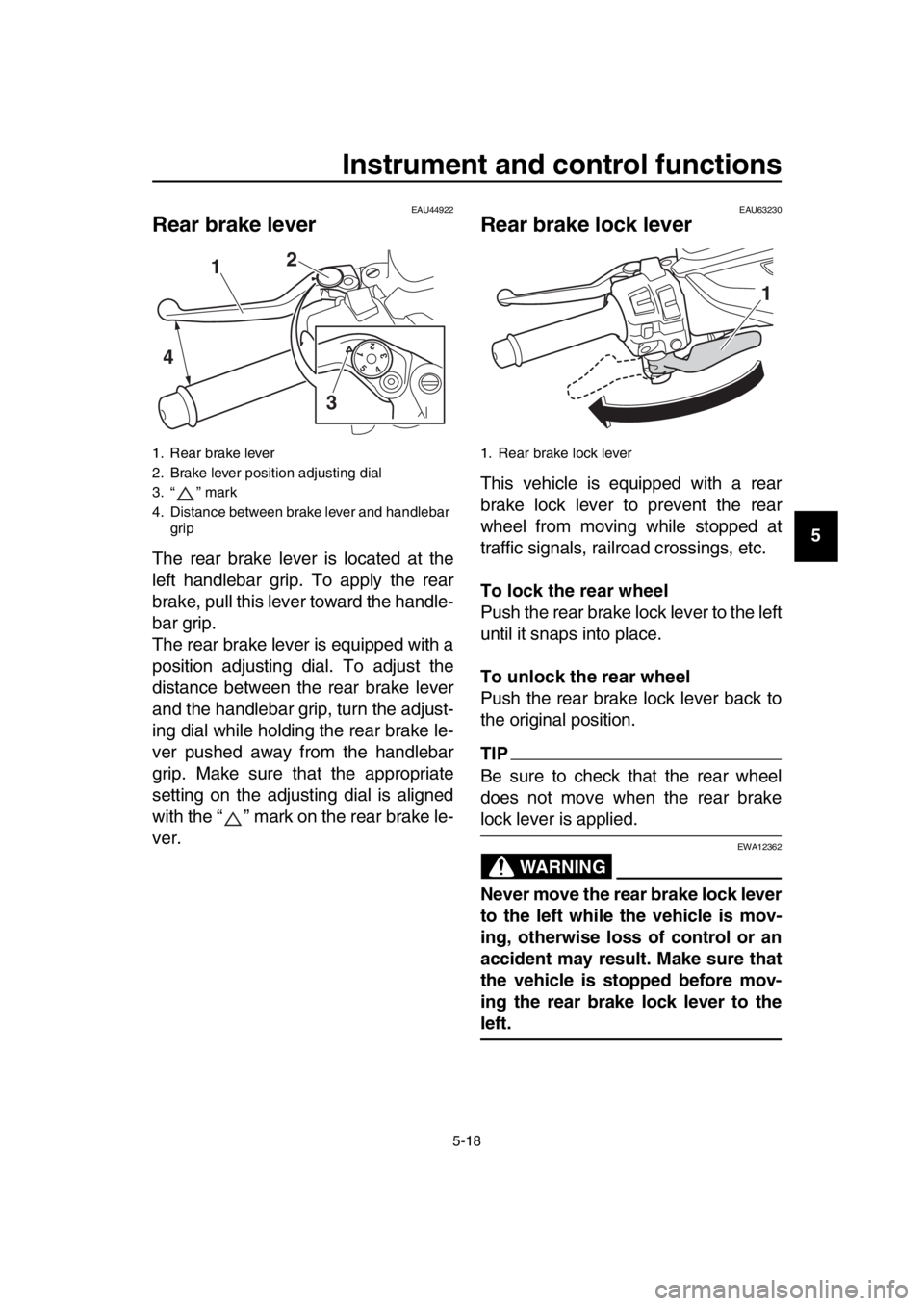
The rear brake lever is located at the
left handlebar grip. To apply the rear
brake, pull this lever toward the handle-
bar grip.
The rear brake lever is equipped with a
position adjusting dial. To adjust the
distance between the rear brake lever
and the handlebar grip, turn the adjust-
ing dial while holding the rear brake le-
ver pushed away from the handlebar
grip. Make sure that the appropriate
setting on the adjusting dial is aligned
with the “ ” mark on the rear brake le-
ver.
EAU63230
Rear brake lock lever
This vehicle is equipped with a rear
brake lock lever to prevent the rear
wheel from moving while stopped at
traffic signals, railroad crossings, etc.
To lock the rear wheel
Push the rear brake lock lever to the left
until it snaps into place.
To unlock the rear wheel
Push the rear brake lock lever back to
the original position.
TIP
Be sure to check that the rear wheel
does not move when the rear brake
lock lever is applied.
WARNING
EWA12362
Never move the rear brake lock lever
to the left while the vehicle is mov-
ing, otherwise loss of control or an
accident may result. Make sure that
the vehicle is stopped before mov-
ing the rear brake lock lever to the
left.
1. Rear brake lever
2. Brake lever position adjusting dial
3. “ ” mark
4. Distance between brake lever and handlebar grip
54321
1 2
3
4
1. Rear brake lock lever
1
BV1-28199-E0.book 18 ページ 2016年12月19日 月曜日 午前11時25分