light YAMAHA VX 2021 Owners Manual
[x] Cancel search | Manufacturer: YAMAHA, Model Year: 2021, Model line: VX, Model: YAMAHA VX 2021Pages: 123, PDF Size: 5.72 MB
Page 21 of 123
Safety information
12
As with any water sport, you should not op-
erate your watercraft without someone else
nearby. If you operate further than swim-
ming distance from shore, you should be
accompanied by another boat or water-
craft, but make sure you stay a safe dis-
tance away. It’s good, common sense.
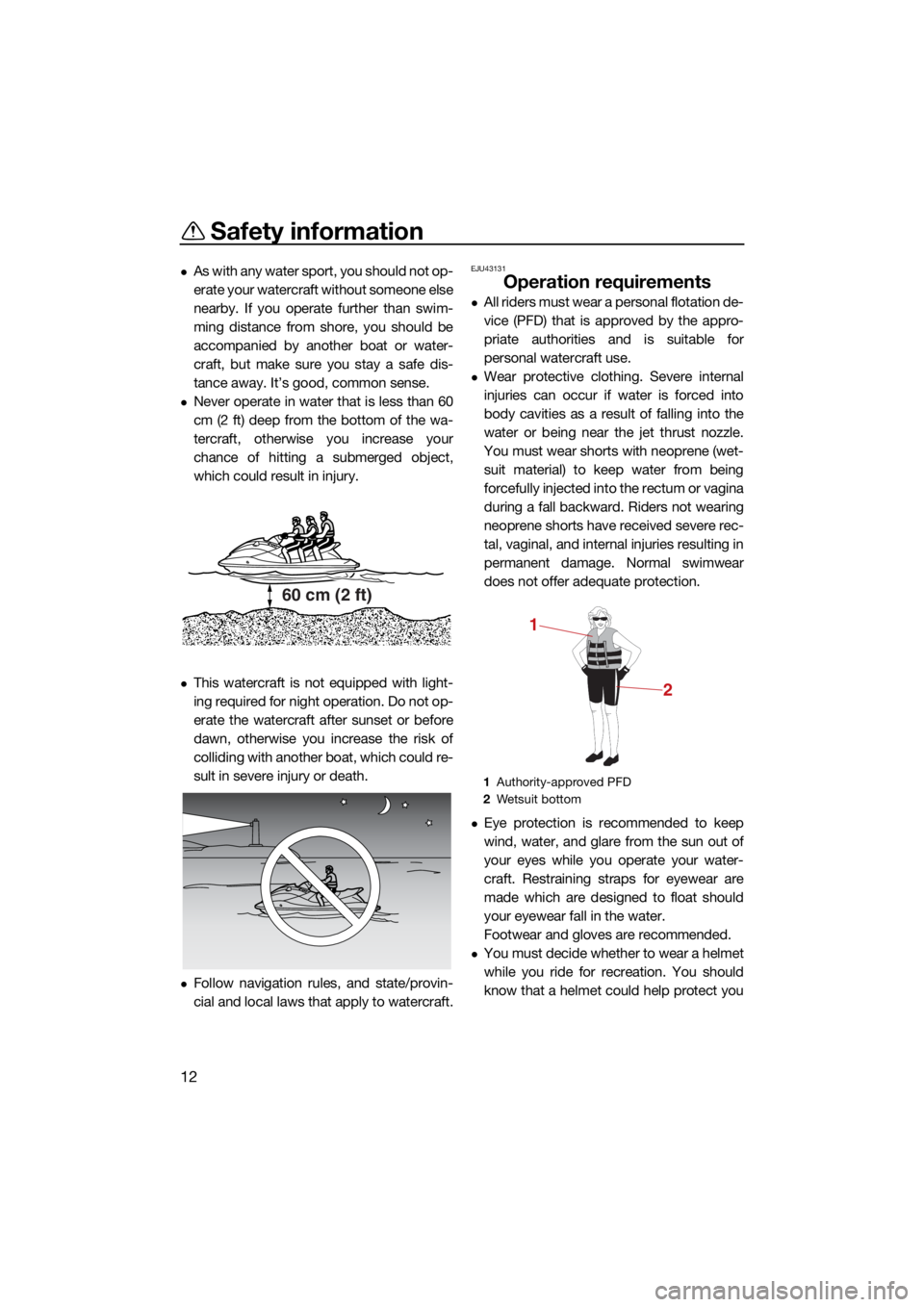
Never operate in water that is less than 60
cm (2 ft) deep from the bottom of the wa-
tercraft, otherwise you increase your
chance of hitting a submerged object,
which could result in injury.
This watercraft is not equipped with light-
ing required for night operation. Do not op-
erate the watercraft after sunset or before
dawn, otherwise you increase the risk of
colliding with another boat, which could re-
sult in severe injury or death.
Follow navigation rules, and state/provin-
cial and local laws that apply to watercraft.
EJU43131
Operation requirements
All riders must wear a personal flotation de-
vice (PFD) that is approved by the appro-
priate authorities and is suitable for
personal watercraft use.
Wear protective clothing. Severe internal
injuries can occur if water is forced into
body cavities as a result of falling into the
water or being near the jet thrust nozzle.
You must wear shorts with neoprene (wet-
suit material) to keep water from being
forcefully injected into the rectum or vagina
during a fall backward. Riders not wearing
neoprene shorts have received severe rec-
tal, vaginal, and internal injuries resulting in
permanent damage. Normal swimwear
does not offer adequate protection.
Eye protection is recommended to keep
wind, water, and glare from the sun out of
your eyes while you operate your water-
craft. Restraining straps for eyewear are
made which are designed to float should
your eyewear fall in the water.
Footwear and gloves are recommended.
You must decide whether to wear a helmet
while you ride for recreation. You should
know that a helmet could help protect you
60 cm (2 ft)
1Authority-approved PFD
2 Wetsuit bottom
1
2
UF4N70E0.book Page 12 Tuesday, October 6, 2020 5:13 PM
Page 29 of 123

Description
20
EJU43331
Watercraft glossary
Trolling speed
“Trolling” is the lowest maneuvering speed. You are applying little or no throttle. The water-
craft is down in the water, and there is no wake.
Sub-planing speed
“Sub-planing” is a medium speed. The bow of the watercraft is slightly up from the water sur-
face, but you are still traveling through the water. There is a wake.
Planing speed
“Planing” is a faster speed. The watercraft is more level and is skimming on top of the water.
There is a wake.
Bow
The front end of the watercraft.
Stern
The rear end of the watercraft.
Starboard
The right side of the watercraft when facing forward.
Port
The left side of the watercraft when facing forward.
Bilge water
Water that has collected in the engine compartment.
Yamaha Engine Management System (YEMS) YEMS is an integrated, computerized management system that controls and adjusts ignition
timing, fuel injection, engine diagnostics, and the off-throttle steering (OTS) system.
Reverse with Intuitive Deceleration Electronics (RiDE)
RiDE is an electronic system that controls the reverse, neutral, and deceleration operations of
the watercraft.
UF4N70E0.book Page 20 Tuesday, October 6, 2020 5:13 PM
Page 42 of 123
Watercraft operation
33
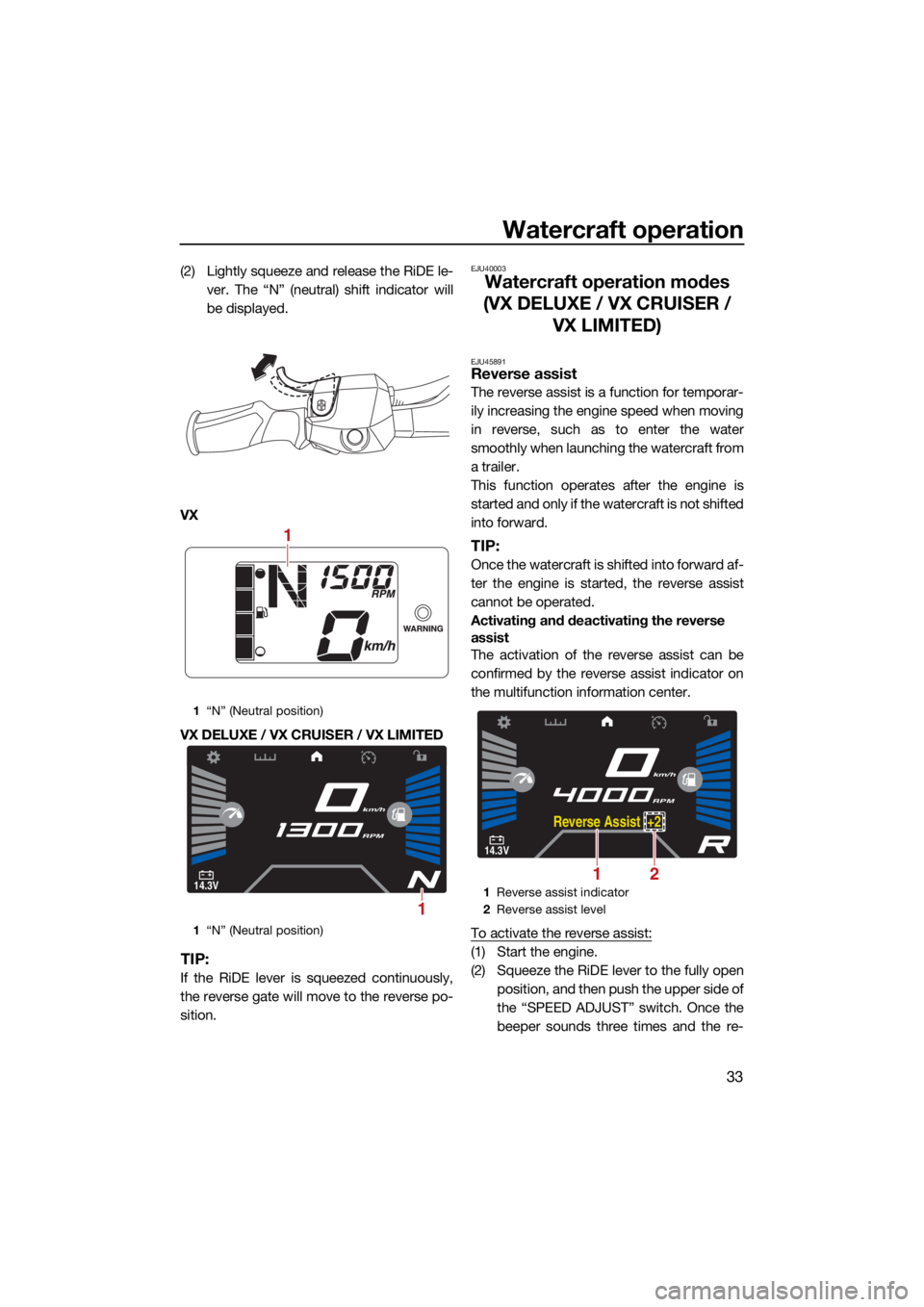
(2) Lightly squeeze and release the RiDE le-ver. The “N” (neutral) shift indicator will
be displayed.
VX
VX DELUXE / VX CRUISER / VX LIMITED
TIP:
If the RiDE lever is squeezed continuously,
the reverse gate will move to the reverse po-
sition.
EJU40003
Watercraft operation modes
(VX DELUXE / VX CRUISER / VX LIMITED)
EJU45891Reverse assist
The reverse assist is a function for temporar-
ily increasing the engine speed when moving
in reverse, such as to enter the water
smoothly when launching the watercraft from
a trailer.
This function operates after the engine is
started and only if the watercraft is not shifted
into forward.
TIP:
Once the watercraft is shifted into forward af-
ter the engine is started, the reverse assist
cannot be operated.
Activating and deactivating the reverse
assist
The activation of the reverse assist can be
confirmed by the reverse assist indicator on
the multifunction information center.
To activate the reverse assist:
(1) Start the engine.
(2) Squeeze the RiDE lever to the fully open
position, and then push the upper side of
the “SPEED ADJUST” switch. Once the
beeper sounds three times and the re-
1“N” (Neutral position)
1 “N” (Neutral position)
1
14.3V
km/h
RPM
1
1 Reverse assist indicator
2 Reverse assist level
14.3V
km/h
RPM
Rever se Assist +2
21
UF4N70E0.book Page 33 Tuesday, October 6, 2020 5:13 PM
Page 43 of 123
Watercraft operation
34
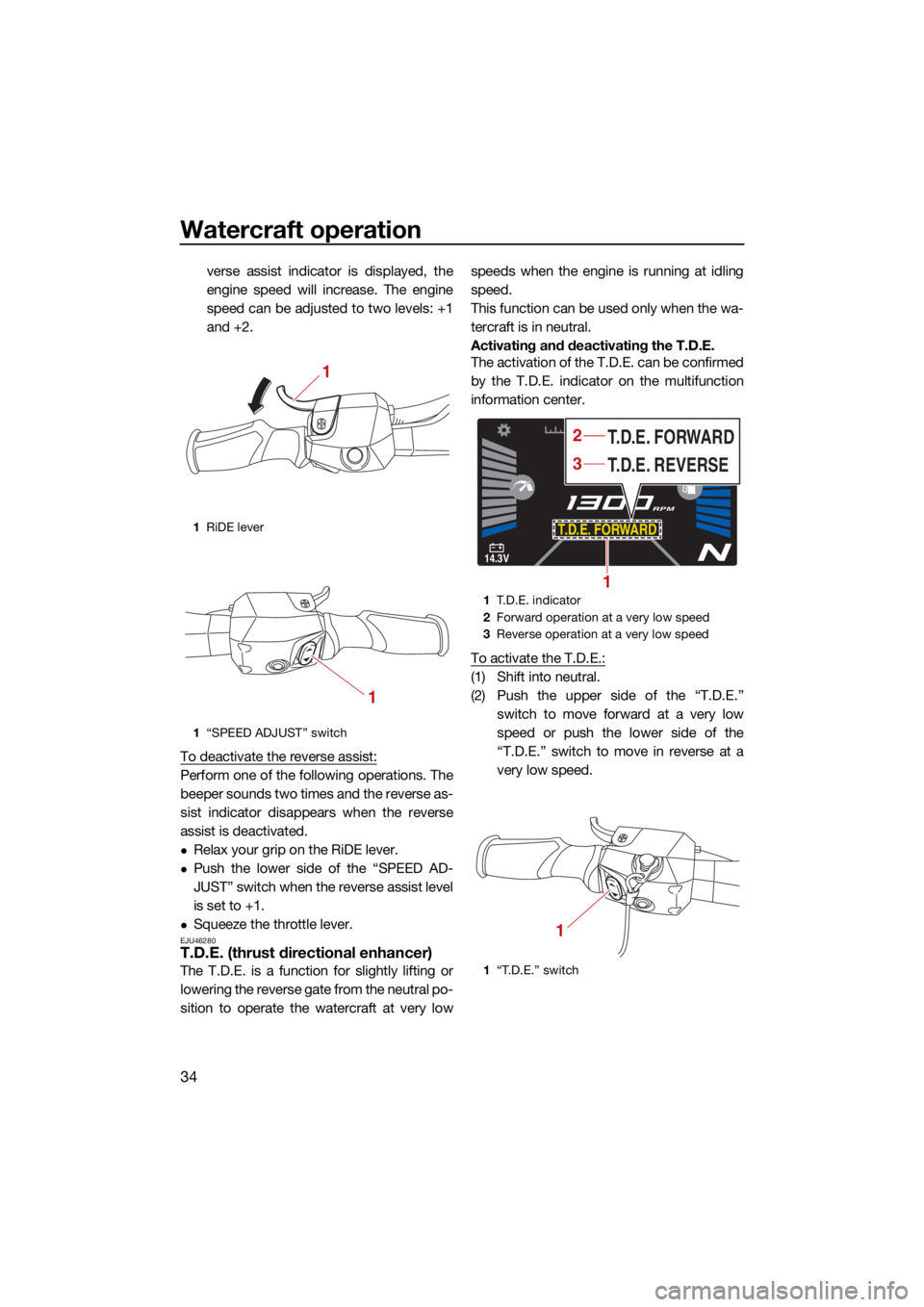
verse assist indicator is displayed, the
engine speed will increase. The engine
speed can be adjusted to two levels: +1
and +2.
To deactivate the reverse assist:
Perform one of the following operations. The
beeper sounds two times and the reverse as-
sist indicator disappears when the reverse
assist is deactivated.
Relax your grip on the RiDE lever.
Push the lower side of the “SPEED AD-
JUST” switch when the reverse assist level
is set to +1.
Squeeze the throttle lever.EJU46280T.D.E. (thrust directional enhancer)
The T.D.E. is a function for slightly lifting or
lowering the reverse gate from the neutral po-
sition to operate the watercraft at very low speeds when the engine is running at idling
speed.
This function can be used only when the wa-
tercraft is in neutral.
Activating and deactivating the T.D.E.
The activation of the T.D.E. can be confirmed
by the T.D.E. indicator on the multifunction
information center.
To activate the T.D.E.:
(1) Shift into neutral.
(2) Push the upper side of the “T.D.E.”
switch to move forward at a very low
speed or push the lower side of the
“T.D.E.” switch to move in reverse at a
very low speed.
1RiDE lever
1 “SPEED ADJUST” switch
1
1
1T.D.E. indicator
2 Forward operation at a very low speed
3 Reverse operation at a very low speed
1 “T.D.E.” switch
14.3V
MPH
RPM
T.D.E. FORWARD
T.D.E. REVERSE T.D.E. FORWARD
1
3
2
1
UF4N70E0.book Page 34 Tuesday, October 6, 2020 5:13 PM
Page 45 of 123
Watercraft operation
36
Push the “CRUISE/NO WAKE” switch.
Squeeze the throttle lever.
Squeeze the RiDE lever.
TIP:
The no-wake mode is also deactivated when
the engine is stopped.
EJU46380Drive control mode
The drive control mode is a function for set-
ting the maximum watercraft speed.
The maximum watercraft speed can be se-
lected from two settings.
Activating the drive control mode
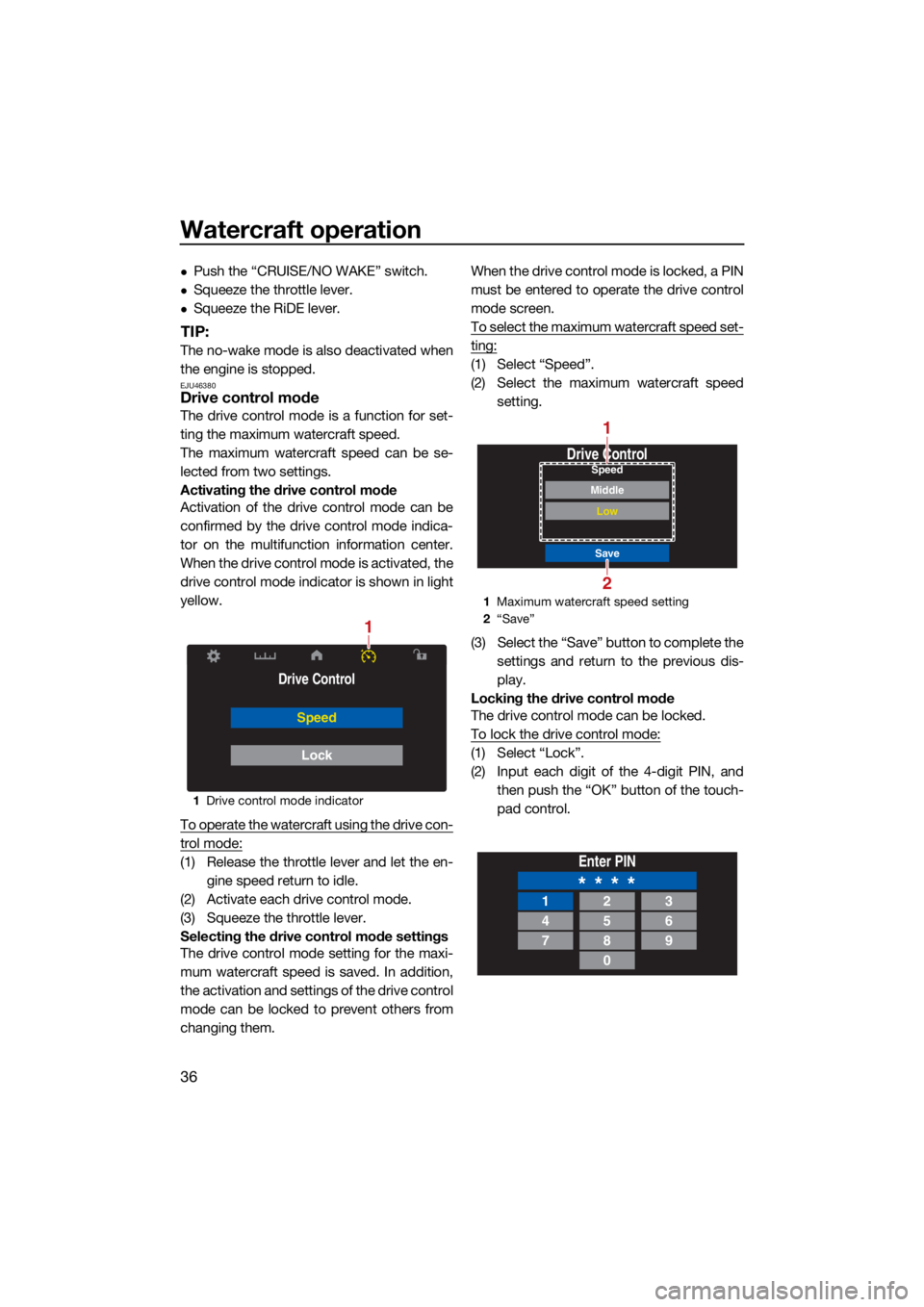
Activation of the drive control mode can be
confirmed by the drive control mode indica-
tor on the multifunction information center.
When the drive control mode is activated, the
drive control mode indicator is shown in light
yellow.
To operate the watercraft using the drive con-
trol mode:
(1) Release the throttle lever and let the en-gine speed return to idle.
(2) Activate each drive control mode.
(3) Squeeze the throttle lever.
Selecting the drive control mode settings
The drive control mode setting for the maxi-
mum watercraft speed is saved. In addition,
the activation and settings of the drive control
mode can be locked to prevent others from
changing them. When the drive control mode is locked, a PIN
must be entered to operate the drive control
mode screen.
To select the maximum watercraft speed set-
ting:
(1) Select “Speed”.
(2) Select the maximum watercraft speed
setting.
(3) Select the “Save” button to complete the settings and return to the previous dis-
play.
Locking the drive control mode
The drive control mode can be locked.
To lock the drive control mode:
(1) Select “Lock”.
(2) Input each digit of the 4-digit PIN, and then push the “OK” button of the touch-
pad control.
1Drive control mode indicator
Drive Control
Speed
Lock
1
1Maximum watercraft speed setting
2 “Save”
Drive Control
Save
Low
MiddleSpeed
2
1
Enter PIN
* * * *123
456
789
0
UF4N70E0.book Page 36 Tuesday, October 6, 2020 5:13 PM
Page 48 of 123
Instrument operation
39
EJU44571
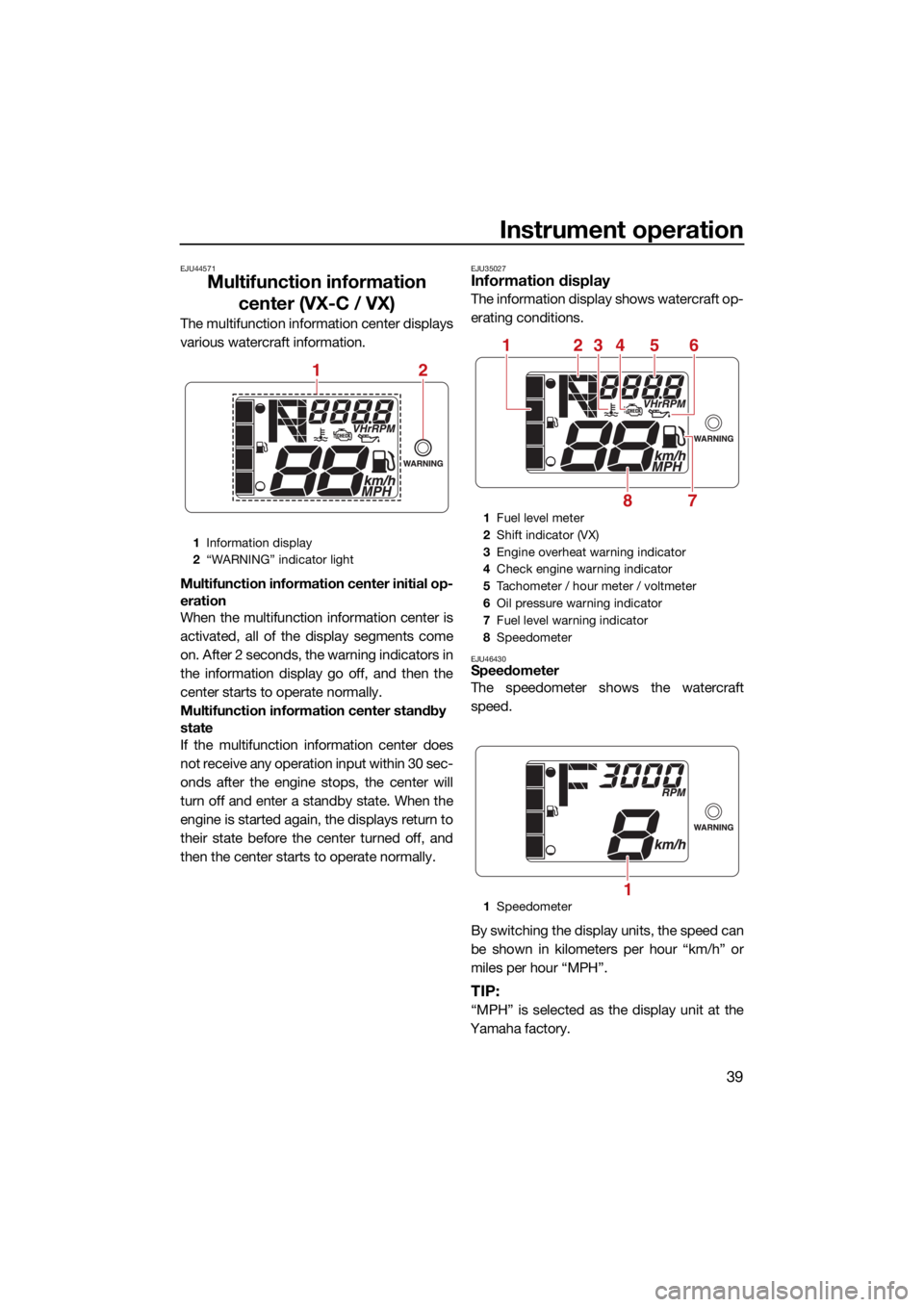
Multifunction information center (VX-C / VX)
The multifunction information center displays
various watercraft information.
Multifunction information center initial op-
eration
When the multifunction information center is
activated, all of the display segments come
on. After 2 seconds, the warning indicators in
the information display go off, and then the
center starts to operate normally.
Multifunction information center standby
state
If the multifunction information center does
not receive any operation input within 30 sec-
onds after the engine stops, the center will
turn off and enter a standby state. When the
engine is started again, the displays return to
their state before the center turned off, and
then the center starts to operate normally.
EJU35027Information display
The information display shows watercraft op-
erating conditions.
EJU46430Speedometer
The speedometer shows the watercraft
speed.
By switching the display units, the speed can
be shown in kilometers per hour “km/h” or
miles per hour “MPH”.
TIP:
“MPH” is selected as the display unit at the
Yamaha factory.
1 Information display
2 “WARNING” indicator light
12
1Fuel level meter
2 Shift indicator (VX)
3 Engine overheat warning indicator
4 Check engine warning indicator
5 Tachometer / hour meter / voltmeter
6 Oil pressure warning indicator
7 Fuel level warning indicator
8 Speedometer
1 Speedometer
251346
78
1
UF4N70E0.book Page 39 Tuesday, October 6, 2020 5:13 PM
Page 51 of 123
Instrument operation
42
and have a Yamaha dealer service the water-
craft.
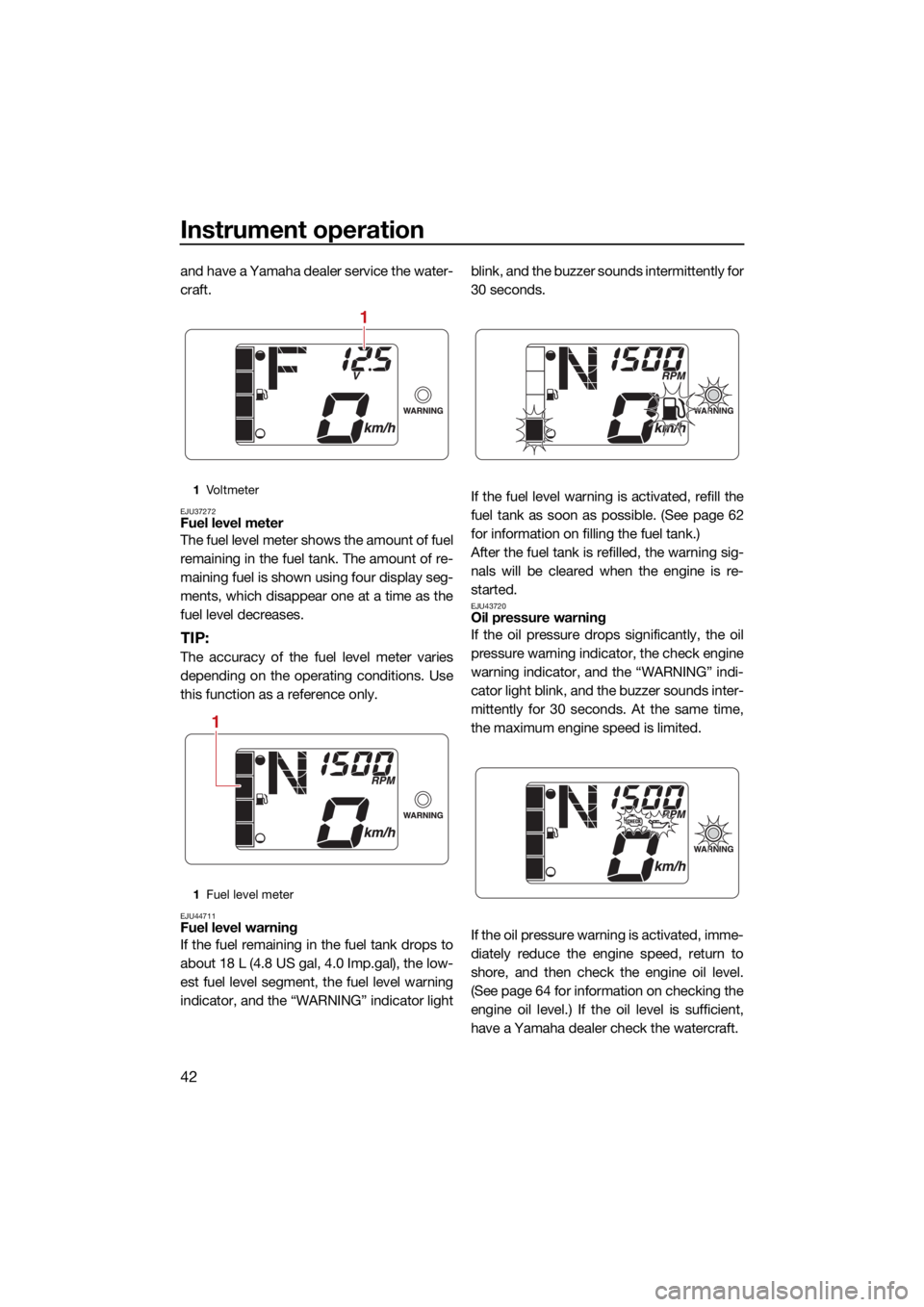
EJU37272Fuel level meter
The fuel level meter shows the amount of fuel
remaining in the fuel tank. The amount of re-
maining fuel is shown using four display seg-
ments, which disappear one at a time as the
fuel level decreases.
TIP:
The accuracy of the fuel level meter varies
depending on the operating conditions. Use
this function as a reference only.
EJU44711Fuel level warning
If the fuel remaining in the fuel tank drops to
about 18 L (4.8 US gal, 4.0 Imp.gal), the low-
est fuel level segment, the fuel level warning
indicator, and the “WARNING” indicator lightblink, and the buzzer sounds intermittently for
30 seconds.
If the fuel level warning is activated, refill the
fuel tank as soon as possible. (See page 62
for information on filling the fuel tank.)
After the fuel tank is refilled, the warning sig-
nals will be cleared when the engine is re-
started.
EJU43720Oil pressure warning
If the oil pressure drops significantly, the oil
pressure warning indicator, the check engine
warning indicator, and the “WARNING” indi-
cator light blink, and the buzzer sounds inter-
mittently for 30 seconds. At the same time,
the maximum engine speed is limited.
If the oil pressure warning is activated, imme-
diately reduce the engine speed, return to
shore, and then check the engine oil level.
(See page 64 for information on checking the
engine oil level.) If the oil level is sufficient,
have a Yamaha dealer check the watercraft.
1
Vo l t m et e r
1 Fuel level meter
1
1
UF4N70E0.book Page 42 Tuesday, October 6, 2020 5:13 PM
Page 52 of 123

Instrument operation
43
EJU43901Engine overheat warning
If the engine temperature rises significantly,
the engine overheat warning indicator, the
check engine warning indicator, and the
“WARNING” indicator light blink, and the
buzzer sounds intermittently. After 5 sec-
onds, the engine overheat warning indicator
and the “WARNING” indicator light stop
blinking and remain on, and the buzzer
sounds continuously. After 30 seconds, the
buzzer stops. While the engine overheat
warning is activated, the maximum engine
speed is limited.
If the engine overheat warning is activated,
immediately reduce the engine speed, return
to shore, and then make sure that water is
being discharged from the cooling water pilot
outlet while the engine is running. If there is
no discharge of water, stop the engine, and
then check the jet intake for clogging. (See
page 107 for information on the jet intake.)
NOTICE: If you cannot locate and correct
the cause of the overheating, consult a
Yamaha dealer. Continuing to operate at higher speeds could result in severe en-
gine damage. [ECJ00042]
EJU44690
Check engine warning
If a sensor malfunction or a short circuit is de-
tected, the check engine warning indicator
and the “WARNING” indicator light blink, and
the buzzer sounds intermittently for 30 sec-
onds.
If the engine is stopped after the check en-
gine warning is activated, the tachometer
portion of the information display will show
UF4N70E0.book Page 43 Tuesday, October 6, 2020 5:13 PM
Page 54 of 123
Instrument operation
45
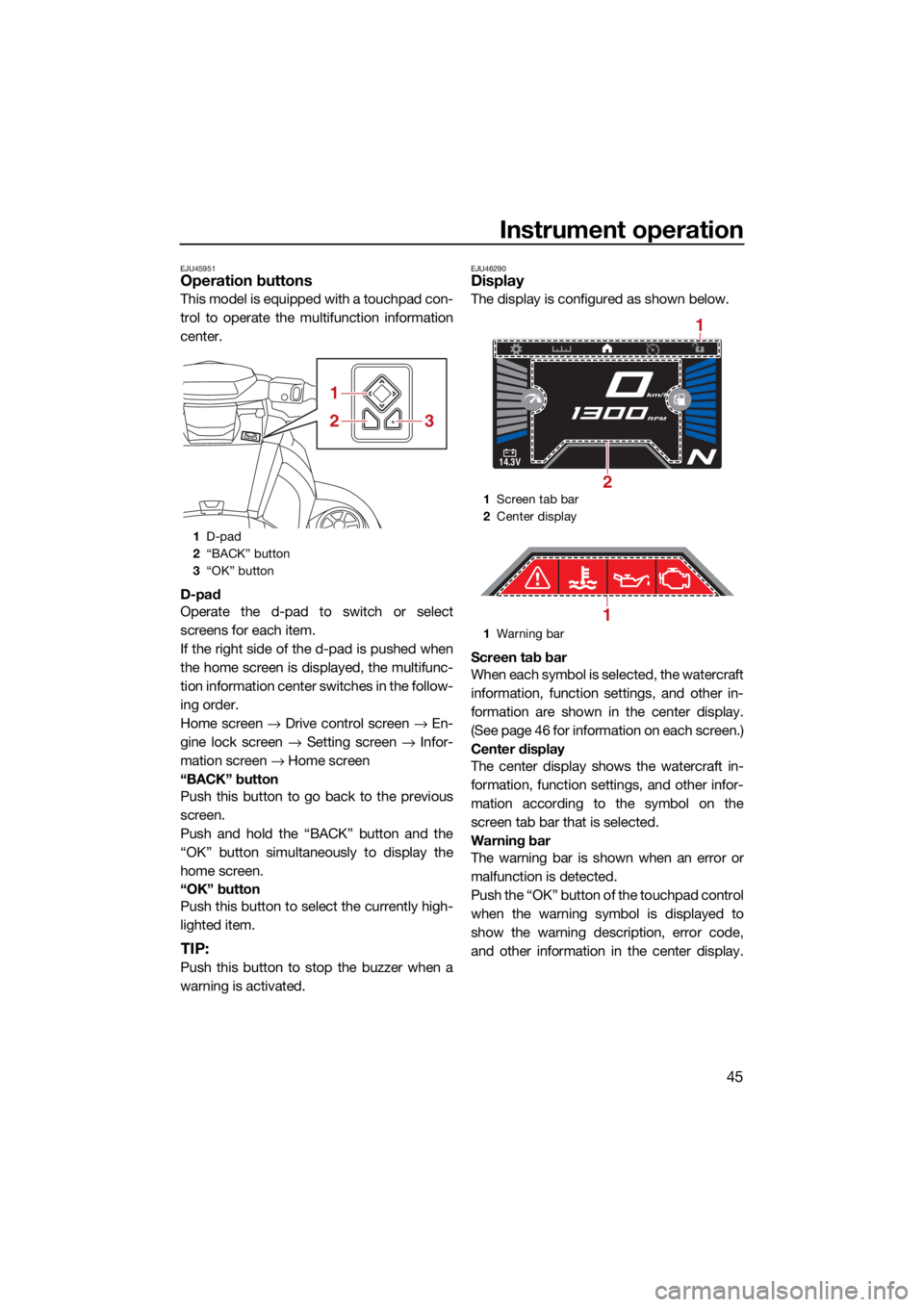
EJU45951Operation buttons
This model is equipped with a touchpad con-
trol to operate the multifunction information
center.
D-pad
Operate the d-pad to switch or select
screens for each item.
If the right side of the d-pad is pushed when
the home screen is displayed, the multifunc-
tion information center switches in the follow-
ing order.
Home screen → Drive control screen → En-
gine lock screen → Setting screen → Infor-
mation screen → Home screen
“BACK” button
Push this button to go back to the previous
screen.
Push and hold the “BACK” button and the
“OK” button simultaneously to display the
home screen.
“OK” button
Push this button to select the currently high-
lighted item.
TIP:
Push this button to stop the buzzer when a
warning is activated.
EJU46290Display
The display is configured as shown below.
Screen tab bar
When each symbol is selected, the watercraft
information, function settings, and other in-
formation are shown in the center display.
(See page 46 for information on each screen.)
Center display
The center display shows the watercraft in-
formation, function settings, and other infor-
mation according to the symbol on the
screen tab bar that is selected.
Warning bar
The warning bar is shown when an error or
malfunction is detected.
Push the “OK” button of the touchpad control
when the warning symbol is displayed to
show the warning description, error code,
and other information in the center display.
1 D-pad
2 “BACK” button
3 “OK” button
1
23
1Screen tab bar
2 Center display
1 Warning bar
14.3V
km/h
RPM
2
1
1
UF4N70E0.book Page 45 Tuesday, October 6, 2020 5:13 PM
Page 61 of 123

Instrument operation
52
EJU46300
Audio system (equipped models)
This model is equipped with an audio system
that can be connected via Bluetooth.
EJU46312Audio control
This model is equipped with an audio control
to operate the audio system.
Power button
Press this button to turn the audio system on.
Play/Pause button
Press this button to play or pause.
Cursor button “ / ”
Press these buttons to skip to the previous or
next track. Cursor button “ / ”
Press these buttons to adjust the volume.
To connect an external device:
(1) Turn on the Bluetooth function of the ex-
ternal device, and then search for this
audio system.
(2) Turn the audio system on by pushing the power button on the audio control.
(3) Select this audio system to connect to it.
To disconnect an external device:
Turn the Bluetooth function of the external
device off.
EJU46320Accessory outlet
There is a 12 V DC outlet located inside the
glove compartment. NOTICE: Do not use an
automotive cigarette lighter or other ac-
cessories that get hot because the outlet
can be damaged.
[ECJ02880]
1 Speaker
1 12V DC outlet
2 USB charger
3 Audio control
4 Cursor button
5 Play/Pause button
6 Power button
11
1
3
65
4
2
112V DC outlet
1
UF4N70E0.book Page 52 Tuesday, October 6, 2020 5:13 PM