sensor ACURA NSX 1991 Service Repair Manual
[x] Cancel search | Manufacturer: ACURA, Model Year: 1991, Model line: NSX, Model: ACURA NSX 1991Pages: 1640, PDF Size: 60.48 MB
Page 1579 of 1640
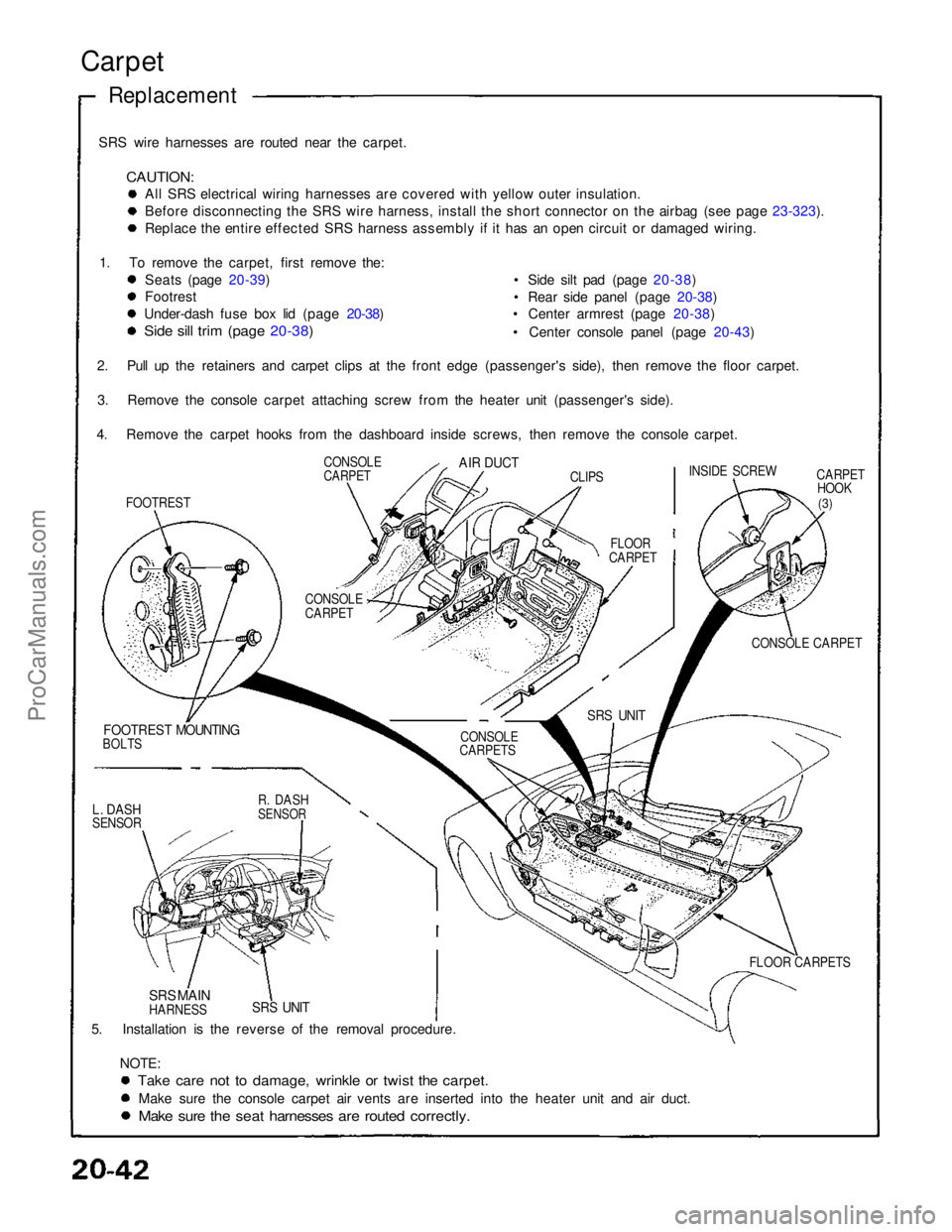
SRS wire harnesses are routed near the carpet.
CAUTION:
All SRS electrical wiring harnesses are covered with yellow outer insulation.
Before disconnecting the SRS wire harness, install the short connector on the airbag (see page 23-323).
Replace the entire effected SRS harness assembly if it has an open circuit or damaged wiring.
1. To remove the carpet, first remove the: Seats (page 20-39)
Footrest
Under-dash fuse box lid (page 20-38)
Side sill trim (page 20-38)
• Side silt pad (page 20-38)
• Rear side panel (page 20-38)
• Center armrest (page 20-38)
• Center console panel (page 20-43)
CARPETHOOK
(3)
CONSOLE CARPET
FOOTREST MOUNTING
BOLTS
5. Installation is the reverse of the removal procedure. NOTE:
Take care not to damage, wrinkle or twist the carpet.
Make sure the console carpet air vents are inserted into the heater unit and air duct.
Make sure the seat harnesses are routed correctly.
Carpet
Replacement
SRS UNIT
SRS MAIN
HARNESS FLOOR CARPETS
SRS UNIT
CONSOLE
CARPETS
CONSOLE
CARPET
FLOOR
CARPET INSIDE SCREW
CLIPS
AIR DUCT
CONSOLE
CARPET
FOOTREST
2. Pull up the retainers and carpet clips at the front edge (passenger's side), then remove the floor carpet.
3. Remove the console carpet attaching screw from the heater unit (passenger's side).
4. Remove the carpet hooks from the dashboard inside screws, then remove the console carpet.
L. DASH
SENSOR
R. DASH
SENSORProCarManuals.com
Page 1581 of 1640
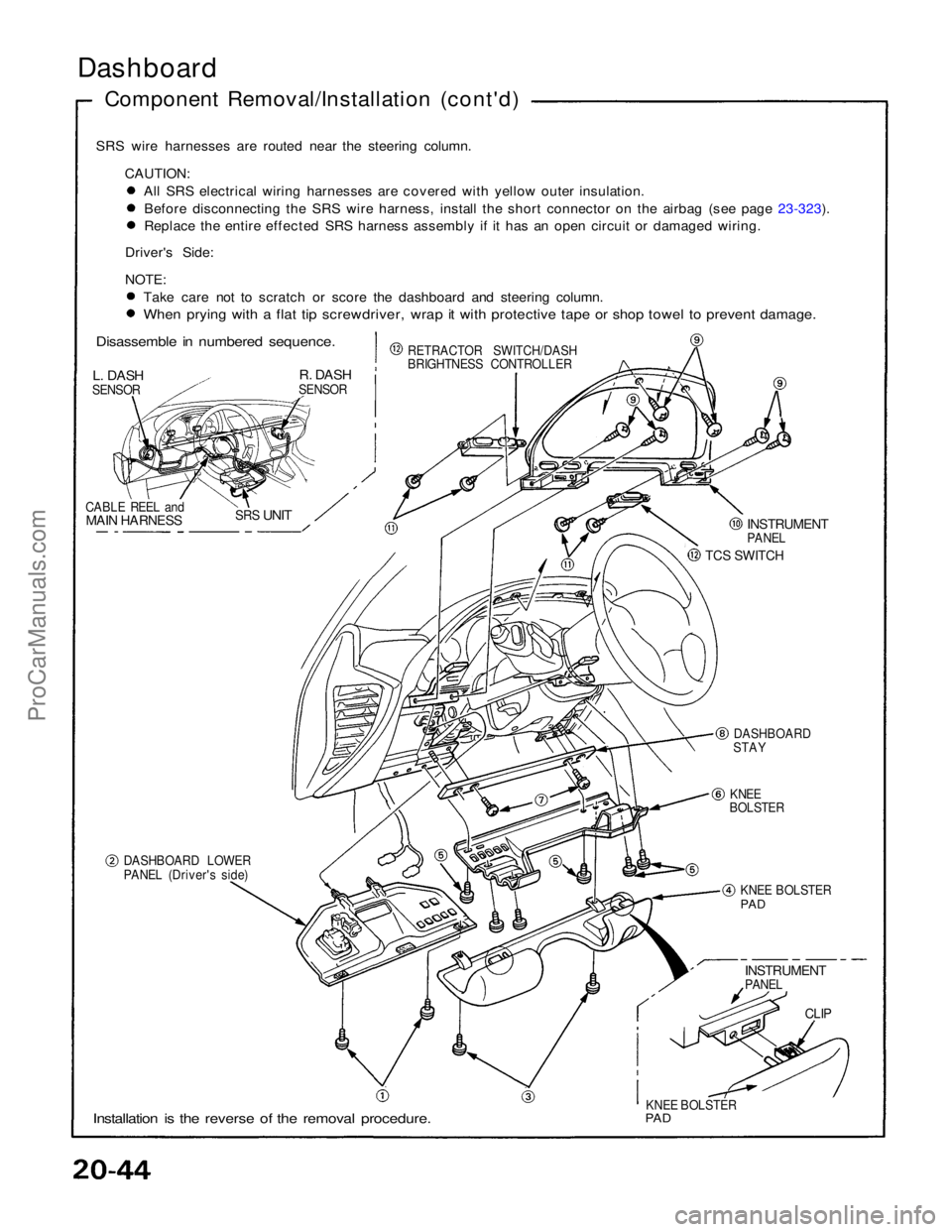
Dashboard
Component Removal/Installation (cont'd)
SRS wire harnesses are routed near the steering column. CAUTION: All SRS electrical wiring harnesses are covered with yellow outer insulation.
Before disconnecting the SRS wire harness, install the short connector on the airbag (see page 23-323).
Replace the entire effected SRS harness assembly if it has an open circuit or damaged wiring.
Driver's Side:
NOTE: Take care not to scratch or score the dashboard and steering column.
When prying with a flat tip screwdriver, wrap it with protective tape or shop towel to prevent damage.
Disassemble in numbered sequence.
L. DASH
SENSOR
R. DASH
SENSOR
CABLE REEL and
MAIN HARNESS
SRS
UNIT
RETRACTOR SWITCH/DASH
BRIGHTNESS CONTROLLER
INSTRUMENT
PANEL
TCS SWITCH
DASHBOARD
STAY
KNEE
BOLSTER
DASHBOARD LOWER
PANEL (Driver's side) KNEE BOLSTER
PAD
INSTRUMENT
PANEL
CLIP
KNEE BOLSTER
PAD
Installation is the reverse of the removal procedure.ProCarManuals.com
Page 1582 of 1640
Replacement
SRS wire harnesses are routed near the dashboard and
steering column,
CAUTION:
AH SRS electrical wiring harnesses are covered
with yellow outer insulation.
Before disconnecting the SRS wire harness, in-
stall the short connector on the airbag (see page
23-232).
Replace the entire effected SRS harness
assembly If it has an open circuit or damaged
wiring.
R. DASH
SENSOR
L. DASH
SENSOR
SRS MAIN
HARNESS
SRS
UNIT
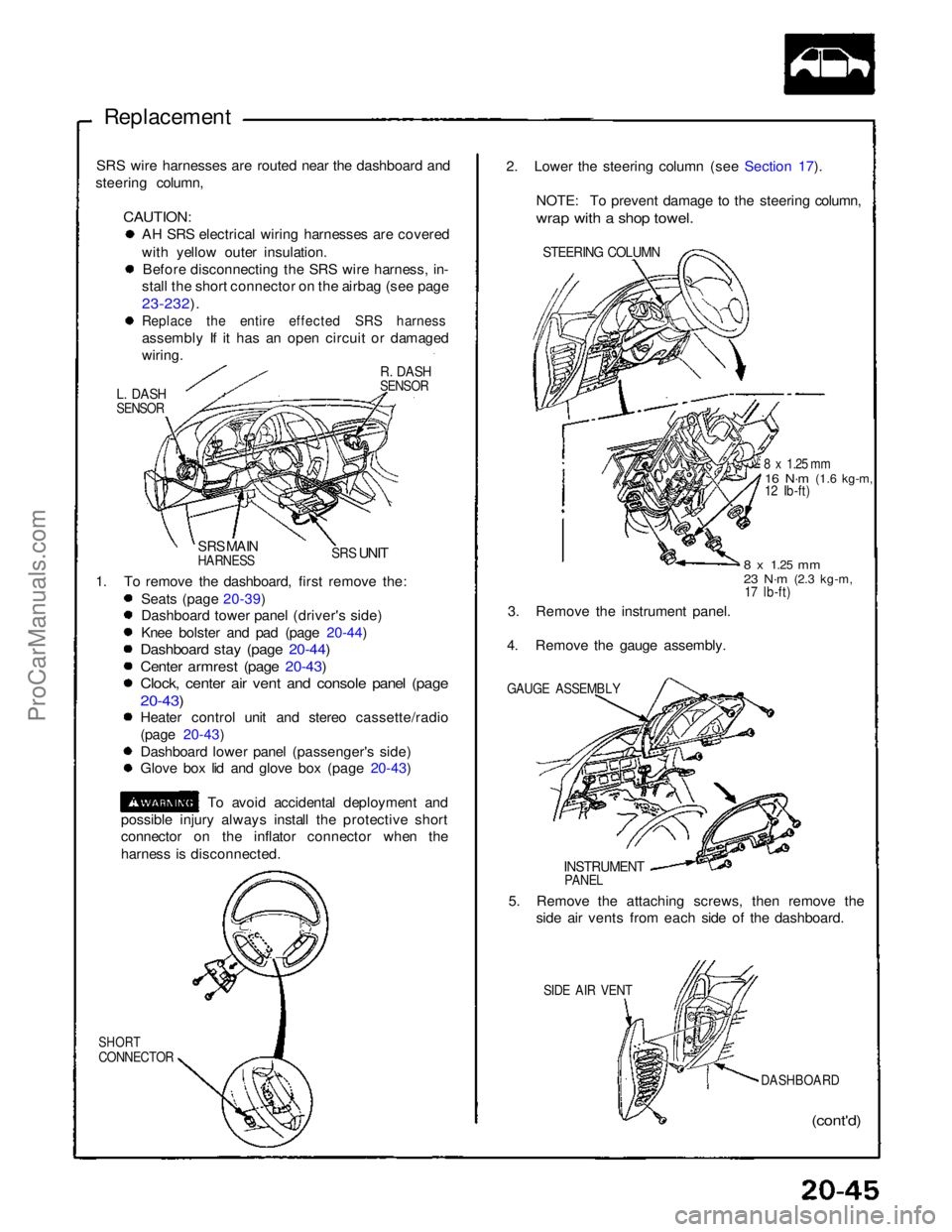
1. To remove the dashboard, first remove the: Seats (page 20-39)
Dashboard tower panel (driver's side)
Knee bolster and pad (page 20-44)
Dashboard stay (page 20-44)
Center armrest (page 20-43)
Clock, center air vent and console panel (page
20-43)
Heater control unit and stereo cassette/radio
(page 20-43)
Dashboard lower panel (passenger's side)
Glove box lid and glove box (page 20-43)
To avoid accidental deployment and
possible injury always install the protective short
connector on the inflator connector when the
harness is disconnected.
SHORT
CONNECTOR
(cont'd)
DASHBOARD
SIDE AIR VENT
5. Remove the attaching screws, then remove the
side air vents from each side of the dashboard.
INSTRUMENT
PANEL
GAUGE ASSEMBLY
3. Remove the instrument panel.
4. Remove the gauge assembly.
8 x
1.25
mm
23 N·m
(2.3 kg-m,
17 lb-ft)
8 x 1.25 mm
16 N·m
(1.6 kg-m,
12 Ib-ft)
STEERING COLUMN
2. Lower the steering column (see Section 17).
NOTE: To prevent damage to the steering column,
wrap with a shop towel.ProCarManuals.com
Page 1585 of 1640
Supplemental Restraint System (SRS)
Self-diagnosis Function
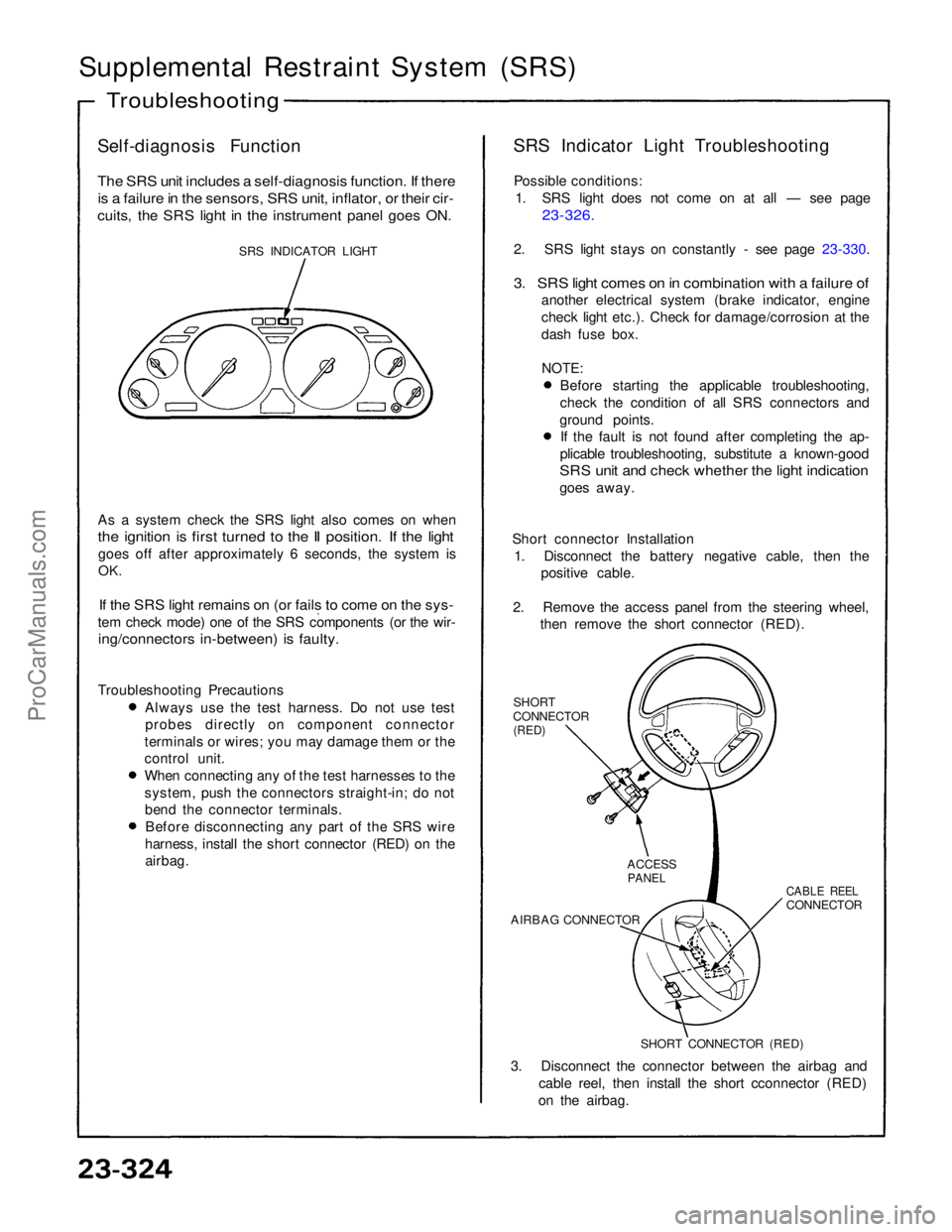
The SRS unit includes a self-diagnosis function. If there
is a failure in the sensors, SRS unit, inflator, or their cir-
cuits, the SRS light in the instrument panel goes ON.
SRS INDICATOR LIGHT
As a system check the SRS light also comes on when
the ignition is first turned to the II position. If the light
goes off after approximately 6 seconds, the system is
OK.
If the SRS light remains on (or fails to come on the sys-
tem check mode) one of the SRS components (or the wir-
ing/connectors in-between) is faulty.
Troubleshooting Precautions Always use the test harness. Do not use test
probes directly on component connector
terminals or wires; you may damage them or the
control unit. When connecting any of the test harnesses to the
system, push the connectors straight-in; do not
bend the connector terminals. Before disconnecting any part of the SRS wire
harness, install the short connector (RED) on the airbag. SRS Indicator Light Troubleshooting
Possible conditions: 1. SRS light does not come on at all — see page
23-326.
2. SRS light stays on constantly - see page 23-330.
3. SRS light comes on in combination with a failure of
another electrical system (brake indicator, engine
check light etc.). Check for damage/corrosion at the
dash fuse box.
NOTE:
Before starting the applicable troubleshooting,
check the condition of all SRS connectors and
ground points. If the fault is not found after completing the ap-
plicable troubleshooting, substitute a known-good
SRS unit and check whether the light indication
goes away.
Short connector Installation 1. Disconnect the battery negative cable, then the positive cable.
2. Remove the access panel from the steering wheel, then remove the short connector (RED).
SHORT
CONNECTOR
(RED)
3. Disconnect the connector between the airbag and cable reel, then install the short cconnector (RED)
on the airbag.
Troubleshooting
SHORT CONNECTOR (RED)
AIRBAG CONNECTOR
CABLE REEL
CONNECTOR
ACCESS
PANELProCarManuals.com
Page 1590 of 1640
Radiator and Condenser Fan Controls
Description
Fan control system:
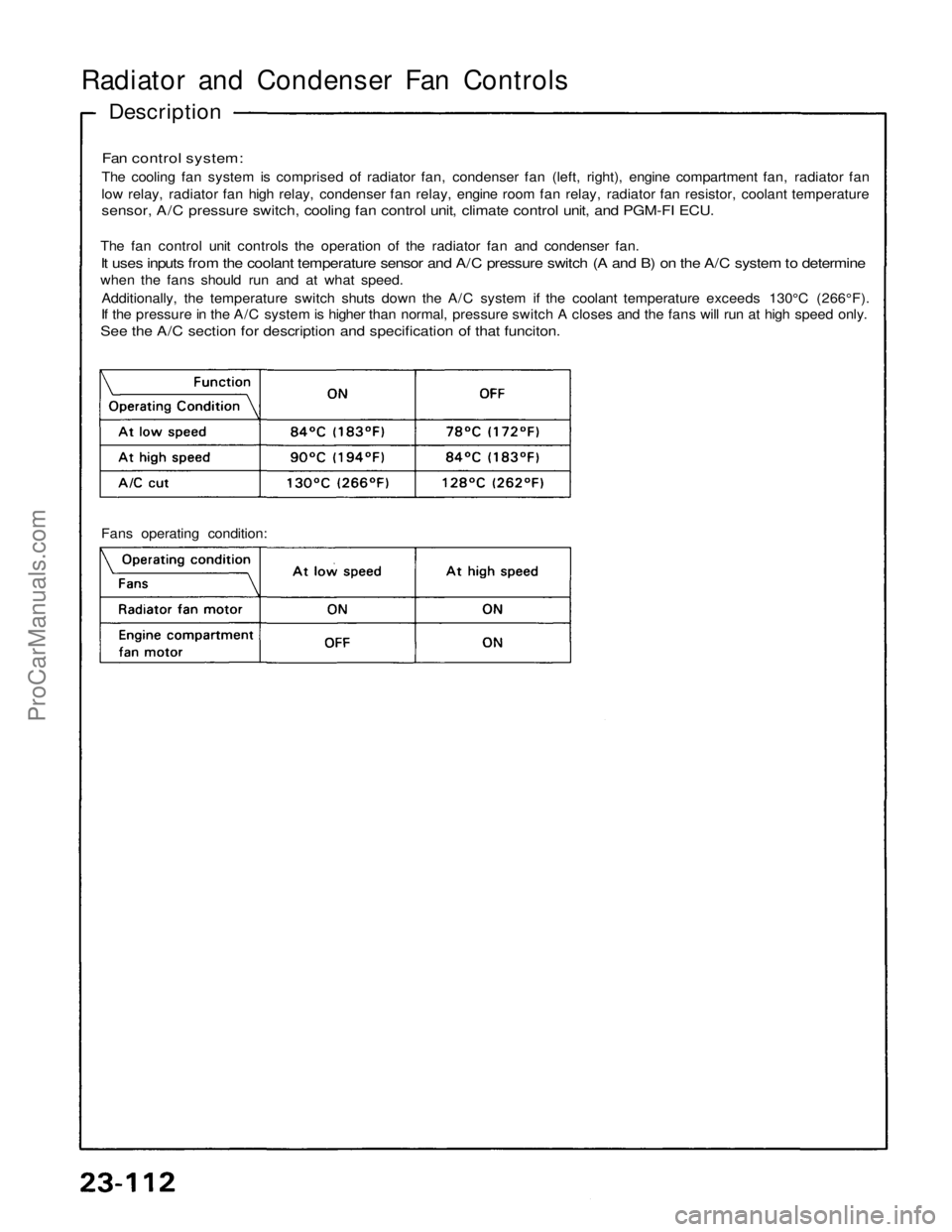
The cooling fan system is comprised of radiator fan, condenser fan (left, right), engine compartment fan, radiator fan
low relay, radiator fan high relay, condenser fan relay, engine room fan relay, radiator fan resistor, coolant temperature
sensor, A/C pressure switch, cooling fan control unit, climate control unit, and PGM-FI ECU.
The fan control unit controls the operation of the radiator fan and condenser fan.
It uses inputs from the coolant temperature sensor and A/C pressure switch (A and B) on the A/C system to determine
when the fans should run and at what speed.
Additionally, the temperature switch shuts down the A/C system if the coolant temperature exceeds 130°C (266°F).
If the pressure in the A/C system is higher than normal, pressure switch A closes and the fans will run at high speed only.
See the A/C section for description and specification of that funciton.
Fans operating condition:ProCarManuals.com
Page 1593 of 1640
— Defective gauge assemble, check for the A21
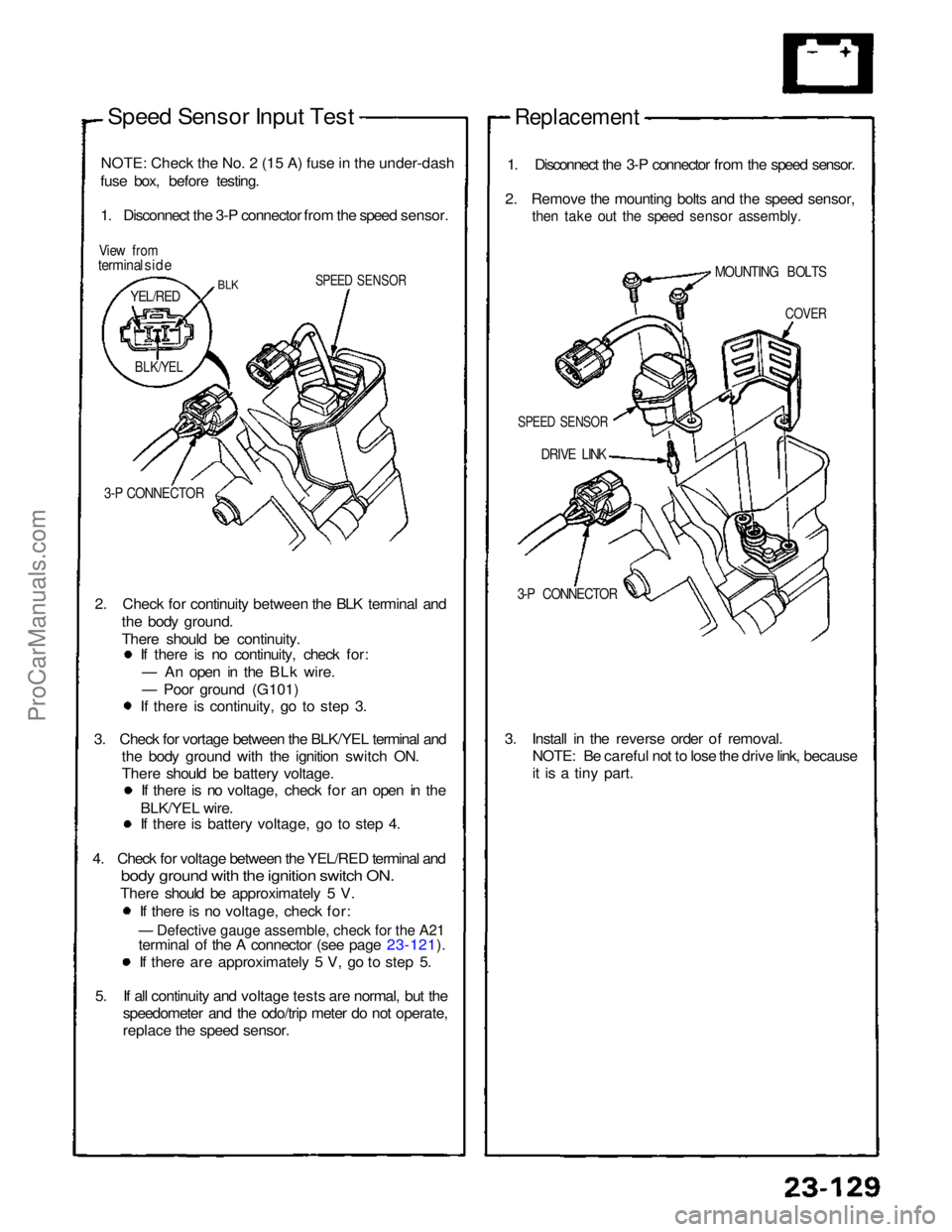
Speed Sensor Input Test
NOTE
:
Check the No. 2 (15 A) fuse in the under-dash
fuse box, before testing.
1. Disconnect the 3-P connector from the speed sensor.
View from
terminal side
SPEED SENSOR
3-P CONNECTOR
2. Check for continuity between the BLK terminal and the body ground.
There should be continuity. If there is no continuity, check for:
— An open in the BLk wire.
— Poor ground (G101) If there is continuity, go to step 3.
3. Check for vortage between the BLK/YEL terminal and the body ground with the ignition switch ON.
There should be battery voltage. If there is no voltage, check for an open in the
BLK/YEL wire. If there is battery voltage, go to step 4.
4. Check for voltage between the YEL/RED terminal and
bod
y
ground with the ignition switch ON.
There should be approximately 5 V.
If there is no voltage, check for:
terminal of the A connector (see page 23-121). If there are approximately 5 V, go to step 5.
5. If all continuity and voltage tests are normal, but the speedometer and the odo/trip meter do not operate,
replace the speed sensor.
Replacement
1. Disconnect the 3-P connector from the speed sensor.
2. Remove the mounting bolts and the speed sensor,
then take out the speed sensor assembly.
DRIVE LINK
3-P CONNECTOR
3. Install in the reverse order of removal. NOTE: Be careful not to lose the drive link, because
it is a tiny part.
BLK
YEL/RED
BLK/YEL
SPEED SENSOR
COVER
MOUNTING BOLTSProCarManuals.com
Page 1625 of 1640
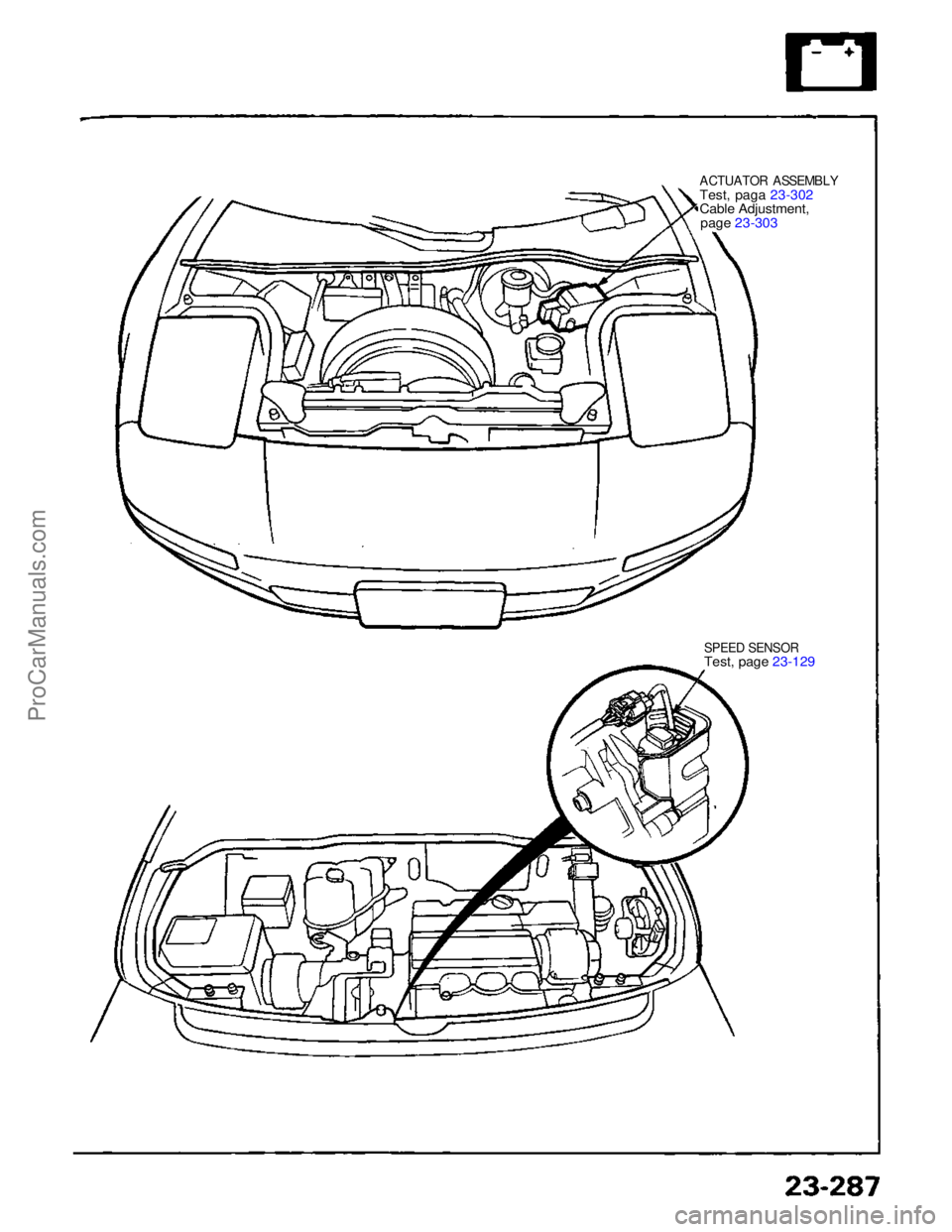
ACTUATOR ASSEMBLY
Test
,
paga 23-302
Cabl
e
Adjustment,
pag
e
23-303
SPEE
D
SENSORTest
,
page 23-129
ProCarManuals.com
Page 1640 of 1640
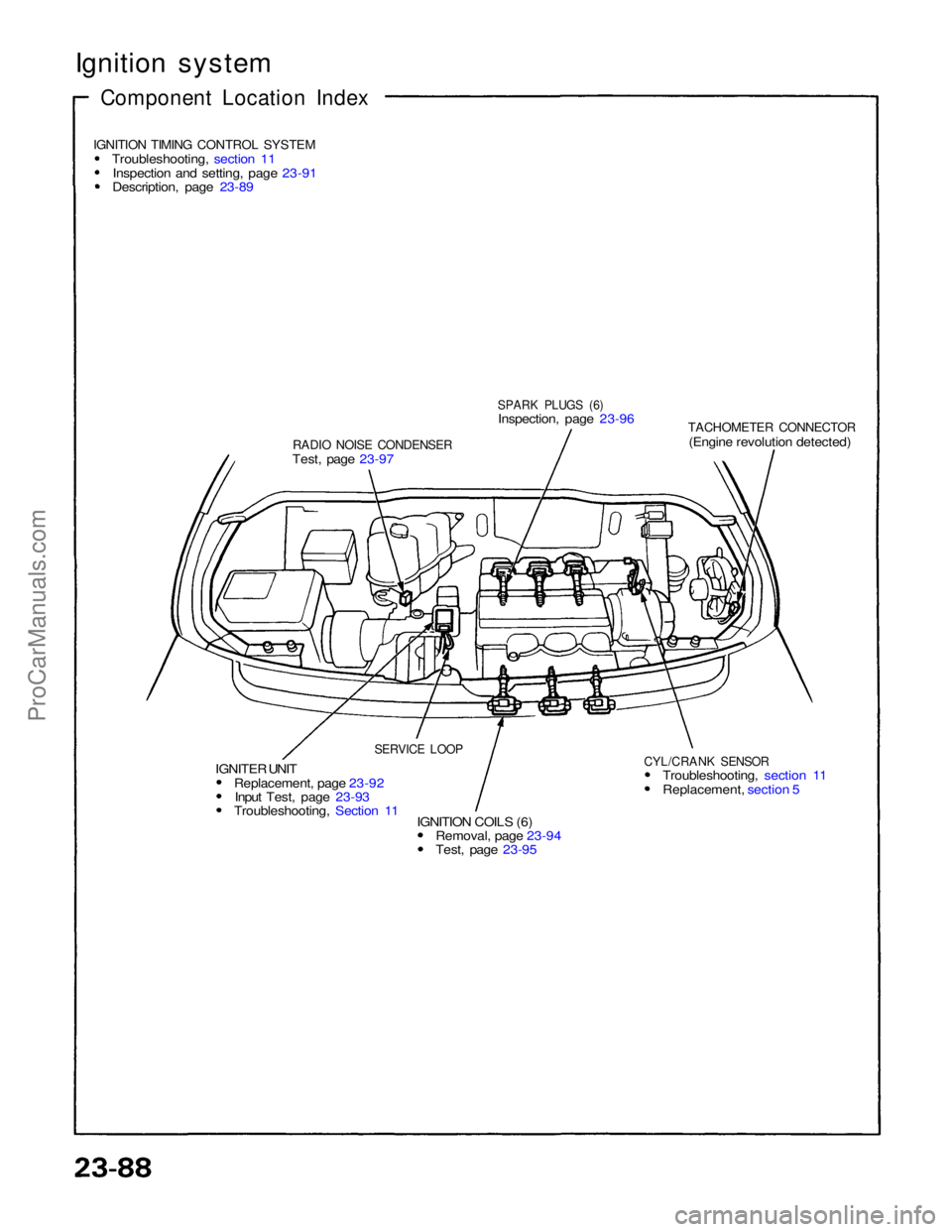
Ignition system
Component Location Index
IGNITION TIMING CONTROL SYSTEM
Troubleshooting, section 11Inspection and setting, page 23-91
Description, page 23-89
RADIO NOISE CONDENSER
Test, page 23-97
SPARK PLUGS (6)
Inspection, page 23-96
TACHOMETER CONNECTOR
(Engine revolution detected)
CYL/CRANK SENSOR
Troubleshooting, section 11 Replacement, section 5
IGNITION COILS (6) Removal, page 23-94 Test, page 23-95
IGNITER UNIT
Replacement, page 23-92Input Test, page 23-93 Troubleshooting, Section 11
SERVICE LOOPProCarManuals.com