ignition ACURA RL KA9 1996 Service Workshop Manual
[x] Cancel search | Manufacturer: ACURA, Model Year: 1996, Model line: RL KA9, Model: ACURA RL KA9 1996Pages: 1954, PDF Size: 61.44 MB
Page 1196 of 1954

TCS CONTROL UNIT 20P CONNECTOR
Wire side of female terminals
VB: Battery Voltage
Terminal
number
1
2
4
5
6
9
10
11
12
13
14
15
16
17
20
Wire
color
BLK/YEL
GRN/RED
BLU
PNK/BLU
BLK/WHT
BLK
BRN/WHT
GRN/WHT
BLU
GRN/ORN
BLK/ORN
BRN/BLK
WHT/BLU
BLU/GRY
GRN
BRN
Terminal sign
(Terminal name)
IG1
(Ignition 1)
PARK
(Parking)
SCS
(Service check
signal)
STR-GND
(Steering ground)
AT-SHIFT
(AT shift)
FSR
(Fail-safe relay)
PMG
(Power motor
Ground)
VPM
(Voltage power
motor)
STOP
(Stop)
NEP (Engine
speed pulse)
BARO
(Barometric)
TC-FC
(Traction control
fuel cut)
LG2
(Logic ground 2)
STR-VCC (Steer-
ing power supply)
WARN2
(Warning 2)
SH-MOT
(Shield motor)
MOT +
(Motor +)
MOT-
(Motor -)
Description
Detects ignition switch
IG1 signal
Detects parking brake
switch signal
Detects service check
connector signal
(Diagnostic trouble
code indication)
Ground for the steering
angle sensor
Detects A/T shift posi-
tion signal
Drives fail-safe relay
Power ground for the
TCS control valve
actuator motor
Power source for the
TCS control valve
actuator motor
Detects brake pedal
position switch signal
Detects engine speed
signal
Detects barometric
sensor signal
TCS Fl, Fuel cut
(torque down) signal
Ground for the logic
circuit
Power source for the
steering angle sensor
Drives TCS indicator light
(The indicator light comes
on by the self-bias)
Shield for the TCS con-
trol valve actuator motor
Drives TCS control
valve actuator motor
Drives TCS control
valve actuator motor
Measurement
terminals
1-GND
2
3-GND
4-GND
5-GND
6-GND
9-GND
10-GND
11-GND
12-GND
13-GND
14-GND
15-GND
16-GND
17-GND
19-20
20-19
Voltage
Conditions
(Ignition Switch ON (II))
Depress the parking
brake pedal.
Release the parking
brake pedal.
SCS service connector
connected.
SCS service connector
disconnected.
Shift the transmission
to position, then
start the engine.
Start the engine.
Start the engine.
Brake pedal depressed.
Brake pedal released.
Engine idling
TCS is functioning,
(maximum fuel cut)
TCS is not functioning.
Indicator light ON
Indicator light OFF
TCS is functioning.
TCS is not functioning.
TCS is functioning.
TCS is not functioning.
Output
voltage
VB
Below 0.6 V
VB
0V
5V
Below 0.3V
About 4V
(5V 0V)
VB
1.5V
Below 0.3 V
0V
VB
VB
0V
About 6V
(12V
0V)
About 3 V
About 1.5V
About 4.5 V
(5 V,
PWM)
Below 0.3V
About 5 V
About 2 V
VB
VB
0V
VB
0VProCarManuals.com
Page 1199 of 1954
Diagnostic Trouble Code (DTC)
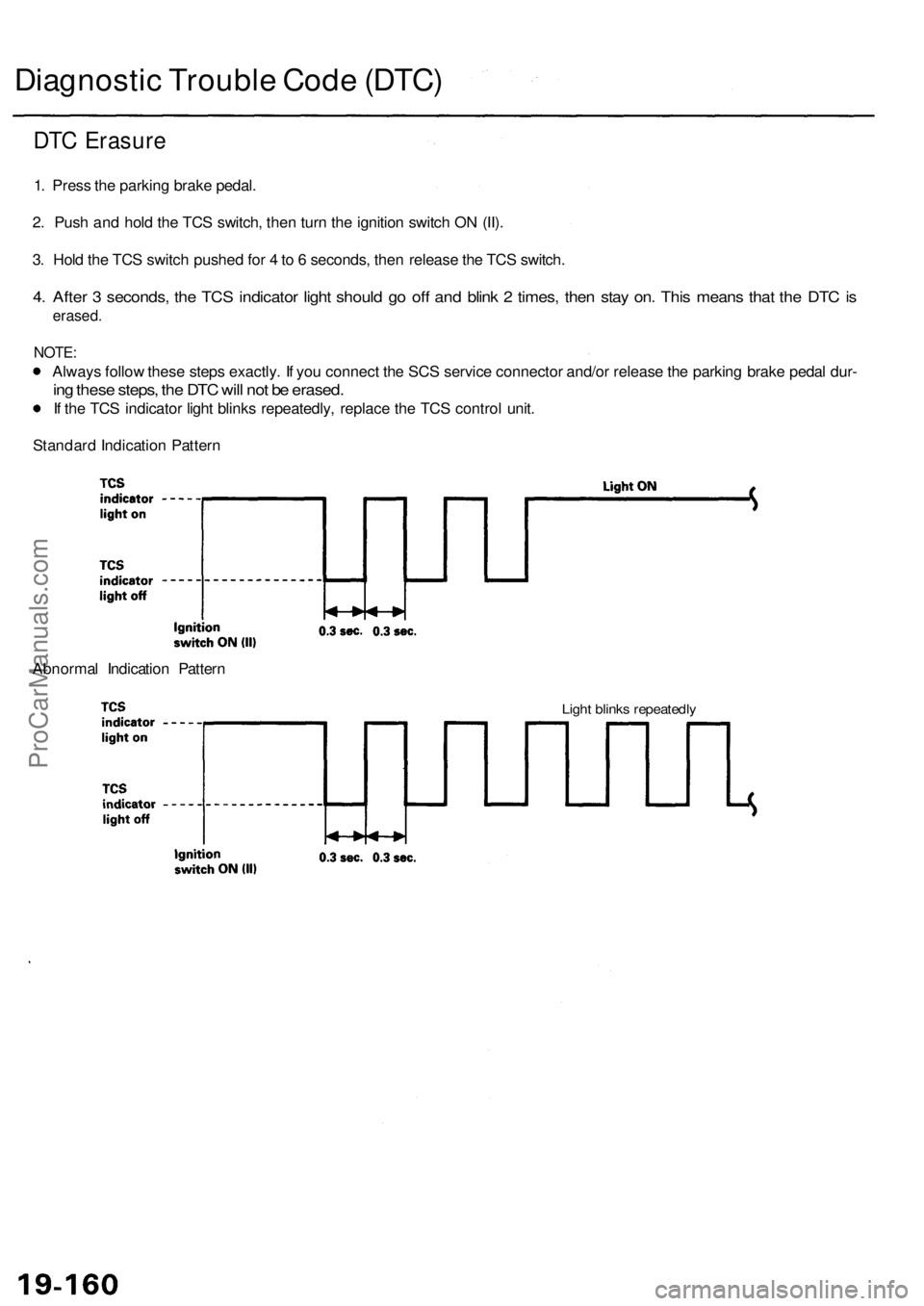
DTC Erasure
1. Press the parking brake pedal.
2. Push and hold the TCS switch, then turn the ignition switch ON (II).
3. Hold the TCS switch pushed for 4 to 6 seconds, then release the TCS switch.
4. After 3 seconds, the TCS indicator light should go off and blink 2 times, then stay on. This means that the DTC is
erased.
NOTE:
Always follow these steps exactly. If you connect the SCS service connector and/or release the parking brake pedal dur-
ing these steps, the DTC will not be erased.
If the TCS indicator light blinks repeatedly, replace the TCS control unit.
Standard Indication Pattern
Abnormal Indication Pattern
Light blinks repeatedlyProCarManuals.com
Page 1214 of 1954
![ACURA RL KA9 1996 Service Workshop Manual
PGM-FI DTC: 36 [TC-FC signal (High-Low check)]
Check for a short to body ground
in the TC-FC circuit:
1. Disconnect the PCM connec-
tor C (12P) and TCS control
unit 20P connectors.
2. Check for](/img/32/56992/w960_56992-1213.png "ACURA RL KA9 1996 Service Workshop Manual
PGM-FI DTC: 36 [TC-FC signal (High-Low check)]
Check for a short to body ground
in the TC-FC circuit:
1. Disconnect the PCM connec-
tor C (12P) and TCS control
unit 20P connectors.
2. Check for")
PGM-FI DTC: 36 [TC-FC signal (High-Low check)]
Check for a short to body ground
in the TC-FC circuit:
1. Disconnect the PCM connec-
tor C (12P) and TCS control
unit 20P connectors.
2. Check for continuity between
the TCS control unit 20P con-
nector terminal No. 14 and
body ground.
TCS CONTROL UNIT 20P CONNECTOR
Is there continuity?
Repair short to body ground in
the wire between the PCM and
TCS control unit.
Wire side of female terminals
TCS IS NOT TCS IS
FUNCTIONING FUNCTIONING
NOTE: Use the 10 V range or a similar
range in an analog tester.
Is there about 4.5 V when TCS is
not functioning?
Check for loose TCS control unit
connector. If necessary, substi-
tute a known-good TCS control
unit and recheck.
Check for an open in the TC-FC
circuit:
Measure the voltage between the
PCM connector C (12P) terminal
No. 10 and body ground.
NOTE: Use the 10 V range or a similar
range in an analog tester.
TCS IS NOT TCS IS
FUNCTIONING FUNCTIONING
PCM CONNECTOR C (12P)
Is there about 4.5 V when TCS is
not functioning?
Repair open in the wire between
the TCS control unit and PCM.
Wire side of female terminals
Check for loose PCM connectors.
If necessary, substitute a known-
good PCM and recheck.
Check the TCS control unit:
1. Connect the TCS control unit
20P connector.
2. Turn the ignition switch ON
(II).
3. Measure the voltage between
the TCS control unit 20P con-
nector terminal No. 14 and
body ground.ProCarManuals.com
Page 1225 of 1954
Troubleshooting
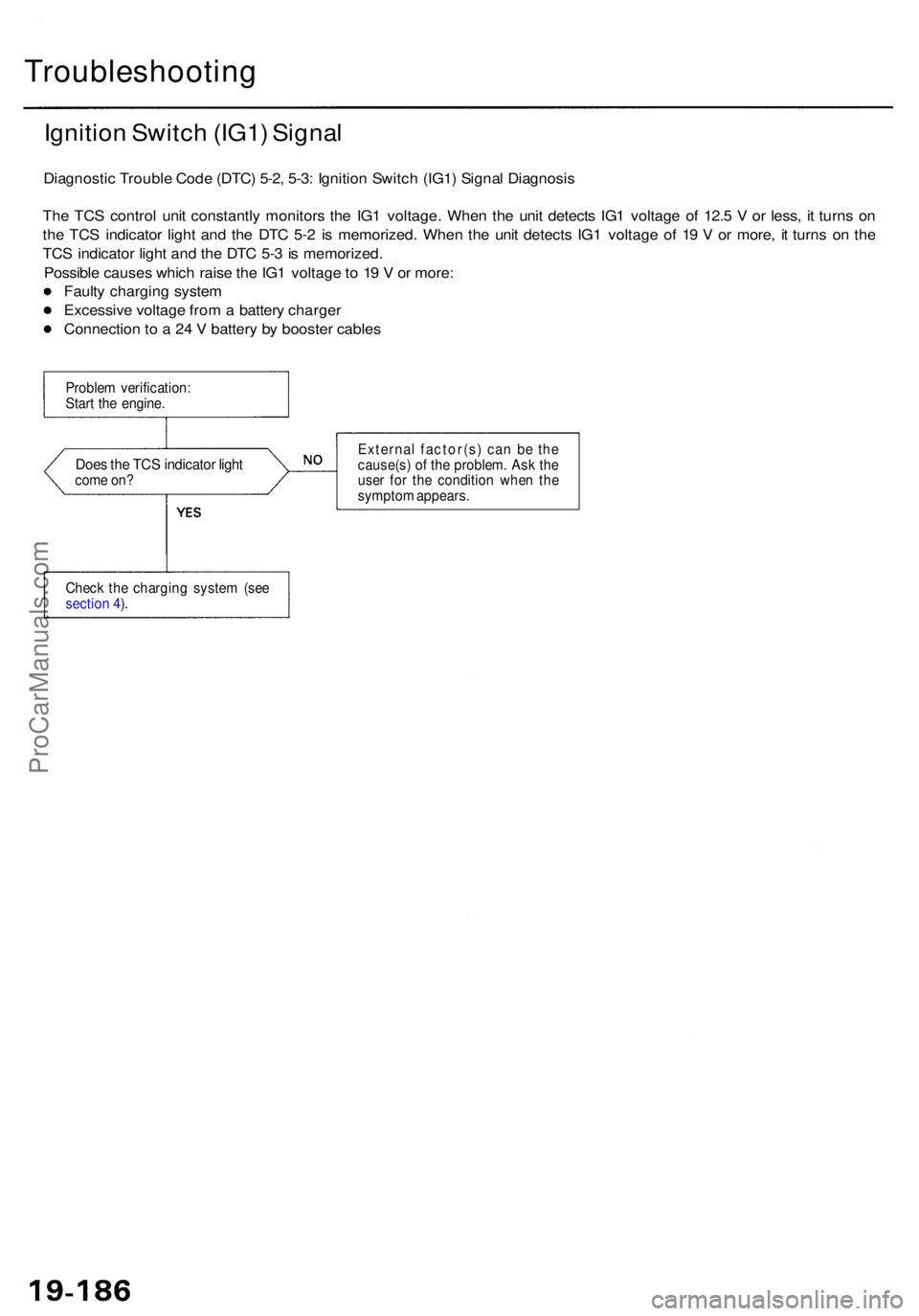
Ignition Switc h (IG1 ) Signa l
Diagnosti c Troubl e Cod e (DTC ) 5-2 , 5-3 : Ignitio n Switc h (IG1 ) Signa l Diagnosi s
Th e TC S contro l uni t constantl y monitor s th e IG 1 voltage . Whe n th e uni t detect s IG 1 voltag e o f 12. 5 V or less , i t turn s o n
th e TC S indicato r ligh t an d th e DT C 5- 2 i s memorized . Whe n th e uni t detect s IG 1 voltag e o f 1 9 V or more , i t turn s o n th e
TC S indicato r ligh t an d th e DT C 5- 3 is memorized .
Possibl e cause s whic h rais e th e IG 1 voltag e to 1 9 V or more :
Fault y chargin g syste m
Excessiv e voltag e fro m a batter y charge r
Connectio n t o a 24 V batter y b y booste r cable s
Proble m verification :
Star t th e engine .
Does th e TC S indicato r ligh tcom e on ? Externa
l factor(s ) ca n b e th e
cause(s ) o f th e problem . As k th e
use r fo r th e conditio n whe n th e
sympto m appears .
Chec k th e chargin g syste m (se e
sectio n 4 ).
ProCarManuals.com
Page 1236 of 1954
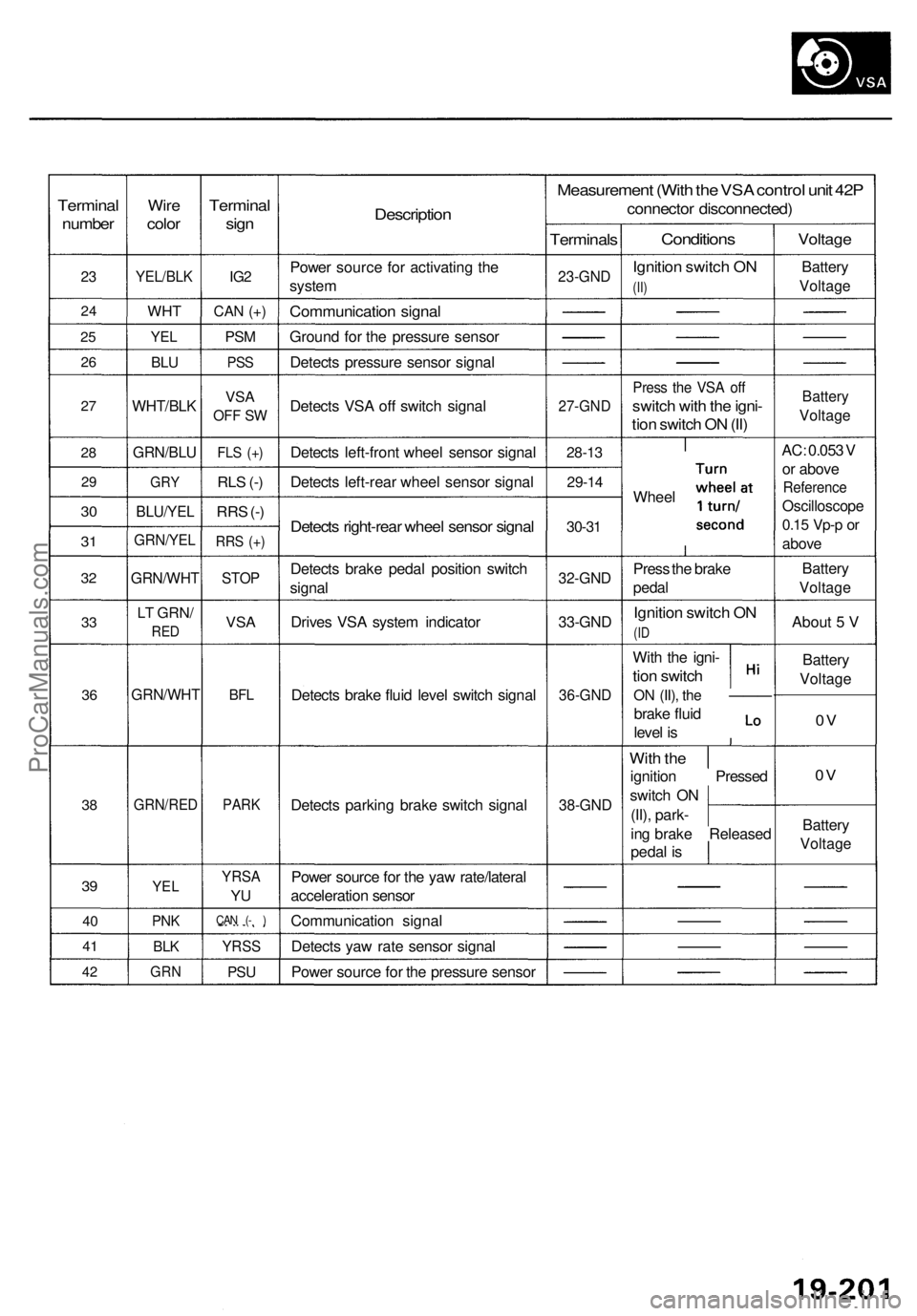
Terminal
number
23
2 4
25
2 6
27
2 8
2 9
30
3 1
3 2
33
3 6
38
39
4 0
4 1
42
Wir e
colo r
YEL/BL K
WHT
YEL
BLU
WHT/BL K
GRN/BLU
GRY
BLU/YE L
GRN/YE L
GRN/WH T
LT GRN /
RED
GRN/WH T
GRN/RED
YEL
PNK
BLK
GR N
Termina l
sign
IG2
CA N (+ )
PS M
PS S
VS A
OF F S W
FL S (+ )
RLS (- )
RR S (- )
RR S (+ )
STO P
VSA
BFL
PAR K
YRS A
YU
CA N ( - )
YRS S
PSU
Descriptio n
Power sourc e fo r activatin g th e
syste m
Communicatio n signa l
Groun d fo r th e pressur e senso r
Detect s pressur e senso r signa l
Detect s VS A of f switc h signa l
Detect s left-fron t whee l senso r signa l
Detect s left-rea r whee l senso r signa l
Detects right-rea r whee l senso r signa l
Detect s brak e peda l positio n switc h
signa l
Drive s VS A syste m indicato r
Detect s brak e flui d leve l switc h signa l
Detect s parkin g brak e switc h signa l
Powe r sourc e fo r th e ya w rate/latera l
acceleratio n senso r
Communicatio n signa l
Detect s ya w rat e senso r signa l
Powe r sourc e fo r th e pressur e senso r
Measuremen t (Wit h th e VS A contro l uni t 42 P
connecto r disconnected )
Terminals
23-GND
27-GN D
28-13
29-1 4
30-31
32-GN D
33-GND
36-GN D
38-GND
Condition s
Ignition switc h O N
(II)
Pres s th e VS A of f
switc h wit h th e igni -
tion switc h O N (II )
Whee l
Pres s th e brak e
peda l
Ignitio n switc h O N
(ID
Wit h th e igni -
tion switc h
ON (II) , the —— —
brake flui d
leve l i s
Wit h th e
ignitio n Presse d
switc h O N
(II) , park -
in g brak e Release d
peda l i s
Voltag e
Battery
Voltag e
Battery
Voltag e
AC: 0.05 3 V
o r abov e
Referenc e
Oscilloscop e
0.15 Vp- p or
abov e
Batter y
Voltag e
About 5 V
Batter y
Voltag e
0V
0 V
Batter y
Voltag e
ProCarManuals.com
Page 1245 of 1954
Troubleshooting
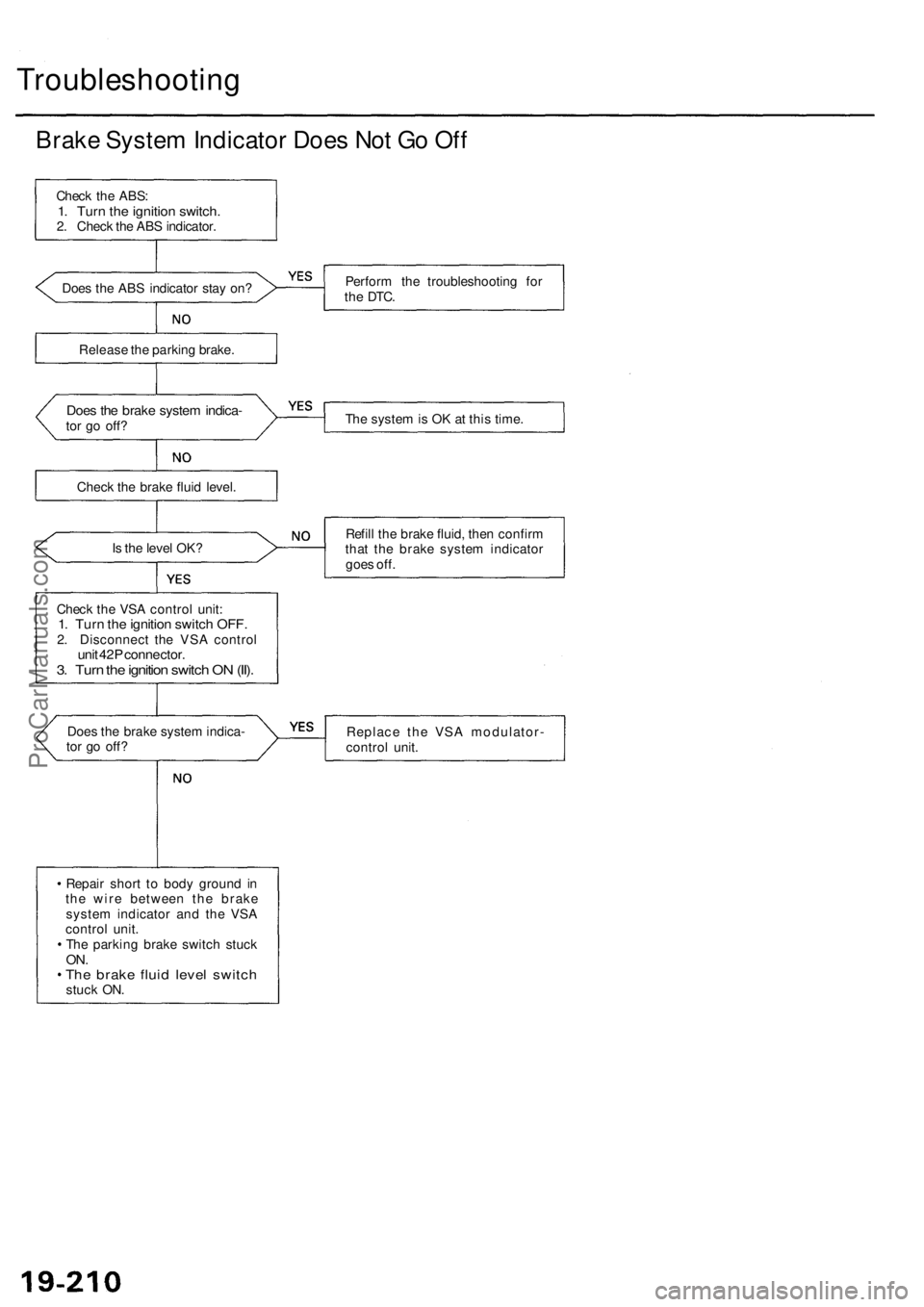
Brake System Indicator Does Not Go Off
Check the ABS:
1. Turn the ignition switch.
2. Check the ABS indicator.
Does the ABS indicator stay on?
Perform the troubleshooting for
the
DTC.
Release the parking brake.
Does the brake system indica-
tor go off?
The system is OK at this time.
Check the brake fluid level.
Is the level OK?
Refill the brake fluid, then confirm
that the brake system indicator
goes off.
Check the VSA control unit:
1. Turn the ignition switch OFF.
2. Disconnect the VSA control
unit 42P connector.
3. Turn the ignition switch ON (II).
Does the brake system indica-
tor go off?
Replace the VSA modulator-
control unit.
Repair short to body ground in
the wire between the brake
system indicator and the VSA
control unit.
The parking brake switch stuck
ON.
The brake fluid level switch
stuck ON.ProCarManuals.com
Page 1254 of 1954
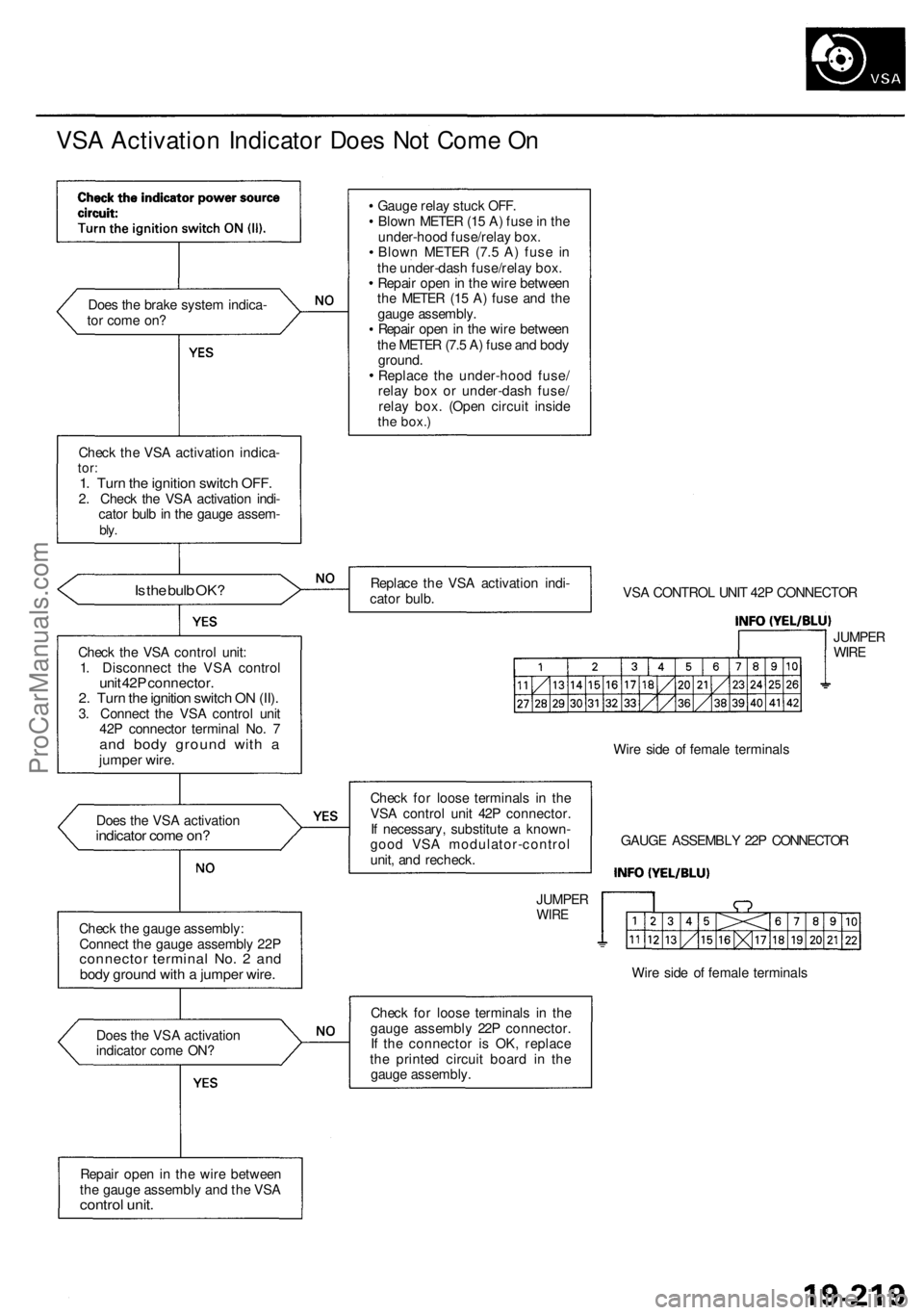
VSA Activation Indicator Does Not Come On
Does the brake system indica-
tor come on?
Check the VSA activation indica-
tor:
1. Turn the ignition switch OFF.
2. Check the VSA activation indi-
cator bulb in the gauge assem-
bly.
Is the bulb OK?
Check the VSA control unit:
1. Disconnect the VSA control
unit 42P connector.
2. Turn the ignition switch ON (II).
3. Connect the VSA control unit
42P connector terminal No. 7
and body ground with a
jumper wire.
Does the VSA activation
indicator come on?
Check the gauge assembly:
Connect the gauge assembly 22P
connector terminal No. 2 and
body ground with a jumper wire.
Does the VSA activation
indicator come ON?
Repair open in the wire between
the gauge assembly and the VSA
control unit.
Gauge relay stuck OFF.
Blown METER (15 A) fuse in the
under-hood fuse/relay box.
Blown METER (7.5 A) fuse in
the under-dash fuse/relay box.
Repair open in the wire between
the METER (15 A) fuse and the
gauge assembly.
Repair open in the wire between
the METER (7.5 A) fuse and body
ground.
Replace the under-hood fuse/
relay box or under-dash fuse/
relay box. (Open circuit inside
the
box.)
Replace the VSA activation indi-
cator bulb.
VSA CONTROL UNIT 42P CONNECTOR
JUMPER
WIRE
Check for loose terminals in the
VSA control unit 42P connector.
If necessary, substitute a known-
good VSA modulator-control
unit, and recheck.
JUMPER
WIRE
Wire side of female terminals
GAUGE ASSEMBLY 22P CONNECTOR
Wire side of female terminals
Check for loose terminals in the
gauge assembly 22P connector.
If the connector is OK, replace
the printed circuit board in the
gauge assembly.ProCarManuals.com
Page 1255 of 1954
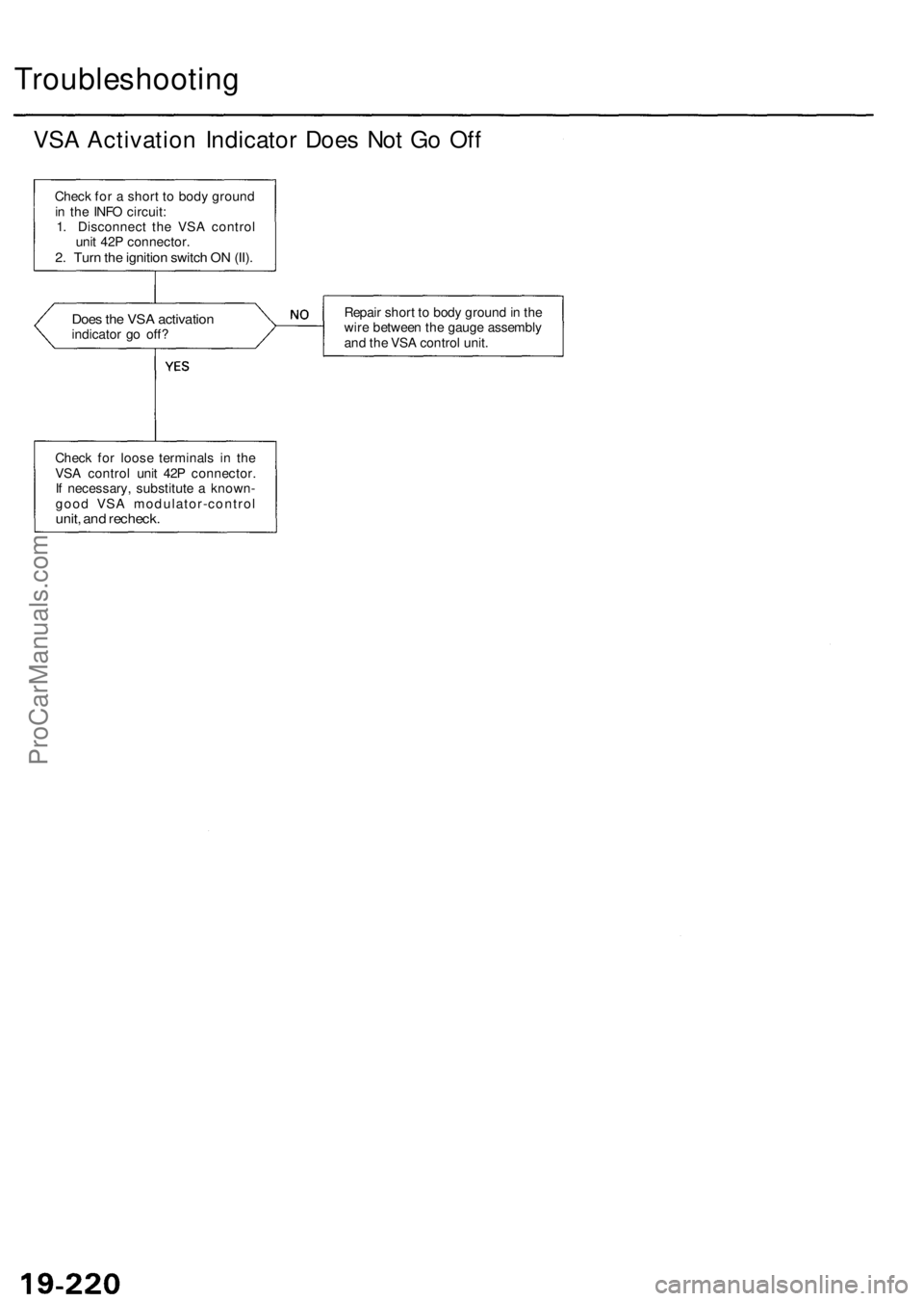
Troubleshooting
VSA Activation Indicator Does Not Go Off
Check for a short to body ground
in the INFO circuit:
1. Disconnect the VSA control
unit 42P connector.
2. Turn the ignition switch ON (II).
Does the VSA activation
indicator go off?
Repair short to body ground in the
wire between the gauge assembly
and the VSA control unit.
Check for loose terminals in the
VSA control unit 42P connector.
If necessary, substitute a known-
good VSA modulator-control
unit, and recheck.ProCarManuals.com
Page 1256 of 1954
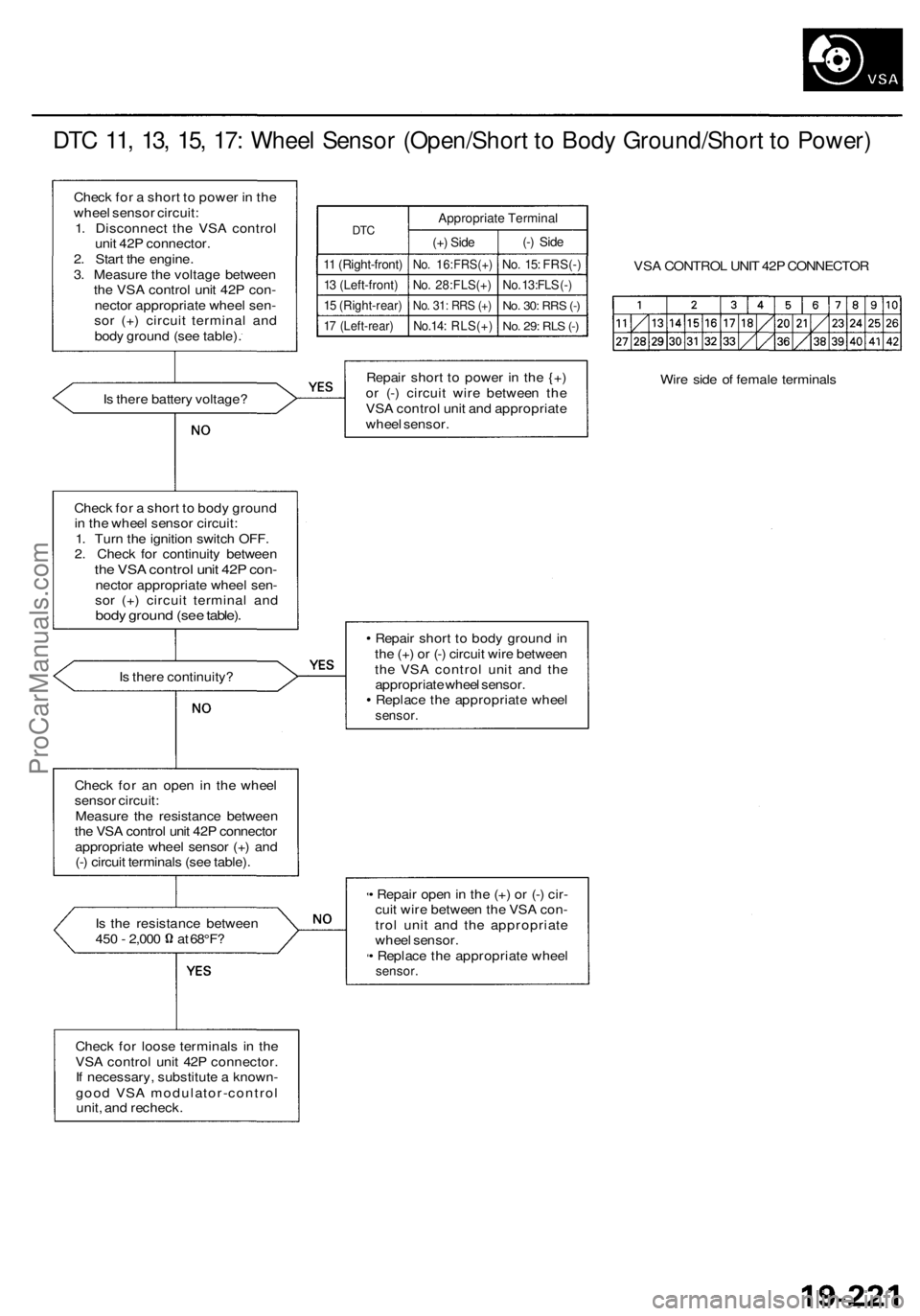
DTC 11, 13, 15, 17: Wheel Sensor (Open/Short to Body Ground/Short to Power)
Check for a short to power in the
wheel sensor circuit:
1. Disconnect the VSA control
unit 42P connector.
2. Start the engine.
3. Measure the voltage between
the VSA control unit 42P con-
nector appropriate wheel sen-
sor (+) circuit terminal and
body ground (see table).
DTC
11 (Right-front)
13 (Left-front)
15 (Right-rear)
17 (Left-rear)
Appropriate Terminal
(+) Side
No. 16:FRS(+)
No. 28:FLS(+)
No. 31: RRS (+)
No.14: RLS(+)
(-) Side
No. 15: FRS(-)
No. 13:FLS (-)
No. 30:
RRS
(-)
No. 29: RLS (-)
VSA CONTROL UNIT 42P CONNECTOR
Is there battery voltage?
Repair short to power in the {+)
or (-) circuit wire between the
VSA control unit and appropriate
wheel sensor.
Wire side of female terminals
Check for a short to body ground
in the wheel sensor circuit:
1. Turn the ignition switch OFF.
2. Check for continuity between
the VSA control unit 42P con-
nector appropriate wheel sen-
sor (+) circuit terminal and
body ground (see table).
Is there continuity?
Repair short to body ground in
the (+) or (-) circuit wire between
the VSA control unit and the
appropriate wheel sensor.
Replace the appropriate wheel
sensor.
Check for an open in the wheel
sensor circuit:
Measure the resistance between
the VSA control unit 42P connector
appropriate wheel sensor (+) and
(-) circuit terminals (see table).
Is the resistance between
450 - 2,000 at 68°F?
• Repair open in the (+) or (-) cir-
cuit wire between the VSA con-
trol unit and the appropriate
wheel sensor.
• Replace the appropriate wheel
sensor.
Check for loose terminals in the
VSA control unit 42P connector.
If necessary, substitute a known-
good VSA modulator-control
unit, and recheck.ProCarManuals.com
Page 1263 of 1954
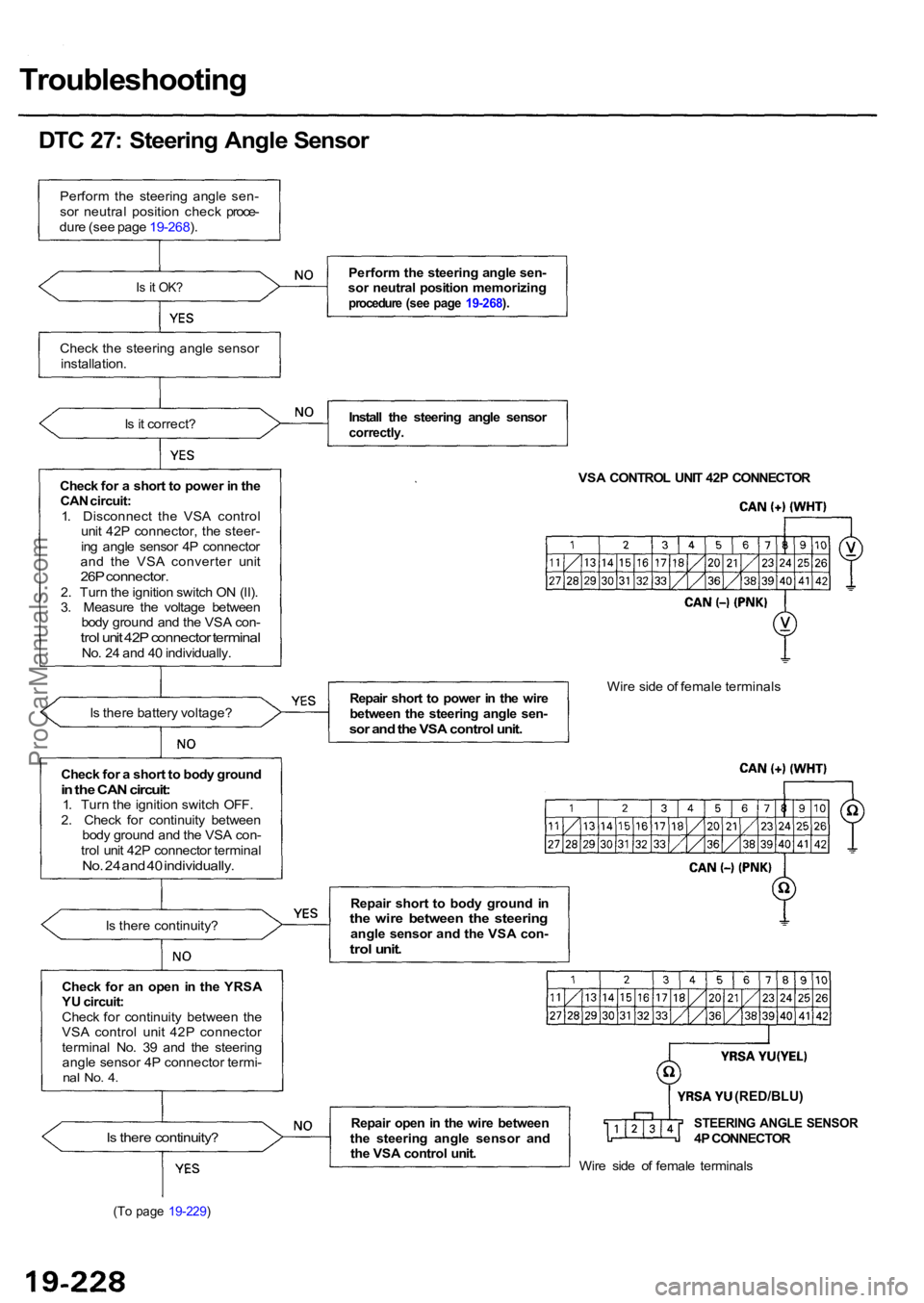
Troubleshooting
DTC 27: Steering Angle Sensor
Perform the steering angle sen-
sor neutral position check proce-
dure (see page 19-268).
Is it OK?
Check the steering angle sensor
installation.
Is it correct?
Check for a short to power in the CAN circuit:
1. Disconnect the VSA control unit 42P connector, the steer-
ing angle sensor 4P connector
and the VSA converter unit
26P connector.2. Turn the ignition switch ON (II).
3. Measure the voltage between body ground and the VSA con-
trol unit 42P connector terminalNo. 24 and 40 individually.
Is there battery voltage?
Is there continuity?
Check for an open in the YRSA
YU circuit:
Check for continuity between the
VSA control unit 42P connector
terminal No. 39 and the steering angle sensor 4P connector termi-
nal No. 4.
Is there continuity?
(To page 19-229)
Perform the steering angle sen-
sor neutral position memorizing
procedure (see page 19-268).
Install the steering angle sensorcorrectly.
VSA CONTROL UNIT 42P CONNECTOR
Repair short to power in the wire
between the steering angle sen-
sor and the VSA control unit.
Wire side of female terminals
Repair short to body ground in
the wire between the steeringangle sensor and the VSA con-trol unit.
Repair open in the wire between
the steering angle sensor and the VSA control unit.STEERING ANGLE SENSOR4P CONNECTOR
Wire side of female terminals
Check for a short to body ground
in the CAN circuit:1. Turn the ignition switch OFF.
2. Check for continuity between body ground and the VSA con-
trol unit 42P connector terminal
No. 24 and 40 individually.
(RED/BLU)
ProCarManuals.com